
INTRODUCTION TO COMPUTER GRAPHICS CIS 736 Computer Graphics

- Slides: 27
INTRODUCTION TO COMPUTER GRAPHICS CIS 736 Computer Graphics Review of Basics 4 of 5: Clipping and Viewing II Wednesday, 04 February 2004 (pages 78 -81, 110 -127) Adapted with Permission W. H. Hsu http: //www. kddresearch. org Andries van Dam September 25, 2003 2 D Clipping 1/14
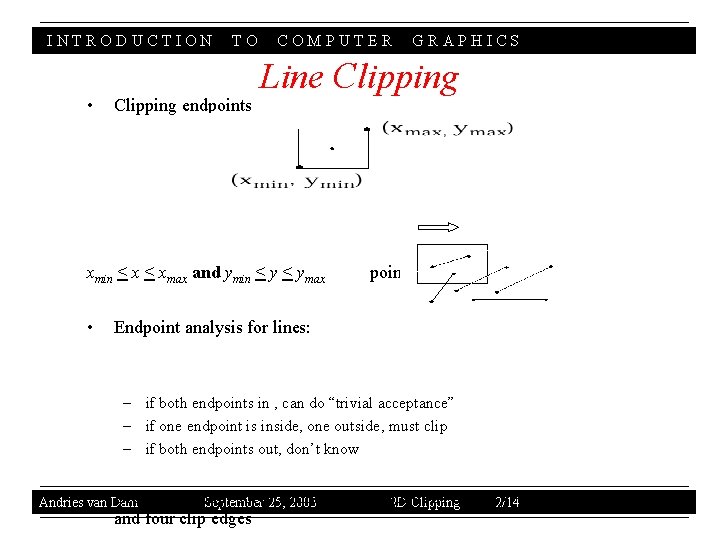
INTRODUCTION • TO Clipping endpoints COMPUTER Line Clipping xmin < xmax and ymin < ymax • GRAPHICS point inside Endpoint analysis for lines: – if both endpoints in , can do “trivial acceptance” – if one endpoint is inside, one outside, must clip – if both endpoints out, don’t know • Dam Brute Andries van force clip: solve 25, simultaneous equations using 2/14 y = mx + b for line September 2003 2 D Clipping and four clip edges
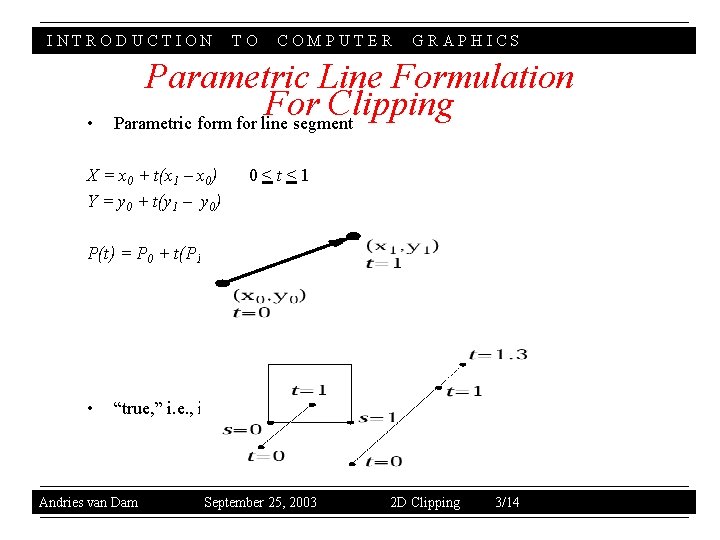
INTRODUCTION • TO COMPUTER GRAPHICS Parametric Line Formulation For Clipping Parametric form for line segment X = x 0 + t(x 1 – x 0) Y = y 0 + t(y 1 – y 0) 0<t<1 P(t) = P 0 + t(P 1 – P 0) • “true, ” i. e. , interior intersection, if sedge and tline in [0, 1] Andries van Dam September 25, 2003 2 D Clipping 3/14
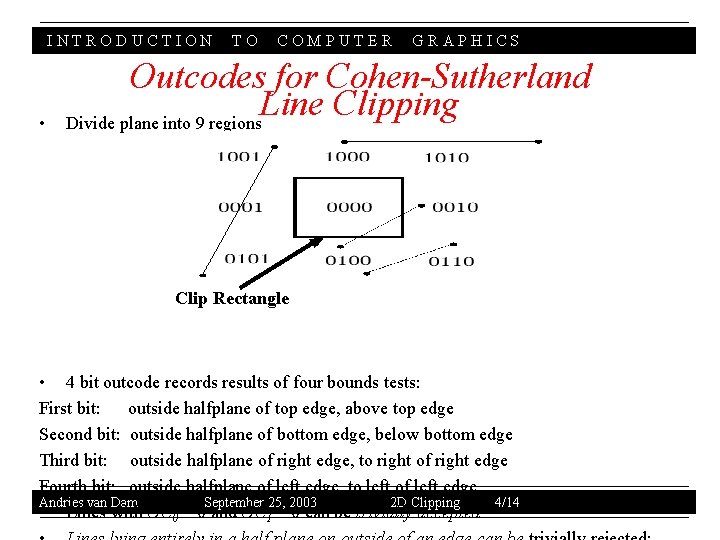
INTRODUCTION • TO COMPUTER GRAPHICS Outcodes for Cohen-Sutherland Line Clipping Divide plane into 9 regions Clip Rectangle • 4 bit outcode records results of four bounds tests: First bit: outside halfplane of top edge, above top edge Second bit: outside halfplane of bottom edge, below bottom edge Third bit: outside halfplane of right edge, to right of right edge Fourth bit: outside halfplane of left edge, to left of left edge Andries van Dam September 25, 2003 2 D Clipping 4/14 • Lines with OC 0 = 0 and OC 1 = 0 can be trivially accepted
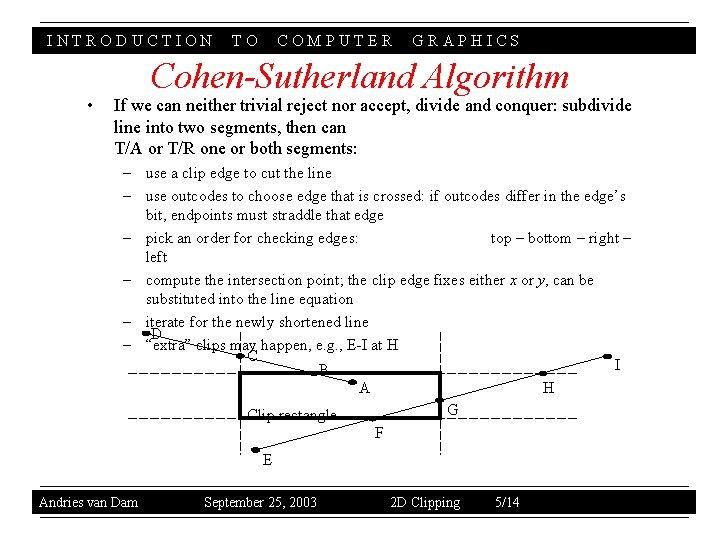
INTRODUCTION • TO COMPUTER GRAPHICS Cohen-Sutherland Algorithm If we can neither trivial reject nor accept, divide and conquer: subdivide line into two segments, then can T/A or T/R one or both segments: – use a clip edge to cut the line – use outcodes to choose edge that is crossed: if outcodes differ in the edge’s bit, endpoints must straddle that edge – pick an order for checking edges: top – bottom – right – left – compute the intersection point; the clip edge fixes either x or y, can be substituted into the line equation – iterate for the newly shortened line D – “extra” clips may happen, e. g. , E-I at H C I B A H G Clip rectangle F E Andries van Dam September 25, 2003 2 D Clipping 5/14
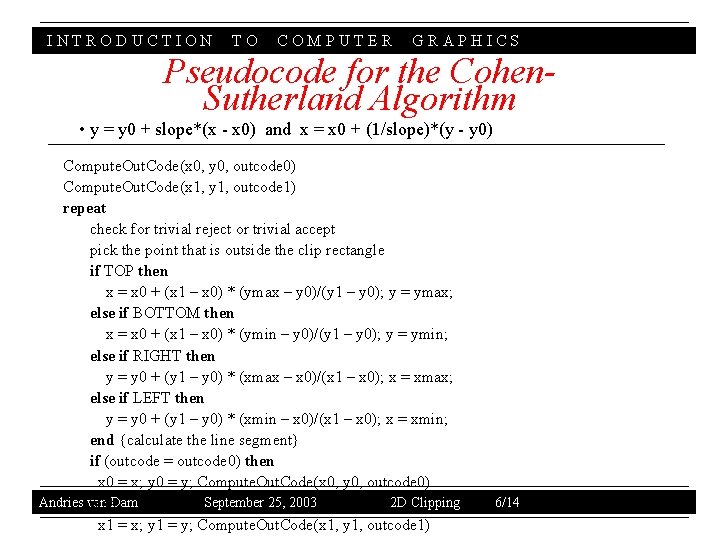
INTRODUCTION TO COMPUTER GRAPHICS Pseudocode for the Cohen. Sutherland Algorithm • y = y 0 + slope*(x - x 0) and x = x 0 + (1/slope)*(y - y 0) Compute. Out. Code(x 0, y 0, outcode 0) Compute. Out. Code(x 1, y 1, outcode 1) repeat check for trivial reject or trivial accept pick the point that is outside the clip rectangle if TOP then x = x 0 + (x 1 – x 0) * (ymax – y 0)/(y 1 – y 0); y = ymax; else if BOTTOM then x = x 0 + (x 1 – x 0) * (ymin – y 0)/(y 1 – y 0); y = ymin; else if RIGHT then y = y 0 + (y 1 – y 0) * (xmax – x 0)/(x 1 – x 0); x = xmax; else if LEFT then y = y 0 + (y 1 – y 0) * (xmin – x 0)/(x 1 – x 0); x = xmin; end {calculate the line segment} if (outcode = outcode 0) then x 0 = x; y 0 = y; Compute. Out. Code(x 0, y 0, outcode 0) Andries van September 25, 2003 2 D Clipping else. Dam x 1 = x; y 1 = y; Compute. Out. Code(x 1, y 1, outcode 1) 6/14
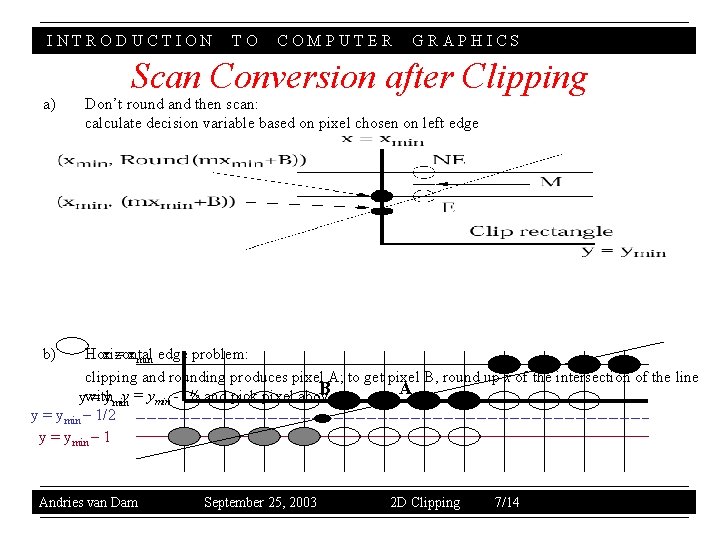
INTRODUCTION a) TO COMPUTER GRAPHICS Scan Conversion after Clipping Don’t round and then scan: calculate decision variable based on pixel chosen on left edge b) Horizontal x = xmin edge problem: clipping and rounding produces pixel A; to get pixel B, round up x of the intersection of the line B A ywith = yminy = ymin - ½ and pick pixel above: y = ymin – 1/2 y = ymin – 1 Andries van Dam September 25, 2003 2 D Clipping 7/14
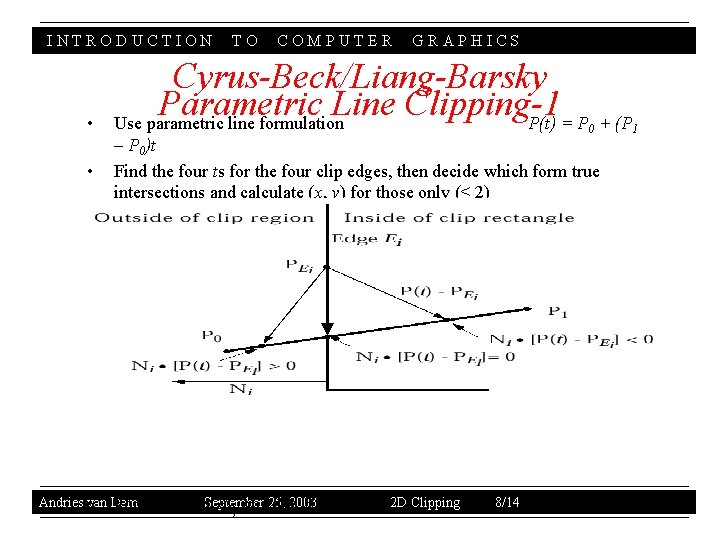
INTRODUCTION • • TO COMPUTER GRAPHICS Cyrus-Beck/Liang-Barsky Parametric Line Clipping-1 Use parametric line formulation P(t) = P + (P 0 – P 0)t Find the four ts for the four clip edges, then decide which form true intersections and calculate (x, y) for those only (< 2) Andries van • Dam For 25, 2003 any point. September PEi on edge Ei 2 D Clipping 8/14 1
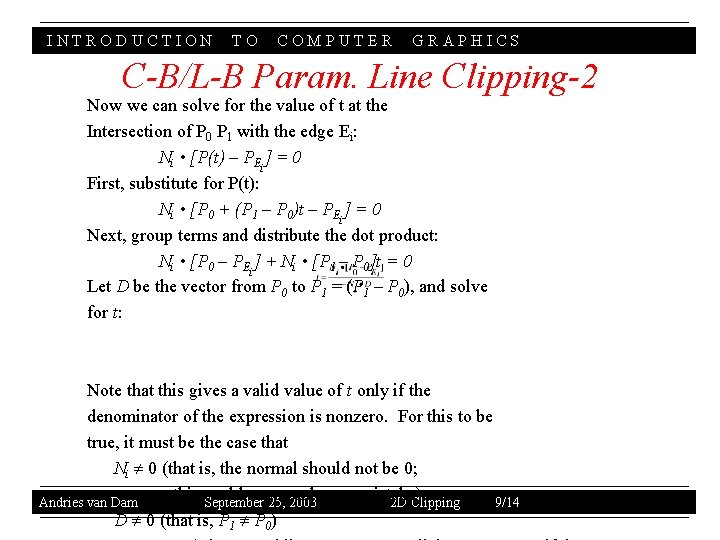
INTRODUCTION TO COMPUTER GRAPHICS C-B/L-B Param. Line Clipping-2 Now we can solve for the value of t at the Intersection of P 0 P 1 with the edge Ei: Ni • [P(t) – PEi] = 0 First, substitute for P(t): Ni • [P 0 + (P 1 – P 0)t – PEi] = 0 Next, group terms and distribute the dot product: Ni • [P 0 – PEi] + Ni • [P 1 – P 0]t = 0 Let D be the vector from P 0 to P 1 = (P 1 – P 0), and solve for t: Note that this gives a valid value of t only if the denominator of the expression is nonzero. For this to be true, it must be the case that Ni 0 (that is, the normal should not be 0; this could occur only as a mistake) Andries van Dam September 25, 2003 2 D Clipping 9/14 D 0 (that is, P 1 P 0)
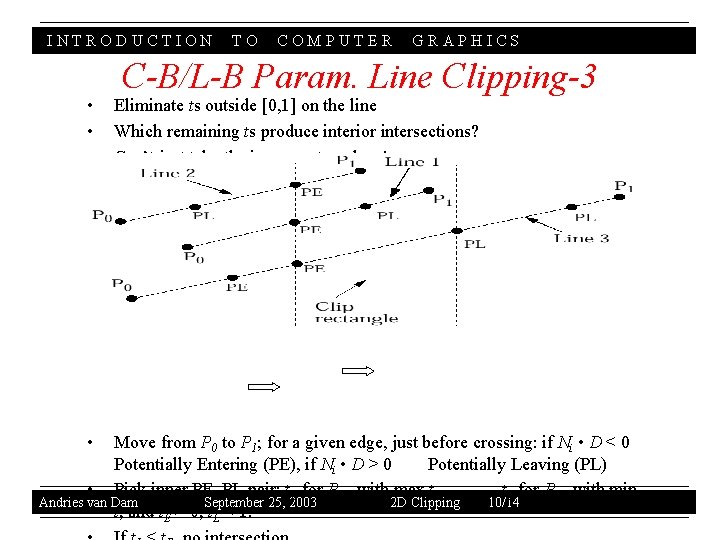
INTRODUCTION • • TO COMPUTER GRAPHICS C-B/L-B Param. Line Clipping-3 Eliminate ts outside [0, 1] on the line Which remaining ts produce interior intersections? Can’t just take the innermost t values! Move from P 0 to P 1; for a given edge, just before crossing: if Ni • D < 0 Potentially Entering (PE), if Ni • D > 0 Potentially Leaving (PL) • Pick inner PE, PL pair: t. E for PPE with max t, t. L for PPL with min Andries van Dam September 25, 2003 2 D Clipping 10/14 t, and t. E > 0, t. L < 1.
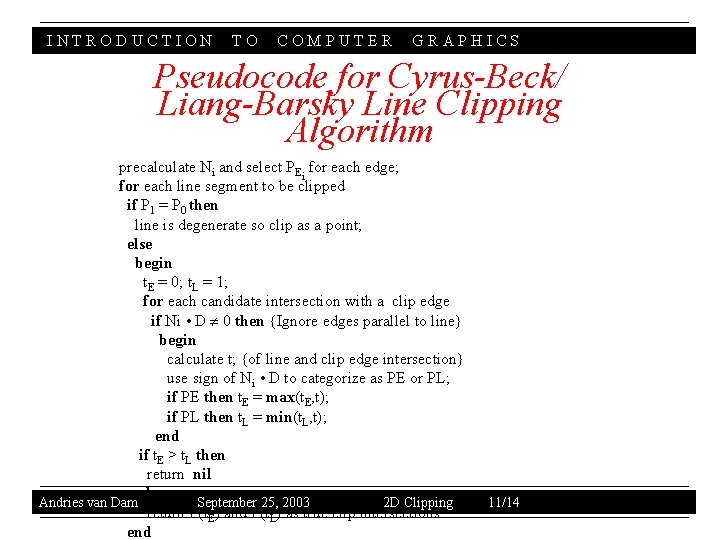
INTRODUCTION TO COMPUTER GRAPHICS Pseudocode for Cyrus-Beck/ Liang-Barsky Line Clipping Algorithm precalculate Ni and select PEi for each edge; for each line segment to be clipped if P 1 = P 0 then line is degenerate so clip as a point; else begin t. E = 0; t. L = 1; for each candidate intersection with a clip edge if Ni • D 0 then {Ignore edges parallel to line} begin calculate t; {of line and clip edge intersection} use sign of Ni • D to categorize as PE or PL; if PE then t. E = max(t. E, t); if PL then t. L = min(t. L, t); end if t. E > t. L then return nil else Andries van Dam September 25, 2003 2 D Clipping return P(t. E) and P(t. L) as true clip intersections end 11/14
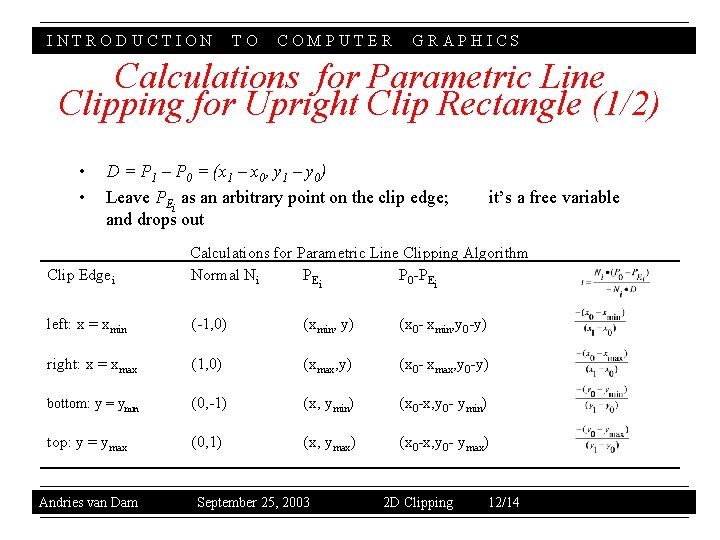
INTRODUCTION TO COMPUTER GRAPHICS Calculations for Parametric Line Clipping for Upright Clip Rectangle (1/2) • • D = P 1 – P 0 = (x 1 – x 0, y 1 – y 0) Leave PEi as an arbitrary point on the clip edge; and drops out it’s a free variable Clip Edgei Calculations for Parametric Line Clipping Algorithm Normal Ni PE i P 0 -PEi left: x = xmin (-1, 0) (xmin, y) (x 0 - xmin, y 0 -y) right: x = xmax (1, 0) (xmax, y) (x 0 - xmax, y 0 -y) bottom: y = ymin (0, -1) (x, ymin) (x 0 -x, y 0 - ymin) top: y = ymax (0, 1) (x, ymax) (x 0 -x, y 0 - ymax) Andries van Dam September 25, 2003 2 D Clipping 12/14
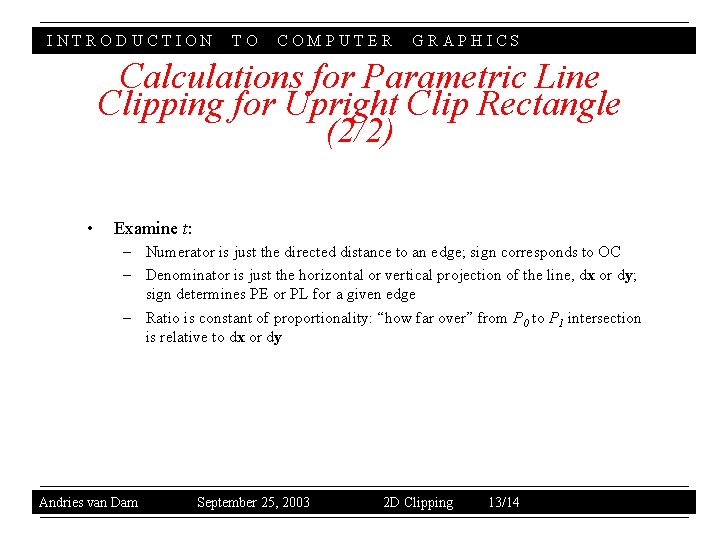
INTRODUCTION TO COMPUTER GRAPHICS Calculations for Parametric Line Clipping for Upright Clip Rectangle (2/2) • Examine t: – Numerator is just the directed distance to an edge; sign corresponds to OC – Denominator is just the horizontal or vertical projection of the line, dx or dy; sign determines PE or PL for a given edge – Ratio is constant of proportionality: “how far over” from P 0 to P 1 intersection is relative to dx or dy Andries van Dam September 25, 2003 2 D Clipping 13/14
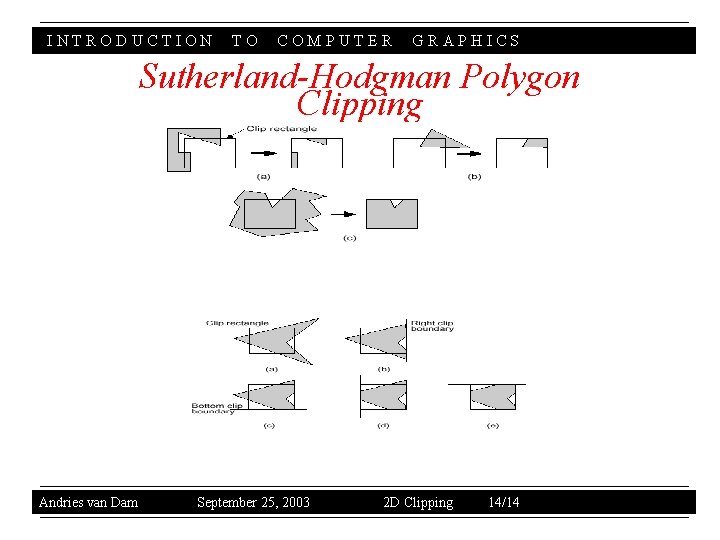
INTRODUCTION TO COMPUTER GRAPHICS Sutherland-Hodgman Polygon Clipping Andries van Dam September 25, 2003 2 D Clipping 14/14
INTRODUCTION COMPUTER GRAPHICS Aspect Ratio Andries van Dam September 16, 2003 3 D Viewing II NTSC 4: 3 HDTV 16: 9 Analogous to the size of film used in a camera Determines proportion of width to height of image displayed on screen Square viewing window has aspect ratio of 1: 1 Movie theater “letterbox” format has aspect ratio of 2: 1 NTSC television has an aspect ratio of 4: 3, and HDTV is 16: 9 Kodak • • • TO 9/21
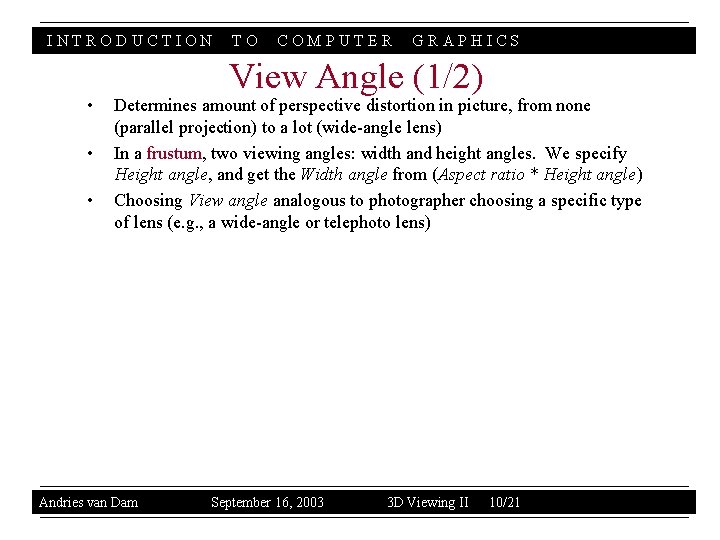
INTRODUCTION • • • TO COMPUTER GRAPHICS View Angle (1/2) Determines amount of perspective distortion in picture, from none (parallel projection) to a lot (wide-angle lens) In a frustum, two viewing angles: width and height angles. We specify Height angle, and get the Width angle from (Aspect ratio * Height angle) Choosing View angle analogous to photographer choosing a specific type of lens (e. g. , a wide-angle or telephoto lens) Andries van Dam September 16, 2003 3 D Viewing II 10/21
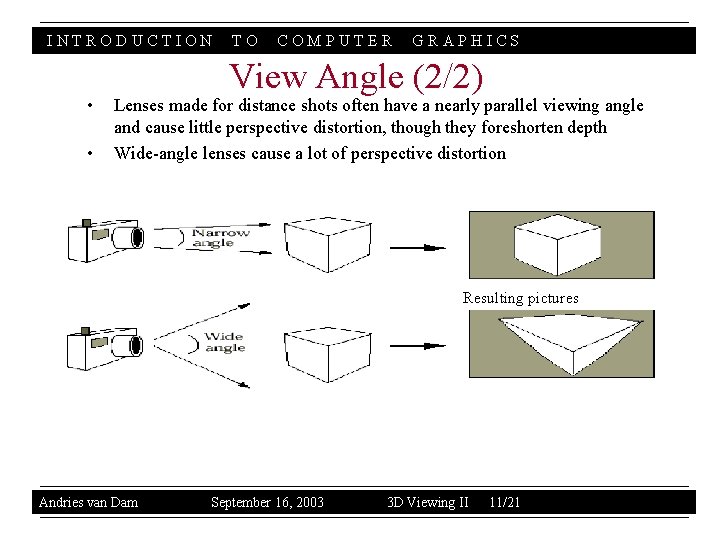
INTRODUCTION • • TO COMPUTER GRAPHICS View Angle (2/2) Lenses made for distance shots often have a nearly parallel viewing angle and cause little perspective distortion, though they foreshorten depth Wide-angle lenses cause a lot of perspective distortion Resulting pictures Andries van Dam September 16, 2003 3 D Viewing II 11/21
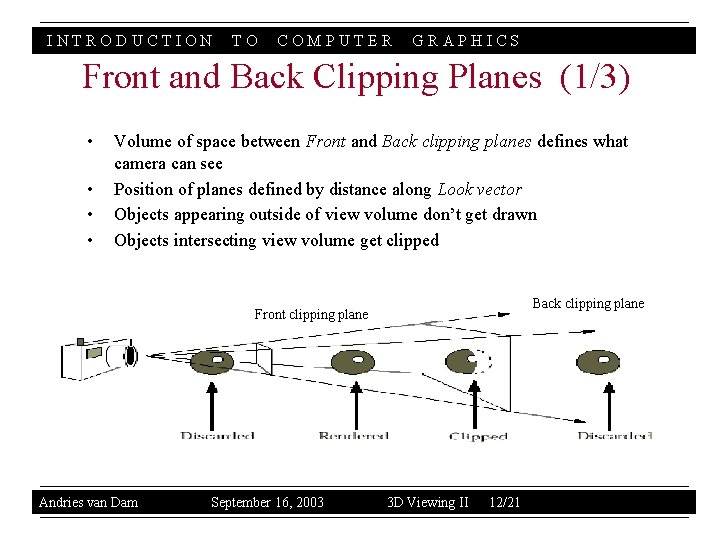
INTRODUCTION TO COMPUTER GRAPHICS Front and Back Clipping Planes (1/3) • • Volume of space between Front and Back clipping planes defines what camera can see Position of planes defined by distance along Look vector Objects appearing outside of view volume don’t get drawn Objects intersecting view volume get clipped Back clipping plane Front clipping plane Andries van Dam September 16, 2003 3 D Viewing II 12/21
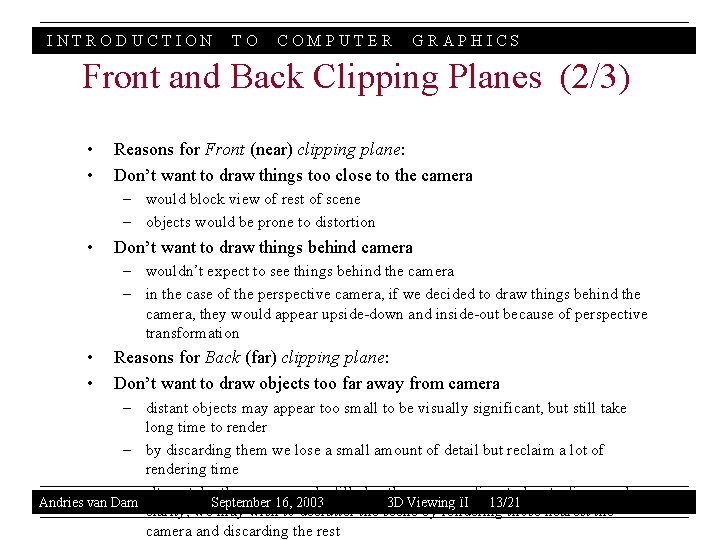
INTRODUCTION TO COMPUTER GRAPHICS Front and Back Clipping Planes (2/3) • • Reasons for Front (near) clipping plane: Don’t want to draw things too close to the camera – would block view of rest of scene – objects would be prone to distortion • Don’t want to draw things behind camera – wouldn’t expect to see things behind the camera – in the case of the perspective camera, if we decided to draw things behind the camera, they would appear upside-down and inside-out because of perspective transformation • • Reasons for Back (far) clipping plane: Don’t want to draw objects too far away from camera – distant objects may appear too small to be visually significant, but still take long time to render – by discarding them we lose a small amount of detail but reclaim a lot of rendering time – alternately, the scene may be filled with many significant objects; for visual Andries van Dam September 16, 2003 3 D Viewing II 13/21 clarity, we may wish to declutter the scene by rendering those nearest the camera and discarding the rest
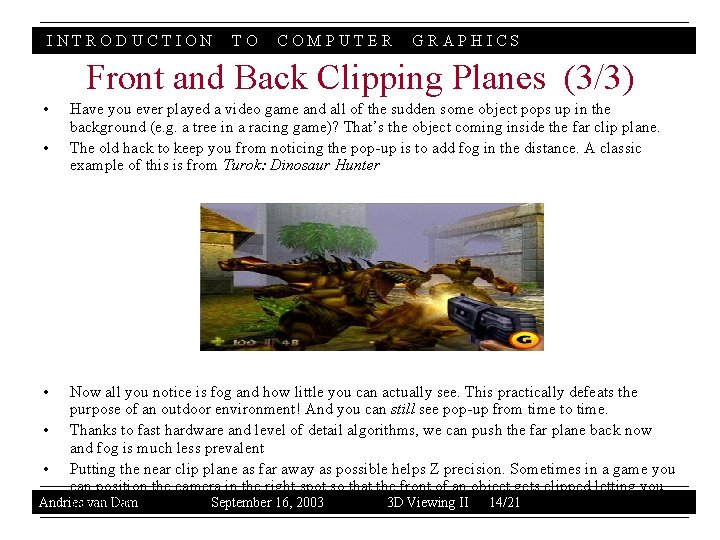
INTRODUCTION TO COMPUTER GRAPHICS Front and Back Clipping Planes (3/3) • • • Have you ever played a video game and all of the sudden some object pops up in the background (e. g. a tree in a racing game)? That’s the object coming inside the far clip plane. The old hack to keep you from noticing the pop-up is to add fog in the distance. A classic example of this is from Turok: Dinosaur Hunter Now all you notice is fog and how little you can actually see. This practically defeats the purpose of an outdoor environment! And you can still see pop-up from time to time. • Thanks to fast hardware and level of detail algorithms, we can push the far plane back now and fog is much less prevalent • Putting the near clip plane as far away as possible helps Z precision. Sometimes in a game you can position the camera in the right spot so that the front of an object gets clipped letting you Andries Damof it. September 16, 2003 3 D Viewing II 14/21 seevan inside
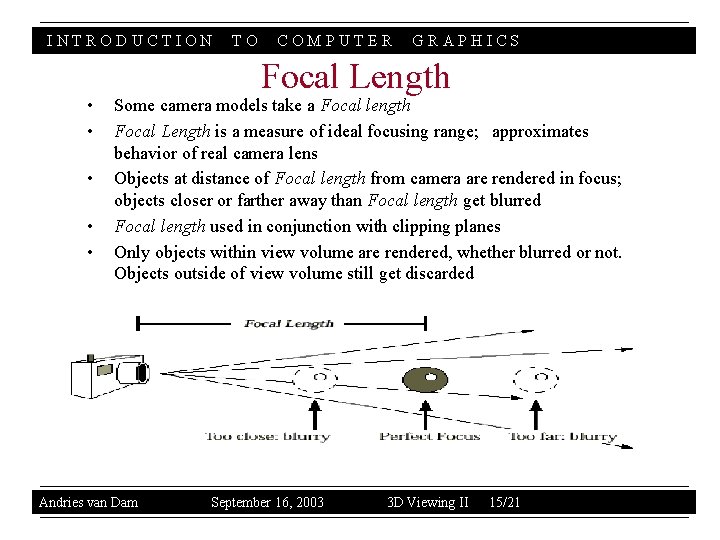
INTRODUCTION • • • TO COMPUTER GRAPHICS Focal Length Some camera models take a Focal length Focal Length is a measure of ideal focusing range; approximates behavior of real camera lens Objects at distance of Focal length from camera are rendered in focus; objects closer or farther away than Focal length get blurred Focal length used in conjunction with clipping planes Only objects within view volume are rendered, whether blurred or not. Objects outside of view volume still get discarded Andries van Dam September 16, 2003 3 D Viewing II 15/21
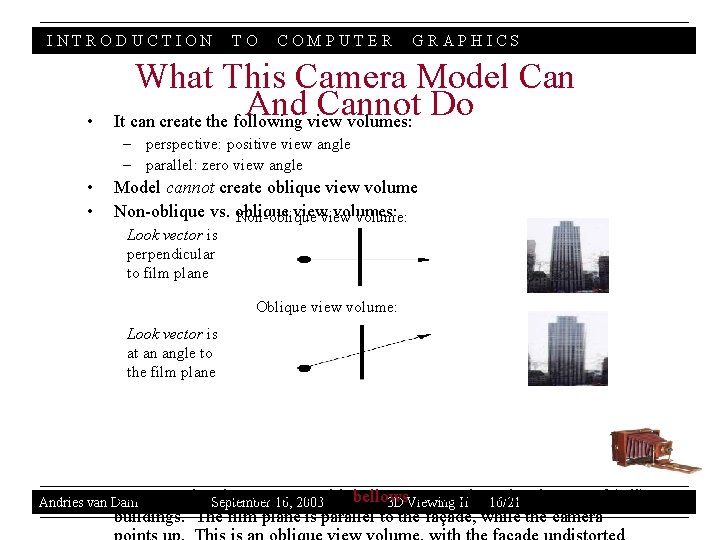
INTRODUCTION • TO COMPUTER GRAPHICS What This Camera Model Can And Cannot Do It can create the following view volumes: – perspective: positive view angle – parallel: zero view angle • • Model cannot create oblique view volume Non-oblique vs. oblique view volumes: Non-oblique volume: Look vector is perpendicular to film plane Oblique view volume: Look vector is at an angle to the film plane • Dam For Andries van example, September view cameras with bellows are used take pictures of (tall) 16, 2003 3 D Viewing II to 16/21 buildings. The film plane is parallel to the façade, while the camera
INTRODUCTION • • TO COMPUTER GRAPHICS View Volume Specification From Position, Look vector, Up vector, Aspect ratio, Height angle, Clipping planes, and (optionally) Focal length together specify a truncated view volume Truncated view volume is a specification of bounded space that camera can “see” 2 D view of 3 D scene can be computed from truncated view volume and projected onto film plane Truncated view volumes come in two flavors: parallel and perspective Andries van Dam September 16, 2003 3 D Viewing II 17/21
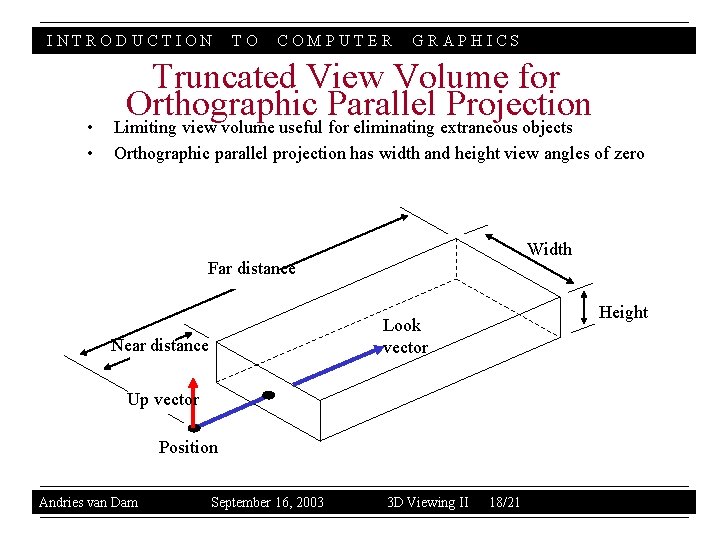
INTRODUCTION • • TO COMPUTER GRAPHICS Truncated View Volume for Orthographic Parallel Projection Limiting view volume useful for eliminating extraneous objects Orthographic parallel projection has width and height view angles of zero Width Far distance Height Look vector Near distance Up vector Position Andries van Dam September 16, 2003 3 D Viewing II 18/21
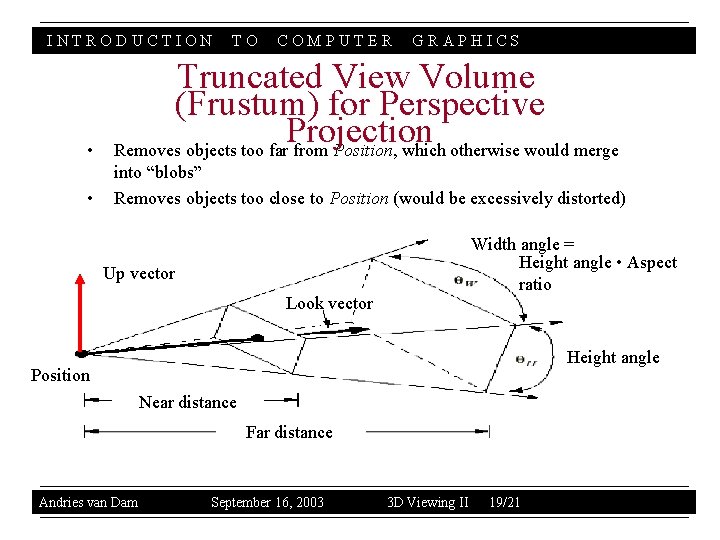
INTRODUCTION TO COMPUTER GRAPHICS • Truncated View Volume (Frustum) for Perspective Projection Removes objects too far from Position, which otherwise would merge • into “blobs” Removes objects too close to Position (would be excessively distorted) Width angle = Height angle • Aspect ratio Up vector Look vector Height angle Position Near distance Far distance Andries van Dam September 16, 2003 3 D Viewing II 19/21
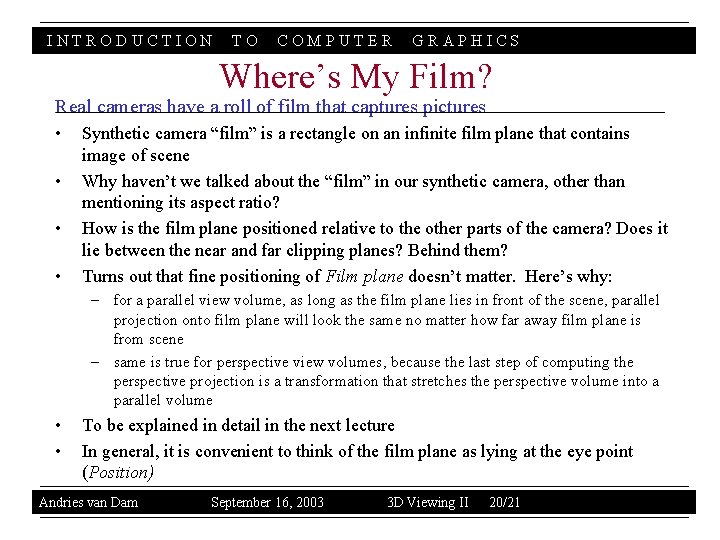
INTRODUCTION TO COMPUTER GRAPHICS Where’s My Film? Real cameras have a roll of film that captures pictures • • Synthetic camera “film” is a rectangle on an infinite film plane that contains image of scene Why haven’t we talked about the “film” in our synthetic camera, other than mentioning its aspect ratio? How is the film plane positioned relative to the other parts of the camera? Does it lie between the near and far clipping planes? Behind them? Turns out that fine positioning of Film plane doesn’t matter. Here’s why: – for a parallel view volume, as long as the film plane lies in front of the scene, parallel projection onto film plane will look the same no matter how far away film plane is from scene – same is true for perspective view volumes, because the last step of computing the perspective projection is a transformation that stretches the perspective volume into a parallel volume • • To be explained in detail in the next lecture In general, it is convenient to think of the film plane as lying at the eye point (Position) Andries van Dam September 16, 2003 3 D Viewing II 20/21
INTRODUCTION • • • TO COMPUTER GRAPHICS Sources Carlbom, Ingrid and Paciorek, Joseph, “Planar Geometric Projections and Viewing Transformations, ” Computing Surveys, Vol. 10, No. 4 December 1978 Kemp, Martin, The Science of Art, Yale University Press, 1992 Mitchell, William J. , The Reconfigured Eye, MIT Press, 1992 Foley, van Dam, et. al. , Computer Graphics: Principles and Practice, Addison-Wesley, 1995 Wernecke, Josie, The Inventor Mentor, Addison-Wesley, 1994 Andries van Dam September 16, 2003 3 D Viewing II 21/21