
Introduction to Cloud Computing Lecture 5 Server Virtualization
- Slides: 61
Introduction to Cloud Computing Lecture 5 Server Virtualization *Some slides are adopted from “Distributed and Cloud Computing from Parallel Processing to the Internet of Things” by K. Hwang, G. C. Fox and J. J. Dongarra
How Virtualization meets cloud properties ?
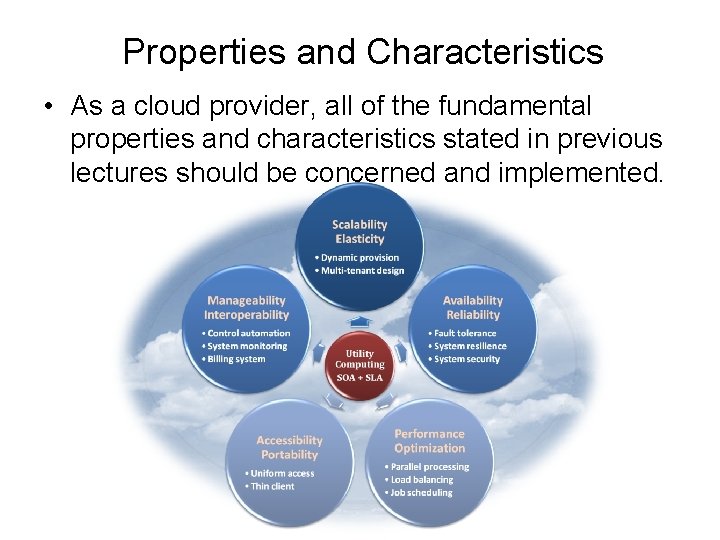
Properties and Characteristics • As a cloud provider, all of the fundamental properties and characteristics stated in previous lectures should be concerned and implemented.
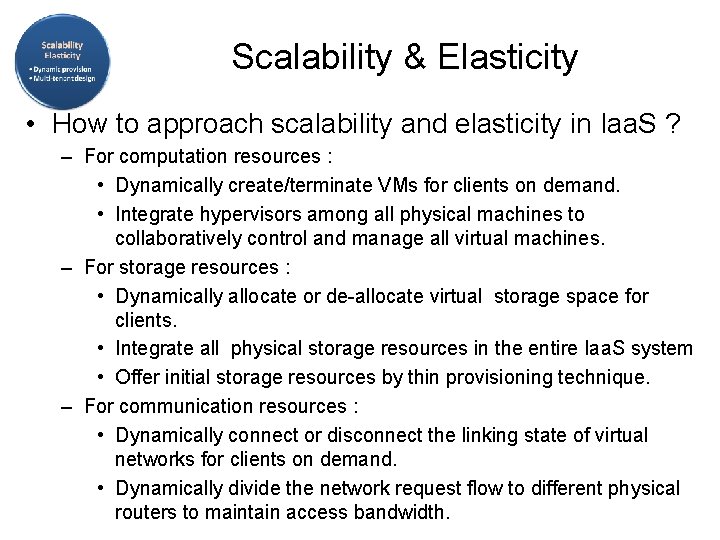
Scalability & Elasticity • What do scalability and elasticity mean in Iaa. S ? – Clients should be able to dynamically increase or decrease the amount of infrastructure resources in need. – Large amount of resources provisioning and deployment should be done in a short period of time, such as several hours or days. – System behavior should remain identical in small scale or large one.
Scalability & Elasticity • How to approach scalability and elasticity in Iaa. S ? – For computation resources : • Dynamically create/terminate VMs for clients on demand. • Integrate hypervisors among all physical machines to collaboratively control and manage all virtual machines. – For storage resources : • Dynamically allocate or de-allocate virtual storage space for clients. • Integrate all physical storage resources in the entire Iaa. S system • Offer initial storage resources by thin provisioning technique. – For communication resources : • Dynamically connect or disconnect the linking state of virtual networks for clients on demand. • Dynamically divide the network request flow to different physical routers to maintain access bandwidth.
Availability & Reliability • What do availability and reliability mean in Iaa. S ? – Clients should be able to access computation resources without considering the possibility of hardware failure. – Data stored in Iaa. S cloud should be able to be retrieved when needed without considering any natural disaster damage. – Communication capability and capacity should be maintained without considering any physical equipment shortage.
Availability & Reliability • How to approach availability and reliability in Iaa. S ? – For computation resources : • Monitor each physical and virtual machine for any possible failure. • Regularly backup virtual machine system state for disaster recovery. • Migrate virtual machine among physical machines for potential failure prevention. – For storage resources : • Maintain data pieces replication among different physical storage devices. • Regularly backup virtual storage data to geographical remote locations for disaster prevention. – For communication resources : • Built redundant connection system to improve robustness.
Manageability & Interoperability • What do manageability and interoperability mean in Iaa. S ? – Clients should be able to fully control the virtualized infrastructure resources which allocated to them. – Virtualized resources can be allocated by means of system control automation process with pre-configured policy. – States of all virtualized resource should be fully under monitoring. – Usage of infrastructure resources will be recorded and then billing system will convert these information to user payment.
Manageability & Interoperability • Manageability and interoperability in Iaa. S ? – For computation resources : • Provide basic virtual machine operations, such as creation, termination, suspension, resumption and system snapshot. • Monitor and record CPU and memory loading for each VM. – For storage resources : • Monitor and record storage space usage and read/write data access from user for each virtual storage resource. • Automatic allocate/de-allocate physical storage according to space utilization. – For communication resources : • Monitor and record the network bandwidth consumption for each virtual link. • Automatically reroute the data path when computation and storage are duplicated.
Performance & Optimization • What do performance and optimization mean in Iaa. S ? – Physical resources should be highly utilized among different clients. – Physical resources should form a large resource pool which provide high computing power through parallel processing. – Virtual infrastructure resources will be dynamically configured to an optimized deployment among physical resources.
Performance & Optimization • How to approach performance and optimization in Iaa. S ? – For computation resources : • Deploy virtual machine with load balancing consideration. • Live migrate virtual machines among physical ones to balance the system loading. – For storage resources : • Deploy virtual storage with hot spot access consideration. • Live migrate virtual storage among physical ones with different performance level. – For communication resources : • Consider network bandwidth loading when deploying virtual machines and storage. • Dynamically migrate virtual machines or storage to balance network flow.
Accessibility & Portability • What do accessibility and portability mean in Iaa. S ? – Clients should be able to control, manage and access infrastructure resources in an easy way, such as the web -browser, without additional local software or hardware installation. – Provided infrastructure resources should be able to be reallocated or duplicated easily.
Accessibility & Portability • How to approach accessibility and portability in Iaa. S ? – For computation resources : • Cloud provider integrates virtual machine management and access through web-based portal. • Comply the virtual machine standard for portability. – For storage resources : • Cloud provider integrates virtual storage management and access through web-based portal. – For communication resources : • Cloud provider integrates virtual network management and access through web-based portal.
Virtualization Overview
Virtualization Overview • What is virtualization ? – Virtualization is the creation of a virtual (rather than physical) version of something, such as an operating system, a server, a storage device or network resources. – It hides the physical characteristics of a resource from users, instead showing another abstract resource. • But, where does virtualization come from ? – Virtualization is NOT a new idea of computer science. – Virtualization concept comes from the component abstraction of system design, and it has been adapted in many system level. – Now, let’s take a look of our original system architecture !!
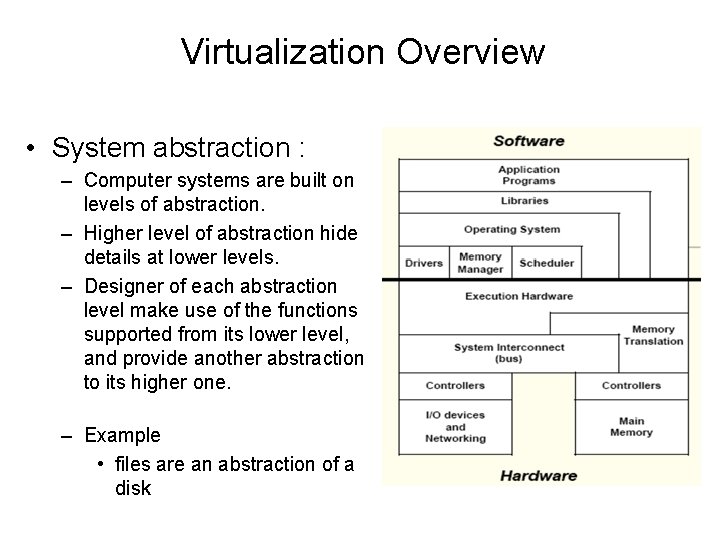
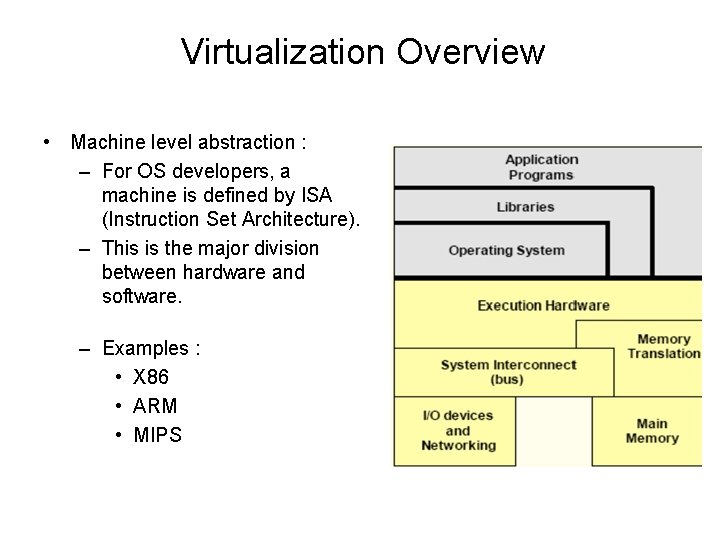
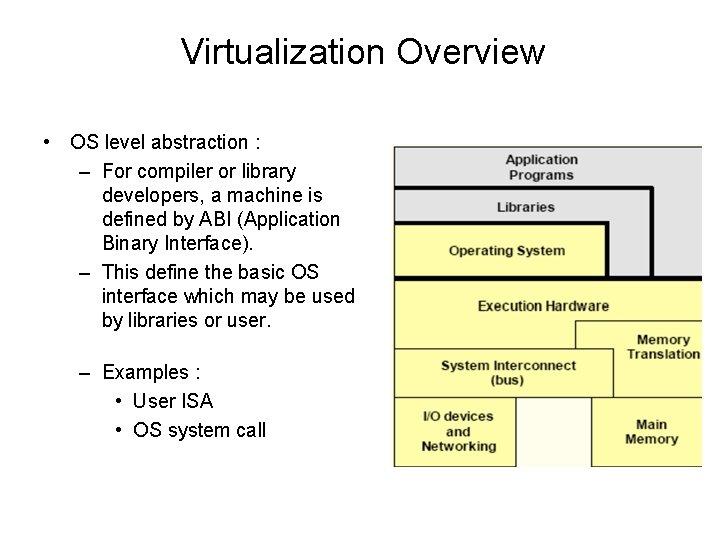
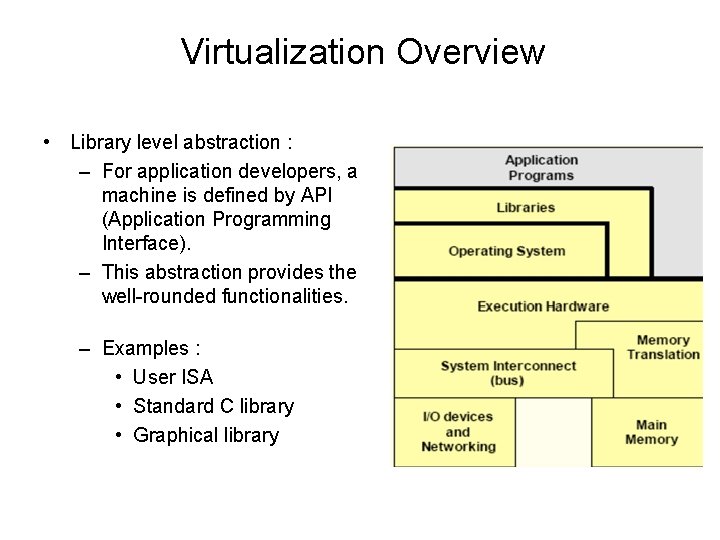
Virtualization Overview • System abstraction : – Computer systems are built on levels of abstraction. – Higher level of abstraction hide details at lower levels. – Designer of each abstraction level make use of the functions supported from its lower level, and provide another abstraction to its higher one. – Example • files are an abstraction of a disk
Virtualization Overview • Machine level abstraction : – For OS developers, a machine is defined by ISA (Instruction Set Architecture). – This is the major division between hardware and software. – Examples : • X 86 • ARM • MIPS
Virtualization Overview • OS level abstraction : – For compiler or library developers, a machine is defined by ABI (Application Binary Interface). – This define the basic OS interface which may be used by libraries or user. – Examples : • User ISA • OS system call
Virtualization Overview • Library level abstraction : – For application developers, a machine is defined by API (Application Programming Interface). – This abstraction provides the well-rounded functionalities. – Examples : • User ISA • Standard C library • Graphical library
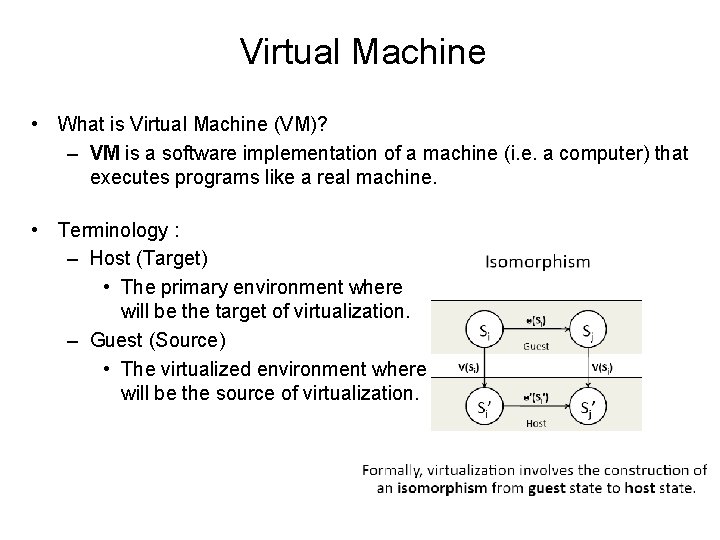
Virtual Machine • What is Virtual Machine (VM)? – VM is a software implementation of a machine (i. e. a computer) that executes programs like a real machine. • Terminology : – Host (Target) • The primary environment where will be the target of virtualization. – Guest (Source) • The virtualized environment where will be the source of virtualization.
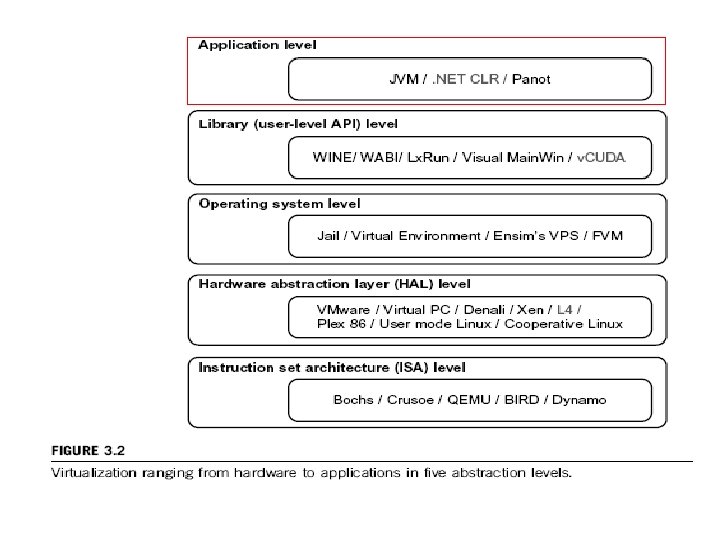
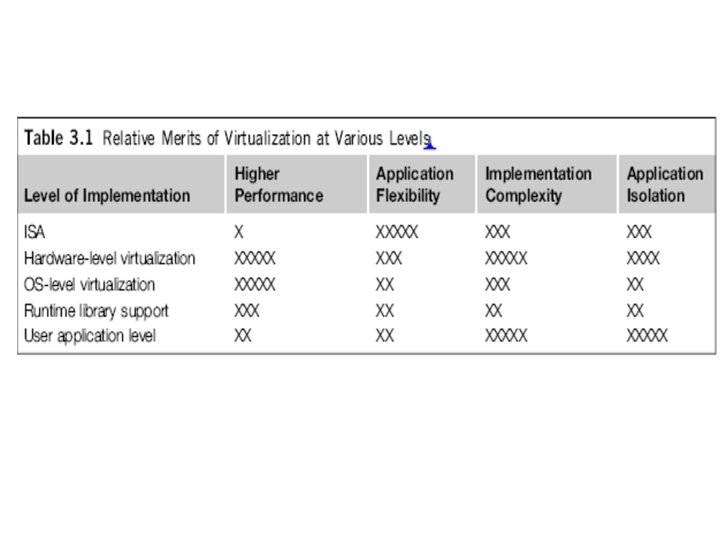
Virtualization at ISA level: Emulating a given ISA by the ISA of the host machine. For example, MIPS binary code can run on an x-86 -based host machine with the help of ISA emulation. Typical systems: Bochs, Crusoe, Quemu, BIRD, Dynamo • Advantage: It can run a large amount of legacy binary codes written for various processors on any given new hardware host machines; best application flexibility • Shortcoming & limitation: One source instruction may require tens or hundreds of native target instructions to perform its function, which is relatively slow. V-ISA requires adding a processor-specific software translation layer in the complier. * This technology is usually included in the Hardware-Abstraction-Level-Virtualization
Virtualization at Hardware Abstraction level: Virtualization is performed right on top of the hardware. It generates virtual hardware environments for VMs, and manages the underlying hardware through virtualization. Typical systems: VMware, Virtual PC, Denali, Xen • Advantage: has higher performance and good application isolation • Shortcoming & limitation: very expensive to implement (complexity)
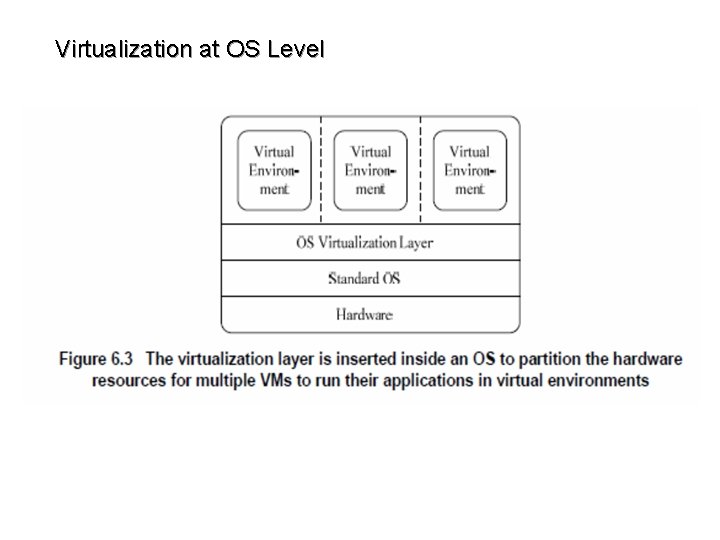
Virtualization at Operating System level: It is an abstraction layer between traditional OS and user placations. This virtualization creates isolated containers on a single physical server and the OS-instance to utilize the hardware and software in datacenters. Typical systems: Jail / Virtual Environment / Ensim's VPS / FVM • Advantage: have minimal starup/shutdown cost, low resource requirement, and high scalability; synchronize VM and host state changes. • Shortcoming & limitation: all VMs at the operating system level must have the same kind of guest OS; poor application flexibility and isolation.
Virtualization at OS Level
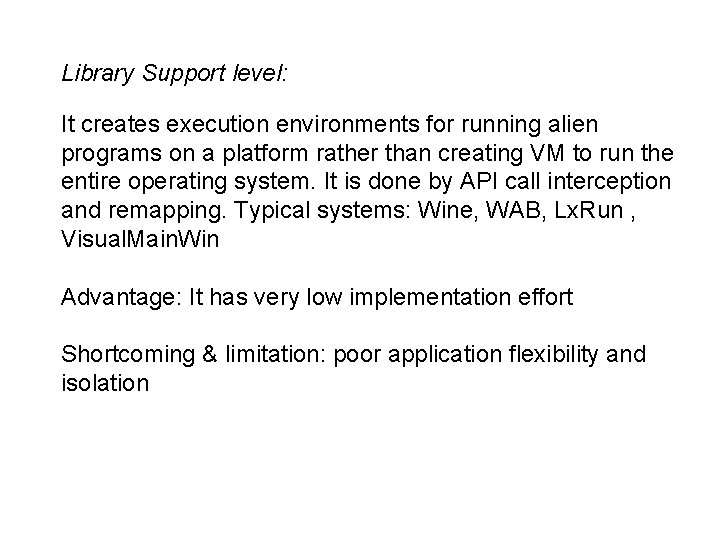
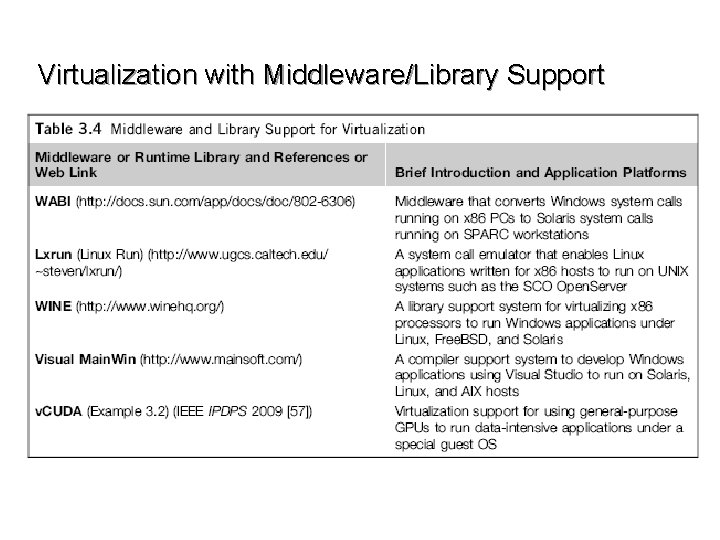
Library Support level: It creates execution environments for running alien programs on a platform rather than creating VM to run the entire operating system. It is done by API call interception and remapping. Typical systems: Wine, WAB, Lx. Run , Visual. Main. Win Advantage: It has very low implementation effort Shortcoming & limitation: poor application flexibility and isolation
Virtualization with Middleware/Library Support
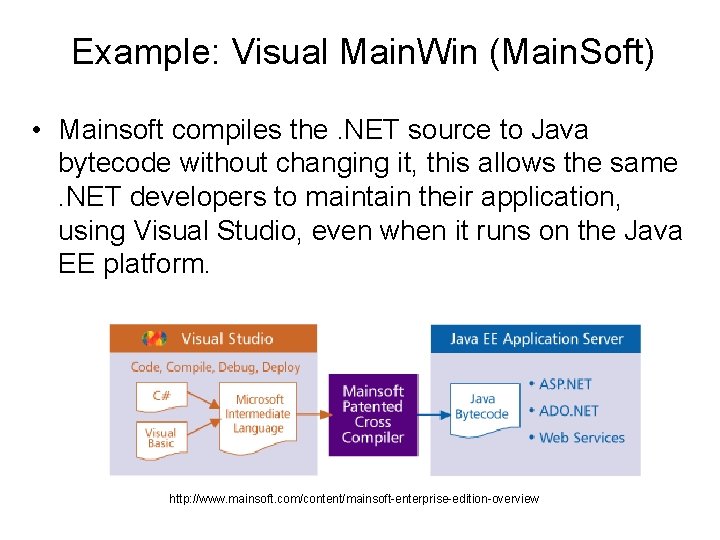
Example: Visual Main. Win (Main. Soft) • Mainsoft compiles the. NET source to Java bytecode without changing it, this allows the same. NET developers to maintain their application, using Visual Studio, even when it runs on the Java EE platform. http: //www. mainsoft. com/content/mainsoft-enterprise-edition-overview
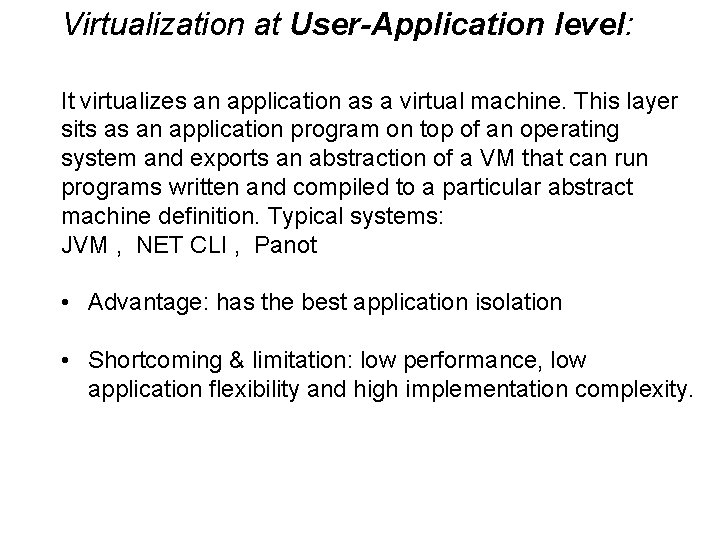
Virtualization at User-Application level: It virtualizes an application as a virtual machine. This layer sits as an application program on top of an operating system and exports an abstraction of a VM that can run programs written and compiled to a particular abstract machine definition. Typical systems: JVM , NET CLI , Panot • Advantage: has the best application isolation • Shortcoming & limitation: low performance, low application flexibility and high implementation complexity.
Server Virtualization – Hardware Abstraction Layer
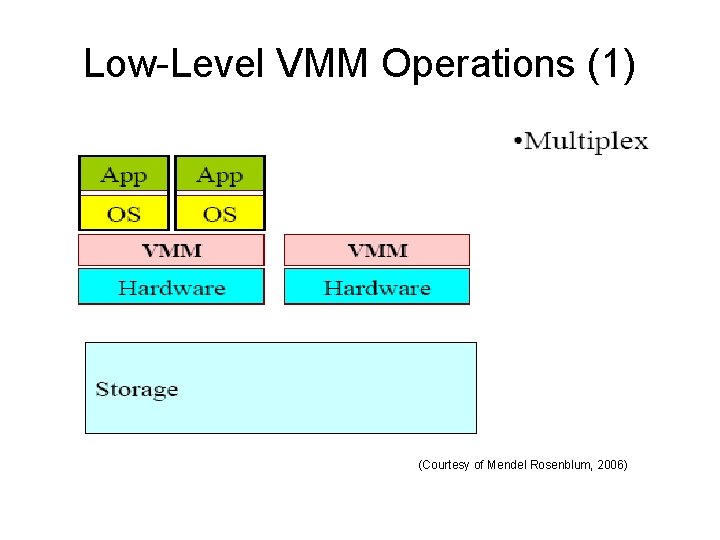
Low-Level VMM Operations (1) (Courtesy of Mendel Rosenblum, 2006)
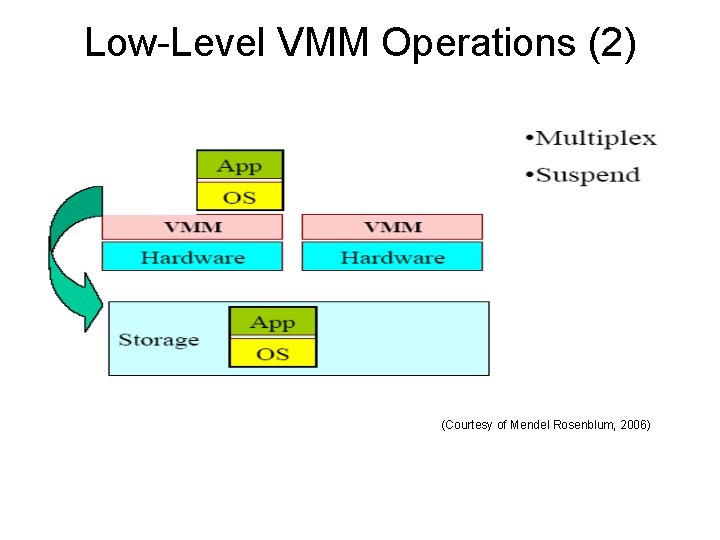
Low-Level VMM Operations (2) (Courtesy of Mendel Rosenblum, 2006)
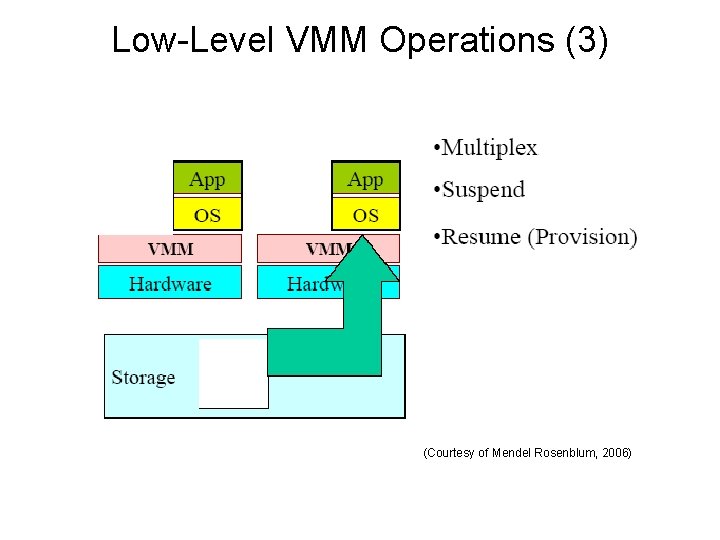
Low-Level VMM Operations (3) (Courtesy of Mendel Rosenblum, 2006)
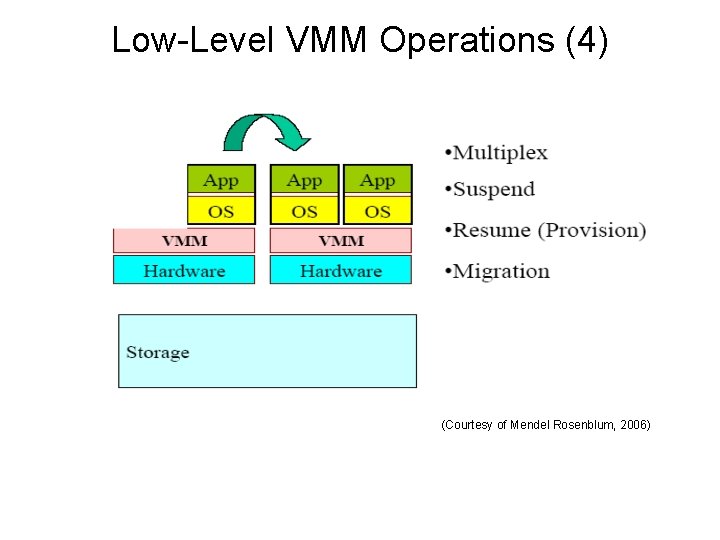
Low-Level VMM Operations (4) (Courtesy of Mendel Rosenblum, 2006)
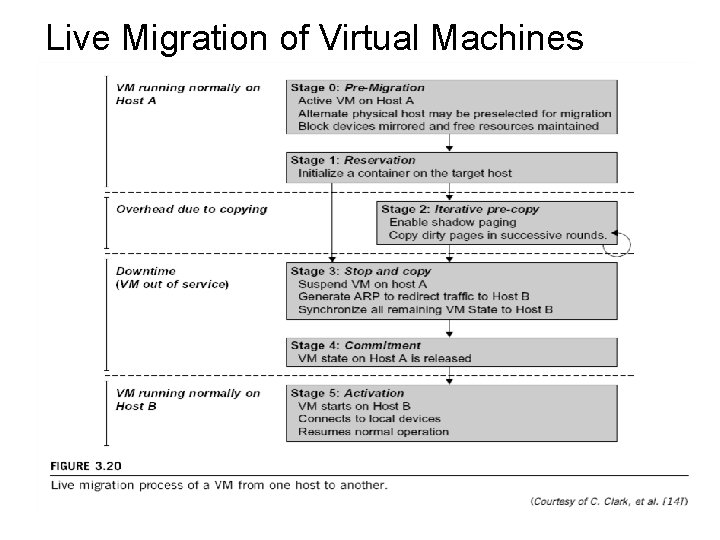
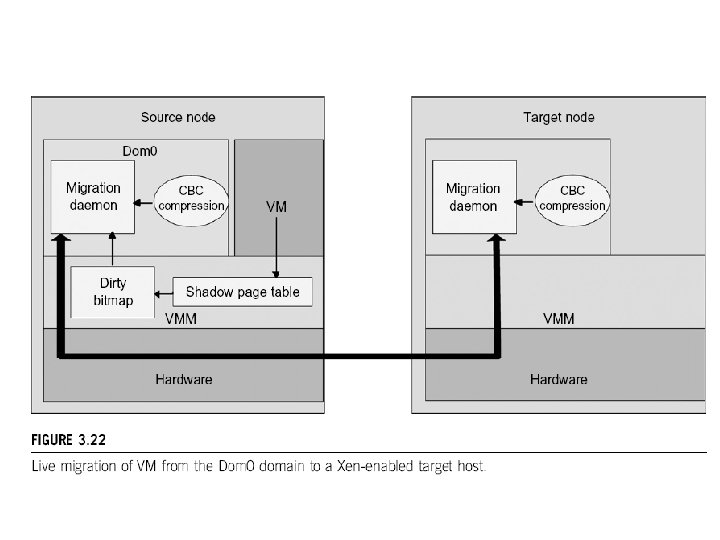
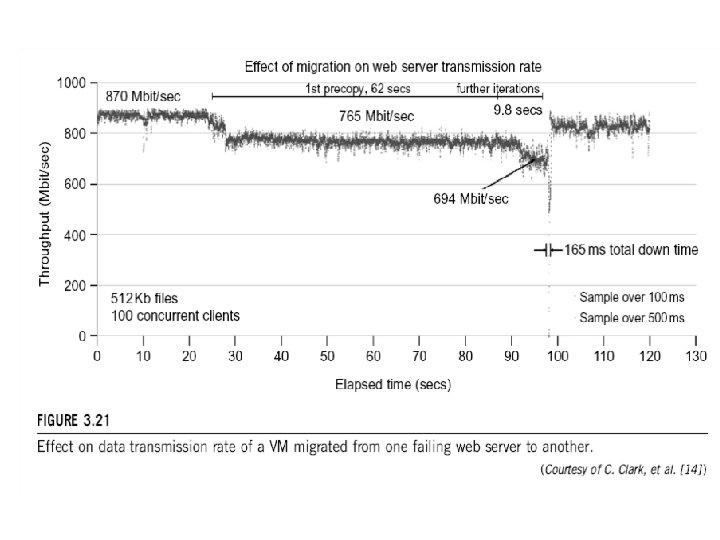
Live Migration of Virtual Machines
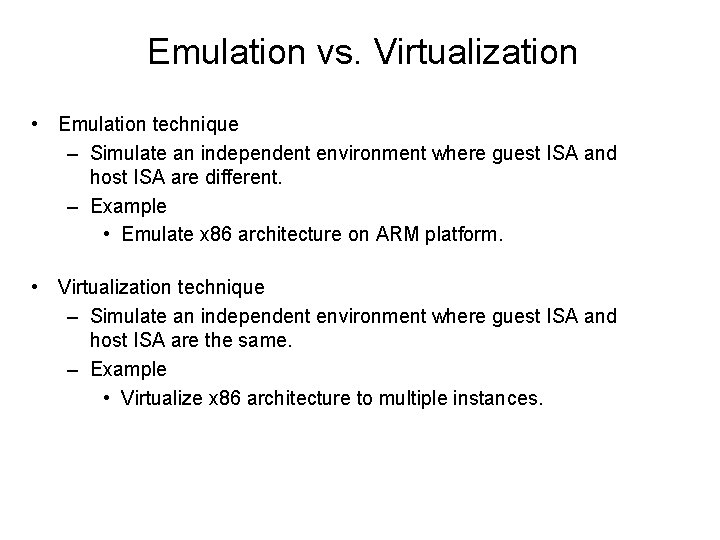
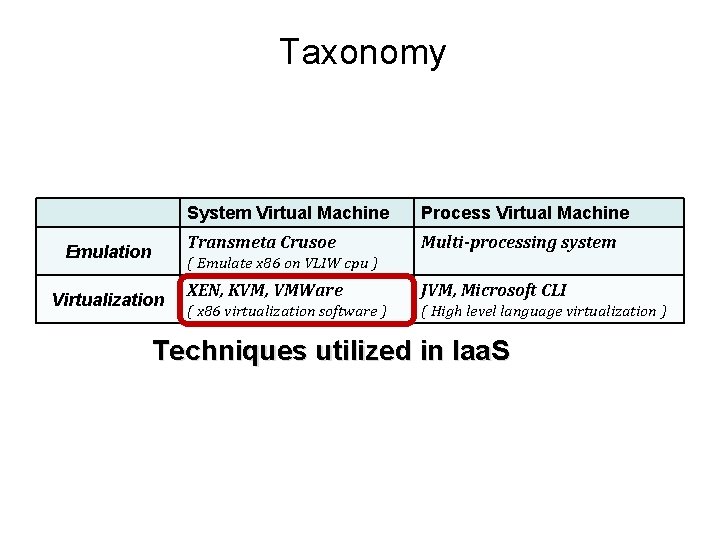
Emulation vs. Virtualization • Emulation technique – Simulate an independent environment where guest ISA and host ISA are different. – Example • Emulate x 86 architecture on ARM platform. • Virtualization technique – Simulate an independent environment where guest ISA and host ISA are the same. – Example • Virtualize x 86 architecture to multiple instances.
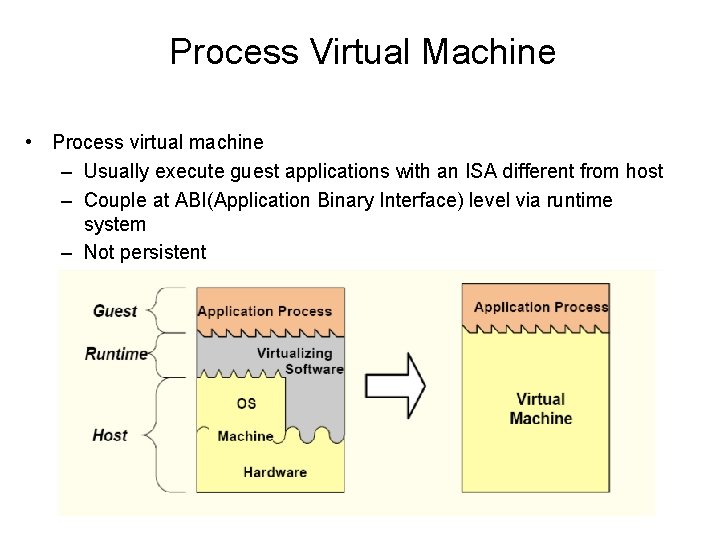
Process Virtual Machine • Process virtual machine – Usually execute guest applications with an ISA different from host – Couple at ABI(Application Binary Interface) level via runtime system – Not persistent
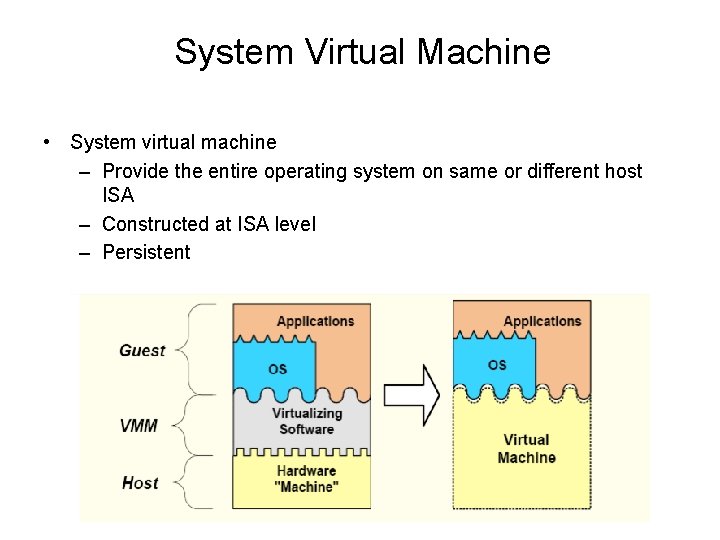
System Virtual Machine • System virtual machine – Provide the entire operating system on same or different host ISA – Constructed at ISA level – Persistent
Taxonomy Emulation System Virtual Machine Process Virtual Machine Transmeta Crusoe Multi-processing system ( Emulate x 86 on VLIW cpu ) Virtualization XEN, KVM, VMWare JVM, Microsoft CLI ( x 86 virtualization software ) ( High level language virtualization ) Techniques utilized in Iaa. S
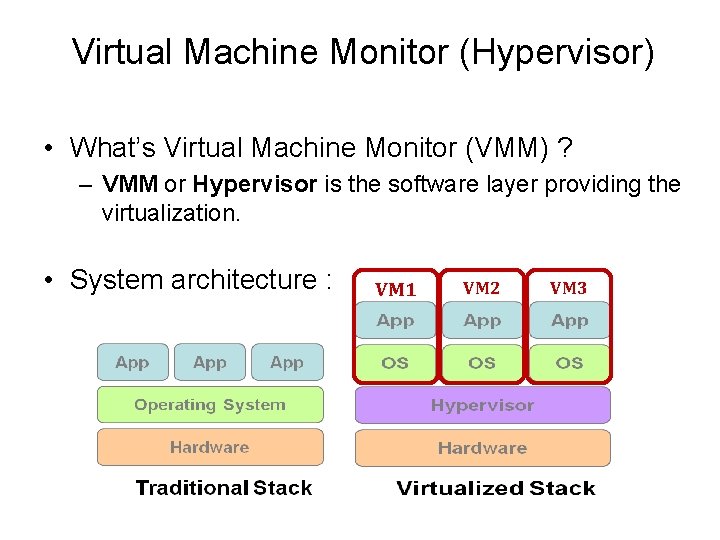
Virtual Machine Monitor (Hypervisor) • What’s Virtual Machine Monitor (VMM) ? – VMM or Hypervisor is the software layer providing the virtualization. • System architecture : VM 1 VM 2 VM 3
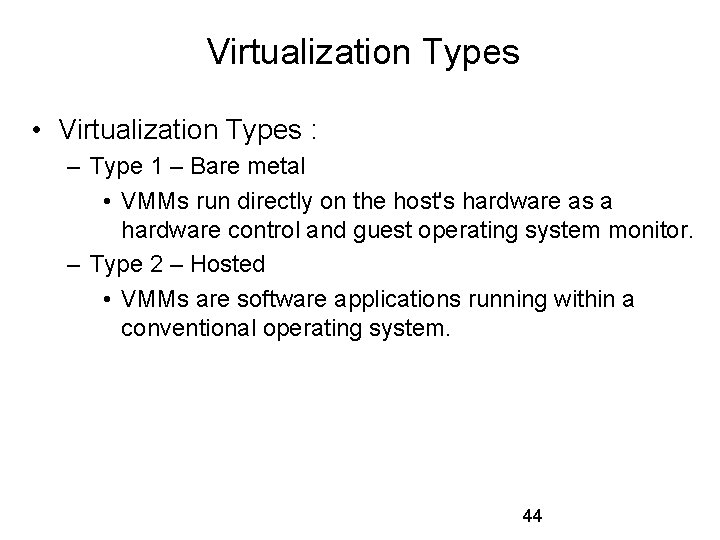
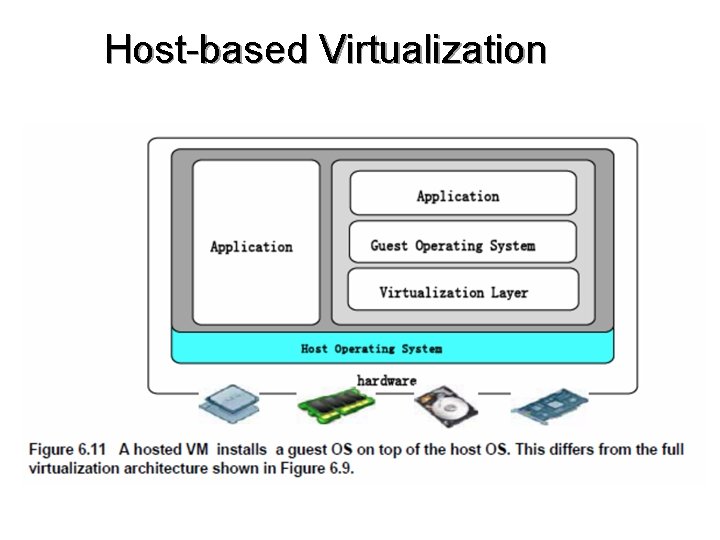
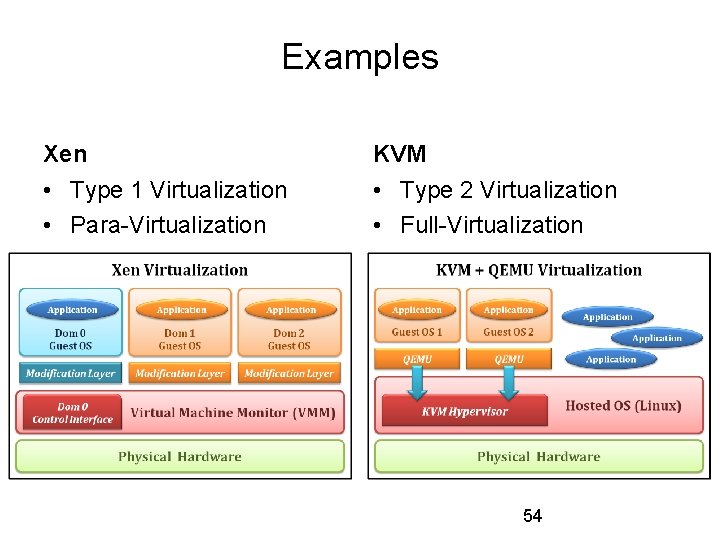
Virtualization Types • Virtualization Types : – Type 1 – Bare metal • VMMs run directly on the host's hardware as a hardware control and guest operating system monitor. – Type 2 – Hosted • VMMs are software applications running within a conventional operating system. 44
Host-based Virtualization
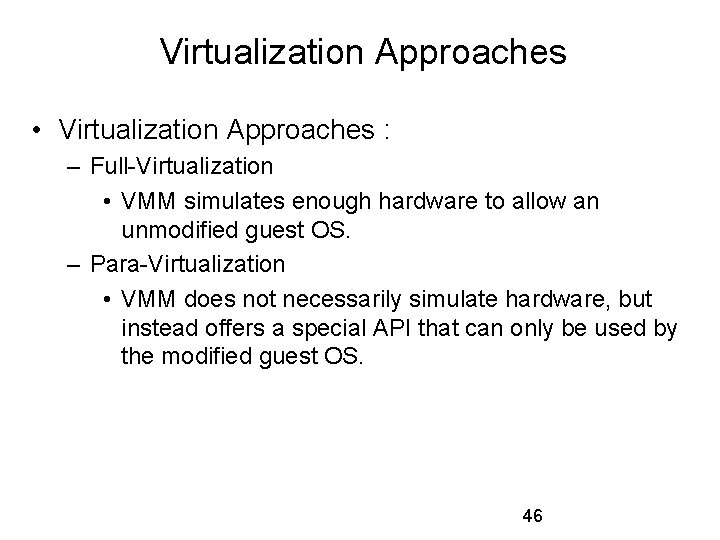
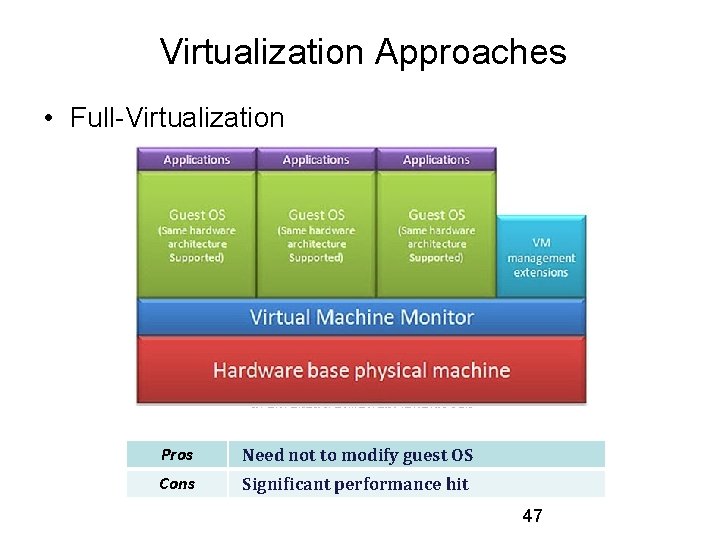
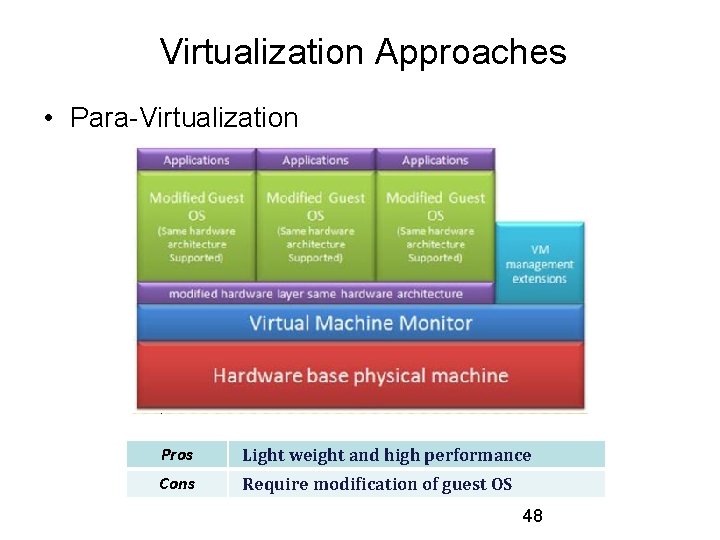
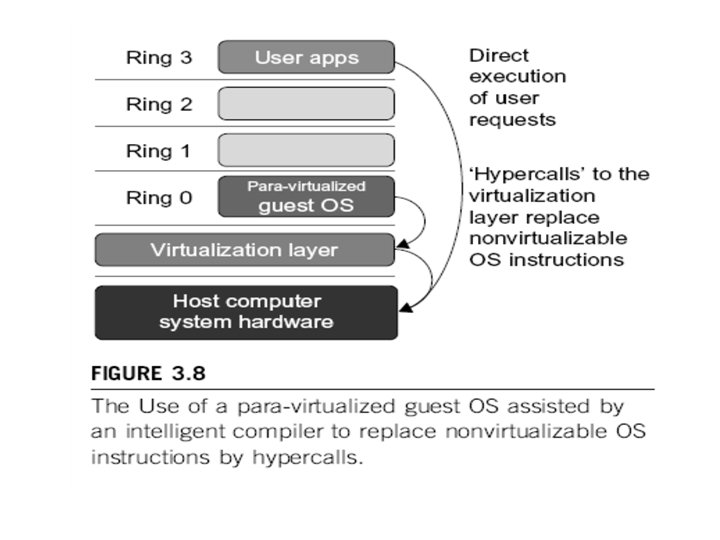
Virtualization Approaches • Virtualization Approaches : – Full-Virtualization • VMM simulates enough hardware to allow an unmodified guest OS. – Para-Virtualization • VMM does not necessarily simulate hardware, but instead offers a special API that can only be used by the modified guest OS. 46
Virtualization Approaches • Full-Virtualization Pros Need not to modify guest OS Cons Significant performance hit 47
Virtualization Approaches • Para-Virtualization Pros Light weight and high performance Cons Require modification of guest OS 48
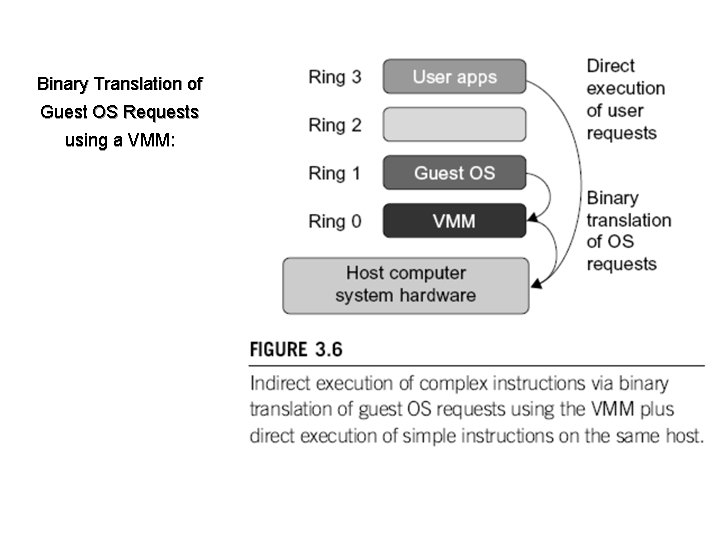
Binary Translation of Guest OS Requests using a VMM:
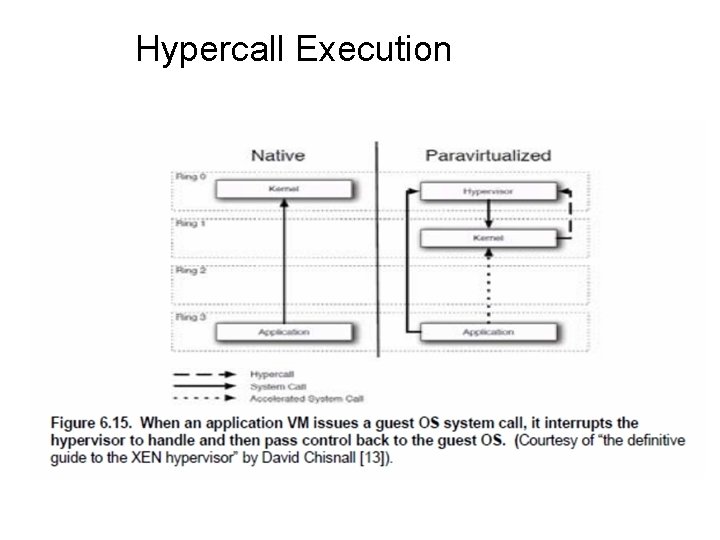
Hypercall Execution
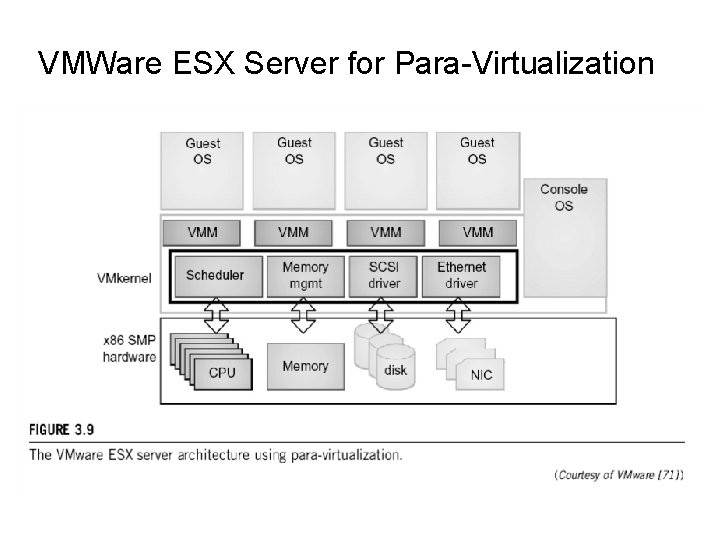
VMWare ESX Server for Para-Virtualization
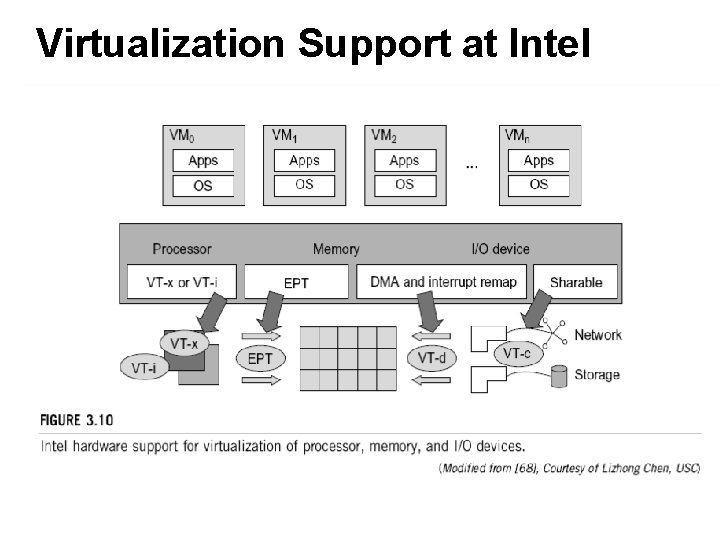
Virtualization Support at Intel
Examples Xen KVM • Type 1 Virtualization • Para-Virtualization • Type 2 Virtualization • Full-Virtualization 54
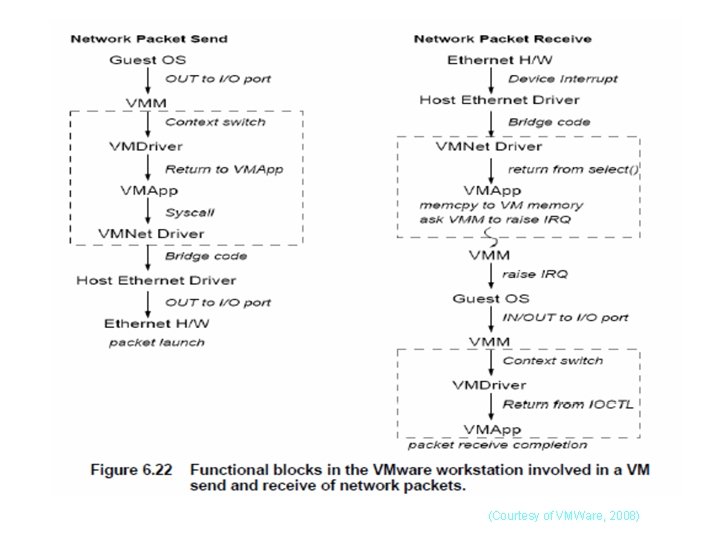
(Courtesy of VMWare, 2008)
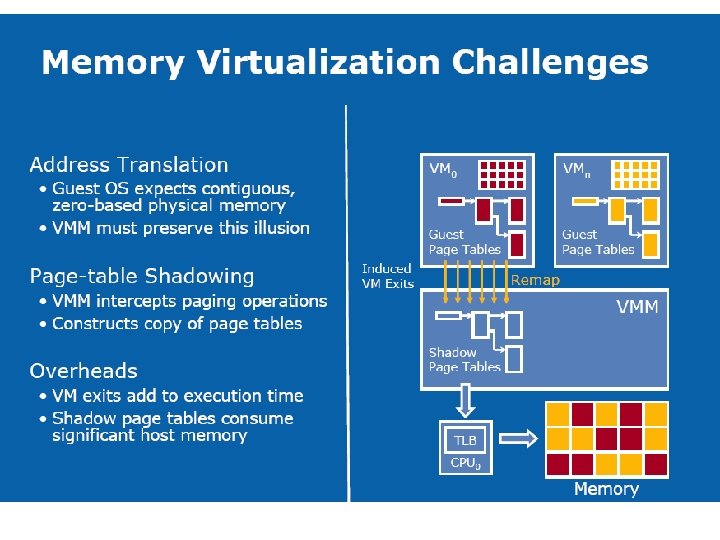
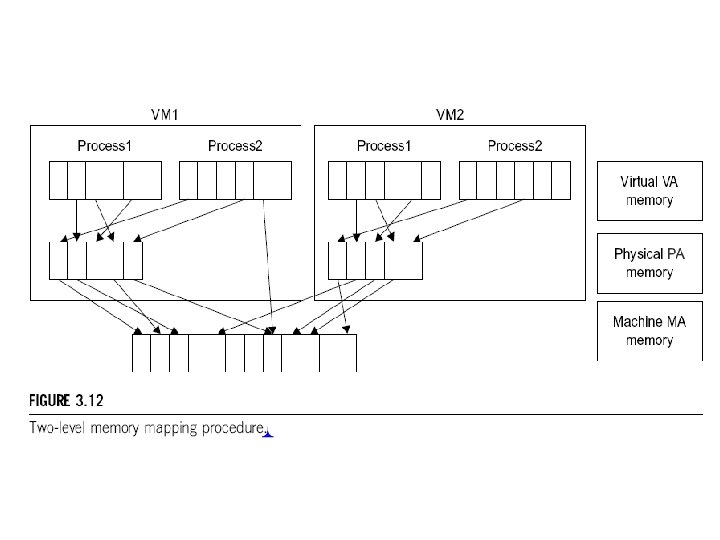
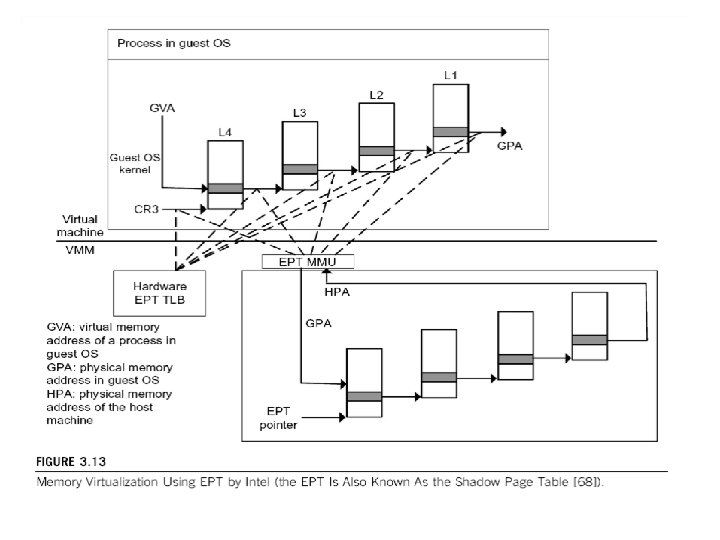
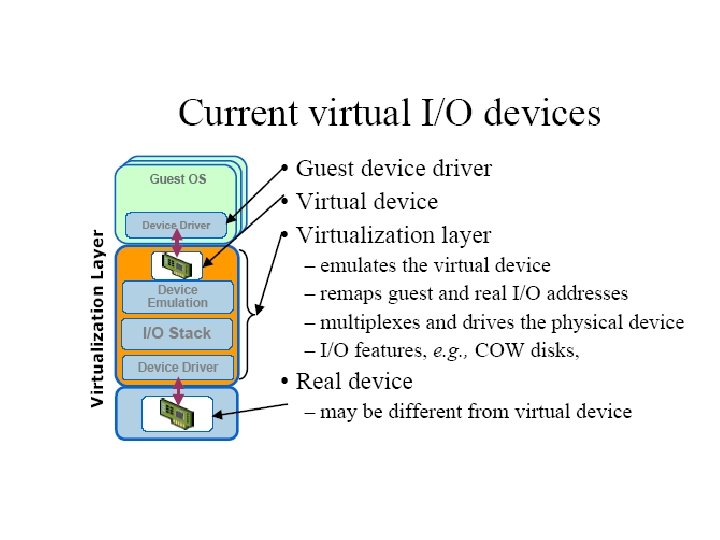
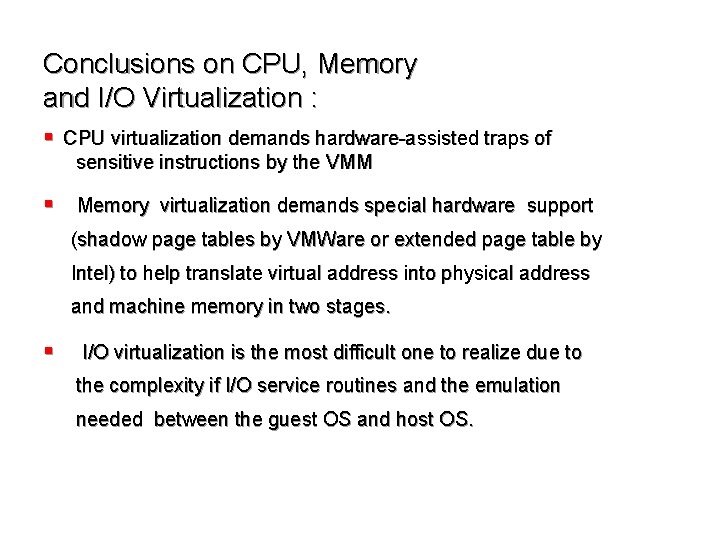
Conclusions on CPU, Memory and I/O Virtualization : § CPU virtualization demands hardware-assisted traps of sensitive instructions by the VMM § Memory virtualization demands special hardware support (shadow page tables by VMWare or extended page table by Intel) to help translate virtual address into physical address and machine memory in two stages. § I/O virtualization is the most difficult one to realize due to the complexity if I/O service routines and the emulation needed between the guest OS and host OS.
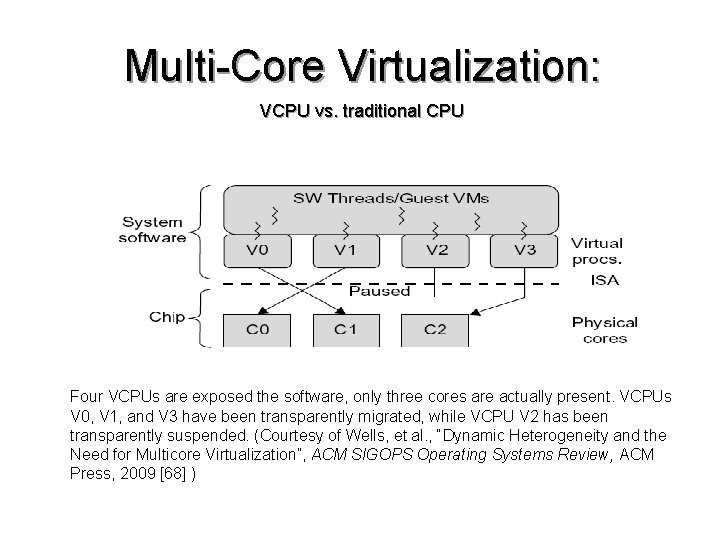
Multi-Core Virtualization: VCPU vs. traditional CPU Four VCPUs are exposed the software, only three cores are actually present. VCPUs V 0, V 1, and V 3 have been transparently migrated, while VCPU V 2 has been transparently suspended. (Courtesy of Wells, et al. , “Dynamic Heterogeneity and the Need for Multicore Virtualization”, ACM SIGOPS Operating Systems Review, ACM Press, 2009 [68] )