
Introduction to Buying and Selling on e Bay
Introduction to Buying and Selling on e. Bay ~ Dr. Jan G. Hogle ~ ™ The World’s Marketplace™ 1 Intro to Buying & Selling on e. Bay © 2004, Jan G. Hogle
What is an online auction? A typical auction-style listing works this way: 1. The seller offers an item and sets a starting price. 2. Buyers visit the listing and bid on the item. 3. When the listing ends, the high bidder or bidders buy the item from the seller for the highest bid. 2 Intro to Buying & Selling on e. Bay © 2004, Jan G. Hogle
Reasons to Buy Online Bargains Selection Worldwide customer base Easy Payment options 3 Intro to Buying & Selling on e. Bay © 2004, Jan G. Hogle
e. Bay Auction Types Length: 3, 5, 7, or 10 -day 7 -day auction is common Shorter length for “Hot” items Longer for better exposure Fixed Price and Real Estate Ads No bidding, set price 4 Intro to Buying & Selling on e. Bay © 2004, Jan G. Hogle
Auction Options “Buy it Now” Disappears after first bid or reserve is met Buyers must qualify Reserve Price Seller sets a hidden minimum-selling price Reserve price not shown, only whether it’s been met Winning bid must meet or exceed the reserve price No sale if reserve price is not met Private Auction Bidder Ids are not revealed 5 Intro to Buying & Selling on e. Bay © 2004, Jan G. Hogle
Fixed Price Auctions Works like “Buy it Now” No bidding Set Price Sellers must qualify ID verified or minimum Feedback rating Real Estate Ads are usually Fixed Price 6 Intro to Buying & Selling on e. Bay © 2004, Jan G. Hogle
Real Estate Ads Asking price is listed No bidding takes place Interested buyers fill out a contact form Property lists for 30 or 90 days Revise your item any time No feedback on Real Estate Ads Aim is to generate leads rather than a single high bidder 7 Intro to Buying & Selling on e. Bay © 2004, Jan G. Hogle
What e. Bay Costs Buyer Pays for the item Pays shipping Seller Pays insertion fee when item is listed Pays listing fees when item is listed Pays final value fee to e. Bay when item sells Pays fee to Payment service, if used 8 Intro to Buying & Selling on e. Bay © 2004, Jan G. Hogle
What You Can Sell? Personal Items Spring Cleaning Purchases you can’t return Vehicles Real Estate e. Bay Stores Almost anything not illegal or dangerous 9 Intro to Buying & Selling on e. Bay © 2004, Jan G. Hogle
Is My Item Allowed? Handout Prohibited Not allowed, Period. Questionable May be listed under certain conditions Potentially infringing May violate copyrights, trademarks, licenses 10 Intro to Buying & Selling on e. Bay © 2004, Jan G. Hogle
How to Buy on e. Bay Register Find the item you want Bid or “Buy it Now” Pay for the item Leave Feedback 11 Intro to Buying & Selling on e. Bay © 2004, Jan G. Hogle
Getting Started: Registration Enter personal information Name, address, phone Birthdate (you must be 18+) Create ID & password Agree to terms Confirm email 12 Intro to Buying & Selling on e. Bay © 2004, Jan G. Hogle
Buying on e. Bay: Finding Items Browse by category Search by key word Power Search using filters Save favorite searches Email results: Let e. Bay search for you Save items of interest to “My e. Bay” 13 Intro to Buying & Selling on e. Bay © 2004, Jan G. Hogle
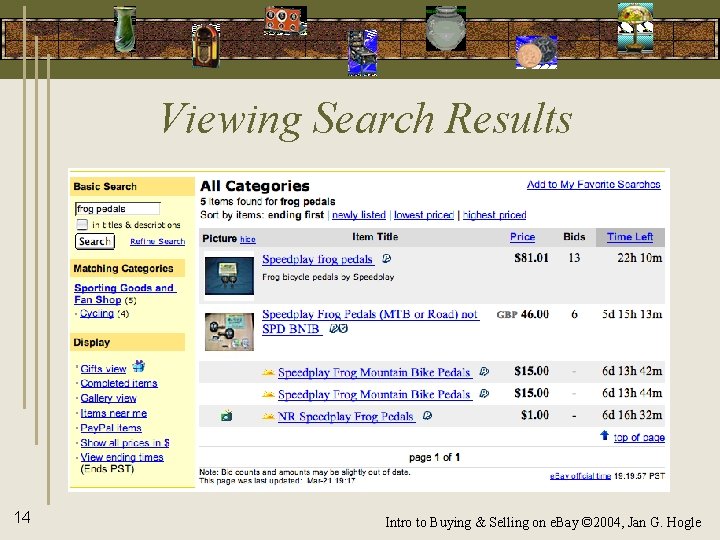
Viewing Search Results 14 Intro to Buying & Selling on e. Bay © 2004, Jan G. Hogle
Bidding Process How much to bid Research the item’s value Decide on your maximum bid Don’t bid early Use odd bid increments Proxy bidding Let e. Bay bid automatically, up to your maximum Sniping Bid in the last few seconds 15 Intro to Buying & Selling on e. Bay © 2004, Jan G. Hogle
Completing the Sale Contact the seller “Ask the Seller a Question” Contact Prior to bidding Checking out Contact Seller promptly Pay promptly 16 Intro to Buying & Selling on e. Bay © 2004, Jan G. Hogle
Paying for the Item Website Pay. Pal Online Payment service Part of e. Bay Credit Card or Bank Withdrawal Money Order or Cashier's check (by mail) Cash or Personal Check (local sales) Other online payment services 17 Intro to Buying & Selling on e. Bay © 2004, Jan G. Hogle
Pay. Pal: e. Bay’s Payment Service Easiest & safest way to pay on e. Bay Can pay with credit cards or check Anyone with an email account can send or receive Pay. Pal payments No fee to send money (Buyers) Small fee to receive money (Sellers) Simplifies International sales 18 Intro to Buying & Selling on e. Bay © 2004, Jan G. Hogle
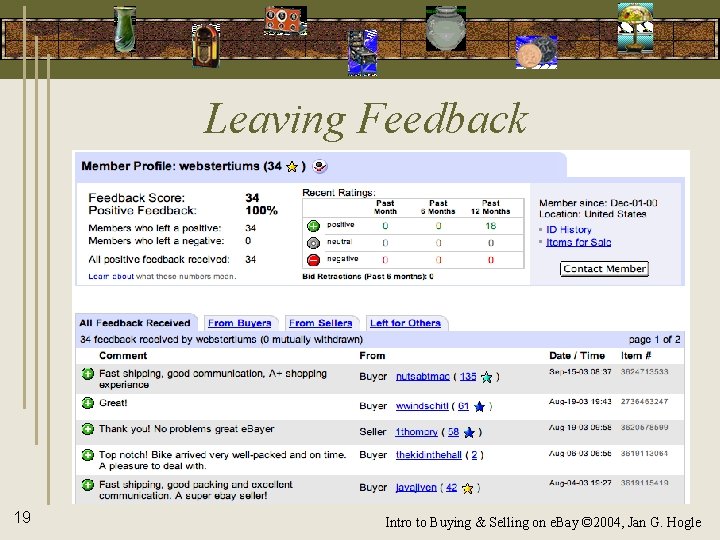
Leaving Feedback 19 Intro to Buying & Selling on e. Bay © 2004, Jan G. Hogle
Software Tools Website My e. Bay Toolbar (for Windows PCs) Internet Explorer “Auction Manager” (for Macs, too) Management software: Many available Sniping software: Many available Website 20 Intro to Buying & Selling on e. Bay © 2004, Jan G. Hogle
Safe Buying Tips Handout Before bidding: Ask Seller questions before you bid Check refund/return policies & shipping costs Confirm authenticity & value of item Avoid cash-only deals After winning: Use payment method with buyer protection Verify Seller contact info Keep careful records 21 Intro to Buying & Selling on e. Bay © 2004, Jan G. Hogle
Create a Seller’s Account Verify buyer registration info Establish Proof of Identity Need Credit/Debit card & Bank Account or Get ID Verified ($5 fee) • e. Bay checks personal info against credit accounts • Need ID Verify for BIN, large bids, mature area • Can’t change contact info for 30 days Select how to pay seller’s fees Deduct from bank account (US banks only) Charge to Credit Card 22 Intro to Buying & Selling on e. Bay © 2004, Jan G. Hogle
Seller’s Checklist Get ready to sell Create a listing Get the details Payment and shipping info 23 Handout Intro to Buying & Selling on e. Bay © 2004, Jan G. Hogle
Sources of Items to Sell Spring cleaning Friends & family Garage & yard sales Flea markets Estate sales Thrift stores 24 Discount & dollar stores Clearance sales Going out of business sales Classified ads e. Bay Intro to Buying & Selling on e. Bay © 2004, Jan G. Hogle
Setting a Price Research the item’s value Recover your costs Listing fees Shipping fees Payment service fees Packing materials Make sure you can live with a single bid 25 Intro to Buying & Selling on e. Bay © 2004, Jan G. Hogle
Listing Options The auction length The start time Setting a reserve. . . or not Buy it now. . . or not Public or private Keeping it local Include a picture 26 Intro to Buying & Selling on e. Bay © 2004, Jan G. Hogle
Listing Upgrades Gallery pictures Bold Highlight Featured Great gift 27 Intro to Buying & Selling on e. Bay © 2004, Jan G. Hogle
Writing a Good Description Be Honest Be accurate List everything that’s included List everything that’s missing Include links to manufacturers site, if useful For manuals or specs “Exactly which car models do these roof rack adapters fit, anyway? ” Don't steal descriptions or pictures 28 Intro to Buying & Selling on e. Bay © 2004, Jan G. Hogle
Writing Your Listing Use key words in the title A good description Include features and benefits Be concise but… Use all the space you need Include sales, refund & return policies Include shipping info Policies shouldn’t be longer than description 29 Intro to Buying & Selling on e. Bay © 2004, Jan G. Hogle
Using Pictures Take a picture of everything that’s included Scan an image from a manual or package Borrow if you can but don't steal Keep it simple & clean Show any flaws Fill the frame 30 Intro to Buying & Selling on e. Bay © 2004, Jan G. Hogle
Uploading Pictures Upload your image(s) to e. Bay Use another Web host to include photo(s) within your description Format pictures for e. Bay’s standards Save as jpg 400 by 300 pixels (w x h) 31 Intro to Buying & Selling on e. Bay © 2004, Jan G. Hogle
Managing Your Auctions Using “My e. Bay” Website Monitor your current auctions Daily updates from e. Bay Using other software Many available for tracking sales, writing ads, bulk listings 32 Intro to Buying & Selling on e. Bay © 2004, Jan G. Hogle
Updating Your Listing Can change most info if no bids and 12 hrs or more left Can add info if you do have bids and 12 hrs or more left Limited revision if less than 12 hrs See e. Bay “help” for full details 33 Intro to Buying & Selling on e. Bay © 2004, Jan G. Hogle
Canceling an Auction Reasons for ending listings early include: Item is no longer available Error in the starting price or reserve Error in the listing description Item was lost or broken If there are bids, you can: Cancel bids and end the listing early Sell item to high bidder(s) and end listing early 34 Intro to Buying & Selling on e. Bay © 2004, Jan G. Hogle
Completing Your Sale Contact the winning bidder Send an Invoice through e. Bay checkout Ship only after receiving payment Packing and shipping Leave feedback Handling complaints and problems 35 Intro to Buying & Selling on e. Bay © 2004, Jan G. Hogle
Packing Supplies What you need Boxes, tape, labels, packing peanuts/excelsior Scale for weighing package Include invoice/receipt in package Free materials Free Boxes, tape at USPS Free labels at USPS, UPS, Fed. Ex with accounts Recycle & garbage bins (Ask!) Office supply stores USPS, Wal. Mart, Office. Max, Target, The UPS Store, etc. 36 Intro to Buying & Selling on e. Bay © 2004, Jan G. Hogle
Shipping Determine shipping costs before listing Choose a primary shipper before listing Ship large and heavy items by Fed. Ex (usually) Electronic postage Prepay shipment & print labels with accounts USPS offers free delivery confirmation online Track your shipment Insure most items 37 Intro to Buying & Selling on e. Bay © 2004, Jan G. Hogle
When the Item Doesn’t Sell Re-list a second time If it sells on second listing, insertion fee is refunded (not if e. Bay store or Real Estate) No refund for subsequent re-listings If you choose to re-list: Use a different title Lower the starting price Add a more detailed description 38 Intro to Buying & Selling on e. Bay © 2004, Jan G. Hogle
Bidders Who Don’t Pay Contact the unresponsive buyer File a nonpaying bidder alert Request fee refund Leave negative feedback Give other bidders a second chance Re-list your item 39 Intro to Buying & Selling on e. Bay © 2004, Jan G. Hogle
Safe Selling Tips Accurately represent your items Respond promptly to questions Clearly state return and shipping policies Ship with tracking numbers & insurance Document everything Don’t ship until payment is complete 40 Intro to Buying & Selling on e. Bay © 2004, Jan G. Hogle
Rules to Remember: Be Nice Be Honest Communicate! Consult e. Bay Help Document Everything 41 Intro to Buying & Selling on e. Bay © 2004, Jan G. Hogle
- Slides: 41