
Introduction The Intercompany Integration Solution for SAP Business
Introduction The Intercompany Integration Solution for SAP Business One Version 2. 0 for SAP Business One 9. 1
Topic Objective At the end of this course, you will be able to: n Describe the process of working with multiple branches of a company. n Recognize key terms in the Intercompany Integration Solution. © 2015 SAP SE or an SAP affiliate company. All rights reserved. Public 2

The Intercompany Integration Solution With the Intercompany Integration Solution you can: n Configure hierarchy between the branches to enable group-wise reporting. n Utilize the Intercompany trade process between the branch companies. n Replicate master data between companies. n Allocate expense and income amounts to other branch companies. n Centralize payments. n Get notified about business transactions in the trade process. n Accept or reject incoming intercompany transactions and notify the sending companies of your decision. n Run cross company reports and user Queries. © 2015 SAP SE or an SAP affiliate company. All rights reserved. Public 3
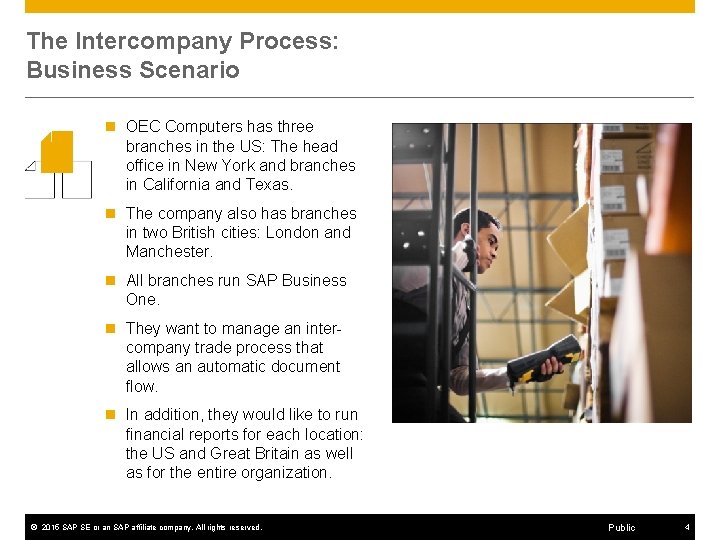
The Intercompany Process: Business Scenario n OEC Computers has three branches in the US: The head office in New York and branches in California and Texas. n The company also has branches in two British cities: London and Manchester. n All branches run SAP Business One. n They want to manage an intercompany trade process that allows an automatic document flow. n In addition, they would like to run financial reports for each location: the US and Great Britain as well as for the entire organization. © 2015 SAP SE or an SAP affiliate company. All rights reserved. Public 4
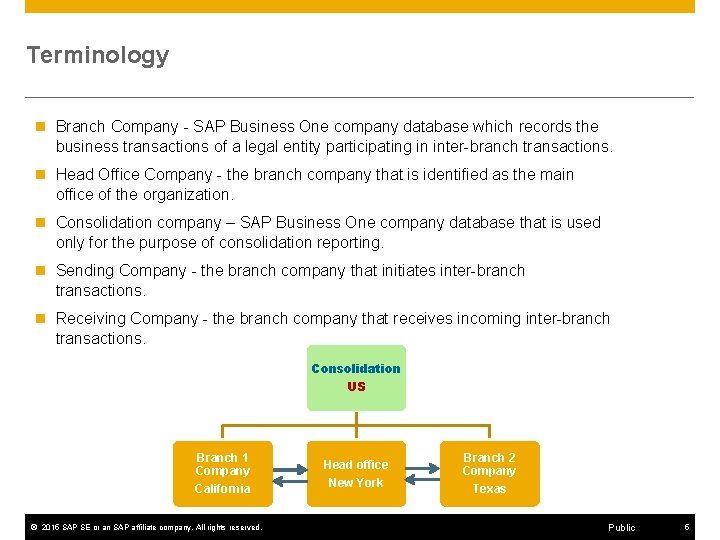
Terminology n Branch Company - SAP Business One company database which records the business transactions of a legal entity participating in inter-branch transactions. n Head Office Company - the branch company that is identified as the main office of the organization. n Consolidation company – SAP Business One company database that is used only for the purpose of consolidation reporting. n Sending Company - the branch company that initiates inter-branch transactions. n Receiving Company - the branch company that receives incoming inter-branch transactions. Consolidation US Branch 1 Company California © 2015 SAP SE or an SAP affiliate company. All rights reserved. Head office New York Branch 2 Company Texas Public 5
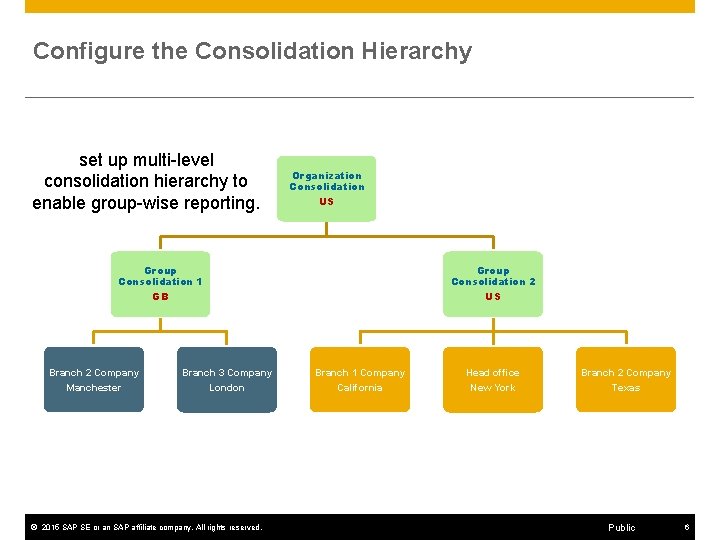
Configure the Consolidation Hierarchy set up multi-level consolidation hierarchy to enable group-wise reporting. Organization Consolidation US Group Consolidation 1 GB Branch 2 Company Manchester Branch 3 Company London © 2015 SAP SE or an SAP affiliate company. All rights reserved. Group Consolidation 2 US Branch 1 Company California Head office New York Branch 2 Company Texas Public 6
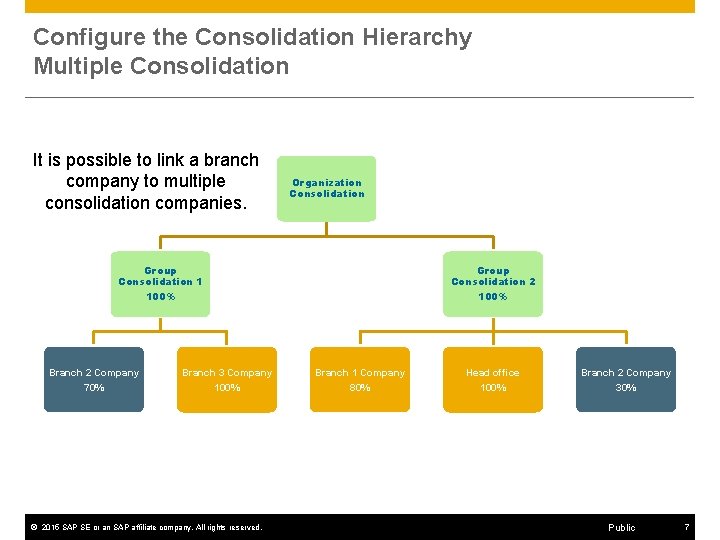
Configure the Consolidation Hierarchy Multiple Consolidation It is possible to link a branch company to multiple consolidation companies. Organization Consolidation Group Consolidation 1 100% Branch 2 Company 70% Branch 3 Company 100% © 2015 SAP SE or an SAP affiliate company. All rights reserved. Group Consolidation 2 100% Branch 1 Company 80% Head office 100% Branch 2 Company 30% Public 7

Utilize the Intercompany Trade Process Group Consolidation 2 US Branch 1 Company California Head office New York Branch 2 Company Texas 2 Branch Texas User Action © 2015 SAP SE or an SAP affiliate company. All rights reserved. Public 8

© 2015 SAP SE or an SAP affiliate company. All rights reserved. OEC-TX OEC-NY Utilize the Intercompany Trade Process Public 9
Replicate Master Data n The intercompany integration solution supports the replication of essential master data between companies. n Selective replication is possible for the following types of master data records by checking the ‘Global’ field: Item Master Data. n Business Partner Master Data. n Bill of Materials. n Price Lists. n © 2015 SAP SE or an SAP affiliate company. All rights reserved. Public 10
Allocate Expense and Income Amounts to Other Branch Companies n At the end of each month the head office branch (NY) allocates expense and income amounts to the other branch companies (California and Texas). n The head office branch allocates expenses such as travel, payroll, and audit. n The head office also allocates income earned from Interest to the branch companies. © 2015 SAP SE or an SAP affiliate company. All rights reserved. Public 11
Centralize Payments n At the end of each month the head office branch (NY) centralizes the outgoing payments and pays the company vendors on behalf of the other branches (California and Texas) n For this process, the branch companies (California and Texas) need to delegate outgoing payment lines to the paying branch (NY). © 2015 SAP SE or an SAP affiliate company. All rights reserved. Public 12
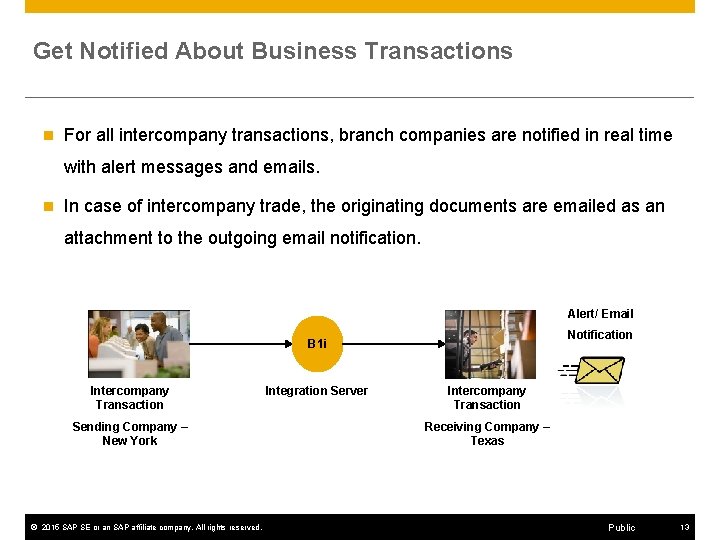
Get Notified About Business Transactions n For all intercompany transactions, branch companies are notified in real time with alert messages and emails. n In case of intercompany trade, the originating documents are emailed as an attachment to the outgoing email notification. Alert/ Email Notification B 1 i Intercompany Transaction Sending Company – New York © 2015 SAP SE or an SAP affiliate company. All rights reserved. Integration Server Intercompany Transaction Receiving Company – Texas Public 13

Get Notified About Company Decision n The intercompany workflow feature enables the branch companies to accept or reject incoming intercompany transactions and to notify the sending companies of their decision. Workflow Notification Accept/ Reject B 1 i Intercompany Transaction Sending Company – New York © 2015 SAP SE or an SAP affiliate company. All rights reserved. Integration Server Intercompany Transaction Receiving Company – Texas Public 14

Map the Branches and the Consolidation Chart of Accounts Liabilities Turnover Assets Liabilities Cap. + Res. Turnover Cost of Sales Operating C. Non-Operating Tax + Extr. Cost of Sales Assets Operating C. Non-Operating Tax + Extr. OEC Texas Consolidation Company Chart of Accounts Cap. + Res. OEC New York Assets Liabilities Cap. + Res. Turnover Cost of Sales Operating C. Non-Operating Tax + Extr. © 2015 SAP SE or an SAP affiliate company. All rights reserved. Public 15
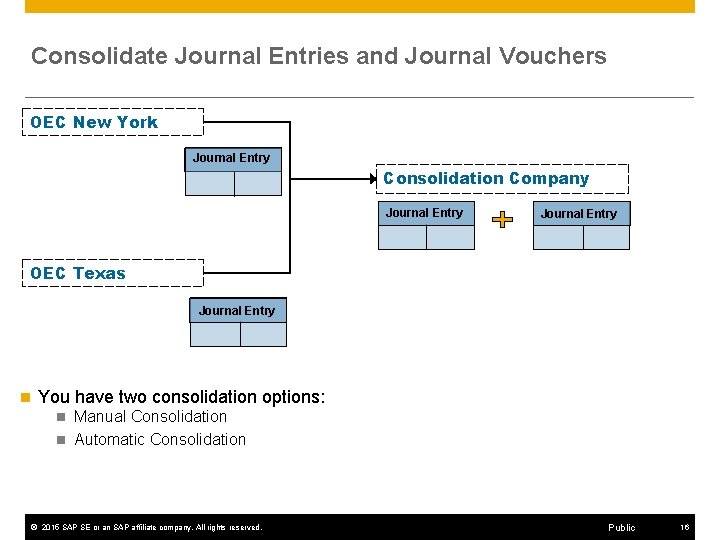
Consolidate Journal Entries and Journal Vouchers OEC New York Journal Entry Consolidation Company Journal Entry OEC Texas Journal Entry n You have two consolidation options: n Manual Consolidation n Automatic Consolidation © 2015 SAP SE or an SAP affiliate company. All rights reserved. Public 16
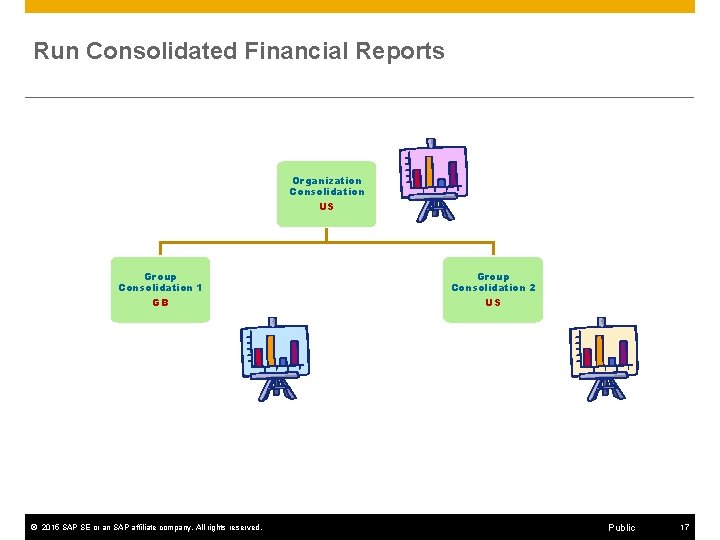
Run Consolidated Financial Reports Organization Consolidation US Group Consolidation 1 GB Branch 2 Company Manchester Branch 3 Company London © 2015 SAP SE or an SAP affiliate company. All rights reserved. Group Consolidation 2 US Branch 1 Company California Head office New York Branch 2 Company Texas Public 17
Run Cross Company Reports and User Queries n Run multiple reports that extract data from one or all branch companies: 1. Consolidated Balances by Business Partner 2. Branch Balances 3. Branch Inventory in Warehouse 4. Branch Sales Analysis Report 5. Un-Posted Intercompany Transactions Report 6. Intercompany Transaction Report n Use the Remote Query Execution option. © 2015 SAP SE or an SAP affiliate company. All rights reserved. Public 18
- Slides: 18