
Introduction Part 1 The Microprocessor Based Systems Memory
Introduction Part 1 • The Microprocessor Based Systems § Memory and I/O System § Microprocessor
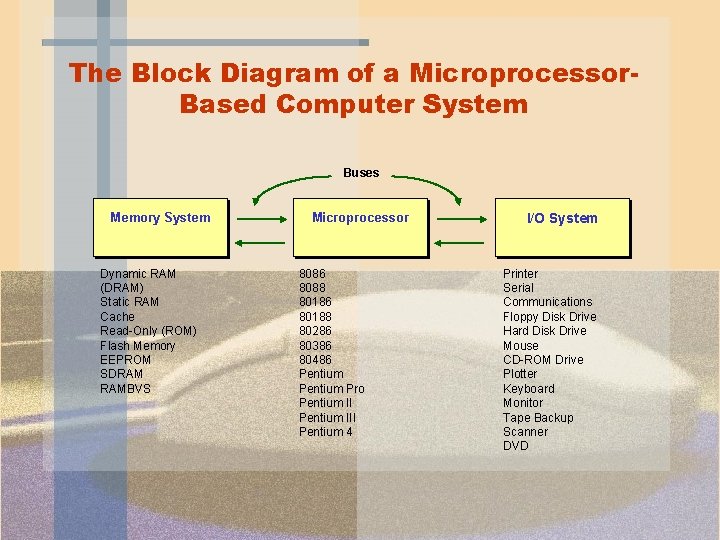
The Block Diagram of a Microprocessor. Based Computer System Buses Memory System Dynamic RAM (DRAM) Static RAM Cache Read-Only (ROM) Flash Memory EEPROM SDRAM RAMBVS Microprocessor 8086 8088 80186 80188 80286 80386 80486 Pentium Pro Pentium III Pentium 4 I/O System Printer Serial Communications Floppy Disk Drive Hard Disk Drive Mouse CD-ROM Drive Plotter Keyboard Monitor Tape Backup Scanner DVD
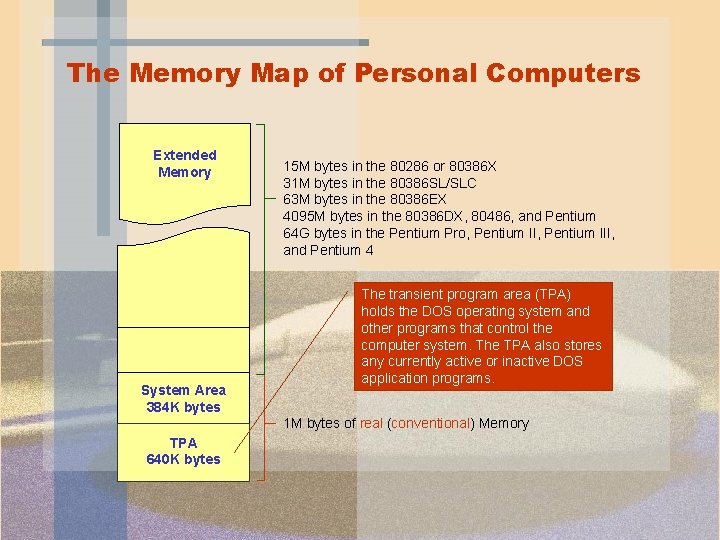
The Memory Map of Personal Computers Extended Memory System Area 384 K bytes 15 M bytes in the 80286 or 80386 X 31 M bytes in the 80386 SL/SLC 63 M bytes in the 80386 EX 4095 M bytes in the 80386 DX, 80486, and Pentium 64 G bytes in the Pentium Pro, Pentium III, and Pentium 4 The transient program area (TPA) holds the DOS operating system and other programs that control the computer system. The TPA also stores any currently active or inactive DOS application programs. 1 M bytes of real (conventional) Memory TPA 640 K bytes
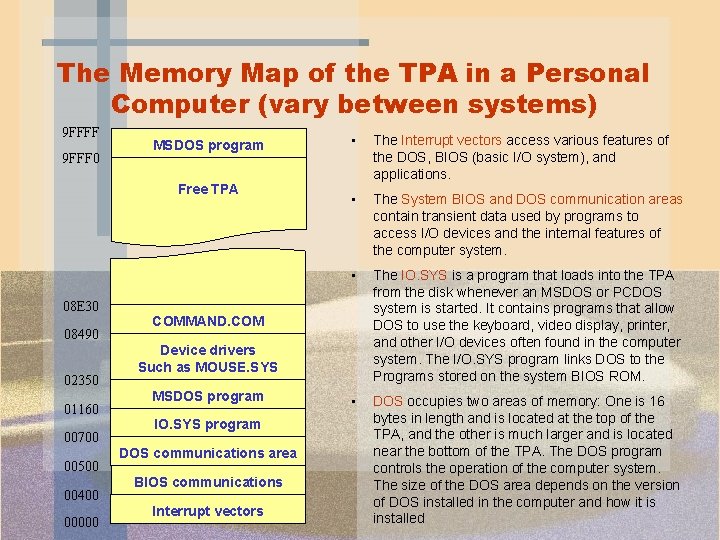
The Memory Map of the TPA in a Personal Computer (vary between systems) 9 FFFF 9 FFF 0 MSDOS program Free TPA 08 E 30 08490 02350 01160 00700 00500 00400 00000 • The Interrupt vectors access various features of the DOS, BIOS (basic I/O system), and applications. • The System BIOS and DOS communication areas contain transient data used by programs to access I/O devices and the internal features of the computer system. • The IO. SYS is a program that loads into the TPA from the disk whenever an MSDOS or PCDOS system is started. It contains programs that allow DOS to use the keyboard, video display, printer, and other I/O devices often found in the computer system. The I/O. SYS program links DOS to the Programs stored on the system BIOS ROM. • DOS occupies two areas of memory: One is 16 bytes in length and is located at the top of the TPA, and the other is much larger and is located near the bottom of the TPA. The DOS program controls the operation of the computer system. The size of the DOS area depends on the version of DOS installed in the computer and how it is installed COMMAND. COM Device drivers Such as MOUSE. SYS MSDOS program IO. SYS program DOS communications area BIOS communications area Interrupt vectors
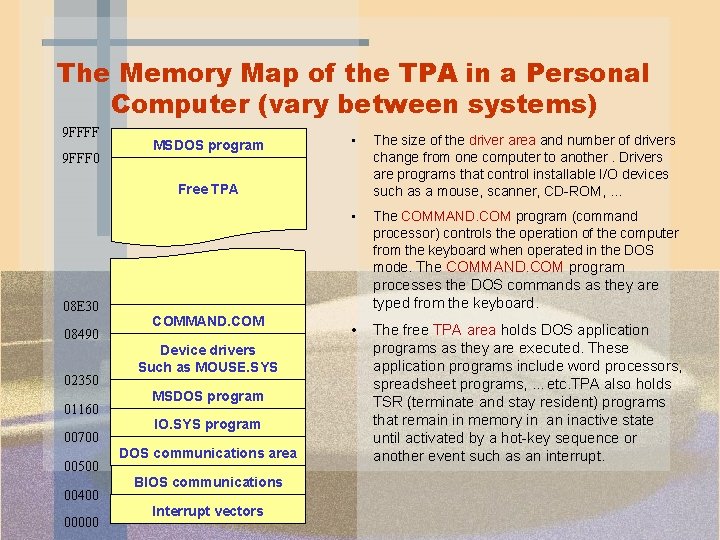
The Memory Map of the TPA in a Personal Computer (vary between systems) 9 FFFF 9 FFF 0 MSDOS program • The size of the driver area and number of drivers change from one computer to another. Drivers are programs that control installable I/O devices such as a mouse, scanner, CD-ROM, … • The COMMAND. COM program (command processor) controls the operation of the computer from the keyboard when operated in the DOS mode. The COMMAND. COM program Free TPA 08 E 30 08490 02350 01160 00700 00500 00400 00000 processes the DOS commands as they are typed from the keyboard. COMMAND. COM Device drivers Such as MOUSE. SYS MSDOS program IO. SYS program DOS communications area BIOS communications area Interrupt vectors • The free TPA area holds DOS application programs as they are executed. These application programs include word processors, spreadsheet programs, …etc. TPA also holds TSR (terminate and stay resident) programs that remain in memory in an inactive state until activated by a hot-key sequence or another event such as an interrupt.
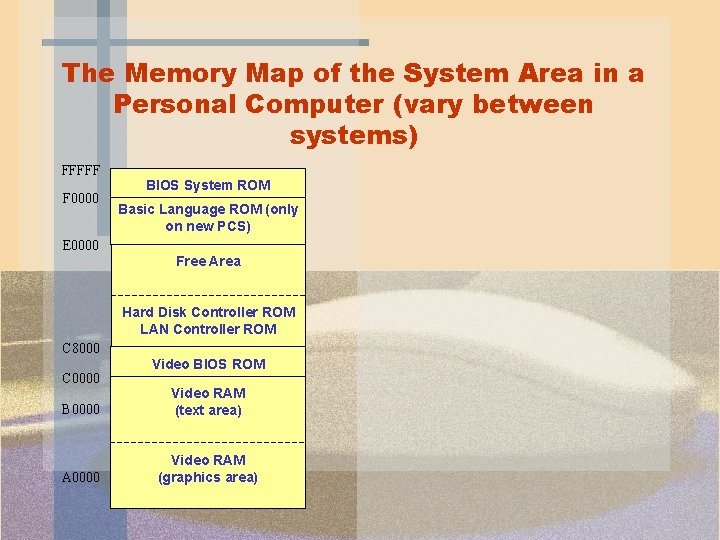
The Memory Map of the System Area in a Personal Computer (vary between systems) FFFFF F 0000 BIOS System ROM Basic Language ROM (only on new PCS) E 0000 Free Area Hard Disk Controller ROM LAN Controller ROM C 8000 C 0000 Video BIOS ROM B 0000 Video RAM (text area) A 0000 Video RAM (graphics area)
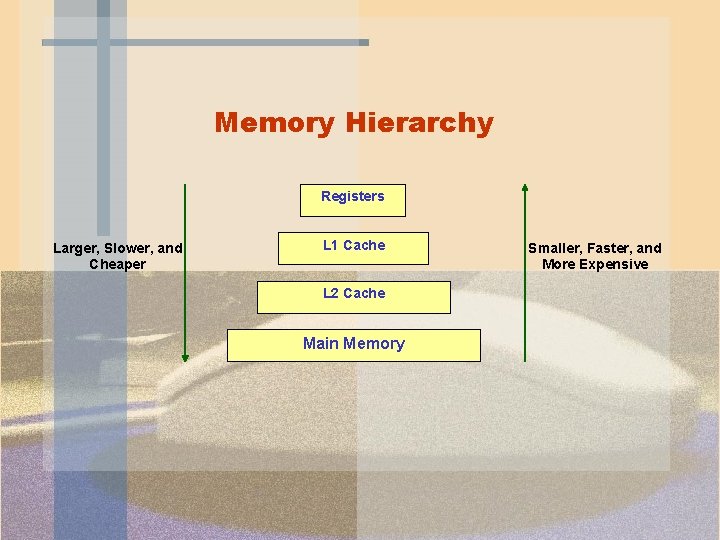
Memory Hierarchy Registers Larger, Slower, and Cheaper L 1 Cache L 2 Cache Main Memory Smaller, Faster, and More Expensive

The Microprocessor The microprocessor (sometimes referred as the CPU) is the controlling element in a computer system. The microprocessor controls memory and I/O through a series of connections called buses. The microprocessor performs three main tasks for the computer system: Data transfer between itself and the memory or I/O systems. Simple arithmetic and logic operations. Program flow via simple decisions. The power of the microprocessor is in its capability to execute hundreds of millions of instructions per second from a program or software (group of instructions) stored in the memory system.
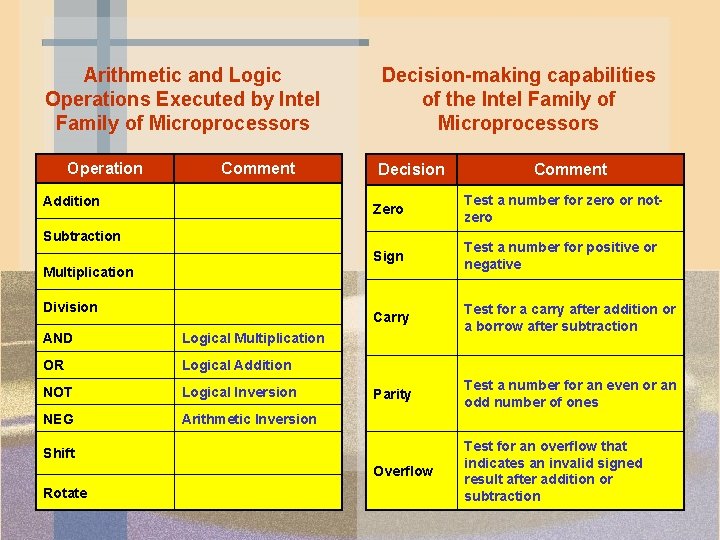
Arithmetic and Logic Operations Executed by Intel Family of Microprocessors Operation Comment Addition Decision-making capabilities of the Intel Family of Microprocessors Decision Zero Test a number for zero or notzero Sign Test a number for positive or negative Carry Test for a carry after addition or a borrow after subtraction Parity Test a number for an even or an odd number of ones Overflow Test for an overflow that indicates an invalid signed result after addition or subtraction Subtraction Multiplication Division AND Logical Multiplication OR Logical Addition NOT Logical Inversion NEG Arithmetic Inversion Shift Rotate Comment
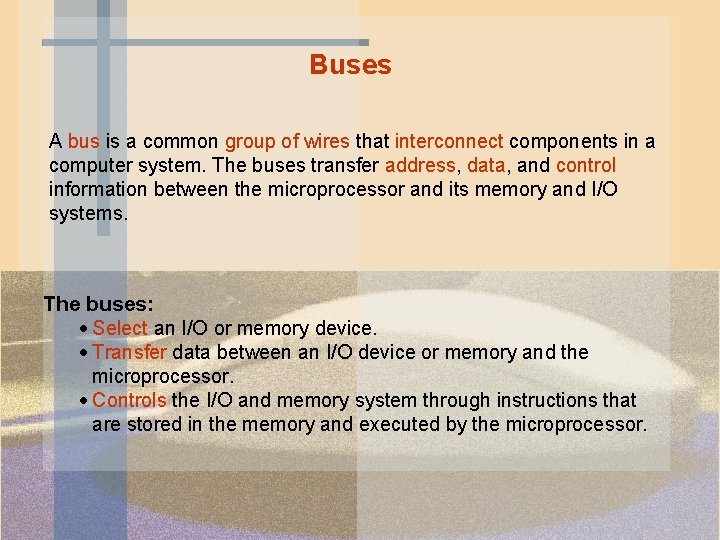
Buses A bus is a common group of wires that interconnect components in a computer system. The buses transfer address, data, and control information between the microprocessor and its memory and I/O systems. The buses: Select an I/O or memory device. Transfer data between an I/O device or memory and the microprocessor. Controls the I/O and memory system through instructions that are stored in the memory and executed by the microprocessor.
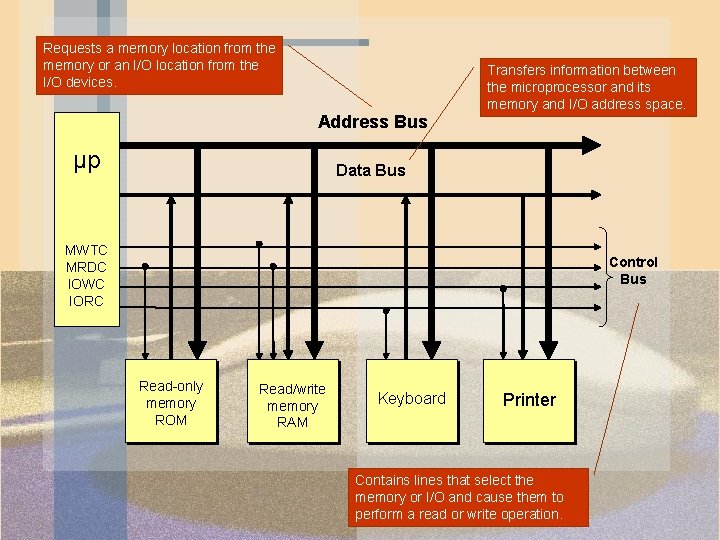
Requests a memory location from the memory or an I/O location from the I/O devices. Address Bus µp Transfers information between the microprocessor and its memory and I/O address space. Data Bus MWTC MRDC IOWC IORC Control Bus Read-only memory ROM Read/write memory RAM Keyboard Printer Contains lines that select the memory or I/O and cause them to perform a read or write operation.
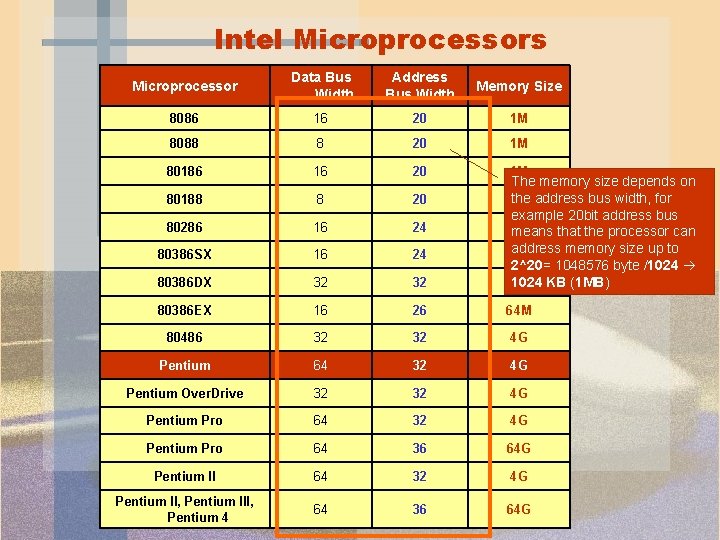
Intel Microprocessors Microprocessor Data Bus Width Address Bus Width Memory Size 8086 16 20 1 M 8088 8 20 1 M 80186 16 20 1 M 80188 8 20 80286 16 24 80386 SX 16 24 80386 DX 32 32 The memory size depends on the address bus width, for 1 M example 20 bit address bus 16 M means that the processor can address memory size up to 16 M 2^20= 1048576 byte /1024 KB (1 MB) 4 G 80386 EX 16 26 64 M 80486 32 32 4 G Pentium 64 32 4 G Pentium Over. Drive 32 32 4 G Pentium Pro 64 36 64 G Pentium II 64 32 4 G Pentium II, Pentium III, Pentium 4 64 36 64 G
- Slides: 12