
Introduction of zOS Basics Chapter 5 Working with
Introduction of z/OS Basics Chapter 5: Working with data sets © 2006 IBM Corporation
Chapter 05 Working with Datasets Chapter objectives Be able to: Explain what a data set is Describe data set naming conventions and record formats List some access methods for managing data and programs Explain what catalogs and VTOCs are used for Be able to create, delete, and modify data sets 2 © 2006 IBM Corporation
Chapter 05 Working with Datasets Key terms in this chapter block size catalog data set PDS and PDSE record format (RECFM) high level qualifier system managed library virtual storage access (HLQ) logical record length (LRECL) 3 member storage (SMS) method (VSAM) VTOC © 2006 IBM Corporation
Chapter 05 Working with Datasets What is a data set? A data set is a collection of logically related data records stored on one disk storage volume or a set of volumes. A data set can be: – a source program – a library of macros – a file of data records used by a processing program. You can print a data set or display it on a terminal. The logical record is the basic unit of information used by a program running on z/OS. 4 © 2006 IBM Corporation
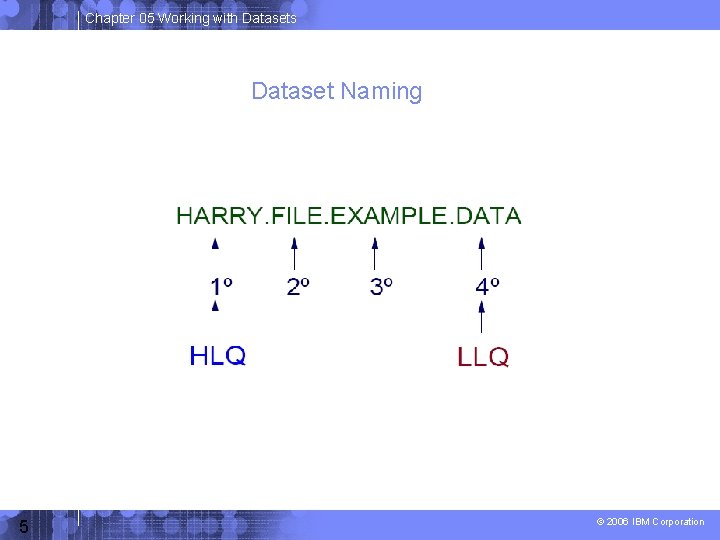
Chapter 05 Working with Datasets Dataset Naming 5 © 2006 IBM Corporation
Chapter 05 Working with Datasets What an access method is Defines the technique used to store and retrieve data. Includes system-provided programs and utilities to define and process data sets. Commonly used access methods include the following: – VSAM, QSAM, BDAM, and BPAM. 6 © 2006 IBM Corporation
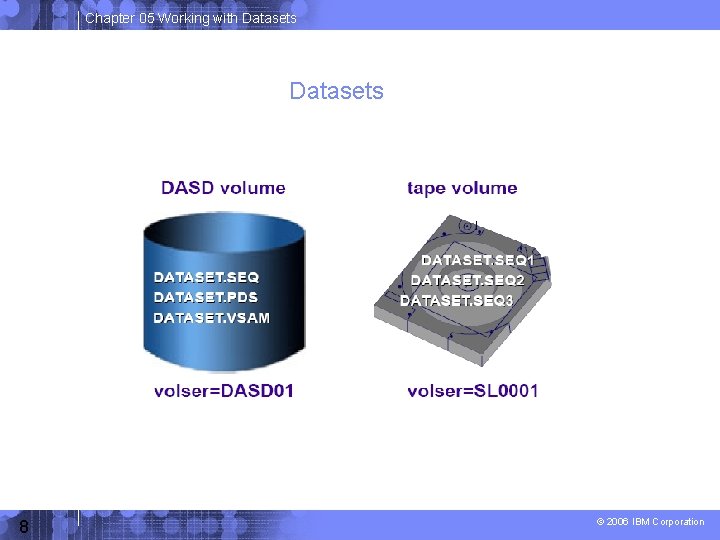
Chapter 05 Working with Datasets DASD: Use and terminology Direct Access Storage Device (DASD) is another name for a disk drive. DASD volumes are used for storing data and executable programs. Data sets in a z/OS system are organized on DASD volumes. – A disk drive contains cylinders – Cylinders contain tracks – Tracks contain data records. 7 © 2006 IBM Corporation
Chapter 05 Working with Datasets 8 © 2006 IBM Corporation
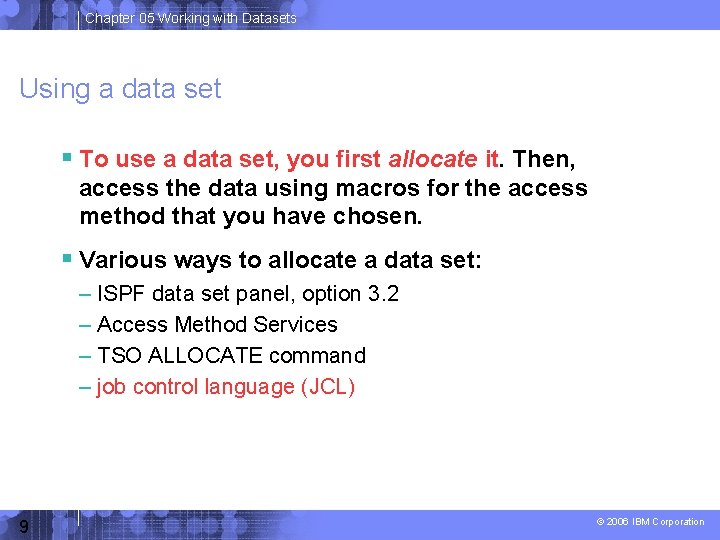
Chapter 05 Working with Datasets Using a data set To use a data set, you first allocate it. Then, access the data using macros for the access method that you have chosen. Various ways to allocate a data set: – ISPF data set panel, option 3. 2 – Access Method Services – TSO ALLOCATE command – job control language (JCL) 9 © 2006 IBM Corporation
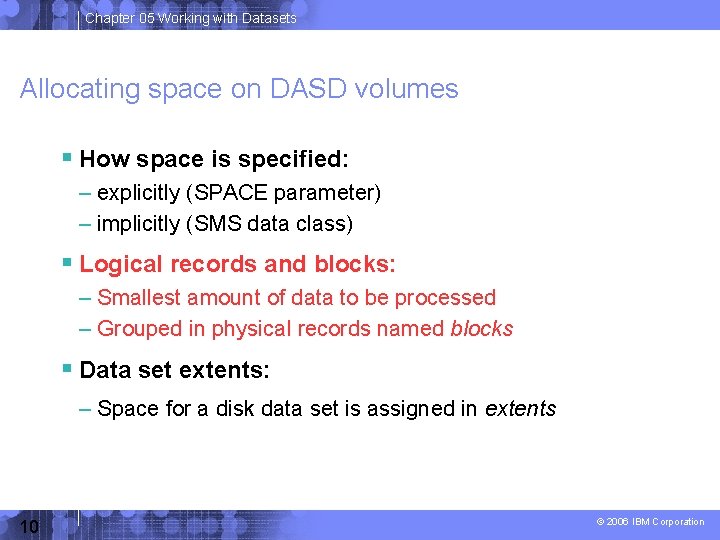
Chapter 05 Working with Datasets Allocating space on DASD volumes How space is specified: – explicitly (SPACE parameter) – implicitly (SMS data class) Logical records and blocks: – Smallest amount of data to be processed – Grouped in physical records named blocks Data set extents: – Space for a disk data set is assigned in extents 10 © 2006 IBM Corporation
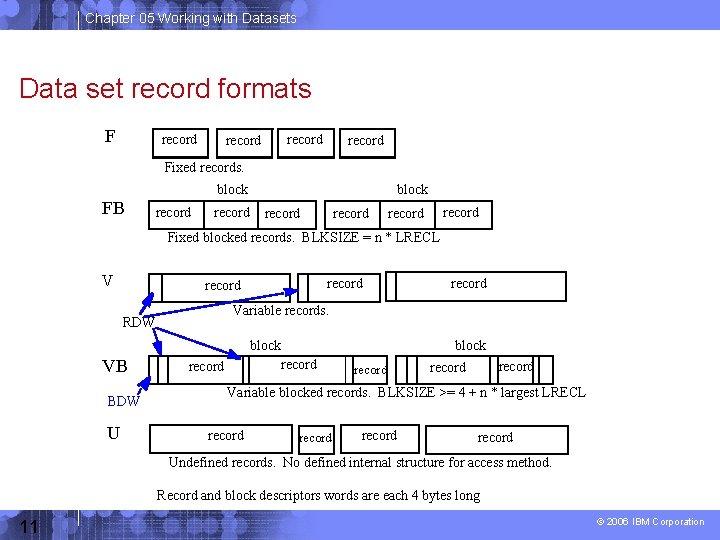
Chapter 05 Working with Datasets Data set record formats F record Fixed records. FB block record record Fixed blocked records. BLKSIZE = n * LRECL V record Variable records. RDW block VB BDW U record block record record Variable blocked records. BLKSIZE >= 4 + n * largest LRECL record Undefined records. No defined internal structure for access method. Record and block descriptors words are each 4 bytes long 11 © 2006 IBM Corporation
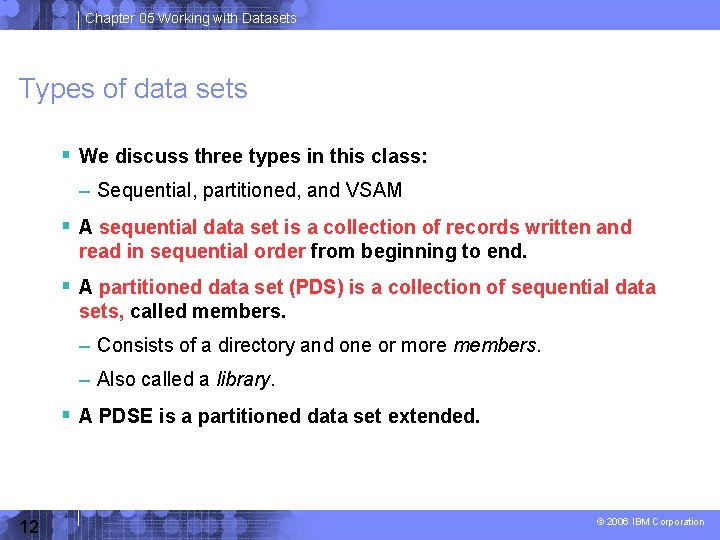
Chapter 05 Working with Datasets Types of data sets We discuss three types in this class: – Sequential, partitioned, and VSAM A sequential data set is a collection of records written and read in sequential order from beginning to end. A partitioned data set (PDS) is a collection of sequential data sets, called members. – Consists of a directory and one or more members. – Also called a library. A PDSE is a partitioned data set extended. 12 © 2006 IBM Corporation
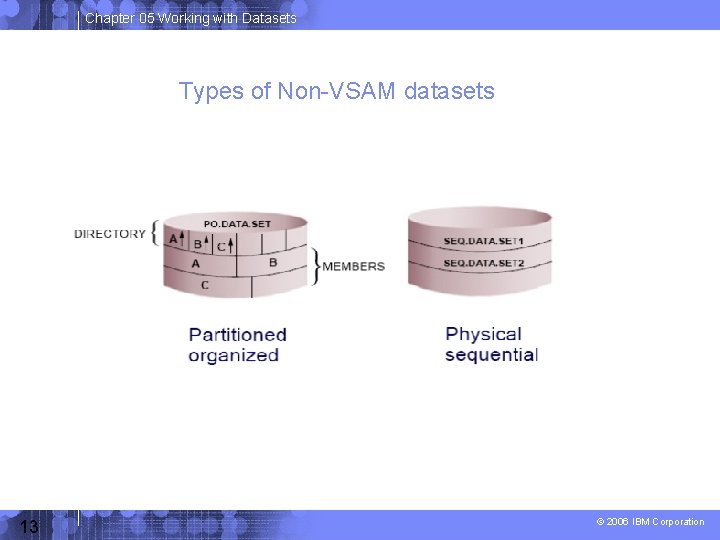
Chapter 05 Working with Datasets Types of Non-VSAM datasets 13 © 2006 IBM Corporation
Chapter 05 Working with Datasets PDS versus PDSE PDS data sets: – Simple and efficient way to organize related groups of sequential files. PDSE data sets: – Similar to a PDS, but advantages include: • Space reclaimed automatically when a member is deleted • Flexible size • Can be shared • Faster directory searches 14 © 2006 IBM Corporation
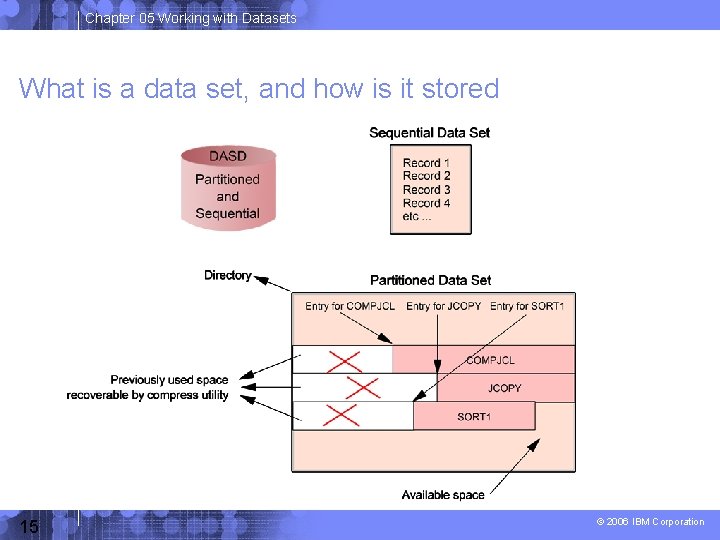
Chapter 05 Working with Datasets What is a data set, and how is it stored 15 © 2006 IBM Corporation
Chapter 05 Working with Datasets How data is stored in a z/OS system Data is stored on a disk (DASD), magnetic tape volume, or storage device optical media. You can store and retrieve records either directly or sequentially. You use DASD volumes for storing data and executable programs, including the operating system itself, and for temporary working storage. You can use one DASD volume for many different data sets, and reallocate or reuse space on the volume. 16 © 2006 IBM Corporation
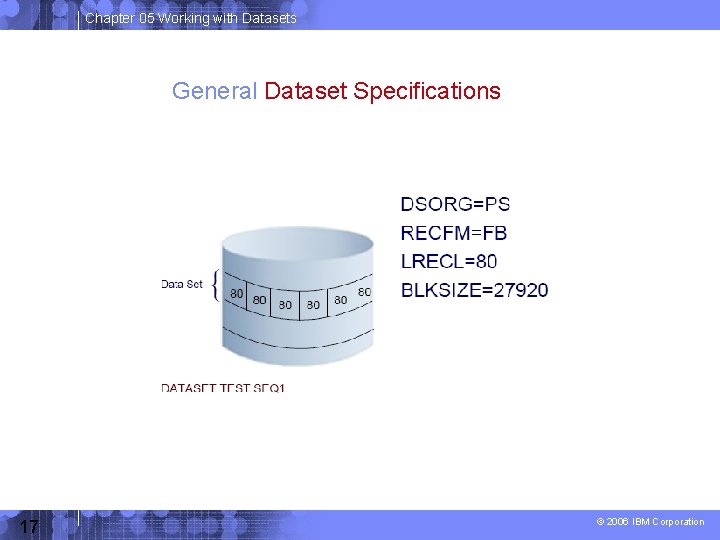
Chapter 05 Working with Datasets General Dataset Specifications 17 © 2006 IBM Corporation
Chapter 05 Working with Datasets How data sets are named Data set naming convention--Unique name • Maximum 44 characters – Maximum of 22 name segments: level qualifier • The first name in the left: high level qualifier (HLQ) Level qualifiers are separated by '. ' – Each level qualifier: • From 1 up to 8 characters • The first must be alphabetical (A-Z) or (@ # $) • The 7 remaining: alphabetical, national, numeric (09) or hyphen (-) • Upper case only – Example: MYID. JCL. FILE 2 HLQ: MYID 3 qualifiers Member name of PDS (partitioned data set) – 8 bytes long – First byte: alphabetical (A-Z) or special (@ # $) – The 7 remaining: alphabetical, special, numeric (0 -9) 18 © 2006 IBM Corporation
Chapter 05 Working with Datasets Catalogs and VTOCs z/OS uses a catalog and a volume table of contents (VTOC) on each DASD volume to manage the storage and placement of data sets. VTOC: – Lists the data sets on a volume – Lists the free space on the volume. 19 © 2006 IBM Corporation
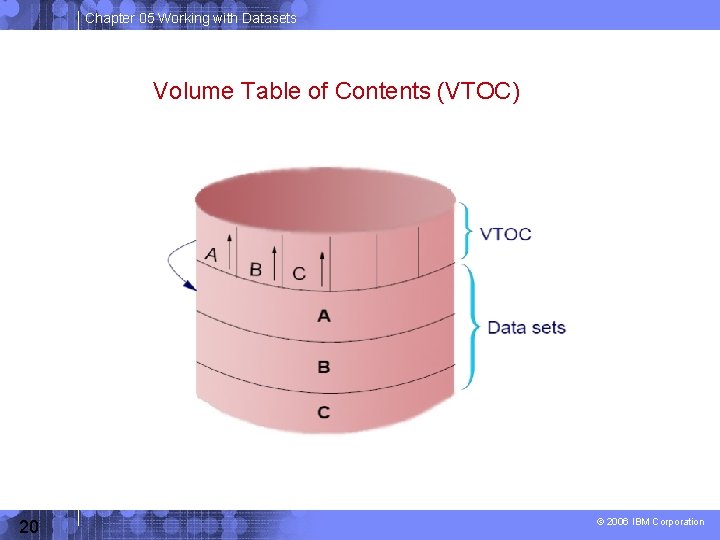
Chapter 05 Working with Datasets Volume Table of Contents (VTOC) 20 © 2006 IBM Corporation
Chapter 05 Working with Datasets VTOC location 21 © 2006 IBM Corporation
Chapter 05 Working with Datasets How a catalog is used A catalog associates a data set with the volume on which the data set is located. Locating a data set requires: – Data set name – Volume name – Unit I. e. (volume device type e. g. disk, tape) Typical z/OS system includes a master catalog and numerous user catalogs. 22 © 2006 IBM Corporation
Chapter 05 Working with Datasets Catalog Structure 23 © 2006 IBM Corporation
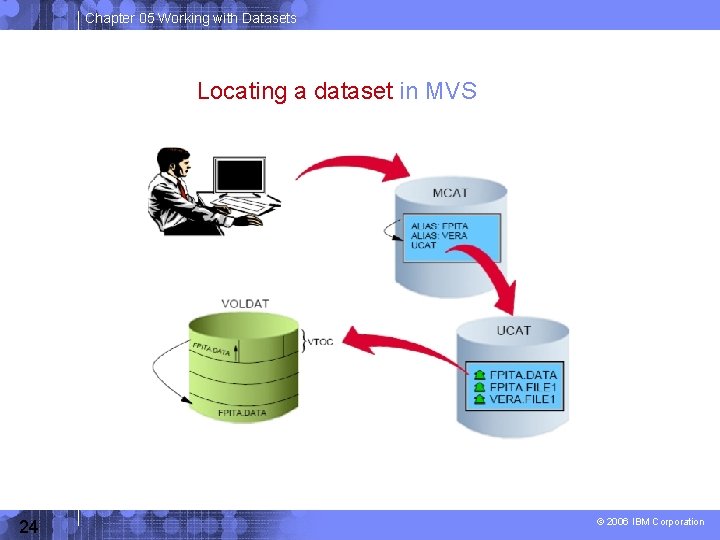
Chapter 05 Working with Datasets Locating a dataset in MVS 24 © 2006 IBM Corporation
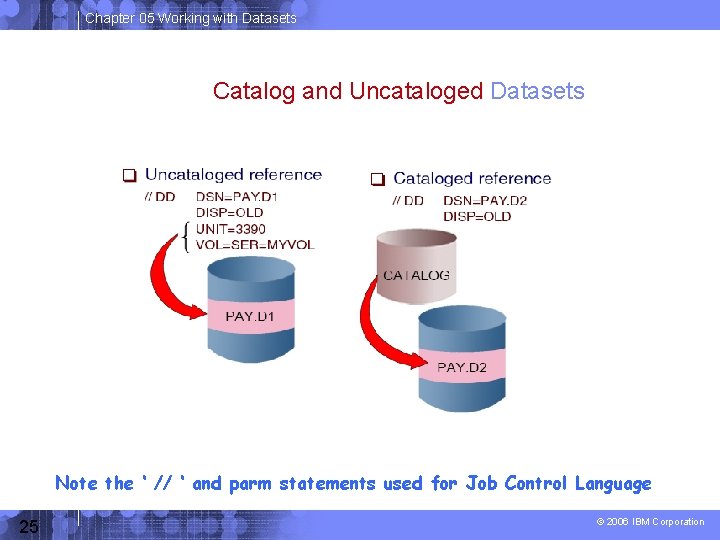
Chapter 05 Working with Datasets Catalog and Uncataloged Datasets Note the ‘ // ‘ and parm statements used for Job Control Language 25 © 2006 IBM Corporation
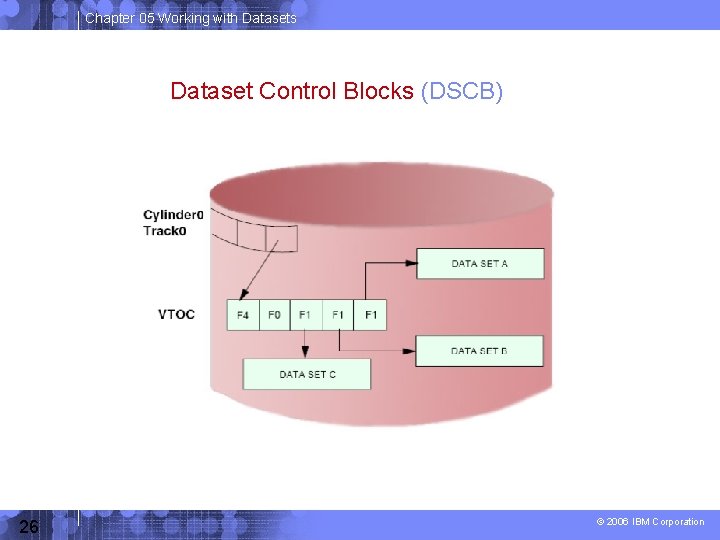
Chapter 05 Working with Datasets Dataset Control Blocks (DSCB) 26 © 2006 IBM Corporation
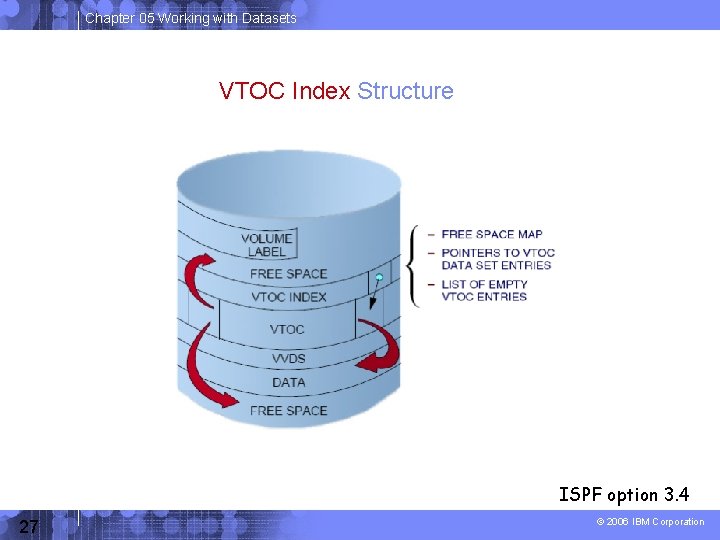
Chapter 05 Working with Datasets VTOC Index Structure ISPF option 3. 4 27 © 2006 IBM Corporation
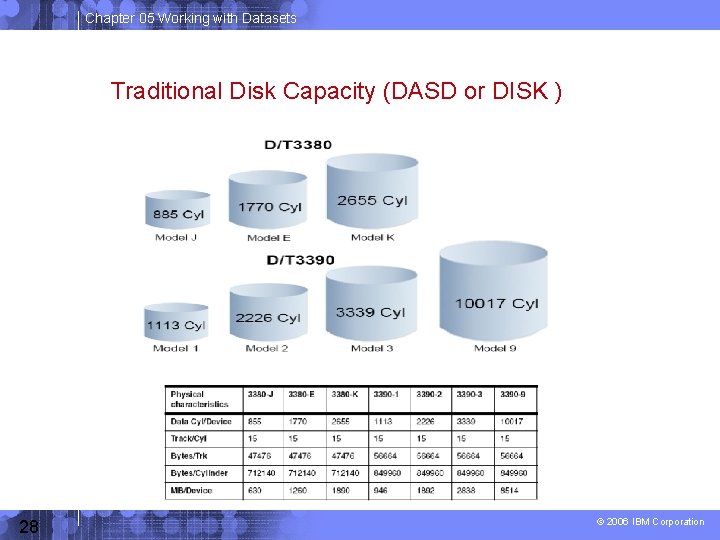
Chapter 05 Working with Datasets Traditional Disk Capacity (DASD or DISK ) 28 © 2006 IBM Corporation
Chapter 05 Working with Datasets Data management in z/OS Data management involves all of the following tasks: – allocation, – placement, – monitoring, – migration, – backup, – recall, – recovery, and – deletion. Storage management is either manual or automated (or a combination ). In z/OS, DFSMS is used to automate storage management for data sets. 29 © 2006 IBM Corporation
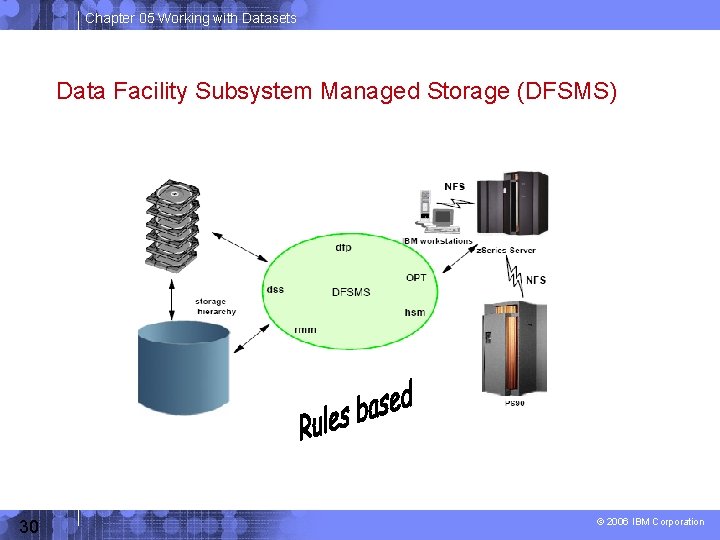
Chapter 05 Working with Datasets Data Facility Subsystem Managed Storage (DFSMS) 30 © 2006 IBM Corporation
Chapter 05 Working with Datasets VSAM is Virtual Storage Access Method VSAM provides more complex functions than other disk access methods VSAM record formats: – Key Sequence Data Set (KSDS) – Entry Sequence Data Set (ESDS) – Relative Record Data Set (RRDS) – Linear Data Set (LDS) 31 © 2006 IBM Corporation
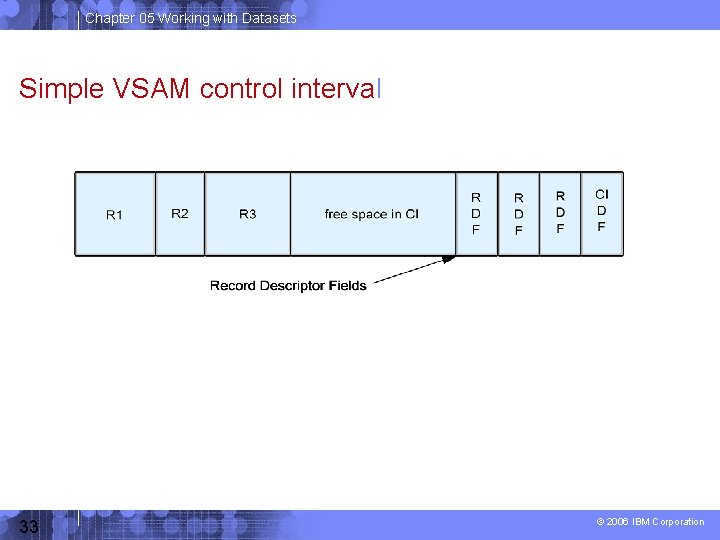
Chapter 05 Working with Datasets VSAM - Structure >VSAM data sets consist of control intervals (CI) and control areas (CA). >The size of the CI and CA is normally determined by the access method (They are not visible to the user). >There will be a fixed number of control intervals in each control area. (e. g. CI is a block, CA is a track) >A control interval normally contains multiple records. >The records are stored within the control interval at one end > Control information is at the other end of the control interval > The space between is the free space. 32 © 2006 IBM Corporation
Chapter 05 Working with Datasets Simple VSAM control interval 33 © 2006 IBM Corporation
Chapter 05 Working with Datasets VSAM – Structure (cont) The control information has two types of entry: - a control interval descriptor field (CIDF) which is always present, - and record descriptor fields (RDF) which are present when there are records and describe the length of the associated record. -Free space within a CI is always contiguous. 34 © 2006 IBM Corporation
Chapter 05 Working with Datasets VSAM – Structure (cont) Record insertion - placed in the correct order relative to other records. - records may have to be moved in the control interval (CI). - If there is not enough space, the CI is split (about equally from a free pool in the Control Area (CA) - If no more FREE CI in the CA, the CA is split (about equally) Record deletion- When a record is deleted, later records are moved down so that the free space remains contiguous. 35 © 2006 IBM Corporation
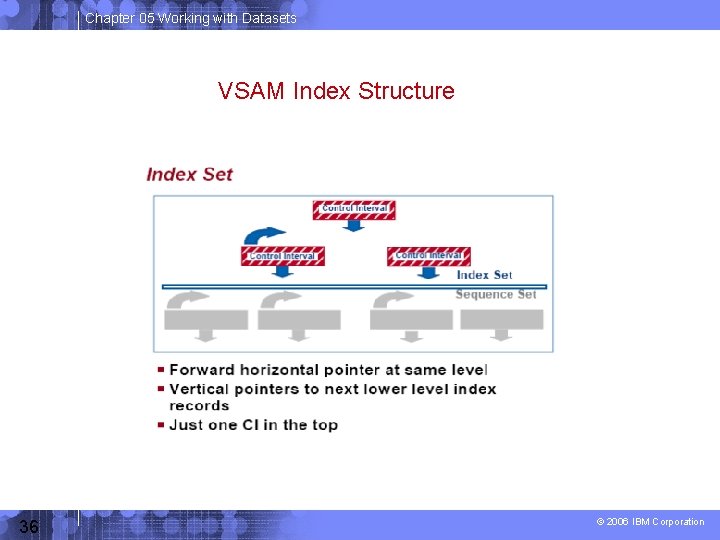
Chapter 05 Working with Datasets VSAM Index Structure 36 © 2006 IBM Corporation
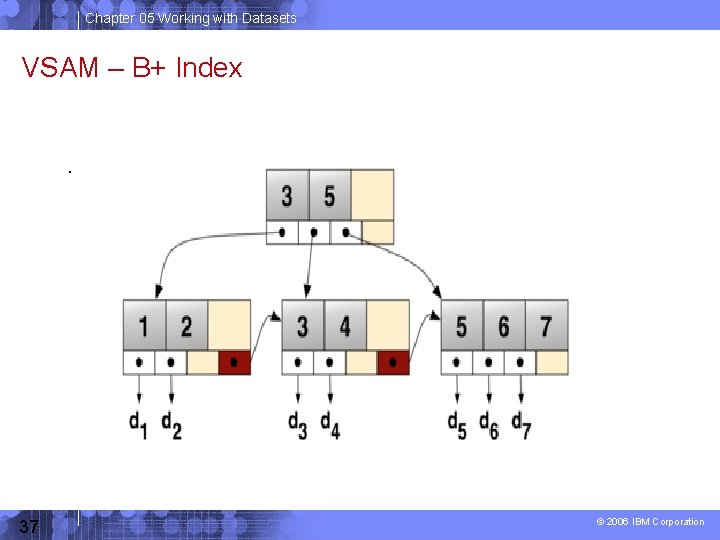
Chapter 05 Working with Datasets VSAM – B+ Index . 37 © 2006 IBM Corporation
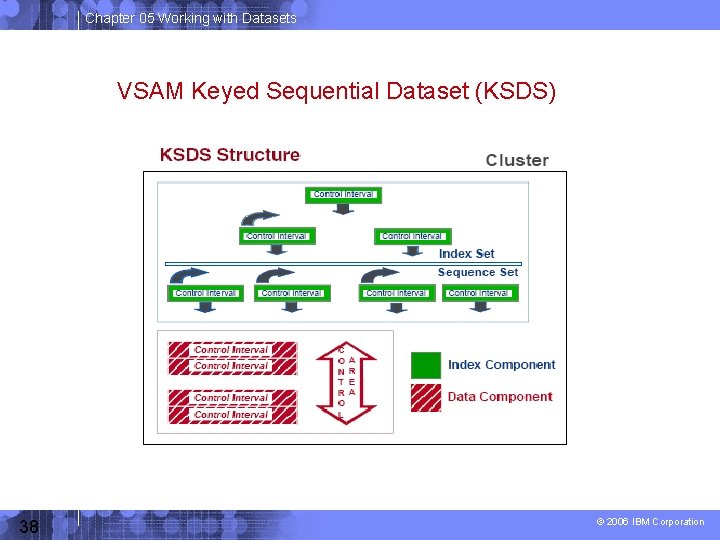
Chapter 05 Working with Datasets VSAM Keyed Sequential Dataset (KSDS) 38 © 2006 IBM Corporation
Chapter 05 Working with Datasets VSAM – Entry Sequenced Data Set (ESDS) >Records in ESDS are stored in order in which they are written >Records are loaded irrespective of their contents and their byte addresses cannot be changed. >An ESDS may have an index defined to it to enable access via keys, by defining an Alternate Index > Records are accessed based on their sequential order, that is, the order in which they were written to the file; > accessing a particular record involves searching all the records sequentially until it is located, or by using a relative physical address (Relative byte address, RBA), i. e. the number of bytes from the beginning of the file to start reading. 39 © 2006 IBM Corporation
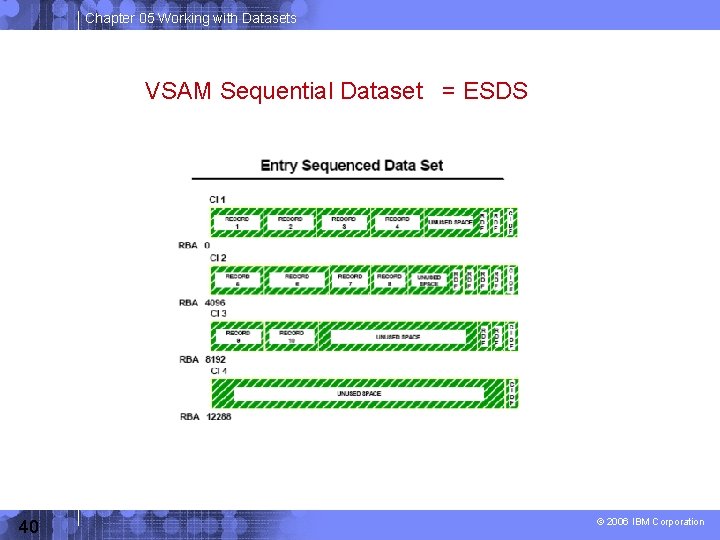
Chapter 05 Working with Datasets VSAM Sequential Dataset = ESDS 40 © 2006 IBM Corporation
Chapter 05 Working with Datasets VSAM – Relative Record Data Set (RRDS) >A Relative Record Data Set (RRDS) is a type of data set organization used by the VSAM computer data storage system. > Records are accessed based on their ordinal position in the file (relative record number, RRN). For example, the desired record to be accessed might be the 42 nd record in the file out of 999 total. >The concept of RRDS is similar to ESDS method, but it can access data in random or dynamic access. >An RRDS may have an index defined to it to enable access via keys, by defining an Alternate Index 41 © 2006 IBM Corporation
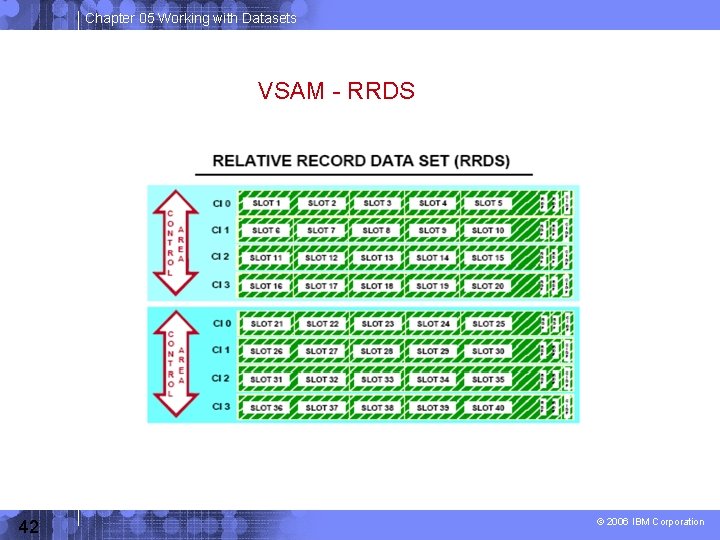
Chapter 05 Working with Datasets VSAM - RRDS 42 © 2006 IBM Corporation
Chapter 05 Working with Datasets VSAM – Linear Data Set >A linear data set contains data that can be accessed as byteaddressable strings in virtual storage. > It is a VSAM data set with a CI size multiple of 4096 bytes. >An LDS has no embedded control information in its CI >All LDS bytes are data bytes. > Logical records must be blocked and deblocked by the program. i. e. Logical records are not apparent from VSAM’s point of view. In a sense, an LDS is a non-VSAM data set with some VSAM facilities, such as VSAM specific information in the catalog. >The most common LDS user is IBM DB 2®. LDS is the VSAM data set organization that is used by Data-in-Virtual (DIV) facility. 43 © 2006 IBM Corporation
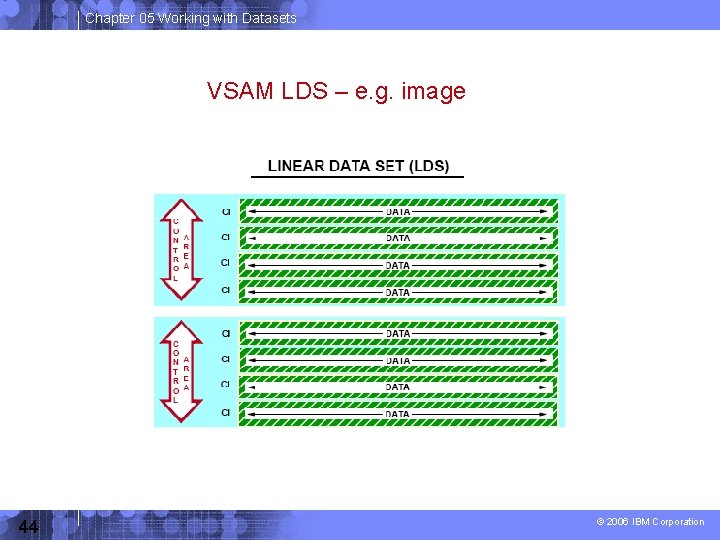
Chapter 05 Working with Datasets VSAM LDS – e. g. image 44 © 2006 IBM Corporation
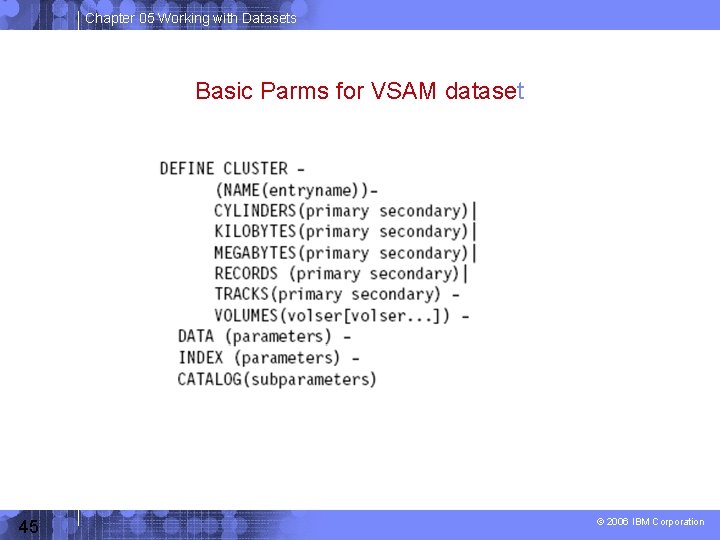
Chapter 05 Working with Datasets Basic Parms for VSAM dataset 45 © 2006 IBM Corporation
Chapter 05 Working with Datasets z/OS UNIX file systems z/OS UNIX System Services (z/OS UNIX) allows z/OS to access UNIX files. A z/OS UNIX file system is hierarchical and byteoriented. Files in the UNIX file system are sequential files and accessed as byte streams. UNIX files and traditional z/OS data sets can reside on the same DASD volume. 46 © 2006 IBM Corporation
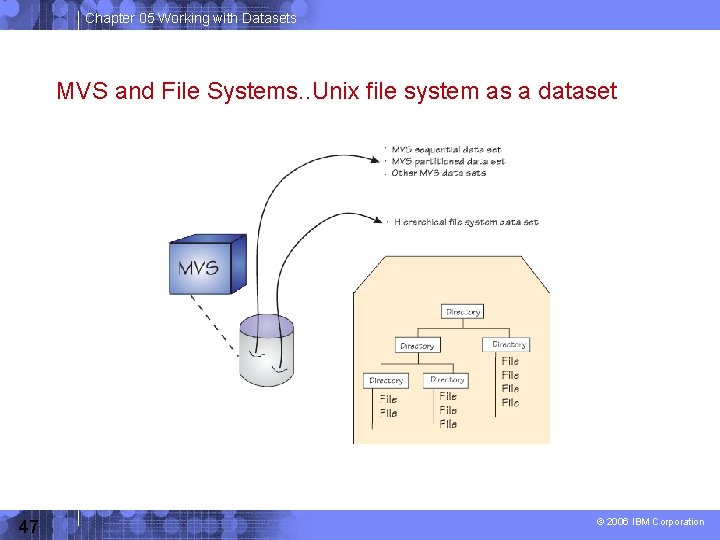
Chapter 05 Working with Datasets MVS and File Systems. . Unix file system as a dataset 47 © 2006 IBM Corporation
Chapter 05 Working with Datasets UNIX file system structure 48 © 2006 IBM Corporation
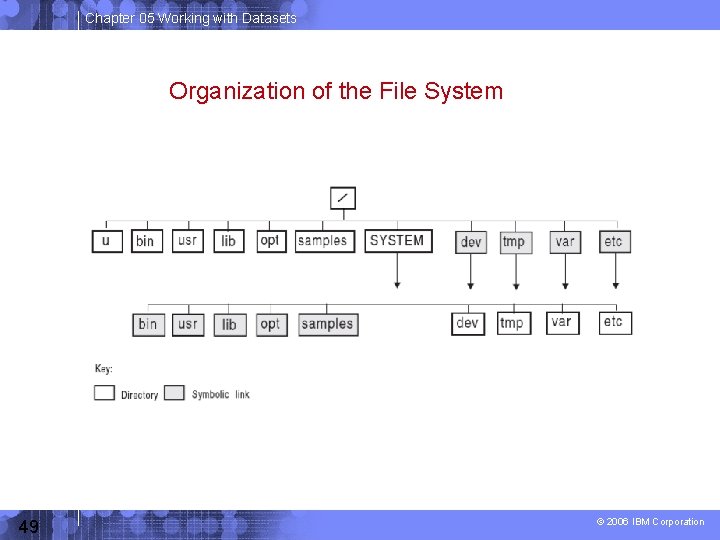
Chapter 05 Working with Datasets Organization of the File System 49 © 2006 IBM Corporation
Chapter 05 Working with Datasets Comparison of MVS Datasets and UNIX HFS (Hierarchical file system) 50 © 2006 IBM Corporation
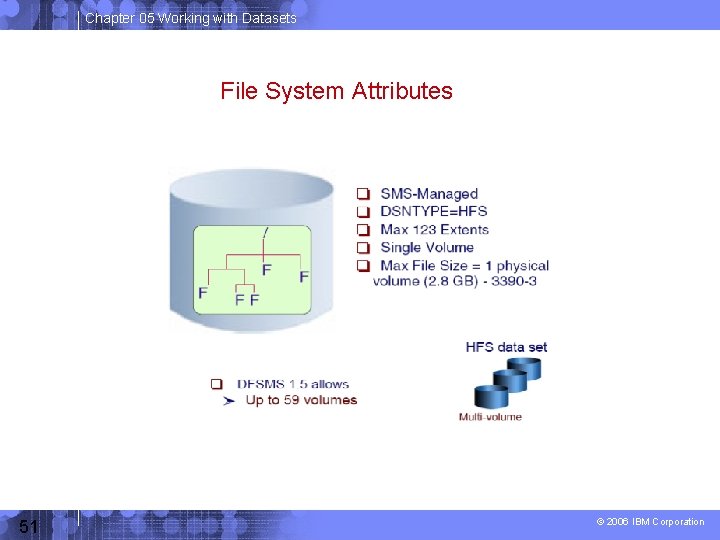
Chapter 05 Working with Datasets File System Attributes 51 © 2006 IBM Corporation
Chapter 05 Working with Datasets Summary A data set is a collection of logically related data (programs or files) Data sets are stored on disk drives (DASD) and tape. Most z/OS data processing is record-oriented. Byte stream files are present only in z/OS UNIX. z/OS records follow well-defined formats, based on record format (RECFM), logical record length (LRECL), and the maximum block size (BLKSIZE). z/OS data set names have up to 44 characters, divided by periods into qualifiers. 52 © 2006 IBM Corporation
Chapter 05 Working with Datasets Summary (continued) Catalogs are used to locate data sets. VSAM is an access method that provides more complex functions than other disk access methods. z/OS libraries are known as partitioned data sets (PDS or PDSE) and contain members. A file in the hierarchical file system can be either a text file or a binary file. z/OS treats an entire UNIX file system hierarchy as a collection of “data sets” where Each “UNIX” data set is a MOUNTABLE file system. 53 © 2006 IBM Corporation
- Slides: 53