
Introduction of MAG Manager MAG 2 2 By
Introduction of MAG Manager (MAG 2. 2) By Sascha Preibisch Dec 20 th 2014 © 2014 CA. ALL RIGHTS RESERVED. CA CONFIDENTIAL AND PROPRIETARY INFORMATION; FOR INTERNAL USE ONLY. NO UNAUTHORIZED USE, COPYING OR DISTRIBUTION.
Agenda 1 PREREQUISITES 2 UNDERSTANDING MAG DEVICE REGISTRATION UNDERSTADNING 3 MAG MANAGER 4 MAG MANAGER CONFIGURATION 5 Q&A 2 © 2014 CA. ALL RIGHTS RESERVED.

Prerequisites
Prerequisites § Target Audience – PS, Support, Sales § Basic knowledge of OAuth and MAG (CA Mobile API Gateway) § Basic knowledge of the Policy Manager § MAG policies installed including MAG Manager 4 © 2014 CA. ALL RIGHTS RESERVED.
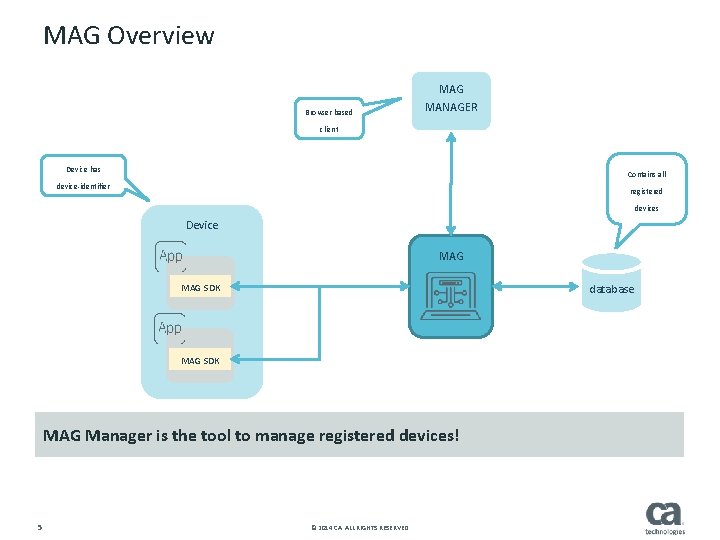
MAG Overview Browser based MAG MANAGER client Device has Contains all device-identifier registered devices Device MAG database MAG SDK MAG Manager is the tool to manage registered devices! 5 © 2014 CA. ALL RIGHTS RESERVED.
Understanding MAG device registration
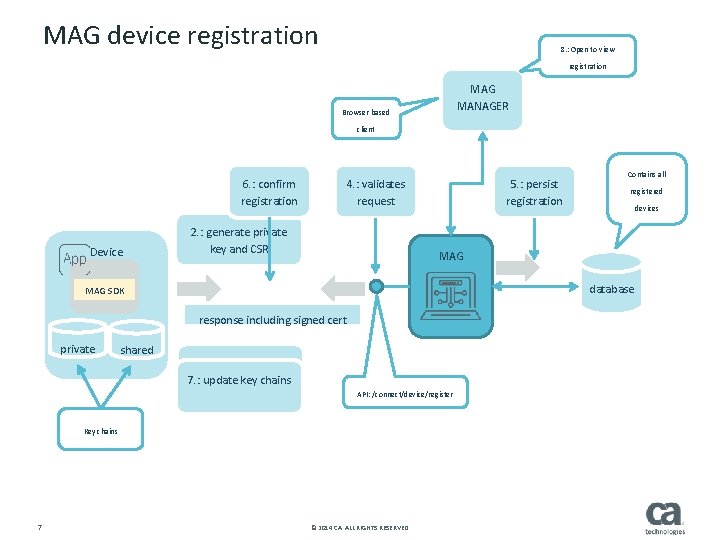
MAG device registration 8. : Open to view registration MAG MANAGER Browser based client 6. : confirm registration Device 5. : persist registration 4. : validates request 2. : generate private key and CSR 1. : not registered? 7. : update chains Registerkey device API: /connect/device/register Key chains 7 devices database 3. : register including CSRcert response including signed shared registered MAG SDK private Contains all © 2014 CA. ALL RIGHTS RESERVED.

MAG Manager

MAG Manager URL: /mag/manager MAG Manager is an OAuth client. By default it is registered in MAG 9 © 2014 CA. ALL RIGHTS RESERVED.
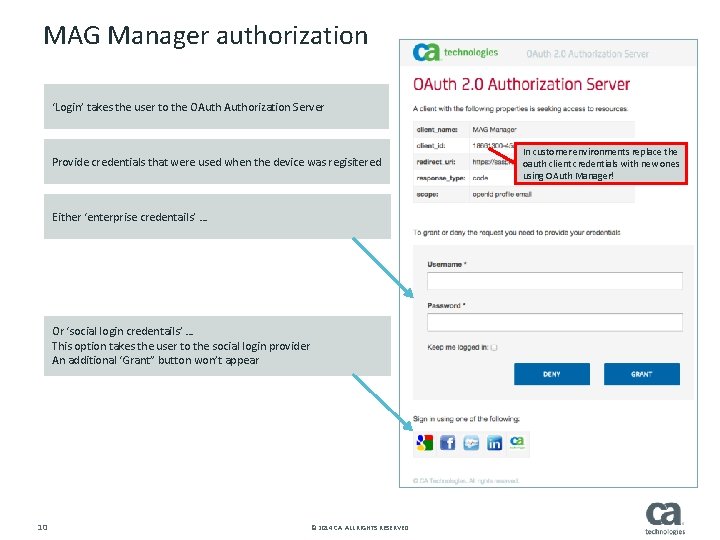
MAG Manager authorization ‘Login’ takes the user to the OAuthorization Server Provide credentials that were used when the device was regisitered Either ‘enterprise credentails’ … Or ‘social login credentails’ … This option takes the user to the social login provider An additional ‘Grant” button won’t appear 10 © 2014 CA. ALL RIGHTS RESERVED. In customer environments replace the oauth client credentials with new ones using OAuth Manager!
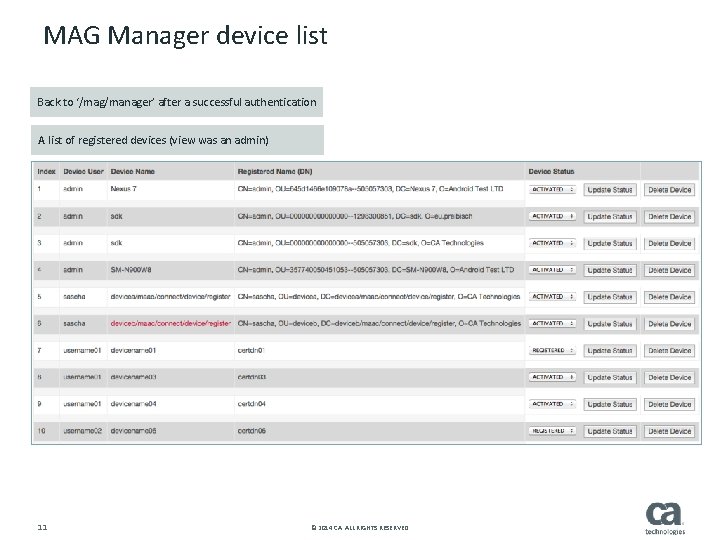
MAG Manager device list Back to ‘/mag/manager’ after a successful authentication A list of registered devices (view was an admin) 11 © 2014 CA. ALL RIGHTS RESERVED.
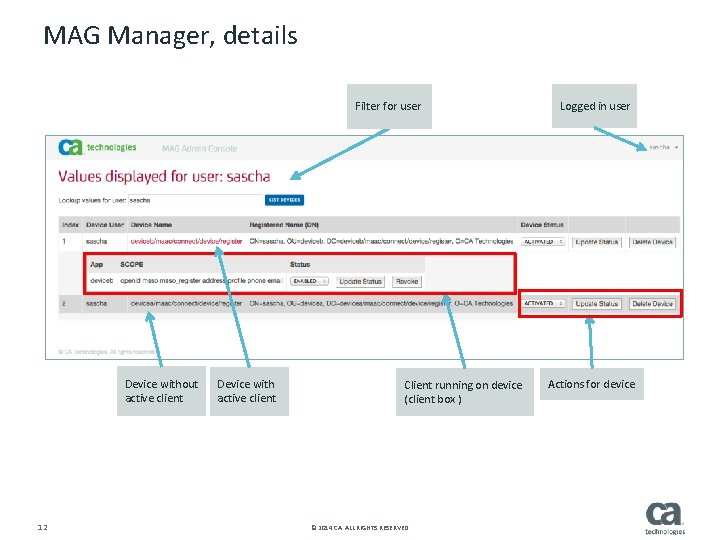
MAG Manager, details Filter for user Device without active client 12 Device with active client Client running on device (client box ) © 2014 CA. ALL RIGHTS RESERVED. Logged in user Actions for device
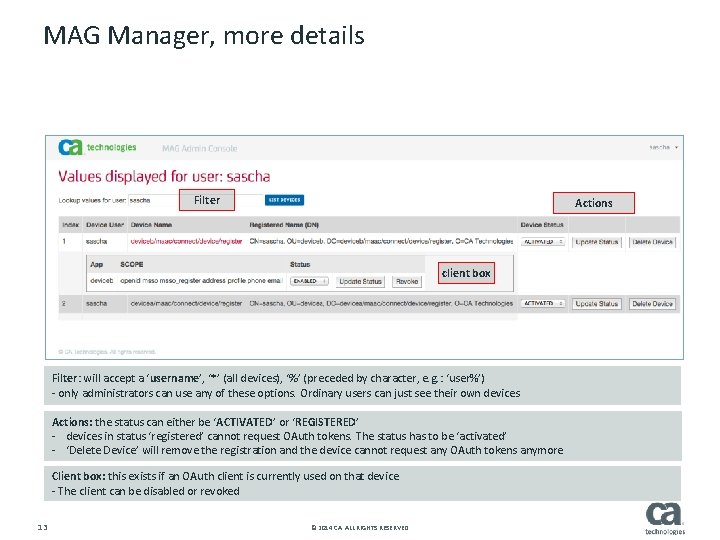
MAG Manager, more details Filter Actions client box Filter: will accept a ‘username’, ‘*’ (all devices), ‘%’ (preceded by character, e. g. : ‘user%’) - only administrators can use any of these options. Ordinary users can just see their own devices Actions: the status can either be ‘ACTIVATED’ or ‘REGISTERED’ - devices in status ‘registered’ cannot request OAuth tokens. The status has to be ‘activated’ - ‘Delete Device’ will remove the registration and the device cannot request any OAuth tokens anymore Client box: this exists if an OAuth client is currently used on that device - The client can be disabled or revoked 13 © 2014 CA. ALL RIGHTS RESERVED.

MAG Manager configuration
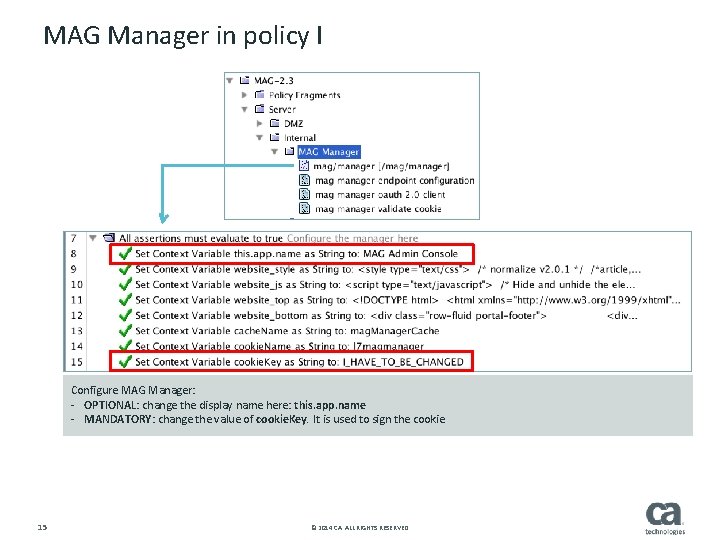
MAG Manager in policy I Configure MAG Manager: - OPTIONAL: change the display name here: this. app. name - MANDATORY: change the value of cookie. Key. It is used to sign the cookie 15 © 2014 CA. ALL RIGHTS RESERVED.
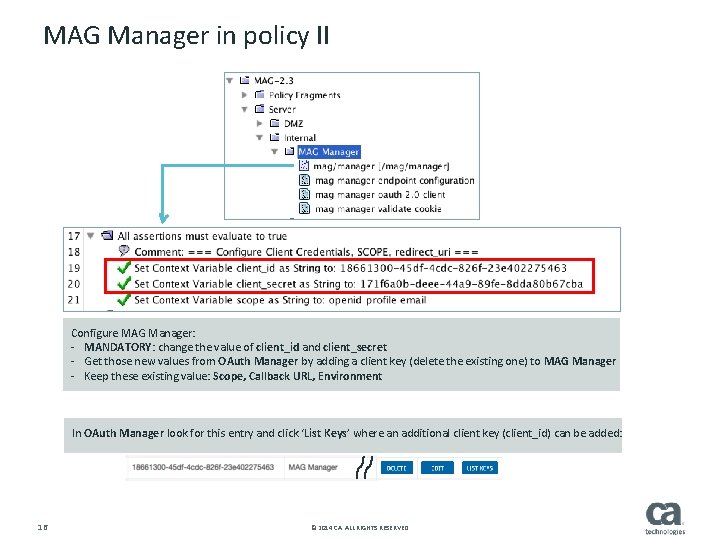
MAG Manager in policy II Configure MAG Manager: - MANDATORY: change the value of client_id and client_secret - Get those new values from OAuth Manager by adding a client key (delete the existing one) to MAG Manager - Keep these existing value: Scope, Callback URL, Environment In OAuth Manager look for this entry and click ‘List Keys’ where an additional client key (client_id) can be added: 16 © 2014 CA. ALL RIGHTS RESERVED.
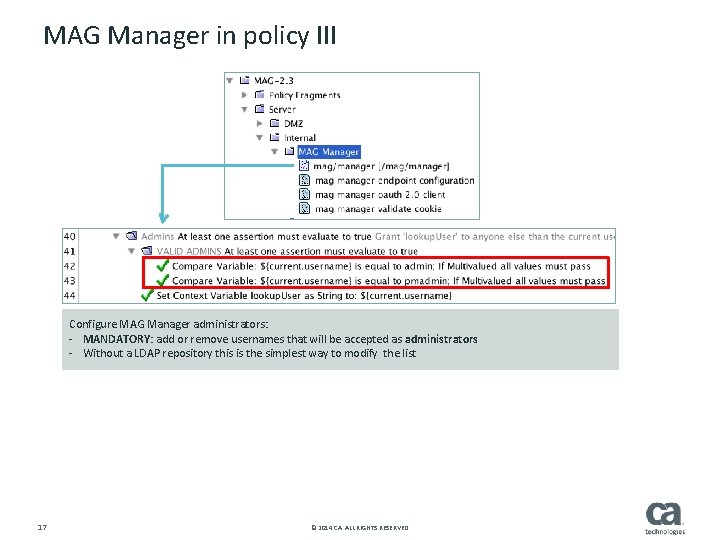
MAG Manager in policy III Configure MAG Manager administrators: - MANDATORY: add or remove usernames that will be accepted as administrators - Without a LDAP repository this is the simplest way to modify the list 17 © 2014 CA. ALL RIGHTS RESERVED.
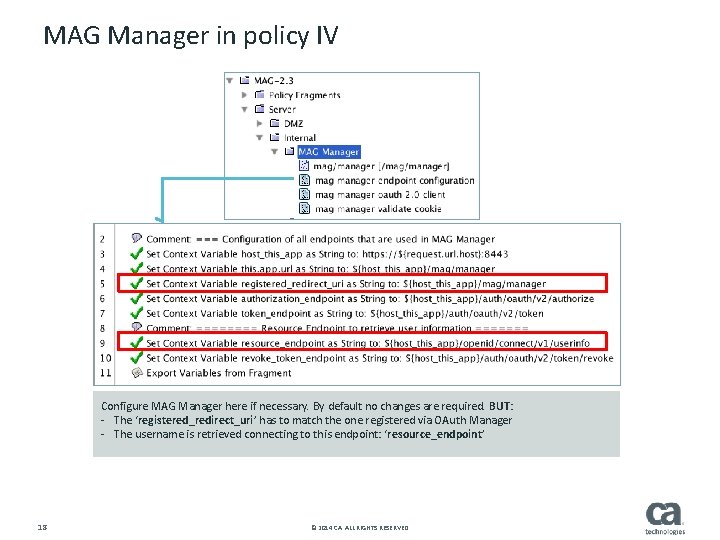
MAG Manager in policy IV Configure MAG Manager here if necessary. By default no changes are required. BUT: - The ‘registered_redirect_uri’ has to match the one registered via OAuth Manager - The username is retrieved connecting to this endpoint: ‘resource_endpoint’ 18 © 2014 CA. ALL RIGHTS RESERVED.

Q&A

Thank you!
- Slides: 20