
Introduction of Hikvision i VMS5200 January 2013 1
- Slides: 51
Introduction of Hikvision i. VMS-5200 January, 2013 1
Contents 1 1 Hikvision i. VMS-5200 Overview 2 Features of Hikvision i. VMS-5200 3 Functions of Hikvision i. VMS-5200 4 Specification Details of Hikvision i. VMS-5200
Preface Hikvision Brief View Why Hikvision moved into VMS business? Hikvision abilities No. 7 VMS vendor 3
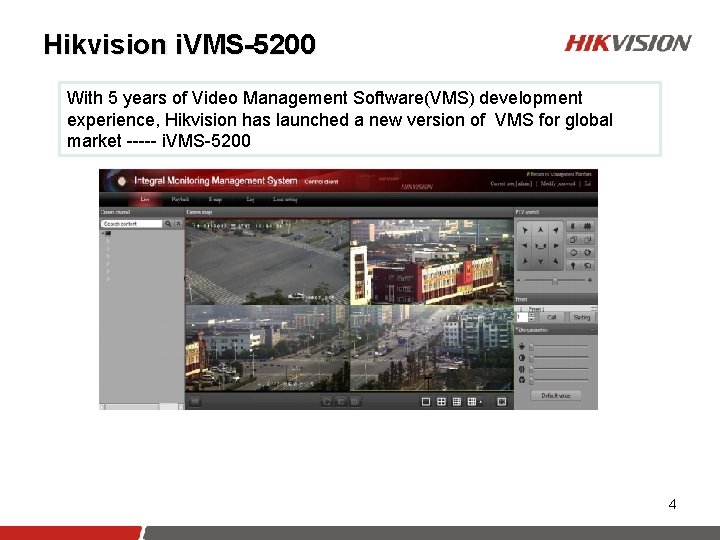
Hikvision i. VMS-5200 With 5 years of Video Management Software(VMS) development experience, Hikvision has launched a new version of VMS for global market ----- i. VMS-5200 4
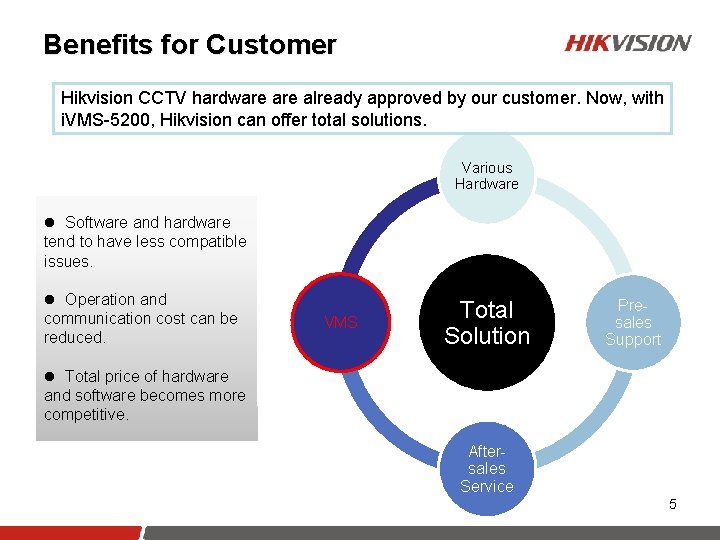
Benefits for Customer Hikvision CCTV hardware already approved by our customer. Now, with i. VMS-5200, Hikvision can offer total solutions. Various Hardware l Software and hardware tend to have less compatible issues. l Operation and communication cost can be reduced. VMS Total Solution Presales Support l Total price of hardware and software becomes more competitive. Aftersales Service 5
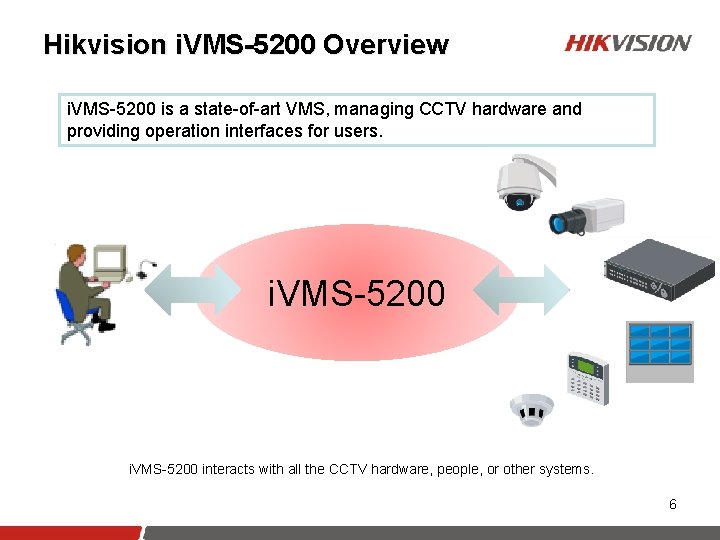
Hikvision i. VMS-5200 Overview i. VMS-5200 is a state-of-art VMS, managing CCTV hardware and providing operation interfaces for users. i. VMS-5200 interacts with all the CCTV hardware, people, or other systems. 6
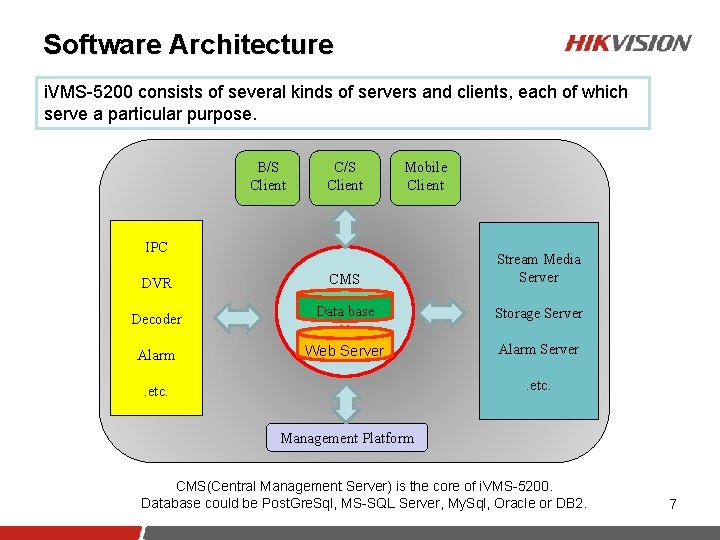
Software Architecture i. VMS-5200 consists of several kinds of servers and clients, each of which serve a particular purpose. B/S Client C/S Client Mobile Client IPC DVR Decoder Alarm CMS Stream Media Server Data base Storage Server Web Server Alarm Server. etc. Management Platform CMS(Central Management Server) is the core of i. VMS-5200. Database could be Post. Gre. Sql, MS-SQL Server, My. Sql, Oracle or DB 2. 7
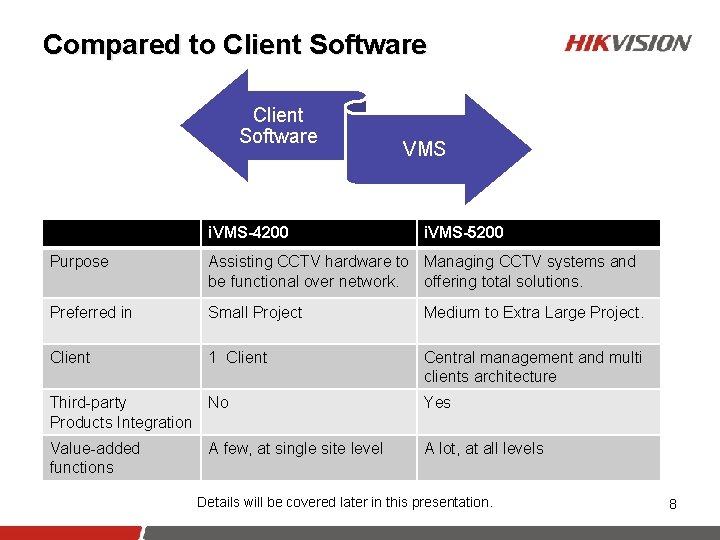
Compared to Client Software i. VMS-4200 VMS i. VMS-5200 Purpose Assisting CCTV hardware to Managing CCTV systems and be functional over network. offering total solutions. Preferred in Small Project Medium to Extra Large Project. Client 1 Client Central management and multi clients architecture Third-party No Products Integration Yes Value-added functions A lot, at all levels A few, at single site level Details will be covered later in this presentation. 8
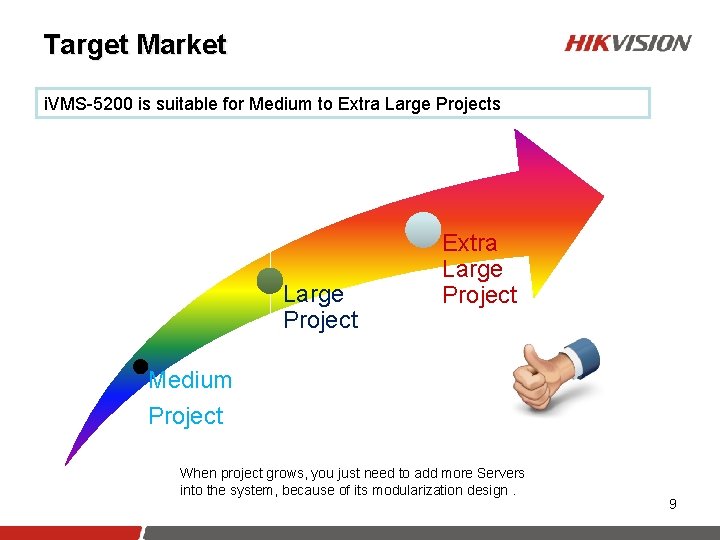
Target Market i. VMS-5200 is suitable for Medium to Extra Large Projects Large Project Extra Large Project Medium Project When project grows, you just need to add more Servers into the system, because of its modularization design. 9
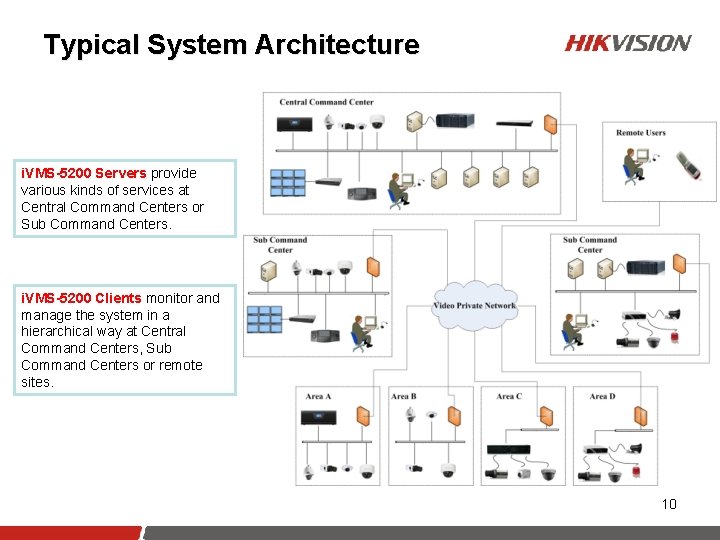
Typical System Architecture i. VMS-5200 Servers provide various kinds of services at Central Command Centers or Sub Command Centers. i. VMS-5200 Clients monitor and manage the system in a hierarchical way at Central Command Centers, Sub Command Centers or remote sites. 10
Contents 1 2 1 Hikvision i. VMS-5200 Overview Features of Hikvision i. VMS-5200 3 Functions of Hikvision i. VMS-5200 4 Specification Details of Hikvision i. VMS-5200
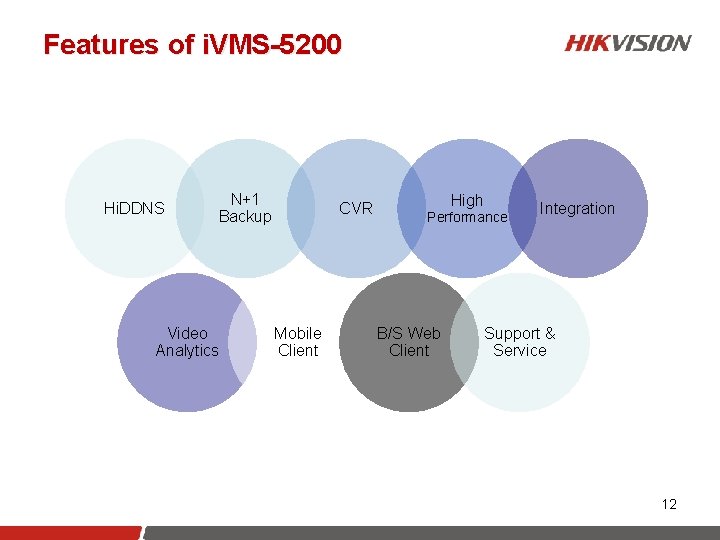
Features of i. VMS-5200 Hi. DDNS N+1 Backup Video Analytics CVR Mobile Client High Performance B/S Web Client Integration Support & Service 12
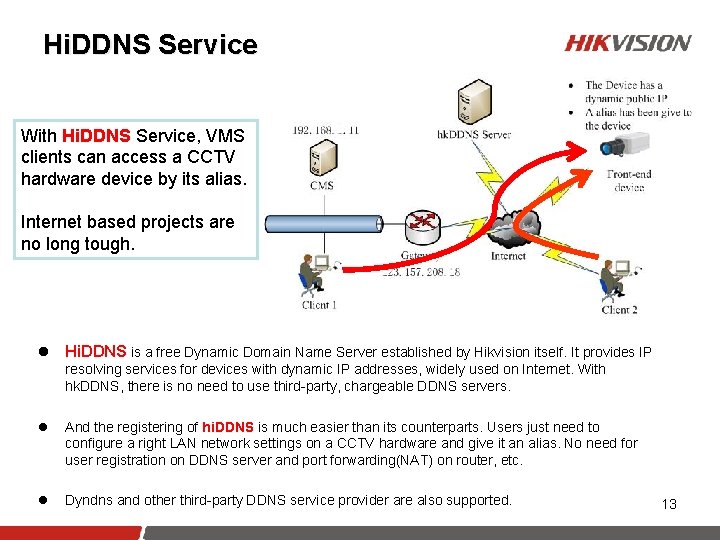
Hi. DDNS Service With Hi. DDNS Service, VMS clients can access a CCTV hardware device by its alias. Internet based projects are no long tough. l Hi. DDNS is a free Dynamic Domain Name Server established by Hikvision itself. It provides IP resolving services for devices with dynamic IP addresses, widely used on Internet. With hk. DDNS, there is no need to use third-party, chargeable DDNS servers. l And the registering of hi. DDNS is much easier than its counterparts. Users just need to configure a right LAN network settings on a CCTV hardware and give it an alias. No need for user registration on DDNS server and port forwarding(NAT) on router, etc. l Dyndns and other third-party DDNS service provider are also supported. 13
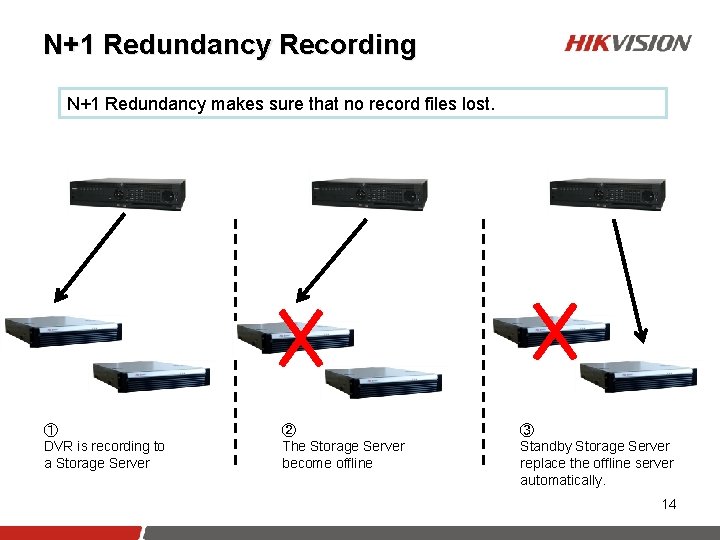
N+1 Redundancy Recording N+1 Redundancy makes sure that no record files lost. ① DVR is recording to a Storage Server ② The Storage Server become offline ③ Standby Storage Server replace the offline server automatically. 14
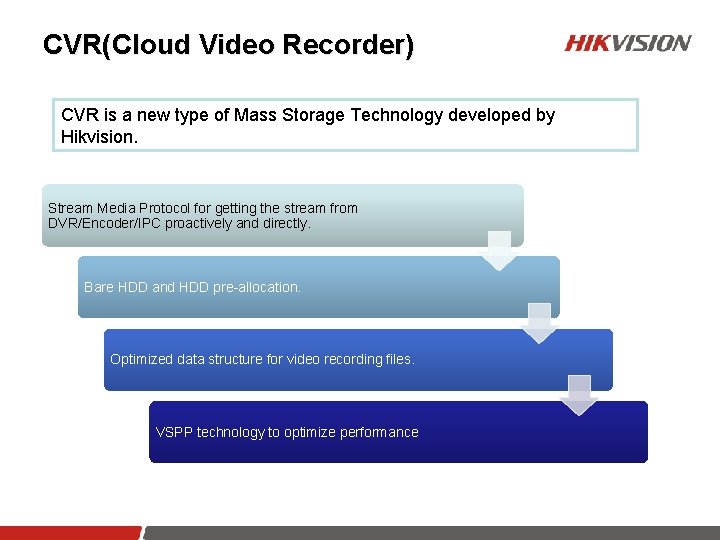
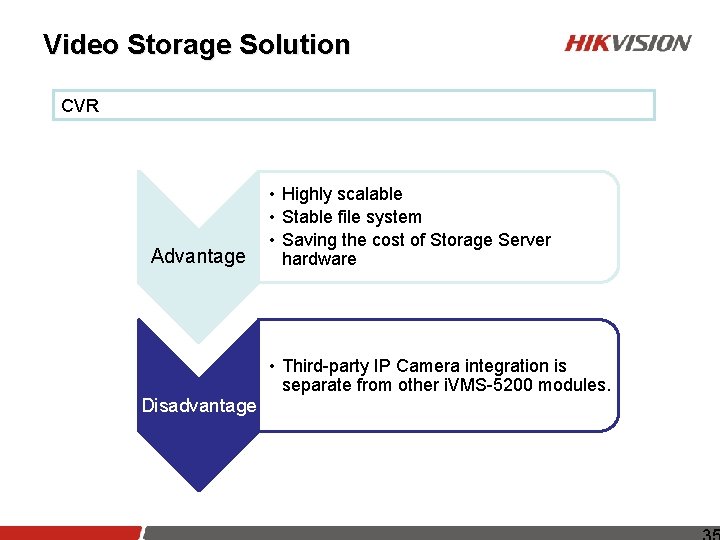
CVR(Cloud Video Recorder) CVR is a new type of Mass Storage Technology developed by Hikvision. Stream Media Protocol for getting the stream from DVR/Encoder/IPC proactively and directly. Bare HDD and HDD pre-allocation. Optimized data structure for video recording files. VSPP technology to optimize performance
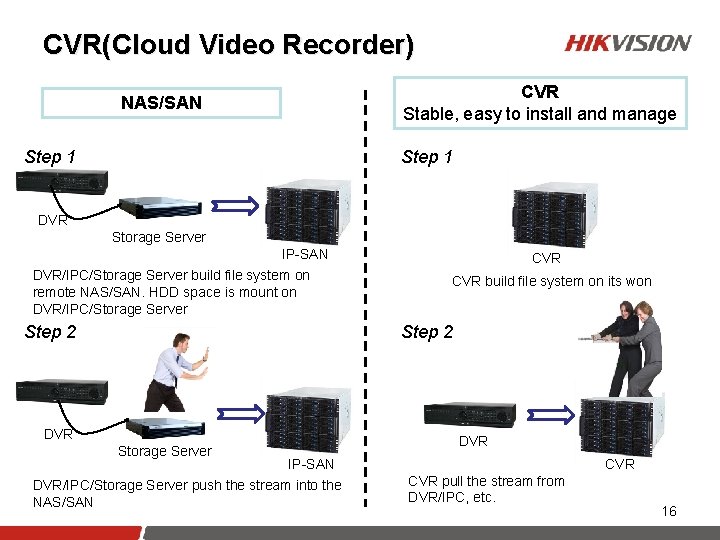
CVR(Cloud Video Recorder) CVR Stable, easy to install and manage NAS/SAN Step 1 DVR Storage Server IP-SAN DVR/IPC/Storage Server build file system on remote NAS/SAN. HDD space is mount on DVR/IPC/Storage Server Step 2 CVR build file system on its won Step 2 DVR Storage Server DVR IP-SAN DVR/IPC/Storage Server push the stream into the NAS/SAN CVR pull the stream from DVR/IPC, etc. 16
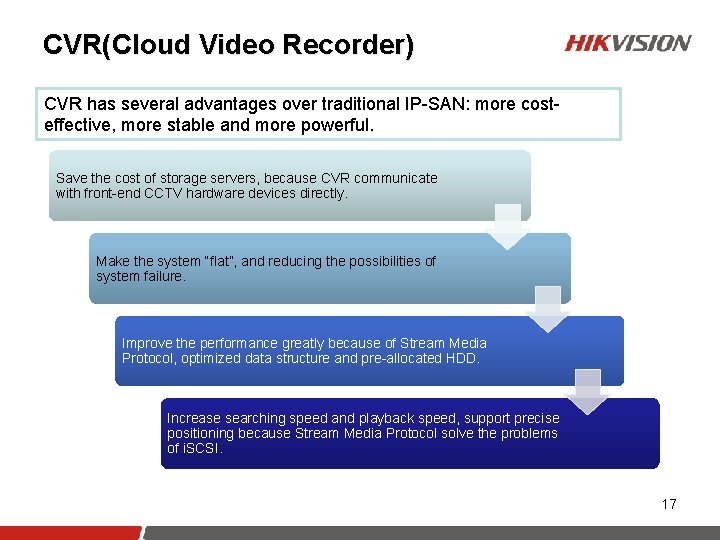
CVR(Cloud Video Recorder) CVR has several advantages over traditional IP-SAN: more costeffective, more stable and more powerful. Save the cost of storage servers, because CVR communicate with front-end CCTV hardware devices directly. Make the system “flat”, and reducing the possibilities of system failure. Improve the performance greatly because of Stream Media Protocol, optimized data structure and pre-allocated HDD. Increase searching speed and playback speed, support precise positioning because Stream Media Protocol solve the problems of i. SCSI. 17
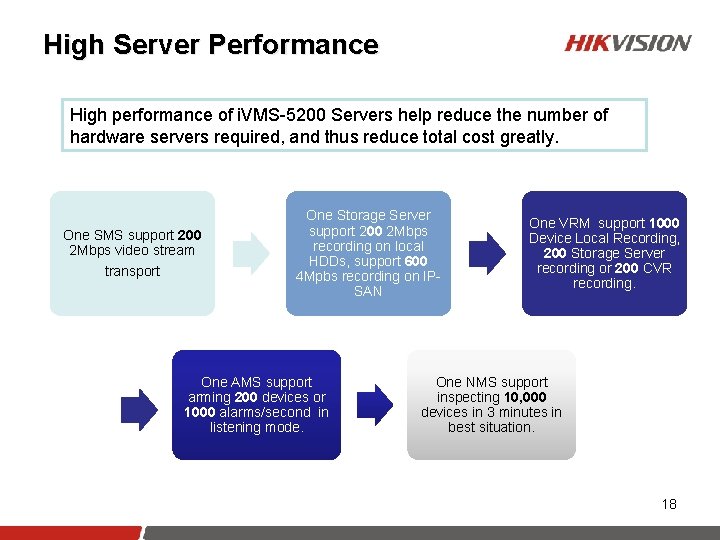
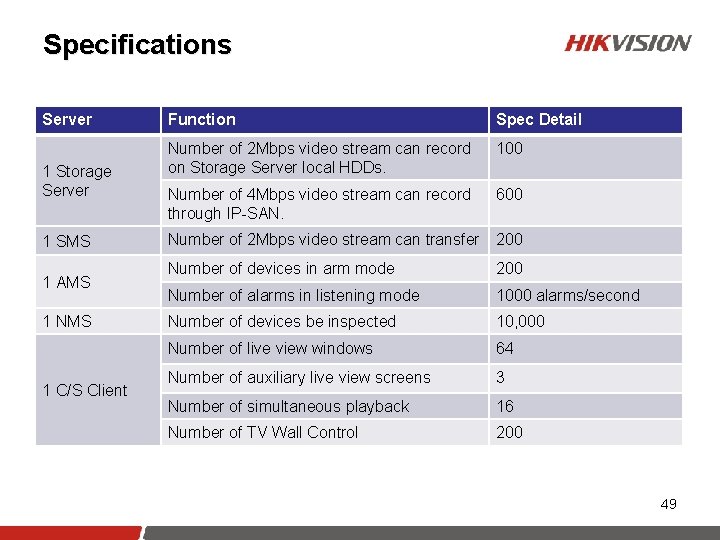
High Server Performance High performance of i. VMS-5200 Servers help reduce the number of hardware servers required, and thus reduce total cost greatly. One SMS support 200 2 Mbps video stream transport One Storage Server support 200 2 Mbps recording on local HDDs, support 600 4 Mpbs recording on IPSAN One AMS support arming 200 devices or 1000 alarms/second in listening mode. One VRM support 1000 Device Local Recording, 200 Storage Server recording or 200 CVR recording. One NMS support inspecting 10, 000 devices in 3 minutes in best situation. 18
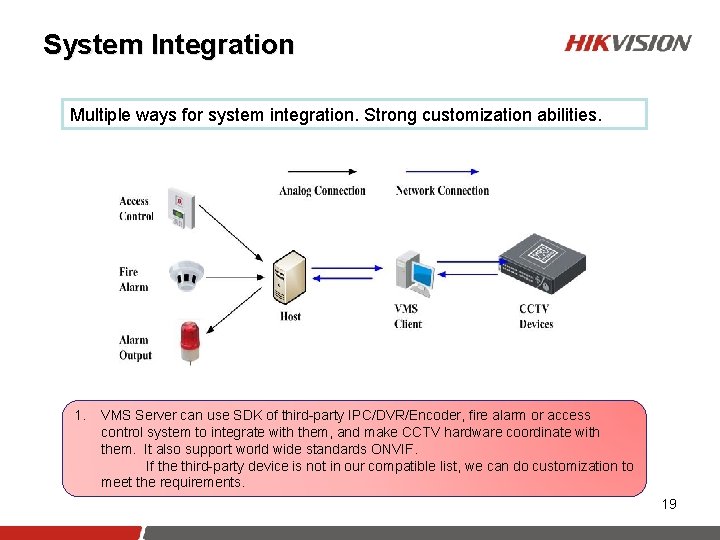
System Integration Multiple ways for system integration. Strong customization abilities. 1. VMS Server can use SDK of third-party IPC/DVR/Encoder, fire alarm or access control system to integrate with them, and make CCTV hardware coordinate with them. It also support world wide standards ONVIF. If the third-party device is not in our compatible list, we can do customization to meet the requirements. 19
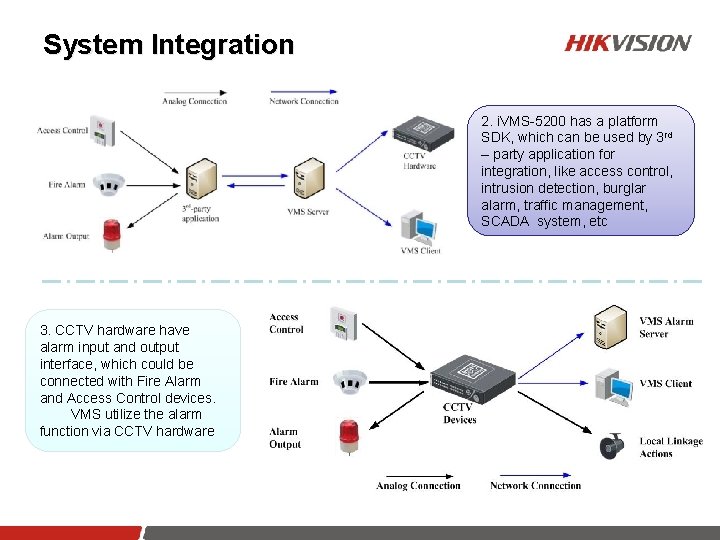
System Integration 2. i. VMS-5200 has a platform SDK, which can be used by 3 rd – party application for integration, like access control, intrusion detection, burglar alarm, traffic management, SCADA system, etc 3. CCTV hardware have alarm input and output interface, which could be connected with Fire Alarm and Access Control devices. VMS utilize the alarm function via CCTV hardware 20
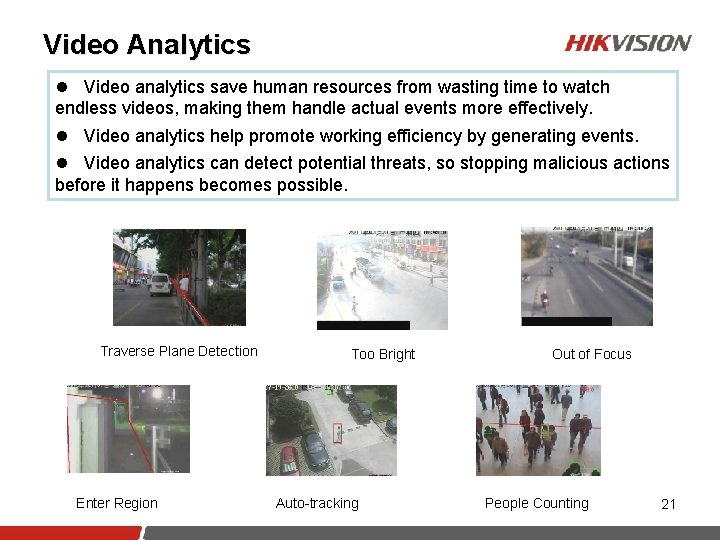
Video Analytics l Video analytics save human resources from wasting time to watch endless videos, making them handle actual events more effectively. l Video analytics help promote working efficiency by generating events. l Video analytics can detect potential threats, so stopping malicious actions before it happens becomes possible. Traverse Plane Detection Enter Region Too Bright Auto-tracking Out of Focus People Counting 21
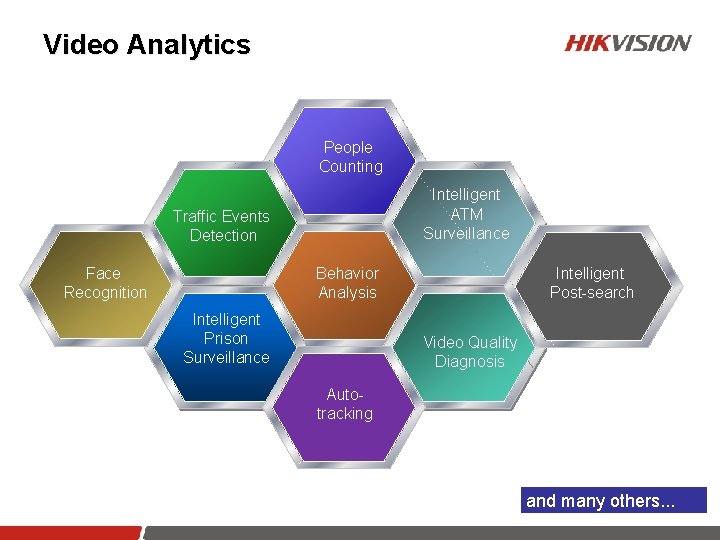
Video Analytics People Counting Intelligent ATM Surveillance Traffic Events Detection Behavior Analysis Face Recognition Intelligent Prison Surveillance Intelligent Post-search Video Quality Diagnosis Autotracking and many others. . . 22
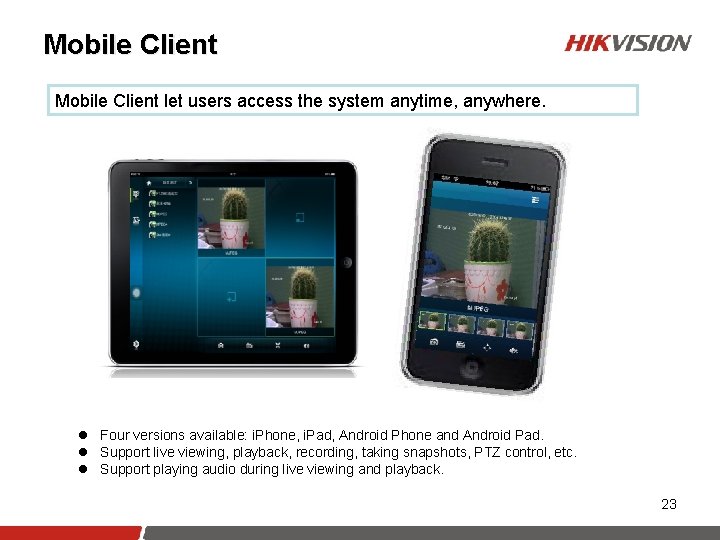
Mobile Client let users access the system anytime, anywhere. l Four versions available: i. Phone, i. Pad, Android Phone and Android Pad. l Support live viewing, playback, recording, taking snapshots, PTZ control, etc. l Support playing audio during live viewing and playback. 23
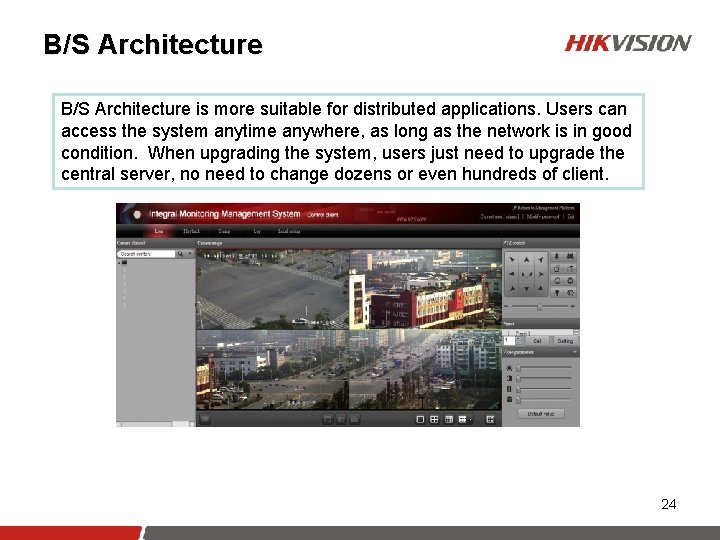
B/S Architecture is more suitable for distributed applications. Users can access the system anytime anywhere, as long as the network is in good condition. When upgrading the system, users just need to upgrade the central server, no need to change dozens or even hundreds of client. 24
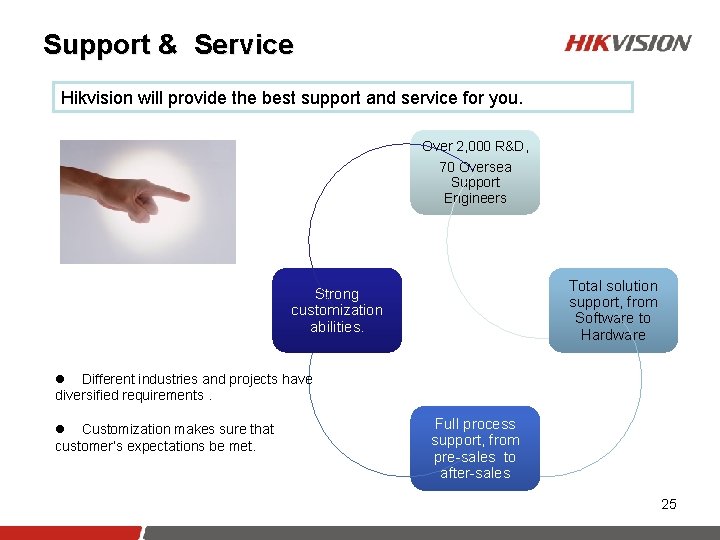
Support & Service Hikvision will provide the best support and service for you. Over 2, 000 R&D, 70 Oversea Support Engineers Total solution support, from Software to Hardware Strong customization abilities. l Different industries and projects have diversified requirements. l Customization makes sure that customer’s expectations be met. Full process support, from pre-sales to after-sales 25
Contents 1 Hikvision i. VMS-5200 Overview 2 Features of Hikvision i. VMS-5200 3 4 1 Functions of Hikvision i. VMS-5200 Specification Details of Hikvision i. VMS-5200
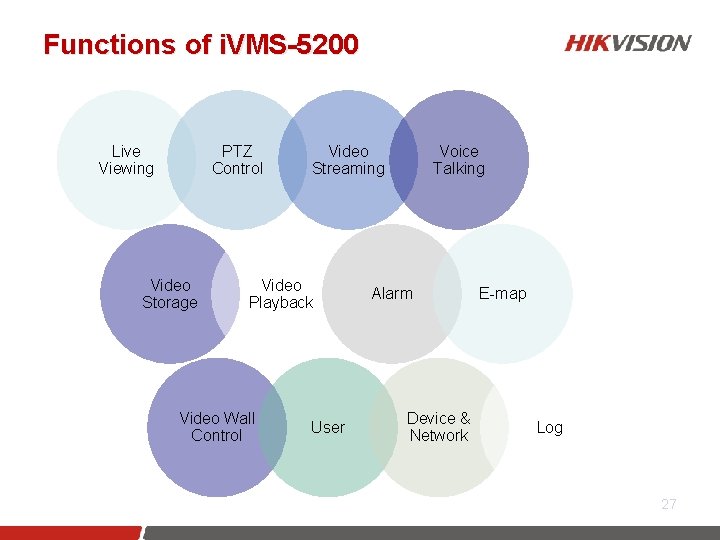
Functions of i. VMS-5200 Live Viewing PTZ Control Video Storage Video Streaming Video Playback Video Wall Control User Voice Talking Alarm Device & Network E-map Log 27
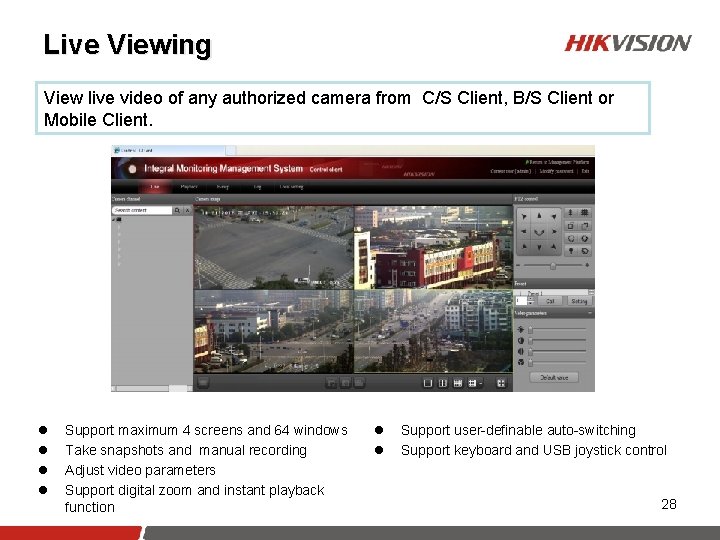
Live Viewing View live video of any authorized camera from C/S Client, B/S Client or Mobile Client. l l Support maximum 4 screens and 64 windows Take snapshots and manual recording Adjust video parameters Support digital zoom and instant playback function l l Support user-definable auto-switching Support keyboard and USB joystick control 28
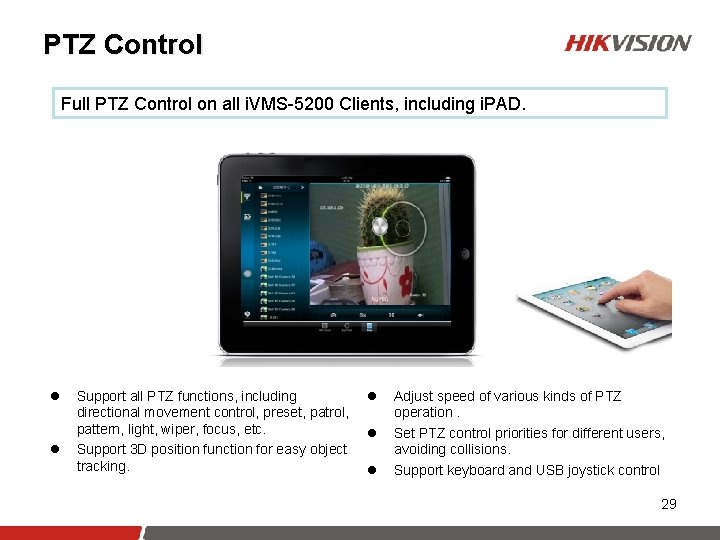
PTZ Control Full PTZ Control on all i. VMS-5200 Clients, including i. PAD. l l Support all PTZ functions, including directional movement control, preset, patrol, pattern, light, wiper, focus, etc. Support 3 D position function for easy object tracking. l l l Adjust speed of various kinds of PTZ operation. Set PTZ control priorities for different users, avoiding collisions. Support keyboard and USB joystick control 29
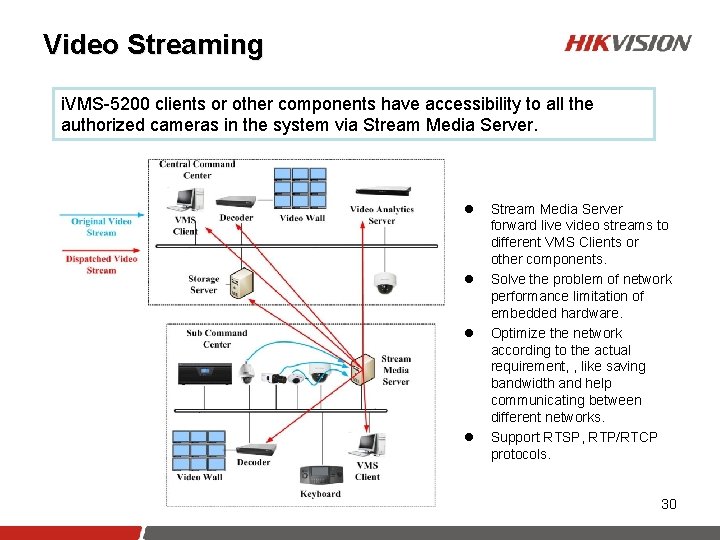
Video Streaming i. VMS-5200 clients or other components have accessibility to all the authorized cameras in the system via Stream Media Server. l l Stream Media Server forward live video streams to different VMS Clients or other components. Solve the problem of network performance limitation of embedded hardware. Optimize the network according to the actual requirement, , like saving bandwidth and help communicating between different networks. Support RTSP, RTP/RTCP protocols. 30
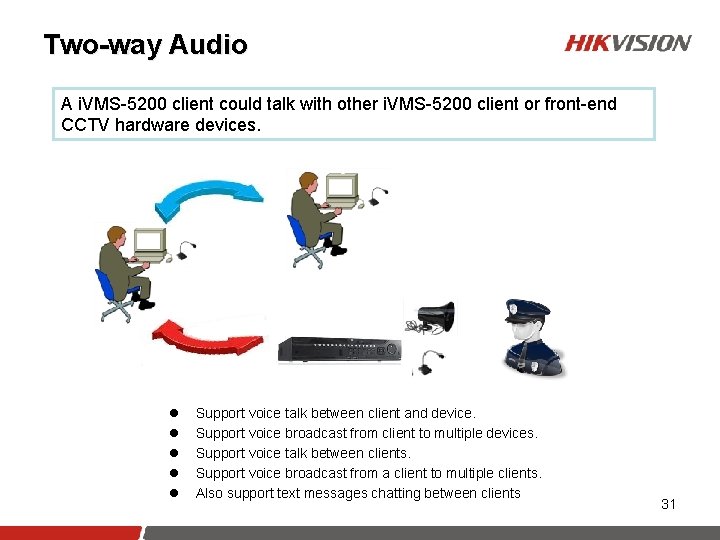
Two-way Audio A i. VMS-5200 client could talk with other i. VMS-5200 client or front-end CCTV hardware devices. l l l Support voice talk between client and device. Support voice broadcast from client to multiple devices. Support voice talk between clients. Support voice broadcast from a client to multiple clients. Also support text messages chatting between clients 31
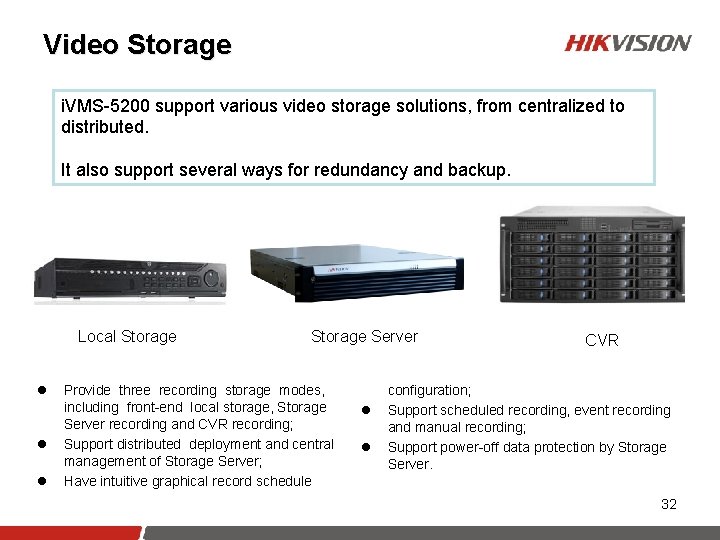
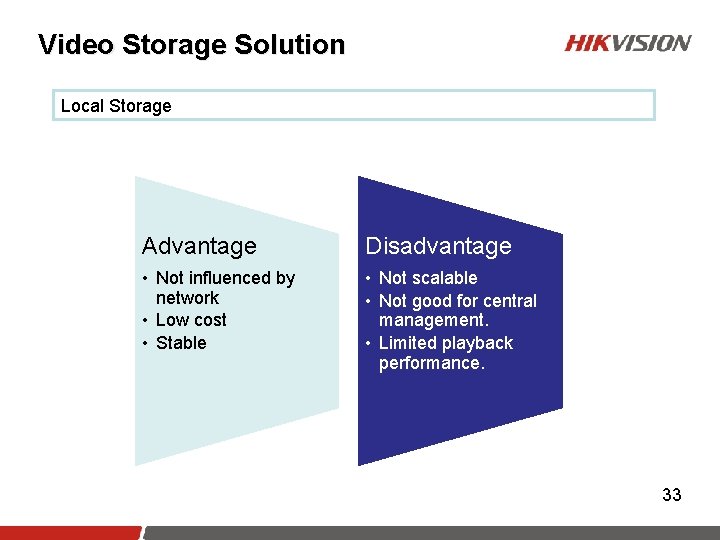
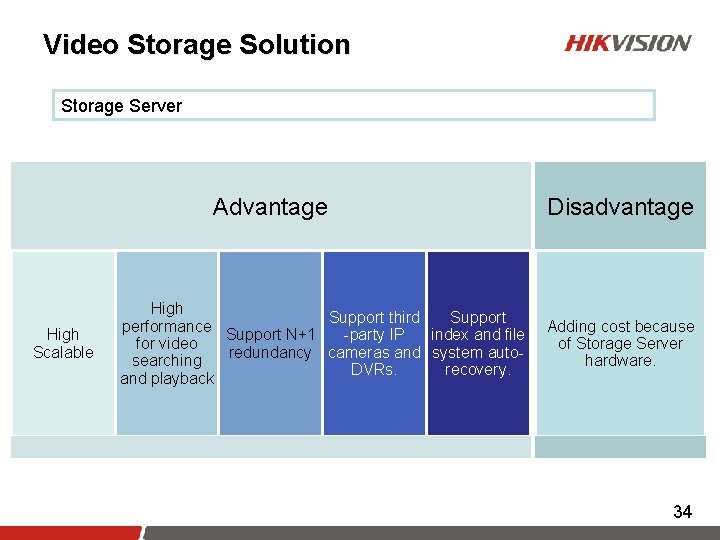
Video Storage i. VMS-5200 support various video storage solutions, from centralized to distributed. It also support several ways for redundancy and backup. Local Storage l l l Storage Server Provide three recording storage modes, including front-end local storage, Storage Server recording and CVR recording; Support distributed deployment and central management of Storage Server; Have intuitive graphical record schedule l l CVR configuration; Support scheduled recording, event recording and manual recording; Support power-off data protection by Storage Server. 32
Video Storage Solution Local Storage Advantage Disadvantage • Not influenced by network • Low cost • Stable • Not scalable • Not good for central management. • Limited playback performance. 33
Video Storage Solution Storage Server Advantage High Scalable High Support third Support performance Support N+1 -party IP index and file for video redundancy cameras and system autosearching DVRs. recovery. and playback Disadvantage Adding cost because of Storage Server hardware. 34
Video Storage Solution CVR Advantage Disadvantage • Highly scalable • Stable file system • Saving the cost of Storage Server hardware • Third-party IP Camera integration is separate from other i. VMS-5200 modules.
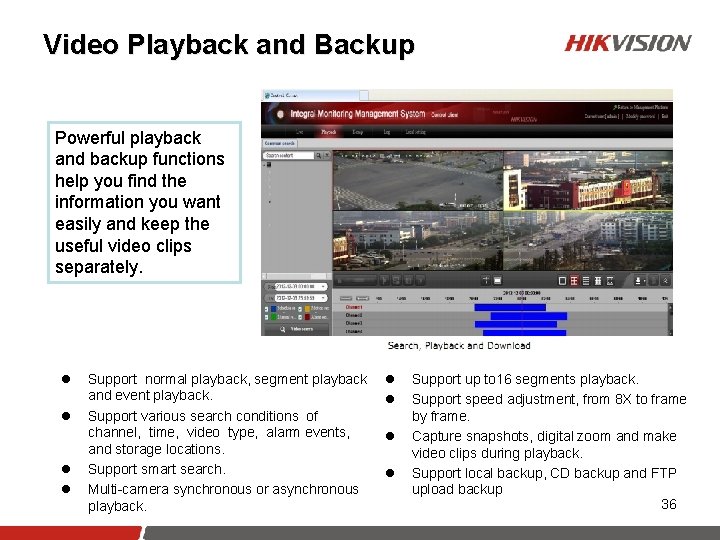
Video Playback and Backup Powerful playback and backup functions help you find the information you want easily and keep the useful video clips separately. l l Support normal playback, segment playback and event playback. Support various search conditions of channel, time, video type, alarm events, and storage locations. Support smart search. Multi-camera synchronous or asynchronous playback. l l Support up to 16 segments playback. Support speed adjustment, from 8 X to frame by frame. Capture snapshots, digital zoom and make video clips during playback. Support local backup, CD backup and FTP upload backup 36
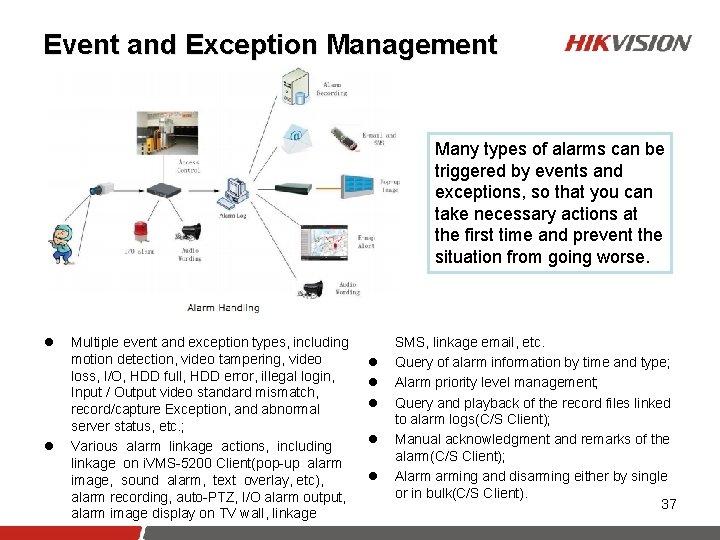
Event and Exception Management Many types of alarms can be triggered by events and exceptions, so that you can take necessary actions at the first time and prevent the situation from going worse. l l Multiple event and exception types, including motion detection, video tampering, video loss, I/O, HDD full, HDD error, illegal login, Input / Output video standard mismatch, record/capture Exception, and abnormal server status, etc. ; Various alarm linkage actions, including linkage on i. VMS-5200 Client(pop-up alarm image, sound alarm, text overlay, etc), alarm recording, auto-PTZ, I/O alarm output, alarm image display on TV wall, linkage l l l SMS, linkage email, etc. Query of alarm information by time and type; Alarm priority level management; Query and playback of the record files linked to alarm logs(C/S Client); Manual acknowledgment and remarks of the alarm(C/S Client); Alarm arming and disarming either by single or in bulk(C/S Client). 37
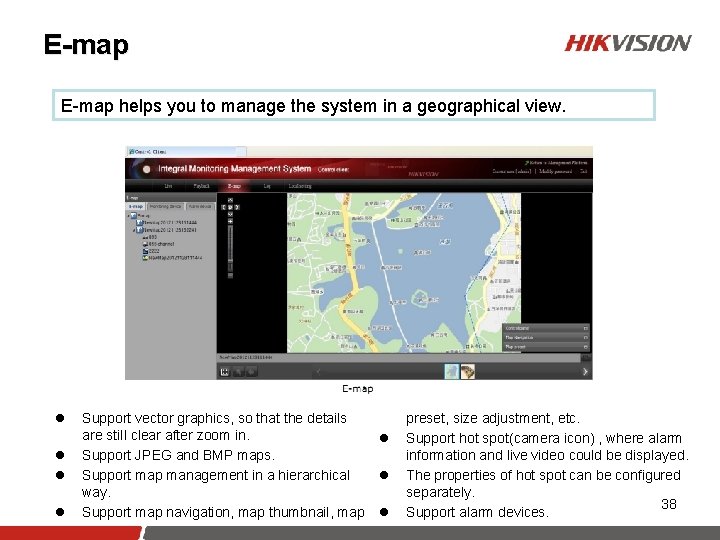
E-map helps you to manage the system in a geographical view. l l Support vector graphics, so that the details are still clear after zoom in. Support JPEG and BMP maps. Support map management in a hierarchical way. Support map navigation, map thumbnail, map l l l preset, size adjustment, etc. Support hot spot(camera icon) , where alarm information and live video could be displayed. The properties of hot spot can be configured separately. 38 Support alarm devices.
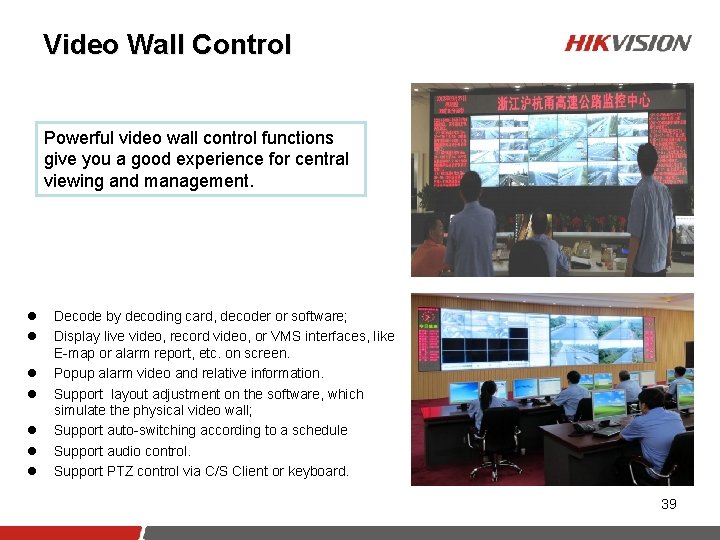
Video Wall Control Powerful video wall control functions give you a good experience for central viewing and management. l l l l Decode by decoding card, decoder or software; Display live video, record video, or VMS interfaces, like E-map or alarm report, etc. on screen. Popup alarm video and relative information. Support layout adjustment on the software, which simulate the physical video wall; Support auto-switching according to a schedule Support audio control. Support PTZ control via C/S Client or keyboard. 39
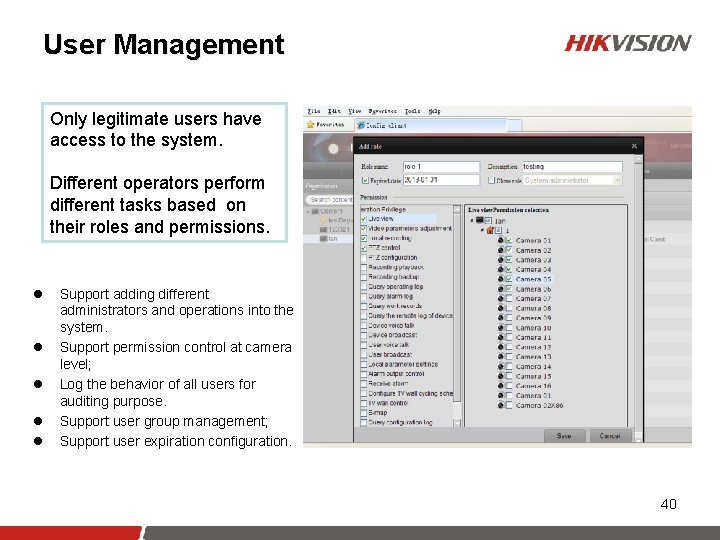
User Management Only legitimate users have access to the system. Different operators perform different tasks based on their roles and permissions. l l l Support adding different administrators and operations into the system. Support permission control at camera level; Log the behavior of all users for auditing purpose. Support user group management; Support user expiration configuration. 40
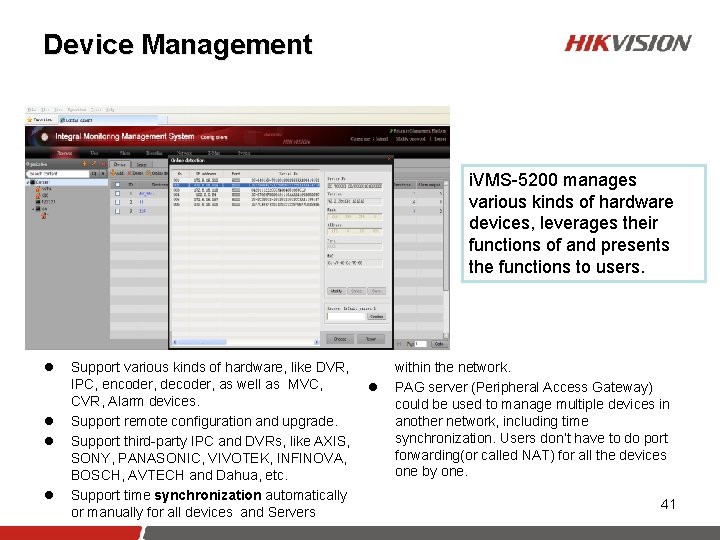
Device Management i. VMS-5200 manages various kinds of hardware devices, leverages their functions of and presents the functions to users. l l Support various kinds of hardware, like DVR, IPC, encoder, decoder, as well as MVC, CVR, Alarm devices. Support remote configuration and upgrade. Support third-party IPC and DVRs, like AXIS, SONY, PANASONIC, VIVOTEK, INFINOVA, BOSCH, AVTECH and Dahua, etc. Support time synchronization automatically or manually for all devices and Servers l within the network. PAG server (Peripheral Access Gateway) could be used to manage multiple devices in another network, including time synchronization. Users don’t have to do port forwarding(or called NAT) for all the devices one by one. 41
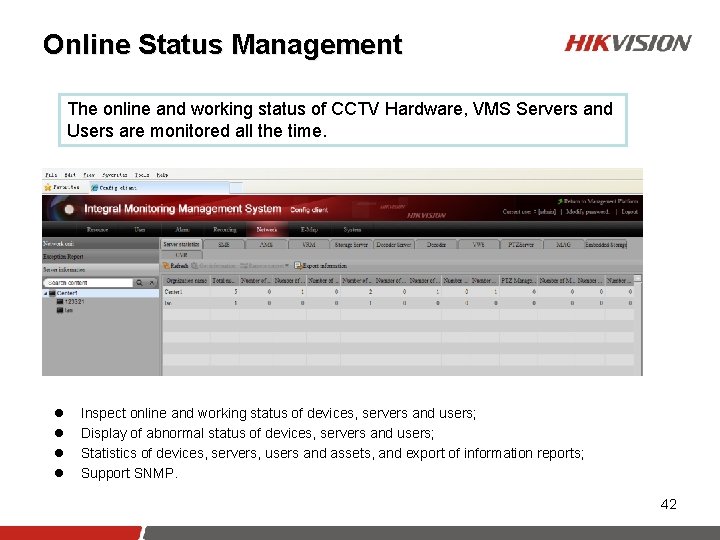
Online Status Management The online and working status of CCTV Hardware, VMS Servers and Users are monitored all the time. l l Inspect online and working status of devices, servers and users; Display of abnormal status of devices, servers and users; Statistics of devices, servers, users and assets, and export of information reports; Support SNMP. 42
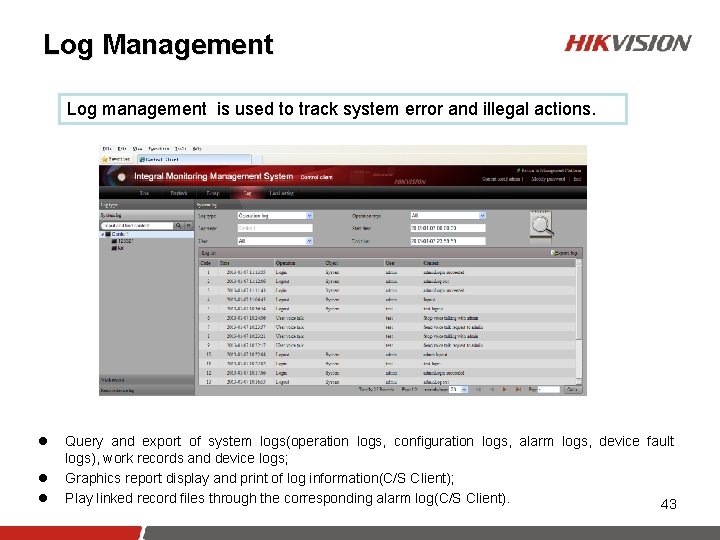
Log Management Log management is used to track system error and illegal actions. l l l Query and export of system logs(operation logs, configuration logs, alarm logs, device fault logs), work records and device logs; Graphics report display and print of log information(C/S Client); Play linked record files through the corresponding alarm log(C/S Client). 43
Contents 1 Hikvision i. VMS-5200 Overview 2 Functions of Hikvision i. VMS-5200 3 Features of Hikvision i. VMS-5200 Specification Details of Hikvision 41 i. VMS-5200 1
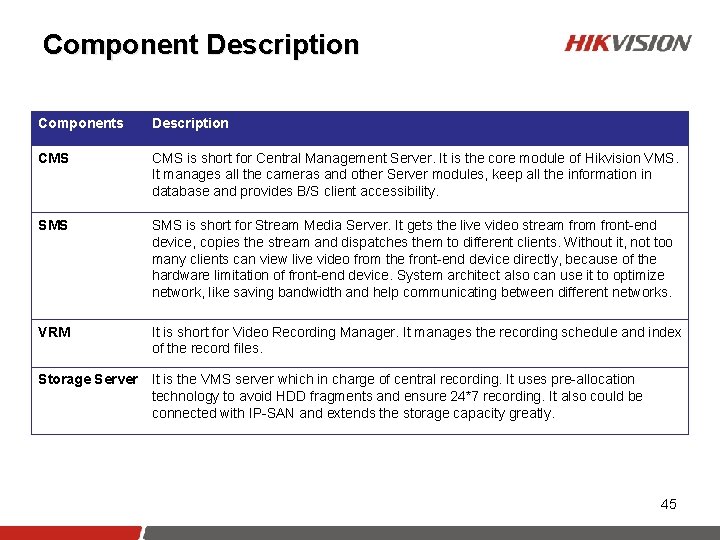
Component Description Components Description CMS is short for Central Management Server. It is the core module of Hikvision VMS. It manages all the cameras and other Server modules, keep all the information in database and provides B/S client accessibility. SMS is short for Stream Media Server. It gets the live video stream front-end device, copies the stream and dispatches them to different clients. Without it, not too many clients can view live video from the front-end device directly, because of the hardware limitation of front-end device. System architect also can use it to optimize network, like saving bandwidth and help communicating between different networks. VRM It is short for Video Recording Manager. It manages the recording schedule and index of the record files. Storage Server It is the VMS server which in charge of central recording. It uses pre-allocation technology to avoid HDD fragments and ensure 24*7 recording. It also could be connected with IP-SAN and extends the storage capacity greatly. 45
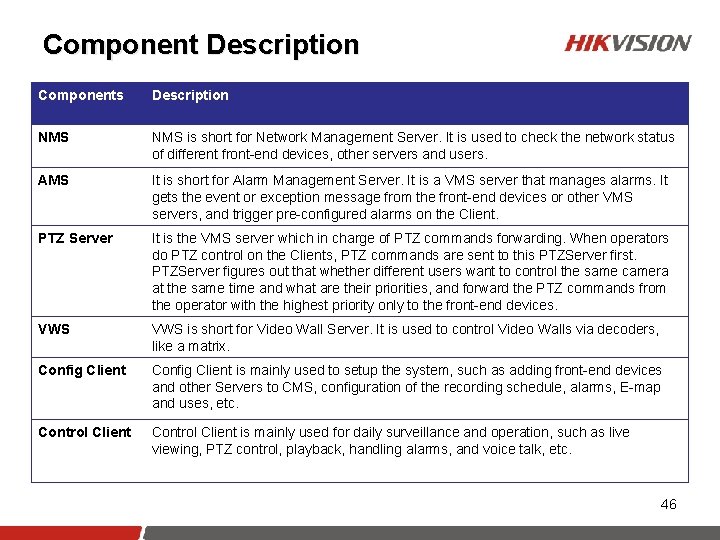
Component Description Components Description NMS is short for Network Management Server. It is used to check the network status of different front-end devices, other servers and users. AMS It is short for Alarm Management Server. It is a VMS server that manages alarms. It gets the event or exception message from the front-end devices or other VMS servers, and trigger pre-configured alarms on the Client. PTZ Server It is the VMS server which in charge of PTZ commands forwarding. When operators do PTZ control on the Clients, PTZ commands are sent to this PTZServer first. PTZServer figures out that whether different users want to control the same camera at the same time and what are their priorities, and forward the PTZ commands from the operator with the highest priority only to the front-end devices. VWS is short for Video Wall Server. It is used to control Video Walls via decoders, like a matrix. Config Client is mainly used to setup the system, such as adding front-end devices and other Servers to CMS, configuration of the recording schedule, alarms, E-map and uses, etc. Control Client is mainly used for daily surveillance and operation, such as live viewing, PTZ control, playback, handling alarms, and voice talk, etc. 46
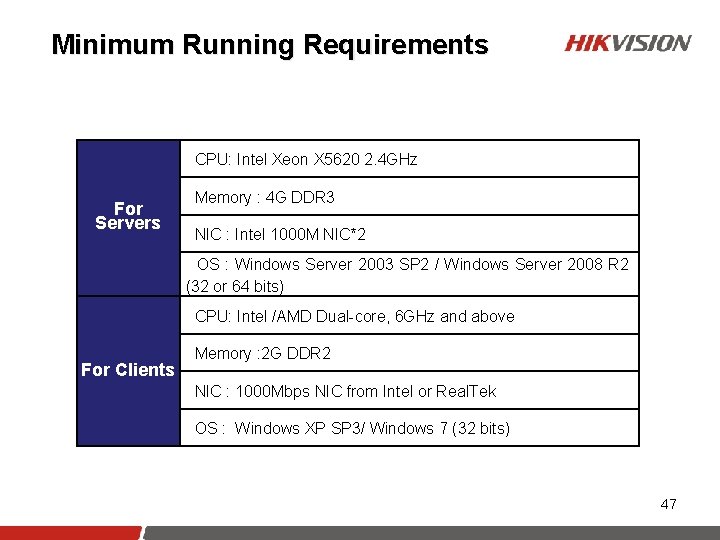
Minimum Running Requirements CPU: Intel Xeon X 5620 2. 4 GHz For Servers Memory : 4 G DDR 3 NIC : Intel 1000 M NIC*2 OS : Windows Server 2003 SP 2 / Windows Server 2008 R 2 (32 or 64 bits) CPU: Intel /AMD Dual-core, 6 GHz and above For Clients Memory : 2 G DDR 2 NIC : 1000 Mbps NIC from Intel or Real. Tek OS : Windows XP SP 3/ Windows 7 (32 bits) 47
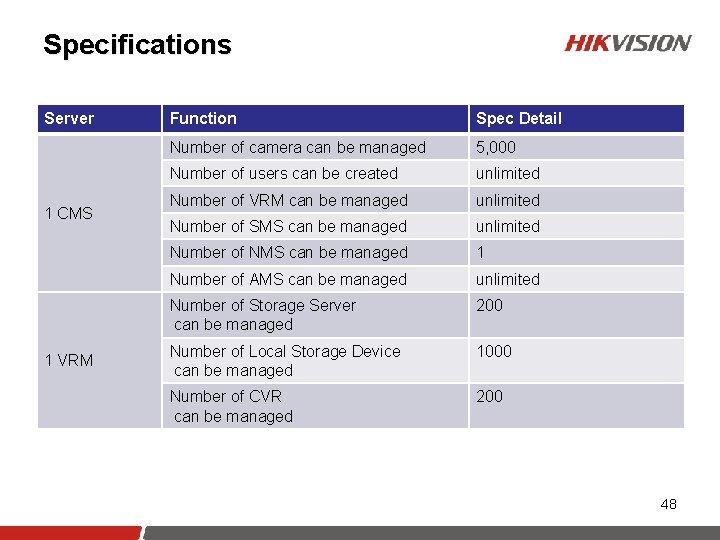
Specifications Server 1 CMS 1 VRM Function Spec Detail Number of camera can be managed 5, 000 Number of users can be created unlimited Number of VRM can be managed unlimited Number of SMS can be managed unlimited Number of NMS can be managed 1 Number of AMS can be managed unlimited Number of Storage Server can be managed 200 Number of Local Storage Device can be managed 1000 Number of CVR can be managed 200 48
Specifications Server 1 Storage Server 1 SMS 1 AMS 1 NMS 1 C/S Client Function Spec Detail Number of 2 Mbps video stream can record on Storage Server local HDDs. 100 Number of 4 Mbps video stream can record through IP-SAN. 600 Number of 2 Mbps video stream can transfer 200 Number of devices in arm mode 200 Number of alarms in listening mode 1000 alarms/second Number of devices be inspected 10, 000 Number of live view windows 64 Number of auxiliary live view screens 3 Number of simultaneous playback 16 Number of TV Wall Control 200 49
50
Thanks! www. hikvision. com