
Introduction Java programs are divided into two main
- Slides: 43
Introduction • Java programs are divided into two main categories, applets and applications • An application is an ordinary Java program • An applet is a kind of Java program that can be run across the Internet Sahar Mosleh California State University San Marcos Page 1
A Brief Introduction to HTML • HTML stands for Hypertext Markup Language • Hypertext is text viewed on a browser that contains clickable entries called links or hyperlinks • When a link or hyperlink is clicked, the document specified by the link is displayed • HTML is a language used to write HTML documents or pages that will be viewed on a Web browser Sahar Mosleh California State University San Marcos Page 2
A Brief Introduction to HTML • HTML is made up of a collection of simple commands that can be inserted into a text file • This converts the text file into a document meant to be viewed with a Web browser • Some commands allow pictures and hyperlinks to be inserted • Others are editing commands that specify the main heading, subheading, paragraph beginning, and so forth Sahar Mosleh California State University San Marcos Page 3
A Brief Introduction to HTML • Much of HTML is simply a language formatting text • However, HTML is not a word processor • It is more like a very simple programming language • It is similar to the annotations used by copy editors to mark a manuscript before it is typeset for production • HTML is not part of the Java language • There can be interaction between HTML and Java • HTML can be used to display a Java applet program Sahar Mosleh California State University San Marcos Page 4
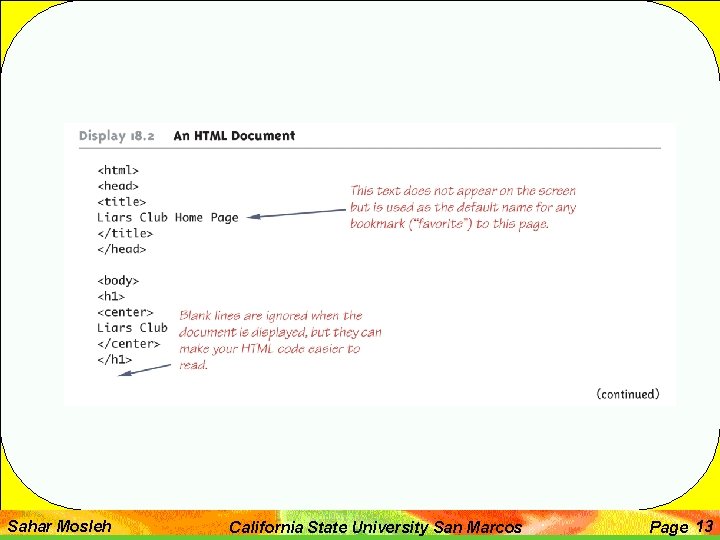
HTML Formatting Commands • There are two basic kinds of HTML commands : • Those that mark the beginning and end of a section of text • Those that mark a single location in the text • Commands that mark the beginning and end of a section of text have the form: • <Command> • Some text • </Command> Sahar Mosleh California State University San Marcos Page 5
HTML Formatting Commands • The following makes the phrase "World's Greatest Home Page" a level 1 heading • Level 1 is the largest standard heading • <h 1> • World's Greatest Home Page • </h 1> • Smaller headings, Level 2 and level 3, are generated by the commands h 2 and h 3, and so forth Sahar Mosleh California State University San Marcos Page 6
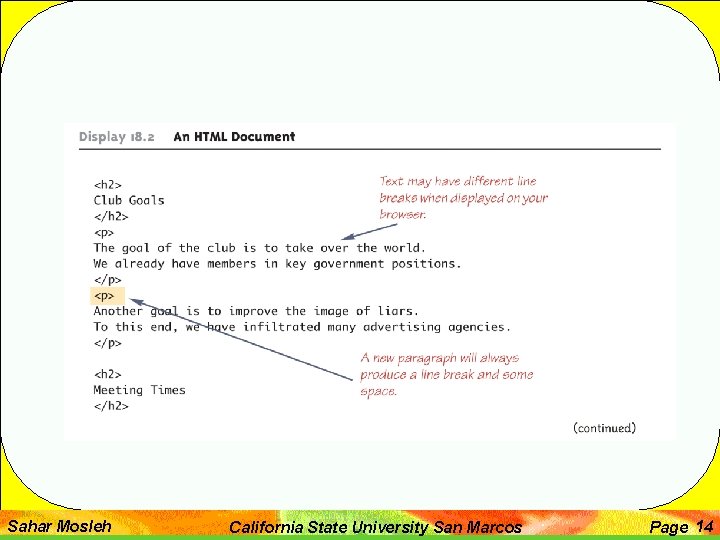
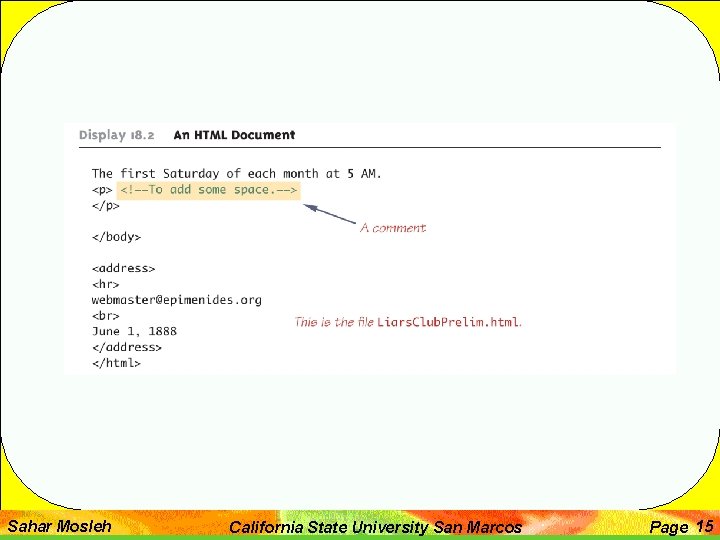
HTML Formatting Commands • Commands that mark a single location in the text are not closed with the command of form </Command> • For example, the horizontal line command: • <hr> • Commands in HTML are relative commands, instead of being absolute commands that determine exact size or locations • The browser determines the exact sizes and locations Sahar Mosleh California State University San Marcos Page 7
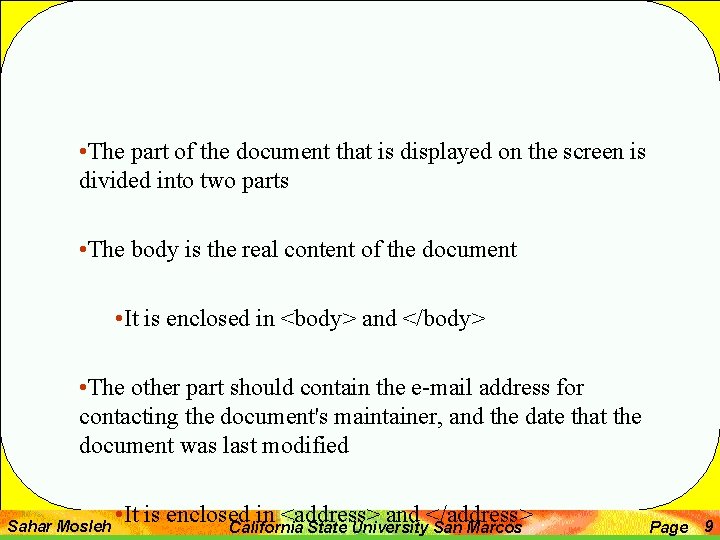
Outline of an HTML Document • The browser normally determines the location of line breaks in the displayed text • However, a line break can be forced by inserting a break command: • • Some layout specifications can be made as well • Anything between the commands <center> and </center> will be centered on the page Sahar Mosleh California State University San Marcos Page 8
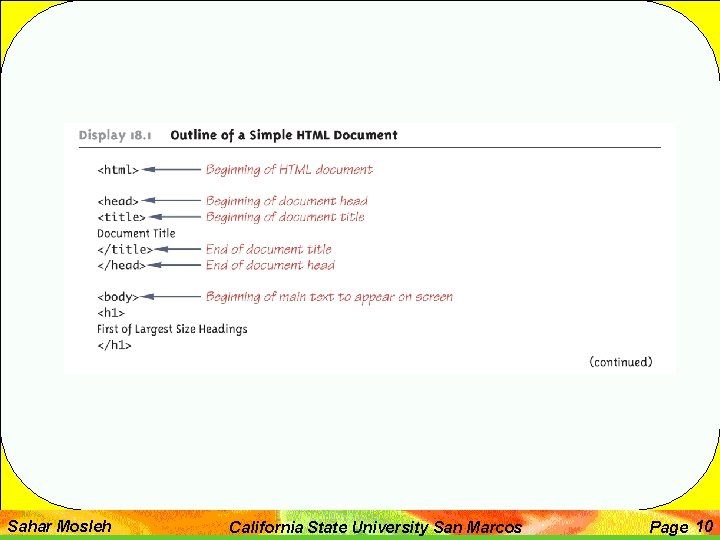
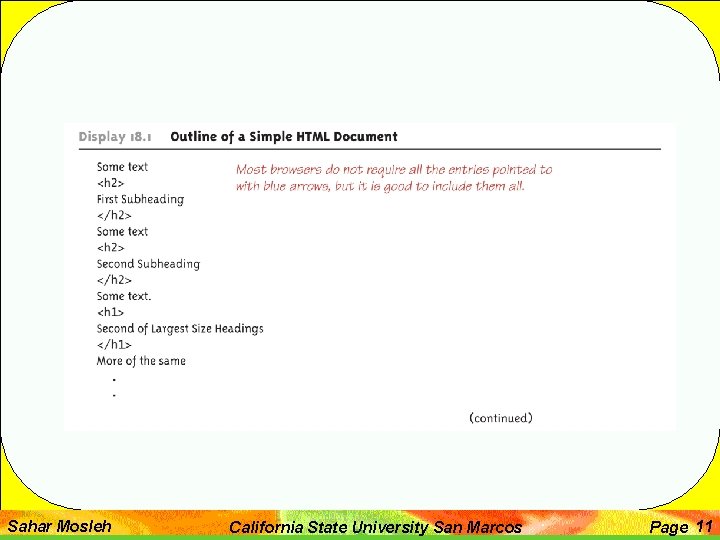
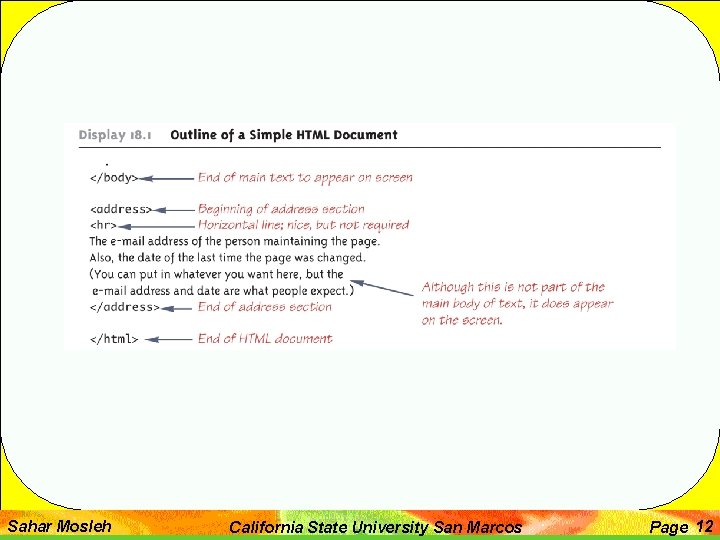
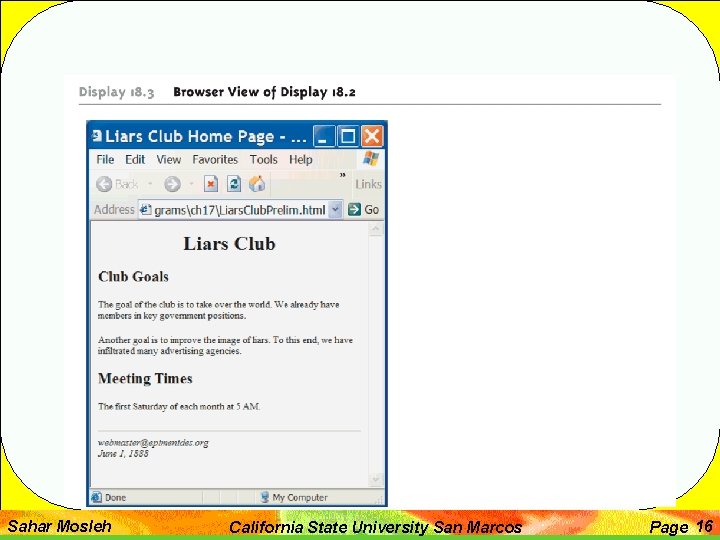
• The part of the document that is displayed on the screen is divided into two parts • The body is the real content of the document • It is enclosed in <body> and </body> • The other part should contain the e-mail address for contacting the document's maintainer, and the date that the document was last modified Sahar Mosleh • It is enclosed in <address> and </address> California State University San Marcos Page 9
Sahar Mosleh California State University San Marcos Page 10
Sahar Mosleh California State University San Marcos Page 11
Sahar Mosleh California State University San Marcos Page 12
Sahar Mosleh California State University San Marcos Page 13
Sahar Mosleh California State University San Marcos Page 14
Sahar Mosleh California State University San Marcos Page 15
Sahar Mosleh California State University San Marcos Page 16
• A URL is the name of an HTML document on the Web • URL is an acronym for Uniform Resource Locator • URLs often begin with http • This is the name of the protocol used to transfer and interpret the HTML document • Most browsers will fill in http: // if it is omitted Sahar Mosleh California State University San Marcos Page 17
• Text can be marked as a hyperlink so that if a user clicks that text, the browser goes to another Web page specified by the link • <a href="Path. To. Document"> • Text. To. Click • </a> • The Path. To. Document can be a full or relative path name to an HTML file, or a URL to any place on the Web • The Text. To. Click will be displayed and underlined by the browser Sahar Mosleh California State University San Marcos Page 18
• A picture can also be inserted in an HTML document • <img src="Path. To. Picture"> • The Path. To. Picture can be a full or relative path name to a file with a digitally encoded picture • Most commonly used picture-encoding formats are accepted, such as. gif, . tiff, and. jpg Sahar Mosleh California State University San Marcos Page 19
• Browsers normally keep copies of the most recently viewed HTML pages • This helps the browser retrieve a page quickly when someone returns to that page • This feature can be a problem when designing and debugging an HTML page • If a change is made to a page, and that page is viewed again, it may still look the same • This is because the copy is being viewed, not the new page • Browsers have a command to reload a page, and thus get the most recent version of it • It is usually called "Refresh" or "Reload", and is a button or menu item Sahar Mosleh California State University San Marcos Page 20
• HTML is a low-level language for a Web browser much the same as assembly language is a low-level language for a computer • Most Web page designers today use a high-level Web page design language that translates into HTML • For example Dreamweaver (Macromedia, Inc. ), Front. Page (Microsoft Corporation), and Go. Live (Adobe Systems Inc. ) Sahar Mosleh California State University San Marcos Page 21
• The word applet is meant to suggest a small application • Applets were intended to be small programs run over the Internet • However, there are no size constraints on applets • Applets can be viewed over the Internet, or without any connection to the internet • An applet is similar to a Swing GUI • In fact, almost all of the Swing techniques can be used in applets Sahar Mosleh California State University San Marcos Page 22
Sahar Mosleh California State University San Marcos Page 23
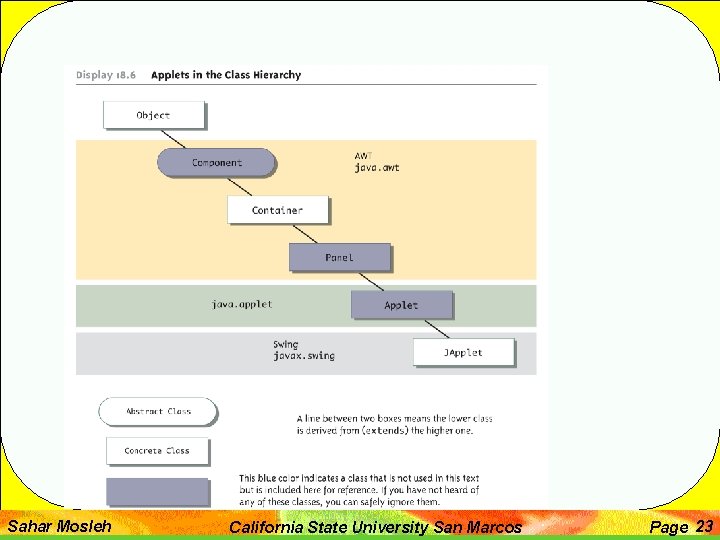
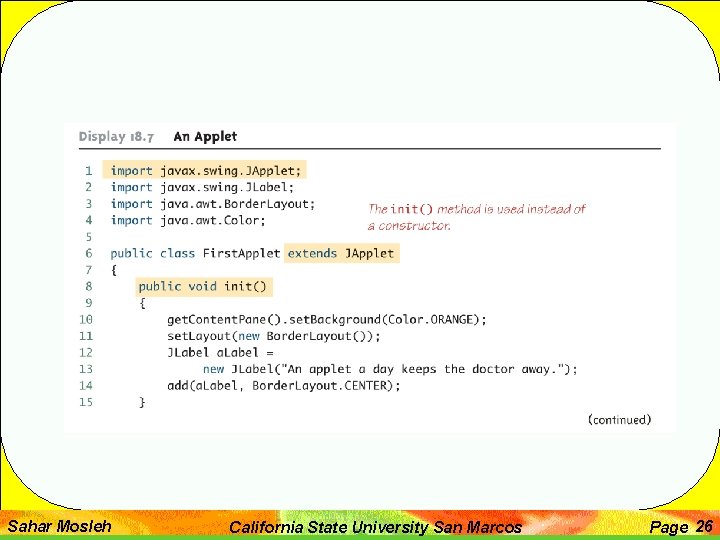
• An applet class can be designed as a derived class of JApplet in much the same way that regular Swing GUIs are defined as derived classes of JFrame • However, an applet normally defines no constructors • The method init performs the initializations that would be performed in a constructor for a regular Swing GUI Sahar Mosleh California State University San Marcos Page 24
• Components can be added to an applet in the same way that a component is added to a JFrame • The method add is used to add components to an applet in the same way that components are added to a JFrame Sahar Mosleh California State University San Marcos Page 25
Sahar Mosleh California State University San Marcos Page 26
Sahar Mosleh California State University San Marcos Page 27
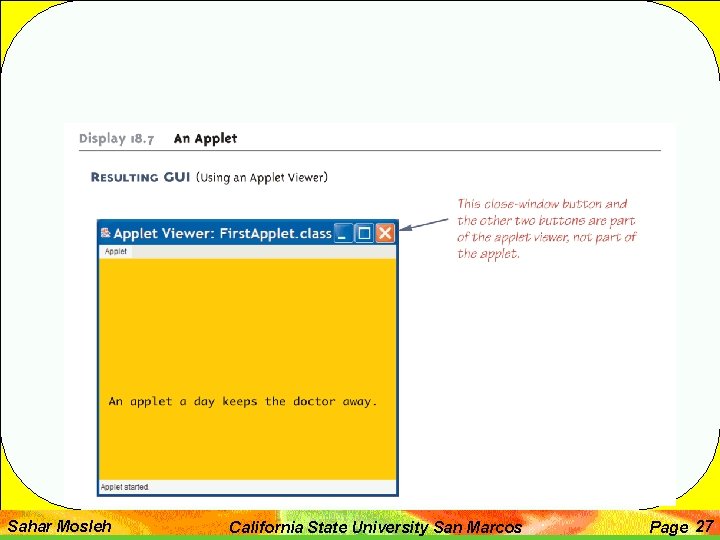
• Some of the items included in a Swing GUI are not included in an applet • Applets do not contain a main or set. Visible method • Applets are displayed automatically by a Web page or an applet viewer • Applets do not have titles • Therefore, they do not use the set. Title method • They are normally embedded in an HTML document, and the HTML document can add any desired title Sahar Mosleh California State University San Marcos Page 28
• Applets do not use the set. Size method • The HTML document takes care of sizing the applet • Applets do not have a close-window button • Therefore, they do not have a set. Default. Close. Operation method • When the HTML document containing the applet is closed, then the applet is automatically closed Sahar Mosleh California State University San Marcos Page 29
• An applet class is compiled in the same way as any other Java class • However, an applet is run differently from other Java programs • The normal way to run an applet is to embed it in an HTML document • The applet is then run and viewed through a Web browser Sahar Mosleh California State University San Marcos Page 30
• Menus are constructed and added to a JApplet as they are for a JFrame • JApplet has a method named set. JMenu. Bar that behaves the same as the set. JMenu. Bar method of a JFrame • JApplet can also have menu bars added to a JApplet or to a panel that is part of the JApplet using the add method Sahar Mosleh California State University San Marcos Page 31
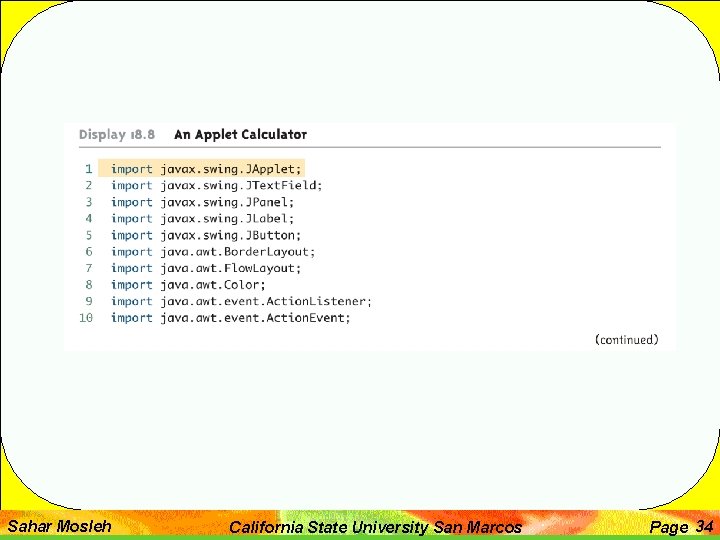
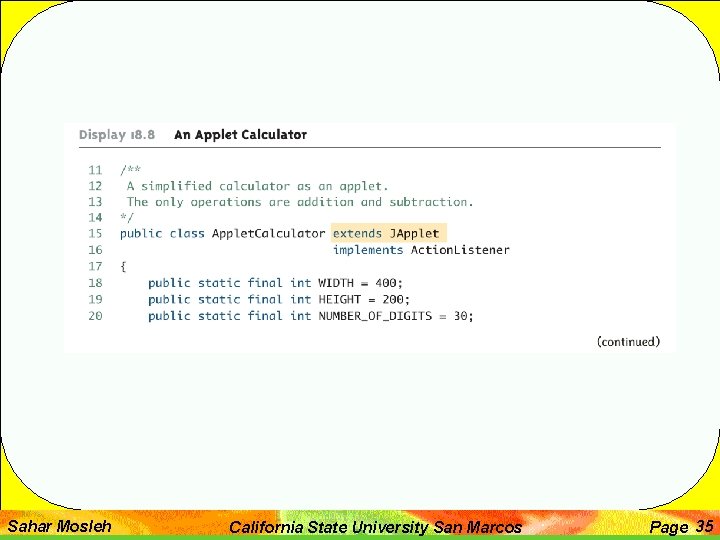
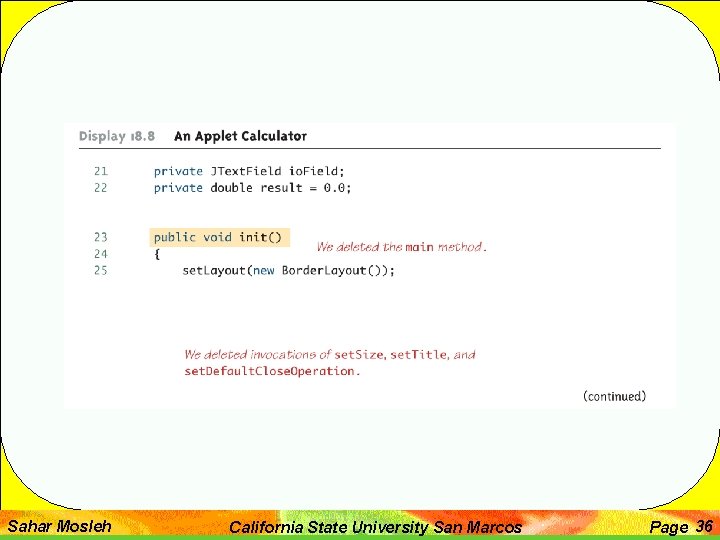
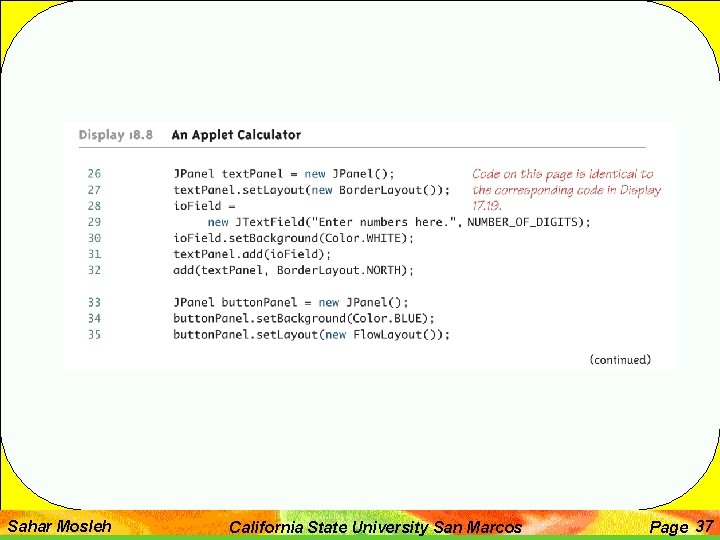
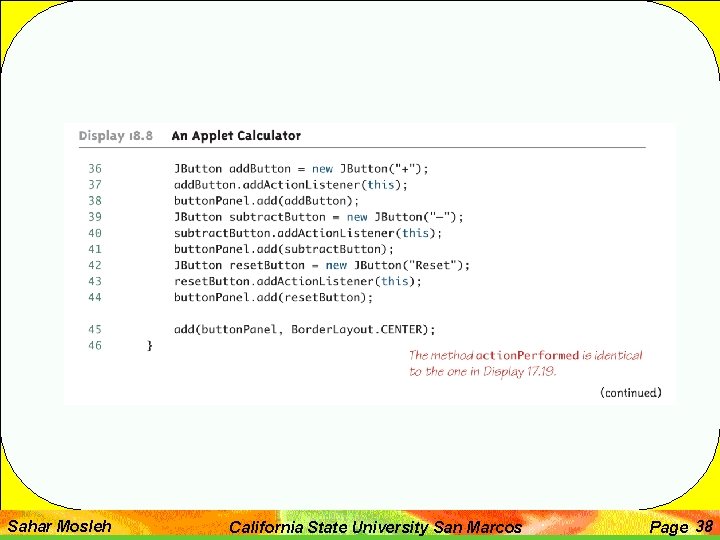
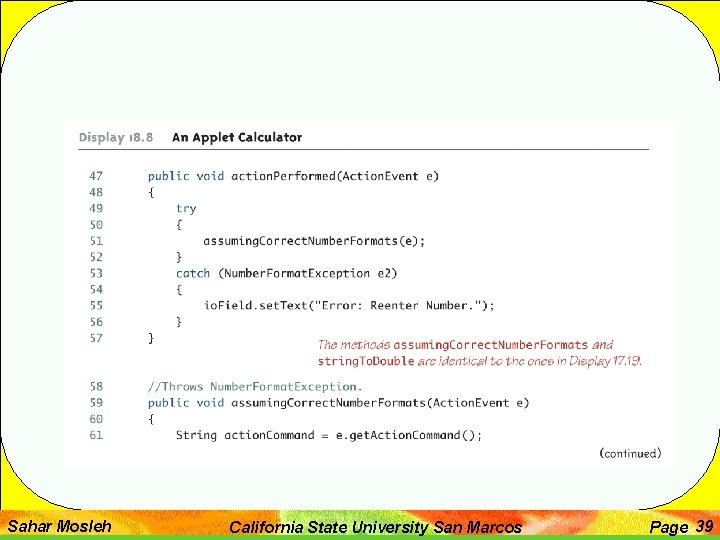
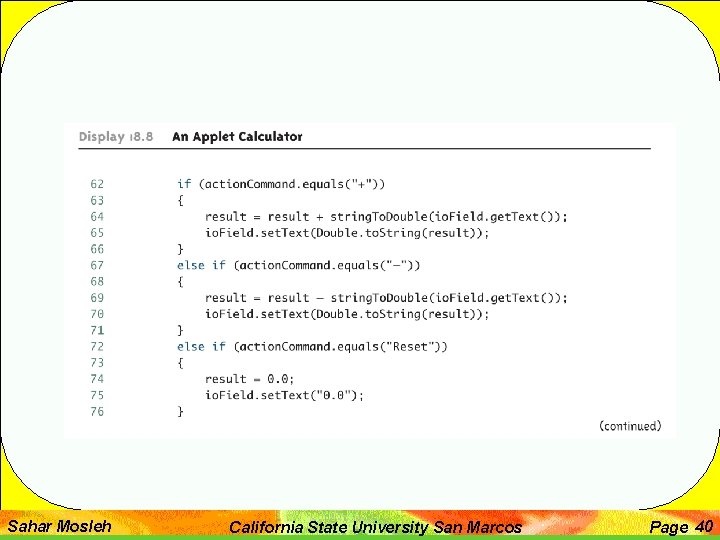
• The fastest and easiest way to explain how to define an applet, is to explain how to modify a Swing GUI to transform it into an applet • Derive the class from the class JApplet instead of from the class Jframe • Remove the main method • Replace the constructor with a no-parameter method named init • The body of the init method can be the same as the body of the deleted constructor, but with some items removed Sahar Mosleh California State University San Marcos Page 32
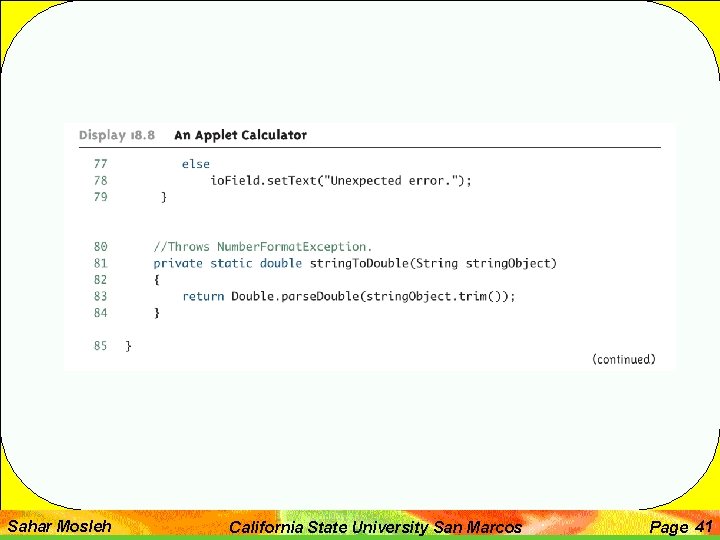
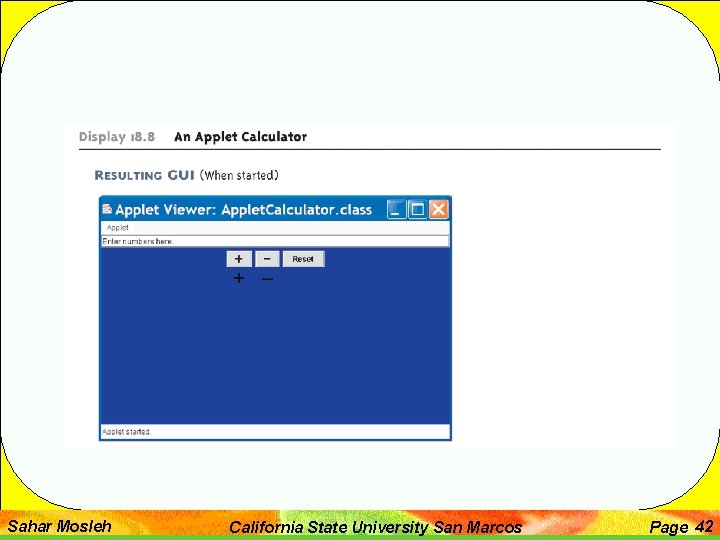
• Delete any invocation of super • Delete any method invocations that program the closewindow button of a windowing GUI • Delete any invocation of set. Title • Delete any invocation of set. Size • The following applet was generated in this way Sahar Mosleh California State University San Marcos Page 33
Sahar Mosleh California State University San Marcos Page 34
Sahar Mosleh California State University San Marcos Page 35
Sahar Mosleh California State University San Marcos Page 36
Sahar Mosleh California State University San Marcos Page 37
Sahar Mosleh California State University San Marcos Page 38
Sahar Mosleh California State University San Marcos Page 39
Sahar Mosleh California State University San Marcos Page 40
Sahar Mosleh California State University San Marcos Page 41
Sahar Mosleh California State University San Marcos Page 42
• An icon is a picture • It is typically, but not always, a small picture • An icon can be stored in a file of many different standard formats • Such as. gif, . tiff, or. jpg • The class Image. Icon is used to convert a picture file to a Swing icon • Then it can be added as a component to any Container class, such as JApplet • The class Image. Icon is in the javax. swing package • Image. Icon Name. Of. Image. Icon = new Image. Icon("Picture. File. Name"); Sahar Mosleh California State University San Marcos Page 43