
Introduction 3 Tier ClientServer Overview by Gary Rau
Introduction 3 -Tier Client/Server Overview by Gary Rau DS 513 April 29, 1999 http: //people. ce. mediaone. net/grau/clientserver. html

What is Client/Server? • 1) Client/Server describes the relationship between two computer programs in which one program, the client, makes a service request from another program, the server, which fulfills the request. • 2) Tiers describe the logical partitioning of an application across clients and servers.
2 -Tier and 3 -Tier Architecture • 2 -Tier splits the processing load in two. Application logic runs on client, which communicates with data on server. • 3 -Tier splits the processing load between clients that run user interface logic, application server running business logic, and database/legacy application.
Characteristics of Client/Server Systems • • • Service Shared resources Asymmetrical protocols Transparency of location Platform independence Message-based exchanges Encapsulation of services Scalability Integrity

2 -Tier vs 3 -Tier Comparison I Characteristic 2 3 Comments
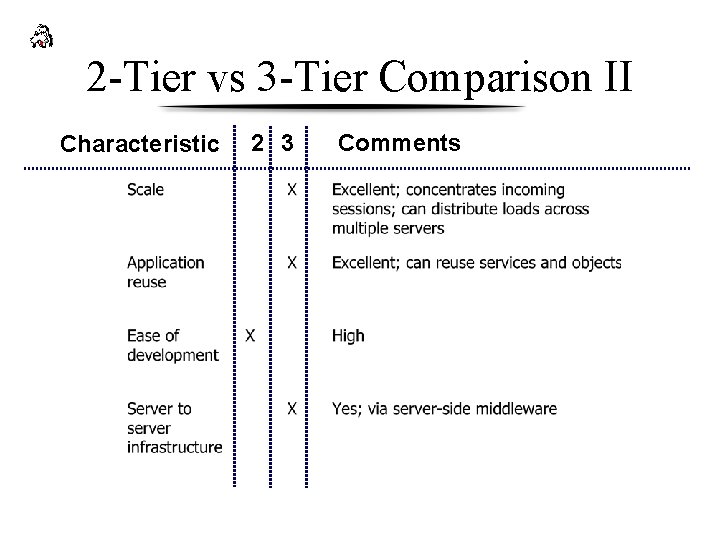
2 -Tier vs 3 -Tier Comparison II Characteristic 2 3 Comments
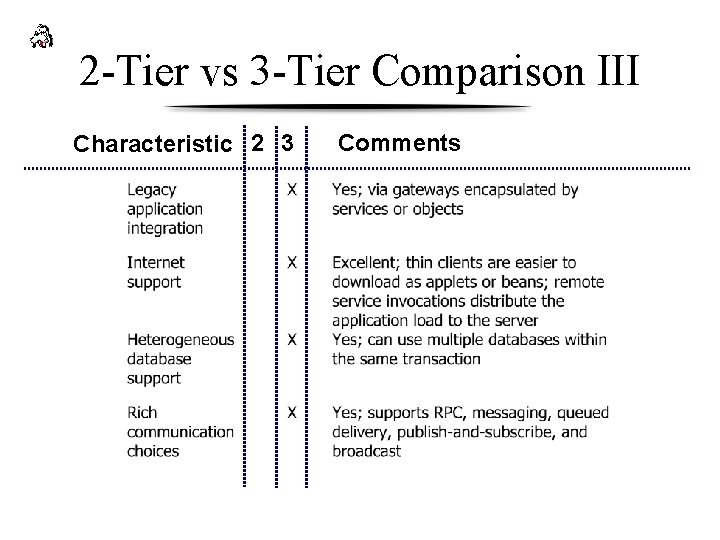
2 -Tier vs 3 -Tier Comparison III Characteristic 2 3 Comments
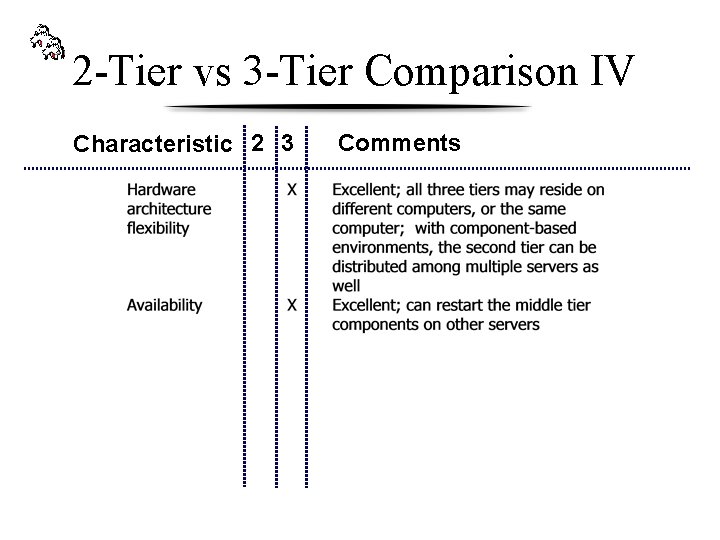
2 -Tier vs 3 -Tier Comparison IV Characteristic 2 3 Comments
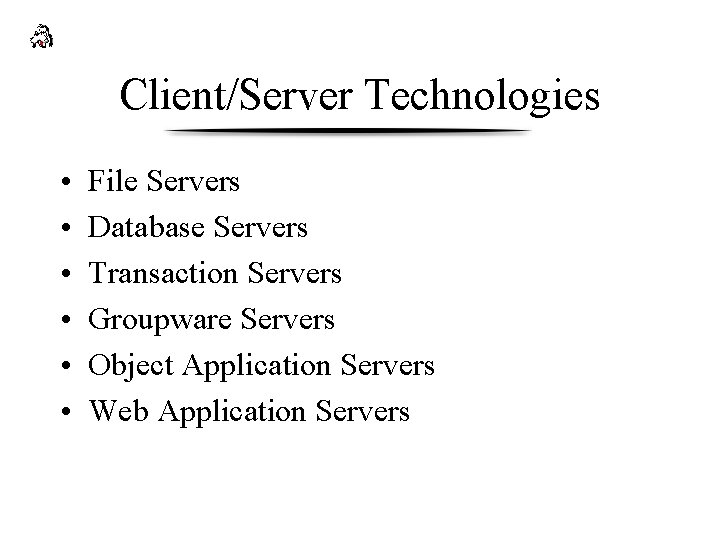
Client/Server Technologies • • • File Servers Database Servers Transaction Servers Groupware Servers Object Application Servers Web Application Servers
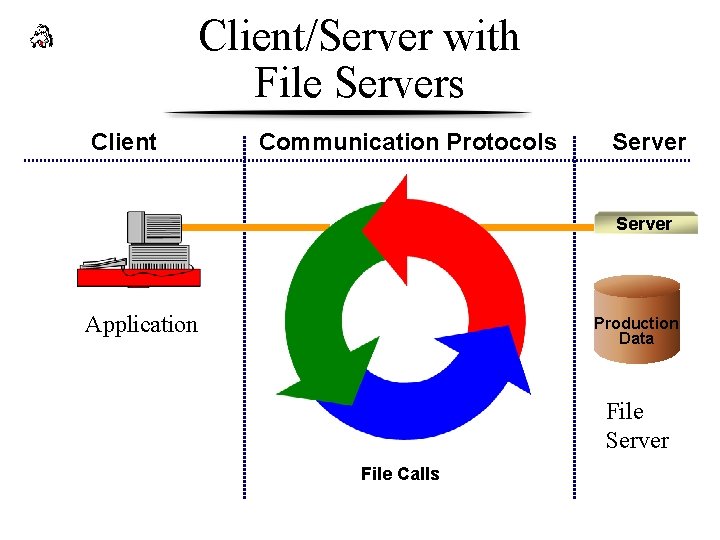
Client/Server with File Servers Client Communication Protocols Server Page Serv er Application Production Data File Server File Calls
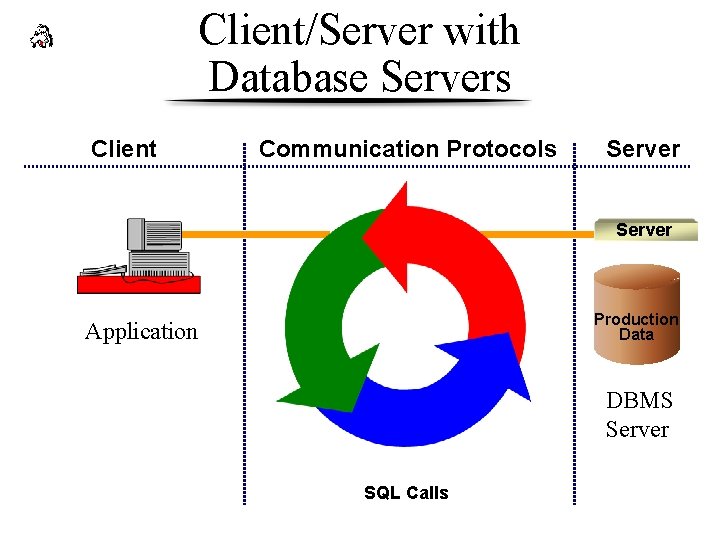
Client/Server with Database Servers Client Communication Protocols Server Page Serv er Application Production Data DBMS Server SQL Calls
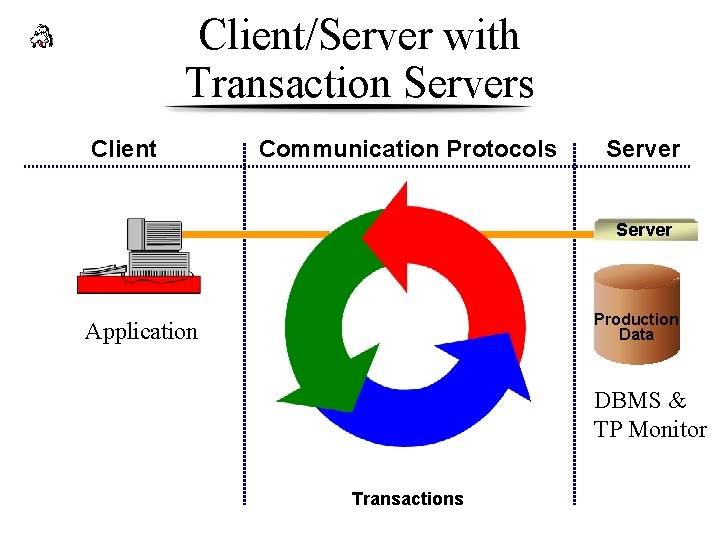
Client/Server with Transaction Servers Client Communication Protocols Server Page Serv er Application Production Data DBMS & TP Monitor Transactions
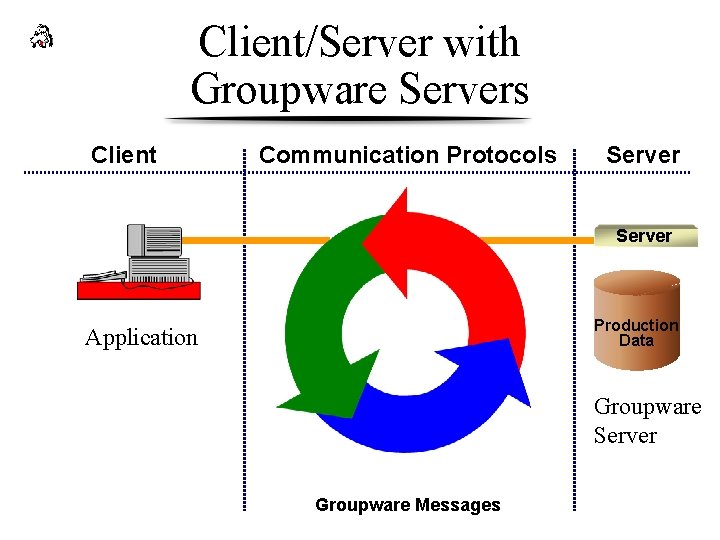
Client/Server with Groupware Servers Client Communication Protocols Server Page Serv er Application Production Data Groupware Server Groupware Messages
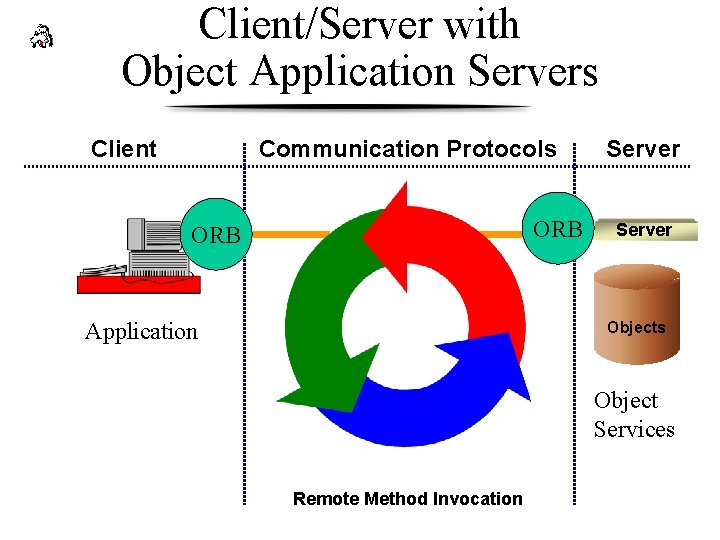
Client/Server with Object Application Servers Client Communication Protocols ORB Server Page Serv er Application Objects Object Services Remote Method Invocation
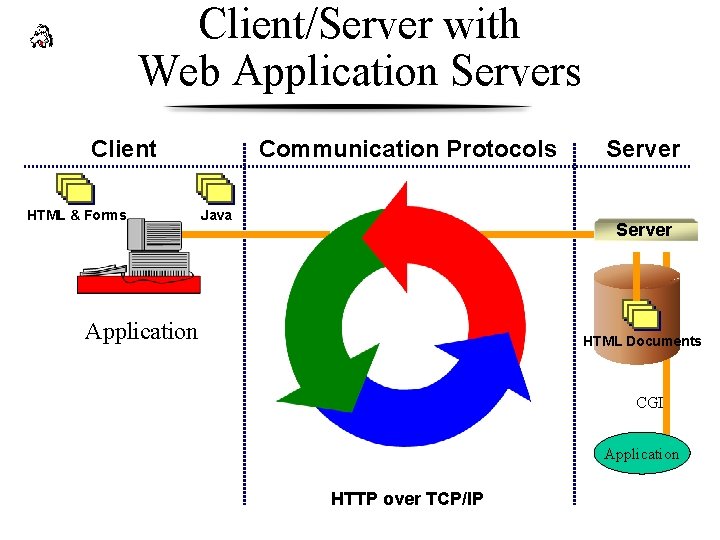
Client/Server with Web Application Servers Client HTML & Forms Communication Protocols Java Server Page Serv er Application HTML Documents CGI Application HTTP over TCP/IP
Middleware I • The “/” in Client/Server • All the distributed software needed to support interactions between clients and servers • Client-side API to invoke a service • Transmission of request and response over network
Middleware II • Provide platform for running server-side components; responsible for: • Load balancing • Integrity of transactions • High availablity • Secure environment
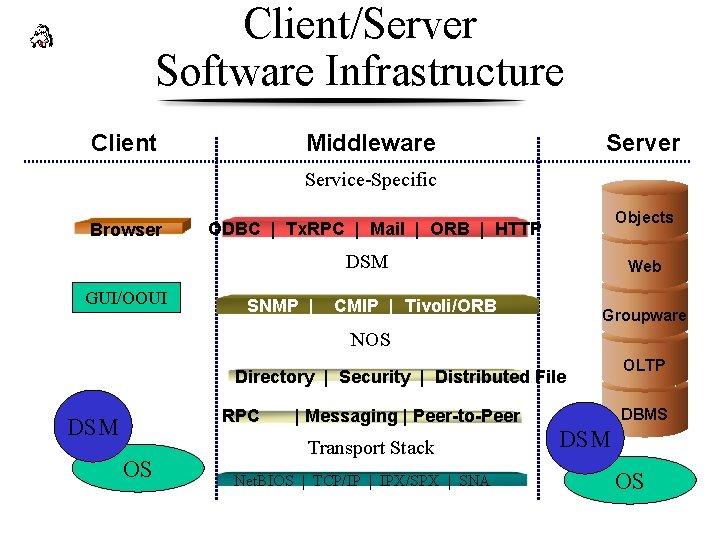
Client/Server Software Infrastructure Client Middleware Server Service-Specific Browser Objects ODBC | Tx. RPC | Mail | ORB | HTTP DSM GUI/OOUI SNMP | Web CMIP | Tivoli/ORB Groupware NOS Directory | Security | Distributed File RPC DSM OS | Messaging | Peer-to-Peer Custom Transport Stack Server Net. BIOS | TCP/IP | IPX/SPX | SNA OLTP DBMS DSM OS
Component-Based Architecture • • • Develop in small steps (4 X 4) Applications reuse components Encapsulate services Off-the-shelf, mix-and-match Component environments get better with age
Component Types • Services encapsulate a business function • Objects encapsulate specific data with the associated business functions • Stateless objects retrieve required instance data when needed, and update database when done • Stateful objects are unique. Changes in state must be captured by the infrastructure.
Design Patterns • Greenfield • Turbocharger • Integrator
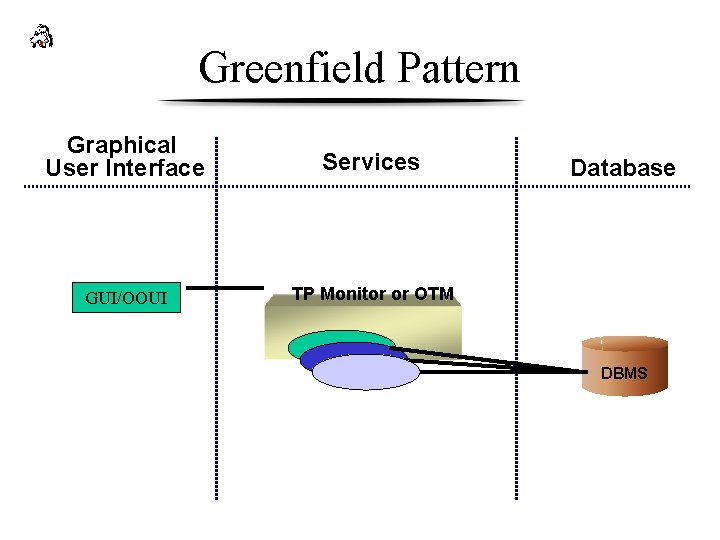
Greenfield Pattern Graphical User Interface Services GUI/OOUI TP Monitor or OTM Database DBMS
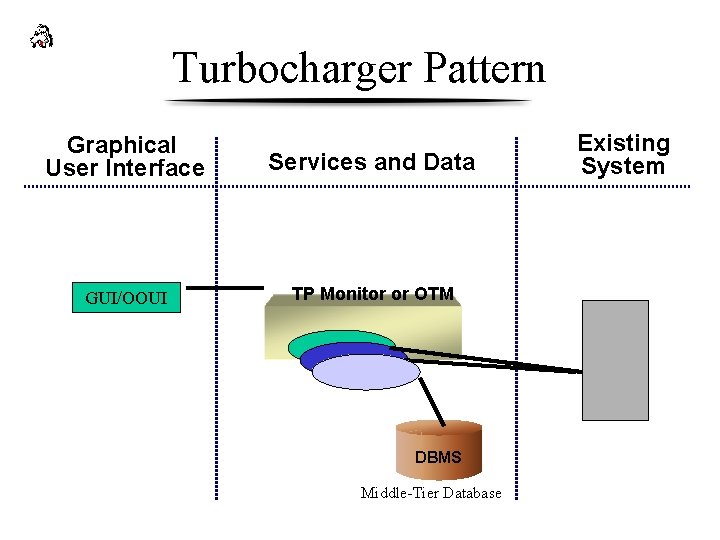
Turbocharger Pattern Graphical User Interface Services and Data GUI/OOUI TP Monitor or OTM DBMS Middle-Tier Database Existing System
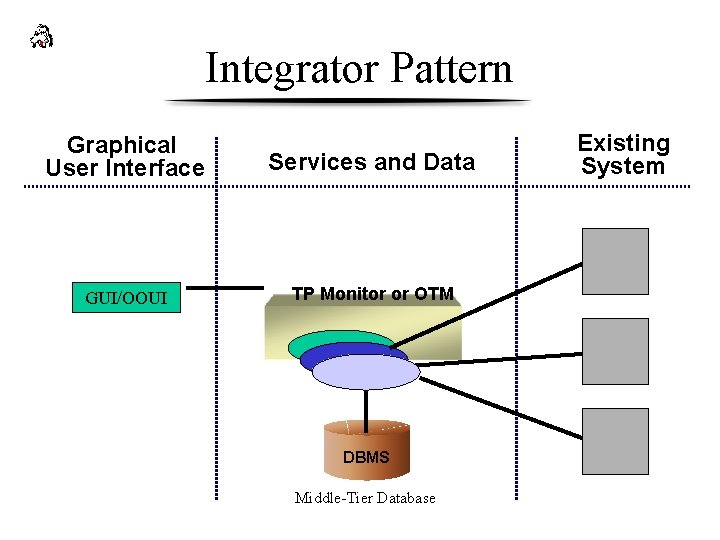
Integrator Pattern Graphical User Interface Services and Data GUI/OOUI TP Monitor or OTM DBMS Middle-Tier Database Existing System
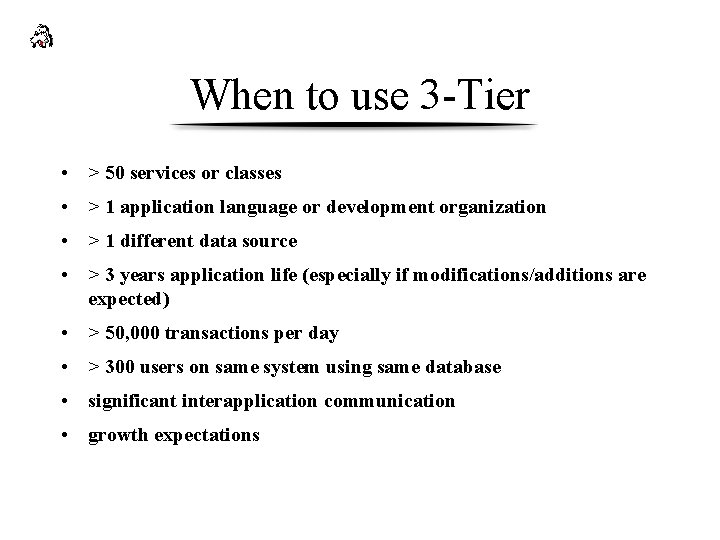
When to use 3 -Tier • > 50 services or classes • > 1 application language or development organization • > 1 different data source • > 3 years application life (especially if modifications/additions are expected) • > 50, 000 transactions per day • > 300 users on same system using same database • significant interapplication communication • growth expectations
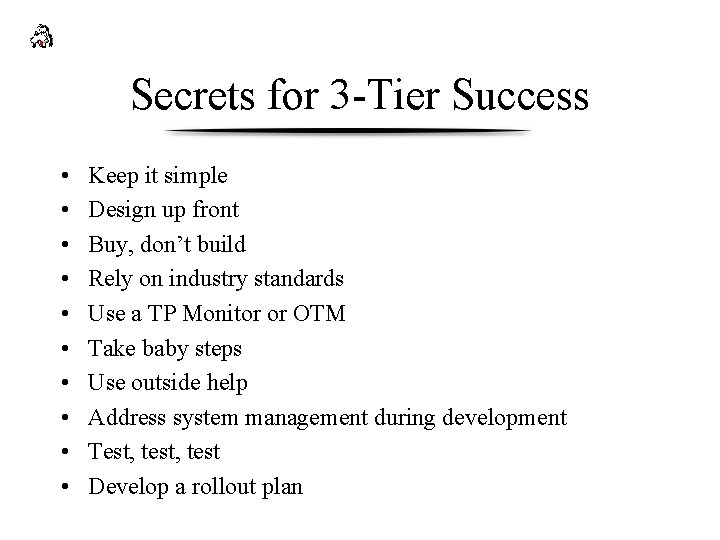
Secrets for 3 -Tier Success • • • Keep it simple Design up front Buy, don’t build Rely on industry standards Use a TP Monitor or OTM Take baby steps Use outside help Address system management during development Test, test Develop a rollout plan
Overview of scripting lang. • Scripting languages are used for adding client side interaction, publishing live and dynamic data to web site and an ability to communicate with components in application server is making them a very important in building multitier architecture for organizations.
Where scripting lang is important • 1) Datawarehousing. Plays a major role in publishing data out to web • 2) Internet and Intranet Applications. eg Fed Ex. • 3) Applications where deployment is major pain and has lot of remote users.
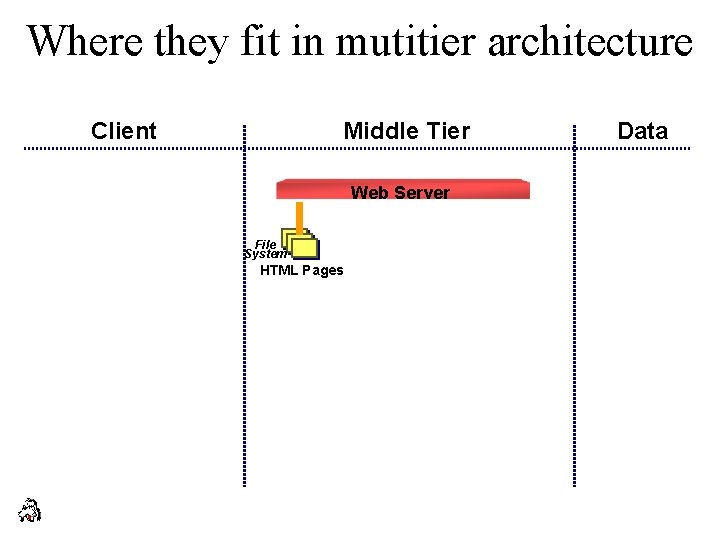
Where they fit in mutitier architecture Client Middle Tier Web Server File System HTML Pages Data
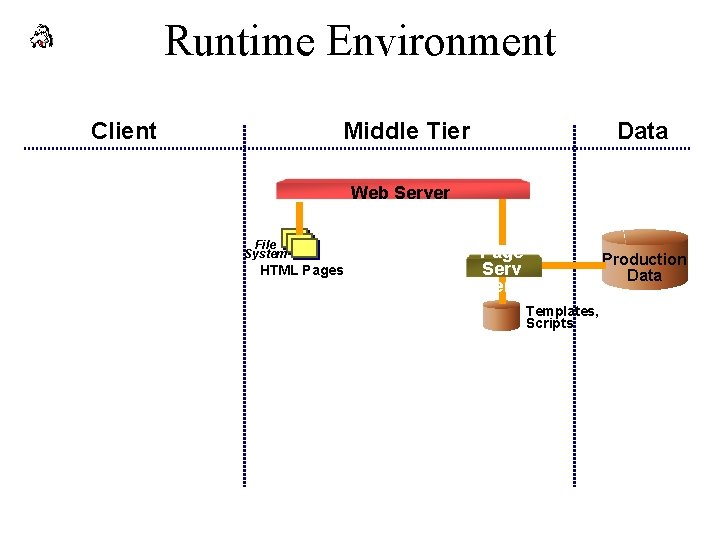
Runtime Environment Client Middle Tier Data Web Server File System HTML Pages Page Serv er Production Data Templates, Scripts
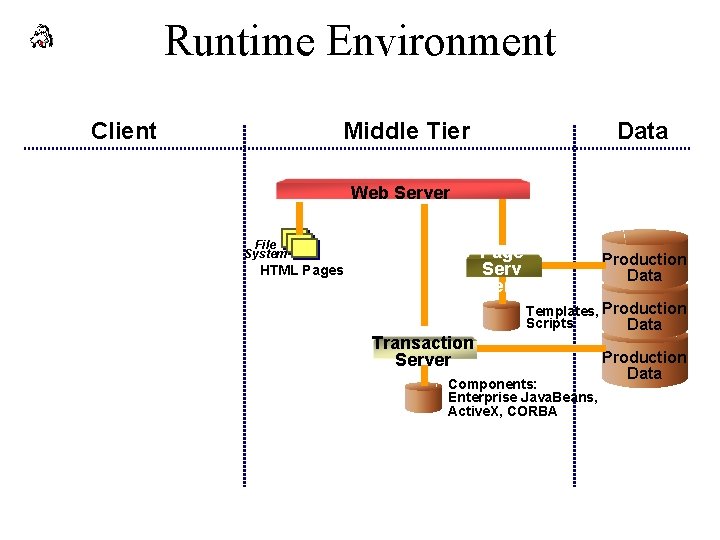
Runtime Environment Client Middle Tier Data Web Server File System Page Serv er HTML Pages Transaction Server Production Data Templates, Production Scripts Data Components: Enterprise Java. Beans, Active. X, CORBA Production Data
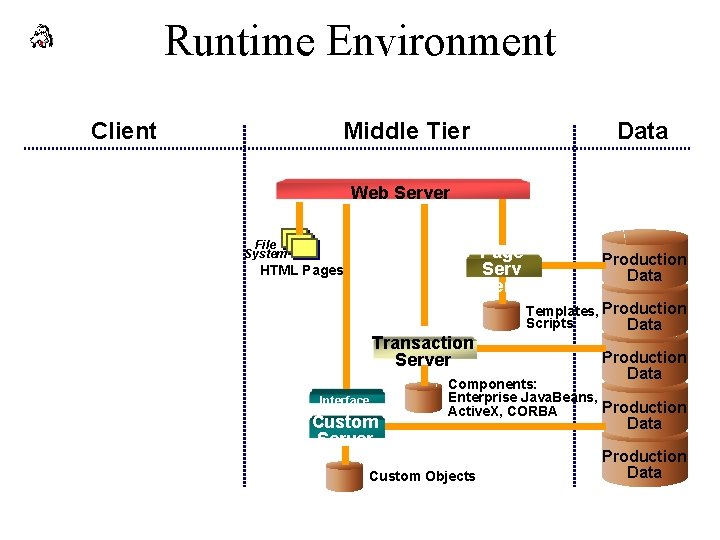
Runtime Environment Client Middle Tier Data Web Server File System Page Serv er HTML Pages Transaction Server Interface Custom Server Production Data Templates, Production Scripts Data Production Data Components: Enterprise Java. Beans, Production Active. X, CORBA Custom Objects Data Production Data
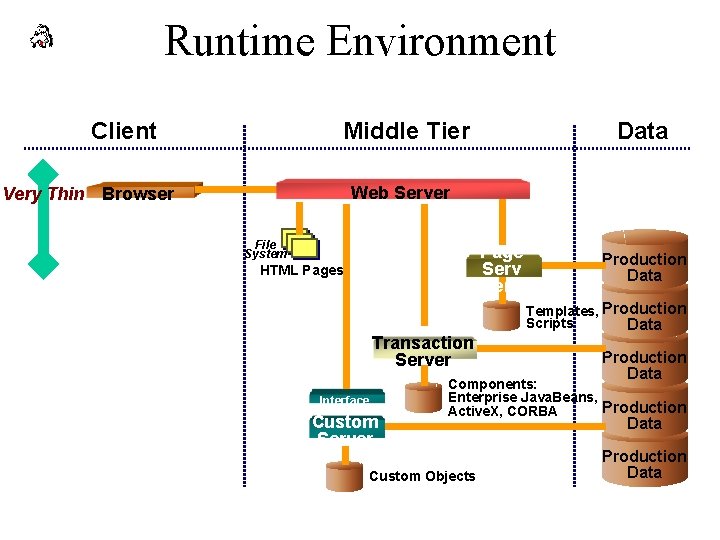
Runtime Environment Client Middle Tier Data Web Server Very Thin Browser File System Page Serv er HTML Pages Transaction Server Interface Custom Server Production Data Templates, Production Scripts Data Production Data Components: Enterprise Java. Beans, Production Active. X, CORBA Custom Objects Data Production Data
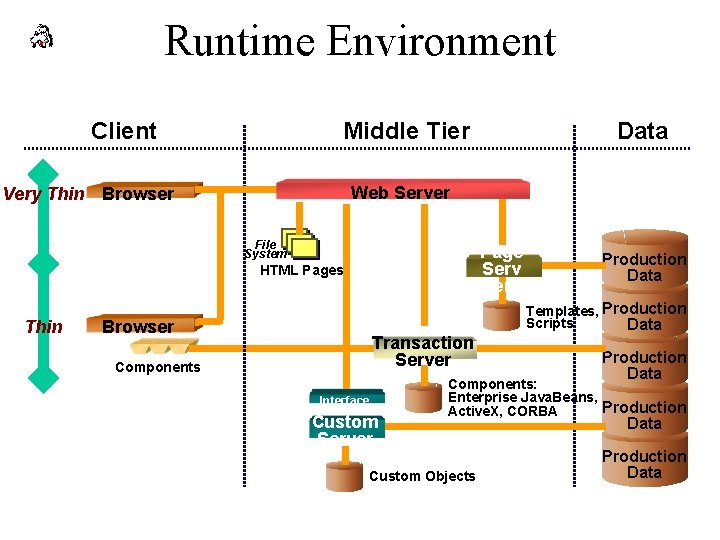
Runtime Environment Client Middle Tier Web Server Very Thin Browser File System Page Serv er HTML Pages Thin Data Browser Transaction Server Components Interface Custom Server Production Data Templates, Production Scripts Data Production Data Components: Enterprise Java. Beans, Production Active. X, CORBA Custom Objects Data Production Data
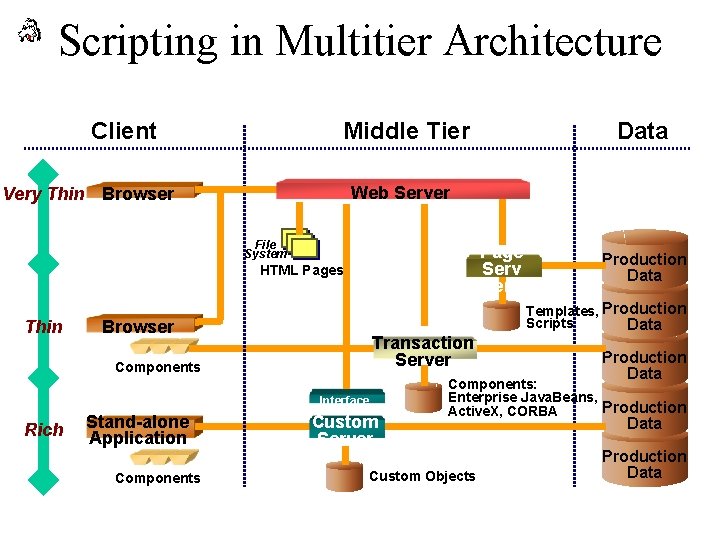
Scripting in Multitier Architecture Client Middle Tier Web Server Very Thin Browser File System Page Serv er HTML Pages Thin Browser Transaction Server Components Interface Rich Stand-alone Application Components Data Custom Server Production Data Templates, Production Scripts Data Production Data Components: Enterprise Java. Beans, Production Active. X, CORBA Custom Objects Data Production Data
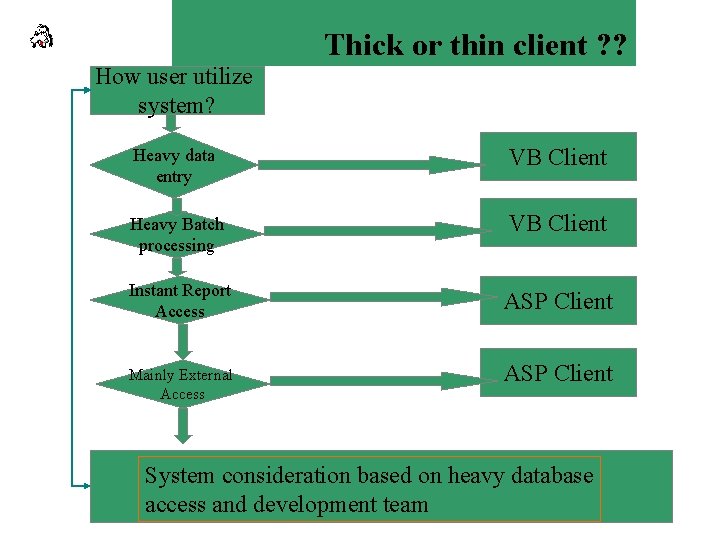
Thick or thin client ? ? How user utilize system? Heavy data entry VB Client Heavy Batch processing VB Client Instant Report Access ASP Client Mainly External Access ASP Client System consideration based on heavy database access and development team
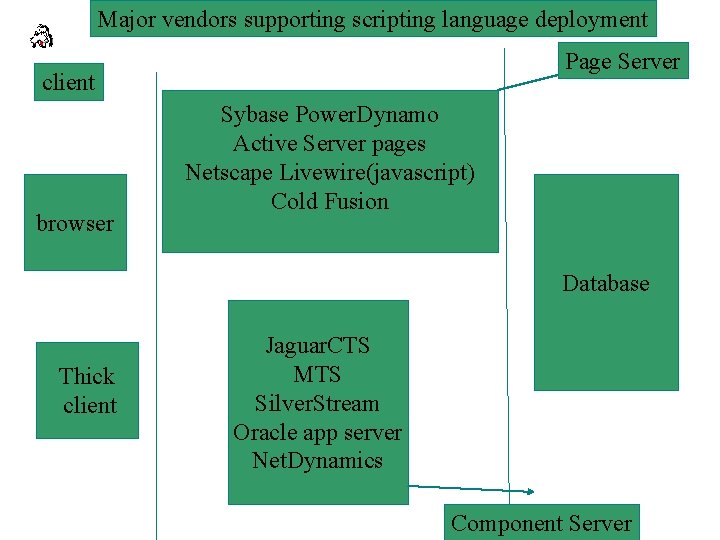
Major vendors supporting scripting language deployment Page Server client browser Sybase Power. Dynamo Active Server pages Netscape Livewire(javascript) Cold Fusion Database Thick client Jaguar. CTS MTS Silver. Stream Oracle app server Net. Dynamics Component Server
Where CGI fits in • CGI. The classic way to perform server-side functions is via Common Gateway Interface (CGI). Many CGI programs use Perl, a scripting language well-suited to the task. However, you can write CGI programs in practically any language including C++, Python, and Java. Without careful planning, CGI can introduce security holes in your server, and CGI programs are usually hard to debug and difficult for casual programmers to write.
Server side scripting(eg ASP) • ASP is a deployment environment for server side scripting • Client call the page server where the scripts resides. • Scripts then query against the database or components to create dyanamic content on the client.
Server side scripting(eg ASP) • Jscript(competition of javascript) and Vbscript are the scripting languages used in ASP environment. • ASP files on the server can be updated at any time. Simply save the changes to the file and the script will be automatically compiled the next time the Web page is loaded.
Server side scripting(eg ASP) • ASP includes five standard objects for global use • Request -- To get information from the user • Response -- To send information to the user • Server -- To control the Internet Information Server • Session -- To store information about and change settings for the user's current Web-server session • Application -- To share application-level information and control settings for the lifetime of the application
VBscript(Overview) • Visual Basic Scripting Edition, also known as VBScript, enables authors to create scripts using a subset of the Microsoft Visual Basic language. If you are already a Visual Basic programmer, or if you are not a programmer but are looking for a scripting language that is easy to learn, VBScript might be the right language for you. VBScript is implemented as a fast, portable interpreter for use in Web browsers and applications that use Active. X™ controls, Java applets, and OLE Automation servers.

VBScript -- Features – Error handling. VBScript has a subset of the error handling provided by Visual Basic. This includes the error object and on error resume next. Error handling is very important when developing server-side code, since most of the functionality will require access to external COM objects, which could throw errors. – Formatting. VBScript has the ability to format dates, numbers, and currency built into the language.
VBScript -- Features – Easier COM integration. Many COM objects return information in the form of a collection. VBScript has built-in support for iterating through collections – Standard Event-binding Syntax. Visual Basic developers will immediately recognize the object_event (sub button 1_onclick) naming convention for event handlers. VBScript works in exactly the same way, so in any application that supports event binding (such as Internet Explorer, Outlook, and Windows Scripting Host), you can use this syntax for your event hook-up code.
VBScript -- Advantages – Easy to understand master. VBScript's biggest asset is that it's Basic, a language designed to be learned quickly. Visual Basic has brought Basic users some of the advantages of more complex languages, while not losing sight of the fact that the language should be easy to understand. – It's Visual Basic. All the skills learned with VB instantly apply to VBScript. Also, an enormous community exists to provide training, books, and magazines for learning Visual Basic. – Flexible. VBScript can be used in a wide variety of applications, and Microsoft is committed to ensuring that wherever script is part of an application, VBScript will be included.
VBScript --- Syntax • <CENTER> • <P> • <H 2>Hello, world sample</H 2> • <INPUT TYPE=BUTTON VALUE="Click me" NAME="Btn. Hello"> • </CENTER> • <SCRIPT LANGUAGE="VBScript"> • <!-Sub Btn. Hello_On. Click Msg. Box "Hello, world!", 0, "My first active document" • End Sub • --> • </SCRIPT> • •
JScript(Overview) • JScript is Microsoft's implementation of an ECMAcompliant scripting language (like Java. Script) that is targeted specifically to the Internet. Like VBScript, JScript is implemented as a fast, portable interpreter for use in Web browsers and applications that use Active. X controls, Java applets, and OLE Automation servers. JScript is not Java and has nothing to do with Java. It is closer in syntax to C or C++.
Jscript Features – Dynamic: JScript was designed as a completely dynamic language; that is, you can effectively redefine your program on the fly. While this has a number of potential disadvantages, it does give you the ultimate flexibility in your scripts. This is particularly useful in DHTML programming, since DHTML allows you to dynamically manipulate the object model. If you really want to drive DHTML, you might want to consider using JScript instead of VBScript. – Object oriented: JScript certainly isn't a traditional classbased, object-oriented language, but it does provide an effective alternative based on prototypes. This allows you to reap the benefits of object orientation without the statically defined nature of classes.
Jscript - Features – Regular expressions: A main reason why Perl has such a huge following. Regular expressions add the ability to search for expressions in strings. This is exceptionally useful on the server and, increasingly, on the client. – Eval: Provides the ability to immediately evaluate code at runtime. This allows you to dynamically redefine logic dependent at run time. This is especially useful when used in conjunction with Remote Scripting, which works with VBScript as well.
Jscript -- Advantages – Broad reach. JScript is pretty much guaranteed to run in any browser, anywhere. If your page really must work in any browser, this is the language for you. – All those books in the bookstore. How many books can there be? If you want to learn JScript, there are myriad books to help you. – Similarity to C and Java. If you are a C or Java programmer, the JScript syntax is going to be familiar to you.
Java. Script Overview • Netscapes compact, object-based scripting language for developing client and server Internet applications. • Not Java …. . Or is it?
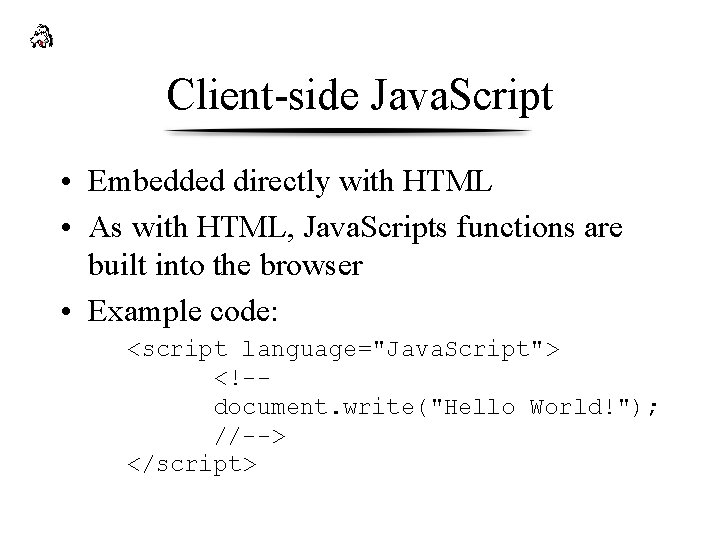
Client-side Java. Script • Embedded directly with HTML • As with HTML, Java. Scripts functions are built into the browser • Example code: <script language="Java. Script"> <!-document. write("Hello World!"); //--> </script>
Live. Connect in Java. Script • Allows Java and Java. Script code to communicate with each other – From Java. Script, you can instansiate Java objects and access their public methods and fields – From Java, you can access Java. Script objects, properties and methods
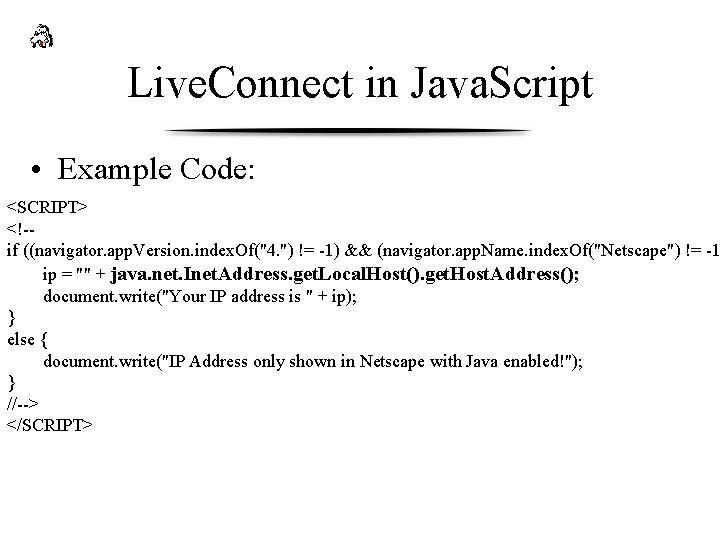
Live. Connect in Java. Script • Example Code: <SCRIPT> <!-if ((navigator. app. Version. index. Of("4. ") != -1) && (navigator. app. Name. index. Of("Netscape") != -1 ip = "" + java. net. Inet. Address. get. Local. Host(). get. Host. Address(); document. write("Your IP address is " + ip); } else { document. write("IP Address only shown in Netscape with Java enabled!"); } //--> </SCRIPT>
Server. Side Java. Script • Serve more Client Java. Script and HTML • Database Connectivity through Live. Wire • Corba Object Connectivity through Live. Connect
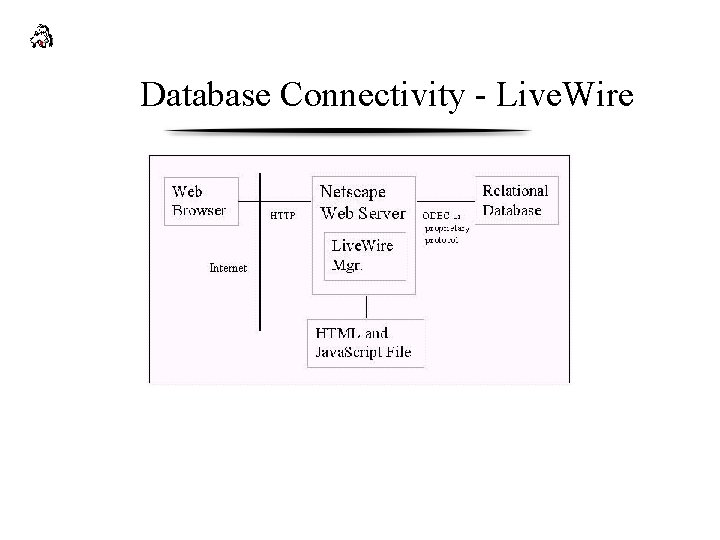
Database Connectivity - Live. Wire
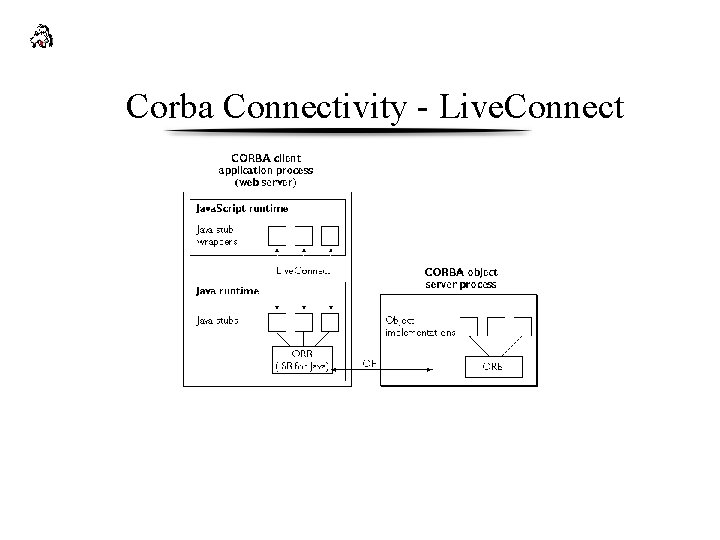
Corba Connectivity - Live. Connect

Silver. Stream Overview • What is Silver. Stream • The birth and success of Silver. Stream
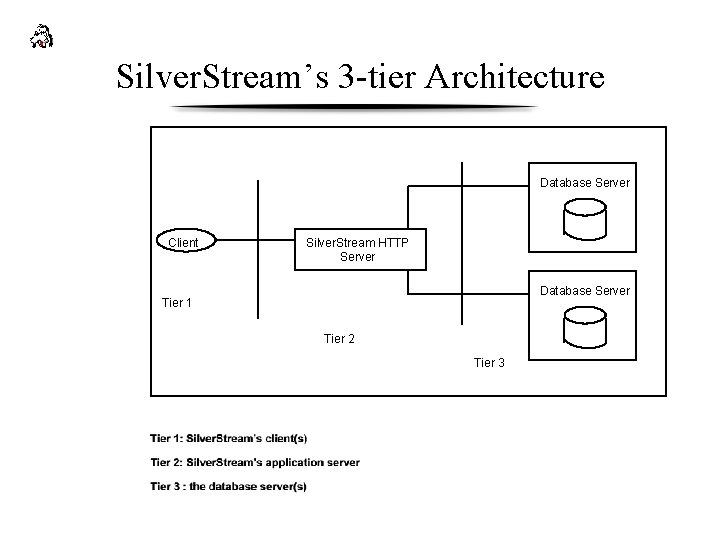
Silver. Stream’s 3 -tier Architecture Database Server Client Silver. Stream HTTP Server Database Server Tier 1 Tier 2 Tier 3
Benefits of Silver. Streams 3 -Tier Architecture • Security management • Code Management • Data Valication
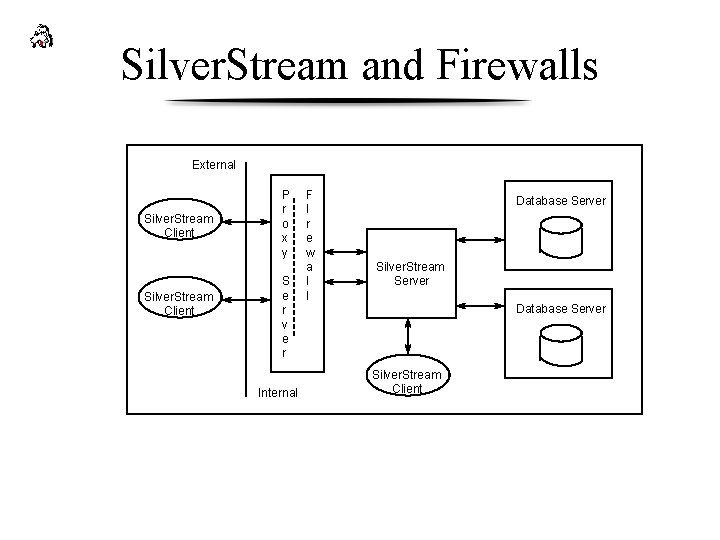
Silver. Stream and Firewalls External Silver. Stream Client P r o x y S e r v e r Internal F I r e w a l l Database Server Silver. Stream Server Database Server Silver. Stream Client
Silver. Stream and Web Servers
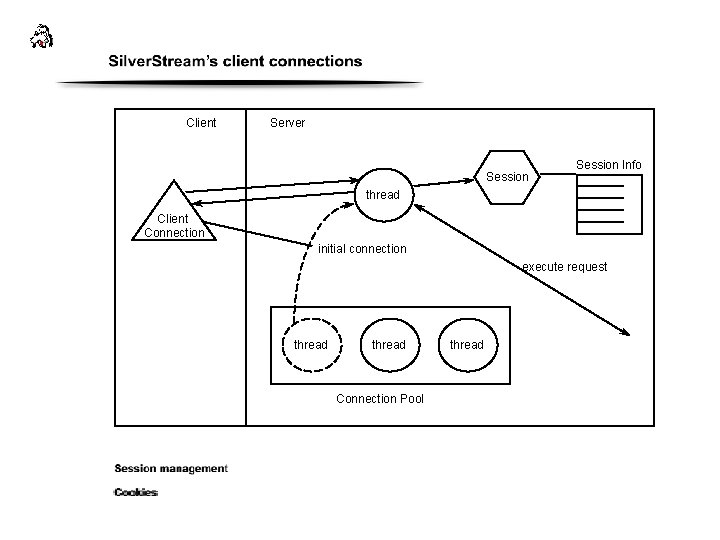
Client Server Session Info thread Client Connection initial connection execute request thread Connection Pool thread
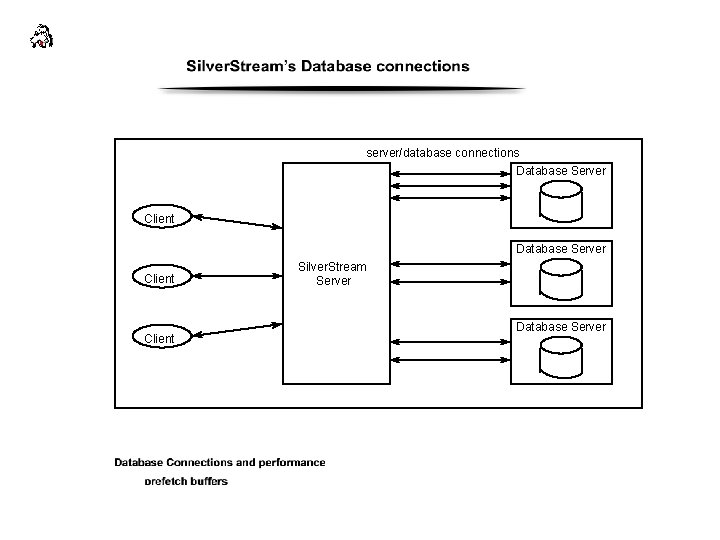
server/database connections Database Server Client Silver. Stream Server Database Server
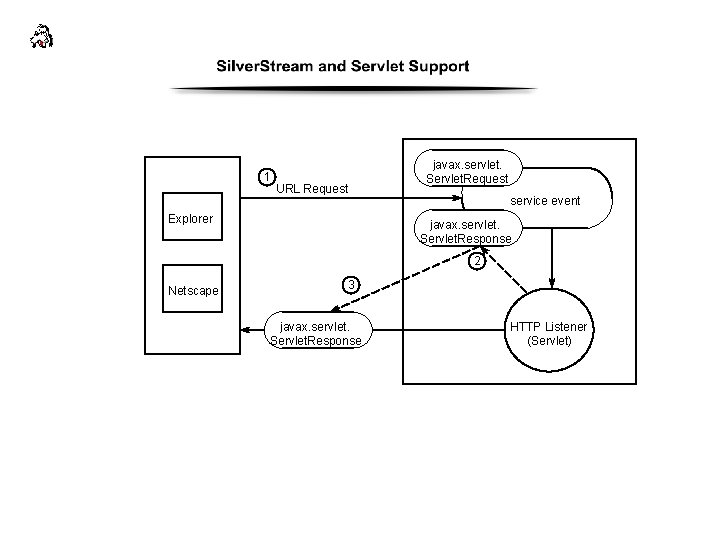
1 javax. servlet. Servlet. Request URL Request service event Explorer javax. servlet. Servlet. Response 2 Netscape 3 javax. servlet. Servlet. Response HTTP Listener (Servlet)
Silver. Stream and Page Management • Java Presentations • Dynamic Page Presentations
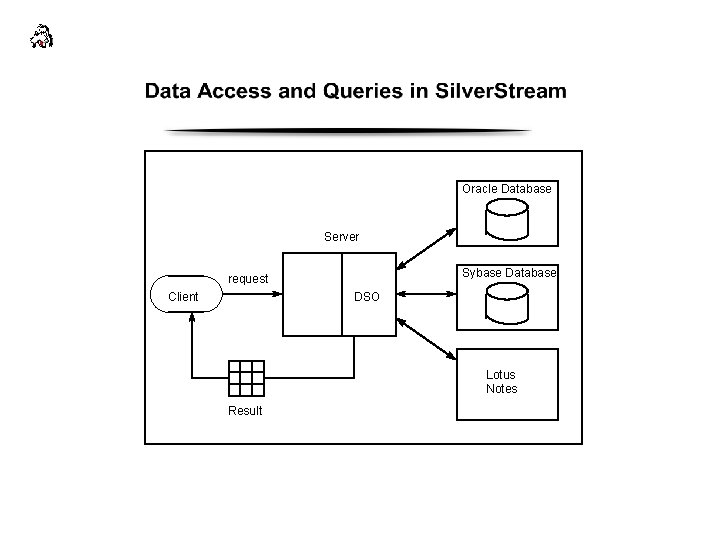
Oracle Database Server Sybase Database request Client DSO Lotus Notes Result
Business Objects and Corba Objects in Silver. Stream
Other Features of Silver. Stream • Silver. Stream and E-mail • Silver. Stream and JAR(java archive) files • Silver. Stream and Java. Beans
Silver. Stream Security
Load Balancing and Fail-over in Silver. Stream
In the Distance with Silver. Stream
Load Balancing
Topics • Concepts – What is Load Balancing? – Why do we need load balancing? – What is essential for a load balancer? • Architecture example: Silverstream • Common Algorithms • Vendors
Concepts: What is Load Balancing? • Evenly distribute network processing, database access, transactions. • Example: Clustering – distribute incoming transactions evenly – redirect requests
Concepts: Why do we need load balancing? • Handling multiple requests, while ensuring – optimal response time – quality performance • The cluster of servers have even workload and operate at maximum efficiency.
Concepts: What is essential for a load balancer? • Retain the state of all servers it is managing. • Have a good algorithm efficient load balancing plan Example of a good load balancing architecture (Silverstream). . .
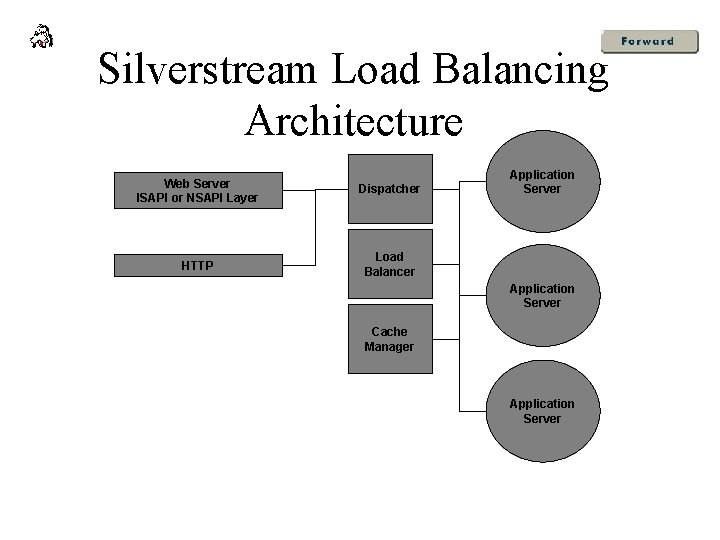
Silverstream Load Balancing Architecture Web Server ISAPI or NSAPI Layer Dispatcher HTTP Load Balancer Application Server Cache Manager Application Server
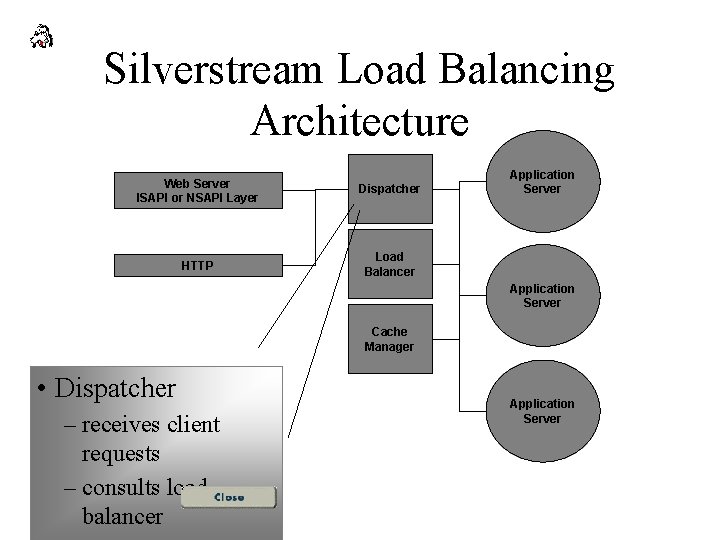
Silverstream Load Balancing Architecture Web Server ISAPI or NSAPI Layer Dispatcher HTTP Load Balancer Application Server Cache Manager • Dispatcher – receives client requests – consults load balancer Application Server
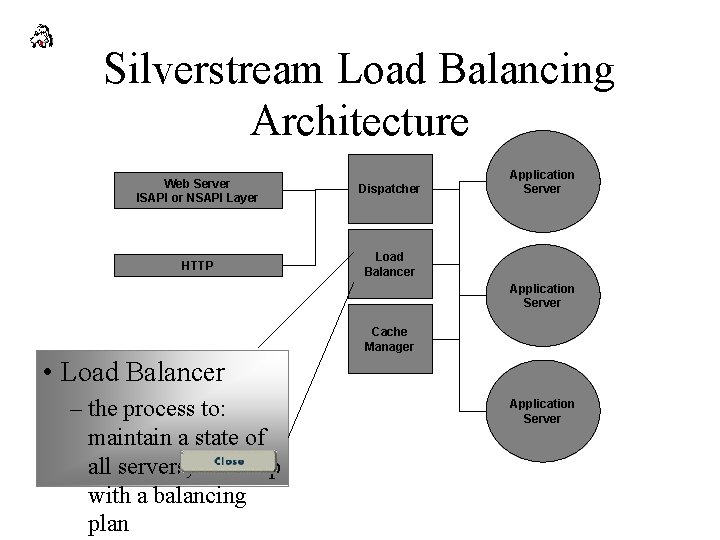
Silverstream Load Balancing Architecture Web Server ISAPI or NSAPI Layer Dispatcher HTTP Load Balancer Application Server Cache Manager • Load Balancer – the process to: maintain a state of all servers; come up with a balancing plan Application Server
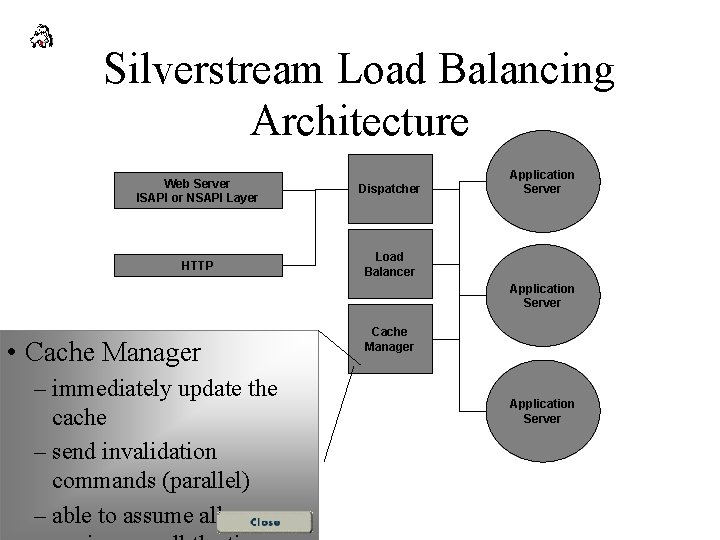
Silverstream Load Balancing Architecture Web Server ISAPI or NSAPI Layer Dispatcher HTTP Load Balancer Application Server • Cache Manager – immediately update the cache – send invalidation commands (parallel) – able to assume all servers Cache Manager Application Server
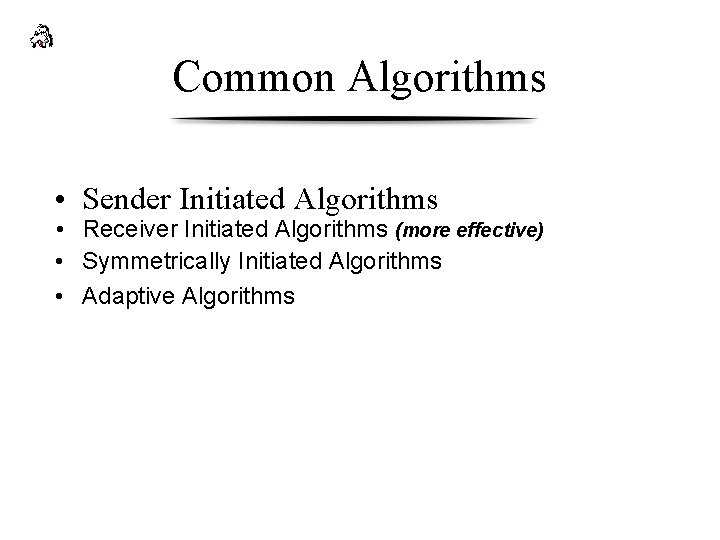
Common Algorithms • Sender Initiated Algorithms • Receiver Initiated Algorithms (more effective) • Symmetrically Initiated Algorithms • Adaptive Algorithms
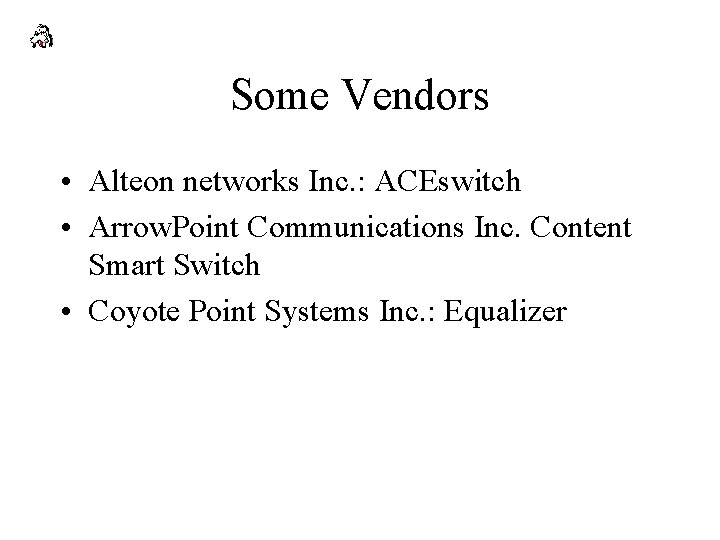
Some Vendors • Alteon networks Inc. : ACEswitch • Arrow. Point Communications Inc. Content Smart Switch • Coyote Point Systems Inc. : Equalizer
- Slides: 84