
Introducing the Unified Modeling Language UML Based on
Introducing the Unified Modeling Language (UML) (Based on Fowler (2004, Chapter 1) and Stevens and Pooley (2006, Preface & Chapter 3)) David Meredith dave@create. aau. dk http: //mea. create. aau. dk/course/view. php? id=58 Med 4 Aalborg Object-Oriented Analysis, Design and Programming
What is UML and why should we bother with it? • UML is a graphical notation system for designing and describing component-based and object-oriented software • graphical modeling languages for software development have been around for a long time • textual programming languages not abstract enough for discussing high-level design • diagrams good at communicating design without lots of detail – not a replacement for a textual programming language • UML is an open standard controlled by the Object Management Group (OMG) – www. uml. org • OMG set up to build standards to support interoperability of objectoriented systems • This course will focus on the current standard which is UML 2. 2 • Familiarity with UML has become a core skill for software engineers 2
Modes of using UML • Sketch mode – – • most common forward engineering: make UML diagram then write code reverse engineering: derive UML diagram from code focus on important features and leave out detail Blueprint mode – emphasis on completeness – forward engineering: build detailed design for programmers to implement • like architect designing a building which is built by construction company • Programming language mode – draw UML diagrams that are automatically compiled into executable code – Model Driven Architecture (MDA) (Kleppe et al. , 2003) • standard approach to using UML as a programming language • Three stages 1. PIM - platform-independent model (in UML) 2. PSM - platform-specific model (e. g. , different for. NET or Java, probably also in UML) 3. executable code – Executable UML (Mellor and Balcer, 2002) • Model compiler compiles UML directly into executable code without passing through PSM stage • Uses a subset of full UML • is it more productive than using a textual programming language? 3

Using UML from two perspectives • Software perspective – Using UML to model software systems – Direct mapping from UML elements to software elements – Two levels of abstraction (but not clear-cut demarcation between them) • Interface – Specification – how an object behaves (i. e. , what it does) – how we interact with an object • Implementation – how an object achieves its behaviour (i. e. , how exactly it does what it does) • Conceptual perspective – Using UML to represent concepts in some nonsoftware domain (e. g. , business processes) 4
We will be using UML… • …from a software perspective • …at the interface level of abstraction • …in sketch and blueprint mode 5
Views on a design • When we want to express a design, we do not try to express all aspects of it at once • Build different models to describe different aspects • Express models as diagrams in a modelling language like UML 6
Three basic types of model • Use case model – describes system from the point of view of the users • Static structural model – describes elements of the system and the relationships between them • Dynamic behavioural model – describes behaviour of the system over time 7
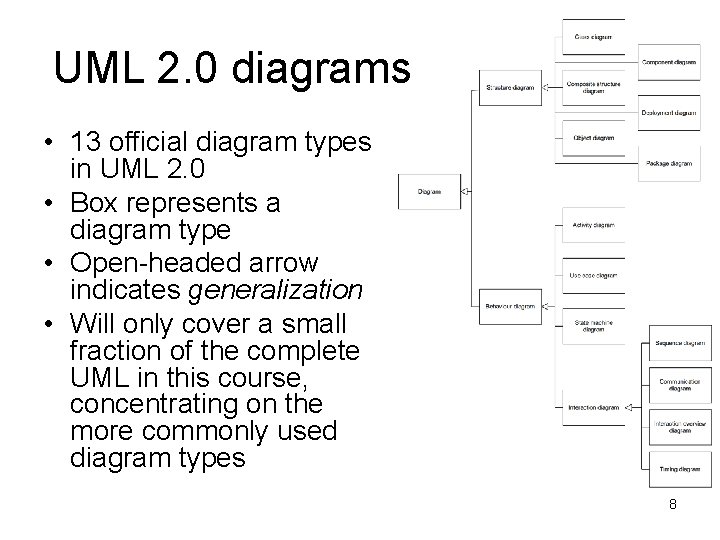
UML 2. 0 diagrams • 13 official diagram types in UML 2. 0 • Box represents a diagram type • Open-headed arrow indicates generalization • Will only cover a small fraction of the complete UML in this course, concentrating on the more commonly used diagram types 8
Legal UML • normative UML conforms to the standard specification • conventional UML may not conform to standard (i. e. , may be non-normative) but commonly used in practice • UML rules are treated as descriptive, not prescriptive – but must have well-defined meaning, even if not strictly legal UML • otherwise the diagrams cannot be interpreted reliably 9
Suppression in UML • Anything may be suppressed in a UML diagram – Therefore cannot assume that something is not in the system simply because it is not in the diagram! • Unless it conflicts with what is in the diagram 10
Using non-UML diagrams • Don’t need to use UML all the time! • Sometimes non-UML diagrams are useful – Screen flow diagrams – Flow charts – Decision tables – Class-Responsibility-Collaboration (CRC) cards 11
Using UML in requirements analysis • Use case diagram to describe how people interact with the system • Class diagram for building up vocabulary of domain • Activity diagram to describe how humans interact with software in the organisation • State diagram for describing complex life cycle of a concept • Have to communicate with users and customers who may not be experts in software engineering – Keep notation to a minimum – Avoid implementational details – Domain experts (users) must understand your diagrams 12
Using UML in design • Class diagrams from a software perspective • Sequence diagrams and CRC cards for common scenarios • Package diagrams for large-scale structure of software • State diagrams for classes with complex lifecycles • Deployment diagrams to show physical layout of software 13
Using UML in documentation • Use UML diagrams in sketch mode to highlight and illustrate interesting features • Remember: – “Comprehensiveness is the enemy of comprehensibility” 14
Using UML to study other people’s code • Use UML in sketch mode to make graphical notes about the structure and behaviour of a piece of software or code that you are studying 15
Introductory case study: Initial problem statement • “You have been contracted to develop a computer system for a university library. The library currently uses a 1960 s program, written in an obsolete language, for some simple bookkeeping tasks, and a card index for user browsing. You are asked to build an interactive system which handles both of these aspects online. ” (Stevens and Pooley, 2006, p. 27) 16
Clarifying the requirements • Initial problem statement is vague – Need a more detailed analysis before agreeing to tackle the problem • Requirements engineering is difficult because – Different users have different priorities – Users are not good at imagining or expressing what an ideal system would be like – Managers who talk to developers might not be users and so might not have experience of doing the jobs that the system is supposed to help with 17
Requirements in more detail • Books and journals – – – – – Library contains books and journals May have several copies of a given book Some books are for short-term loan Other books can be borrowed by any library member for 3 weeks Only members of staff may borrow journals Ordinary library members may borrow up to 6 items at a time Members of staff may borrow up to 12 items at a time New books and journals are added to the library and old ones are sometimes disposed of Current year’s journals are sent away to be bound into hardback volumes at the end of each year 18
Requirements in more detail • Borrowing – System must keep track of when books and journals are borrowed and returned – System should produce reminders when a book is overdue – In the future, users may need to be able to extend a loan if the item is not reserved 19
Requirements in more detail • Browsing – Users should be able to search for a book on a particular topic, by a particular author, etc. in order to • Check if a copy of the book is available • Reserve a copy if it is not – Anyone can browse in the library 20
Users and tasks • High quality system must meet its users’ needs – Need to identify users of a system – Need to identify tasks each user must carry out with the system – Need to prioritise tasks in order of importance • So that we can plan development 21
Actors and use cases • In UML – User is modelled by an actor – Task is modelled by a use case • Actor – User of a system in a particular role • e. g. , library member as book borrower – External system which interacts with our system • E. g. , bar-code reading machine • Use case – Task that actor needs to perform with the help of our system • E. g. , borrow a copy of a book – May involve a complex process • E. g. – Checking that the library member has not borrowed the maximum number of books – Checking that the book can be borrowed – May include two or more scenarios, each with a different type of outcome • E. g. – User allowed to borrow book – User refused permission to borrow book – Name use case after what happens in “normal” or main success scenario • E. g. , “Borrow copy of book” 22
Documenting a use case • Document each use case in third person, active voice, e. g. – “Borrow copy of book A Book. Borrower presents a book. The system checks that the potential borrower is a member of the library, and does not already have the maximum permitted number of books on loan. This maximum is 6 unless the member is a staff member, in which case it is 12. If both checks succeed, the system records that this library member has this copy of the book on loan. Otherwise, the system refuses the loan. ” • In use case description, say what system must achieve, not exactly how it should achieve it – E. g. , don’t say exactly how system stores information 23 about a loan
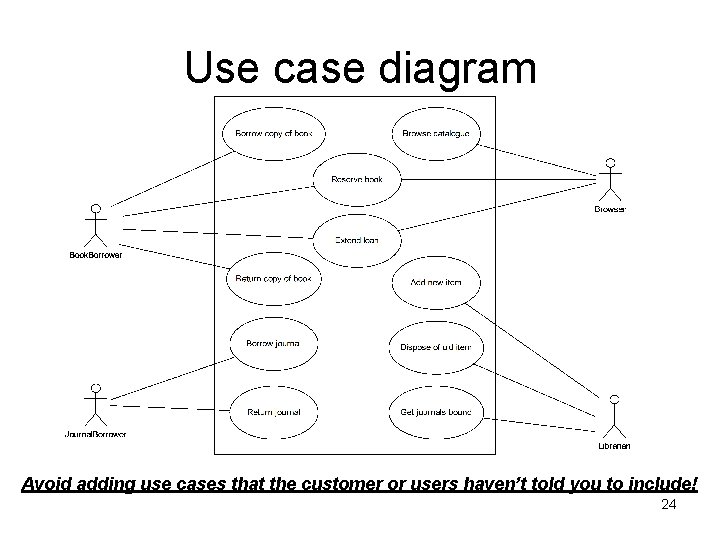
Use case diagram Avoid adding use cases that the customer or users haven’t told you to include! 24
Using use cases to determine goals of iterations • Decide what most important use cases are and provide these in early iterations • For example – in library case study, most important use cases might be • • Borrow copy of book Return copy of book Borrow journal Return journal – So aim to provide these at end of first iteration 25
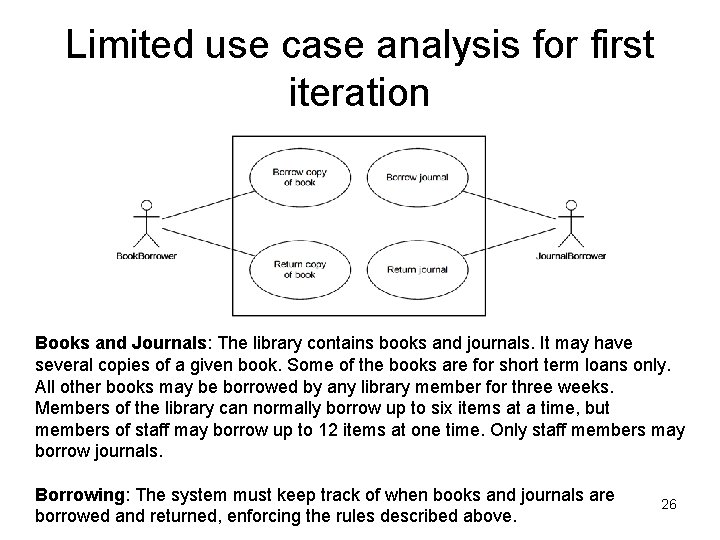
Limited use case analysis for first iteration Books and Journals: The library contains books and journals. It may have several copies of a given book. Some of the books are for short term loans only. All other books may be borrowed by any library member for three weeks. Members of the library can normally borrow up to six items at a time, but members of staff may borrow up to 12 items at one time. Only staff members may borrow journals. Borrowing: The system must keep track of when books and journals are borrowed and returned, enforcing the rules described above. 26

Identifying classes • Classes correspond to key domain abstractions • Domain is application area that we’re working in (e. g. , the library) • Abstraction represents only relevant important properties of a domain concept or thing • Can use noun identification technique to help with identifying appropriate classes 27
Noun identification technique 1. Take a clear concise statement of requirements or use case descriptions 2. Underline all nouns and noun phrases 3. This gives us candidate classes 4. Remove inappropriate classes to get initial class list for the system 28
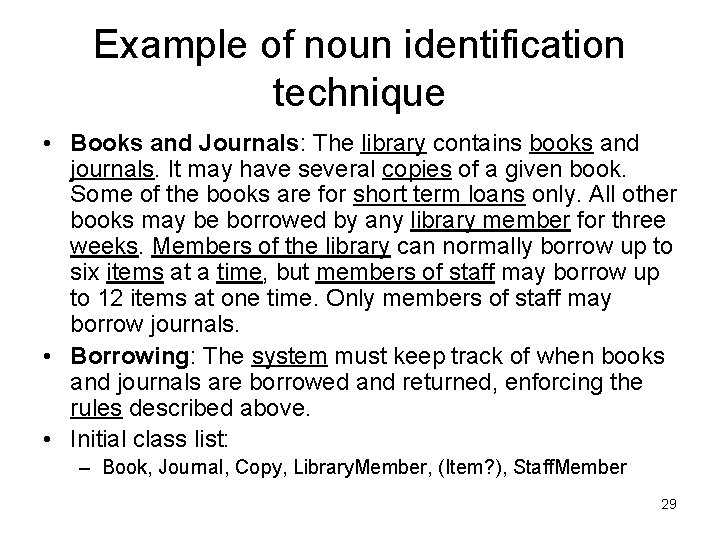
Example of noun identification technique • Books and Journals: The library contains books and journals. It may have several copies of a given book. Some of the books are for short term loans only. All other books may be borrowed by any library member for three weeks. Members of the library can normally borrow up to six items at a time, but members of staff may borrow up to 12 items at one time. Only members of staff may borrow journals. • Borrowing: The system must keep track of when books and journals are borrowed and returned, enforcing the rules described above. • Initial class list: – Book, Journal, Copy, Library. Member, (Item? ), Staff. Member 29
Objects representing actors • There isn’t always an object in a system representing each actor (e. g. , Staff. Member or Library. Member objects) • Can make objects representing actors responsible for carrying out actions on behalf of those actors – E. g. , send message borrow(the. Copy) to Library. Member object representing Jo Bloggs when Jo borrows a copy of a book • In library system, need to know how many books each member has on loan, so makes sense to have a Library. Member object for each member 30
Associations between classes • Having identified initial class list, then identify important real-world relationships or associations between the classes – Clarifies understanding of domain – Reveals coupling in the system • OK for closely-related domain objects to be associated since expect one class to depend on the other • Examples of real-world associations in the library system – – a copy is a copy of a book a library member borrows or returns a copy a member of staff borrows or returns a journal 31
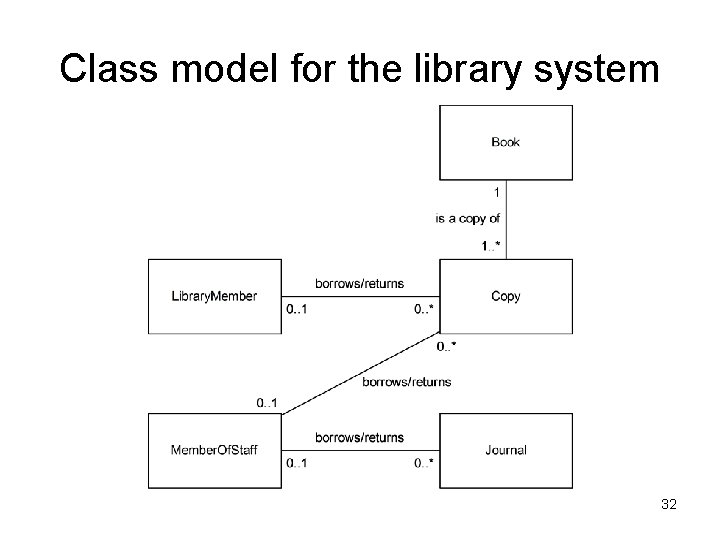
Class model for the library system 32
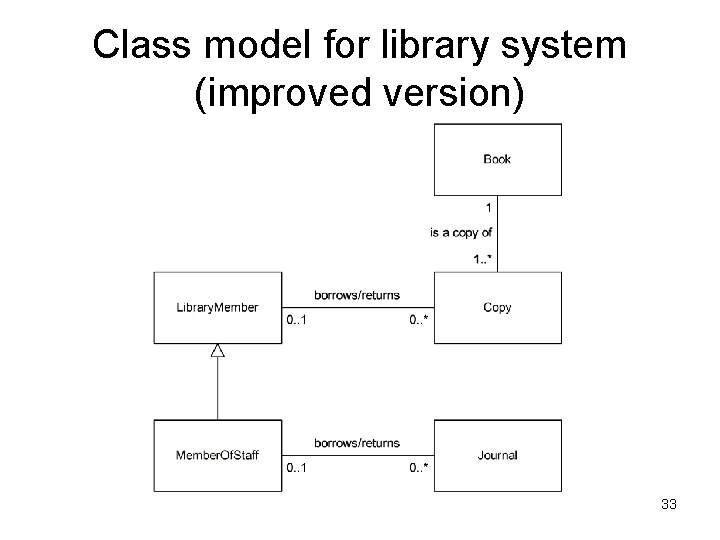
Class model for library system (improved version) 33
Dynamic behavioral models • Class model describes static structure of system • Also need to describe dynamic behaviour of system – How classes work together to provide the behaviour required by the use cases • Interaction diagrams show messages pass between objects to realize a use case 34
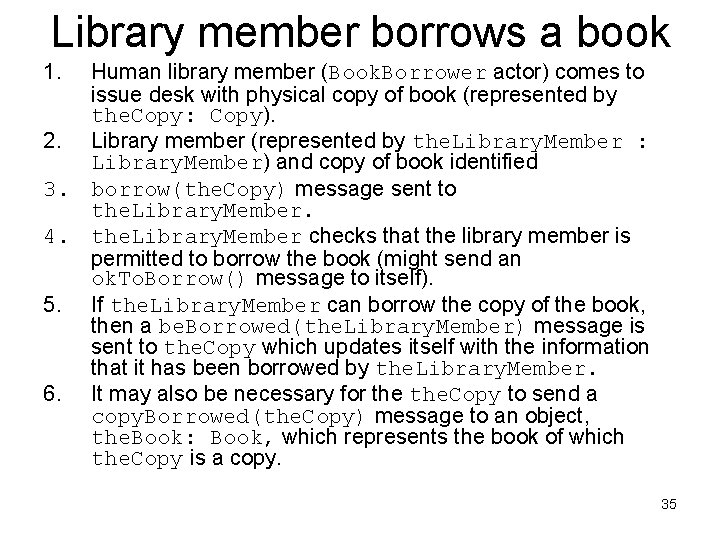
Library member borrows a book 1. Human library member (Book. Borrower actor) comes to issue desk with physical copy of book (represented by the. Copy: Copy). 2. Library member (represented by the. Library. Member : Library. Member) and copy of book identified 3. borrow(the. Copy) message sent to the. Library. Member. 4. the. Library. Member checks that the library member is permitted to borrow the book (might send an ok. To. Borrow() message to itself). 5. If the. Library. Member can borrow the copy of the book, then a be. Borrowed(the. Library. Member) message is sent to the. Copy which updates itself with the information that it has been borrowed by the. Library. Member. 6. It may also be necessary for the. Copy to send a copy. Borrowed(the. Copy) message to an object, the. Book: Book, which represents the book of which the. Copy is a copy. 35
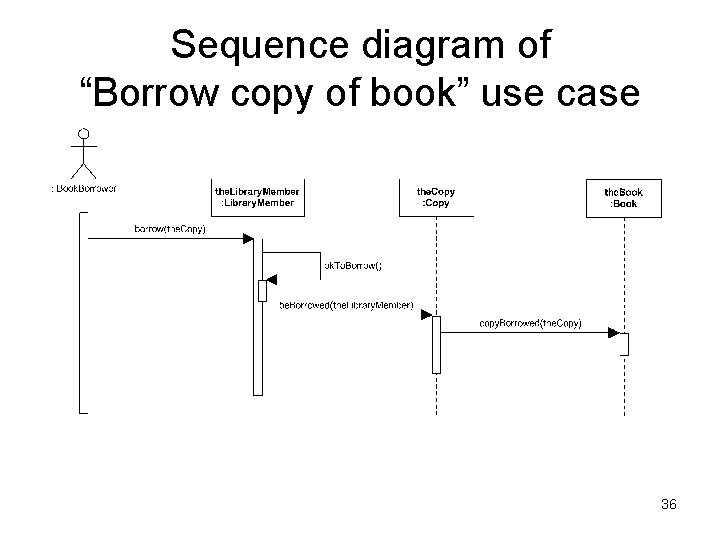
Sequence diagram of “Borrow copy of book” use case 36
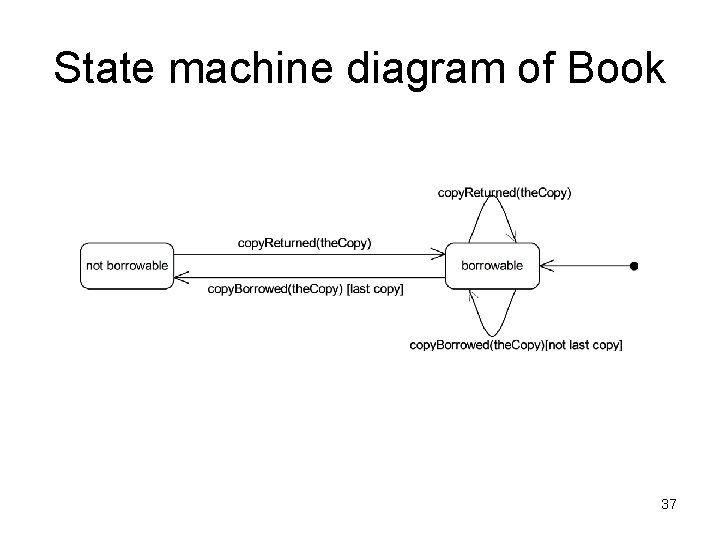
State machine diagram of Book 37
Going further • Having worked out sequence diagram and state machine diagram, can go back to class model and add attributes and operations to some of the classes • Once identified how all use cases are realized, down to level of which messages are passed, can then implement the classes and complete the first iteration 38
Summary • • UML is a graphical notation system for designing and describing component -based and object-oriented software can be used in sketch mode, blueprint mode or programming language mode can be used from a software perspective or a conceptual perspective three basic types of model – use case models – static structural models – dynamic behavioural models • UML standard is descriptive not prescriptive – but must be comprehensible with well-defined meaning • • • almost anything can be suppressed in a UML diagram UML can be used in requirements analysis, design, documentation and for studying legacy code considered a simple case study which involved designing a library system – – – Requirements analysis using UML use case diagrams Using the use case analysis to determine goals of iterations Identifying classes using noun identification technique Using class model to represent classes and associations between them Using a sequence diagram to represent the dynamic behaviour of the system when it realizes a use case – Using a state machine diagram to represent how the state of a class changes 39 when it receives messages
- Slides: 39