
Introducing Modularity Copyright 2005 Department of Computer Information
- Slides: 28
Introducing Modularity Copyright © 2005 Department of Computer & Information Science
Goals By the end of this lecture you should … • Understand why programmers use modularity. • Understand the difference between subprograms and functions. • Understand the basic components of a module. continued … Copyright © 2005 Department of Computer & Information Science
Goals By the end of this lecture you should … • Understand the importance of writing a main module. • Understand how modules share data. • Understand how programmers define variable scope. Copyright © 2005 Department of Computer & Information Science
Defining Modularity • Modularity is the process of taking larger programming tasks and breaking them into smaller, more manageable pieces. • Why should we use modularity in our code? – – – Eliminates duplicate code Makes code more understandable Facilitates code reusability Copyright © 2005 Department of Computer & Information Science
Sub-Programs & Functions • Sometimes, we call upon a module to perform a certain task without giving back a value to the procedure that called it. We call such modules sub-programs. • When a module returns a value to its calling procedure, we call it a function. • Java. Script doesn't differentiate between the two, using only the function structure to accomplish both. Copyright © 2005 Department of Computer & Information Science
Module Components • A module header, which includes the module's name and defines the module's arguments (if the module requires them). • The module's executable block, which defines what the module will do when other code calls it (if a module returns a value to the code that calls it, the executable block will also contain a return statement). Copyright © 2005 Department of Computer & Information Science
The main Module • Programmers use a main module in as a centralized point through which all other modules work. • The main module serves as an application's "traffic cop. " All information to and from other modules flow through it. Copyright © 2005 Department of Computer & Information Science
Sharing Data • Program modules do not have access to all of the variables from other modules. However, sometimes we need to share data between modules. • We share data by passing parameters from one module to another. Think of this as “exporting” and “importing” data. Copyright © 2005 Department of Computer & Information Science
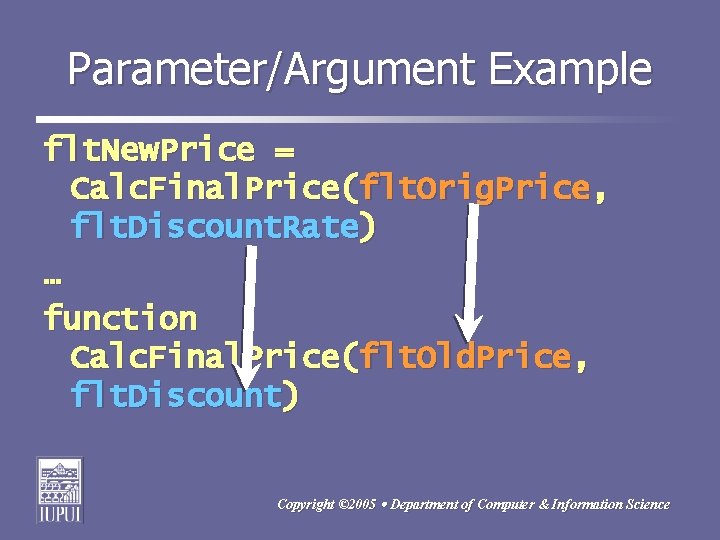
Parameters & Arguments • Suppose we designed a module to output the results of some calculations. We will need to pass the data to that module so that it can do the output. On the next slide you'll see code for a module that accepts data (has parameters) and how to call such a module passing the data (arguments). Copyright © 2005 Department of Computer & Information Science
Parameter/Argument Example flt. New. Price = Calc. Final. Price(flt. Orig. Price, flt. Discount. Rate) … function Calc. Final. Price(flt. Old. Price, flt. Discount) Copyright © 2005 Department of Computer & Information Science
Passing Values to Modules • When we transfer data between modules, we must also decide whether we should pass those values “by value” or “by reference. ” Before going further, let’s take a step back and examine how memory stores variable values … Copyright © 2005 Department of Computer & Information Science
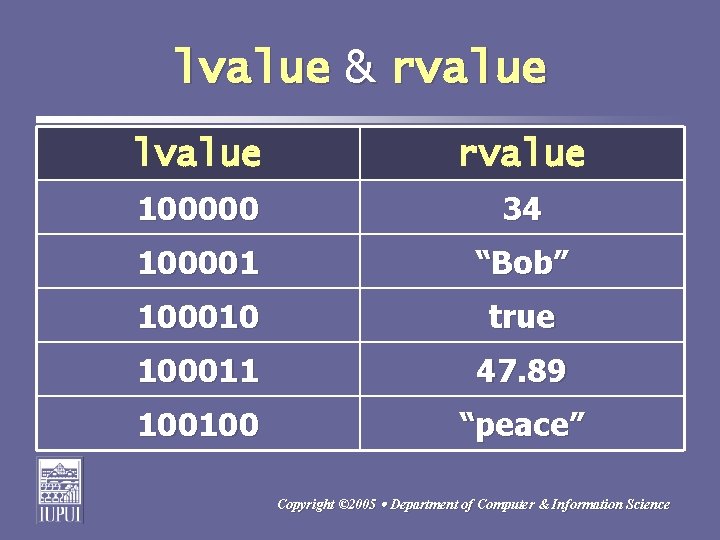
lvalue & rvalue • When a program tells memory to store data, memory creates a table of the stored data. In that table, memory stores two different values for each piece of data. • It stores a location value, or lvalue. The lvalue stores the memory address of where we are storing the value. • It also stores the actual value, called the read value, or rvalue. Copyright © 2005 Department of Computer & Information Science
lvalue & rvalue lvalue rvalue 100000 34 100001 “Bob” 100010 true 100011 47. 89 100100 “peace” Copyright © 2005 Department of Computer & Information Science
Passing By Value • Most of the of time, we want to protect our original values stored in variables. To prevent a called subprogram or function from manipulating those original values, we send a copy of a variable’s rvalue to the parameter of the called procedure. We call this “passing arguments by value. ” Copyright © 2005 Department of Computer & Information Science
Passing By Reference • Sometimes, we want to give a called procedure the ability to manipulate a variable value. We can do this by passing the variable’s lvalue to the parameter of the called procedure. We call this “passing arguments by reference. ” We should be very careful when sending by reference. Copyright © 2005 Department of Computer & Information Science
By Value or By Reference • In most languages, the programmer is responsible for determining how to pass module parameters. • Java. Script, however, passes all primitive data types by value and all composite data types by reference. Copyright © 2005 Department of Computer & Information Science
Variable Scope • Scope refers to the region of a program where we define a variable and scope also determines which code can use a variable. • Java. Script supports two types of scope: – Global Scope – Local Scope Copyright © 2005 Department of Computer & Information Science
Global Scope Variables • We declare global scope variables outside of functions. All modules in a Java. Script application may use global variable scope variables. • Global variables exist in memory so long as a Java. Script application executes. • You should avoid using Global Scope variables, when possible, in order to secure your data. Copyright © 2005 Department of Computer & Information Science
Local Scope Variables • We declare local scope variables inside a function’s executable block. Local scope variables exist in memory ONLY when a function that declares them executes. • Local scope variables are available ONLY to the code inside a function’s executable block. Other functions cannot use or see a function’s local scope variables. However, we can pass a local scope variable’s value to another function. Copyright © 2005 Department of Computer & Information Science
Tips for Writing Modules • Narrow the scope of your module – write modules that perform only a single task. • Design modules to work by themselves without interfering with the data in other modules. • Minimize module interrelations. continued … Copyright © 2005 Department of Computer & Information Science
Tips for Writing Modules • Keep your module length short – limit your modules to about 1 viewable screen of your editor. • Write modules so they are re-usable. • Write modules so you can easily do unit testing. continued … Copyright © 2005 Department of Computer & Information Science
Tips for Writing Modules • Think I-P-O when planning a module: – What inputs does my module need? – What will my module do? – What outputs will it return? • Group modules together in your <head>…</head> section, before other code. continued … Copyright © 2005 Department of Computer & Information Science
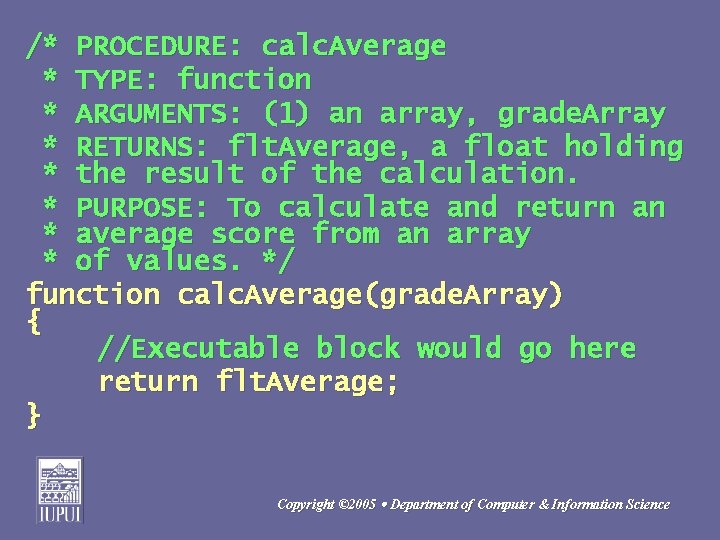
Tips for Writing Modules • Name your modules using identifiers that describe the module's purpose. • Clearly document your module, including its purpose, a description of input data and return value (see the next slide …). Copyright © 2005 Department of Computer & Information Science
/* PROCEDURE: calc. Average * TYPE: function * ARGUMENTS: (1) an array, grade. Array * RETURNS: flt. Average, a float holding * the result of the calculation. * PURPOSE: To calculate and return an * average score from an array * of values. */ function calc. Average(grade. Array) { //Executable block would go here return flt. Average; } Copyright © 2005 Department of Computer & Information Science
Summary • Modularity allows programmers to break larger tasks into smaller, more manageable pieces. • A sub-program performs a task without returning a value; a function is similar, but returns a value. continued … Copyright © 2005 Department of Computer & Information Science
Summary • The main module acts as a "traffic cop" through which data flows from one module to another. • We use parameters to pass values to program modules. continued … Copyright © 2005 Department of Computer & Information Science
Summary • When we pass parameters by value, we pass a copy of data. Java. Script passes primitive data types by value. • When we pass parameters by reference, we pass the memory address of data. Java. Script passes composite data types by reference. continued … Copyright © 2005 Department of Computer & Information Science
Summary • We declare global scope variables outside of a function; they are available to all the code in our application. • We declare local scope variables inside a function's block; they are available only to that function. Copyright © 2005 Department of Computer & Information Science