
Introducing ASP NET Core 1 0 A NEW
- Slides: 9
Introducing ASP. NET Core 1. 0 A NEW PLATFORM FOR BUILDING WEB APPLICATIONS
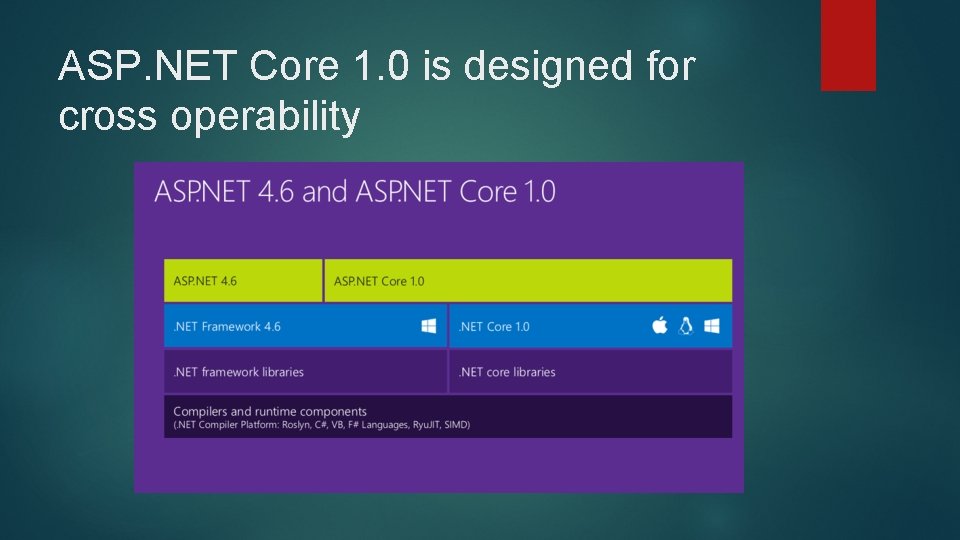
ASP. NET Core 1. 0 is designed for cross operability
Json files are used for configuration global. json sets the sdk version project. json holds the information that the. csproj file used to contain appsettings. json contains information that the web. config App. Settings used to contain bower. json holds the configuration information for client side plugins package. json holds information necessary for deployment
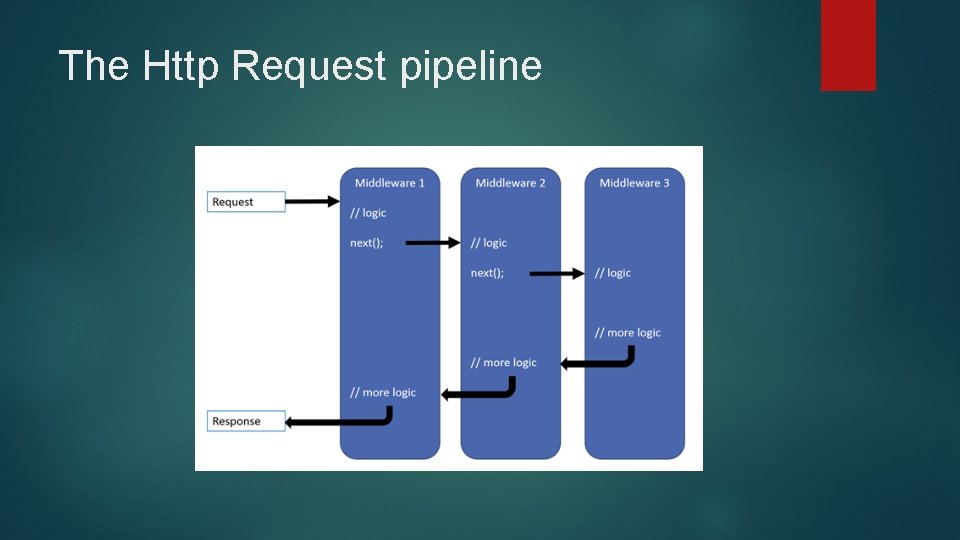
Entry point for ASP. NET Core 1. 0 The entry point for an ASP. NET Core 1. 0 application is a Main method The Main method instantiates the Startup class The Configure method is used to configure the HTTP request pipeline Configure. Services is used to add services to the container Only the services you need are added
The Http Request pipeline
Middleware software components that are assembled into an application pipeline to handle requests and responses Each component chooses whether to pass the request on to the next component in the pipeline, and can perform certain actions before and after the next component is invoked in the pipeline
What else is new is ASP. NET Core 1. 0 The new Razor syntax introduces tag helpers <label asp-for="Birthday" /> <input asp-for="Birthday" asp-format="{0: yyyy-MM-dd}" /> <select asp-for="Country" asp-items="View. Bag. Countries"> <option selected="selected" value="">Choose Country</option> </select> <a asp-controller="Album" asp-action="Details" asp-routeid="@a. Album. Id">Details</a> C# 6. 0 introduces a shortcut for String. Format $"Artist: {Artist. Name}"
Session It is necessary to serialize and deserialize Session This can be done with a generic class Serialization. Logic<T> It has methods public static byte[] Serialize(T m) public static T Deserialize(byte[] bytes) These methods are called by byte[] bytes; var ret = Http. Context. Session. Try. Get. Value("cart. Items", out bytes); var bytes = Business. Methods. Serialization. Logic<List<Cart. Item. Model>>. Serialize(cart. Items); Http. Context. Session. Set("cart. Items", bytes);
Resources http: //www. hanselman. com/blog/NETCore 10 R C 2 Upgrading. From. Previous. Versions. aspx https: //github. com/carolynlschroeder/Core. De mo. App http: //carolynlschroederblog. com/category/ho me/ http: //schroederconsulting. org