
Intro to Desktop Publishing A History of Printing
Intro to Desktop Publishing A History of Printing & Related Terminology
What is desktop publishing? The term desktop publishing was first used in 1985 by Paul Brainerd of Aldus Corporation. He was describing a new process to produce documents by using a system of combined hardware and software. The components of this new system could fit on the top of an ordinary desk.
The steps involved BEFORE desktop publishing: 1. Someone wrote, revised and proofread the text. 2. Artist designed art to accompany text. 3. Designer combined text and artwork to create a “mock-up” of what the page would look like when printed.
The steps involved 4. Typesetter set type according to designer’s specifications. 5. Paste-up artist combined art and type to create “camera-ready mechanical, ” a master version of the page 6. Printer photographed this master and reproduced it on the plates, from which the actual printing was finally done.
The steps involved AFTER desktop publishing: 1. Someone writes text on word processor and imports it into layout program. When the page is ready it is given to the printer, either in hard-copy or file format. 2. Printer makes plates and prints or sends digital file directly to printer to make multiple copies.

Advantages of desktop publishing • Gives user immediate access to printing. • A single copy of a document can be produced very quickly, but with a professional appearance. • Writers have greater control over the finished product. • The cost of creating a piece is reduced.
Drawbacks of desktop publishing • Fewer jobs in printing industry. One person can do job 4 -5 used to do. • Less emphasis on craftsmanship. • Initial set-up costs for home system can be expensive if not used often or for high volume of work. • Less knowledge about the history of printing.
The History of Printed Materials • Cavemen used stone tools to carve drawings into cave walls. • Clay tokens with pictographs (symbols) that recorded quantities of materials traded or shipped dated to 8, 500 B. C. • Egyptians sacred writings were called hieroglyphs.
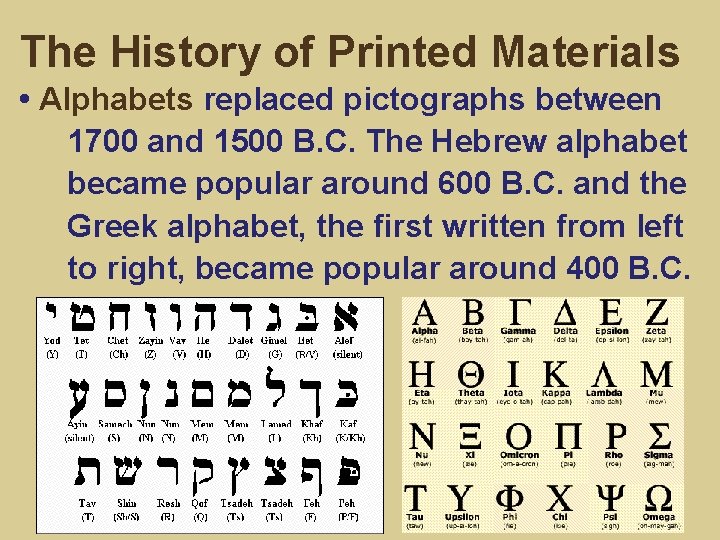
The History of Printed Materials • Alphabets replaced pictographs between 1700 and 1500 B. C. The Hebrew alphabet became popular around 600 B. C. and the Greek alphabet, the first written from left to right, became popular around 400 B. C.
The History of Printed Materials • Greeks used a writing stylus made of metal, bone or ivory to place marks upon wax-coated tablets.
The History of Printed Materials • Early Egyptians, Romans, Greeks and Hebrews used papyrus and parchment papers, which were made from reeds. • Wood-fiber paper was developed in China in 105 A. D. , but not widely used until paper mills were built in the 14 th century.
The History of Printed Materials • Chinese philosopher Tien-Lcheu (2, 697 B. C. ) invented and perfected “Indian Ink” (soot, lamp oil and gelatin from donkey skin and musk). Other cultures had inks from berries, plants and minerals. • By 400 A. D. , a stable form of ink was developed from iron salts, nutgalls and gum. Went on blue-black, dried to black and faded to brown over years.
The History of Printed Materials Johannes Gutenberg & the printing press • Gutenberg was a German goldsmith & inventor who created the movable-type press in 1436. • Letters in frame just had to be re-organized, so every page did not have to be separately carved. It was an expensive device.
The History of Printed Materials Gutenberg’s press helped to develop or popularize: • mass production of paper (move away from vellum, which is calf or lamb skin, and was too costly) • oil-based inks • punch & mold system for creating and replacing movable type
The History of Printed Materials • On September 30, 1452, the Gutenberg Bible was published, becoming the first book to be printed in volume.
The History of Printed Materials • Early books were bibles/religious texts. • Most people were illiterate, so only the wealthy and educated had books, which were very expensive. Printed images were more common. • By 1501, there were 1, 000 printing shops in Europe, which had produced 35, 000 titles and 20 million copies.
The History of Printed Materials • Increase in books and printed materials helped people learn of other parts of the world and about math and science. Many maps were printed at this time.
Modern Desktop Publishing In September 1986, the first issue of The Seybold Report on Desktop Publishing included one of the first definitions of the field; it defined desktop publishing as the …preparation of typeset or near typeset documents on desktop computers. All text composition, page makeup, manipulation of digitized graphics and integration of text and graphics are performed on desktop computers.
Modern Desktop Publishing Although it can be argued that DTP has been around since the invention of the typewriter, it is more accurate to say that the earliest form of DTP began in the 1930 s when desktop duplicating equipment first became available at an affordable price. This early form of DTP involved using a typewriter to cut a wax stencil of all text, adding all art-work by hand, then running off up to several thousand copies on a duplicator or mimeo machine.
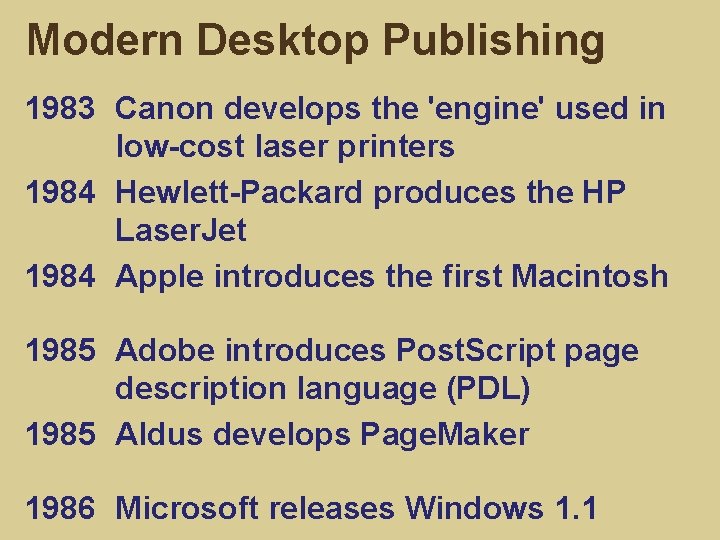
Modern Desktop Publishing 1983 Canon develops the 'engine' used in low-cost laser printers 1984 Hewlett-Packard produces the HP Laser. Jet 1984 Apple introduces the first Macintosh 1985 Adobe introduces Post. Script page description language (PDL) 1985 Aldus develops Page. Maker 1986 Microsoft releases Windows 1. 1
Desktop Publishing Software Arguably the most significant development in DTP was the first page layout software program: Page. Maker by Aldus Corporation in 1985. Page. Maker has been described as “the grandfather of all desktop publishing programs. ” Adobe later owned Page. Maker, which was replaced by In. Design. Quark. Express, Frame. Maker and Publisher are other DTP layout programs.
Desktop Publishing Software Another significant software development in DTP occurred with the evolution of high level graphics programs. Two of the most widely used are Adobe Illustrator and Adobe Photoshop. The availability and affordability of high resolution color monitors, scanners and Post. Script compatible color laser printers has made color an increasingly common element in DTP.
Alternative Terms Alternative terms such as personal publishing, electronic publishing and computer-aided publishing are preferred by some working in the field, but desktop publishing has become the most commonly used term.
Desktop Publishing Categories There are three categories of activity DTP: • pure text preparation • the creation/manipulation of graphics, where text plays minor role • complex page makeup, where text and graphics are united on single page By definition, it is generally assumed DTP will fit on a desktop and that software will enable the integration of multi-font text and graphics and display in a what-you-see-iswhat-you-get (WYSIWYG) form.
Components of a DTP System • a data input device • data manipulation software • a cpu to run the software • a display device • an output device
Components of a DTP System Data input Text input is normally done with a keyboard but a wide range of text scanning devices will accept text input. Until recently, scanners were of two different types: graphical scanners and text or OCR (Optical Character Recognition) scanners. Nowadays most scanners are well suited to both applications.
Components of a DTP System Data input A key input tool for text and graphics in DTP is the mouse. Other graphics input devices include slide or negative scanners, video digitizers and digital cameras or digital video cameras.
Components of a DTP System Data manipulation software DTP is created with a package of software programs. These include a word-processing program, a graphics program and a page layout program. Page layout software programs enable the user to mix different elements in a page layout format, revise this format and save all data as a multi-page, fully formatted, camera -ready document.
Components of a DTP System Processor While the Macintosh was the first processor associated with DTP, the IBM PC is now just as common. This was largely due to the introduction of Microsoft Windows. The Macintosh and Windows environment both utilize a graphics-based screen display designed to provide a friendly user interface.
Components of a DTP System Processor Graphical user interfaces (GUI) include: • windows for the display of text, data, graphics, etc. • pull-down menus for selecting different program functions • icons to provide identification of programs and program functions • a mouse as an input device for selection of program functions and accurate cursor positioning
Components of a DTP System Display In any DTP system, it is important that the computer screen provides a WYSIWYG display, which enables the user to preview the publication's pages on the screen, revise and refine where necessary and generally experiment with changes before printing out the final document. * The resolution of a computer screen will be less than a high quality printer.
Components of a DTP System Output The most common output device remains some form of matrix printer. Matrix printers simulate letters, line drawings and continuous-tone images with patterns of tiny dots. The dot density essentially determines the output quality of any matrix printer.
Components of a DTP System Output Ink-jet and laser printers clearly provide a printed image with a much more closely spaced dot pattern than the relatively low resolution mechanical “dot matrix printers. ” Ink-jet printers require an ink-filled ribbon pressed against paper. Laser printers use a beam of light to draw characters, similar to a photocopier.
Components of a DTP System Output Where a high quality printed output is required, it may be necessary to print to a Post. Script compatible phototypesetting device commonly known as an imagesetter. These devices can be driven by the same page layout software programs as a laser printer but are capable of a resolution of 2540 dpi.
Stages in DTP 1. Determine purpose and audience: Consider the audience, content, style, language, purpose. 2. Create text: Word processed, scanned or directly typed into program. Proof read text to ensure content is OK. 3. Create graphics: Graphics created with appropriate software, scanner or digitizer.
Stages in DTP 4. Design format: Determine grid, columns, headers and footers, page numbers, text style, design final layout. 5. Load files and layout publication: Text and graphics are combined, formatted, scaled and positioned. 6. Print: Choice of a suitable high resolution printer, i. e. laser printer or imagesetter
- Slides: 36