
Internet Wireless Mobile technologies 1 Introduction InternetWirelessMobile Going
Internet + Wireless+ Mobile technologies 1
Introduction � Internet+Wireless+Mobile = ◦ Going on-line anywhere, anytime and using multiple devices ◦ New opportunities, services � Ubiquitous ◦ Anywhere, any time ◦ Convenient, instant connectivity � Very personal ◦ Device owner has an exclusive access to the contents/services ◦ Service providers know who the owner is � Varied users, usage contexts ◦ Anybody ◦ Location and context-sensitive apps and services 2
What drives these technologies � High mobile phone penetration � Convergence of the Internet and the mobile devices � Improvements in technology: transition from 1 st to 2 nd, 3 rd, 4 th and 5 th generation mobile broadband. � Declining prices: device, service prices � Explosion of e-commerce 3
Applications � Current applications ◦ On-line transactions ◦ On-line purchases ◦ On-the-go entertainment ◦ A wireless office ◦ Migration from PC-centric to multi-device models 4
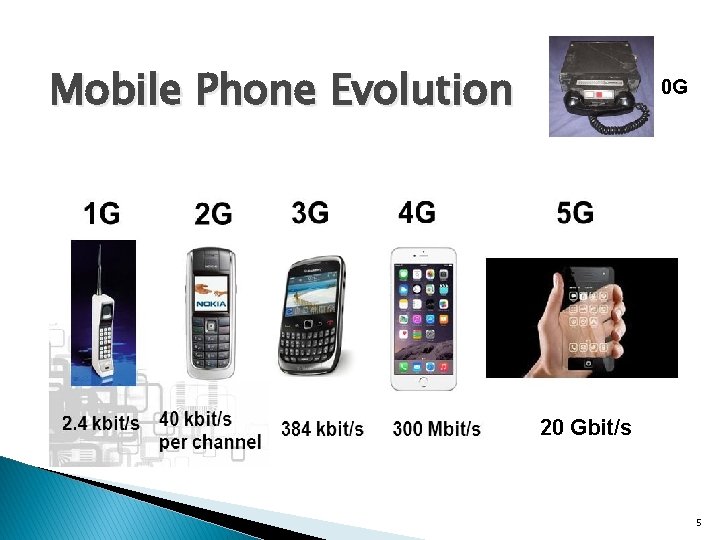
Mobile Phone Evolution 0 G 20 Gbit/s 5
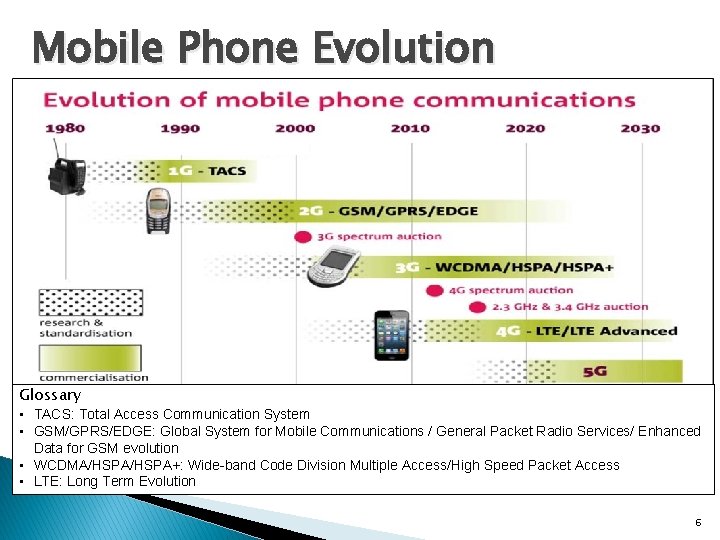
Mobile Phone Evolution Glossary • TACS: Total Access Communication System • GSM/GPRS/EDGE: Global System for Mobile Communications / General Packet Radio Services/ Enhanced Data for GSM evolution • WCDMA/HSPA+: Wide-band Code Division Multiple Access/High Speed Packet Access • LTE: Long Term Evolution 6
Mobile Technology Evolution: from 0 G to 5 G 0 G, Zero Generation: pre-cellular analogue technology, typically mounted on cars. � 1 G, analogue cellular technology: Total Access Communication System (TACS) � 2 G, adapted for digital cellular phones: Global System for Mobile (GSM) communication � 2. 5 G: umbrella term for technologies designed to add 3 G capabilities to existing cellular networks. Combines enhanced technologies: � ◦ GPRS: General Packet Radio Services (packet-switching) ◦ EDGE: Enhanced Data Rates for GSM Evolution 3 G: send/receive data & multimedia content up to 7 x times faster. � 4 G: send/receive data/multimedia up to 10 x faster � 5 G: send/receive data/multimedia up to 20 x faster � � Wireless devices ◦ Digital cellular phones 7
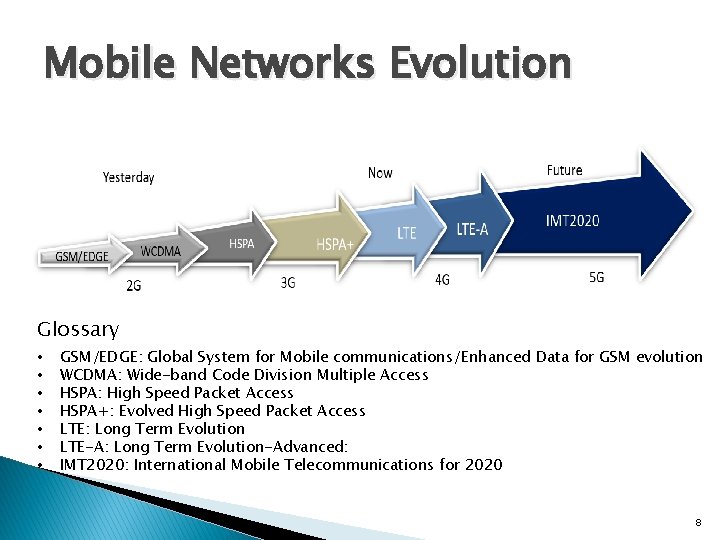
Mobile Networks Evolution Glossary • • GSM/EDGE: Global System for Mobile communications/Enhanced Data for GSM evolution WCDMA: Wide-band Code Division Multiple Access HSPA: High Speed Packet Access HSPA+: Evolved High Speed Packet Access LTE: Long Term Evolution LTE-A: Long Term Evolution-Advanced: IMT 2020: International Mobile Telecommunications for 2020 8
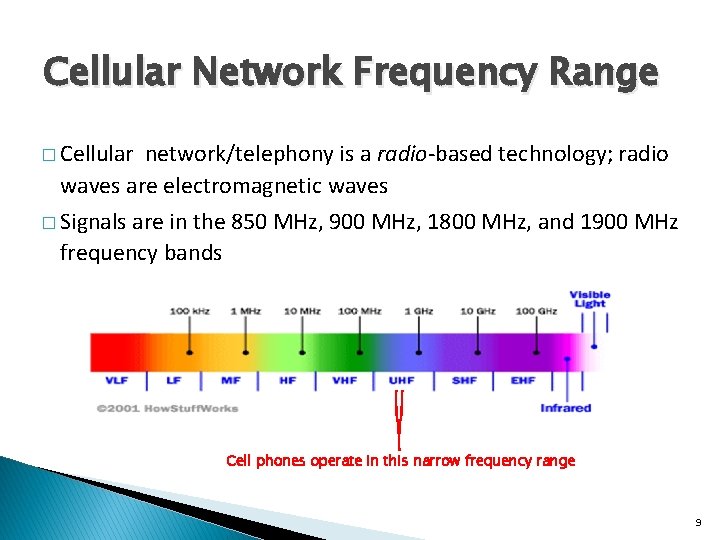
Cellular Network Frequency Range � Cellular network/telephony is a radio-based technology; radio waves are electromagnetic waves � Signals are in the 850 MHz, 900 MHz, 1800 MHz, and 1900 MHz frequency bands Cell phones operate in this narrow frequency range 9
Characteristics of Wireless Devices � Ubiquitous interactivity ◦ Personal: handy, available at all times ◦ User identity: the device carries its user identity ◦ Distinctly personal: can be tracked to an individual. � Location aware ◦ Tracks where the user is physically, as long as the wireless device is on (using GPS) 10
Current Limitations of Devices & Services � Huge investment needed for infrastructure � Service is still relatively expensive � � Limited bandwidth restricts the amount of data that can be sent over the wireless network as well as the speed Wireless devices still have smaller memory capacity and less powerful processors than desktop computers � Small screen, keyboard: usability, navigation problems � Rapidly developing standards � � Security (viruses, tapping, hacking) However, wireless technology is growing rapidly 11
Multiple Access Problem Base Stations (BS) need to serve many mobile terminals at the same time (both downlink and uplink) � All mobiles in a cell need to transmit to the BS. � We need a multiple access scheme, and must address � ◦ Interference among different senders and receivers � Cellular technology uses, instead of wires (e. g. copper or coaxial cables): ◦ a multiple access radio system ◦ wireless channels: between users/terminals and wireless networks 12
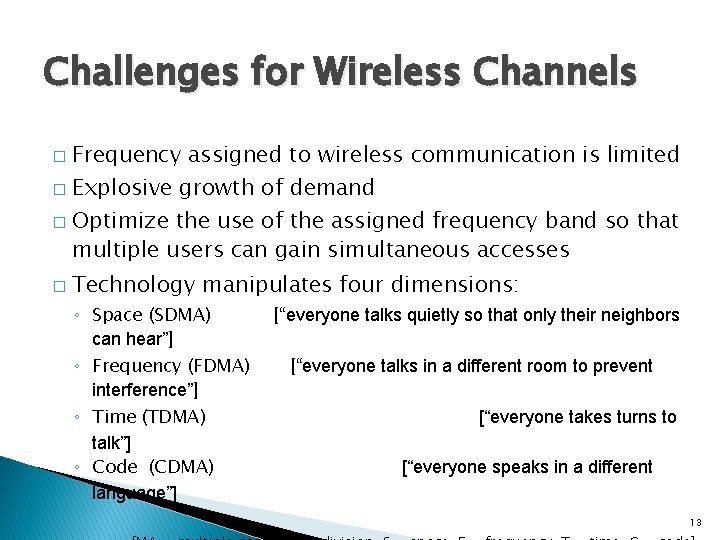
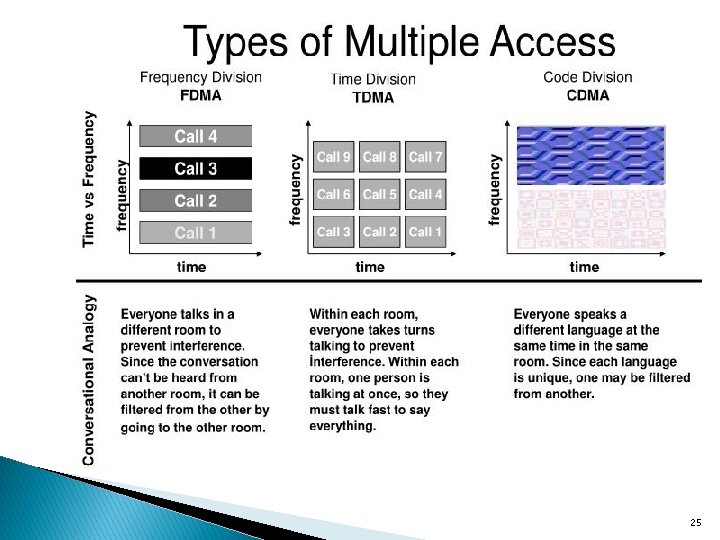
Challenges for Wireless Channels � � Frequency assigned to wireless communication is limited Explosive growth of demand Optimize the use of the assigned frequency band so that multiple users can gain simultaneous accesses Technology manipulates four dimensions: ◦ Space (SDMA) can hear”] ◦ Frequency (FDMA) interference”] ◦ Time (TDMA) talk”] ◦ Code (CDMA) language”] [“everyone talks quietly so that only their neighbors [“everyone talks in a different room to prevent [“everyone takes turns to [“everyone speaks in a different 13
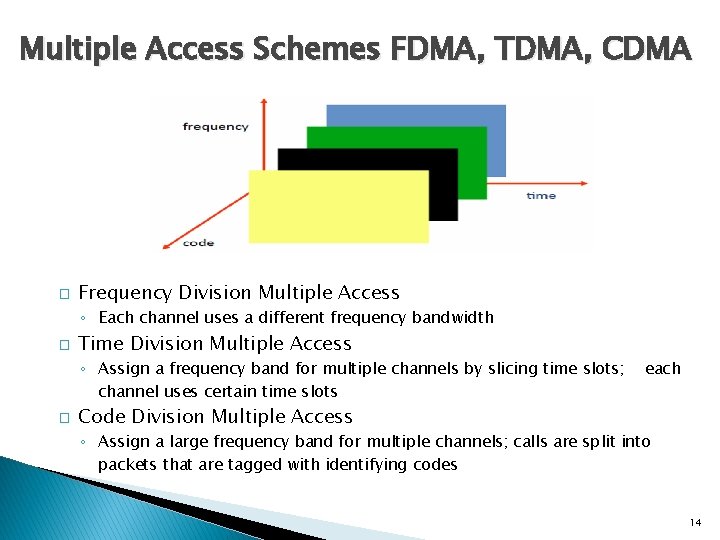
Multiple Access Schemes FDMA, TDMA, CDMA � Frequency Division Multiple Access ◦ Each channel uses a different frequency bandwidth � Time Division Multiple Access ◦ Assign a frequency band for multiple channels by slicing time slots; channel uses certain time slots � each Code Division Multiple Access ◦ Assign a large frequency band for multiple channels; calls are split into packets that are tagged with identifying codes 14
SDMA -Space Division Multiple Access � Frequency bandwidth is re-used � A covered area is divided into many small cells � A channel (frequency band) in one cell is re-used by a different user in another cell as long as there is enough separation between the two cells to minimize interference 15
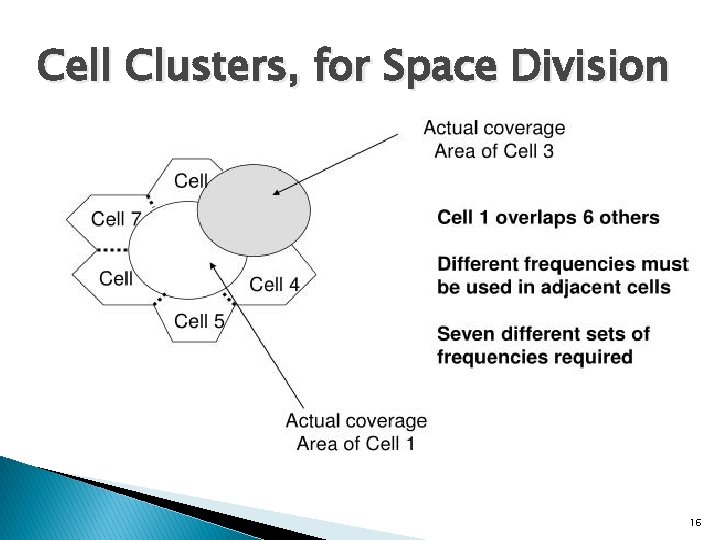
Cell Clusters, for Space Division 16
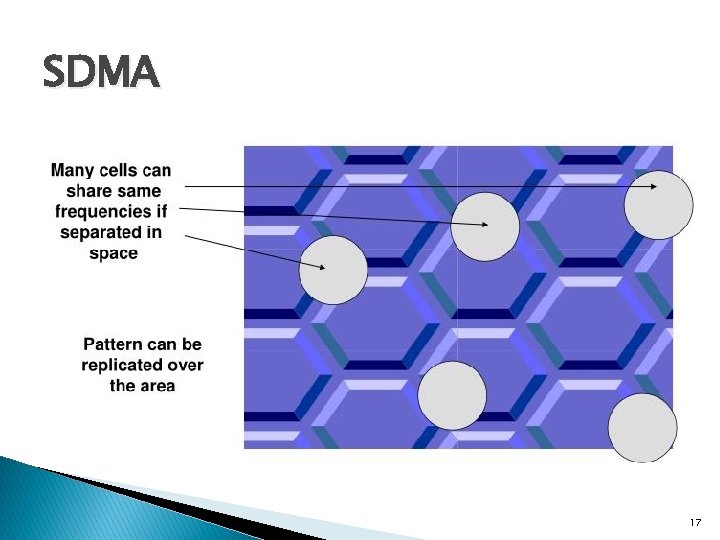
SDMA 17
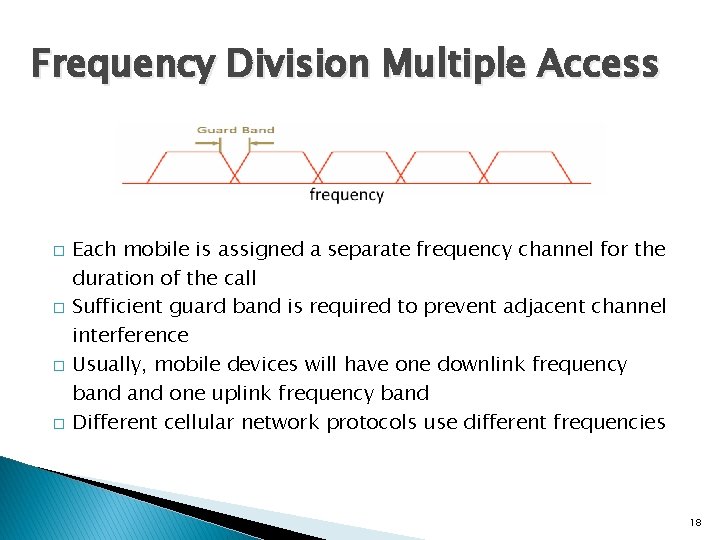
Frequency Division Multiple Access � � Each mobile is assigned a separate frequency channel for the duration of the call Sufficient guard band is required to prevent adjacent channel interference Usually, mobile devices will have one downlink frequency band one uplink frequency band Different cellular network protocols use different frequencies 18
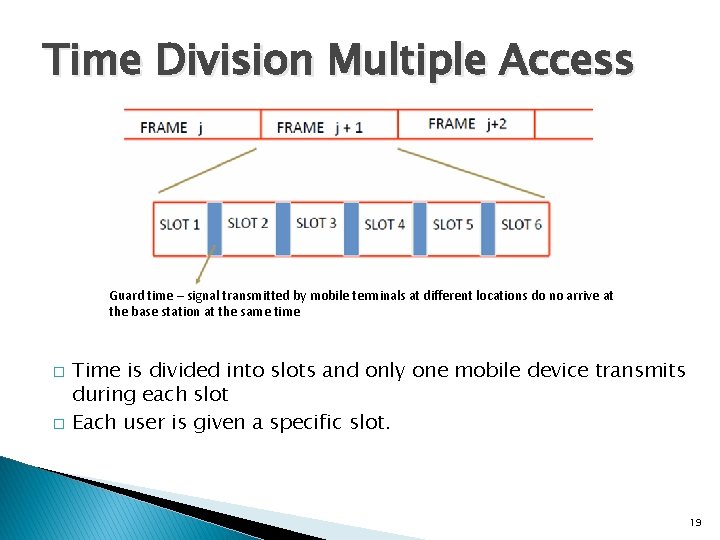
Time Division Multiple Access Guard time – signal transmitted by mobile terminals at different locations do no arrive at the base station at the same time � � Time is divided into slots and only one mobile device transmits during each slot Each user is given a specific slot. 19
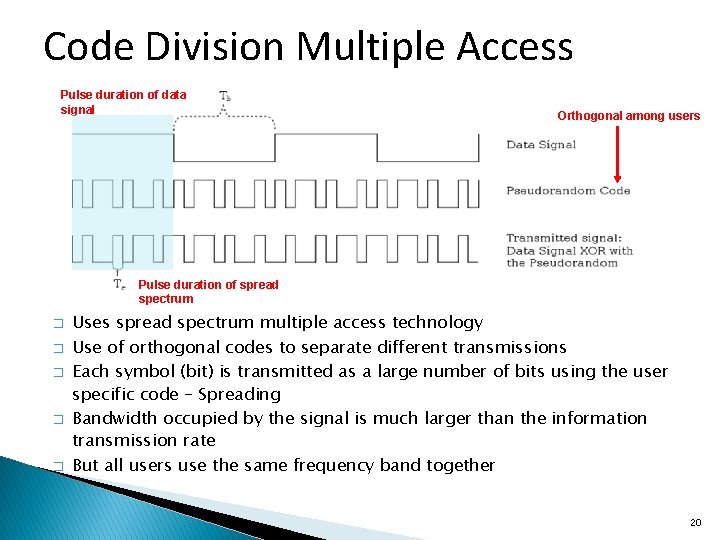
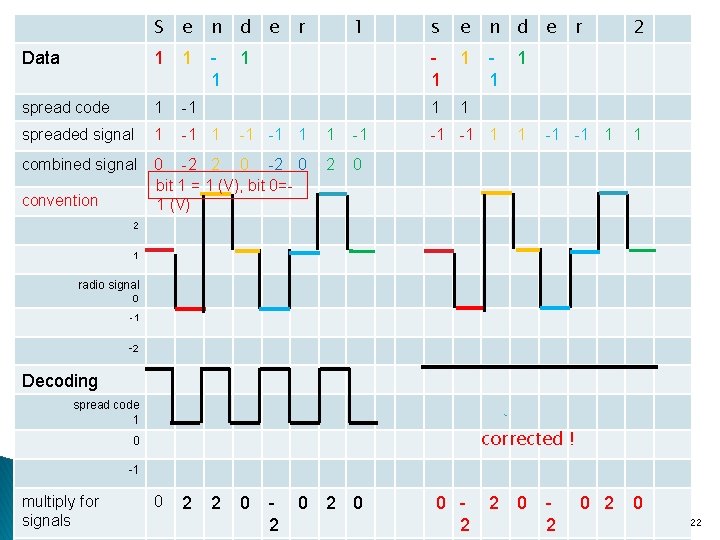
Code Division Multiple Access Pulse duration of data signal Orthogonal among users Pulse duration of spread spectrum � � � Uses spread spectrum multiple access technology Use of orthogonal codes to separate different transmissions Each symbol (bit) is transmitted as a large number of bits using the user specific code – Spreading Bandwidth occupied by the signal is much larger than the information transmission rate But all users use the same frequency band together 20
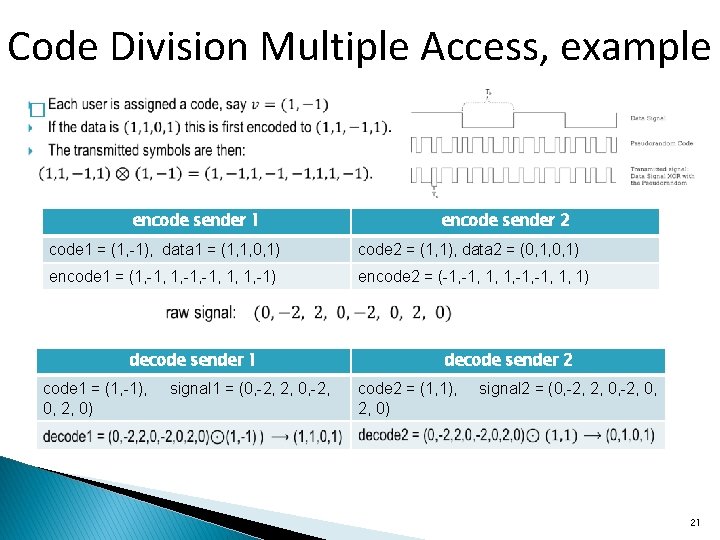
Code Division Multiple Access, example � encode sender 1 encode sender 2 code 1 = (1, -1), data 1 = (1, 1, 0, 1) code 2 = (1, 1), data 2 = (0, 1, 0, 1) encode 1 = (1, -1, -1, 1, 1, -1) encode 2 = (-1, 1, 1, -1, 1, 1) decode sender 1 code 1 = (1, -1), 0, 2, 0) signal 1 = (0, -2, 2, 0, -2, decode sender 2 code 2 = (1, 1), 2, 0) signal 2 = (0, -2, 2, 0, -2, 0, 21
S e n d e Data 1 1 1 spread code 1 -1 spreaded signal 1 -1 -1 1 1 -1 combined signal 0 -2 2 0 -2 0 bit 1 = 1 (V), bit 0=1 (V) 2 0 convention r 1 1 s e n d e r 2 1 1 1 -1 -1 1 1 2 1 radio signal 0 -1 -2 Decoding spread code 1 corrected ! 0 -1 multiply for signals 0 2 2 0 2 0 2 0 22
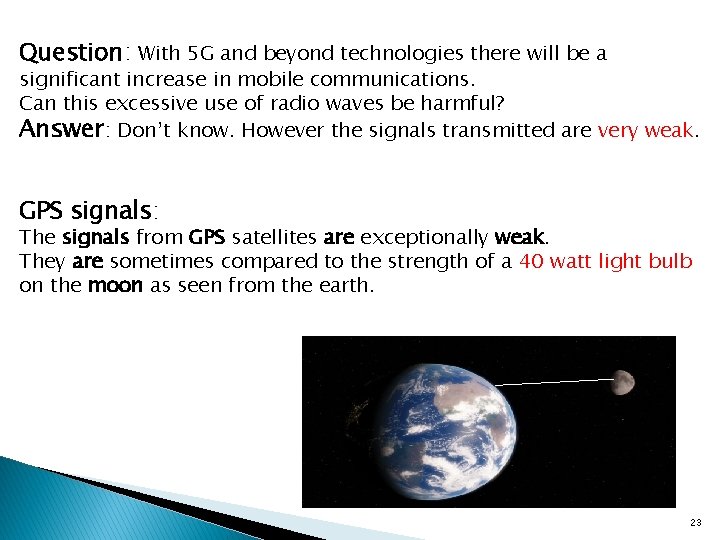
Question: With 5 G and beyond technologies there will be a significant increase in mobile communications. Can this excessive use of radio waves be harmful? Answer: Don’t know. However the signals transmitted are very weak. GPS signals: The signals from GPS satellites are exceptionally weak. They are sometimes compared to the strength of a 40 watt light bulb on the moon as seen from the earth. 23
Code Division Multiple Access � � � Often in FDMA+CDMA format Considered most efficient; creates a capacity that is triple that of comparable TDMA Generally CDMA >TDMA >FDMA 24
25
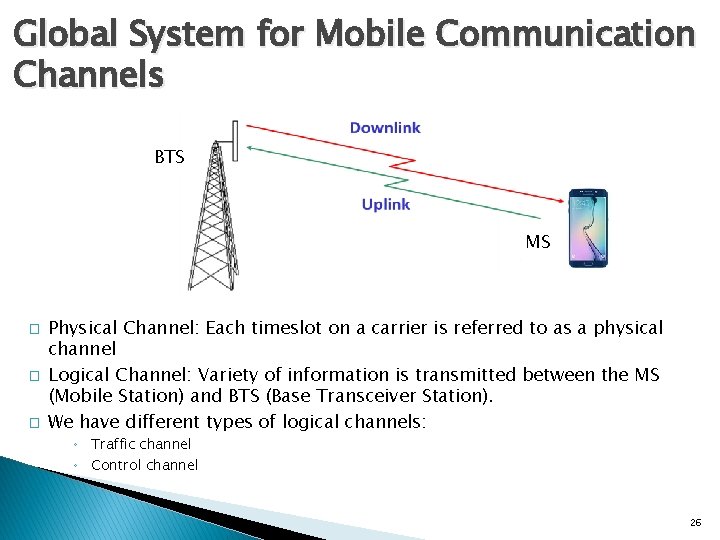
Global System for Mobile Communication Channels BTS MS � � � MS Physical Channel: Each timeslot on a carrier is referred to as a physical channel Logical Channel: Variety of information is transmitted between the MS (Mobile Station) and BTS (Base Transceiver Station). We have different types of logical channels: ◦ Traffic channel ◦ Control channel 26
GSM Channels � BCCH, Broadcast Control Channel: downlink channel that contains detailed network and cell specific information such as: ◦ Frequency used by the cell and its neighboring cells ◦ Frequency HSN (Hopping Sequence Number) ◦ Max output power allowed in the cell, etc � RACH, Random Access Channel: uplink channel with a random signal � AGCH, Access Grant Channel: downlink channel in reply to the RACH � SDCCH, Stand Alone Dedicated Control Channel: bi-directional channel used for ◦ ◦ System signaling Call setup Authentication Location Update, etc 27
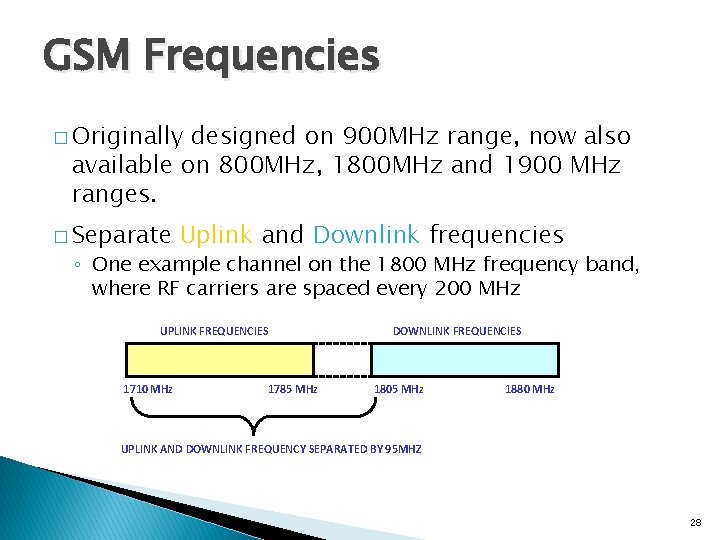
GSM Frequencies � Originally designed on 900 MHz range, now also available on 800 MHz, 1800 MHz and 1900 MHz ranges. � Separate Uplink and Downlink frequencies ◦ One example channel on the 1800 MHz frequency band, where RF carriers are spaced every 200 MHz UPLINK FREQUENCIES 1710 MHz 1785 MHz DOWNLINK FREQUENCIES 1805 MHz 1880 MHz UPLINK AND DOWNLINK FREQUENCY SEPARATED BY 95 MHZ 28
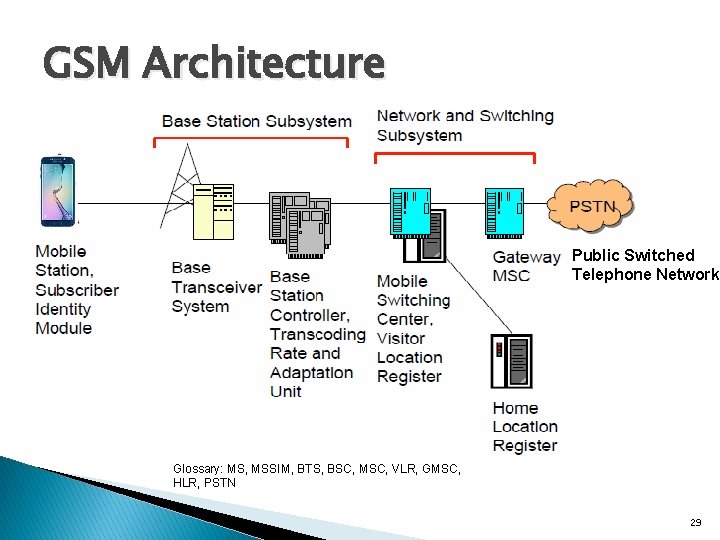
GSM Architecture Public Switched Telephone Network Glossary: MS, MSSIM, BTS, BSC, MSC, VLR, GMSC, HLR, PSTN 29
Subscriber Module and Identifiers � 30
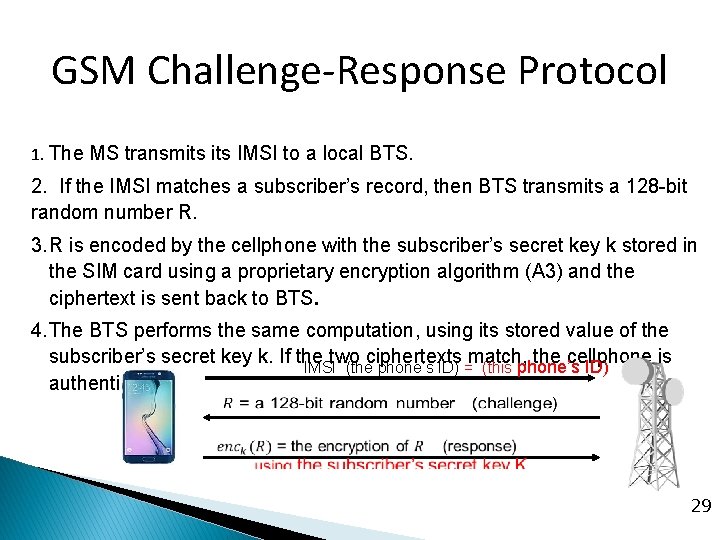
GSM Challenge-Response Protocol 1. The MS transmits IMSI to a local BTS. 2. If the IMSI matches a subscriber’s record, then BTS transmits a 128 -bit random number R. 3. R is encoded by the cellphone with the subscriber’s secret key k stored in the SIM card using a proprietary encryption algorithm (A 3) and the ciphertext is sent back to BTS. 4. The BTS performs the same computation, using its stored value of the subscriber’s secret key k. If the two ciphertexts match, the cellphone is IMSI (the phone’s ID) = (this phone’s ID) authenticated. 31 292 9
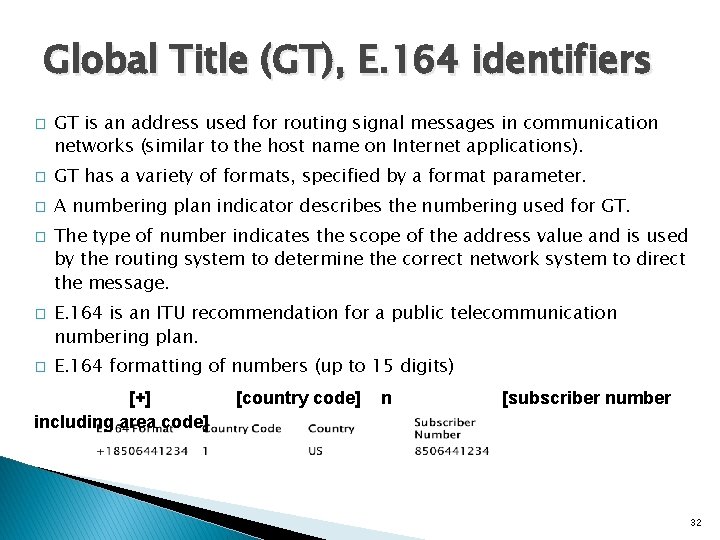
Global Title (GT), E. 164 identifiers � GT is an address used for routing signal messages in communication networks (similar to the host name on Internet applications). � GT has a variety of formats, specified by a format parameter. � A numbering plan indicator describes the numbering used for GT. � � � The type of number indicates the scope of the address value and is used by the routing system to determine the correct network system to direct the message. E. 164 is an ITU recommendation for a public telecommunication numbering plan. E. 164 formatting of numbers (up to 15 digits) [+] including area code] [country code] n [subscriber number 32
Global System for Mobile Signaling Overview � � � GSM signaling defines the communication between the MS and the communication network GSM signaling is based on the Open Systems Interconnect (OSI) model The MS Controller uses ITU’s Signaling System 7 (SS 7) protocol for signal processing 33
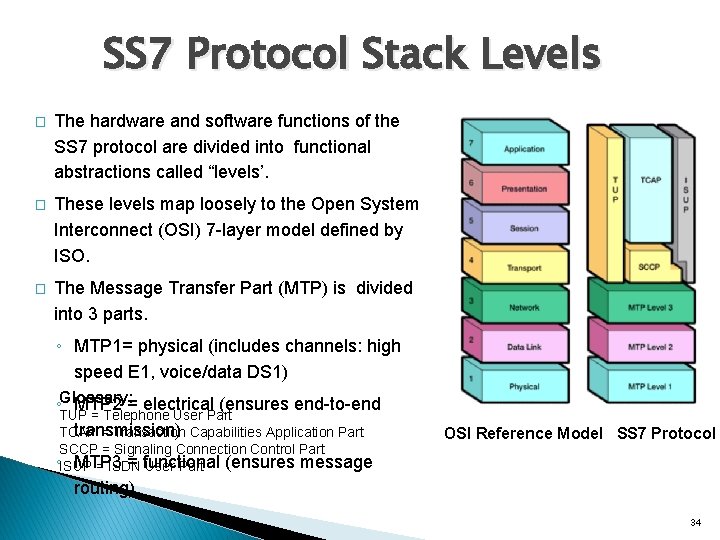
SS 7 Protocol Stack Levels � The hardware and software functions of the SS 7 protocol are divided into functional abstractions called “levels’. � These levels map loosely to the Open System Interconnect (OSI) 7 -layer model defined by ISO. � The Message Transfer Part (MTP) is divided into 3 parts. ◦ MTP 1= physical (includes channels: high speed E 1, voice/data DS 1) ◦Glossary: MTP 2 = electrical (ensures end-to-end TUP = Telephone User Part transmission) TCAP = Transaction Capabilities Application Part SCCP = Signaling Connection Control Part OSI Reference Model SS 7 Protocol ◦ISUP MTP 3 = functional = ISDN User Part (ensures message routing) 34
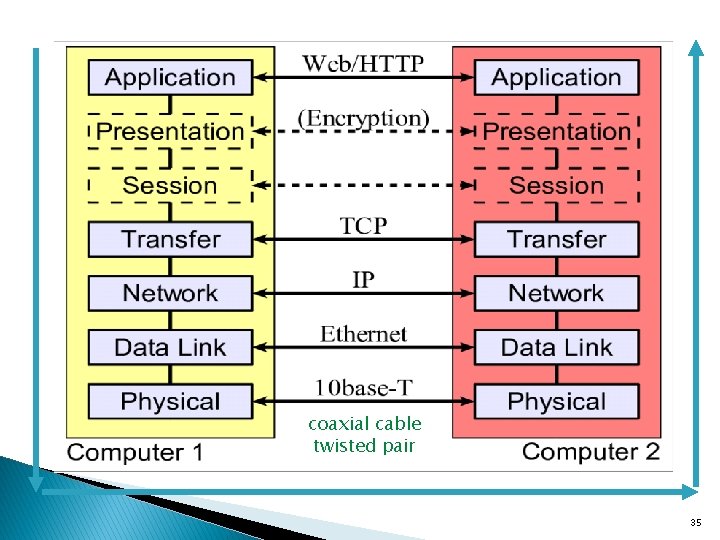
coaxial cable twisted pair 35
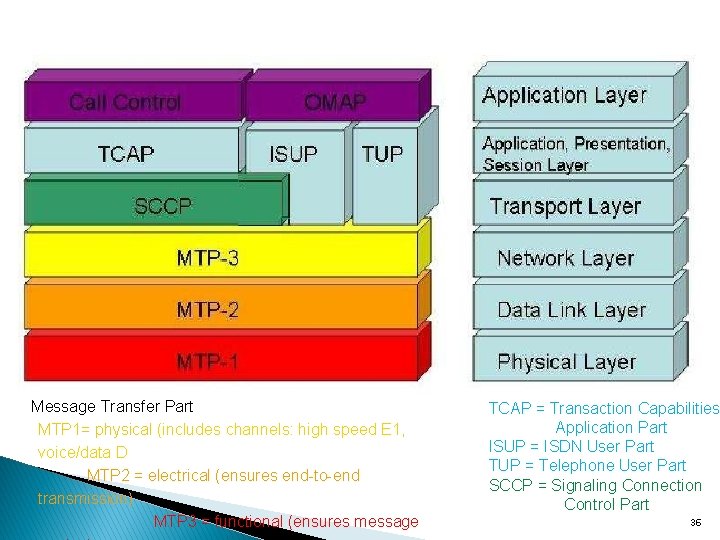
Message Transfer Part MTP 1= physical (includes channels: high speed E 1, voice/data DS 1) MTP 2 = electrical (ensures end-to-end transmission) MTP 3 = functional (ensures message TCAP = Transaction Capabilities Application Part ISUP = ISDN User Part TUP = Telephone User Part SCCP = Signaling Connection Control Part 36
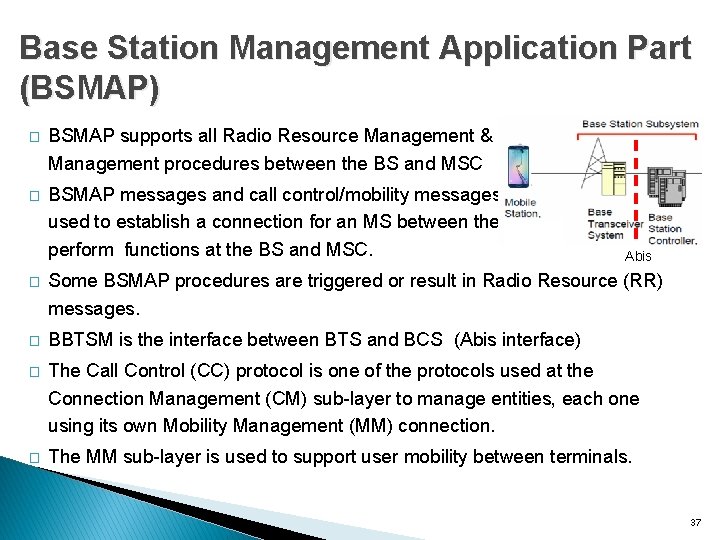
Base Station Management Application Part (BSMAP) � BSMAP supports all Radio Resource Management & Facility Management procedures between the BS and MSC � BSMAP messages and call control/mobility messages are used to establish a connection for an MS between the BS and perform functions at the BS and MSC. Abis � Some BSMAP procedures are triggered or result in Radio Resource (RR) messages. � BBTSM is the interface between BTS and BCS (Abis interface) � The Call Control (CC) protocol is one of the protocols used at the Connection Management (CM) sub-layer to manage entities, each one using its own Mobility Management (MM) connection. � The MM sub-layer is used to support user mobility between terminals. 37
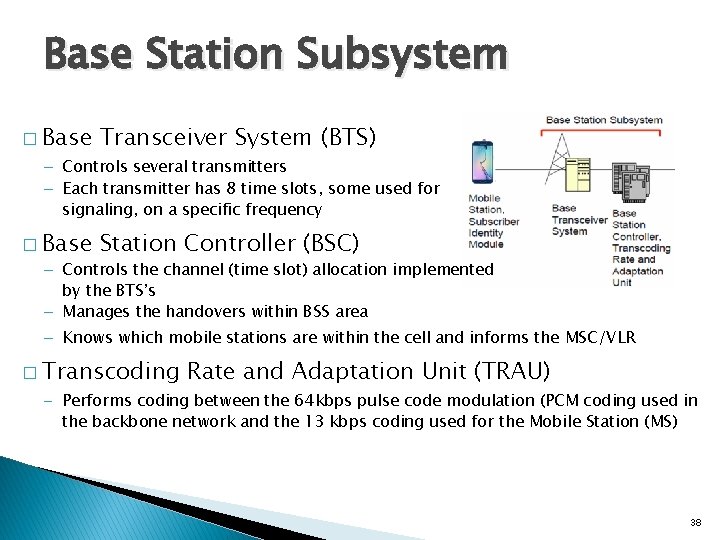
Base Station Subsystem � Base Transceiver System (BTS) – Controls several transmitters – Each transmitter has 8 time slots, some used for signaling, on a specific frequency � Base Station Controller (BSC) – Controls the channel (time slot) allocation implemented by the BTS’s – Manages the handovers within BSS area – Knows which mobile stations are within the cell and informs the MSC/VLR � Transcoding Rate and Adaptation Unit (TRAU) – Performs coding between the 64 kbps pulse code modulation (PCM coding used in the backbone network and the 13 kbps coding used for the Mobile Station (MS) 38
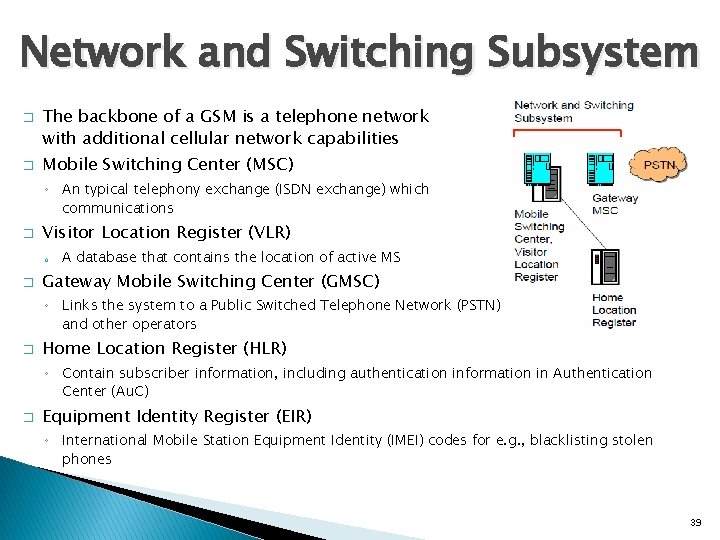
Network and Switching Subsystem � � The backbone of a GSM is a telephone network with additional cellular network capabilities Mobile Switching Center (MSC) ◦ An typical telephony exchange (ISDN exchange) which communications � Visitor Location Register (VLR) o � supports mobile A database that contains the location of active MS Gateway Mobile Switching Center (GMSC) ◦ Links the system to a Public Switched Telephone Network (PSTN) and other operators � Home Location Register (HLR) ◦ Contain subscriber information, including authentication information in Authentication Center (Au. C) � Equipment Identity Register (EIR) ◦ International Mobile Station Equipment Identity (IMEI) codes for e. g. , blacklisting stolen phones 39
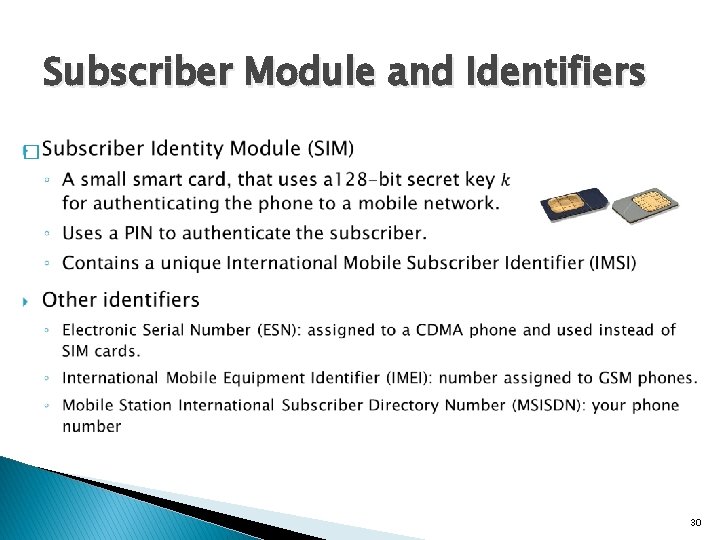
Home Location Register � � One database per operator Contains all the permanent subscriber information ◦ MSISDN (Mobile Subscriber ISDN number = the telephone number of the subscriber) ◦ IMSI, the International Mobile Subscriber Identity: a 15 digit code used to identify the subscriber � It incorporates a country code and operator code ◦ IMSI code is used to link the MSISDN number to the subscriber’s SIM (Subscriber Identity Module) ◦ Charging information ◦ Services available to the customer � Also the subscriber’s present Location Area Code, which refers to the MSC, which can connect to the MS. 40
Location Updates � � � The cells overlap and a mobile station can ‘see’ several BTS’s The MS monitors the identifier of the BS Controller (BSC) that controls the cells When the MS reaches a new BSC’s area, it requests a location update The update is forwarded to the Mobile Switching Center (MSC), entered into the Visitor Location Register (VLR) The old BSC is notified an acknowledgement is passed back 41
Handoff (Handover) � � When a call is in process, the changes in location need special processing Within a BSS, the BSC, which knows the current radio link configuration (including feedbacks from the MS), prepares an available channel in the new BTS � The MS is told to switch over to the new BTS � This is called a hard handoff � In a soft handoff, the MS is connected to two BTS’s simultaneously 42
Roaming � � When a MS enters another operators network, it can be allowed to use the services of this operator There are operator-to-operator agreements and contracts The MS is identified by the information in the SIM card and the identification request is forwarded to the home operator The Home Location Register (HLR) is updated to reflect the MS’s current location 43
Glossary � � � ITU: International Telecommunication Union IMT-2000: International Mobile Telecommunications 2000, an ITU initiative aimed at harmonizing the various efforts under way to create 3 G networks CDMA 2000: an implementation of wideband CDMA backed by USA for 3 G WCDMA, Wide-band CDMA: a 3 G network type supported by EU and Japan; also known as UMTS (universal mobile telecommunications service) CDMA 2000 and WCDMA share basic CDMA technology. SMS: short message service, a means of conveying messages up to 160 characters long to and from GSM cell phones 44
Mobile business (M-business) � E-business � New using wireless devices with internet access possibilities for commerce beyond internet access � Enormous � Currently potential in many areas (B 2 C, B 2 B) B 2 C wireless apps are more rapidly emerging 45
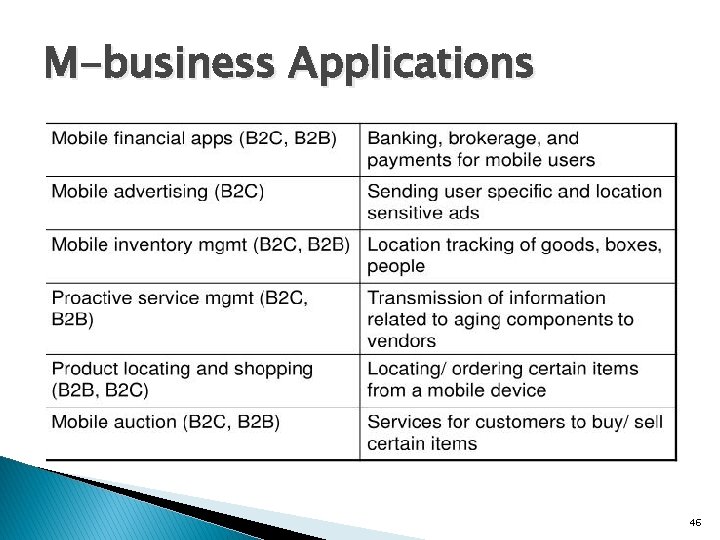
M-business Applications 46
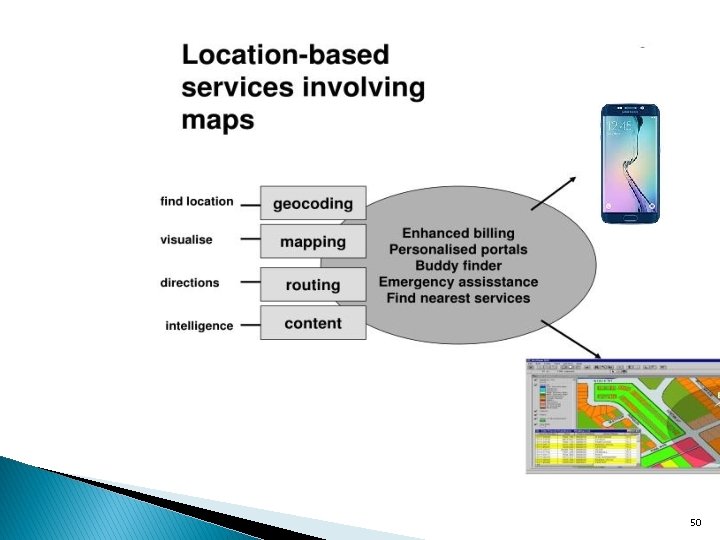
Location-aware Apps � Vehicle tracking ◦ Automatic vehicle location (AVL) ◦ Rapidly dispatching taxis, ambulances, police vehicles, trucks ◦ Navigating optimal routing in unfamiliar geographical areas or heavy traffic ◦ Tracking cargo, delivery, baggage, giving customers more accurate info 47
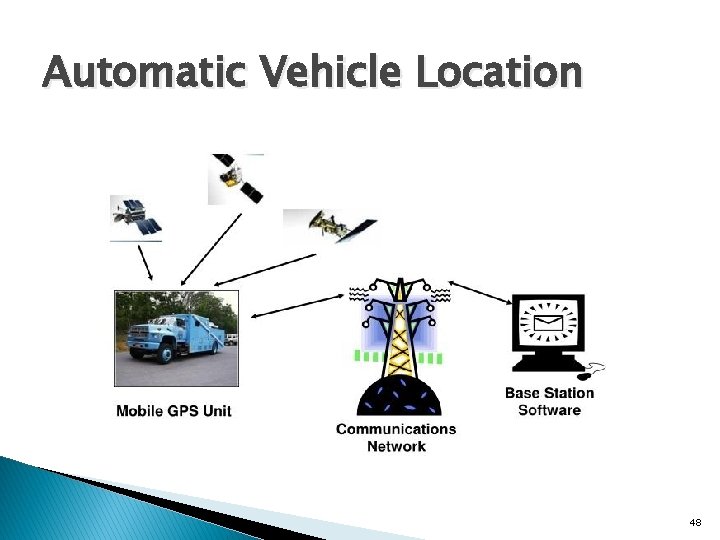
Automatic Vehicle Location 48
Shopping, product location, etc � Provide ads for shoppers, promotional events, price alerts at a shopping mall � Locate and compare products using a DB containing info on products, locations of stores, and distance from the users’ current location ◦ Allowing shoppers to buy on-line using a mobile device � Mobile retailing, ticketing and reservation 49
50
Location-aware Applications � E-911 (Enhanced 911) ◦ Mandates wireless carriers to provide location-identification capabilities that enable rescuers to locate 911 callers ◦ Designed to improve emergency response time ◦ Interest increased after 9/11, earthquakes, etc. ◦ Can be used for rescuing people in a disaster area � Firemen, emergency crew, doctors, patients assistance ◦ Firemen in a building under fire (automatic warning signal for oxygen remaining) ◦ Sending doctors vital signs of patients in critical situations ◦ Patients with Alzheimer’s: exact location, the location of the nearest police station and contact information for family members 51
Telematics (or Telemetry) � Integration of ◦ Wireless communications ◦ Vehicle monitoring systems and location devices � Diverse apps for cars ◦ Remote vehicle diagnostics – Install GSM chip sets in cars to monitor performance and provide an early warning message to the manufacturer indicating what problem is occurring ◦ Emergency breakdown service ◦ Multimedia services and m-commerce on the dashboard 52
Bluetooth � Wireless technology for short-range, high-speed voice and data communication between a variety of mobile digital devices � Conceived by Ericsson in 1994 ◦ Open specification to encourage cross-platform capabilities for wireless devices � Bluetooth Characteristics ◦ Uses radio frequency band (2. 4 GHz) available worldwide, for global compatibility ◦ Lower power (1 milliwatt) making it suitable for small, battery-operated devices ◦ Data transfer capability between devices: 10– 100 meter range, bandwidth 12 Mbps 53
Wireless Fidelity (Wi-Fi) � Increasingly popular networking standard for wireless LANs in homes/offices ◦ Provides broadband Internet access to PCs and laptops within a few hundred feet of a Wi-Fi base station in hot-spots where people can log onto wireless networks � Technical standard IEEE 802. 11 for wireless LAN ◦ 802. 11 b: popular standard, speed up to 11 Mbps at 2. 4 GHz band, typically 500 k-1 Mbps ◦ 802. 11 a: speed up to 54 Mbps at 5 GHz band (less congested, less interference) ◦ 802. 11 g: up to 54 Mbps at 2. 4 GHz band (extension of 802. 11 b) � Some concerns ◦ Security, interference (micro-wave ovens, garage doors), network slow-down ◦ Network hopping: can share a connection with other people (free-riders), hard to monitor unauthorized uses ◦ Cannot maintain a connection outside the range of the hot spot 54
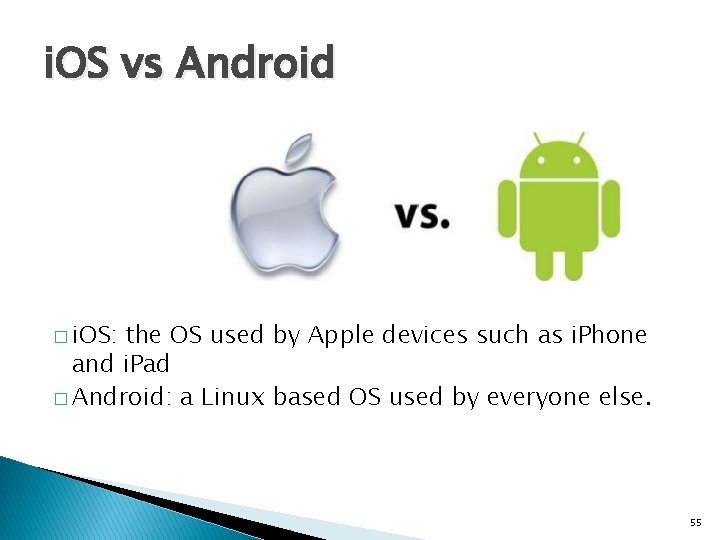
i. OS vs Android � i. OS: the OS used by Apple devices such as i. Phone and i. Pad � Android: a Linux based OS used by everyone else. 55
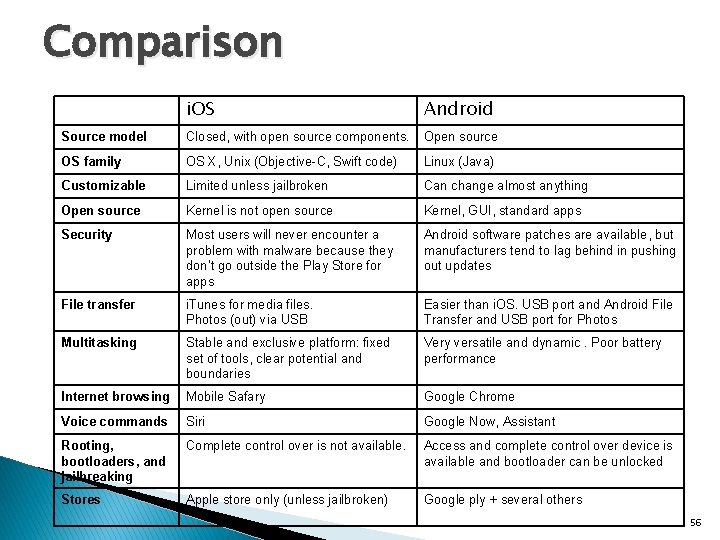
Comparison i. OS Android Source model Closed, with open source components. Open source OS family OS X, Unix (Objective-C, Swift code) Linux (Java) Customizable Limited unless jailbroken Can change almost anything Open source Kernel is not open source Kernel, GUI, standard apps Security Most users will never encounter a problem with malware because they don’t go outside the Play Store for apps Android software patches are available, but manufacturers tend to lag behind in pushing out updates File transfer i. Tunes for media files. Photos (out) via USB Easier than i. OS. USB port and Android File Transfer and USB port for Photos Multitasking Stable and exclusive platform: fixed set of tools, clear potential and boundaries Very versatile and dynamic. Poor battery performance Internet browsing Mobile Safary Google Chrome Voice commands Siri Google Now, Assistant Rooting, bootloaders, and jailbreaking Complete control over is not available. Access and complete control over device is available and bootloader can be unlocked Stores Apple store only (unless jailbroken) Google ply + several others 56
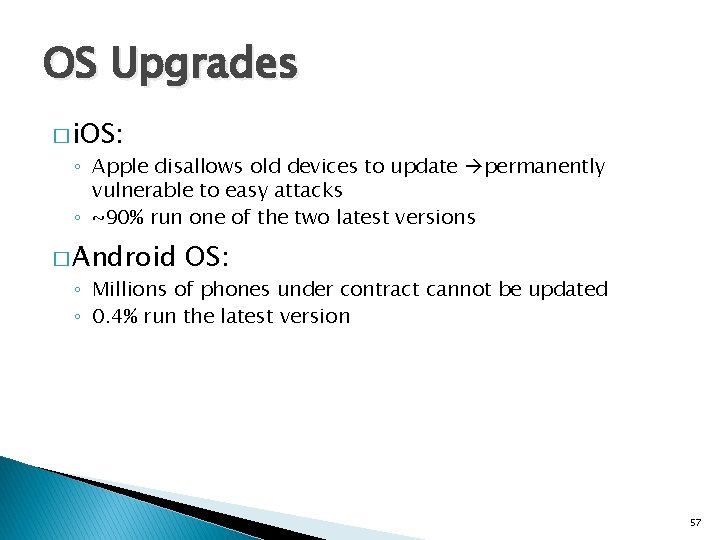
OS Upgrades � i. OS: ◦ Apple disallows old devices to update permanently vulnerable to easy attacks ◦ ~90% run one of the two latest versions � Android OS: ◦ Millions of phones under contract cannot be updated ◦ 0. 4% run the latest version 57
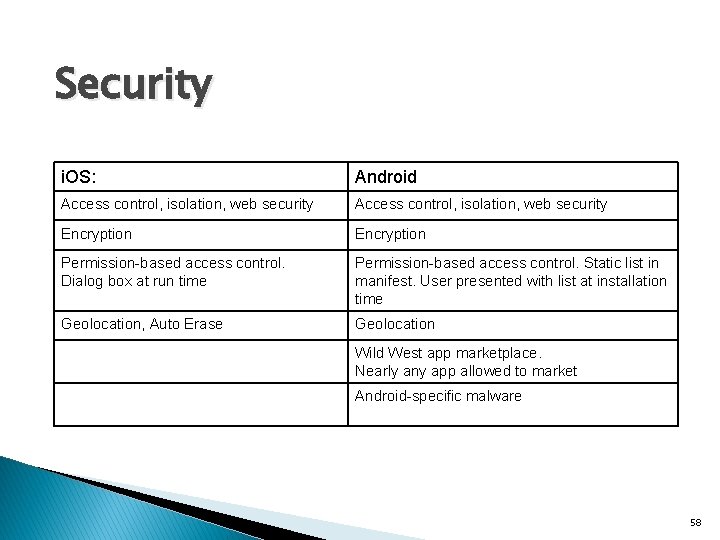
Security i. OS: Android Access control, isolation, web security Encryption Permission-based access control. Dialog box at run time Permission-based access control. Static list in manifest. User presented with list at installation time Geolocation, Auto Erase Geolocation Wild West app marketplace. Nearly any app allowed to market Android-specific malware 58
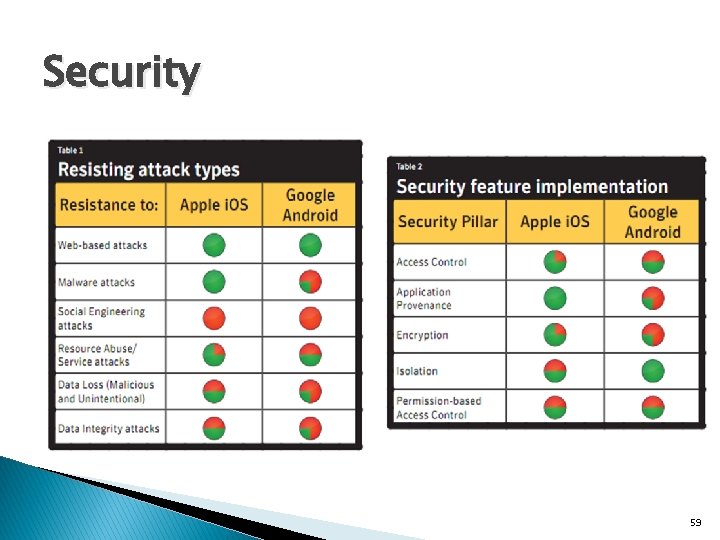
Security 59
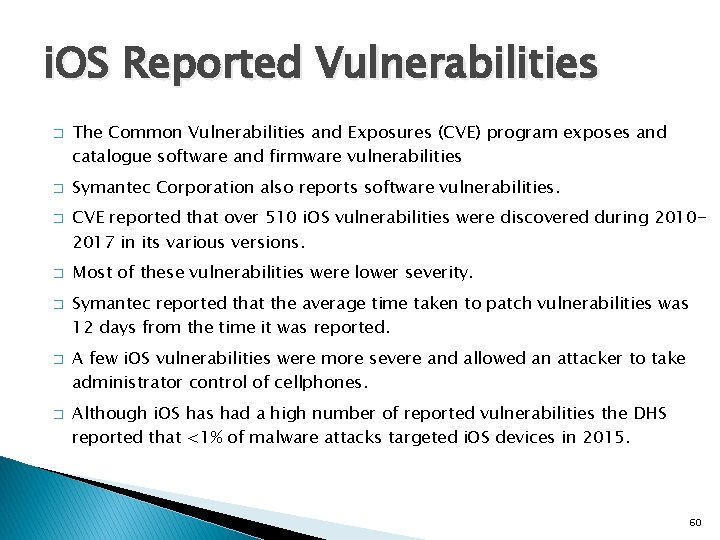
i. OS Reported Vulnerabilities � � � � The Common Vulnerabilities and Exposures (CVE) program exposes and catalogue software and firmware vulnerabilities Symantec Corporation also reports software vulnerabilities. CVE reported that over 510 i. OS vulnerabilities were discovered during 20102017 in its various versions. Most of these vulnerabilities were lower severity. Symantec reported that the average time taken to patch vulnerabilities was 12 days from the time it was reported. A few i. OS vulnerabilities were more severe and allowed an attacker to take administrator control of cellphones. Although i. OS has had a high number of reported vulnerabilities the DHS reported that <1% of malware attacks targeted i. OS devices in 2015. 60
Some Android vulnerabilities � Do. S vulnerability ◦ Exploited either by an installed malicious app, or a crafted website � Overflow ◦ Phone is apparently dead, unable to make calls � Memory corruption ◦ Affects executables even with preotections suchs as ASLR, Stack Guard, SE Linux � XSS ◦ Adversary steals credentials by injecting malicious code into webpages accessed by the phone 61
Some Android vulnerabilities � Directory Traversal ◦ Allows attackers to perpetrate a path traversal attack for accessing read/write files and view restricted files inside internal storage. � Http Response Splitting ◦ Happens when data penetrates web applications through an entrusted source like an http request. The attacker passes malicious data to a vulnerable application. � Bypass Something ◦ The attacker can bypass the phone’s lockscreen by entering a long string of random characters into the password file while the camera app is active. This causes the phone to crash (and bypasses the need for a correct password). 62
Some Android vulnerabilities � Gain Information/Gain Privilege ◦ Android device fails to perform adequate boundary checks usersupplied data. So that attackers can exploit this vulnerability by executing arbitrary code within the context of the affected device for getting credentials & personal information of the user. � Cross Site Request Forgery (CSRF) ◦ Web browser applications store cookies which are used to maintain credentials of the user. In this attack, the user is tricked by submitting forged request using the cookies which store credentials associated with the browser applications. � File Inclusion ◦ File inclusion on the web server at the time of application installation. vulnerability allows an attacker to include precreated file, usually through a script 63
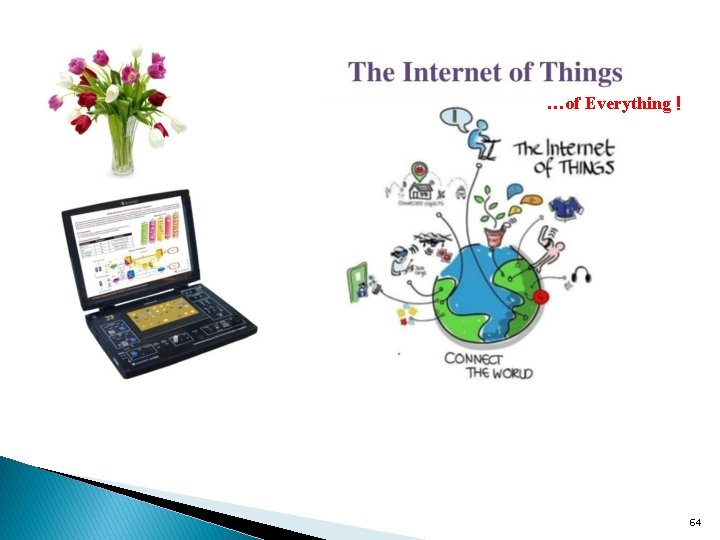
…of Everything ! 64
- Slides: 64