
Internet 2 Multicast Workshop Florida International University February
Internet 2 Multicast Workshop Florida International University February 2003 Engineering Workshops
2 Acknowledgements Greg Shepherd Marshall Eubanks Bill Nickless Patrick Dorn University of Oregon Cisco Systems Juniper Networks Florida International University Engineering Workshops
3 Contents • • Overview Multicast on the LAN Source-Specific Multicast (SSM) Any-Source Multicast (ASM) – Intra-domain ASM – Inter-domain ASM • Making the Case for Multicast Engineering Workshops

4 Overview Engineering Workshops
5 The Basic Idea Rather than sending a separate copy of the data for each recipient, the source sends the data only once, and routers along the way to the destinations make copies as needed. Unicast does mass mailings; multicast does chain letters. Engineering Workshops
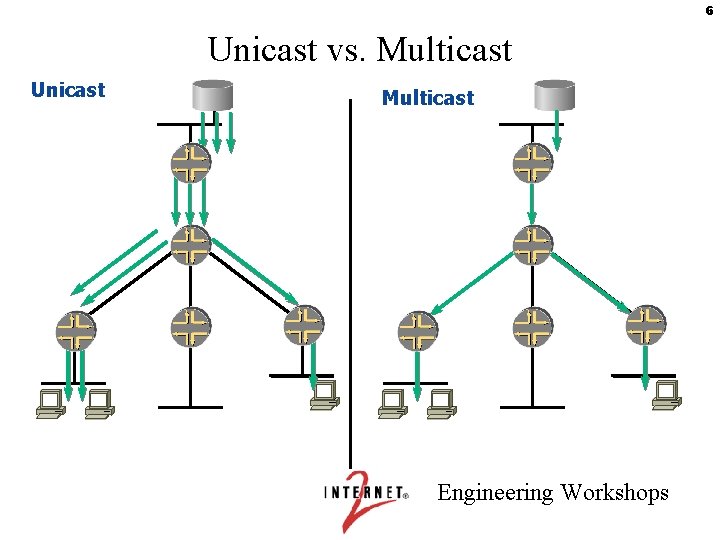
6 Unicast vs. Multicast Unicast Multicast Engineering Workshops
7 Some Uses for Multicast • Any application with multiple receivers – one-to-many or many-to-many • Live video distribution • Collaborative groupware • Periodic data delivery - “push” technology – stock quotes, sports scores, magazines, newspapers – advertisements Engineering Workshops
8 Some More Uses for Multicast • Server/web site replication • Reducing network/resource overhead – more efficient to establish multicast tree rather than multiple point-to-point links • Resource discovery • Distributed interactive simulation – war games – virtual reality Engineering Workshops
9 What Happened to Multicast? • By 1995, multicast seemed well on its way to adoption. – The MBone (Multicast back. Bone) had been set up and was growing. – Audiocasts and Videocasts of meetings, seminars, etc. , were fairly routine. – Serious interest was coming from industry. • So why isn’t it ubiquitous now ? – The hype got ahead of the technology! – The original technology was not suitable for adoption throughout the Internet. Basic parts had to be re-engineered. – This took from 1997 to early 2001. Engineering Workshops
10 The MBone • The original multicast network was called the MBone. It used a simple routing protocol called DVMRP (Distance Vector Multicast Routing Protocol). • As there were only isolated subnetworks that wanted to deal with DVMRP, the old MBone used tunnels to get multicast traffic between DVMRP subnetworks. – i. e. , the multicast traffic was hidden and sent between the subnetworks via unicast. • This mechanism was simple, but required manual administration and absolutely could not scale to the entire Internet. • Worse, DVMRP requires substantial routing traffic behind the scenes and this grew with the size of the MBone. – Thus, the legend grew that multicast was a bandwidth hog. Engineering Workshops
11 Multicast Grows Up • Starting about 1997, the building blocks for a multicast-enabled Internet were put into place. – An efficient modern multicast routing protocol, Protocol Independent Multicast – Sparse Mode (PIM-SM), was deployed. – The mechanisms for multicast peering were established, using an extension to BGP called Multiprotocol BGP (MBGP), and peering became routine. – The service model was split into: • a many-to-many part (e. g. , for videoconferencing): Any-Source Multicast (ASM), and • a one-to-many (or “broadcast”) part: Source-Specific Multicast (SSM). • By 2001, these had completely replaced the old MBone. • This path is not unusual for new technology. . . Engineering Workshops
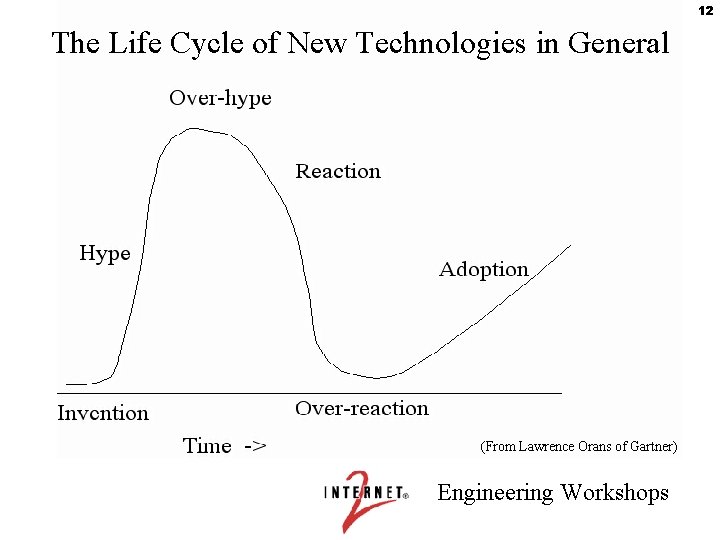
12 The Life Cycle of New Technologies in General (From Lawrence Orans of Gartner) Engineering Workshops
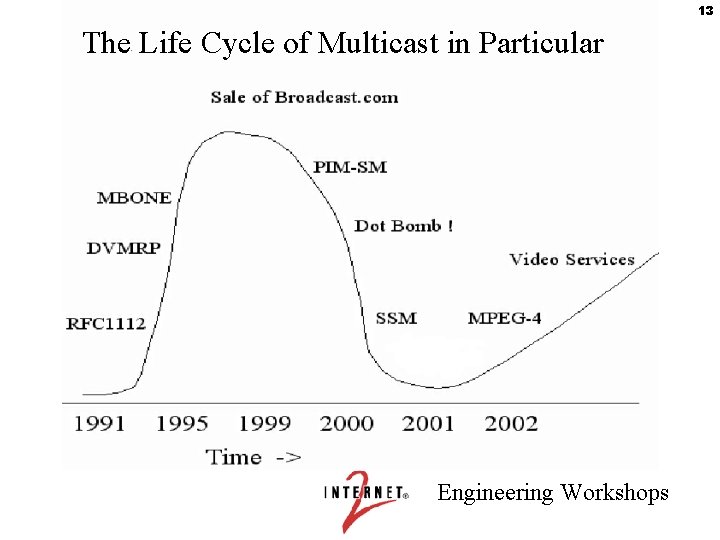
13 The Life Cycle of Multicast in Particular Engineering Workshops
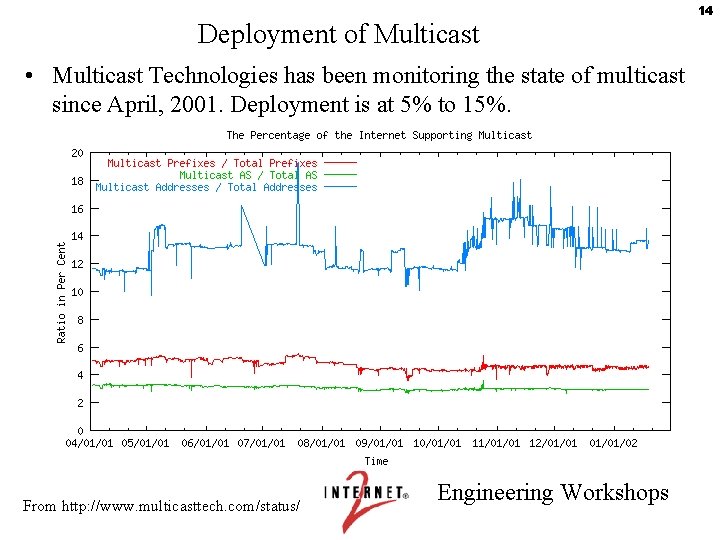
Deployment of Multicast • Multicast Technologies has been monitoring the state of multicast since April, 2001. Deployment is at 5% to 15%. From http: //www. multicasttech. com/status/ Engineering Workshops 14
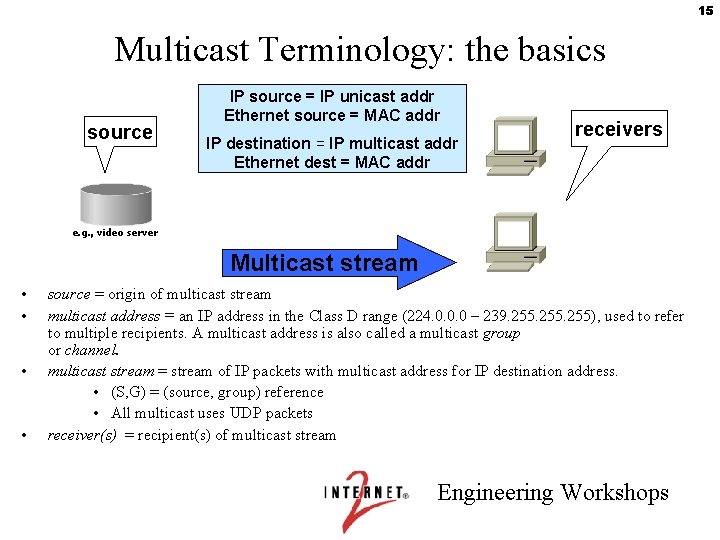
15 Multicast Terminology: the basics source IP source = IP unicast addr Ethernet source = MAC addr IP destination = IP multicast addr Ethernet dest = MAC addr receivers e. g. , video server Multicast stream • • source = origin of multicast stream multicast address = an IP address in the Class D range (224. 0. 0. 0 – 239. 255), used to refer to multiple recipients. A multicast address is also called a multicast group or channel. multicast stream = stream of IP packets with multicast address for IP destination address. • (S, G) = (source, group) reference • All multicast uses UDP packets receiver(s) = recipient(s) of multicast stream Engineering Workshops
16 Multicast Protocol Summary • IGMP - Internet Group Management Protocol is used by hosts and routers to tell each other about group membership. • PIM-SM - Protocol Independent Multicast-Sparse Mode is used to propagate forwarding state between routers. • MBGP - Multiprotocol Border Gateway Protocol is used to exchange routing information for inter-domain RPF checking. • MSDP - Multicast Source Discovery Protocol is used to exchange active source information between RPs. Engineering Workshops
17 (S, G) notation • For every multicast source there must be two pieces of information: the source IP address, S, and the group address, G. – These correspond to the sender and receiver addresses in unicast. – This is generally expressed as (S, G). – Also commonly used is (*, G) - every source for a particular group. Engineering Workshops
18 IP Multicast building blocks • The SENDERS send without worrying about receivers – Packets are sent to a multicast address (RFC 1700) – This is in the class D range (224. 0. 0. 0 - 239. 255) • The RECEIVERS inform the routers what they want to receive – done via Internet Group Management Protocol (IGMP), version 2 (RFC 2236) or later • The routers make sure the STREAMS make it to the correct receiving networks. – Multicast routing protocol: PIM-SM Engineering Workshops
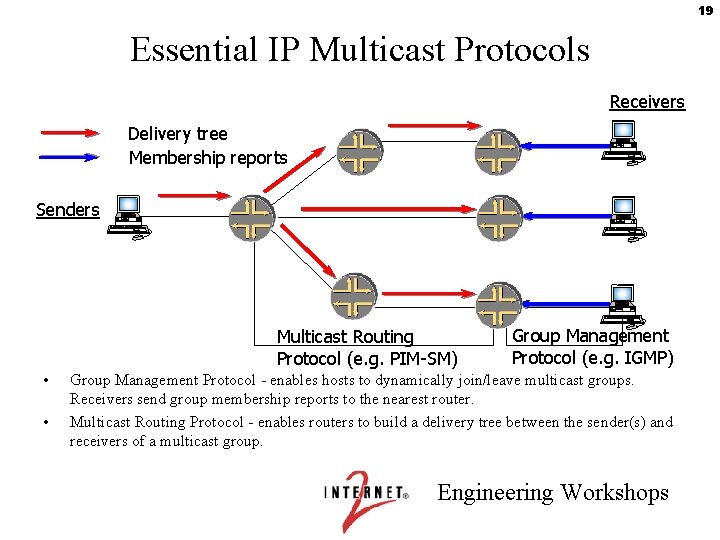
19 Essential IP Multicast Protocols Receivers Delivery tree Membership reports Senders Multicast Routing Protocol (e. g. PIM-SM) • • Group Management Protocol (e. g. IGMP) Group Management Protocol - enables hosts to dynamically join/leave multicast groups. Receivers send group membership reports to the nearest router. Multicast Routing Protocol - enables routers to build a delivery tree between the sender(s) and receivers of a multicast group. Engineering Workshops
20 Multicast Routing • Multicast Routing can be thought of as the reverse of Unicast Forwarding. – Unicast Forwarding is concerned with where the packet is going. – Multicast Routing is concerned with where the packet will be coming from. • Multicast paths to many receivers form a “tree”. The tree is built (or torn down) from the receiver back toward the source (or, if there is more than one source, the Rendezvous Point, or core). Engineering Workshops
21 PIM-SM Protocol Independent Multicast - Sparse Mode – The core multicast protocol: builds and tears down multicast trees – draft-ietf-pim-sm-v 2 -new-06. txt obsoletes RFC 2362; bootstrap router removed from PIM spec – explicit join: assumes that not everyone wants the data – uses externally-provided reachability table to build forwarding topology Engineering Workshops
22 Multicast Distribution Trees • The path taken by data from the source to receivers is called the “tree” – Routing loops are not allowed, so there is always a unique series of branches between the root of the tree and the receivers. – For each receiver, the tree is the shortest path from the source or core / RP to the receiver. The tree is built based on RPF reachability information. Engineering Workshops
23 Reachability • When a unicast packet shows up on an interface, the destination address is looked up in the unicast forwarding table to determine where the router should send the packet next. • When a multicast (S, G) Join shows up on an interface, the source address, S, is looked up in the reverse-path forwarding (RPF) table to determine how the router should join the source-based forwarding tree. This information is used to build the multicast forwarding tree. • The unicast forwarding table and the RPF table contain the same kind of information — unicast routes, or reachability information — and may in fact be the same table. • The point of having separate tables is to enable separate policies and paths for unicast forwarding and RPF. You need MBGP, IS-IS, or static mroutes to do this. • Once the multicast forwarding tree is built, multicast forwarding works similarly to unicast forwarding. Engineering Workshops
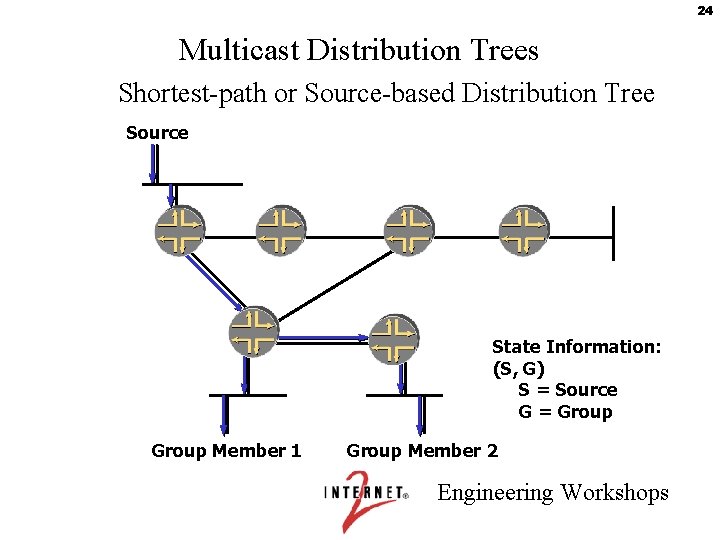
24 Multicast Distribution Trees Shortest-path or Source-based Distribution Tree Source State Information: (S, G) S = Source G = Group Member 1 Group Member 2 Engineering Workshops
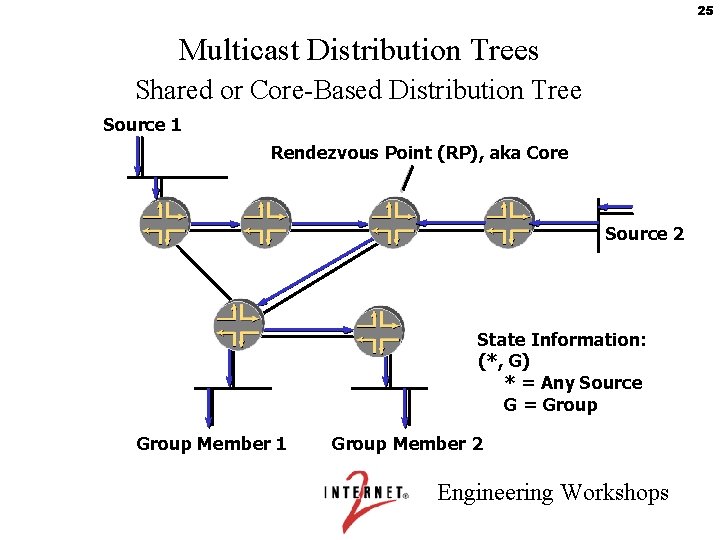
25 Multicast Distribution Trees Shared or Core-Based Distribution Tree Source 1 Rendezvous Point (RP), aka Core Source 2 State Information: (*, G) * = Any Source G = Group Member 1 Group Member 2 Engineering Workshops
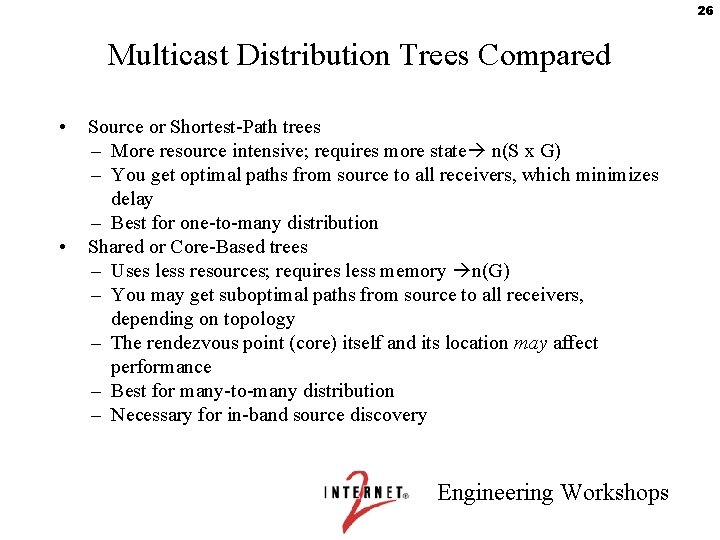
26 Multicast Distribution Trees Compared • • Source or Shortest-Path trees – More resource intensive; requires more state n(S x G) – You get optimal paths from source to all receivers, which minimizes delay – Best for one-to-many distribution Shared or Core-Based trees – Uses less resources; requires less memory n(G) – You may get suboptimal paths from source to all receivers, depending on topology – The rendezvous point (core) itself and its location may affect performance – Best for many-to-many distribution – Necessary for in-band source discovery Engineering Workshops
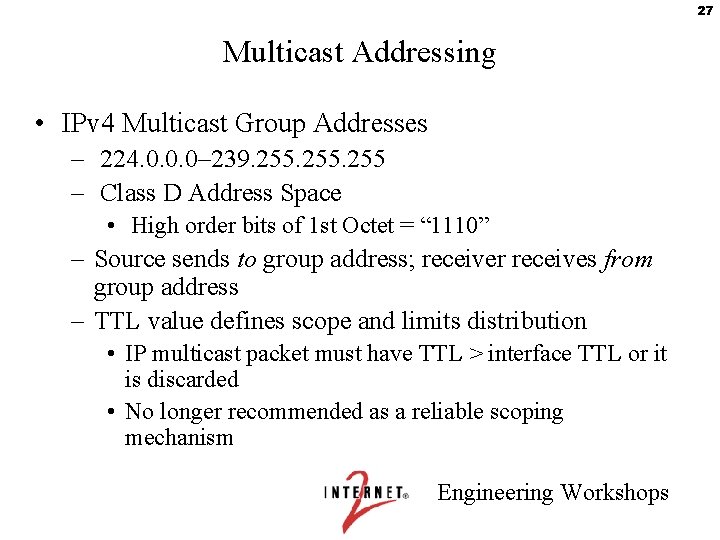
27 Multicast Addressing • IPv 4 Multicast Group Addresses – 224. 0. 0. 0– 239. 255 – Class D Address Space • High order bits of 1 st Octet = “ 1110” – Source sends to group address; receiver receives from group address – TTL value defines scope and limits distribution • IP multicast packet must have TTL > interface TTL or it is discarded • No longer recommended as a reliable scoping mechanism Engineering Workshops
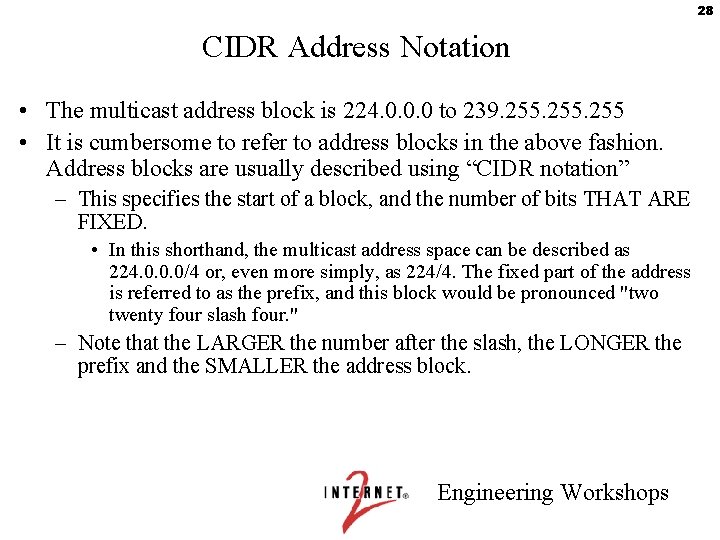
28 CIDR Address Notation • The multicast address block is 224. 0. 0. 0 to 239. 255 • It is cumbersome to refer to address blocks in the above fashion. Address blocks are usually described using “CIDR notation” – This specifies the start of a block, and the number of bits THAT ARE FIXED. • In this shorthand, the multicast address space can be described as 224. 0. 0. 0/4 or, even more simply, as 224/4. The fixed part of the address is referred to as the prefix, and this block would be pronounced "two twenty four slash four. " – Note that the LARGER the number after the slash, the LONGER the prefix and the SMALLER the address block. Engineering Workshops
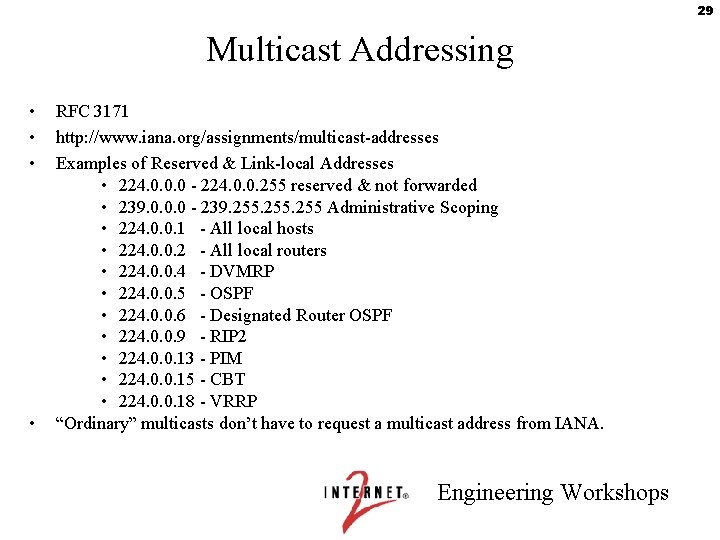
29 Multicast Addressing • • RFC 3171 http: //www. iana. org/assignments/multicast-addresses Examples of Reserved & Link-local Addresses • 224. 0. 0. 0 - 224. 0. 0. 255 reserved & not forwarded • 239. 0. 0. 0 - 239. 255 Administrative Scoping • 224. 0. 0. 1 - All local hosts • 224. 0. 0. 2 - All local routers • 224. 0. 0. 4 - DVMRP • 224. 0. 0. 5 - OSPF • 224. 0. 0. 6 - Designated Router OSPF • 224. 0. 0. 9 - RIP 2 • 224. 0. 0. 13 - PIM • 224. 0. 0. 15 - CBT • 224. 0. 0. 18 - VRRP “Ordinary” multicasts don’t have to request a multicast address from IANA. Engineering Workshops
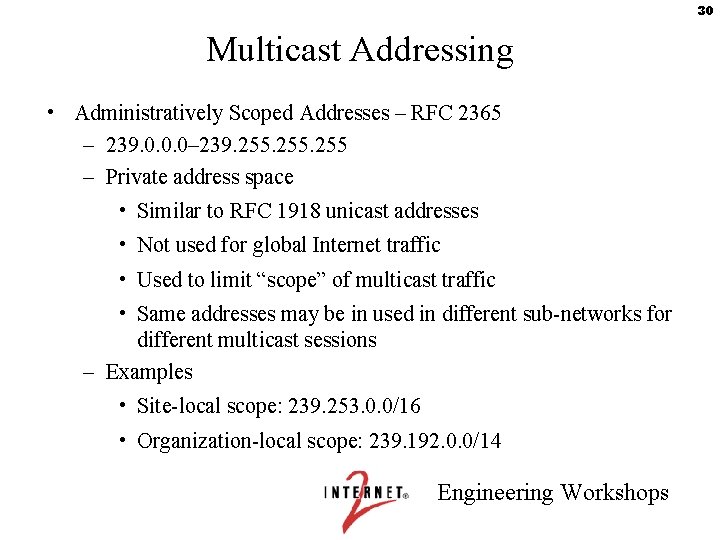
30 Multicast Addressing • Administratively Scoped Addresses – RFC 2365 – 239. 0. 0. 0– 239. 255 – Private address space • Similar to RFC 1918 unicast addresses • Not used for global Internet traffic • Used to limit “scope” of multicast traffic • Same addresses may be in used in different sub-networks for different multicast sessions – Examples • Site-local scope: 239. 253. 0. 0/16 • Organization-local scope: 239. 192. 0. 0/14 Engineering Workshops
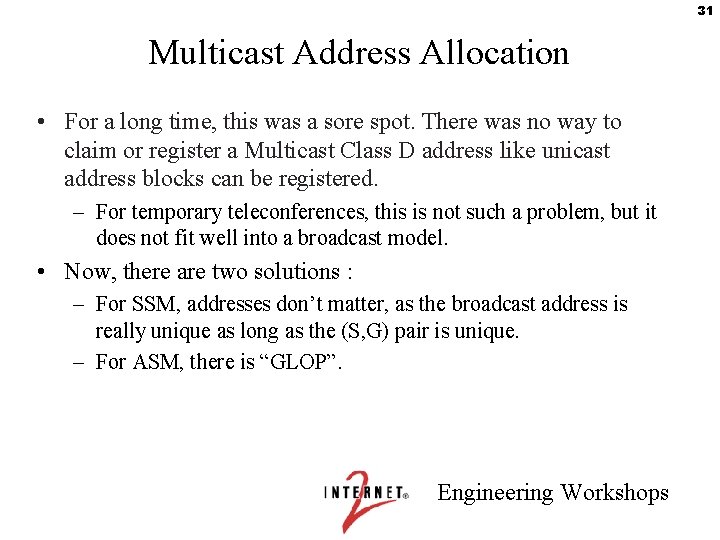
31 Multicast Address Allocation • For a long time, this was a sore spot. There was no way to claim or register a Multicast Class D address like unicast address blocks can be registered. – For temporary teleconferences, this is not such a problem, but it does not fit well into a broadcast model. • Now, there are two solutions : – For SSM, addresses don’t matter, as the broadcast address is really unique as long as the (S, G) pair is unique. – For ASM, there is “GLOP”. Engineering Workshops
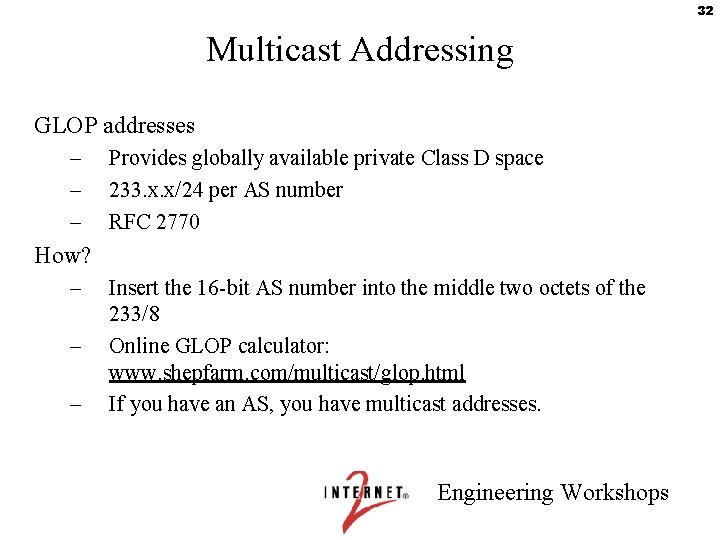
32 Multicast Addressing GLOP addresses – – – Provides globally available private Class D space 233. x. x/24 per AS number RFC 2770 How? – – – Insert the 16 -bit AS number into the middle two octets of the 233/8 Online GLOP calculator: www. shepfarm. com/multicast/glop. html If you have an AS, you have multicast addresses. Engineering Workshops
33 Multicast on the LAN Engineering Workshops
34 Multicast Addressing at Layer 2 • An IPv 4 multicast address is 32 bits, of which the first 4 bits are always the same, leaving 28 bits. • A MAC multicast address is 48 bits, of which the first 24 bits are always the same. One of the remaining bits is reserved, leaving 23 bits. • So, one multicast MAC address maps to 32 multicast IP addresses. Engineering Workshops
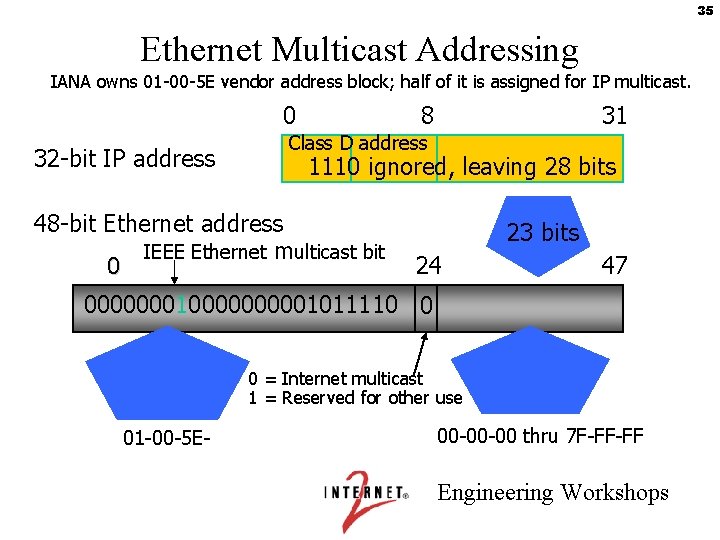
35 Ethernet Multicast Addressing IANA owns 01 -00 -5 E vendor address block; half of it is assigned for IP multicast. 0 32 -bit IP address 8 31 Class D address 1110 ignored, leaving 28 bits 48 -bit Ethernet address IEEE Ethernet multicast bit 0 23 bits 24 47 00000001000001011110 0 0 = Internet multicast 1 = Reserved for other use 01 -00 -5 E- 00 -00 -00 thru 7 F-FF-FF Engineering Workshops
36 IGMP • Internet Group Management Protocol - how hosts tell routers about group membership • Routers also solicit group membership from directly connected hosts • RFC 1112 specifies version 1 of IGMP – Supported on Windows 95 • RFC 2236 specifies version 2 of IGMP – Supported on latest service pack for Windows, newer Windows releases, and most UNIX systems • RFC 3376 specifies version 3 of IGMP – provides source include-list capabilities (SSM!) – Support? • Free. BSD patch, Linux patch, Window XP • www. shepfarm. com/multicast/ Engineering Workshops
37 IGMPv 2 • Router: – sends Membership Query messages to All Hosts (224. 0. 0. 1) • query-interval = 125 secs default – router with lowest IP address is Querier (rest non-queriers) – If lower-IP address query heard, back off to non-querier state • Other Querier Present Interval default: (robust-count x queryinterval) + (0. 5 x query-response-interval) = 255 secs – listens for reports (whether querier or not) and adds group to membership list for that interface • query-response-interval = 10 secs default – timeout (Group member interval) default: • (robust-count x query-interval) + (1 x query-response-interval) = 260 sec – robust-count - provides fine-tuning to allow for expected packet loss on a subnet. Default = 2 (tunable from 2 -10) Engineering Workshops
38 IGMPv 2 • Host: – sends Membership Report messages, if joined • waits 0 -10 sec (default) • Hosts listen to other host reports • Only 1 host responds – sends unsolicited Membership Reports (i. e. , Join Messages) to group address (e. g. 224. 10. 8. 5) – sends Leave messages to All Routers (224. 0. 0. 2) – reports group membership ONLY – no sources. Only the existence of local group members is reported, not the actual members themselves Engineering Workshops
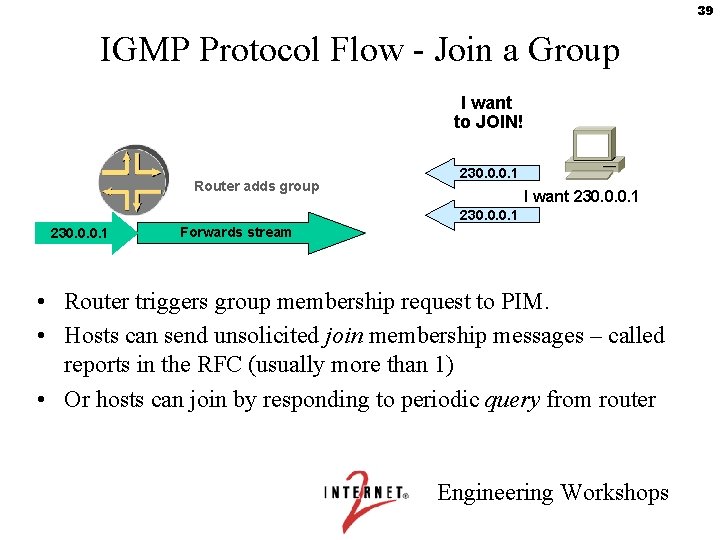
39 IGMP Protocol Flow - Join a Group I want to JOIN! Router adds group 230. 0. 0. 1 I want 230. 0. 0. 1 Forwards stream • Router triggers group membership request to PIM. • Hosts can send unsolicited join membership messages – called reports in the RFC (usually more than 1) • Or hosts can join by responding to periodic query from router Engineering Workshops
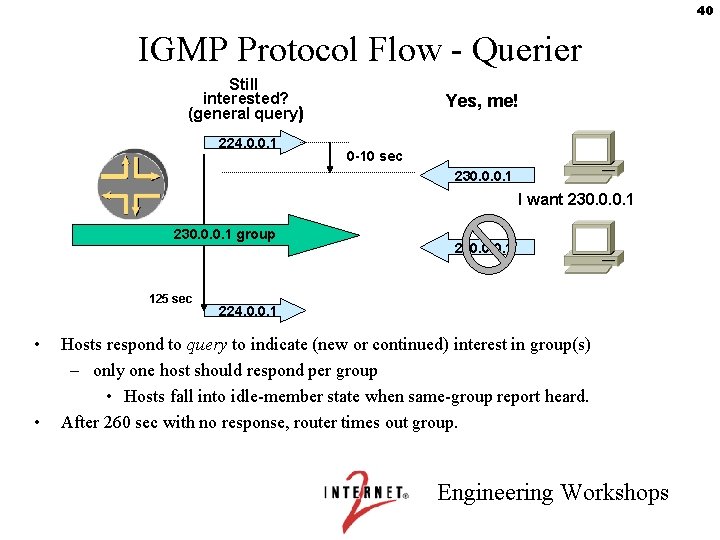
40 IGMP Protocol Flow - Querier Still interested? (general query) 224. 0. 0. 1 Yes, me! 0 -10 sec 230. 0. 0. 1 I want 230. 0. 0. 1 group 125 sec • • 230. 0. 0. 1 224. 0. 0. 1 Hosts respond to query to indicate (new or continued) interest in group(s) – only one host should respond per group • Hosts fall into idle-member state when same-group report heard. After 260 sec with no response, router times out group. Engineering Workshops
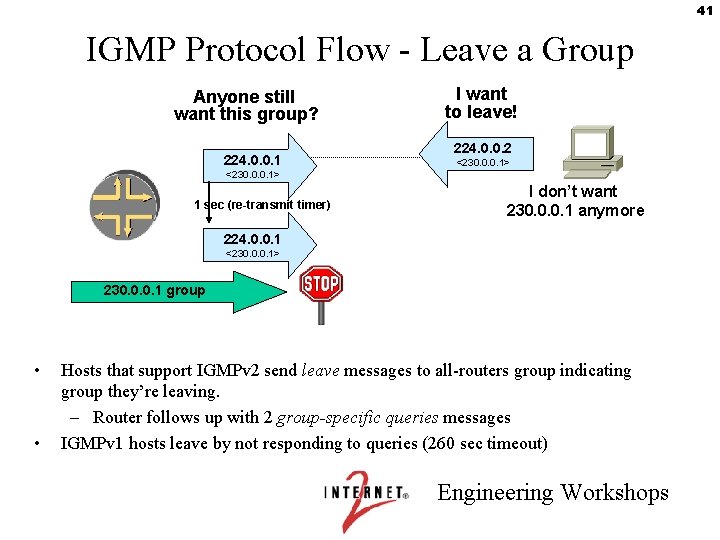
41 IGMP Protocol Flow - Leave a Group Anyone still want this group? 224. 0. 0. 1 I want to leave! 224. 0. 0. 2 <230. 0. 0. 1> 1 sec (re-transmit timer) I don’t want 230. 0. 0. 1 anymore 224. 0. 0. 1 <230. 0. 0. 1> 230. 0. 0. 1 group • • Hosts that support IGMPv 2 send leave messages to all-routers group indicating group they’re leaving. – Router follows up with 2 group-specific queries messages IGMPv 1 hosts leave by not responding to queries (260 sec timeout) Engineering Workshops
42 Soft State • Say I set up an active Multicast group, say by issuing a membership report. What happens if my computer goes down and never directly leaves the group ? • This is fixed with “Soft State” – Everything has a timer, and if not periodically reinitiated the timer will expire and the state will be removed. – So there is no danger of some rogue group lasting forever. Engineering Workshops
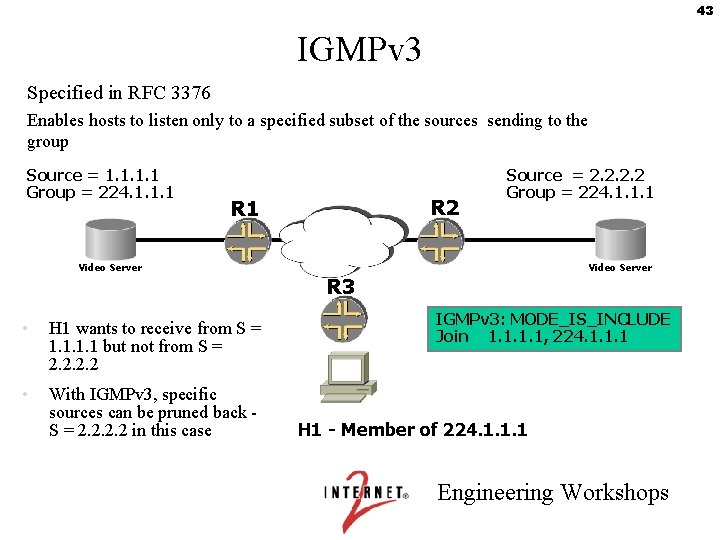
43 IGMPv 3 Specified in RFC 3376 Enables hosts to listen only to a specified subset of the sources sending to the group Source = 1. 1 Group = 224. 1. 1. 1 R 2 R 1 Source = 2. 2 Group = 224. 1. 1. 1 Video Server R 3 • H 1 wants to receive from S = 1. 1 but not from S = 2. 2 • With IGMPv 3, specific sources can be pruned back S = 2. 2 in this case IGMPv 3: MODE_IS_INCLUDE Join 1. 1, 224. 1. 1. 1 H 1 - Member of 224. 1. 1. 1 Engineering Workshops
44 IGMPv 3 Enhancements – Group-Source Report message is defined. Enables hosts to specify which senders it can receive or not receive data from. – Group-Source Leave message is defined. Enables host to specify the specific IP addresses of a (source, group) that it wishes to leave. Engineering Workshops
45 Lab 1: Multicast on the LAN Engineering Workshops

46 SSM Engineering Workshops
47 PIM-SM • SM stands for “Sparse Mode. ” – RFC 2362 and draft-ietf-pim-sm-v 2 -new-06. txt – There is also a Dense Mode but we don’t recommend using it. – Cisco has a proprietary “Sparse-Dense” mode which they use for RP discovery. • PIM-SM allows for both Shared Trees (STs) from a Rendezvous Point (RP) and Shortest Path Trees (SPTs) from the source. – Note that STs are shortest path, just to the RP. • There are two ways to use PIM-SM… Engineering Workshops
48 ASM and SSM • ASM: Any-Source Multicast. Traditional multicast – data and joins are forwarded to a Rendezvous Point (RP). – all routers in a PIM domain must have RP mapping – when load exceeds threshold, forwarding swaps to shortest path tree. The default threshold is one packet; in this case, the sole purpose of the ST is to learn which sources are active (with IGMPv 2, the receiver can only specify the group, not specific sources. ) – state increases (not everywhere) as number of sources and number of groups increase – source-tree state is refreshed when data is forwarded and with Join/Prune control messages • SSM: Source-Specific Multicast. PIM-SM without RPs – instead, source is learned out-of-band, and shortest-path tree is built directly to it. Engineering Workshops
49 SSM • Source-Specific Multicast (SSM) is a subset of ASM, so – SSM concepts apply directly to ASM, but – SSM is a lot simpler than ASM. For these reasons, we cover SSM first in this workshop. • 232 / 8 is assigned to SSM as an address space. Other address ranges can also be set up for SSM -- this is primarily a function of the receiving network. • Source activity and IP addresses are assumed known, say through a web page. • IGMPv 3 allows for “Include” lists of (S, G) pairs. Engineering Workshops
50 SSM • SSM - draft-ietf-ssm-arch-01. txt – 232/8 – IANA assigned – No shared trees – Guarantees ONE source on any delivery tree • Content security – no unwanted sources – Reduced protocol dependence – more later. . . – Solves address allocation issues for inter-domain one-to-many • tree address is 64 bits – S, G – Host must learn source address out-of-band (e. g, from a web page) – Host-to-router join request specifies source as well as group • requires IGMPv 3 for include-source list – Hard-coded behavior in 232/8 • Configurable to expand range Engineering Workshops
51 SSM in Action • Each (S, G) pair listed in the IGMPv 3 include list generates a (S, G) join directly towards the source. • That’s it. It’s very simple. All you need to implement is : – Edge routers need IGMP version 3 – Interior Routers need filters to prevent RP (*, G) joins & other RP state for the SSM address block Engineering Workshops
52 SSM Group Addresses • 232 / 8 is assigned to SSM as an address space. – You don’t have to ask, you can just pick one and use it. • How can this be ? – Note that all joins are unique as long as the combination of S and G are unique. Not only can one source support multiple groups, but if there are two sources using the same Group address, everything works just fine. Engineering Workshops
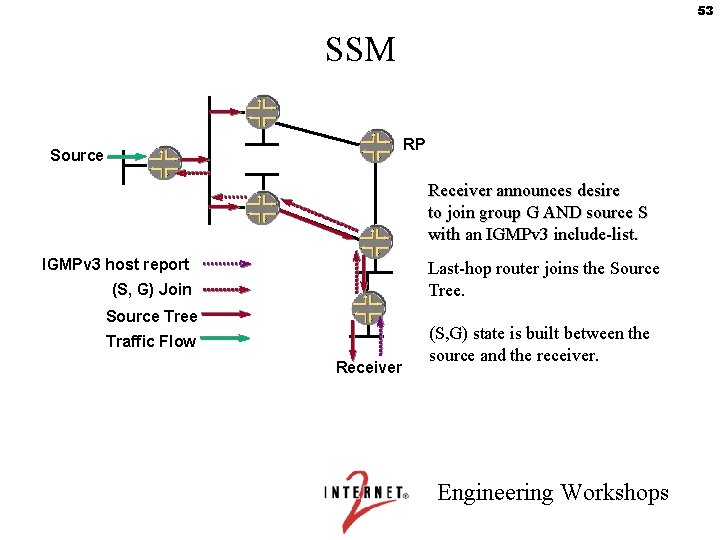
53 SSM RP Source Receiver announces desire to join group G AND source S with an IGMPv 3 include-list. IGMPv 3 host report Last-hop router joins the Source Tree. (S, G) Join Source Tree Traffic Flow Receiver (S, G) state is built between the source and the receiver. Engineering Workshops
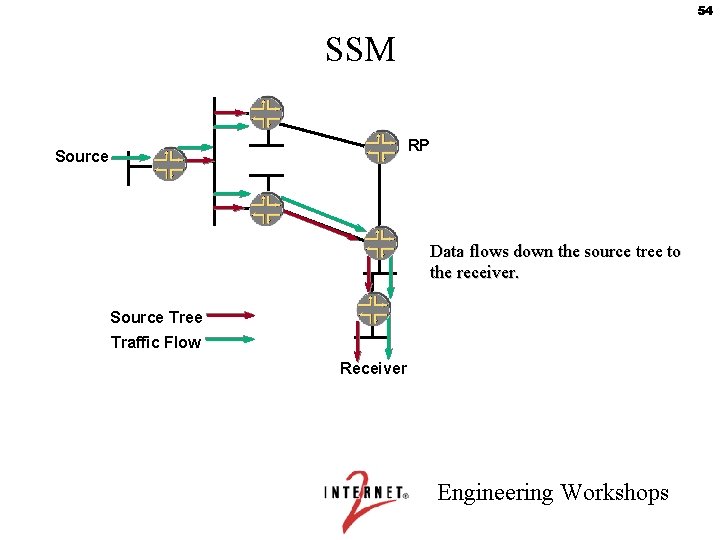
54 SSM RP Source Data flows down the source tree to the receiver. Source Tree Traffic Flow Receiver Engineering Workshops
55 Lab 2: SSM Engineering Workshops

56 ASM Engineering Workshops
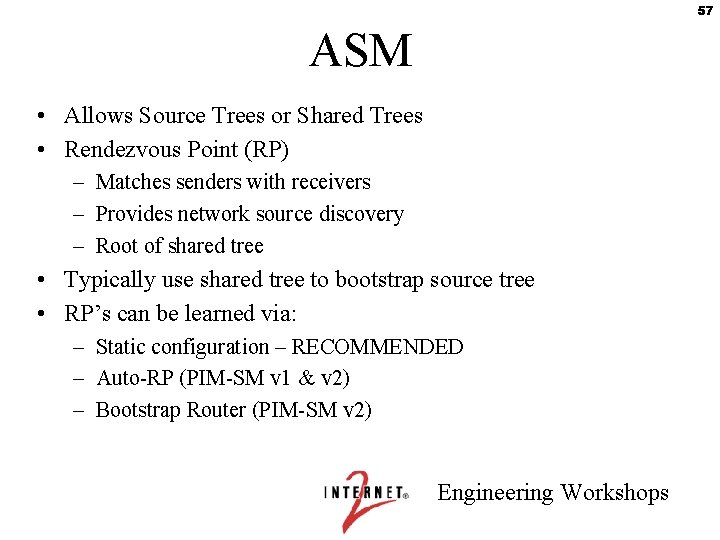
57 ASM • Allows Source Trees or Shared Trees • Rendezvous Point (RP) – Matches senders with receivers – Provides network source discovery – Root of shared tree • Typically use shared tree to bootstrap source tree • RP’s can be learned via: – Static configuration – RECOMMENDED – Auto-RP (PIM-SM v 1 & v 2) – Bootstrap Router (PIM-SM v 2) Engineering Workshops
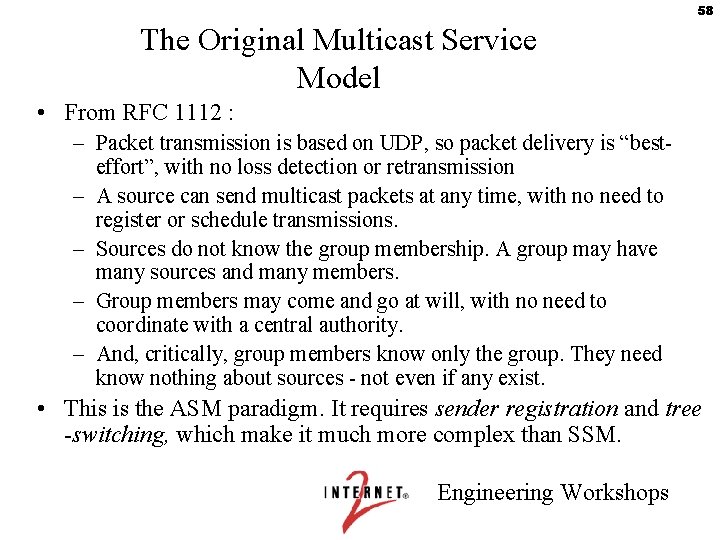
58 The Original Multicast Service Model • From RFC 1112 : – Packet transmission is based on UDP, so packet delivery is “besteffort”, with no loss detection or retransmission – A source can send multicast packets at any time, with no need to register or schedule transmissions. – Sources do not know the group membership. A group may have many sources and many members. – Group members may come and go at will, with no need to coordinate with a central authority. – And, critically, group members know only the group. They need know nothing about sources - not even if any exist. • This is the ASM paradigm. It requires sender registration and tree -switching, which make it much more complex than SSM. Engineering Workshops
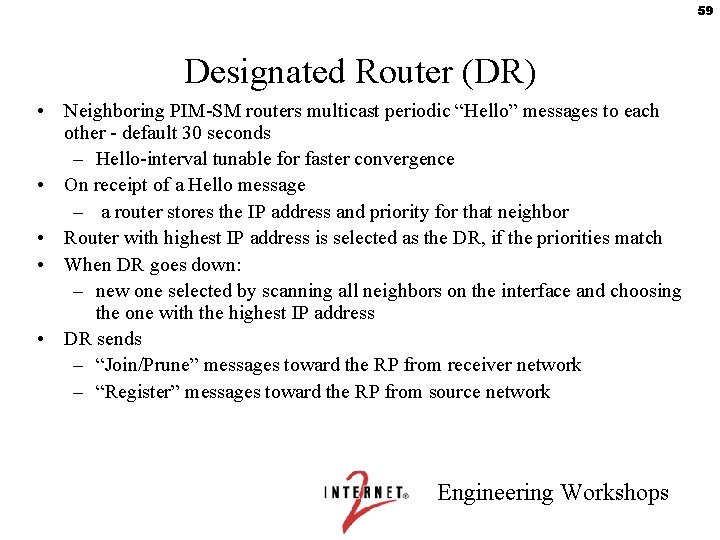
59 Designated Router (DR) • Neighboring PIM-SM routers multicast periodic “Hello” messages to each other - default 30 seconds – Hello-interval tunable for faster convergence • On receipt of a Hello message – a router stores the IP address and priority for that neighbor • Router with highest IP address is selected as the DR, if the priorities match • When DR goes down: – new one selected by scanning all neighbors on the interface and choosing the one with the highest IP address • DR sends – “Join/Prune” messages toward the RP from receiver network – “Register” messages toward the RP from source network Engineering Workshops
60 Intra-domain ASM Engineering Workshops
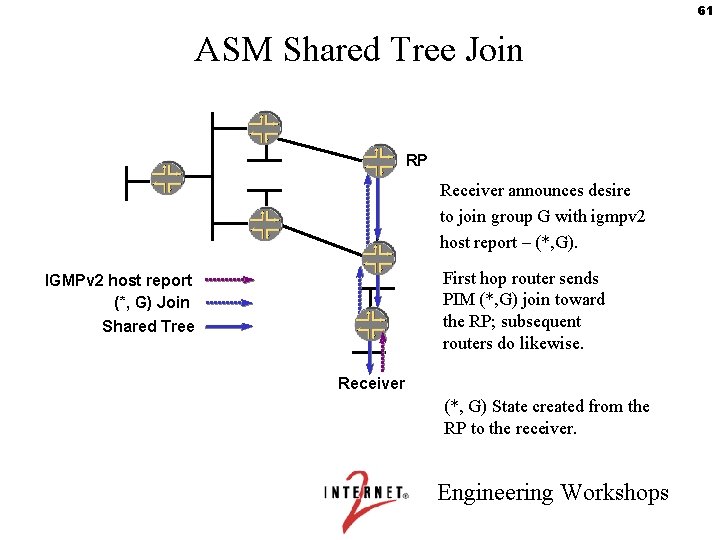
61 ASM Shared Tree Join RP Receiver announces desire to join group G with igmpv 2 host report – (*, G). First hop router sends PIM (*, G) join toward the RP; subsequent routers do likewise. IGMPv 2 host report (*, G) Join Shared Tree Receiver (*, G) State created from the RP to the receiver. Engineering Workshops
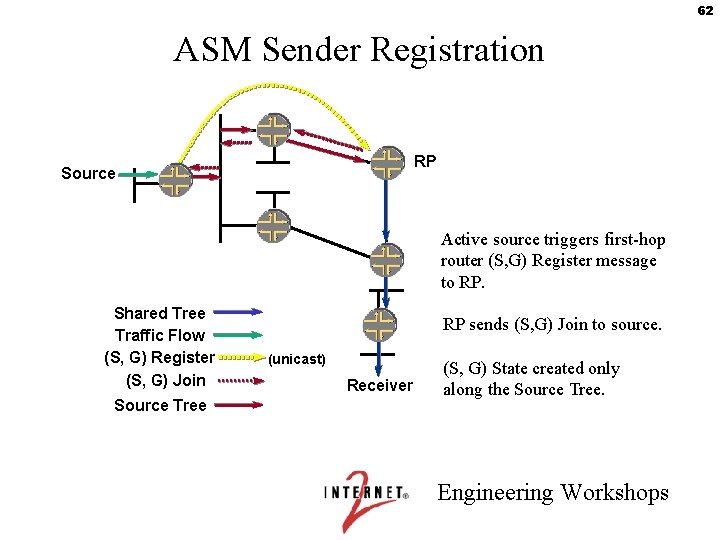
62 ASM Sender Registration RP Source Active source triggers first-hop router (S, G) Register message to RP. Shared Tree Traffic Flow (S, G) Register (S, G) Join Source Tree RP sends (S, G) Join to source. (unicast) Receiver (S, G) State created only along the Source Tree. Engineering Workshops
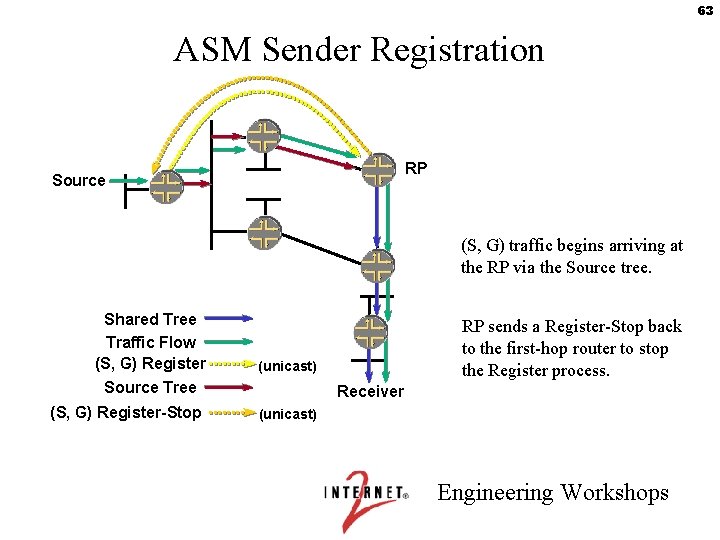
63 ASM Sender Registration RP Source (S, G) traffic begins arriving at the RP via the Source tree. Shared Tree Traffic Flow (S, G) Register (unicast) Source Tree (S, G) Register-Stop RP sends a Register-Stop back to the first-hop router to stop the Register process. Receiver (unicast) Engineering Workshops
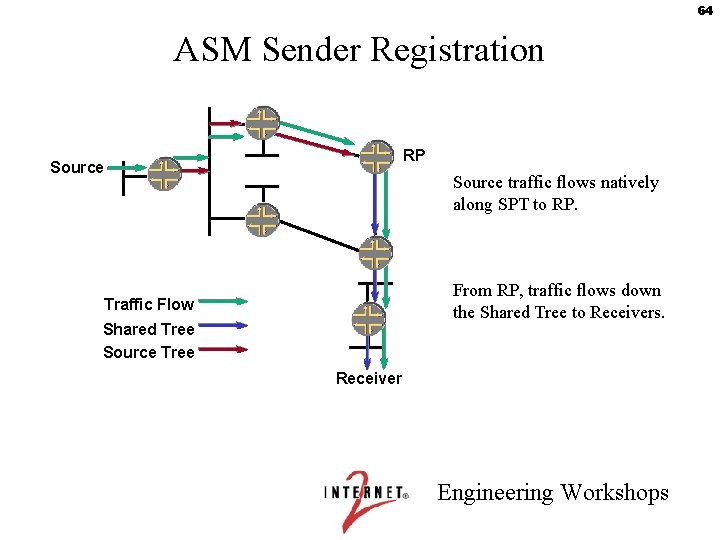
64 ASM Sender Registration RP Source traffic flows natively along SPT to RP. From RP, traffic flows down the Shared Tree to Receivers. Traffic Flow Shared Tree Source Tree Receiver Engineering Workshops
65 How can PIM do both SPTs and STs ? • PIM-SM includes a mechanism for switching between a tree based on the RP and one based on the Source. – Generally, this is configured to happen immediately, i. e. , at most one packet flows down the ST. – This means that the placement of the RP and the speed of the links to it are not so important. • This gets pretty complicated ! Engineering Workshops
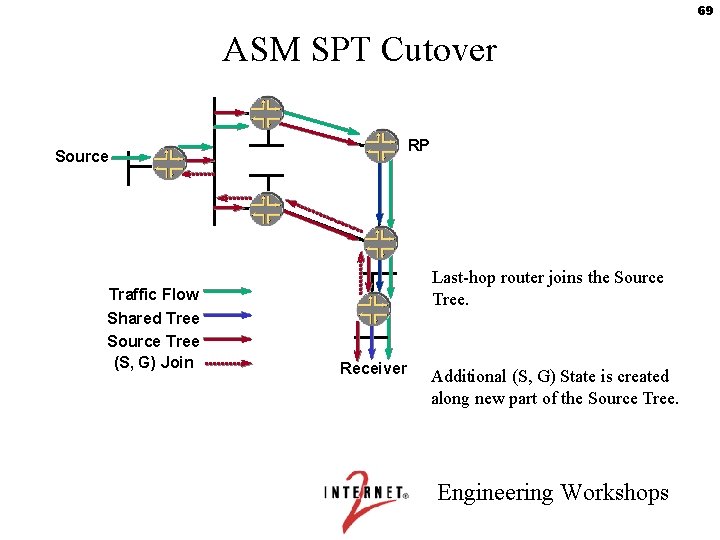
66 How PIM Switches Trees 1. ) Source sends data to its First Hop Router. 2. ) First Hop Router encapsulates it and unicasts it to the RP in a Register message. 3. ) If the RP has receivers that belong to the group, it sends the data down the shared tree. Receivers may join before or after the source starts. Receivers join just the group (i. e. , a (*, G) join). 4. ) The RP issues a (S, G) join towards the source, S, in order to receive the data through multicast. Engineering Workshops
67 Switching Trees (cont’d) 5. ) The routers in the path learn about the particular S from the traffic down the shared tree. 6. ) The receiver’s first hop router issues a (S, G) join towards the source. 7. ) This travels hop by hop towards the source until it finds a router with (S, G) state - maybe at the source, maybe closer. 8. ) The (S, G) data start flowing directly from the source to the receiver. Engineering Workshops
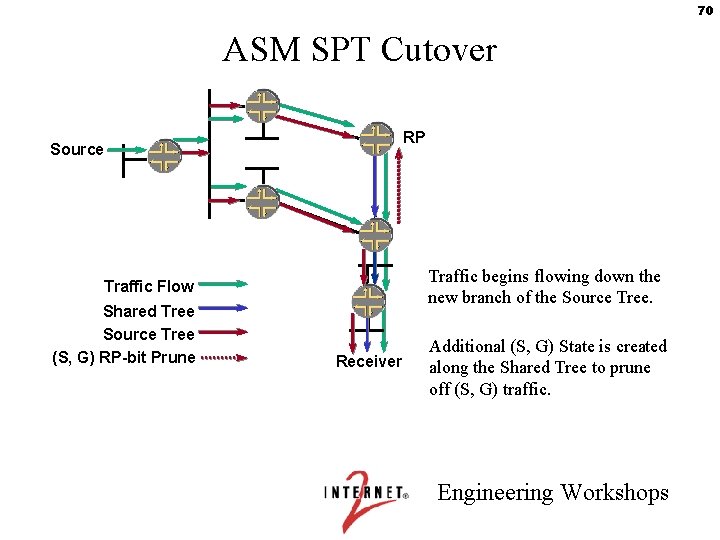
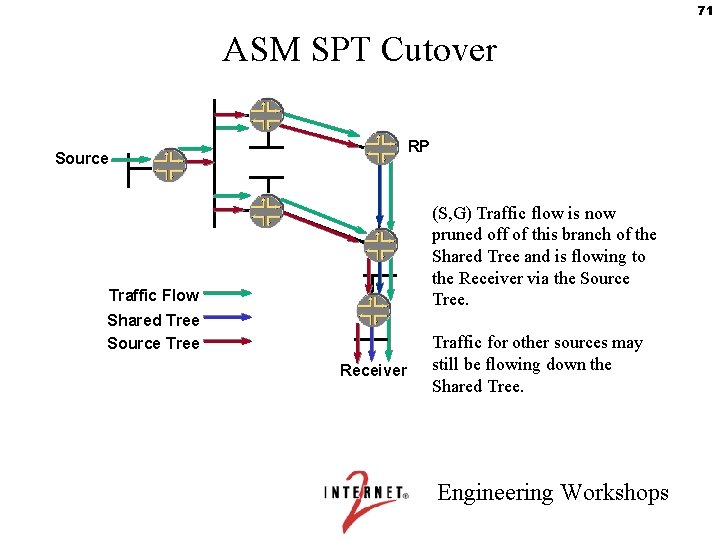
68 Yet more on Switching Trees 9. ) Some router in the ST is receiving two copies of the data, from the SPT and the ST. 10. ) This router drops the ST data from the RP, and issues a (S, G) leave message towards the RP. 11. ) This travels hop by hop towards the RP, pruning the state, until it reaches a router that needs the (S, G) data for some other receiver. Engineering Workshops
69 ASM SPT Cutover RP Source Last-hop router joins the Source Tree. Traffic Flow Shared Tree Source Tree (S, G) Join Receiver Additional (S, G) State is created along new part of the Source Tree. Engineering Workshops
70 ASM SPT Cutover RP Source Traffic begins flowing down the new branch of the Source Tree. Traffic Flow Shared Tree Source Tree (S, G) RP-bit Prune Receiver Additional (S, G) State is created along the Shared Tree to prune off (S, G) traffic. Engineering Workshops
71 ASM SPT Cutover RP Source (S, G) Traffic flow is now pruned off of this branch of the Shared Tree and is flowing to the Receiver via the Source Tree. Traffic Flow Shared Tree Source Tree Receiver Traffic for other sources may still be flowing down the Shared Tree. Engineering Workshops
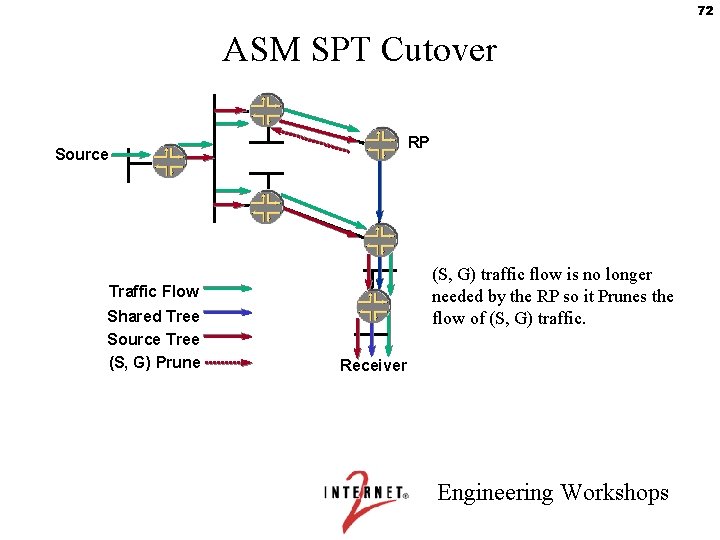
72 ASM SPT Cutover RP Source (S, G) traffic flow is no longer needed by the RP so it Prunes the flow of (S, G) traffic. Traffic Flow Shared Tree Source Tree (S, G) Prune Receiver Engineering Workshops
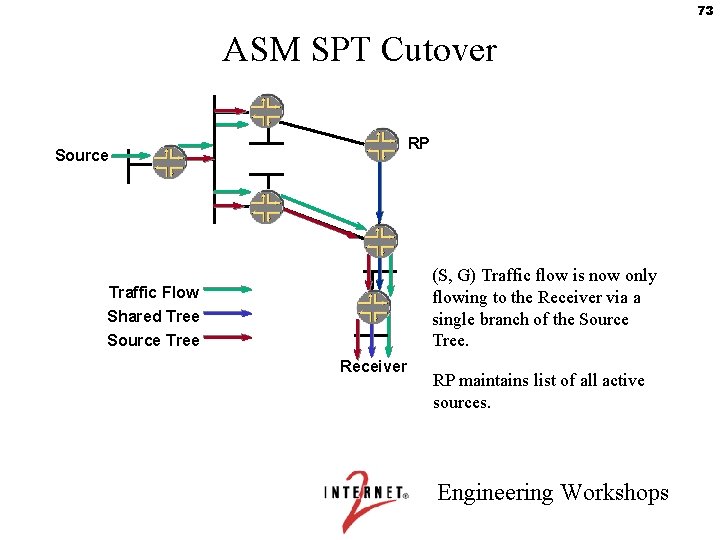
73 ASM SPT Cutover RP Source (S, G) Traffic flow is now only flowing to the Receiver via a single branch of the Source Tree. Traffic Flow Shared Tree Source Tree Receiver RP maintains list of all active sources. Engineering Workshops
74 ASM Configuration • RP Mapping options – Static RP • Recommended • Easy transition to Anycast-RP • Allows for a hierarchy of RPs – Auto-RP • Fixed convergence timers (slow) • Must flood RP mapping traffic – bootstrap router • No longer in the PIM spec. • Fixed convergence timers (slow) • Allows for a hierarchy of RPs Engineering Workshops
75 Lab 3: Intra-domain ASM Engineering Workshops
76 Inter-domain ASM Engineering Workshops
77 MBGP • Multiprotocol extensions to BGP • MBGP overview • MBGP capability negotiation • Multicast Reachability Engineering Workshops
78 MBGP Overview • MBGP: Multiprotocol BGP (aka multicast BGP in multicast networks) – Makes it possible for multicast routing policies to differ from unicast routing policies – Defined in RFC 2283 (extensions to BGP) – Can carry different route types for different purposes • Unicast • Multicast – Both route types carried in same BGP session – Does not propagate multicast state information – Same path selection and validation rules • AS-Path, Local. Pref, MED, … Engineering Workshops
79 MBGP • Tag unicast prefixes as multicast source prefixes for intradomain mcast routing protocols to do RPF checks. • WHY? Allows for inter-domain RPF checking where unicast and multicast paths are non-congruent. • DO I REALLY NEED IT? – YES, if: • ISP to ISP peering • Multiple-homed networks – NO, if: • You are single-homed Engineering Workshops
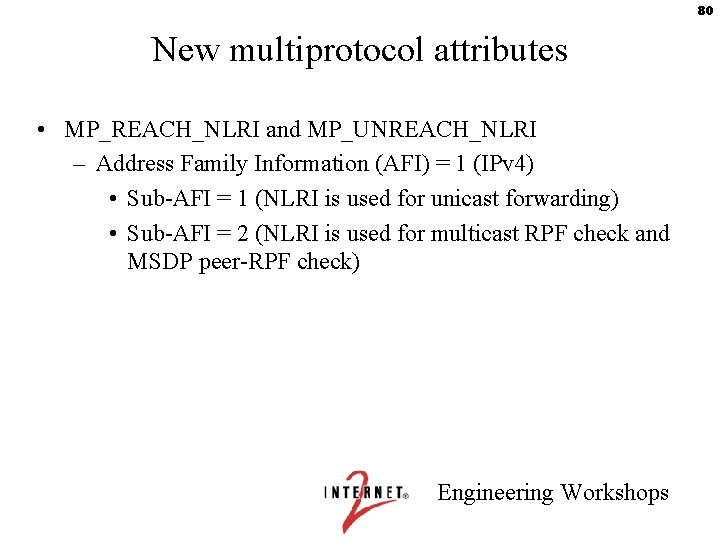
80 New multiprotocol attributes • MP_REACH_NLRI and MP_UNREACH_NLRI – Address Family Information (AFI) = 1 (IPv 4) • Sub-AFI = 1 (NLRI is used for unicast forwarding) • Sub-AFI = 2 (NLRI is used for multicast RPF check and MSDP peer-RPF check) Engineering Workshops
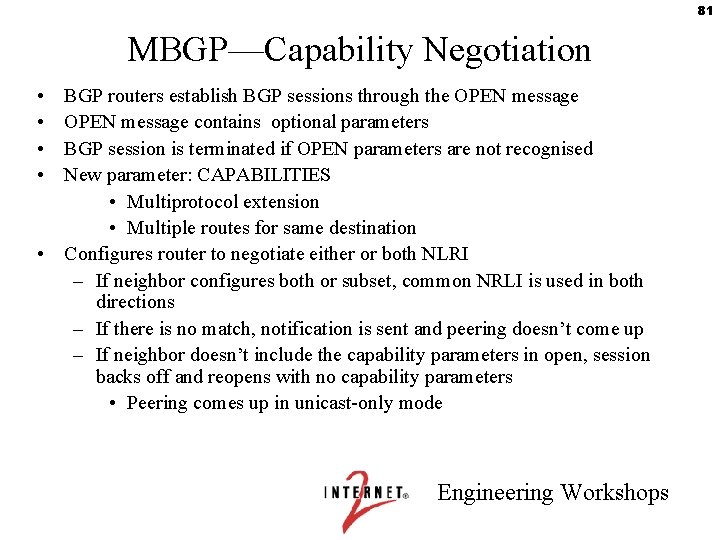
81 MBGP—Capability Negotiation • • BGP routers establish BGP sessions through the OPEN message contains optional parameters BGP session is terminated if OPEN parameters are not recognised New parameter: CAPABILITIES • Multiprotocol extension • Multiple routes for same destination • Configures router to negotiate either or both NLRI – If neighbor configures both or subset, common NRLI is used in both directions – If there is no match, notification is sent and peering doesn’t come up – If neighbor doesn’t include the capability parameters in open, session backs off and reopens with no capability parameters • Peering comes up in unicast-only mode Engineering Workshops
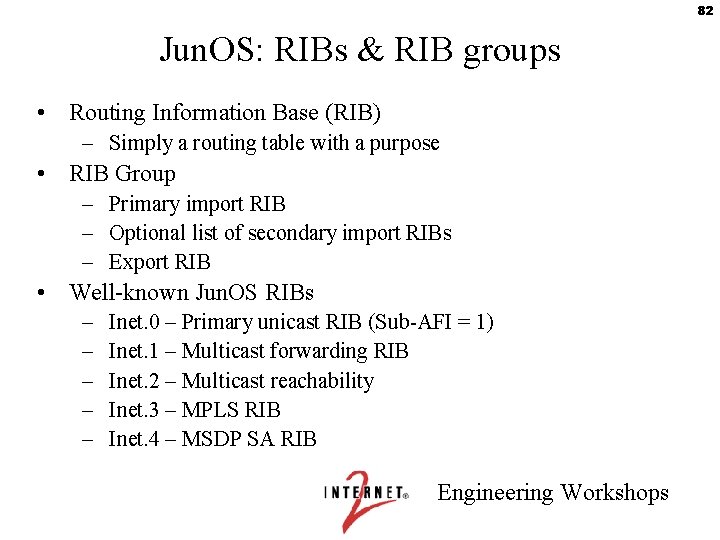
82 Jun. OS: RIBs & RIB groups • Routing Information Base (RIB) – Simply a routing table with a purpose • RIB Group – Primary import RIB – Optional list of secondary import RIBs – Export RIB • Well-known Jun. OS RIBs – – – Inet. 0 – Primary unicast RIB (Sub-AFI = 1) Inet. 1 – Multicast forwarding RIB Inet. 2 – Multicast reachability Inet. 3 – MPLS RIB Inet. 4 – MSDP SA RIB Engineering Workshops
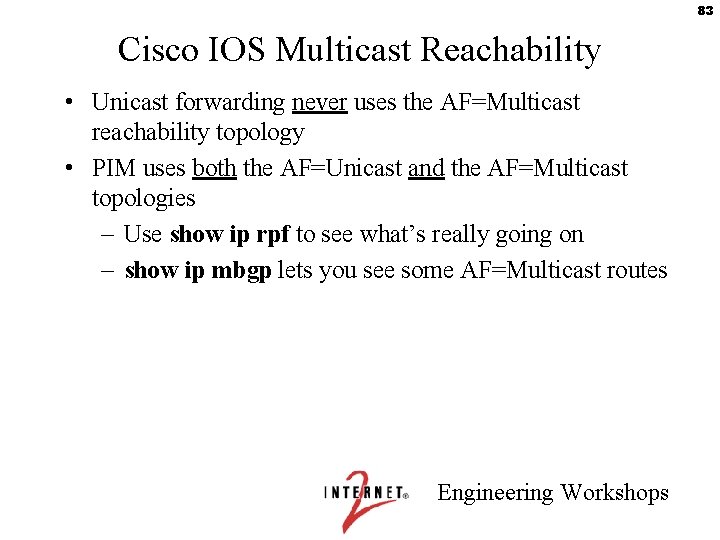
83 Cisco IOS Multicast Reachability • Unicast forwarding never uses the AF=Multicast reachability topology • PIM uses both the AF=Unicast and the AF=Multicast topologies – Use show ip rpf to see what’s really going on – show ip mbgp lets you see some AF=Multicast routes Engineering Workshops
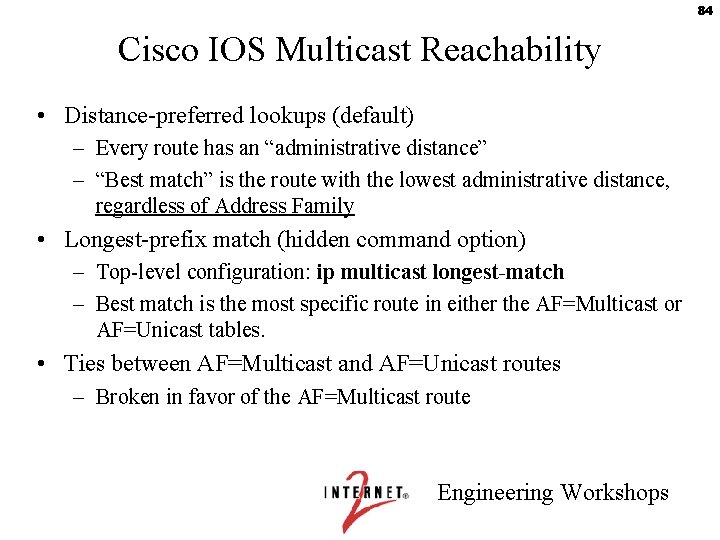
84 Cisco IOS Multicast Reachability • Distance-preferred lookups (default) – Every route has an “administrative distance” – “Best match” is the route with the lowest administrative distance, regardless of Address Family • Longest-prefix match (hidden command option) – Top-level configuration: ip multicast longest-match – Best match is the most specific route in either the AF=Multicast or AF=Unicast tables. • Ties between AF=Multicast and AF=Unicast routes – Broken in favor of the AF=Multicast route Engineering Workshops
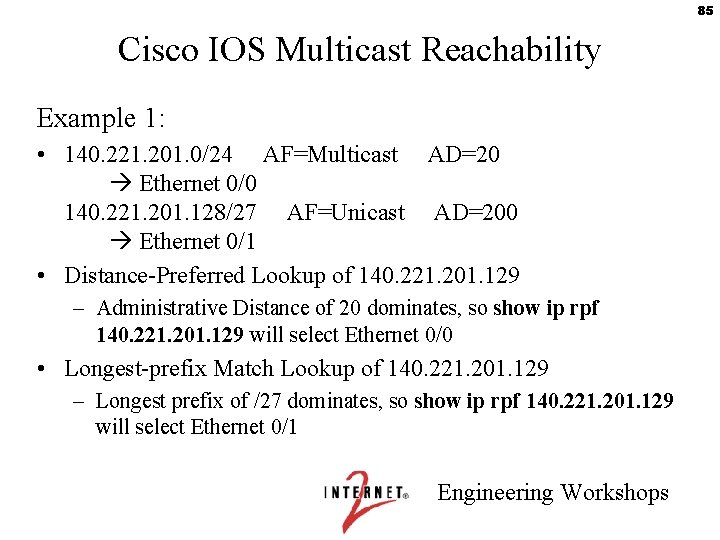
85 Cisco IOS Multicast Reachability Example 1: • 140. 221. 201. 0/24 AF=Multicast AD=20 Ethernet 0/0 140. 221. 201. 128/27 AF=Unicast AD=200 Ethernet 0/1 • Distance-Preferred Lookup of 140. 221. 201. 129 – Administrative Distance of 20 dominates, so show ip rpf 140. 221. 201. 129 will select Ethernet 0/0 • Longest-prefix Match Lookup of 140. 221. 201. 129 – Longest prefix of /27 dominates, so show ip rpf 140. 221. 201. 129 will select Ethernet 0/1 Engineering Workshops
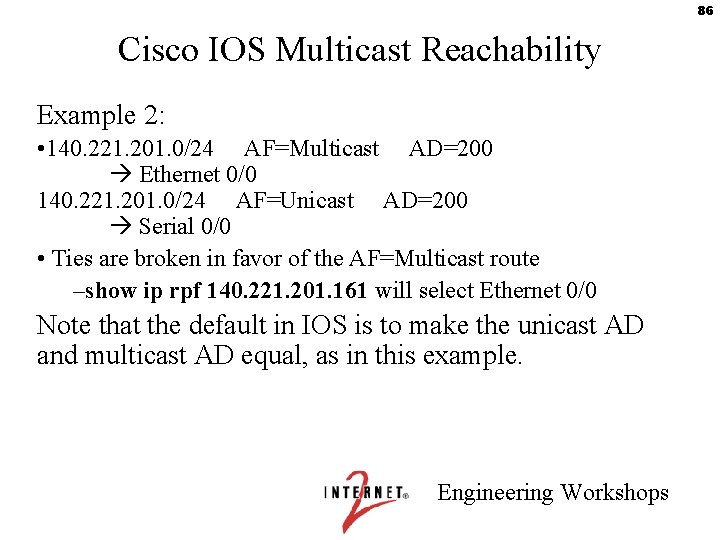
86 Cisco IOS Multicast Reachability Example 2: • 140. 221. 201. 0/24 AF=Multicast AD=200 Ethernet 0/0 140. 221. 201. 0/24 AF=Unicast AD=200 Serial 0/0 • Ties are broken in favor of the AF=Multicast route –show ip rpf 140. 221. 201. 161 will select Ethernet 0/0 Note that the default in IOS is to make the unicast AD and multicast AD equal, as in this example. Engineering Workshops
87 MBGP—Summary • Solves part of inter-domain problem – Can exchange unicast prefixes for multicast RPF checks – Uses standard BGP configuration knobs – Permits separate unicast and multicast topologies if desired • Still must use PIM to: – Build distribution trees – Actually forward multicast traffic Engineering Workshops
88 Lab 4: MBGP & Inter-domain SSM Engineering Workshops
Inter-domain ASM and MSDP • A PIM domain is a network in which all routers use the same RP for any given multicast group. • Inter-domain SSM is easy. Because you know the IP address of the source, you can issue PIM joins that leave your PIM domain and travel hop by hop across as many PIM domains as necessary. • Inter-domain ASM requires another protocol: Multicast Source Discovery Protocol (MSDP). – Why? Because even if the receiver knows the source address, S, it’s still restricted to sending only (*, G) joins. And the RP in the receiver's PIM domain can't help join it with the source, because the source is in a different PIM domain and therefore registering to a different RP. MSDP is needed for the receiver's RP to find the (S, G). – Officially, MSDP is a temporary solution. We shall see. Engineering Workshops 89
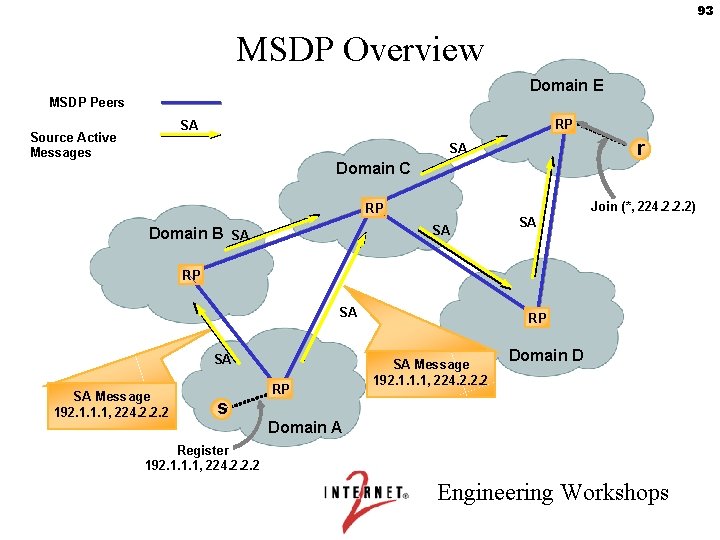
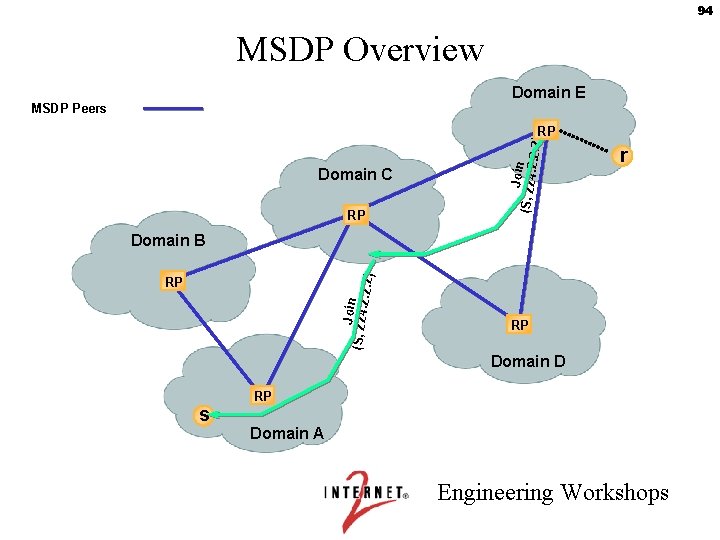
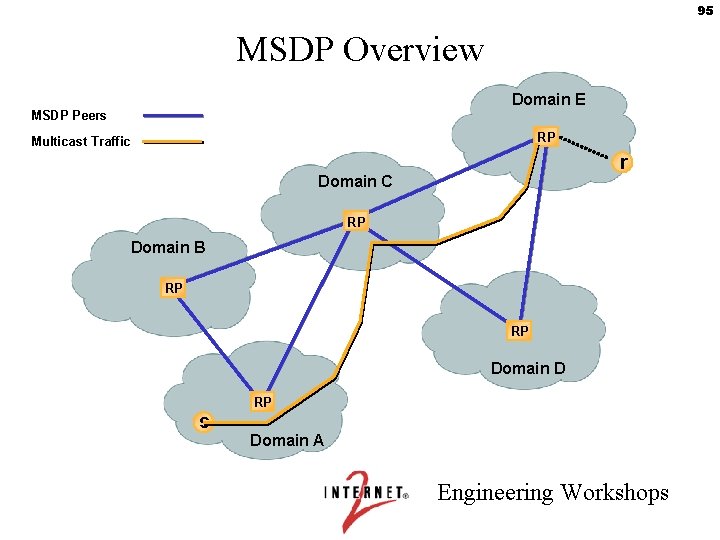
90 MSDP • MSDP sets up peering between Rendezvous Points (RPs) in different domains. – draft-ietf-msdp-spec-14. txt • These MSDP Peer RPs pass Source Active (SA) messages for every (S, G) they know about. • Your local RP thus knows about the source, and can implement a direct (S, G) join from the RP to the source. – This sets up an SPT to the local RP. – Then the routing can switch over to a direct SPT to the receiver in the usual fashion. Engineering Workshops
91 MSDP Operation • MSDP peers (inter- or intra-domain) – TCP port 639 is used for communications between peers • Higher IP address LISTENS and is passive • “FLOOD & join” – SA (source active) packets periodically sent to MSDP peers indicating: • source address of active streams • group address of active streams • IP address of RP originating the SA – only originate SAs for your sources within your domain • “flood & JOIN” – interested parties can send joins towards source (creates inter-domain source trees) Engineering Workshops
92 MSDP Source Active Messages • Initial SA message sent when source first registers – May optionally encapsulate first data packet • Supports SAP / SDR !! – Should be treated as if it was a PIM register packet • Originating RP sends subsequent SA messages every 60 seconds, for as long as source remains active • Other MSDP peers don’t originate this SA but only forward it if received • SA messages must be cached on router for new group members that may join – Recent change to Draft – Reduces join latency – Prevents SA storm propagation Engineering Workshops
93 MSDP Overview Domain E MSDP Peers RP SA Source Active Messages r SA Domain C Join (*, 224. 2. 2. 2) RP SA Domain B SA SA RP SA SA SA Message 192. 1. 1. 1, 224. 2. 2. 2 s RP RP SA Message 192. 1. 1. 1, 224. 2. 2. 2 Domain D Domain A Register 192. 1. 1. 1, 224. 2. 2. 2 Engineering Workshops
94 MSDP Overview Domain E MSDP Peers Domain C RP Joi (S, 224 n. 2. 2. 2) RP r Joi (S, 224 n. 2. 2. 2) Domain B RP RP Domain D s RP Domain A Engineering Workshops
95 MSDP Overview Domain E MSDP Peers RP Multicast Traffic r Domain C RP Domain B RP RP Domain D s RP Domain A Engineering Workshops
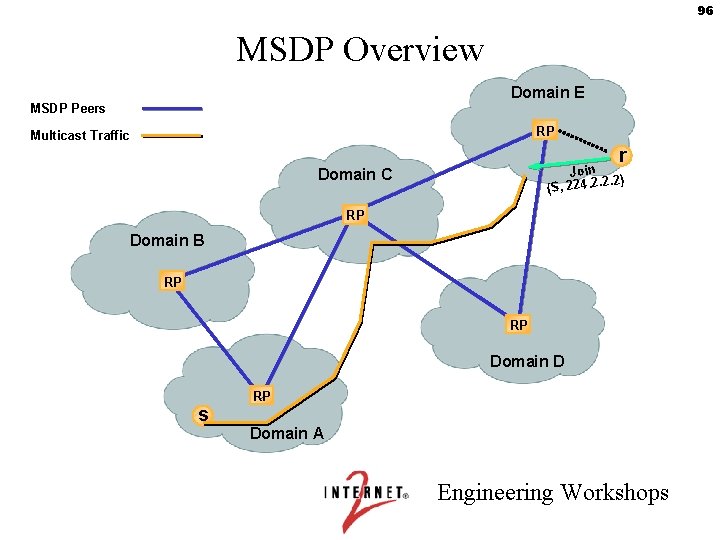
96 MSDP Overview Domain E MSDP Peers RP Multicast Traffic r Join. 2) (S, 224. 2. 2 Domain C RP Domain B RP RP Domain D s RP Domain A Engineering Workshops
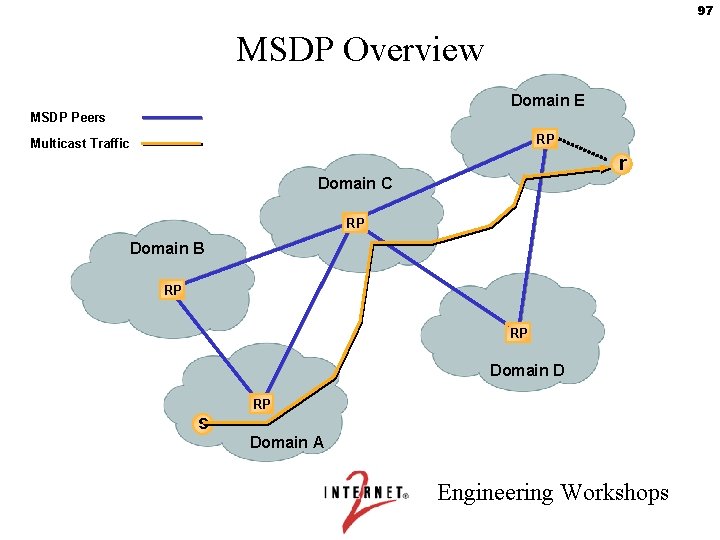
97 MSDP Overview Domain E MSDP Peers RP Multicast Traffic r Domain C RP Domain B RP RP Domain D s RP Domain A Engineering Workshops
98 MSDP Peers (inter-domain case) • MSDP establishes a neighbor relationship between MSDP peers – Peers connect using TCP port 639 – Peers send keepalives every 60 secs (fixed) – Peer connection reset after 75 seconds if no MSDP packets or keepalives are received • MSDP peers must have knowledge of multicast topology. – May be an MBGP peer, a BGP peer or both – Required for peer-RPF checking of the RP address in the SA to prevent SA looping. Note that this is not the same thing as the multicast routing RPF check. – Exception: BGP is unnecessary when peering with only a single MSDP peer (default-peer) Engineering Workshops
99 MSDP so far • • Allows RPs to share information about which sources in their domains are active sending. Interconnects RPs (MSDP Peers) between domains, using TCP connections to pass source active messages (SAs). Can also be used within a domain to provide RP redundancy (Anycast-RP). RPs send SA messages for internal sources to MSDP peers. SAs are Peer-RPF checked before accepting or forwarding. RPs learn about external sources via SA messages and may trigger (S, G) joins on behalf of local receivers. MSDP connections typically parallel MBGP connections. Next: Peer-RPF checking in detail. This is complex. Engineering Workshops
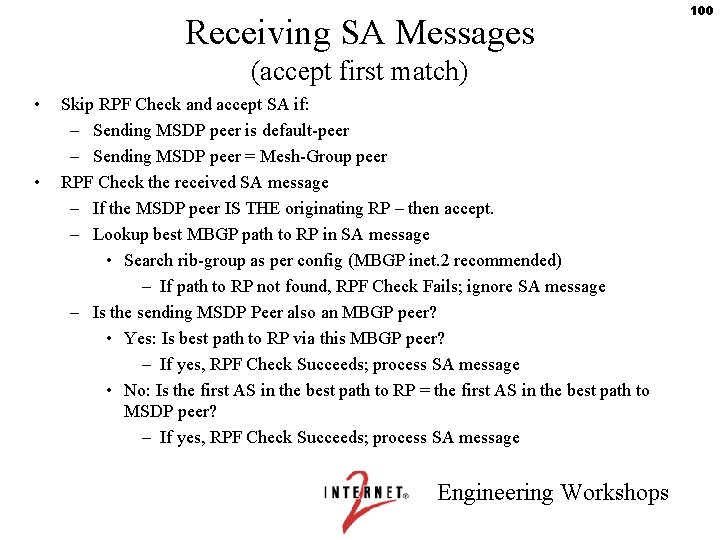
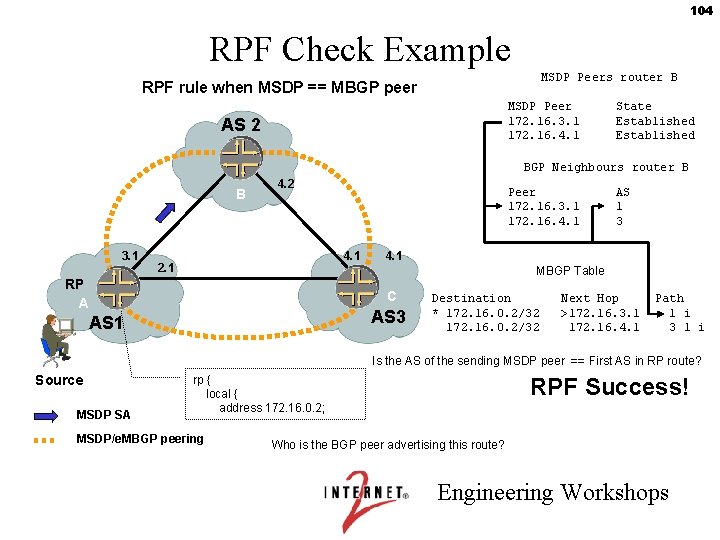
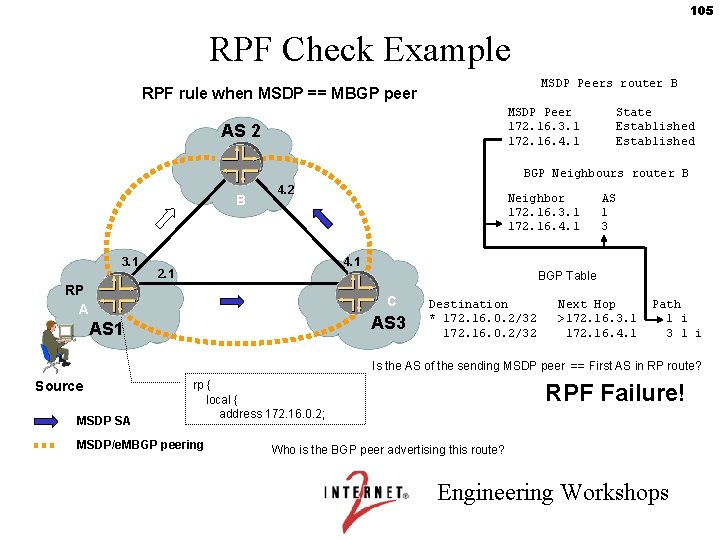
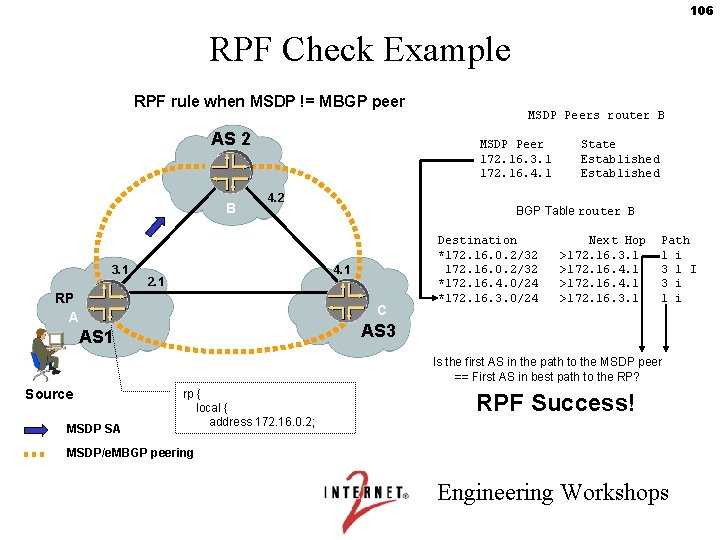
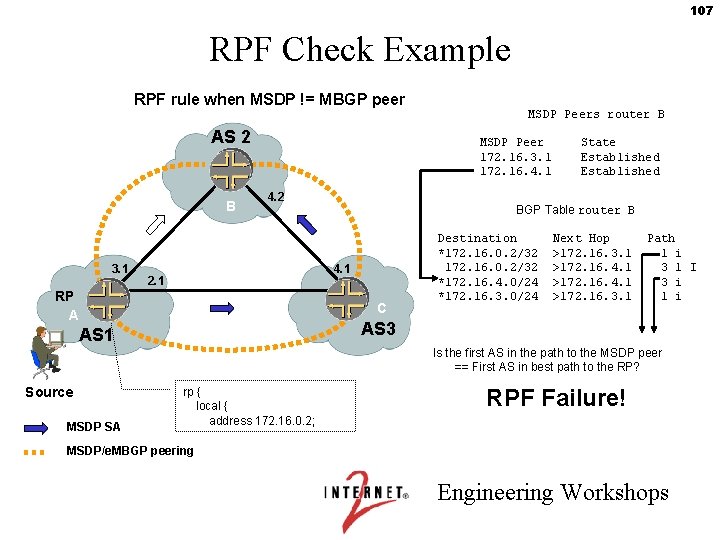
Receiving SA Messages (accept first match) • • Skip RPF Check and accept SA if: – Sending MSDP peer is default-peer – Sending MSDP peer = Mesh-Group peer RPF Check the received SA message – If the MSDP peer IS THE originating RP – then accept. – Lookup best MBGP path to RP in SA message • Search rib-group as per config (MBGP inet. 2 recommended) – If path to RP not found, RPF Check Fails; ignore SA message – Is the sending MSDP Peer also an MBGP peer? • Yes: Is best path to RP via this MBGP peer? – If yes, RPF Check Succeeds; process SA message • No: Is the first AS in the best path to RP = the first AS in the best path to MSDP peer? – If yes, RPF Check Succeeds; process SA message Engineering Workshops 100
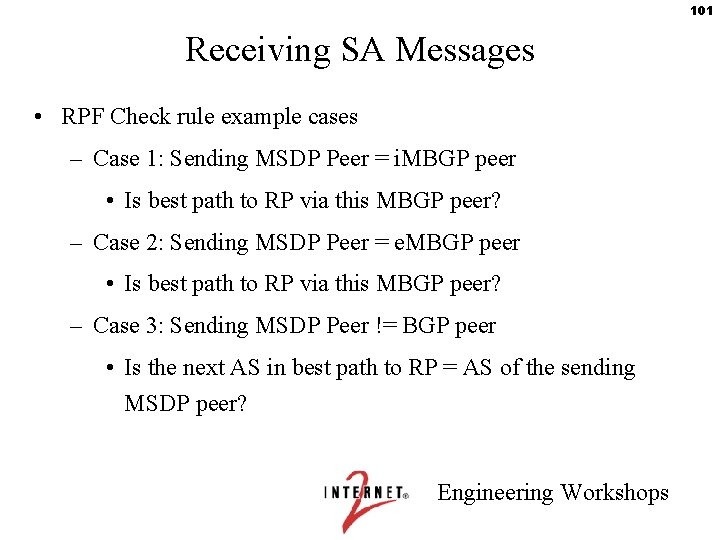
101 Receiving SA Messages • RPF Check rule example cases – Case 1: Sending MSDP Peer = i. MBGP peer • Is best path to RP via this MBGP peer? – Case 2: Sending MSDP Peer = e. MBGP peer • Is best path to RP via this MBGP peer? – Case 3: Sending MSDP Peer != BGP peer • Is the next AS in best path to RP = AS of the sending MSDP peer? Engineering Workshops
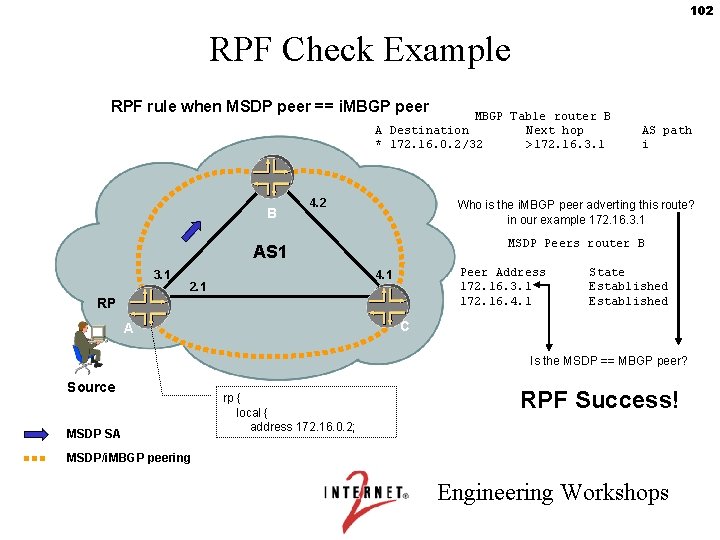
102 RPF Check Example RPF rule when MSDP peer == i. MBGP peer MBGP Table router B A Destination Next hop * 172. 16. 0. 2/32 >172. 16. 3. 1 B 4. 2 Who is the i. MBGP peer adverting this route? in our example 172. 16. 3. 1 MSDP Peers router B AS 1 3. 1 Peer Address 172. 16. 3. 1 172. 16. 4. 1 2. 1 AS path i RP State Established C A Is the MSDP == MBGP peer? Source MSDP SA rp { local { address 172. 16. 0. 2; RPF Success! MSDP/i. MBGP peering Engineering Workshops
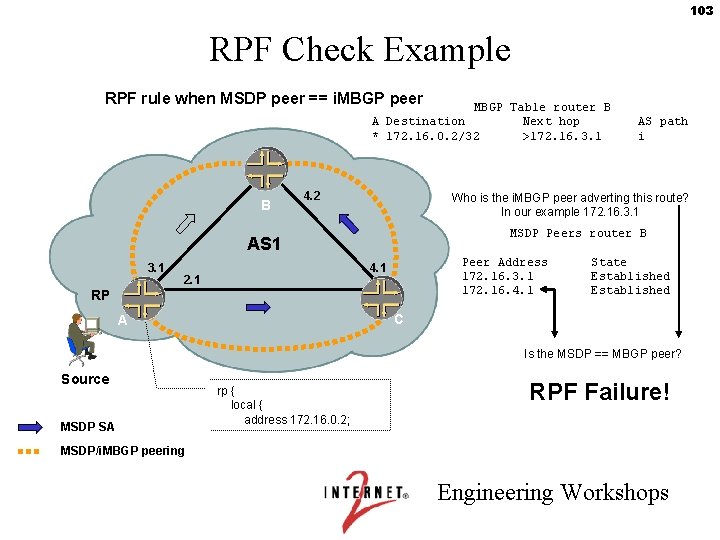
103 RPF Check Example RPF rule when MSDP peer == i. MBGP peer MBGP Table router B A Destination Next hop * 172. 16. 0. 2/32 >172. 16. 3. 1 B 4. 2 Who is the i. MBGP peer adverting this route? In our example 172. 16. 3. 1 MSDP Peers router B AS 1 3. 1 Peer Address 172. 16. 3. 1 172. 16. 4. 1 2. 1 AS path i RP State Established C A Is the MSDP == MBGP peer? Source MSDP SA rp { local { address 172. 16. 0. 2; RPF Failure! MSDP/i. MBGP peering Engineering Workshops
104 RPF Check Example MSDP Peers router B RPF rule when MSDP == MBGP peer MSDP Peer 172. 16. 3. 1 172. 16. 4. 1 AS 2 State Established BGP Neighbours router B B 3. 1 4. 2 Peer 172. 16. 3. 1 172. 16. 4. 1 2. 1 AS 1 3 4. 1 MBGP Table RP A C AS 3 AS 1 Destination * 172. 16. 0. 2/32 Next Hop >172. 16. 3. 1 172. 16. 4. 1 Path 1 i 3 1 i Is the AS of the sending MSDP peer == First AS in RP route? Source MSDP SA rp { local { address 172. 16. 0. 2; MSDP/e. MBGP peering RPF Success! Who is the BGP peer advertising this route? Engineering Workshops
105 RPF Check Example MSDP Peers router B RPF rule when MSDP == MBGP peer MSDP Peer 172. 16. 3. 1 172. 16. 4. 1 AS 2 State Established BGP Neighbours router B B 3. 1 4. 2 Neighbor 172. 16. 3. 1 172. 16. 4. 1 AS 1 3 4. 1 2. 1 BGP Table RP A C AS 3 AS 1 Destination * 172. 16. 0. 2/32 Next Hop >172. 16. 3. 1 172. 16. 4. 1 Path 1 i 3 1 i Is the AS of the sending MSDP peer == First AS in RP route? Source MSDP SA rp { local { address 172. 16. 0. 2; MSDP/e. MBGP peering RPF Failure! Who is the BGP peer advertising this route? Engineering Workshops
106 RPF Check Example RPF rule when MSDP != MBGP peer AS 2 B 3. 1 MSDP Peers router B MSDP Peer 172. 16. 3. 1 172. 16. 4. 1 4. 2 BGP Table router B 4. 1 2. 1 RP A State Established C Destination *172. 16. 0. 2/32 *172. 16. 4. 0/24 *172. 16. 3. 0/24 Next Hop >172. 16. 3. 1 >172. 16. 4. 1 >172. 16. 3. 1 Path 1 i 3 1 I 3 i 1 i AS 3 AS 1 Is the first AS in the path to the MSDP peer == First AS in best path to the RP? Source MSDP SA rp { local { address 172. 16. 0. 2; RPF Success! MSDP/e. MBGP peering Engineering Workshops
107 RPF Check Example RPF rule when MSDP != MBGP peer AS 2 B 3. 1 MSDP Peers router B MSDP Peer 172. 16. 3. 1 172. 16. 4. 1 4. 2 BGP Table router B 4. 1 2. 1 RP A State Established C Destination *172. 16. 0. 2/32 *172. 16. 4. 0/24 *172. 16. 3. 0/24 Next Hop >172. 16. 3. 1 >172. 16. 4. 1 >172. 16. 3. 1 Path 1 i 3 1 I 3 i 1 i AS 3 AS 1 Is the first AS in the path to the MSDP peer == First AS in best path to the RP? Source MSDP SA rp { local { address 172. 16. 0. 2; RPF Failure! MSDP/e. MBGP peering Engineering Workshops
108 MSDP debug • The only way to check why an MSDP SA is/isn’t accepted is to turn on MSDP debug printout. If you do this, watch out! Lots of messages will follow! It may kill your router. • See current MSDP Internet Draft for details. Engineering Workshops
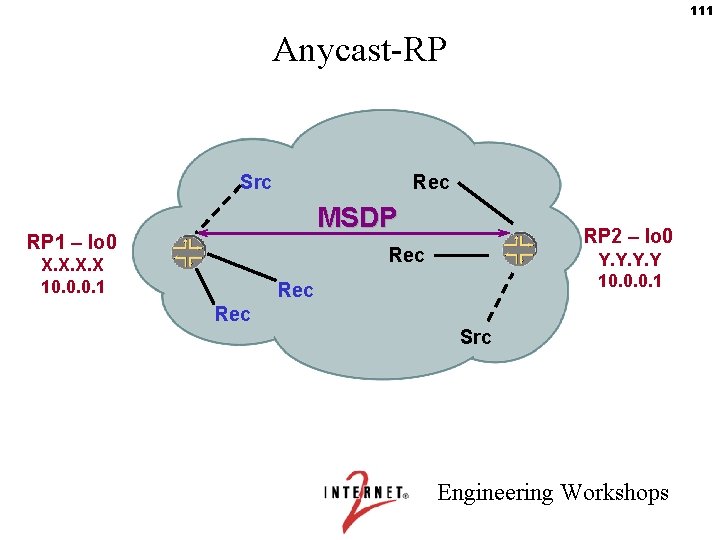
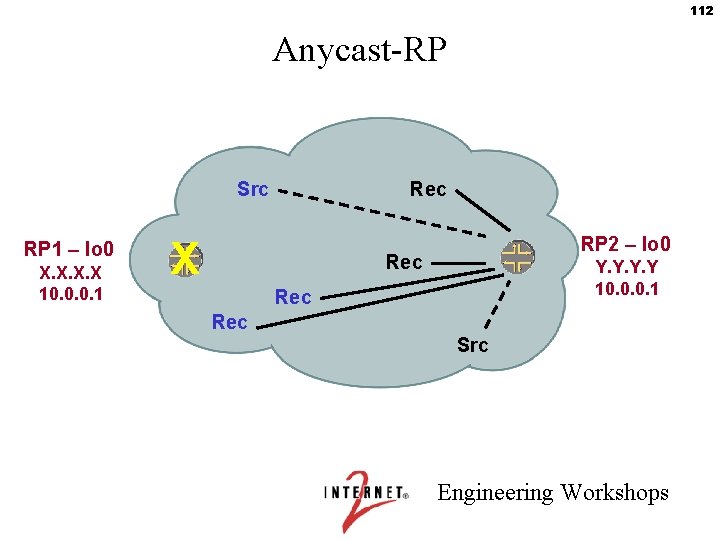
109 MSDP Application: Anycast-RP • draft-ietf-mboned-anycast-rp-08. txt • Within a domain, deploy more than one MSDP Peer RP for the same group range • Sources from one RP are known to other RPs using MSDP • Give each RP the same /32 IP address • Sources and receivers use closest RP, as determined by the IGP • Used intra-domain to provide redundancy and RP load sharing, when an RP goes down, sources and receivers are taken to new RP via unicast routing – Fast convergence! – Becoming best common practice for large networks Engineering Workshops
110 MSDP Application: Anycast-RP • Rules are fairly simple - Have e-MSDP peers and i-MSDP peers • If a mesh group member originates a SA message – Send to all i-MSDP peers and any e-MSDP peers • If a mesh group member receives a SA message from an i-MSDP peer – send to any e-MSDP peers – Do NOT send to other i-MSDP peers • If a mesh group member received a SA message from a e-MSDP peer – Check RPF - If passes, then – Flood to all i-MSDP peers and any other e-MSDP peers. Engineering Workshops
111 Anycast-RP Src Rec MSDP RP 1 – lo 0 RP 2 – lo 0 Rec X. X 10. 0. 0. 1 Y. Y 10. 0. 0. 1 Rec Src Engineering Workshops
112 Anycast-RP Src RP 1 – lo 0 X. X 10. 0. 0. 1 Rec X RP 2 – lo 0 Rec Y. Y 10. 0. 0. 1 Rec Src Engineering Workshops
113 Lab 5: MSDP & Inter-domain ASM Engineering Workshops
Cisco Multicast Forwarding State Flags Engineering Workshops
115 D – Dense Mode Flag • The D flag indicates that the multicast group is a dense mode group. • Appears only on (*, G) entries Engineering Workshops
116 S – Sparse Mode Flag • The S flag indicates that the multicast group is a sparse mode group. • Appears only on (*, G) entries Engineering Workshops
117 s – SSM Group Flag • Shows up on (*, G) entries for SSM groups • Incoming and Outgoing Interfaces are Null • SSM group (*, G) parent entries exist only for internal data structure purposes Engineering Workshops
118 L – Local Flag • The L flag indicates that the router itself is a member of the group. • The router will process the traffic at the route processor. • Example: PIM RP-Discovery (224. 0. 1. 40) Engineering Workshops
119 C – Connected Flag • The C flag indicates that there’s a directly connected receiver. • Shows up on (*, G) state from IGMPv 2 Host Membership reports. • Shows up on (S, G) state from IGMPv 3 Host Membership reports (without INCLUDE lists). Engineering Workshops
120 I – Source Specific Host Report • The I flag indicates that the directly connected receiver indicated that it wants traffic from a specific source on the specific group. • Shows up on (S, G) state created by IGMPv 3 Host Membership reports (with INCLUDE lists). Engineering Workshops
121 U – URD • Shows up on (S, G) entries created by the Cisco. Proprietary URL Redirect protocol (URD) • URD provides SSM semantics on networks/hosts that don’t support IGMPv 3 natively. • Host sends special HTTP request towards the last-hop router on TCP port 659, which specifies the source and group address. • Router intercepts that HTTP request and creates this (S, G) state. Engineering Workshops
122 P – Pruned Flag • The P flag indicates that either: (1) the outgoing interface list (OIL) is Null -or(2) all interfaces in the outgoing interface list (OIL) are in the Prune state • The P flag results in a Prune being sent to the upstream neighbor for this (S, G) entry. Engineering Workshops
123 T – SPT Flag • The T flag (or SPT) flag indicates that traffic is being forwarded via the (S, G) entries. That is, on Source. Specific Tree. • Appears only on (S, G) entries Engineering Workshops
124 J – Join SPT flag on (*, G) • Appears on (*, G) entries when the C flag is set (there’s a locally connected receiver). • Set when traffic rate on the Shared Tree exceeds the SPT-Threshhold. • When set, the next packet down the (*, G) Shared Tree will create separate (S, G) state. (SPT-cutover) Engineering Workshops
125 J – Join SPT flag on (S, G) • (S, G) created by SPT-cutover. • PIM checks the rate every minute to decide whethere’s enough traffic to justify maintenance of the (S, G) state. Engineering Workshops
126 R – RP-bit flag • Shows up on (S, G) entries only • The (S, G) entry’s RPF is towards the RP (not towards S) • The output interface list is often Null, or a subset of the output interface list on the (*, G) parent entry • Used to prune (S, G) traffic from the shared tree when downstream routers have joined the SPT tree instead Engineering Workshops
127 F – Register flag • F flag means that Register messages are being sent to the Rendezvous Point (RP) • Set on Designated Router (DR) state for each (S, G) • Also set on the parent (*, G) state if any child (S, G) state entry has the F flag set. Engineering Workshops
128 A – Advertised via MSDP • Shows up on (S, G) entries at the Rendezvous Point (RP) • Indicates that Register messages are being received, and converted by the RP into MSDP Source Active messages for transmission to peers. Engineering Workshops
129 M – MSDP Created Entry • Shows up on (S, G) entries at the Rendezvous Point (RP) • Indicates that the (S, G) entry was created when an MSDP Source Active message was received on a group for which there is “group interest”. • Group Interest: a (*, G) entry exists, created either by local IGMP or PIM (*, G) joins. Engineering Workshops
130 X – Proxy-Join Timer • Shows up on (S, G) entries when a router becomes the “Turnaround Router” • Deals with situations like “RP On A Stick” • State times out if not refreshed Engineering Workshops
131 SSM Revisited Engineering Workshops
132 Rationale for SSM • Why go to all the trouble involved in using RPs (treeswitching, MSDP) when the shared tree to the RP is dropped for the shortest-path tree to the source, as soon as the first packet flows down the shared tree? – The RP is not really forwarding data, just doing source discovery. – Isn’t there an easier way ? • This is the rationale for Source-Specific Multicast (SSM). Engineering Workshops
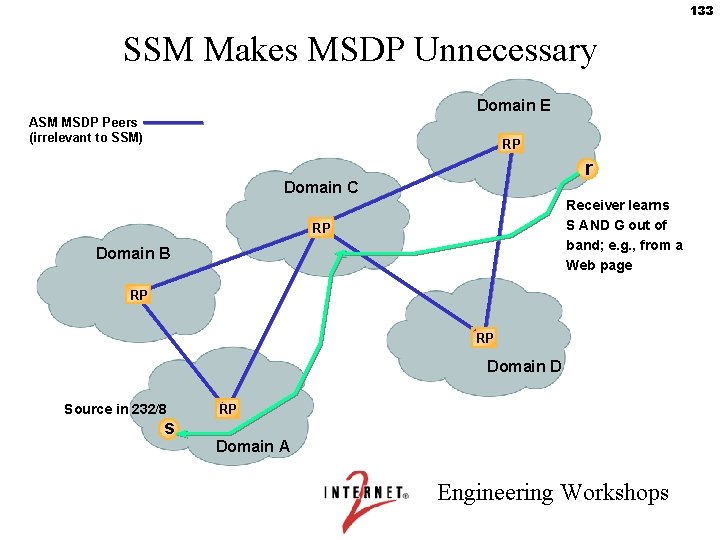
133 SSM Makes MSDP Unnecessary Domain E ASM MSDP Peers (irrelevant to SSM) RP r Domain C Receiver learns S AND G out of band; e. g. , from a Web page RP Domain B RP RP Domain D Source in 232/8 s RP Domain A Engineering Workshops
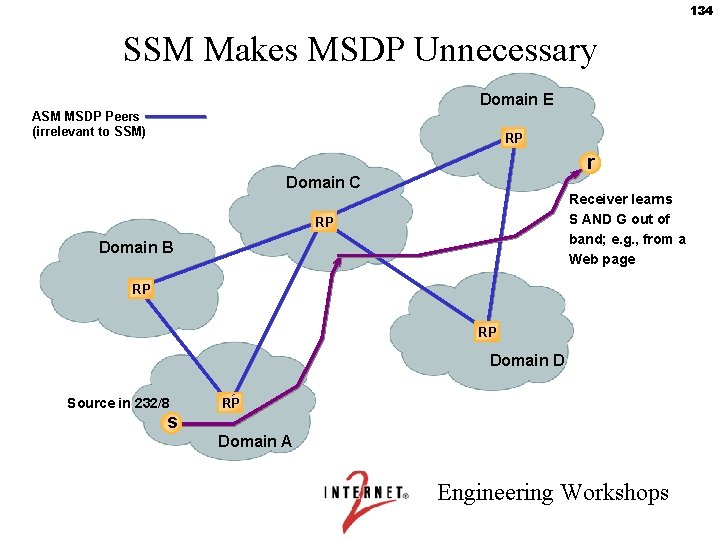
134 SSM Makes MSDP Unnecessary Domain E ASM MSDP Peers (irrelevant to SSM) RP r Domain C Receiver learns S AND G out of band; e. g. , from a Web page RP Domain B RP RP Domain D Source in 232/8 s RP Domain A Engineering Workshops
135 Summary: Advantages of SSM • No shared trees • No register packets • No RP mapping required (no RP required!) • No RP-to-RP source discovery (no MSDP required!) • No RP means no concentration of traffic towards the RP, and no single point to attack • Rogue sources cannot easily spoof traffic • SSM can use entire multicast address space, but 232/8 is reserved for SSM exclusively Engineering Workshops
136 Making the Case for Multicast Engineering Workshops
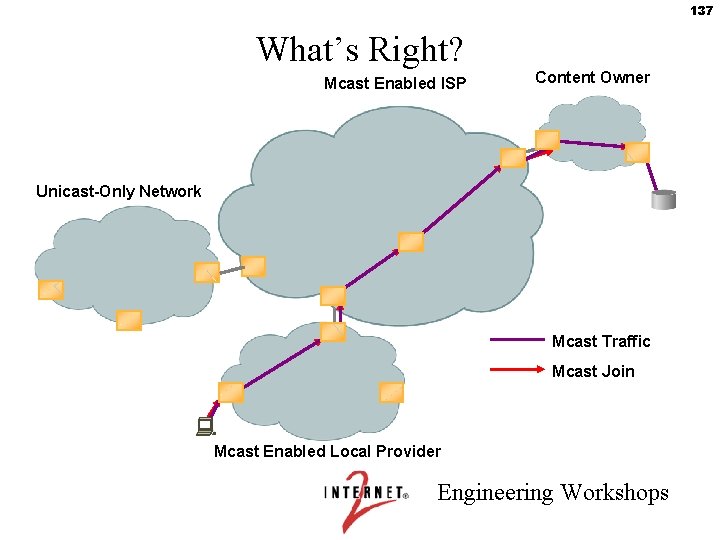
137 What’s Right? Mcast Enabled ISP Content Owner Unicast-Only Network Mcast Traffic Mcast Join Mcast Enabled Local Provider Engineering Workshops
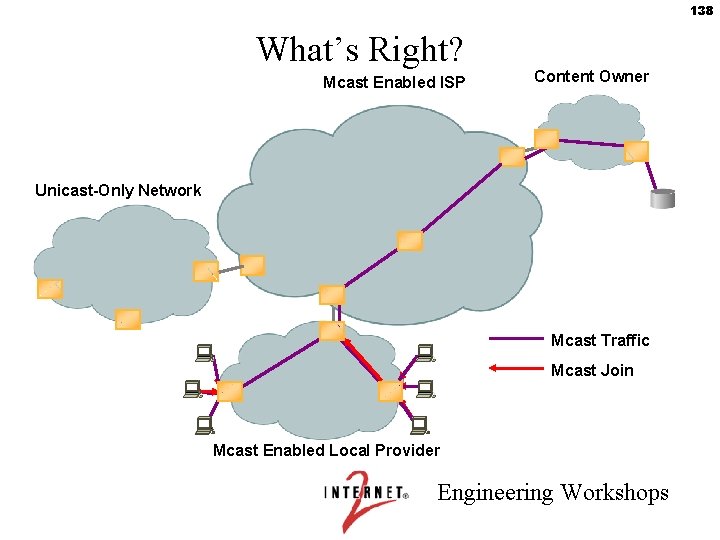
138 What’s Right? Mcast Enabled ISP Content Owner Unicast-Only Network Mcast Traffic Mcast Join Mcast Enabled Local Provider Engineering Workshops
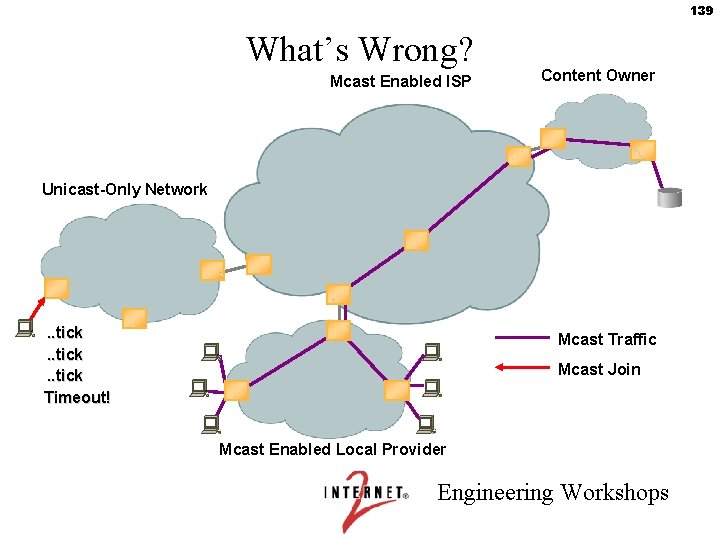
139 What’s Wrong? Mcast Enabled ISP Content Owner Unicast-Only Network . . tick Timeout! Mcast Traffic Mcast Join Mcast Enabled Local Provider Engineering Workshops
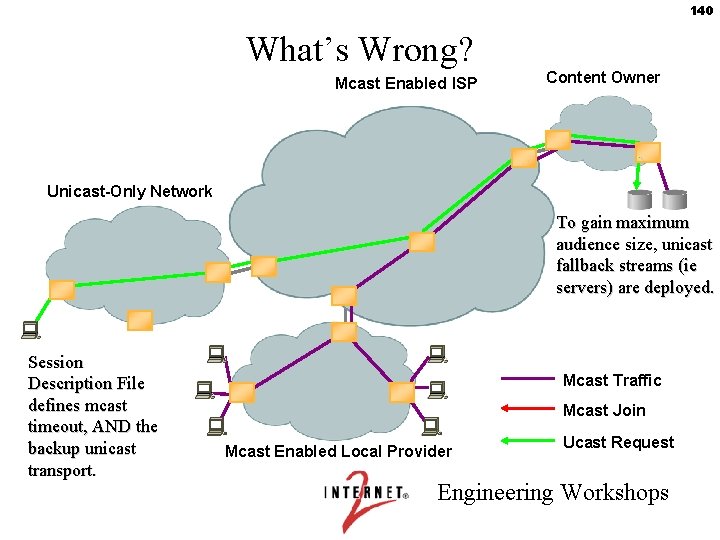
140 What’s Wrong? Mcast Enabled ISP Content Owner Unicast-Only Network To gain maximum audience size, unicast fallback streams (ie servers) are deployed. Session Description File defines mcast timeout, AND the backup unicast transport. Mcast Traffic Mcast Join Mcast Enabled Local Provider Ucast Request Engineering Workshops
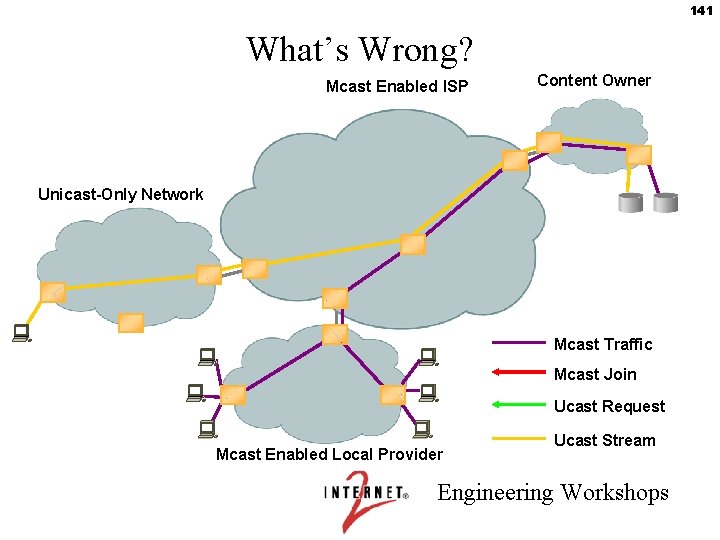
141 What’s Wrong? Mcast Enabled ISP Content Owner Unicast-Only Network Mcast Traffic Mcast Join Ucast Request Mcast Enabled Local Provider Ucast Stream Engineering Workshops
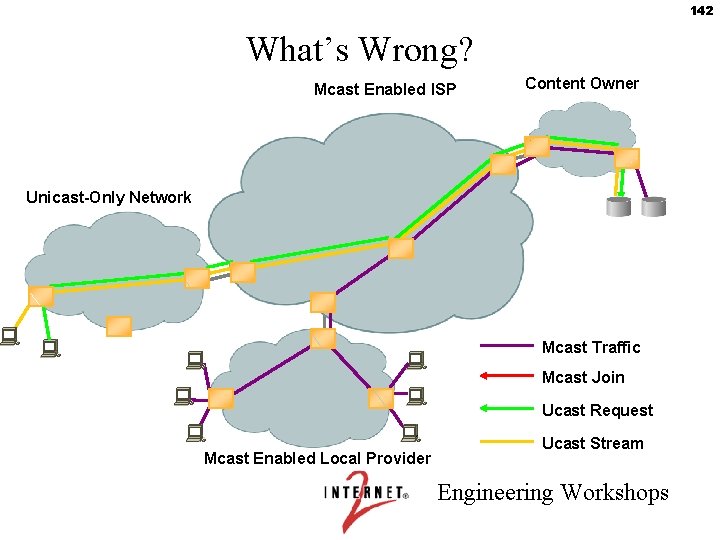
142 What’s Wrong? Mcast Enabled ISP Content Owner Unicast-Only Network Mcast Traffic Mcast Join Ucast Request Mcast Enabled Local Provider Ucast Stream Engineering Workshops
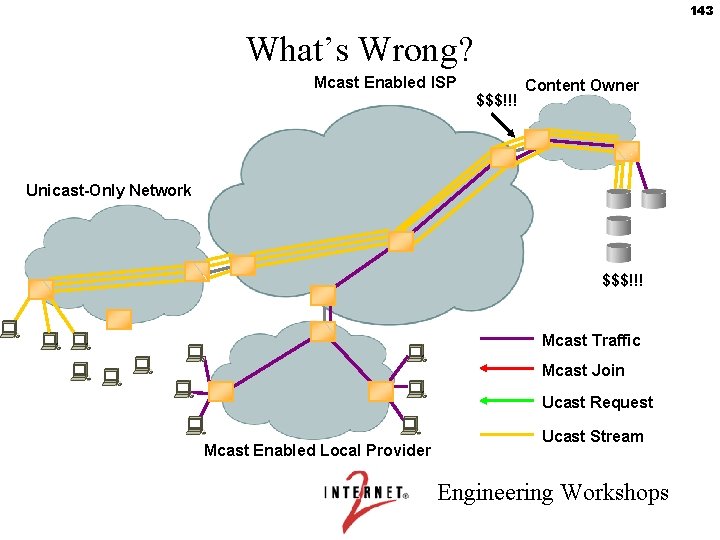
143 What’s Wrong? Mcast Enabled ISP $$$!!! Content Owner Unicast-Only Network $$$!!! Mcast Traffic Mcast Join Ucast Request Mcast Enabled Local Provider Ucast Stream Engineering Workshops
144 What’s Wrong? • Even multicast-aware content owners must provide unicast streams to gain audience size • Unicast will never scale – Splitters/Caches just distribute the problem • Still has a cost-per-user – As receiver bandwidth increases, problem gets worse – Creates a non-functional business model – Will never bring ~real content to IP • Must provide a multicast-only solution for content owners, but how? Engineering Workshops
What capabilities does IP Multicast provide ? • Cost efficient distribution of data • Timely distribution of data • Robust distribution of data “Data” here could be – Files – Streamed Audio or Video Engineering Workshops 145
146 Cost Efficient Data Distribution • This is the core of the streaming case. – Unicast Streaming is just too expensive – This is true either on the commodity Internet or on the Intranet. – Multicast is especially compelling for video Engineering Workshops
147 Timely Distribution of Data • This is the argument for multicast in financial services • In unicast, it takes time to send packets separately to each receiver. – Even if the cost is not an object, the time may be. – Example : A DS 3 would take 2 days to distribute a 100 megabyte file to 10, 000 desktops. With Multicast, this would take 18 seconds. – Multicasting is compelling here if timely distribution is important. Engineering Workshops
148 Robust Distribution of Data • In some streaming or data distribution cases, the problem is handling large increases in load. – This is really the case with Mac. World or Victoria’s Secret type streaming. • Multicast was designed to handle sudden increases in load. Engineering Workshops
149 Enterprise Data Delivery • Multicast data delivery is a big business now, and will become increasingly important in the future. – The combination of cost-effectiveness, timely delivery, and robustness is compelling as physical delivery (e. g. Fed. Ex) becomes increasingly supplanted and complemented by Internet data delivery. – This will move out of financial services into the mainstream. Engineering Workshops
150 Case Studies: Enterprise Streaming • Bandwidth is limited on enterprise networks. • A typical business quality video stream uses 300 Kbps, while a high quality stream might be 1 Mbps. • On a typical 100 Base. T Ethernet, 300 unicast viewers would completely saturate the network. • 100 unicast viewers would saturate a point-to-point DS 3 link between corporate campuses; five would saturate a point to point DS 1. • The case for multicast is compelling for corporations with more than a few hundred desktops. Engineering Workshops
151 Enterprise Streaming and the ISP • Most enterprises with more than 100 desktops will have people in remote locations. • There will generally be no reason to tie up expensive VPN bandwidth for streaming video. • ISP’s should offer multicast carriage to their customers to allow for cost effective streaming to their remote locations. – RTSP can be used to negotiate bandwidth with remote sites. Engineering Workshops
152 Consumer Streaming • There is already a sufficient critical mass of multicast enabled consumers to support multicast streaming media delivery. – These will be increasingly aimed at high-bandwidth broadband consumers. – The robustness afforded by multicasting is (for live events) almost as important as its cost-effectiveness to the content delivery industry. • The adoption of MPEG-4, with its interactive capabilities, will accelerate the development of a second generation streaming industry. Engineering Workshops

153 The Audience for Consumer Streaming • • Total US broadband population currently 10 million connected users with ~1 -2 million multicast enabled users. Most are college-educated adults ages 18 -35. A substantial fraction are college students in their dormitories and offices (at least 1 million). This demographic cannot be reached by cable television, and has low satellite TV penetration. Potential audience will reach over 100 million people in the next ten years. Engineering Workshops
154 Multicast-Only Solution • Successful business model will bring more content • Unicast edge networks are only pain-point – Upgrade or die. • It’s coming. . . – Many proposals – Many players – Lowest pain-to-deployment may (should) win Engineering Workshops
155 Multicast Myths • “It’s too hard. ” – NOT! – It just hasn’t been a requirement (yet) for many people • “If it hasn’t caught on yet, it never will. ” – It’s unfortunately been an all-or-nothing solution – Multicast needs an mcast-to-ucast transition technology • Provider – “If multicast catches on, my customers will stop buying big circuits. ” – WRONG! • Vendor – “If multicast catches on, no one will need big routers and high-speed interfaces. ” – WRONG! Engineering Workshops
How Do ISPs Make Money from Multicast ? • By offering as a value-added part of their basic service. • Enterprise customers, in particular, will want and need multicast to extend their internal video and data delivery to remote locations. • Multicast should also be part of every broadband consumer rollout. – Multicast enabled consumers will have access to more content. Engineering Workshops 156
What are the Costs of Migrating to Multicast ? • New equipment costs are usually minimal. – If you can run IOS 11 on your Cisco routers, you can support multicast. – Junipers all support multicast. – There have been issues with Nortel / Cisco interoperability. – Most switches now support IGMP snooping. This is necessary for bridged Ethernet networks, which is common in the Enterprise. Engineering Workshops 157
Other Costs of Migrating to Multicast • Peering Costs – Sprint and Verio include multicast peering at no extra costs, as do a number of ISP’s. • Multicast Peering is available at the LINX in London, and also in Amsterdam. • All Giga. Po. Ps offer multicast exchanges / peering. – It can be a problem, though, if none of your peers support multicast. – On the other hand, offering multicast peering can attract customers. Engineering Workshops 158
159 Multicast Debugging Costs • Multicast Debugging – Multicast debugging can be tedious. – Setting it up is easy. But, what if it doesn’t work ? – Most companies do not provide good multicast technical support. – You may want to contract for network assistance. Engineering Workshops
160 When the World Deploys Multicast Access providers Content Owners Mcast Enabled ISP Engineering Workshops
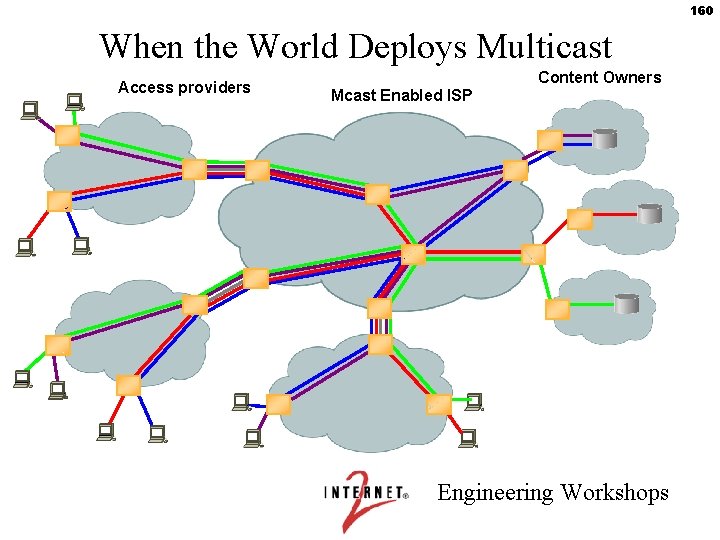
161 When the World Deploys Multicast • A successful multicast business model makes IP profitable for content owners – Success brings MORE content • Access networks of tomorrow look like provider networks of today – Few large circuits upstream, many small circuits downstream • Provider revenue model gets flopped – Few small circuits from content networks, many large circuits down to access networks Engineering Workshops
162 Lab 6: Troubleshooting Engineering Workshops
163 Information Online • http: //multicast. internet 2. edu especially the tutorial-style paper at http: //multicast. internet 2. edu/almeroth. pdf • www. ncne. nlanr. net/documentation/faq/mcast_eng_faq. html • http: //dast. nlanr. net/Projects/Beacon/ • www. multicasttech. com/faq/multicast_faq. html and www. multicasttech. com/status/ • Greg Shepherd’s multicast site: www. shepfarm. com/multicast/ • www. cisco. com/warp/public/cc/pd/iosw/tech/ipmu_ov. htm and ftp: //ftpeng. cisco. com/ipmulticast. html • www. sprint. net/multicast/faq. html Engineering Workshops
- Slides: 163