
Interfacing keyboard with FPGA Electrical and Information Technology
Interfacing keyboard with FPGA Electrical and Information Technology (EIT) Faculty of Engineering (LTH) - Lund University 1
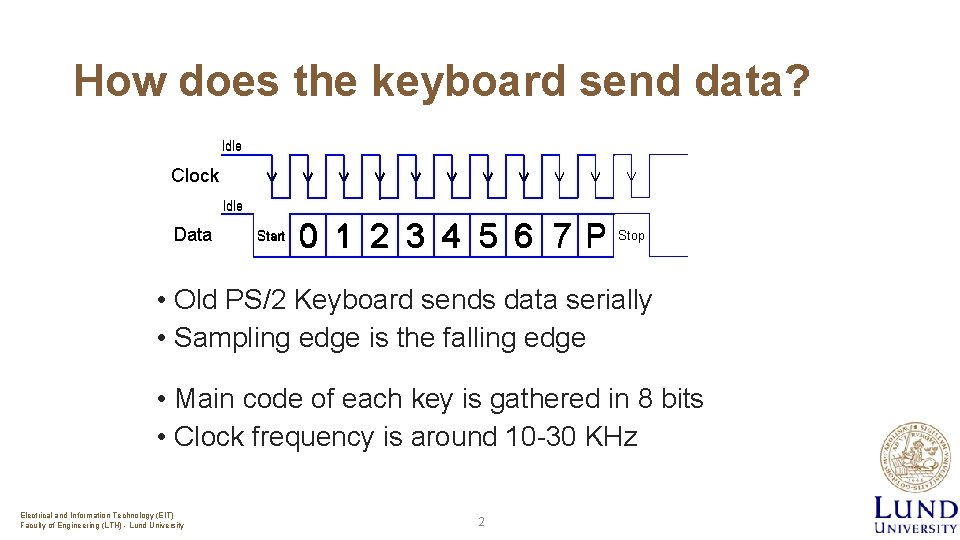
How does the keyboard send data? • Old PS/2 Keyboard sends data serially • Sampling edge is the falling edge • Main code of each key is gathered in 8 bits • Clock frequency is around 10 -30 KHz Electrical and Information Technology (EIT) Faculty of Engineering (LTH) - Lund University 2

What happens when you press/release a key? Key pressed => make code Key released => break code Electrical and Information Technology (EIT) Faculty of Engineering (LTH) - Lund University 3
Make/break codes Example of ’A’ key When ’A’ is pressed: “ 1 C” is sent serially through serial data line If you are still holding it down, another “ 1 C” will be sent. This keeps occurring until the 'A' key has been released when the pressed key is released: “F 0” (hex) and then “ 1 C” For more info see: https: //retired. beyondlogic. org/keyboard/keybrd. htm Electrical and Information Technology (EIT) Faculty of Engineering (LTH) - Lund University 4
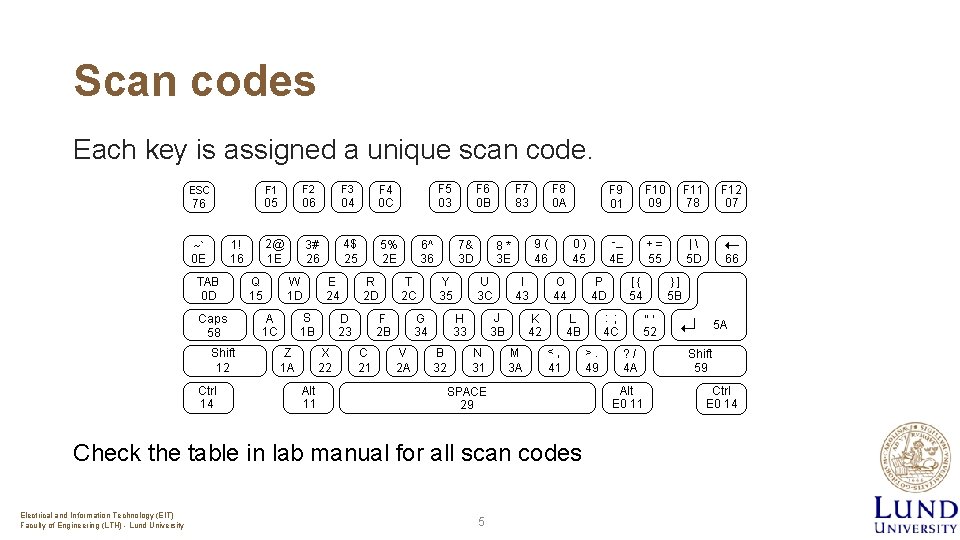
Scan codes Each key is assigned a unique scan code. Check the table in lab manual for all scan codes Electrical and Information Technology (EIT) Faculty of Engineering (LTH) - Lund University 5
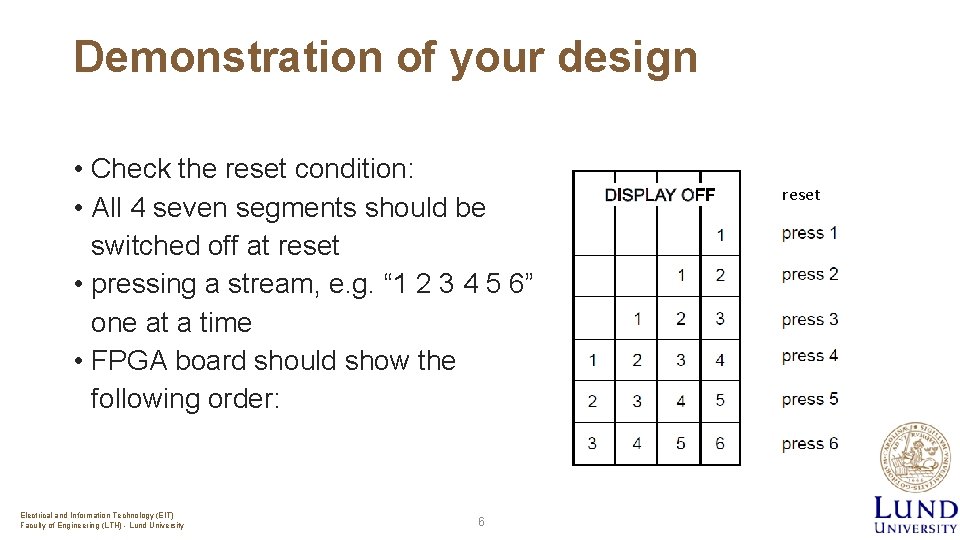
Demonstration of your design • Check the reset condition: • All 4 seven segments should be switched off at reset • pressing a stream, e. g. “ 1 2 3 4 5 6” one at a time • FPGA board should show the following order: Electrical and Information Technology (EIT) Faculty of Engineering (LTH) - Lund University 6 reset
Important Concepts The frequency difference between FPGA and keyboard (keyboard freq. typically is a few KHz (~10 -30) and FPGA in the MHz range) Synchronization to avoid meta-stability between two clock domains Keyboard operates by sampling the data line on the falling edge of its clock Falling edge detection of keyboard clock is the key not to miss any data from data line Electrical and Information Technology (EIT) Faculty of Engineering (LTH) - Lund University 7
Tips and Hints • Build a testbench for each component & TESTIt! The sooner you realize a problem, the easier you will solve it • Comment your code wherever possible! • Document the your work process! • Make sure you keep the input/output ports of each component the same as they are provided. • Though you can create your own internal signals in the components. Electrical and Information Technology (EIT) Faculty of Engineering (LTH) - Lund University 8
Tips and Hints • Read the required parts from reference manual of FPGA board. You need to understand e. g. , how to refresh the 7 segments to show your digits • Almost all necessary solutions to your problems can be found in the course book. Also, searching through internet may help you for better understanding • And Finally: Electrical and Information Technology (EIT) Faculty of Engineering (LTH) - Lund University No Latch! 9
- Slides: 9