
Integration of Analytics in Alma Viewing usage data
- Slides: 27
Integration of Analytics in Alma Viewing usage data in Alma Yoel Kortick Senior Librarian © 2016 Ex Libris | Confidential & Proprietary – For Internal Use Only
The inquiry Two examples How does it work? Our specific results https: //slidemodel. com/templates/animated-rainbow-business-powerpoint-template/ © 2016 Ex Libris | Confidential & Proprietary – For Internal Use Only http: //image. shutterstock. com/z/stock-photo-business-hand-writing-blank-agenda-list-130255148. jpg 2
The inquiry • When I search for a portfolio in Alma and click “More Info” I get a link to “Combined Usage (last 12 months)”. When I click it I get a graph. Where is this data and graph coming from? • Also, how come sometimes I really do see the last 12 months but sometimes I see only part of the last 12 month period? © 2016 Ex Libris | Confidential & Proprietary – For Internal Use Only 3
The inquiry Two examples How does it work? Our specific results https: //slidemodel. com/templates/animated-rainbow-business-powerpoint-template/ © 2016 Ex Libris | Confidential & Proprietary – For Internal Use Only http: //image. shutterstock. com/z/stock-photo-business-hand-writing-blank-agenda-list-130255148. jpg 4
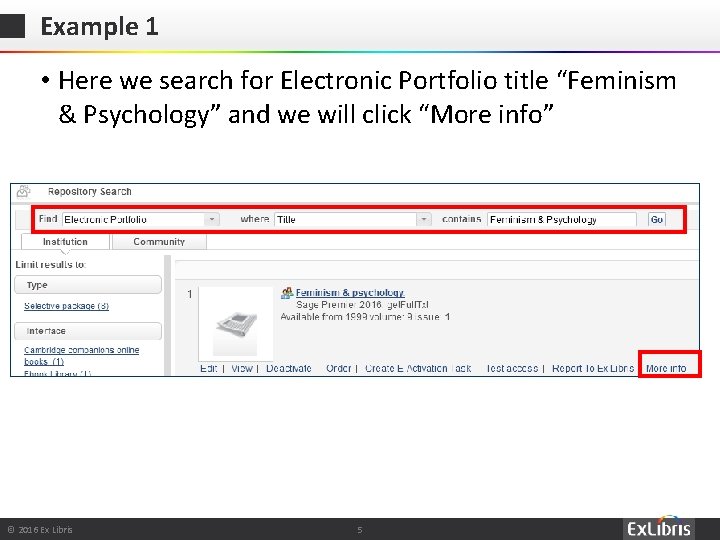
Example 1 • Here we search for Electronic Portfolio title “Feminism & Psychology” and we will click “More info” © 2016 Ex Libris | Confidential & Proprietary – For Internal Use Only 5
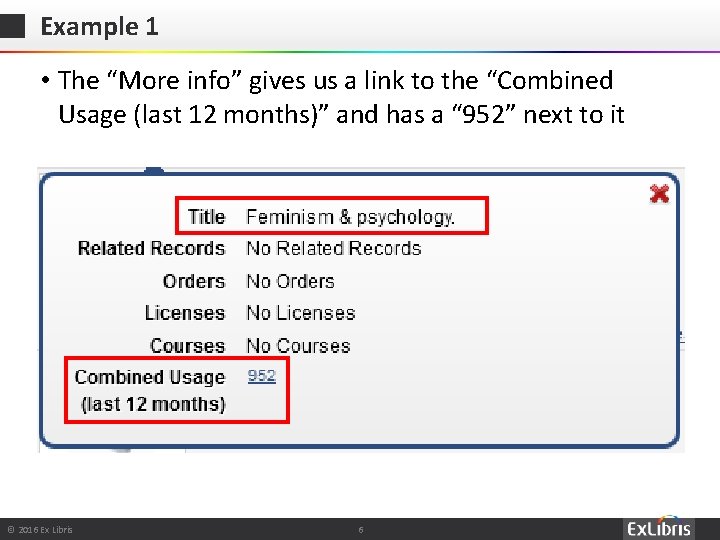
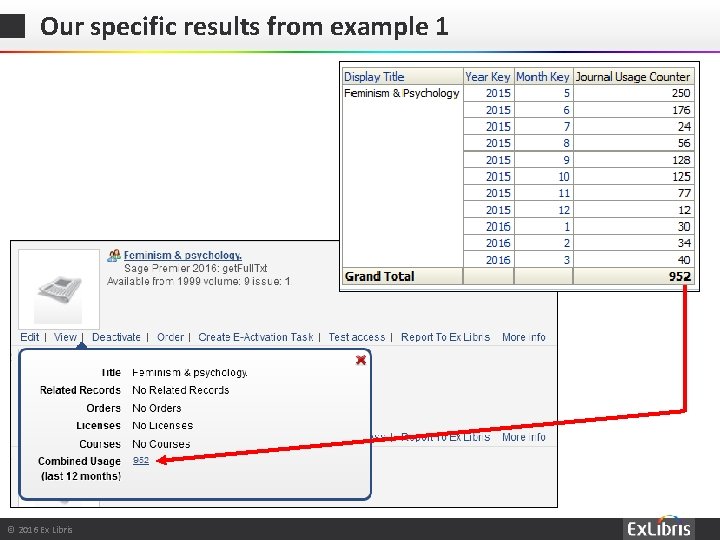
Example 1 • The “More info” gives us a link to the “Combined Usage (last 12 months)” and has a “ 952” next to it © 2016 Ex Libris | Confidential & Proprietary – For Internal Use Only 6
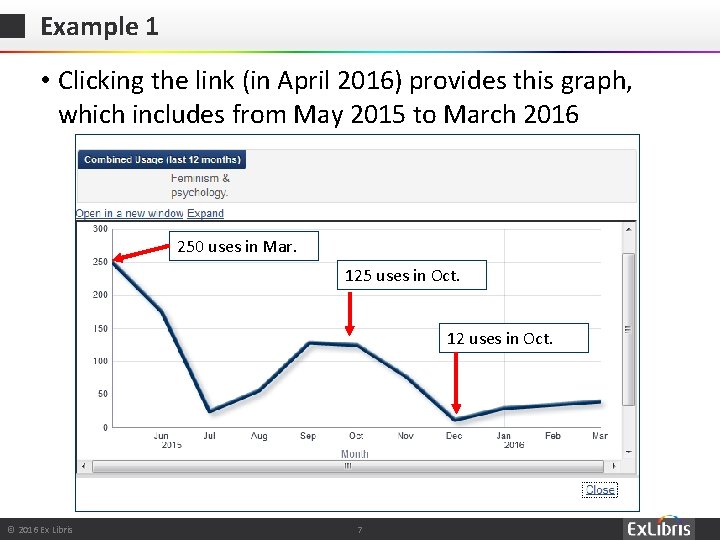
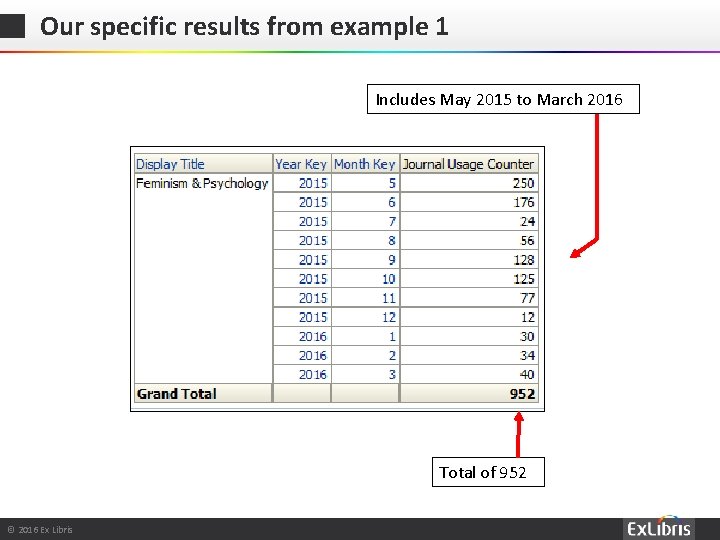
Example 1 • Clicking the link (in April 2016) provides this graph, which includes from May 2015 to March 2016 250 uses in Mar. 125 uses in Oct. 12 uses in Oct. © 2016 Ex Libris | Confidential & Proprietary – For Internal Use Only 7
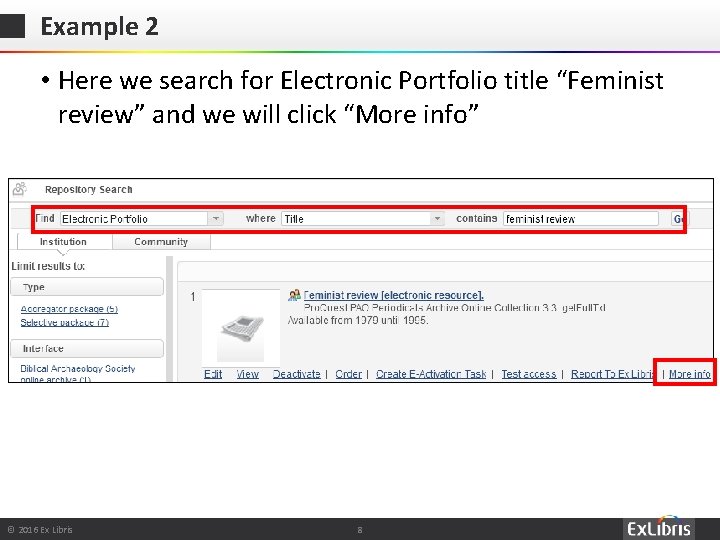
Example 2 • Here we search for Electronic Portfolio title “Feminist review” and we will click “More info” © 2016 Ex Libris | Confidential & Proprietary – For Internal Use Only 8
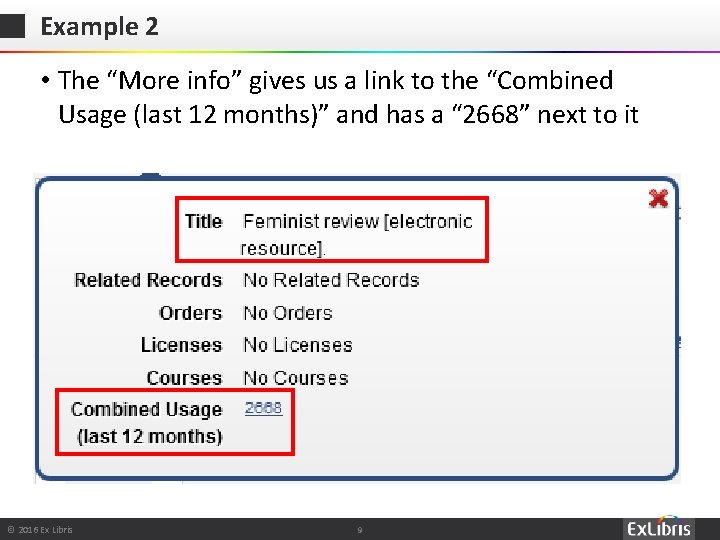
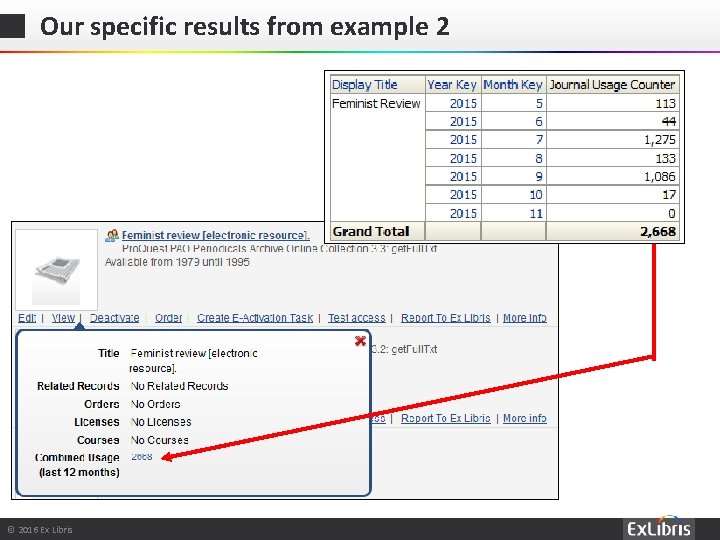
Example 2 • The “More info” gives us a link to the “Combined Usage (last 12 months)” and has a “ 2668” next to it © 2016 Ex Libris | Confidential & Proprietary – For Internal Use Only 9
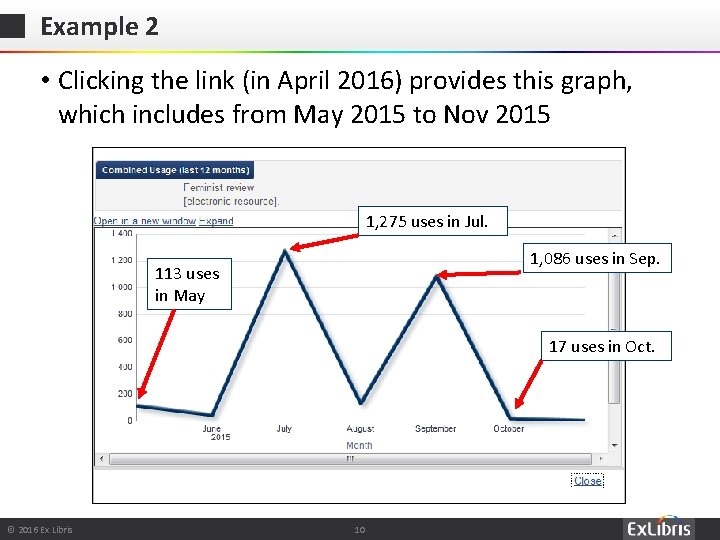
Example 2 • Clicking the link (in April 2016) provides this graph, which includes from May 2015 to Nov 2015 1, 275 uses in Jul. 1, 086 uses in Sep. 113 uses in May 17 uses in Oct. © 2016 Ex Libris | Confidential & Proprietary – For Internal Use Only 10
The inquiry Two examples How does it work? Our specific results https: //slidemodel. com/templates/animated-rainbow-business-powerpoint-template/ © 2016 Ex Libris | Confidential & Proprietary – For Internal Use Only http: //image. shutterstock. com/z/stock-photo-business-hand-writing-blank-agenda-list-130255148. jpg 11
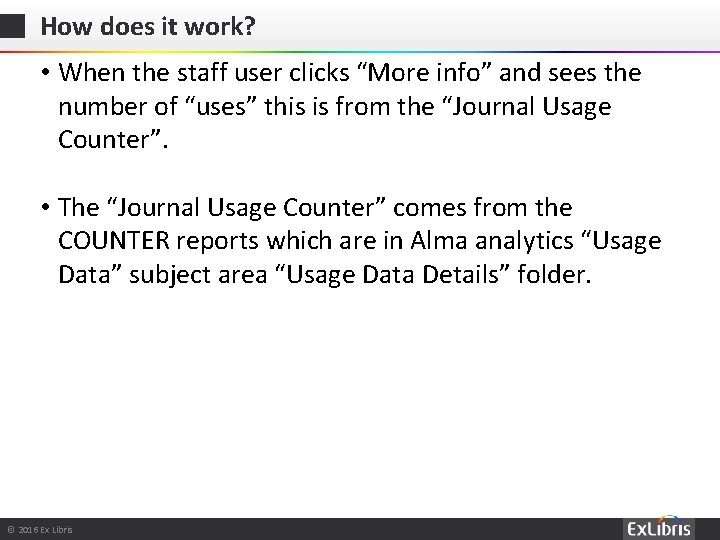
How does it work? • When the staff user clicks “More info” and sees the number of “uses” this is from the “Journal Usage Counter”. • The “Journal Usage Counter” comes from the COUNTER reports which are in Alma analytics “Usage Data” subject area “Usage Data Details” folder. © 2016 Ex Libris | Confidential & Proprietary – For Internal Use Only
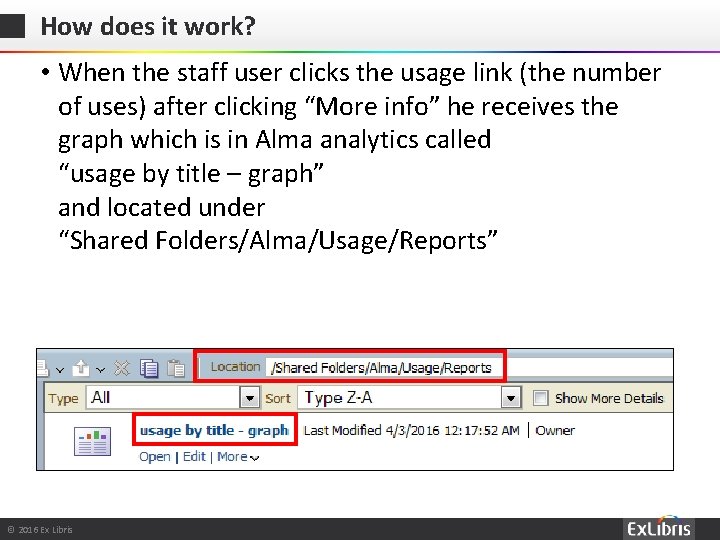
How does it work? • When the staff user clicks the usage link (the number of uses) after clicking “More info” he receives the graph which is in Alma analytics called “usage by title – graph” and located under “Shared Folders/Alma/Usage/Reports” © 2016 Ex Libris | Confidential & Proprietary – For Internal Use Only
How does it work? • The number of months which will display for the last 12 month period will depend on what months are included in the COUNTER reports which have been loaded by the library. • Example 1 “Feminism & Psychology” has May 2015 to March 2016 because the COUNTER reports loaded by the library included these dates. • Example 2 “Feminist review” has only May 2015 to Nov 2015 because the COUNTER reports loaded by the library included only these dates. © 2016 Ex Libris | Confidential & Proprietary – For Internal Use Only
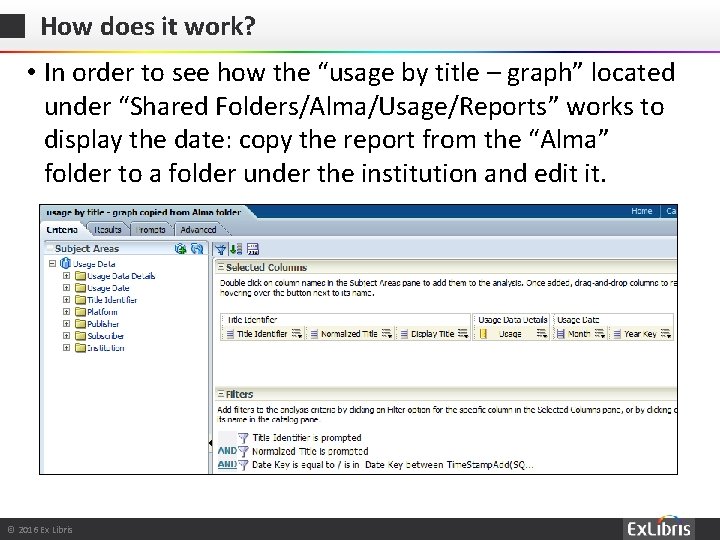
How does it work? • In order to see how the “usage by title – graph” located under “Shared Folders/Alma/Usage/Reports” works to display the date: copy the report from the “Alma” folder to a folder under the institution and edit it. © 2016 Ex Libris | Confidential & Proprietary – For Internal Use Only
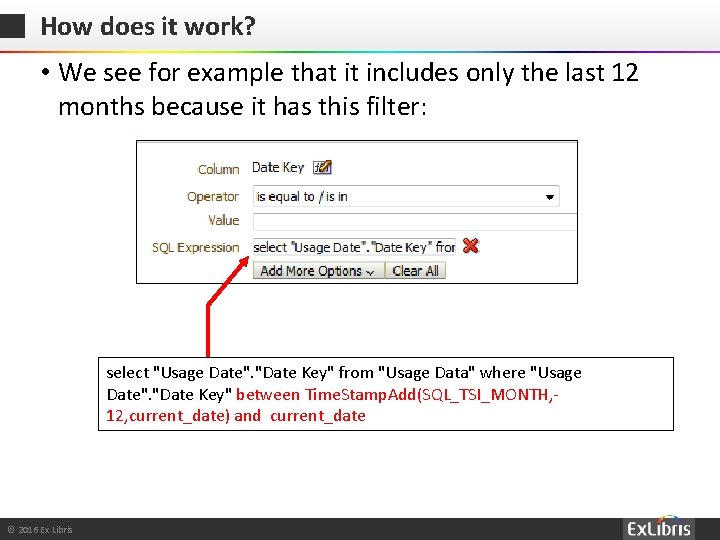
How does it work? • We see for example that it includes only the last 12 months because it has this filter: select "Usage Date". "Date Key" from "Usage Data" where "Usage Date". "Date Key" between Time. Stamp. Add(SQL_TSI_MONTH, 12, current_date) and current_date © 2016 Ex Libris | Confidential & Proprietary – For Internal Use Only
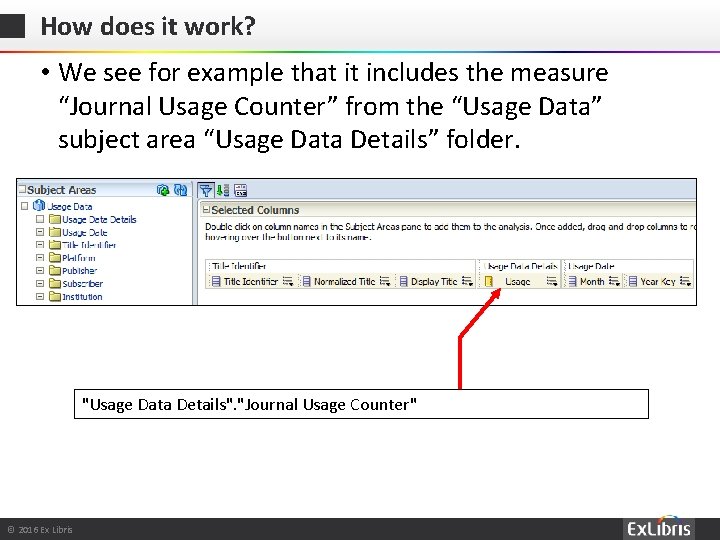
How does it work? • We see for example that it includes the measure “Journal Usage Counter” from the “Usage Data” subject area “Usage Data Details” folder. "Usage Data Details". "Journal Usage Counter" © 2016 Ex Libris | Confidential & Proprietary – For Internal Use Only
The Use Case The reports Summary Our specific results https: //slidemodel. com/templates/animated-rainbow-business-powerpoint-template/ © 2016 Ex Libris | Confidential & Proprietary – For Internal Use Only http: //image. shutterstock. com/z/stock-photo-business-hand-writing-blank-agenda-list-130255148. jpg 18
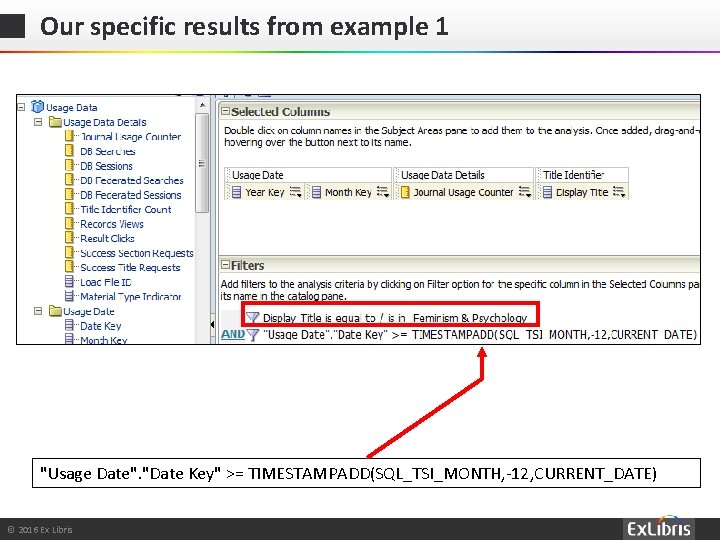
Our specific results from example 1 • Lets see why we got a total of 952 uses for May 2015 to March 2016 for title “Feminism & Psychology” • In the Usage Data subject area we will make a report displaying the • • Year Key Month Key Display Title Journal Usage Counter • We will filter by • Display title = “Feminism & Psychology” • Date Key is greater than or equal to 12 months ago © 2016 Ex Libris | Confidential & Proprietary – For Internal Use Only
Our specific results from example 1 "Usage Date". "Date Key" >= TIMESTAMPADD(SQL_TSI_MONTH, -12, CURRENT_DATE) © 2016 Ex Libris | Confidential & Proprietary – For Internal Use Only
Our specific results from example 1 Includes May 2015 to March 2016 Total of 952 © 2016 Ex Libris | Confidential & Proprietary – For Internal Use Only
Our specific results from example 1 © 2016 Ex Libris | Confidential & Proprietary – For Internal Use Only
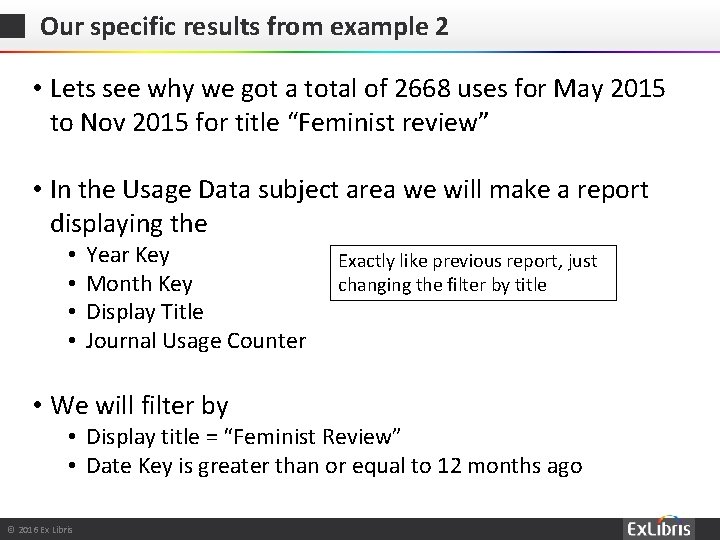
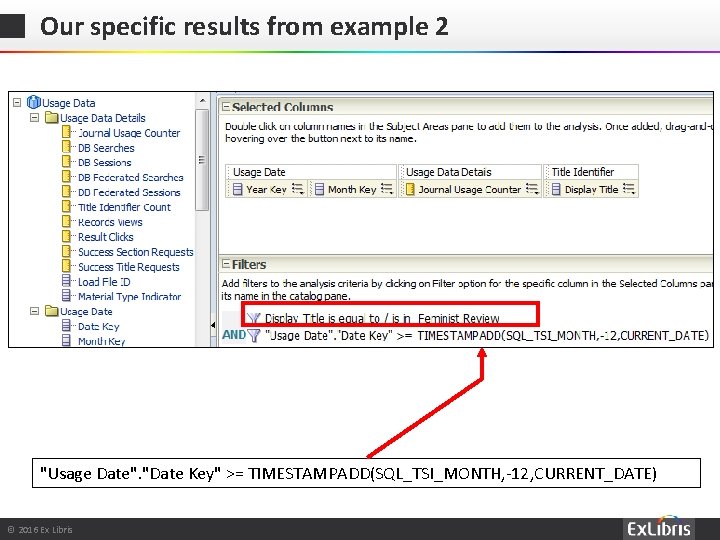
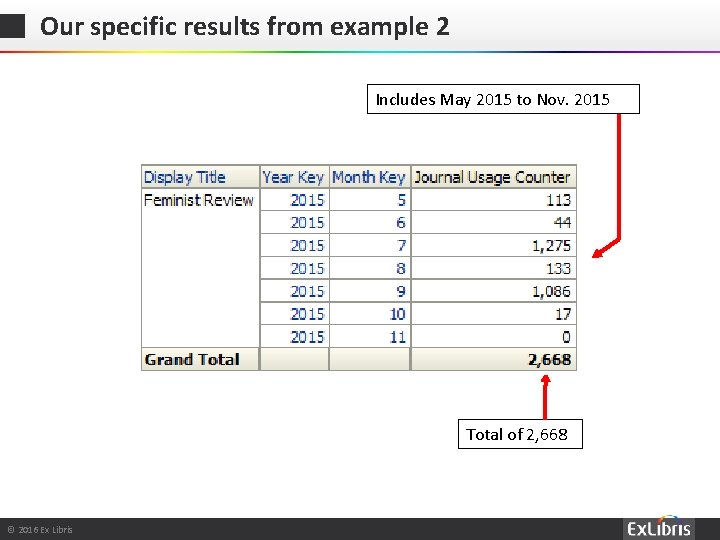
Our specific results from example 2 • Lets see why we got a total of 2668 uses for May 2015 to Nov 2015 for title “Feminist review” • In the Usage Data subject area we will make a report displaying the • • Year Key Month Key Display Title Journal Usage Counter • We will filter by Exactly like previous report, just changing the filter by title • Display title = “Feminist Review” • Date Key is greater than or equal to 12 months ago © 2016 Ex Libris | Confidential & Proprietary – For Internal Use Only
Our specific results from example 2 "Usage Date". "Date Key" >= TIMESTAMPADD(SQL_TSI_MONTH, -12, CURRENT_DATE) © 2016 Ex Libris | Confidential & Proprietary – For Internal Use Only
Our specific results from example 2 Includes May 2015 to Nov. 2015 Total of 2, 668 © 2016 Ex Libris | Confidential & Proprietary – For Internal Use Only
Our specific results from example 2 © 2016 Ex Libris | Confidential & Proprietary – For Internal Use Only
Thank You Yoel. Kortick@exlibrisgroup. com © 2016 Ex Libris | Confidential & Proprietary – For Internal Use Only