
Integrating Relational Database Schemas using a Standardized Dictionary
Integrating Relational Database Schemas using a Standardized Dictionary
Outline è Introduction, Motivation, and Background è The integration architecture u Standard è Example dictionary, X-Specs, query processor integration u Northwind, è Querying Southstorm databases the integrated databases u Generating SQL queries from semantic queries è Unity implementation è Contributions, Conclusions, and Future Work Page 2
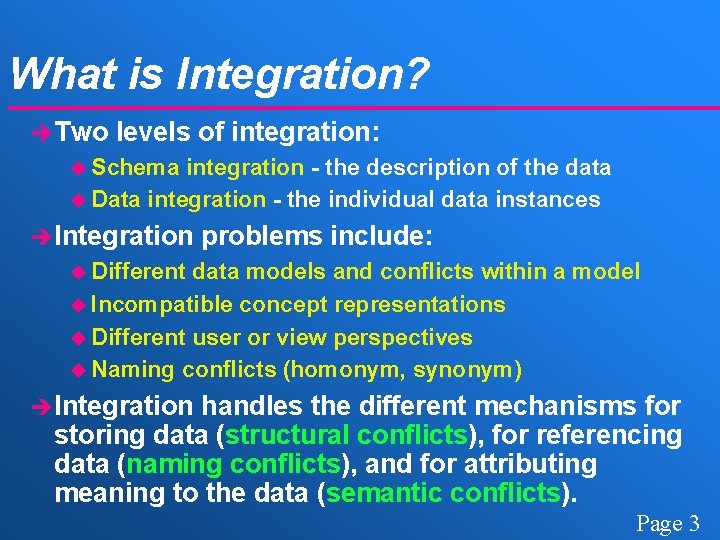
What is Integration? è Two levels of integration: u Schema integration - the description of the data u Data integration - the individual data instances è Integration problems include: u Different data models and conflicts within a model u Incompatible concept representations u Different user or view perspectives u Naming conflicts (homonym, synonym) è Integration handles the different mechanisms for storing data (structural conflicts), for referencing data (naming conflicts), and for attributing meaning to the data (semantic conflicts). Page 3
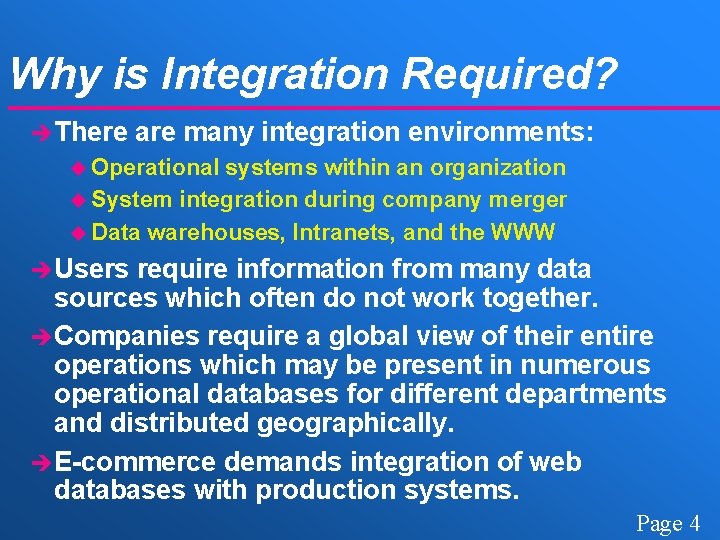
Why is Integration Required? è There are many integration environments: u Operational systems within an organization u System integration during company merger u Data warehouses, Intranets, and the WWW è Users require information from many data sources which often do not work together. è Companies require a global view of their entire operations which may be present in numerous operational databases for different departments and distributed geographically. è E-commerce demands integration of web databases with production systems. Page 4
Previous Work è Research systems: u integrating systems by logical rules (Sheth) u defining global dictionaries (Castano) u Carnot Project using the Cyc knowledge base u wrapper and mediator systems: ï Information Manifold, TSIMMIS, Infomaster è Industrial systems and standards: u Metadata Interchange Specification (MDIS) u XML, Biz. Talk, E-commerce portals è Query Languages: u SQL, MSQL, IDL, DIRECT, Schema. SQL Page 5
Previous Work Summary è Current techniques for database integration have some of these problems: u Require integrator to understand all databases u Integration process is manual u Do not hide system complexity from the user u Force changes on the existing database systems u Construct global view manually u Suffer from query imprecision (query containment) Page 6
Our Approach è Our approach combines standardization and query mapping algorithms. è The major idea is that schema conflicts can be resolved if we: u Eliminate all naming conflicts u Define a language capable of determining schema equivalence and performing transformations è Naming conflicts are eliminated by accepting a standard term dictionary. u Not a knowledge base or set of mediated views u Leverages semantic information in English words Page 7
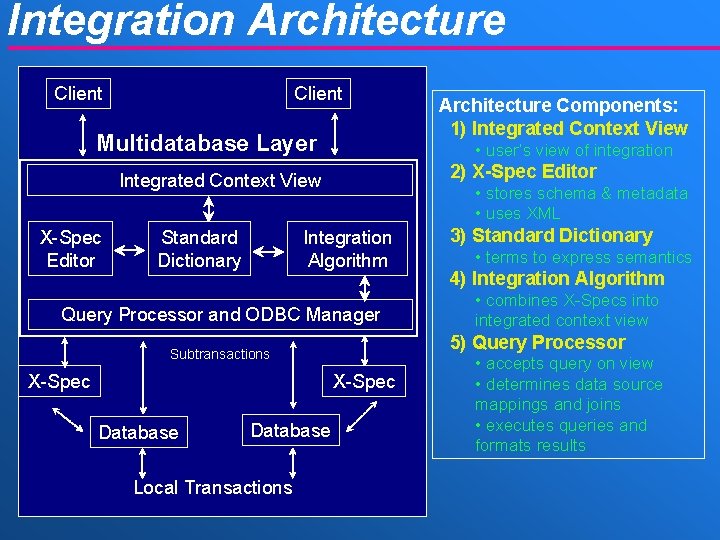
Integration Architecture Client Multidatabase Layer • user’s view of integration 2) X-Spec Editor Integrated Context View X-Spec Editor Standard Dictionary • stores schema & metadata • uses XML Integration Algorithm Query Processor and ODBC Manager X-Spec Database Local Transactions 3) Standard Dictionary • terms to express semantics 4) Integration Algorithm • combines X-Specs into integrated context view 5) Query Processor Subtransactions X-Spec Architecture Components: 1) Integrated Context View • accepts query on view • determines data source mappings and joins • executes queries and formats results
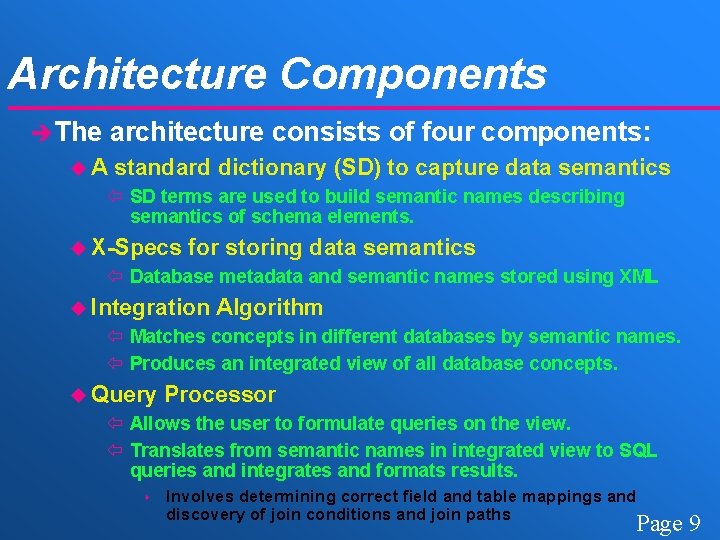
Architecture Components è The architecture consists of four components: u. A standard dictionary (SD) to capture data semantics ï SD terms are used to build semantic names describing semantics of schema elements. u X-Specs for storing data semantics ï Database metadata and semantic names stored using XML u Integration Algorithm ï Matches concepts in different databases by semantic names. ï Produces an integrated view of all database concepts. u Query Processor ï Allows the user to formulate queries on the view. ï Translates from semantic names in integrated view to SQL queries and integrates and formats results. s Involves determining correct field and table mappings and discovery of join conditions and join paths Page 9
Integration Processes è The integration architecture consists of three separate processes: u Capture process: independently extracts database schema information and metadata into a XML document called a X-Spec. u Integration process: combines X-Specs into a structurally-neutral hierarchy of database concepts called an integrated context view. u Query process: allows the user to formulate queries on the integrated view that are mapped by the query processor to structural queries (SQL) and the results are integrated and formatted. Page 10
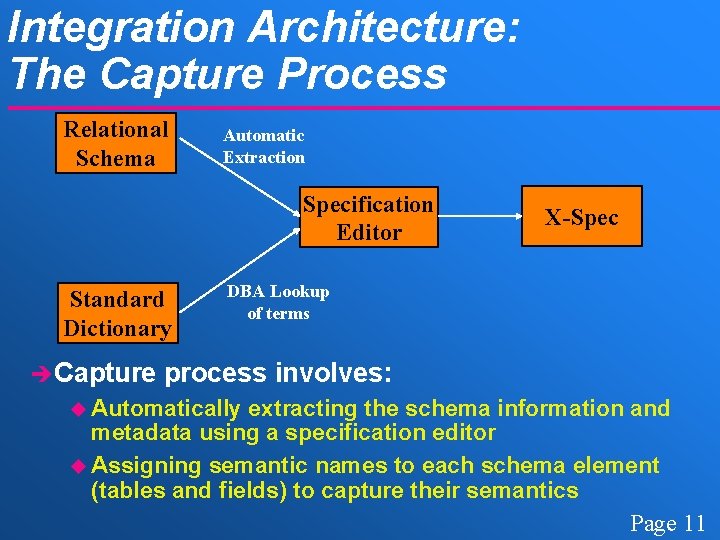
Integration Architecture: The Capture Process Relational Schema Automatic Extraction Specification Editor Standard Dictionary è Capture X-Spec DBA Lookup of terms process involves: u Automatically extracting the schema information and metadata using a specification editor u Assigning semantic names to each schema element (tables and fields) to capture their semantics Page 11
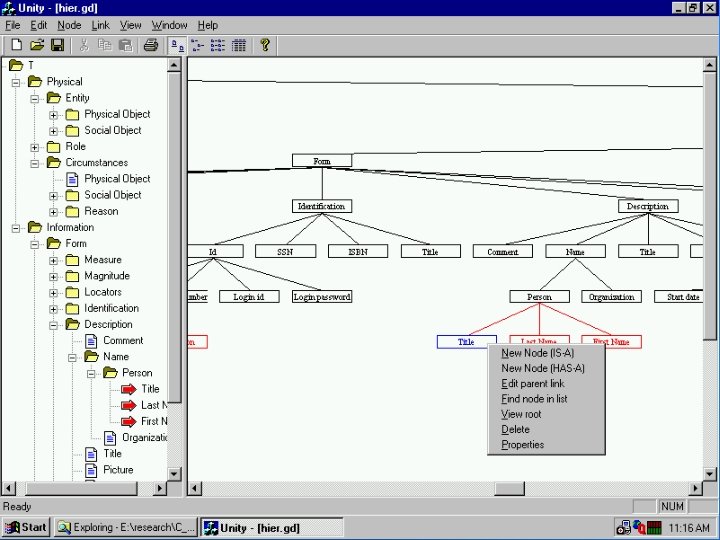
Architecture Components: The Standard Dictionary èA standard dictionary (SD) provides standardized terms to capture data semantics. u Hierarchy of terms related by IS-A or Has-A links u Contains base set of common database concepts, but new concepts can be added èA SD term is a single, unambiguous semantic definition. u Several SD entries for a single English word are required if the word has multiple definitions. è The top-level dictionary terms are those proposed by Sowa. Page 12
Architecture Components: Dictionary vs. Knowledge Base è The standard dictionary differs from a knowledge base such as Cyc because: u Not intended to be a general English dictionary or contain knowledge facts about the world ï Dictionary is evolved as new terms are required ï Not all English words are used u Dictionary provides the systems with no “knowledge” ï Since no facts are stored, system cannot deduce new facts ï Dictionary terms are just semantic place holders, integrators determine the semantics of the database not the system u Simplified organization ï Dictionary is organized as a tree for efficiency and simplicity in determining related concepts u Re-use of terms ï Terms are re-used in semantic names Page 13

Architecture Components: Using the Standard Dictionary è SD terms are used to build semantic names describing semantics of schema elements. è Semantic names have the form: u semantic name : = [CT_Type] | [CT_Type] CN u CT_Type : = CT | CT {; CT} | CT {, CT} u CT : = context term, CN : = concept name u each CT and CN is a single term from the SD è Semantic names are included in specifications describing a database. Page 14
Northwind & Southstorm Integration Example Page 15
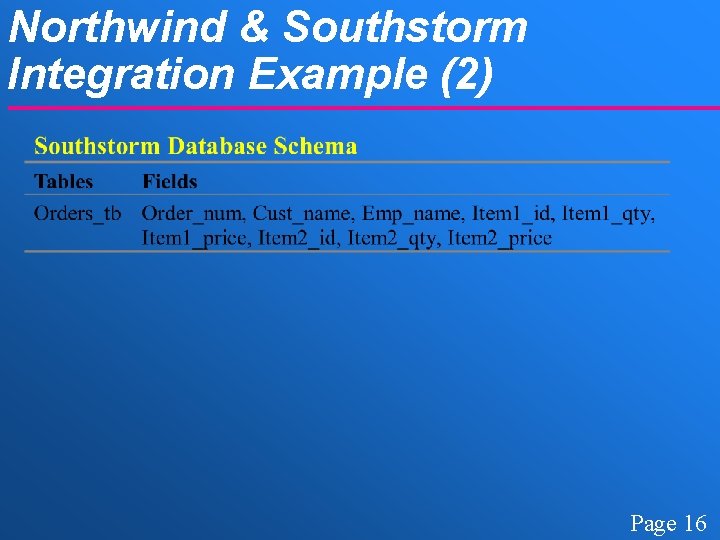
Northwind & Southstorm Integration Example (2) Page 16
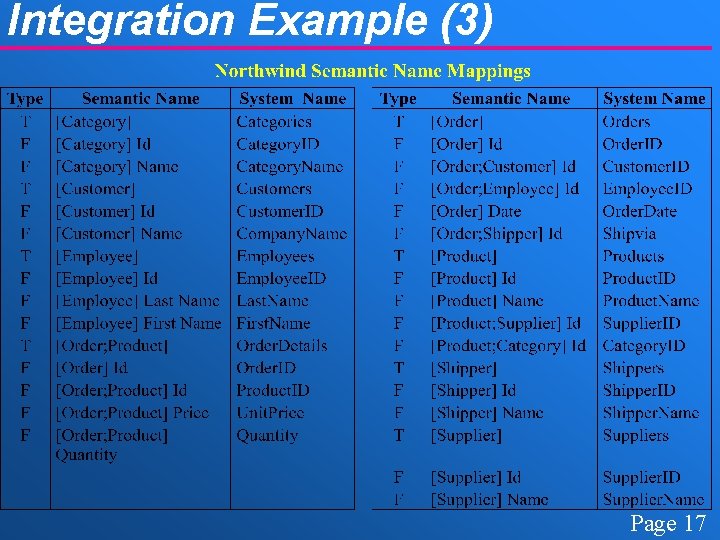
Integration Example (3) Page 17
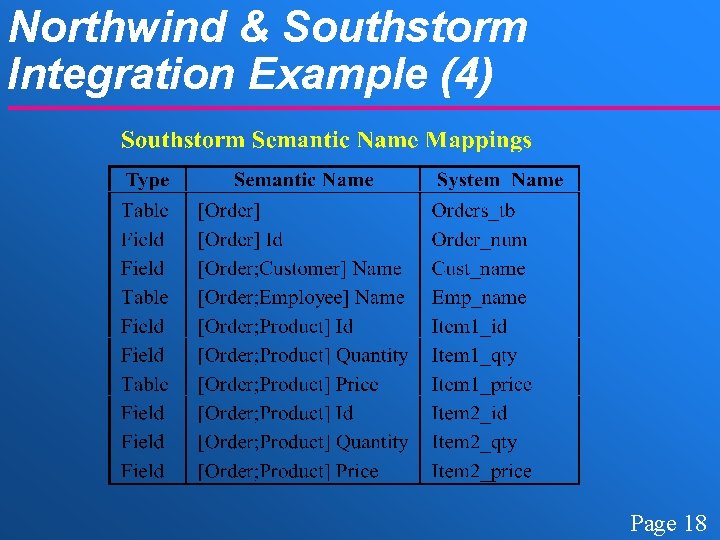
Northwind & Southstorm Integration Example (4) Page 18
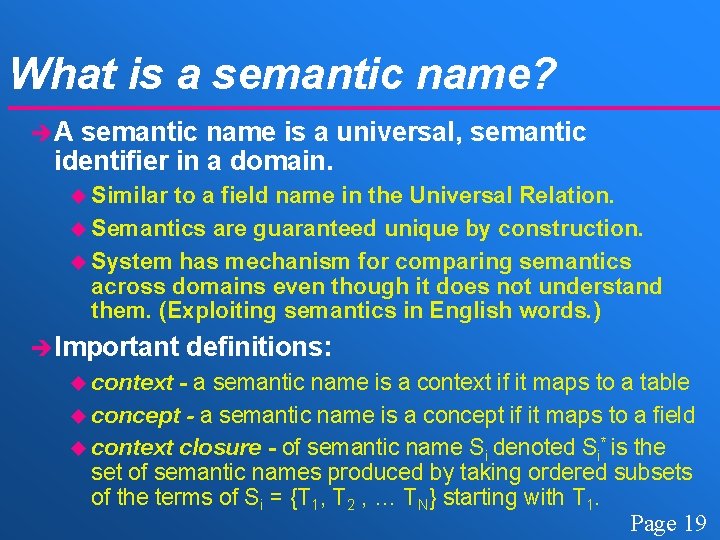
What is a semantic name? èA semantic name is a universal, semantic identifier in a domain. u Similar to a field name in the Universal Relation. u Semantics are guaranteed unique by construction. u System has mechanism for comparing semantics across domains even though it does not understand them. (Exploiting semantics in English words. ) è Important u context definitions: - a semantic name is a context if it maps to a table u concept - a semantic name is a concept if it maps to a field u context closure - of semantic name Si denoted Si* is the set of semantic names produced by taking ordered subsets of the terms of Si = {T 1, T 2 , … TN} starting with T 1. Page 19
Architecture Components: X-Specs è Database metadata and semantic names are combined into specifications called X-Specs: u Stored and transmitted using XML u Contains information on a relational schema u Organized into database, table, and field levels u Stores semantic names to describe and integrate schema elements Page 20
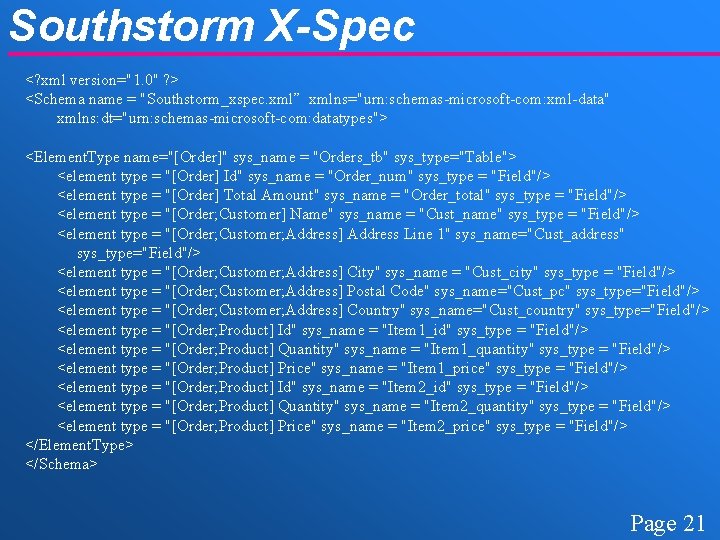
Southstorm X-Spec <? xml version="1. 0" ? > <Schema name = "Southstorm_xspec. xml” xmlns="urn: schemas-microsoft-com: xml-data" xmlns: dt="urn: schemas-microsoft-com: datatypes"> <Element. Type name="[Order]" sys_name = "Orders_tb" sys_type="Table"> <element type = "[Order] Id" sys_name = "Order_num" sys_type = "Field"/> <element type = "[Order] Total Amount" sys_name = "Order_total" sys_type = "Field"/> <element type = "[Order; Customer] Name" sys_name = "Cust_name" sys_type = "Field"/> <element type = "[Order; Customer; Address] Address Line 1" sys_name="Cust_address" sys_type="Field"/> <element type = "[Order; Customer; Address] City" sys_name = "Cust_city" sys_type = "Field"/> <element type = "[Order; Customer; Address] Postal Code" sys_name="Cust_pc" sys_type="Field"/> <element type = "[Order; Customer; Address] Country" sys_name="Cust_country" sys_type="Field"/> <element type = "[Order; Product] Id" sys_name = "Item 1_id" sys_type = "Field"/> <element type = "[Order; Product] Quantity" sys_name = "Item 1_quantity" sys_type = "Field"/> <element type = "[Order; Product] Price" sys_name = "Item 1_price" sys_type = "Field"/> <element type = "[Order; Product] Id" sys_name = "Item 2_id" sys_type = "Field"/> <element type = "[Order; Product] Quantity" sys_name = "Item 2_quantity" sys_type = "Field"/> <element type = "[Order; Product] Price" sys_name = "Item 2_price" sys_type = "Field"/> </Element. Type> </Schema> Page 21
Integration Product: The Integrated Context View è The product of the integration is a structurallyneutral hierarchy of concepts called an integrated context view. è Define a context view (CV) as follows: u If a semantic name Si is in CV, then for any Sj in Si*, Sj is also in CV. u For each semantic name Si in CV, there exists a set of zero or more mappings Mi that associate a schema element Ej with Si. u A semantic name Si can only occur once in the CV. èA context view (CV) is a valid Universal Relation. u Each field is assigned a semantic name which uniquely identifies its semantic connotation. Page 22
Northwind & Southstorm Integration Example Page 23
Architecture Components: The Query Processor è The query processor: u Allows the user to formulate queries on the view. u Translates from semantic names in the context view to structural queries (SQL) on databases. ï Involves determining correct field and table mappings and discovery of join conditions and join paths u Retrieves the user. è Client-side query results and formats them for display to query processing: u Perform joins between databases using common keys. u Data value formatting and transformation Page 24
Advanced Query Processing è Advanced query processor features include: u global keys and joins - a mechanism for specifying when a field stores a global key such as a social security number. u result normalization - a procedure for normalizing query results returned from each individual database. (e. g. Southstorm) u data integration - transforming data representational conflicts at the global level. ï For example, “M” and “F” may represent “Male” and “Female” in one database, and another may represent these concepts using “ 0” and “ 1”. Page 25
![Northwind & Southstorm Query Examples è Example 1: Retrieve all order ids ([Order] Id)](http://slidetodoc.com/presentation_image/cf38ae53f0aec287b4094118ed3d88f0/image-26.jpg "Northwind & Southstorm Query Examples è Example 1: Retrieve all order ids ([Order] Id)")
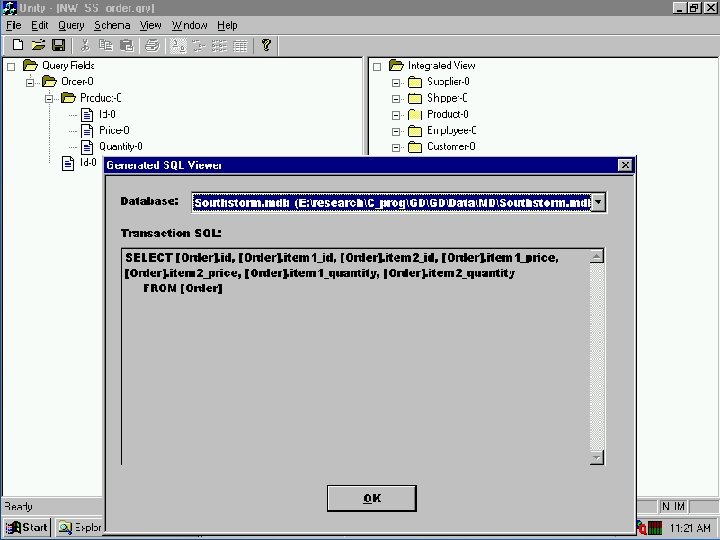
Northwind & Southstorm Query Examples è Example 1: Retrieve all order ids ([Order] Id) and customers ([Customer] Name): u SS: SELECT Order_num, Cust_name FROM Orders_tb u NW: SELECT Order. ID, Company. Name FROM Orders, Customers WHERE Orders. Customer. ID = Customers. Customer. ID è Example 2: Retrieve all ordered products ([Order; Product] Id) and their order ids. u SS: SELECT Order_num, Item 1_id, Item 2_id FROM Orders_tb u NW: SELECT Order. ID, Product. ID FROM Order. Details u Note: In NW, selects from two different order id mappings. In SS, result normalization is required. Page 26
Integration Example: Discussion è Important points: u System table and field names are not presented to the user who queries based on semantic names. u Database structure is not shown to the user. u Field and table mappings are automatically determined based on X-Spec information. u Join conditions are inserted as needed when available to join tables. u Different physical representations for the same concept are combined. u Hierarchically related concepts are combined based on their IS-A relationship in the standard dictionary. Page 27

Unity Overview è Unity is a software package that implements the integration architecture with a GUI. è Developed using Microsoft Visual C++ 6 and Microsoft Foundation Classes (MFC). è Unity allows the user to: u Construct and modify standard dictionaries u Build X-Specs to describe data sources u Integrate X-Specs into an integrated view u Transparently query integrated systems using ODBC and automatically generate SQL transactions è Unity is available for demonstration and distribution. Page 28
Contributions è Architecture contributions: u Has an unique application of a standard dictionary which is not a knowledge base u Separates the capture and integration processes u Allows transparent querying without structure u Provides algorithms for dynamically extracting database data (creating relevant views) u Algorithms for mediation of global level conflicts (global keys, normalization, etc. ) u Arguably simpler method for capturing data semantics than using description logic u An implementation, Unity, which demonstrates the practical benefits of the architecture Page 31
Conclusions & Future Work è Automatic database integration is possible by using a standard term dictionary and defining semantic names for schema elements. è Users are able to transparently query integrated systems by concept instead of structure. è We are constantly refining Unity. u Develop an integration component for a web browser è Test the system in large industrial projects. è Allow distributed updates and global updates on all databases. Page 32
References è Publications: u Unity - A Database Integration Tool, R. Lawrence and K. Barker, TRLabs Emerging Technology Bulletin, January 2000. u Multidatabase Querying by Context, R. Lawrence and K. Barker, Data. Sem 2000, pages 127 -136, Oct. 2000. u Integrating Relational Database Schemas using a Standardized Dictionary, To appear in SAC’ 2001 - ACM Symposium on Applied Computing, March, 2001. è Sponsors: u NSERC, è Further TRLabs Information: u http: //www. cs. umanitoba. ca/~umlawren/ Page 33
- Slides: 33