
Integrated Compliance Information System ICIS and Beyond Current
Integrated Compliance Information System (ICIS) and Beyond: Current and Future Plans and Technology Presented by: Alison Kittle, U. S. EPA Bill Rensmith, Windsor Solutions, Inc. Mike Beaulac, Michigan DNRE Tony Jeng, enfo. Tech & Consulting Exchange Network National Meeting May 30, 2012 1
Agenda Ø ICIS Today Ø Future of ICIS Ø ICIS Electronic Submission Tools l l Open. Node 2 Starter Kit for ICIS EN-Node 2 Plug-In for ICIS Ø Resources Available to States 2
Agenda Ø ICIS Today Ø Future of ICIS Ø ICIS Electronic Submission Tools l l Open. Node 2 Starter Kit for ICIS EN-Node 2 Plug-In for ICIS Ø Resources Available to States 3
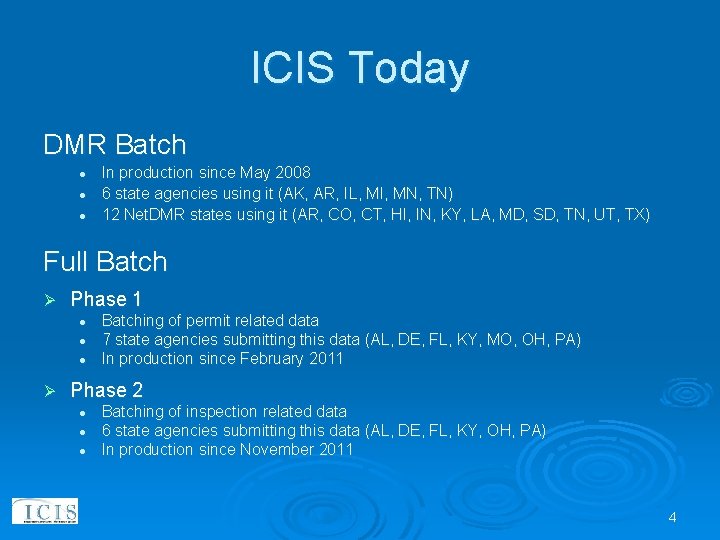
ICIS Today DMR Batch l l l In production since May 2008 6 state agencies using it (AK, AR, IL, MI, MN, TN) 12 Net. DMR states using it (AR, CO, CT, HI, IN, KY, LA, MD, SD, TN, UT, TX) Full Batch Ø Phase 1 l l l Ø Batching of permit related data 7 state agencies submitting this data (AL, DE, FL, KY, MO, OH, PA) In production since February 2011 Phase 2 l l l Batching of inspection related data 6 state agencies submitting this data (AL, DE, FL, KY, OH, PA) In production since November 2011 4
ICIS Today Full Batch Ø Phase 3 l l l Batching of enforcement action, violation and program report related data 15 State agencies to be migrated out of PCS (AZ, IA, KS, ME, MS, NJ, NC, ND, OR, SC, VA, VT, WA, WV, WY) Scheduled to be in production December 2012 5
Agenda Ø ICIS Today Ø Future of ICIS Ø ICIS Electronic Submission Tools l l Open. Node 2 Starter Kit for ICIS EN-Node 2 Plug-In for ICIS Ø Resources Available to States 6
Future of ICIS Ø Full Batch Data Flow Enables ICIS For: l l Electronic exchange of information between EPA and states (e. g. , NPDES Permitting, Enforcement and Compliance information). Electronic reporting from the NPDES regulated universe to EPA Electronic reporting of compliance monitoring data from inspectors in the field Electronic submission of data from other EPA systems 7
Future of ICIS Ø Electronic reporting of compliance data from inspectors in the field: l l Region 4 inspectors to send their compliance monitoring data and RCRA inspection reports directly to ICIS from the field via CDX EPA is piloting tablet software for the PCB and NPDES Construction Storm Water compliance monitoring programs 8
Agenda Ø ICIS Today Ø Future of ICIS Ø ICIS Electronic Submission Tools l l Open. Node 2 Starter Kit for ICIS EN-Node 2 Plug-In for ICIS Ø Making the Future of ICIS and Electronic Reporting a Reality 9
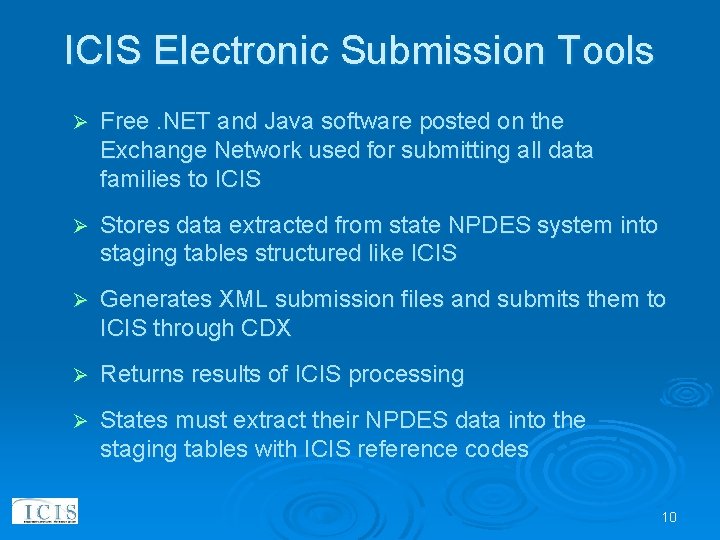
ICIS Electronic Submission Tools Ø Free. NET and Java software posted on the Exchange Network used for submitting all data families to ICIS Ø Stores data extracted from state NPDES system into staging tables structured like ICIS Ø Generates XML submission files and submits them to ICIS through CDX Ø Returns results of ICIS processing Ø States must extract their NPDES data into the staging tables with ICIS reference codes 10
Open. Node 2 ICIS-NPDES Full Batch Plugin Submitting Data to ICIS the Easy Way Bill Rensmith, Windsor Solutions, Inc. 11
Open. Node 2 Ø Project Background l l l Ø How it Works l l Ø Staging Tables Submission Lifecycle Live Demonstration l l Ø About Open. Node 2, flows, and plugins About this Project Timeline Implementer Responsibilities Options for non-Open. Node 2 States Q&A 12
About Open. Node 2 Ø Open source Exchange Network node software Ø Open. Node 2 can: l l send data to other Network partners make data available for others to query Ø Most widely used node software on the Network Ø Available at http: //code. google. com/p/opennode 2 13
About Flows and Plugins Each type of data on the network is a “flow” l There is a flow for each regulatory area (air, waste, etc…) l ICIS-NPDES is one of many available flows l EPA defined the rules for sending data via the ICISNPDES flow Ø Each flow is implemented as a Plugin in Open. Node 2 l Plugins are the software that contain the functionality needed to support a specific flow l The Open. Node 2 Google code site has plugins for most major regulatory flows to EPA Ø 14
About this Project Ø The ICIS-NPDES Full Batch flow is complex l l 46 different data families 149 tables (complex data types) 1195 fields (simple elements) 963 business rules Ø To reduce implementation challenge, EPA and ECOS wanted to make available tools to simplify flow implementation for states. 15
About this Project (cont’d) In September 2011, EPA and ECOS engaged Windsor to develop full batch data flow plugin for Open. Node 2 l Ubiquity of Open. Node 2 made it a good choice to reach the widest potential audience of states l To reduce cost, only developing for the. NET version of Open. Node 2 (most commonly used version) Ø Pilot with Washington Dept. of Ecology l Summer 2012 Ø 16
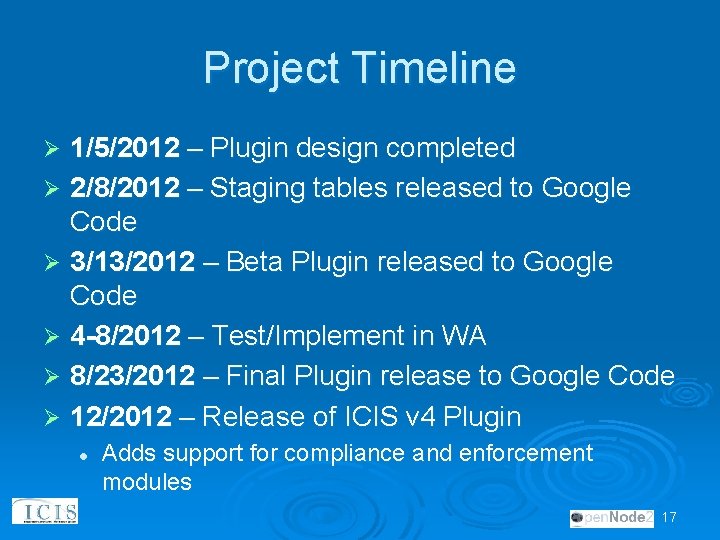
Project Timeline 1/5/2012 – Plugin design completed Ø 2/8/2012 – Staging tables released to Google Code Ø 3/13/2012 – Beta Plugin released to Google Code Ø 4 -8/2012 – Test/Implement in WA Ø 8/23/2012 – Final Plugin release to Google Code Ø 12/2012 – Release of ICIS v 4 Plugin Ø l Adds support for compliance and enforcement modules 17
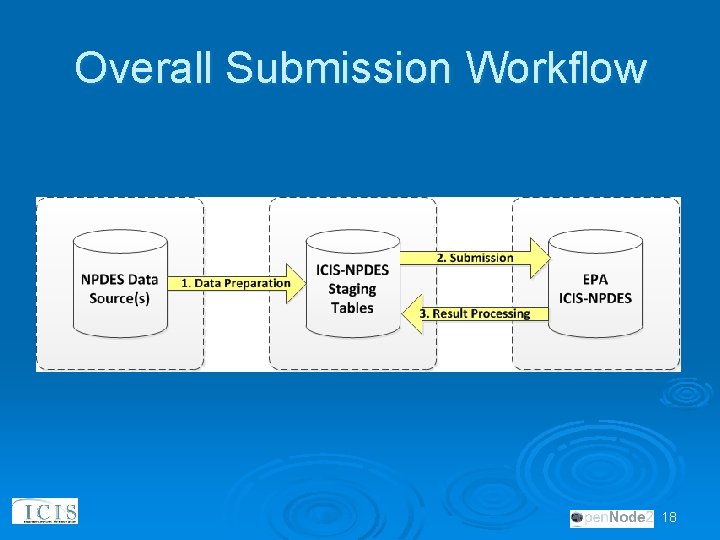
Overall Submission Workflow 18
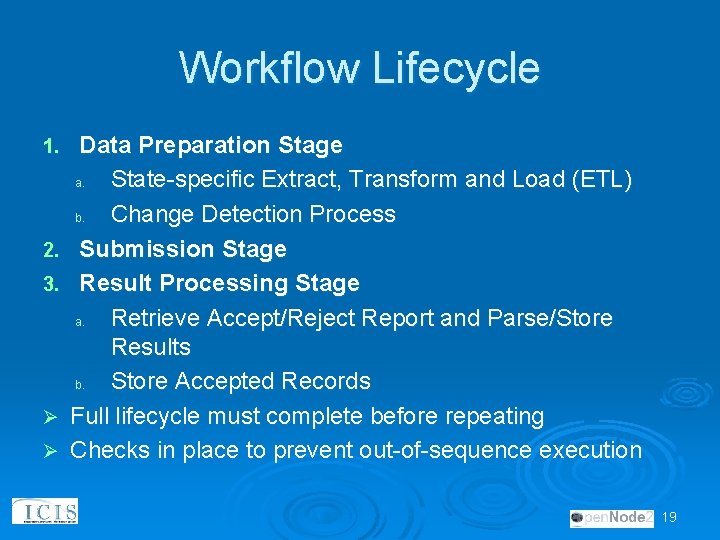
Workflow Lifecycle 1. 2. 3. Ø Ø Data Preparation Stage a. State-specific Extract, Transform and Load (ETL) b. Change Detection Process Submission Stage Result Processing Stage a. Retrieve Accept/Reject Report and Parse/Store Results b. Store Accepted Records Full lifecycle must complete before repeating Checks in place to prevent out-of-sequence execution 19
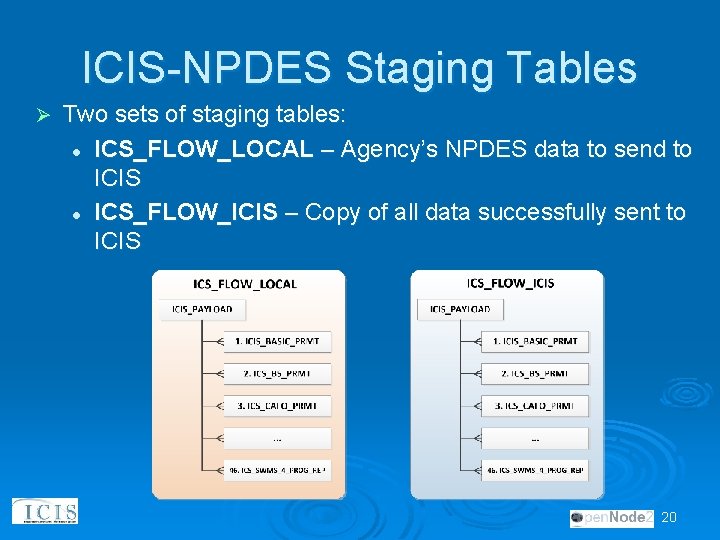
ICIS-NPDES Staging Tables Ø Two sets of staging tables: l ICS_FLOW_LOCAL – Agency’s NPDES data to send to ICIS l ICS_FLOW_ICIS – Copy of all data successfully sent to ICIS 20
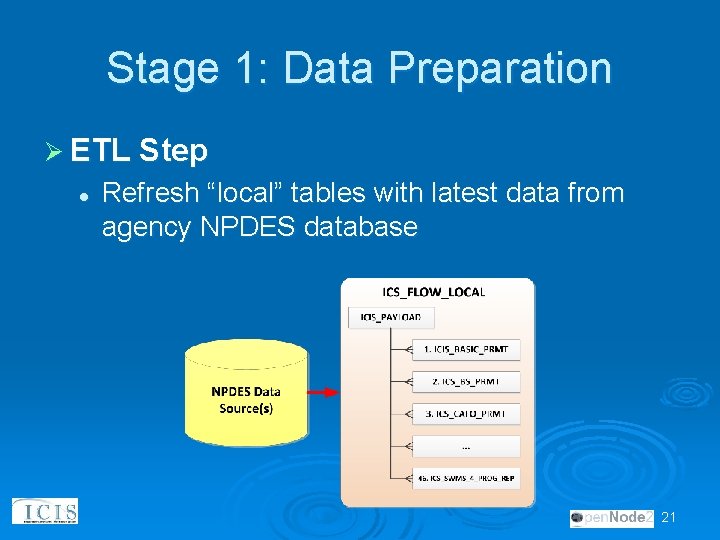
Stage 1: Data Preparation Ø ETL Step l Refresh “local” tables with latest data from agency NPDES database 21
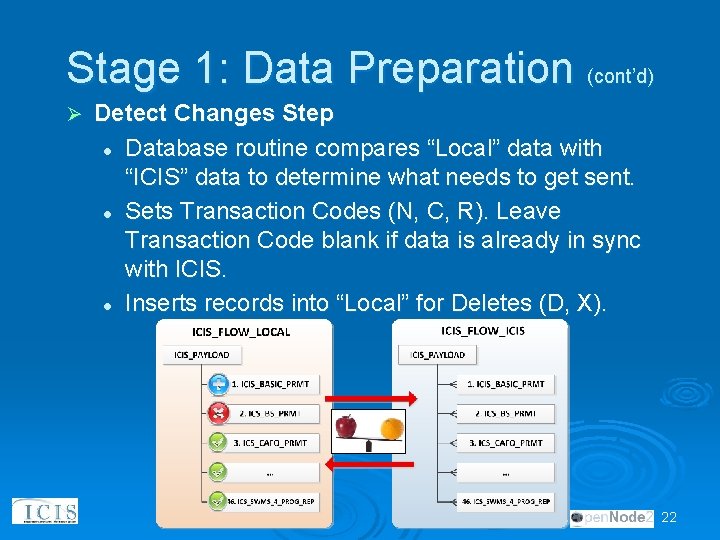
Stage 1: Data Preparation (cont’d) Ø Detect Changes Step l Database routine compares “Local” data with “ICIS” data to determine what needs to get sent. l Sets Transaction Codes (N, C, R). Leave Transaction Code blank if data is already in sync with ICIS. l Inserts records into “Local” for Deletes (D, X). 22
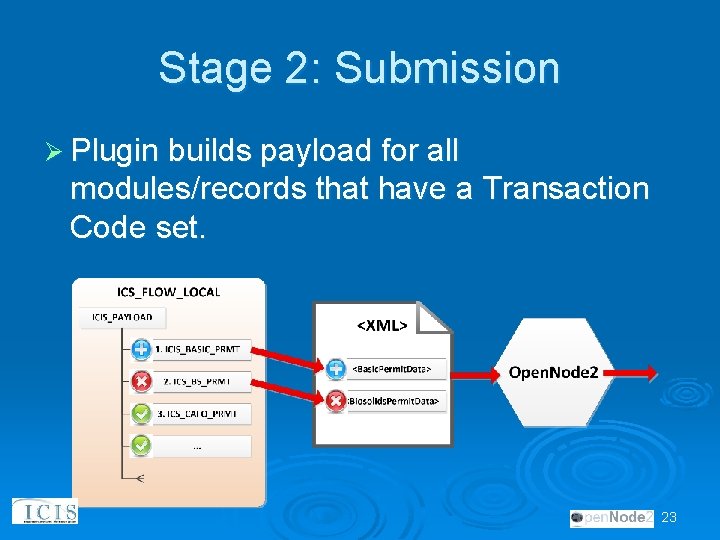
Stage 2: Submission Ø Plugin builds payload for all modules/records that have a Transaction Code set. 23
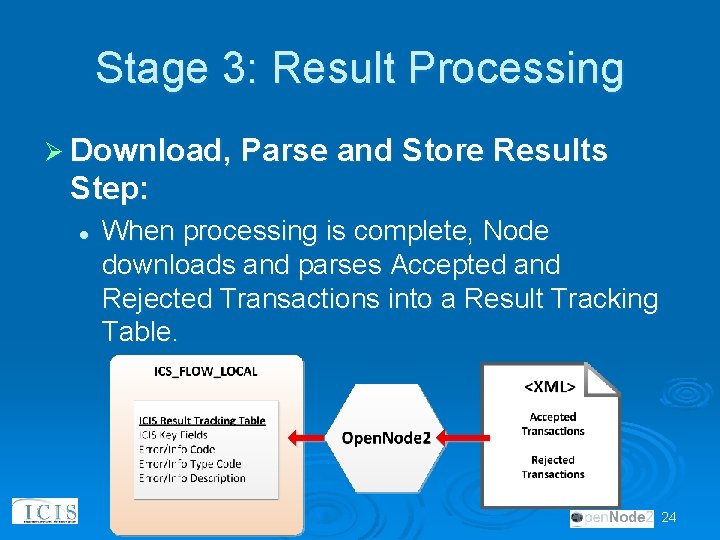
Stage 3: Result Processing Ø Download, Parse and Store Results Step: l When processing is complete, Node downloads and parses Accepted and Rejected Transactions into a Result Tracking Table. 24
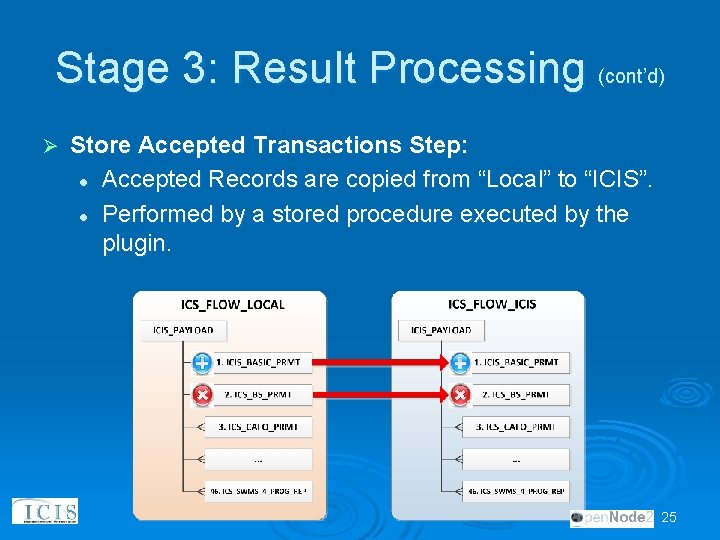
Stage 3: Result Processing (cont’d) Ø Store Accepted Transactions Step: l Accepted Records are copied from “Local” to “ICIS”. l Performed by a stored procedure executed by the plugin. 25
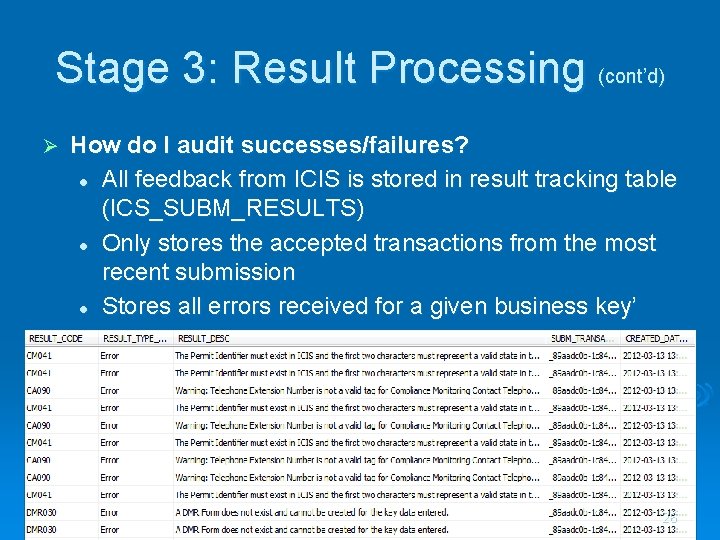
Stage 3: Result Processing (cont’d) Ø How do I audit successes/failures? l All feedback from ICIS is stored in result tracking table (ICS_SUBM_RESULTS) l Only stores the accepted transactions from the most recent submission l Stores all errors received for a given business key’ 26
Live Demonstration 27
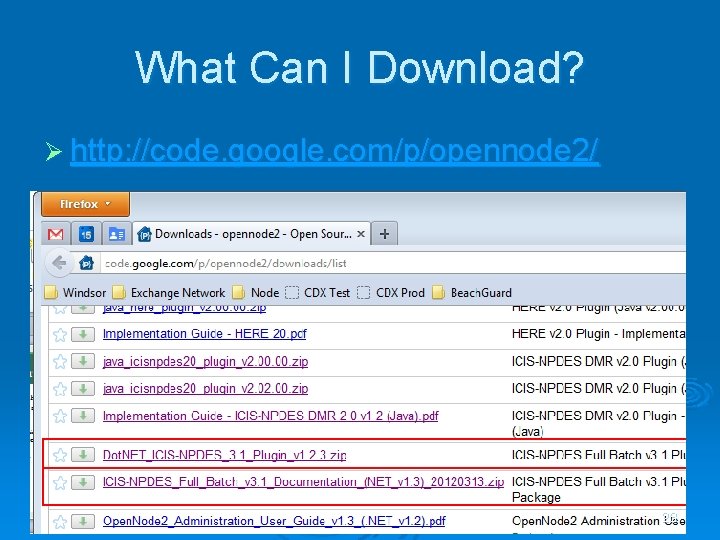
What Can I Download? Ø http: //code. google. com/p/opennode 2/ 28
What Can I Download? (cont’d) Ø Plugin l Plugin. zip – this is what you upload to Open. Node 2 l Database scripts – for SQL Server and Oracle • Creates needed tables, procedures, views… Ø Documentation l Plugin Implementation Guide PDF • Just the facts. Describes how to install and configure the plugin and database components. l Plugin Design Specification PDF • All the nitty-gritty details of the plugin design. Very useful to understand the details of how the plugin components work. 29
Implementer Responsibilities Set up staging tables in state environment 2. Map source systems to staging tables 1. Mapping to ICIS-NPDES lookup values 3. 4. 5. 6. 7. 30 Develop data extraction and transformation routines to copy data from state database to staging tables Set up node and plugin Flow data to CDX Test environment Monitor for errors. Fix by: 1. Fixing data in source system 2. refining ETL logic Migrate to production
Questions and Answers http: //code. google. com/p/opennode 2 Webinar Video: http: //youtu. be/7 q. P 2 d 6 CUypsb 31
Electronic Submission Plug-Ins Ø Michigan e. DMR Demonstration l by Mike Beaulac, Michigan DEQ 32
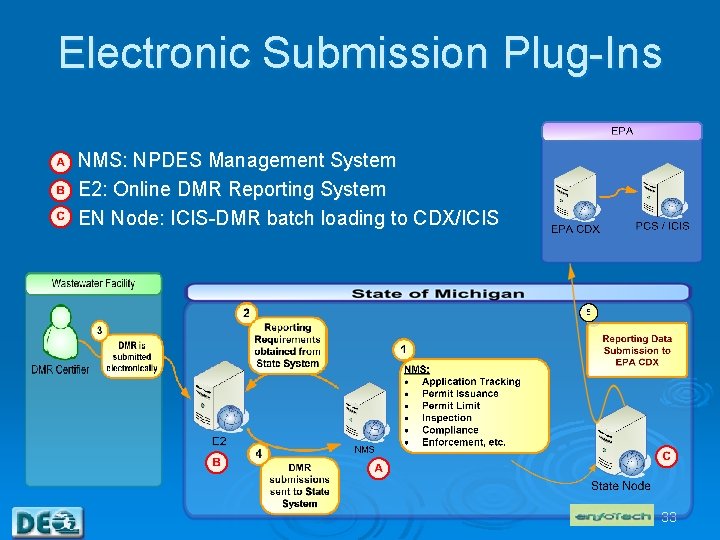
Electronic Submission Plug-Ins NMS: NPDES Management System E 2: Online DMR Reporting System EN Node: ICIS-DMR batch loading to CDX/ICIS 33
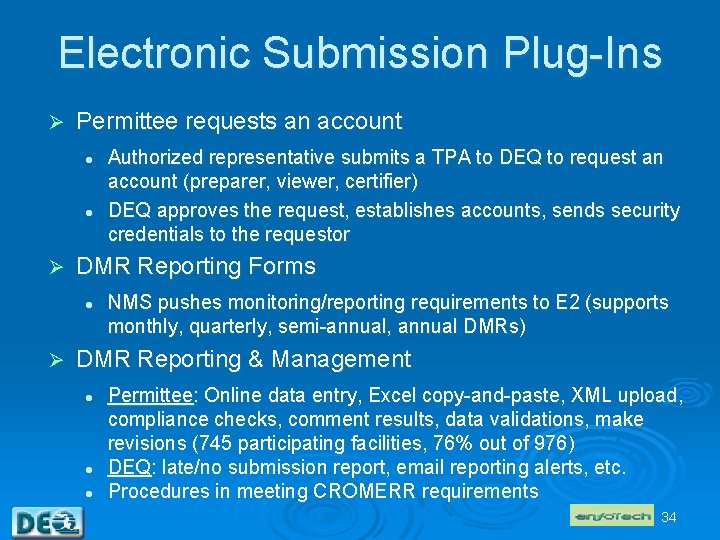
Electronic Submission Plug-Ins Ø Permittee requests an account l l Ø DMR Reporting Forms l Ø Authorized representative submits a TPA to DEQ to request an account (preparer, viewer, certifier) DEQ approves the request, establishes accounts, sends security credentials to the requestor NMS pushes monitoring/reporting requirements to E 2 (supports monthly, quarterly, semi-annual, annual DMRs) DMR Reporting & Management l l l Permittee: Online data entry, Excel copy-and-paste, XML upload, compliance checks, comment results, data validations, make revisions (745 participating facilities, 76% out of 976) DEQ: late/no submission report, email reporting alerts, etc. Procedures in meeting CROMERR requirements 34
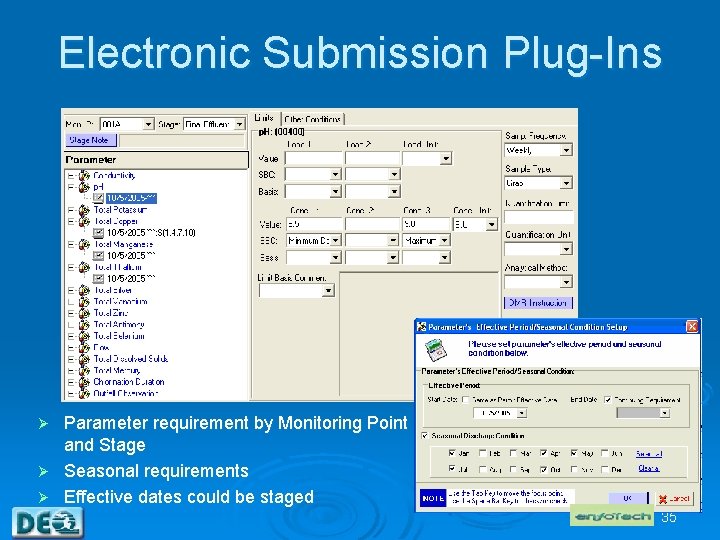
Electronic Submission Plug-Ins Parameter requirement by Monitoring Point and Stage Ø Seasonal requirements Ø Effective dates could be staged Ø 35
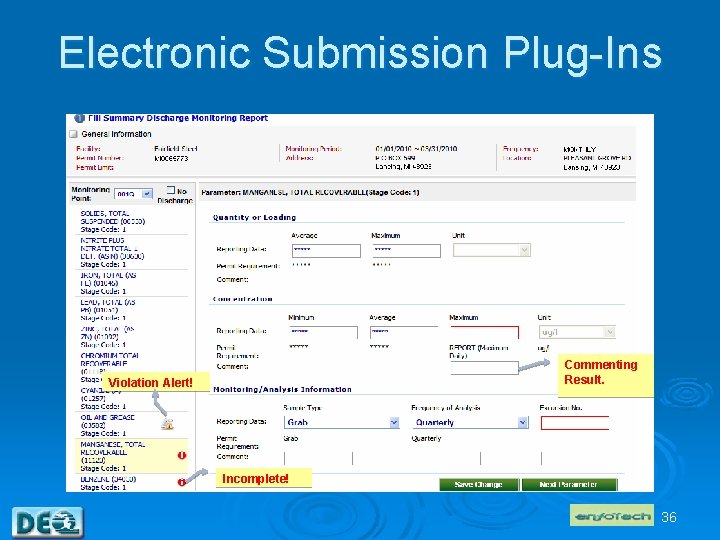
Electronic Submission Plug-Ins Commenting Result. Violation Alert! Incomplete! 36
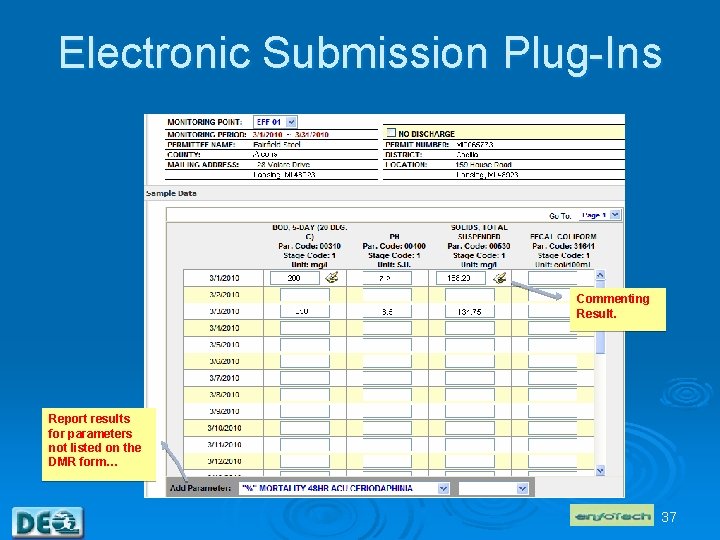
Electronic Submission Plug-Ins Commenting Result. Report results for parameters not listed on the DMR form… 37
ICIS Electronic Submission Tools Ø EN-Node 2 ICIS Plug-In Demonstration l by Tony Jeng, enfo. Tech & Consulting, Inc. 38
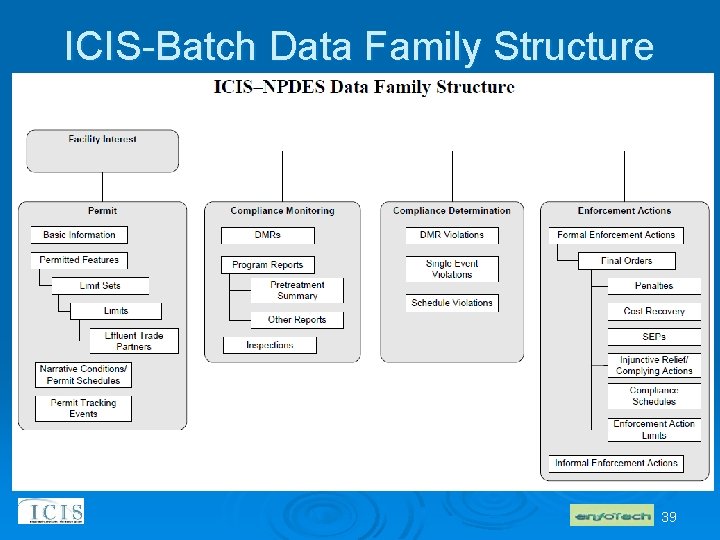
ICIS-Batch Data Family Structure 39
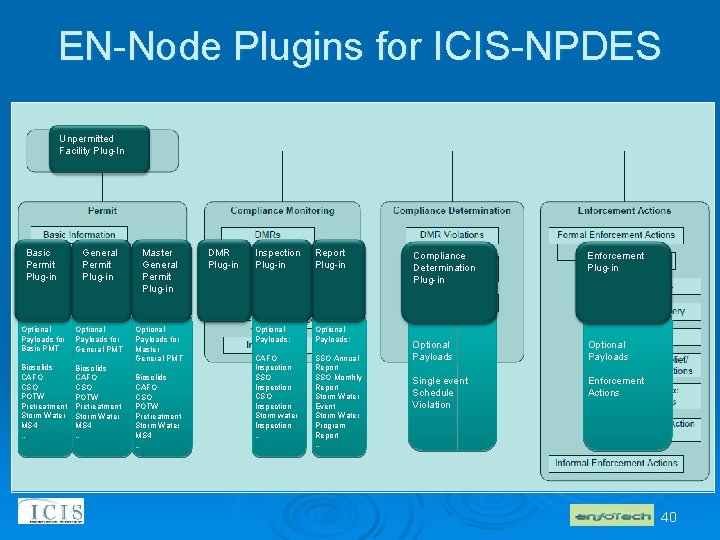
EN-Node Plugins for ICIS-NPDES Unpermitted Facility Plug-In Basic Permit Plug-in General Permit Plug-in Master General Permit Plug-in Optional Payloads for Basic PMT Optional Payloads for General PMT Optional Payloads for Master General PMT Biosolids CAFO CSO POTW Pretreatment Storm Water MS 4 … DMR Plug-in Inspection Plug-in Report Plug-in Optional Payloads: CAFO Inspection SSO Inspection CSO Inspection Storm water Inspection … SSO Annual Report SSO Monthly Report Storm Water Event Storm Water Program Report … Compliance Determination Plug-in Enforcement Plug-in Optional Payloads Single event Schedule Violation Enforcement Actions 40
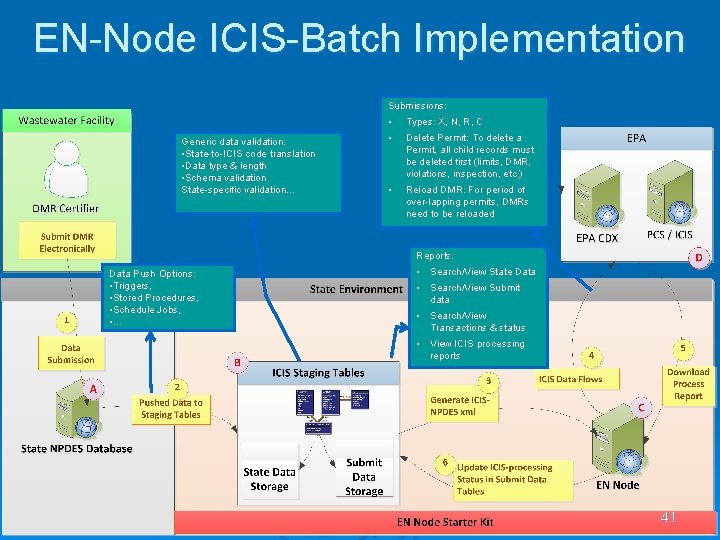
EN-Node ICIS-Batch Implementation Submissions: Generic data validation: • State-to-ICIS code translation • Data type & length • Schema validation State-specific validation… • Types: X, N, R, C • Delete Permit: To delete a Permit, all child records must be deleted first (limits, DMR, violations, inspection, etc. ) • Reload DMR: For period of over-lapping permits, DMRs need to be reloaded Reports: Data Push Options: • Triggers, • Stored Procedures, • Schedule Jobs, • … • Search/View State Data • Search/View Submit data • Search/View Transactions & status • View ICIS processing reports 41
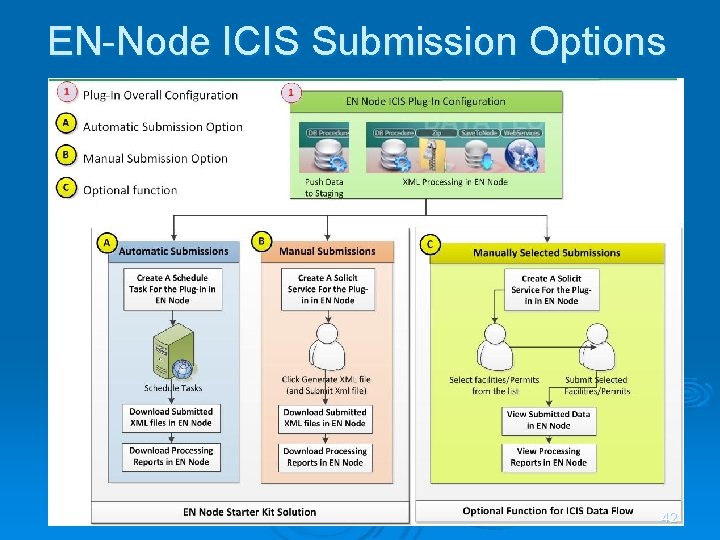
EN-Node ICIS Submission Options 42
EN-Node Flow Wizard - Process Configuration 43
EN-Node ICIS Plugins Ø Availability Status Ø Download EN-Node & Plug-ins: https: //code. google. com/p/en-node 2/downloads/list 44
Agenda Ø ICIS Today Ø Future of ICIS Ø ICIS Electronic Submission Tools l l Open. Node 2 Starter Kit for ICIS EN-Node 2 Plug-In for ICIS Ø Resources Available to States 45
Resources Available to States OEI Exchange Network Grants Ø Funding to states, territories and federally recognized Indian tribes to support development of Environmental Information Exchange Network related activities Ø Announcement of the availability of funds and soliciting of proposals and partial applications from applicants occurs through the Exchange Network Grant web page at www. epa. gov/networkg l 46
For More Information Contacts Ø ICIS-NPDES Electronic Submissions l Ø Michigan e. DMR l Ø Mike Beaulac Bealac. M@Michigan. gov EN-Node l Ø Alison Kittle kittle. alison@epa. gov Tony Jeng Tony_Jeng@enfotech. com Open. Node 2 l Bill Rensmith bill_rensmith@windsorsolutions. com 47

Questions ? ? ? 48
- Slides: 48