
Instructor Materials Chapter 2 Static Routing CCNA Routing








- Slides: 44
Instructor Materials Chapter 2: Static Routing CCNA Routing and Switching Introduction to Networks v 6. 0 Presentation_ID © 2008 Cisco Systems, Inc. All rights reserved. Cisco Confidential 1
Chapter 2 - Sections & Objectives 2. 1 Static Routing Implementation • Explain the advantages and disadvantages of static routing. • Explain the purpose of different types of static routes. 2. 2 Configure Static and Default Routes • Configure IPv 4 and IPv 6 static routes by specifying a next-hop address. • Configure IPv 4 and IPv 6 default routes. • Configure a floating static route to provide a backup connection. • Configure IPv 4 and IPv 6 static host routes that direct traffic to a specific host 2. 3 Troubleshoot Static and Default Route Issues Presentation_ID • Explain how a router processes packets when a static route is configured. • Troubleshoot common static and default route configuration issues. © 2008 Cisco Systems, Inc. All rights reserved. Cisco Confidential 2
2. 1 Static Routing Implementation Presentation_ID © 2008 Cisco Systems, Inc. All rights reserved. Cisco Confidential 3
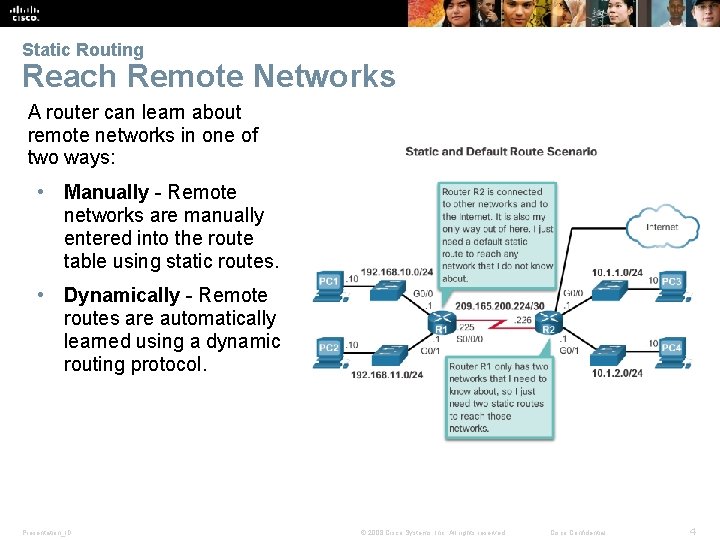
Static Routing Reach Remote Networks A router can learn about remote networks in one of two ways: • Manually - Remote networks are manually entered into the route table using static routes. • Dynamically - Remote routes are automatically learned using a dynamic routing protocol. Presentation_ID © 2008 Cisco Systems, Inc. All rights reserved. Cisco Confidential 4
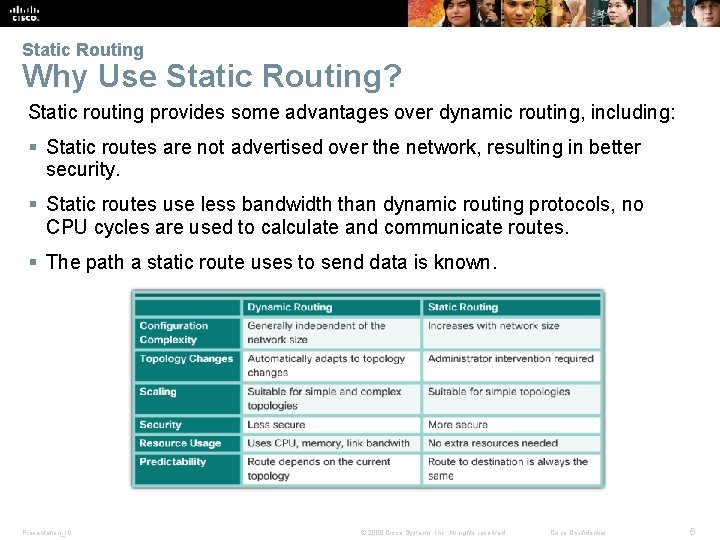
Static Routing Why Use Static Routing? Static routing provides some advantages over dynamic routing, including: § Static routes are not advertised over the network, resulting in better security. § Static routes use less bandwidth than dynamic routing protocols, no CPU cycles are used to calculate and communicate routes. § The path a static route uses to send data is known. Presentation_ID © 2008 Cisco Systems, Inc. All rights reserved. Cisco Confidential 5
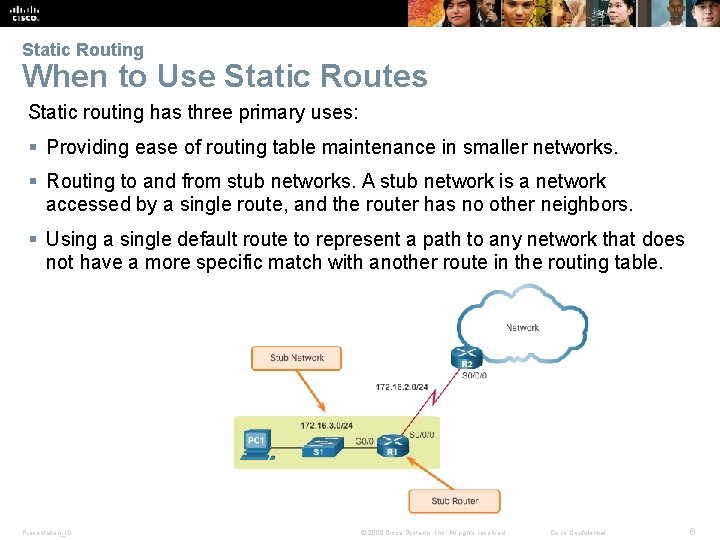
Static Routing When to Use Static Routes Static routing has three primary uses: § Providing ease of routing table maintenance in smaller networks. § Routing to and from stub networks. A stub network is a network accessed by a single route, and the router has no other neighbors. § Using a single default route to represent a path to any network that does not have a more specific match with another route in the routing table. Presentation_ID © 2008 Cisco Systems, Inc. All rights reserved. Cisco Confidential 6
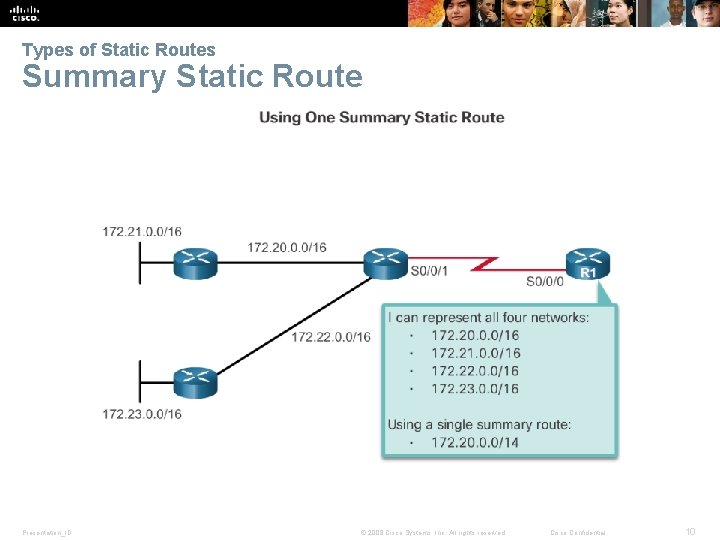
Types of Static Routes Static Route Applications Static Routes are often used to: § Connect to a specific network. § Provide a Gateway of Last Resort for a stub network. § Reduce the number of routes advertised by summarizing several contiguous networks as one static route. § Create a backup route in case a primary route link fails. Presentation_ID © 2008 Cisco Systems, Inc. All rights reserved. Cisco Confidential 7
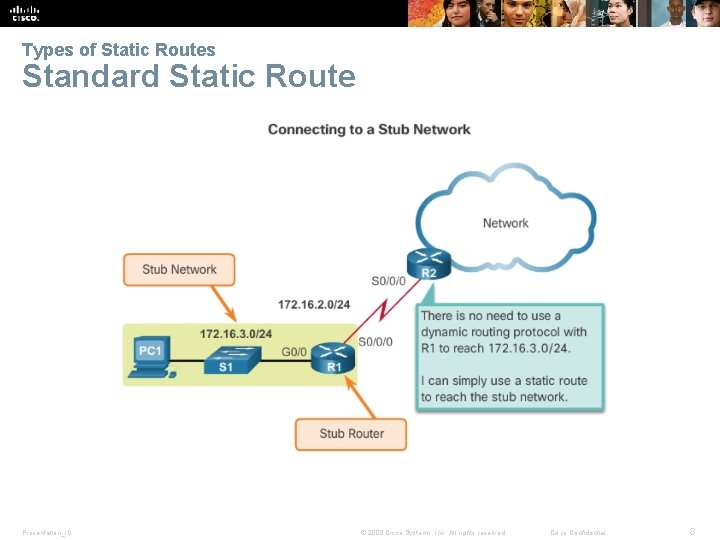
Types of Static Routes Standard Static Route Presentation_ID © 2008 Cisco Systems, Inc. All rights reserved. Cisco Confidential 8
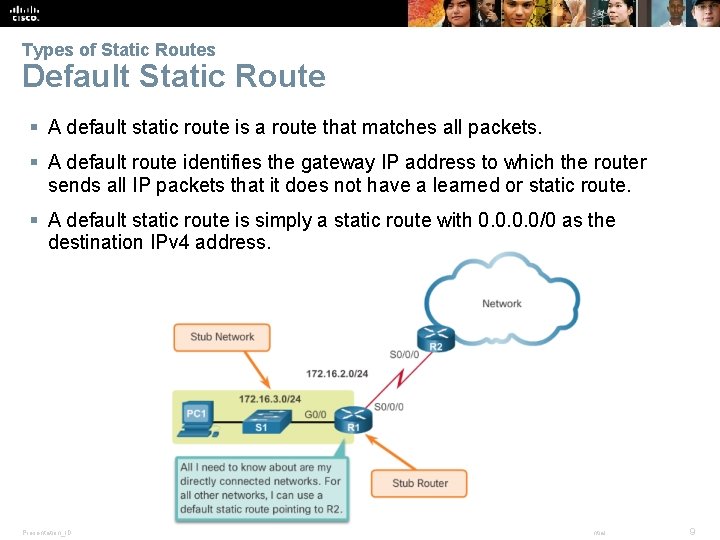
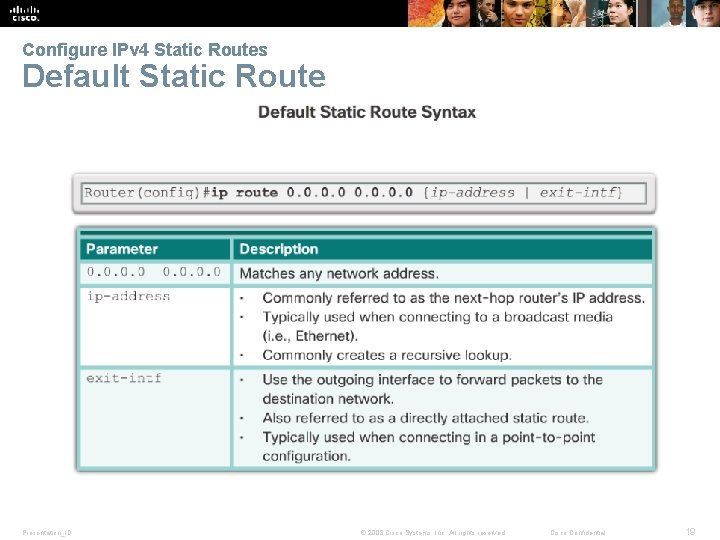
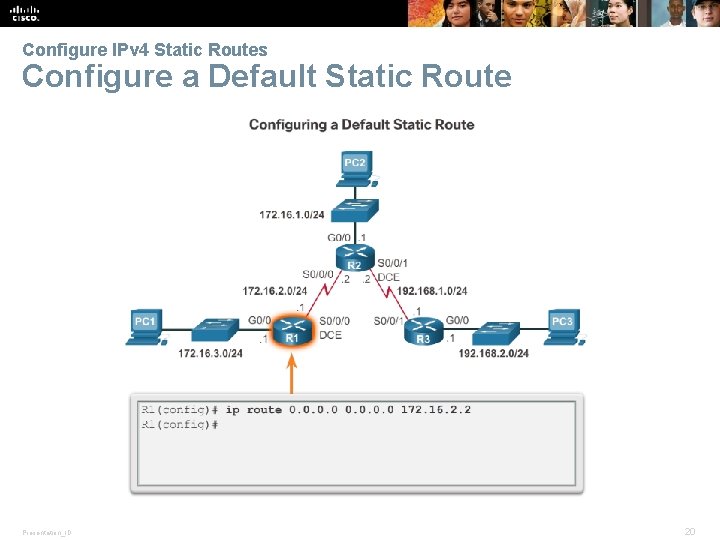
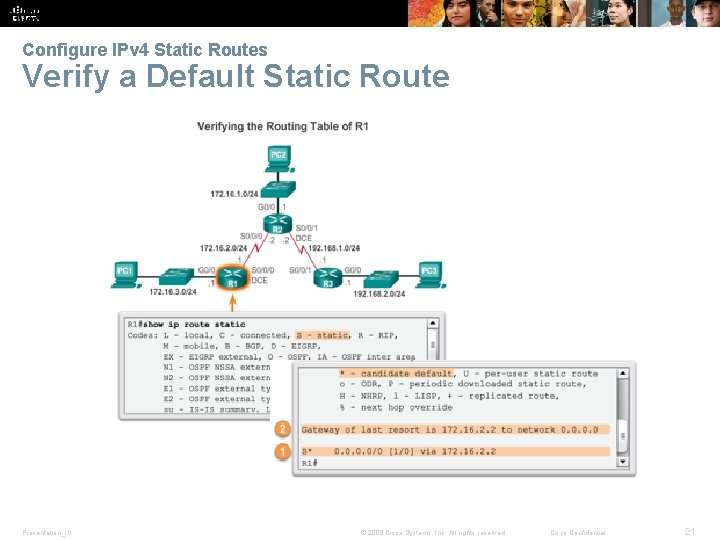
Types of Static Routes Default Static Route § A default static route is a route that matches all packets. § A default route identifies the gateway IP address to which the router sends all IP packets that it does not have a learned or static route. § A default static route is simply a static route with 0. 0/0 as the destination IPv 4 address. Presentation_ID © 2008 Cisco Systems, Inc. All rights reserved. Cisco Confidential 9
Types of Static Routes Summary Static Route Presentation_ID © 2008 Cisco Systems, Inc. All rights reserved. Cisco Confidential 10
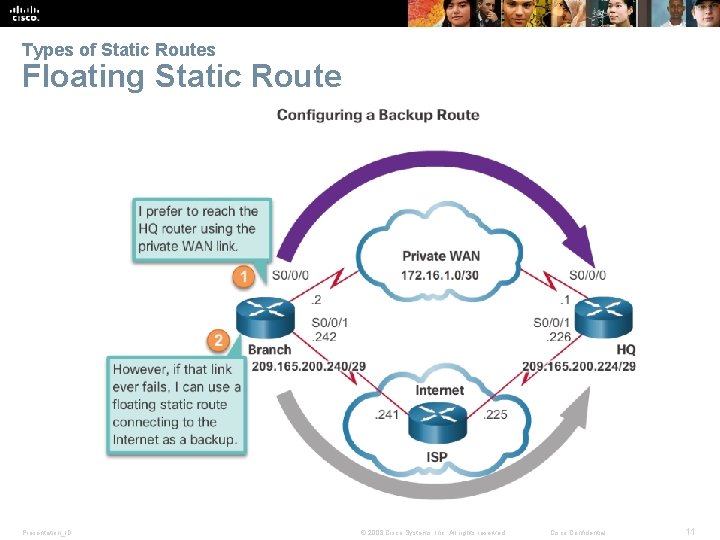
Types of Static Routes Floating Static Route Presentation_ID © 2008 Cisco Systems, Inc. All rights reserved. Cisco Confidential 11
6. 2 Configure Static and Default Routes Presentation_ID © 2008 Cisco Systems, Inc. All rights reserved. Cisco Confidential 12
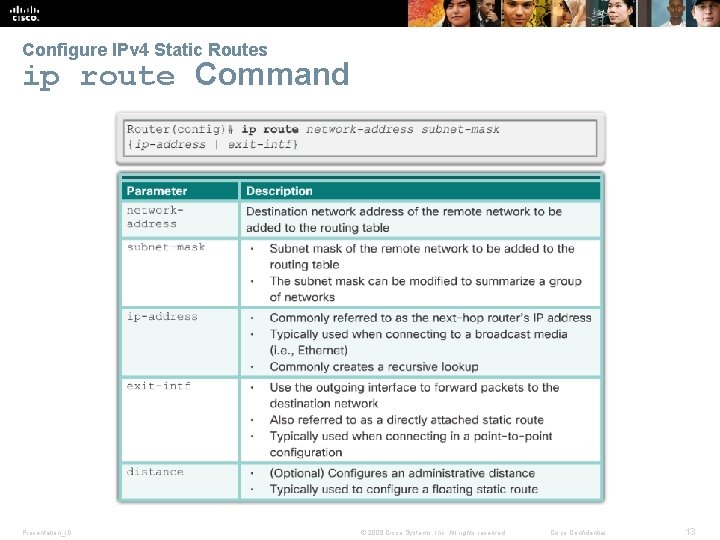
Configure IPv 4 Static Routes ip route Command Presentation_ID © 2008 Cisco Systems, Inc. All rights reserved. Cisco Confidential 13
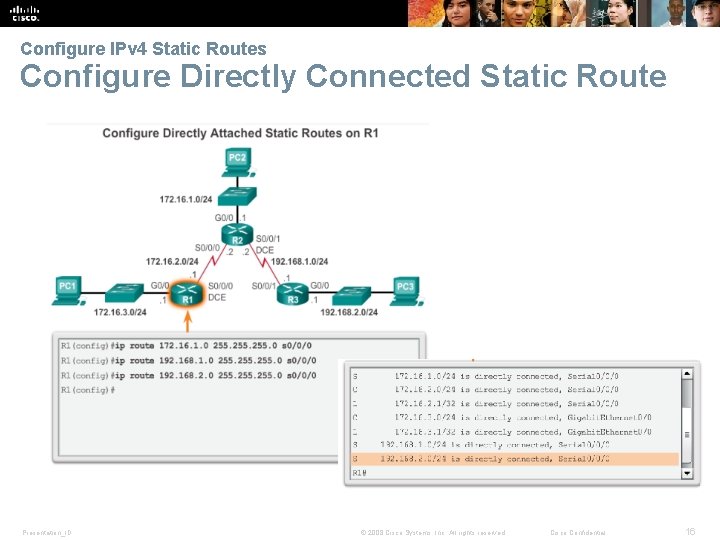
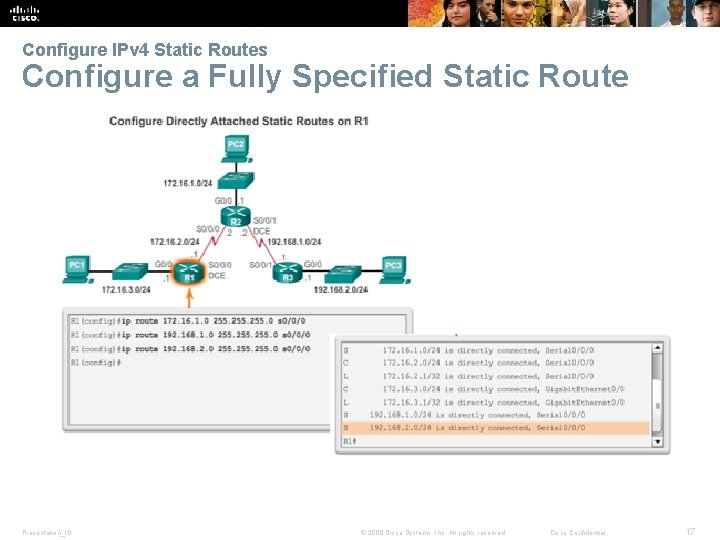
Configure IPv 4 Static Routes Next-Hop Options The next hop can be identified by an IP address, exit interface, or both. How the destination is specified creates one of the three following route types: § Next-hop route - Only the next-hop IP address is specified. § Directly connected static route - Only the router exit interface is specified. § Fully specified static route - The next-hop IP address and exit interface are specified. Presentation_ID © 2008 Cisco Systems, Inc. All rights reserved. Cisco Confidential 14
Configure IPv 4 Static Routes Configure a Next-Hop Static Route Presentation_ID © 2008 Cisco Systems, Inc. All rights reserved. Cisco Confidential 15
Configure IPv 4 Static Routes Configure Directly Connected Static Route Presentation_ID © 2008 Cisco Systems, Inc. All rights reserved. Cisco Confidential 16
Configure IPv 4 Static Routes Configure a Fully Specified Static Route Presentation_ID © 2008 Cisco Systems, Inc. All rights reserved. Cisco Confidential 17
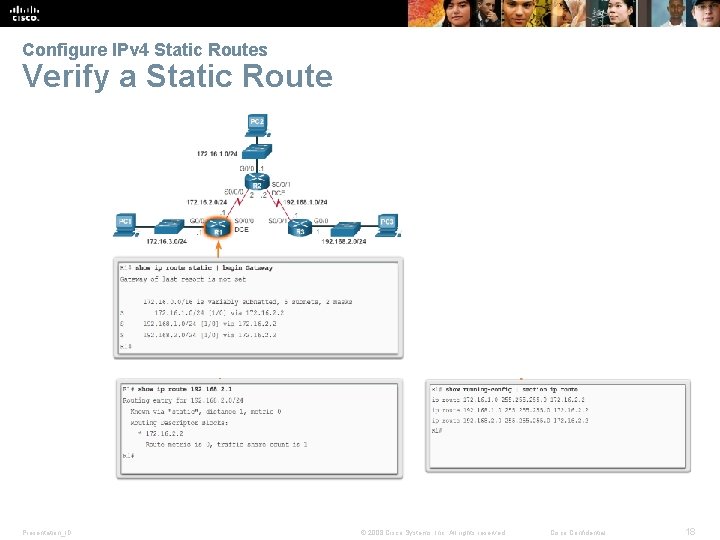
Configure IPv 4 Static Routes Verify a Static Route Presentation_ID © 2008 Cisco Systems, Inc. All rights reserved. Cisco Confidential 18
Configure IPv 4 Static Routes Default Static Route Presentation_ID © 2008 Cisco Systems, Inc. All rights reserved. Cisco Confidential 19
Configure IPv 4 Static Routes Configure a Default Static Route Presentation_ID © 2008 Cisco Systems, Inc. All rights reserved. Cisco Confidential 20
Verify a Default Static Route Configure IPv 4 Static Routes Verify a Default Static Route Presentation_ID © 2008 Cisco Systems, Inc. All rights reserved. Cisco Confidential 21
Verify a Default Static Route Configure IPv 6 Static Routes The ipv 6 route Command Presentation_ID © 2008 Cisco Systems, Inc. All rights reserved. Cisco Confidential 22
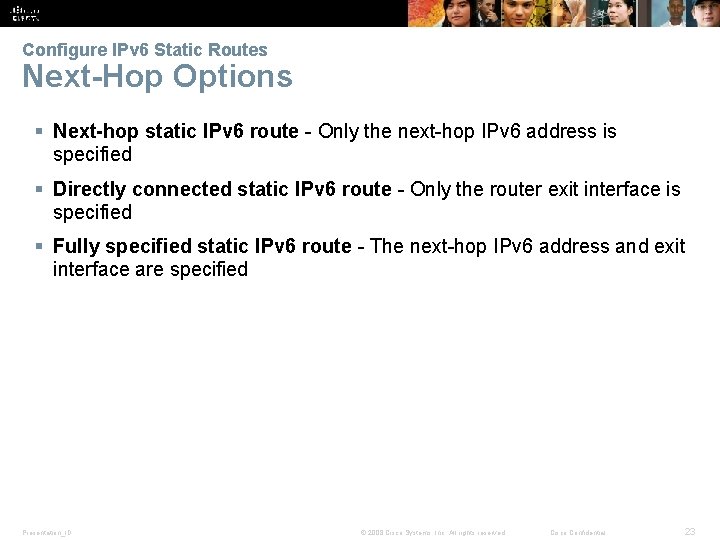
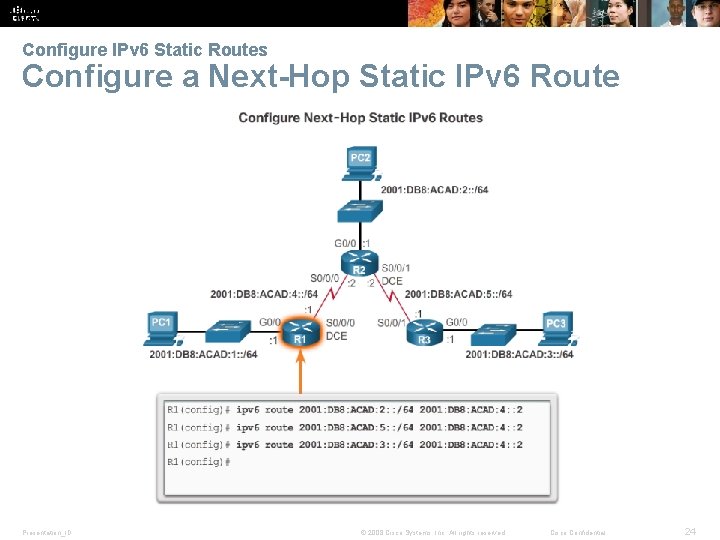
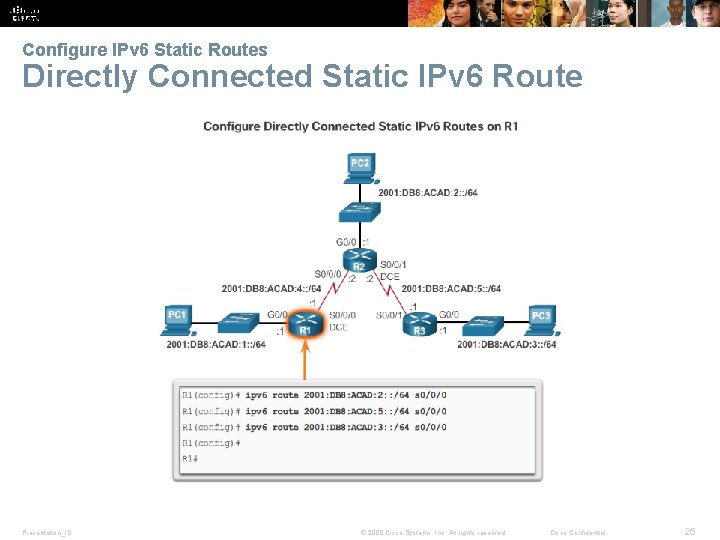
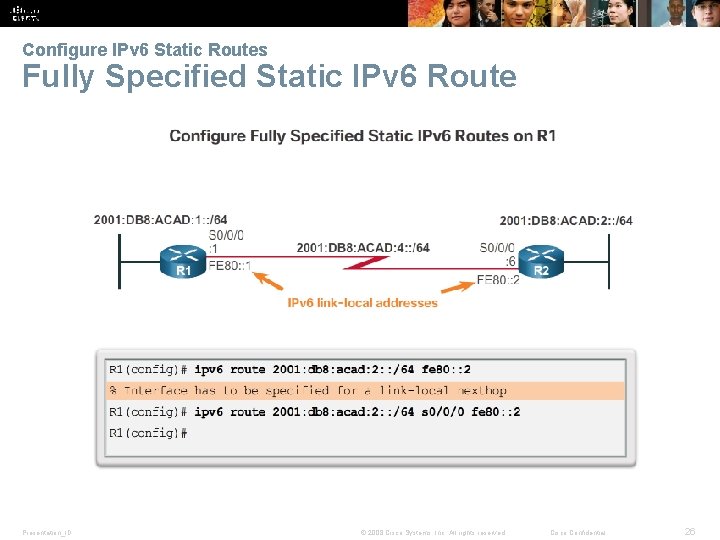
Verify a Default Static Route Configure IPv 6 Static Routes Next-Hop Options § Next-hop static IPv 6 route - Only the next-hop IPv 6 address is specified § Directly connected static IPv 6 route - Only the router exit interface is specified § Fully specified static IPv 6 route - The next-hop IPv 6 address and exit interface are specified Presentation_ID © 2008 Cisco Systems, Inc. All rights reserved. Cisco Confidential 23
Verify a Default Static Route Configure IPv 6 Static Routes Configure a Next-Hop Static IPv 6 Route Presentation_ID © 2008 Cisco Systems, Inc. All rights reserved. Cisco Confidential 24
Verify a Default Static Route Configure IPv 6 Static Routes Directly Connected Static IPv 6 Route Presentation_ID © 2008 Cisco Systems, Inc. All rights reserved. Cisco Confidential 25
Verify a Default Static Route Configure IPv 6 Static Routes Fully Specified Static IPv 6 Route Presentation_ID © 2008 Cisco Systems, Inc. All rights reserved. Cisco Confidential 26
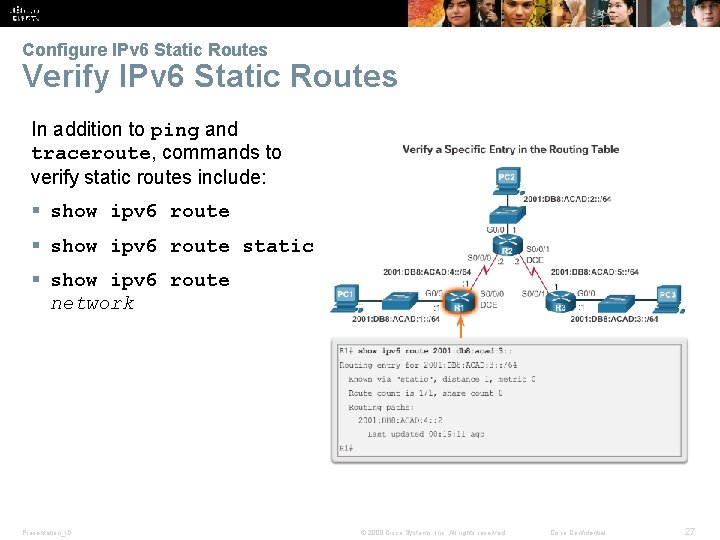
Verify a Default Static Route Configure IPv 6 Static Routes Verify IPv 6 Static Routes In addition to ping and traceroute, commands to verify static routes include: § show ipv 6 route static § show ipv 6 route network Presentation_ID © 2008 Cisco Systems, Inc. All rights reserved. Cisco Confidential 27
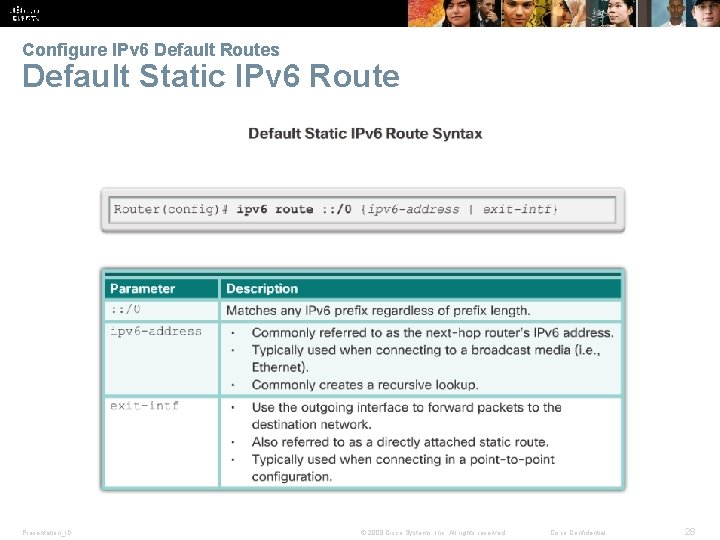
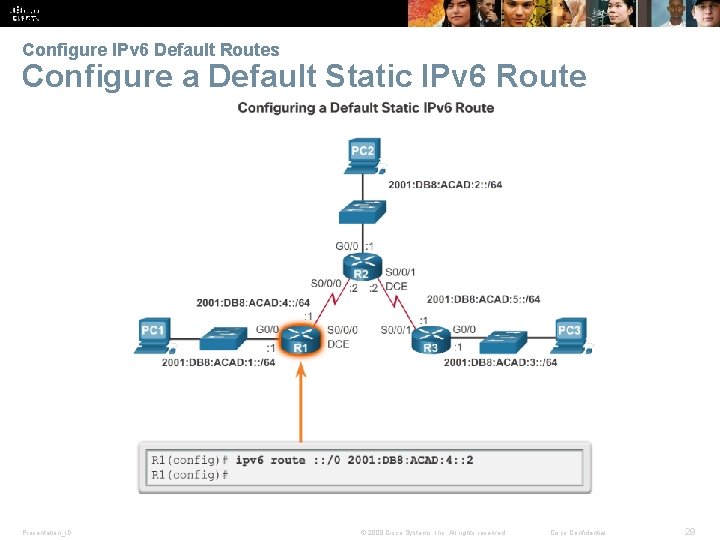
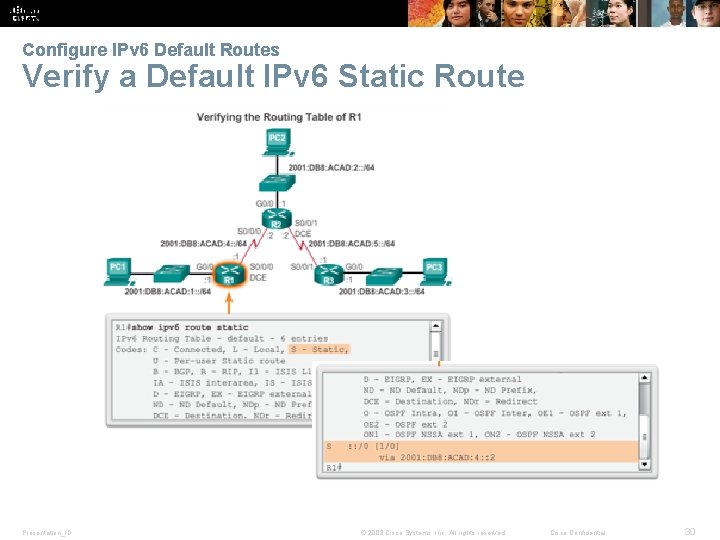
Verify a Default Static Route Configure IPv 6 Default Routes Default Static IPv 6 Route Presentation_ID © 2008 Cisco Systems, Inc. All rights reserved. Cisco Confidential 28
Verify a Default Static Route Configure IPv 6 Default Routes Configure a Default Static IPv 6 Route Presentation_ID © 2008 Cisco Systems, Inc. All rights reserved. Cisco Confidential 29
Verify a Default Static Route Configure IPv 6 Default Routes Verify a Default IPv 6 Static Route Presentation_ID © 2008 Cisco Systems, Inc. All rights reserved. Cisco Confidential 30
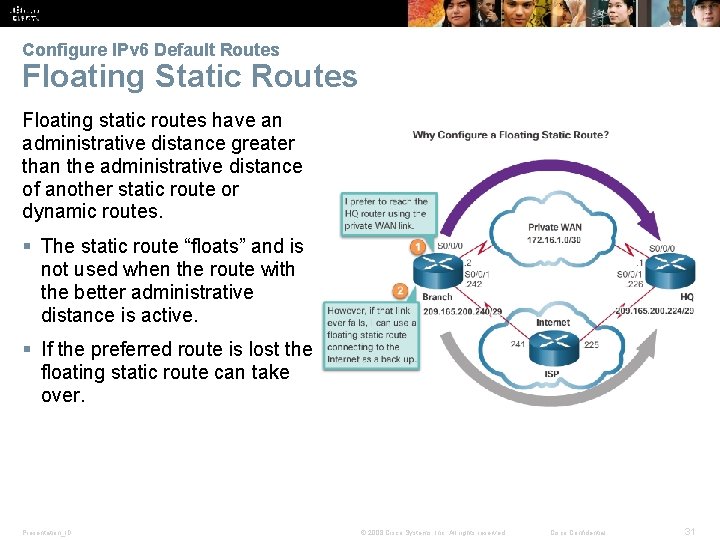
Verify a Default Static Route Configure IPv 6 Default Routes Floating Static Routes Floating static routes have an administrative distance greater than the administrative distance of another static route or dynamic routes. § The static route “floats” and is not used when the route with the better administrative distance is active. § If the preferred route is lost the floating static route can take over. Presentation_ID © 2008 Cisco Systems, Inc. All rights reserved. Cisco Confidential 31
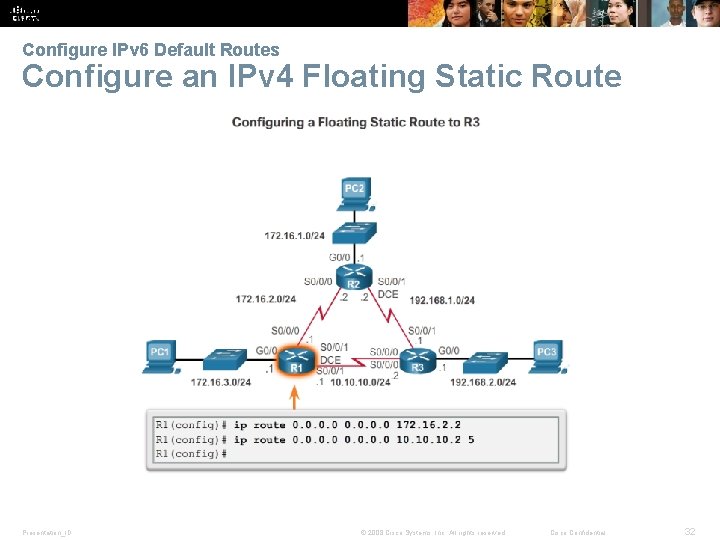
Verify a Default Static Route Configure IPv 6 Default Routes Configure an IPv 4 Floating Static Route Presentation_ID © 2008 Cisco Systems, Inc. All rights reserved. Cisco Confidential 32
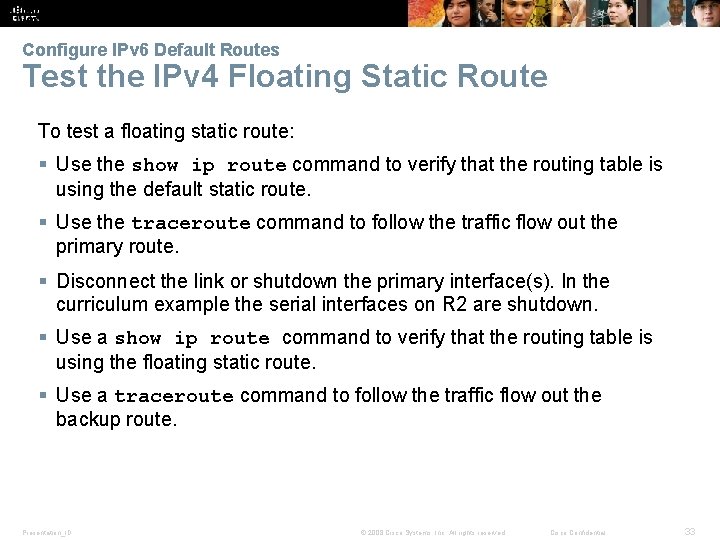
Verify a Default Static Route Configure IPv 6 Default Routes Test the IPv 4 Floating Static Route To test a floating static route: § Use the show ip route command to verify that the routing table is using the default static route. § Use the traceroute command to follow the traffic flow out the primary route. § Disconnect the link or shutdown the primary interface(s). In the curriculum example the serial interfaces on R 2 are shutdown. § Use a show ip route command to verify that the routing table is using the floating static route. § Use a traceroute command to follow the traffic flow out the backup route. Presentation_ID © 2008 Cisco Systems, Inc. All rights reserved. Cisco Confidential 33
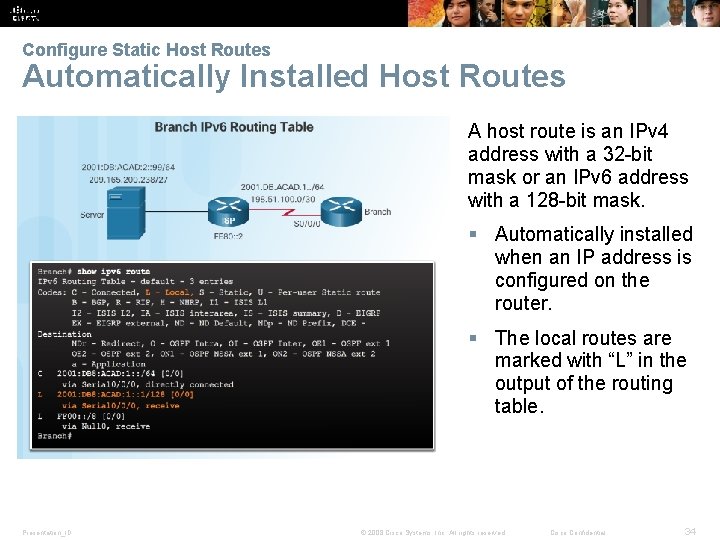
Verify a Default Static Route Configure Static Host Routes Automatically Installed Host Routes A host route is an IPv 4 address with a 32 -bit mask or an IPv 6 address with a 128 -bit mask. § Automatically installed when an IP address is configured on the router. § The local routes are marked with “L” in the output of the routing table. Presentation_ID © 2008 Cisco Systems, Inc. All rights reserved. Cisco Confidential 34
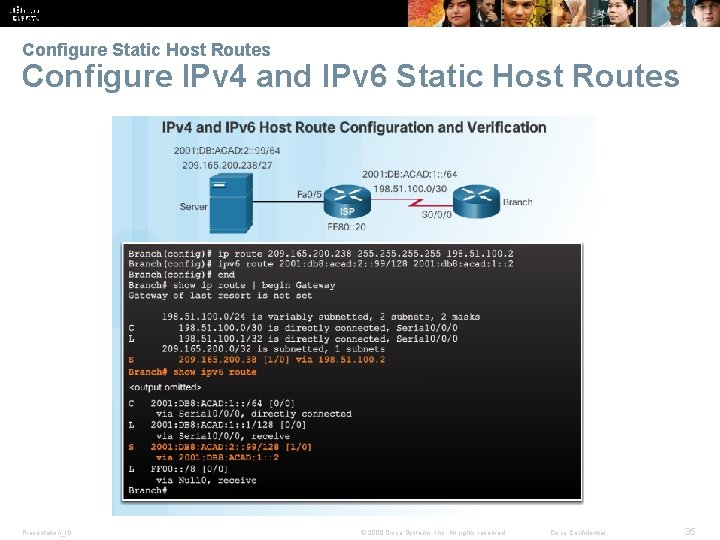
Verify a Default Static Route Configure Static Host Routes Configure IPv 4 and IPv 6 Static Host Routes Presentation_ID © 2008 Cisco Systems, Inc. All rights reserved. Cisco Confidential 35
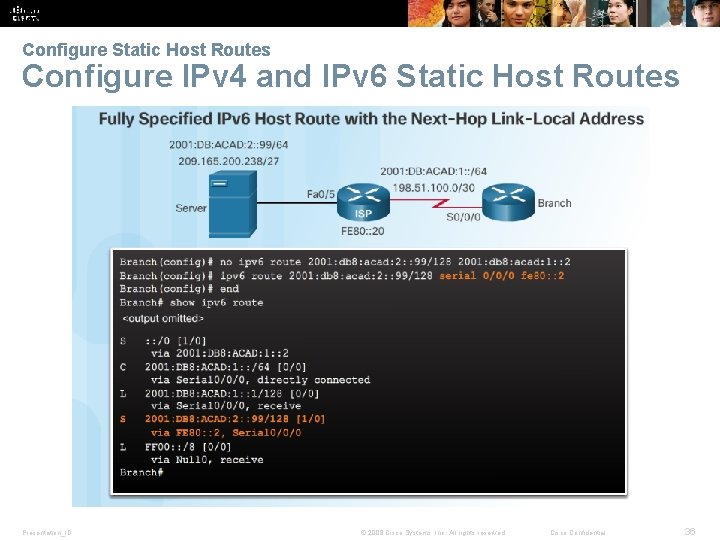
Verify a Default Static Route Configure Static Host Routes Configure IPv 4 and IPv 6 Static Host Routes Presentation_ID © 2008 Cisco Systems, Inc. All rights reserved. Cisco Confidential 36
6. 2 Troubleshoot Static and Default Route Issues Presentation_ID © 2008 Cisco Systems, Inc. All rights reserved. Cisco Confidential 37
Verify a Default Static Route Packet Processing with Static Routes and Packet Forwarding Presentation_ID © 2008 Cisco Systems, Inc. All rights reserved. Cisco Confidential 38
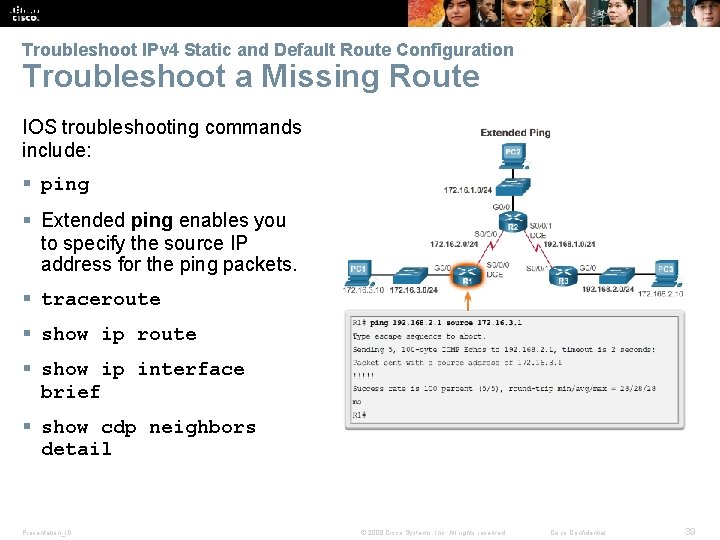
Verify a Default Static Route Troubleshoot IPv 4 Static and Default Route Configuration Troubleshoot a Missing Route IOS troubleshooting commands include: § ping § Extended ping enables you to specify the source IP address for the ping packets. § traceroute § show ip interface brief § show cdp neighbors detail Presentation_ID © 2008 Cisco Systems, Inc. All rights reserved. Cisco Confidential 39
Verify a Default Static Route Packet Processing with Static Routes Solve a Connectivity Problem § Finding a missing (or misconfigured) route requires using the right tools in a methodical manner. § Use the ping command to confirm the destination can’t be reached. § A traceroute would also reveal the closest router (or hop) that fails to respond as expected. In this case, the router would then send an Internet Control Message Protocol (ICMP) destination unreachable message back to the source. § The next step is to investigate the routing table using the show ip route command. Look for missing or misconfigured routes. § Incorrect static routes are a common cause of routing problems. Presentation_ID © 2008 Cisco Systems, Inc. All rights reserved. Cisco Confidential 40
2. 4 Chapter Summary Presentation_ID © 2008 Cisco Systems, Inc. All rights reserved. Cisco Confidential 41
Chapter Summary • Explain the advantages and disadvantages of static routing. • Explain the purpose of different types of static routes. • Configure IPv 4 and IPv 6 static routes by specifying a next-hop address. • Configure IPv 4 and IPv 6 default routes. • Configure a floating static route to provide a backup connection. • Configure IPv 4 and IPv 6 static host routes that direct traffic to a specific host. • Explain how a router processes packets when a static route is configured. • Troubleshoot common static and default route configuration issues. Presentation_ID © 2008 Cisco Systems, Inc. All rights reserved. Cisco Confidential 42
Presentation_ID © 2008 Cisco Systems, Inc. All rights reserved. Cisco Confidential 46
Presentation_ID © 2008 Cisco Systems, Inc. All rights reserved. Cisco Confidential 47