
Instructor Materials Chapter 10 OSPF Tuning and Troubleshooting
Instructor Materials Chapter 10: OSPF Tuning and Troubleshooting CCNA Routing and Switching Scaling Networks Presentation_ID © 2017 Cisco Systems, Inc. All rights reserved. Cisco Confidential 1
Chapter 10 - Sections & Objectives § 10. 1 Advanced Single-Area OSPF Configurations § Configure OSPF to improve network performance. § 10. 2 Troubleshooting Single-Area OSPF Implementations § Troubleshoot common OSPF configuration issues in a small to medium-sized business network. Presentation_ID © 2017 Cisco Systems, Inc. All rights reserved. Cisco Confidential ‹#›
10. 1 Advanced Single-Area OSPF Configurations Presentation_ID © 2017 Cisco Systems, Inc. All rights reserved. Cisco Confidential 3
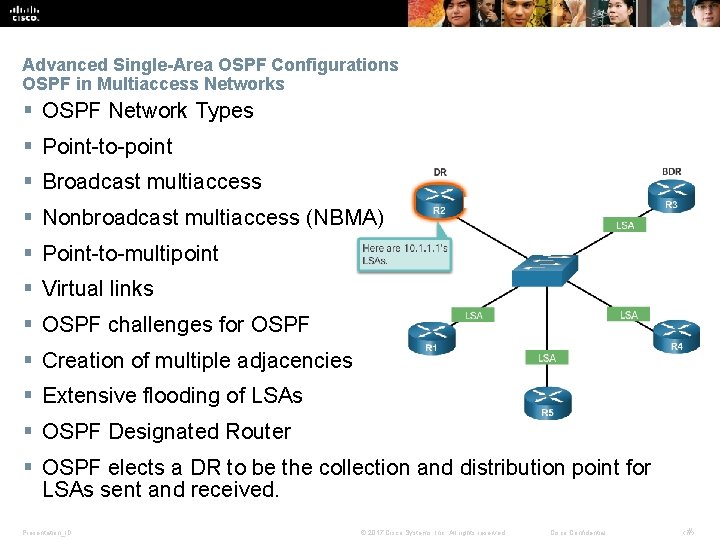
Advanced Single-Area OSPF Configurations OSPF in Multiaccess Networks § OSPF Network Types § Point-to-point § Broadcast multiaccess § Nonbroadcast multiaccess (NBMA) § Point-to-multipoint § Virtual links § OSPF challenges for OSPF § Creation of multiple adjacencies § Extensive flooding of LSAs § OSPF Designated Router § OSPF elects a DR to be the collection and distribution point for LSAs sent and received. Presentation_ID © 2017 Cisco Systems, Inc. All rights reserved. Cisco Confidential ‹#›
Advanced Single-Area OSPF Configurations OSPF in Multiaccess Networks (Cont. ) § § § § Verifying DR/BDR Roles To verify the roles of the OSPFv 2 router, use the show ip ospf interface command. For the equivalent OSPFv 3 command, simply substitute ip with ipv 6. Verifying DR/BDR Adjacencies To verify the OSPFv 2 adjacencies, use the show ip ospf neighbor command. The normal state for an OSPF router is usually FULL. Default DR/BDR Election Process The routers in the network elect the router with the highest interface priority as the DR. § The router with the second highest interface priority is elected as the BDR. § The OSPF Priority § To configure the OSPF priority, use the ip ospf priority value interface command. For the equivalent OSPFv 3 command, simply substitute ip with ipv 6. § With the OSPF priority of 0, the router does not become a DR or BDR. § For values 1 – 255, the higher the value, the more likely the router becomes the DR or BDR on the interface. Presentation_ID © 2017 Cisco Systems, Inc. All rights reserved. Cisco Confidential ‹#›

Advanced Single-Area OSPF Configurations Default Route Propagation § Propagating a Default Static Route in OSPFv 2 § To propagate a default route, the edge router must be configured with: § A default static route using the ip route 0. 0 {ipaddress | exit-intf} command. § The default-information originate router configuration mode command. § Verifying the Propagated IPv 4 Default Route § Verify the default route settings on using the show ip route command Presentation_ID © 2017 Cisco Systems, Inc. All rights reserved. Cisco Confidential ‹#›

Advanced Single-Area OSPF Configurations Default Route Propagation (Cont. ) § Propagating a Default Static Route in OSPFv 3 § The process of propagating a default static route in OSPFv 3 is almost identical to OSPFv 2 § To propagate a default route, the edge router must be configured with: § A default static route using the ipv 6 route : : /0 {ipv 6 -address | exit-intf} command § The default-information originate router configuration mode command. § Verifying the Propagated IPv 6 Default Route § Verify the default static route setting on R 2 using the show ipv 6 route static command Presentation_ID © 2017 Cisco Systems, Inc. All rights reserved. Cisco Confidential ‹#›
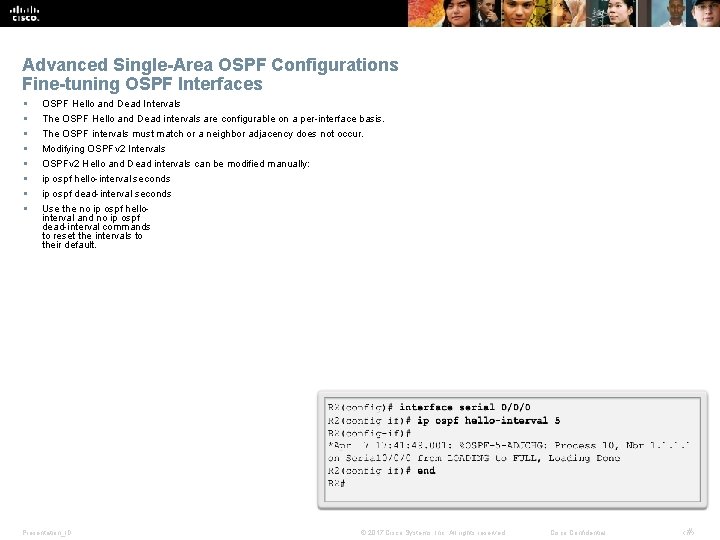
Advanced Single-Area OSPF Configurations Fine-tuning OSPF Interfaces § § § § OSPF Hello and Dead Intervals The OSPF Hello and Dead intervals are configurable on a per-interface basis. The OSPF intervals must match or a neighbor adjacency does not occur. Modifying OSPFv 2 Intervals OSPFv 2 Hello and Dead intervals can be modified manually: ip ospf hello-interval seconds ip ospf dead-interval seconds Use the no ip ospf hellointerval and no ip ospf dead-interval commands to reset the intervals to their default. Presentation_ID © 2017 Cisco Systems, Inc. All rights reserved. Cisco Confidential ‹#›
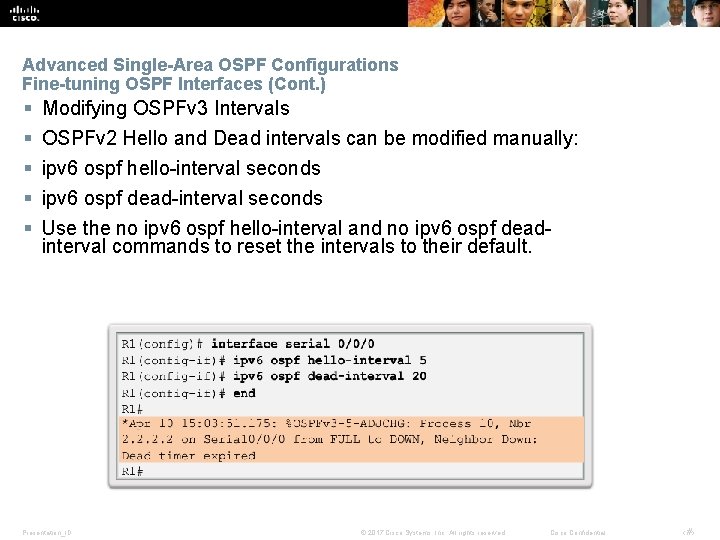
Advanced Single-Area OSPF Configurations Fine-tuning OSPF Interfaces (Cont. ) § § § Modifying OSPFv 3 Intervals OSPFv 2 Hello and Dead intervals can be modified manually: ipv 6 ospf hello-interval seconds ipv 6 ospf dead-interval seconds Use the no ipv 6 ospf hello-interval and no ipv 6 ospf deadinterval commands to reset the intervals to their default. Presentation_ID © 2017 Cisco Systems, Inc. All rights reserved. Cisco Confidential ‹#›
10. 2 Troubleshooting Single-Area OSPF Implementations Presentation_ID © 2017 Cisco Systems, Inc. All rights reserved. Cisco Confidential 10
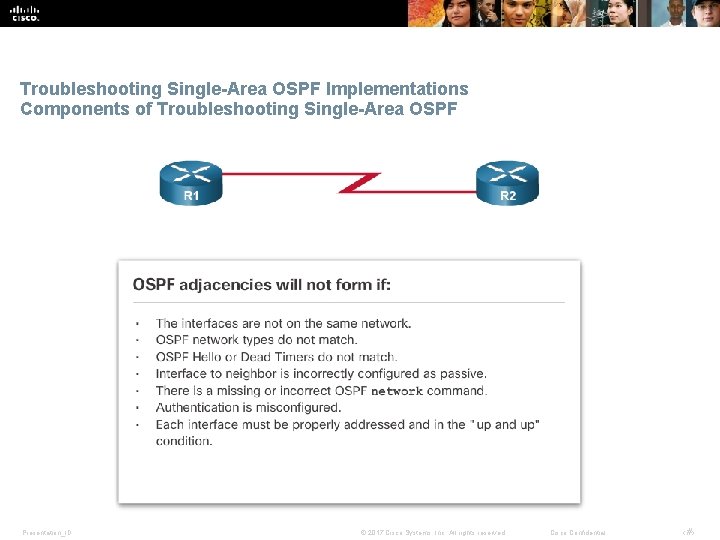
Troubleshooting Single-Area OSPF Implementations Components of Troubleshooting Single-Area OSPF Presentation_ID © 2017 Cisco Systems, Inc. All rights reserved. Cisco Confidential ‹#›
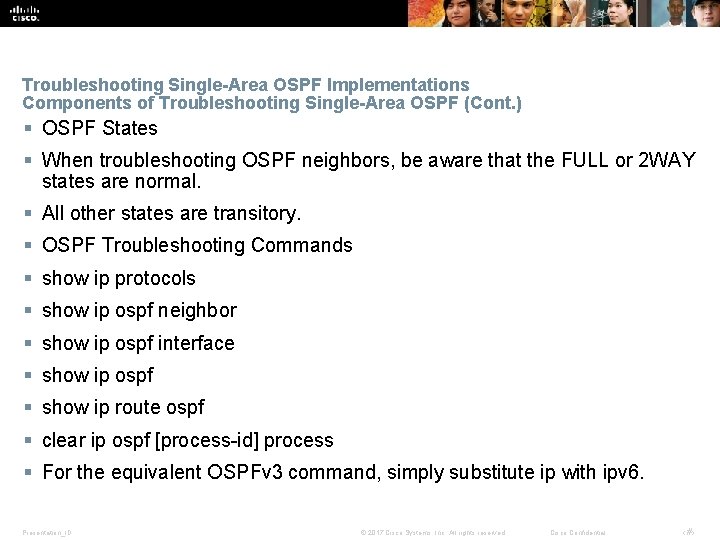
Troubleshooting Single-Area OSPF Implementations Components of Troubleshooting Single-Area OSPF (Cont. ) § OSPF States § When troubleshooting OSPF neighbors, be aware that the FULL or 2 WAY states are normal. § All other states are transitory. § OSPF Troubleshooting Commands § show ip protocols § show ip ospf neighbor § show ip ospf interface § show ip ospf § show ip route ospf § clear ip ospf [process-id] process § For the equivalent OSPFv 3 command, simply substitute ip with ipv 6. Presentation_ID © 2017 Cisco Systems, Inc. All rights reserved. Cisco Confidential ‹#›

Troubleshooting Single-Area OSPF Implementations Components of Troubleshooting Single-Area OSPF (Cont. ) § Components of Troubleshooting OSPF § Neighbor table is not correct § Are the interfaces operational? Are the interfaces enabled for OSPF? Does the OSPF area match? Is there an interface that is configured as passive? § Routing table is not correct § Are the networks being advertised? Is there an ACL that is blocking advertisements? Is there another routing protocol with a lower AD being used as well? Are all areas connected to Area 0? § Traffic does not take the desired path § Verify the OSPF cost on an interface. Verify the OSPF reference bandwidth. Presentation_ID © 2017 Cisco Systems, Inc. All rights reserved. Cisco Confidential ‹#›
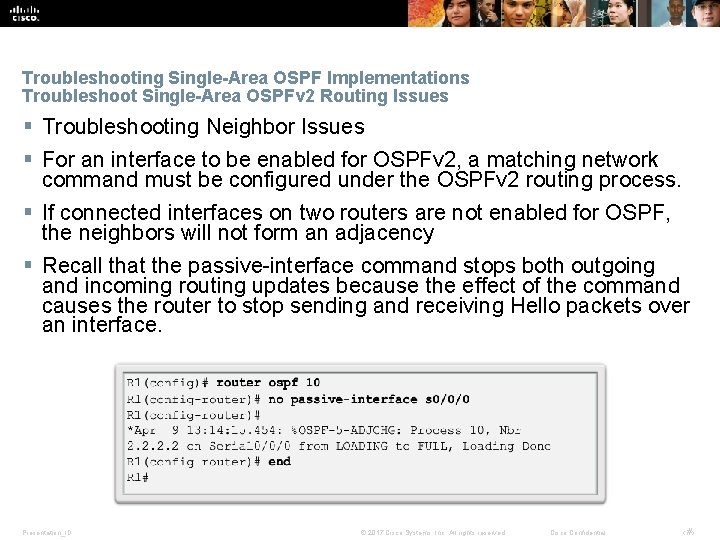
Troubleshooting Single-Area OSPF Implementations Troubleshoot Single-Area OSPFv 2 Routing Issues § Troubleshooting Neighbor Issues § For an interface to be enabled for OSPFv 2, a matching network command must be configured under the OSPFv 2 routing process. § If connected interfaces on two routers are not enabled for OSPF, the neighbors will not form an adjacency § Recall that the passive-interface command stops both outgoing and incoming routing updates because the effect of the command causes the router to stop sending and receiving Hello packets over an interface. Presentation_ID © 2017 Cisco Systems, Inc. All rights reserved. Cisco Confidential ‹#›
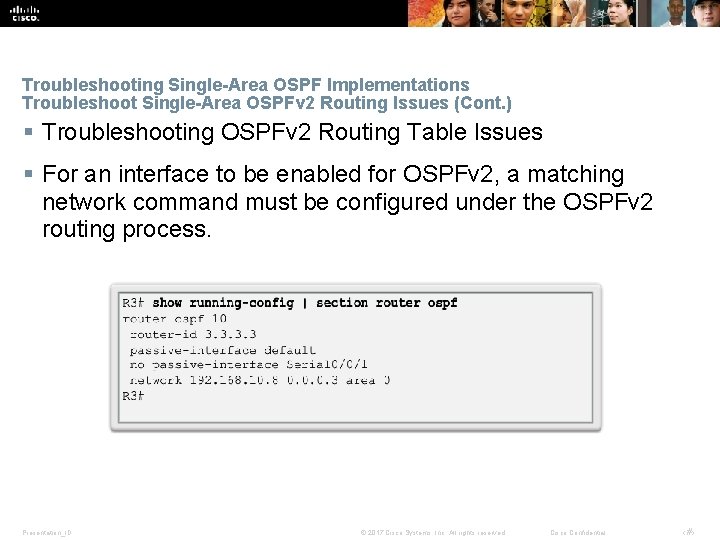
Troubleshooting Single-Area OSPF Implementations Troubleshoot Single-Area OSPFv 2 Routing Issues (Cont. ) § Troubleshooting OSPFv 2 Routing Table Issues § For an interface to be enabled for OSPFv 2, a matching network command must be configured under the OSPFv 2 routing process. Presentation_ID © 2017 Cisco Systems, Inc. All rights reserved. Cisco Confidential ‹#›
Troubleshooting Single-Area OSPF Implementations Troubleshoot Single-Area OSPFv 3 Routing Issues § OSPFv 3 Troubleshooting Commands § show ipv 6 protocols § show ipv 6 ospf neighbor § show ipv 6 ospf interface § show ipv 6 ospf § show ipv 6 route ospf § clear ip ospfv 6 [process-id] process § Troubleshooting OSPFv 3 § Unlike OSPFv 2, OSPFV 3 does not use the network command. Instead OSPFv 3 is enabled directly on the interface. Presentation_ID © 2017 Cisco Systems, Inc. All rights reserved. Cisco Confidential ‹#›
Troubleshooting Single-Area OSPF Implementations Troubleshoot Multiarea OSPFv 2 and OSPFv 3 § Multiarea OSPF Troubleshooting Skills § Before you can begin to diagnose and resolve problems related to a multiarea OSPF implementation, you must be able to do the following: § Understand the processes OSPF uses to distribute, store, and select routing information. § Understand how OSPF information flows within and between areas. § Use Cisco IOS commands to gather and interpret the information necessary to troubleshoot OSPF operation. § Multiarea OSPF Troubleshooting Data Structures § OSPF stores routing information in four main data structures: § Interface table § Neighbor table § Link-state database (LSDB) § Routing table Presentation_ID © 2017 Cisco Systems, Inc. All rights reserved. Cisco Confidential ‹#›
10. 3 Chapter Summary Presentation_ID © 2017 Cisco Systems, Inc. All rights reserved. Cisco Confidential 18
Chapter Summary § OSPF defines five network types: point-to-point, broadcast multiaccess, nonbroadcast multiaccess, point -to-multipoint, and virtual links. § Multiaccess networks can create two challenges for OSPF regarding the flooding of LSAs: creation of multiple adjacencies and extensive flooding of LSAs. The solution to managing the number of adjacencies and the flooding of LSAs on a multiaccess network is the DR and BDR. If the DR stops producing Hellos, the BDR promotes itself and assumes the role of DR. § The routers in the network elect the router with the highest interface priority as DR. The router with the second highest interface priority is elected the BDR. The higher the priority, the likelier the router will be selected as the DR. If set to 0, the router is not capable of becoming the DR. The default priority of multiaccess broadcast interfaces is 1. Therefore, unless otherwise configured, all routers have an equal priority value and must rely on another tie breaking method during the DR/BDR election. If the interface priorities are equal, then the router with the highest router ID is elected the DR. The router with the second highest router ID is the BDR. The addition of a new router does not initiate a new election process. § To propagate a default route in OSPF, the router must be configured with a default static route and the default-information originate command must be added to the configuration. Verify routes with the show ip route or show ipv 6 route command. § To assist OSPF in making the correct path determination, the reference bandwidth must be changed to a higher value to accommodate networks with links faster than 100 Mb/s. To adjust the reference bandwidth, use the auto-cost reference-bandwidth Mbps router configuration mode command. To adjust the interface bandwidth, use the bandwidth kilobits interface configuration mode command. The cost can be manually configured on an interface using the ip ospf cost value interface configuration mode command. Presentation_ID © 2017 Cisco Systems, Inc. All rights reserved. Cisco Confidential ‹#›
Chapter Summary (Cont. ) § The OSPF Hello and Dead intervals must match or a neighbor adjacency does not occur. To modify these intervals, use the following interface commands: § ip ospf hello-interval seconds § ip ospf dead-interval seconds § ipv 6 ospf hello-interval seconds § ipv 6 ospf dead-interval seconds § When troubleshooting OSPF neighbors, be aware that the FULL or 2 WAY states are normal. The following commands summarize OSPFv 2 troubleshooting: § show ip protocols § show ip ospf neighbor § show ip ospf interface § show ip ospf § show ip route ospf § clear ip ospf [process-id] process § Troubleshooting OSPFv 3 is similar to OSPFv 2. The following commands are the equivalent commands used with OSPFv 3: show ipv 6 protocols, show ipv 6 ospf neighbor, show ipv 6 ospf interface, show ipv 6 ospf, show ipv 6 route ospf, and clear ipv 6 ospf [process-id] process. Presentation_ID © 2017 Cisco Systems, Inc. All rights reserved. Cisco Confidential ‹#›
Presentation_ID © 2017 Cisco Systems, Inc. All rights reserved. Cisco Confidential ‹#›

Presentation_ID © 2017 Cisco Systems, Inc. All rights reserved. Cisco Confidential ‹#›
- Slides: 22