
Installation Guide for AC6000 V 1 4 Fingerprint
- Slides: 24
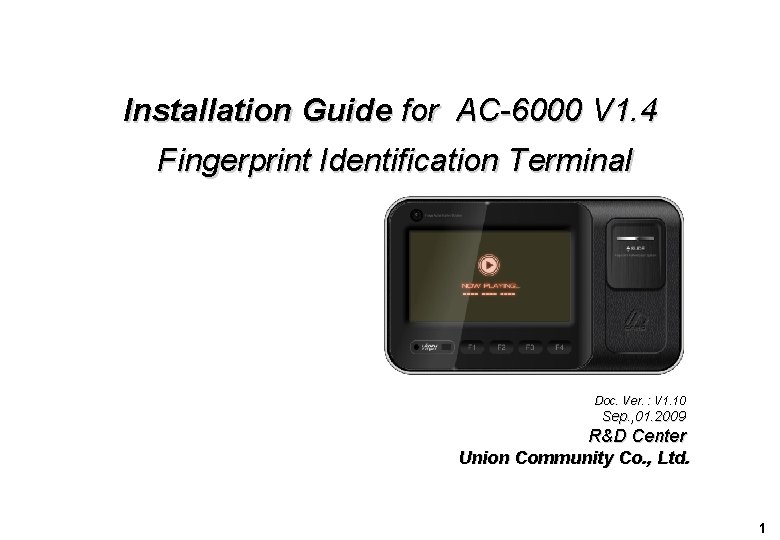
Installation Guide for AC-6000 V 1. 4 Fingerprint Identification Terminal Doc. Ver. : V 1. 10 Sep. , 01. 2009 R&D Center Union Community Co. , Ltd. 1
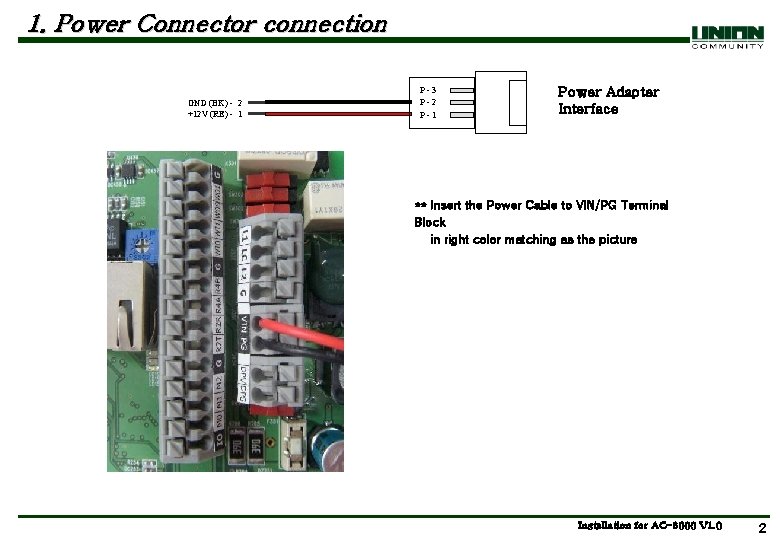
1. Power Connector connection GND (BK) - 2 +12 V (RE) - 1 P-3 P-2 P-1 Power Adapter Interface ** Insert the Power Cable to VIN/PG Terminal Block in right color matching as the picture Installation for AC-6000 V 1. 0 2
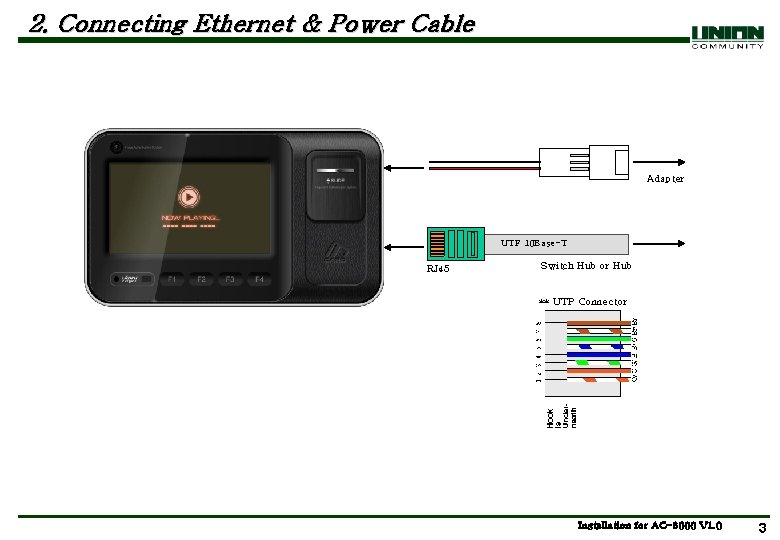
2. Connecting Ethernet & Power Cable Adapter UTP 10 Base-T RJ 45 Switch Hub or Hub ** UTP Connector Installation for AC-6000 V 1. 0 3
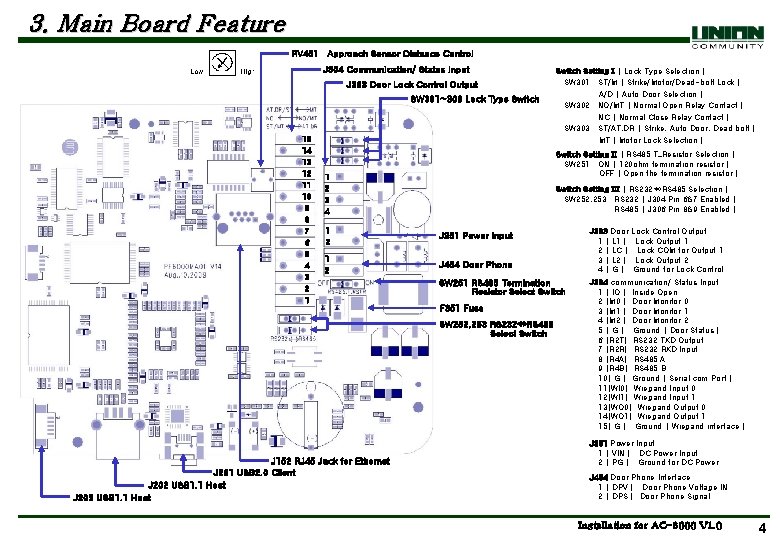
3. Main Board Feature RV 451 Approach Sensor Distance Control J 304 Communication/ Status Input J 303 Door Lock Control Output SW 301~303 Lock Type Switch 15 14 13 12 11 10 9 8 7 6 5 4 3 2 1 Switch Setting II [ RS 485 T_Resistor Selection ] SW 251 : ON [ 120 ohm termination resistor ] OFF [ Open the termination resistor ] 1 2 3 4 Switch Setting III [ RS 232 RS 485 Selection ] SW 252, 253 : RS 232 [ J 304 Pin 6&7 Enabled ] RS 485 [ J 306 Pin 8&9 Enabled ] 1 2 J 351 Power Input 1 2 J 454 Door Phone SW 251 RS 485 Termination Resistor Select Switch F 351 Fuse SW 252, 253 RS 232 RS 485 Select Switch J 152 RJ 45 Jack for Ethernet J 201 USB 2. 0 Client J 202 USB 1. 1 Host J 203 USB 1. 1 Host Switch Setting I [ Lock Type Selection ] SW 301 : ST/M [ Strike/Motor/Dead-bolt Lock ] A/D [ Auto Door Selection ] SW 302 : NO/MT [ Normal Open Relay Contact ] NC [ Normal Close Relay Contact ] SW 303 : ST/AT. DR [ Strike, Auto Door, Dead bolt ] MT [ Motor Lock Selection ] J 303 Door Lock Control Output 1 [ L 1 ] : Lock Output 1 2 [ LC ] : Lock COM for Output 1 3 [ L 2 ] : Lock Output 2 4 [ G ] : Ground for Lock Control J 304 communication/ Status Input 1 [ IO ]: Inside Open 2 [M 0 ]: Door Monitor 0 3 [M 1 ]: Door Monitor 1 4 [M 2 ]: Door Monitor 2 5 [ G ] : Ground [ Door Status ] 6 [R 2 T]: RS 232 TXD Output 7 [R 2 R]: RS 232 RXD Input 8 [R 4 A]: RS 485 A 9 [R 4 B]: RS 485 B 10[ G ]: Ground [ Serial com Port ] 11[WI 0]: Wiegand Input 0 12[WI 1]: Wiegand Input 1 13[WO 0]: Wiegand Output 0 14[WO 1]: Wiegand Output 1 15[ G ] : Ground [ Wiegand interface ] J 351 Power Input 1 [ VIN ] : DC Power Input 2 [ PG ] : Ground for DC Power J 454 Door Phone Interface 1 [ DPV ] : Door Phone Voltage IN 2 [ DPS ] : Door Phone Signal Installation for AC-6000 V 1. 0 4
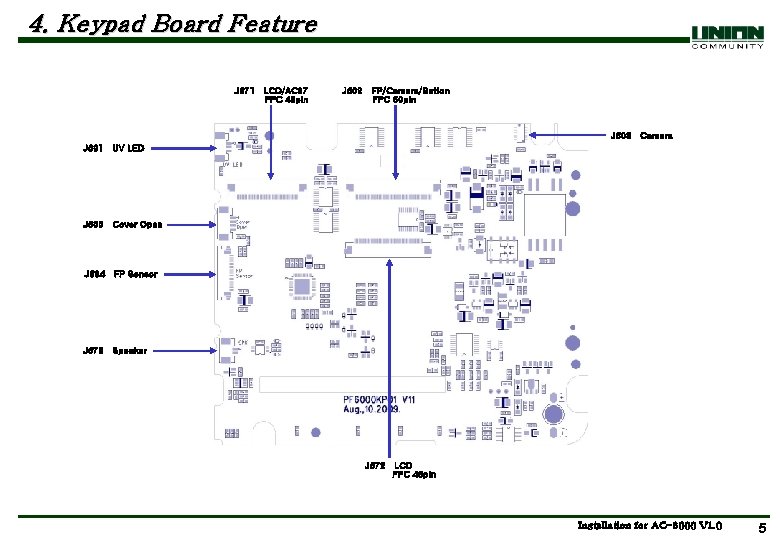
4. Keypad Board Feature J 671 LCD/AC 97 FPC 40 pin J 602 FP/Camera/Button FPC 50 pin J 603 Camera J 601 UV LED J 605 Cover Open J 604 FP Sensor J 673 Speaker J 672 LCD FPC 45 pin Installation for AC-6000 V 1. 0 5
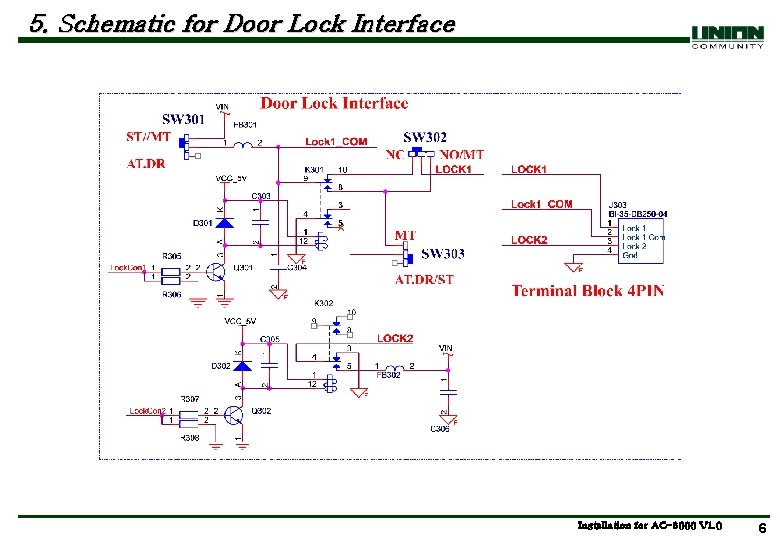
5. Schematic for Door Lock Interface Installation for AC-6000 V 1. 0 6
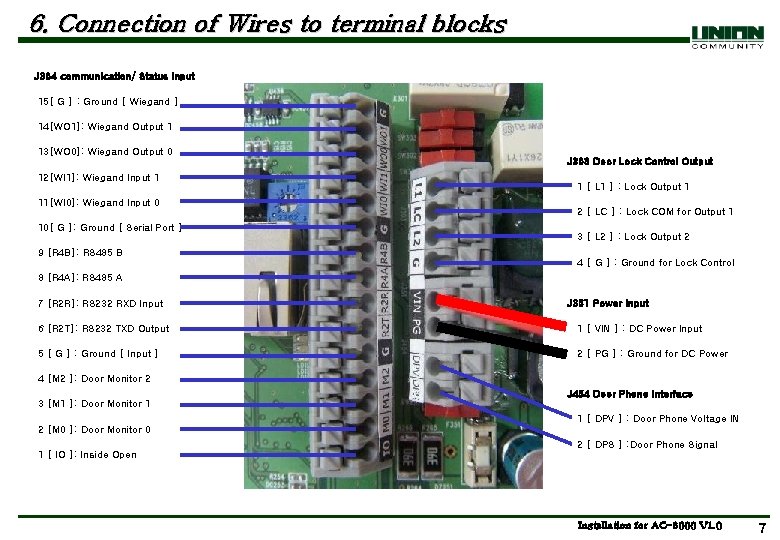
6. Connection of Wires to terminal blocks J 304 communication/ Status Input 15[ G ] : Ground [ Wiegand ] 14[WO 1]: Wiegand Output 1 13[WO 0]: Wiegand Output 0 12[WI 1]: Wiegand Input 1 11[WI 0]: Wiegand Input 0 10[ G ]: Ground [ Serial Port ] 9 [R 4 B]: RS 485 B J 303 Door Lock Control Output 1 [ L 1 ] : Lock Output 1 2 [ LC ] : Lock COM for Output 1 3 [ L 2 ] : Lock Output 2 4 [ G ] : Ground for Lock Control 8 [R 4 A]: RS 485 A 7 [R 2 R]: RS 232 RXD Input J 351 Power Input 6 [R 2 T]: RS 232 TXD Output 1 [ VIN ] : DC Power Input 5 [ G ] : Ground [ Input ] 2 [ PG ] : Ground for DC Power 4 [M 2 ]: Door Monitor 2 J 454 Door Phone Interface 3 [M 1 ]: Door Monitor 1 1 [ DPV ] : Door Phone Voltage IN 2 [M 0 ]: Door Monitor 0 2 [ DPS ] : Door Phone Signal 1 [ IO ]: Inside Open Installation for AC-6000 V 1. 0 7
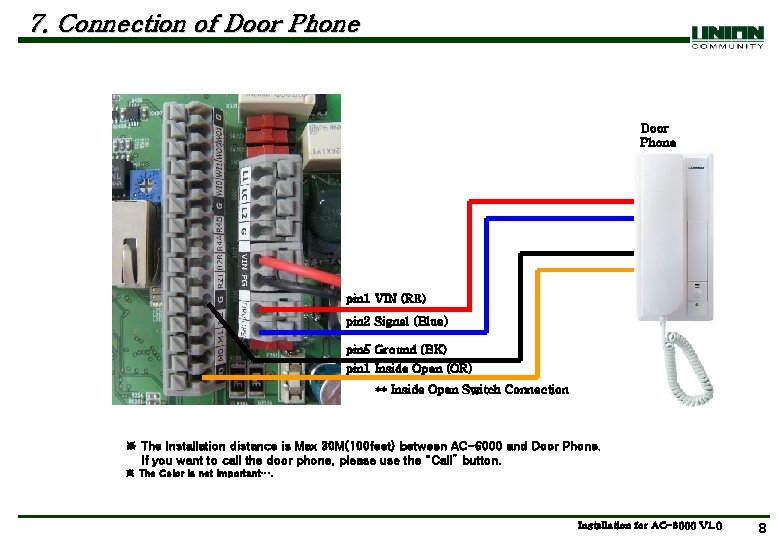
7. Connection of Door Phone pin 1 VIN (RE) pin 2 Signal (Blue) pin 5 Ground (BK) pin 1 Inside Open (OR) ** Inside Open Switch Connection ※ The Installation distance is Max 30 M(100 feet) between AC-6000 and Door Phone. If you want to call the door phone, please use the “Call” button. ※ The Color is not important…. Installation for AC-6000 V 1. 0 8
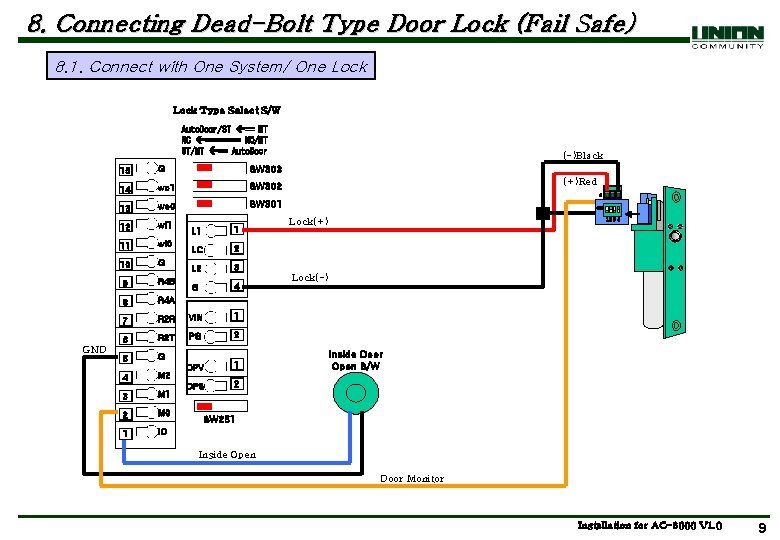
8. Connecting Dead-Bolt Type Door Lock (Fail Safe) 8. 1. Connect with One System/ One Lock Type Select S/W Auto. Door/ST == MT NC ==== NO/MT ST/MT == Auto. Door GND 15 G SW 303 14 wo 1 SW 302 13 wo 0 SW 301 12 wi 1 11 wi 0 10 G 9 R 4 B 8 R 4 A 7 L 1 1 LC 2 L 2 3 G 4 R 2 R VIN 1 6 R 2 T PG 2 5 G 1 4 M 2 DPV 2 M 1 DPS 3 2 M 0 1 IO (-)Black (+)Red ON Lock(+) 12 3 4 Lock(-) Inside Door Open S/W SW 251 Inside Open Door Monitor Installation for AC-6000 V 1. 0 9
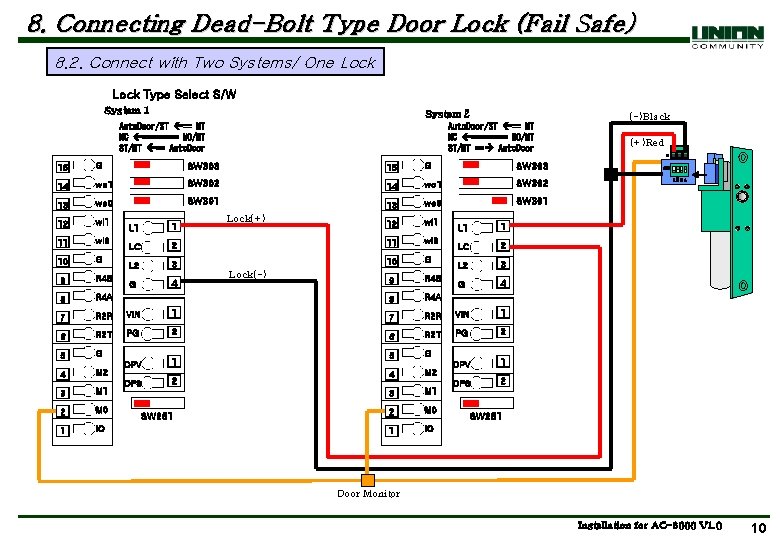
8. Connecting Dead-Bolt Type Door Lock (Fail Safe) 8. 2. Connect with Two Systems/ One Lock Type Select S/W System 1 System 2 Auto. Door/ST == MT NC ==== NO/MT ST/MT == Auto. Door (-)Black Auto. Door/ST == MT NC ==== NO/MT ST/MT == Auto. Door 15 G SW 303 14 wo 1 SW 302 13 wo 0 SW 301 12 wi 1 11 wi 0 10 G 9 R 4 B 8 R 4 A 7 1 Lock(+) 2 LC L 2 3 G 4 9 R 4 B 8 R 4 A 7 R 2 R VIN 1 6 R 2 T PG 2 5 G 1 4 M 2 DPV 3 M 1 2 M 0 1 IO DPS 2 SW 251 Lock(-) L 1 1 LC 2 L 2 3 G 4 R 2 R VIN 1 6 R 2 T PG 2 5 G 1 M 2 DPV 4 2 M 1 DPS 3 2 M 0 1 IO (+)Red ON 12 3 4 SW 251 Door Monitor Installation for AC-6000 V 1. 0 10
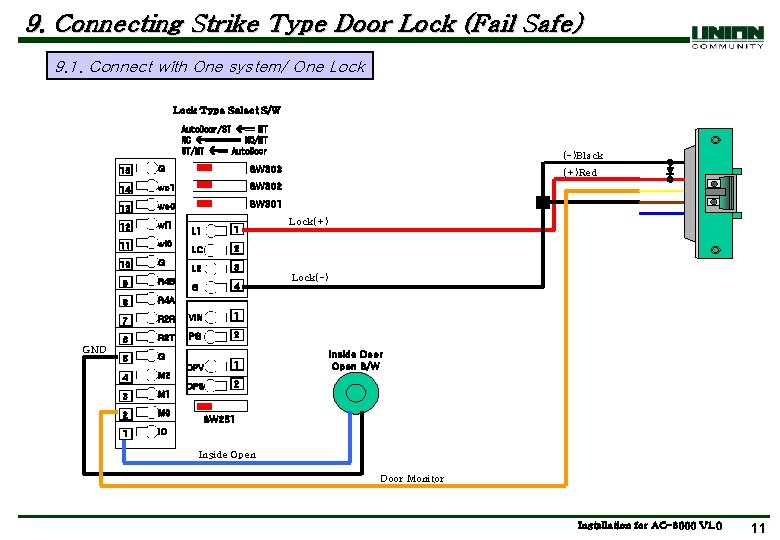
9. Connecting Strike Type Door Lock (Fail Safe) 9. 1. Connect with One system/ One Lock Type Select S/W Auto. Door/ST == MT NC ==== NO/MT ST/MT == Auto. Door GND 15 G SW 303 14 wo 1 SW 302 13 wo 0 SW 301 12 wi 1 11 wi 0 10 G 9 R 4 B 8 R 4 A 7 L 1 1 LC 2 L 2 3 G 4 R 2 R VIN 1 6 R 2 T PG 2 5 G 1 4 M 2 DPV 2 M 1 DPS 3 2 M 0 1 IO (-)Black (+)Red Lock(+) Lock(-) Inside Door Open S/W SW 251 Inside Open Door Monitor Installation for AC-6000 V 1. 0 11
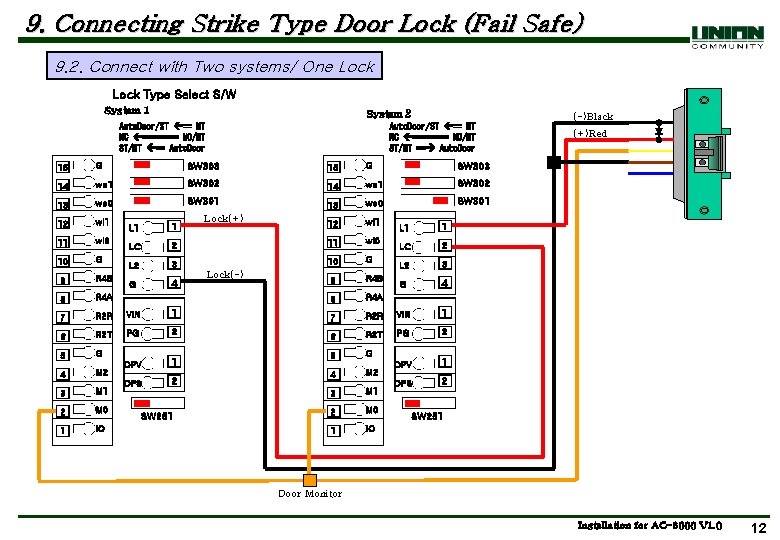
9. Connecting Strike Type Door Lock (Fail Safe) 9. 2. Connect with Two systems/ One Lock Type Select S/W System 1 System 2 Auto. Door/ST == MT NC ==== NO/MT ST/MT == Auto. Door (-)Black Auto. Door/ST == MT NC ==== NO/MT ST/MT == Auto. Door 15 G SW 303 14 wo 1 SW 302 13 wo 0 SW 301 12 wi 1 11 wi 0 10 G 9 R 4 B 8 R 4 A 7 1 Lock(+) 2 LC L 2 3 G 4 9 R 4 B 8 R 4 A 7 R 2 R VIN 1 6 R 2 T PG 2 5 G 1 4 M 2 DPV 3 M 1 2 M 0 1 IO DPS 2 SW 251 Lock(-) L 1 1 LC 2 L 2 3 G 4 R 2 R VIN 1 6 R 2 T PG 2 5 G 1 M 2 DPV 4 2 M 1 DPS 3 2 M 0 1 IO (+)Red SW 251 Door Monitor Installation for AC-6000 V 1. 0 12
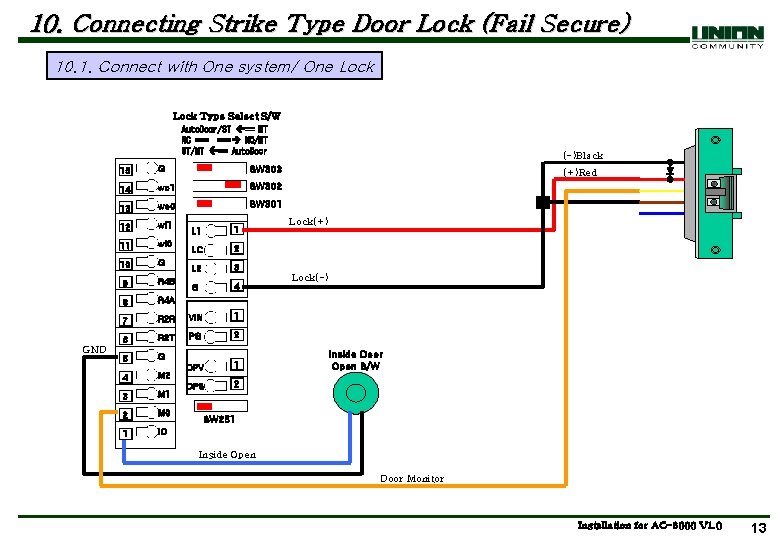
10. Connecting Strike Type Door Lock (Fail Secure) 10. 1. Connect with One system/ One Lock Type Select S/W Auto. Door/ST == MT NC === NO/MT ST/MT == Auto. Door GND 15 G SW 303 14 wo 1 SW 302 13 wo 0 SW 301 12 wi 1 11 wi 0 10 G 9 R 4 B 8 R 4 A 7 L 1 1 LC 2 L 2 3 G 4 R 2 R VIN 1 6 R 2 T PG 2 5 G 1 4 M 2 DPV 2 M 1 DPS 3 2 M 0 1 IO (-)Black (+)Red Lock(+) Lock(-) Inside Door Open S/W SW 251 Inside Open Door Monitor Installation for AC-6000 V 1. 0 13
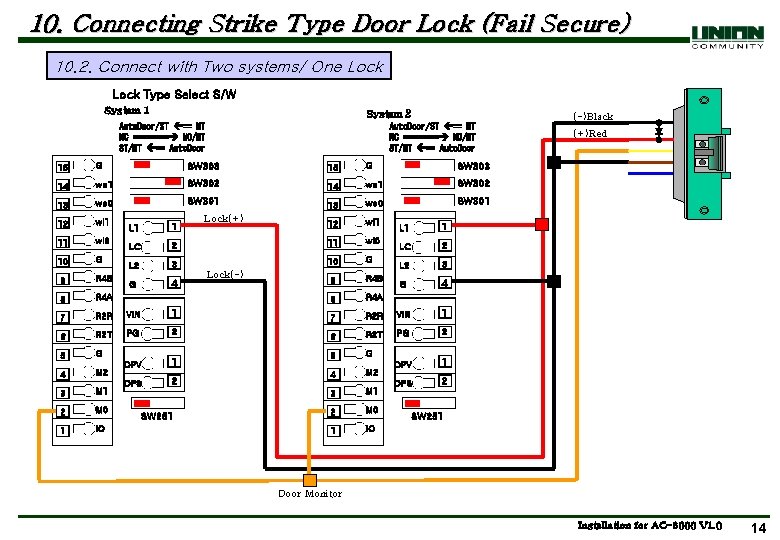
10. Connecting Strike Type Door Lock (Fail Secure) 10. 2. Connect with Two systems/ One Lock Type Select S/W System 1 System 2 Auto. Door/ST == MT NC ==== NO/MT ST/MT == Auto. Door (-)Black Auto. Door/ST == MT NC ==== NO/MT ST/MT == Auto. Door 15 G SW 303 14 wo 1 SW 302 13 wo 0 SW 301 12 wi 1 11 wi 0 10 G 9 R 4 B 8 R 4 A 7 1 Lock(+) 2 LC L 2 3 G 4 9 R 4 B 8 R 4 A 7 R 2 R VIN 1 6 R 2 T PG 2 5 G 1 4 M 2 DPV 3 M 1 2 M 0 1 IO DPS 2 SW 251 Lock(-) L 1 1 LC 2 L 2 3 G 4 R 2 R VIN 1 6 R 2 T PG 2 5 G 1 M 2 DPV 4 2 M 1 DPS 3 2 M 0 1 IO (+)Red SW 251 Door Monitor Installation for AC-6000 V 1. 0 14
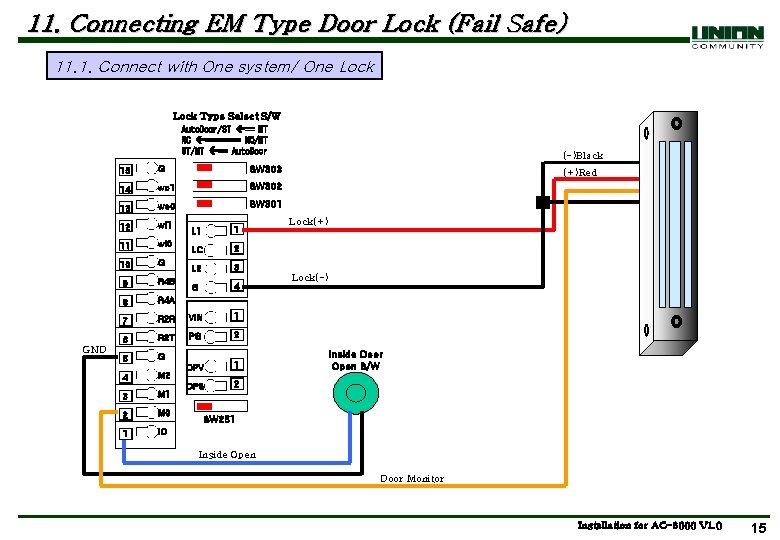
11. Connecting EM Type Door Lock (Fail Safe) 11. 1. Connect with One system/ One Lock Type Select S/W Auto. Door/ST == MT NC ==== NO/MT ST/MT == Auto. Door GND 15 G SW 303 14 wo 1 SW 302 13 wo 0 SW 301 12 wi 1 11 wi 0 10 G 9 R 4 B 8 R 4 A 7 L 1 1 LC 2 L 2 3 G 4 R 2 R VIN 1 6 R 2 T PG 2 5 G 1 4 M 2 DPV 2 M 1 DPS 3 2 M 0 1 IO (-)Black (+)Red Lock(+) Lock(-) Inside Door Open S/W SW 251 Inside Open Door Monitor Installation for AC-6000 V 1. 0 15
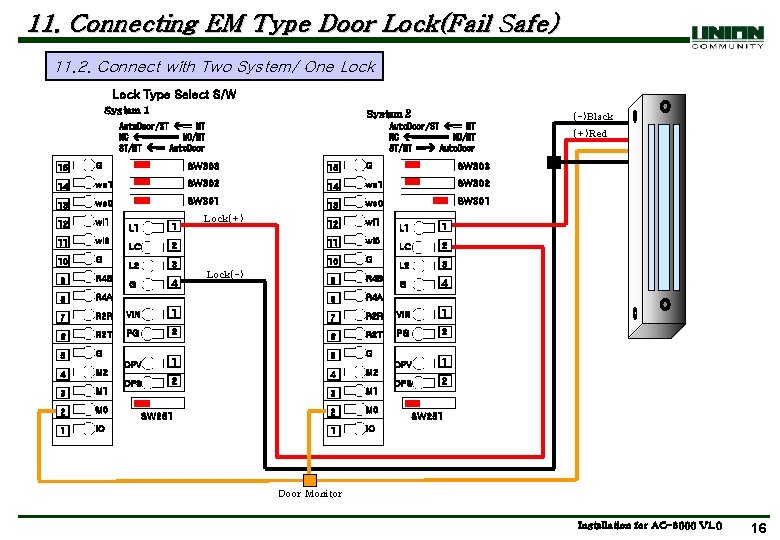
11. Connecting EM Type Door Lock(Fail Safe) 11. 2. Connect with Two System/ One Lock Type Select S/W System 1 System 2 Auto. Door/ST == MT NC ==== NO/MT ST/MT == Auto. Door (-)Black Auto. Door/ST == MT NC ==== NO/MT ST/MT == Auto. Door 15 G SW 303 14 wo 1 SW 302 13 wo 0 SW 301 12 wi 1 11 wi 0 10 G 9 R 4 B 8 R 4 A 7 1 Lock(+) 2 LC L 2 3 G 4 9 R 4 B 8 R 4 A 7 R 2 R VIN 1 6 R 2 T PG 2 5 G 1 4 M 2 DPV 3 M 1 2 M 0 1 IO DPS 2 SW 251 Lock(-) L 1 1 LC 2 L 2 3 G 4 R 2 R VIN 1 6 R 2 T PG 2 5 G 1 M 2 DPV 4 2 M 1 DPS 3 2 M 0 1 IO (+)Red SW 251 Door Monitor Installation for AC-6000 V 1. 0 16
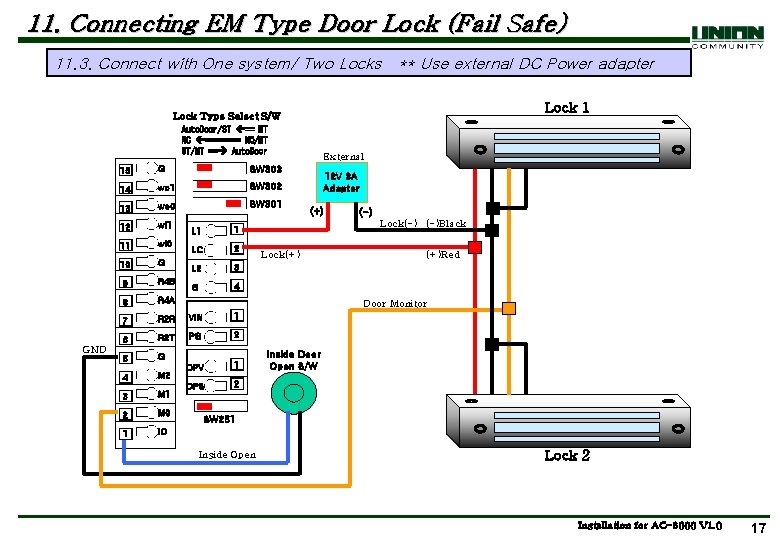
11. Connecting EM Type Door Lock (Fail Safe) 11. 3. Connect with One system/ Two Locks ** Use external DC Power adapter Lock 1 Lock Type Select S/W Auto. Door/ST == MT NC ==== NO/MT ST/MT == Auto. Door GND 15 G SW 303 14 wo 1 SW 302 13 wo 0 SW 301 12 wi 1 11 wi 0 10 G 9 R 4 B 8 R 4 A L 1 1 LC 2 L 2 3 G 4 External 12 V 3 A Adapter (+) (-) Lock(-) (-)Black Lock(+) (+)Red Door Monitor 7 R 2 R VIN 1 6 R 2 T PG 2 5 G 1 4 M 2 DPV 2 M 1 DPS 3 2 M 0 1 IO Inside Door Open S/W SW 251 Inside Open Lock 2 Installation for AC-6000 V 1. 0 17
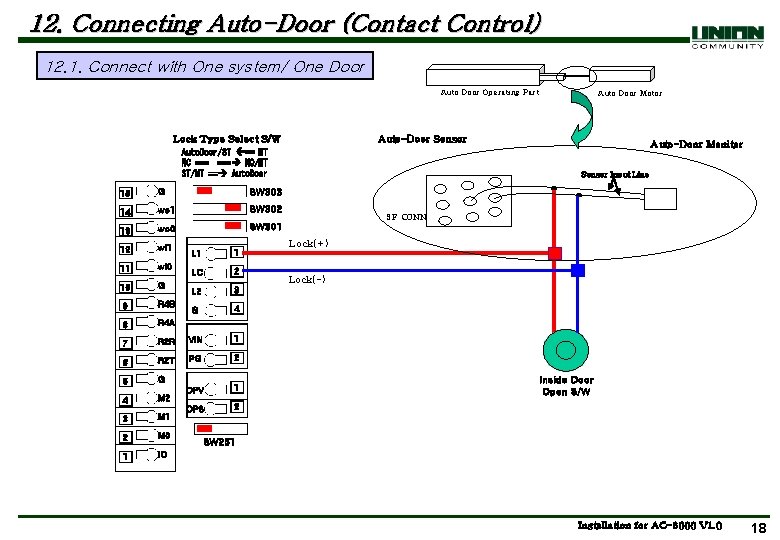
12. Connecting Auto-Door (Contact Control) 12. 1. Connect with One system/ One Door Auto Door Operating Part Lock Type Select S/W Auto-Door Sensor Auto. Door/ST == MT NC === NO/MT ST/MT == Auto. Door 15 G SW 303 14 wo 1 SW 302 13 wo 0 SW 301 12 wi 1 11 wi 0 10 G 9 R 4 B 8 R 4 A 7 L 1 1 LC 2 L 2 3 G 4 R 2 R VIN 1 6 R 2 T PG 2 5 G 1 4 M 2 DPV 2 M 1 DPS 3 2 M 0 1 IO Auto Door Motor Auto-Door Monitor Sensor Input Line 9 P CONN Lock(+) Lock(-) Inside Door Open S/W SW 251 Installation for AC-6000 V 1. 0 18
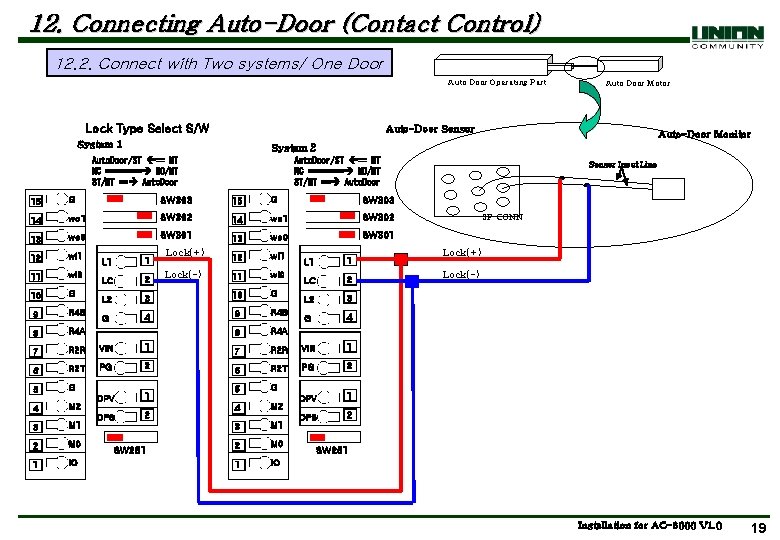
12. Connecting Auto-Door (Contact Control) 12. 2. Connect with Two systems/ One Door Auto Door Operating Part Lock Type Select S/W Auto-Door Sensor System 1 Auto. Door/ST == MT NC ==== NO/MT ST/MT == Auto. Door 15 G SW 303 14 wo 1 SW 302 13 wo 0 SW 301 12 wi 1 11 wi 0 10 G 9 R 4 B 8 R 4 A 7 R 2 R VIN 1 7 6 R 2 T PG 2 5 G 1 4 M 2 DPV 3 M 1 2 M 0 1 IO L 1 1 LC 2 L 2 3 4 DPS Auto-Door Monitor System 2 Auto. Door/ST == MT NC ==== NO/MT ST/MT == Auto. Door G Auto Door Motor 2 SW 251 Lock(+) Lock(-) L 1 1 LC 2 L 2 3 G 4 R 2 R VIN 1 6 R 2 T PG 2 5 G 1 M 2 DPV 4 2 M 1 DPS 3 2 M 0 1 IO Sensor Input Line 9 P CONN Lock(+) Lock(-) SW 251 Installation for AC-6000 V 1. 0 19
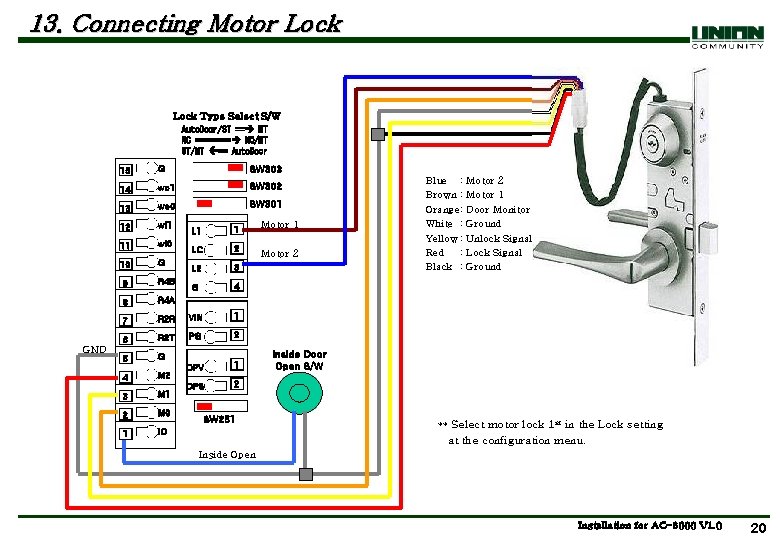
13. Connecting Motor Lock Type Select S/W Auto. Door/ST == MT NC ==== NO/MT ST/MT == Auto. Door GND 15 G SW 303 14 wo 1 SW 302 13 wo 0 SW 301 12 wi 1 11 wi 0 10 G 9 R 4 B 8 R 4 A 7 L 1 1 LC 2 L 2 3 G 4 R 2 R VIN 1 6 R 2 T PG 2 5 G 1 4 M 2 DPV 2 M 1 DPS 3 2 M 0 1 IO SW 251 Motor 2 Blue : Brown : Orange: White : Yellow : Red : Black : Motor 2 Motor 1 Door Monitor Ground Unlock Signal Lock Signal Ground Inside Door Open S/W ** Select motor lock 1 st in the Lock setting at the configuration menu. Inside Open Installation for AC-6000 V 1. 0 20
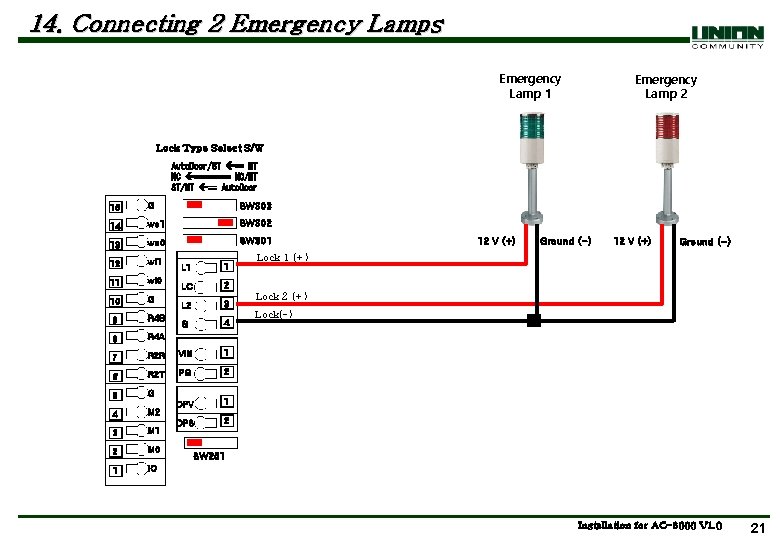
14. Connecting 2 Emergency Lamps Emergency Lamp 1 Emergency Lamp 2 Lock Type Select S/W Auto. Door/ST == MT NC ==== NO/MT ST/MT == Auto. Door 15 G SW 303 14 wo 1 SW 302 13 wo 0 SW 301 12 wi 1 11 wi 0 10 G 9 R 4 B 8 R 4 A 7 L 1 1 LC 2 L 2 3 G 4 R 2 R VIN 1 6 R 2 T PG 2 5 G 1 M 2 DPV 4 2 M 1 DPS 3 2 M 0 1 IO 12 V (+) Ground (-) Lock 1 (+) Lock 2 (+) Lock(-) SW 251 Installation for AC-6000 V 1. 0 21
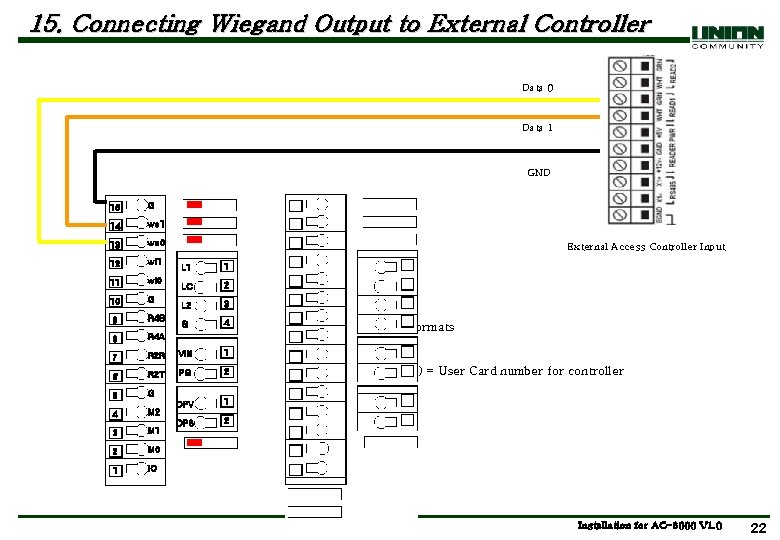
15. Connecting Wiegand Output to External Controller Data 0 Data 1 GND 15 G 14 wo 1 13 wo 0 12 wi 1 11 wi 0 10 G 9 R 4 B 8 R 4 A 7 External Access Controller Input L 1 1 LC 2 L 2 3 G 4 R 2 R VIN 1 6 R 2 T PG 2 5 G 1 M 2 DPV 4 2 M 1 DPS 3 2 M 0 1 IO AC 6000 Supported Formats -26 bits -34 bits (Site Code + User ID) = User Card number for controller Installation for AC-6000 V 1. 0 22
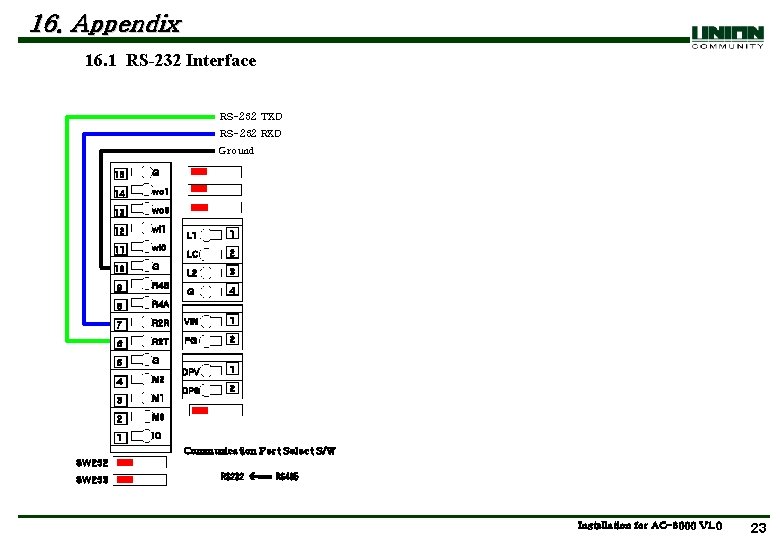
16. Appendix 16. 1 RS-232 Interface RS-232 TXD RS-232 RXD Ground 15 G 14 wo 1 13 wo 0 12 wi 1 11 wi 0 10 G 9 R 4 B 8 R 4 A 7 L 1 1 LC 2 L 2 3 G 4 R 2 R VIN 1 6 R 2 T PG 2 5 G 1 M 2 DPV 4 2 M 1 DPS 3 2 M 0 1 IO Communication Port Select S/W SW 252 SW 253 RS 232 === RS 485 Installation for AC-6000 V 1. 0 23
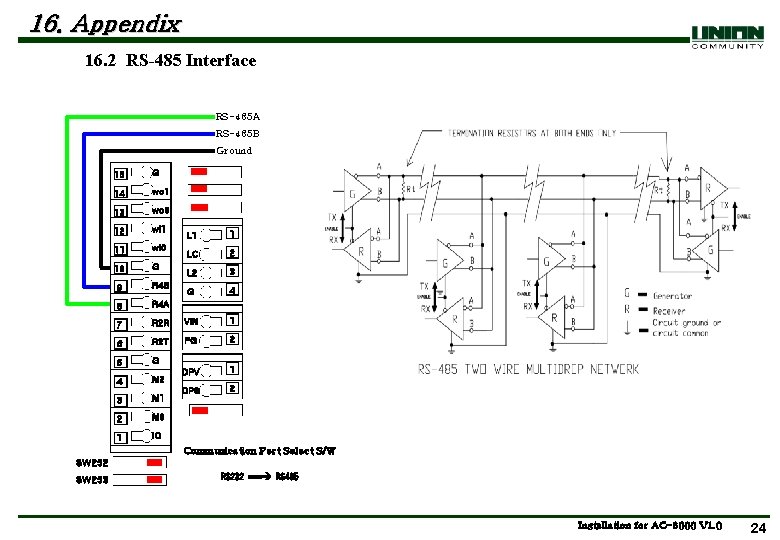
16. Appendix 16. 2 RS-485 Interface RS-485 A RS-485 B Ground 15 G 14 wo 1 13 wo 0 12 wi 1 11 wi 0 10 G 9 R 4 B 8 R 4 A 7 L 1 1 LC 2 L 2 3 G 4 R 2 R VIN 1 6 R 2 T PG 2 5 G 1 M 2 DPV 4 2 M 1 DPS 3 2 M 0 1 IO Communication Port Select S/W SW 252 SW 253 RS 232 === RS 485 Installation for AC-6000 V 1. 0 24