
Insert Picture Here Oracle Fusion Receivables Implementation and
<Insert Picture Here> Oracle Fusion Receivables Implementation and Configuration Considerations Sept, 2011
Pre-requisite Readings • Fusion Financials Overview & Concepts • Oracle Fusion Financials Financial Enterprise Structures • Oracle Fusion Financials Security Copyright © 2011, Oracle and/or its affiliates. All rights reserved. Oracle Proprietary and Confidential.
Agenda • Implementation Overview • Order Fulfillment Business Process at a Glance • Business Process Mapping to Setup Activities • Minimal Configuration to Make Receivables Operational • Key Implementation Concepts and Considerations • • • Security in Fusion Receivables Business Unit, Ledger, and Legal Entity in Receivables Reference Data Sharing Across Receivables Business Units Accounting in Receivables Customer Billing Customer Payments Revenue Management Late Charges Receivables to General Ledger Reconciliation • Deltas with EBS • Additional Resources Copyright © 2011, Oracle and/or its affiliates. All rights reserved. Oracle Proprietary and Confidential.
Agenda • Implementation Overview • Order Fulfillment Business Process at a Glance • Business Process Mapping to Setup Activities • Minimal Configuration to Make Receivables Operational • Key Implementation Concepts and Considerations • • • Security in Fusion Receivables Business Unit, Ledger, and Legal Entity in Fusion Receivables Reference Data Sharing Across Receivables Business Units Accounting in Receivables Customer Billing Customer Payments Revenue Management Late Charges Receivables to General Ledger Reconciliation • Deltas with EBS • Additional Resources Copyright © 2011, Oracle and/or its affiliates. All rights reserved. Oracle Proprietary and Confidential.
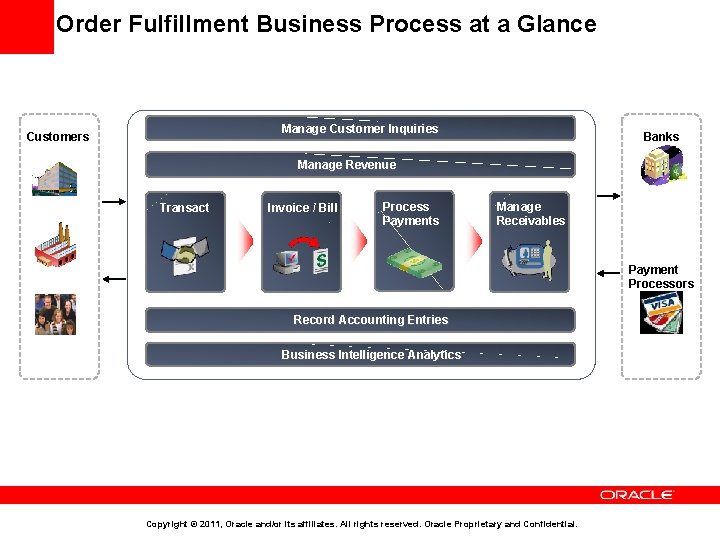
Order Fulfillment Business Process at a Glance Manage Customer Inquiries Customers Banks Manage Revenue Transact Invoice / Bill Process Payments Manage Receivables Payment Processors Record Accounting Entries Business Intelligence Analytics Copyright © 2011, Oracle and/or its affiliates. All rights reserved. Oracle Proprietary and Confidential.
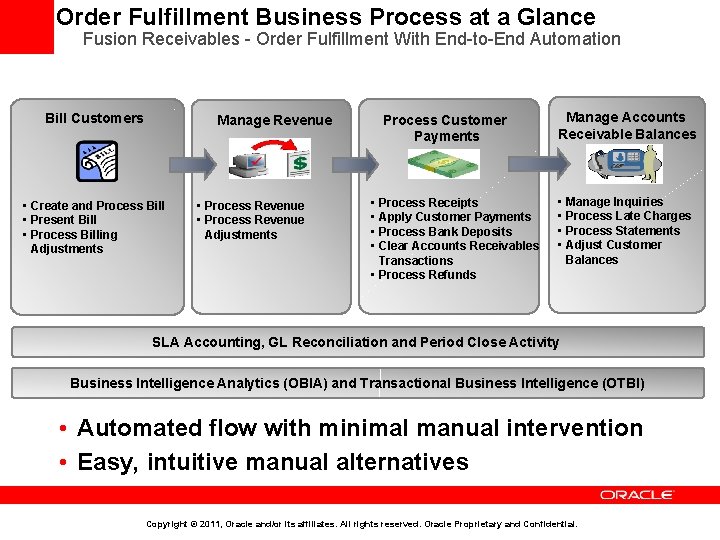
Order Fulfillment Business Process at a Glance Fusion Receivables - Order Fulfillment With End-to-End Automation Bill Customers • Create and Process Bill • Present Bill • Process Billing Adjustments Process Customer Payments Manage Revenue • Process Revenue Adjustments • • Process Receipts Apply Customer Payments Process Bank Deposits Clear Accounts Receivables Transactions • Process Refunds Manage Accounts Receivable Balances • • Manage Inquiries Process Late Charges Process Statements Adjust Customer Balances SLA Accounting, GL Reconciliation and Period Close Activity Business Intelligence Analytics (OBIA) and Transactional Business Intelligence (OTBI) • Automated flow with minimal manual intervention • Easy, intuitive manual alternatives Copyright © 2011, Oracle and/or its affiliates. All rights reserved. Oracle Proprietary and Confidential.
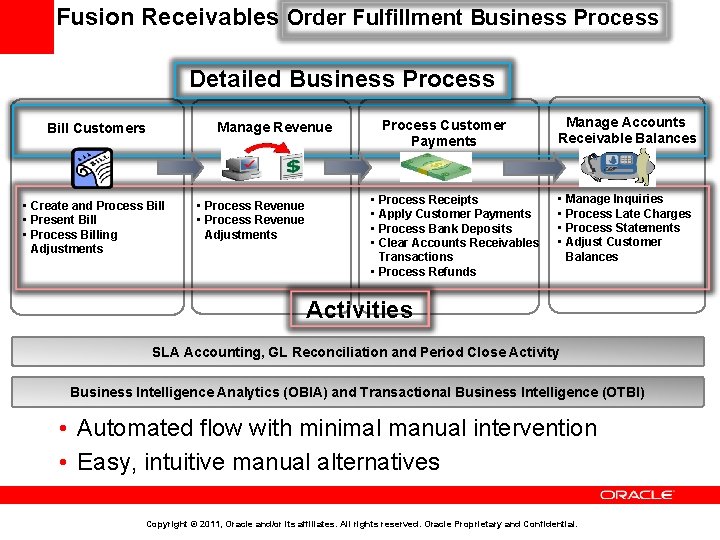
Fusion Receivables Order Fulfillment Business Process Detailed Business Process • Create and Process Bill • Present Bill • Process Billing Adjustments Process Customer Payments Manage Revenue Bill Customers • Process Revenue Adjustments • • Process Receipts Apply Customer Payments Process Bank Deposits Clear Accounts Receivables Transactions • Process Refunds Manage Accounts Receivable Balances • • Manage Inquiries Process Late Charges Process Statements Adjust Customer Balances Activities SLA Accounting, GL Reconciliation and Period Close Activity Business Intelligence Analytics (OBIA) and Transactional Business Intelligence (OTBI) • Automated flow with minimal manual intervention • Easy, intuitive manual alternatives Copyright © 2011, Oracle and/or its affiliates. All rights reserved. Oracle Proprietary and Confidential.
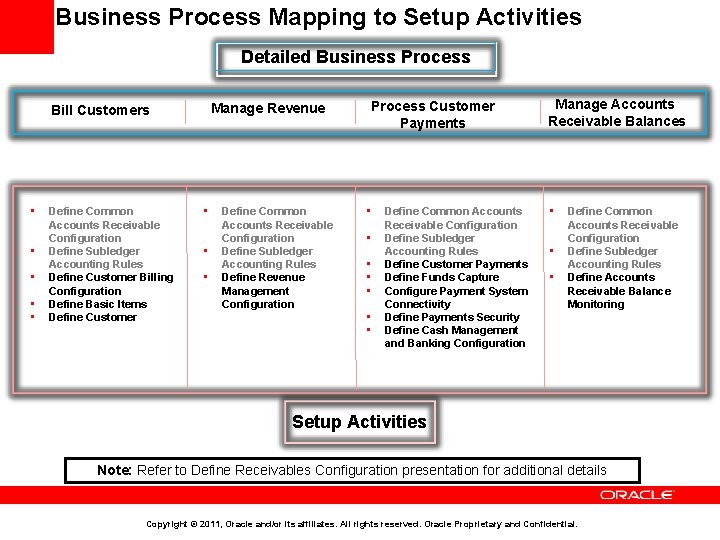
Business Process Mapping to Setup Activities Detailed Business Process Manage Revenue Bill Customers • • • Define Common Accounts Receivable Configuration Define Subledger Accounting Rules Define Customer Billing Configuration Define Basic Items Define Customer • • • Define Common Accounts Receivable Configuration Define Subledger Accounting Rules Define Revenue Management Configuration Process Customer Payments • • Define Common Accounts Receivable Configuration Define Subledger Accounting Rules Define Customer Payments Define Funds Capture Configure Payment System Connectivity Define Payments Security Define Cash Management and Banking Configuration Manage Accounts Receivable Balances • • • Define Common Accounts Receivable Configuration Define Subledger Accounting Rules Define Accounts Receivable Balance Monitoring Setup Activities Note: Refer to Define Receivables Configuration presentation for additional details Copyright © 2011, Oracle and/or its affiliates. All rights reserved. Oracle Proprietary and Confidential.
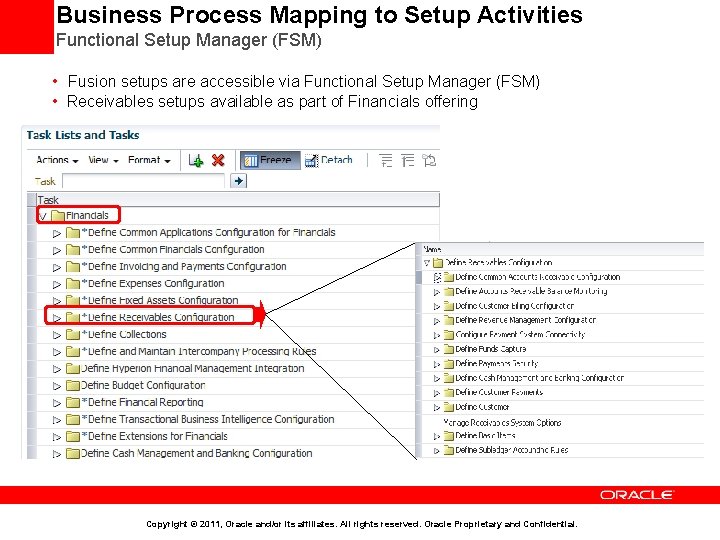
Business Process Mapping to Setup Activities Functional Setup Manager (FSM) • Fusion setups are accessible via Functional Setup Manager (FSM) • Receivables setups available as part of Financials offering Copyright © 2011, Oracle and/or its affiliates. All rights reserved. Oracle Proprietary and Confidential.
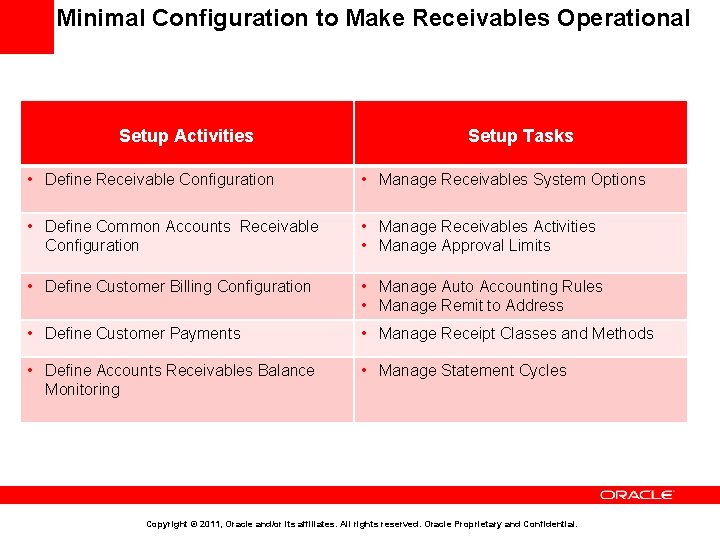
Minimal Configuration to Make Receivables Operational Setup Activities Setup Tasks • Define Receivable Configuration • Manage Receivables System Options • Define Common Accounts Receivable Configuration • Manage Receivables Activities • Manage Approval Limits • Define Customer Billing Configuration • Manage Auto Accounting Rules • Manage Remit to Address • Define Customer Payments • Manage Receipt Classes and Methods • Define Accounts Receivables Balance Monitoring • Manage Statement Cycles Copyright © 2011, Oracle and/or its affiliates. All rights reserved. Oracle Proprietary and Confidential.
Agenda • Implementation Overview • Order Fulfillment Business Process at a Glance • Business Process Mapping to Setup Activities • Minimal Configuration to Make Receivables Operational • Key Implementation Concepts and Considerations • • • Security in Fusion Receivables Business Unit, Ledger, and Legal Entity in Fusion Receivables Reference Data Sharing Across Receivables Business Units Accounting in Receivables Customer Billing Customer Payments Revenue Management Late Charges Receivables to General Ledger Reconciliation • Deltas with EBS • Additional Resources Copyright © 2011, Oracle and/or its affiliates. All rights reserved. Oracle Proprietary and Confidential.
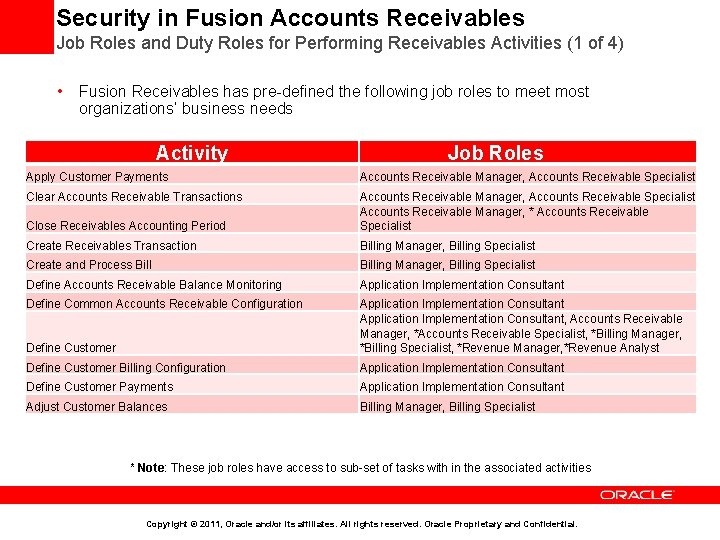
Security in Fusion Accounts Receivables Job Roles and Duty Roles for Performing Receivables Activities (1 of 4) • Fusion Receivables has pre-defined the following job roles to meet most organizations’ business needs Activity Job Roles Apply Customer Payments Accounts Receivable Manager, Accounts Receivable Specialist Clear Accounts Receivable Transactions Close Receivables Accounting Period Accounts Receivable Manager, Accounts Receivable Specialist Accounts Receivable Manager, * Accounts Receivable Specialist Create Receivables Transaction Billing Manager, Billing Specialist Create and Process Billing Manager, Billing Specialist Define Accounts Receivable Balance Monitoring Application Implementation Consultant Define Common Accounts Receivable Configuration Define Customer Application Implementation Consultant, Accounts Receivable Manager, *Accounts Receivable Specialist, *Billing Manager, *Billing Specialist, *Revenue Manager, *Revenue Analyst Define Customer Billing Configuration Application Implementation Consultant Define Customer Payments Application Implementation Consultant Adjust Customer Balances Billing Manager, Billing Specialist * Note: These job roles have access to sub-set of tasks with in the associated activities Copyright © 2011, Oracle and/or its affiliates. All rights reserved. Oracle Proprietary and Confidential.
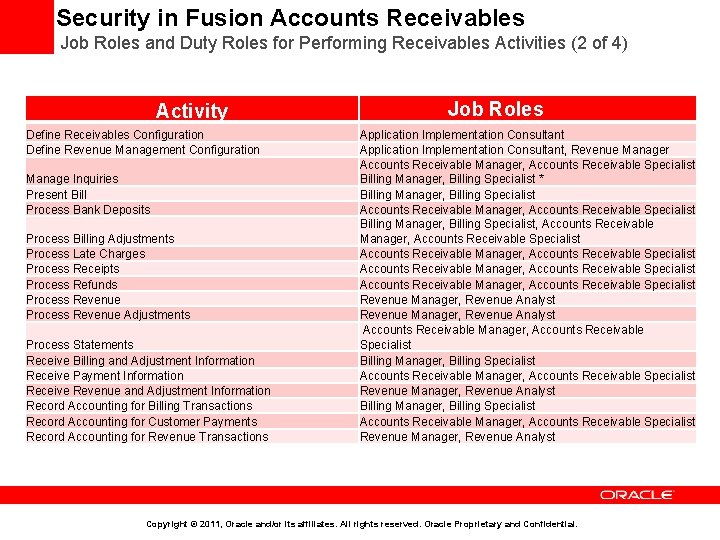
Security in Fusion Accounts Receivables Job Roles and Duty Roles for Performing Receivables Activities (2 of 4) Activity Define Receivables Configuration Define Revenue Management Configuration Manage Inquiries Present Bill Process Bank Deposits Process Billing Adjustments Process Late Charges Process Receipts Process Refunds Process Revenue Adjustments Process Statements Receive Billing and Adjustment Information Receive Payment Information Receive Revenue and Adjustment Information Record Accounting for Billing Transactions Record Accounting for Customer Payments Record Accounting for Revenue Transactions Job Roles Application Implementation Consultant, Revenue Manager Accounts Receivable Manager, Accounts Receivable Specialist Billing Manager, Billing Specialist * Billing Manager, Billing Specialist Accounts Receivable Manager, Accounts Receivable Specialist Billing Manager, Billing Specialist, Accounts Receivable Manager, Accounts Receivable Specialist Revenue Manager, Revenue Analyst Accounts Receivable Manager, Accounts Receivable Specialist Billing Manager, Billing Specialist Accounts Receivable Manager, Accounts Receivable Specialist Revenue Manager, Revenue Analyst Copyright © 2011, Oracle and/or its affiliates. All rights reserved. Oracle Proprietary and Confidential.
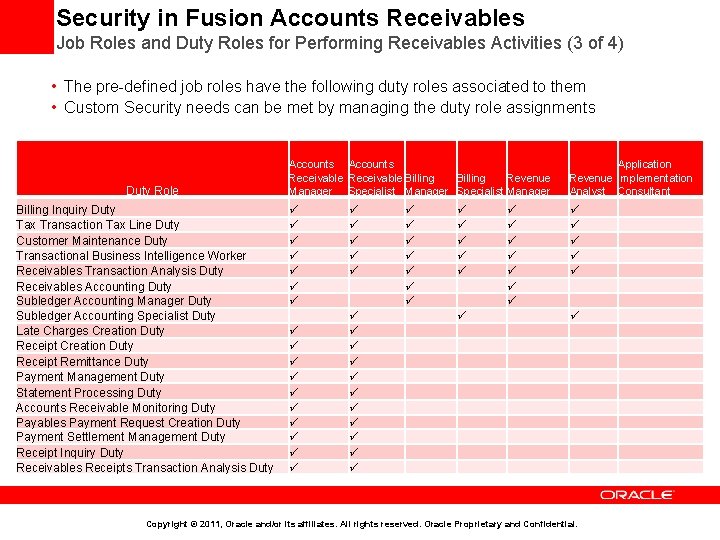
Security in Fusion Accounts Receivables Job Roles and Duty Roles for Performing Receivables Activities (3 of 4) • The pre-defined job roles have the following duty roles associated to them • Custom Security needs can be met by managing the duty role assignments Duty Role Billing Inquiry Duty Tax Transaction Tax Line Duty Customer Maintenance Duty Transactional Business Intelligence Worker Receivables Transaction Analysis Duty Receivables Accounting Duty Subledger Accounting Manager Duty Subledger Accounting Specialist Duty Late Charges Creation Duty Receipt Remittance Duty Payment Management Duty Statement Processing Duty Accounts Receivable Monitoring Duty Payables Payment Request Creation Duty Payment Settlement Management Duty Receipt Inquiry Duty Receivables Receipts Transaction Analysis Duty Accounts Receivable Billing Revenue Manager Specialist Manager Application Revenue Implementation Analyst Consultant Copyright © 2011, Oracle and/or its affiliates. All rights reserved. Oracle Proprietary and Confidential.
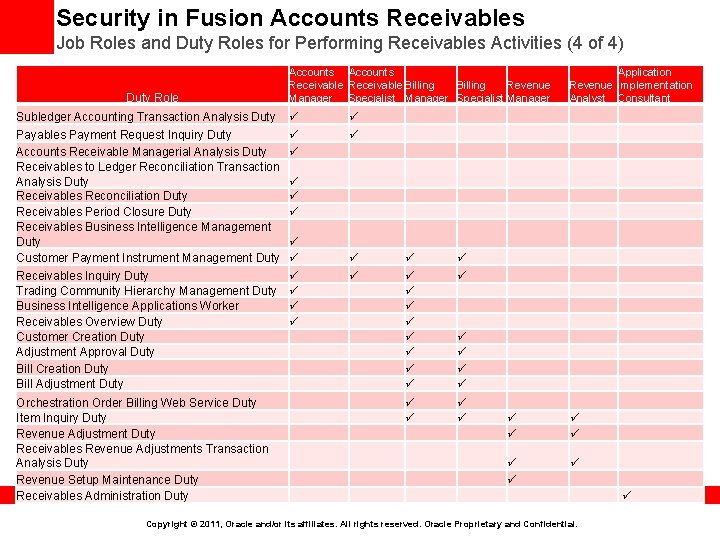
Security in Fusion Accounts Receivables Job Roles and Duty Roles for Performing Receivables Activities (4 of 4) Duty Role Accounts Receivable Billing Revenue Manager Specialist Manager Application Revenue Implementation Analyst Consultant Subledger Accounting Transaction Analysis Duty Payables Payment Request Inquiry Duty Accounts Receivable Managerial Analysis Duty Receivables to Ledger Reconciliation Transaction Analysis Duty Receivables Reconciliation Duty Receivables Period Closure Duty Receivables Business Intelligence Management Duty Customer Payment Instrument Management Duty Receivables Inquiry Duty Trading Community Hierarchy Management Duty Business Intelligence Applications Worker Receivables Overview Duty Customer Creation Duty Adjustment Approval Duty Bill Creation Duty Bill Adjustment Duty Orchestration Order Billing Web Service Duty Item Inquiry Duty Revenue Adjustment Duty Receivables Revenue Adjustments Transaction Analysis Duty Revenue Setup Maintenance Duty Receivables Administration Duty Copyright © 2011, Oracle and/or its affiliates. All rights reserved. Oracle Proprietary and Confidential.
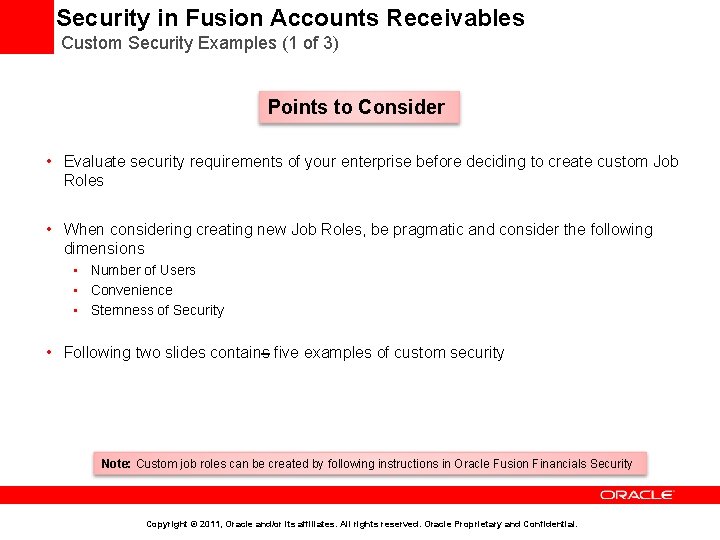
Security in Fusion Accounts Receivables Custom Security Examples (1 of 3) Points to Consider • Evaluate security requirements of your enterprise before deciding to create custom Job Roles • When considering creating new Job Roles, be pragmatic and consider the following dimensions • Number of Users • Convenience • Sternness of Security • Following two slides contains five examples of custom security Note: Custom job roles can be created by following instructions in Oracle Fusion Financials Security Copyright © 2011, Oracle and/or its affiliates. All rights reserved. Oracle Proprietary and Confidential.
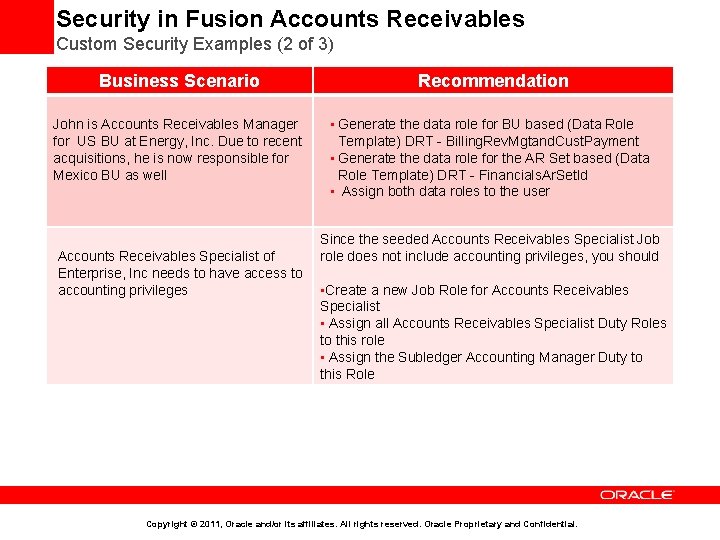
Security in Fusion Accounts Receivables Custom Security Examples (2 of 3) Business Scenario Recommendation John is Accounts Receivables Manager for US BU at Energy, Inc. Due to recent acquisitions, he is now responsible for Mexico BU as well • Generate the data role for BU based (Data Role Template) DRT - Billing. Rev. Mgtand. Cust. Payment • Generate the data role for the AR Set based (Data Role Template) DRT - Financials. Ar. Set. Id • Assign both data roles to the user Since the seeded Accounts Receivables Specialist Job role does not include accounting privileges, you should Accounts Receivables Specialist of Enterprise, Inc needs to have access to accounting privileges • Create a new Job Role for Accounts Receivables Specialist • Assign all Accounts Receivables Specialist Duty Roles to this role • Assign the Subledger Accounting Manager Duty to this Role Copyright © 2011, Oracle and/or its affiliates. All rights reserved. Oracle Proprietary and Confidential.
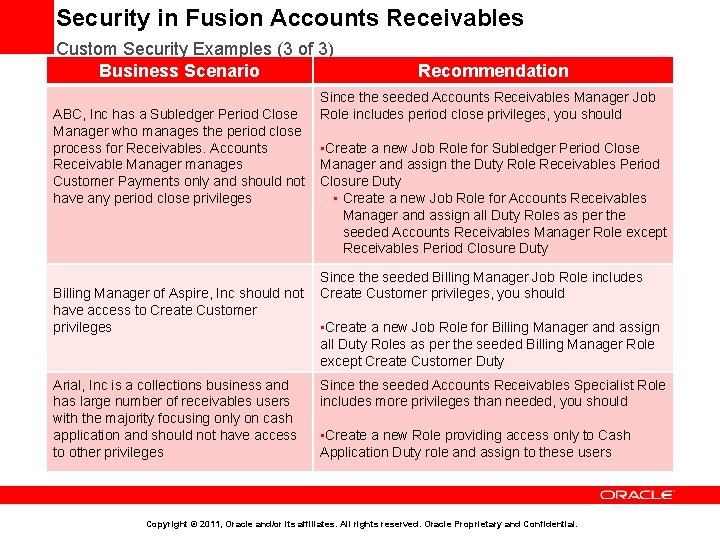
Security in Fusion Accounts Receivables Custom Security Examples (3 of 3) Business Scenario Recommendation Since the seeded Accounts Receivables Manager Job Role includes period close privileges, you should ABC, Inc has a Subledger Period Close Manager who manages the period close process for Receivables. Accounts • Create a new Job Role for Subledger Period Close Receivable Manager manages Manager and assign the Duty Role Receivables Period Customer Payments only and should not Closure Duty have any period close privileges • Create a new Job Role for Accounts Receivables Manager and assign all Duty Roles as per the seeded Accounts Receivables Manager Role except Receivables Period Closure Duty Since the seeded Billing Manager Job Role includes Billing Manager of Aspire, Inc should not Create Customer privileges, you should have access to Create Customer privileges • Create a new Job Role for Billing Manager and assign all Duty Roles as per the seeded Billing Manager Role except Create Customer Duty Arial, Inc is a collections business and has large number of receivables users with the majority focusing only on cash application and should not have access to other privileges Since the seeded Accounts Receivables Specialist Role includes more privileges than needed, you should • Create a new Role providing access only to Cash Application Duty role and assign to these users Copyright © 2011, Oracle and/or its affiliates. All rights reserved. Oracle Proprietary and Confidential.
Agenda • Implementation Overview • Order fulfillment business process at a glance • Business process mapping to setup activities • Minimal configuration to make Receivables operational • Key implementation concepts and considerations • • • Security in Fusion Receivables Business Unit, Ledger, and Legal Entity in Fusion Receivables Reference Data Sharing across Receivables Business Units Accounting in Receivables Customer Billing Customer Payments Revenue Management Late Charges Receivables to General Ledger Reconciliation • Deltas with EBS • Additional Resources Copyright © 2011, Oracle and/or its affiliates. All rights reserved. Oracle Proprietary and Confidential.
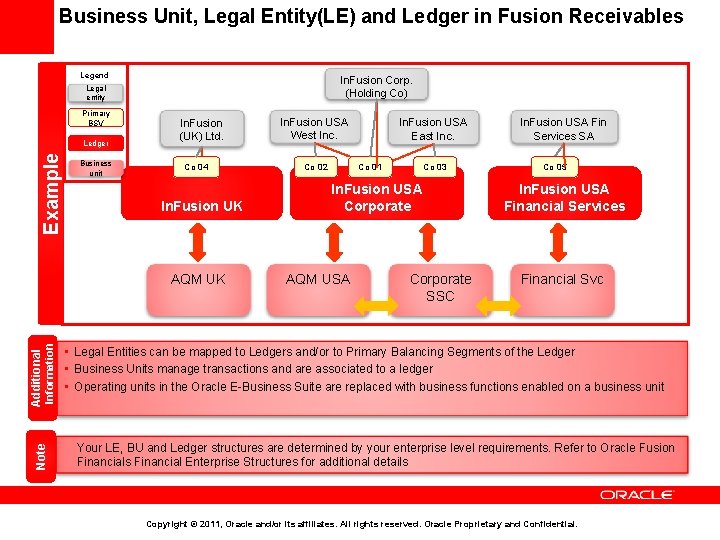
Business Unit, Legal Entity(LE) and Ledger in Fusion Receivables Legend In. Fusion Corp. (Holding Co) Legal entity Primary BSV Example Ledger Business unit In. Fusion (UK) Ltd. Co 04 In. Fusion UK Note Additional Information AQM UK In. Fusion USA East Inc. In. Fusion USA West Inc. Co 02 Co 01 Co 03 In. Fusion USA Corporate AQM USA Corporate SSC In. Fusion USA Fin Services SA Co 05 In. Fusion USA Financial Services Financial Svc • Legal Entities can be mapped to Ledgers and/or to Primary Balancing Segments of the Ledger • Business Units manage transactions and are associated to a ledger • Operating units in the Oracle E-Business Suite are replaced with business functions enabled on a business unit Your LE, BU and Ledger structures are determined by your enterprise level requirements. Refer to Oracle Fusion Financials Financial Enterprise Structures for additional details Copyright © 2011, Oracle and/or its affiliates. All rights reserved. Oracle Proprietary and Confidential.
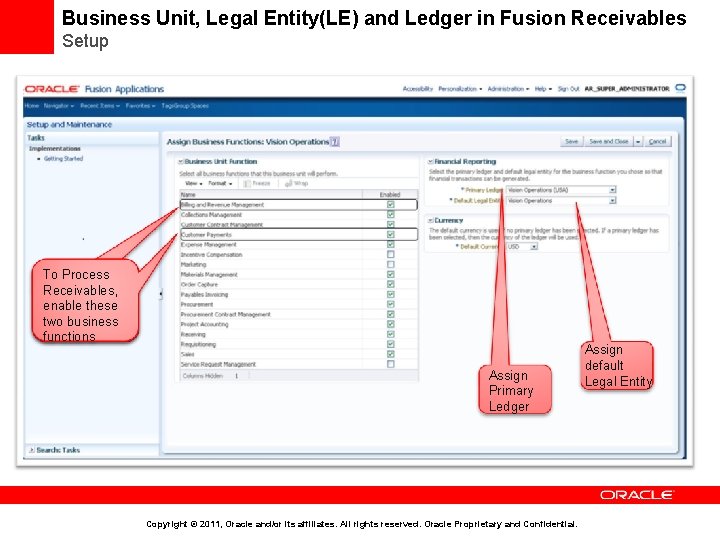
Business Unit, Legal Entity(LE) and Ledger in Fusion Receivables Setup To Process Receivables, enable these two business functions Assign Primary Ledger Copyright © 2011, Oracle and/or its affiliates. All rights reserved. Oracle Proprietary and Confidential. Assign default Legal Entity
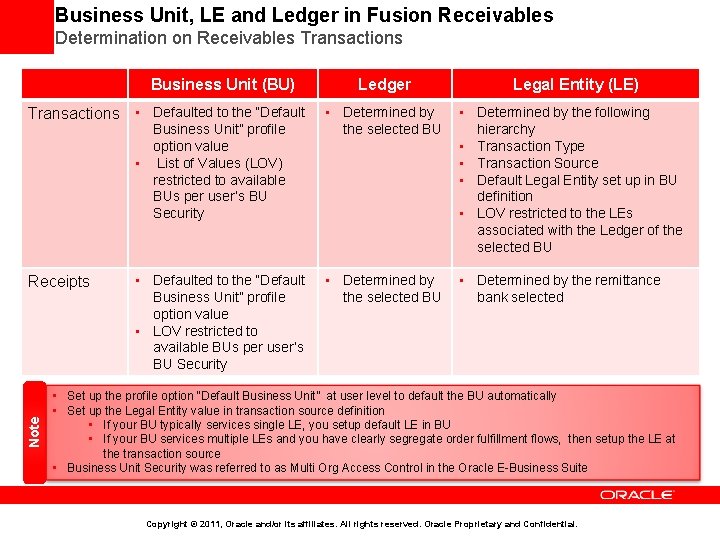
Business Unit, LE and Ledger in Fusion Receivables Determination on Receivables Transactions Business Unit (BU) Transactions • Defaulted to the “Default Business Unit” profile option value • List of Values (LOV) restricted to available BUs per user’s BU Security Note Receipts • Defaulted to the “Default Business Unit” profile option value • LOV restricted to available BUs per user’s BU Security Ledger Legal Entity (LE) • Determined by the following the selected BU hierarchy • Transaction Type • Transaction Source • Default Legal Entity set up in BU definition • LOV restricted to the LEs associated with the Ledger of the selected BU • Determined by the remittance the selected BU bank selected • Set up the profile option “Default Business Unit” at user level to default the BU automatically • Set up the Legal Entity value in transaction source definition • If your BU typically services single LE, you setup default LE in BU • If your BU services multiple LEs and you have clearly segregate order fulfillment flows, then setup the LE at the transaction source • . Business Unit Security was referred to as Multi Org Access Control in the Oracle E-Business Suite Copyright © 2011, Oracle and/or its affiliates. All rights reserved. Oracle Proprietary and Confidential.
Agenda • Implementation Overview • Order Fulfillment Business Process at a Glance • Business Process Mapping to Setup Activities • Minimal Configuration to Make Receivables Operational • Key implementation Concepts and Considerations • • • Security in Fusion Receivables Business Unit, Ledger, and Legal Entity in Fusion Receivables Reference Data Sharing Across Receivables Business Units Accounting in Receivables Customer Billing Customer Payments Revenue Management Late Charges Receivables to General Ledger Reconciliation • Deltas with EBS • Additional Resources Copyright © 2011, Oracle and/or its affiliates. All rights reserved. Oracle Proprietary and Confidential.
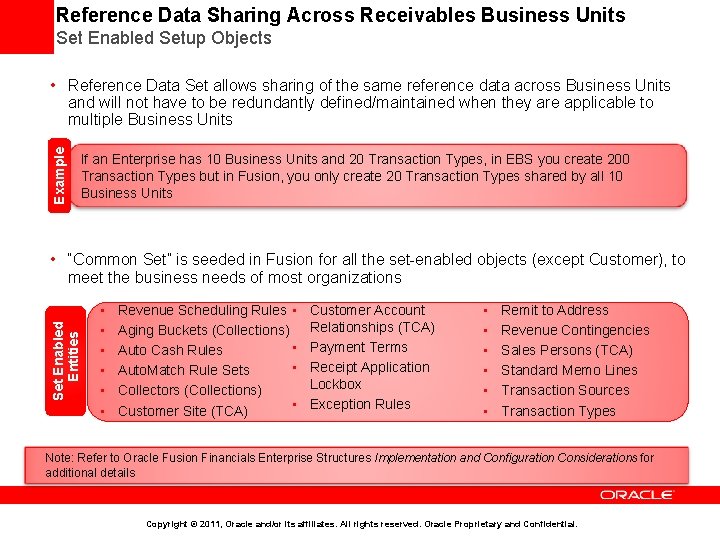
Reference Data Sharing Across Receivables Business Units Set Enabled Setup Objects Example • Reference Data Set allows sharing of the same reference data across Business Units and will not have to be redundantly defined/maintained when they are applicable to multiple Business Units If an Enterprise has 10 Business Units and 20 Transaction Types, in EBS you create 200 Transaction Types but in Fusion, you only create 20 Transaction Types shared by all 10 Business Units Set Enabled Entities • “Common Set” is seeded in Fusion for all the set-enabled objects (except Customer), to meet the business needs of most organizations • • • Revenue Scheduling Rules • Aging Buckets (Collections) • Auto Cash Rules • Auto. Match Rule Sets Collectors (Collections) • Customer Site (TCA) Customer Account Relationships (TCA) Payment Terms Receipt Application Lockbox Exception Rules • • • Remit to Address Revenue Contingencies Sales Persons (TCA) Standard Memo Lines Transaction Sources Transaction Types Note: Refer to Oracle Fusion Financials Enterprise Structures Implementation and Configuration Considerations for additional details Copyright © 2011, Oracle and/or its affiliates. All rights reserved. Oracle Proprietary and Confidential.
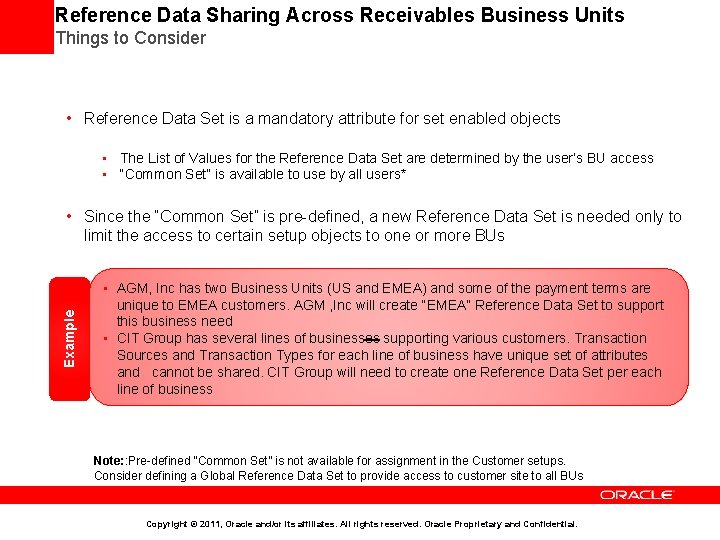
Reference Data Sharing Across Receivables Business Units Things to Consider • Reference Data Set is a mandatory attribute for set enabled objects • The List of Values for the Reference Data Set are determined by the user’s BU access • “Common Set” is available to use by all users* Example • Since the “Common Set” is pre-defined, a new Reference Data Set is needed only to limit the access to certain setup objects to one or more BUs • AGM, Inc has two Business Units (US and EMEA) and some of the payment terms are unique to EMEA customers. AGM , Inc will create “EMEA” Reference Data Set to support this business need • CIT Group has several lines of businesses supporting various customers. Transaction Sources and Transaction Types for each line of business have unique set of attributes and cannot be shared. CIT Group will need to create one Reference Data Set per each line of business Note: : Pre-defined “Common Set” is not available for assignment in the Customer setups. Consider defining a Global Reference Data Set to provide access to customer site to all BUs Copyright © 2011, Oracle and/or its affiliates. All rights reserved. Oracle Proprietary and Confidential.
Agenda • Implementation Overview • Order Fulfillment Business Process at a Glance • Business Process Mapping to Setup Activities • Minimal Configuration to Make Receivables Operational • Key implementation Concepts and Considerations • • • Security in Fusion Receivables Business Unit, Ledger, and Legal Entity in Fusion Receivables Reference Data Sharing across Receivables Business Units Accounting in Receivables Customer Billing Customer Payments Revenue Management Late Charges Receivables to General Ledger Reconciliation • Deltas with EBS • Additional Resources Copyright © 2011, Oracle and/or its affiliates. All rights reserved. Oracle Proprietary and Confidential.
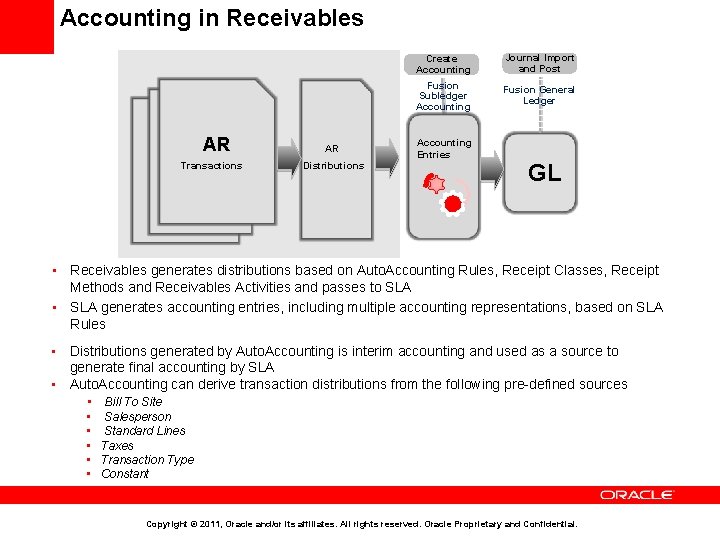
Accounting in Receivables Tr Tr AR Transactions AR Distributions Create Accounting Journal Import and Post Fusion Subledger Accounting Fusion General Ledger Accounting Entries GL • Receivables generates distributions based on Auto. Accounting Rules, Receipt Classes, Receipt Methods and Receivables Activities and passes to SLA • SLA generates accounting entries, including multiple accounting representations, based on SLA Rules • Distributions generated by Auto. Accounting is interim accounting and used as a source to generate final accounting by SLA • Auto. Accounting can derive transaction distributions from the following pre-defined sources • Bill To Site • • • Salesperson Standard Lines Taxes Transaction Type Constant Copyright © 2011, Oracle and/or its affiliates. All rights reserved. Oracle Proprietary and Confidential.
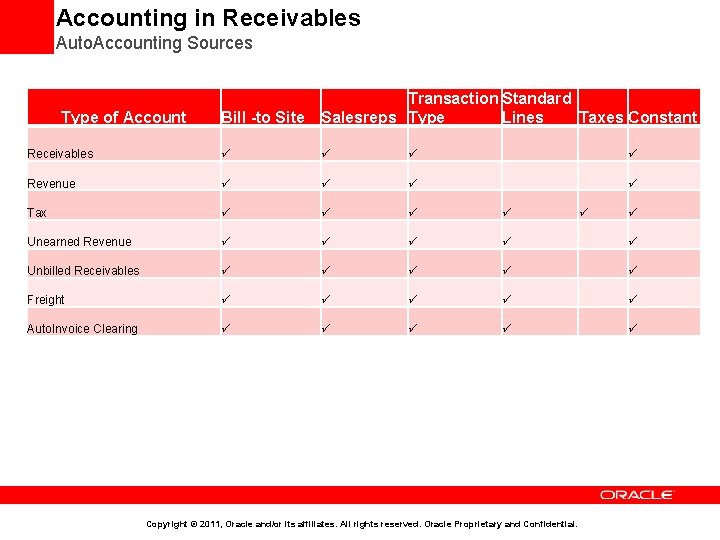
Accounting in Receivables Auto. Accounting Sources Bill -to Site Transaction Standard Salesreps Type Lines Taxes Constant Receivables Revenue Tax Unearned Revenue Unbilled Receivables Freight Auto. Invoice Clearing Type of Account Copyright © 2011, Oracle and/or its affiliates. All rights reserved. Oracle Proprietary and Confidential.
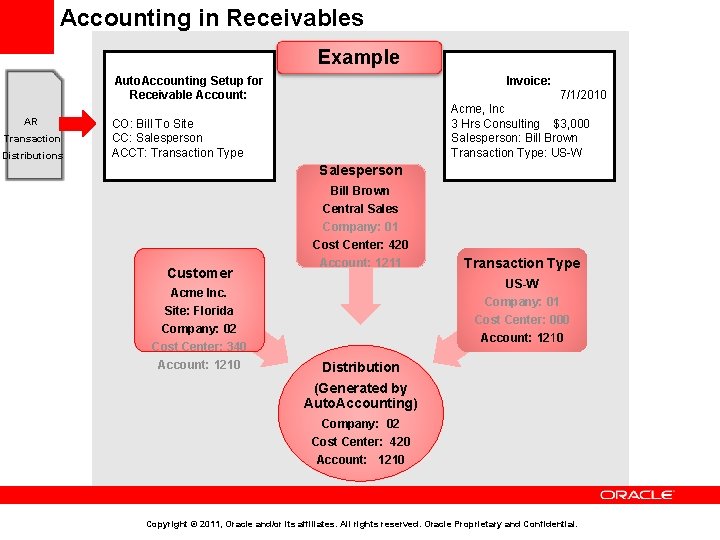
Accounting in Receivables Example Auto. Accounting Setup for Receivable Account: AR Transaction Distributions Invoice: 7/1/2010 Acme, Inc 3 Hrs Consulting $3, 000 Salesperson: Bill Brown Transaction Type: US-W CO: Bill To Site CC: Salesperson ACCT: Transaction Type Salesperson Customer Acme Inc. Site: Florida Company: 02 Cost Center: 340 Account: 1210 Bill Brown Central Sales Company: 01 Cost Center: 420 Account: 1211 Transaction Type US-W Company: 01 Cost Center: 000 Account: 1210 Distribution (Generated by Auto. Accounting) Company: 02 Cost Center: 420 Account: 1210 Copyright © 2011, Oracle and/or its affiliates. All rights reserved. Oracle Proprietary and Confidential.
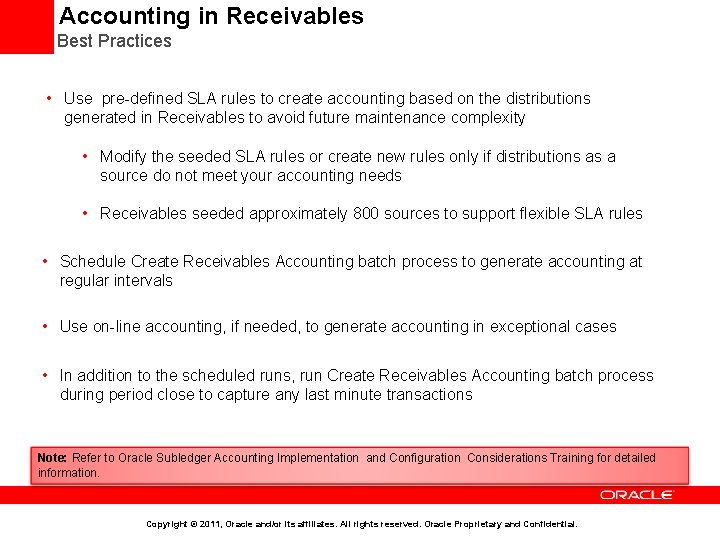
Accounting in Receivables Best Practices • Use pre-defined SLA rules to create accounting based on the distributions generated in Receivables to avoid future maintenance complexity • Modify the seeded SLA rules or create new rules only if distributions as a source do not meet your accounting needs • Receivables seeded approximately 800 sources to support flexible SLA rules • Schedule Create Receivables Accounting batch process to generate accounting at regular intervals • Use on-line accounting, if needed, to generate accounting in exceptional cases • In addition to the scheduled runs, run Create Receivables Accounting batch process during period close to capture any last minute transactions Note: Refer to Oracle Subledger Accounting Implementation and Configuration Considerations Training for detailed information. Copyright © 2011, Oracle and/or its affiliates. All rights reserved. Oracle Proprietary and Confidential.
Agenda • Implementation Overview • Order Fulfillment Business Process at a Glance • Business Process Mapping to Setup Activities • Minimal Configuration to Make Receivables Operational • Key implementation Concepts and Considerations • • • Security in Fusion Receivables Business Unit, Ledger and Legal Entity in Receivables Reference Data Sharing across Receivables Business Units Accounting in Receivables Customer Billing Customer Payments Revenue Management Late Charges Receivables to General Ledger Reconciliation • Deltas with EBS • Additional Resources Copyright © 2011, Oracle and/or its affiliates. All rights reserved. Oracle Proprietary and Confidential.
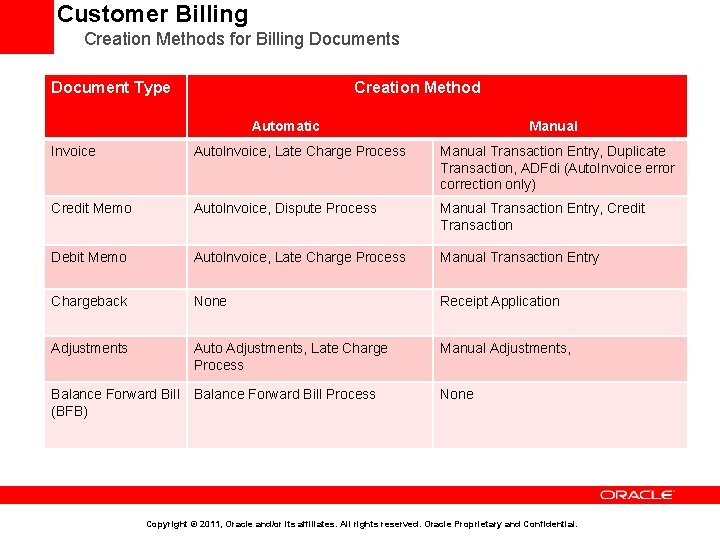
Customer Billing Creation Methods for Billing Documents Document Type Creation Method XXXXXXX Automatic Manual Invoice Auto. Invoice, Late Charge Process Manual Transaction Entry, Duplicate Transaction, ADFdi (Auto. Invoice error correction only) Credit Memo Auto. Invoice, Dispute Process Manual Transaction Entry, Credit Transaction Debit Memo Auto. Invoice, Late Charge Process Manual Transaction Entry Chargeback None Receipt Application Adjustments Auto Adjustments, Late Charge Process Manual Adjustments, Balance Forward Bill Process (BFB) None Copyright © 2011, Oracle and/or its affiliates. All rights reserved. Oracle Proprietary and Confidential.
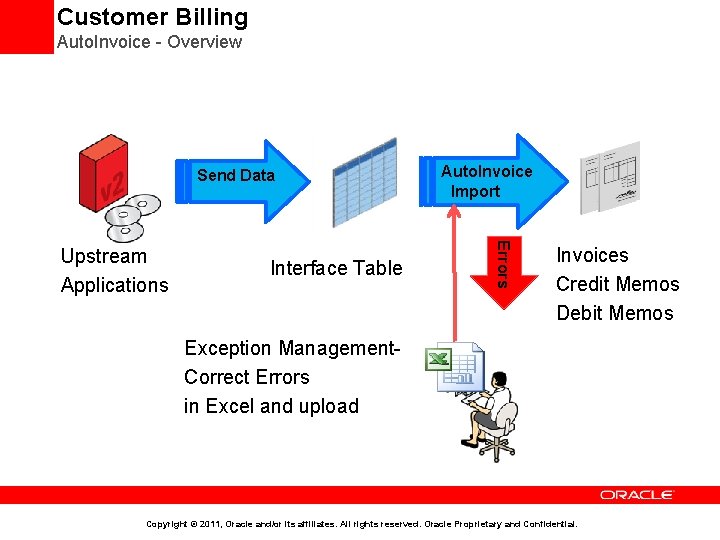
Customer Billing Auto. Invoice - Overview Send Data Interface Table Errors Upstream Applications Auto. Invoice Import Invoices Credit Memos Debit Memos Exception Management. Correct Errors in Excel and upload Copyright © 2011, Oracle and/or its affiliates. All rights reserved. Oracle Proprietary and Confidential.
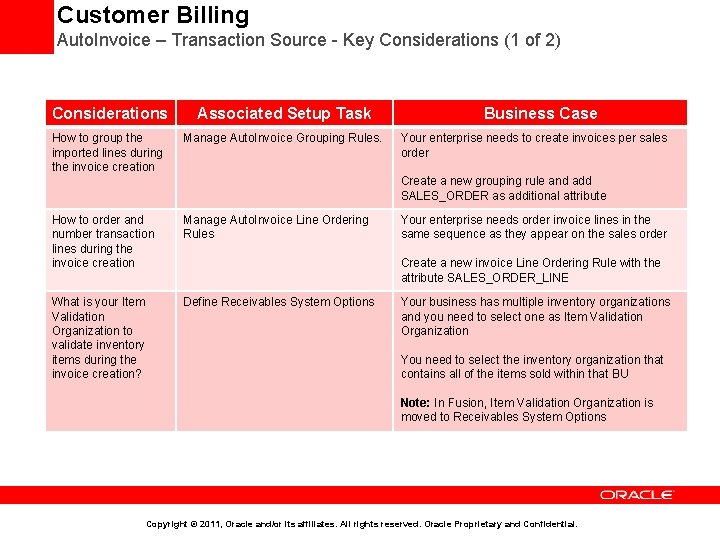
Customer Billing Auto. Invoice – Transaction Source - Key Considerations (1 of 2) Considerations Associated Setup Task How to group the imported lines during the invoice creation Manage Auto. Invoice Grouping Rules. Business Case Your enterprise needs to create invoices per sales order Create a new grouping rule and add SALES_ORDER as additional attribute How to order and number transaction lines during the invoice creation Manage Auto. Invoice Line Ordering Rules What is your Item Validation Organization to validate inventory items during the invoice creation? Define Receivables System Options Your enterprise needs order invoice lines in the same sequence as they appear on the sales order Create a new invoice Line Ordering Rule with the attribute SALES_ORDER_LINE Your business has multiple inventory organizations and you need to select one as Item Validation Organization You need to select the inventory organization that contains all of the items sold within that BU Note: In Fusion, Item Validation Organization is moved to Receivables System Options Copyright © 2011, Oracle and/or its affiliates. All rights reserved. Oracle Proprietary and Confidential.
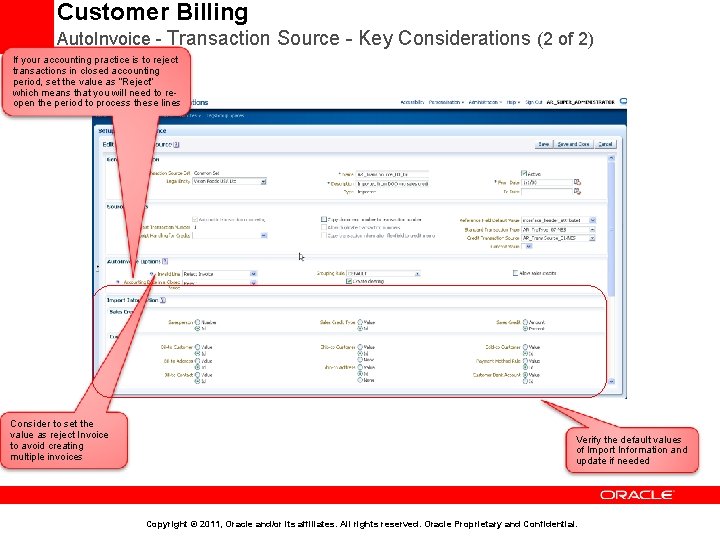
Customer Billing Auto. Invoice - Transaction Source - Key Considerations (2 of 2) If your accounting practice is to reject transactions in closed accounting period, set the value as “Reject” which means that you will need to reopen the period to process these lines Consider to set the value as reject Invoice to avoid creating multiple invoices Verify the default values of Import Information and update if needed Copyright © 2011, Oracle and/or its affiliates. All rights reserved. Oracle Proprietary and Confidential.
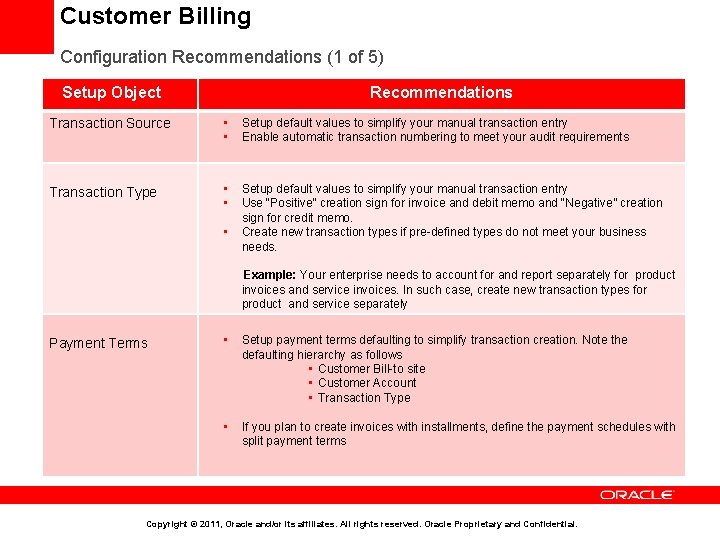
Customer Billing Configuration Recommendations (1 of 5) Setup Object Recommendations Transaction Source • • Setup default values to simplify your manual transaction entry Enable automatic transaction numbering to meet your audit requirements Transaction Type • • Setup default values to simplify your manual transaction entry Use “Positive” creation sign for invoice and debit memo and “Negative” creation sign for credit memo. Create new transaction types if pre-defined types do not meet your business needs. • Example: Your enterprise needs to account for and report separately for product invoices and service invoices. In such case, create new transaction types for product and service separately Payment Terms • Setup payment terms defaulting to simplify transaction creation. Note the defaulting hierarchy as follows • Customer Bill-to site • Customer Account • Transaction Type • If you plan to create invoices with installments, define the payment schedules with split payment terms Copyright © 2011, Oracle and/or its affiliates. All rights reserved. Oracle Proprietary and Confidential.
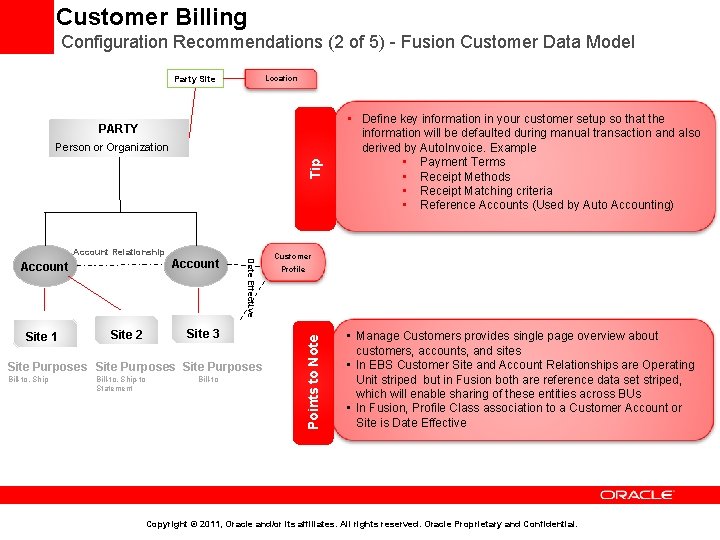
Customer Billing Configuration Recommendations (2 of 5) - Fusion Customer Data Model Party Site Location PARTY Tip Person or Organization Site 1 Site 2 Date Effective Account Site 3 Site Purposes Bill-to, Ship-to Statement Bill-to Customer Profile Points to Note Account Relationship • Define key information in your customer setup so that the Points to Note information will be defaulted during manual transaction and also derived by Auto. Invoice. Example • Payment Terms • Receipt Methods • Receipt Matching criteria • Reference Accounts (Used by Auto Accounting) • Manage Customers provides single page overview about customers, accounts, and sites • In EBS Customer Site and Account Relationships are Operating Unit striped but in Fusion both are reference data set striped, which will enable sharing of these entities across BUs • In Fusion, Profile Class association to a Customer Account or Site is Date Effective Copyright © 2011, Oracle and/or its affiliates. All rights reserved. Oracle Proprietary and Confidential.
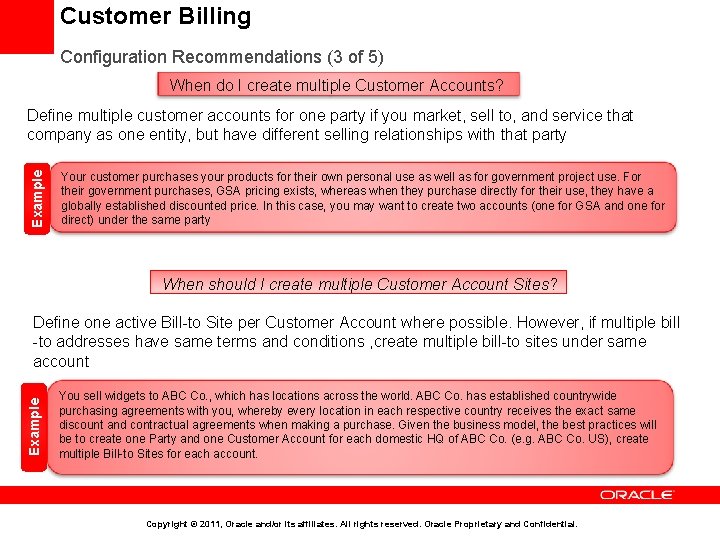
Customer Billing Configuration Recommendations (3 of 5) When do I create multiple Customer Accounts? Example Define multiple customer accounts for one party if you market, sell to, and service that company as one entity, but have different selling relationships with that party Your customer purchases your products for their own personal use as well as for government project use. For their government purchases, GSA pricing exists, whereas when they purchase directly for their use, they have a globally established discounted price. In this case, you may want to create two accounts (one for GSA and one for direct) under the same party When should I create multiple Customer Account Sites? Example Define one active Bill-to Site per Customer Account where possible. However, if multiple bill -to addresses have same terms and conditions , create multiple bill-to sites under same account You sell widgets to ABC Co. , which has locations across the world. ABC Co. has established countrywide purchasing agreements with you, whereby every location in each respective country receives the exact same discount and contractual agreements when making a purchase. Given the business model, the best practices will be to create one Party and one Customer Account for each domestic HQ of ABC Co. (e. g. ABC Co. US), create multiple Bill-to Sites for each account. Copyright © 2011, Oracle and/or its affiliates. All rights reserved. Oracle Proprietary and Confidential.
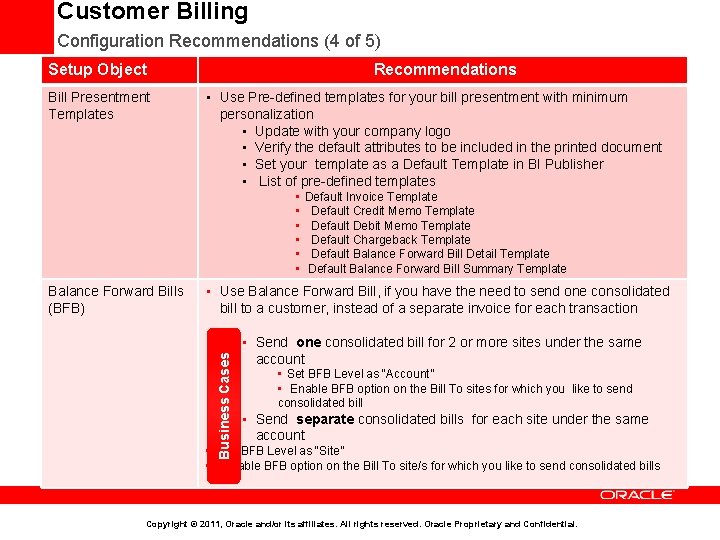
Customer Billing Configuration Recommendations (4 of 5) Setup Object Bill Presentment Templates Recommendations • Use Pre-defined templates for your bill presentment with minimum personalization • Update with your company logo • Verify the default attributes to be included in the printed document • Set your template as a Default Template in BI Publisher • List of pre-defined templates • • Use Balance Forward Bill, if you have the need to send one consolidated bill to a customer, instead of a separate invoice for each transaction Business Cases Balance Forward Bills (BFB) Default Invoice Template Default Credit Memo Template Default Debit Memo Template Default Chargeback Template Default Balance Forward Bill Detail Template Default Balance Forward Bill Summary Template • Send one consolidated bill for 2 or more sites under the same account • Set BFB Level as “Account” • Enable BFB option on the Bill To sites for which you like to send consolidated bill • Send separate consolidated bills for each site under the same account • Set BFB Level as “Site” • Enable BFB option on the Bill To site/s for which you like to send consolidated bills Copyright © 2011, Oracle and/or its affiliates. All rights reserved. Oracle Proprietary and Confidential.
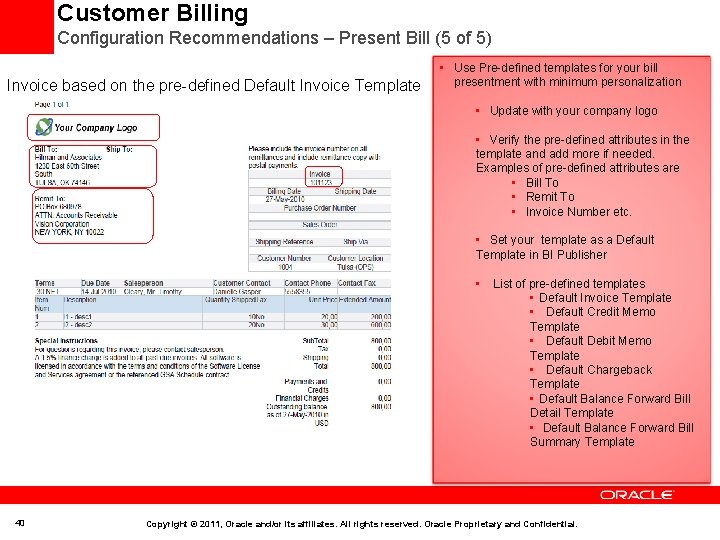
Customer Billing Configuration Recommendations – Present Bill (5 of 5) Invoice based on the pre-defined Default Invoice Template • Use Pre-defined templates for your bill presentment with minimum personalization • Update with your company logo • Verify the pre-defined attributes in the template and add more if needed. Examples of pre-defined attributes are • Bill To • Remit To • Invoice Number etc. • Set your template as a Default Template in BI Publisher • List of pre-defined templates • Default Invoice Template • Default Credit Memo Template • Default Debit Memo Template • Default Chargeback Template • Default Balance Forward Bill Detail Template • Default Balance Forward Bill Summary Template 40 Copyright © 2011, Oracle and/or its affiliates. All rights reserved. Oracle Proprietary and Confidential.
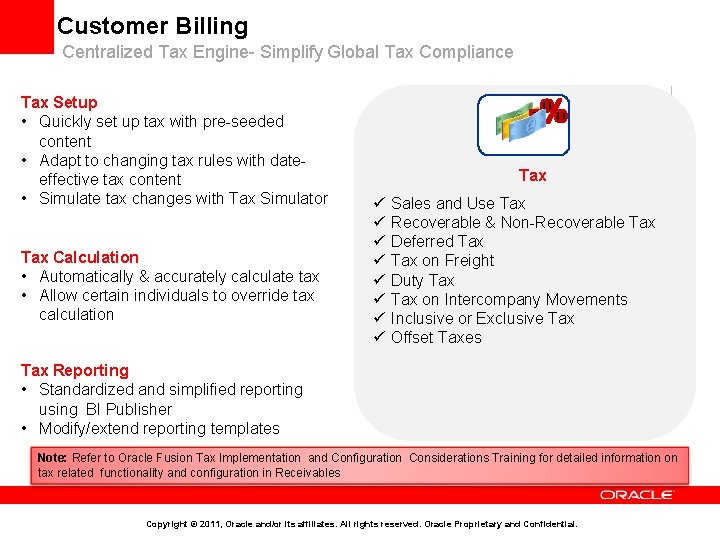
Customer Billing Centralized Tax Engine- Simplify Global Tax Compliance Tax Setup • Quickly set up tax with pre-seeded content • Adapt to changing tax rules with dateeffective tax content • Simulate tax changes with Tax Simulator Tax Calculation • Automatically & accurately calculate tax • Allow certain individuals to override tax calculation Tax Sales and Use Tax Recoverable & Non-Recoverable Tax Deferred Tax on Freight Duty Tax on Intercompany Movements Inclusive or Exclusive Tax Offset Taxes Tax Reporting • Standardized and simplified reporting using BI Publisher • Modify/extend reporting templates Note: Refer to Oracle Fusion Tax Implementation and Configuration Considerations Training for detailed information on tax related functionality and configuration in Receivables Copyright © 2011, Oracle and/or its affiliates. All rights reserved. Oracle Proprietary and Confidential.
Agenda • Implementation Overview • Order Fulfillment Business Process at a Glance • Business Process Mapping to Setup Activities • Minimal Configuration to Make Receivables Operational • Key implementation Concepts and Considerations • • • Security in Fusion Receivables Business Unit, Ledger, and Legal Entity in Receivables Reference Data Sharing across Receivables Business Units Accounting in Receivables Customer Billing Customer Payments Revenue Management Late Charges Receivables to General Ledger Reconciliation • Deltas with EBS • Additional Resources Copyright © 2011, Oracle and/or its affiliates. All rights reserved. Oracle Proprietary and Confidential.
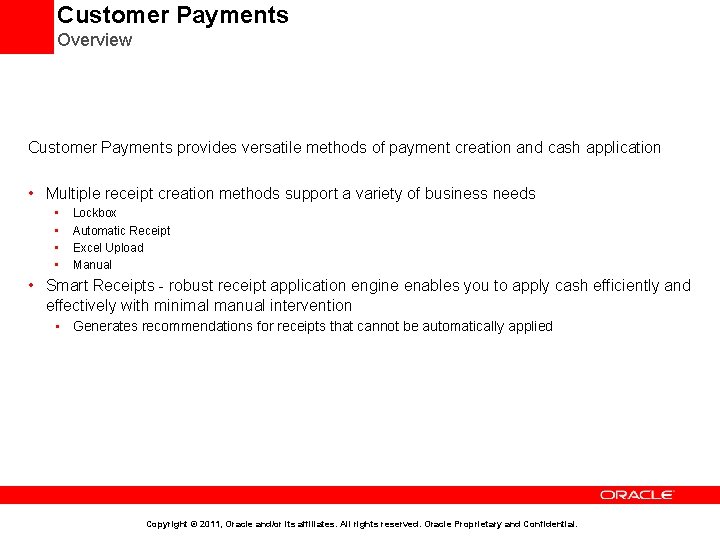
Customer Payments Overview Customer Payments provides versatile methods of payment creation and cash application • Multiple receipt creation methods support a variety of business needs • • Lockbox Automatic Receipt Excel Upload Manual • Smart Receipts - robust receipt application engine enables you to apply cash efficiently and effectively with minimal manual intervention • Generates recommendations for receipts that cannot be automatically applied Copyright © 2011, Oracle and/or its affiliates. All rights reserved. Oracle Proprietary and Confidential.
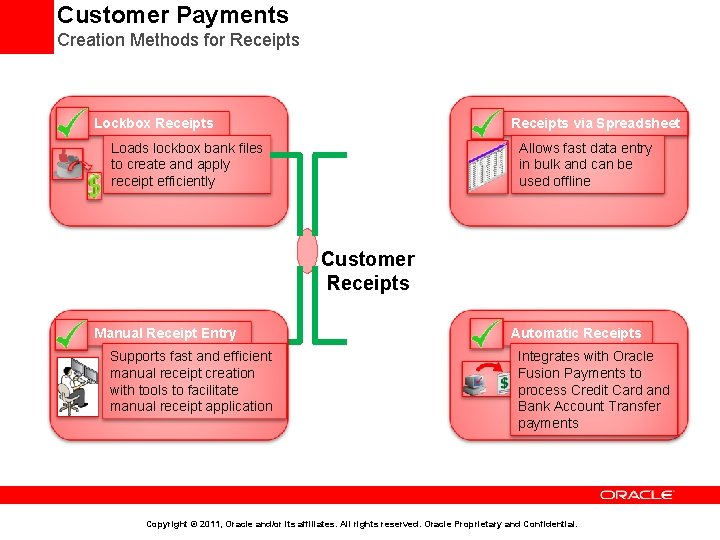
Customer Payments Creation Methods for Receipts via Spreadsheet Lockbox Receipts Allows fast data entry in bulk and can be used offline Loads lockbox bank files to create and apply receipt efficiently Customer Receipts Manual Receipt Entry Supports fast and efficient manual receipt creation with tools to facilitate manual receipt application Automatic Receipts Integrates with Oracle Fusion Payments to process Credit Card and Bank Account Transfer payments Copyright © 2011, Oracle and/or its affiliates. All rights reserved. Oracle Proprietary and Confidential.
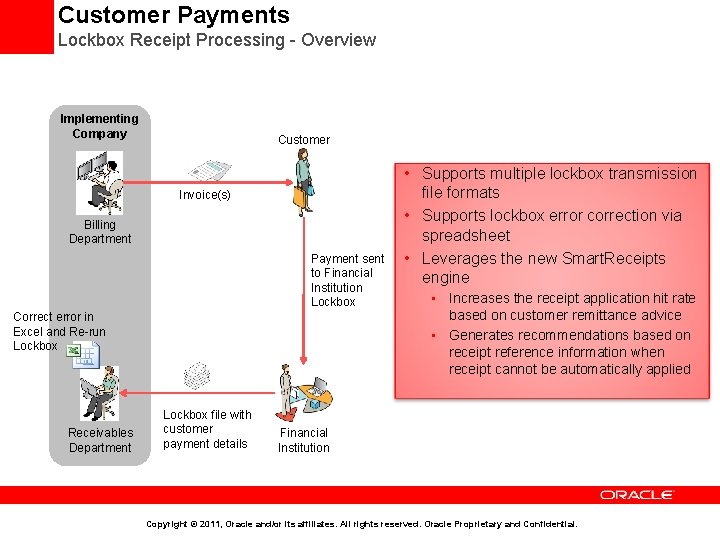
Customer Payments Lockbox Receipt Processing - Overview Implementing Company Customer Invoice(s) Billing Department Payment sent to Financial Institution Lockbox Correct error in Excel and Re-run Lockbox Receivables Department Lockbox file with customer payment details • Supports multiple lockbox transmission file formats • Supports lockbox error correction via spreadsheet • Leverages the new Smart. Receipts engine • Increases the receipt application hit rate based on customer remittance advice • Generates recommendations based on receipt reference information when receipt cannot be automatically applied Financial Institution Copyright © 2011, Oracle and/or its affiliates. All rights reserved. Oracle Proprietary and Confidential.
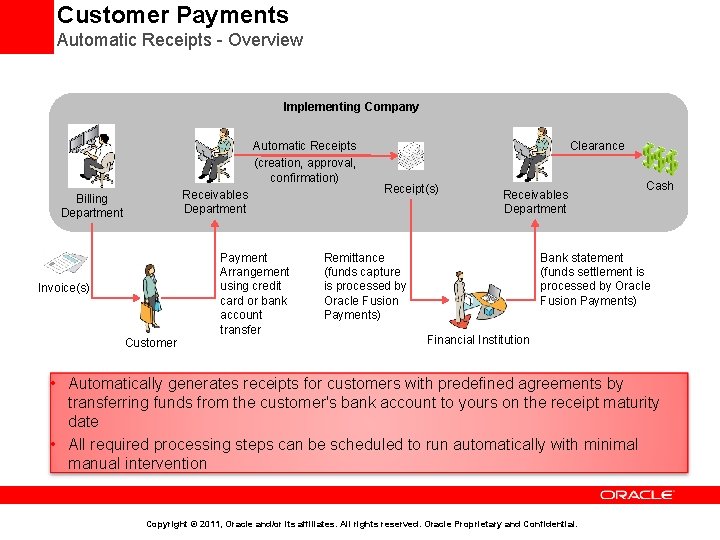
Customer Payments Automatic Receipts - Overview Implementing Company Automatic Receipts (creation, approval, confirmation) Receivables Department Billing Department Payment Arrangement using credit card or bank account transfer Invoice(s) Customer Clearance Receipt(s) Receivables Department Remittance (funds capture is processed by Oracle Fusion Payments) Cash Bank statement (funds settlement is processed by Oracle Fusion Payments) Financial Institution • Automatically generates receipts for customers with predefined agreements by transferring funds from the customer's bank account to yours on the receipt maturity date • All required processing steps can be scheduled to run automatically with minimal manual intervention Copyright © 2011, Oracle and/or its affiliates. All rights reserved. Oracle Proprietary and Confidential.
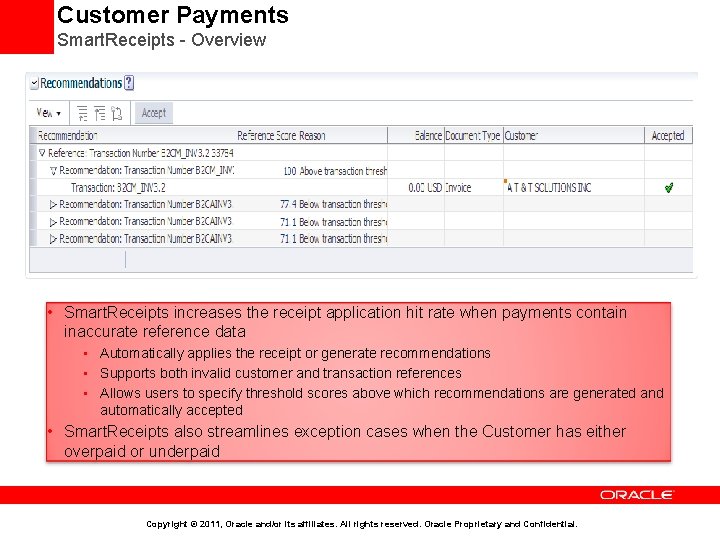
Customer Payments Smart. Receipts - Overview • Smart. Receipts increases the receipt application hit rate when payments contain inaccurate reference data • Automatically applies the receipt or generate recommendations • Supports both invalid customer and transaction references • Allows users to specify threshold scores above which recommendations are generated and automatically accepted • Smart. Receipts also streamlines exception cases when the Customer has either overpaid or underpaid Copyright © 2011, Oracle and/or its affiliates. All rights reserved. Oracle Proprietary and Confidential.
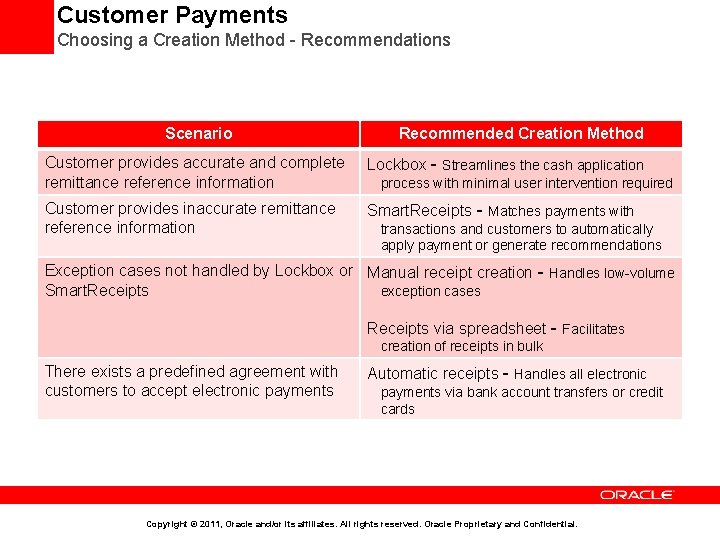
Customer Payments Choosing a Creation Method - Recommendations Scenario Recommended Creation Method Customer provides accurate and complete remittance reference information Lockbox - Streamlines the cash application Customer provides inaccurate remittance reference information Smart. Receipts - Matches payments with process with minimal user intervention required transactions and customers to automatically apply payment or generate recommendations Exception cases not handled by Lockbox or Manual receipt creation - Handles low-volume Smart. Receipts exception cases Receipts via spreadsheet - Facilitates creation of receipts in bulk There exists a predefined agreement with customers to accept electronic payments Automatic receipts - Handles all electronic payments via bank account transfers or credit cards Copyright © 2011, Oracle and/or its affiliates. All rights reserved. Oracle Proprietary and Confidential.
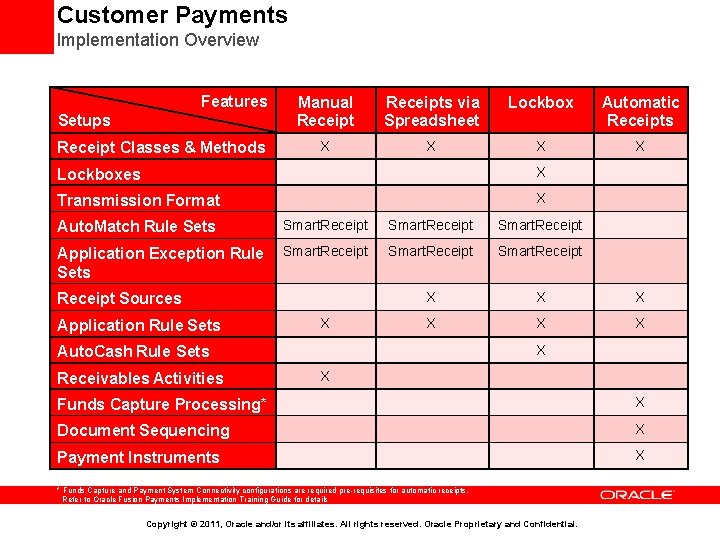
Customer Payments Implementation Overview Features Setups Receipt Classes & Methods Manual Receipts via Spreadsheet Lockbox Automatic Receipts X X Lockboxes X Transmission Format X Auto. Match Rule Sets Smart. Receipt Application Exception Rule Sets Smart. Receipt X X X Receipt Sources Application Rule Sets X X Auto. Cash Rule Sets Receivables Activities X Funds Capture Processing* X Document Sequencing X Payment Instruments X * Funds Capture and Payment System Connectivity configurations are required pre-requisites for automatic receipts. Refer to Oracle Fusion Payments Implementation Training Guide for details Copyright © 2011, Oracle and/or its affiliates. All rights reserved. Oracle Proprietary and Confidential.
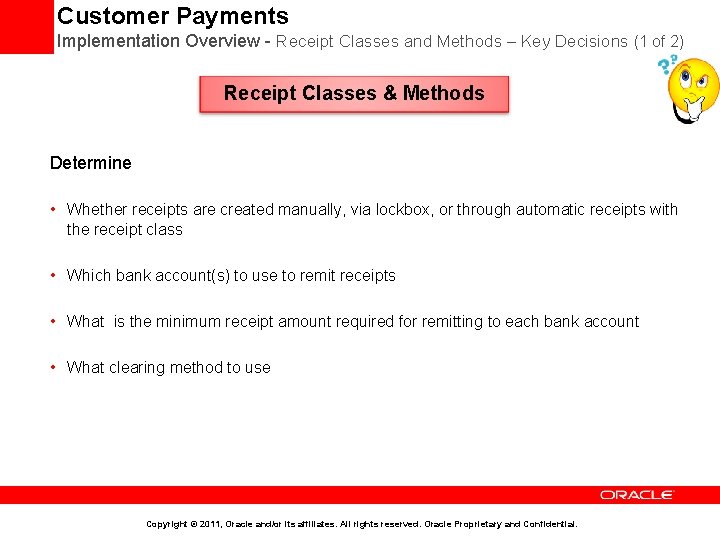
Customer Payments Implementation Overview - Receipt Classes and Methods – Key Decisions (1 of 2) Receipt Classes & Methods Determine • Whether receipts are created manually, via lockbox, or through automatic receipts with the receipt class • Which bank account(s) to use to remit receipts • What is the minimum receipt amount required for remitting to each bank account • What clearing method to use Copyright © 2011, Oracle and/or its affiliates. All rights reserved. Oracle Proprietary and Confidential.
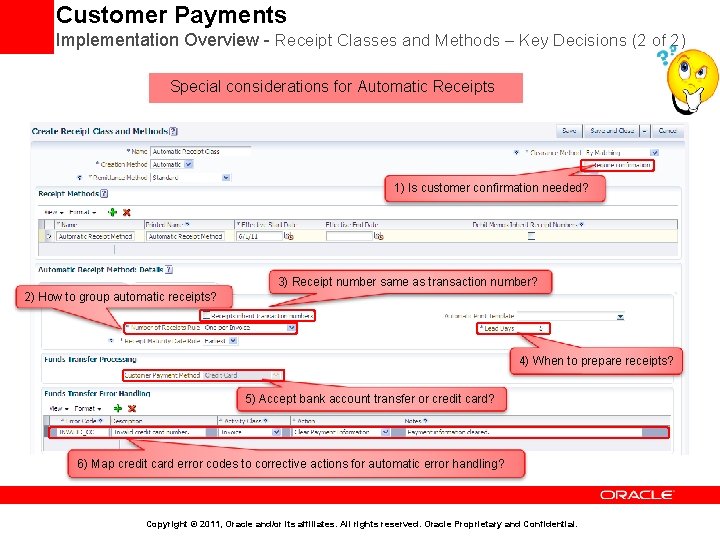
Customer Payments Implementation Overview - Receipt Classes and Methods – Key Decisions (2 of 2) Special considerations for Automatic Receipts 1) Is customer confirmation needed? 3) Receipt number same as transaction number? 2) How to group automatic receipts? 4) When to prepare receipts? 5) Accept bank account transfer or credit card? 6) Map credit card error codes to corrective actions for automatic error handling? Copyright © 2011, Oracle and/or its affiliates. All rights reserved. Oracle Proprietary and Confidential.
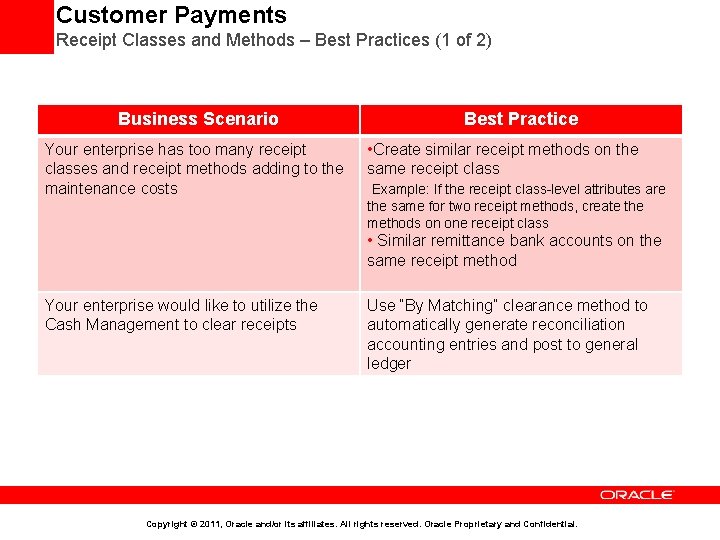
Customer Payments Receipt Classes and Methods – Best Practices (1 of 2) Business Scenario Best Practice Your enterprise has too many receipt classes and receipt methods adding to the maintenance costs • Create similar receipt methods on the same receipt class Example: If the receipt class-level attributes are the same for two receipt methods, create the methods on one receipt class • Similar remittance bank accounts on the same receipt method Your enterprise would like to utilize the Cash Management to clear receipts Use “By Matching” clearance method to automatically generate reconciliation accounting entries and post to general ledger Copyright © 2011, Oracle and/or its affiliates. All rights reserved. Oracle Proprietary and Confidential.
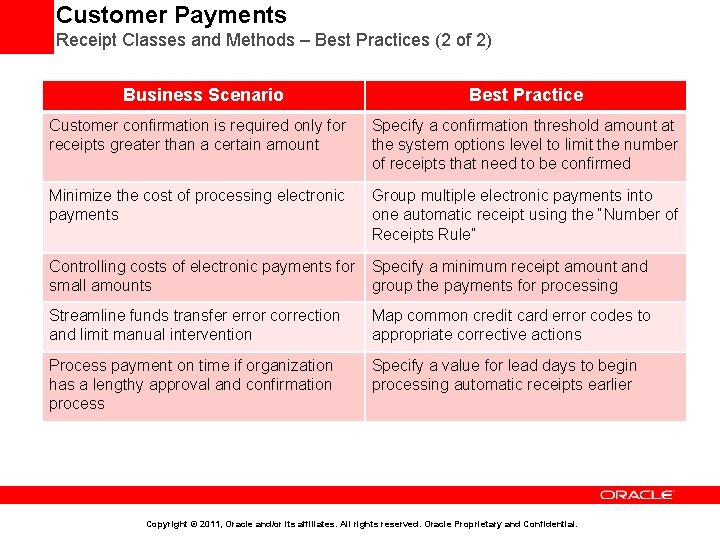
Customer Payments Receipt Classes and Methods – Best Practices (2 of 2) Business Scenario Best Practice Customer confirmation is required only for receipts greater than a certain amount Specify a confirmation threshold amount at the system options level to limit the number of receipts that need to be confirmed Minimize the cost of processing electronic payments Group multiple electronic payments into one automatic receipt using the “Number of Receipts Rule” Controlling costs of electronic payments for Specify a minimum receipt amount and small amounts group the payments for processing Streamline funds transfer error correction and limit manual intervention Map common credit card error codes to appropriate corrective actions Process payment on time if organization has a lengthy approval and confirmation process Specify a value for lead days to begin processing automatic receipts earlier Copyright © 2011, Oracle and/or its affiliates. All rights reserved. Oracle Proprietary and Confidential.
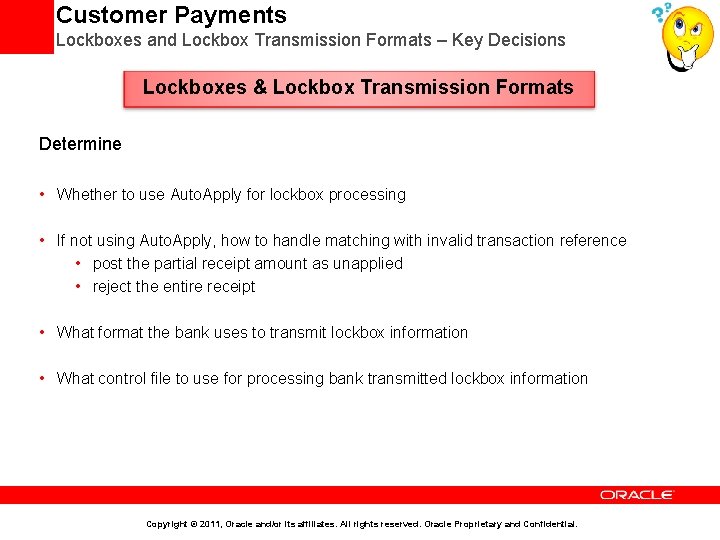
Customer Payments Lockboxes and Lockbox Transmission Formats – Key Decisions Lockboxes & Lockbox Transmission Formats Determine • Whether to use Auto. Apply for lockbox processing • If not using Auto. Apply, how to handle matching with invalid transaction reference • post the partial receipt amount as unapplied • reject the entire receipt • What format the bank uses to transmit lockbox information • What control file to use for processing bank transmitted lockbox information Copyright © 2011, Oracle and/or its affiliates. All rights reserved. Oracle Proprietary and Confidential.
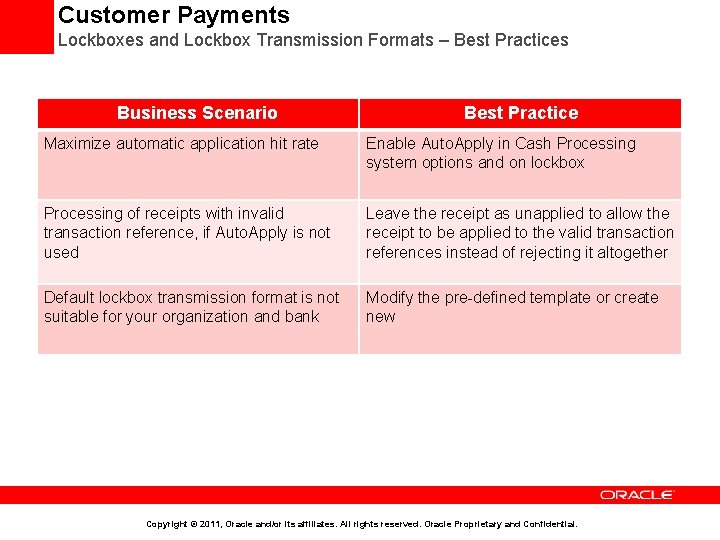
Customer Payments Lockboxes and Lockbox Transmission Formats – Best Practices Business Scenario Best Practice Maximize automatic application hit rate Enable Auto. Apply in Cash Processing system options and on lockbox Processing of receipts with invalid transaction reference, if Auto. Apply is not used Leave the receipt as unapplied to allow the receipt to be applied to the valid transaction references instead of rejecting it altogether Default lockbox transmission format is not suitable for your organization and bank Modify the pre-defined template or create new Copyright © 2011, Oracle and/or its affiliates. All rights reserved. Oracle Proprietary and Confidential.
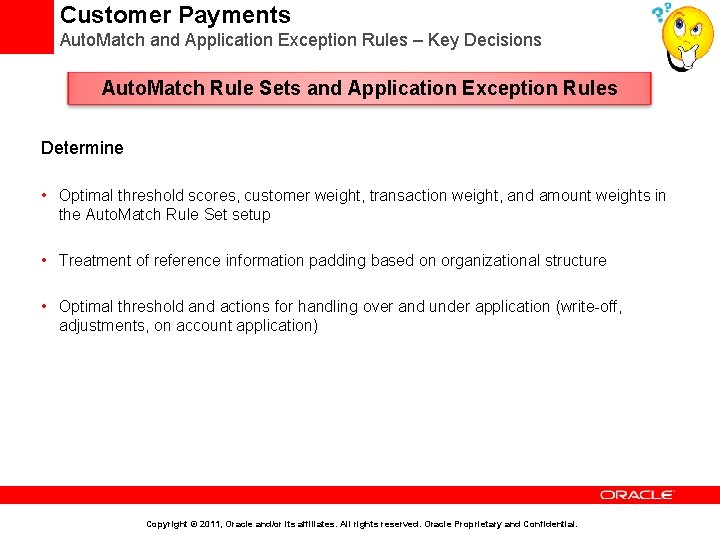
Customer Payments Auto. Match and Application Exception Rules – Key Decisions Auto. Match Rule Sets and Application Exception Rules Determine • Optimal threshold scores, customer weight, transaction weight, and amount weights in the Auto. Match Rule Set setup • Treatment of reference information padding based on organizational structure • Optimal threshold and actions for handling over and under application (write-off, adjustments, on account application) Copyright © 2011, Oracle and/or its affiliates. All rights reserved. Oracle Proprietary and Confidential.
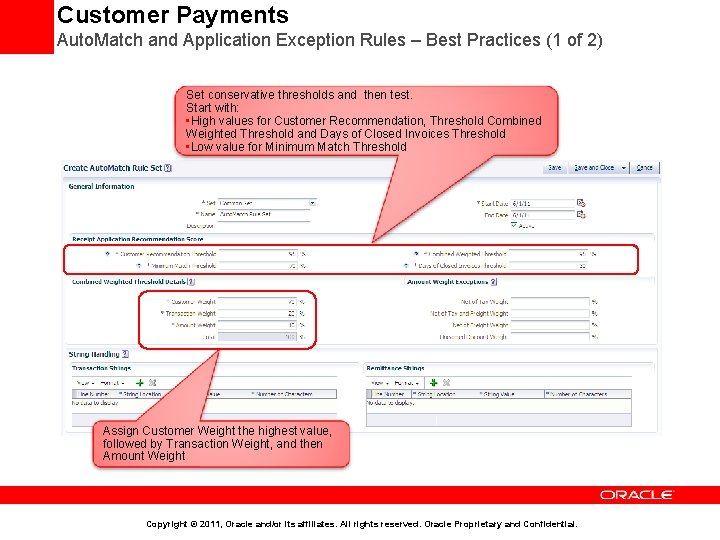
Customer Payments Auto. Match and Application Exception Rules – Best Practices (1 of 2) Set conservative thresholds and then test. Start with: • High values for Customer Recommendation, Threshold Combined Weighted Threshold and Days of Closed Invoices Threshold • Low value for Minimum Match Threshold Assign Customer Weight the highest value, followed by Transaction Weight, and then Amount Weight Copyright © 2011, Oracle and/or its affiliates. All rights reserved. Oracle Proprietary and Confidential.
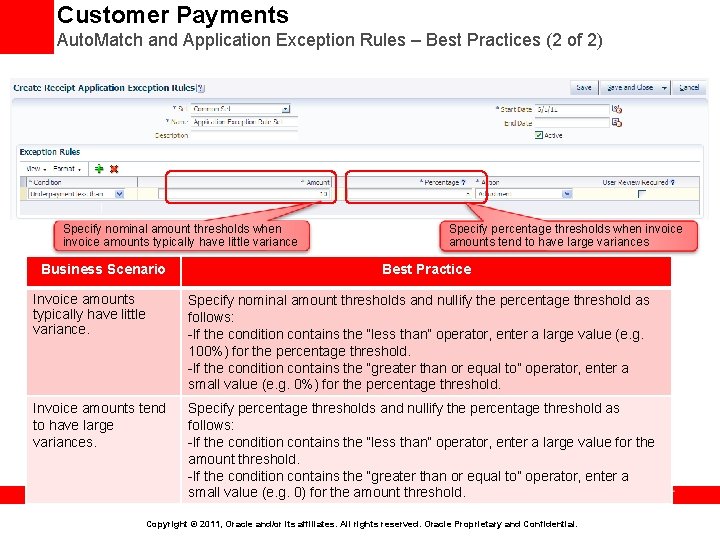
Customer Payments Auto. Match and Application Exception Rules – Best Practices (2 of 2) Specify nominal amount thresholds when invoice amounts typically have little variance Business Scenario Specify percentage thresholds when invoice amounts tend to have large variances Best Practice Invoice amounts typically have little variance. Specify nominal amount thresholds and nullify the percentage threshold as follows: -If the condition contains the “less than” operator, enter a large value (e. g. 100%) for the percentage threshold. -If the condition contains the “greater than or equal to” operator, enter a small value (e. g. 0%) for the percentage threshold. Invoice amounts tend to have large variances. Specify percentage thresholds and nullify the percentage threshold as follows: -If the condition contains the “less than” operator, enter a large value for the amount threshold. -If the condition contains the “greater than or equal to” operator, enter a small value (e. g. 0) for the amount threshold. Copyright © 2011, Oracle and/or its affiliates. All rights reserved. Oracle Proprietary and Confidential.
Agenda • Implementation Overview • Order Fulfillment Business Process at a Glance • Business Process Mapping to Setup Activities • Minimal Configuration to Make Receivables Operational • Key implementation Concepts and Considerations • • • Security in Fusion Receivables Business Unit, Ledger and Legal Entity in Receivables Reference Data Sharing across Receivables Business Units Security in Fusion Receivables Accounting in Receivables Customer Billing Customer Payments Revenue Management Late Charges Receivables to General Ledger Reconciliation • Deltas with EBS • Additional Resources Copyright © 2011, Oracle and/or its affiliates. All rights reserved. Oracle Proprietary and Confidential.
Revenue Management Overview • Supports revenue recognition by providing pre-defined invoicing rule and several Revenue Scheduling Rule types to meet various revenue recognition requirements of diverse business needs • Support crediting of invoices with rules by creating appropriate revenue reversals as per the accounting standards • Ensures that COGS and Revenue recognition occur in the same accounting period • Support Mass Revenue Adjustments i. e. adjust multiple transaction lines across transactions from a single search • Perform Revenue related setup activities directly from Revenue Management Workarea, secured by privileges Copyright © 2011, Oracle and/or its affiliates. All rights reserved. Oracle Proprietary and Confidential.
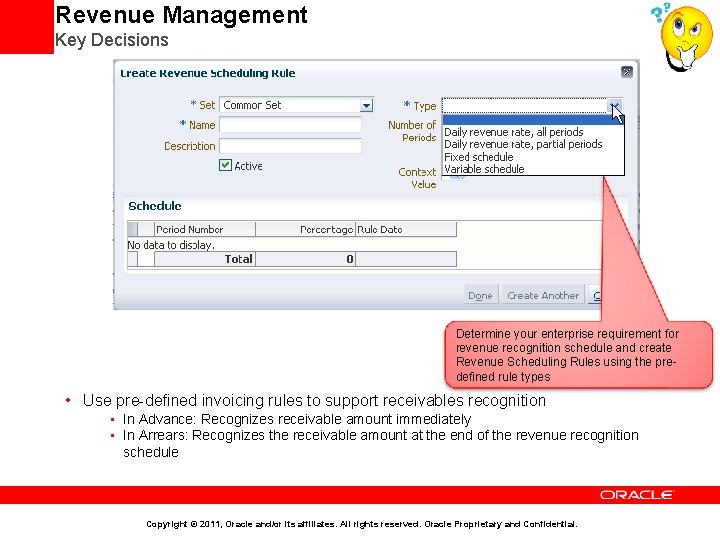
Revenue Management Key Decisions Determine your enterprise requirement for revenue recognition schedule and create Revenue Scheduling Rules using the predefined rule types • Use pre-defined invoicing rules to support receivables recognition • In Advance: Recognizes receivable amount immediately • In Arrears: Recognizes the receivable amount at the end of the revenue recognition schedule Copyright © 2011, Oracle and/or its affiliates. All rights reserved. Oracle Proprietary and Confidential.
Revenue Management Best Practices (1 of 3) • To meet the strict revenue recognition and accounting standards, use Revenue Scheduling Rule types of Daily Revenue Rate, All Periods and Daily Revenue Rate, Partial Periods. These rule types provide you with the most precise revenue recognition schedule possible • To defer revenue manually without using event based revenue management engine, use Deferred Revenue Scheduling Rules created by enabling the deferred revenue option and use RAM UI to recognize revenue manually • Schedule the Revenue Recognition Process at regular intervals, to generate the revenue distributions Copyright © 2011, Oracle and/or its affiliates. All rights reserved. Oracle Proprietary and Confidential.
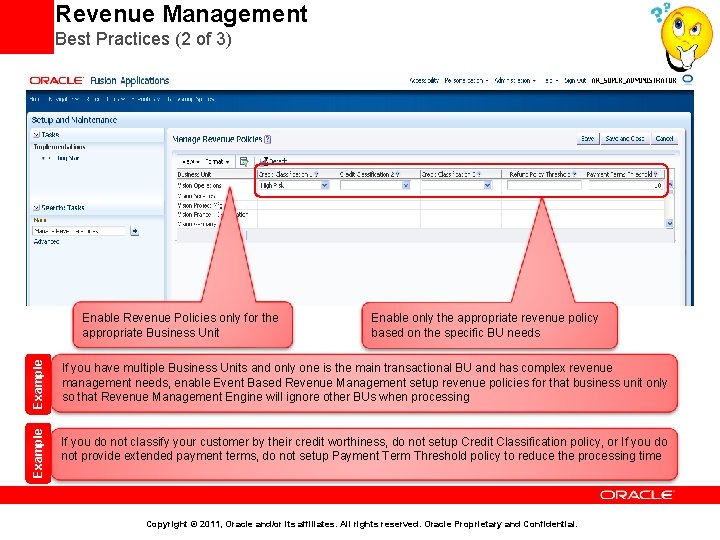
Revenue Management Best Practices (2 of 3) Example Enable only the appropriate revenue policy based on the specific BU needs If you have multiple Business Units and only one is the main transactional BU and has complex revenue management needs, enable Event Based Revenue Management setup revenue policies for that business unit only so that Revenue Management Engine will ignore other BUs when processing Example Enable Revenue Policies only for the appropriate Business Unit If you do not classify your customer by their credit worthiness, do not setup Credit Classification policy, or If you do not provide extended payment terms, do not setup Payment Term Threshold policy to reduce the processing time Copyright © 2011, Oracle and/or its affiliates. All rights reserved. Oracle Proprietary and Confidential.
Revenue Management Best Practices (3 of 3) • Setup Enterprise Revenue Policies to automate the revenue recognition decisions to avoid time consuming manual intervention because Revenue Management Engine uses these policies to make the defer or not-to-defer revenue decisions making every transaction adhere strict revenue recognition guidelines • Use Revenue Contingencies and Contingency Assignment Rules to automate revenue recognition decisions for scenarios that are not covered by Enterprise Revenue Policies • Use Optional Removal Event Attributes and Days to optimize the revenue management process and for timely revenue recognition Copyright © 2011, Oracle and/or its affiliates. All rights reserved. Oracle Proprietary and Confidential.
Agenda • Implementation Overview • Order Fulfillment Business Process at a Glance • Business Process Mapping to Setup Activities • Minimal Configuration to Make Receivables Operational • Key implementation Concepts and Considerations • • • Security in Fusion Receivables Business Unit, Ledger and Legal Entity in Receivables Reference Data Sharing across Receivables Business Units Accounting in Receivables Customer Billing Customer Payments Revenue Management Late Charges Receivables to General Ledger Reconciliation • Deltas with EBS • Additional Resources Copyright © 2011, Oracle and/or its affiliates. All rights reserved. Oracle Proprietary and Confidential.
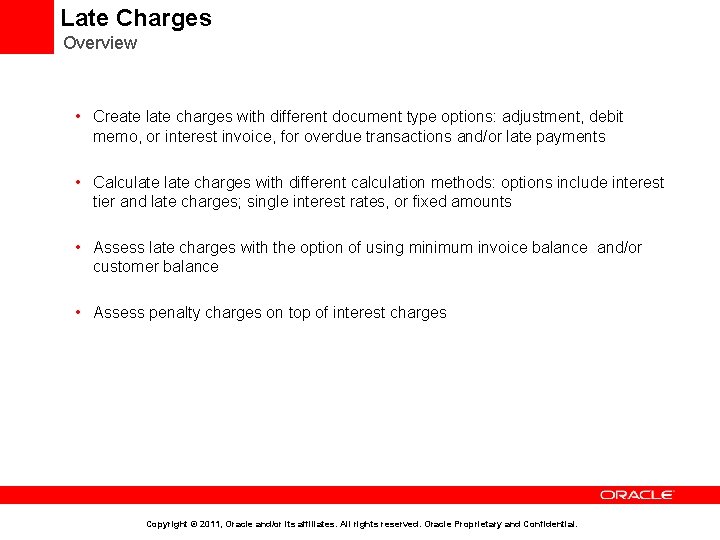
Late Charges Overview • Create late charges with different document type options: adjustment, debit memo, or interest invoice, for overdue transactions and/or late payments • Calculate charges with different calculation methods: options include interest tier and late charges; single interest rates, or fixed amounts • Assess late charges with the option of using minimum invoice balance and/or customer balance • Assess penalty charges on top of interest charges Copyright © 2011, Oracle and/or its affiliates. All rights reserved. Oracle Proprietary and Confidential.
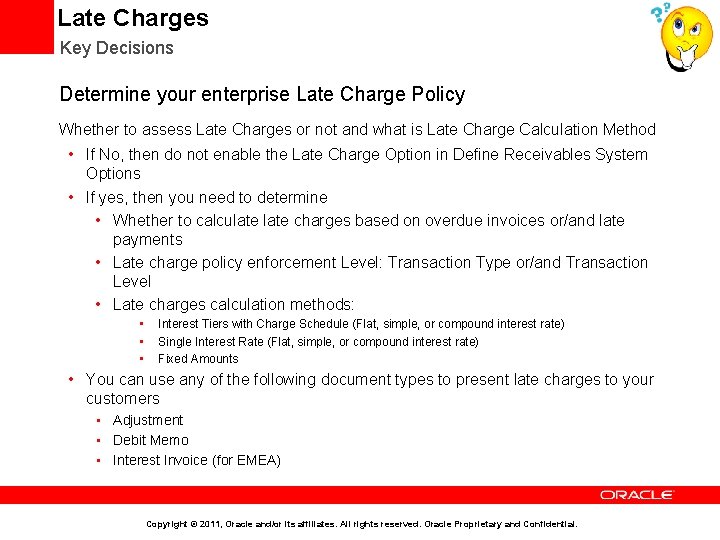
Late Charges Key Decisions Determine your enterprise Late Charge Policy Whether to assess Late Charges or not and what is Late Charge Calculation Method • If No, then do not enable the Late Charge Option in Define Receivables System Options • If yes, then you need to determine • Whether to calculate charges based on overdue invoices or/and late payments • Late charge policy enforcement Level: Transaction Type or/and Transaction Level • Late charges calculation methods: • • • Interest Tiers with Charge Schedule (Flat, simple, or compound interest rate) Single Interest Rate (Flat, simple, or compound interest rate) Fixed Amounts • You can use any of the following document types to present late charges to your customers • Adjustment • Debit Memo • Interest Invoice (for EMEA) Copyright © 2011, Oracle and/or its affiliates. All rights reserved. Oracle Proprietary and Confidential.
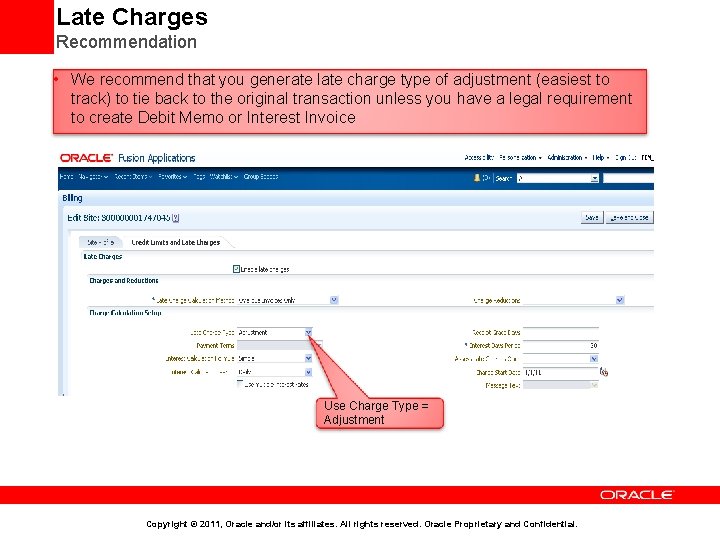
Late Charges Recommendation • We recommend that you generate late charge type of adjustment (easiest to track) to tie back to the original transaction unless you have a legal requirement to create Debit Memo or Interest Invoice Use Charge Type = Adjustment Copyright © 2011, Oracle and/or its affiliates. All rights reserved. Oracle Proprietary and Confidential.
Agenda • Implementation Overview • Order Fulfillment Business Process at a Glance • Business Process Mapping to Setup Activities • Minimal Configuration to Make Receivables Operational • Key implementation Concepts and Considerations • • • Security in Fusion Receivables Business Unit, Ledger and Legal Entity in Receivables Reference Data Sharing across Receivables Business Units Accounting in Receivables Customer Billing Customer Payments Revenue Management Late Charges Receivables to General Ledger Reconciliation • Deltas with EBS • Additional Resources Copyright © 2011, Oracle and/or its affiliates. All rights reserved. Oracle Proprietary and Confidential.
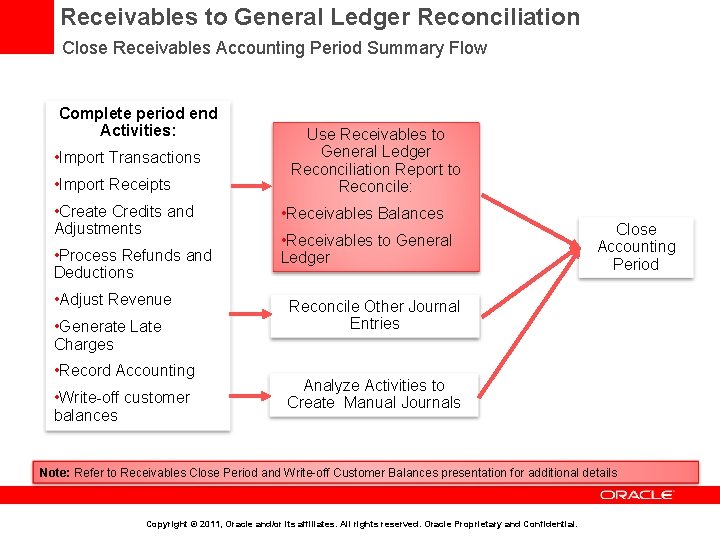
Receivables to General Ledger Reconciliation Close Receivables Accounting Period Summary Flow Complete period end Activities: • Import Transactions • Import Receipts • Create Credits and Adjustments • Process Refunds and Deductions • Adjust Revenue • Generate Late Charges • Record Accounting • Write-off customer balances Use Receivables to General Ledger Reconciliation Report to Reconcile: • Receivables Balances • Receivables to General Ledger Close Accounting Period Reconcile Other Journal Entries Analyze Activities to Create Manual Journals Note: Refer to Receivables Close Period and Write-off Customer Balances presentation for additional details Copyright © 2011, Oracle and/or its affiliates. All rights reserved. Oracle Proprietary and Confidential.
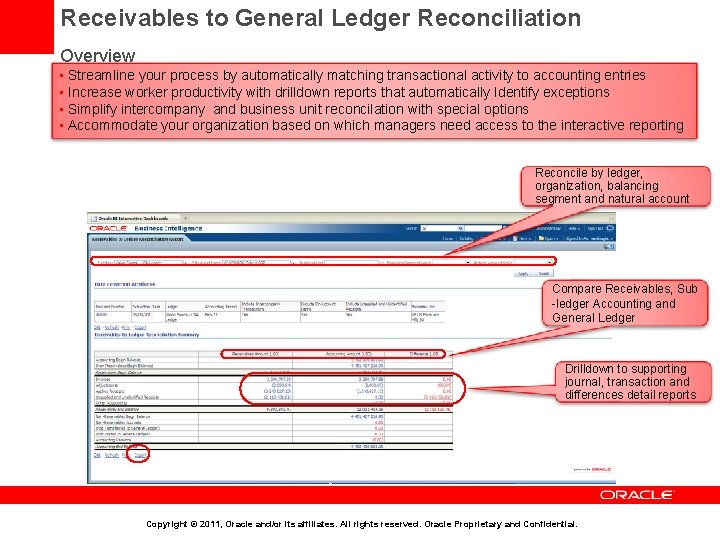
Receivables to General Ledger Reconciliation Overview • Streamline your process by automatically matching transactional activity to accounting entries • Increase worker productivity with drilldown reports that automatically Identify exceptions • Simplify intercompany and business unit reconcilation with special options • Accommodate your organization based on which managers need access to the interactive reporting Reconcile by ledger, organization, balancing segment and natural account Compare Receivables, Sub -ledger Accounting and General Ledger Drilldown to supporting journal, transaction and differences detail reports Copyright © 2011, Oracle and/or its affiliates. All rights reserved. Oracle Proprietary and Confidential.
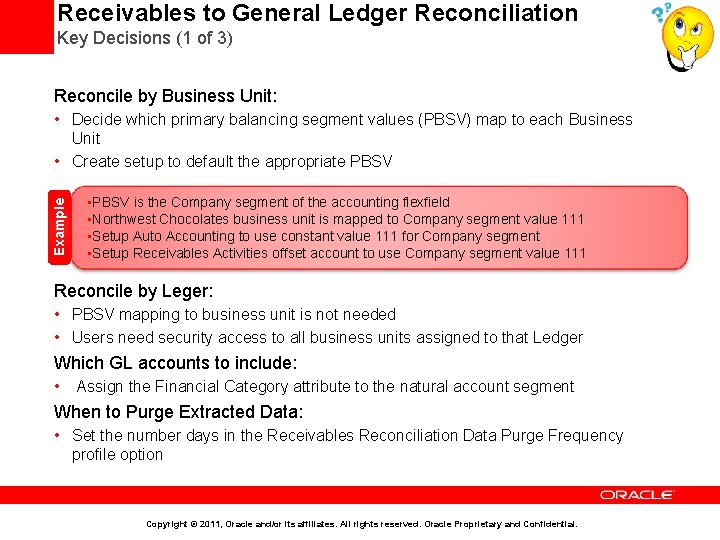
Receivables to General Ledger Reconciliation Key Decisions (1 of 3) Reconcile by Business Unit: Example • Decide which primary balancing segment values (PBSV) map to each Business Unit • Create setup to default the appropriate PBSV • PBSV is the Company segment of the accounting flexfield • Northwest Chocolates business unit is mapped to Company segment value 111 • Setup Auto Accounting to use constant value 111 for Company segment • Setup Receivables Activities offset account to use Company segment value 111 Reconcile by Leger: • PBSV mapping to business unit is not needed • Users need security access to all business units assigned to that Ledger Which GL accounts to include: • Assign the Financial Category attribute to the natural account segment When to Purge Extracted Data: • Set the number days in the Receivables Reconciliation Data Purge Frequency profile option Copyright © 2011, Oracle and/or its affiliates. All rights reserved. Oracle Proprietary and Confidential.
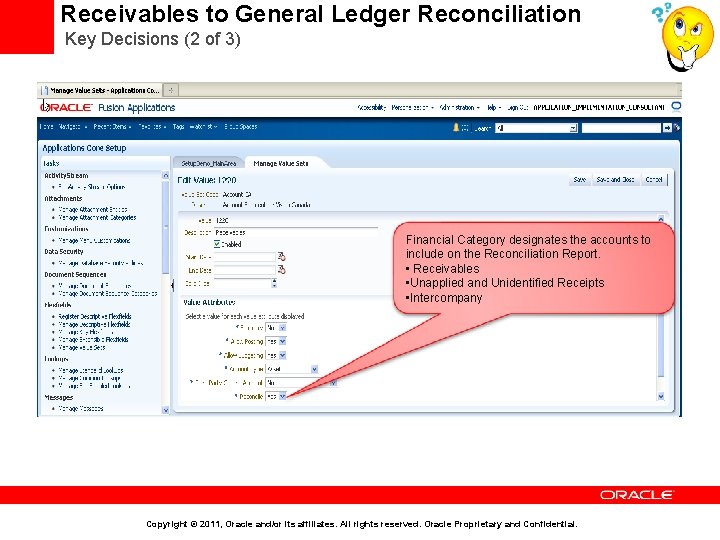
Receivables to General Ledger Reconciliation Key Decisions (2 of 3) Financial Category designates the accounts to include on the Reconciliation Report. • Receivables • Unapplied and Unidentified Receipts • Intercompany Copyright © 2011, Oracle and/or its affiliates. All rights reserved. Oracle Proprietary and Confidential.
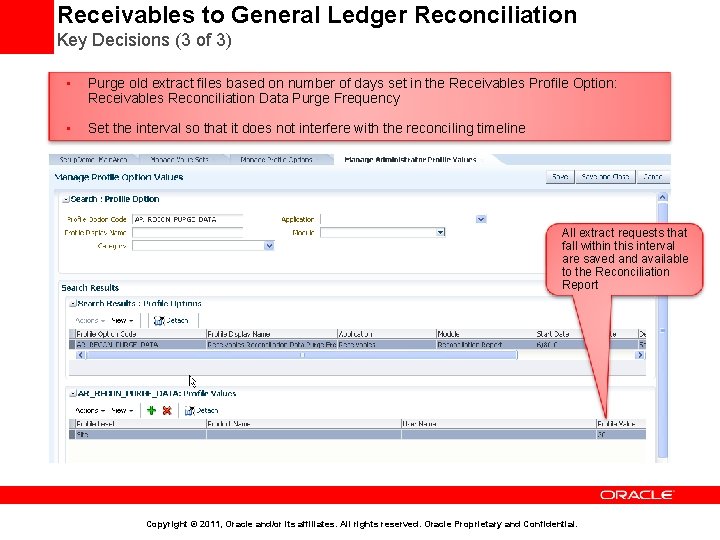
Receivables to General Ledger Reconciliation Key Decisions (3 of 3) • Purge old extract files based on number of days set in the Receivables Profile Option: Receivables Reconciliation Data Purge Frequency • Set the interval so that it does not interfere with the reconciling timeline All extract requests that fall within this interval are saved and available to the Reconciliation Report Copyright © 2011, Oracle and/or its affiliates. All rights reserved. Oracle Proprietary and Confidential.
Agenda • Implementation Overview • Order Fulfillment Business Process at a Glance • Business Process Mapping to Setup Activities • Minimal Configuration to Make Receivables Operational • Key implementation Concepts and Considerations • • • Security in Fusion Receivables Business Unit, Ledger and Legal Entity in Receivables Reference Data Sharing across Receivables Business Units Security in Fusion Receivables Accounting in Receivables Customer Billing Customer Payments Revenue Management Late Charges Receivables to General Ledger Reconciliation • Deltas with EBS • Additional Resources Copyright © 2011, Oracle and/or its affiliates. All rights reserved. Oracle Proprietary and Confidential.
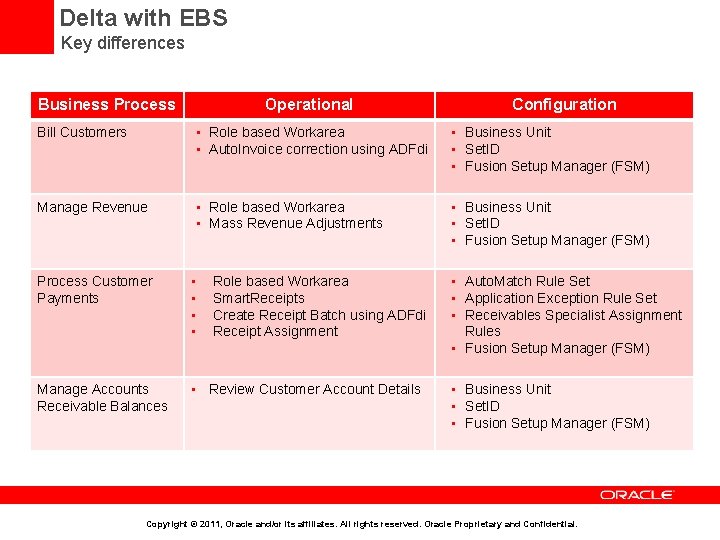
Delta with EBS Key differences Business Process Operational Configuration Bill Customers • Role based Workarea • Auto. Invoice correction using ADFdi • Business Unit • Set. ID • Fusion Setup Manager (FSM) Manage Revenue • Role based Workarea • Mass Revenue Adjustments • Business Unit • Set. ID • Fusion Setup Manager (FSM) Process Customer Payments • • Manage Accounts Receivable Balances • Review Customer Account Details Role based Workarea Smart. Receipts Create Receipt Batch using ADFdi Receipt Assignment • Auto. Match Rule Set • Application Exception Rule Set • Receivables Specialist Assignment Rules • Fusion Setup Manager (FSM) • Business Unit • Set. ID • Fusion Setup Manager (FSM) Copyright © 2011, Oracle and/or its affiliates. All rights reserved. Oracle Proprietary and Confidential.
Agenda • Implementation Overview • Order Fulfillment Business Process at a Glance • Business Process Mapping to Setup Activities • Minimal Configuration to Make Receivables Operational • Key implementation Concepts and Considerations • • • Security in Fusion Receivables Business Unit, Ledger and Legal Entity in Receivables Reference Data Sharing across Receivables Business Units Security in Fusion Receivables Accounting in Receivables Customer Billing Customer Payments Revenue Management Late Charges Receivables to General Ledger Reconciliation • Deltas with EBS • Additional Resources Copyright © 2011, Oracle and/or its affiliates. All rights reserved. Oracle Proprietary and Confidential.
Additional Resources • Trainings • • • Define Receivables Configuration Define Funds Capture Configure Payment System Connectivity Receivables Accounting Define Sales Order Fulfillment Define Customer Receivables Close Period and Write-off Customer Balances Oracle Fusion Intercompany Implementation and Configuration Considerations Oracle Fusion Accounting Hub Implementation Training Oracle Fusion Subledger Accounting Implementation and Configuration Considerations • Non Embedded Help Documents • • Define Receivables Configuration Define Customer Billing Configuration Define Customer Payments Define Revenue Management Configuration Define Accounts Receivable Balance Monitoring Setting Up for Receivables to General Ledger Reconciliation : Points to Consider Oracle Fusion Accounting Hub Implementation Guide Copyright © 2011, Oracle and/or its affiliates. All rights reserved. Oracle Proprietary and Confidential.
END Copyright © 2011, Oracle and/or its affiliates. All rights reserved. Oracle Proprietary and Confidential.
- Slides: 79