
Insert Company Logo Here Production Automation with Flash

- Slides: 39
Insert Company Logo Here Production Automation with Flash Programmers Gregory Czajkowski, Ph. D. Elprotronic Inc. 2004 MSP 430 Advanced Technical Conference Slide 1
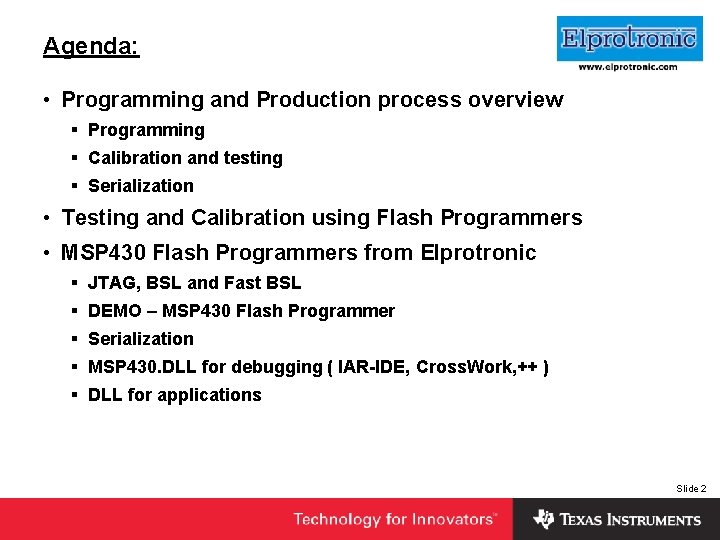
Agenda: • Programming and Production process overview Insert Company Logo Here § Programming § Calibration and testing § Serialization • Testing and Calibration using Flash Programmers • MSP 430 Flash Programmers from Elprotronic § JTAG, BSL and Fast BSL § DEMO – MSP 430 Flash Programmer § Serialization § MSP 430. DLL for debugging ( IAR-IDE, Cross. Work, ++ ) § DLL for applications Slide 2
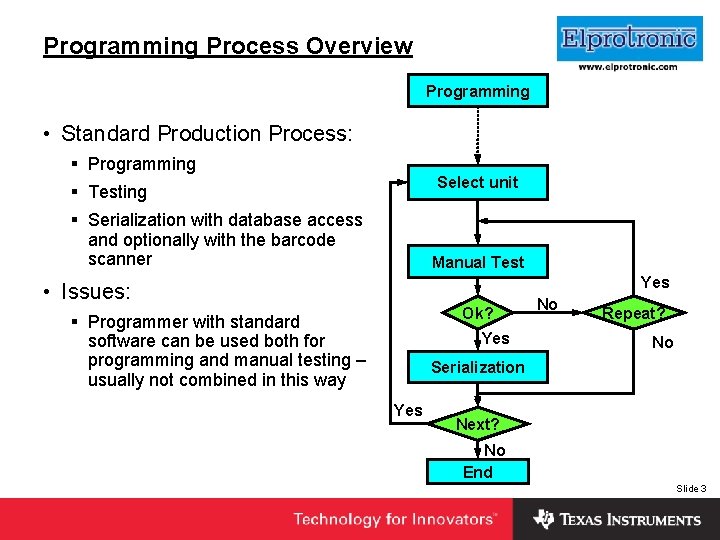
Insert Company Logo Here Programming Process Overview Programming • Standard Production Process: § Programming Select unit § Testing § Serialization with database access and optionally with the barcode scanner Manual Test Yes • Issues: Ok? § Programmer with standard software can be used both for programming and manual testing – usually not combined in this way Yes No Repeat? No Serialization Yes Next? No End Slide 3
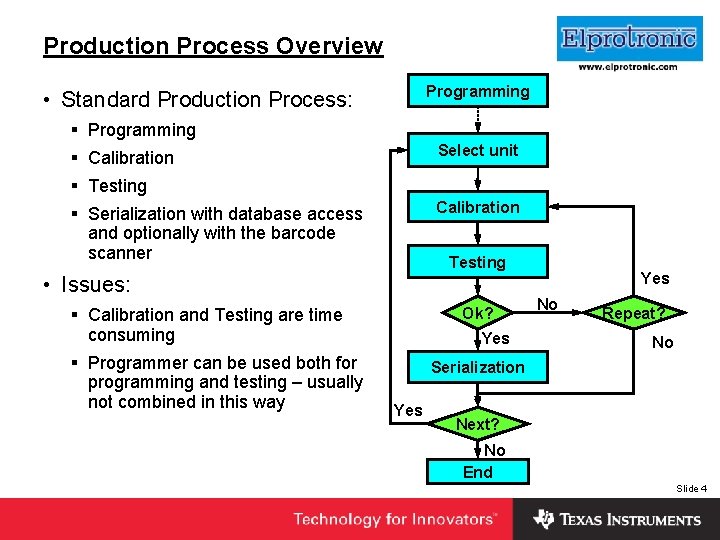
Insert Company Logo Here Production Process Overview Programming • Standard Production Process: § Programming Select unit § Calibration § Testing Calibration § Serialization with database access and optionally with the barcode scanner Testing • Issues: Ok? § Calibration and Testing are time consuming § Programmer can be used both for programming and testing – usually not combined in this way Yes No Repeat? No Serialization Yes Next? No End Slide 4
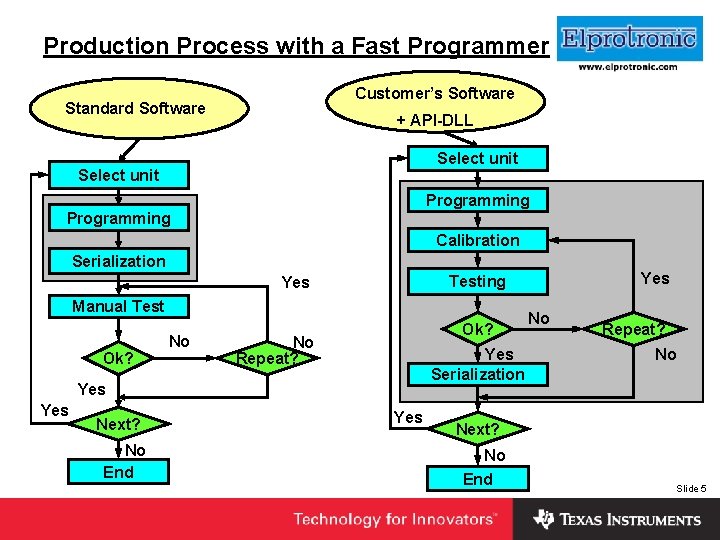
Insert Production Process with a Fast Programmer Company Logo Here Customer’s Software Standard Software + API-DLL Select unit Programming Calibration Serialization Manual Test Ok? No Repeat? Yes Serialization Yes Next? No End Yes Testing Yes No Repeat? No Next? No End Slide 5
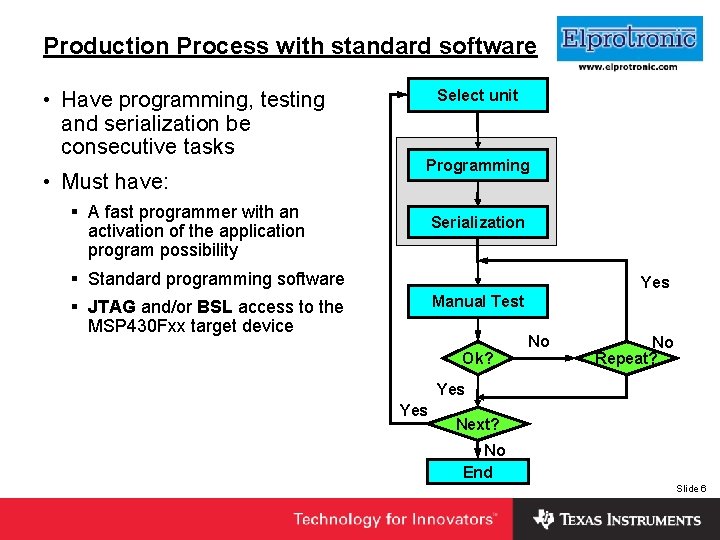
Production Process with standard software • Have programming, testing and serialization be consecutive tasks • Must have: Select unit Insert Company Logo Here Programming § A fast programmer with an activation of the application program possibility Serialization § Standard programming software Yes Manual Test § JTAG and/or BSL access to the MSP 430 Fxx target device Ok? No No Repeat? Yes Next? No End Slide 6
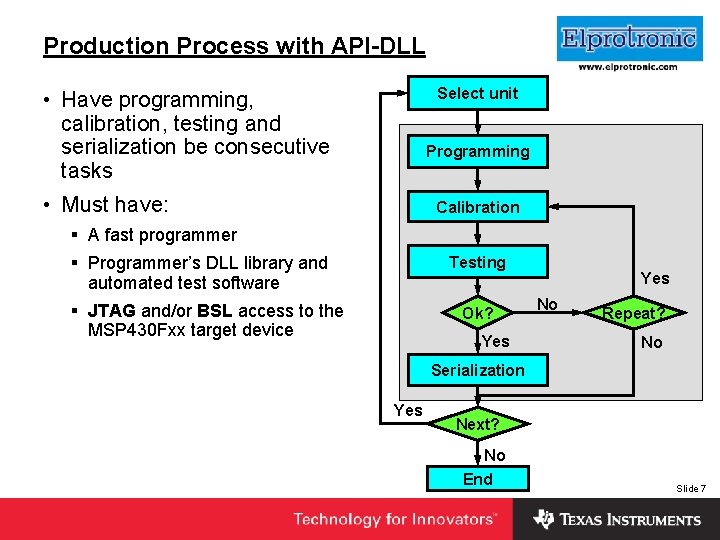
Insert Company Logo Here Production Process with API-DLL Select unit • Have programming, calibration, testing and serialization be consecutive tasks Programming • Must have: Calibration § A fast programmer § Programmer’s DLL library and automated test software Testing § JTAG and/or BSL access to the MSP 430 Fxx target device Ok? Yes No Repeat? No Serialization Yes Next? No End Slide 7
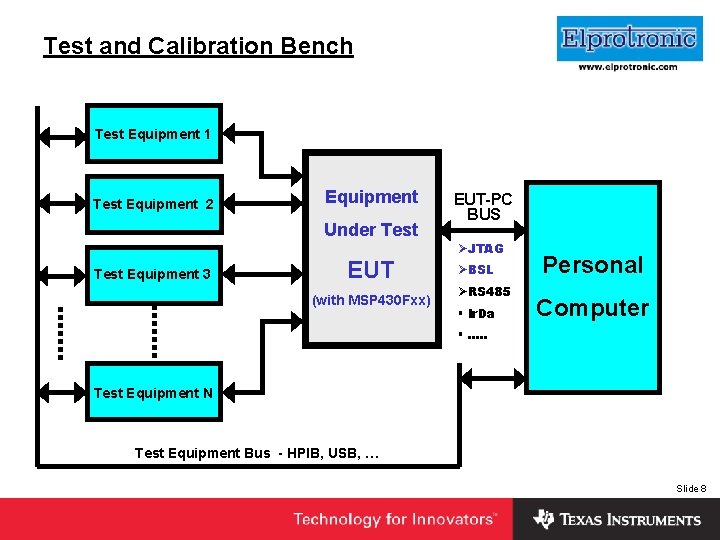
Insert Company Logo Here Test and Calibration Bench Test Equipment 1 Test Equipment 2 Equipment Under Test Equipment 3 EUT (with MSP 430 Fxx) EUT-PC BUS ØJTAG ØBSL ØRS 485 § Ir. Da Personal Computer § …. . Test Equipment N Test Equipment Bus - HPIB, USB, … Slide 8
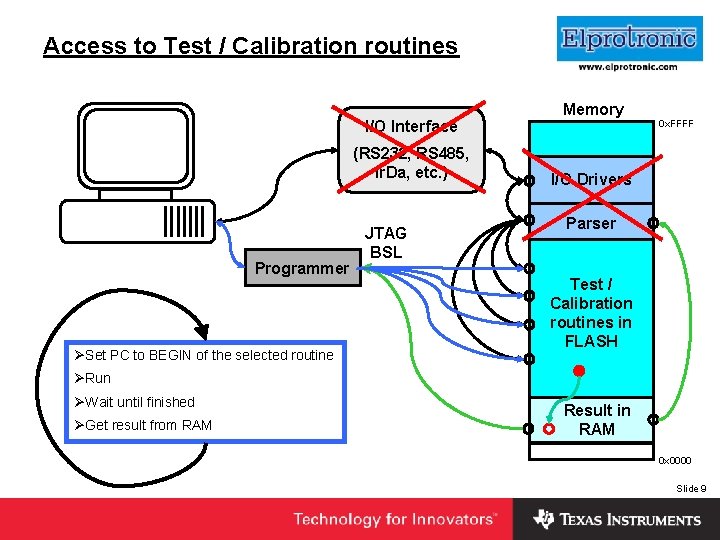
Access to Test / Calibration routines I/O Interface (RS 232, RS 485, Ir. Da, etc. ) Programmer ØSet PC to BEGIN of the selected routine JTAG BSL Insert Company Logo Here Memory 0 x. FFFF I/O Drivers Parser Test / Calibration routines in FLASH ØRun ØWait until finished ØGet result from RAM Result in RAM 0 x 0000 Slide 9
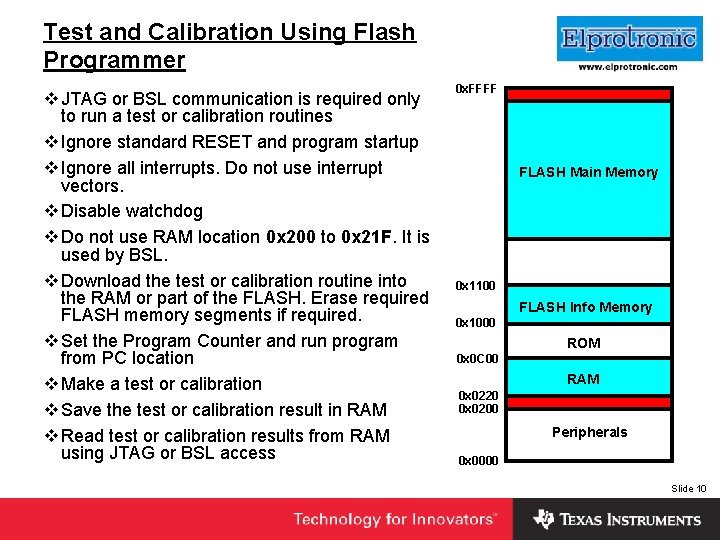
Test and Calibration Using Flash Programmer v JTAG or BSL communication is required only to run a test or calibration routines v Ignore standard RESET and program startup v Ignore all interrupts. Do not use interrupt vectors. v Disable watchdog v Do not use RAM location 0 x 200 to 0 x 21 F. It is used by BSL. v Download the test or calibration routine into the RAM or part of the FLASH. Erase required FLASH memory segments if required. v Set the Program Counter and run program from PC location v Make a test or calibration v Save the test or calibration result in RAM v Read test or calibration results from RAM using JTAG or BSL access 0 x. FFFF Insert Company Logo Here FLASH Main Memory 0 x 1100 FLASH Info Memory 0 x 1000 ROM 0 x 0 C 00 RAM 0 x 0220 0 x 0200 Peripherals 0 x 0000 Slide 10
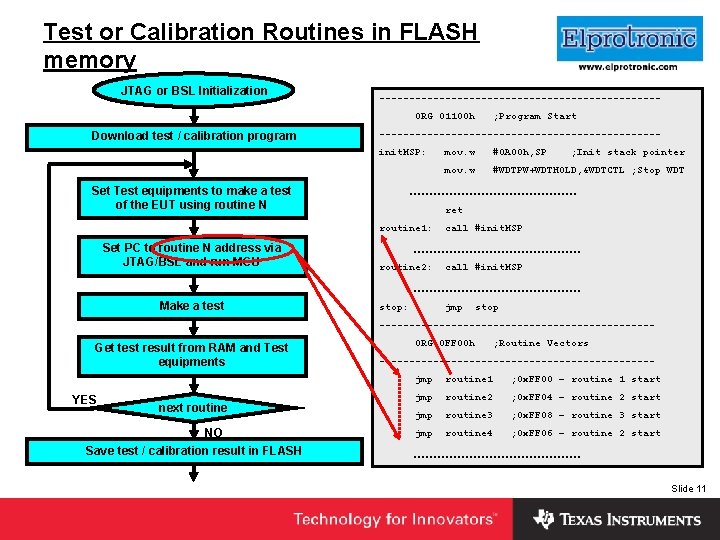
Insert Company Logo Here ------------------------ Test or Calibration Routines in FLASH memory JTAG or BSL Initialization ORG 01100 h Download test / calibration program -----------------------init. MSP: Set Test equipments to make a test of the EUT using routine N mov. w #0 A 00 h, SP ; Init stack pointer mov. w #WDTPW+WDTHOLD, &WDTCTL ; Stop WDT ………………… ret routine 1: Set PC to routine N address via JTAG/BSL and run MCU ; Program Start call #init. MSP ………………… routine 2: call #init. MSP ………………… Make a test stop: jmp stop ----------------------- Get test result from RAM and Test equipments YES next routine NO Save test / calibration result in FLASH ORG 0 FF 00 h ; Routine Vectors -----------------------jmp routine 1 ; 0 x. FF 00 – routine 1 start jmp routine 2 ; 0 x. FF 04 – routine 2 start jmp routine 3 ; 0 x. FF 08 – routine 3 start jmp routine 4 ; 0 x. FF 06 – routine 2 start ………………… Slide 11
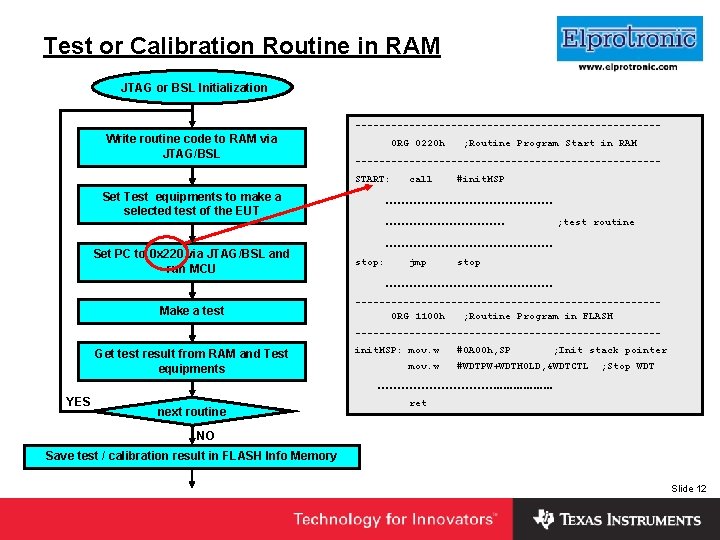
Insert Company Logo Here Test or Calibration Routine in RAM JTAG or BSL Initialization -------------------------- Write routine code to RAM via JTAG/BSL ORG 0220 h -------------------------START: Set Test equipments to make a selected test of the EUT Set PC to 0 x 220 via JTAG/BSL and run MCU ; Routine Program Start in RAM call #init. MSP ………………… ; test routine ………………… stop: jmp stop ………………… Make a test -------------------------ORG 1100 h ; Routine Program in FLASH -------------------------- Get test result from RAM and Test equipments init. MSP: mov. w #0 A 00 h, SP ; Init stack pointer #WDTPW+WDTHOLD, &WDTCTL ; Stop WDT ……………. . . . YES next routine ret NO Save test / calibration result in FLASH Info Memory Slide 12
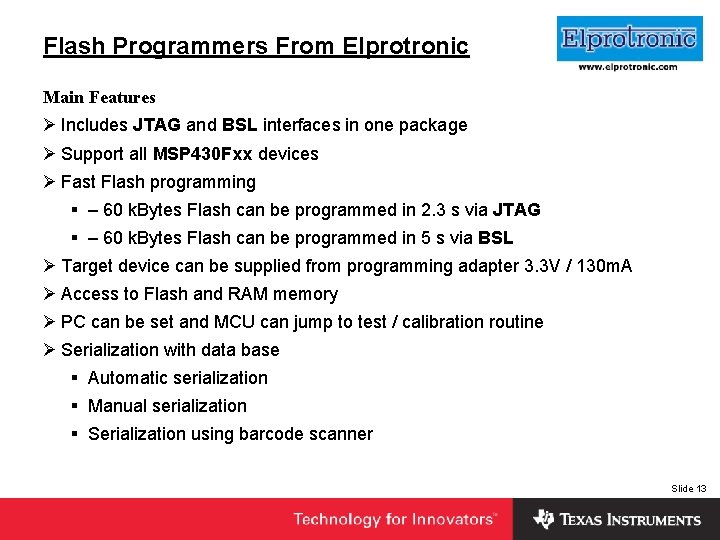
Flash Programmers From Elprotronic Main Features Insert Company Logo Here Ø Includes JTAG and BSL interfaces in one package Ø Support all MSP 430 Fxx devices Ø Fast Flash programming § – 60 k. Bytes Flash can be programmed in 2. 3 s via JTAG § – 60 k. Bytes Flash can be programmed in 5 s via BSL Ø Target device can be supplied from programming adapter 3. 3 V / 130 m. A Ø Access to Flash and RAM memory Ø PC can be set and MCU can jump to test / calibration routine Ø Serialization with data base § Automatic serialization § Manual serialization § Serialization using barcode scanner Slide 13
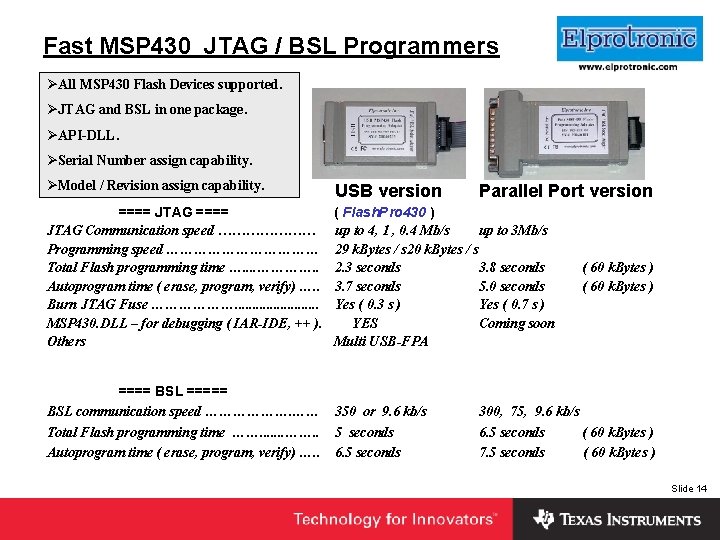
Fast MSP 430 JTAG / BSL Programmers ØAll MSP 430 Flash Devices supported. Insert Company Logo Here ØJTAG and BSL in one package. ØAPI-DLL. ØSerial Number assign capability. ØModel / Revision assign capability. USB version Parallel Port version ==== JTAG ==== ( Flash. Pro 430 ) JTAG Communication speed ………………… up to 4, 1 , 0. 4 Mb/s up to 3 Mb/s Programming speed ……………… 29 k. Bytes / s 20 k. Bytes / s Total Flash programming time …. . …………. . 2. 3 seconds 3. 8 seconds Autoprogram time ( erase, program, verify) …. . 3. 7 seconds 5. 0 seconds Burn JTAG Fuse ………………. . . Yes ( 0. 3 s ) Yes ( 0. 7 s ) MSP 430. DLL – for debugging ( IAR-IDE, ++ ). YES Coming soon Others Multi USB-FPA ==== BSL ===== BSL communication speed ………………. …… Total Flash programming time ……. . . . ……. . Autoprogram time ( erase, program, verify) …. . 350 or 9. 6 kb/s 5 seconds 6. 5 seconds ( 60 k. Bytes ) 300, 75, 9. 6 kb/s 6. 5 seconds ( 60 k. Bytes ) 7. 5 seconds ( 60 k. Bytes ) Slide 14
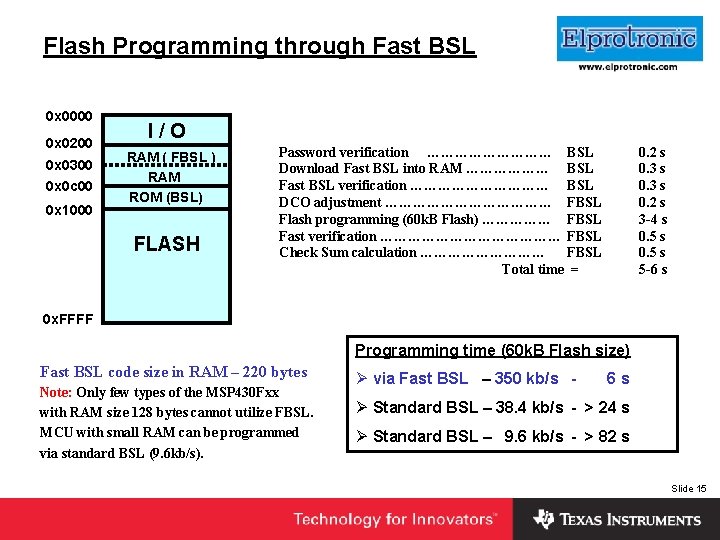
Flash Programming through Fast BSL 0 x 0000 0 x 0200 0 x 0300 0 x 0 c 00 0 x 1000 Insert Company Logo Here I / O RAM ( FBSL ) RAM ROM (BSL) FLASH Password verification …………… BSL Download Fast BSL into RAM ……………… BSL Fast BSL verification …………… BSL DCO adjustment ……………… FBSL Flash programming (60 k. B Flash) …………… FBSL Fast verification ………………… FBSL Check Sum calculation …………… FBSL Total time = 0. 2 s 0. 3 s 0. 2 s 3 -4 s 0. 5 s 5 -6 s 0 x. FFFF Programming time (60 k. B Flash size) Fast BSL code size in RAM – 220 bytes Note: Only few types of the MSP 430 Fxx with RAM size 128 bytes cannot utilize FBSL. MCU with small RAM can be programmed via standard BSL (9. 6 kb/s). Ø via Fast BSL – 350 kb/s - 6 s Ø Standard BSL – 38. 4 kb/s - > 24 s Ø Standard BSL – 9. 6 kb/s - > 82 s Slide 15
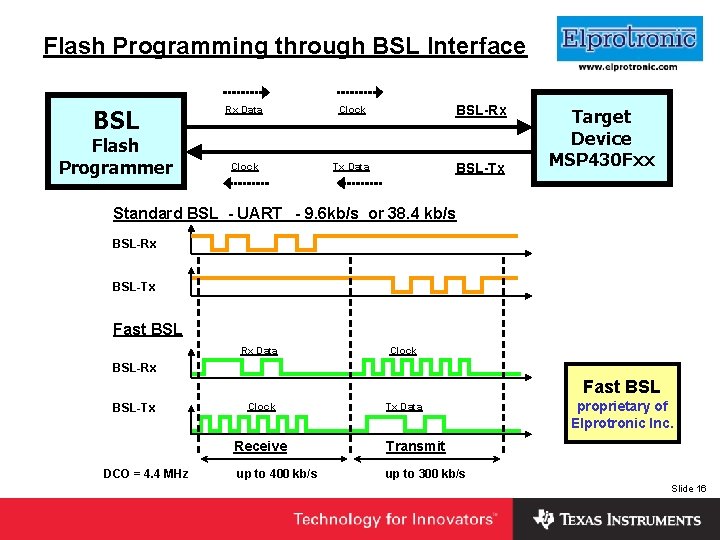
Flash Programming through BSL Interface BSL Flash Programmer Rx Data Clock BSL-Rx Clock Tx Data BSL-Tx Insert Company Logo Here Target Device MSP 430 Fxx Standard BSL - UART - 9. 6 kb/s or 38. 4 kb/s BSL-Rx BSL-Tx Fast BSL Rx Data Clock BSL-Rx Fast BSL-Tx Clock Receive DCO = 4. 4 MHz up to 400 kb/s Tx Data proprietary of Elprotronic Inc. Transmit up to 300 kb/s Slide 16
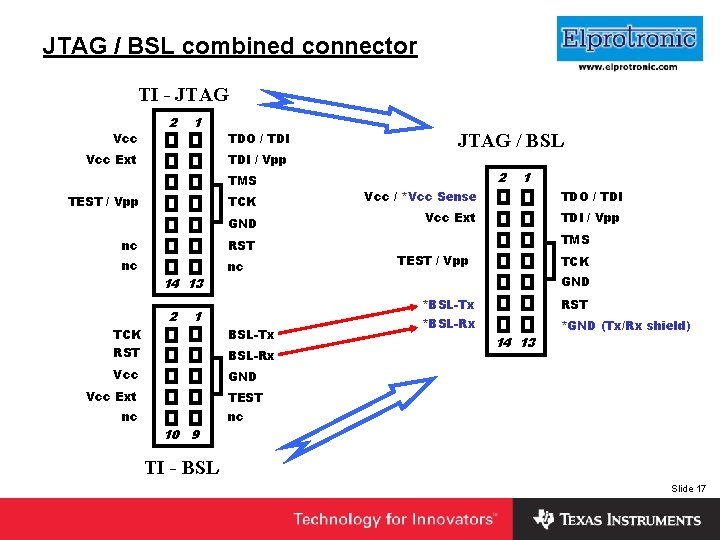
Insert Company Logo Here JTAG / BSL combined connector TI - JTAG Vcc 2 1 Vcc Ext TDO / TDI / Vpp TMS TEST / Vpp TCK GND nc RST nc nc 14 13 2 1 TCK BSL-Tx RST BSL-Rx Vcc GND Vcc Ext JTAG / BSL 2 1 Vcc / *Vcc Sense TDO / TDI Vcc Ext TDI / Vpp TMS TEST / Vpp TCK GND *BSL-Tx RST *BSL-Rx *GND (Tx/Rx shield) 14 13 TEST nc nc 10 9 TI - BSL Slide 17
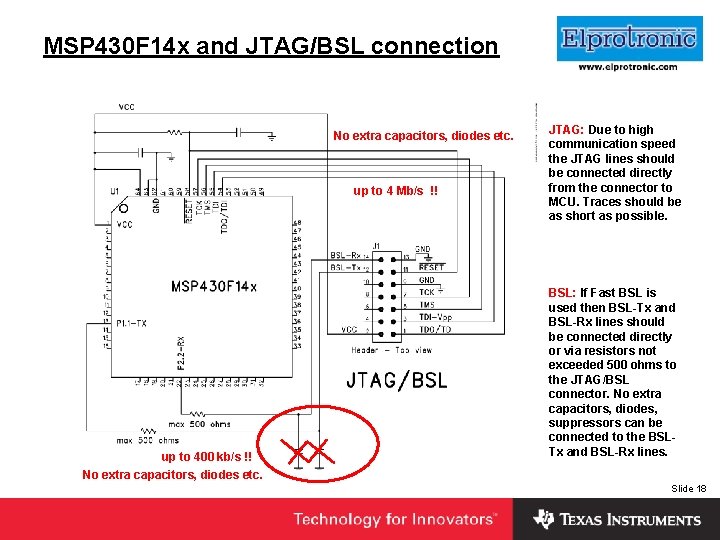
MSP 430 F 14 x and JTAG/BSL connection No extra capacitors, diodes etc. up to 4 Mb/s !! up to 400 kb/s !! Insert Company Logo Here JTAG: Due to high communication speed the JTAG lines should be connected directly from the connector to MCU. Traces should be as short as possible. BSL: If Fast BSL is used then BSL-Tx and BSL-Rx lines should be connected directly or via resistors not exceeded 500 ohms to the JTAG/BSL connector. No extra capacitors, diodes, suppressors can be connected to the BSLTx and BSL-Rx lines. No extra capacitors, diodes etc. Slide 18
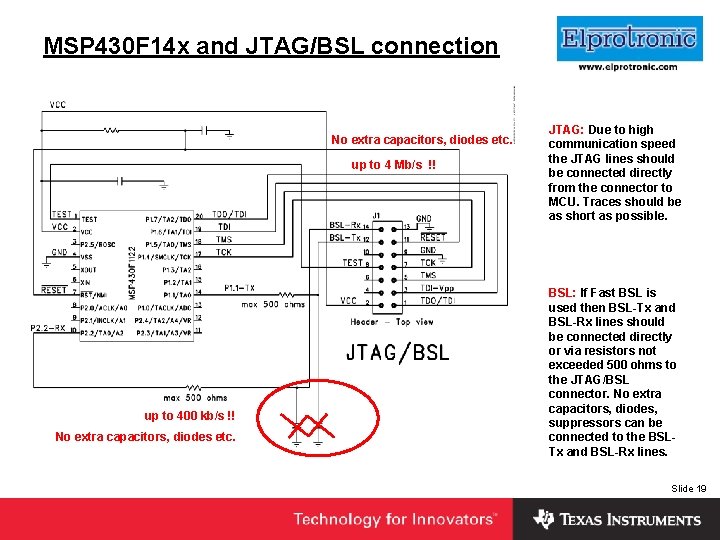
MSP 430 F 14 x and JTAG/BSL connection No extra capacitors, diodes etc. up to 4 Mb/s !! up to 400 kb/s !! No extra capacitors, diodes etc. Insert Company Logo Here JTAG: Due to high communication speed the JTAG lines should be connected directly from the connector to MCU. Traces should be as short as possible. BSL: If Fast BSL is used then BSL-Tx and BSL-Rx lines should be connected directly or via resistors not exceeded 500 ohms to the JTAG/BSL connector. No extra capacitors, diodes, suppressors can be connected to the BSLTx and BSL-Rx lines. Slide 19
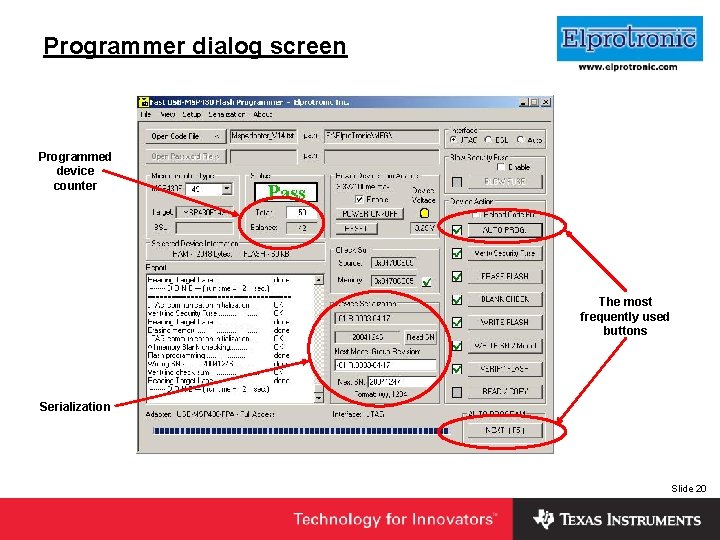
Programmer dialog screen Insert Company Logo Here Programmed device counter The most frequently used buttons Serialization Slide 20
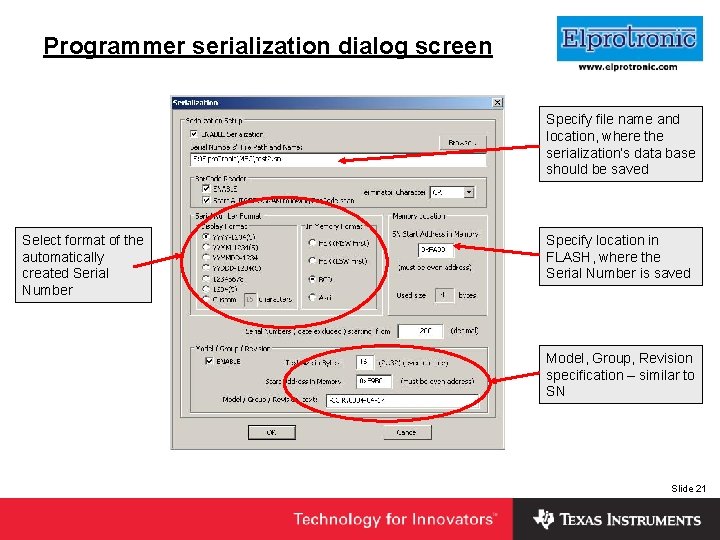
Programmer serialization dialog screen Insert Company Logo Here Specify file name and location, where the serialization’s data base should be saved Select format of the automatically created Serial Number Specify location in FLASH, where the Serial Number is saved Model, Group, Revision specification – similar to SN Slide 21
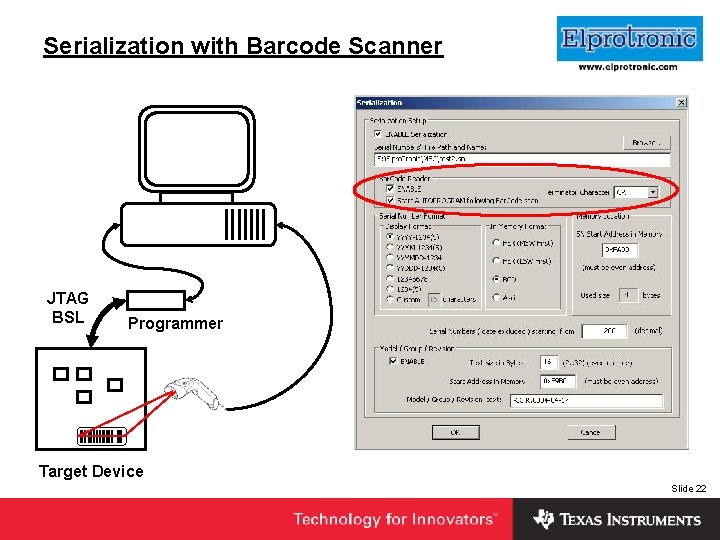
Serialization with Barcode Scanner JTAG BSL Insert Company Logo Here Programmer Target Device Slide 22
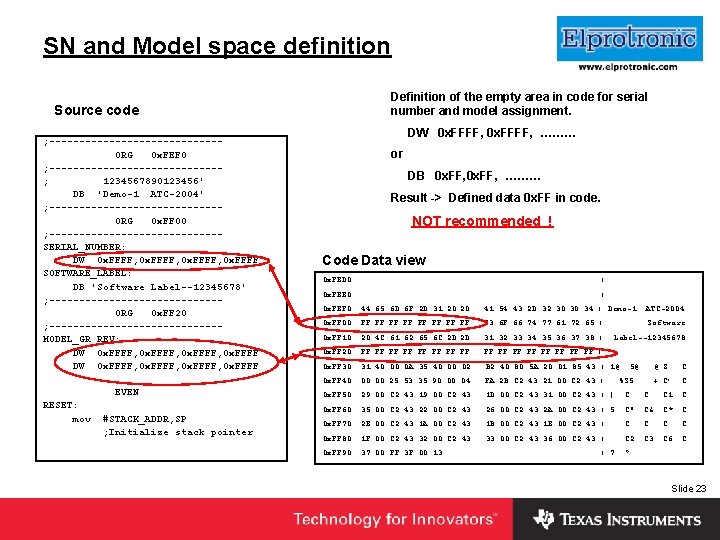
Insert SN and Model space definition Company Logo Here Definition of the empty area in code for serial Source code ; --------------ORG 0 x. FEF 0 ; --------------; 1234567890123456' DB 'Demo-1 ATC-2004' ; --------------ORG 0 x. FF 00 ; --------------SERIAL_NUMBER: DW 0 x. FFFF, 0 x. FFFF SOFTWARE_LABEL: DB 'Software Label--12345678' ; --------------ORG 0 x. FF 20 ; --------------MODEL_GR_REV: DW 0 x. FFFF, 0 x. FFFF EVEN RESET: mov #STACK_ADDR, SP ; Initialize stack pointer number and model assignment. DW 0 x. FFFF, ……… or DB 0 x. FF, ……… Result -> Defined data 0 x. FF in code. NOT recommended ! Code Data view 0 x. FED 0: . . . . |. . . . 0 x. FEE 0: . . . . |. . . . 0 x. FEF 0: 44 65 6 D 6 F 2 D 31 20 20 41 54 43 2 D 32 30 30 34 | Demo-1 0 x. FF 00: FF FF 53 6 F 66 74 77 61 72 65 |. . . . Software 0 x. FF 10: 20 4 C 61 62 65 6 C 2 D 2 D 31 32 33 34 35 36 37 38 | 0 x. FF 20: FF FF FF FF |. . . . ATC-2004 Label--12345678 0 x. FF 30: 31 40 00 0 A 35 40 00 02 B 2 40 80 5 A 20 01 85 43 | 1@. . 5@. . . @. Z. . C 0 x. FF 40: 00 00 25 53 35 90 00 04 FA 2 B C 2 43 21 00 C 2 43 |. . %S 5. . +. C!. . C 0 x. FF 50: 29 00 C 2 43 1 D 00 C 2 43 31 00 C 2 43 | ). . C 1. . C 0 x. FF 60: 35 00 C 2 43 22 00 C 2 43 26 00 C 2 43 2 A 00 C 2 43 | 5. . C". . C&. . C*. . C 0 x. FF 70: 2 E 00 C 2 43 1 A 00 C 2 43 1 B 00 C 2 43 1 E 00 C 2 43 |. . . C 0 x. FF 80: 1 F 00 C 2 43 32 00 C 2 43 33 00 C 2 43 36 00 C 2 43 |. . . C 2. . C 3. . C 6. . C 0 x. FF 90: 37 00 FF 3 F 00 13. . . . . | 7. . ? . . . Slide 23
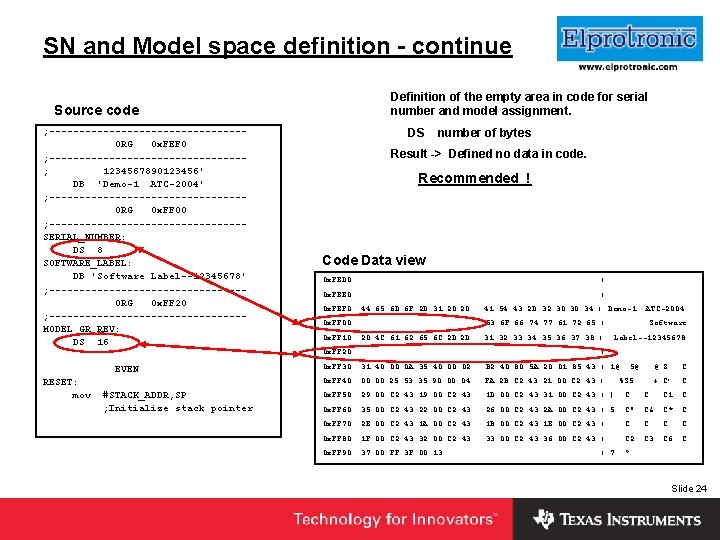
Insert SN and Model space definition - continue Company Logo Here Definition of the empty area in code for serial Source code ; ----------------ORG 0 x. FEF 0 ; ----------------; 1234567890123456' DB 'Demo-1 ATC-2004' ; ----------------ORG 0 x. FF 00 ; ----------------SERIAL_NUMBER: DS 8 SOFTWARE_LABEL: DB 'Software Label--12345678' ; ----------------ORG 0 x. FF 20 ; ----------------MODEL_GR_REV: DS 16 EVEN RESET: mov #STACK_ADDR, SP ; Initialize stack pointer number and model assignment. DS number of bytes Result -> Defined no data in code. Recommended ! Code Data view 0 x. FED 0: . . . . |. . . . 0 x. FEE 0: . . . . |. . . . 0 x. FEF 0: 44 65 6 D 6 F 2 D 31 20 20 41 54 43 2 D 32 30 30 34 | Demo-1 ATC-2004 0 x. FF 00: . . . . 53 6 F 66 74 77 61 72 65 |. . . . Software 0 x. FF 10: 20 4 C 61 62 65 6 C 2 D 2 D 31 32 33 34 35 36 37 38 | 0 x. FF 20: . . . . |. . . . Label--12345678 0 x. FF 30: 31 40 00 0 A 35 40 00 02 B 2 40 80 5 A 20 01 85 43 | 1@. . 5@. . . @. Z. . C 0 x. FF 40: 00 00 25 53 35 90 00 04 FA 2 B C 2 43 21 00 C 2 43 |. . %S 5. . +. C!. . C 0 x. FF 50: 29 00 C 2 43 1 D 00 C 2 43 31 00 C 2 43 | ). . C 1. . C 0 x. FF 60: 35 00 C 2 43 22 00 C 2 43 26 00 C 2 43 2 A 00 C 2 43 | 5. . C". . C&. . C*. . C 0 x. FF 70: 2 E 00 C 2 43 1 A 00 C 2 43 1 B 00 C 2 43 1 E 00 C 2 43 |. . . C 0 x. FF 80: 1 F 00 C 2 43 32 00 C 2 43 33 00 C 2 43 36 00 C 2 43 |. . . C 2. . C 3. . C 6. . C 0 x. FF 90: 37 00 FF 3 F 00 13. . . . . | 7. . ? . . . Slide 24
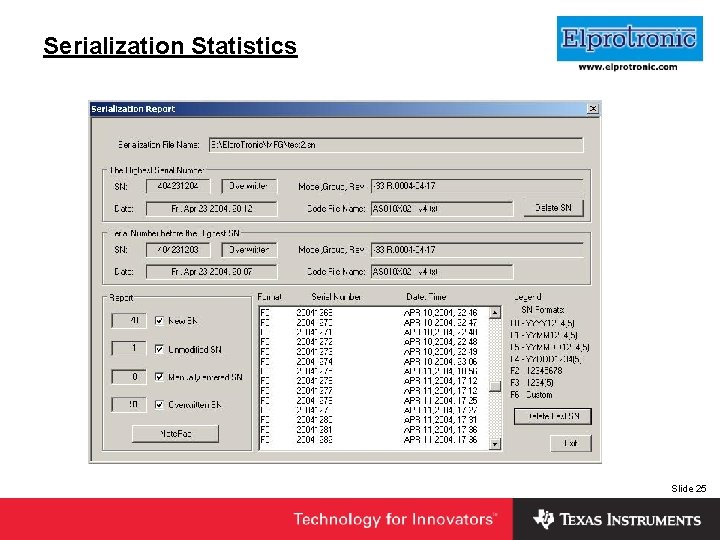
Serialization Statistics Insert Company Logo Here Slide 25
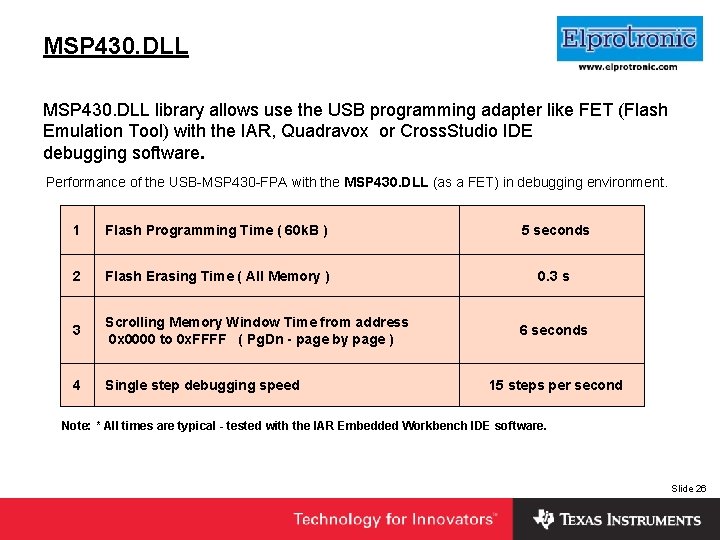
Insert Company Logo Here MSP 430. DLL library allows use the USB programming adapter like FET (Flash Emulation Tool) with the IAR, Quadravox or Cross. Studio IDE debugging software. Performance of the USB-MSP 430 -FPA with the MSP 430. DLL (as a FET) in debugging environment. 1 Flash Programming Time ( 60 k. B ) 5 seconds 2 Flash Erasing Time ( All Memory ) 0. 3 s 3 Scrolling Memory Window Time from address 0 x 0000 to 0 x. FFFF ( Pg. Dn - page by page ) 4 Single step debugging speed 6 seconds 15 steps per second Note: * All times are typical - tested with the IAR Embedded Workbench IDE software. Slide 26
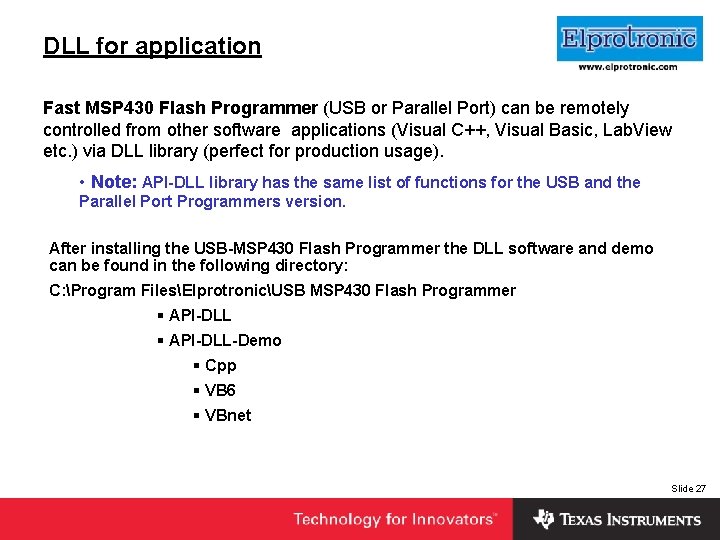
DLL for application Insert Company Logo Here Fast MSP 430 Flash Programmer (USB or Parallel Port) can be remotely controlled from other software applications (Visual C++, Visual Basic, Lab. View etc. ) via DLL library (perfect for production usage). • Note: API-DLL library has the same list of functions for the USB and the Parallel Port Programmers version. After installing the USB-MSP 430 Flash Programmer the DLL software and demo can be found in the following directory: C: Program FilesElprotronicUSB MSP 430 Flash Programmer § API-DLL-Demo § Cpp § VB 6 § VBnet Slide 27
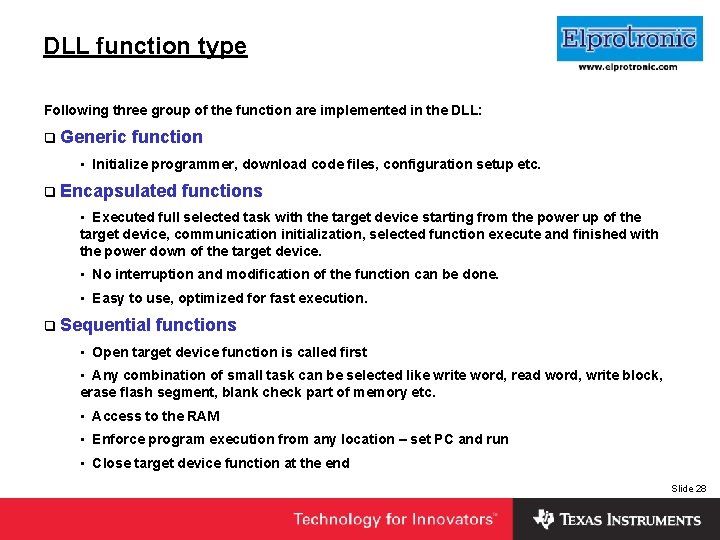
DLL function type Insert Company Logo Here Following three group of the function are implemented in the DLL: q Generic function • Initialize programmer, download code files, configuration setup etc. q Encapsulated functions • Executed full selected task with the target device starting from the power up of the target device, communication initialization, selected function execute and finished with the power down of the target device. • No interruption and modification of the function can be done. • Easy to use, optimized for fast execution. q Sequential functions • Open target device function is called first • Any combination of small task can be selected like write word, read word, write block, erase flash segment, blank check part of memory etc. • Access to the RAM • Enforce program execution from any location – set PC and run • Close target device function at the end Slide 28
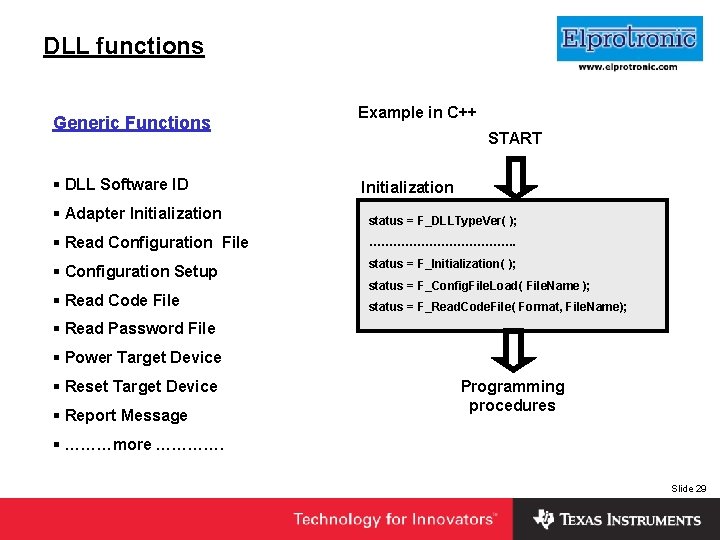
Insert Company Logo Here DLL functions Generic Functions § DLL Software ID Example in C++ START Initialization § Adapter Initialization status = F_DLLType. Ver( ); § Read Configuration File ………………. § Configuration Setup status = F_Initialization( ); § Read Code File status = F_Config. File. Load( File. Name ); status = F_Read. Code. File( Format, File. Name); § Read Password File § Power Target Device § Reset Target Device § Report Message Programming procedures § ………more …………. Slide 29
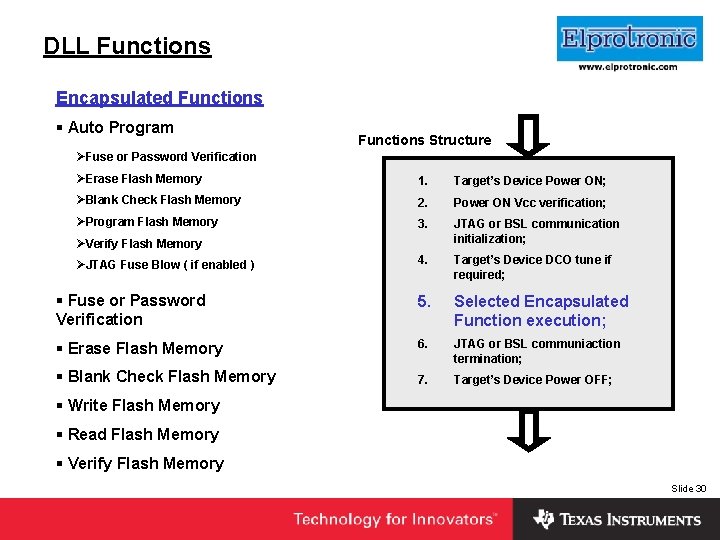
Insert Company Logo Here DLL Functions Encapsulated Functions § Auto Program Functions Structure ØFuse or Password Verification ØErase Flash Memory 1. Target’s Device Power ON; ØBlank Check Flash Memory 2. Power ON Vcc verification; ØProgram Flash Memory 3. JTAG or BSL communication initialization; 4. Target’s Device DCO tune if required; § Fuse or Password Verification 5. Selected Encapsulated Function execution; § Erase Flash Memory 6. JTAG or BSL communiaction termination; § Blank Check Flash Memory 7. Target’s Device Power OFF; ØVerify Flash Memory ØJTAG Fuse Blow ( if enabled ) § Write Flash Memory § Read Flash Memory § Verify Flash Memory Slide 30
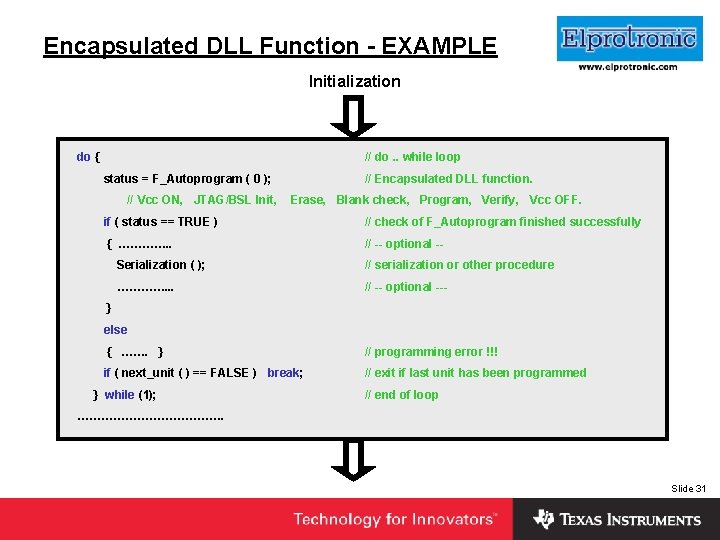
Insert Company Logo Here Encapsulated DLL Function - EXAMPLE Initialization do { // do. . while loop status = F_Autoprogram ( 0 ); // Encapsulated DLL function. // Vcc ON, JTAG/BSL Init, Erase, Blank check, Program, Verify, Vcc OFF. if ( status == TRUE ) // check of F_Autoprogram finished successfully { …………. . // -- optional -- Serialization ( ); // serialization or other procedure …………. . . // -- optional --- } else { ……. } // programming error !!! if ( next_unit ( ) == FALSE ) break; // exit if last unit has been programmed } while (1); // end of loop ………………. Slide 31
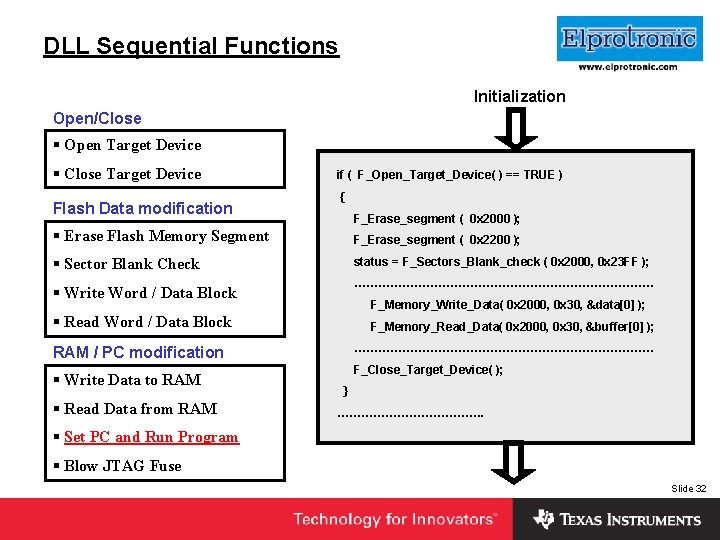
DLL Sequential Functions Initialization Insert Company Logo Here Open/Close § Open Target Device § Close Target Device Flash Data modification if ( F_Open_Target_Device( ) == TRUE ) { F_Erase_segment ( 0 x 2000 ); § Erase Flash Memory Segment F_Erase_segment ( 0 x 2200 ); § Sector Blank Check status = F_Sectors_Blank_check ( 0 x 2000, 0 x 23 FF ); § Write Word / Data Block ………………………………… F_Memory_Write_Data( 0 x 2000, 0 x 30, &data[0] ); § Read Word / Data Block F_Memory_Read_Data( 0 x 2000, 0 x 30, &buffer[0] ); RAM / PC modification ………………………………… § Write Data to RAM § Read Data from RAM F_Close_Target_Device( ); } ………………. § Set PC and Run Program § Blow JTAG Fuse Slide 32
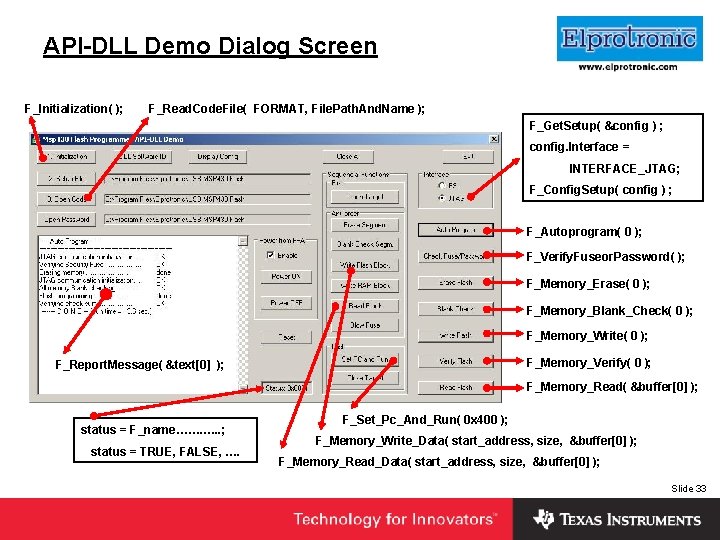
API-DLL Demo Dialog Screen F_Initialization( ); Insert Company Logo Here F_Read. Code. File( FORMAT, File. Path. And. Name ); F_Get. Setup( &config ) ; config. Interface = INTERFACE_JTAG; F_Config. Setup( config ) ; F_Autoprogram( 0 ); F_Verify. Fuseor. Password( ); F_Memory_Erase( 0 ); F_Memory_Blank_Check( 0 ); F_Memory_Write( 0 ); F_Memory_Verify( 0 ); F_Report. Message( &text[0] ); F_Memory_Read( &buffer[0] ); status = F_name……. …. . ; status = TRUE, FALSE, …. F_Set_Pc_And_Run( 0 x 400 ); F_Memory_Write_Data( start_address, size, &buffer[0] ); F_Memory_Read_Data( start_address, size, &buffer[0] ); Slide 33
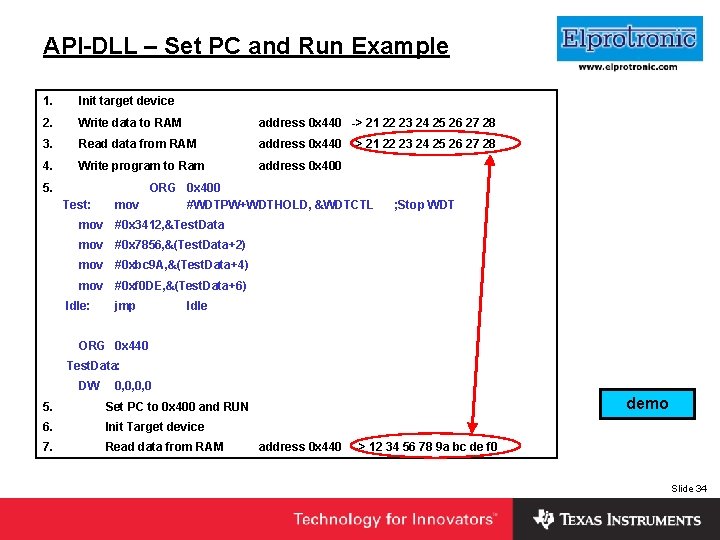
API-DLL – Set PC and Run Example 1. Init target device 2. Write data to RAM address 0 x 440 -> 21 22 23 24 25 26 27 28 3. Read data from RAM address 0 x 440 -> 21 22 23 24 25 26 27 28 4. Write program to Ram address 0 x 400 Insert Company Logo Here 5. ORG 0 x 400 Test: mov #WDTPW+WDTHOLD, &WDTCTL ; Stop WDT mov #0 x 3412, &Test. Data mov #0 x 7856, &(Test. Data+2) mov #0 xbc 9 A, &(Test. Data+4) mov #0 xf 0 DE, &(Test. Data+6) Idle: jmp Idle ORG 0 x 440 Test. Data: DW 0, 0, 0, 0 5. Set PC to 0 x 400 and RUN 6. Init Target device 7. Read data from RAM demo address 0 x 440 -> 12 34 56 78 9 a bc de f 0 Slide 34
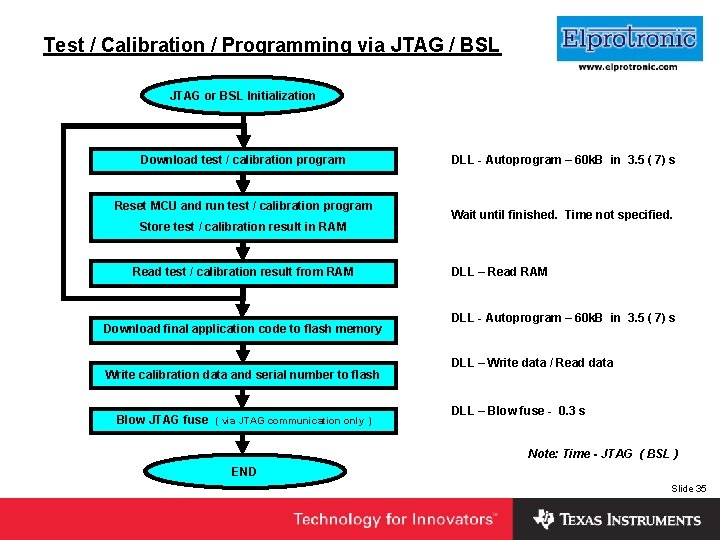
Insert Company Logo Here Test / Calibration / Programming via JTAG / BSL JTAG or BSL Initialization Download test / calibration program Reset MCU and run test / calibration program Store test / calibration result in RAM Read test / calibration result from RAM Download final application code to flash memory Write calibration data and serial number to flash Blow JTAG fuse ( via JTAG communication only ) DLL - Autoprogram – 60 k. B in 3. 5 ( 7) s Wait until finished. Time not specified. DLL – Read RAM DLL - Autoprogram – 60 k. B in 3. 5 ( 7) s DLL – Write data / Read data DLL – Blow fuse - 0. 3 s Note: Time - JTAG ( BSL ) END Slide 35
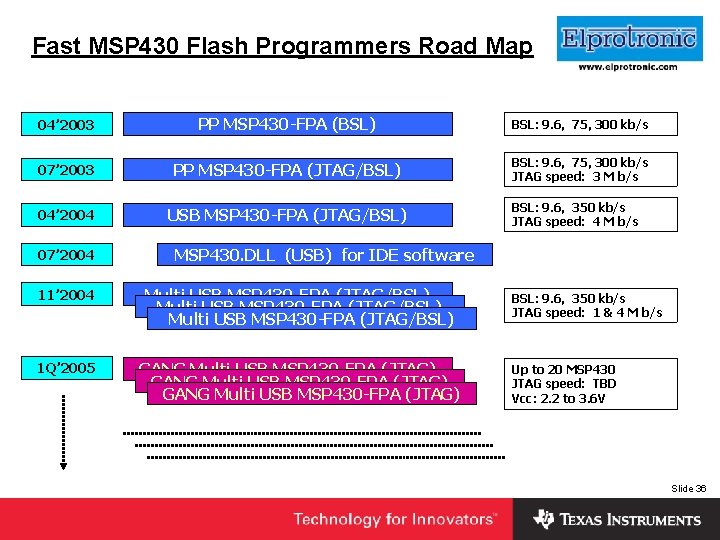
Fast MSP 430 Flash Programmers Road Map Insert Company Logo Here 04’ 2003 PP MSP 430 -FPA (BSL) BSL: 9. 6, 75, 300 kb/s 07’ 2003 PP MSP 430 -FPA (JTAG/BSL) BSL: 9. 6, 75, 300 kb/s JTAG speed: 3 M b/s 04’ 2004 USB MSP 430 -FPA (JTAG/BSL) 07’ 2004 BSL: 9. 6, 350 kb/s JTAG speed: 4 M b/s MSP 430. DLL (USB) for IDE software 11’ 2004 Multi USB MSP 430 -FPA (JTAG/BSL) 1 Q’ 2005 GANG Multi USB MSP 430 -FPA (JTAG) BSL: 9. 6, 350 kb/s JTAG speed: 1 & 4 M b/s Up to 20 MSP 430 JTAG speed: TBD Vcc: 2. 2 to 3. 6 V Slide 36
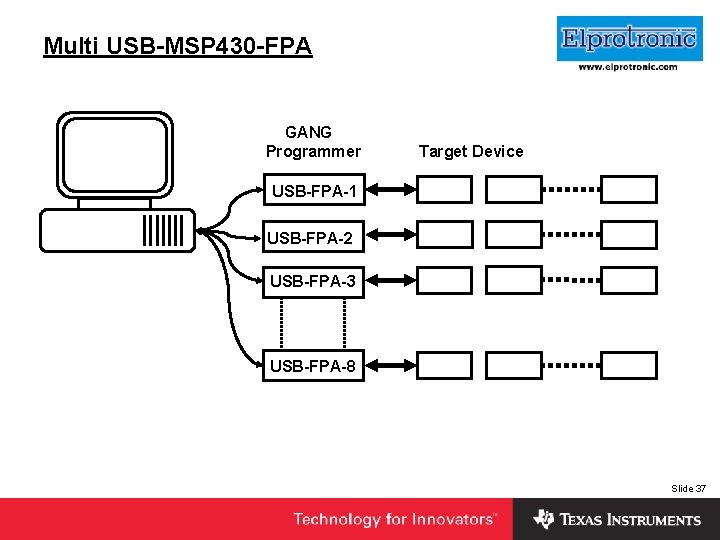
Insert Company Logo Here Multi USB-MSP 430 -FPA GANG Programmer Target Device USB-FPA-1 USB-FPA-2 USB-FPA-3 USB-FPA-8 Slide 37
Conclusion Insert Company Logo Here • Fast MSP 430 Flash Programmers from Elprotronic can simplify production process and can be used for: § Flash programming § Accessing test and calibration routines § Serialization Slide 38
Insert Company Logo Here Questions? Slide 39