
inner HTML STILL using get Element By Id
inner. HTML STILL using get. Element. By. Id…
So Far: • We’ve used get. Element. By. Id to: • Set (change) the. src for an image tag on a web page • Set (change) the styles of a tag on a web page • Get the style information about a tag from a web page • Get the alt text from an image tag on a web page • Information is changed when document. get. Element. By. Id is on the left • we get information and put it into a variable when document. get. Element. By. Id is on the right.
inner. HTML • The inner. HTML is what is between the opening and the closing tag of anything • regardless of what the tag is. Examples: <p id = “firstp”> This is the inner. HTML text between the opening and closing tag</p> The inner. HTML of firstp is: “This is the inner. HTML text between the opening and closing tag” • In this html code: <h 1 id = “largeheader”>Capybara</h 1> The inner. HTML of largeheader is “Capybara” • In this html code: <a href = "http: //www. cowsareawesome. com" id = "coolcows"> link to cows are awesome</a> The inner. HTML is “link to cows are awesome” Hey you! You got this!
Modifying inner. HTML: <p id = 'p 1' on. Click = "changeinner. HTML('p 1')">Cows</p> Java. Script: 1 3 function changeinner. HTML(par) { document. get. Element. By. Id(par). inner. HTML = "Horses“ (2) } Explained: 1. When you clicked on the paragraph, you sent the id of the paragraph into the parameter par in the function in the. js file. 2. Then document. get. Element. By. Id(par). inner. HTML, which is currently “Cow”, gets set to what is on the right, or “Horses” 3. In the html page, the old inner. HTML gets changed to “Horses.

Reading inner. HTML: Just like with the style and the image information, you can also read the inner. HTML from the web page. x = document. get. Element. By. Id(par). inner. HTML You just need to put the inner. HTML on the right and a variable on the left. Example: HTML: <p id = 'p 1' on. Click = "changeinner. HTML('p 1')">Cows</p> <p id = ‘p 2' on. Click = "changeinner. HTML(‘p 2’)”>Giraffes</p> <p id = ‘p 3' on. Click = "changeinner. HTML(‘p 3’)”>Pandas</p> Java. Script: function changeinner. HTML(par) { x = document. get. Element. By. Id(par). inner. HTML alert(x) } If you click on each of the paragraphs, its inner. HTML content should pop up (Cows, Giraffes, Pandas).
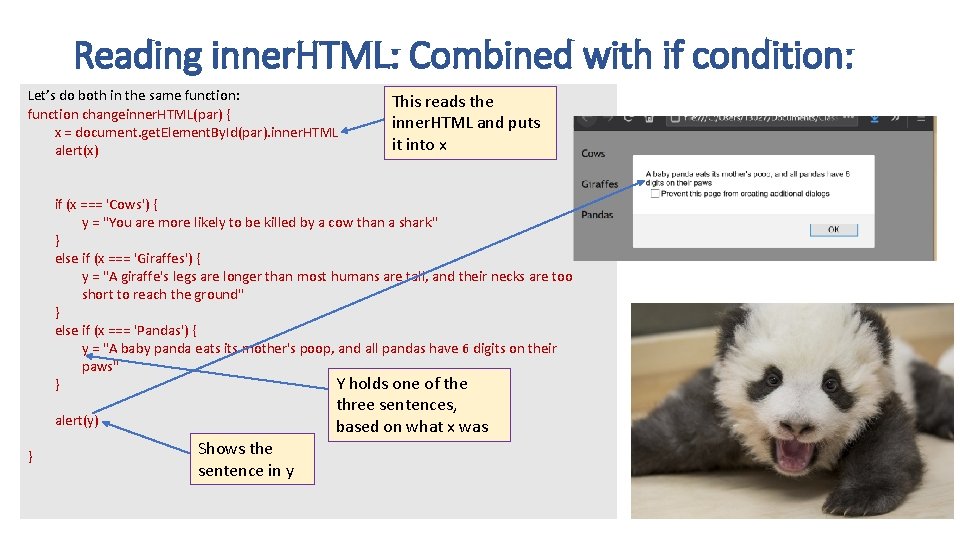
Reading inner. HTML: Combined with if condition: Let’s do both in the same function: function changeinner. HTML(par) { x = document. get. Element. By. Id(par). inner. HTML alert(x) This reads the inner. HTML and puts it into x if (x === 'Cows') { y = "You are more likely to be killed by a cow than a shark" } else if (x === 'Giraffes') { y = "A giraffe's legs are longer than most humans are tall, and their necks are too short to reach the ground" } else if (x === 'Pandas') { y = "A baby panda eats its mother's poop, and all pandas have 6 digits on their paws" Y holds one of the } three sentences, based on what x was alert(y) } Shows the sentence in y
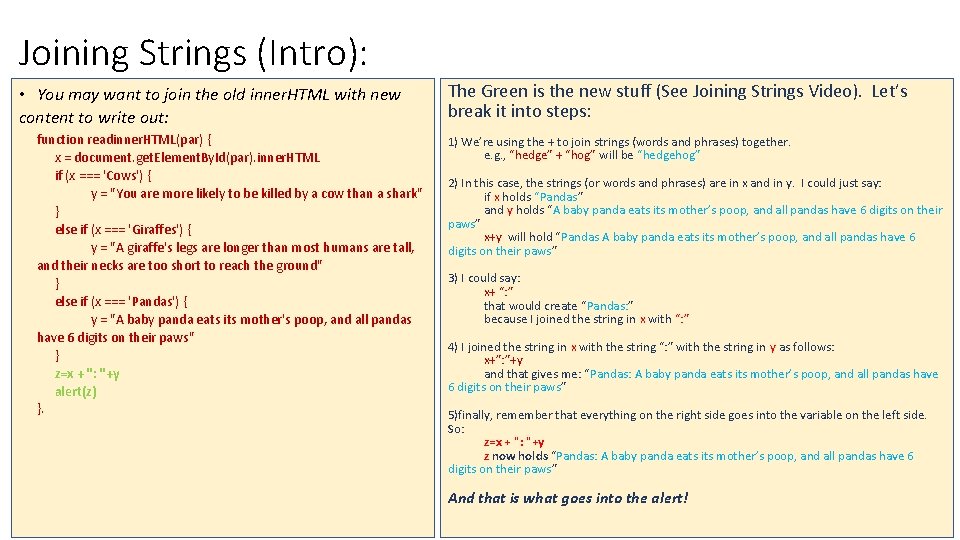
Joining Strings (Intro): • You may want to join the old inner. HTML with new content to write out: function readinner. HTML(par) { x = document. get. Element. By. Id(par). inner. HTML if (x === 'Cows') { y = "You are more likely to be killed by a cow than a shark" } else if (x === 'Giraffes') { y = "A giraffe's legs are longer than most humans are tall, and their necks are too short to reach the ground" } else if (x === 'Pandas') { y = "A baby panda eats its mother's poop, and all pandas have 6 digits on their paws" } z=x + ": "+y alert(z) }. The Green is the new stuff (See Joining Strings Video). Let’s break it into steps: 1) We’re using the + to join strings (words and phrases) together. e. g. , “hedge” + “hog” will be “hedgehog” 2) In this case, the strings (or words and phrases) are in x and in y. I could just say: if x holds “Pandas” and y holds “A baby panda eats its mother’s poop, and all pandas have 6 digits on their paws” x+y will hold “Pandas A baby panda eats its mother’s poop, and all pandas have 6 digits on their paws” 3) I could say: x+ “: ” that would create “Pandas: ” because I joined the string in x with “: ” 4) I joined the string in x with the string “: ” with the string in y as follows: x+”: ”+y and that gives me: “Pandas: A baby panda eats its mother’s poop, and all pandas have 6 digits on their paws” 5)finally, remember that everything on the right side goes into the variable on the left side. So: z=x + ": "+y z now holds “Pandas: A baby panda eats its mother’s poop, and all pandas have 6 digits on their paws” And that is what goes into the alert!
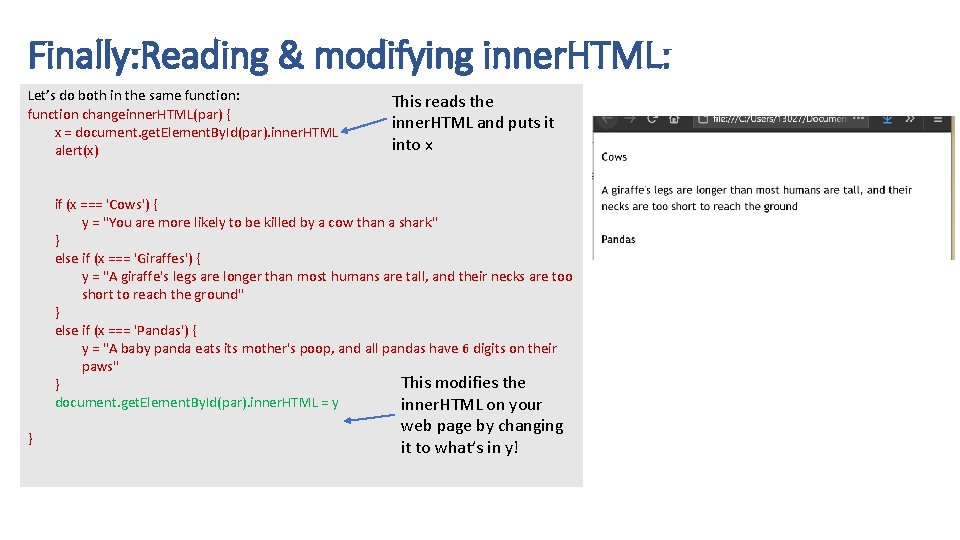
Finally: Reading & modifying inner. HTML: Let’s do both in the same function: function changeinner. HTML(par) { x = document. get. Element. By. Id(par). inner. HTML alert(x) This reads the inner. HTML and puts it into x if (x === 'Cows') { y = "You are more likely to be killed by a cow than a shark" } else if (x === 'Giraffes') { y = "A giraffe's legs are longer than most humans are tall, and their necks are too short to reach the ground" } else if (x === 'Pandas') { y = "A baby panda eats its mother's poop, and all pandas have 6 digits on their paws" This modifies the } document. get. Element. By. Id(par). inner. HTML = y inner. HTML on your } web page by changing it to what’s in y!
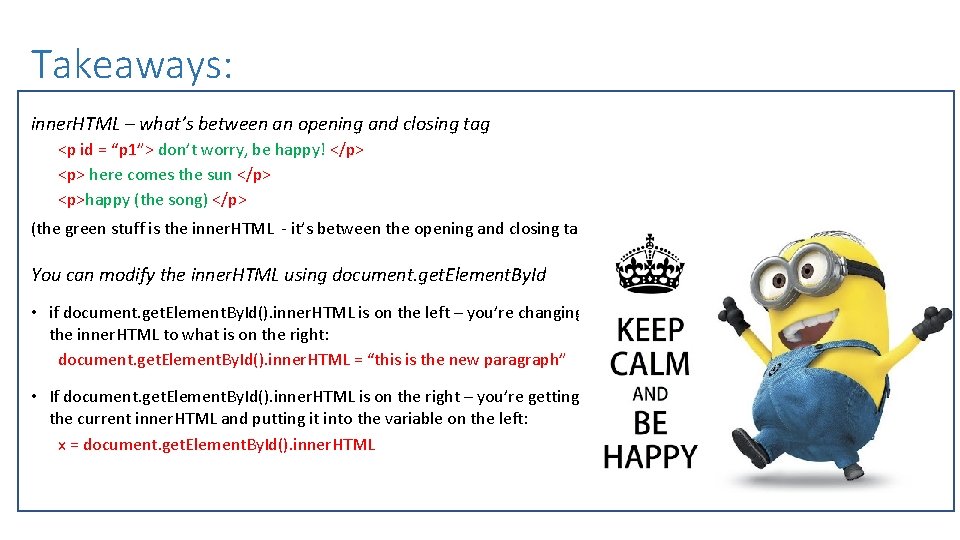
Takeaways: inner. HTML – what’s between an opening and closing tag <p id = “p 1”> don’t worry, be happy! </p> <p> here comes the sun </p> <p>happy (the song) </p> (the green stuff is the inner. HTML - it’s between the opening and closing tag) You can modify the inner. HTML using document. get. Element. By. Id • if document. get. Element. By. Id(). inner. HTML is on the left – you’re changing the inner. HTML to what is on the right: document. get. Element. By. Id(). inner. HTML = “this is the new paragraph” • If document. get. Element. By. Id(). inner. HTML is on the right – you’re getting the current inner. HTML and putting it into the variable on the left: x = document. get. Element. By. Id(). inner. HTML
- Slides: 9