
Information System Analysis Topic3 1 Entity Relationship Diagram
- Slides: 51
Information System Analysis Topic-3 1
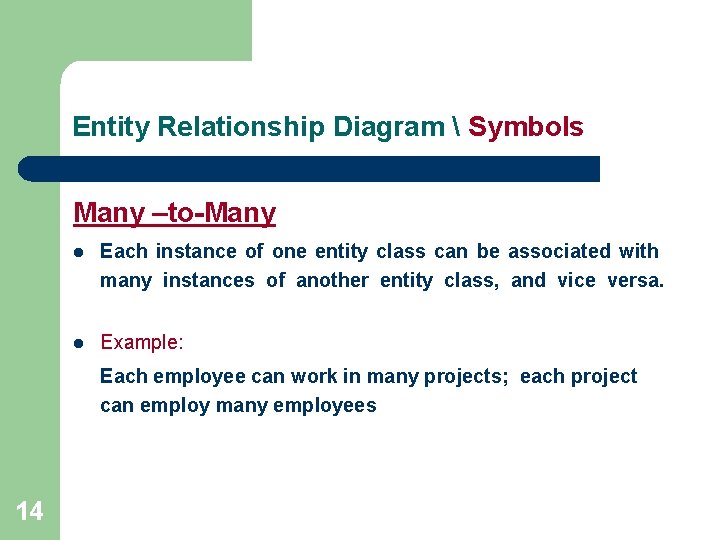
Entity Relationship Diagram Definition 2 l An entity-relationship (ER) diagram is a specialized graphic that illustrates the interrelationships between entities in a database. l ER diagrams often use symbols to represent three different types of information. Boxes are commonly used to represent entities. Diamonds are normally used to represent relationships and ovals are used to represent attributes.
Entity Relationship Diagram Definition 3 l Also Known As: ER Diagram, E-R Diagram, entityrelationship model. l Emphasis on data and not on actions on the data
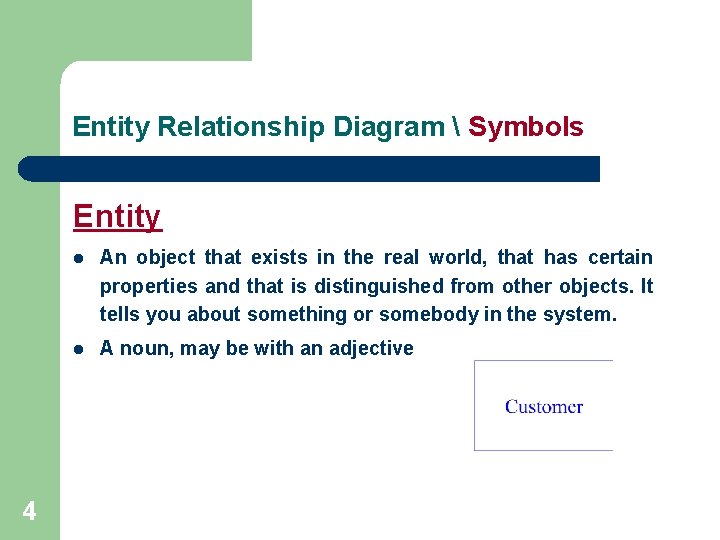
Entity Relationship Diagram Symbols Entity 4 l An object that exists in the real world, that has certain properties and that is distinguished from other objects. It tells you about something or somebody in the system. l A noun, may be with an adjective
Entity Relationship Diagram Symbols l l A collection of things that share common properties or characteristics May describe - Roles-people or organizations EMPLOYEE - Tangible things MACHINE, BUILDING - Events SALE, REGISTRATION - Locations STATE, BRANCH - Concepts COURSE 5
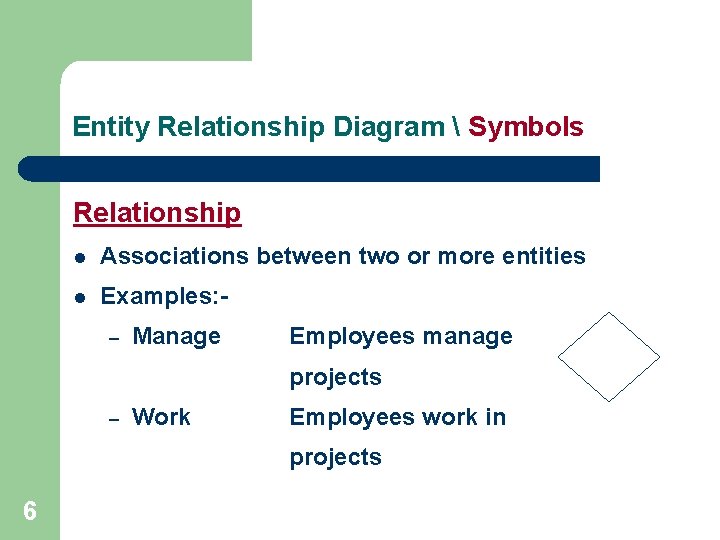
Entity Relationship Diagram Symbols Relationship l Associations between two or more entities l Examples: – Manage Employees manage projects – Work Employees work in projects 6
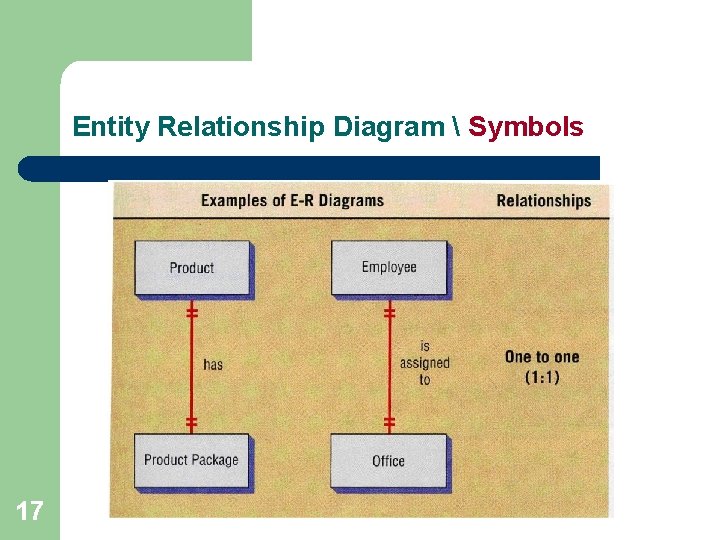
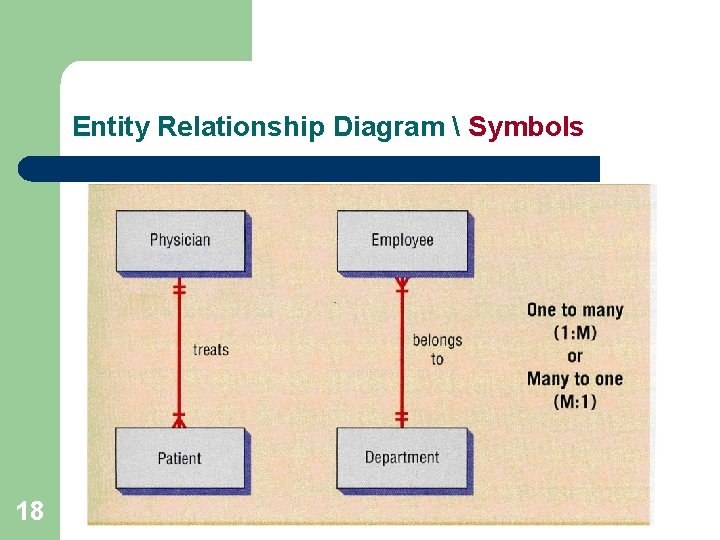
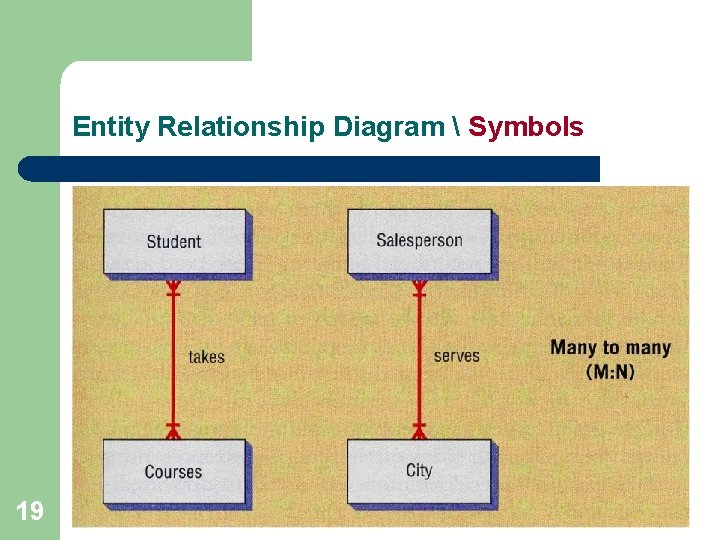
Entity Relationship Diagram Symbols Types of Relationship 7 l One-to-One l Many-to-One (One-to-Many) l Many-to-Many
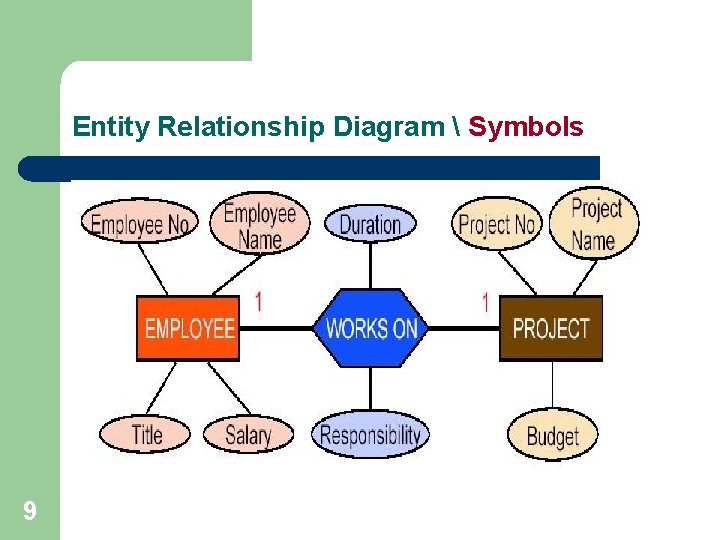
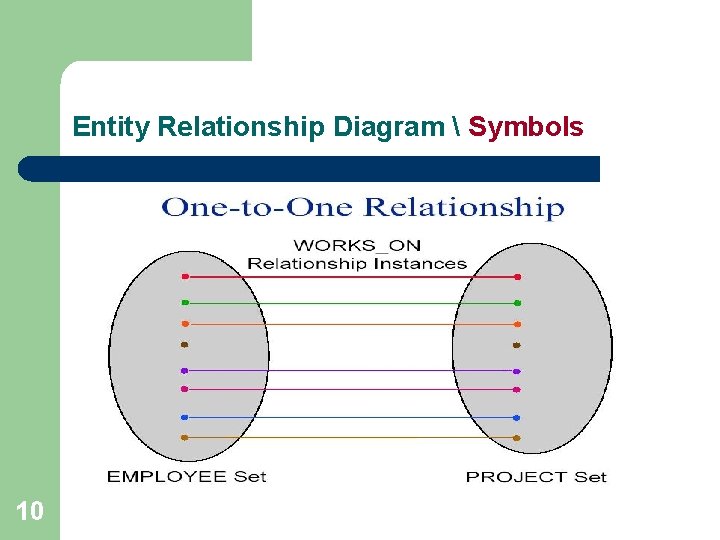
Entity Relationship Diagram Symbols One –to-One l Each instance of one entity class E 1 can be associated with at most one instance of another entity class E 2 and vice versa. l Example: Each employee can work in at most one project and each project employs at most one employee. 8
Entity Relationship Diagram Symbols 9
Entity Relationship Diagram Symbols 10
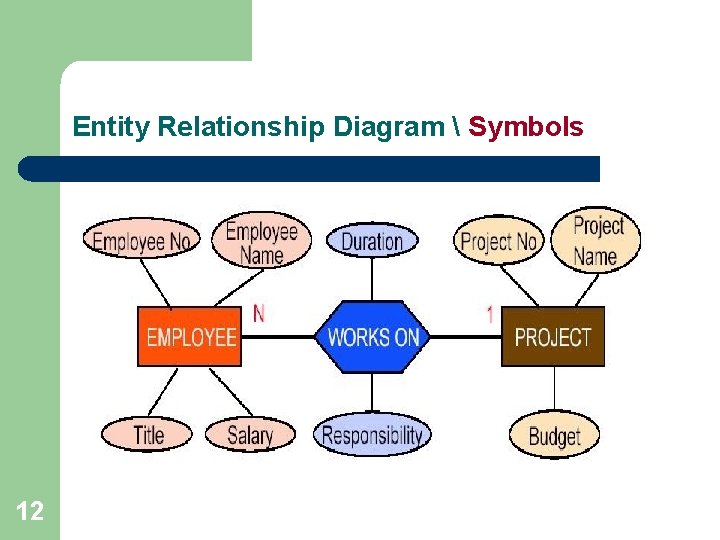
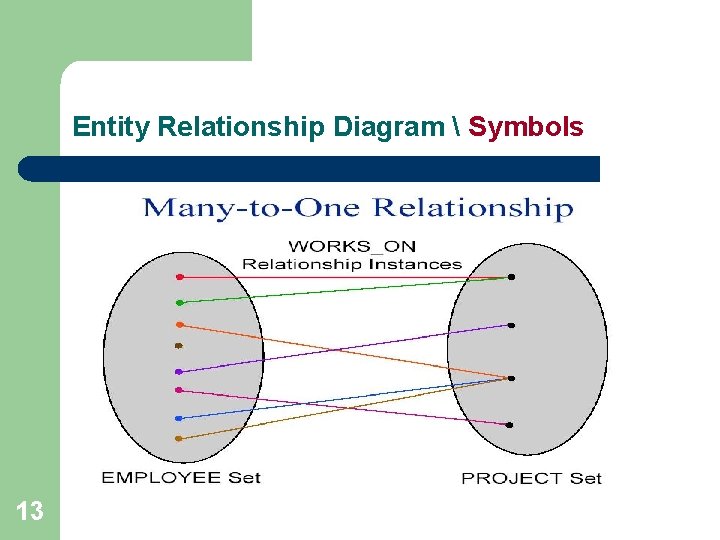
Entity Relationship Diagram Symbols Many –to-One l Each instance of one entity class E 1 can be associated with zero or more instances of another entity class E 2, but each instance of E 2 can be associated with at most 1 instance of E 1. l Example: Each employee can work in at most one project; each project can employ many engineers. 11
Entity Relationship Diagram Symbols 12
Entity Relationship Diagram Symbols 13
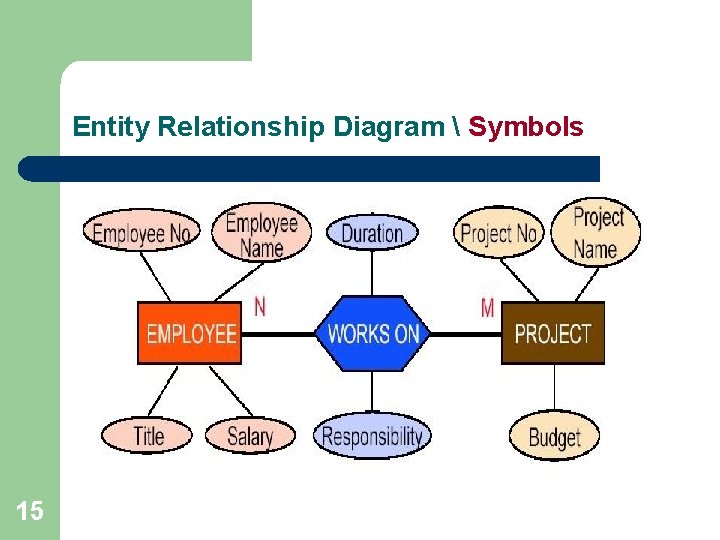
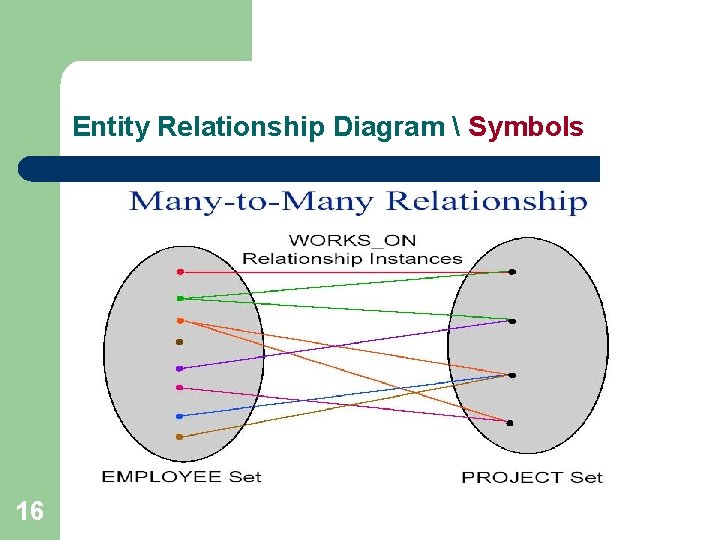
Entity Relationship Diagram Symbols Many –to-Many l Each instance of one entity class can be associated with many instances of another entity class, and vice versa. l Example: Each employee can work in many projects; each project can employ many employees 14
Entity Relationship Diagram Symbols 15
Entity Relationship Diagram Symbols 16
Entity Relationship Diagram Symbols 17
Entity Relationship Diagram Symbols 18
Entity Relationship Diagram Symbols 19
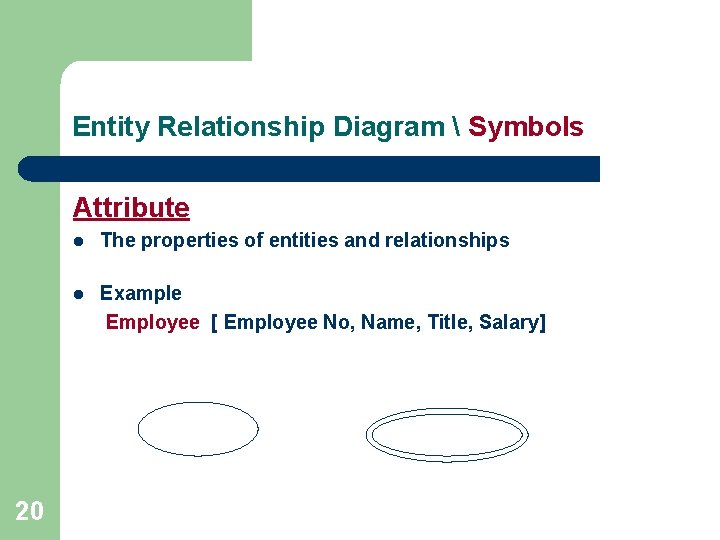
Entity Relationship Diagram Symbols Attribute 20 l The properties of entities and relationships l Example Employee [ Employee No, Name, Title, Salary]
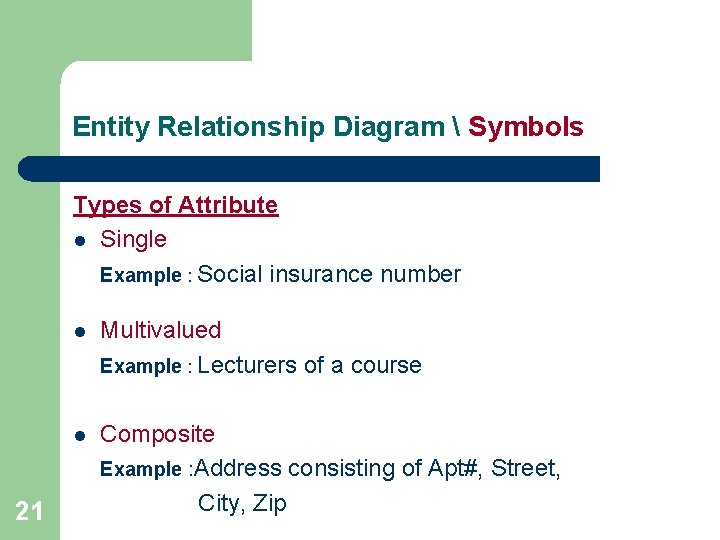
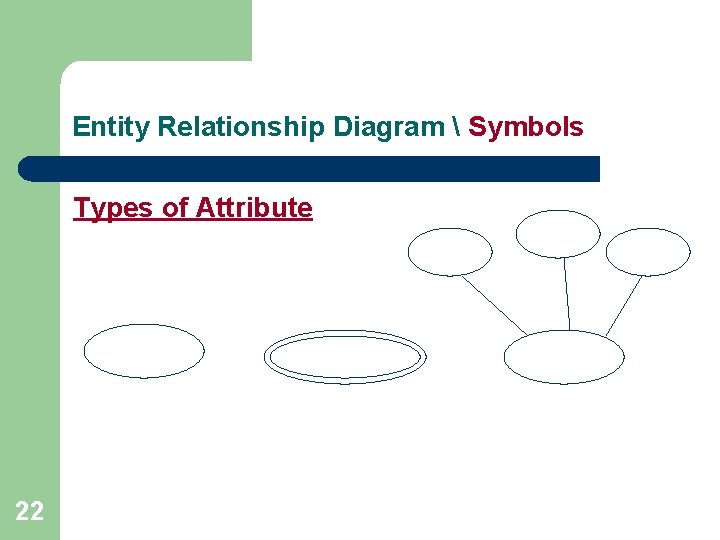
Entity Relationship Diagram Symbols Types of Attribute l Single Example : Social insurance number 21 l Multivalued Example : Lecturers of a course l Composite Example : Address consisting of Apt#, Street, City, Zip
Entity Relationship Diagram Symbols Types of Attribute 22
Entity Relationship Diagram Entity identifier l One or more of the attributes that can uniquely identify each instance of a given entity type l Example: Employee : Employee No Project : Project No 23
How do we start an ERD? 24 1. Define Entities: these are usually nouns used in descriptions of the system, in the discussion of business rules, or in documentation; identified in the narrative 2. Define Relationships: these are usually verbs used in descriptions of the system or in discussion of the business rules (entity ______ entity); identified in the narrative
How do we start an ERD? 25 3. Add attributes to the entities; and suggest the keys or identifiers. 4. Add cardinality to the relations 5. Represent that information with symbols
ERD Example -1 26 1. A house is identified by a three part address consisting of a No. , Street, and City. Each house also has a style and a set of colors. 2. A person is identified by a social insurance No. . Each person also has a name, age, and a sex. 3. Any person lives in at most one house, and a house can have zero or more persons living there. 4. Each person may own zero or more houses, and every house is owned by at least one person.
ERD Example -2 Company Dbase § § 27 A company has a number of employees, and every employee has a unique number assigned by the company, required to store his/her name, address, and date of birth. Some user applications need to refer to the city, state, and zip of the employee's address. The company also has several projects. Each project has a unique number, a unique name, and start date. A project may have several locations. Each employee may be assigned to one or more projects, or may not be assigned to any project, and a project must have at least one employee assigned. An employee may have many skills. Each skill is assigned a number, and short description of each skill.
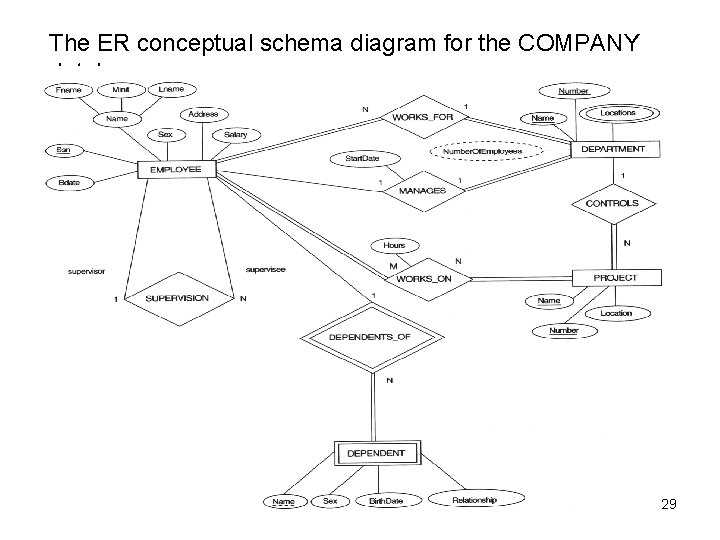
ERD Example -3 Company Dbase l l 28 The company is organized into departments. Each department has a unique name, a unique number, and a particular employee who manages the department. We keep track of the start date when that employee began managing the department. A department may have several locations. A department controls a number of projects, each of which has a unique name, a unique number, and a single location. We store employee’s name, social security number, address, salary, sex, and birth date. An employee is assigned to one department but may work on several projects, which are not necessarily controlled by the same department. We keep track of the numbers of hours per week that an employee works on each project. We also keep track of the direct supervisor of each employee. We want to keep track of the dependents of each employee for insurance purpose. We keep each dependent’s first name, sex, birth date, and relationship to the employee.
The ER conceptual schema diagram for the COMPANY database. 29
Logic Modeling / System Specification l l 30 Data flow diagrams do not show the logic inside the processes Logic modeling involves representing internal structure and functionality of processes depicted on a DFD Logic modeling can also be used to show when processes on a DFD occur The purpose of logic modeling is to show the rules that govern (Control-Identify) the behavior of processes represented in data flow diagrams
Logic Modeling Deliverables and Outcomes: – – – 31 Structured English Decision Tables Decision Trees
Modeling Logic with Structured English l l Modified form of English used to specify the logic of information processes Uses a subset of English – – – 32 Action verbs Noun phrases No adjectives or adverbs
Modeling Logic with Structured English l l No specific standards Similar to programming language – – – 33 If conditions Case statements Repetition
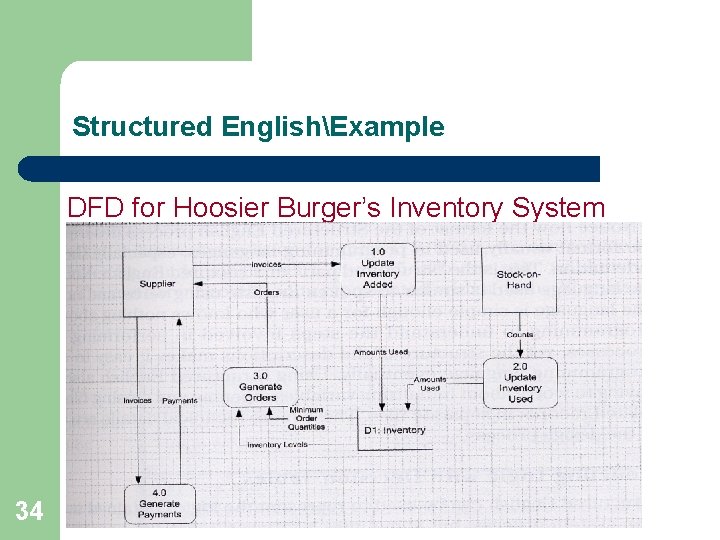
Structured EnglishExample DFD for Hoosier Burger’s Inventory System 34
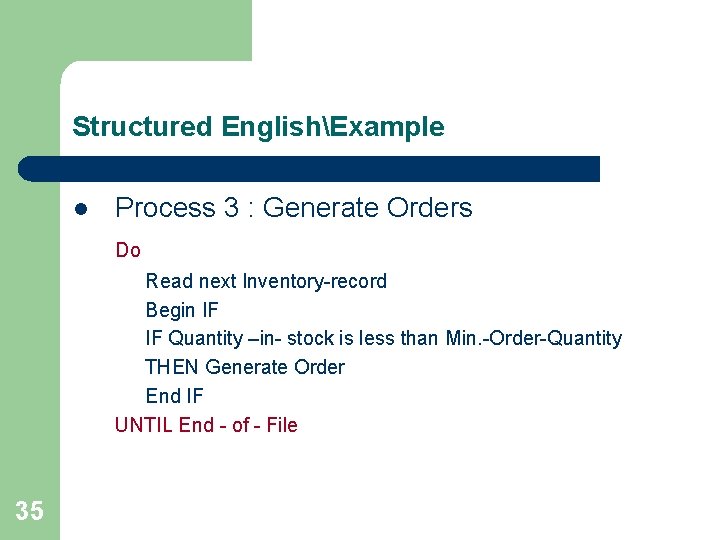
Structured EnglishExample l Process 3 : Generate Orders Do Read next Inventory-record Begin IF IF Quantity –in- stock is less than Min. -Order-Quantity THEN Generate Order End IF UNTIL End - of - File 35
Modeling Logic with Decision Tables l l l 36 A matrix representation of the logic of a decision Specifies the possible conditions and the resulting actions Best used for complicated decision logic
Modeling Logic with Decision Tables l 37 Consists of three parts 1. Condition stubs l Lists condition relevant to decision 2. Action stubs l Actions that result from a given set of conditions 3. Rules l Specify which actions are to be followed for a given set of conditions
Modeling Logic with Decision Tables l l 38 Indifferent Condition – Condition whose value does not affect which action is taken for two or more rules Standard procedure for creating decision tables – Name the condition and values each condition can assume – Name all possible actions that can occur – List all rules – Define the actions for each rule – Simplify the table
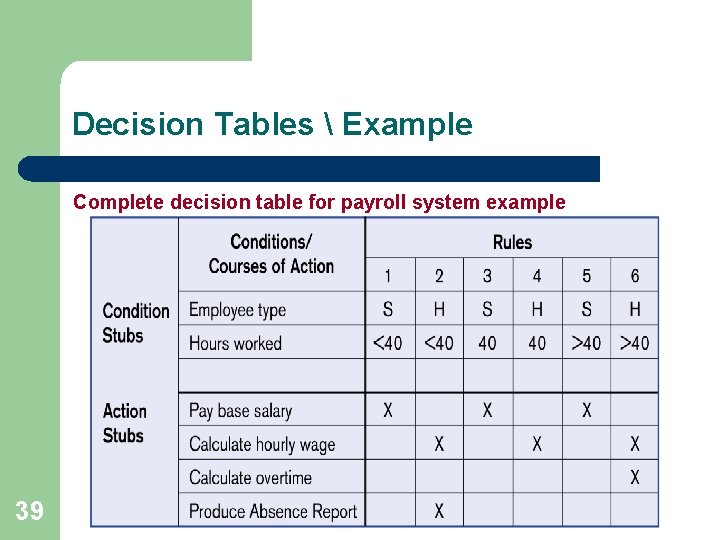
Decision Tables Example Complete decision table for payroll system example 39
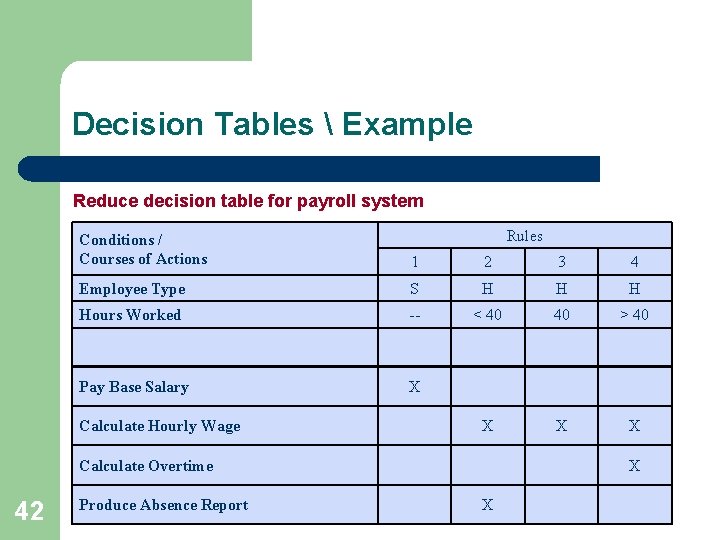
Decision Tables Example Reading Rules: l To read the rules, start by reading the values of the conditions as specified in the first column: employee type is “S”, and hours worked less than 40. when both of these conditions occur, the payroll system is to pay the base salary. 40
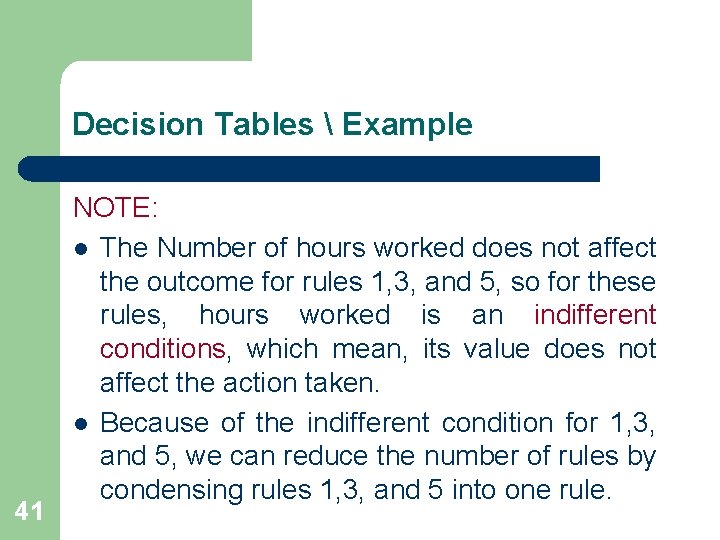
Decision Tables Example 41 NOTE: l The Number of hours worked does not affect the outcome for rules 1, 3, and 5, so for these rules, hours worked is an indifferent conditions, which mean, its value does not affect the action taken. l Because of the indifferent condition for 1, 3, and 5, we can reduce the number of rules by condensing rules 1, 3, and 5 into one rule.
Decision Tables Example Reduce decision table for payroll system Rules Conditions / Courses of Actions 1 2 3 4 Employee Type S H Hours Worked -- < 40 40 > 40 Pay Base Salary X X Calculate Hourly Wage Calculate Overtime 42 Produce Absence Report X X
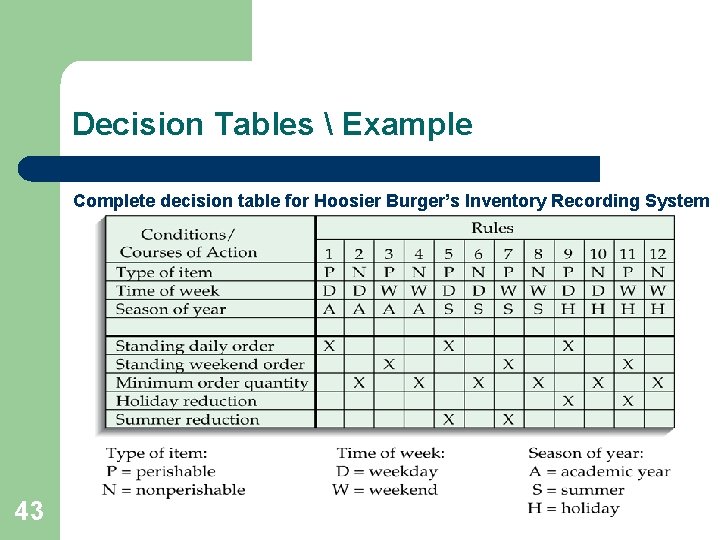
Decision Tables Example Complete decision table for Hoosier Burger’s Inventory Recording System 43
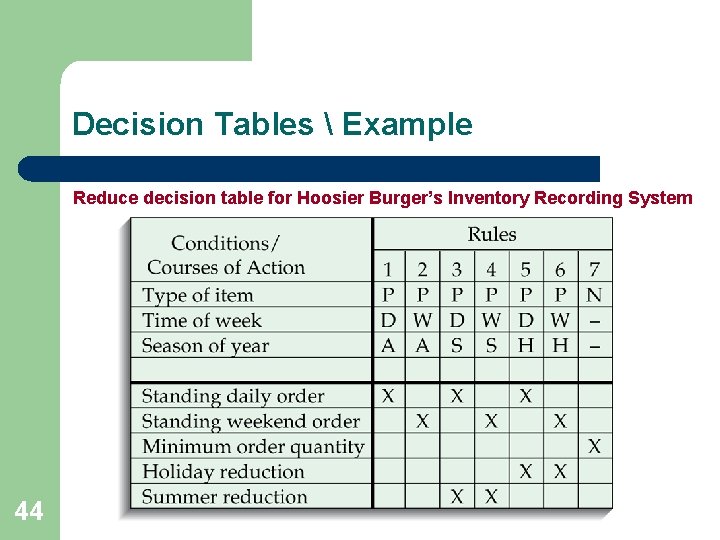
Decision Tables Example Reduce decision table for Hoosier Burger’s Inventory Recording System 44
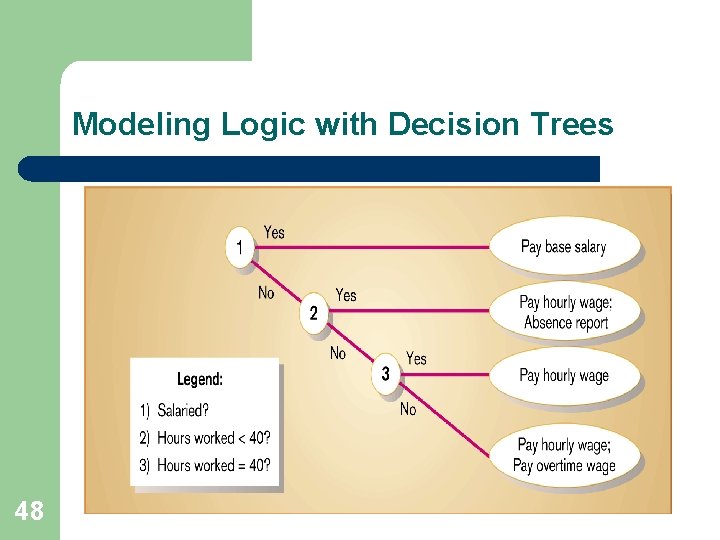
Modeling Logic with Decision Trees l l l 45 A graphical representation of a decision situation Decision situation points are connected together by arcs and terminate in ovals Two main components – Decision points represented by nodes – Actions represented by ovals
Modeling Logic with Decision Trees l l l 46 Read from left to right Each node corresponds to a numbered choice on a legend All possible actions are listed on the far right
Modeling Logic with Decision Trees l 47 The following figure shows Decision tree representation of the decision logic in the decision tables in the previous example, with only two choices per decision point
Modeling Logic with Decision Trees 48
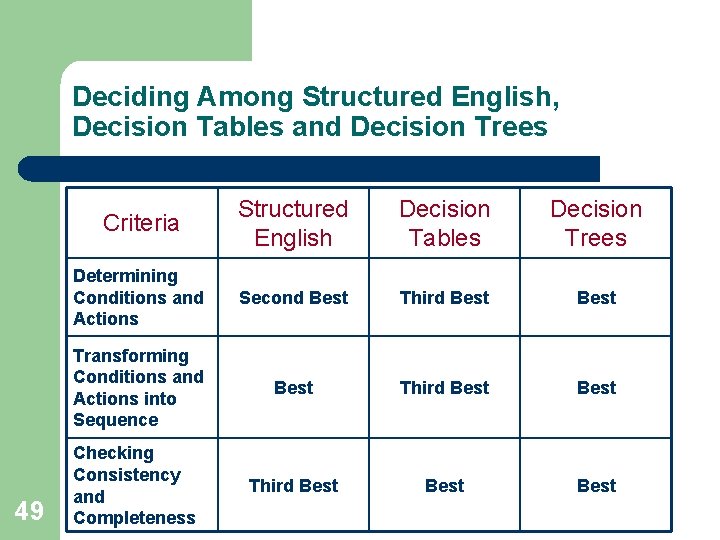
Deciding Among Structured English, Decision Tables and Decision Trees 49 Criteria Structured English Decision Tables Decision Trees Determining Conditions and Actions Second Best Third Best Transforming Conditions and Actions into Sequence Best Third Best Checking Consistency and Completeness Third Best
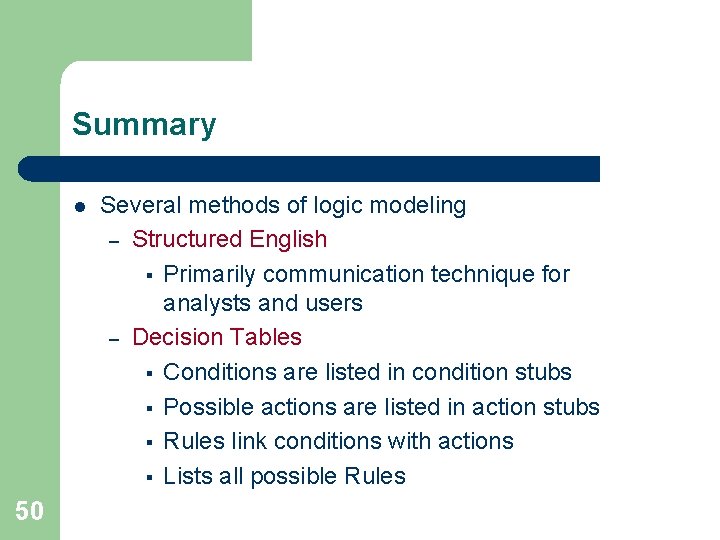
Summary l 50 Several methods of logic modeling – Structured English § Primarily communication technique for analysts and users – Decision Tables § Conditions are listed in condition stubs § Possible actions are listed in action stubs § Rules link conditions with actions § Lists all possible Rules
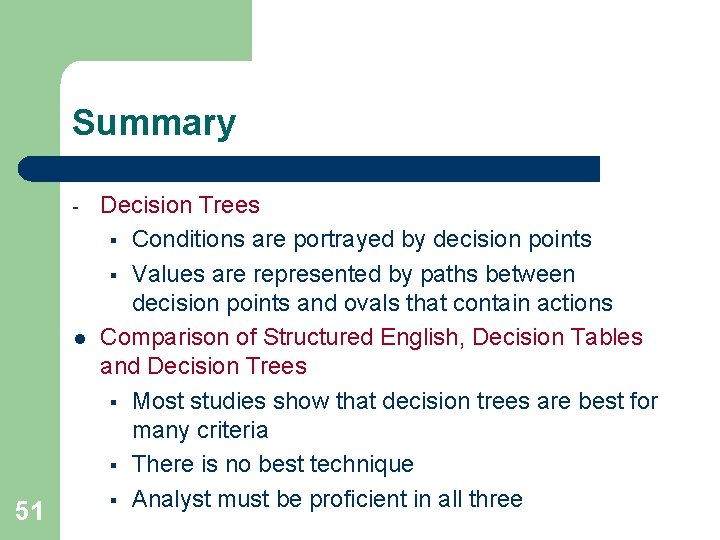
Summary - l 51 Decision Trees § Conditions are portrayed by decision points § Values are represented by paths between decision points and ovals that contain actions Comparison of Structured English, Decision Tables and Decision Trees § Most studies show that decision trees are best for many criteria § There is no best technique § Analyst must be proficient in all three