
Information and Communication Technology ICT Edexcel Product Design


- Slides: 20
Information and Communication Technology (ICT) Edexcel – Product Design: Graphics
ICT • Electronic communications • Computer Aided Design (CAD) • Marketing, distribution and retailing of products • Digital special effects
Electronic communications • Email • Electronic Data Interchange (EDI) – Paperless system through a computer network • Integrated Services Digital Network (ISDN) and broadband – Voice, data, text, graphics, music and video • Video conferencing – Dedicated systems or desktop systems Advantages Disadvantages For Development Marketing Sales Global market place
Email Advantages • Paperless society / supports sustainability. • Documents can be attached electronically. • Documents can be saved / edited easily. • Convenient / easy way of communicating. • Efficient / received almost immediately. • Email messages less formal and they are also usually shorter and more to the point. • Correspondence can be managed on screen. • Proposal can be answered / revised / stored / sent to others without reams of paper involved. • The reader can identify critical correspondence quickly and dealt with it immediately. • Quicker than posting. (Do not accept quicker/cheaper/faster as a single word answer, it MUST be qualified. ) • Minimum running costs but high set up costs. • Cheap to send by bulk posting. • Allows rapid billing. Disadvantages • Privacy / security issues as messages can be intercepted & read. • Data can get lost. • Impersonal& some messages can be misinterpreted/misread/ misunderstood. • Limitations on size of attachments. (1) • Possible virus infection. • Time wasting / spam / unsolicited junk mail. • Not always suitable for serious business documents or transactions requiring signatures. (1) • E mails can easily be ignored / allows for misunderstanding. • Too many e-mails can lead to management problems / in-box being overwhelmed by mail. • Removes face to face meeting/ impersonal contact. • Software used must be compatible between users.
EDI - electronic communication method that provides standards for exchanging data via any electronic means. Advantages • EDI can save companies money/more efficient. • No limit on size of documents. • Secure method of transferring information. • Data translated into a common format between sites/companies. • More reliable than e-mail. • Limits the amount of human interaction. • Use of data from the exchange reduces the handling costs of sorting/ distributing/organising/searching for paper documents. • EDI reduces the chances of transcription error. • Information handling is greatly reduced. • Creates a paperless company. Disadvantages • Too Many Standards (file formats) • Changing Standards (versions of software) • EDI can be too expensive for small businesses
ISDN • • • • High speed/faster connection/more efficient. Wide bandwidth. Lets digital data to pass along analogue telephone lines. Modems at input end convert computer digital data into audible tones. Modems at output end convert signals back to digital. Allows for shared use of networks. Allows telephone & internet use at the same time on later versions/with early versions users had to disconnect. Can be installed over existing telephone lines. Lines can be used for voice/data Broadband is cheaper. Broadband easier to set up. Allows easy access to the web. ISDN is a dial up service.
Video Conferencing • • • • Allows face to face communication. Brings people at different sites together for a meeting. Saves time / money because people do not have to travel to a central meeting point. Quicker to set up meetings because travel not necessary. Visual information easily communicated. Speeds up decision making as presentations can be made to several people in different locations simultaneously. Remote diagnostics available with technicians in different countries. Allows for corporate training on a world wide basis. Teams can work together even if in different locations. Synchronising time of meeting in different time zones across the world can be a problem. Connections can often fail. Lack of eye contact with others can hinder conversation or intent. Camera shyness can hinder presentations due to be filmed often recorded More environmentally friendly. Less chance of misunderstanding between members.
Computer Aided Design (CAD) • Creative and technical design – Quick editing for client – Zoomed in views • Virtual modelling and testing – Simulations • Rapid prototyping – Solid models Advantages Disadvantages Development Marketing Sales Global market place
CAD • • • Able to see 3 D view so saves money on costly real models. Easy to manipulate/alter/edit to allow alterations/redrawing/rendering. Library of components/nets makes it easier to construct/draw package. Drawings can embed cut lines/score lines/folds leading to accuracy in manufacturing/speed in manufacturing. It allows for collaborative working with different designers producing parts remotely. Range of fonts/grids/tools/zoom/measurements that all leads to increased accuracy. Integrated process which can be linked to testing and QC software. digital image can be saved so can be used/altered/adjusted later. can email to manufacturer allowing direct link to CAM machining/output to printer.
3 D CAD vs 2 D CAD • Helps visualise the product/gives accurate/scale/realistic impression. • Product can be seen from 3600/all angles. • Clear un-technical view so you don’t have to understand 2 D orthographic/2 d views. • Can automatically modify sizes and dimensions. • Surface textures/lighting detail/colour/rendering can be added. • Helps designer where improvements/faults could be. • Enables client feedback. • Ergonomic/aesthetic testing can occur. • Saves physical model being made. • Surface model can be used as a promotional impression. • Can be linked to RPT. • Easier to work with than 2 D modelling. • Can simulate ‘in use’/walk round capability/virtual feel. • Ability to edit/modify on screen.
Virtual Modelling • Useful method for visualising the design in 3 D. • Different materials / colour schemes can be readily shown. • Different times of the year / day / weather and sun positions can be shown. • Wide variety of viewing angles can be shown. • Clients can walk around / through building (virtually). • Ready access to data from other programs. • Time / cost savings involved as physical models do not have to be made. • Changes can be made quickly without having to start again. • Designs can be sent. • Areas/ dimensions can be shown/ calculated
Rapid Prototyping Advantages • Produces an accurate quality prototype • Allows for evaluation by designer/user • Reduces time in manufacture of quality prototype in comparison to traditional methods • Gives the designer a good idea of the final look/3 D look of the product • Allows communication between designer and user • Gives the designer the opportunity to show the user a product for an active participation in the design process • Allows design flaws to be seen in early stages of development • Reduces costs for designer in development as resources are used more efficiently(1) • Gives designer a high quality product for development • Allows testing of product/materials • Reduces design time to market/development time • Allows direct link between CAD and CAM • Helps refine product • Produces scale prototype for marketing • Reduces material costs due to less wastage compared to traditional methods • Allows designer to start another job while printer produces prototype (greater productivity) • Safer as no need to use tools/machines to make traditional model. • Can produce intricate /fine detail not possible by hand Disadvantages • Expensive process may be passed onto customer through increased costs • May cause the designer to constantly redevelop the product for perfection • May slow the development process • Regular upgrading of software • Prototype limited by size of machine/may have to be scaled down in size • Consumables can be expensive • Prototypes maybe fragile • Cost of maintenance could be high • Training maybe required • Cost of equipment can be high • If power goes off there is a need to set up and start again
Marketing, distribution and retailing of products using: • Electronic point of sale (EPOS) – Inventory/ordering – Financial transactions – Spreadsheets for profit/loss – Barcodes/QR codes • Internet marketing and sales • Enterprise Resource Planning (ERP) – Coordinates processes
EPOS Advantages • It saves people checking stock and provides very quick service to the customers. • Employee work rate can be recorded and there performance can be evaluated fairly. • More accuracy and less time consuming. • Bills can be itemised therefore, less mistake in billing. • Stores prices and does calculations automaticallydoesn't have to be memorised. • It can read credit cards as well. Disadvantages • EPOS systems are expensive to install. • This software requires regular maintenance. • This software has to be updated if competitive edge is to be maintained against rival company systems.
Marketing Using the Internet • • • • Companies can reach a wide audience/large market/global Cheaper than advertising via TV/papers/magazines. Increased company profile on a world wide basis. Businesses can reach consumers in a medium that brings results quickly. Greener/saves paper. Marketers can determine which messages or offerings are more appealing to the audience/cookies/pop ups. Information/adverts can be updated immediately. Results of campaigns can be measured/tracked immediately. (1) Can be aimed at/sent to specific target groups. Shows detailed knowledge immediately of user preferences/ market tends by tracking sales. Cost savings due to reduced sales force/need for retail outlets. Advertising this way has a lower carbon footprint/lower global warming. Links to related sites easily made.
ERP • A system designed to coordinate processes / resources / information / activities / shared database • Integrates software from all departments into one system • Provides a software road map for fulfilling customer orders • Information required to fulfil an order is instantly accessible to all staff • Instant updating of information • Easy tracking of customer orders through to invoicing
ERP Advantages • All elements in the supply and production chain easily accessed • All the workforce can see the same information • Information concerning order can be updated instantly/team members are updated • Allows for greater time/efficiency in customer management • Improves communication within the business • Customer orders easily tracked • Customer orders processed quicker Disadvantages • Expensive to install • Success depends on skill / experience of workforce • High quality on-going training needed • System failure affects all areas of the business • Maybe teething problems with system introduction • 24/7 operation maybe interrupted by down-time
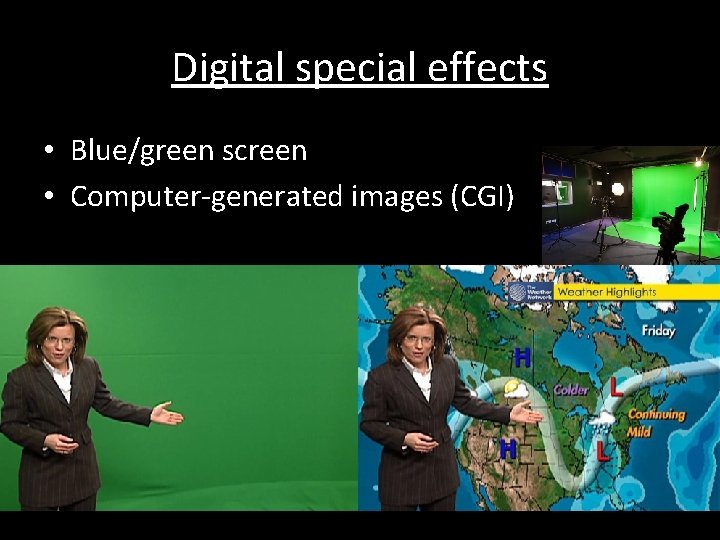
Digital special effects • Blue/green screen • Computer-generated images (CGI)
Blue / Green Screen Process is known as compositing. Background filmed or created on computer / background plate created. Actor / model filmed against blue / green background. This film is passed through a red filter to make background appear black. Silhouettes created of actor / model from blue / green screen footage. One is black on white background; the other is white on black background. There are now four pieces of film. The pieces of film are layered to make a composite. Two matte screens created. Matte screen removes foreground object. Computer removes blue / green background and replaces with realistic background. • Computer imposes CGI. • Black silhouette created for actor to be placed in. • • •
CGI & Digital Special Effects Advantages • Person cannot be involved in any real accidents / no expensive repairs • Reduces risk to people • There is immediate feedback/allows playback of the simulation/lesson/experience • Weather conditions can be simulated • Allows hazardous / real life scenarios can be to presented • Any angle (including impossible to film angles) • No set construction needed • Costumes etc can be changed later Disadvantages • Expensive hardware and software • Skilled technical staff • Technology is outdated quickly (replaced by better techniques and programs)