
Informatics Practices Class XI As per CBSE Board
Informatics Practices Class XI ( As per CBSE Board) Computer System
A computer is an electronic device, under the control of instructions stored in its memory that can accept data (input), process the data according to specified rules(Program) on processor & produces information (output), and store the information for future use Data vs Information Data are raw numbers or other findings which, by themselves, are of limited value. Information is data that has been converted into a meaningful and useful context. Computers are being used extensively nowadays in everyday life/every field In the form of laptop, desktop, smartphone, gadgets etc.

Advantages of computer • • • Speed Accuracy Huge storage Versatility Tirelessness Disadvantages of computer • • Data security issue Computer crimes Health risk Bad impact on environment if not properly disposed off
Any digital computer performs five functions in gross term. 1. Take data as input 2. Stores data/instructions 3. Process those stored data 4. Generate the output 5. Control all above steps Computing The use of a computer to process data or perform calculations or the act of calculating or reckoning through computer is known as computing.
EVOLUTION OF COMPUTING DEVICES Abacus is known to be the first mechanical calculating device. Which was used to be performed addition and subtraction easily and speedily? This device was a first develop Ed by the Egyptians in the 10 th centaury B. C, but it was given it final shape in the 12 th centaury A. D. by the Chinese educationists. NAPIER’S BONES John Napier’s of Scotland invented a calculating device, in the year 1617 called the Napier Bones. In the device, Napier’s used the bone rods of the counting purpose where some no. is printed on these rods. These rods that one can do addition, subtraction, multiplication and division easily. Pascal's calculator In the year 1642, Blaise Pascal a French scientist invented an adding machine called Pascal’s calculator, which represents the position of digit with the help of gears in it.
EVOLUTION OF COMPUTING DEVICES Leibnz Calculator In the year 1671, a German mathematics, Gottfried Leibniz modified the Pascal calculator and he developed a machine which could perform various calculation based on multiplication and division as well. Analytical Engine In the year 1833, a scientist form England knows to be Charles Babbage invented such a machine. Which could keep our data safely? This device was the first mechanical computer. Charles Babbage is also known as the father of the computer. One of the ideas, which went a long way in making computers that they are today, is the ‘Stored Program Concept’ which Charles Babbage gave while designing an automatic machine for calculations. That is why, he is considered as the ‘Father Of Modern Computers’. Mark 1 computer : Mark 1 computer Howard Aiken of Harvard University, in collaboration with IBM Corporation designed a fully automatic machine in 1937 -1944. This machine used electrically actuated switches called ‘Relays’.
EVOLUTION OF COMPUTING DEVICES ENIAC : eniac(Electronic Numerical Integrator and Computer) The development of vacuum tubes made it possible to build better computers. In 1943, during the second world war, the ENIAC was constructed at the Pennsylvania University to satisfy military needs. This marked the beginning of development of modern computers. EDSAC- in full Electronic Delay Storage Automatic Calculator, the first full-size stored-program computer, built at the University of Cambridge, Eng. , by Maurice Wilkes and others to provide a formal computing service for users. EDSAC was built according to the von Neumann machine principles enunciated by the Hungarian American scientist John von Neumann and, like the Manchester Mark I, became operational in 1949.
EVOLUTION OF COMPUTING DEVICES CDC 6600 - The first supercomputer, the Control Data Corporation (CDC) 6600, only had a single CPU. Released in 1964, the CDC 6600 was actually fairly small — about the size of four filing cabinets. It cost $8 million at that time. and operated at up to 40 MHz, squeezing out a peak performance of 3 million floating point operations per second (flops). PARAM 8000 - in 1991, C-DAC rolled out India’s first indigenous supercomputer: PARAM 8000. A multiprocessor machine, PARAM 8000 was benchmarked at 5 Gflops, making it the second fastest supercomputer in the world at that time. Pratyush-As of January 2018, Pratyush and Mihir are the fastest supercomputer in India with a maximum speed of 6. 8 Peta. Flops at a total cost of INR 438. 9 Crore.
EVOLUTION OF COMPUTING DEVICES SPC - The first smartphone, created by IBM, was invented in 1992 and released for purchase in 1994. It was called the Simon Personal Communicator (SPC). i. Phone - 2007 - Enter Steve Jobs. One of the most influential years for smartphone evolution was 2007. It was year Steve Jobs and the team at Macworld revealed the very first i. Phone. Not only was this the sleekest touch screen device to hit the market. The device was offered at a 4 GB level ($499) and 8 GB ($599). 2020 - The World At Our Fingertips -And just like that, we’ve reached modern day. Since the launch of the i. Phone thirteen years ago, we’ve -The advent of the Android— Google’s answer to the i. Phone, Hundreds of hardware iterations of Android smartphones, The rise of apps (and the monetization of them)
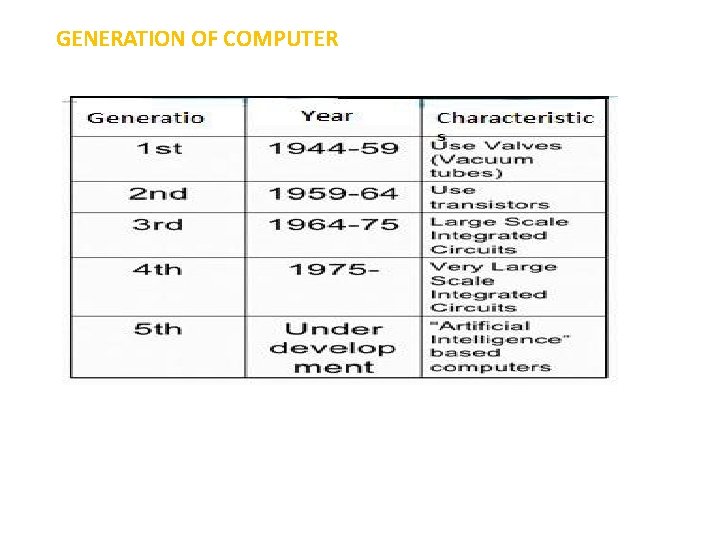
GENERATION OF COMPUTER
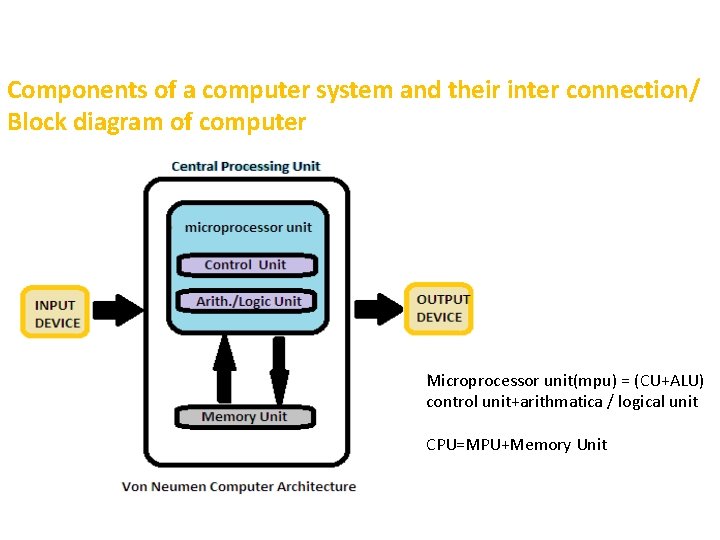
Components of a computer system and their inter connection/ Block diagram of computer Microprocessor unit(mpu) = (CU+ALU) control unit+arithmatica / logical unit CPU=MPU+Memory Unit
• Input/Output Units • Input Unit • A device through which data and programs from the outside world enter the computer system. • Output unit • A device through which results stored in the computer memory are made available outside the • computer system.
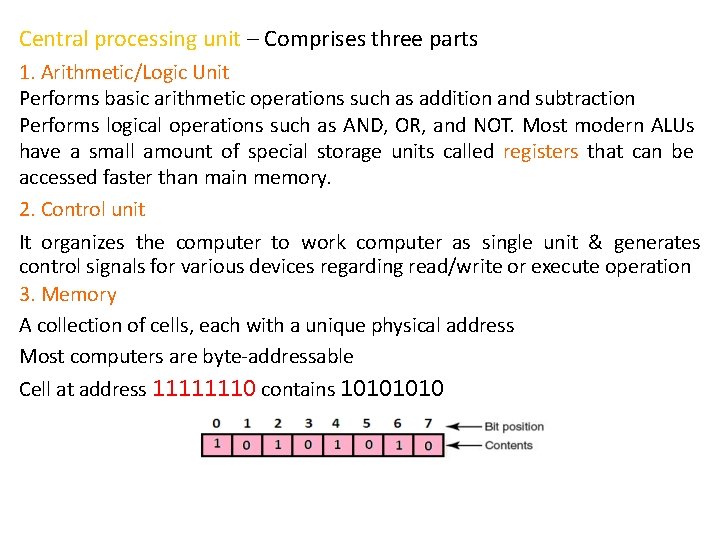
Central processing unit – Comprises three parts 1. Arithmetic/Logic Unit Performs basic arithmetic operations such as addition and subtraction Performs logical operations such as AND, OR, and NOT. Most modern ALUs have a small amount of special storage units called registers that can be accessed faster than main memory. 2. Control unit It organizes the computer to work computer as single unit & generates control signals for various devices regarding read/write or execute operation 3. Memory A collection of cells, each with a unique physical address Most computers are byte-addressable Cell at address 11111110 contains 1010
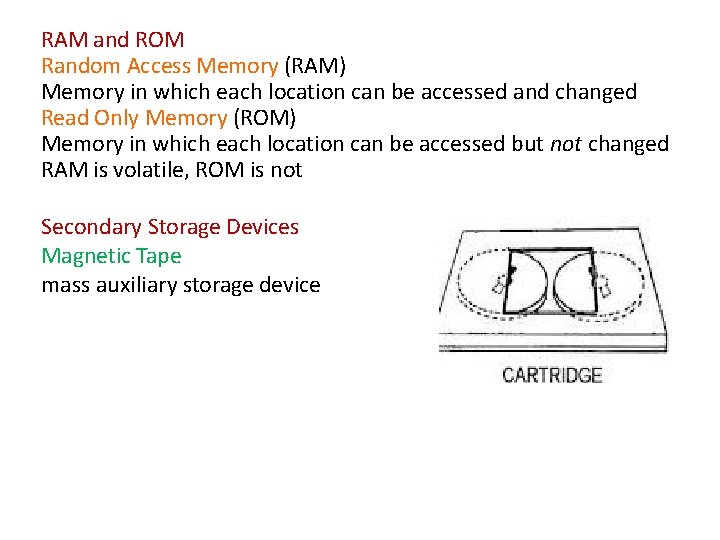
RAM and ROM Random Access Memory (RAM) Memory in which each location can be accessed and changed Read Only Memory (ROM) Memory in which each location can be accessed but not changed RAM is volatile, ROM is not Secondary Storage Devices Magnetic Tape mass auxiliary storage device
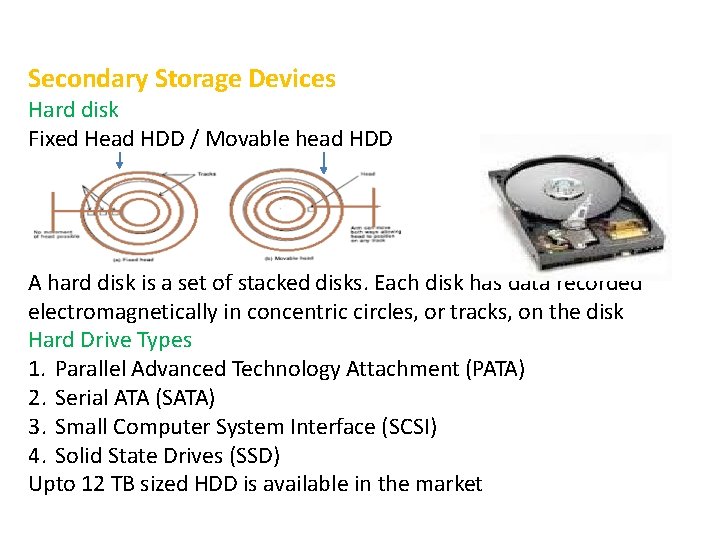
Secondary Storage Devices Hard disk Fixed Head HDD / Movable head HDD A hard disk is a set of stacked disks. Each disk has data recorded electromagnetically in concentric circles, or tracks, on the disk Hard Drive Types 1. Parallel Advanced Technology Attachment (PATA) 2. Serial ATA (SATA) 3. Small Computer System Interface (SCSI) 4. Solid State Drives (SSD) Upto 12 TB sized HDD is available in the market
Input Devices Input devices can send data or information to a computer or another device. Keyboard: It is an input device which sends data in to the computer. The data send depends on the key pressed by the user. Mouse: A mouse is a small handheld input device which controls a cursor in a graphical user interface. It can move and select text, files, folders etc. on our computer according to the user input. Scanner: Scanner optically reads and document, file or image and then changes it into digital signal and sends to the computer. OMR: optical mark recognition/ reader, is used to read marks on a document and send them to computer. OCR: OCR stands for optical character Recognition, is an input device which reads printed text and sends that to computer. MICR: Magnetic Ink Character Reader is an input device which generally finds application is banks to process cheques. Microphone: it receives audio generated by some input source and sends the same to a computer. Webcam: it sends the captured images to a computer. Graphics Tablets: This input device is used to draw using hand. Trackballs: an upside down mouse , encased within a socket. Is a cursor control device. Barcode reader: It is used to read the barcode of various items and feed the same to computer. Gamepad: Also known as joy pad is the input controller for video games. Joystick: these input devices are used to control video games.
Output Devices A device that can receive data from computer or another device and create output with that data is called output device. Examples of various output devices are as : Monitor: A monitor is an output device that is responsible for receiving data from a computer and displaying that information as text or images for users to see. Speakers: Receives sound signal from a computer and then plays that sound signal and thus we hear songs or music or any other audio. Projector: Gets data from a computer and displays or projects the same information onto a screen or a wall. Projector cannot directly accept data from a user and send that data to another device.
Both Input / Output Devices An input/output device is capable of receiving data from users or another devices and also sending data to another devices or computers. That means a devices which can be used as both input device and output device are called Input / Output (I/O) devices. Some examples of input/output devices are as: USB drive: Also known as pen drive or flash stick works as both input device to computer and as an output device. USB drives receive or save data from a computer as an input and it can also send data to a computer or another device. Facsimile: Facsimile or FAX machine has a scanner which is an input device and a small printer to provide output. Modems: It is used to transmit and receive data from one computer to another computer or other devices using telephone lines CD-RW drives and DVD-RW drives: Receives data from a computer as input to copy onto and save into writable CD or DVD. We also use CDs or DVDs to transfer data to a computer. Touch Screen: Touch screen is both input and output device. By touching the screen input is provided and being a screen, it is used as an output device. Headsets: Headset consists of speaker as an output device and microphone functions as an input device.
- Slides: 18