
INCIWEB DESCRIPTIONS HOW INFORMATION IN THE TABS ON
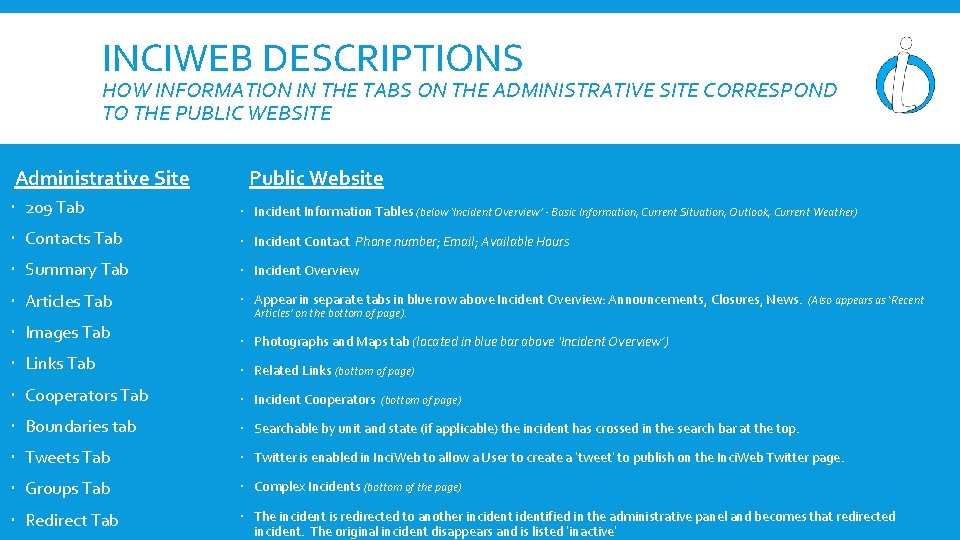
INCIWEB DESCRIPTIONS HOW INFORMATION IN THE TABS ON THE ADMINISTRATIVE SITE CORRESPOND TO THE PUBLIC WEBSITE Administrative Site Public Website 209 Tab Incident Information Tables (below ‘Incident Overview’ - Basic Information, Current Situation, Outlook, Current Weather) Contacts Tab Incident Contact Phone number; Email; Available Hours Summary Tab Incident Overview Articles Tab Appear in separate tabs in blue row above Incident Overview: Announcements, Closures, News. (Also appears as ‘Recent Images Tab Photographs and Maps tab (located in blue bar above ‘Incident Overview’) Links Tab Related Links (bottom of page) Cooperators Tab Incident Cooperators (bottom of page) Boundaries tab Searchable by unit and state (if applicable) the incident has crossed in the search bar at the top. Tweets Tab Twitter is enabled in Inci. Web to allow a User to create a ‘tweet’ to publish on the Inci. Web Twitter page. Groups Tab Complex Incidents (bottom of the page) Redirect Tab The incident is redirected to another incidentified in the administrative panel and becomes that redirected incident. The original incident disappears and is listed ‘inactive’ Articles’ on the bottom of page).
- Slides: 1