
Implementing Special Device for ICS ESO D Popovic
- Slides: 25
Implementing Special Device for ICS ESO – D. Popovic ESO Instrumentation Software Workshop 2008 - 1
VLTSW Standard Devices • Standard HW devices supported by the VLTSW • Standard communication and command interface • Limited to most common functionality • Standard devices should be used whenever possible! • Special devices must be justified at FDR at the latest. ESO – D. Popovic ESO Instrumentation Software Workshop 2008 - 2
VLTSW Standard Device Misconceptions • HW device with standard communication interface, e. g. RS -232, automatically qualifies for a standard device • Standard device can do anything (or everything) • Always consult ESO SW group before selecting HW ESO – D. Popovic ESO Instrumentation Software Workshop 2008 - 3
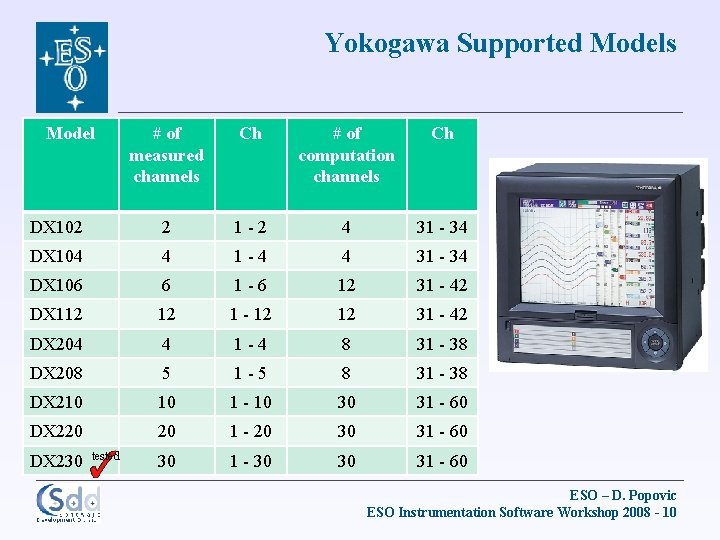
New Standard Devices in VLT 2009 • Lake. Shore Temperature Monitor and Controllers • Used for measurement and control of cryogenic temperatures of instrument detectors independently of the instrument control software. • Used in CRIRES, X-Shooter, HAWKI, VISIR and AMBER • Yokogawa DX 100/DX 200 Series DAQ Stations • Multi-channel Data Acquisition Station used to provide status of various instrument temperatures sensors. It is also capable of handling several I/O signals for ON/OFF control independently of the instrument control software through direct and programmable digital outputs. • Used in HAWKI and CRIRES ESO – D. Popovic ESO Instrumentation Software Workshop 2008 - 4
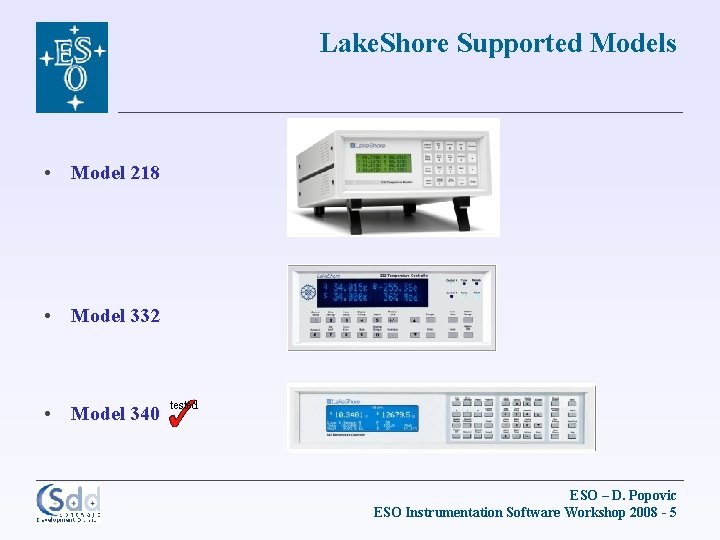
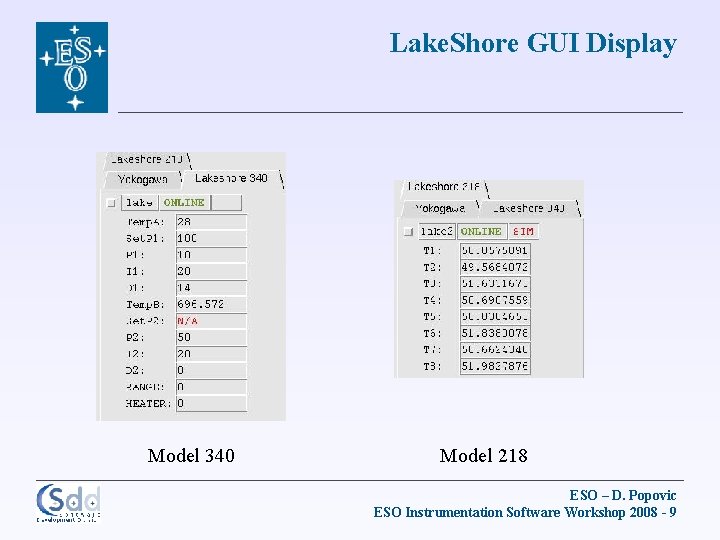
Lake. Shore Supported Models • Model 218 • Model 332 • Model 340 tested ESO – D. Popovic ESO Instrumentation Software Workshop 2008 - 5
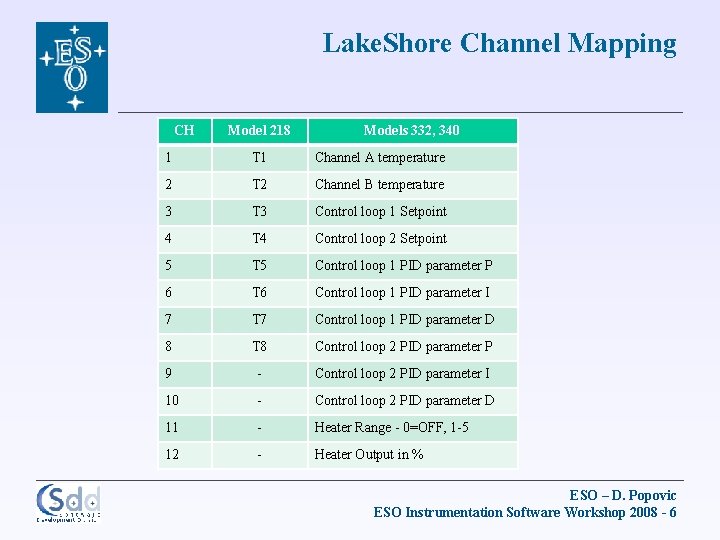
Lake. Shore Channel Mapping CH Model 218 Models 332, 340 1 T 1 Channel A temperature 2 T 2 Channel B temperature 3 T 3 Control loop 1 Setpoint 4 T 4 Control loop 2 Setpoint 5 T 5 Control loop 1 PID parameter P 6 T 6 Control loop 1 PID parameter I 7 T 7 Control loop 1 PID parameter D 8 T 8 Control loop 2 PID parameter P 9 - Control loop 2 PID parameter I 10 - Control loop 2 PID parameter D 11 - Heater Range - 0=OFF, 1 -5 12 - Heater Output in % ESO – D. Popovic ESO Instrumentation Software Workshop 2008 - 6
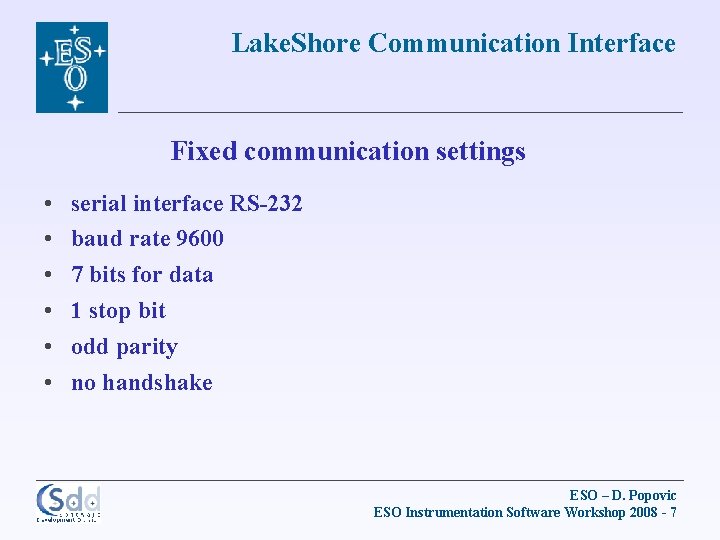
Lake. Shore Communication Interface Fixed communication settings • • • serial interface RS-232 baud rate 9600 7 bits for data 1 stop bit odd parity no handshake ESO – D. Popovic ESO Instrumentation Software Workshop 2008 - 7
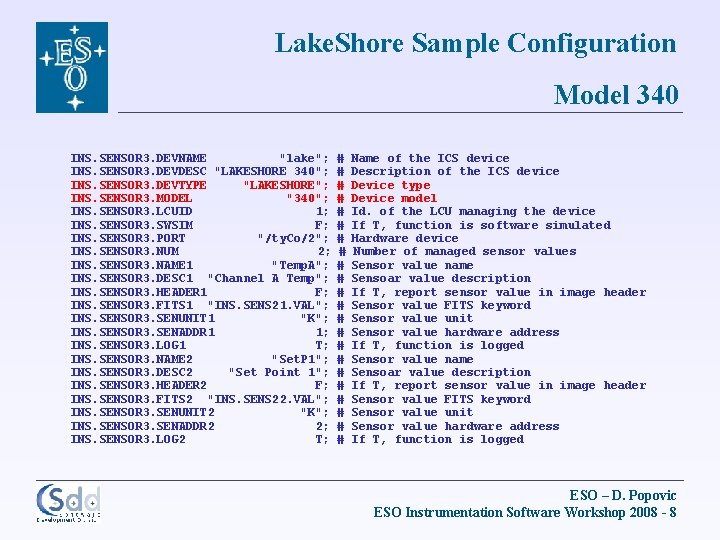
Lake. Shore Sample Configuration Model 340 INS. SENSOR 3. DEVNAME "lake"; INS. SENSOR 3. DEVDESC "LAKESHORE 340"; INS. SENSOR 3. DEVTYPE "LAKESHORE"; INS. SENSOR 3. MODEL "340"; INS. SENSOR 3. LCUID 1; INS. SENSOR 3. SWSIM F; INS. SENSOR 3. PORT "/ty. Co/2"; INS. SENSOR 3. NUM 2; INS. SENSOR 3. NAME 1 "Temp. A"; INS. SENSOR 3. DESC 1 "Channel A Temp"; INS. SENSOR 3. HEADER 1 F; INS. SENSOR 3. FITS 1 "INS. SENS 21. VAL"; INS. SENSOR 3. SENUNIT 1 "K"; INS. SENSOR 3. SENADDR 1 1; INS. SENSOR 3. LOG 1 T; INS. SENSOR 3. NAME 2 "Set. P 1"; INS. SENSOR 3. DESC 2 "Set Point 1"; INS. SENSOR 3. HEADER 2 F; INS. SENSOR 3. FITS 2 "INS. SENS 22. VAL"; INS. SENSOR 3. SENUNIT 2 "K"; INS. SENSOR 3. SENADDR 2 2; INS. SENSOR 3. LOG 2 T; # # # # # # Name of the ICS device Description of the ICS device Device type Device model Id. of the LCU managing the device If T, function is software simulated Hardware device Number of managed sensor values Sensor value name Sensoar value description If T, report sensor value in image header Sensor value FITS keyword Sensor value unit Sensor value hardware address If T, function is logged ESO – D. Popovic ESO Instrumentation Software Workshop 2008 - 8
Lake. Shore GUI Display Model 340 Model 218 ESO – D. Popovic ESO Instrumentation Software Workshop 2008 - 9
Yokogawa Supported Models Model # of measured channels Ch # of computation channels Ch DX 102 2 1 -2 4 31 - 34 DX 104 4 1 -4 4 31 - 34 DX 106 6 1 -6 12 31 - 42 DX 112 12 1 - 12 12 31 - 42 DX 204 4 1 -4 8 31 - 38 DX 208 5 1 -5 8 31 - 38 DX 210 10 1 - 10 30 31 - 60 DX 220 20 1 - 20 30 31 - 60 30 1 - 30 30 31 - 60 DX 230 tested ESO – D. Popovic ESO Instrumentation Software Workshop 2008 - 10
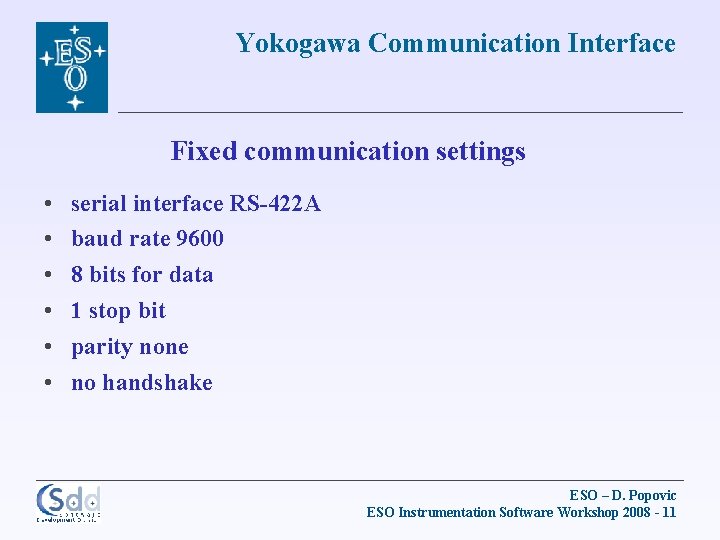
Yokogawa Communication Interface Fixed communication settings • • • serial interface RS-422 A baud rate 9600 8 bits for data 1 stop bit parity none no handshake ESO – D. Popovic ESO Instrumentation Software Workshop 2008 - 11
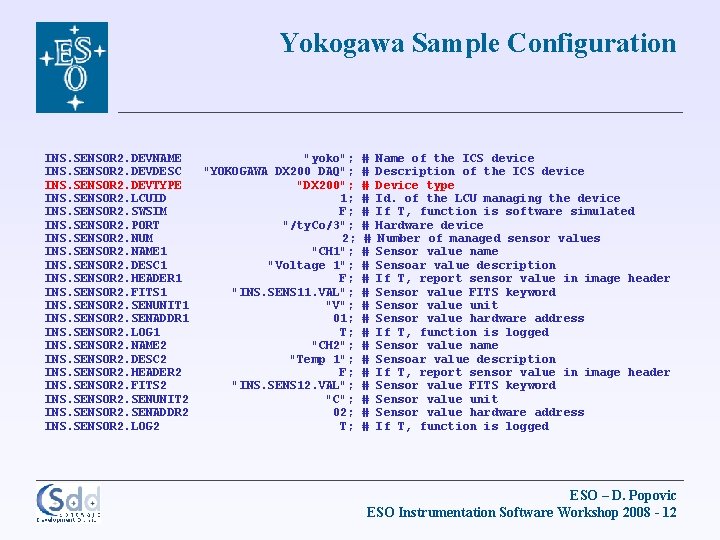
Yokogawa Sample Configuration INS. SENSOR 2. DEVNAME INS. SENSOR 2. DEVDESC INS. SENSOR 2. DEVTYPE INS. SENSOR 2. LCUID INS. SENSOR 2. SWSIM INS. SENSOR 2. PORT INS. SENSOR 2. NUM INS. SENSOR 2. NAME 1 INS. SENSOR 2. DESC 1 INS. SENSOR 2. HEADER 1 INS. SENSOR 2. FITS 1 INS. SENSOR 2. SENUNIT 1 INS. SENSOR 2. SENADDR 1 INS. SENSOR 2. LOG 1 INS. SENSOR 2. NAME 2 INS. SENSOR 2. DESC 2 INS. SENSOR 2. HEADER 2 INS. SENSOR 2. FITS 2 INS. SENSOR 2. SENUNIT 2 INS. SENSOR 2. SENADDR 2 INS. SENSOR 2. LOG 2 "yoko"; "YOKOGAWA DX 200 DAQ"; "DX 200"; 1; F; "/ty. Co/3"; 2; "CH 1"; "Voltage 1"; F; "INS. SENS 11. VAL"; "V"; 01; T; "CH 2"; "Temp 1"; F; "INS. SENS 12. VAL"; "C"; 02; T; # # # # # # Name of the ICS device Description of the ICS device Device type Id. of the LCU managing the device If T, function is software simulated Hardware device Number of managed sensor values Sensor value name Sensoar value description If T, report sensor value in image header Sensor value FITS keyword Sensor value unit Sensor value hardware address If T, function is logged ESO – D. Popovic ESO Instrumentation Software Workshop 2008 - 12
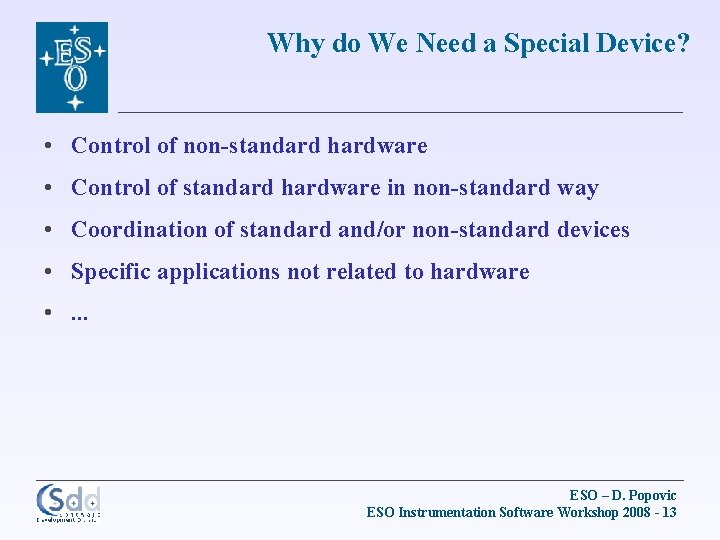
Why do We Need a Special Device? • Control of non-standard hardware • Control of standard hardware in non-standard way • Coordination of standard and/or non-standard devices • Specific applications not related to hardware • . . . ESO – D. Popovic ESO Instrumentation Software Workshop 2008 - 13
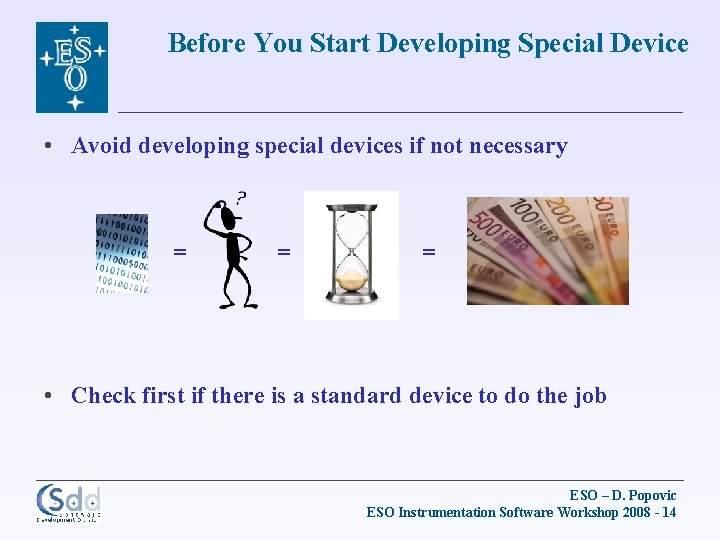
Before You Start Developing Special Device • Avoid developing special devices if not necessary = = = • Check first if there is a standard device to do the job ESO – D. Popovic ESO Instrumentation Software Workshop 2008 - 14
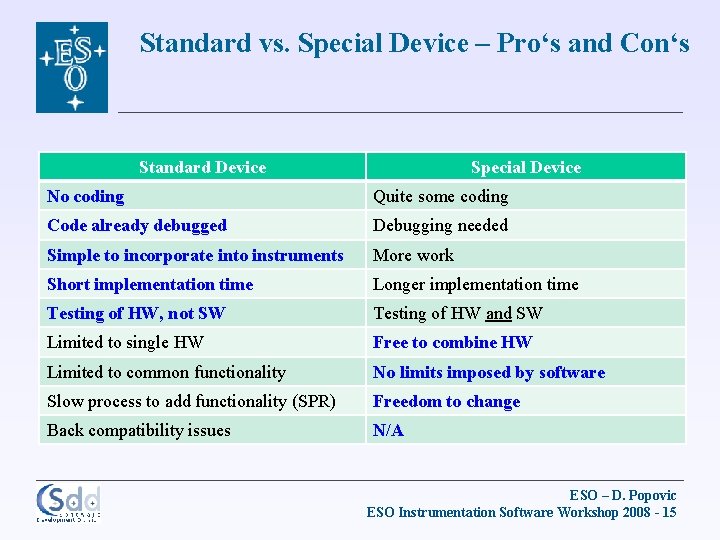
Standard vs. Special Device – Pro‘s and Con‘s Standard Device Special Device No coding Quite some coding Code already debugged Debugging needed Simple to incorporate into instruments More work Short implementation time Longer implementation time Testing of HW, not SW Testing of HW and SW Limited to single HW Free to combine HW Limited to common functionality No limits imposed by software Slow process to add functionality (SPR) Freedom to change Back compatibility issues N/A ESO – D. Popovic ESO Instrumentation Software Workshop 2008 - 15
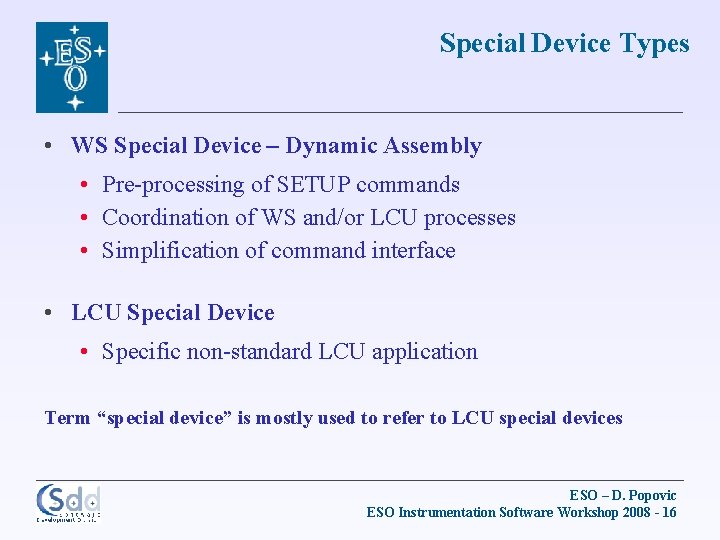
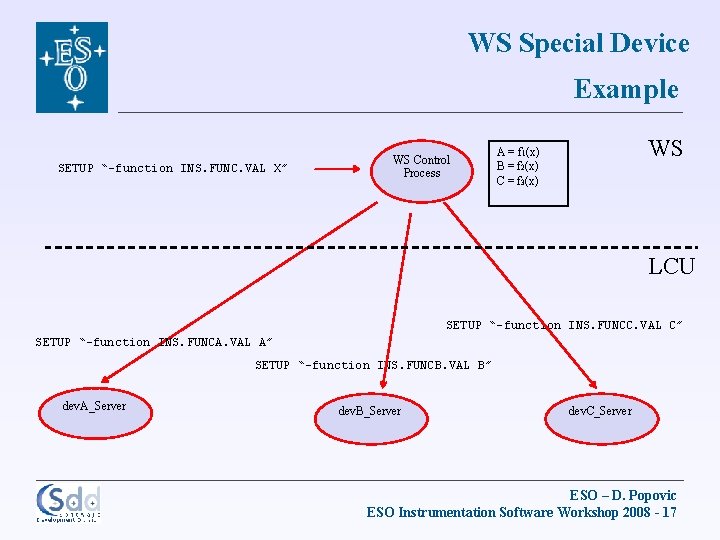
Special Device Types • WS Special Device – Dynamic Assembly • Pre-processing of SETUP commands • Coordination of WS and/or LCU processes • Simplification of command interface • LCU Special Device • Specific non-standard LCU application Term “special device” is mostly used to refer to LCU special devices ESO – D. Popovic ESO Instrumentation Software Workshop 2008 - 16
WS Special Device Example SETUP “-function INS. FUNC. VAL X” WS Control Process WS A = f 1(x) B = f 2(x) C = f 3(x) LCU SETUP “-function INS. FUNCC. VAL C” SETUP “-function INS. FUNCA. VAL A” SETUP “-function INS. FUNCB. VAL B” dev. A_Server dev. B_Server dev. C_Server ESO – D. Popovic ESO Instrumentation Software Workshop 2008 - 17
WS Special Device Implementation Steps • Sample C++ code given in module xxi, device TRAK • Steps to do: • Add new keywords to the Dictionary • Define class in xxi. INS_TRAK. h • Register the class in xxi. Control. h • Modify Dev. Trigger method • Add corresponding assembly in xxmcfg. INS. cfg ESO – D. Popovic ESO Instrumentation Software Workshop 2008 - 18
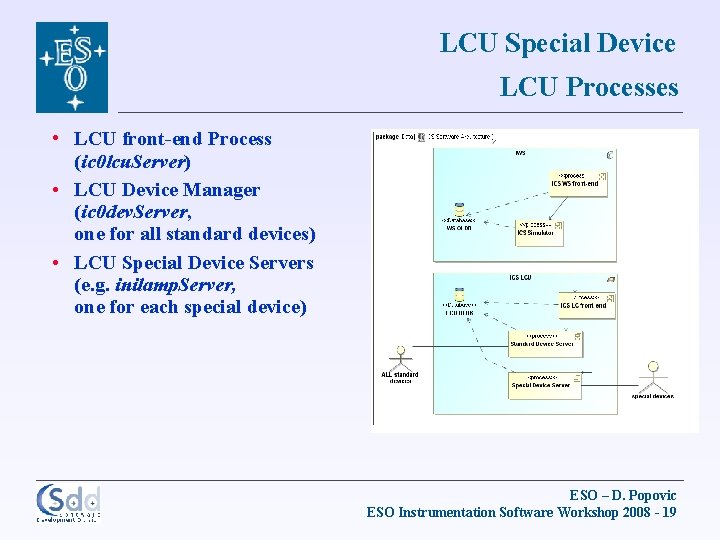
LCU Special Device LCU Processes • LCU front-end Process (ic 0 lcu. Server) • LCU Device Manager (ic 0 dev. Server, one for all standard devices) • LCU Special Device Servers (e. g. inilamp. Server, one for each special device) ESO – D. Popovic ESO Instrumentation Software Workshop 2008 - 19
LCU Special Device Implementation Steps • Sample C code given in module xxidev • Steps to do: • Add new keywords to the Dictionary • Retrieve and rename the module xxidev, e. g. : › › cmm. Copy xxidev insc. Rename xxidev inilamp YYYY LAMP 2 xx in • Implement specific code • Register the device in the system (DB, config, scanning, WS simulation, GUI widget, LCU boot. Script, …) ESO – D. Popovic ESO Instrumentation Software Workshop 2008 - 20
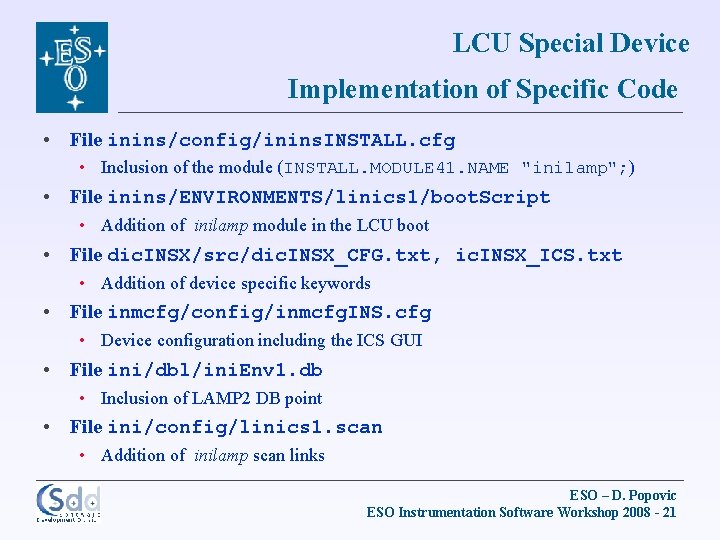
LCU Special Device Implementation of Specific Code • File inins/config/inins. INSTALL. cfg • Inclusion of the module (INSTALL. MODULE 41. NAME "inilamp"; ) • File inins/ENVIRONMENTS/linics 1/boot. Script • Addition of inilamp module in the LCU boot • File dic. INSX/src/dic. INSX_CFG. txt, ic. INSX_ICS. txt • Addition of device specific keywords • File inmcfg/config/inmcfg. INS. cfg • Device configuration including the ICS GUI • File ini/dbl/ini. Env 1. db • Inclusion of LAMP 2 DB point • File ini/config/linics 1. scan • Addition of inilamp scan links ESO – D. Popovic ESO Instrumentation Software Workshop 2008 - 21
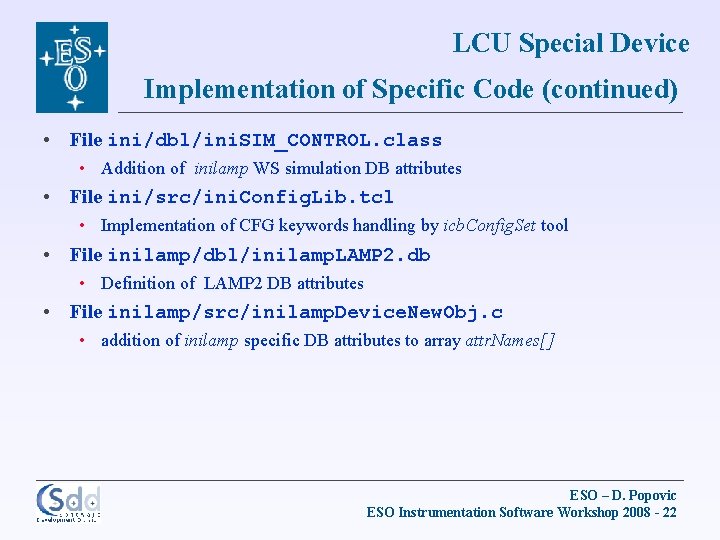
LCU Special Device Implementation of Specific Code (continued) • File ini/dbl/ini. SIM_CONTROL. class • Addition of inilamp WS simulation DB attributes • File ini/src/ini. Config. Lib. tcl • Implementation of CFG keywords handling by icb. Config. Set tool • File inilamp/dbl/inilamp. LAMP 2. db • Definition of LAMP 2 DB attributes • File inilamp/src/inilamp. Device. New. Obj. c • addition of inilamp specific DB attributes to array attr. Names[] ESO – D. Popovic ESO Instrumentation Software Workshop 2008 - 22
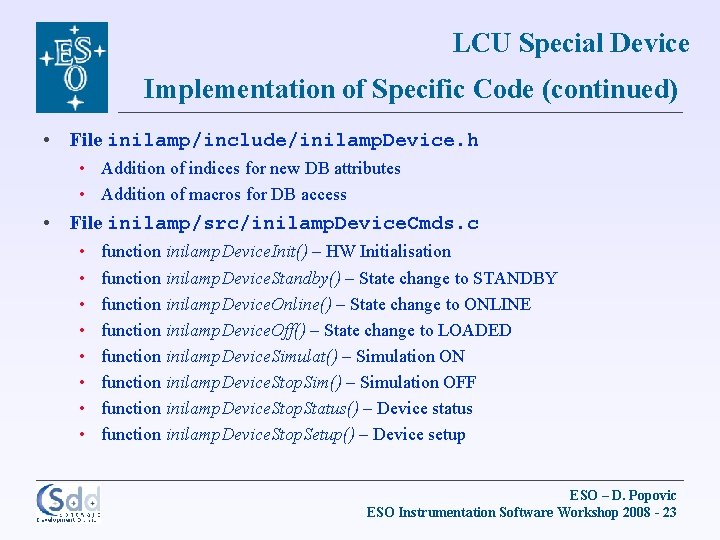
LCU Special Device Implementation of Specific Code (continued) • File inilamp/include/inilamp. Device. h • Addition of indices for new DB attributes • Addition of macros for DB access • File inilamp/src/inilamp. Device. Cmds. c • • function inilamp. Device. Init() – HW Initialisation function inilamp. Device. Standby() – State change to STANDBY function inilamp. Device. Online() – State change to ONLINE function inilamp. Device. Off() – State change to LOADED function inilamp. Device. Simulat() – Simulation ON function inilamp. Device. Stop. Sim() – Simulation OFF function inilamp. Device. Stop. Status() – Device status function inilamp. Device. Stop. Setup() – Device setup ESO – D. Popovic ESO Instrumentation Software Workshop 2008 - 23
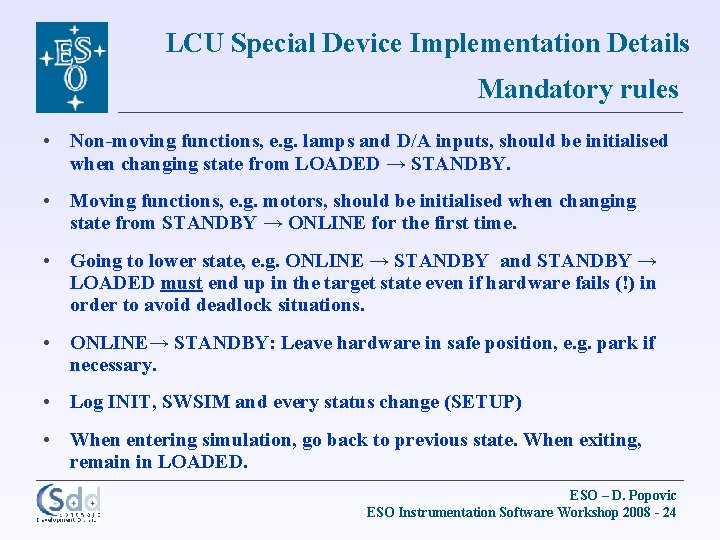
LCU Special Device Implementation Details Mandatory rules • Non-moving functions, e. g. lamps and D/A inputs, should be initialised when changing state from LOADED → STANDBY. • Moving functions, e. g. motors, should be initialised when changing state from STANDBY → ONLINE for the first time. • Going to lower state, e. g. ONLINE → STANDBY and STANDBY → LOADED must end up in the target state even if hardware fails (!) in order to avoid deadlock situations. • ONLINE→ STANDBY: Leave hardware in safe position, e. g. park if necessary. • Log INIT, SWSIM and every status change (SETUP) • When entering simulation, go back to previous state. When exiting, remain in LOADED. ESO – D. Popovic ESO Instrumentation Software Workshop 2008 - 24
LCU Special Device Implementation Details More to come in the Lab Exercise … Thank you ESO – D. Popovic ESO Instrumentation Software Workshop 2008 - 25