
Implementing Grey Heller People Mobile in People Soft
Implementing Grey. Heller People. Mobile® in People. Soft Campus Solutions Accessibility and Usability Project 11/15/2017
Agenda • • • Introduction Overview of People. Mobile project at CU Accessibility testing process / results Example screenshots Questions & Answers 2
INTRODUCTION 3
University of Colorado • CU is a four campus system with Boulder, Colorado Springs, Denver and Anschutz Medical Campus • Aggregate enrollment over 64, 000 students • Nearly 32, 000 faculty and staff • Presenting today: – – Art Figel, UIS Assistant Director of Student Systems Brad Baker, UIS Assistant Dir of Student System Development University Information Systems (UIS) within CU System office Jennifer Goncalves, Grey. Heller, Senior Director of UX 4
People. Soft Campus Solutions at CU • CU Implemented People. Soft Campus Solutions as an enterprise student information system in 2010, currently on version 9. 0. Commonly referred to as CU-SIS. • Additional People. Soft applications in use at CU include Portal, HCM, FIN and CRM • University Information Systems (UIS) maintains and supports CU’s enterprise People. Soft applications • The Boulder Accessibility and Usability Lab (AUL) provides testing and evaluation of IT solutions, including Campus Solutions for usability and accessibility. 5
Campus Solutions and Accessibility • Student self service functions in Campus Solutions have several accessibility and usability challenges • Challenges include a lack of Aria attributes, highly complex pages, visual navigation and layout • In 2014, CU Boulder received a Department of Justice inquiry requesting information about possible ADA noncompliance – In response, CU Boulder launched a project that resulted in organizational structure changes, new policies, better communication and remediation of issues. – CU System (UIS) has been a partner in the evaluation of enterprise system accessibility and efforts to improve accessibility, including People. Mobile. 6
Campus Solutions and Accessibility • Initial Campus Solutions accessibility remediation effort – External accessibility review by The Paciello Group from January thru April 2015 – Initial CS remediation project from May 2015 thru May 2016 – The initial project focused on People. Soft customization to mitigate accessibility issues – This was a challenging process due to automatically generated HTML – Multiple improvements deployed, but fundamental issues still remained • For example: complex page layout, lack of accessibility-focus on HTML, non-standard navigation remained 7
Overview of CU’s People. Mobile project PEOPLEMOBILE AT CU 8
Grey. Heller Peoplemobile at CU • Beginning June 2016, CU worked with Grey. Heller to evaluate and prototype a unique accessibility solution: People. Mobile • What is People. Mobile? – People. Soft add-on providing user experience, accessibility and mobilization improvements – Automatic transformation of People. Soft pages, includes configuration layer – No rebuild of standard PS pages required 9
Grey. Heller Peoplemobile at CU • Why People. Mobile? – Rapid deployment of accessibility improvement for Campus Solutions – Ability to completely transform the displayed content – Existing use of Grey. Heller ERP Firewall, a part of People. Mobile • Completed Proof of Concept from June – September 2016 • The People. Mobile implementation project began October 2016, completed May 2017 – Ongoing improvements continue after project completion 10
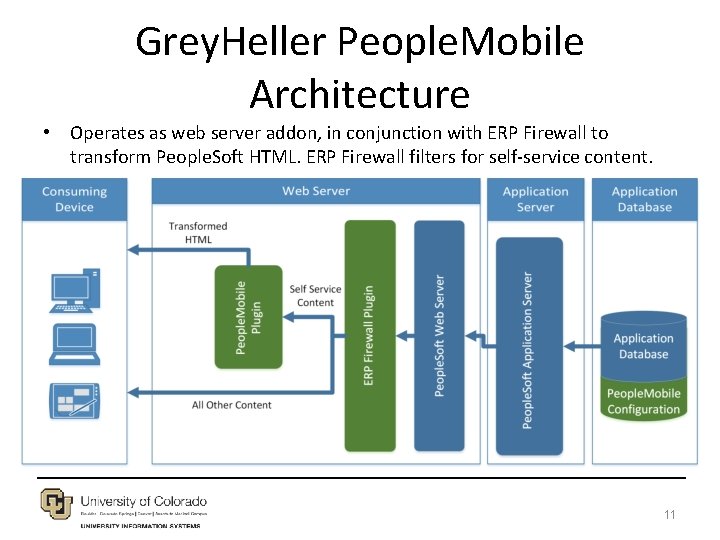
Grey. Heller People. Mobile Architecture • Operates as web server addon, in conjunction with ERP Firewall to transform People. Soft HTML. ERP Firewall filters for self-service content. 11
Grey. Heller Peoplemobile at CU • Project process – Identified self service use cases in four groups: • • Group 1: Core functionality and Student Records enrollment Group 2: Other Student Records functions Group 3: Bio/Demo information Group 4: Financial Aid and Student Financials – Installed People. Mobile in Campus Solutions – Grey. Heller staff implemented transformations for use case groups 1, 2 and 3 – CU Development staff implemented transformations for use case group 4 12
Grey. Heller Peoplemobile at CU • Project process, continued – Grey. Heller’s ERP Firewall product used to enable Peoplemobile in Self-service, not on administrative pages – Technical updates implemented: • People. Soft Message Catalog changes to support new interface • People. Soft Navigation Collections to customize tile navigation • Some People. Soft page and People. Code changes to improve automatic transform (Perkins Loan pages) – Accessibility improvements and technical fixes from the project included in future Grey. Heller People. Mobile builds 13
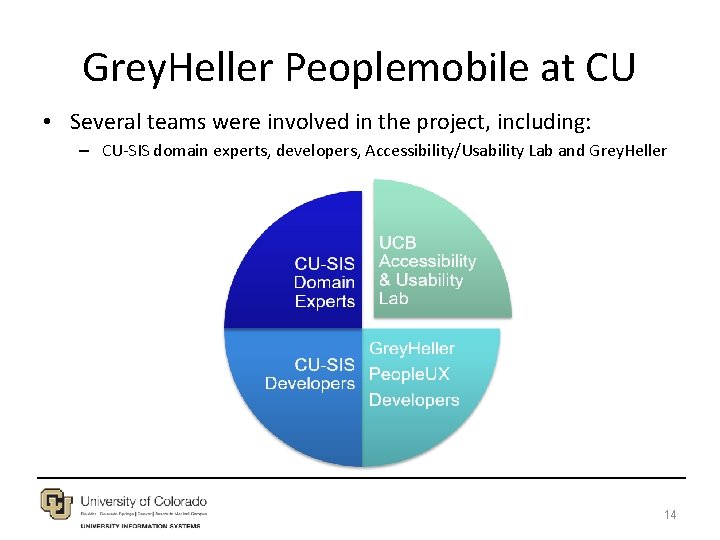
Grey. Heller Peoplemobile at CU • Several teams were involved in the project, including: – CU-SIS domain experts, developers, Accessibility/Usability Lab and Grey. Heller 14
Grey. Heller Peoplemobile at CU • Functional testing – CU-SIS Domain Experts within UIS and at CU campuses provided in-depth testing • Development support – Grey. Heller implemented People. Mobile and primary use cases – CU-SIS Developers provided unit testing, related development support and additional use case development • Level of Effort varied based on use case: – Grey. Heller use cases deployed quickly, less CU work – The CU-SIS supported use cases took longer than anticipated 15
Grey. Heller Peoplemobile at CU • Accessibility testing – Grey. Heller provided browser tool accessibility tests using: Chrome Add-On Axe, Chrome Add-On Audit, Fire. Fox Add. On AInspector – CU Boulder Accessibility and Usability Lab provided detailed testing of all use cases for usability in actual system use. Tools used in AUL testing: • Windows 10 with Windows Magnifier (200%) / Microsoft Edge • Windows 10 with NVDA / Mozilla Firefox • Windows 10 with JAWS 18 / Mozilla Firefox 16
Grey. Heller Peoplemobile at CU • Accessibility testing: – Partnered with UCB Accessibility and Usability Lab (AUL) for independent evaluation – Discovered new issues and added fixes to People. Mobile – Increased expertise screen readers and accessibility tools • Access to screen readers like JAWS and NVDA helps when developing accessibility solutions 17
Summary of accessibility testing process for the project ACCESSIBILITY TESTING 18
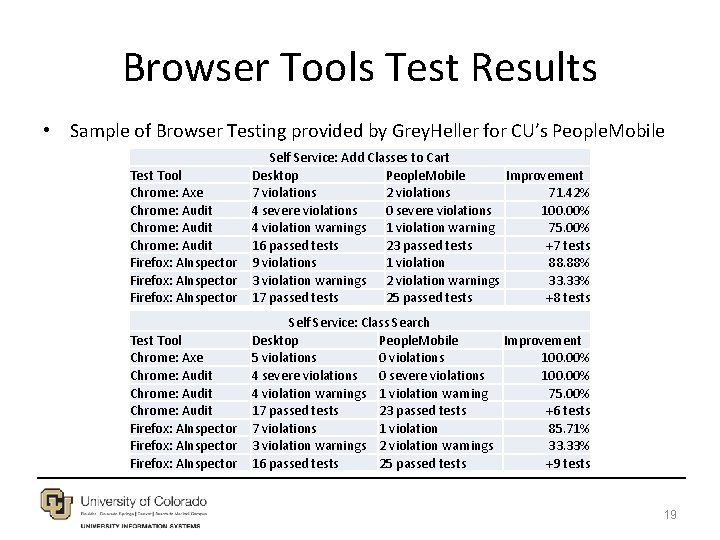
Browser Tools Test Results • Sample of Browser Testing provided by Grey. Heller for CU’s People. Mobile Test Tool Chrome: Axe Chrome: Audit Firefox: AInspector Self Service: Add Classes to Cart Desktop People. Mobile Improvement 7 violations 2 violations 71. 42% 4 severe violations 0 severe violations 100. 00% 4 violation warnings 1 violation warning 75. 00% 16 passed tests 23 passed tests +7 tests 9 violations 1 violation 88. 88% 3 violation warnings 2 violation warnings 33. 33% 17 passed tests 25 passed tests +8 tests Test Tool Chrome: Axe Chrome: Audit Firefox: AInspector Self Service: Class Search Desktop People. Mobile Improvement 5 violations 0 violations 100. 00% 4 severe violations 0 severe violations 100. 00% 4 violation warnings 1 violation warning 75. 00% 17 passed tests 23 passed tests +6 tests 7 violations 1 violation 85. 71% 3 violation warnings 2 violation warnings 33. 33% 16 passed tests 25 passed tests +9 tests 19
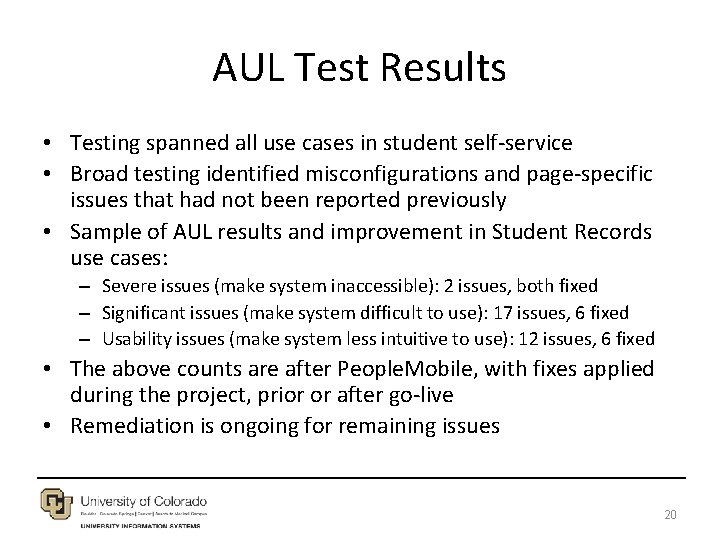
AUL Test Results • Testing spanned all use cases in student self-service • Broad testing identified misconfigurations and page-specific issues that had not been reported previously • Sample of AUL results and improvement in Student Records use cases: – Severe issues (make system inaccessible): 2 issues, both fixed – Significant issues (make system difficult to use): 17 issues, 6 fixed – Usability issues (make system less intuitive to use): 12 issues, 6 fixed • The above counts are after People. Mobile, with fixes applied during the project, prior or after go-live • Remediation is ongoing for remaining issues 20
AUL Test Results • Severe issues: – Collapsible/expandable sections: Lack of heading text, lack of current status: Expanded or collapsed – Date Picker: Original format as javascript popup, changed to browser native • Other notable issues: – Clickable read on static text throughout application – Heading levels in page header vs page content – Focus management and announcing content changes • Functional issue tracking: – 149 total issues: 135 resolved and 14 outstanding 21
Improvement following AUL testing • Several system wide issues were discovered and improved after AUL test feedback: – Color contrast improvements for gridlines, radio buttons, and other elements – Date Picker control improvements: Using browser controls – Collapsible section improvement – Page alert text reading redundantly in screen reader – Navigation role for the new navigation control – Improvement to Weekly Schedule display – Improvement to on page text, link labels, other items 22
Outstanding Issues from AUL • Remediation for AUL feedback continues, with some outstanding issues such as: – Row headers on tables needed, challenging to add – Understand screen reader announcement of page changes, and deploy improved page announcements – Improve loading or waiting feedback/display – Improve the progress bar to remove apparent links 23
Screenshot samples of People. Mobile transformations EXAMPLES 24
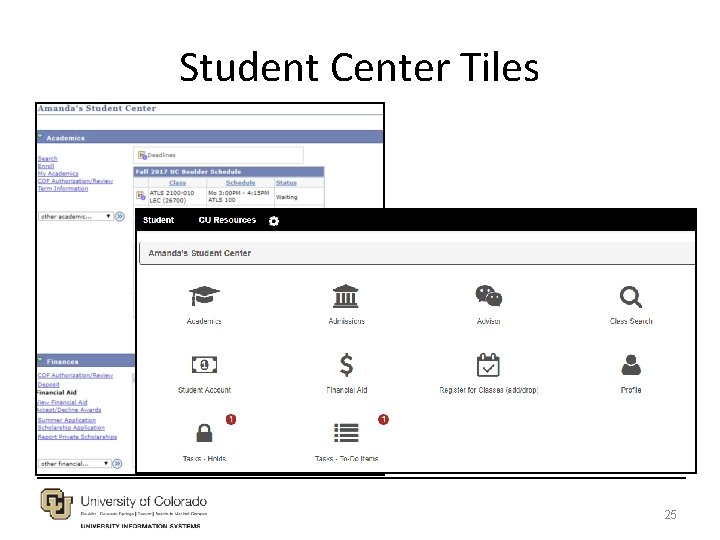
Student Center Tiles 25
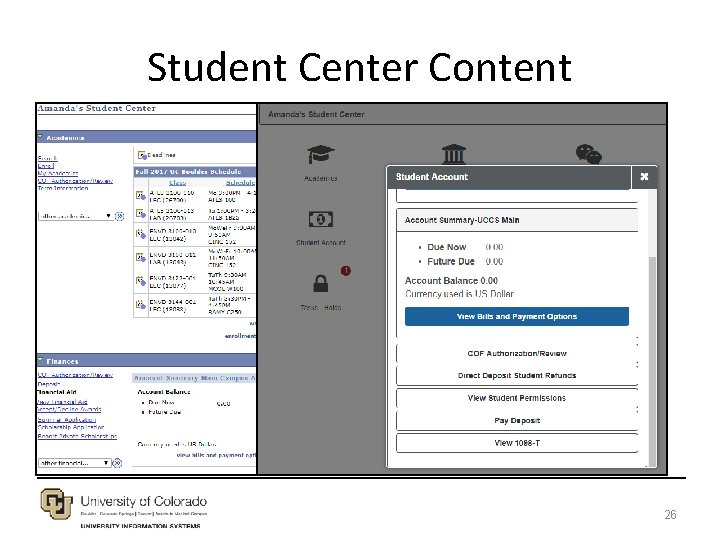
Student Center Content 26
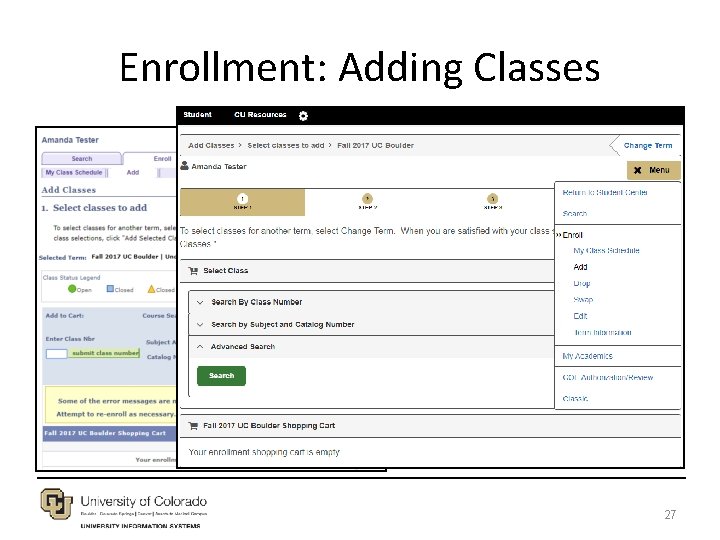
Enrollment: Adding Classes 27
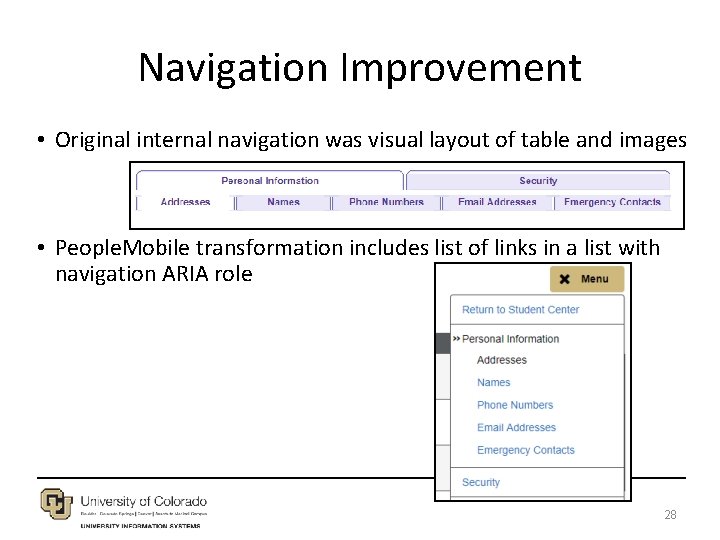
Navigation Improvement • Original internal navigation was visual layout of table and images • People. Mobile transformation includes list of links in a list with navigation ARIA role 28
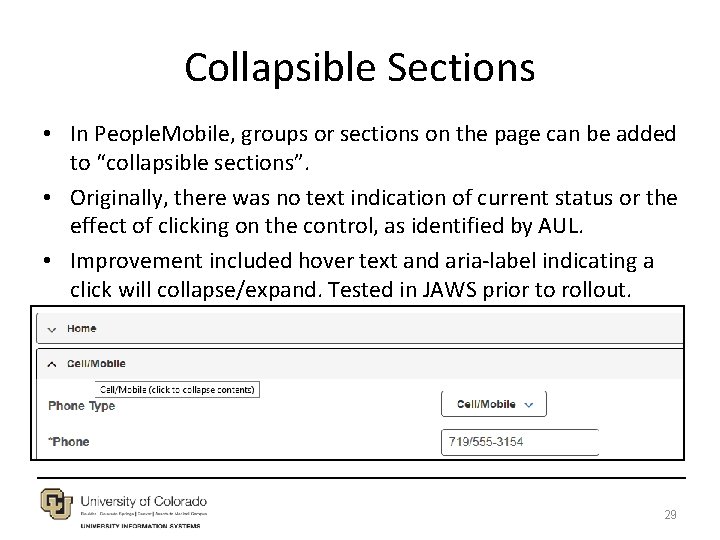
Collapsible Sections • In People. Mobile, groups or sections on the page can be added to “collapsible sections”. • Originally, there was no text indication of current status or the effect of clicking on the control, as identified by AUL. • Improvement included hover text and aria-label indicating a click will collapse/expand. Tested in JAWS prior to rollout. 29
Summary of accessibility testing process for the project CONCLUSION 30
Current Status – Going Forward • Some aspects were challenging such as: – Some issues required complex People. Mobile page configuration logic – Performance is slower due to transformation, work continues to improve performance – Compatibility: encountered issues on certain devices and browsers – Issues working with certain browsers and screen readers, older JAWS versions – j. Query challenge for screen readers: Clickable issue 31
Current Status – Going Forward • Mobile Application: – After People. Mobile project deployment, the interface was included in CU’s Student Mobile Application • Staff Training: – Ongoing training for development staff to understand the transformation process and code • Campus Solutions 9. 2 and Fluid – Currently working on the CS 9. 2 upgrade, and evaluating deployment or transformation of Fluid UI pages. – Consistent look and feel is a benefit of People. Mobile in CS 9. 2 32
Questions? • Contact Information – Brad Baker: brad. baker@cu. edu – Art Figel: art. figel@cu. edu – Jennifer Goncalves: jennifer. goncalves@greyheller. com • Grey. Heller People. Mobile • CU Boulder AUL 33
- Slides: 33