
Implementing AAM with Customer ID sync using Adobe

Implementing AAM with Customer ID sync using Adobe Launch Varun Kalra | Technical Support Consultant © 2018 Adobe Systems Incorporated. All Rights Reserved. Adobe Confidential.

Lab Teaching Assistants § Edward Schuchardt Group Product Manger § Landon Stott Partner Integration Manager § Terry Chen Senior Product Manager § Jantzen Belliston Community Manager © 2018 Adobe Systems Incorporated. All Rights Reserved. Adobe Confidential. 2
Before we start… Username for Mac: L 768 Password: summit 2018 Log in to your demo account at aamlab. marketing. adobe. com Username: L 768+##@adobeeventlab. com (Enterprise ID) Password: Adobe 2018! © 2018 Adobe Systems Incorporated. All Rights Reserved. Adobe Confidential. 3
Access assets and Sample Website… Assets folder on your desktop has File: App. Mss. js Access http: //localhost: 8080 signin. html Sign in username: labuser# (e. g. labuser 1) Password: same as username © 2018 Adobe Systems Incorporated. All Rights Reserved. Adobe Confidential. 4
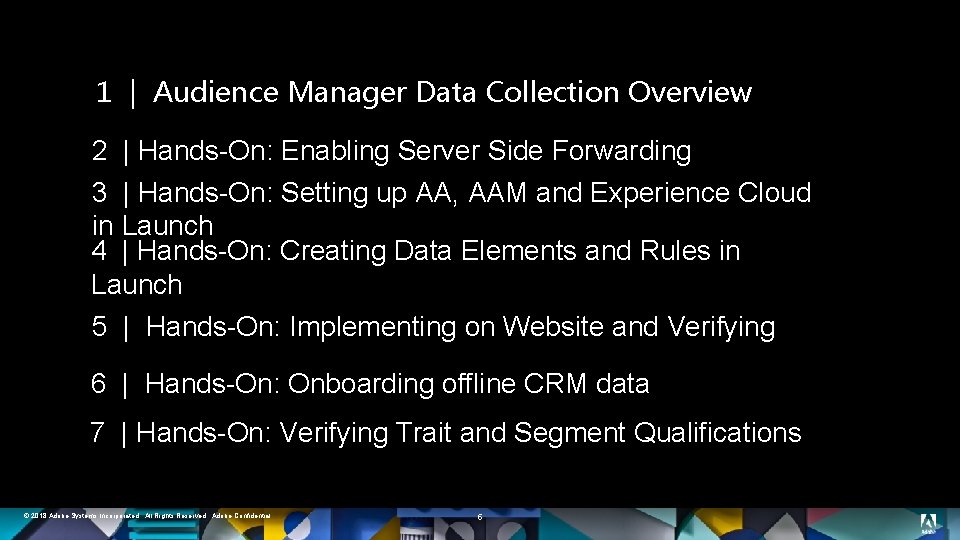
1 | Audience Manager Data Collection Overview 2 | Hands-On: Enabling Server Side Forwarding 3 | Hands-On: Setting up AA, AAM and Experience Cloud in Launch 4 | Hands-On: Creating Data Elements and Rules in Launch 5 | Hands-On: Implementing on Website and Verifying 6 | Hands-On: Onboarding offline CRM data 7 | Hands-On: Verifying Trait and Segment Qualifications © 2018 Adobe Systems Incorporated. All Rights Reserved. Adobe Confidential. 5
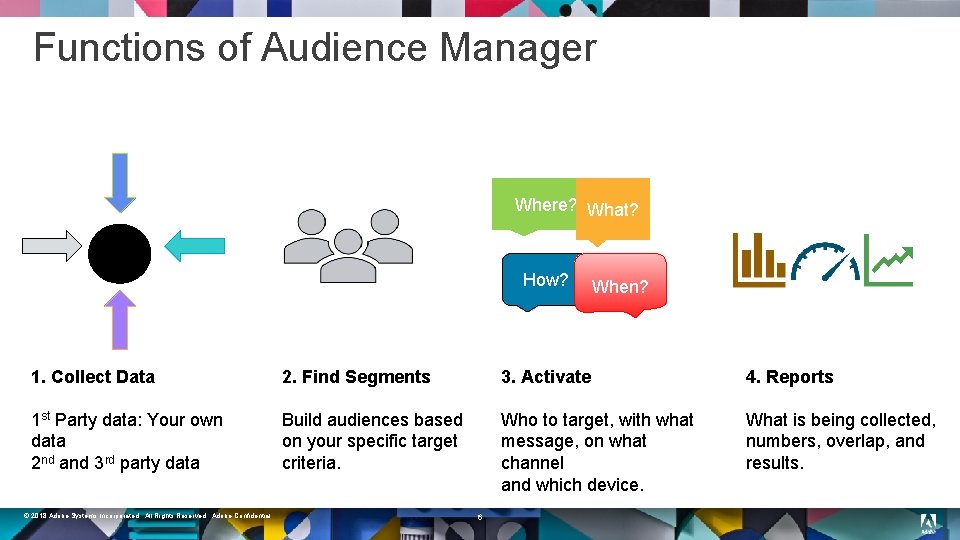
Functions of Audience Manager Where? What? How? When? 1. Collect Data 2. Find Segments 3. Activate 4. Reports 1 st Party data: Your own data 2 nd and 3 rd party data Build audiences based on your specific target criteria. Who to target, with what message, on what channel and which device. What is being collected, numbers, overlap, and results. © 2018 Adobe Systems Incorporated. All Rights Reserved. Adobe Confidential. 6
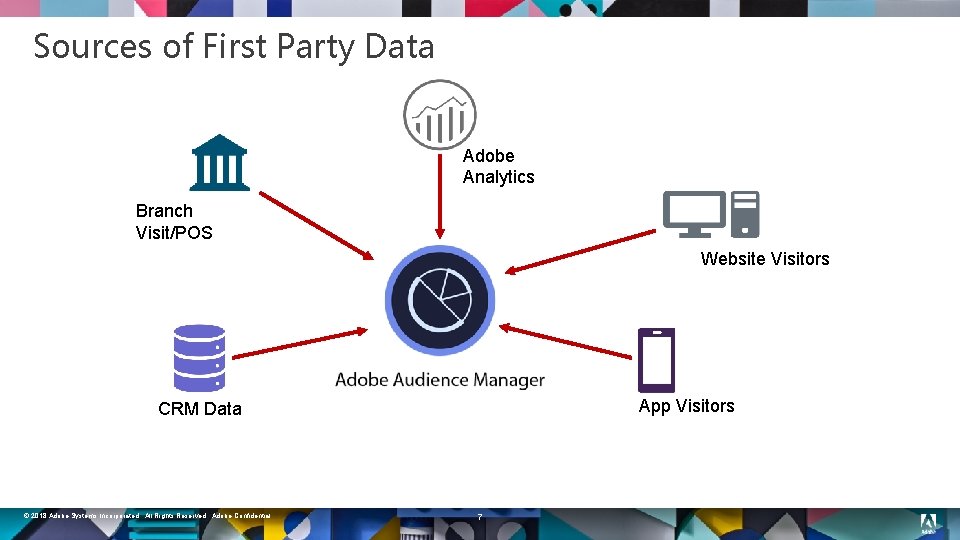
Sources of First Party Data Adobe Analytics Branch Visit/POS Website Visitors App Visitors CRM Data © 2018 Adobe Systems Incorporated. All Rights Reserved. Adobe Confidential. 7
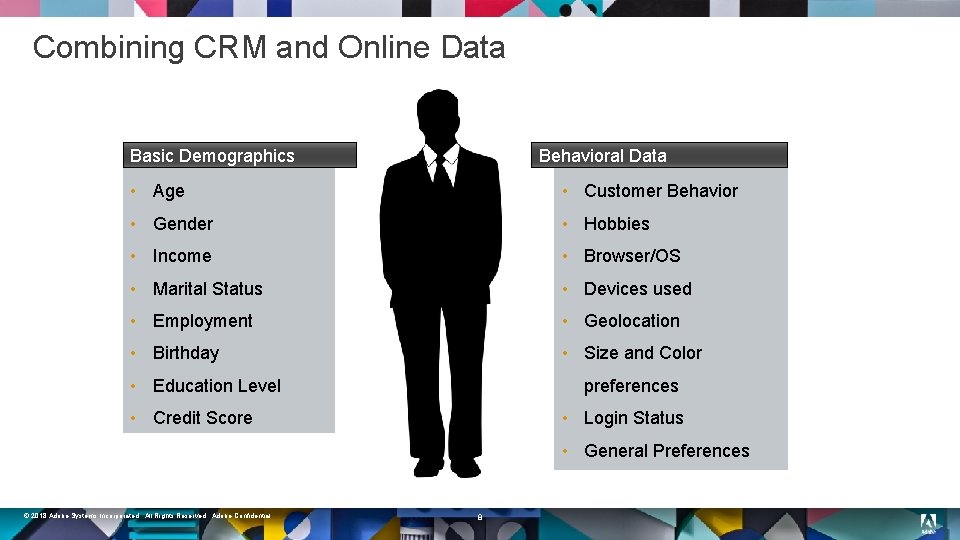
Combining CRM and Online Data Basic Demographics Behavioral Data • Age • Customer Behavior • Gender • Hobbies • Income • Browser/OS • Marital Status • Devices used • Employment • Geolocation • Birthday • Size and Color • Education Level preferences • Login Status • Credit Score • General Preferences © 2018 Adobe Systems Incorporated. All Rights Reserved. Adobe Confidential. 8
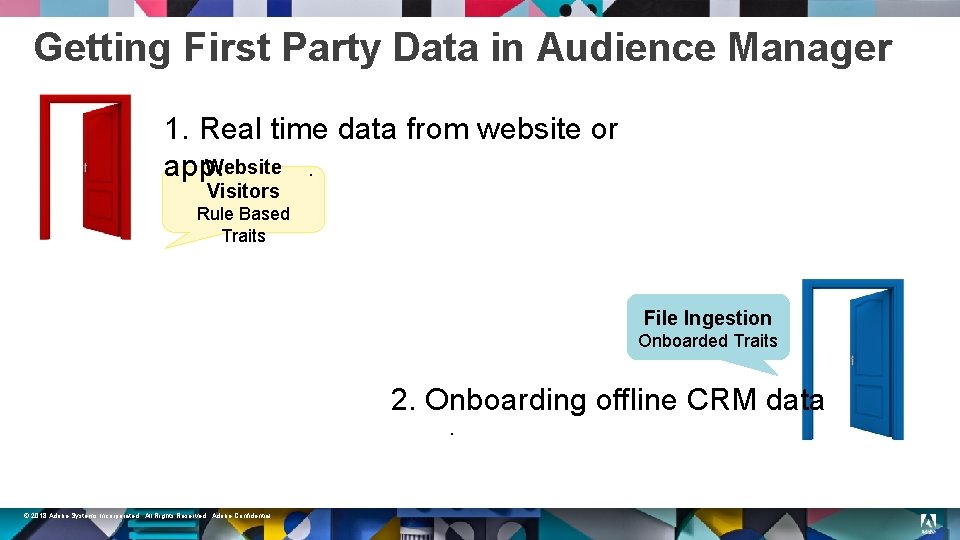
Getting First Party Data in Audience Manager 1. Real time data from website or Website. app. Visitors Rule Based Traits File Ingestion Onboarded Traits 2. Onboarding offline CRM data. © 2018 Adobe Systems Incorporated. All Rights Reserved. Adobe Confidential.
Lab: Use Case § § You are a Marketing Technology Consultant of a Finance Marketplace. The website offers finance products: Credit Cards and Loans. Goal: § § Unify data from different sources to create Visitor Profiles. Create Audience Segments for onsite and offsite personalization. © 2018 Adobe Systems Incorporated. All Rights Reserved. Adobe Confidential. 10
Lab: What we already have? 1. 2. 3. 4. 5. Website with log in functionality. Audience Manager, Adobe Analytics and Launch, by Adobe. Report Suite for Website. (RSID in format : aamlab<seat##>) Data Source in AAM for Customer ID and onboarding data. Data Source Integration Code: crm_id Appmeasurement Library + Audience Management Module in App. Mss. js © 2018 Adobe Systems Incorporated. All Rights Reserved. Adobe Confidential. 11
1 | Audience Manager Data Collection Overview 2 | Hands-On: Enabling Server Side Forwarding 3 | Hands-On: Setting up AA, AAM and Experience Cloud in Launch 4 | Hands-On: Creating Data Elements and Rules in Launch 5 | Hands-On: Implementing on Website and Verifying 6 | Hands-On: Onboarding offline CRM data 7 | Hands-On: Verifying Trait and Segment Qualifications © 2018 Adobe Systems Incorporated. All Rights Reserved. Adobe Confidential. 12
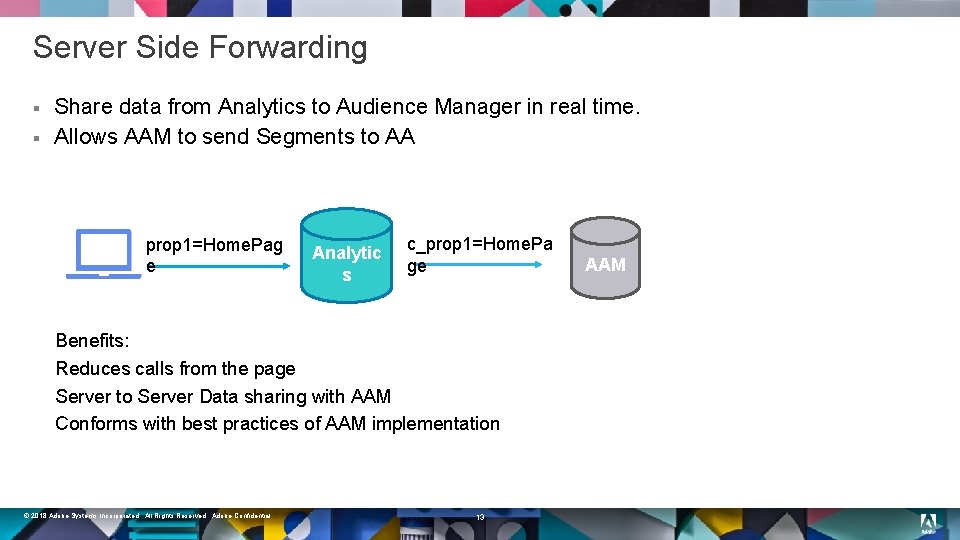
Server Side Forwarding § § Share data from Analytics to Audience Manager in real time. Allows AAM to send Segments to AA prop 1=Home. Pag e Analytic s c_prop 1=Home. Pa ge Benefits: Reduces calls from the page Server to Server Data sharing with AAM Conforms with best practices of AAM implementation © 2018 Adobe Systems Incorporated. All Rights Reserved. Adobe Confidential. 13 AAM
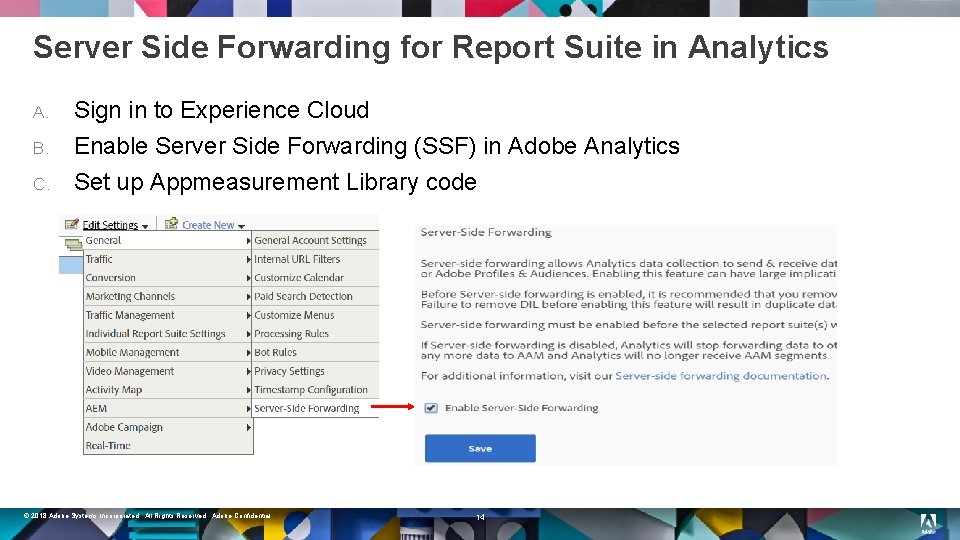
Server Side Forwarding for Report Suite in Analytics A. B. C. Sign in to Experience Cloud Enable Server Side Forwarding (SSF) in Adobe Analytics Set up Appmeasurement Library code © 2018 Adobe Systems Incorporated. All Rights Reserved. Adobe Confidential. 14
End Result § § Server Side Forwarding enabled for Report Suite. Code is ready to be deployed. © 2018 Adobe Systems Incorporated. All Rights Reserved. Adobe Confidential. 15
1 | Audience Manager Data Collection Overview 2 | Hands-On: Enabling Server Side Forwarding 3 | Hands-On: Setting up AA, AAM and Experience Cloud in Launch 4 | Hands-On: Creating Data Elements and Rules in Launch 5 | Hands-On: Implementing on Website and Verifying 6 | Hands-On: Onboarding offline CRM data 7 | Hands-On: Verifying Trait and Segment Qualifications 16 © 2018 Adobe Systems Incorporated. All Rights Reserved. Adobe Confidential.
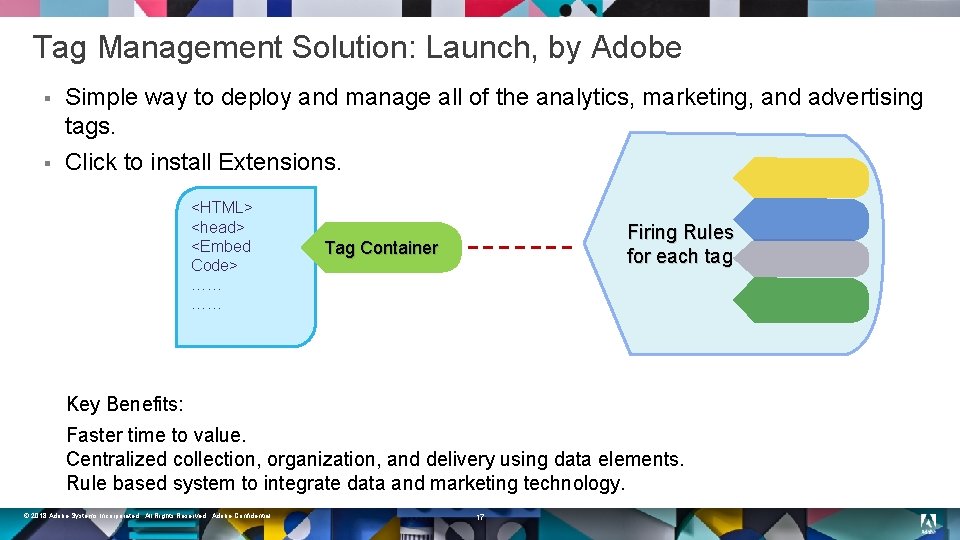
Tag Management Solution: Launch, by Adobe § § Simple way to deploy and manage all of the analytics, marketing, and advertising tags. Click to install Extensions. <HTML> <head> <Embed Code> …… …… Firing Rules for each tag Tag Container Key Benefits: Faster time to value. Centralized collection, organization, and delivery using data elements. Rule based system to integrate data and marketing technology. © 2018 Adobe Systems Incorporated. All Rights Reserved. Adobe Confidential. 17
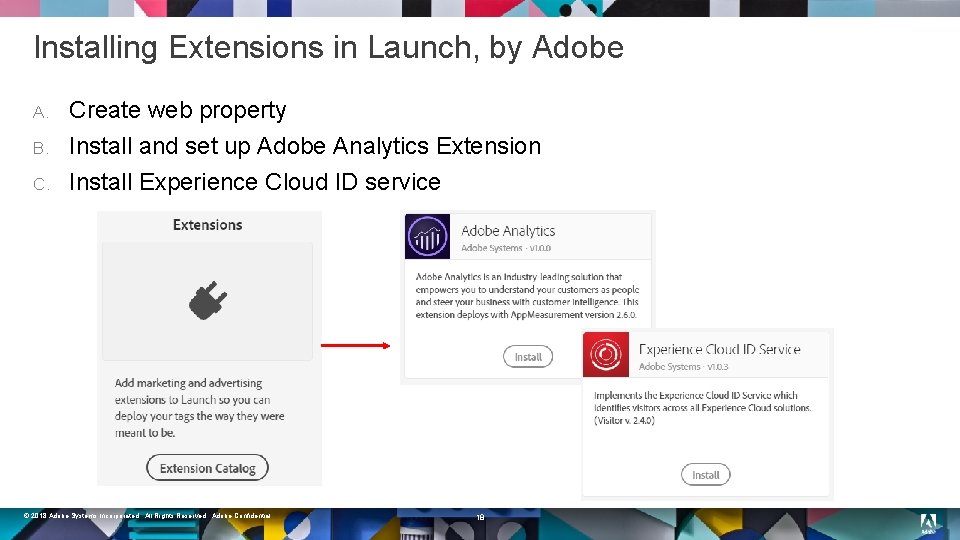
Installing Extensions in Launch, by Adobe A. B. C. Create web property Install and set up Adobe Analytics Extension Install Experience Cloud ID service © 2018 Adobe Systems Incorporated. All Rights Reserved. Adobe Confidential. 18
End Result § § § Web Property created. Adobe Analytics extension installed with AAM code. Experience Cloud ID service installed. © 2018 Adobe Systems Incorporated. All Rights Reserved. Adobe Confidential. 19
1 | Audience Manager Data Collection Overview 2 | Hands-On: Enabling Server Side Forwarding 3 | Hands-On: Setting up AA, AAM and Experience Cloud in Launch 4 | Hands-On: Creating Data Elements and Rules in Launch 5 | Hands-On: Implementing on Website and Verifying 6 | Hands-On: Onboarding offline CRM data 7 | Hands-On: Verifying Trait and Segment Qualifications 20 © 2018 Adobe Systems Incorporated. All Rights Reserved. Adobe Confidential.
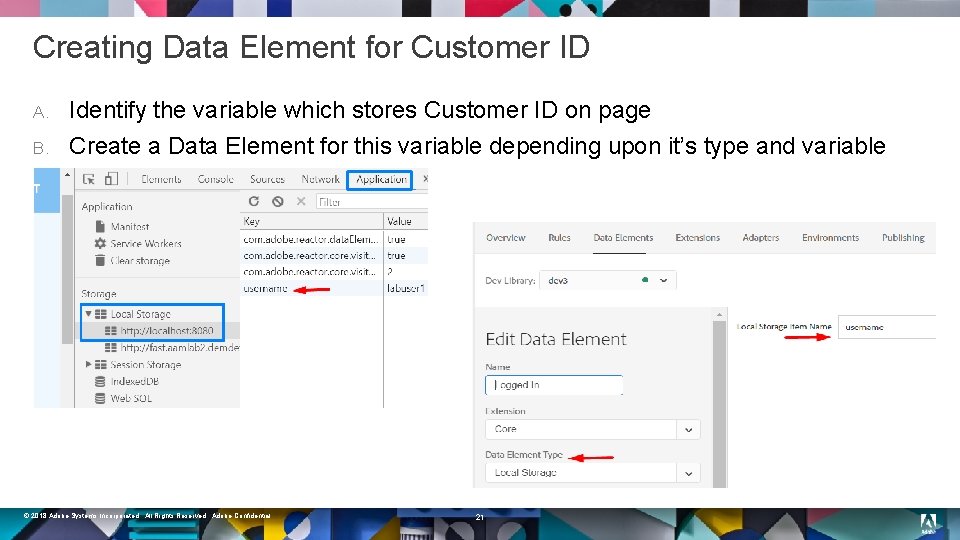
Creating Data Element for Customer ID A. B. Identify the variable which stores Customer ID on page Create a Data Element for this variable depending upon it’s type and variable name © 2018 Adobe Systems Incorporated. All Rights Reserved. Adobe Confidential. 21
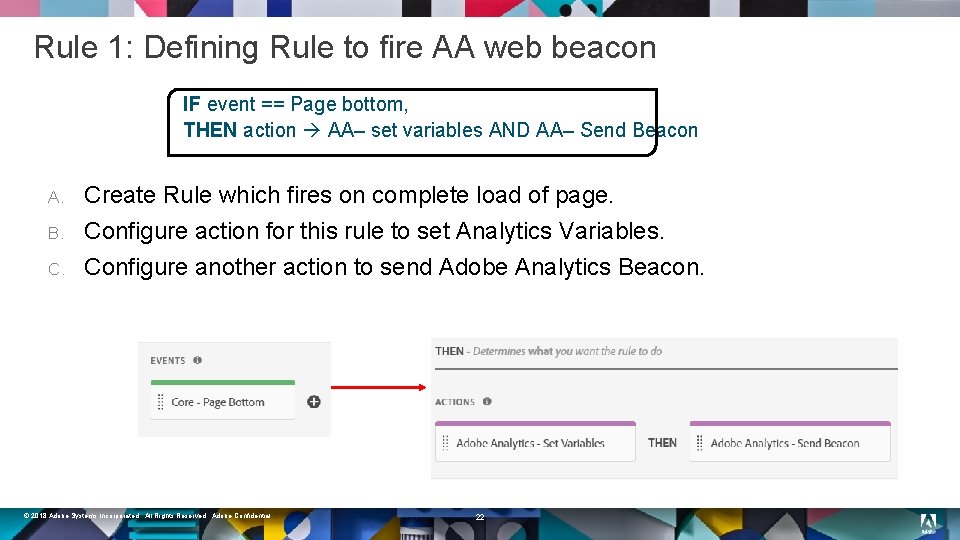
Rule 1: Defining Rule to fire AA web beacon IF event == Page bottom, THEN action AA– set variables AND AA– Send Beacon A. B. C. Create Rule which fires on complete load of page. Configure action for this rule to set Analytics Variables. Configure another action to send Adobe Analytics Beacon. © 2018 Adobe Systems Incorporated. All Rights Reserved. Adobe Confidential. 22
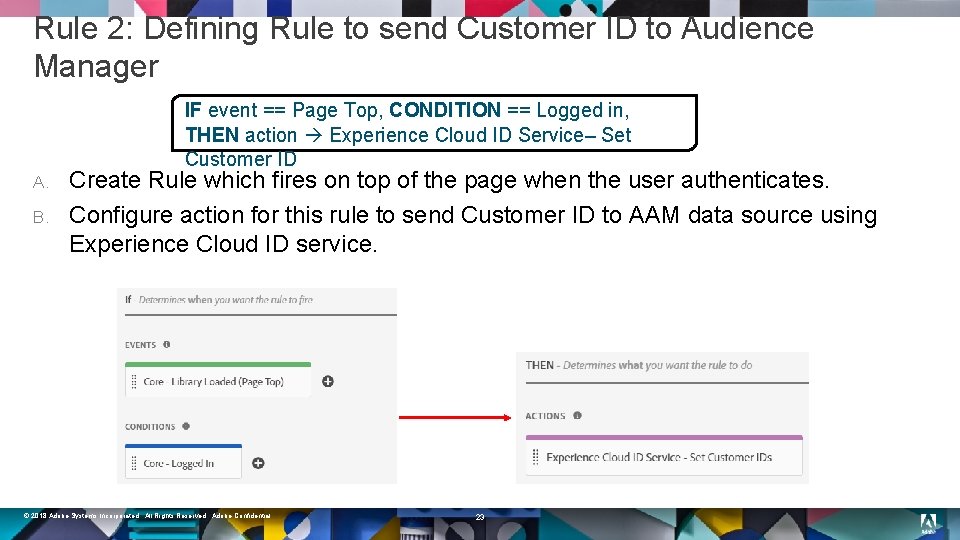
Rule 2: Defining Rule to send Customer ID to Audience Manager IF event == Page Top, CONDITION == Logged in, THEN action Experience Cloud ID Service– Set Customer ID A. B. Create Rule which fires on top of the page when the user authenticates. Configure action for this rule to send Customer ID to AAM data source using Experience Cloud ID service. © 2018 Adobe Systems Incorporated. All Rights Reserved. Adobe Confidential. 23
End Result § § § Data Element Created. Rule to fire Adobe Analytics web beacon created. Rule to send Customer ID to Audience Manager created. © 2018 Adobe Systems Incorporated. All Rights Reserved. Adobe Confidential. 24
1 | Audience Manager Data Collection Overview 2 | Hands-On: Enabling Server Side Forwarding 3 | Hands-On: Setting up AA, AAM and Experience Cloud in Launch 4 | Hands-On: Creating Data Elements and Rules in Launch 5 | Hands-On: Implementing on Website and Verifying 6 | Hands-On: Onboarding offline CRM data 7 | Hands-On: Verifying Trait and Segment Qualifications 25 © 2018 Adobe Systems Incorporated. All Rights Reserved. Adobe Confidential.
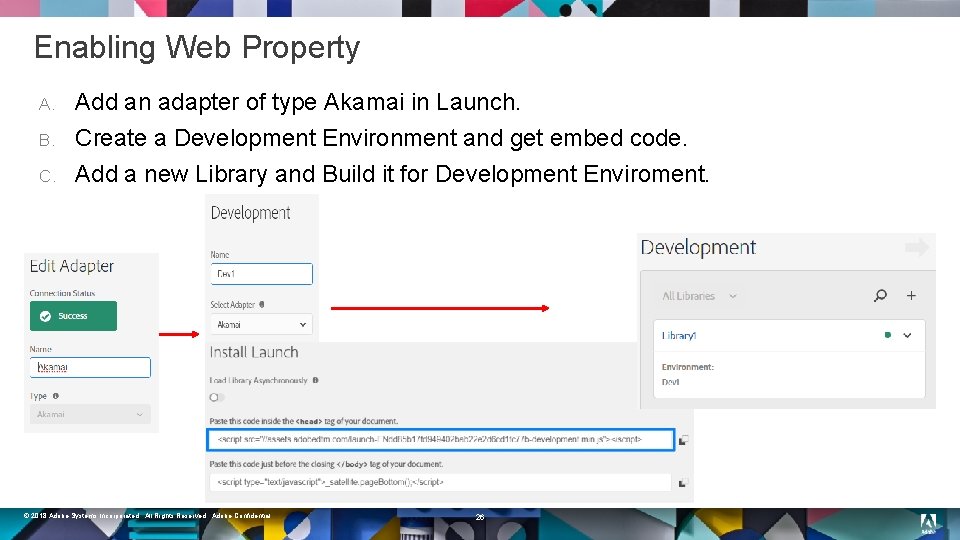
Enabling Web Property A. B. C. Add an adapter of type Akamai in Launch. Create a Development Environment and get embed code. Add a new Library and Build it for Development Enviroment. © 2018 Adobe Systems Incorporated. All Rights Reserved. Adobe Confidential. 26
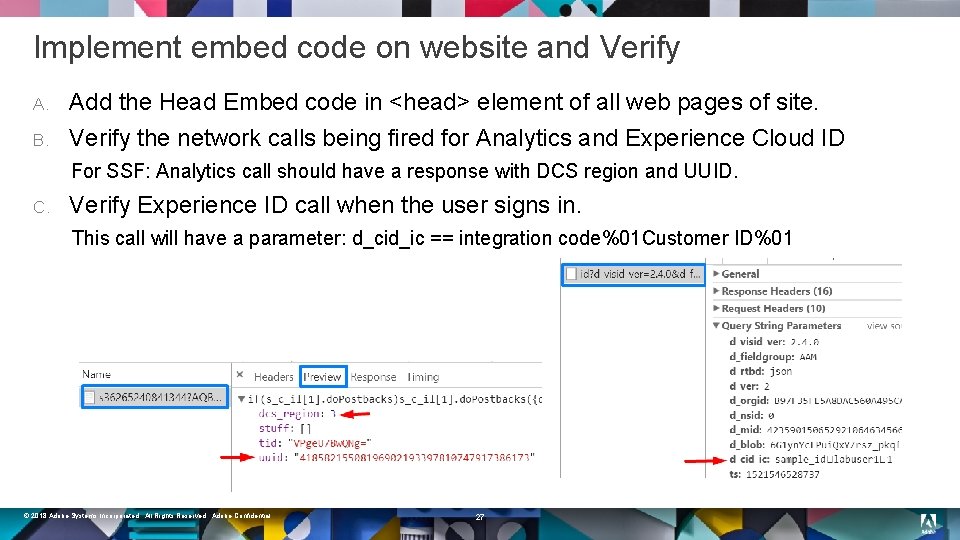
Implement embed code on website and Verify A. B. Add the Head Embed code in <head> element of all web pages of site. Verify the network calls being fired for Analytics and Experience Cloud ID For SSF: Analytics call should have a response with DCS region and UUID. C. Verify Experience ID call when the user signs in. This call will have a parameter: d_cid_ic == integration code%01 Customer ID%01 © 2018 Adobe Systems Incorporated. All Rights Reserved. Adobe Confidential. 27
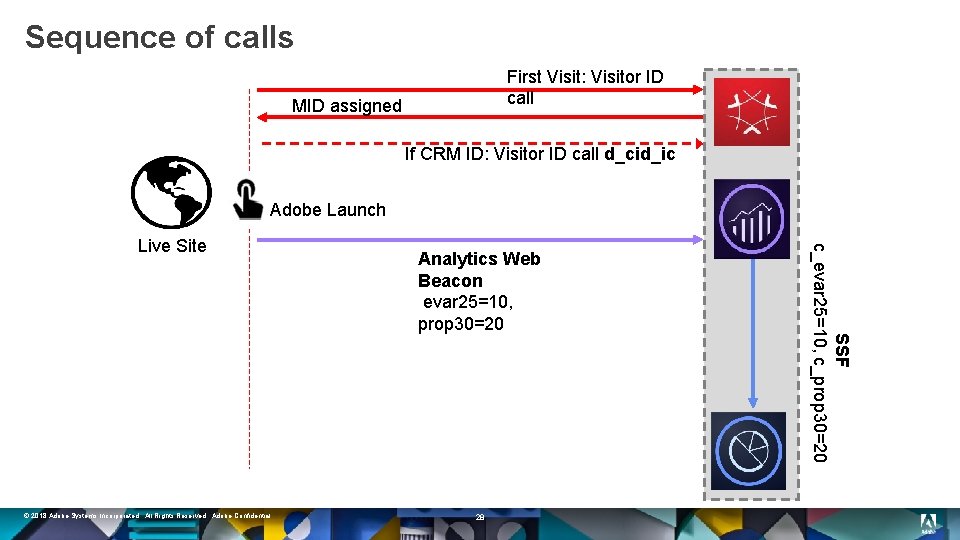
Sequence of calls First Visit: Visitor ID call MID assigned If CRM ID: Visitor ID call d_cid_ic Adobe Launch © 2018 Adobe Systems Incorporated. All Rights Reserved. Adobe Confidential. Analytics Web Beacon evar 25=10, prop 30=20 28 SSF c_evar 25=10, c_prop 30=20 Live Site
End Result § § § . Adapter, Environment and Library created in Launch. Embed code implemented on Web Pages. Verified Analytics call, AAM Server Side Forwarding, and Customer ID Sync. © 2018 Adobe Systems Incorporated. All Rights Reserved. Adobe Confidential. 29
1 | Audience Manager Data Collection Overview 2 | Hands-On: Enabling Server Side Forwarding 3 | Hands-On: Setting up AA, AAM and Experience Cloud in Launch 4 | Hands-On: Creating Data Elements and Rules in Launch 5 | Hands-On: Implementing on Website and Verifying 6 | Hands-On: Onboarding offline CRM data 7 | Hands-On: Verifying Trait and Segment Qualifications 30 © 2018 Adobe Systems Incorporated. All Rights Reserved. Adobe Confidential.
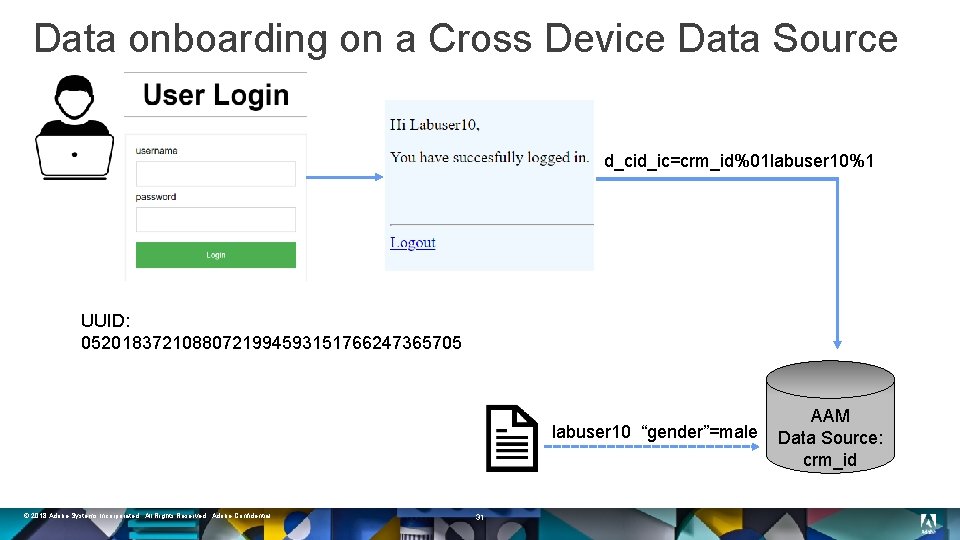
Data onboarding on a Cross Device Data Source d_cid_ic=crm_id%01 labuser 10%1 UUID: 05201837210880721994593151766247365705 labuser 10 “gender”=male © 2018 Adobe Systems Incorporated. All Rights Reserved. Adobe Confidential. 31 AAM Data Source: crm_id
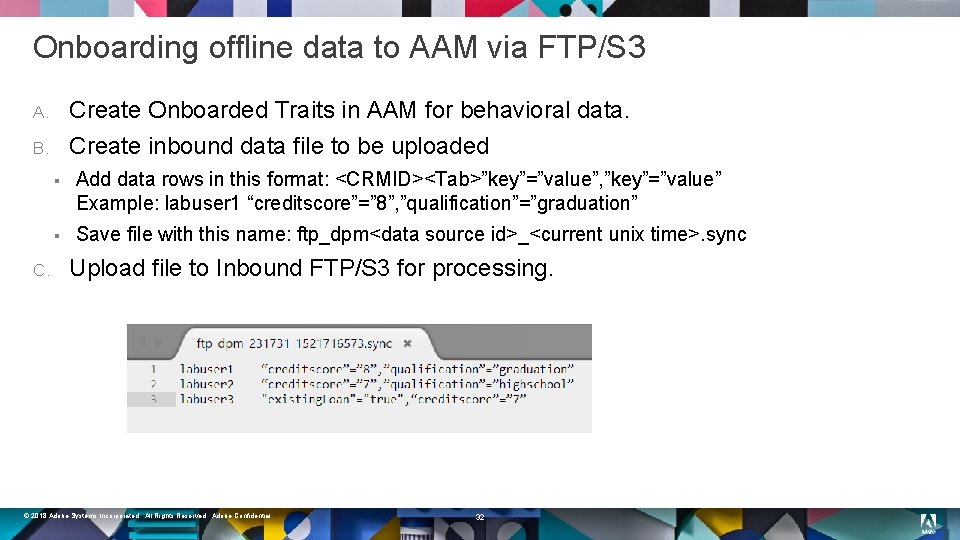
Onboarding offline data to AAM via FTP/S 3 Create Onboarded Traits in AAM for behavioral data. Create inbound data file to be uploaded A. B. C. § Add data rows in this format: <CRMID><Tab>”key”=”value”, ”key”=”value” Example: labuser 1 “creditscore”=” 8”, ”qualification”=”graduation” § Save file with this name: ftp_dpm<data source id>_<current unix time>. sync Upload file to Inbound FTP/S 3 for processing. © 2018 Adobe Systems Incorporated. All Rights Reserved. Adobe Confidential. 32
End Result § § § Onboarded Traits created. . Inbound Data file created with offline CRM data. File uploaded to FTP/S 3 for onboarded traits to get populated. © 2018 Adobe Systems Incorporated. All Rights Reserved. Adobe Confidential. 33
1 | Audience Manager Data Collection Overview 2 | Hands-On: Enabling Server Side Forwarding 3 | Hands-On: Setting up AA, AAM and Experience Cloud in Launch 4 | Hands-On: Creating Data Elements and Rules in Launch 5 | Hands-On: Implementing on Website and Verifying 6 | Hands-On: Onboarding offline CRM data 7 | Hands-On: Verifying Trait and Segment Qualifications 34 © 2018 Adobe Systems Incorporated. All Rights Reserved. Adobe Confidential.
DCS API with d_cts flag § § DCS APIs provide methods that let you send and receive user data and work with this information. d_cts flag indicates that traits and segments should be returned inside the JSON response. Use Cases: § Debugging: Test to see whether Visitor is qualified for intended traits/segments. § On-site personalization: Tailor a visitor’s experience on your site by dynamically adding relevant content and calls to action based on the segments they belong to. © 2018 Adobe Systems Incorporated. All Rights Reserved. Adobe Confidential. 35
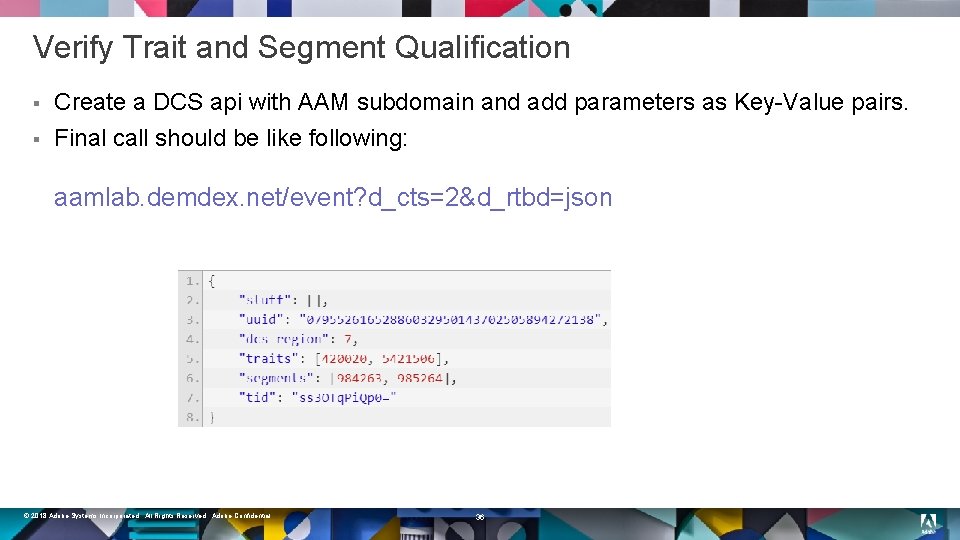
Verify Trait and Segment Qualification § § Create a DCS api with AAM subdomain and add parameters as Key-Value pairs. Final call should be like following: aamlab. demdex. net/event? d_cts=2&d_rtbd=json © 2018 Adobe Systems Incorporated. All Rights Reserved. Adobe Confidential. 36
End Result § § Created DCS api call with d_cts flag. . Verified trait and segment qualification for current visitor. © 2018 Adobe Systems Incorporated. All Rights Reserved. Adobe Confidential. 37
Conclusion § § Discuss and deploy server-side AAM implementation. Synchronize Customer ID and AAM Device ID when user signs in. Data collection from Web Property as well as offline CRM for onboarded traits. Verify Segment and Trait qualification. © 2018 Adobe Systems Incorporated. All Rights Reserved. Adobe Confidential. 38

Adobe Audience Manager Community Sign-in Today: https: //adobe. com/go/aamcommunity Share your learnings & Get Rewarded! Participate in the AAM Summit Contest http: //bit. ly/aamcontest Ask the community Share Interact with Adobe Attend resources product experts virtual meetups © 2018 Adobe Systems Incorporated. All Rights Reserved. Adobe Confidential. 39 Be an AAM ambassador Get recognized Share feedback

Varun Kalra varun. kalra@adobe. com Twitter: @varunkalra 30 Linked. In: Speaker Xavier © 2018 Adobe Systems Incorporated. All Rights Reserved. Adobe Confidential. 40
Take the Survey to win! (Survey section of the mobile app) SESSION PRIZE $10 Starbucks Card one per session DAY 1 DAY 2 DAY 3 Bash Experience Signed football helmet Amazon Echo Show & Cloud Cam Bundle © 2018 Adobe Systems Incorporated. All Rights Reserved. Adobe Confidential. 41
- Slides: 41