
Implementing a Global FMIS Lessons Learned from the
Implementing a Global FMIS Lessons Learned from the Department of State June 28, 2012
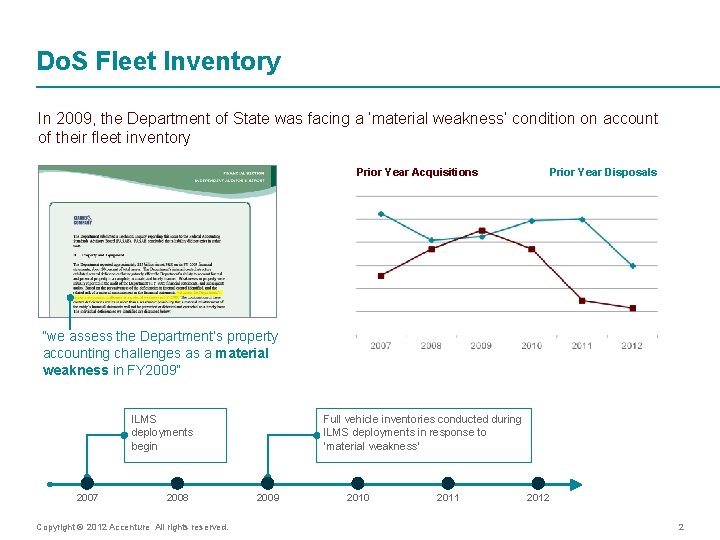
Do. S Fleet Inventory In 2009, the Department of State was facing a ‘material weakness’ condition on account of their fleet inventory Prior Year Acquisitions Prior Year Disposals “we assess the Department’s property accounting challenges as a material weakness in FY 2009” ILMS deployments begin 2007 2008 Copyright © 2012 Accenture All rights reserved. Full vehicle inventories conducted during ILMS deployments in response to ‘material weakness’ 2009 2010 2011 2012 2
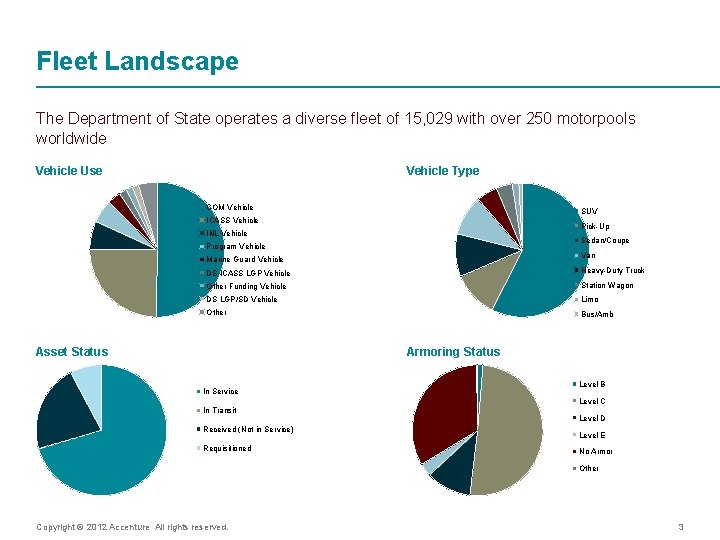
Fleet Landscape The Department of State operates a diverse fleet of 15, 029 with over 250 motorpools worldwide Vehicle Use Vehicle Type COM Vehicle SUV ICASS Vehicle Pick-Up INL Vehicle Sedan/Coupe Program Vehicle Van Marine Guard Vehicle DS ICASS LGP Vehicle Heavy-Duty Truck Other Funding Vehicle Station Wagon DS LGP/SD Vehicle Limo Other Bus/Amb Asset Status Armoring Status In Service Level B Level C In Transit Received (Not in Service) Requisitioned Level D Level E No Armor Other Copyright © 2012 Accenture All rights reserved. 3
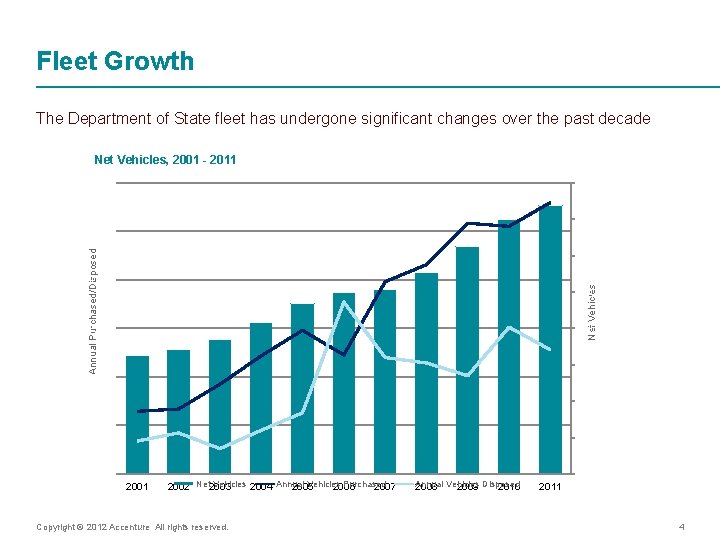
Fleet Growth The Department of State fleet has undergone significant changes over the past decade Net Vehicles, 2001 - 2011 3000 16000 14000 Annual Purchased/Disposed 2500 12000 Net Vehicles 2000 10000 1500 8000 6000 1000 4000 500 2000 0 2001 2002 Net Vehicles 2003 2004 Annual Vehicles Purchased 2005 2006 2007 Copyright © 2012 Accenture All rights reserved. Annual Vehicles Disposed 2008 2009 2010 0 2011 4
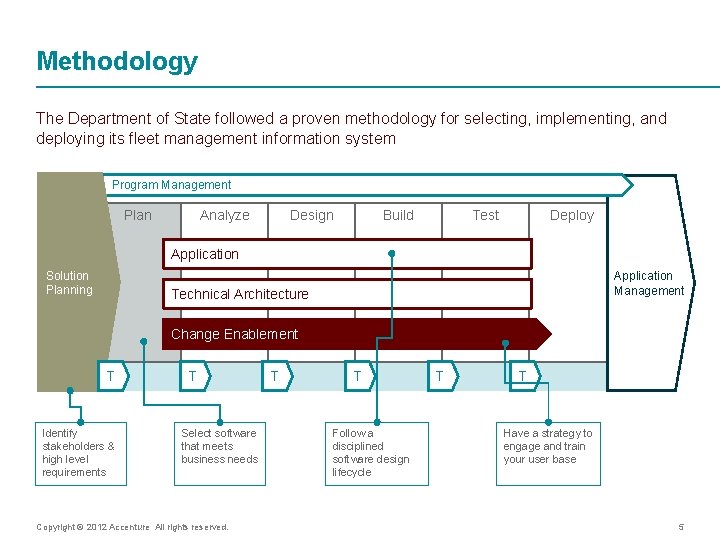
Methodology The Department of State followed a proven methodology for selecting, implementing, and deploying its fleet management information system Program Management Plan Analyze Design Build Test Deploy Application Solution Planning Application Management Technical Architecture Change Enablement T Identify stakeholders & high level requirements T Select software that meets business needs Copyright © 2012 Accenture All rights reserved. T T Follow a disciplined software design lifecycle T T Have a strategy to engage and train your user base 5
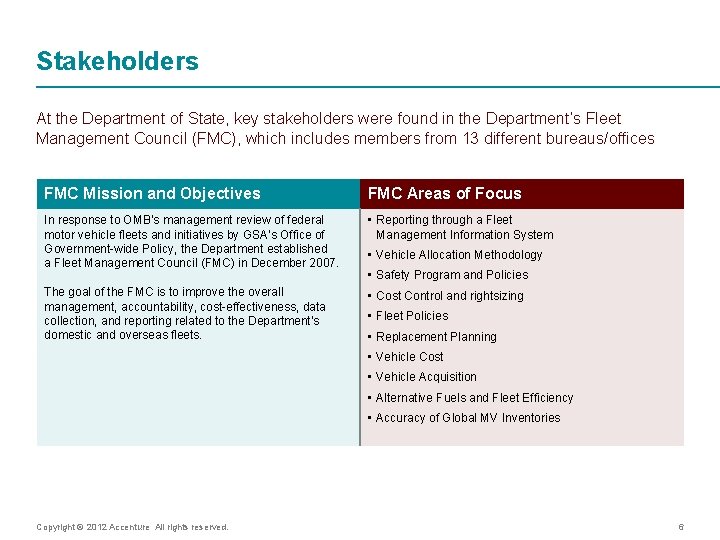
Stakeholders At the Department of State, key stakeholders were found in the Department’s Fleet Management Council (FMC), which includes members from 13 different bureaus/offices FMC Mission and Objectives FMC Areas of Focus In response to OMB’s management review of federal motor vehicle fleets and initiatives by GSA’s Office of Government-wide Policy, the Department established a Fleet Management Council (FMC) in December 2007. • Reporting through a Fleet Management Information System The goal of the FMC is to improve the overall management, accountability, cost-effectiveness, data collection, and reporting related to the Department’s domestic and overseas fleets. • Cost Control and rightsizing • Vehicle Allocation Methodology • Safety Program and Policies • Fleet Policies • Replacement Planning • Vehicle Cost • Vehicle Acquisition • Alternative Fuels and Fleet Efficiency • Accuracy of Global MV Inventories Copyright © 2012 Accenture All rights reserved. 6

Requirements Key Department of State stakeholders helped to derive a high-level requirements framework for FMIS, which became a foundation for the program Fleet Management Information System (FMIS) Dispatch Vehicles Employees Maintenance Reports Receive trip request from e. Services overseas and ILMS domestically Manage fleet records on OFVs, Leased Vehicles, Other Agency Vehicles, and POVs Enter key details on employees, including license information and medical and accident history Create work orders for preventive, inspection, corrective, accident, and recall maintenance Run the DS-1777 and DS-1778, and access the OF-108 Create trip tickets for requests submitted by phone or email Create trip tickets for daily events, shuttles, VIP visits, and other special events Assign drivers and vehicles to trip tickets Enter data on distance driven and actual dates/times at the end of a trip Enter vehicle title, registration, insurance information, and associated expenses Manage registration and insurance renewal requirements Assign Tag #s to vehicles Track vehicle maintenance, expense, assignment, and status history Copyright © 2012 Accenture All rights reserved. Upload information on training and certification activities Manage training, certification, and licensing renewal requirements Create employee schedules Create preventive maintenance schedules and define intervals specific to each vehicle in the fleet Bulk upload fuel tickets from fuel card systems Enter costs associated to maintenance and fuel from in-house and commercial sources Run the FMO Gasoline Report Run the ICASS Motor Pool Services & Maintenance Workload Report, with distance driven & vehicles by Agency Name Capture all data necessary for FAST, with auto-calculations and integration to the MV Survey in ILMS 7
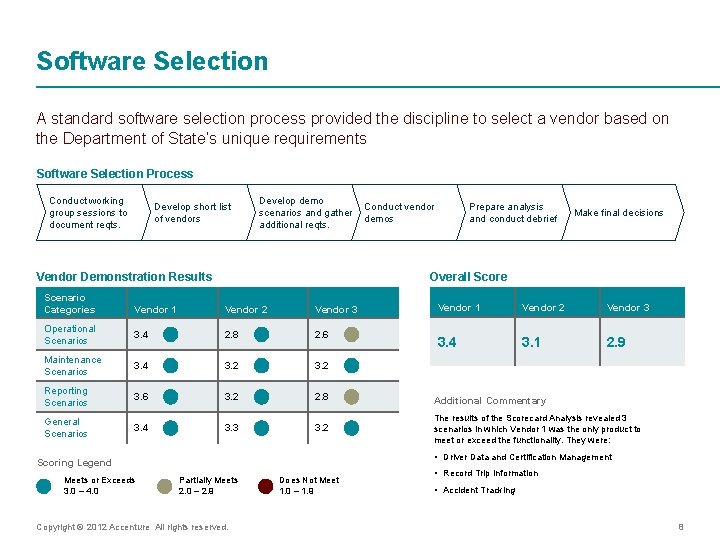
Software Selection A standard software selection process provided the discipline to select a vendor based on the Department of State’s unique requirements Software Selection Process Conduct working group sessions to document reqts. Develop short list of vendors Develop demo Conduct vendor scenarios and gather demos additional reqts. Vendor Demonstration Results Scenario Categories Prepare analysis and conduct debrief Make final decisions Overall Score Vendor 1 Vendor 2 Vendor 3 3. 4 3. 1 2. 9 Vendor 1 Vendor 2 Vendor 3 Operational Scenarios 3. 4 2. 8 2. 6 Maintenance Scenarios 3. 4 3. 2 Reporting Scenarios 3. 6 3. 2 2. 8 Additional Commentary General Scenarios 3. 4 3. 3 3. 2 The results of the Scorecard Analysis revealed 3 scenarios in which Vendor 1 was the only product to meet or exceed the functionality. They were: • Driver Data and Certification Management Scoring Legend Meets or Exceeds 3. 0 – 4. 0 Partially Meets 2. 0 – 2. 9 Copyright © 2012 Accenture All rights reserved. Does Not Meet 1. 0 – 1. 9 • Record Trip Information • Accident Tracking 8
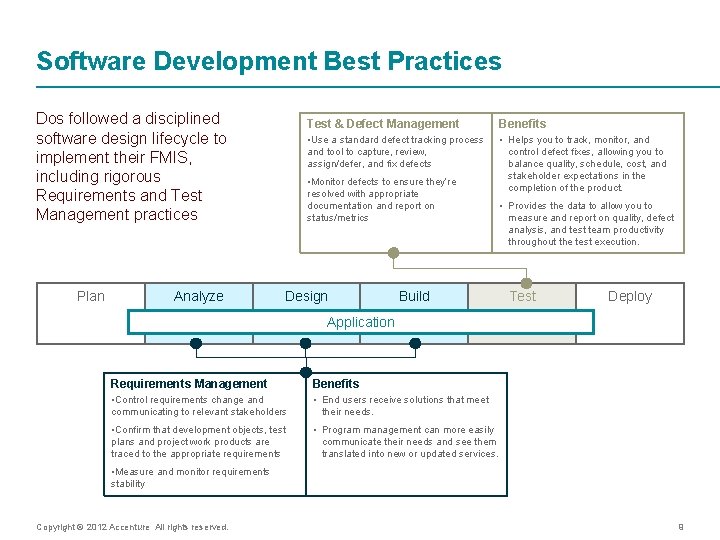
Software Development Best Practices Dos followed a disciplined software design lifecycle to implement their FMIS, including rigorous Requirements and Test Management practices Plan Analyze Test & Defect Management Benefits • Use a standard defect tracking process and tool to capture, review, assign/defer, and fix defects • Helps you to track, monitor, and control defect fixes, allowing you to balance quality, schedule, cost, and stakeholder expectations in the completion of the product. • Monitor defects to ensure they’re resolved with appropriate documentation and report on status/metrics Design • Provides the data to allow you to measure and report on quality, defect analysis, and test team productivity throughout the test execution. Build Test Deploy Application Requirements Management Benefits • Control requirements change and communicating to relevant stakeholders • End users receive solutions that meet their needs. • Confirm that development objects, test plans and project work products are traced to the appropriate requirements • Program management can more easily communicate their needs and see them translated into new or updated services. • Measure and monitor requirements stability Copyright © 2012 Accenture All rights reserved. 9

ILMS and FMIS Integration FMIS helps manage the Department’s fleet through one standardized system. Asset Management Fleet Management Information System • ILMS is the system of record for all Do. S assets, including Motor Vehicles. • FMIS is the system of record for capturing Do. S fleet utilization data. • Reports information to FAST. • Captures fleet utilization data for FAST. • Vehicles entered into ILMS for financial reporting and asset tracking purposes. • Vehicles entered into FMIS for fleet management functions. Do. S Vehicles, Leased Vehicles, & Other Agency Vehicles POVs Vehicle acquisition, modification, and disposal data Fleet Management Information System Asset Management Vehicle Survey Data FAST Reporting Data FAST Templates Copyright © 2012 Accenture All rights reserved. e. Services Trip Requests (Dispatch Module) 10

Functionality FMIS combines a simple interface with useful features, such as automatic conversions and data integration from Asset Management. Easy navigation to all FMIS modules. Starting Odometer prepopulates with the vehicle’s current Odometer Reading. • Odometer Readings are displayed in Miles and Kilometers. • Automatic Starting and Ending Odometer conversions. • Local currency defaulted per module. • Daily currency exchange rate updates. • Automatic currency conversion. Copyright © 2012 Accenture All rights reserved. 11
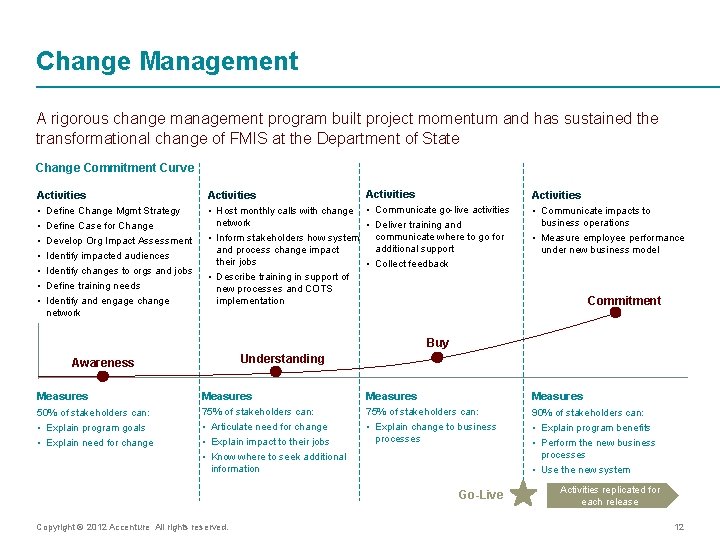
Change Management A rigorous change management program built project momentum and has sustained the transformational change of FMIS at the Department of State Change Commitment Curve Activities • Define Change Mgmt Strategy • Define Case for Change • Develop Org Impact Assessment • Identify impacted audiences • Identify changes to orgs and jobs • Define training needs • Identify and engage change Activities • Host monthly calls with change • Communicate go-live activities network • Deliver training and • Inform stakeholders how system communicate where to go for and process change impact their jobs • Describe training in support of new processes and COTS implementation additional support • Collect feedback Activities • Communicate impacts to business operations • Measure employee performance under new business model Commitment network Buy Understanding Awareness Measures 50% of stakeholders can: • Explain program goals • Explain need for change 75% of stakeholders can: • Articulate need for change • Explain impact to their jobs • Know where to seek additional information 75% of stakeholders can: • Explain change to business processes 90% of stakeholders can: • Explain program benefits • Perform the new business processes • Use the new system Go-Live Copyright © 2012 Accenture All rights reserved. Activities replicated for each release 12
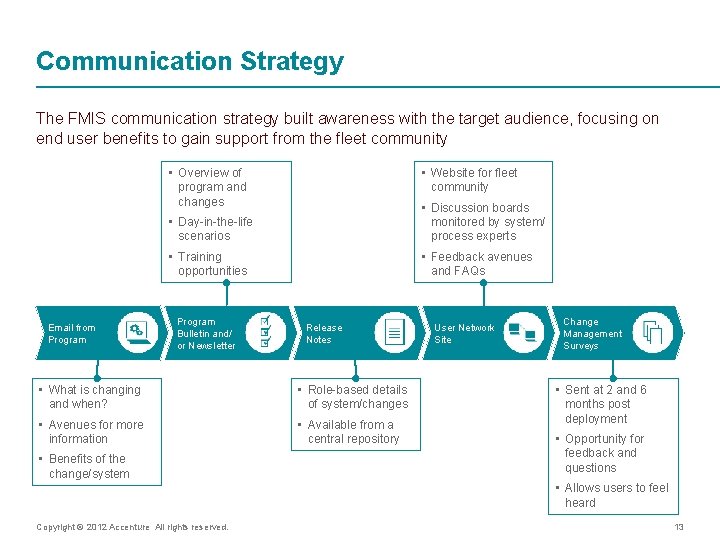
Communication Strategy The FMIS communication strategy built awareness with the target audience, focusing on end user benefits to gain support from the fleet community • Overview of program and changes Email from Program • Website for fleet community • Day-in-the-life scenarios • Discussion boards monitored by system/ process experts • Training opportunities • Feedback avenues and FAQs Program Bulletin and/ or Newsletter Release Notes • What is changing and when? • Role-based details of system/changes • Avenues for more information • Available from a central repository • Benefits of the change/system User Network Site Change Management Surveys • Sent at 2 and 6 months post deployment • Opportunity for feedback and questions • Allows users to feel heard Copyright © 2012 Accenture All rights reserved. 13
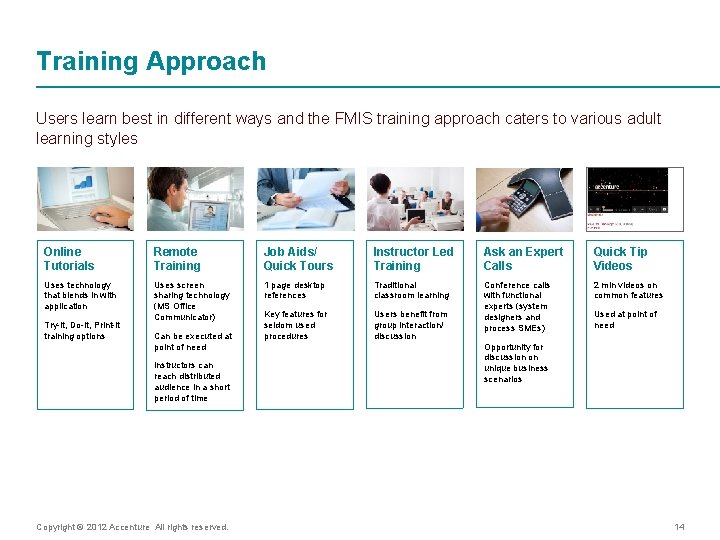
Training Approach Users learn best in different ways and the FMIS training approach caters to various adult learning styles Online Tutorials Remote Training Job Aids/ Quick Tours Instructor Led Training Ask an Expert Calls Quick Tip Videos Uses technology that blends in with application Uses screen sharing technology (MS Office Communicator) 1 page desktop references Traditional classroom learning 2 min videos on common features Key features for seldom used procedures Users benefit from group interaction/ discussion Conference calls with functional experts (system designers and process SMEs) Try-it, Do-it, Print-it training options Can be executed at point of need Instructors can reach distributed audience in a short period of time Copyright © 2012 Accenture All rights reserved. Used at point of need Opportunity for discussion on unique business scenarios 14
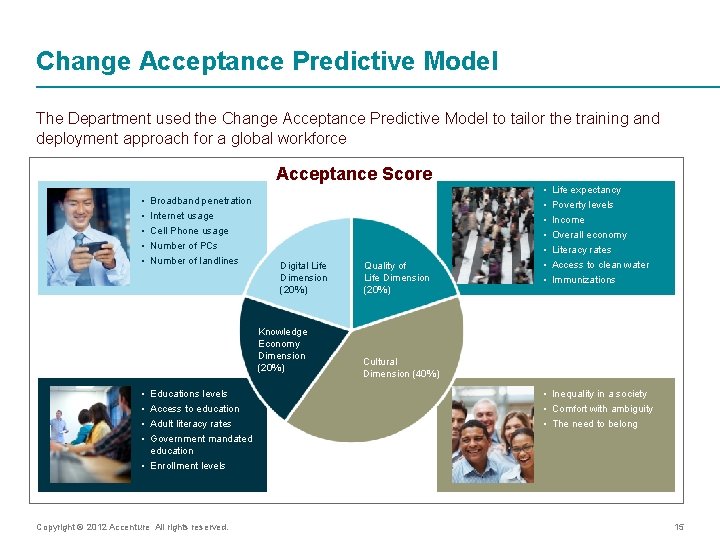
Change Acceptance Predictive Model The Department used the Change Acceptance Predictive Model to tailor the training and deployment approach for a global workforce Acceptance Score • • • Broadband penetration Internet usage Cell Phone usage Number of PCs Number of landlines Digital Life Dimension (20%) Knowledge Economy Dimension (20%) • • Educations levels Access to education Adult literacy rates Government mandated education • Enrollment levels Copyright © 2012 Accenture All rights reserved. Quality of Life Dimension (20%) • • Life expectancy Poverty levels Income Overall economy Literacy rates Access to clean water Immunizations Cultural Dimension (40%) • Inequality in a society • Comfort with ambiguity • The need to belong 15
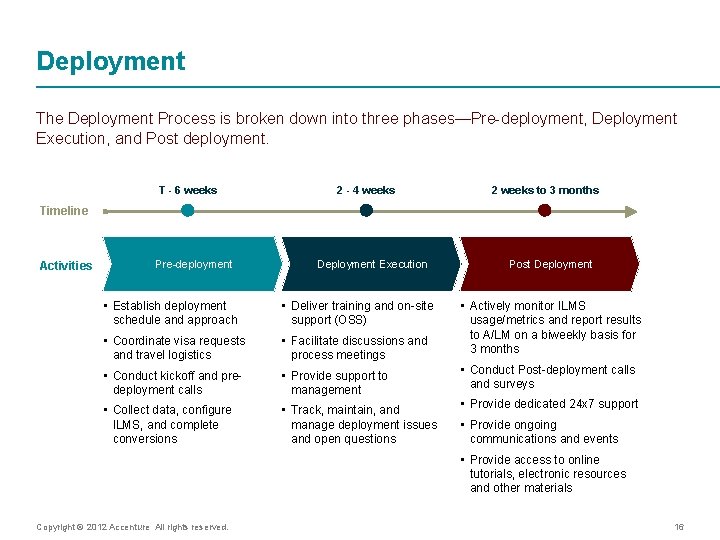
Deployment The Deployment Process is broken down into three phases—Pre-deployment, Deployment Execution, and Post deployment. T - 6 weeks 2 - 4 weeks 2 weeks to 3 months Timeline Activities Pre-deployment Deployment Execution Post Deployment • Establish deployment schedule and approach • Deliver training and on-site support (OSS) • Coordinate visa requests and travel logistics • Facilitate discussions and process meetings • Actively monitor ILMS usage/metrics and report results to A/LM on a biweekly basis for 3 months • Conduct kickoff and predeployment calls • Provide support to management • Conduct Post-deployment calls and surveys • Collect data, configure ILMS, and complete conversions • Track, maintain, and manage deployment issues and open questions • Provide dedicated 24 x 7 support • Provide ongoing communications and events • Provide access to online tutorials, electronic resources and other materials Copyright © 2012 Accenture All rights reserved. 16
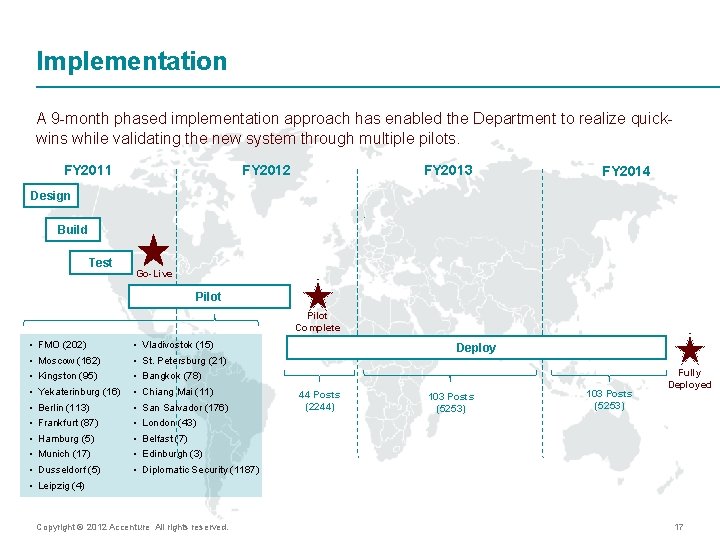
Implementation A 9 -month phased implementation approach has enabled the Department to realize quickwins while validating the new system through multiple pilots. FY 2012 FY 2011 FY 2013 FY 2014 Design Build Test Go-Live Pilot Complete • • • FMO (202) Moscow (162) Kingston (95) Yekaterinburg (16) Berlin (113) Frankfurt (87) Hamburg (5) Munich (17) Dusseldorf (5) • • • Vladivostok (15) Deploy St. Petersburg (21) Bangkok (78) Chiang Mai (11) San Salvador (176) 44 Posts (2244) 103 Posts (5253) Fully Deployed London (43) Belfast (7) Edinburgh (3) Diplomatic Security (1187) Leipzig (4) Copyright © 2012 Accenture All rights reserved. 17
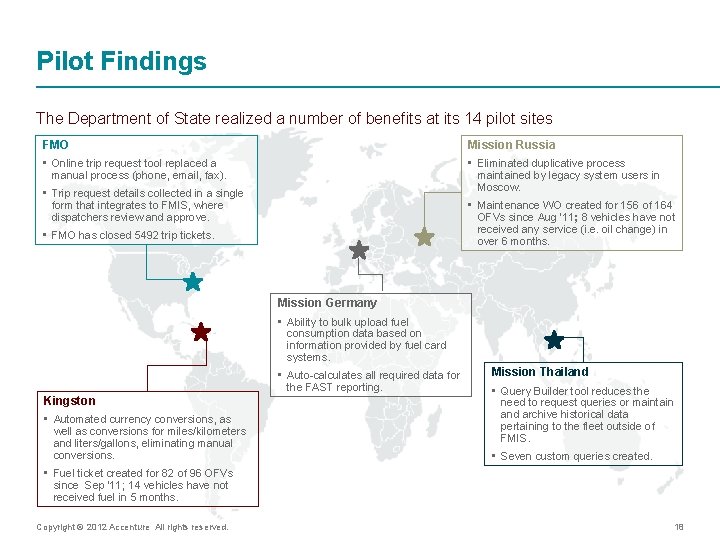
Pilot Findings The Department of State realized a number of benefits at its 14 pilot sites FMO Mission Russia • Online trip request tool replaced a manual process (phone, email, fax). • Eliminated duplicative process maintained by legacy system users in Moscow. • Trip request details collected in a single form that integrates to FMIS, where dispatchers review and approve. • Maintenance WO created for 156 of 164 OFVs since Aug ’ 11; 8 vehicles have not received any service (i. e. oil change) in over 6 months. • FMO has closed 5492 trip tickets. Mission Germany • Ability to bulk upload fuel consumption data based on information provided by fuel card systems. • Auto-calculates all required data for the FAST reporting. Kingston • Automated currency conversions, as well as conversions for miles/kilometers and liters/gallons, eliminating manual conversions. Mission Thailand • Query Builder tool reduces the need to request queries or maintain and archive historical data pertaining to the fleet outside of FMIS. • Seven custom queries created. • Fuel ticket created for 82 of 96 OFVs since Sep ’ 11; 14 vehicles have not received fuel in 5 months. Copyright © 2012 Accenture All rights reserved. 18
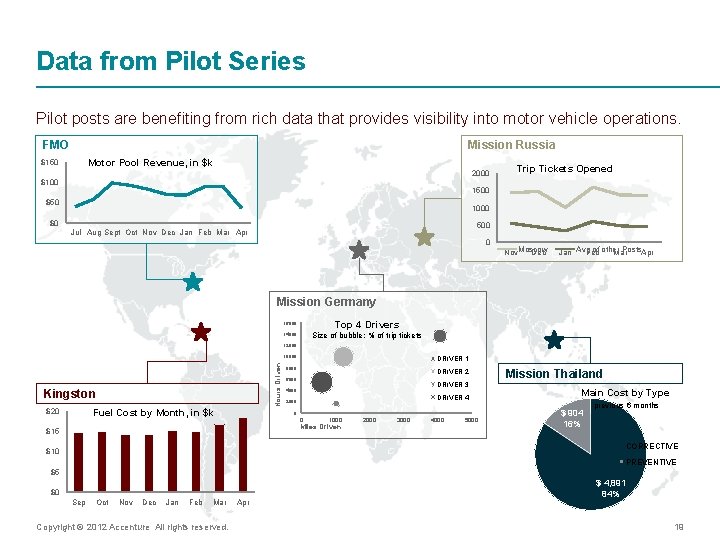
Data from Pilot Series Pilot posts are benefiting from rich data that provides visibility into motor vehicle operations. FMO Mission Russia Motor Pool Revenue, in $k $150 2000 $100 Trip Tickets Opened 1500 $50 1000 $0 500 Jul Aug Sept Oct Nov Dec Jan Feb Mar Apr 0 Nov. Moscow Dec Jan Avg of other Posts Feb Mar Apr Mission Germany 16000 Top 4 Drivers 14000 Size of bubble: % of trip tickets 12000 Hours Driven 10000 Kingston $20 Fuel Cost by Month, in $k DRIVER 1 8000 DRIVER 2 6000 DRIVER 3 4000 DRIVER 4 2000 0 0 1000 Miles Driven $15 2000 3000 4000 5000 Mission Thailand Main Cost by Type previous 6 months $ 904 16% CORRECTIVE $10 PREVENTIVE $5 $0 Sep Oct Nov Dec Jan Feb Mar Copyright © 2012 Accenture All rights reserved. Apr $ 4, 891 84% 19
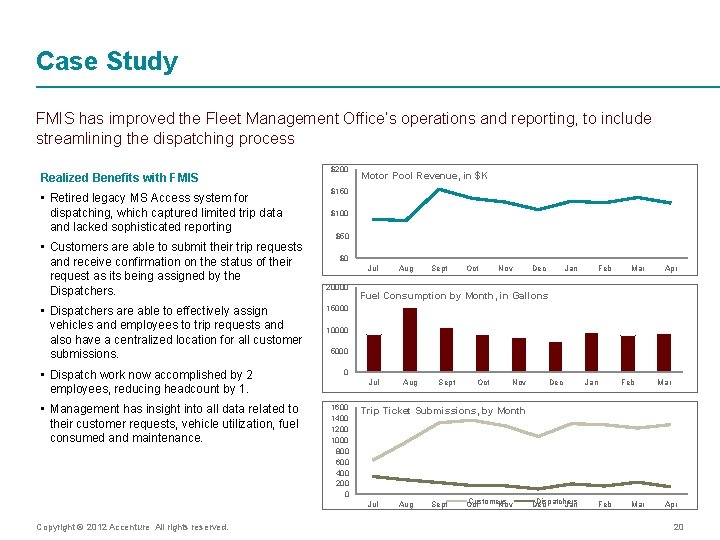
Case Study FMIS has improved the Fleet Management Office’s operations and reporting, to include streamlining the dispatching process Realized Benefits with FMIS • Retired legacy MS Access system for dispatching, which captured limited trip data and lacked sophisticated reporting • Customers are able to submit their trip requests and receive confirmation on the status of their request as its being assigned by the Dispatchers. • Dispatchers are able to effectively assign vehicles and employees to trip requests and also have a centralized location for all customer submissions. • Dispatch work now accomplished by 2 employees, reducing headcount by 1. • Management has insight into all data related to their customer requests, vehicle utilization, fuel consumed and maintenance. $200 Motor Pool Revenue, in $K $150 $100 $50 $0 Jul 20000 Sept Oct Nov Dec Jan Feb Mar Apr Fuel Consumption by Month, in Gallons 15000 10000 5000 0 Jul 1600 1400 1200 1000 800 600 400 200 0 Aug Sept Oct Nov Dec Jan Feb Mar Trip Ticket Submissions, by Month Jul Copyright © 2012 Accenture All rights reserved. Aug Sept Customers Oct Nov Dispatchers Dec Jan Feb Mar Apr 20
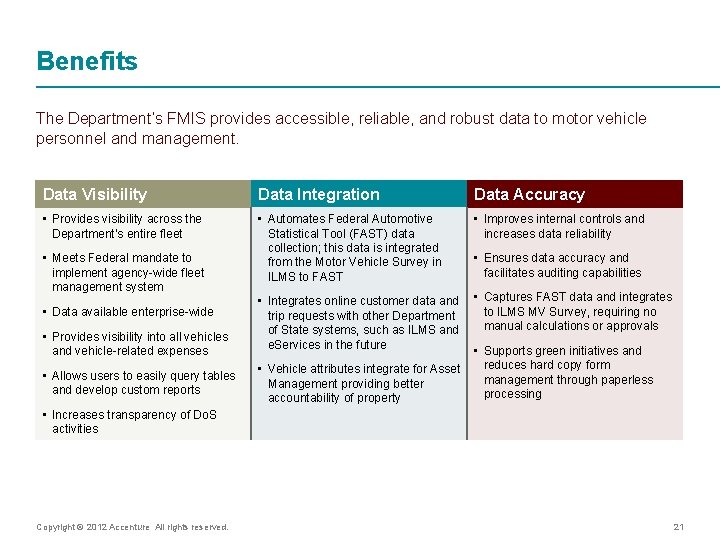
Benefits The Department’s FMIS provides accessible, reliable, and robust data to motor vehicle personnel and management. Data Visibility Data Integration Data Accuracy • Provides visibility across the Department’s entire fleet • Automates Federal Automotive Statistical Tool (FAST) data collection; this data is integrated from the Motor Vehicle Survey in ILMS to FAST • Improves internal controls and increases data reliability • Meets Federal mandate to implement agency-wide fleet management system • Data available enterprise-wide • Provides visibility into all vehicles and vehicle-related expenses • Allows users to easily query tables and develop custom reports • Ensures data accuracy and facilitates auditing capabilities • Integrates online customer data and • Captures FAST data and integrates to ILMS MV Survey, requiring no trip requests with other Department manual calculations or approvals of State systems, such as ILMS and e. Services in the future • Supports green initiatives and reduces hard copy form • Vehicle attributes integrate for Asset management through paperless Management providing better processing accountability of property • Increases transparency of Do. S activities Copyright © 2012 Accenture All rights reserved. 21
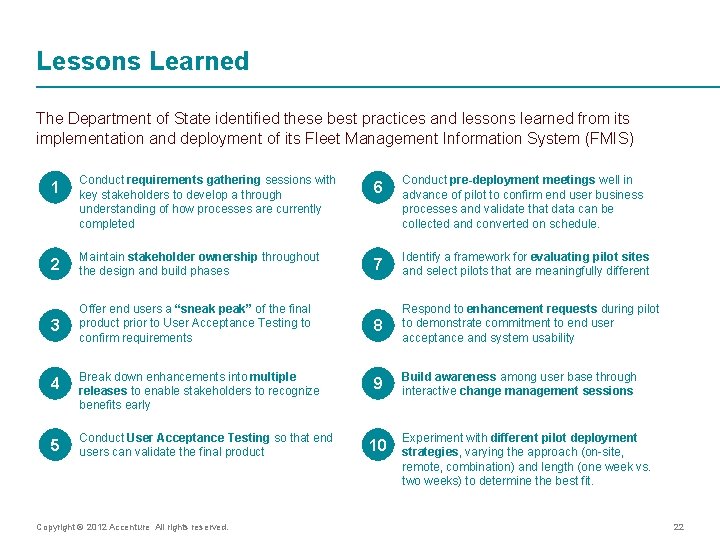
Lessons Learned The Department of State identified these best practices and lessons learned from its implementation and deployment of its Fleet Management Information System (FMIS) 1 Conduct requirements gathering sessions with key stakeholders to develop a through understanding of how processes are currently completed 6 Conduct pre-deployment meetings well in advance of pilot to confirm end user business processes and validate that data can be collected and converted on schedule. 2 Maintain stakeholder ownership throughout the design and build phases 7 Identify a framework for evaluating pilot sites and select pilots that are meaningfully different 3 Offer end users a “sneak peak” of the final product prior to User Acceptance Testing to confirm requirements 8 Respond to enhancement requests during pilot to demonstrate commitment to end user acceptance and system usability 9 Build awareness among user base through interactive change management sessions 4 Break down enhancements into multiple releases to enable stakeholders to recognize benefits early 5 Conduct User Acceptance Testing so that end users can validate the final product Copyright © 2012 Accenture All rights reserved. 10 Experiment with different pilot deployment strategies, varying the approach (on-site, remote, combination) and length (one week vs. two weeks) to determine the best fit. 22
Contact Info Karl Dedolph Senior Manager Accenture Management Consulting karl. c. dedolph@accenture. com +1 703 947 2505 Stefan Ruiz Using Federal Mandates to Drive Fleet Management Best Practices http: //www. accenture. com/usen/Pages/insight-using-fleetmanagement-best-practicessummary. aspx Consultant Accenture Management Consulting stefan. a. ruiz@accenture. com +1 703 947 3959 About Accenture is a global management consulting, technology services and outsourcing company, with more than 246, 000 people serving clients in more than 120 countries. Combining unparalleled experience, comprehensive capabilities across all industries and business functions, and extensive research on the world’s most successful companies, Accenture collaborates with clients to help them become high-performance businesses and governments. The company generated net revenues of US$25. 5 billion for the fiscal year ended Aug. 31, 2011. Its home page is www. accenture. com. Copyright © 2012 Accenture All rights reserved. 23
- Slides: 23