
IMGD 1001 3 D Art Outline o The
- Slides: 45
IMGD 1001: 3 D Art
Outline o The Pipeline o Concept Art o 2 D Art n Animation, Tiles o 3 D Art n Modeling, Texturing, Lighting, (next) Transformations IMGD 1001 2
Polygonal Modeling Basics: Primitives o Primitives are basic shapes o Most 3 d packages have same primitives: n Sphere, Cube, Cylinder, Plane n Use for “broad strokes” o Concentrate on primitives within object n Ex: human body (ovals for shoulders, cylinders for legs, sphere for head…) o Components are parts that make up primitive n Ex: vertices, edges, triangles, faces, elements n Similar across all packages but terminology can vary o Transformation allows moving, rotating, scaling object or component IMGD 1001 3
Polygonal Modeling Basics: Normals o Face normals are at right angle to polygon n Tell what direction if facing, how to render, how light will react o Viewed from other side, is invisible n Fine if on inside (say, of solid cube) o When debugging, pay attention to normals as well as polygons IMGD 1001 4
Polygonal Modeling Basics: Backface Culling o Toggles display of faces that point away from view n When on, see through wireframe n When off, looks solid (not drawn) o Makes look less cluttered IMGD 1001 5
Modeling Tools o Certain tools and techniques used 80 -90% of the time o Line Tool: n Draw outline of object and extrude to get 3 -d shape o Ex: profile of car. Use line tool. Then, extrude outward to get shape. o Extrude: n Take component (often face), duplicating it, pulling pushing or scaling to refine model o Ex: take cube. Extrude face outward and smaller o Cut: n Subdivides faces and adds new faces o Adjust: n The artistic part of modeling. Try to capture form, profile and character by moving vertices o “Vertex surgery”, part of the technical manipulation IMGD 1001 Based on Chapter 6. 2, Introduction to Game Development 6
A Modeling Technique: Box Modeling o Done for character, but can apply to other things o General idea: n Start with box, cylinder or other primitive n Extrude, Cut, Adjust… n Get topology, proportions right n Once happy, refine until details complete IMGD 1001 7
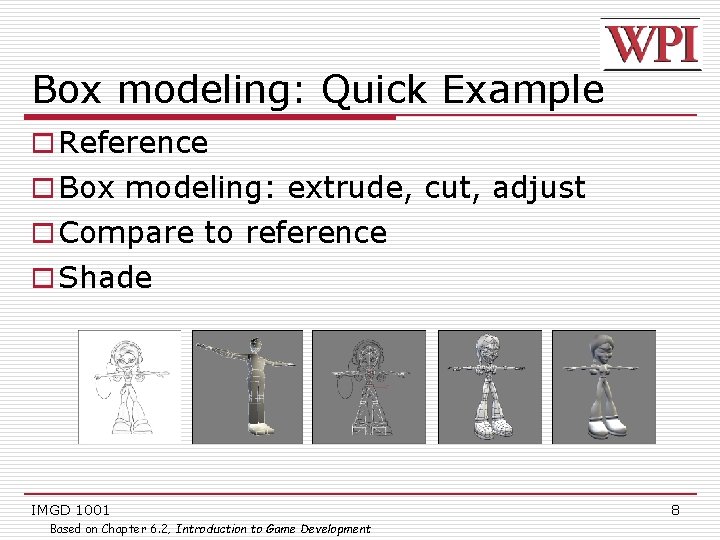
Box modeling: Quick Example o Reference o Box modeling: extrude, cut, adjust o Compare to reference o Shade IMGD 1001 Based on Chapter 6. 2, Introduction to Game Development 8
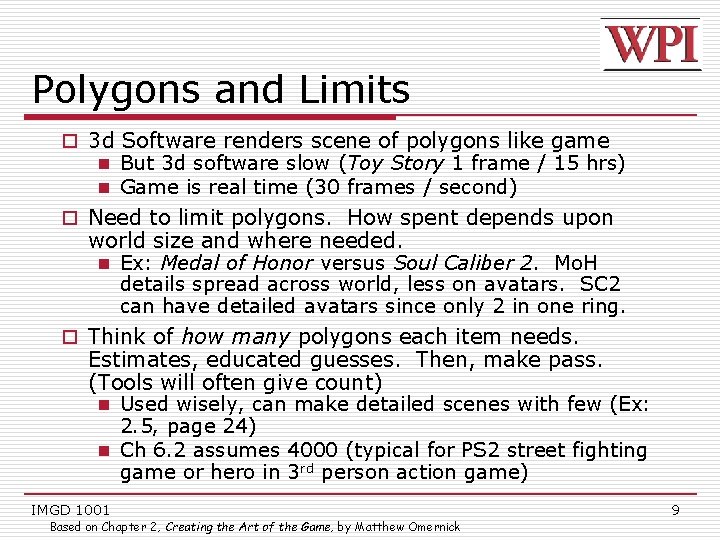
Polygons and Limits o 3 d Software renders scene of polygons like game n But 3 d software slow (Toy Story 1 frame / 15 hrs) n Game is real time (30 frames / second) o Need to limit polygons. How spent depends upon world size and where needed. n Ex: Medal of Honor versus Soul Caliber 2. Mo. H details spread across world, less on avatars. SC 2 can have detailed avatars since only 2 in one ring. o Think of how many polygons each item needs. Estimates, educated guesses. Then, make pass. (Tools will often give count) n Used wisely, can make detailed scenes with few (Ex: 2. 5, page 24) n Ch 6. 2 assumes 4000 (typical for PS 2 street fighting game or hero in 3 rd person action game) IMGD 1001 Based on Chapter 2, Creating the Art of the Game, by Matthew Omernick 9
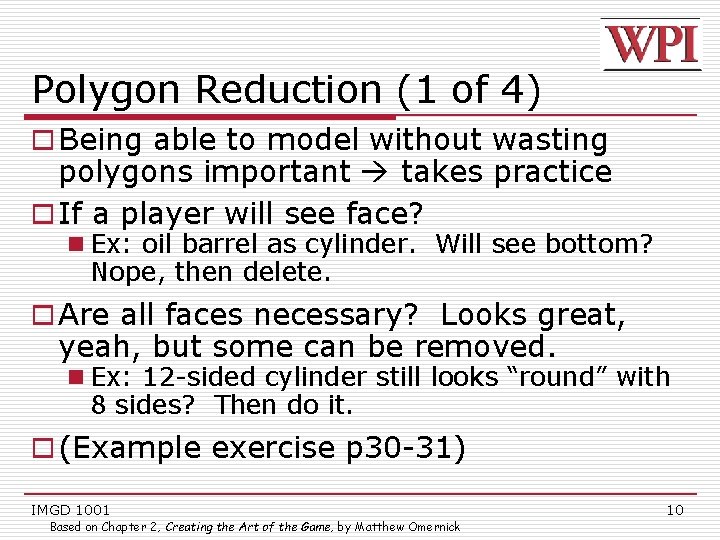
Polygon Reduction (1 of 4) o Being able to model without wasting polygons important takes practice o If a player will see face? n Ex: oil barrel as cylinder. Will see bottom? Nope, then delete. o Are all faces necessary? Looks great, yeah, but some can be removed. n Ex: 12 -sided cylinder still looks “round” with 8 sides? Then do it. o (Example exercise p 30 -31) IMGD 1001 Based on Chapter 2, Creating the Art of the Game, by Matthew Omernick 10
Polygon Reduction (2 of 4) o Level-of-detail (LOD) meshes n Multiple versions of object, progressively lower levels o When far away, use low level n Assume more objects in Field of View o When close, use higher level n Assume fewer objects in Field of View IMGD 1001 11
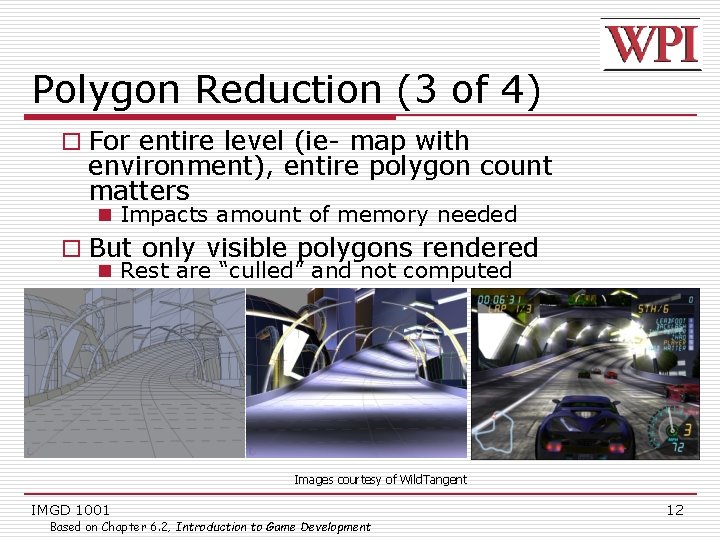
Polygon Reduction (3 of 4) o For entire level (ie- map with environment), entire polygon count matters n Impacts amount of memory needed o But only visible polygons rendered n Rest are “culled” and not computed Images courtesy of Wild. Tangent IMGD 1001 Based on Chapter 6. 2, Introduction to Game Development 12
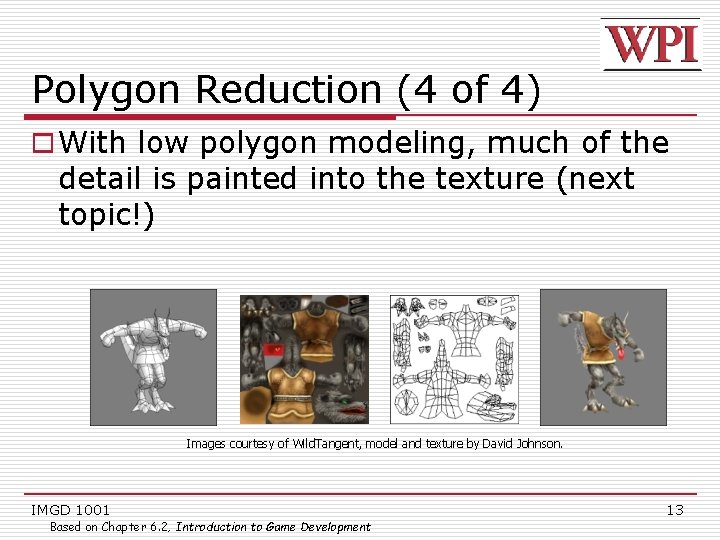
Polygon Reduction (4 of 4) o With low polygon modeling, much of the detail is painted into the texture (next topic!) Images courtesy of Wild. Tangent, model and texture by David Johnson. IMGD 1001 Based on Chapter 6. 2, Introduction to Game Development 13
Texture o Shader – define surface property of object – how shiny, bumpy, how light effects o Texture – bitmap plugged into shader that defines image we want to appear on object IMGD 1001 Based on Chapter 6. 4, Introduction to Game Development 14
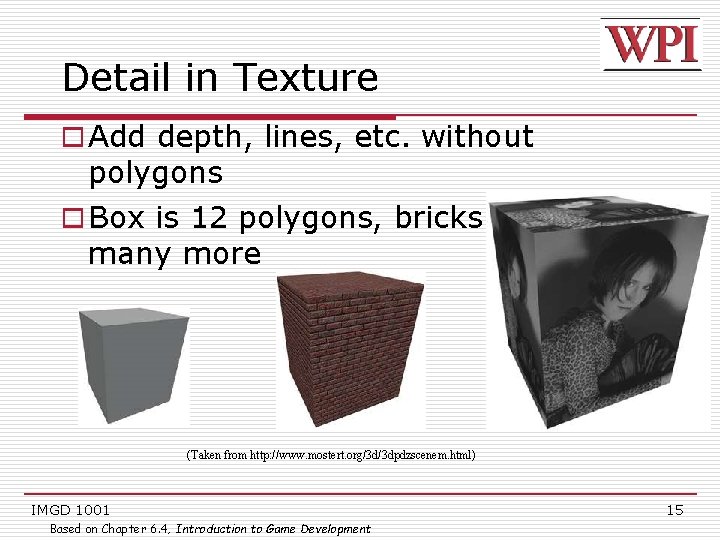
Detail in Texture o Add depth, lines, etc. without polygons o Box is 12 polygons, bricks would take many more (Taken from http: //www. mostert. org/3 d/3 dpdzscenem. html) IMGD 1001 Based on Chapter 6. 4, Introduction to Game Development 15
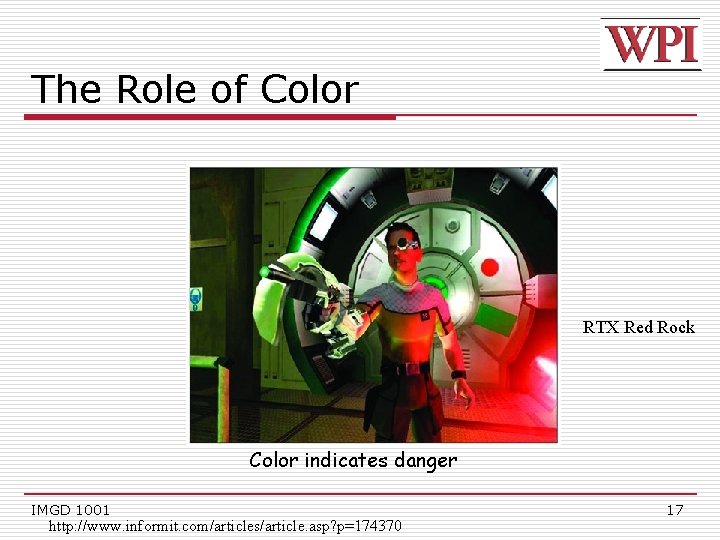
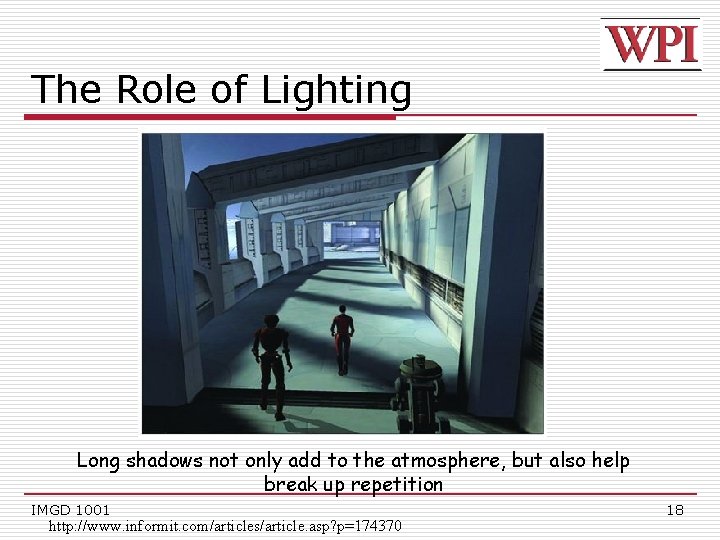
Lighting o Can conjure feelings, emotions, even change what you are seeing n Reveal (or hide) depth n (Many books on traditional lighting) n AR/ID 3150. LIGHT, VISION AND UNDERSTANDING o Color, Mood IMGD 1001 Based on Chapter 6. 6, Introduction to Game Development 16
The Role of Color RTX Red Rock Color indicates danger IMGD 1001 http: //www. informit. com/articles/article. asp? p=174370 17
The Role of Lighting Long shadows not only add to the atmosphere, but also help break up repetition IMGD 1001 http: //www. informit. com/articles/article. asp? p=174370 18
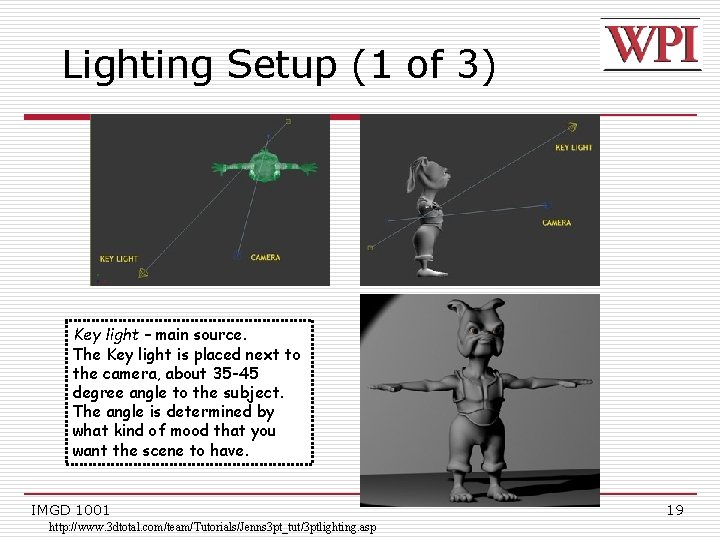
Lighting Setup (1 of 3) Key light – main source. The Key light is placed next to the camera, about 35 -45 degree angle to the subject. The angle is determined by what kind of mood that you want the scene to have. IMGD 1001 http: //www. 3 dtotal. com/team/Tutorials/Jenns 3 pt_tut/3 ptlighting. asp 19
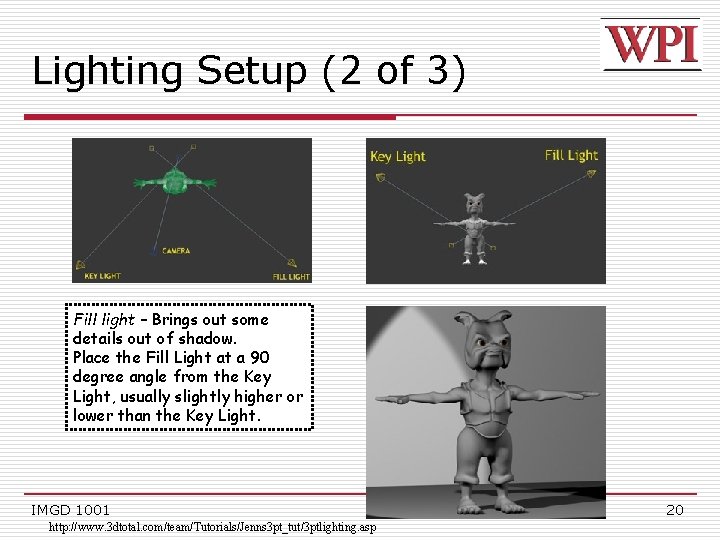
Lighting Setup (2 of 3) Fill light – Brings out some details out of shadow. Place the Fill Light at a 90 degree angle from the Key Light, usually slightly higher or lower than the Key Light. IMGD 1001 http: //www. 3 dtotal. com/team/Tutorials/Jenns 3 pt_tut/3 ptlighting. asp 20
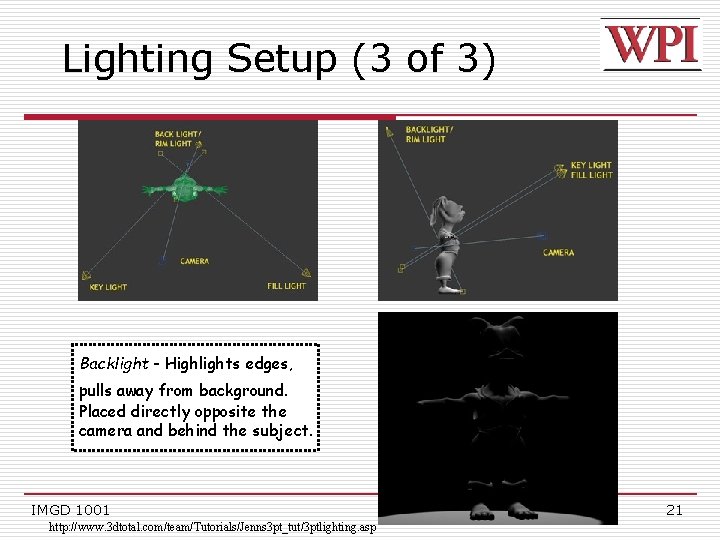
Lighting Setup (3 of 3) Backlight - Highlights edges, pulls away from background. Placed directly opposite the camera and behind the subject. IMGD 1001 http: //www. 3 dtotal. com/team/Tutorials/Jenns 3 pt_tut/3 ptlighting. asp 21
Working with 3 D Lights o Directional Lights – used for sunlight or moonlight. Often as key light. Predictable. o Spot Lights – focus beam on single location. Great control. o Point Lights – single point in all directions. Light bulbs, candles, etc. o Ambient Lights – spread everywhere, equally. Uniform diffuse lights. Precise control over illumination. IMGD 1001 Based on Chapter 6. 6, Introduction to Game Development 22
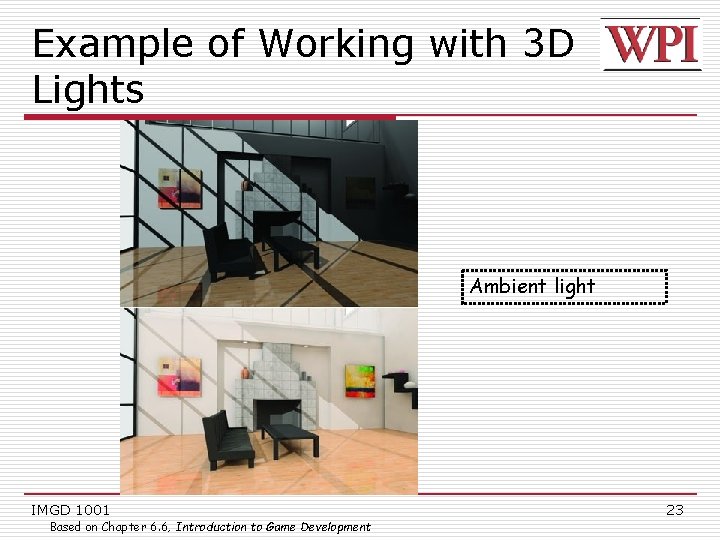
Example of Working with 3 D Lights Ambient light IMGD 1001 Based on Chapter 6. 6, Introduction to Game Development 23
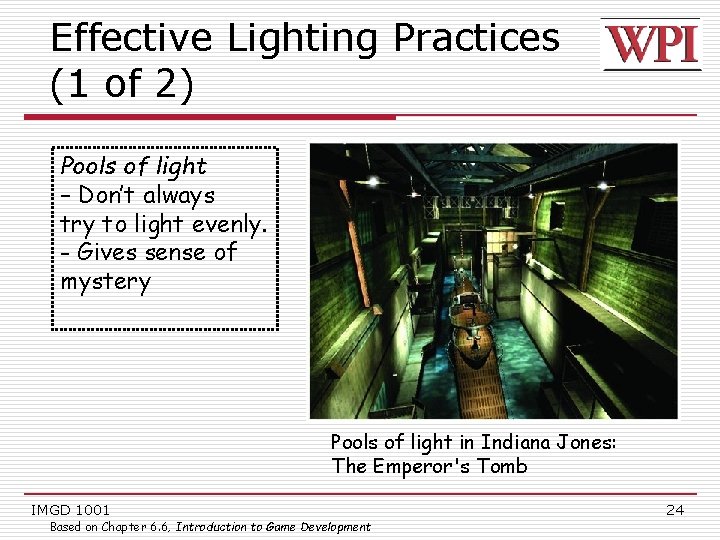
Effective Lighting Practices (1 of 2) Pools of light – Don’t always try to light evenly. - Gives sense of mystery Pools of light in Indiana Jones: The Emperor's Tomb IMGD 1001 Based on Chapter 6. 6, Introduction to Game Development 24
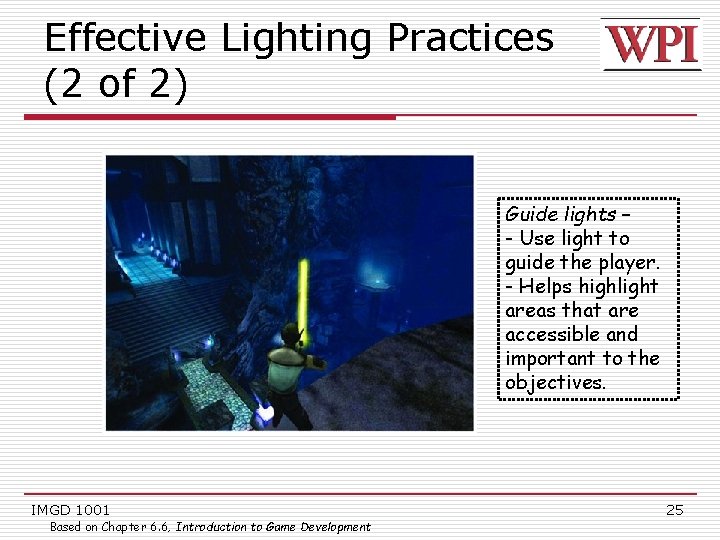
Effective Lighting Practices (2 of 2) Guide lights – - Use light to guide the player. - Helps highlight areas that are accessible and important to the objectives. IMGD 1001 Based on Chapter 6. 6, Introduction to Game Development 25
Introduction to Transformations o A transformation changes an object's n Size (scaling) n Position (translation) n Orientation (rotation) o Transform object by applying sequence of matrix multiplications to object vertices IMGD 1001 26
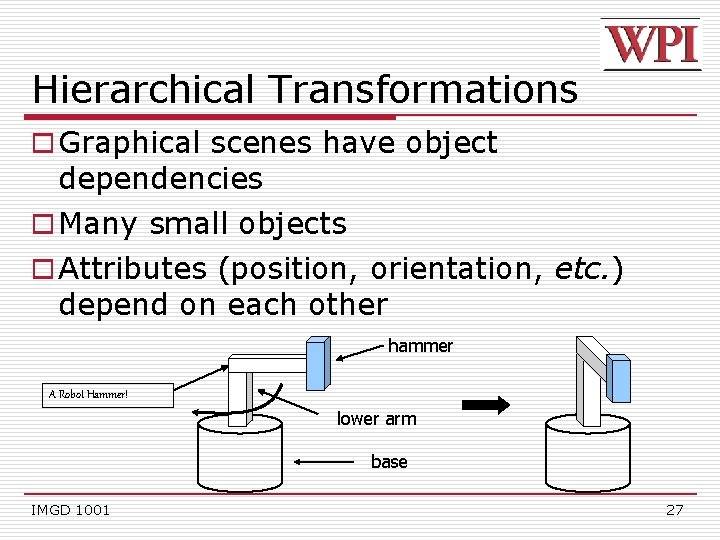
Hierarchical Transformations o Graphical scenes have object dependencies o Many small objects o Attributes (position, orientation, etc. ) depend on each other hammer A Robot Hammer! lower arm base IMGD 1001 27
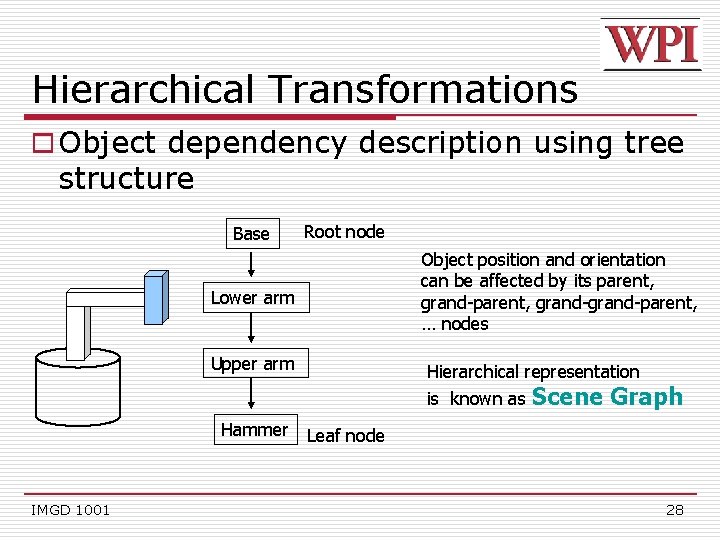
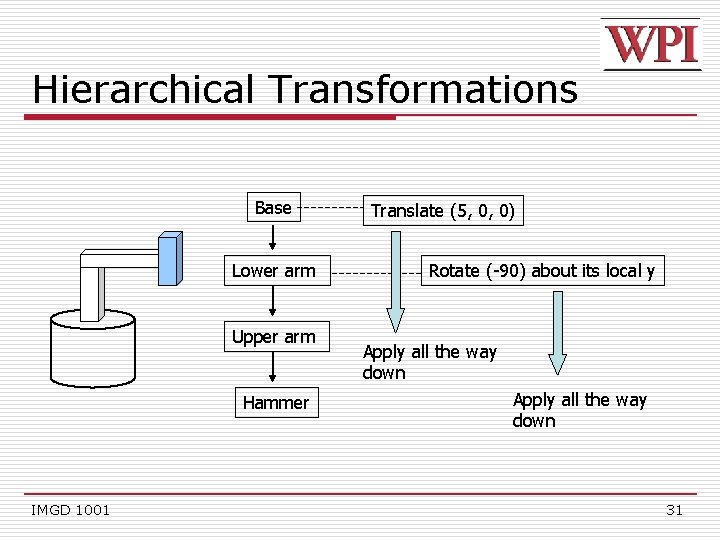
Hierarchical Transformations o Object dependency description using tree structure Base Root node Object position and orientation can be affected by its parent, grand-grand-parent, … nodes Lower arm Upper arm Hierarchical representation is known as Hammer IMGD 1001 Scene Graph Leaf node 28
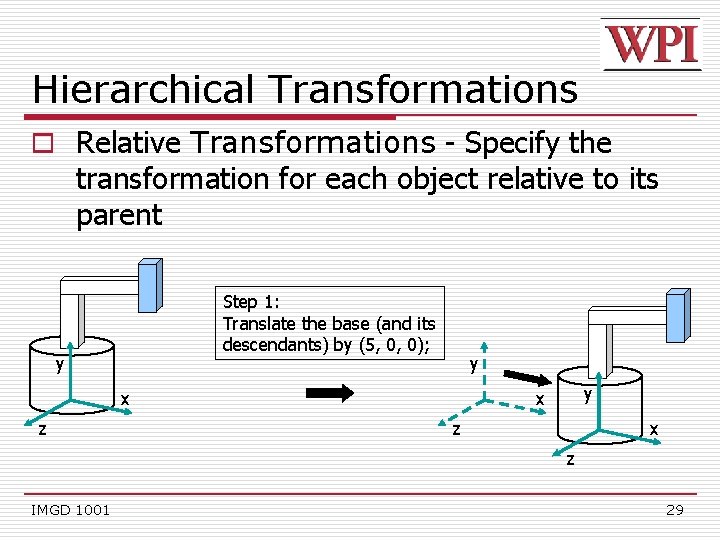
Hierarchical Transformations o Relative Transformations - Specify the transformation for each object relative to its parent Step 1: Translate the base (and its descendants) by (5, 0, 0); y y x z y x x z z IMGD 1001 29
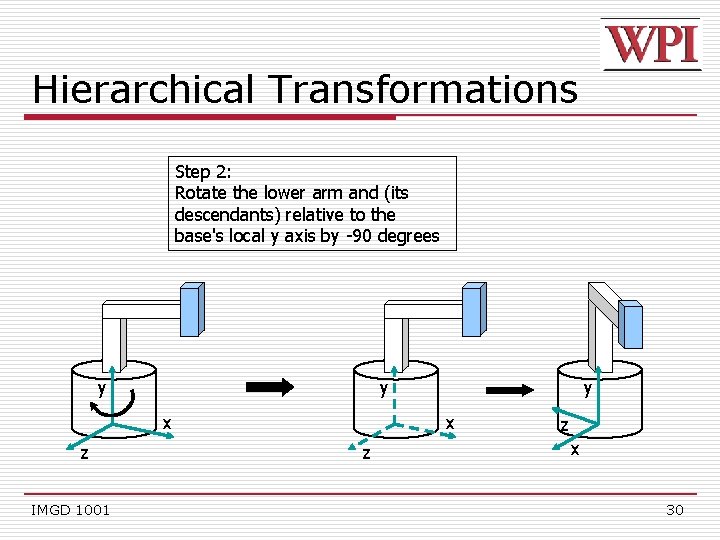
Hierarchical Transformations Step 2: Rotate the lower arm and (its descendants) relative to the base's local y axis by -90 degrees y y x z IMGD 1001 y x z z x 30
Hierarchical Transformations Base Lower arm Upper arm Hammer IMGD 1001 Translate (5, 0, 0) Rotate (-90) about its local y Apply all the way down 31
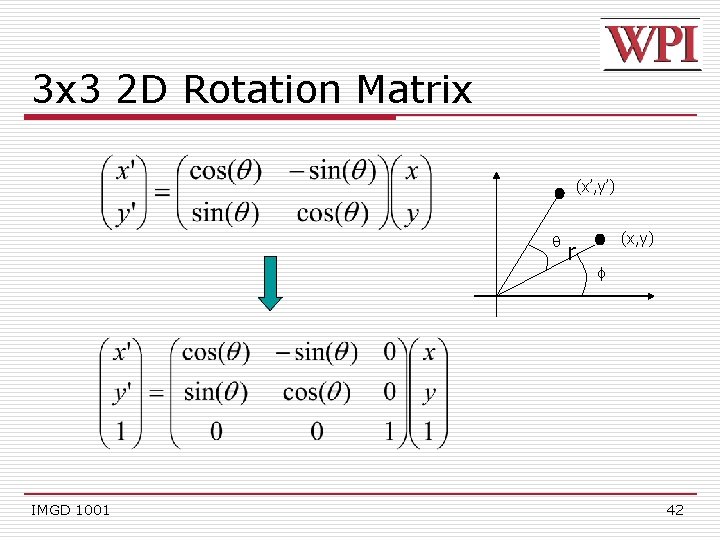
Transformation uses Matrices o All transformations can be performed using matrix/vector multiplication o Allows pre-multiplication of all matrices o Note: point (x, y) needs to be represented as (x, y, 1), also called homogeneous coordinates IMGD 1001 32
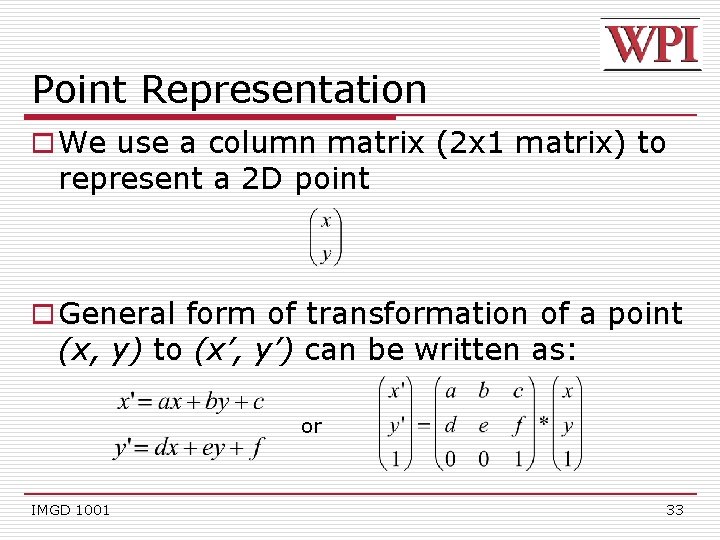
Point Representation o We use a column matrix (2 x 1 matrix) to represent a 2 D point o General form of transformation of a point (x, y) to (x’, y’) can be written as: or IMGD 1001 33
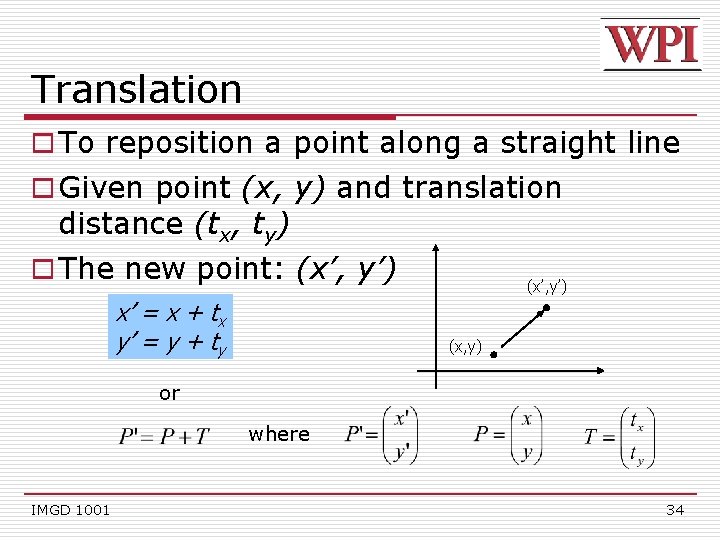
Translation o To reposition a point along a straight line o Given point (x, y) and translation distance (tx, ty) o The new point: (x’, y’) x’ = x + tx y’ = y + ty (x’, y’) (x, y) or where IMGD 1001 34
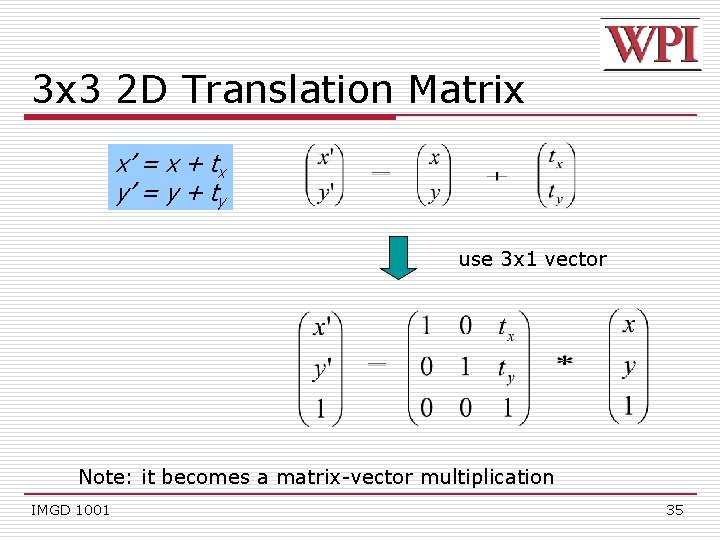
3 x 3 2 D Translation Matrix x’ = x + tx y’ = y + ty use 3 x 1 vector Note: it becomes a matrix-vector multiplication IMGD 1001 35
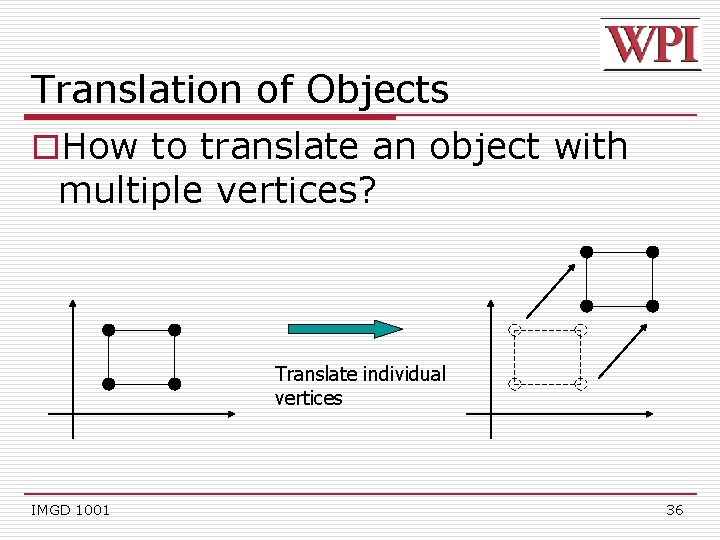
Translation of Objects o. How to translate an object with multiple vertices? Translate individual vertices IMGD 1001 36
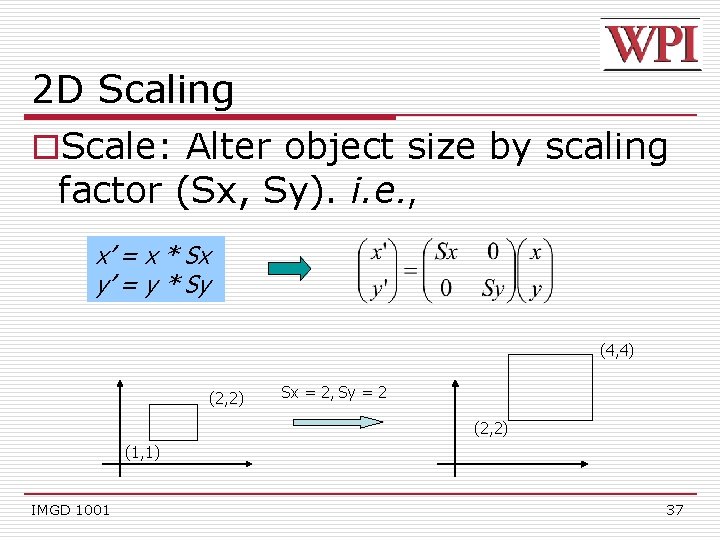
2 D Scaling o. Scale: Alter object size by scaling factor (Sx, Sy). i. e. , x’ = x * Sx y’ = y * Sy (4, 4) (2, 2) Sx = 2, Sy = 2 (2, 2) (1, 1) IMGD 1001 37
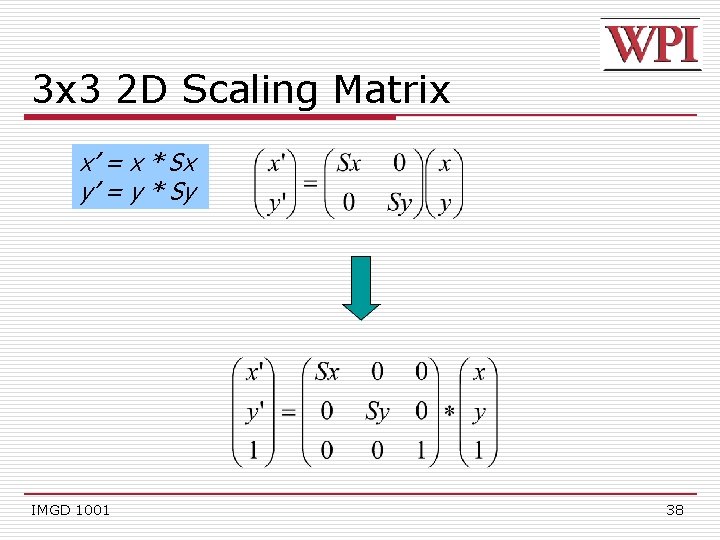
3 x 3 2 D Scaling Matrix x’ = x * Sx y’ = y * Sy IMGD 1001 38
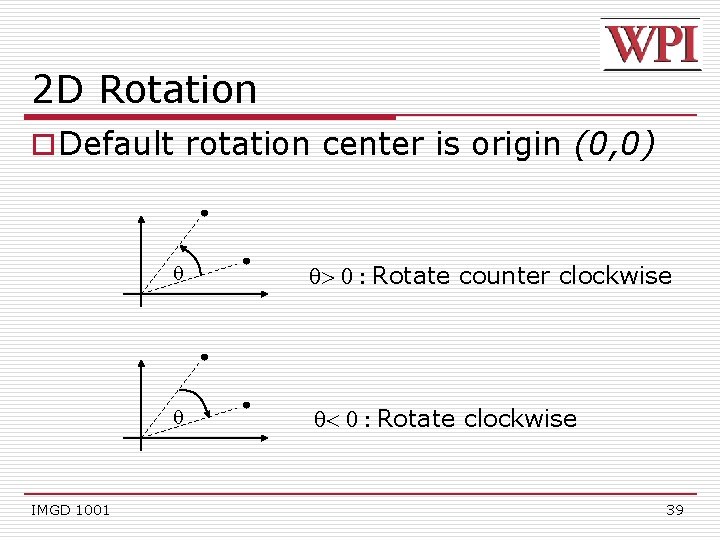
2 D Rotation o Default rotation center is origin (0, 0) IMGD 1001 > 0 : Rotate counter clockwise < 0 : Rotate clockwise 39
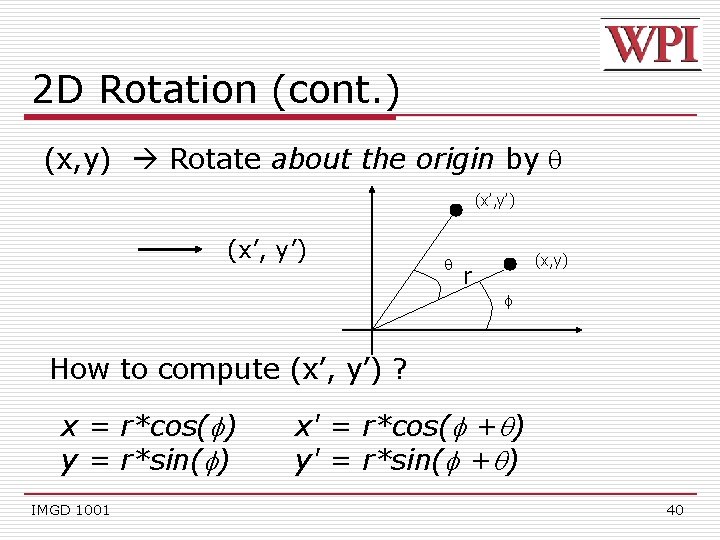
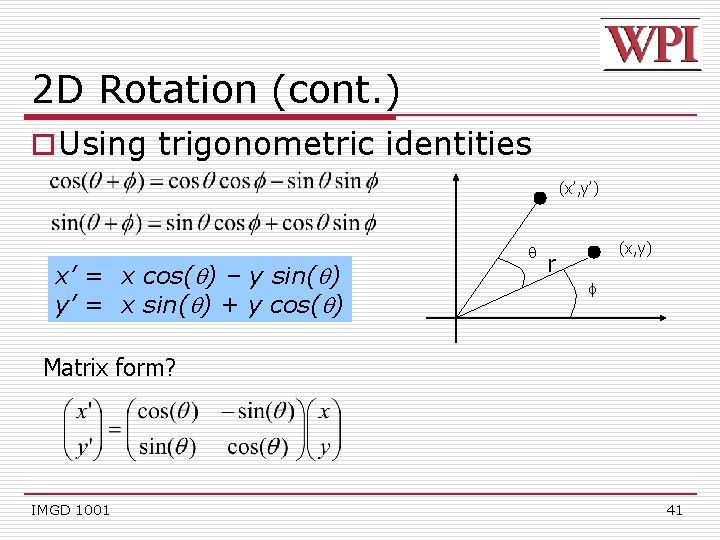
2 D Rotation (cont. ) (x, y) Rotate about the origin by (x’, y’) (x, y) r f How to compute (x’, y’) ? x = r*cos( ) y = r*sin( ) IMGD 1001 x' = r*cos( + ) y' = r*sin( + ) 40
2 D Rotation (cont. ) o Using trigonometric identities (x’, y’) x’ = x cos( ) – y sin( ) y’ = x sin( ) + y cos( ) (x, y) r f Matrix form? IMGD 1001 41
3 x 3 2 D Rotation Matrix (x’, y’) IMGD 1001 r (x, y) f 42
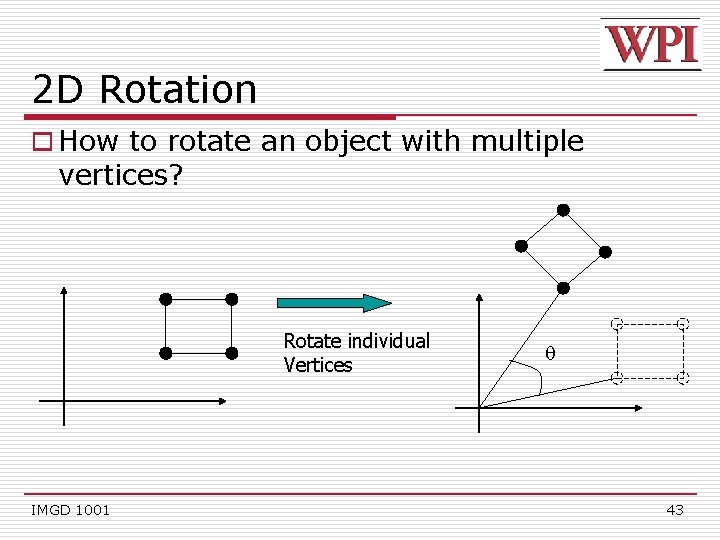
2 D Rotation o How to rotate an object with multiple vertices? Rotate individual Vertices IMGD 1001 43
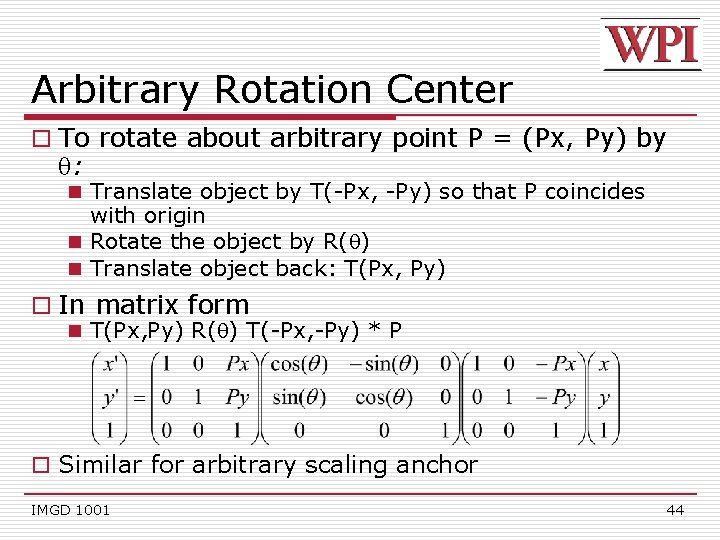
Arbitrary Rotation Center o To rotate about arbitrary point P = (Px, Py) by : n Translate object by T(-Px, -Py) so that P coincides with origin n Rotate the object by R( ) n Translate object back: T(Px, Py) o In matrix form n T(Px, Py) R( ) T(-Px, -Py) * P o Similar for arbitrary scaling anchor IMGD 1001 44
Composing Transformations o Composing transformations n Applying several transforms in succession to form one overall transformation o Example n M 1 X M 2 X M 3 X P where M 1, M 2, M 3 are transform matrices applied to P o Be careful with the order! o For example n Translate by (5, 0), then rotate 60 degrees is NOT same as n Rotate by 60 degrees, then translate by (5, 0) IMGD 1001 45