
IMGD 1001 3 D Art by Mark Claypool
IMGD 1001: 3 D Art by Mark Claypool (claypool@cs. wpi. edu) Robert W. Lindeman (gogo@wpi. edu) Claypool & Lindeman - WPI, CS & IMGD
Outline o The Pipeline o Concept Art o 2 D Art n Animation, Tiles o 3 D Art n Modeling, Texturing, Lighting, (next) Transformations Claypool & Lindeman - WPI, CS & IMGD 2
Polygonal Modeling Basics: Primitives o Primitives are basic shapes o Most 3 d packages have same primitives: n Sphere, Cube, Cylinder, Plane n Use for “broad strokes” o Concentrate on primitives within object n Ex: human body (ovals for shoulders, cylinders for legs, sphere for head…) o Components are parts that make up primitive n Ex: vertices, edges, triangles, faces, elements n Similar across all packages but terminology can vary o Transformation allows moving, rotating, scaling object or component Claypool & Lindeman - WPI, CS & IMGD 3
Polygonal Modeling Basics: Normals o Face normals are at right angle to polygon n Tell what direction if facing, how to render, how light will react o Viewed from other side, is invisible n Fine if on inside (say, of solid cube) o When debugging, pay attention to normals as well as polygons Claypool & Lindeman - WPI, CS & IMGD 4
Polygonal Modeling Basics: Backface Culling o Toggles display of faces that point away from view n When on, see through wireframe n When off, looks solid (not drawn) o Makes look less cluttered Claypool & Lindeman - WPI, CS & IMGD 5
Modeling Tools o Certain tools and techniques used 80 -90% of the time o Line Tool: n Draw outline of object and extrude to get 3 -d shape o Ex: profile of car. Use line tool. Then, extrude outward to get shape. o Extrude: n Take component (often face), duplicating it, pulling pushing or scaling to refine model o Ex: take cube. Extrude face outward and smaller o Cut: n Subdivides faces and adds new faces o Adjust: n The artistic part of modeling. Try to capture form, profile and character by moving vertices o “Vertex surgery”, part of the technical manipulation Claypool & Lindeman - WPI, CS & IMGD Based on Chapter 6. 2, Introduction to Game Development 6
1 Modeling Technique: Box Modeling o Done for character, but can apply to other things o General idea: n Start with box, cylinder or other primitive n Extrude, Cut, Adjust… n Get topology, proportions right n Once happy, refine until details complete Claypool & Lindeman - WPI, CS & IMGD 7
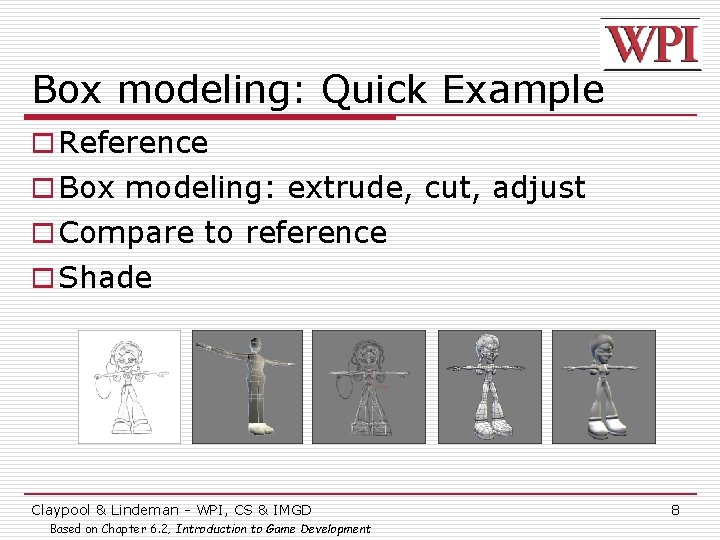
Box modeling: Quick Example o Reference o Box modeling: extrude, cut, adjust o Compare to reference o Shade Claypool & Lindeman - WPI, CS & IMGD Based on Chapter 6. 2, Introduction to Game Development 8
Polygons and Limits o 3 d Software renders scene of polygons like game n But 3 d software slow (Toy Story 1 frame / 15 hrs) n Game is real time (30 frames / second) o Need to limit polygons. How spent depends upon world size and where needed. n Ex: Medal of Honor versus Soul Caliber 2. Mo. H details spread across world, less on avatars. SC 2 can have detailed avatars since only 2 in one ring. o Think of how many polygons each item needs. Estimates, educated guesses. Then, make pass. (Tools will often give count) n Used wisely, can make detailed scenes with few (Ex: 2. 5, page 24) n Ch 6. 2 assumes 4000 (typical for PS 2 street fighting game or hero in 3 rd person action game) Claypool & Lindeman - WPI, CS & IMGD Based on Chapter 2, Creating the Art of the Game, by Matthew Omernick 9
Polygon Reduction (1 of 4) o Being able to model without wasting polygons important takes practice o Ask if a player will see face? n Ex: oil barrel as cylinder. Will see bottom? Nope, then delete. o Are all faces necessary? Looks great, yeah, but some can be removed. n Ex: 12 -sided cylinder still looks “round” with 8 sides? Then do it. o (Example exercise p 30 -31) Claypool & Lindeman - WPI, CS & IMGD Based on Chapter 2, Creating the Art of the Game, by Matthew Omernick 10
Polygon Reduction (2 of 4) o Level-of-detail (LOD) meshes n Multiple versions of object, progressively lower levels o When far away, use low level n Assume more objects in Field of View o When close, use higher level n Assume fewer objects in Field of View Claypool & Lindeman - WPI, CS & IMGD 11
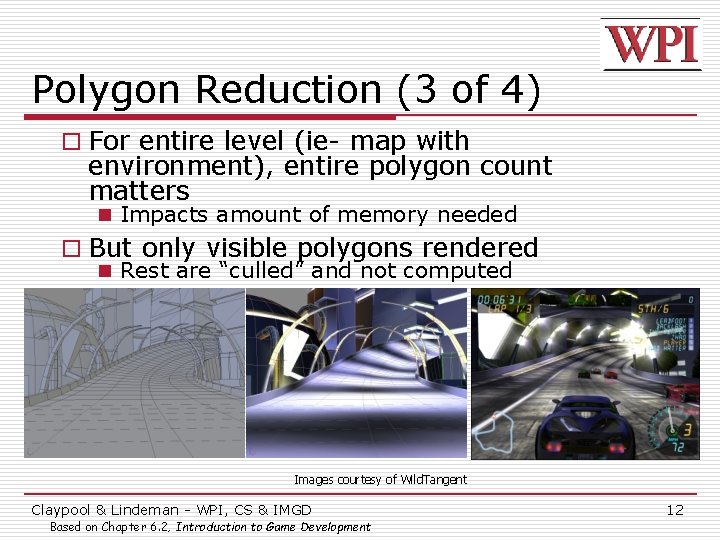
Polygon Reduction (3 of 4) o For entire level (ie- map with environment), entire polygon count matters n Impacts amount of memory needed o But only visible polygons rendered n Rest are “culled” and not computed Images courtesy of Wild. Tangent Claypool & Lindeman - WPI, CS & IMGD Based on Chapter 6. 2, Introduction to Game Development 12
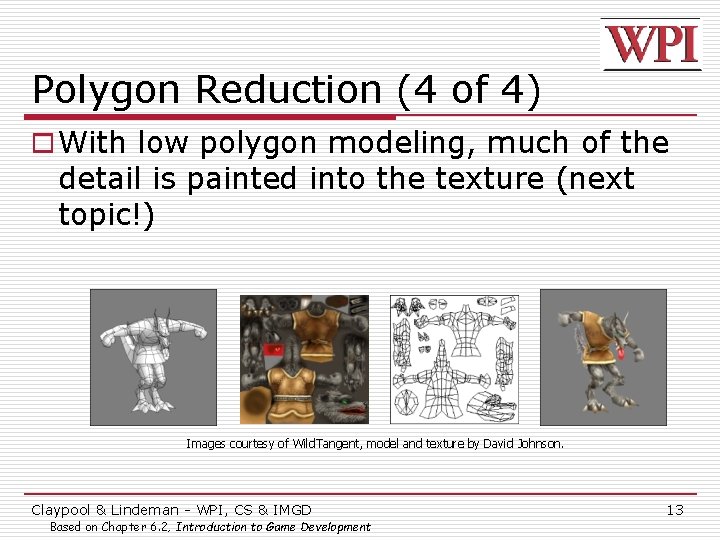
Polygon Reduction (4 of 4) o With low polygon modeling, much of the detail is painted into the texture (next topic!) Images courtesy of Wild. Tangent, model and texture by David Johnson. Claypool & Lindeman - WPI, CS & IMGD Based on Chapter 6. 2, Introduction to Game Development 13
Texture o Shader – define surface property of object – how shiny, bumpy, how light effects o Texture – bitmap plugged into shader that defines image we want to appear on object Claypool & Lindeman - WPI, CS & IMGD Based on Chapter 6. 4, Introduction to Game Development 14
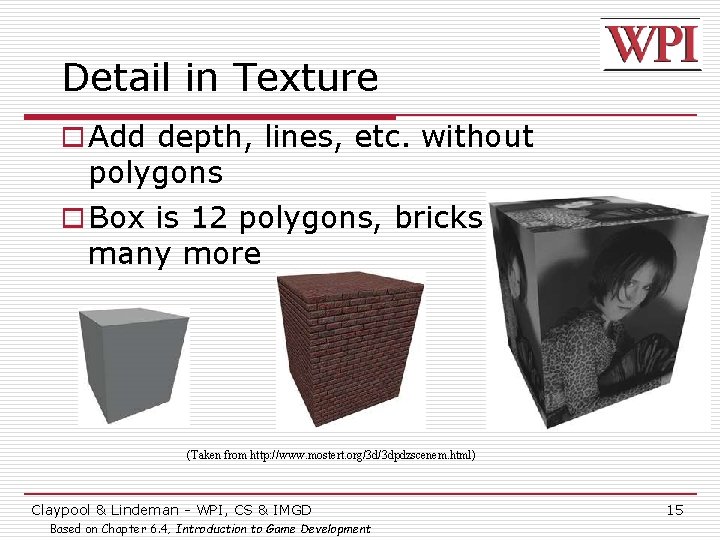
Detail in Texture o Add depth, lines, etc. without polygons o Box is 12 polygons, bricks would take many more (Taken from http: //www. mostert. org/3 d/3 dpdzscenem. html) Claypool & Lindeman - WPI, CS & IMGD Based on Chapter 6. 4, Introduction to Game Development 15
Lighting o Can conjure feelings, emotions, even change what you are seeing n Reveal (or hide) depth n (Many books on traditional lighting) n AR/ID 3150. LIGHT, VISION AND UNDERSTANDING o Color, Mood Claypool & Lindeman - WPI, CS & IMGD Based on Chapter 6. 6, Introduction to Game Development 16
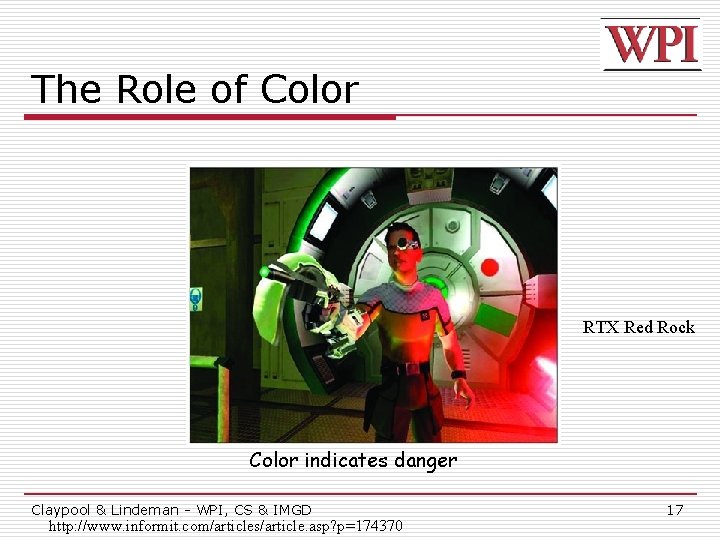
The Role of Color RTX Red Rock Color indicates danger Claypool & Lindeman - WPI, CS & IMGD http: //www. informit. com/articles/article. asp? p=174370 17
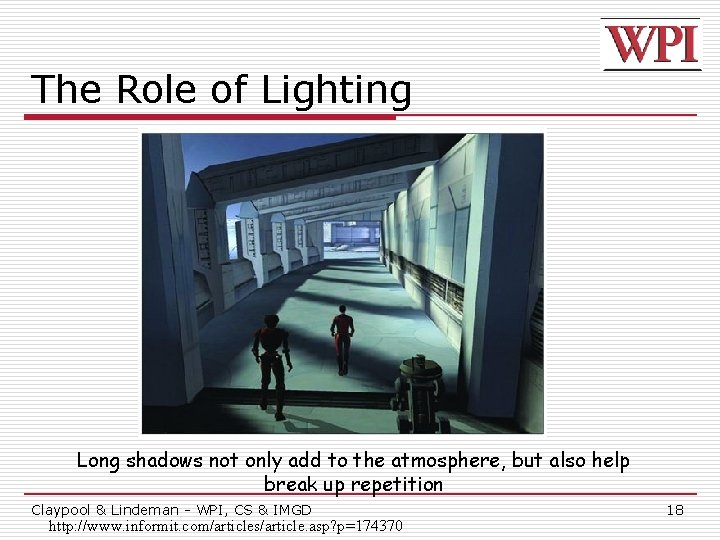
The Role of Lighting Long shadows not only add to the atmosphere, but also help break up repetition Claypool & Lindeman - WPI, CS & IMGD http: //www. informit. com/articles/article. asp? p=174370 18
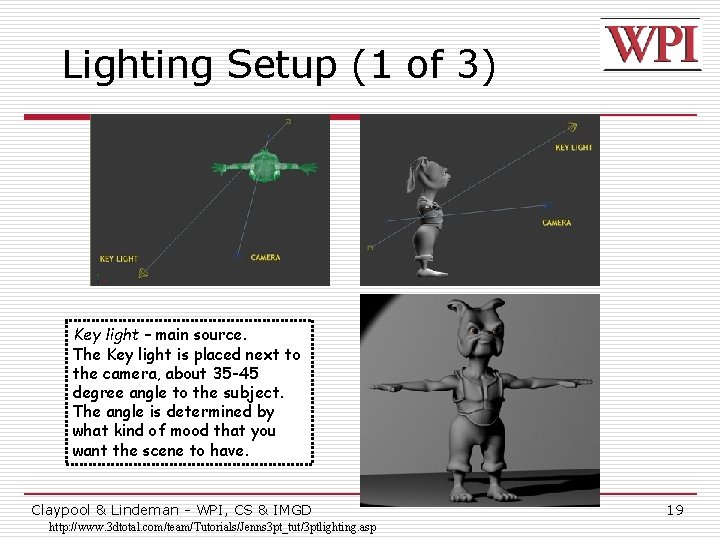
Lighting Setup (1 of 3) Key light – main source. The Key light is placed next to the camera, about 35 -45 degree angle to the subject. The angle is determined by what kind of mood that you want the scene to have. Claypool & Lindeman - WPI, CS & IMGD http: //www. 3 dtotal. com/team/Tutorials/Jenns 3 pt_tut/3 ptlighting. asp 19
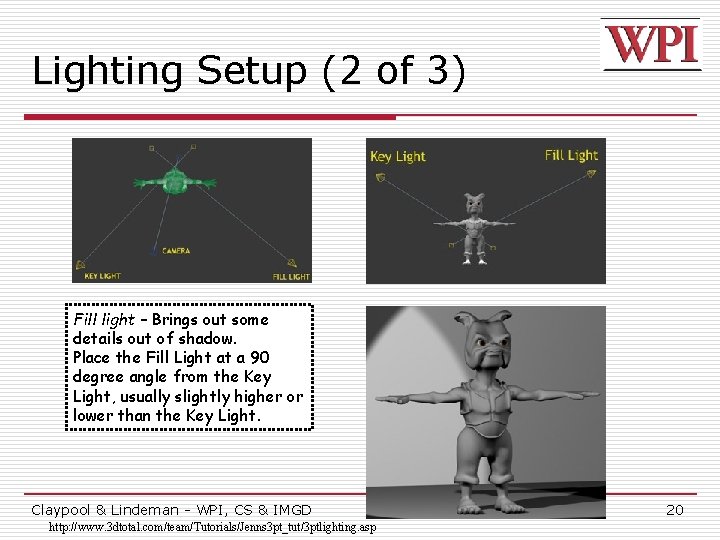
Lighting Setup (2 of 3) Fill light – Brings out some details out of shadow. Place the Fill Light at a 90 degree angle from the Key Light, usually slightly higher or lower than the Key Light. Claypool & Lindeman - WPI, CS & IMGD http: //www. 3 dtotal. com/team/Tutorials/Jenns 3 pt_tut/3 ptlighting. asp 20
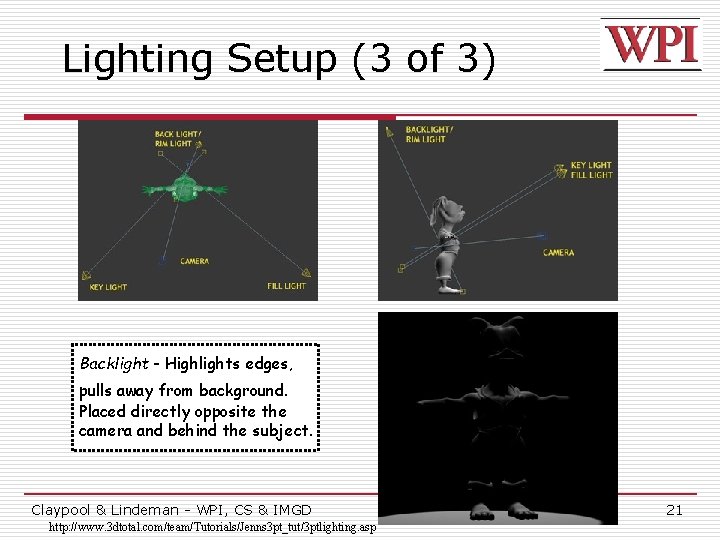
Lighting Setup (3 of 3) Backlight - Highlights edges, pulls away from background. Placed directly opposite the camera and behind the subject. Claypool & Lindeman - WPI, CS & IMGD http: //www. 3 dtotal. com/team/Tutorials/Jenns 3 pt_tut/3 ptlighting. asp 21
Working with 3 D Lights o Directional Lights – used for sunlight or moonlight. Often as key light. Predictable. o Ambient Lights – spread everywhere, equally. Uniform diffuse lights. Precise control over illumination. o Spot Lights – focus beam on single location. Great control. o Point Lights – single point in all directions. Light bulbs, candles, etc. Claypool & Lindeman - WPI, CS & IMGD Based on Chapter 6. 6, Introduction to Game Development 22
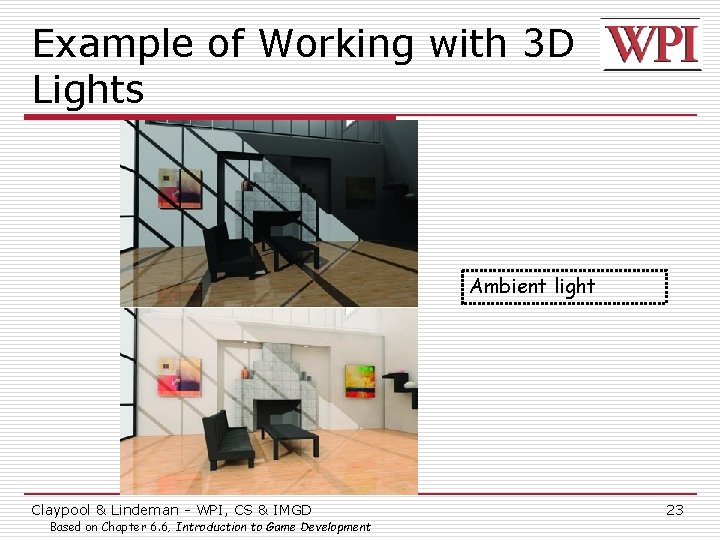
Example of Working with 3 D Lights Ambient light Claypool & Lindeman - WPI, CS & IMGD Based on Chapter 6. 6, Introduction to Game Development 23
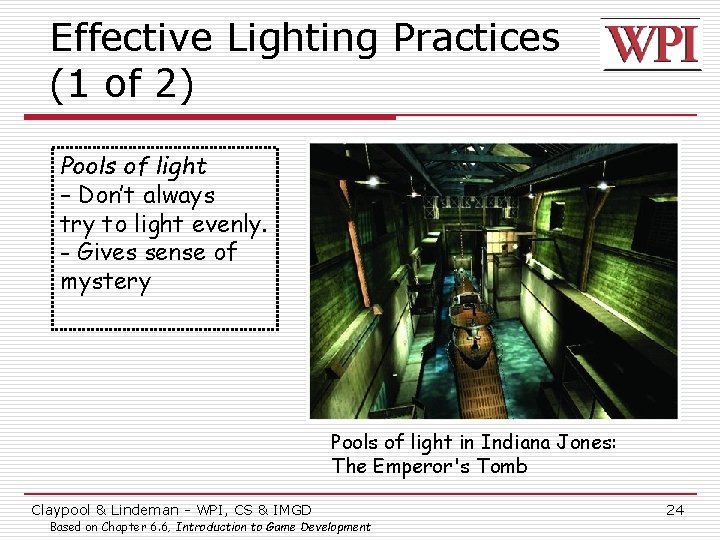
Effective Lighting Practices (1 of 2) Pools of light – Don’t always try to light evenly. - Gives sense of mystery Pools of light in Indiana Jones: The Emperor's Tomb Claypool & Lindeman - WPI, CS & IMGD Based on Chapter 6. 6, Introduction to Game Development 24
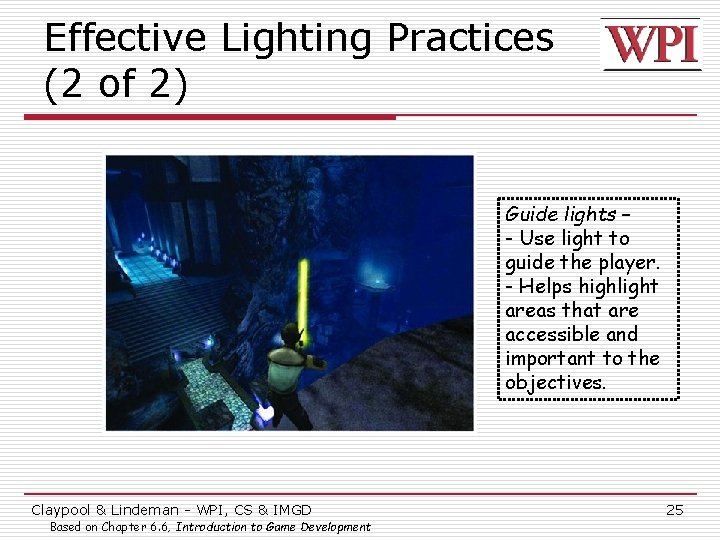
Effective Lighting Practices (2 of 2) Guide lights – - Use light to guide the player. - Helps highlight areas that are accessible and important to the objectives. Claypool & Lindeman - WPI, CS & IMGD Based on Chapter 6. 6, Introduction to Game Development 25
Introduction to Transformations o A transformation changes an object's n Size (scaling) n Position (translation) n Orientation (rotation) o Transform object by applying sequence of matrix multiplications to object vertices Claypool & Lindeman - WPI, CS & IMGD 26
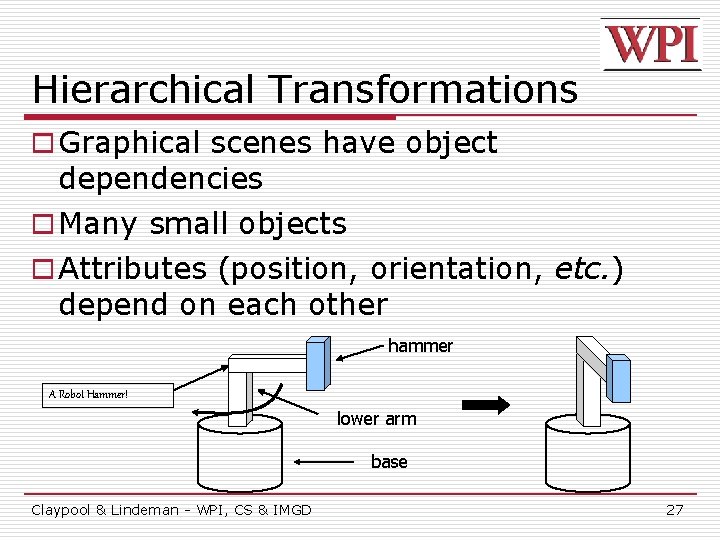
Hierarchical Transformations o Graphical scenes have object dependencies o Many small objects o Attributes (position, orientation, etc. ) depend on each other hammer A Robot Hammer! lower arm base Claypool & Lindeman - WPI, CS & IMGD 27
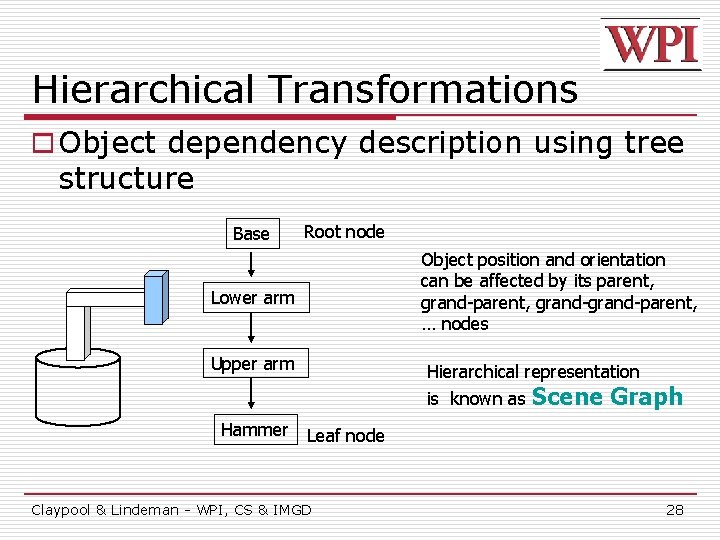
Hierarchical Transformations o Object dependency description using tree structure Base Root node Object position and orientation can be affected by its parent, grand-grand-parent, … nodes Lower arm Upper arm Hierarchical representation is known as Hammer Scene Graph Leaf node Claypool & Lindeman - WPI, CS & IMGD 28
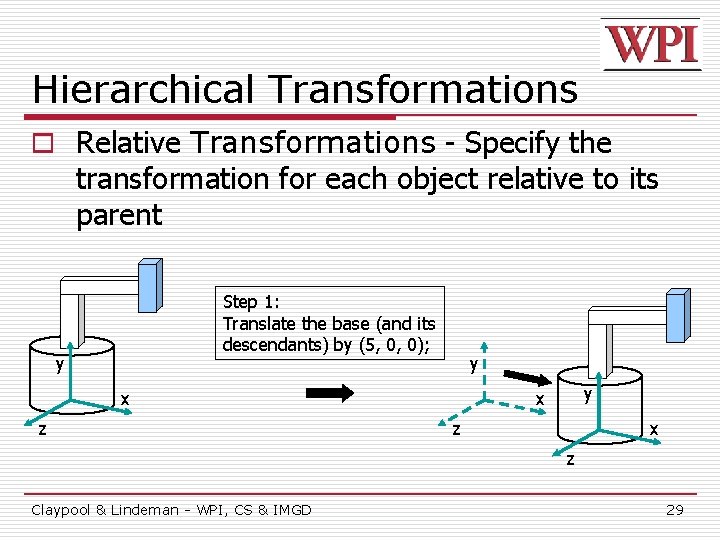
Hierarchical Transformations o Relative Transformations - Specify the transformation for each object relative to its parent Step 1: Translate the base (and its descendants) by (5, 0, 0); y y x z y x x z z Claypool & Lindeman - WPI, CS & IMGD 29
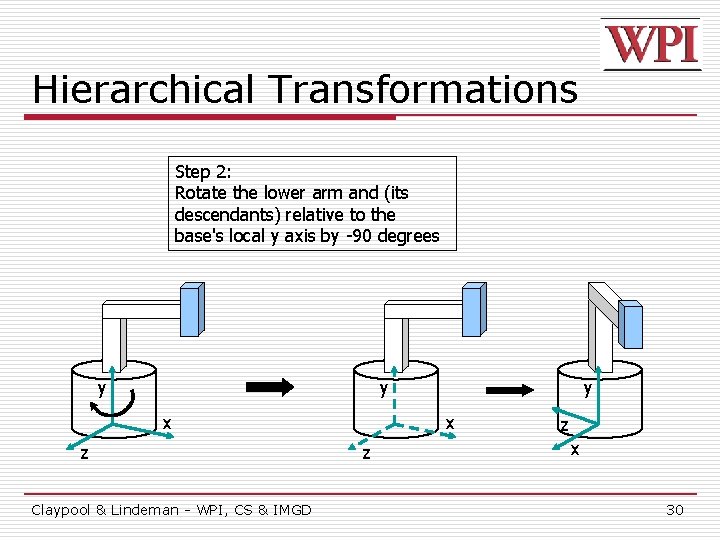
Hierarchical Transformations Step 2: Rotate the lower arm and (its descendants) relative to the base's local y axis by -90 degrees y y x z Claypool & Lindeman - WPI, CS & IMGD y x z z x 30
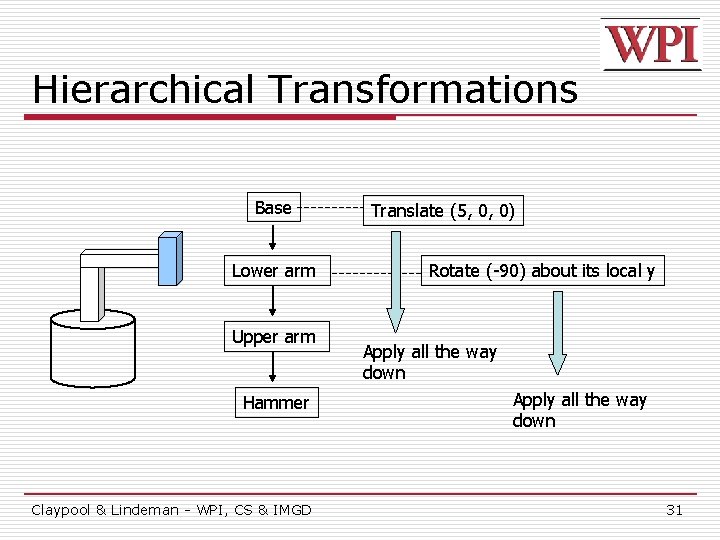
Hierarchical Transformations Base Lower arm Upper arm Hammer Claypool & Lindeman - WPI, CS & IMGD Translate (5, 0, 0) Rotate (-90) about its local y Apply all the way down 31
Transformation uses Matrices o All transformations can be performed using matrix/vector multiplication o Allows pre-multiplication of all matrices o Note: point (x, y) needs to be represented as (x, y, 1), also called homogeneous coordinates Claypool & Lindeman - WPI, CS & IMGD 32
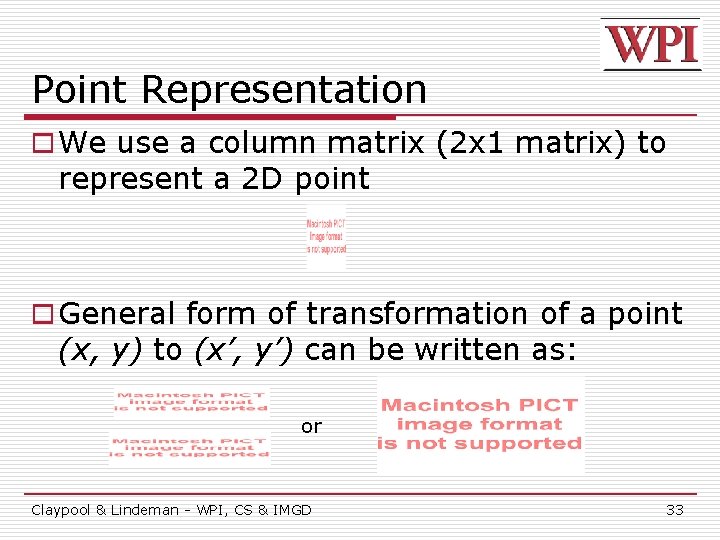
Point Representation o We use a column matrix (2 x 1 matrix) to represent a 2 D point o General form of transformation of a point (x, y) to (x’, y’) can be written as: or Claypool & Lindeman - WPI, CS & IMGD 33
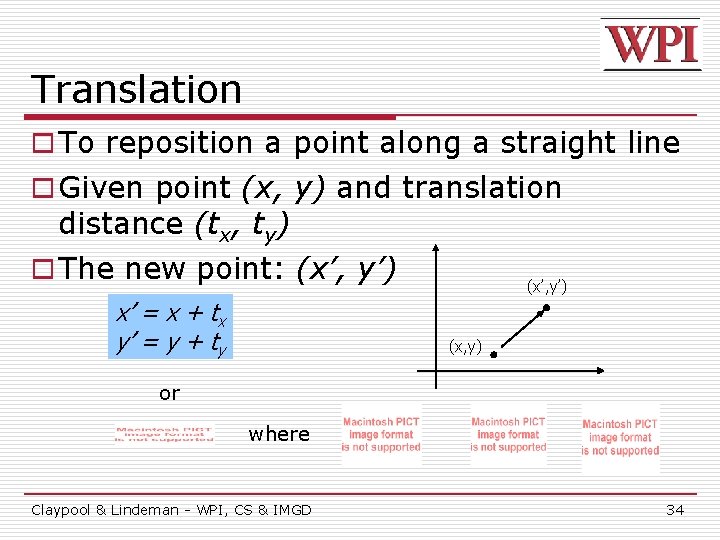
Translation o To reposition a point along a straight line o Given point (x, y) and translation distance (tx, ty) o The new point: (x’, y’) x’ = x + tx y’ = y + ty (x’, y’) (x, y) or where Claypool & Lindeman - WPI, CS & IMGD 34
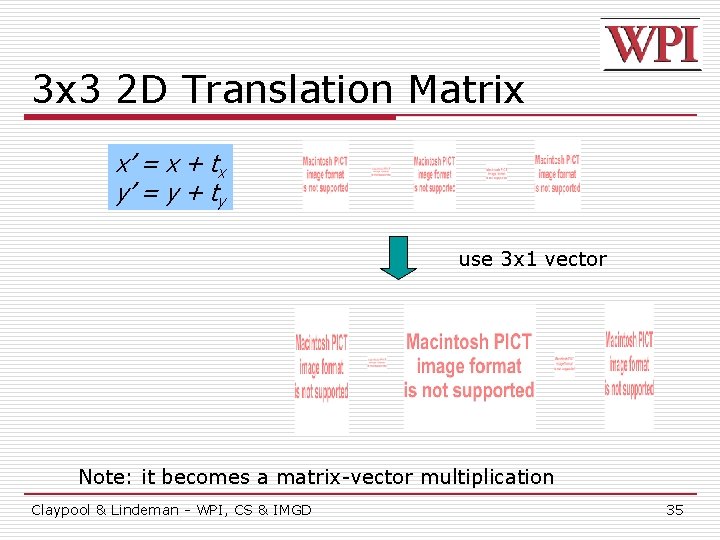
3 x 3 2 D Translation Matrix x’ = x + tx y’ = y + ty use 3 x 1 vector Note: it becomes a matrix-vector multiplication Claypool & Lindeman - WPI, CS & IMGD 35
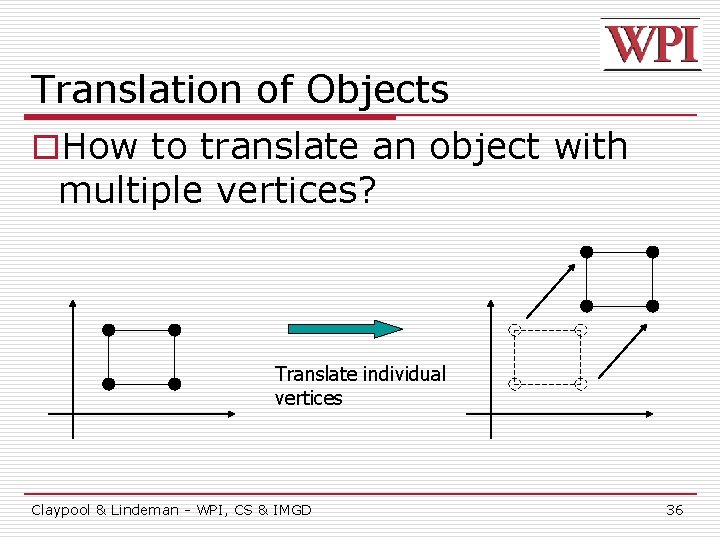
Translation of Objects o. How to translate an object with multiple vertices? Translate individual vertices Claypool & Lindeman - WPI, CS & IMGD 36
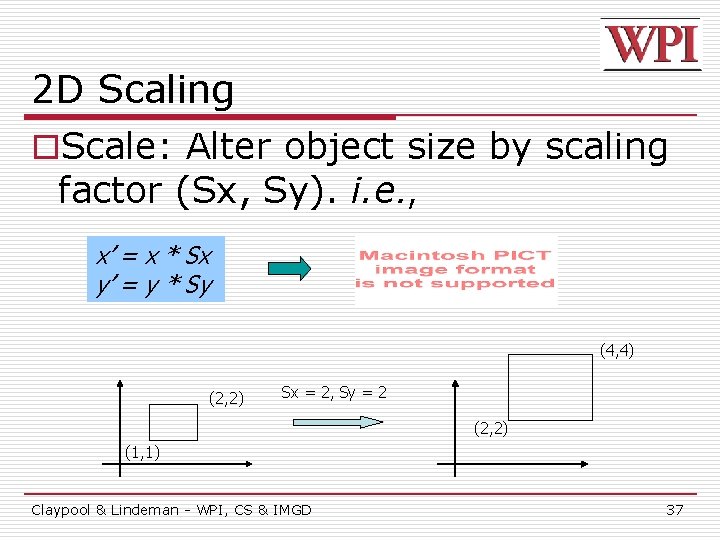
2 D Scaling o. Scale: Alter object size by scaling factor (Sx, Sy). i. e. , x’ = x * Sx y’ = y * Sy (4, 4) (2, 2) Sx = 2, Sy = 2 (2, 2) (1, 1) Claypool & Lindeman - WPI, CS & IMGD 37
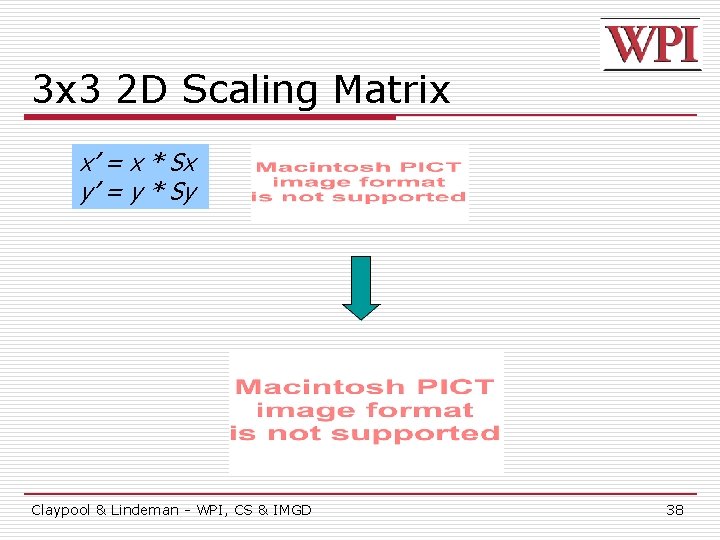
3 x 3 2 D Scaling Matrix x’ = x * Sx y’ = y * Sy Claypool & Lindeman - WPI, CS & IMGD 38
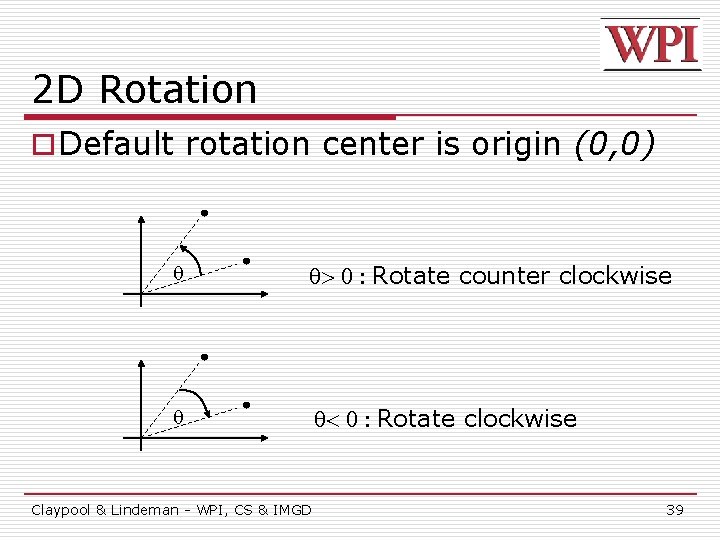
2 D Rotation o Default rotation center is origin (0, 0) > 0 : Rotate counter clockwise < 0 : Rotate clockwise Claypool & Lindeman - WPI, CS & IMGD 39
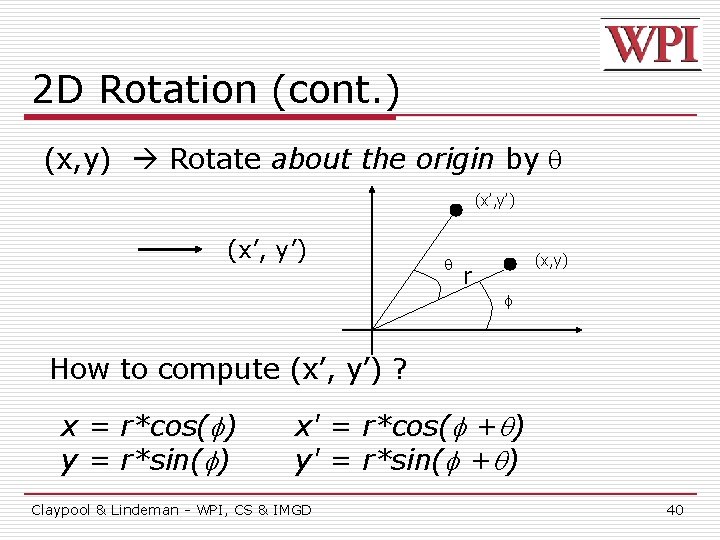
2 D Rotation (cont. ) (x, y) Rotate about the origin by (x’, y’) (x, y) r f How to compute (x’, y’) ? x = r*cos( ) y = r*sin( ) x' = r*cos( + ) y' = r*sin( + ) Claypool & Lindeman - WPI, CS & IMGD 40
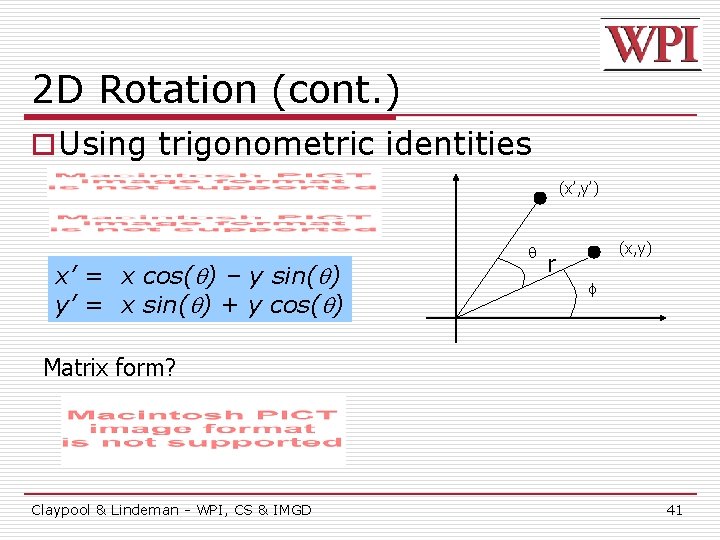
2 D Rotation (cont. ) o Using trigonometric identities (x’, y’) x’ = x cos( ) – y sin( ) y’ = x sin( ) + y cos( ) (x, y) r f Matrix form? Claypool & Lindeman - WPI, CS & IMGD 41
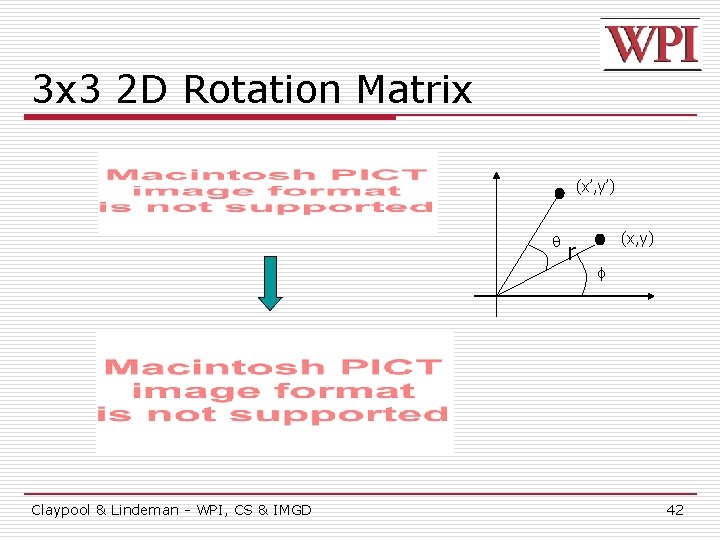
3 x 3 2 D Rotation Matrix (x’, y’) Claypool & Lindeman - WPI, CS & IMGD r (x, y) f 42
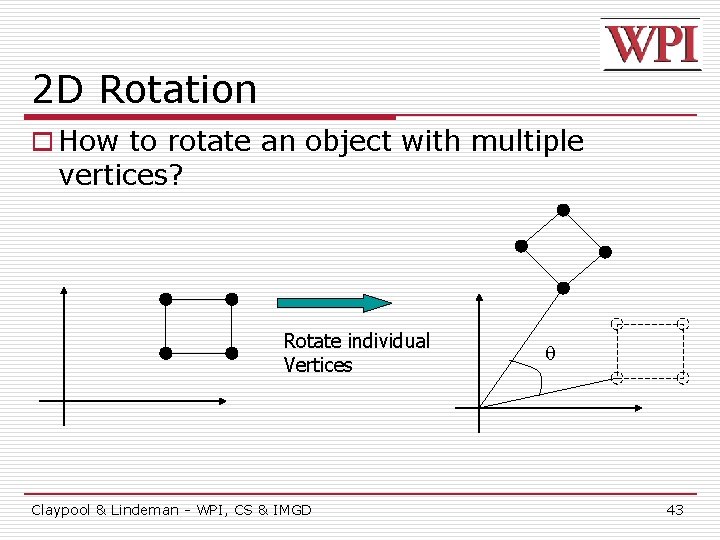
2 D Rotation o How to rotate an object with multiple vertices? Rotate individual Vertices Claypool & Lindeman - WPI, CS & IMGD 43
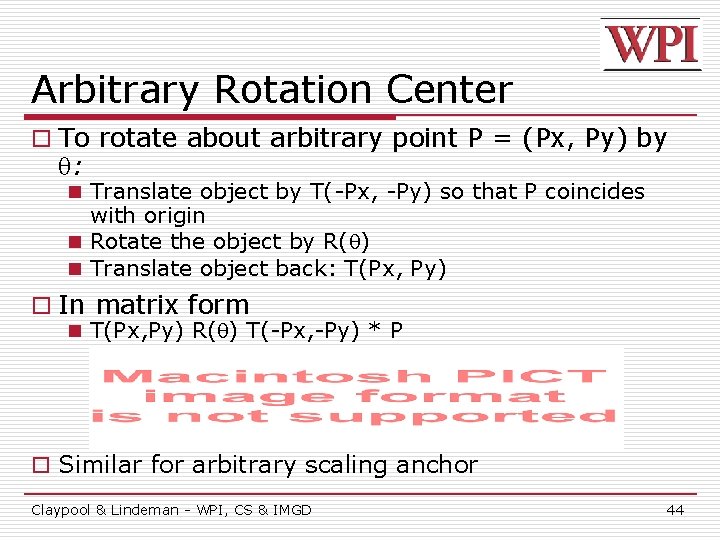
Arbitrary Rotation Center o To rotate about arbitrary point P = (Px, Py) by : n Translate object by T(-Px, -Py) so that P coincides with origin n Rotate the object by R( ) n Translate object back: T(Px, Py) o In matrix form n T(Px, Py) R( ) T(-Px, -Py) * P o Similar for arbitrary scaling anchor Claypool & Lindeman - WPI, CS & IMGD 44
Composing Transformations o Composing transformations n Applying several transforms in succession to form one overall transformation o Example n M 1 X M 2 X M 3 X P where M 1, M 2, M 3 are transform matrices applied to P o Be careful with the order! o For example n Translate by (5, 0), then rotate 60 degrees is NOT same as n Rotate by 60 degrees, then translate by (5, 0) Claypool & Lindeman - WPI, CS & IMGD 45
- Slides: 45