
ICOM 5016 Introduction to Database Systems Dr Manuel
ICOM 5016 - Introduction to Database Systems Dr. Manuel Rodríguez-Martínez Electrical and Computer Engineering Department Lecture 10 – Storage Organization II ©Manuel Rodriguez – All rights reserved
Readings • Read – Chapter 11 ICOM 5016 Dr. Manuel Rodriguez Martinez 2
Storage in Modern Computers • Storage can be classified into two categories – Volatile – Non-Volatile • Volatile is fast, expensive, limited in size and lost if Computer is turned off – CPU Cache – Main Memory • Non-volatile is cheaper, slower, with higher capacity and persistent – – Flash drives Magnetic Disks Optical Disks Tape ICOM 5016 Dr. Manuel Rodriguez Martinez 3

Storage in Modern Computers • Alternative Nomenclature – Primary Storage – Secondary Storage – Tertiary Storage • Primary Storage – Cache, Main Memory • Secondary Storage – Flash Memory, Magnetic Disk • Tertiary Storage – Optical Disks, CDs, DVDs, Tape ICOM 5016 Dr. Manuel Rodriguez Martinez 4
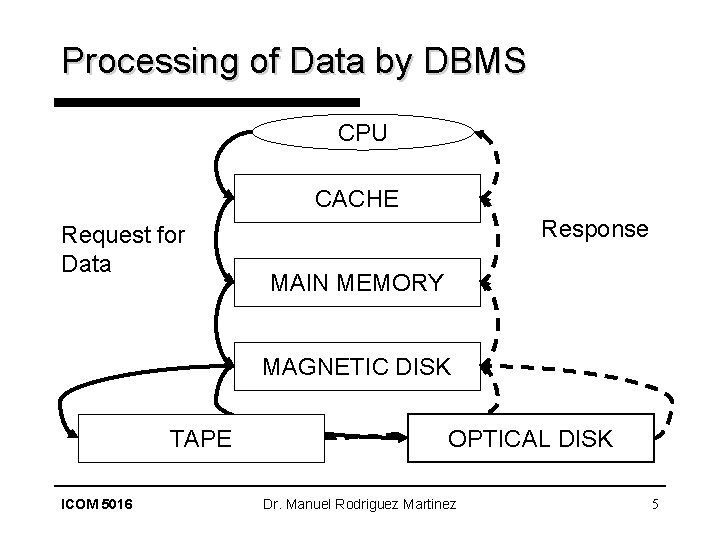
Processing of Data by DBMS CPU CACHE Request for Data Response MAIN MEMORY MAGNETIC DISK TAPE ICOM 5016 OPTICAL DISK Dr. Manuel Rodriguez Martinez 5
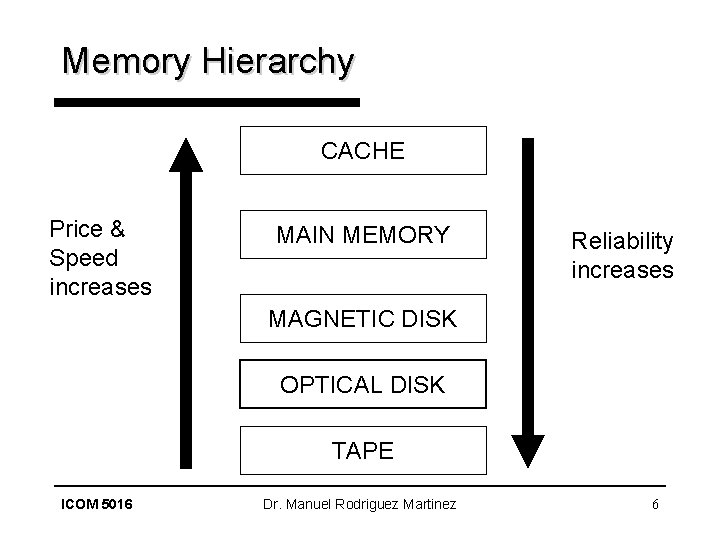
Memory Hierarchy CACHE Price & Speed increases MAIN MEMORY Reliability increases MAGNETIC DISK OPTICAL DISK TAPE ICOM 5016 Dr. Manuel Rodriguez Martinez 6
DBMS and Storage • DBMS will try to keep in memory frequently used data • Go to disk only when you have to – Primary vs Secondary Storage Performance • If you need to go to tape or optical disk, bring lots of data (e. g. a few dozen or hundred MBs) – Secondary vs Tertiary Storage Performance • Most DBMS use tertiary storage to bring dataset that are big and used on one or few seldom run queries – Ex: Satellite Images, old data from backups • Magnetic Disk (or simply Disk) is the predominant method for storage in DBMS ICOM 5016 Dr. Manuel Rodriguez Martinez 7
Performance in DBMS • The performance of a DBMS depends on: – CPU usage – I/O usage – Network usage • We shall concentrate on I/O • Disk I/O performance can be defined in terms of: – Resource usage time: time using the disk – Response time: wall-clock time to complete the query – Number of I/Os: number of times an I/O operation is performed • Parallel I/O – bringing data from various disk simultaneously – Response time <> Resource usage time – In this case usually Response time << Resource usage time ICOM 5016 Dr. Manuel Rodriguez Martinez 8

Single Disk Organization System Bus Controller CPU Memory Disk Controller Bus ICOM 5016 Dr. Manuel Rodriguez Martinez 9
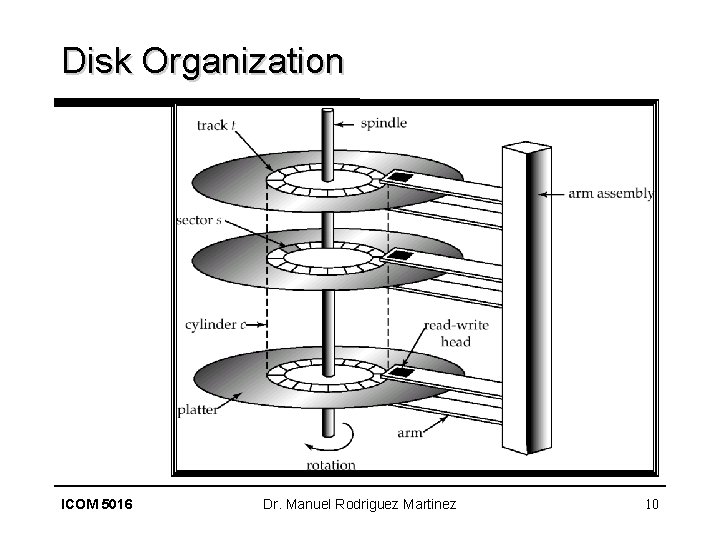
Disk Organization ICOM 5016 Dr. Manuel Rodriguez Martinez 10
Few Notes on Disks • Too expensive and inefficient to bring a few bytes from disk • You often bring one ore more disk blocks • 1 block is the minimal amount of I/O done on disk – For a read or write operation (rw operation) – 1 I/O = 1 block , for read and write • 1 block consist of one or more disk sectors – Implementation of file system layer in DBMS defines this • Few magic numbers for block sizes – 512 bytes – 1 KB – 4 KB ICOM 5016 Dr. Manuel Rodriguez Martinez 11
Cost of performing I/O • To access a single block the cost if defined as – Cost = seek time + rotational delay + transfer time • Seek Time – Time for the arm to get into the right track (or cylinder) – Mechanical movement cost • Rotational Delay – Time before the target block gets underneath the reading head • ½ of time for 1 disk rotation – Mechanical movement cost • Transfer time – Time to move the bytes from the disk into the RAM – Electronics cost ICOM 5016 Dr. Manuel Rodriguez Martinez 12
Example • Let a disk have: – – Average seek time of 11 ms Rotational delay of 6 ms Transfer rate of 10 MB/sec Block size of 1 KB • How much is the cost for one I/O? Recall that 1 KB = 1024 bytes ICOM 5016 Dr. Manuel Rodriguez Martinez 13
Random I/O vs Sequential I/O • Let B 1, B 2, …, Bn be a sequence of n blocks to be read/written from disk • Random I/O – Blocks are read/written from difference regions on the disk – In worst case, one seek and delay per block. • Cost = n * (seek + delay + transfer time) • Sequential I/O – Blocks are read/written one after the other from the same cylinder or adjacent cylinder (just a few seeks and delays) – In best case, after we reach B 1, all others blocks show up next without incurring in seek or delay cost • Cost = seek + delay + n*(transfer time) • DBMS want to do Sequential I/O!!! ICOM 5016 Dr. Manuel Rodriguez Martinez 14
Example • A disk has seek time of 8 ms, rotational delay of 4 ms, 12 MB/sec transfer rate, 4 double-sized platter, 512 byte sector, block of 2 sectors, 50 sectors per track, and 2000 tracks per surface: – How much capacity this disk has? – How much space does a cylinder has? ICOM 5016 Dr. Manuel Rodriguez Martinez 15

Example • How long would it take to read 20, 000 blocks with random I/O? • How long would it take to read 20, 000 blocks with ideal sequential I/O? ICOM 5016 Dr. Manuel Rodriguez Martinez 16
Notes on Disks • Yet another nomenclature – On-line storage: secondary storage – Off-line storage: tertiary storage • Many disk put memory buffer on the disk – Allows this buffers to control the rate at which data are exchanged with main memory – Idea is to minimize amount of time waiting for disk – But, this has implication in terms of transactions and recovery • What is power goes out when the data was on the buffers but before it was written to disk? ICOM 5016 Dr. Manuel Rodriguez Martinez 17
Disks as performance bottlenecks … • Microprocessor speed increase 50% per year. • Disk performance improvements – Access time decreases 10% per year – Transfer rate decreases 20% per year • Disk crash results in data loss. • Solution: Disk array – Have several disk behave as a single, large and very fast disk. • Parallel I/O – Put some redundancy to recover from a failure somewhere in the array ICOM 5016 Dr. Manuel Rodriguez Martinez 18
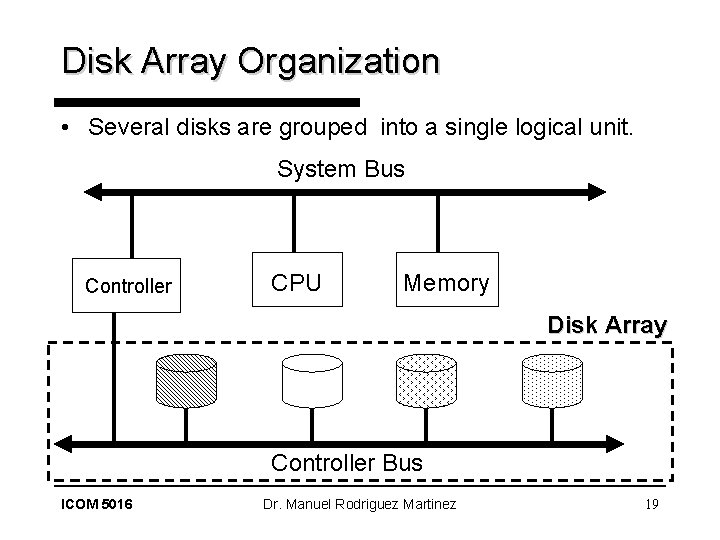
Disk Array Organization • Several disks are grouped into a single logical unit. System Bus Controller CPU Memory Disk Array Controller Bus ICOM 5016 Dr. Manuel Rodriguez Martinez 19
Disk Striping • Disk Striping is a mechanism to divide the data in a file into segments that are scattered over the disks of the disk array. • The minimum size of a segment is 1 bit, in which case each data blocks must be read from several disks to extract the appropriate bits. – The drawback of this approach is the overhead of managing data at the level of bits. • Better approach is to have a striping unit of 1 disk block. – Sequential I/O can be run parallel since block can be fetched in parallel from the disks. ICOM 5016 Dr. Manuel Rodriguez Martinez 20
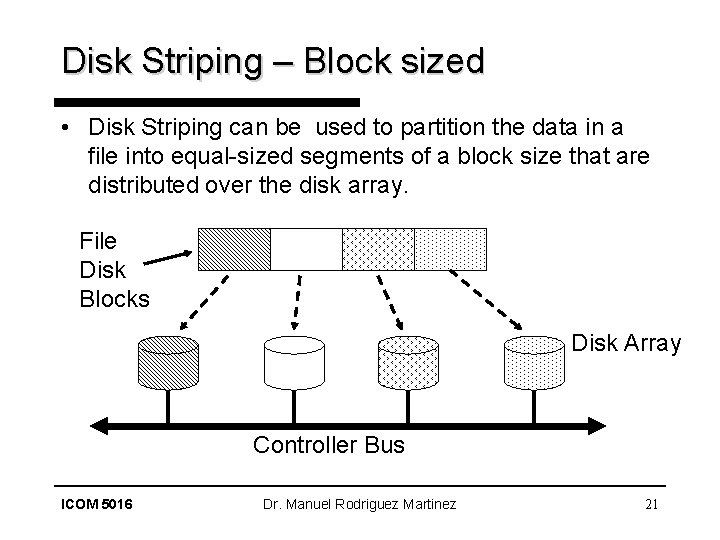
Disk Striping – Block sized • Disk Striping can be used to partition the data in a file into equal-sized segments of a block size that are distributed over the disk array. File Disk Blocks Disk Array Controller Bus ICOM 5016 Dr. Manuel Rodriguez Martinez 21
Data Allocation • Data is partitioned into equal sized segments – Striping unit • Each segment is stored in a different disk of the arrays • Typically, round-robin algorithm is used • If we have n disks, then block i is stored at disk – i mod n • Example: Array of 5 disks, and file of 1 MB with a 4 KB Striping unit – – Disk 0: gets blocks: 0, 5, 10, 15, 20, … Disk 1: gets blocks: 1, 6, 11, 16, 21, … Disk 2: gets blocks: 2, 7, 12, 17, 22, … Etc. ICOM 5016 Dr. Manuel Rodriguez Martinez 22
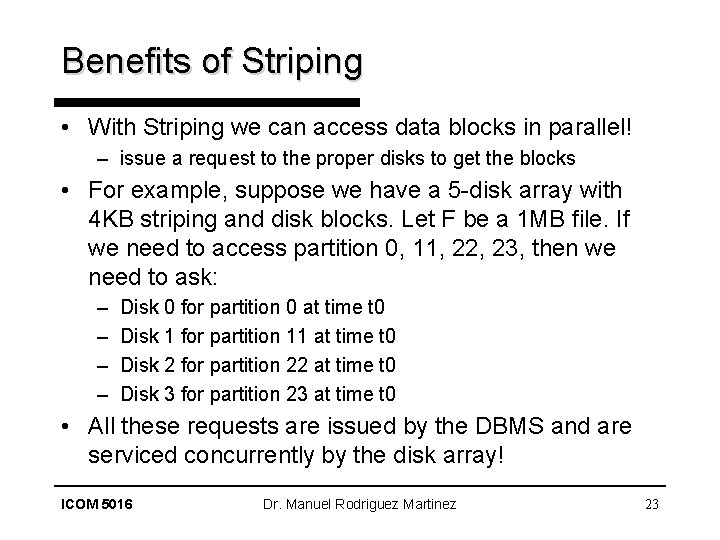
Benefits of Striping • With Striping we can access data blocks in parallel! – issue a request to the proper disks to get the blocks • For example, suppose we have a 5 -disk array with 4 KB striping and disk blocks. Let F be a 1 MB file. If we need to access partition 0, 11, 22, 23, then we need to ask: – – Disk 0 for partition 0 at time t 0 Disk 1 for partition 11 at time t 0 Disk 2 for partition 22 at time t 0 Disk 3 for partition 23 at time t 0 • All these requests are issued by the DBMS and are serviced concurrently by the disk array! ICOM 5016 Dr. Manuel Rodriguez Martinez 23
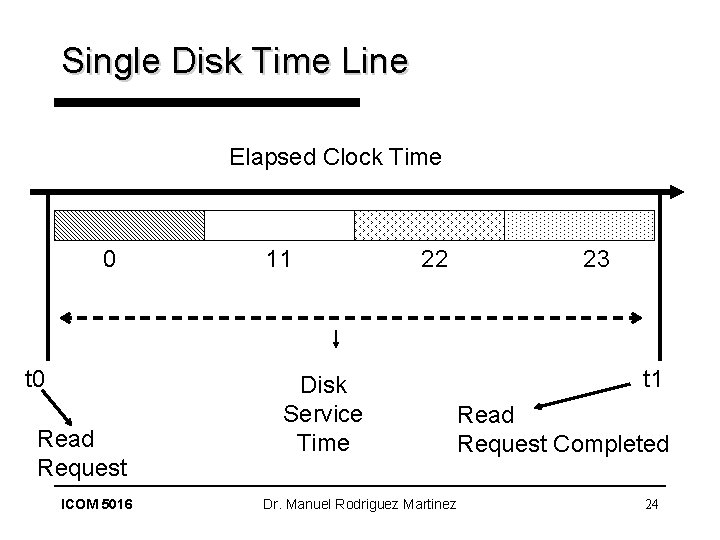
Single Disk Time Line Elapsed Clock Time 0 t 0 Read Request ICOM 5016 11 22 Disk Service Time Dr. Manuel Rodriguez Martinez 23 t 1 Read Request Completed 24
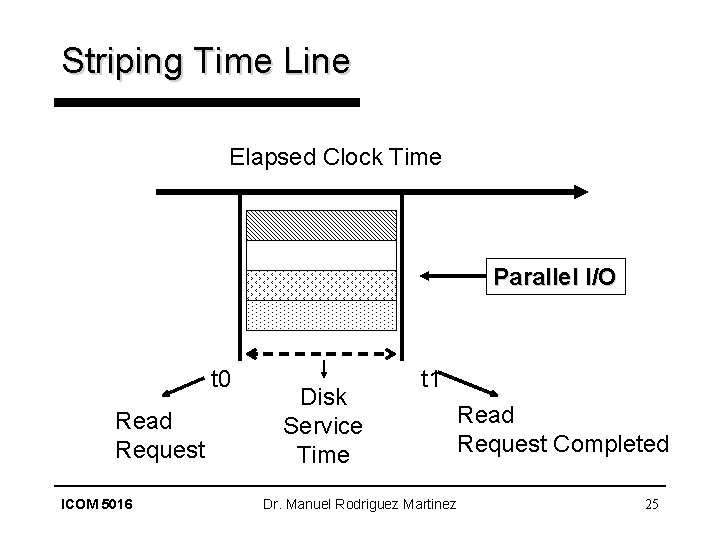
Striping Time Line Elapsed Clock Time Parallel I/O t 0 Read Request ICOM 5016 Disk Service Time t 1 Dr. Manuel Rodriguez Martinez Read Request Completed 25
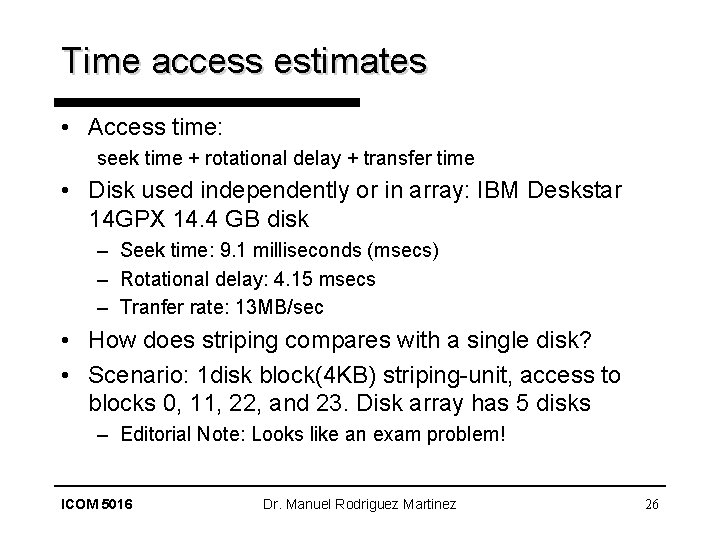
Time access estimates • Access time: seek time + rotational delay + transfer time • Disk used independently or in array: IBM Deskstar 14 GPX 14. 4 GB disk – Seek time: 9. 1 milliseconds (msecs) – Rotational delay: 4. 15 msecs – Tranfer rate: 13 MB/sec • How does striping compares with a single disk? • Scenario: 1 disk block(4 KB) striping-unit, access to blocks 0, 11, 22, and 23. Disk array has 5 disks – Editorial Note: Looks like an exam problem! ICOM 5016 Dr. Manuel Rodriguez Martinez 26
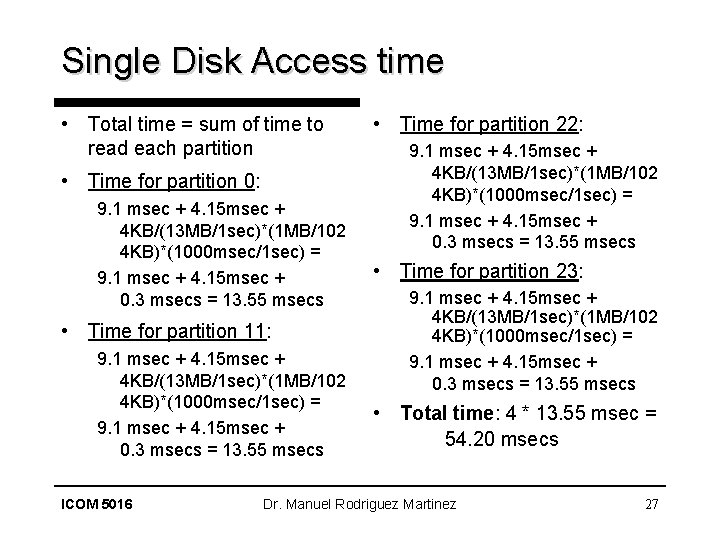
Single Disk Access time • Total time = sum of time to read each partition • Time for partition 0: 9. 1 msec + 4. 15 msec + 4 KB/(13 MB/1 sec)*(1 MB/102 4 KB)*(1000 msec/1 sec) = 9. 1 msec + 4. 15 msec + 0. 3 msecs = 13. 55 msecs • Time for partition 11: 9. 1 msec + 4. 15 msec + 4 KB/(13 MB/1 sec)*(1 MB/102 4 KB)*(1000 msec/1 sec) = 9. 1 msec + 4. 15 msec + 0. 3 msecs = 13. 55 msecs ICOM 5016 • Time for partition 22: 9. 1 msec + 4. 15 msec + 4 KB/(13 MB/1 sec)*(1 MB/102 4 KB)*(1000 msec/1 sec) = 9. 1 msec + 4. 15 msec + 0. 3 msecs = 13. 55 msecs • Time for partition 23: 9. 1 msec + 4. 15 msec + 4 KB/(13 MB/1 sec)*(1 MB/102 4 KB)*(1000 msec/1 sec) = 9. 1 msec + 4. 15 msec + 0. 3 msecs = 13. 55 msecs • Total time: 4 * 13. 55 msec = 54. 20 msecs Dr. Manuel Rodriguez Martinez 27
Striping Access Time • Total time: maximum time to complete any read quest. • Following same calculation as in previous slide: – – Time for partition 0: 13. 55 msec Time for partition 11: 13. 55 msec Time for partition 22: 13. 55 msec Time for partition 23: 13. 55 msec • Total time: – max{13. 55 msec, 13. 55 msec} = 13. 55 msec • In this case, Striping gives us a 4 -1 better (4 times) performance because of parallel I/O. ICOM 5016 Dr. Manuel Rodriguez Martinez 28
The problem with Striping • Striping has the advantage of speeding up disk access time. • But the use of a disk array decrease the reliability of the storage system because more disks mean more possible points of failure. • Mean-time-to-failure (MTTF) – Mean time to have the disk fail and lose its data • MTTF is inversely proportional to the number of components in used by the system. – The more we have the more likely they will fall apart! ICOM 5016 Dr. Manuel Rodriguez Martinez 29
MTTF in disk array • Suppose we have a single disk with a MTTF of 50, 000 hrs (5. 7 years). • Then, if we build an array with 50 disks, then the have a MTTF for the array of 50, 000/50 = 1000 hrs, or 42 days!, because any disk can fail at any given time with equal probability. – Disk failures are more common when disks are new (bad disk from factory) or old (wear due to usage). • Morale of the story: More does not necessarily means better! ICOM 5016 Dr. Manuel Rodriguez Martinez 30
Increasing MTTF with redundancy • We can increase the MTTF in a disk array by storing some redundant information in the disk array. – This information can be used to recover from a disk failure. • This information should be carefully selected so it can be used to reconstruct original data after a failure. • What to store as redundant information? – full data block? – Parity bit for a set of bit locations across the disks ICOM 5016 Dr. Manuel Rodriguez Martinez 31
- Slides: 31