
IBM z Series Scholars Program WAS for zOS
IBM z. Series Scholars Program WAS for z/OS V 5: Assembling and Deploying a J 2 EE Application © Copyright IBM Corporation 2005 Course materials may not be reproduced in whole or in part without the prior written permission of IBM. 3. 3. 1
Unit Objectives IBM z. Series After completing this unit, you should be able to: § Plan process to install a new J 2 EE application § Develop a suitable naming convention for deployment § Use the Application Services Toolkit (ASTK) to assemble a new J 2 EE application § Use administration tool to deploy the application § Plan and execute the "non-GUI" tasks required to complete application setup § Test the new application using a local client § Describe migration issues between JDK 1. 3. 1 and JDK 1. 4. 1 © Copyright IBM Corporation 2005 2
Many Pieces IBM z. Series § WAS servers are like IMS or CICS regions – – – Tailored PROCs for controller region and servant region Tailored environmental variables for each server Tailored environmental variables for each instance of a server Tailored libraries for code Servers may be self-contained or dependent on other servers § Security – Regions have userids associated with them – Users are allowed access to servers and objects within § WLM – Classification of regions and work within – Application environments § Back-end connections – DBRMs – Comm area mappings and objects © Copyright IBM Corporation 2005 3
You've Got to Have a Template IBM z. Series § Server names – – Controller Region PROC names Servant Region PROC names Application Environment names Cluster names This is just my day job. . not my life! § Security – User/group/UID/GID • Controller regions • Servant regions • Unauthenticated users § PROCs – Environmental files – Library names § Other – Log names – HFS directory structures and file systems © Copyright IBM Corporation 2005 4
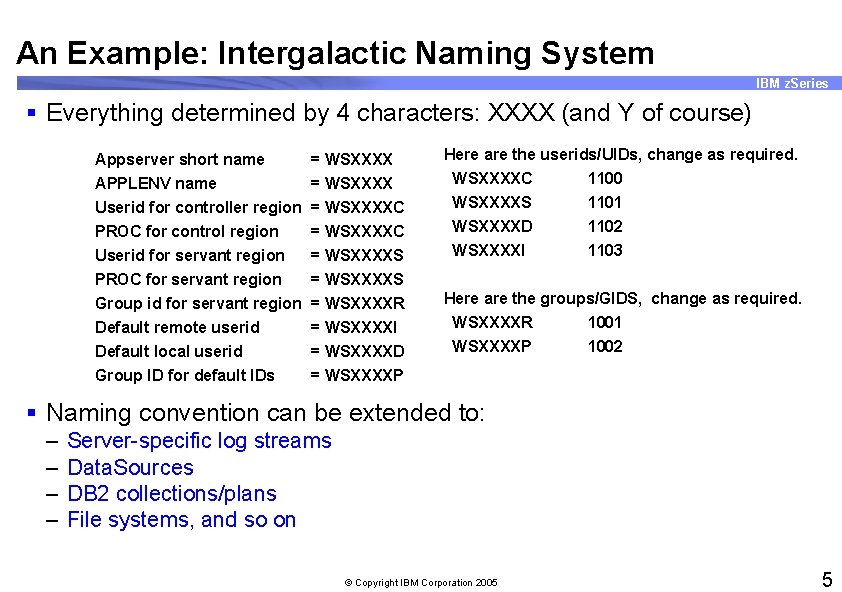
An Example: Intergalactic Naming System IBM z. Series § Everything determined by 4 characters: XXXX (and Y of course) Appserver short name APPLENV name Userid for controller region PROC for control region Userid for servant region = WSXXXXC = WSXXXXS Here are the userids/UIDs, change as required. WSXXXXC 1100 WSXXXXS 1101 WSXXXXD 1102 WSXXXXI 1103 PROC for servant region Group id for servant region Default remote userid Default local userid Group ID for default IDs = WSXXXXS = WSXXXXR = WSXXXXI = WSXXXXD = WSXXXXP Here are the groups/GIDS, change as required. WSXXXXR 1001 WSXXXXP 1002 § Naming convention can be extended to: – – Server-specific log streams Data. Sources DB 2 collections/plans File systems, and so on © Copyright IBM Corporation 2005 5
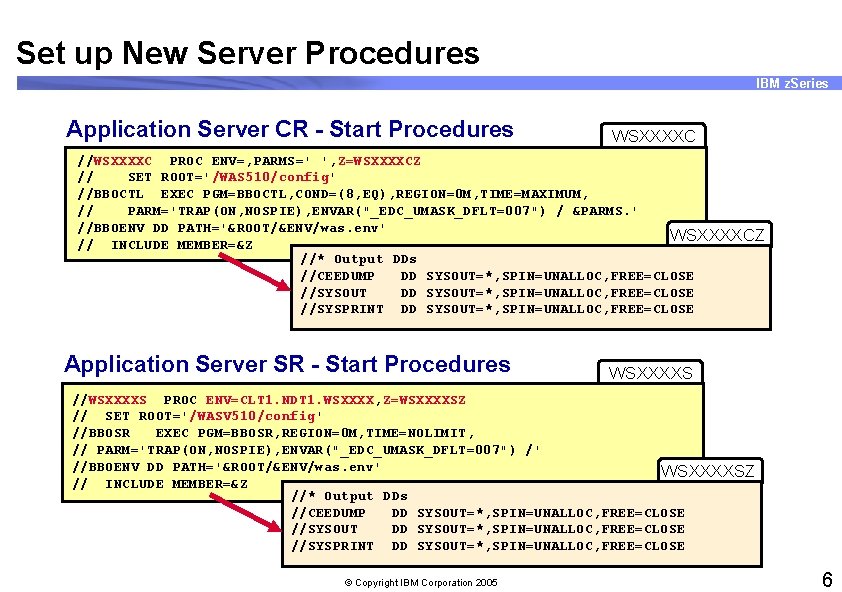
Set up New Server Procedures IBM z. Series Application Server CR - Start Procedures WSXXXXC //WSXXXXC PROC ENV=, PARMS=' ', Z=WSXXXXCZ // SET ROOT='/WAS 510/config' //BBOCTL EXEC PGM=BBOCTL, COND=(8, EQ), REGION=0 M, TIME=MAXIMUM, // PARM='TRAP(ON, NOSPIE), ENVAR("_EDC_UMASK_DFLT=007") / &PARMS. ' //BBOENV DD PATH='&ROOT/&ENV/was. env' WSXXXXCZ // INCLUDE MEMBER=&Z //* Output DDs //CEEDUMP DD SYSOUT=*, SPIN=UNALLOC, FREE=CLOSE //SYSOUT DD SYSOUT=*, SPIN=UNALLOC, FREE=CLOSE //SYSPRINT DD SYSOUT=*, SPIN=UNALLOC, FREE=CLOSE Application Server SR - Start Procedures WSXXXXS //WSXXXXS PROC ENV=CLT 1. NDT 1. WSXXXX, Z=WSXXXXSZ // SET ROOT='/WASV 510/config' //BBOSR EXEC PGM=BBOSR, REGION=0 M, TIME=NOLIMIT, // PARM='TRAP(ON, NOSPIE), ENVAR("_EDC_UMASK_DFLT=007") /' //BBOENV DD PATH='&ROOT/&ENV/was. env' WSXXXXSZ // INCLUDE MEMBER=&Z //* Output DDs //CEEDUMP DD SYSOUT=*, SPIN=UNALLOC, FREE=CLOSE //SYSOUT DD SYSOUT=*, SPIN=UNALLOC, FREE=CLOSE //SYSPRINT DD SYSOUT=*, SPIN=UNALLOC, FREE=CLOSE © Copyright IBM Corporation 2005 6
Time to "Get Real" IBM z. Series Now let's see if this thing really works? Just because the IVT works doesn't mean mere mortals can do it. © Copyright IBM Corporation 2005 7
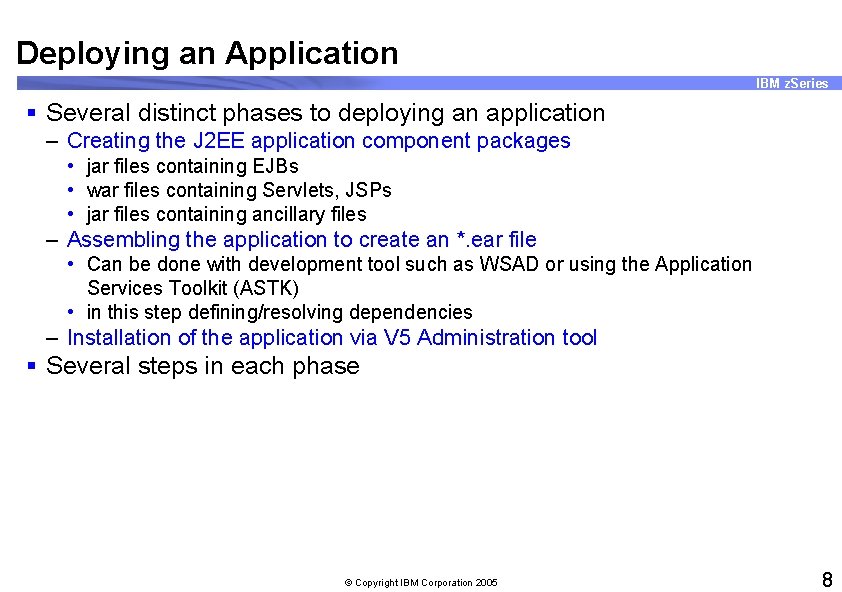
Deploying an Application IBM z. Series § Several distinct phases to deploying an application – Creating the J 2 EE application component packages • jar files containing EJBs • war files containing Servlets, JSPs • jar files containing ancillary files – Assembling the application to create an *. ear file • Can be done with development tool such as WSAD or using the Application Services Toolkit (ASTK) • in this step defining/resolving dependencies – Installation of the application via V 5 Administration tool § Several steps in each phase © Copyright IBM Corporation 2005 8
Step 0 IBM z. Series Provide your application developers a check list of information they must provide to deploy an application. § Decide on the naming convention § Understand the application's data requirements § Understand server/application requirements § Understand the security requirements § Understand the Web. Sphere V 5 eccentricities relative to your own installation’s eccentricities § And so on © Copyright IBM Corporation 2005 9
Step 1 IBM z. Series § Acquire a workstation with: – A development tool. IBM options • Web. Sphere Studio Application Developer V 5. 1. 1 (minimum) • Web. Sphere Studio Application Developer Integration Edition V 5. 1 (adds WBISF support) – Java 2 SDK V 1. 4 – Application Services Toolkit V 5. 1 – Internet Explorer browser for Admin tool § Applications can be developed and assembled on Web. Sphere Studio – Supporting jar files available – Easiest deployment © Copyright IBM Corporation 2005 10
Step 2 IBM z. Series § Export all application components from Web. Sphere Studio – Application EJB jar files – Application client EJB jar files – Client bindings jar files – Utility jar files – Servlet classes § Decide the packaging structure – Which classes go in which jar files – Which jar files should be in which ear – files Need assistance of developers © Copyright IBM Corporation 2005 11
Step 3 IBM z. Series § Use WSAD or ASTK to create the application. ear file – Packages components (jars, wars, and connectors) together – Can set attributes on components used by Web. Sphere containers at run time • Set Transaction attributes • Set Environment variables • Set Resources • Set EJB refs • Set Security refs • And so on – Attributes from assembly stored in deployment descriptor files © Copyright IBM Corporation 2005 12
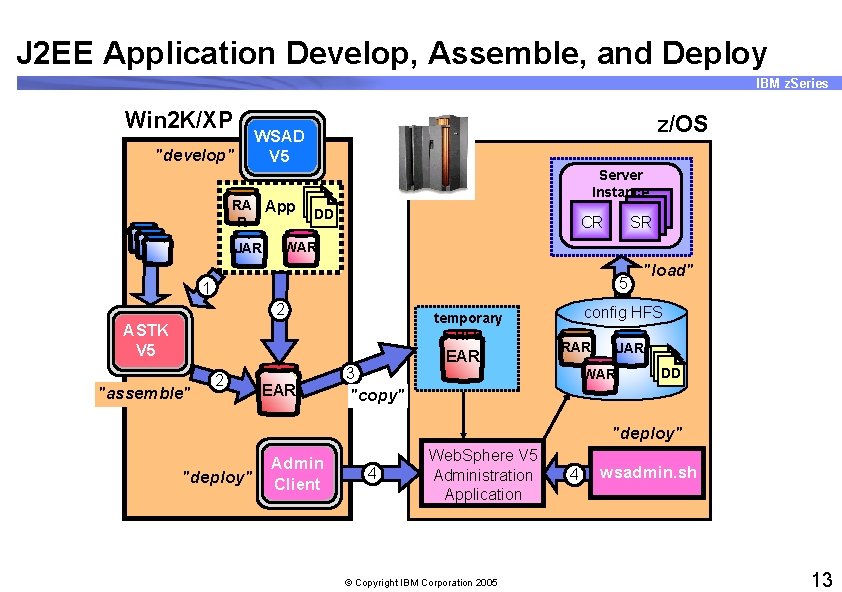
J 2 EE Application Develop, Assemble, and Deploy IBM z. Series Win 2 K/XP "develop" z/OS WSAD V 5 Server Instance RA App DD DD DD R JAR CR SR WAR 5 1 2 temporary HFS ASTK V 5 "assemble" 2 EAR 3 "load" config HFS RAR JAR WAR DD DD DD "copy" "deploy" Admin Client 4 Web. Sphere V 5 Administration Application © Copyright IBM Corporation 2005 4 wsadmin. sh 13
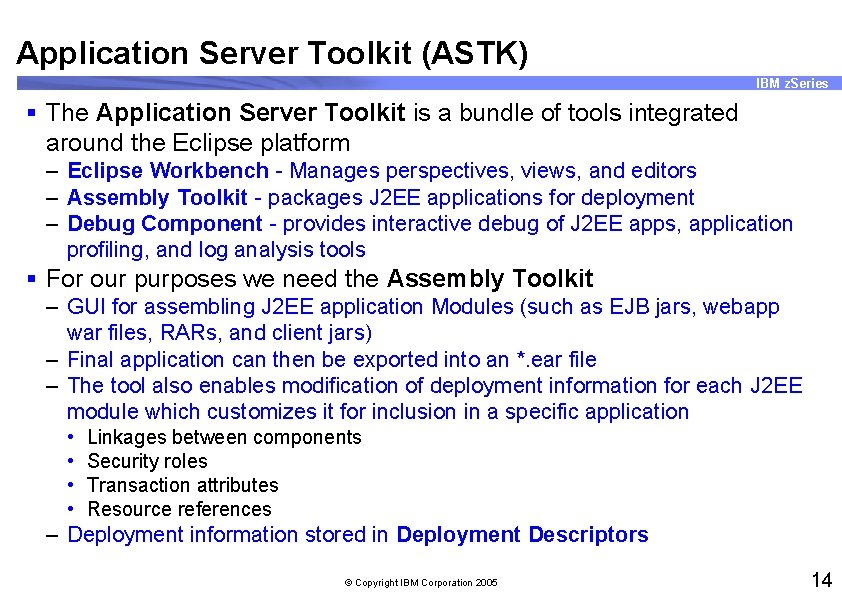
Application Server Toolkit (ASTK) IBM z. Series § The Application Server Toolkit is a bundle of tools integrated around the Eclipse platform – Eclipse Workbench - Manages perspectives, views, and editors – Assembly Toolkit - packages J 2 EE applications for deployment – Debug Component - provides interactive debug of J 2 EE apps, application profiling, and log analysis tools § For our purposes we need the Assembly Toolkit – GUI for assembling J 2 EE application Modules (such as EJB jars, webapp war files, RARs, and client jars) – Final application can then be exported into an *. ear file – The tool also enables modification of deployment information for each J 2 EE module which customizes it for inclusion in a specific application • • Linkages between components Security roles Transaction attributes Resource references – Deployment information stored in Deployment Descriptors © Copyright IBM Corporation 2005 14
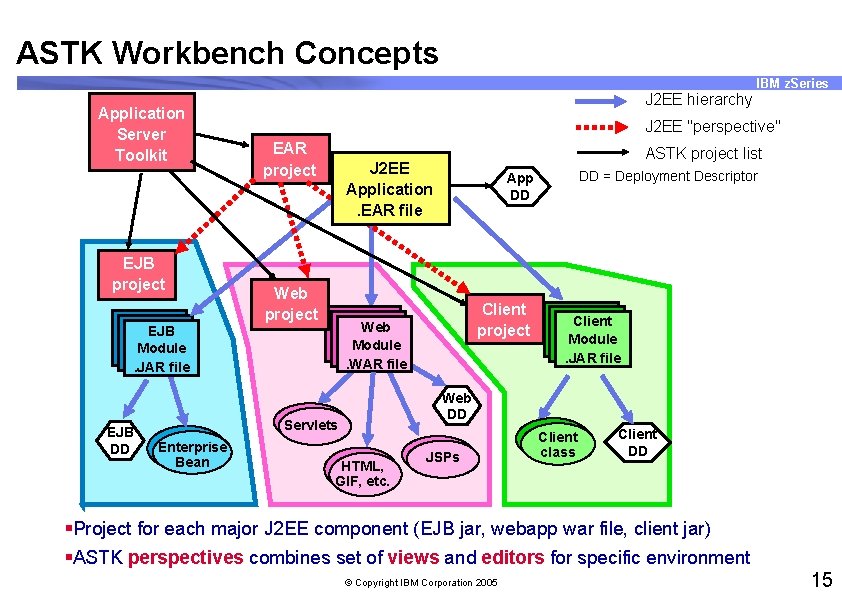
ASTK Workbench Concepts IBM z. Series Application Server Toolkit EJB project J 2 EE hierarchy J 2 EE "perspective" EAR project J 2 EE Application. EAR file Web project Client Module. JAR file Web DD Servlets Enterprise Bean DD = Deployment Descriptor App DD Web Module. WAR file EJB Module. JAR file EJB DD ASTK project list HTML, GIF, etc. JSPs Client class Client DD §Project for each major J 2 EE component (EJB jar, webapp war file, client jar) §ASTK perspectives combines set of views and editors for specific environment © Copyright IBM Corporation 2005 15
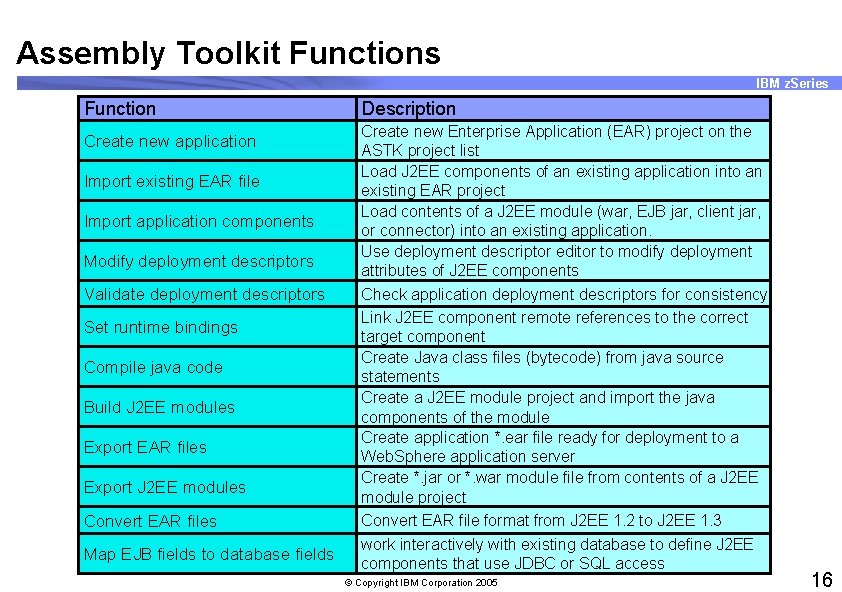
Assembly Toolkit Functions IBM z. Series Function Create new application Import existing EAR file Import application components Modify deployment descriptors Validate deployment descriptors Set runtime bindings Compile java code Build J 2 EE modules Export EAR files Export J 2 EE modules Convert EAR files Map EJB fields to database fields Description Create new Enterprise Application (EAR) project on the ASTK project list Load J 2 EE components of an existing application into an existing EAR project Load contents of a J 2 EE module (war, EJB jar, client jar, or connector) into an existing application. Use deployment descriptor editor to modify deployment attributes of J 2 EE components Check application deployment descriptors for consistency Link J 2 EE component remote references to the correct target component Create Java class files (bytecode) from java source statements Create a J 2 EE module project and import the java components of the module Create application *. ear file ready for deployment to a Web. Sphere application server Create *. jar or *. war module file from contents of a J 2 EE module project Convert EAR file format from J 2 EE 1. 2 to J 2 EE 1. 3 work interactively with existing database to define J 2 EE components that use JDBC or SQL access © Copyright IBM Corporation 2005 16
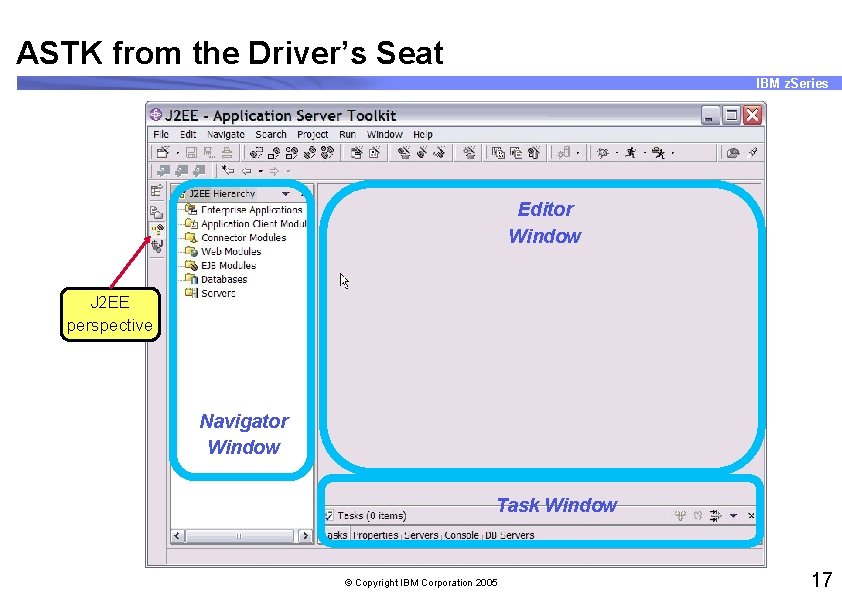
ASTK from the Driver’s Seat IBM z. Series Editor Window J 2 EE perspective Navigator Window Task Window © Copyright IBM Corporation 2005 17
Flow IBM z. Series § Create Application § Import components exported from Web. Sphere Studio or other tooling – – EJB. jar files Web app. war files RAR (Resource Adapter Archive) files J 2 EE client jar files § Include any extra files (non-jar and non-war) needed by the application § Resolve application deployment dependencies – Resources – Security – And so on § Verify the application code § Create the deployable. ear file – Contains application and EJB xml descriptor files © Copyright IBM Corporation 2005 18
Hints, Tips, and Gotchas IBM z. Series § ASTK will try to resolve needed classes during validation § Web. Sphere V 5 for z/OS does not include jars for: – Associations, access beans, finderhelpers, record, persistence builder, eab, ccf, and so on – Bring these jars with you in your deployment package or place them into the WAS runtime classpath § Assembly Toolkit is shipped on a CD together with the Web. Sphere for z/OS product tapes – – Insert the CD and double click on "setup. exe" to start the install Java JDK V 1. 4. 1 is integrated with product Have an option as to whether to install IBM Agent Controller When you first start the product, think about where to put default workspace data © Copyright IBM Corporation 2005 19
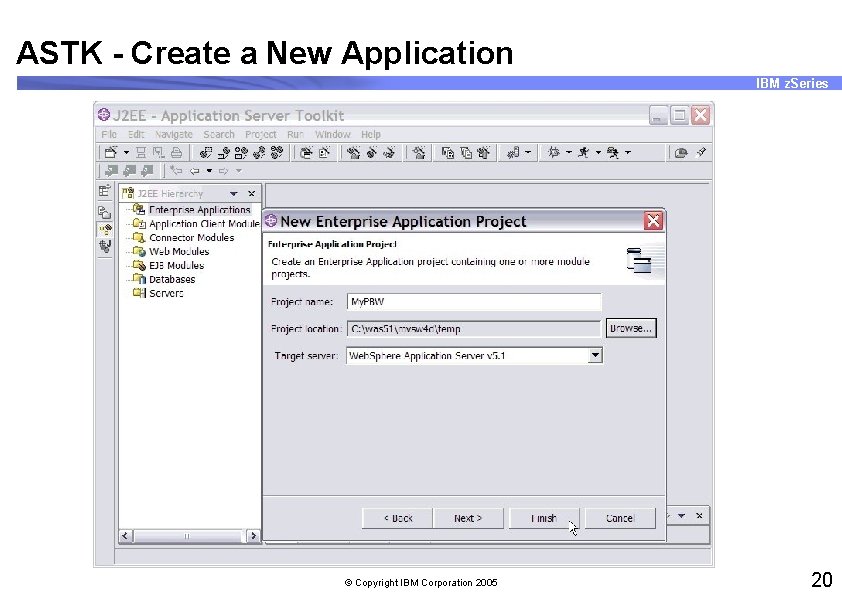
ASTK - Create a New Application IBM z. Series © Copyright IBM Corporation 2005 20
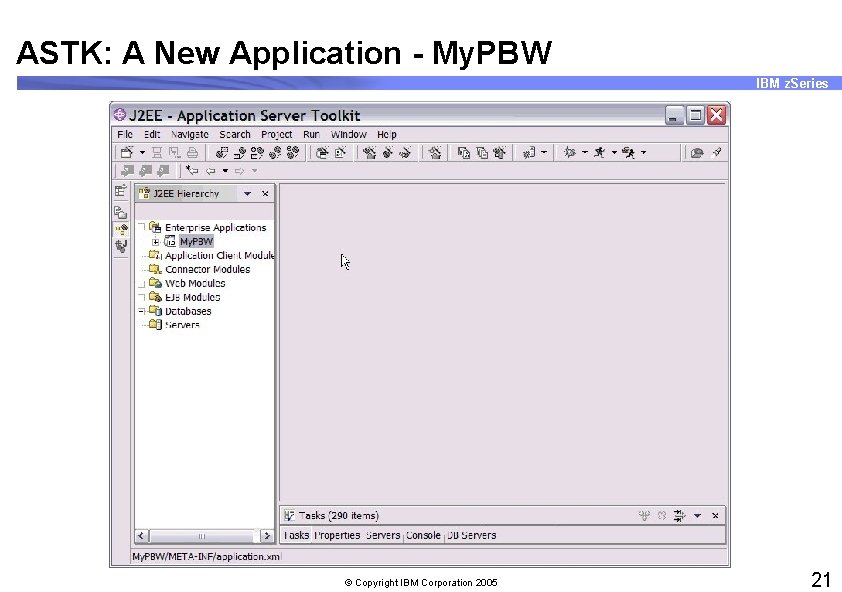
ASTK: A New Application - My. PBW IBM z. Series © Copyright IBM Corporation 2005 21
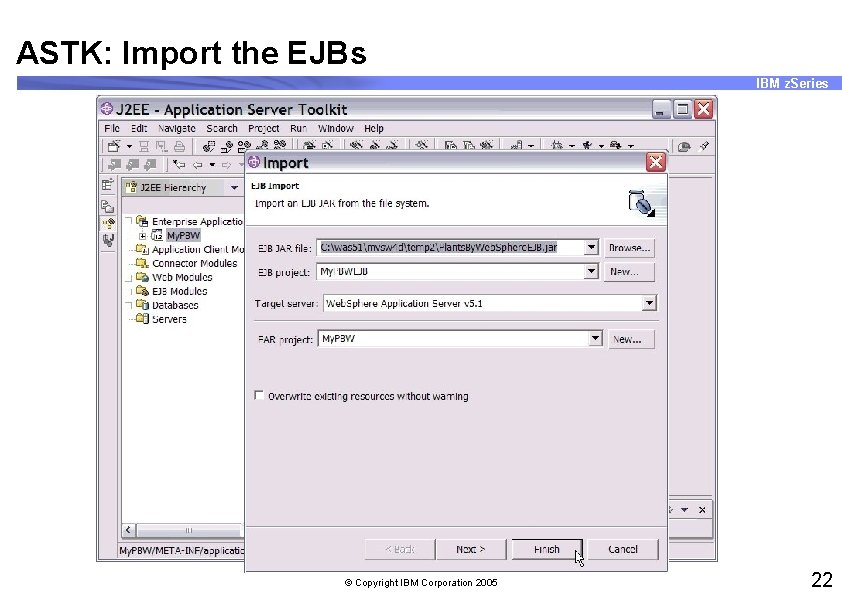
ASTK: Import the EJBs IBM z. Series © Copyright IBM Corporation 2005 22
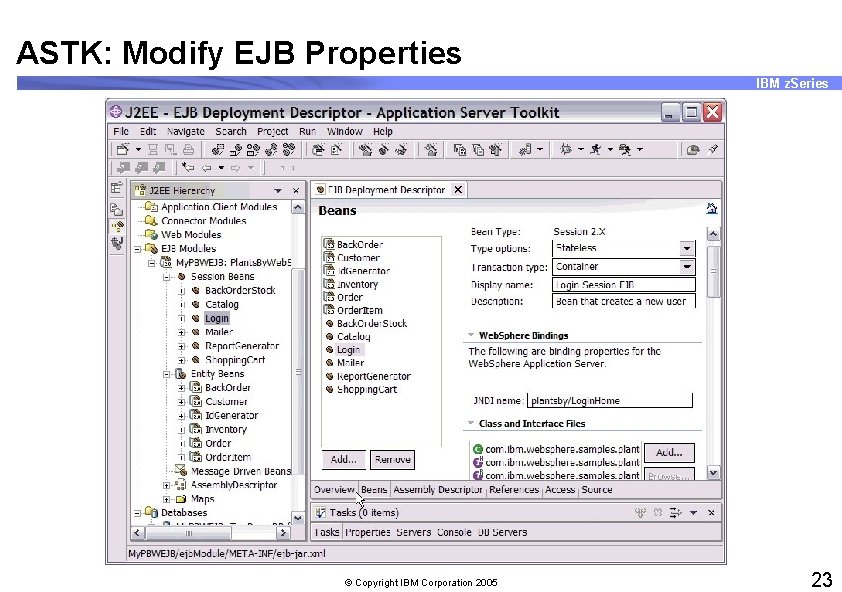
ASTK: Modify EJB Properties IBM z. Series © Copyright IBM Corporation 2005 23
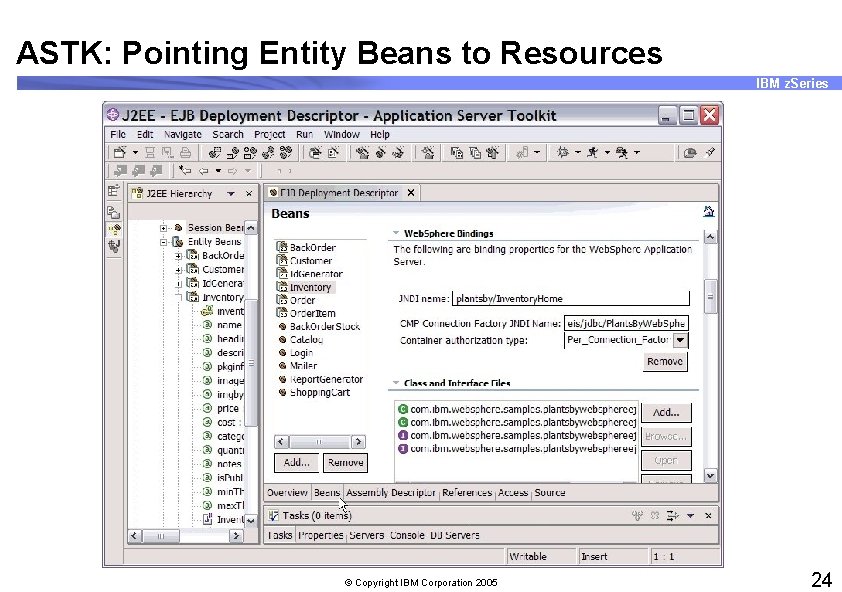
ASTK: Pointing Entity Beans to Resources IBM z. Series © Copyright IBM Corporation 2005 24
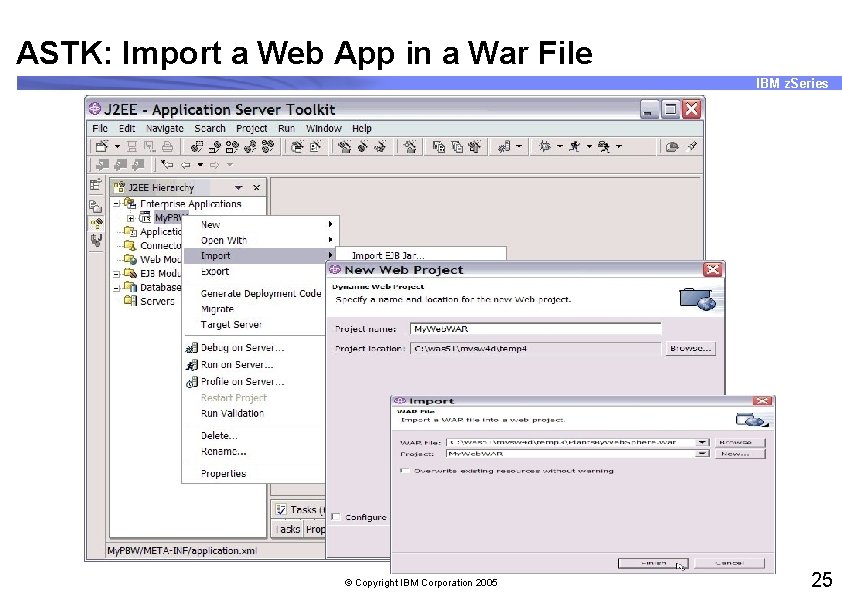
ASTK: Import a Web App in a War File IBM z. Series © Copyright IBM Corporation 2005 25
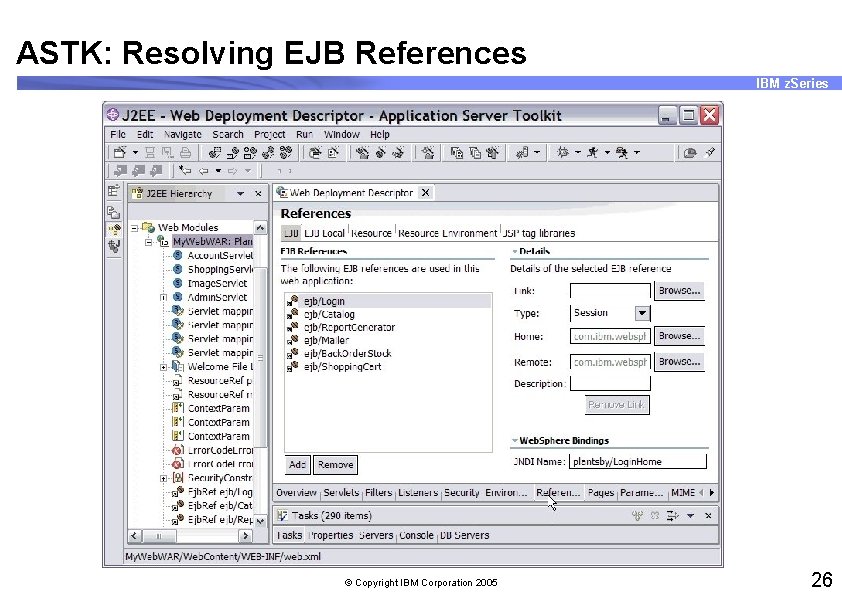
ASTK: Resolving EJB References IBM z. Series © Copyright IBM Corporation 2005 26
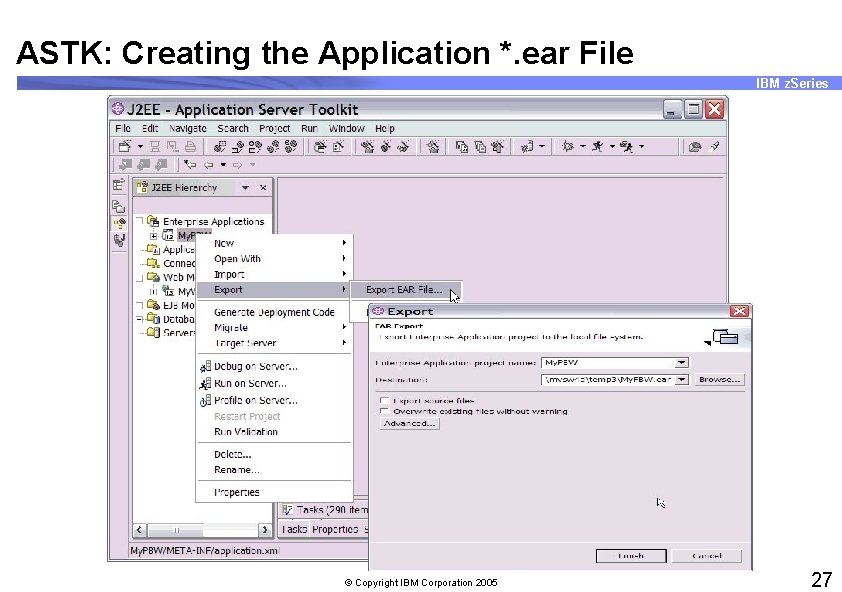
ASTK: Creating the Application *. ear File IBM z. Series © Copyright IBM Corporation 2005 27
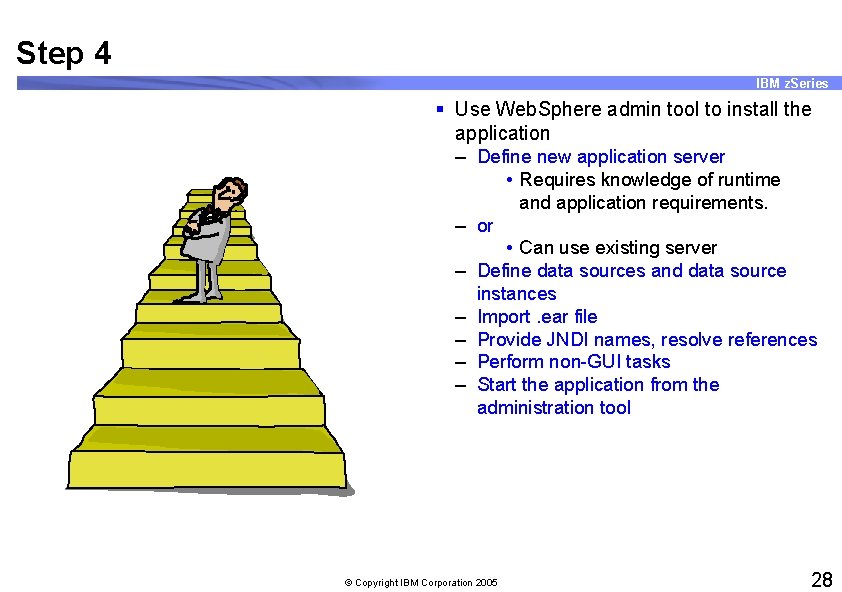
Step 4 IBM z. Series § Use Web. Sphere admin tool to install the application – Define new application server • Requires knowledge of runtime and application requirements. – or – – – • Can use existing server Define data sources and data source instances Import. ear file Provide JNDI names, resolve references Perform non-GUI tasks Start the application from the administration tool © Copyright IBM Corporation 2005 28
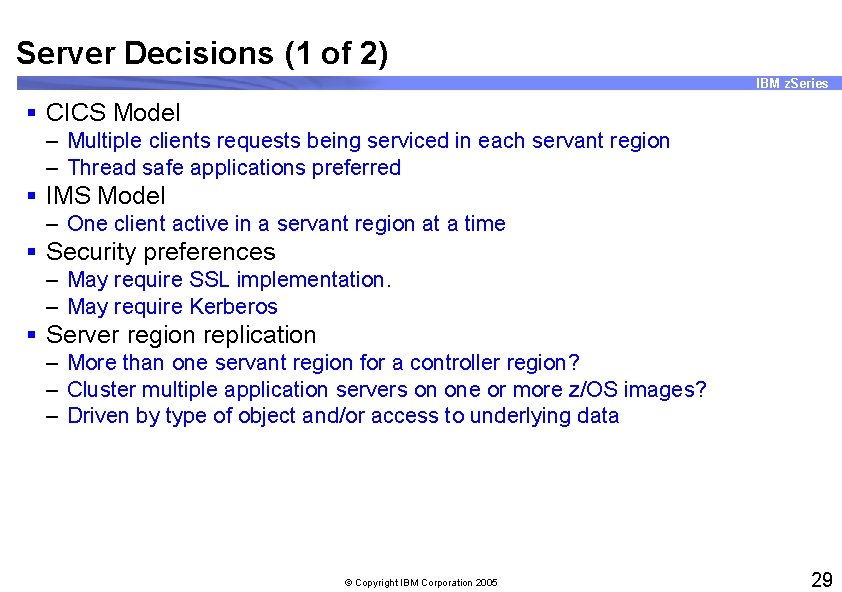
Server Decisions (1 of 2) IBM z. Series § CICS Model – Multiple clients requests being serviced in each servant region – Thread safe applications preferred § IMS Model – One client active in a servant region at a time § Security preferences – May require SSL implementation. – May require Kerberos § Server region replication – More than one servant region for a controller region? – Cluster multiple application servers on one or more z/OS images? – Driven by type of object and/or access to underlying data © Copyright IBM Corporation 2005 29
Server Decisions (2 of 2) IBM z. Series § Environment variables – All changes to the server environment variables should be made through the Admin tool – Refer to "Install & Customize" manual or the Web. Sphere Info. Center for details on which variables are appropriate for your server. – Variables will be "inherited" from Cell --> Node --> Server Instance © Copyright IBM Corporation 2005 30
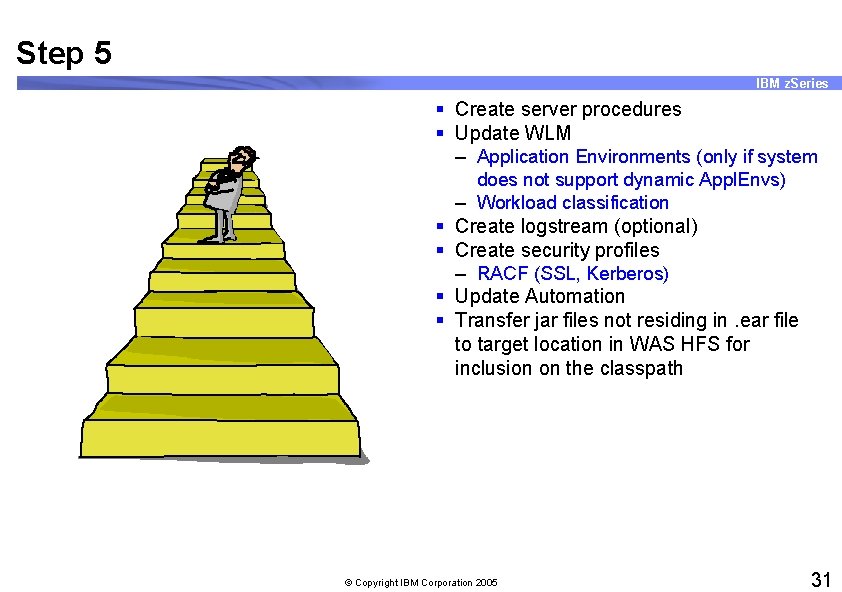
Step 5 IBM z. Series § Create server procedures § Update WLM – Application Environments (only if system does not support dynamic Appl. Envs) – Workload classification § Create logstream (optional) § Create security profiles – RACF (SSL, Kerberos) § Update Automation § Transfer jar files not residing in. ear file to target location in WAS HFS for inclusion on the classpath © Copyright IBM Corporation 2005 31
WLM IBM z. Series § All servant regions should be classified so they can initialize quickly. – Update STC classification to include all controller and servant regions. § Classify work in a server as you see fit. – Only applies to requests which have yet to be classified by the WAS runtime, subsequent object invocations inherit the enclave. – Use server name to classify primarily, userid secondarily. – Or inherit the enclave from someone who has reasonable classification rules (such as IBM HTTP server). © Copyright IBM Corporation 2005 32
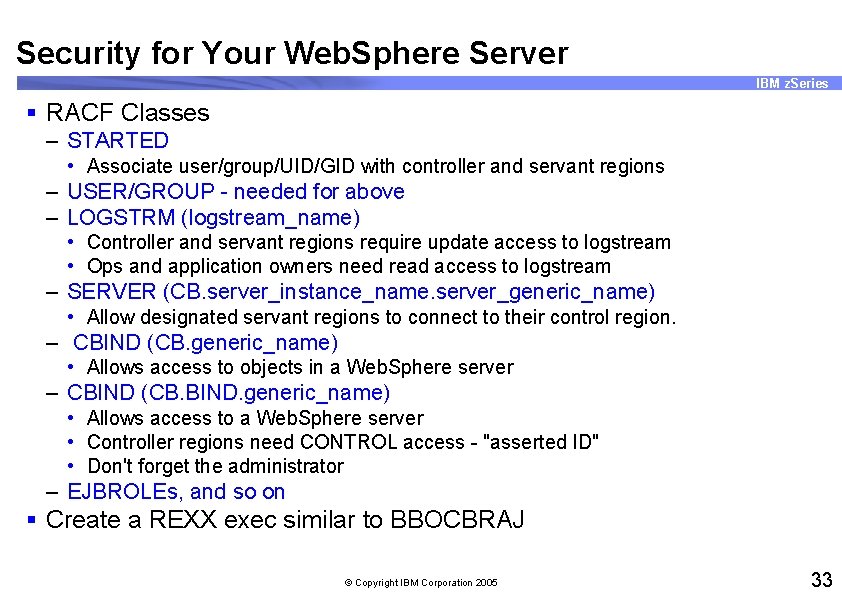
Security for Your Web. Sphere Server IBM z. Series § RACF Classes – STARTED • Associate user/group/UID/GID with controller and servant regions – USER/GROUP - needed for above – LOGSTRM (logstream_name) • Controller and servant regions require update access to logstream • Ops and application owners need read access to logstream – SERVER (CB. server_instance_name. server_generic_name) • Allow designated servant regions to connect to their control region. – CBIND (CB. generic_name) • Allows access to objects in a Web. Sphere server – CBIND (CB. BIND. generic_name) • Allows access to a Web. Sphere server • Controller regions need CONTROL access - "asserted ID" • Don't forget the administrator – EJBROLEs, and so on § Create a REXX exec similar to BBOCBRAJ © Copyright IBM Corporation 2005 33
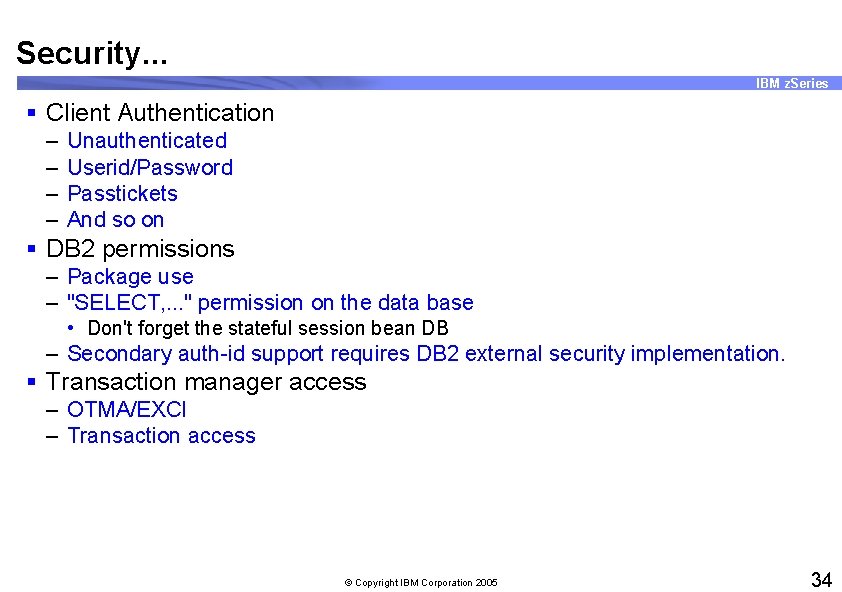
Security. . . IBM z. Series § Client Authentication – – Unauthenticated Userid/Password Passtickets And so on § DB 2 permissions – Package use – "SELECT, . . . " permission on the data base • Don't forget the stateful session bean DB – Secondary auth-id support requires DB 2 external security implementation. § Transaction manager access – OTMA/EXCI – Transaction access © Copyright IBM Corporation 2005 34
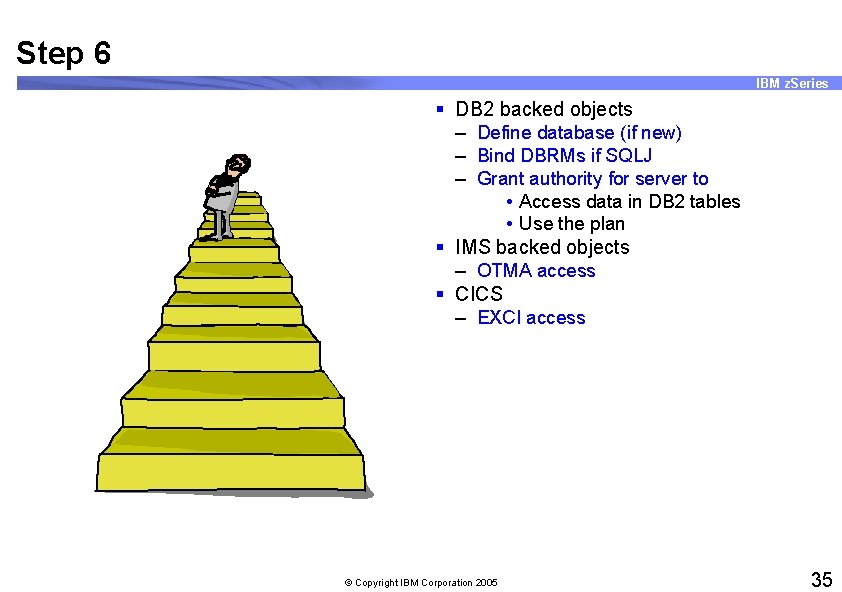
Step 6 IBM z. Series § DB 2 backed objects – Define database (if new) – Bind DBRMs if SQLJ – Grant authority for server to • Access data in DB 2 tables • Use the plan § IMS backed objects – OTMA access § CICS – EXCI access © Copyright IBM Corporation 2005 35
Step 7 IBM z. Series § Start Application Server Control Region – As applications start up, they will register their component names in the dynamic namespace © Copyright IBM Corporation 2005 36
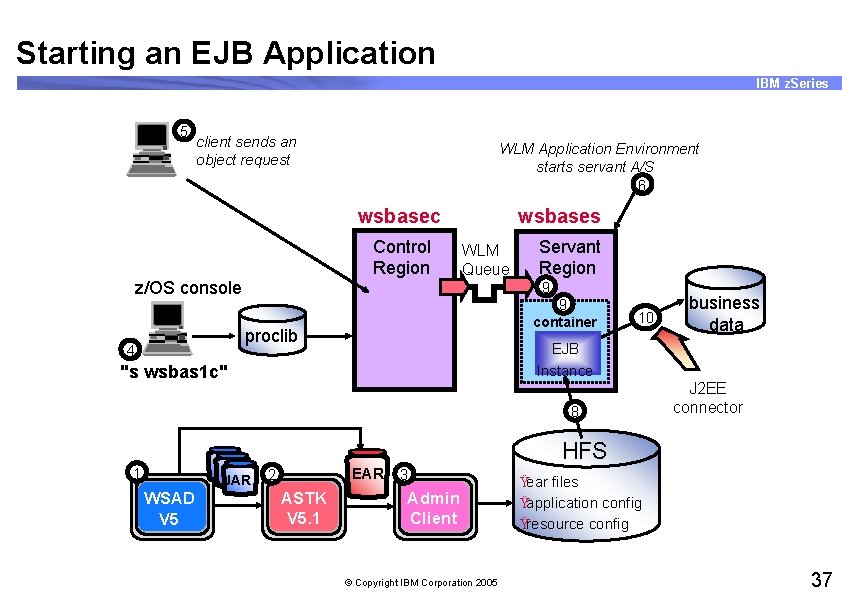
Starting an EJB Application IBM z. Series 5 client sends an object request WLM Application Environment starts servant A/S 6 wsbasec Control Region z/OS console wsbases WLM Queue 9 9 container proclib 4 Servant Region 10 business data EJB Instance "s wsbas 1 c" 8 J 2 EE connector HFS 1 JAR WSAD V 5 EAR 2 ASTK V 5. 1 3 Admin Client © Copyright IBM Corporation 2005 Ÿear files Ÿapplication config Ÿresource config 37
Step 8 IBM z. Series § Deploy client § Test client © Copyright IBM Corporation 2005 38
Step 9 IBM z. Series § Celebrate! © Copyright IBM Corporation 2005 39
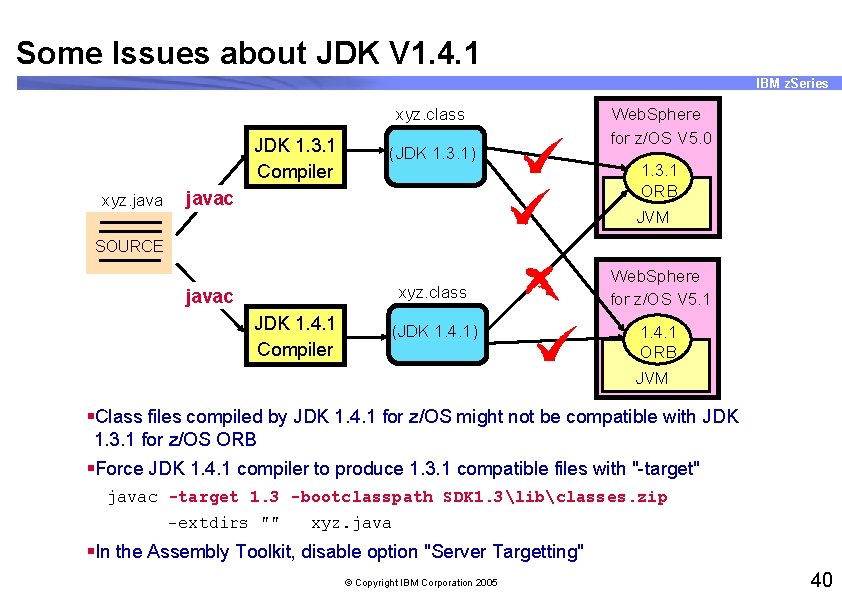
Some Issues about JDK V 1. 4. 1 IBM z. Series xyz. class JDK 1. 3. 1 Compiler xyz. java (JDK 1. 3. 1) javac Web. Sphere for z/OS V 5. 0 1. 3. 1 ORB JVM SOURCE xyz. class javac JDK 1. 4. 1 Compiler (JDK 1. 4. 1) Web. Sphere for z/OS V 5. 1 1. 4. 1 ORB JVM §Class files compiled by JDK 1. 4. 1 for z/OS might not be compatible with JDK 1. 3. 1 for z/OS ORB §Force JDK 1. 4. 1 compiler to produce 1. 3. 1 compatible files with "-target" javac -target 1. 3 -bootclasspath SDK 1. 3libclasses. zip -extdirs "" xyz. java §In the Assembly Toolkit, disable option "Server Targetting" © Copyright IBM Corporation 2005 40
Unit Summary IBM z. Series Having completed this unit, you should be able to: § Plan process to install a new J 2 EE application § Develop a suitable naming convention for deployment § Use the Application Services Toolkit (ASTK) to assemble a new J 2 EE application § Use administration tool to deploy the application § Plan and execute the "non-GUI" tasks required to complete application setup § Test the new application using a local client § Describe migration issues between JDK 1. 3. 1 and JDK 1. 4. 1 © Copyright IBM Corporation 2005 41
- Slides: 41