
IBM Software Group Overview and Direction of the
® IBM Software Group Overview and Direction of the IBM Tivoli System Automation Product Family Creighton Hicks hicksc@us. ibm. com 1
IBM Software Group | Tivoli Software Agenda §Business Case §Tivoli System Automation Product Family §Tivoli System Automation for z/OS §Tivoli System Automation for Multiplatforms Base §Pre-Canned Policy Templates §Tivoli System Automation for Multiplatforms End-to-End §What’s next on the Scope 2
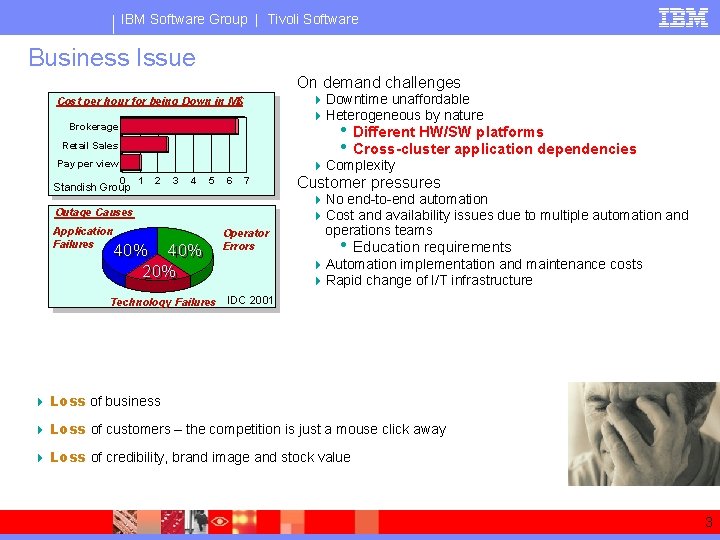
IBM Software Group | Tivoli Software Business Issue On demand challenges 4 Downtime unaffordable 4 Heterogeneous by nature • Different HW/SW platforms • Cross-cluster application dependencies 4 Complexity Cost per hour for being Down in M$ Brokerage Retail Sales Pay per view 0 Standish Group 1 2 3 4 5 6 7 Outage Causes Application Failures 40% 40% 20% Technology Failures Operator Errors Customer pressures 4 No end-to-end automation 4 Cost and availability issues due to multiple automation and operations teams • Education requirements 4 Automation implementation and maintenance costs 4 Rapid change of I/T infrastructure IDC 2001 4 Loss of business 4 Loss of customers – the competition is just a mouse click away 4 Loss of credibility, brand image and stock value 3
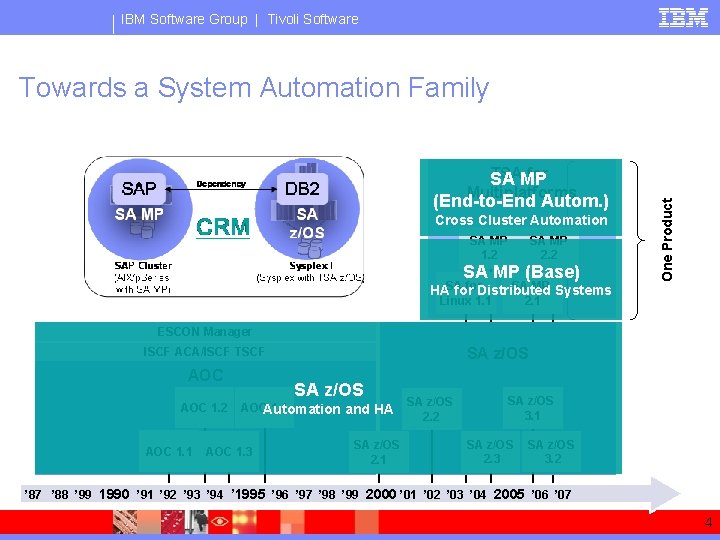
IBM Software Group | Tivoli Software Towards a System Automation Family One Product TSAMP for SA Multiplatforms (End-to-End Autom. ) Cross Cluster Automation SA MP 1. 2 SA MP 2. 2 SA MP (Base) SA MP Systems HASA forfor. Distributed Linux 1. 1 2. 1 ESCON Manager SA z/OS ISCF ACA/ISCF TSCF AOC 1. 2 AOC 1. 1 SA z/OS AOCAutomation 1. 4 and HA AOC 1. 3 SA z/OS 2. 1 SA z/OS 2. 2 SA z/OS 3. 1 SA z/OS 2. 3 GDPS SA z/OS AF/REMOTE 3. 2 ’ 87 ’ 88 ’ 99 1990 ’ 91 ’ 92 ’ 93 ’ 94 ’ 1995 ’ 96 ’ 97 ’ 98 ’ 99 2000 ’ 01 ’ 02 ’ 03 ’ 04 2005 ’ 06 ’ 07 4
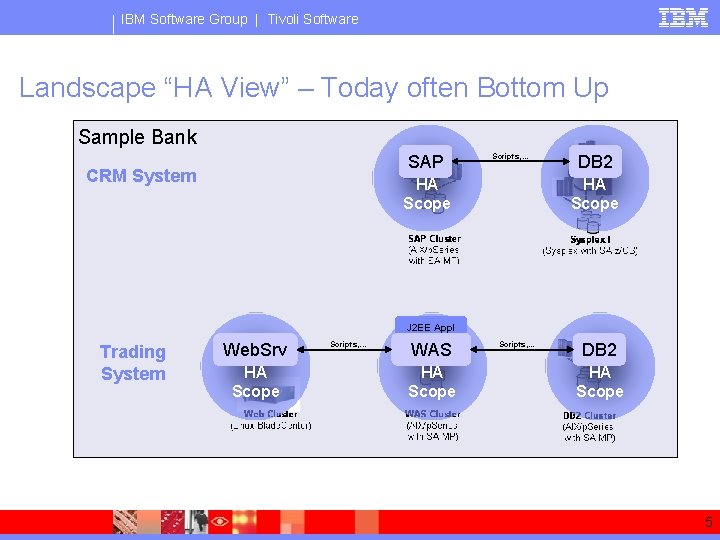
IBM Software Group | Tivoli Software Landscape “HA View” – Today often Bottom Up Sample Bank SAP CRM System Scripts, . . . HA Scope DB 2 HA Scope J 2 EE Appl Trading System Web. Srv HA Scope Scripts, . . . WAS HA Scope Scripts, . . . DB 2 HA Scope 5
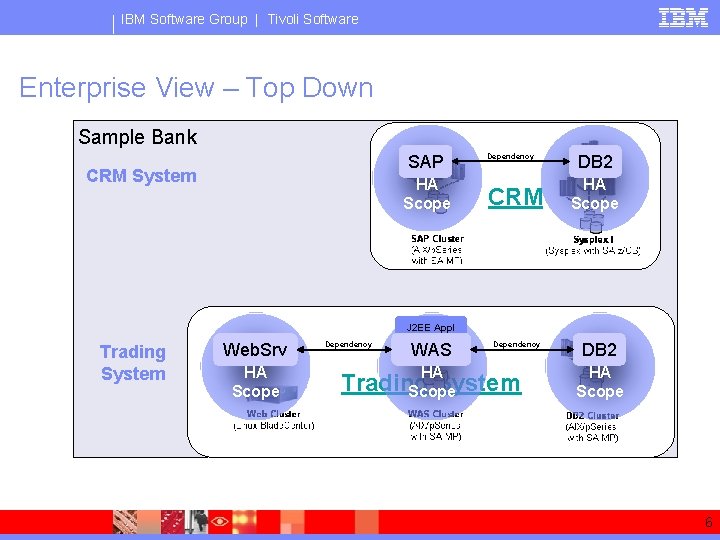
IBM Software Group | Tivoli Software Enterprise View – Top Down Sample Bank SAP CRM System HA Scope Dependency CRM DB 2 HA Scope J 2 EE Appl Trading System Web. Srv HA Scope Dependency WAS HA Dependency Trading System Scope DB 2 HA Scope 6

® IBM Software Group Automation and High Availability with IBM Tivoli System Automation for z/OS 7

IBM Software Group | Tivoli Software SA z/OS’s Architecture Abstract Resource Model § Automation Manager 4 Knows sysplex wide configuraiton Automation Manager 4 Drives automation decisions 4 Implements an expert system tuned for automation concepts 4 Applies automation concepts with a high abstraction agains abstract resources: Agent CF • • Agent § Several group types Several dependency types Automation Agent 4 Starts, stops, and monitors resources 8
® IBM Software Group High Availability with IBM Tivoli System Automation for Multiplatforms (Base Component) 9
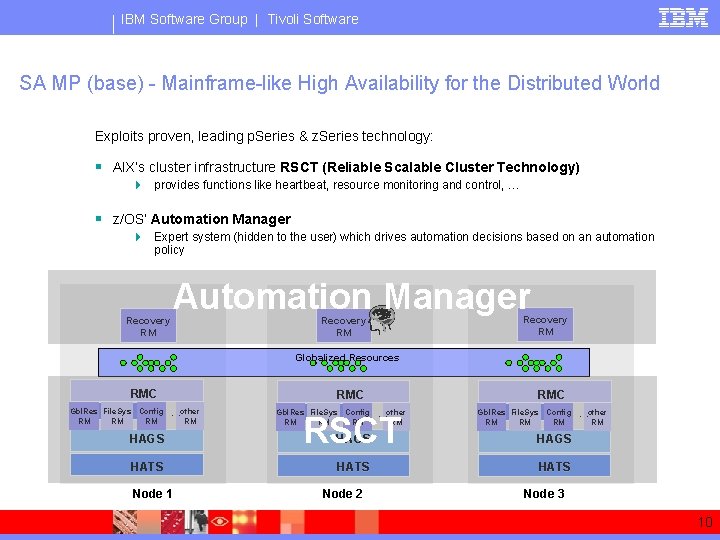
IBM Software Group | Tivoli Software SA MP (base) - Mainframe-like High Availability for the Distributed World Exploits proven, leading p. Series & z. Series technology: Automation Manager § AIX’s cluster infrastructure RSCT (Reliable Scalable Cluster Technology) 4 provides functions like heartbeat, resource monitoring and control, … § z/OS’ Automation Manager 4 Expert system (hidden to the user) which drives automation decisions based on an automation policy Recovery RM Automation Manager Recovery RM Globalized Resources RMC Gbl. Res File. Sys Config. . other RM RM RMC Gbl. Res File. Sys Config. . other RM RM HAGS RSCT HAGS HATS Node 1 Node 2 Node 3 10
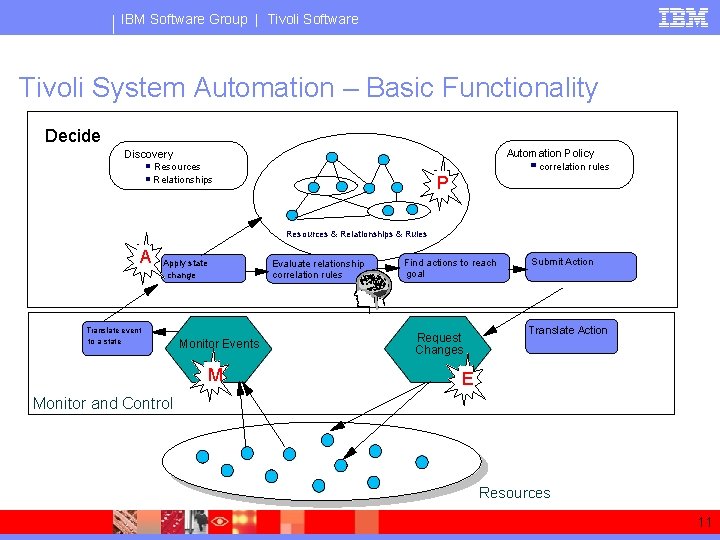
IBM Software Group | Tivoli Software Tivoli System Automation – Basic Functionality Decide Automation Policy Discovery correlation rules Resources Relationships P Resources & Relationships & Rules A Apply state change Translate event to a state Monitor Events M Evaluate relationship correlation rules Find actions to reach goal Request Changes Submit Action Translate Action E Monitor and Control Resources 11
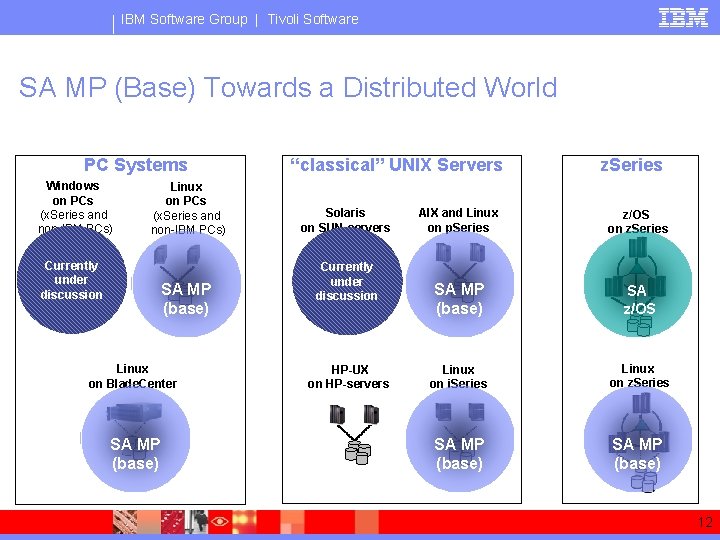
IBM Software Group | Tivoli Software SA MP (Base) Towards a Distributed World PC Systems Windows on PCs (x. Series and non-IBM PCs) Linux on PCs (x. Series and non-IBM PCs) Currently under discussion SA MP (base) Linux on Blade. Center SA MP (base) “classical” UNIX Servers Solaris on SUN-servers Currently under discussion HP-UX on HP-servers z. Series AIX and Linux on p. Series z/OS on z. Series SA MP (base) SA z/OS Linux on i. Series Linux on z. Series SA MP (base) 12
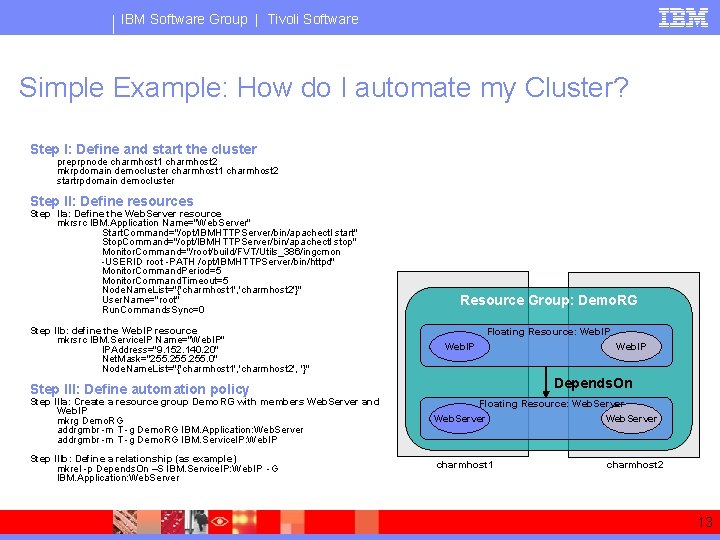
IBM Software Group | Tivoli Software Simple Example: How do I automate my Cluster? Step I: Define and start the cluster preprpnode charmhost 1 charmhost 2 mkrpdomain democluster charmhost 1 charmhost 2 startrpdomain democluster Step II: Define resources Step IIa: Define the Web. Server resource mkrsrc IBM. Application Name="Web. Server" Start. Command="/opt/IBMHTTPServer/bin/apachectl start" Stop. Command="/opt/IBMHTTPServer/bin/apachectl stop" Monitor. Command="/root/build/FVT/Utils_386/ingcmon -USERID root -PATH /opt/IBMHTTPServer/bin/httpd" Monitor. Command. Period=5 Monitor. Command. Timeout=5 Node. Name. List="{'charmhost 1', 'charmhost 2'}" User. Name="root" Run. Commands. Sync=0 Step IIb: define the Web. IP resource mkrsrc IBM. Service. IP Name="Web. IP" IPAddress="9. 152. 140. 20" Net. Mask="255. 0" Node. Name. List="{'charmhost 1', 'charmhost 2', '}" Resource Group: Demo. RG Floating Resource: Web. IP Depends. On Step III: Define automation policy Step IIIa: Create a resource group Demo. RG with members Web. Server and Web. IP mkrg Demo. RG addrgmbr -m T -g Demo. RG IBM. Application: Web. Server addrgmbr -m T -g Demo. RG IBM. Service. IP: Web. IP Step IIIb: Define a relationship (as example) mkrel -p Depends. On –S IBM. Service. IP: Web. IP -G IBM. Application: Web. Server Web. IP Floating Resource: Web. Server charmhost 1 charmhost 2 13
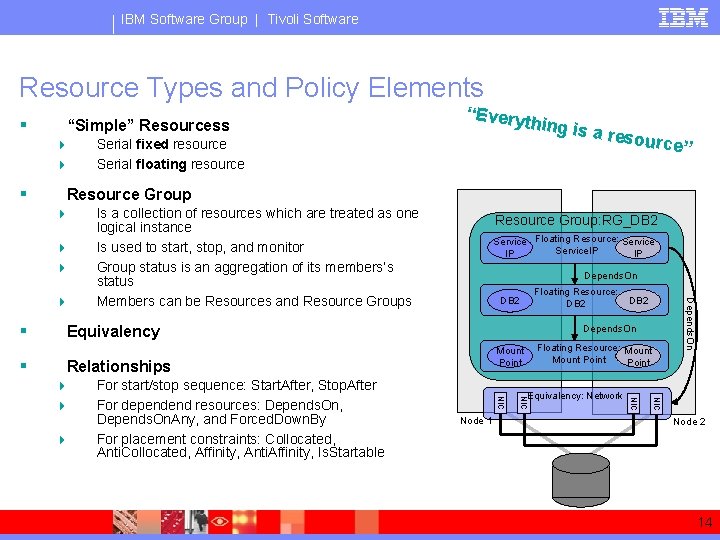
IBM Software Group | Tivoli Software Resource Types and Policy Elements § “Simple” Resourcess 4 4 § 4 4 rce” Is a collection of resources which are treated as one logical instance Is used to start, stop, and monitor Group status is an aggregation of its members‘s status Members can be Resources and Resource Groups Resource Group: RG_DB 2 Service Floating Resource: Service. IP IP IP Depends. On Floating Resource: DB 2 Equivalency Depends. On NIC Node 1 Equivalency: Network NIC 4 For start/stop sequence: Start. After, Stop. After For dependend resources: Depends. On, Depends. On. Any, and Forced. Down. By For placement constraints: Collocated, Anti. Collocated, Affinity, Anti. Affinity, Is. Startable Floating Resource: Mount Point Relationships 4 4 DB 2 Depends. On 4 § a resou Resource Group 4 § Serial fixed resource Serial floating resource “Every thing is Node 2 14
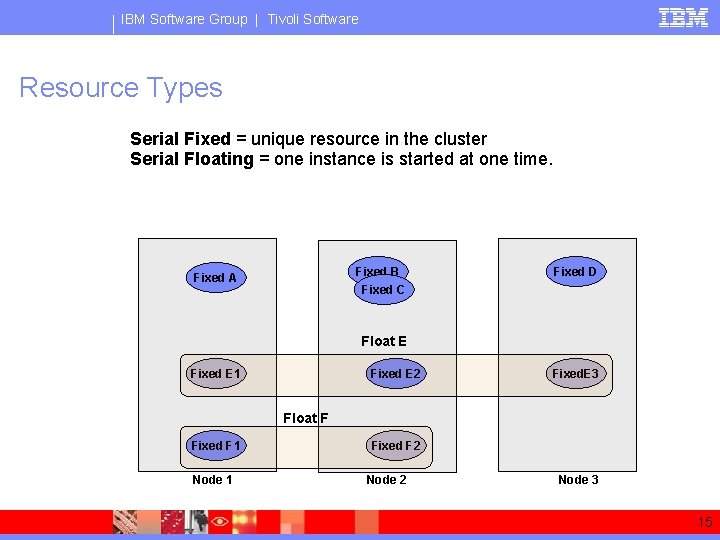
IBM Software Group | Tivoli Software Resource Types Serial Fixed = unique resource in the cluster Serial Floating = one instance is started at one time. Serial Fixed B Fixed C Fixed A Fixed D Float E Fixed E 1 Fixed E 2 Fixed. E 3 Serial Floating Float F Fixed F 1 Node 1 Fixed F 2 Node 3 15
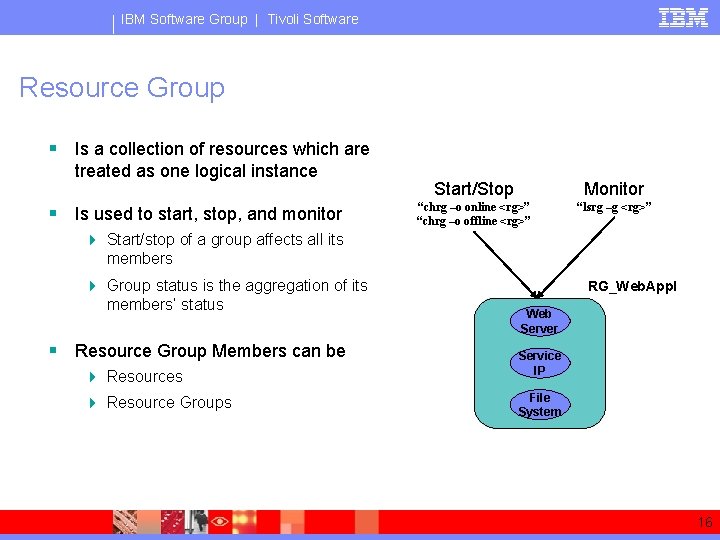
IBM Software Group | Tivoli Software Resource Group § Is a collection of resources which are treated as one logical instance § Is used to start, stop, and monitor Start/Stop Monitor “chrg –o online <rg>” “chrg –o offline <rg>” “lsrg –g <rg>” 4 Start/stop of a group affects all its members 4 Group status is the aggregation of its members’ status § Resource Group Members can be 4 Resources 4 Resource Groups RG_Web. Appl Web Server Service IP File System 16
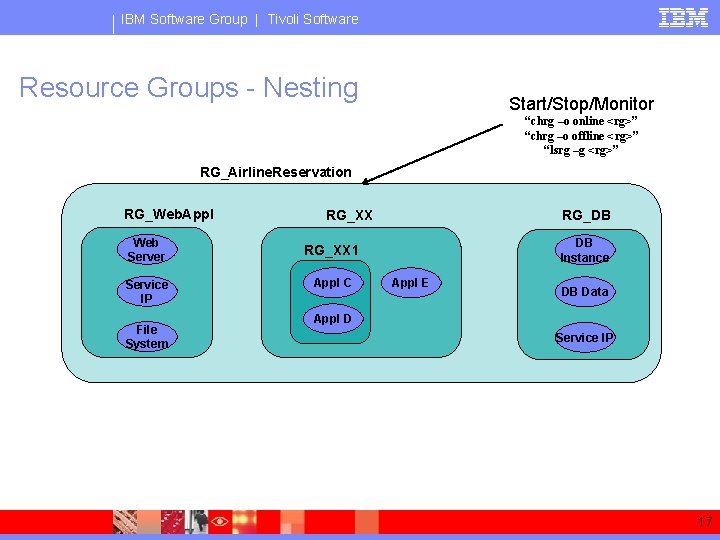
IBM Software Group | Tivoli Software Resource Groups - Nesting Start/Stop/Monitor “chrg –o online <rg>” “chrg –o offline <rg>” “lsrg –g <rg>” RG_Airline. Reservation RG_Web. Appl Web Server Service IP File System RG_DB RG_XX DB Instance RG_XX 1 Appl C Appl E DB Data Appl D Service IP 17
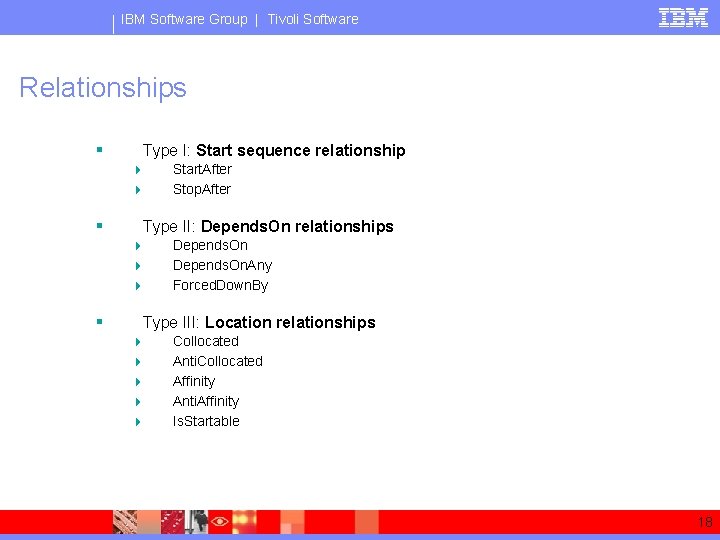
IBM Software Group | Tivoli Software Relationships § Type I: Start sequence relationship 4 4 § Type II: Depends. On relationships 4 4 4 § Start. After Stop. After Depends. On. Any Forced. Down. By Type III: Location relationships 4 4 4 Collocated Anti. Collocated Affinity Anti. Affinity Is. Startable 18
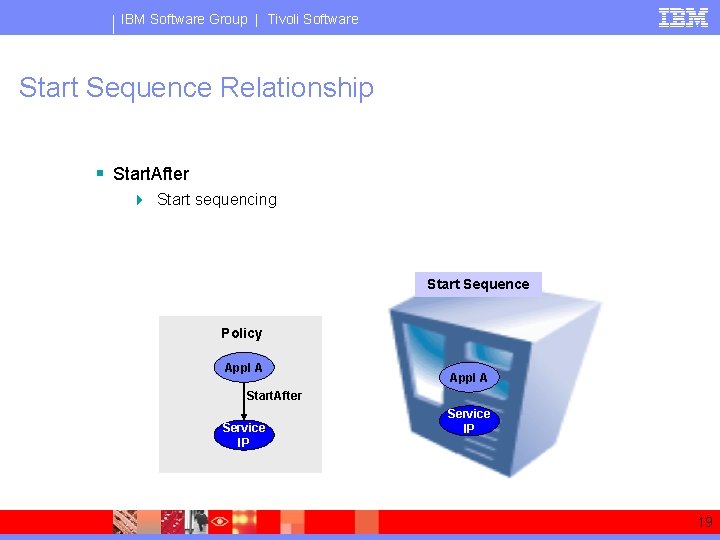
IBM Software Group | Tivoli Software Start Sequence Relationship § Start. After 4 Start sequencing Start Sequence Policy Appl A Start Sequencing Appl A Start. After Service IP 19
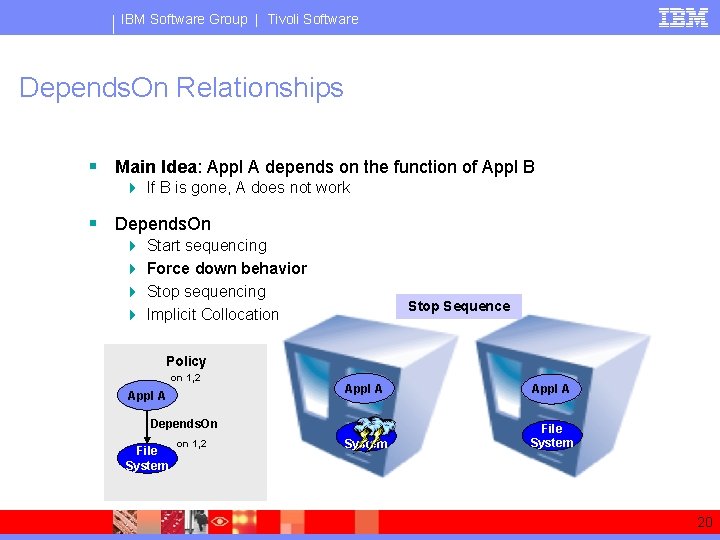
IBM Software Group | Tivoli Software Depends. On Relationships § Main Idea: Appl A depends on the function of Appl B 4 If B is gone, A does not work § Depends. On 4 4 Start sequencing Force down behavior Stop sequencing Implicit Collocation Start Stop Force Sequence Down Policy on 1, 2 Appl A Depends. On File System on 1, 2 Appl A File System 20
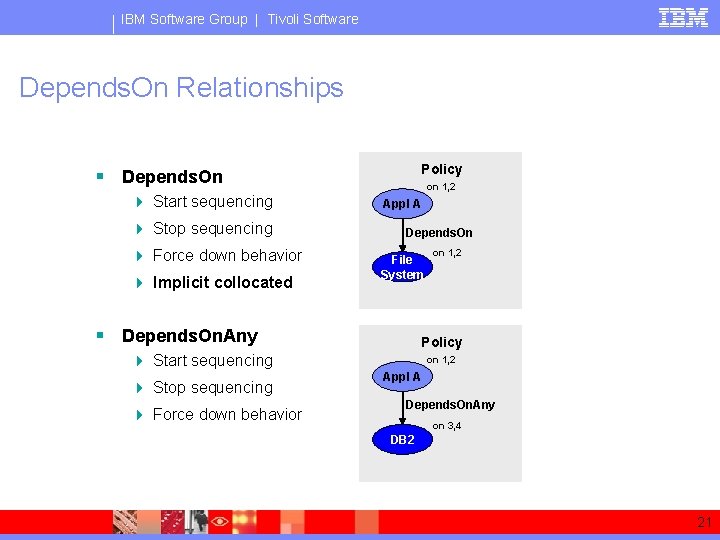
IBM Software Group | Tivoli Software Depends. On Relationships Policy § Depends. On 4 Start sequencing 4 Stop sequencing 4 Force down behavior 4 Implicit collocated on 1, 2 Appl A Depends. On File System § Depends. On. Any Policy 4 Start sequencing 4 Stop sequencing 4 Force down behavior on 1, 2 Appl A Depends. On. Any on 3, 4 DB 2 21
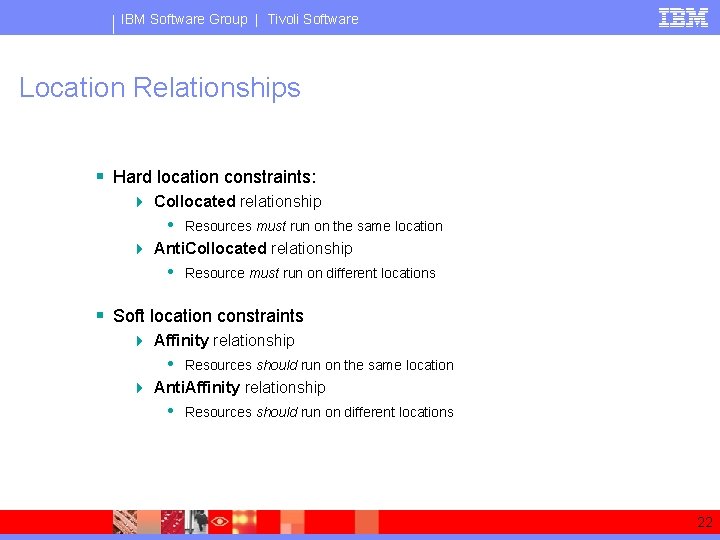
IBM Software Group | Tivoli Software Location Relationships § Hard location constraints: 4 Collocated relationship • Resources must run on the same location 4 Anti. Collocated relationship • Resource must run on different locations § Soft location constraints 4 Affinity relationship • Resources should run on the same location 4 Anti. Affinity relationship • Resources should run on different locations 22
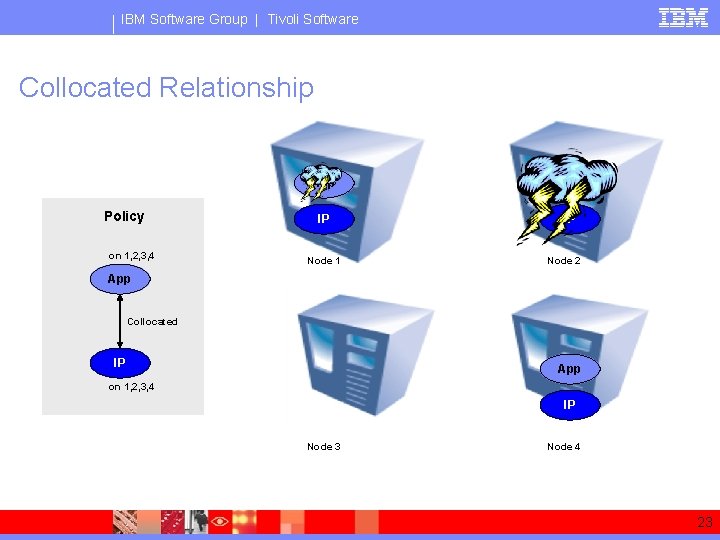
IBM Software Group | Tivoli Software Collocated Relationship Policy on 1, 2, 3, 4 App IP IP Node 1 Node 2 App Collocated IP App on 1, 2, 3, 4 IP Node 3 Node 4 23
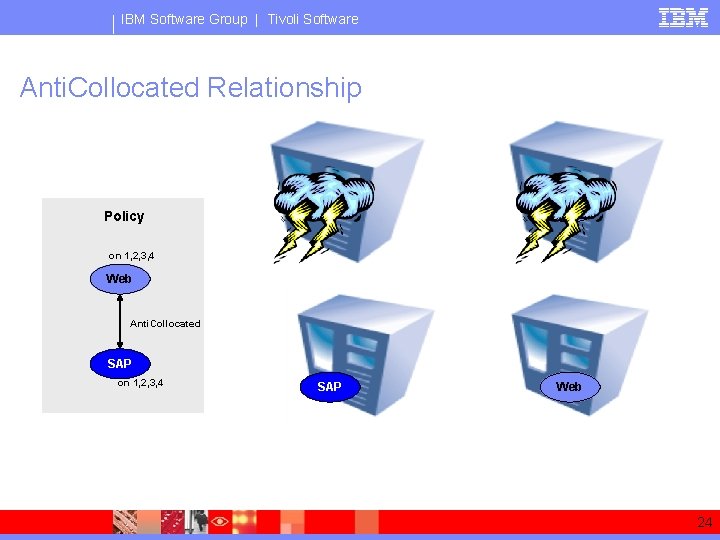
IBM Software Group | Tivoli Software Anti. Collocated Relationship Web Policy on 1, 2, 3, 4 Web Node 1 Node 2 SAP Web Node 3 Node 4 Web Anti. Collocated SAP on 1, 2, 3, 4 24
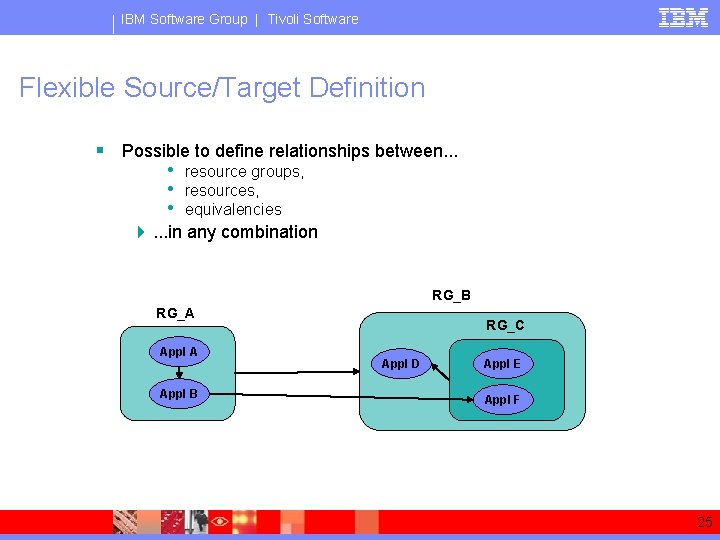
IBM Software Group | Tivoli Software Flexible Source/Target Definition § Possible to define relationships between. . . • resource groups, • resources, • equivalencies 4. . . in any combination RG_B RG_A Appl B RG_C Appl D Appl E Appl F 25
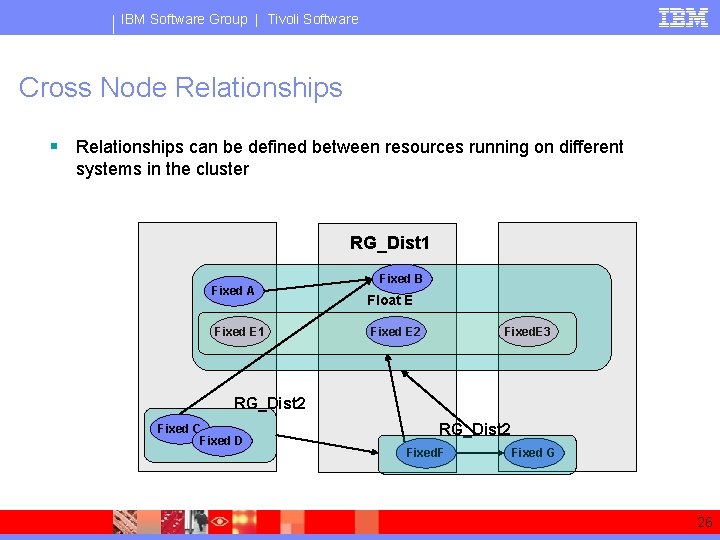
IBM Software Group | Tivoli Software Cross Node Relationships § Relationships can be defined between resources running on different systems in the cluster RG_Dist 1 Fixed A Fixed E 1 Fixed B Float E Fixed E 2 Fixed. E 3 RG_Dist 2 Fixed C Fixed D Node 1 RG_Dist 2 Fixed. F Node 2 Fixed G Node 3 26
® IBM Software Group Pre-Canned Policy Templates 27
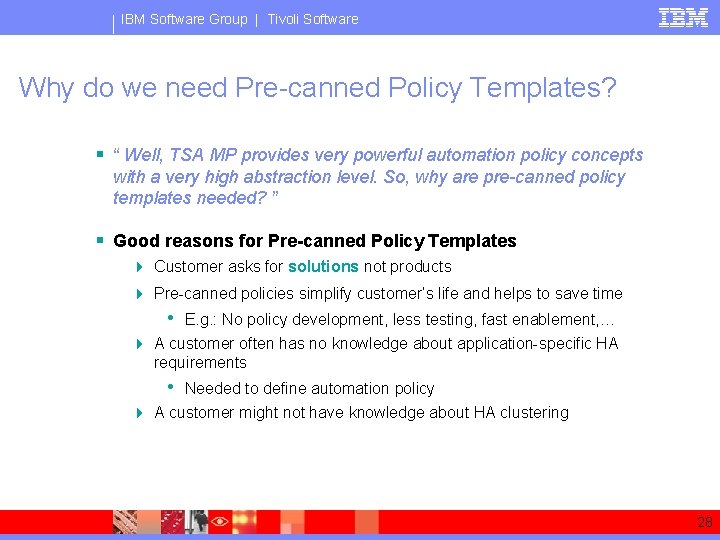
IBM Software Group | Tivoli Software Why do we need Pre-canned Policy Templates? § “ Well, TSA MP provides very powerful automation policy concepts with a very high abstraction level. So, why are pre-canned policy templates needed? ” § Good reasons for Pre-canned Policy Templates 4 Customer asks for solutions not products 4 Pre-canned policies simplify customer’s life and helps to save time • E. g. : No policy development, less testing, fast enablement, … 4 A customer often has no knowledge about application-specific HA requirements • Needed to define automation policy 4 A customer might not have knowledge about HA clustering 28
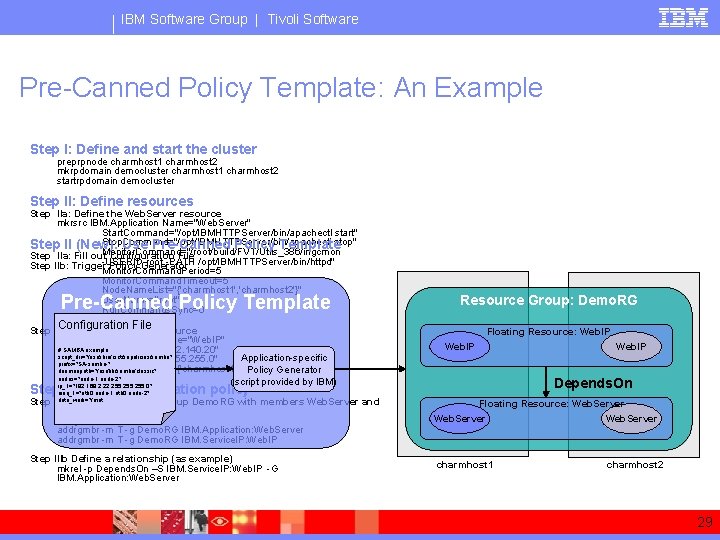
IBM Software Group | Tivoli Software Pre-Canned Policy Template: An Example Step I: Define and start the cluster preprpnode charmhost 1 charmhost 2 mkrpdomain democluster charmhost 1 charmhost 2 startrpdomain democluster Step II: Define resources Step IIa: Define the Web. Server resource mkrsrc IBM. Application Name="Web. Server" Start. Command="/opt/IBMHTTPServer/bin/apachectl start" Stop. Command="/opt/IBMHTTPServer/bin/apachectl Step II (New): Use Pre-Canned Policy Templatestop" Monitor. Command="/root/build/FVT/Utils_386/ingcmon Step IIa: Fill out Configuration File root -PATH /opt/IBMHTTPServer/bin/httpd" Step IIb: Trigger-USERID Policy Generator Monitor. Command. Period=5 Monitor. Command. Timeout=5 Node. Name. List="{'charmhost 1', 'charmhost 2'}" User. Name="root" Run. Commands. Sync=0 Pre-Canned Policy Template Configuration File resource Step IIb: define the Web. IP mkrsrc IBM. Service. IP Name="Web. IP" # SAMBA example IPAddress="9. 152. 140. 20" script_dir="/usr/sbin/rsct/sapolicies/samba" Application-specific Net. Mask="255. 0" prefix="SA-samba-" Node. Name. List="{'charmhost 1', 'charmhost 2', '}" Policy Generator daemonpath="/usr/lib/samba/classic" nodes="node-1 node-2" (script provided by IBM) ip_1="192. 168. 2. 22, 255. 0" Resource Group: Demo. RG Floating Resource: Web. IP Depends. On Stepnieq_1="eth 0: node-1, eth 0: node-2" III: Define automation policy data_work="/mnt Step IIIa: Create a resource group Demo. RG with members Web. Server and Web. IP mkrg Demo. RG addrgmbr -m T -g Demo. RG IBM. Application: Web. Server addrgmbr -m T -g Demo. RG IBM. Service. IP: Web. IP Step IIIb Define a relationship (as example) mkrel -p Depends. On –S IBM. Service. IP: Web. IP -G IBM. Application: Web. Server Web. IP Floating Resource: Web. Server charmhost 1 charmhost 2 29
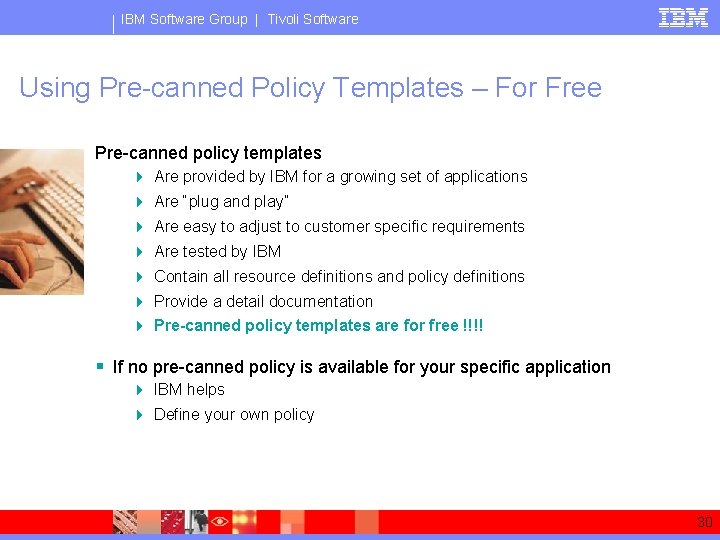
IBM Software Group | Tivoli Software Using Pre-canned Policy Templates – For Free Pre-canned policy templates 4 Are provided by IBM for a growing set of applications 4 Are “plug and play” 4 Are easy to adjust to customer specific requirements 4 Are tested by IBM 4 Contain all resource definitions and policy definitions 4 Provide a detail documentation 4 Pre-canned policy templates are for free !!!! § If no pre-canned policy is available for your specific application 4 IBM helps 4 Define your own policy 30
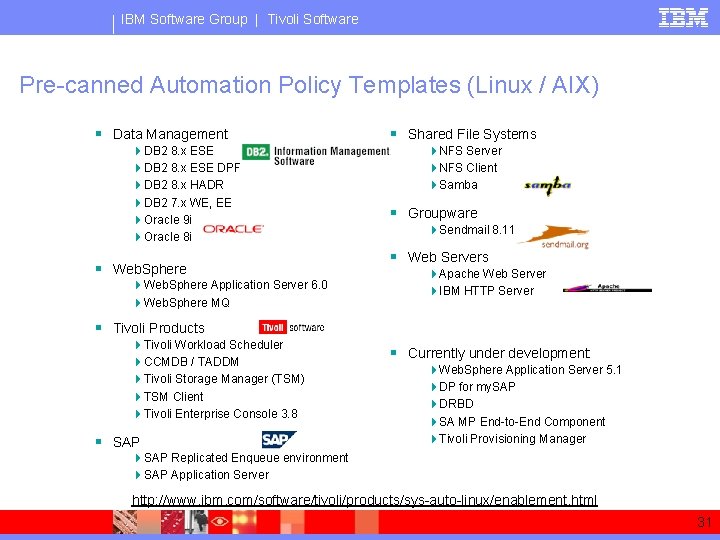
IBM Software Group | Tivoli Software Pre-canned Automation Policy Templates (Linux / AIX) § Data Management 4 DB 2 8. x ESE DPF 4 DB 2 8. x HADR 4 DB 2 7. x WE, EE 4 Oracle 9 i 4 Oracle 8 i § Web. Sphere 4 Web. Sphere Application Server 6. 0 4 Web. Sphere MQ § Shared File Systems 4 NFS Server 4 NFS Client 4 Samba § Groupware 4 Sendmail 8. 11 § Web Servers 4 Apache Web Server 4 IBM HTTP Server § Tivoli Products 4 Tivoli Workload Scheduler 4 CCMDB / TADDM 4 Tivoli Storage Manager (TSM) 4 TSM Client 4 Tivoli Enterprise Console 3. 8 § SAP § Currently under development: 4 Web. Sphere Application Server 5. 1 4 DP for my. SAP 4 DRBD 4 SA MP End-to-End Component 4 Tivoli Provisioning Manager 4 SAP Replicated Enqueue environment 4 SAP Application Server http: //www. ibm. com/software/tivoli/products/sys-auto-linux/enablement. html 31
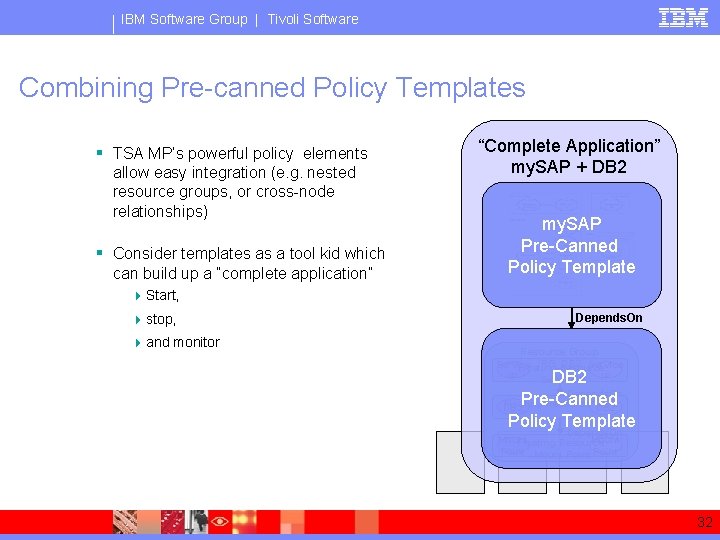
IBM Software Group | Tivoli Software Combining Pre-canned Policy Templates § TSA MP’s powerful policy elements allow easy integration (e. g. nested resource groups, or cross-node relationships) § Consider templates as a tool kid which can build up a “complete application” “Complete Application” my. SAP + DB 2 my. SAP Pre-Canned Policy Template 4 Start, 4 stop, 4 and monitor Depends. On Resource Group: RG_DB 2 Service Floating Resource: IP IP Service. IP DB 2 Depends. On Pre-Canned Floating Resource: DB 2 Policy Template Depends. On Mount Floating Resource: Point Mount Point 32
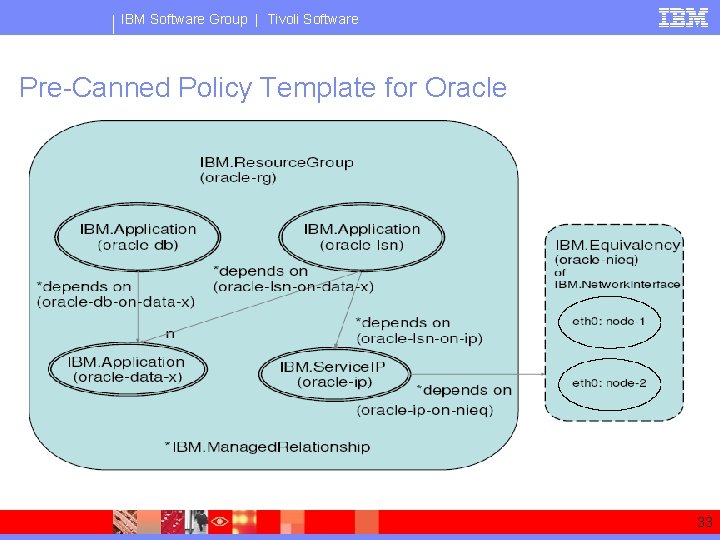
IBM Software Group | Tivoli Software Pre-Canned Policy Template for Oracle 33
IBM Software Group | Tivoli Software Pre-canned Policy Template for DB 2 § TSA MP’s pre-canned policy is DB 2’s default HA solution on Linux 4 Shipped with every DB 2 V 8. 2 CD (Linux) 4 Includes a free TSA MP License for a two-node cluster § Pre-canned policy template supports: 4 DB 2 8. x ESE, 4 DB 2 8. x ESE DPF (multi-partition) 4 DB 2 8. x HADR 4 and DB 2 7. x WE, EE § Documentation Available: 4 Highly Available DB 2 Universal Database v 8. x ESE/DPF using IBM Tivoli System Automation for Multiplatforms 4 Automating DB 2 HADR Failover using IBM Tivoli System Automation for Multiplatforms 34
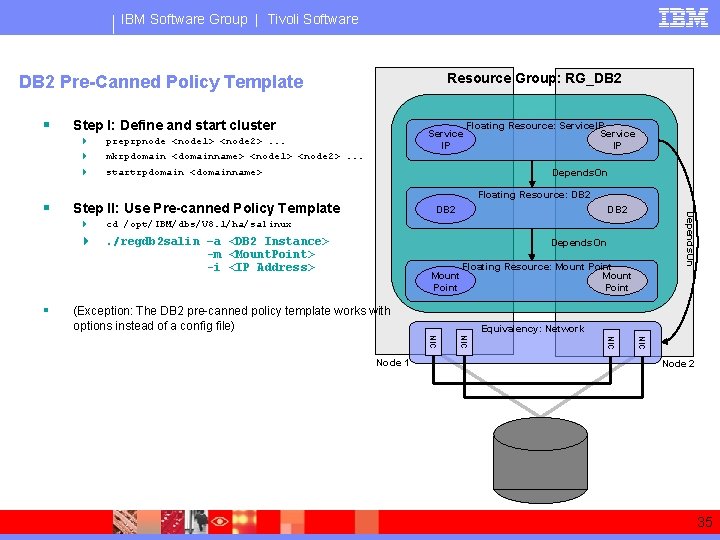
IBM Software Group | Tivoli Software Resource Group: RG_DB 2 Pre-Canned Policy Template § Step I: Define and start cluster 4 4 4 § mkrpdomain <domainname> <node 1> <node 2>. . . Floating Resource: Service. IP Service IP startrpdomain <domainname> Depends. On Floating Resource: DB 2 Step II: Use Pre-canned Policy Template 4 cd /opt/IBM/dbs/V 8. 1/ha/salinux 4 . /regdb 2 salin –a <DB 2 Instance> -m <Mount. Point> -i <IP Address> DB 2 Depends. On § Service IP preprpnode <node 1> <node 2>. . . Depends. On Mount Point Floating Resource: Mount Point (Exception: The DB 2 pre-canned policy template works with options instead of a config file) Equivalency: Network NIC NIC Node 1 Node 2 35
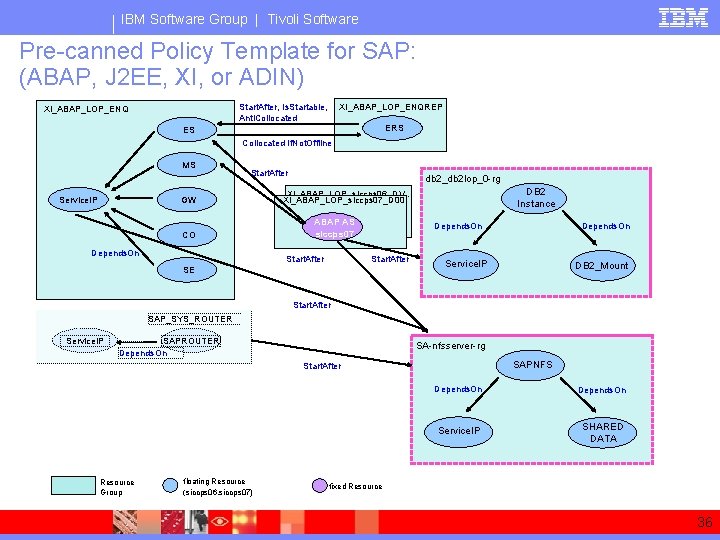
IBM Software Group | Tivoli Software Pre-canned Policy Template for SAP: (ABAP, J 2 EE, XI, or ADIN) XI_ABAP_LOP_ENQREP Start. After, Is. Startable, Anti. Collocated XI_ABAP_LOP_ENQ ERS ES Collocated If. Not. Offline MS Service. IP Start. After GW CO Depends. On db 2_db 2 lop_0 -rg DB 2 Instance XI_ABAP_LOP_siccps 06_DV. . XI_ABAP_LOP_siccps 07_D 00 ABAP AS siccps 07 Start. After Depends. On Start. After SE Depends. On Service. IP DB 2_Mount Start. After SAP_SYS_ROUTER Service. IP SAPROUTER Depends. On SA-nfsserver-rg SAPNFS Start. After Resource Group floating Resource (siccps 06, siccps 07) Depends. On Service. IP SHARED DATA fixed Resource 36
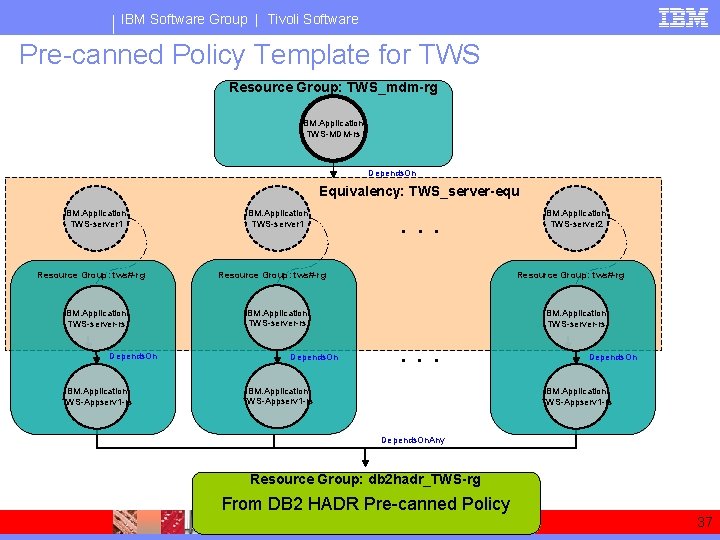
IBM Software Group | Tivoli Software Pre-canned Policy Template for TWS Resource Group: TWS_mdm-rg IBM. Application: TWS-MDM-rs Depends. On Equivalency: TWS_server-equ IBM. Application: TWS-server 1 Resource Group: tws#-rg IBM. Application: TWS-server-rs Depends. On IBM. Application: TWS-Appserv 1 -rs IBM. Application: TWS-server 1 . . . Resource Group: tws#-rg IBM. Application: TWS-server-rs Depends. On IBM. Application: TWS-server 2 IBM. Application: TWS-server-rs . . . IBM. Application: TWS-Appserv 1 -rs Depends. On. Any Resource Group: db 2 hadr_TWS-rg From DB 2 HADR Pre-canned Policy 37
® IBM Software Group Cross Cluster Automation with IBM Tivoli System Automation for Multiplatforms (End-to-End Automation Component) 38
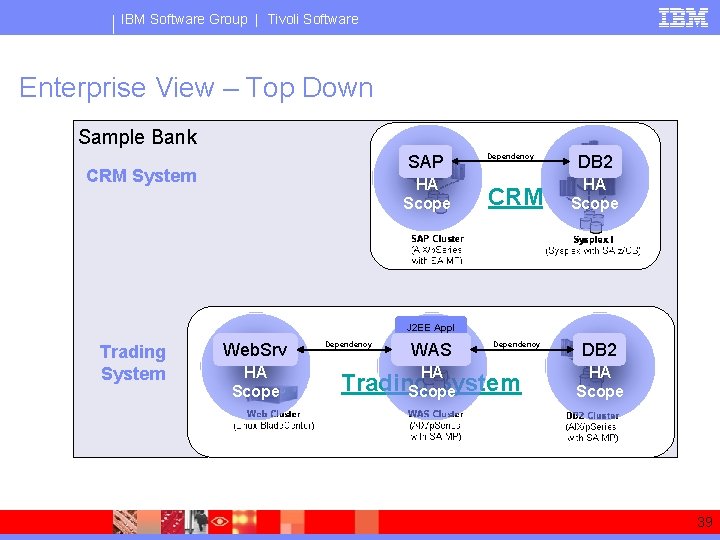
IBM Software Group | Tivoli Software Enterprise View – Top Down Sample Bank SAP CRM System HA Scope Dependency CRM DB 2 HA Scope J 2 EE Appl Trading System Web. Srv HA Scope Dependency WAS HA Dependency Trading System Scope DB 2 HA Scope 39
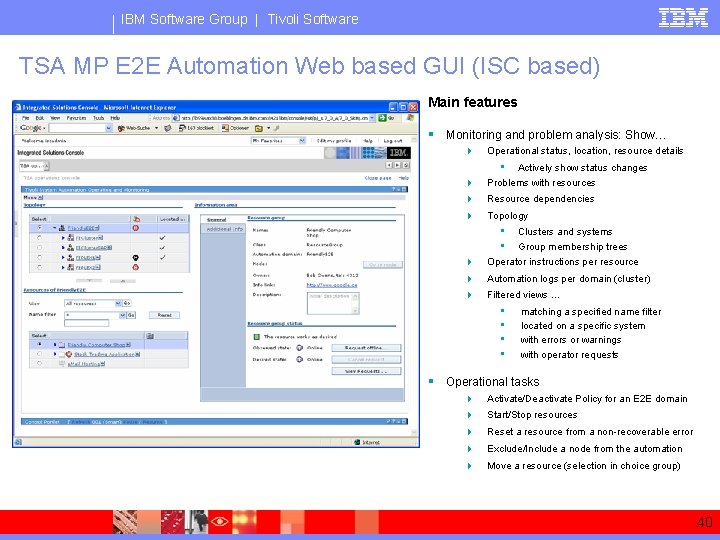
IBM Software Group | Tivoli Software TSA MP E 2 E Automation Web based GUI (ISC based) Main features § Monitoring and problem analysis: Show… 4 Operational status, location, resource details • 4 Actively show status changes Problems with resources 4 Resource dependencies 4 Topology • • 4 Clusters and systems Group membership trees Operator instructions per resource 4 Automation logs per domain (cluster) 4 Filtered views … • • matching a specified name filter located on a specific system with errors or warnings with operator requests § Operational tasks 4 Activate/Deactivate Policy for an E 2 E domain 4 Start/Stop resources 4 Reset a resource from a non-recoverable error 4 Exclude/Include a node from the automation 4 Move a resource (selection in choice group) 40
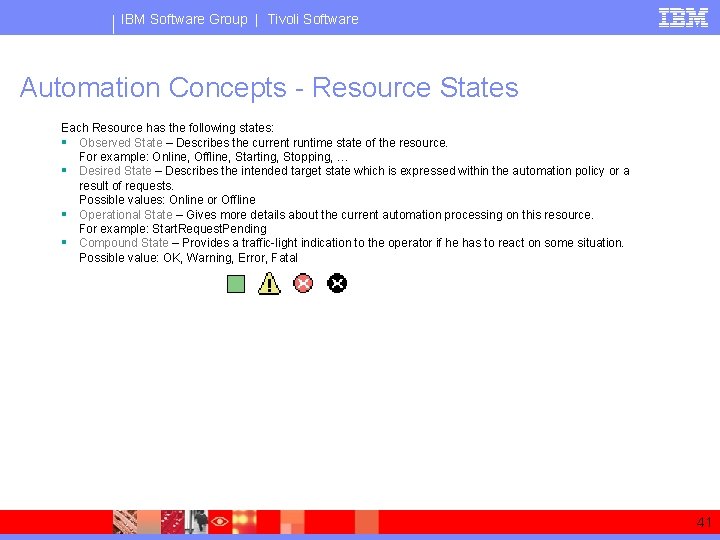
IBM Software Group | Tivoli Software Automation Concepts - Resource States Each Resource has the following states: § Observed State – Describes the current runtime state of the resource. For example: Online, Offline, Starting, Stopping, … § Desired State – Describes the intended target state which is expressed within the automation policy or a result of requests. Possible values: Online or Offline § Operational State – Gives more details about the current automation processing on this resource. For example: Start. Request. Pending § Compound State – Provides a traffic-light indication to the operator if he has to react on some situation. Possible value: OK, Warning, Error, Fatal 41
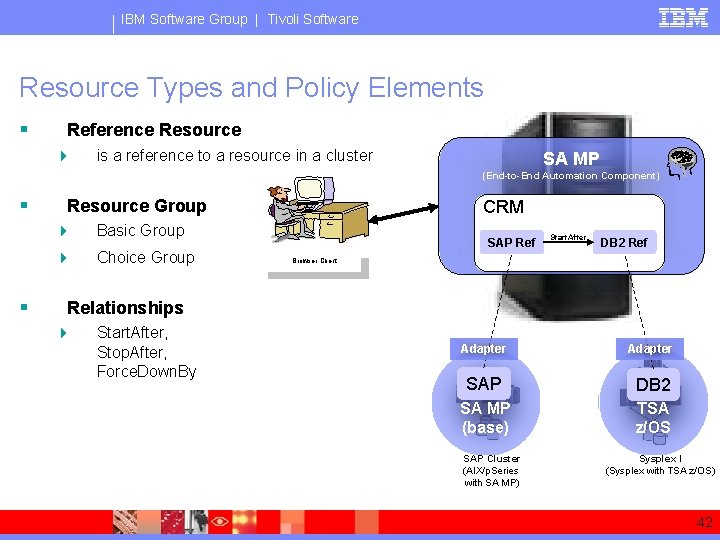
IBM Software Group | Tivoli Software Resource Types and Policy Elements § Reference Resource 4 is a reference to a resource in a cluster SA MP (End-to-End Automation Component) § § Resource Group 4 Basic Group 4 Choice Group CRM SAP Ref Start. After DB 2 Ref Browser Client Relationships 4 Start. After, Stop. After, Force. Down. By Adapter SAP DB 2 SA MP (base) TSA z/OS SAP Cluster (AIX/p. Series with SA MP) Sysplex I (Sysplex with TSA z/OS) 42
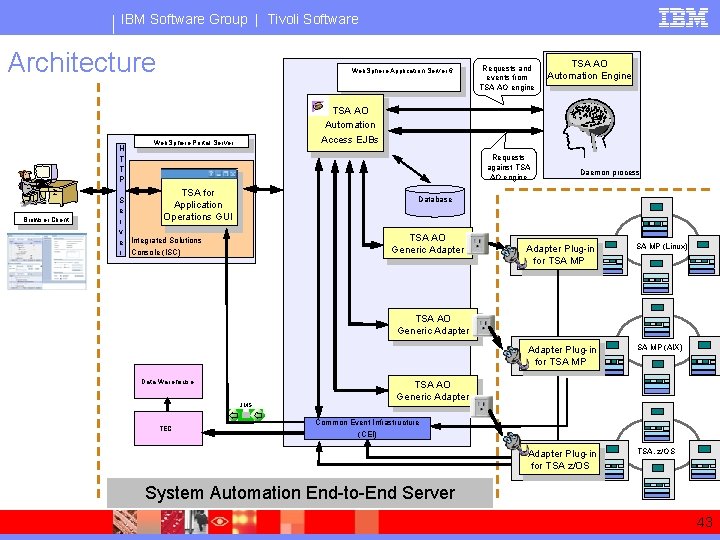
IBM Software Group | Tivoli Software Architecture H T T P Web. Sphere Application Server 6 TSA AO Automation Engine TSA AO Automation Access EJBs Web. Sphere Portal Server Requests against TSA AO engine TSA for Browser Client Requests and events from TSA AO engine Daemon process Database S Application e Operations GUI r v e Integrated Solutions r Console (ISC) . TSA AO Generic Adapter Plug-in for TSA MP . . Adapter Plug-in for TSA MP JMS TEC . . . TSA AO Generic Adapter Data Warehouse SA MP (Linux) . SA MP (AIX) . . . TSA AO Generic Adapter. Common Event Infrastructure (CEI) Adapter Plug-in for TSA z/OS . TSA. z/OS . . . System Automation End-to-End Server 43
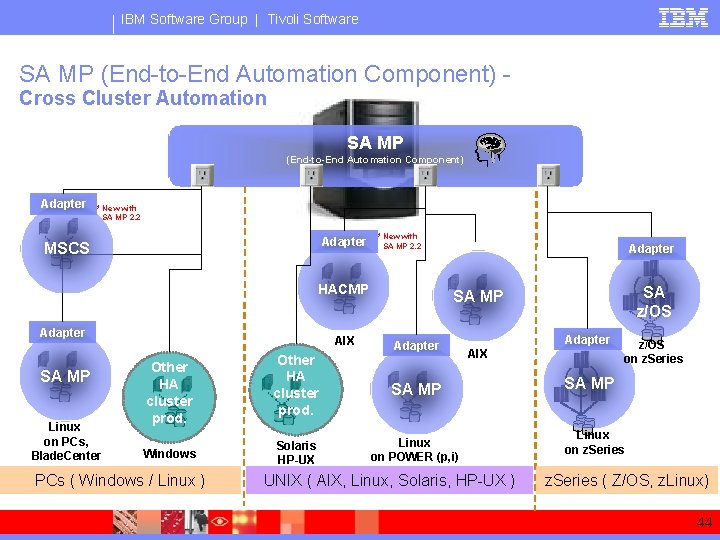
IBM Software Group | Tivoli Software SA MP (End-to-End Automation Component) Cross Cluster Automation SA MP (End-to-End Automation Component) Adapter * New with SA MP 2. 2 Adapter MSCS * New with SA MP 2. 2 HACMP Adapter SA MP Linux on PCs, Blade. Center AIX Other HA cluster prod. Windows PCs ( Windows / Linux ) Adapter SA z/OS SA MP Adapter Other HA cluster prod. SA MP Solaris HP-UX Linux on POWER (p, i) Adapter AIX UNIX ( AIX, Linux, Solaris, HP-UX ) z/OS on z. Series SA MP Linux on z. Series ( Z/OS, z. Linux) 44
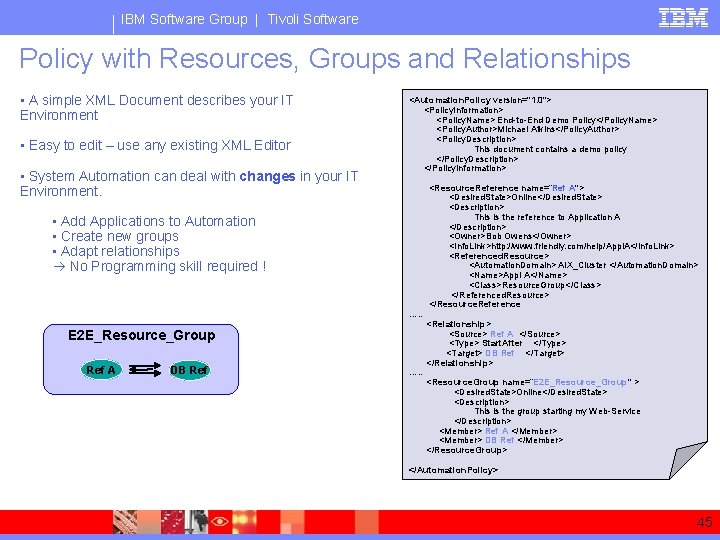
IBM Software Group | Tivoli Software Policy with Resources, Groups and Relationships • A simple XML Document describes your IT Environment • Easy to edit – use any existing XML Editor • System Automation can deal with changes in your IT Environment. <Automation. Policy version="1. 0"> <Policy. Information> <Policy. Name> End-to-End Demo Policy</Policy. Name> <Policy. Author>Michael Atkins</Policy. Author> <Policy. Description> This document contains a demo policy </Policy. Description> </Policy. Information> • Add Applications to Automation • Create new groups • Adapt relationships No Programming skill required ! …. . E 2 E_Resource_Group Ref A DB Ref …. . <Resource. Reference name=“Ref A"> <Desired. State>Online</Desired. State> <Description> This is the reference to Application A </Description> <Owner>Bob Owens</Owner> <Info. Link>http: //www. friendly. com/help/Appl. A</Info. Link> <Referenced. Resource> <Automation. Domain> AIX_Cluster </Automation. Domain> <Name>Appl A</Name> <Class>Resource. Group</Class> </Referenced. Resource> </Resource. Reference <Relationship> <Source> Ref A </Source> <Type> Start. After </Type> <Target> DB Ref </Target> </Relationship> <Resource. Group name=“E 2 E_Resource_Group" > <Desired. State>Online</Desired. State> <Description> This is the group starting my Web-Service </Description> <Member> Ref A </Member> <Member> DB Ref </Member> </Resource. Group> </Automation. Policy> 45
® IBM Software Group What’s next on the Scope? 46
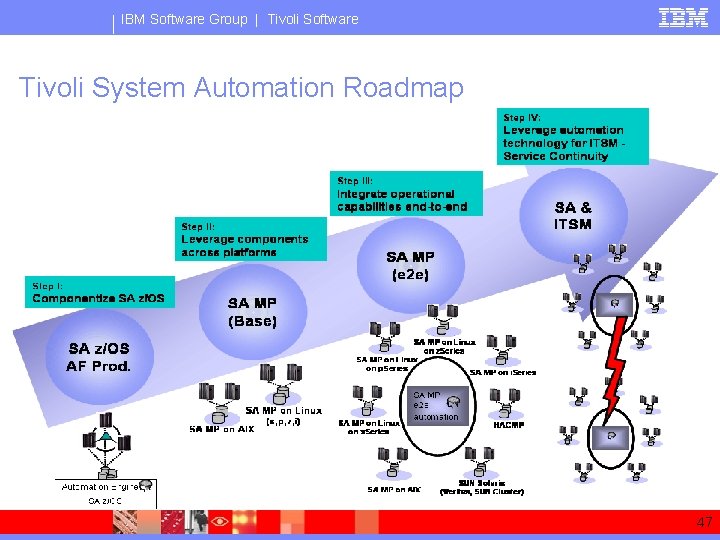
IBM Software Group | Tivoli Software Tivoli System Automation Roadmap 47
IBM Software Group | Tivoli Software Need More Information? Please contact me: Creighton Hicks hicksc@us. ibm. com 48
- Slides: 48