
IBM Link Aggregation with the zVM Virtual Switch
IBM ^ ™ Link Aggregation with the z/VM Virtual Switch Tracy Adams, z/VM Connectivity Development CAVMEN April 17, 2008 © 2007 IBM Corporation
IBM ^ ™ Trademarks The following are trademarks of the International Business Machines Corporation in the United States and/or other countries. APPN* CICS* DB 2* DFSMSMVS DFSMS/VM* Dir. Maint Distributed Relational Database Architecture* DRDA* e-business logo* ECKD Enterprise Storage Server* Enterprise Systems Architecure/390* ESCON* FICON* GDDM* * Registered trademarks of IBM Corporation GDPS* Geographically Dispersed Parallel Sysplex Hiper. Sockets Hyper. Swap IBM* IBM e. Server IBM logo* IBMlink Language Environment* MQSeries* Multiprise* On demand business logo OS/390* Parallel Sysplex* Performance Toolkit for VM POWER 5 POWERPC* PR/SM Processor Resource/Systems Manager QMF RACF* Resource Link RMF RS/6000* S/390 Parallel Enterprise Server System 370 System 390* System z 9 Tivoli* Tivoli Storage Manager Total. Storage* Virtual Image Facility Virtualization Engine Visual. Age* VM/ESA* VSE/ESA VTAM* Web. Sphere* z/Architecture z/OS* z/VM* z/VSE z. Series* z. Series Entry License Charge The following are trademarks or registered trademarks of other companies. Java and all Java-related trademarks and logos are trademarks of Sun Microsystems, Inc. , in the United States and other countries Linux is a trademark of Linus Torvalds in the united States and other countries. . UNIX is a registered trademark of The Open Group in the United States and other countries. Microsoft, Windows and Windows NT are registered trademarks of Microsoft Corporation in the United States and other countries. * All other products may be trademarks or registered trademarks of their respective companies. Notes: Performance is in Internal Throughput Rate (ITR) ratio based on measurements and projections using standard IBM benchmarks in a controlled environment. The actual throughput that any user will experience will vary depending upon considerations such as the amount of multiprogramming in the user's job stream, the I/O configuration, the storage configuration, and the workload processed. Therefore, no assurance can be given that an individual user will achieve throughput improvements equivalent to the performance ratios stated here. IBM hardware products are manufactured from new parts, or new and serviceable used parts. Regardless, our warranty terms apply. All customer examples cited or described in this presentation are presented as illustrations of the manner in which some customers have used IBM products and the results they may have achieved. Actual environmental costs and performance characteristics will vary depending on individual customer configurations and conditions. This publication was produced in the United States. IBM may not offer the products, services or features discussed in this document in other countries, and the information may be subject to change without notice. Consult your local IBM business contact for information on the product or services available in your area. All statements regarding IBM's future direction and intent are subject to change or withdrawal without notice, and represent goals and objectives only. Information about non-IBM products is obtained from the manufacturers of those products or their published announcements. IBM has not tested those products and cannot confirm the performance, compatibility, or any other claims related to non-IBM products. Questions on the capabilities of non-IBM products should be addressed to the suppliers of those products. Prices subject to change without notice. Contact your IBM representative or Business Partner for the most current pricing in your geography. © 2007 IBM Corporation
IBM ^ ™ Session Objectives At the end of this session you will understand the following: • • Virtual Switch Technology Concept of Link Aggregation Software and Hardware Requirements Benefits of Link Aggregation © 2007 IBM Corporation
IBM ^ ™ © 2007 IBM Corporation

IBM ^ ™ Network with VSWITCH LPAR 1 web web LPAR 2 z/VM web app app z/OS DB 2 VSWITCH To internet With 1 VSWITCH, 3 VLANs, and a multi-domain firewall © 2007 IBM Corporation
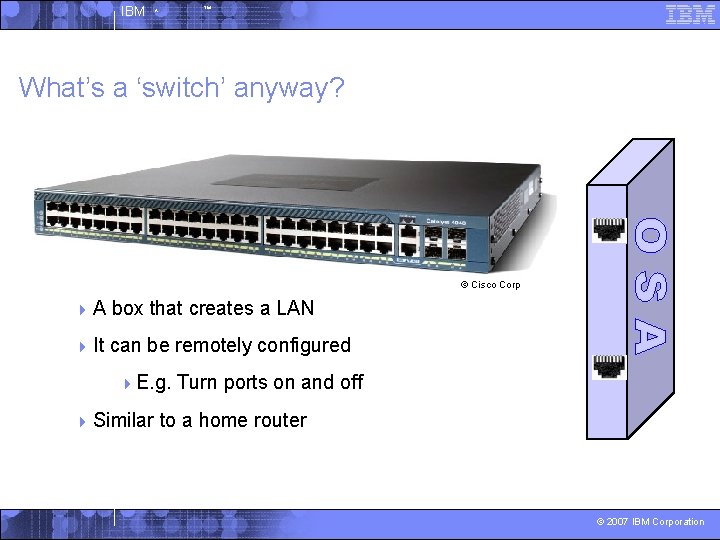
IBM ^ ™ What’s a ‘switch’ anyway? © Cisco Corp 4 A box that creates a LAN 4 It can be remotely configured 4 E. g. 4 Similar Turn ports on and off to a home router © 2007 IBM Corporation
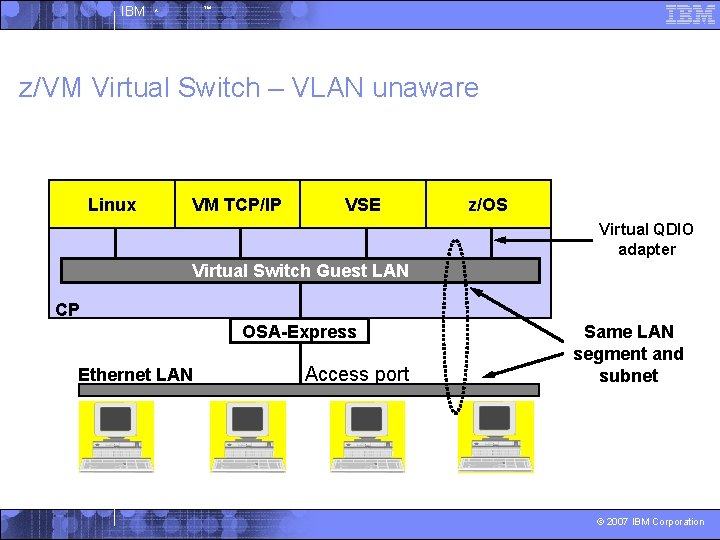
IBM ^ ™ z/VM Virtual Switch – VLAN unaware Linux VM TCP/IP VSE z/OS Virtual QDIO adapter Virtual Switch Guest LAN CP OSA-Express Ethernet LAN Access port Same LAN segment and subnet © 2007 IBM Corporation
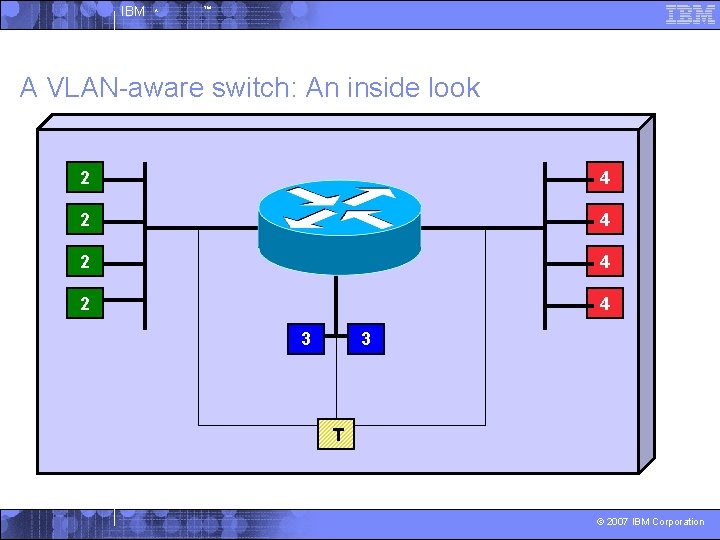
IBM ^ ™ A VLAN-aware switch: An inside look 2 4 2 4 3 3 T © 2007 IBM Corporation

IBM ^ ™ Trunk Port vs. Access Port 4 4 T 4 4 2 2 2 3 4 Trunk port carries traffic from all VLANs 4 Access port carries traffic for a single VLAN 4 Host not aware of VLANs T 2 4 2 3 3 2 4 3 4 Every frame is tagged with the VLAN id © 2007 IBM Corporation
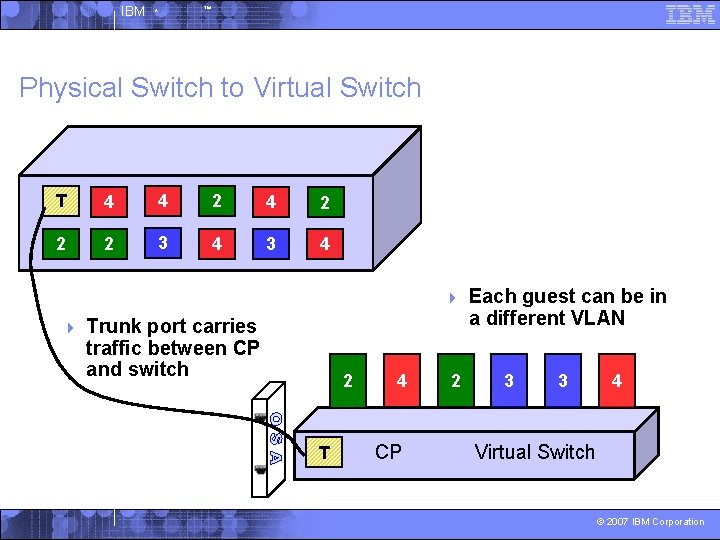
IBM ^ ™ Physical Switch to Virtual Switch T 4 4 2 2 2 3 4 4 4 Trunk port carries traffic between CP and switch 2 T 4 CP 2 Each guest can be in a different VLAN 3 3 4 Virtual Switch © 2007 IBM Corporation

IBM ^ ™ z/VM Virtual Switch – VLAN aware Linux VM TCP/IP VSE z/OS Virtual QDIO adapter Virtual Switch Guest LAN CP OSA-Express Ethernet LAN Trunk port IEEE 802. 1 q transparent bridge Multiple LANs © 2007 IBM Corporation
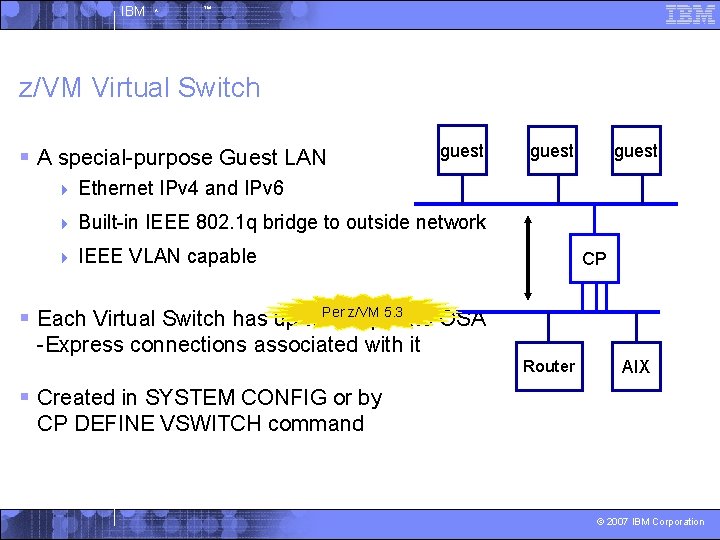
IBM ^ ™ z/VM Virtual Switch § A special-purpose Guest LAN guest 4 Ethernet IPv 4 and IPv 6 4 Built-in IEEE 802. 1 q bridge to outside network 4 IEEE VLAN capable guest CP z/VM 5. 3 § Each Virtual Switch has up to. Per 8 separate OSA -Express connections associated with it Router AIX § Created in SYSTEM CONFIG or by CP DEFINE VSWITCH command © 2007 IBM Corporation
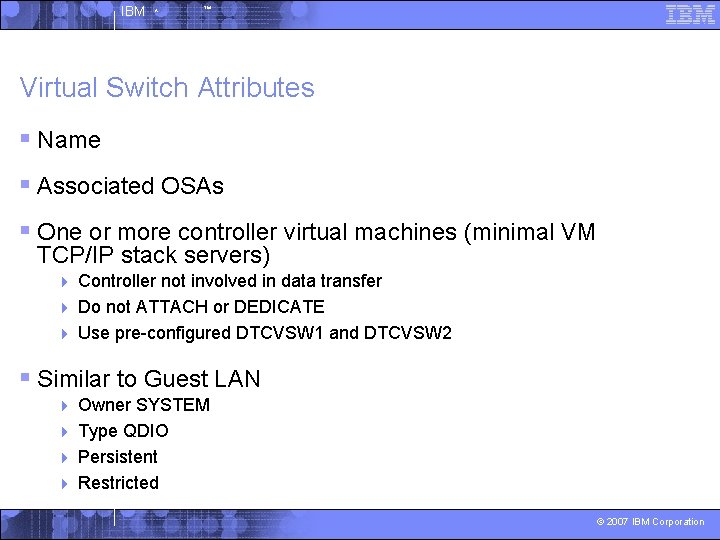
IBM ^ ™ Virtual Switch Attributes § Name § Associated OSAs § One or more controller virtual machines (minimal VM TCP/IP stack servers) Controller not involved in data transfer 4 Do not ATTACH or DEDICATE 4 Use pre-configured DTCVSW 1 and DTCVSW 2 4 § Similar to Guest LAN Owner SYSTEM 4 Type QDIO 4 Persistent 4 Restricted 4 © 2007 IBM Corporation
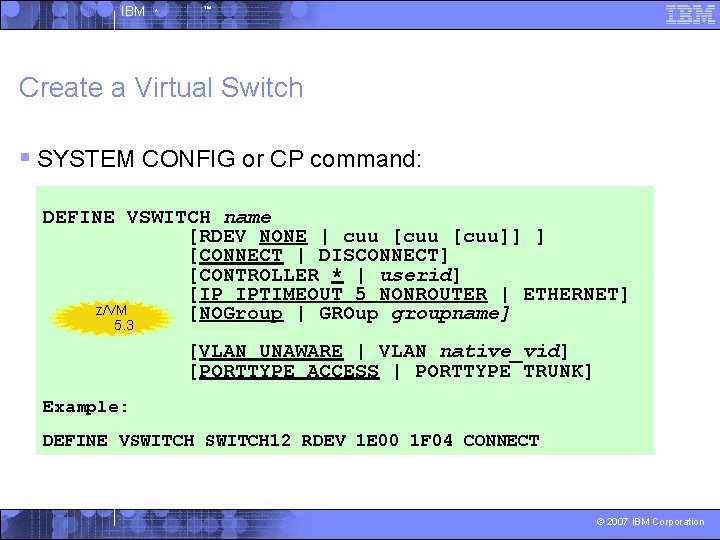
IBM ^ ™ Create a Virtual Switch § SYSTEM CONFIG or CP command: DEFINE VSWITCH name [RDEV NONE | cuu [cuu]] ] [CONNECT | DISCONNECT] [CONTROLLER * | userid] [IP IPTIMEOUT 5 NONROUTER | ETHERNET] z/VM [NOGroup | GROup groupname] 5. 3 [VLAN UNAWARE | VLAN native_vid] [PORTTYPE ACCESS | PORTTYPE TRUNK] Example: DEFINE VSWITCH 12 RDEV 1 E 00 1 F 04 CONNECT © 2007 IBM Corporation
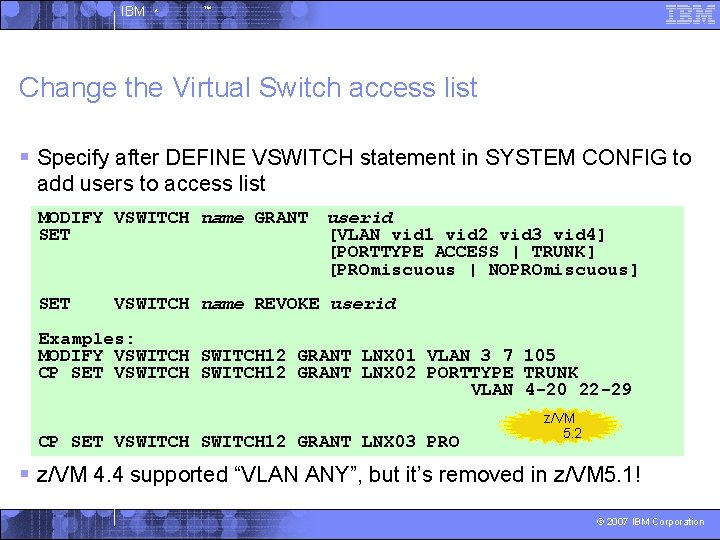
IBM ^ ™ Change the Virtual Switch access list § Specify after DEFINE VSWITCH statement in SYSTEM CONFIG to add users to access list MODIFY VSWITCH name GRANT userid SET [VLAN vid 1 vid 2 vid 3 vid 4] [PORTTYPE ACCESS | TRUNK] [PROmiscuous | NOPROmiscuous] SET VSWITCH name REVOKE userid Examples: MODIFY VSWITCH 12 GRANT LNX 01 VLAN 3 7 105 CP SET VSWITCH 12 GRANT LNX 02 PORTTYPE TRUNK VLAN 4 -20 22 -29 CP SET VSWITCH 12 GRANT LNX 03 PRO z/VM 5. 2 § z/VM 4. 4 supported “VLAN ANY”, but it’s removed in z/VM 5. 1! © 2007 IBM Corporation
IBM ^ ™ © 2007 IBM Corporation
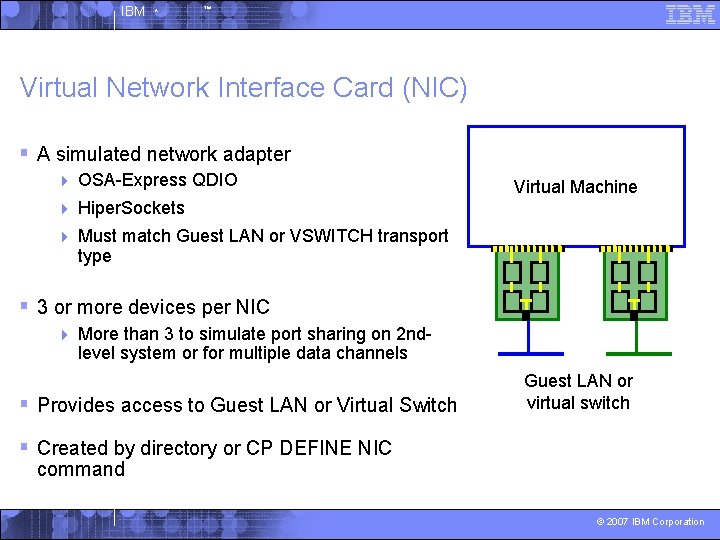
IBM ^ ™ Virtual Network Interface Card (NIC) § A simulated network adapter 4 OSA-Express QDIO 4 Hiper. Sockets 4 Must match Guest LAN or VSWITCH transport type Virtual Machine § 3 or more devices per NIC 4 More than 3 to simulate port sharing on 2 ndlevel system or for multiple data channels § Provides access to Guest LAN or Virtual Switch Guest LAN or virtual switch § Created by directory or CP DEFINE NIC command © 2007 IBM Corporation
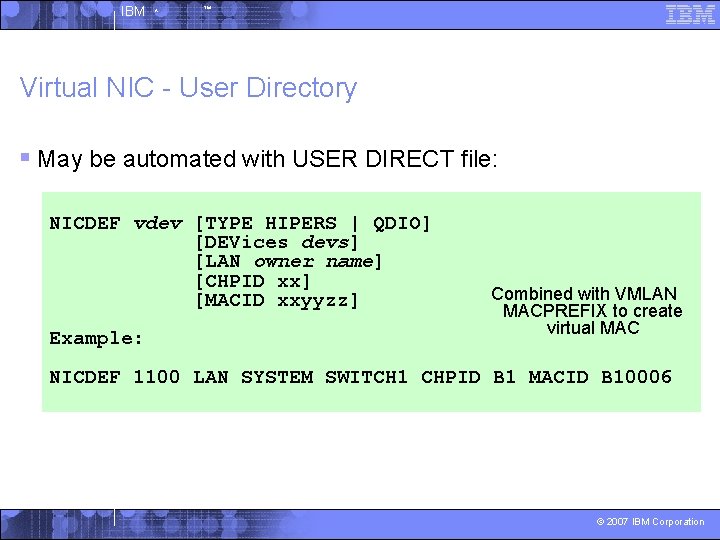
IBM ^ ™ Virtual NIC - User Directory § May be automated with USER DIRECT file: NICDEF vdev [TYPE HIPERS | QDIO] [DEVices devs] [LAN owner name] [CHPID xx] [MACID xxyyzz] Example: Combined with VMLAN MACPREFIX to create virtual MAC NICDEF 1100 LAN SYSTEM SWITCH 1 CHPID B 1 MACID B 10006 © 2007 IBM Corporation

IBM ^ ™ Virtual NIC - CP Command § May be interactive with CP DEFINE NIC and COUPLE commands: CP DEFINE NIC vdev [[TYPE] HIPERsockets|QDIO] [DEVices devs] [CHPID xx] CP COUPLE vdev [TO] owner name Example: CP DEFINE NIC 1200 TYPE QDIO CP COUPLE 1200 TO SYSTEM CSC 201 © 2007 IBM Corporation
IBM ^ ™ © 2007 IBM Corporation
IBM ^ ™ VSWITCH Link. AG Motivation “But why aren’t you using my back up OSA card? ” © 2007 IBM Corporation
IBM ^ ™ VSWITCH Traditional Setup • Define VSWITCH with 3 RDEVS • Use one OSA for data transfer • Keep 2 OSA’s as back up devices • Failover to a back up OSA causes a brief network outage • Has been improved from release to release but customers always want more © 2007 IBM Corporation
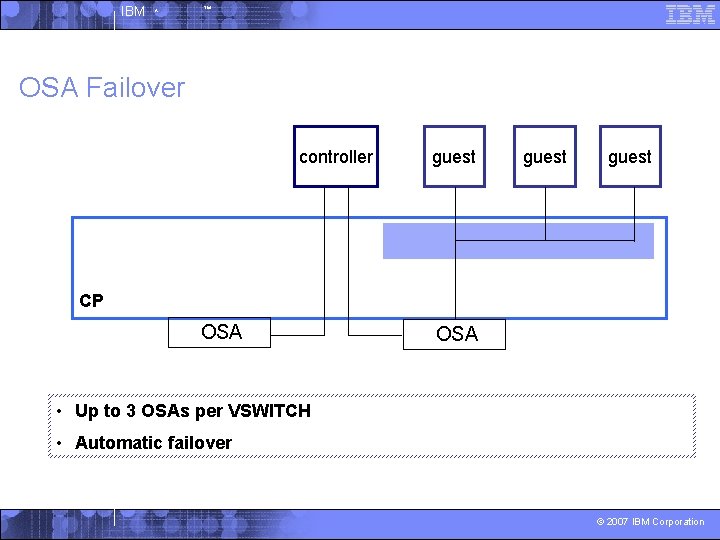
IBM ^ ™ OSA Failover controller guest CP OSA • Up to 3 OSAs per VSWITCH • Automatic failover © 2007 IBM Corporation
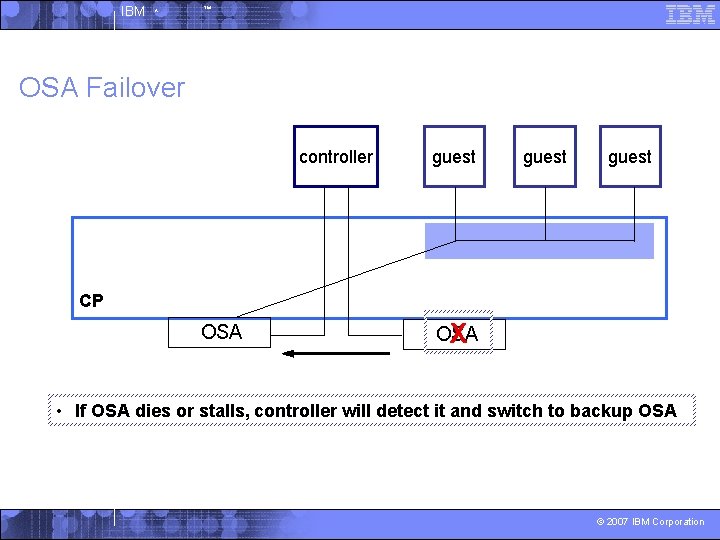
IBM ^ ™ OSA Failover controller guest CP OSA X • If OSA dies or stalls, controller will detect it and switch to backup OSA © 2007 IBM Corporation

IBM ^ ™ Link Aggregation Group two or more ports together to form a logical fat pipe between two switches S S W W I I T T C C H H IEEE 802. 3 ad Cascading Switches © 2007 IBM Corporation
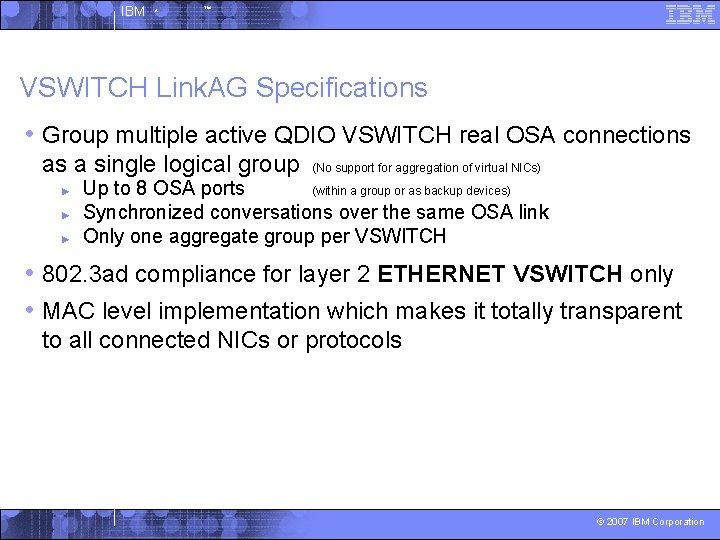
IBM ^ ™ VSWITCH Link. AG Specifications • Group multiple active QDIO VSWITCH real OSA connections as a single logical group ► ► ► (No support for aggregation of virtual NICs) Up to 8 OSA ports (within a group or as backup devices) Synchronized conversations over the same OSA link Only one aggregate group per VSWITCH • 802. 3 ad compliance for layer 2 ETHERNET VSWITCH only • MAC level implementation which makes it totally transparent to all connected NICs or protocols © 2007 IBM Corporation
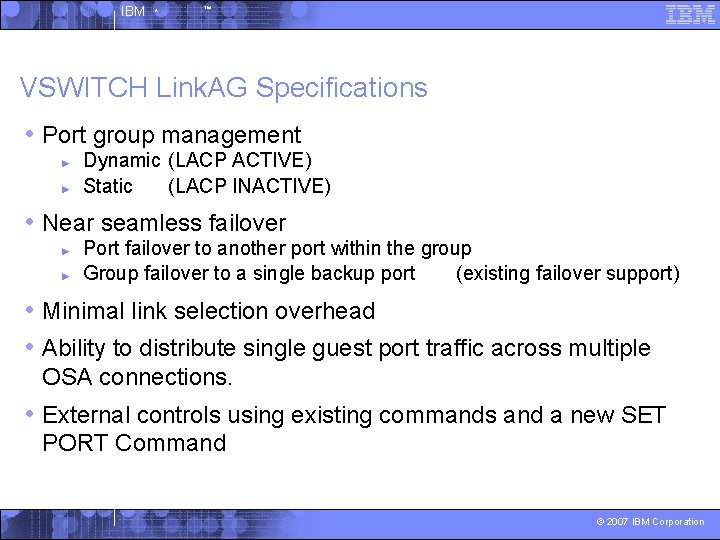
IBM ^ ™ VSWITCH Link. AG Specifications • Port group management ► ► Dynamic (LACP ACTIVE) Static (LACP INACTIVE) • Near seamless failover ► ► Port failover to another port within the group Group failover to a single backup port (existing failover support) • Minimal link selection overhead • Ability to distribute single guest port traffic across multiple OSA connections. • External controls using existing commands and a new SET PORT Command © 2007 IBM Corporation
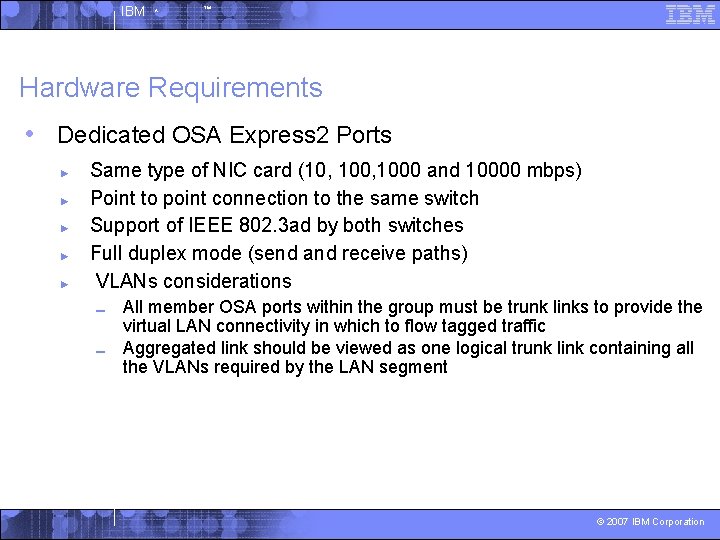
IBM ^ ™ Hardware Requirements • Dedicated OSA Express 2 Ports ► ► ► Same type of NIC card (10, 1000 and 10000 mbps) Point to point connection to the same switch Support of IEEE 802. 3 ad by both switches Full duplex mode (send and receive paths) VLANs considerations ▬ ▬ All member OSA ports within the group must be trunk links to provide the virtual LAN connectivity in which to flow tagged traffic Aggregated link should be viewed as one logical trunk link containing all the VLANs required by the LAN segment © 2007 IBM Corporation
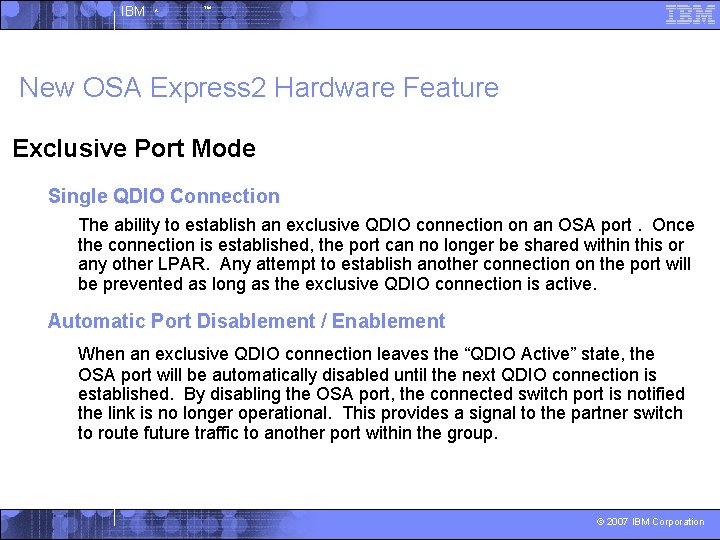
IBM ^ ™ New OSA Express 2 Hardware Feature Exclusive Port Mode Single QDIO Connection The ability to establish an exclusive QDIO connection on an OSA port. Once the connection is established, the port can no longer be shared within this or any other LPAR. Any attempt to establish another connection on the port will be prevented as long as the exclusive QDIO connection is active. Automatic Port Disablement / Enablement When an exclusive QDIO connection leaves the “QDIO Active” state, the OSA port will be automatically disabled until the next QDIO connection is established. By disabling the OSA port, the connected switch port is notified the link is no longer operational. This provides a signal to the partner switch to route future traffic to another port within the group. © 2007 IBM Corporation

IBM ^ ™ Simple Virtual Switch LAN Segment Create a simulated Layer 2 or Layer 3 switch device Virtual machine access control and VLAN authorization Create ports and connect NIC to virtual switch (LAN Segment) (VSWITCH) Linux Linux NIC NIC NIC Port 65 Port 66 Port 67 Port 68 Port 69 Port 70 Provides full MAC address management (generation and assignment) Virtual Switch Forwards traffic between Guest Ports by either IP or MAC address z/VM System z LPAR 1 -n VSWITCHs per z/VM image Example Create VSWITCH from PRIVCLASS B User ID DEF VSWITCH 1 ETHERNET SET VSWITCH 1 GRANT {user ID} From Linux Virtual Machines DEF NIC 100 TYPE QDIO COUPLE 100 SYSTEM VSWITCH 1 Physical Switch © 2007 IBM Corporation

IBM ^ ™ Cascading a Virtual to a Physical Switch Linux Linux NIC NIC NIC Start VM TCPIP Controllers VM TCPIP Controller XAUTOLOG DTCVSW 1 XAUTOLOG DTCVSW 2 Port 65 Port 66 Port 67 Port 68 Port 69 Port 70 Virtual Switch z/VM Port 1 System z LPAR QDIO Connection (3 Devices) Connect the Real Switch OSA SET VSWITCH 1 RDEV 100 Read Control Device Write Control Device Data Device Port 1 Physical Switch © 2007 IBM Corporation
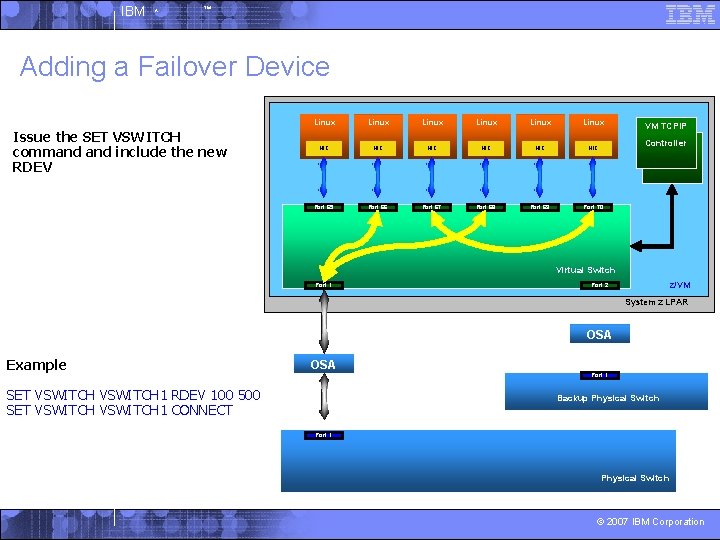
IBM ^ ™ Adding a Failover Device Issue the SET VSWITCH command include the new RDEV Linux Linux NIC NIC NIC VM TCPIP Controller Port 65 Port 66 Port 67 Port 68 Port 69 Port 70 Virtual Switch Port 1 z/VM Port 2 System z LPAR OSA Example OSA SET VSWITCH 1 RDEV 100 500 SET VSWITCH 1 CONNECT Port 1 Backup Physical Switch Port 1 Physical Switch © 2007 IBM Corporation
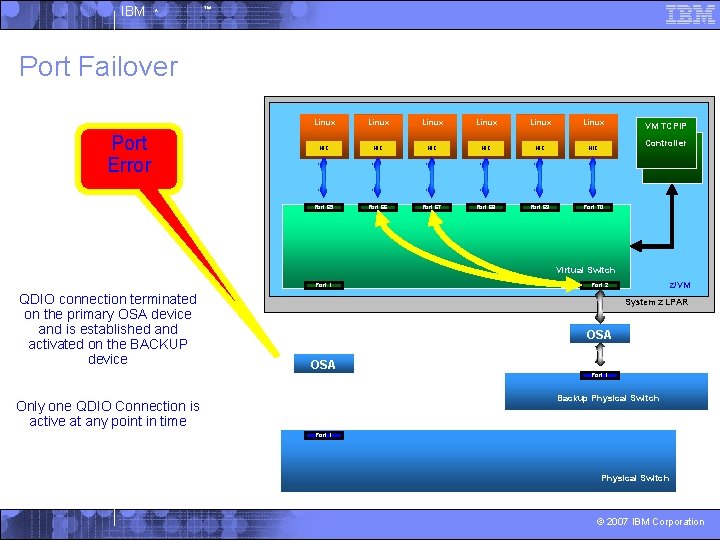
IBM ^ ™ Port Failover Port Error Linux Linux NIC NIC NIC VM TCPIP Controller Port 65 Port 66 Port 67 Port 68 Port 69 Port 70 Virtual Switch Port 1 QDIO connection terminated on the primary OSA device and is established and activated on the BACKUP device z/VM Port 2 System z LPAR OSA Port 1 Backup Physical Switch Only one QDIO Connection is active at any point in time Port 1 Physical Switch © 2007 IBM Corporation
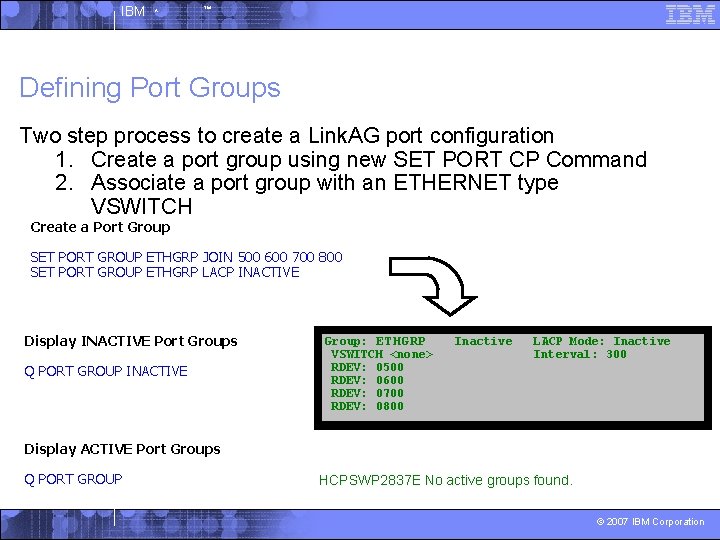
IBM ^ ™ Defining Port Groups Two step process to create a Link. AG port configuration 1. Create a port group using new SET PORT CP Command 2. Associate a port group with an ETHERNET type VSWITCH Create a Port Group SET PORT GROUP ETHGRP JOIN 500 600 700 800 SET PORT GROUP ETHGRP LACP INACTIVE Display INACTIVE Port Groups Q PORT GROUP INACTIVE Group: ETHGRP VSWITCH <none> RDEV: 0500 RDEV: 0600 RDEV: 0700 RDEV: 0800 Inactive LACP Mode: Inactive Interval: 300 Display ACTIVE Port Groups Q PORT GROUP HCPSWP 2837 E No active groups found. © 2007 IBM Corporation
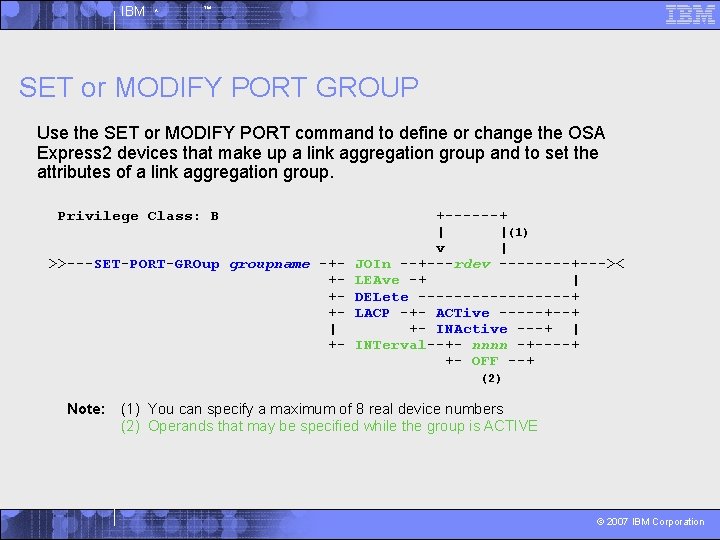
IBM ^ ™ SET or MODIFY PORT GROUP Use the SET or MODIFY PORT command to define or change the OSA Express 2 devices that make up a link aggregation group and to set the attributes of a link aggregation group. Privilege Class: B >>---SET-PORT-GROup groupname -++++| +- +------+ | |(1) v | JOIn --+---rdev ----+--->< LEAve -+ | DELete ---------+ LACP -+- ACTive -----+--+ +- INActive ---+ | INTerval--+- nnnn -+----+ +- OFF --+ (2) Note: (1) You can specify a maximum of 8 real device numbers (2) Operands that may be specified while the group is ACTIVE © 2007 IBM Corporation
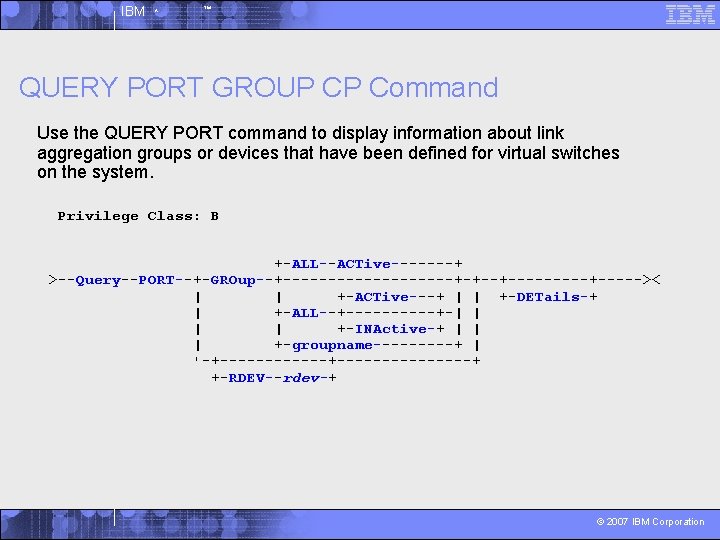
IBM ^ ™ QUERY PORT GROUP CP Command Use the QUERY PORT command to display information about link aggregation groups or devices that have been defined for virtual switches on the system. Privilege Class: B +-ALL--ACTive-------+ >--Query--PORT--+-GROup--+----------+-+--+-----+----->< | | +-ACTive---+ | | +-DETails-+ | +-ALL--+-----+-| | +-INActive-+ | | | +-groupname-----+ | '-+---------------+ +-RDEV--rdev-+ © 2007 IBM Corporation
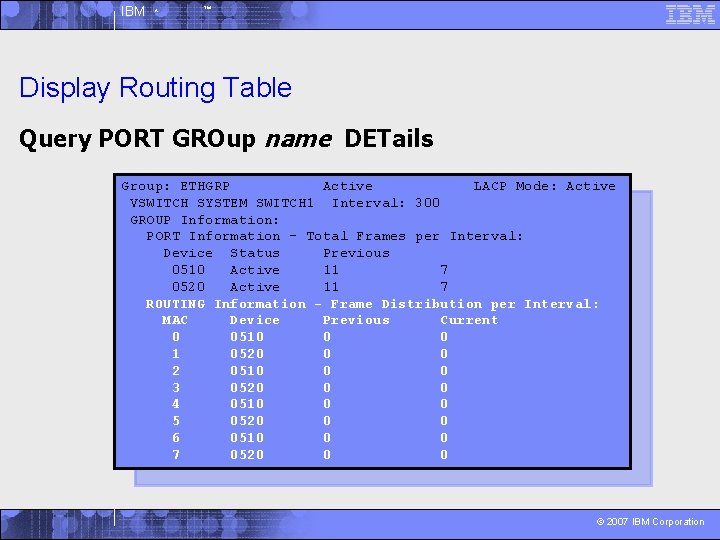
IBM ^ ™ Display Routing Table Query PORT GROup name DETails Group: ETHGRP Active LACP Mode: Active VSWITCH SYSTEM SWITCH 1 Interval: 300 GROUP Information: PORT Information - Total Frames per Interval: Device Status Previous 0510 Active 11 7 0520 Active 11 7 ROUTING Information - Frame Distribution per Interval: MAC Device Previous Current 0 0510 0 0 1 0520 0 0 2 0510 0 0 3 0520 0 0 4 0510 0 0 5 0520 0 0 6 0510 0 0 7 0520 0 0 © 2007 IBM Corporation
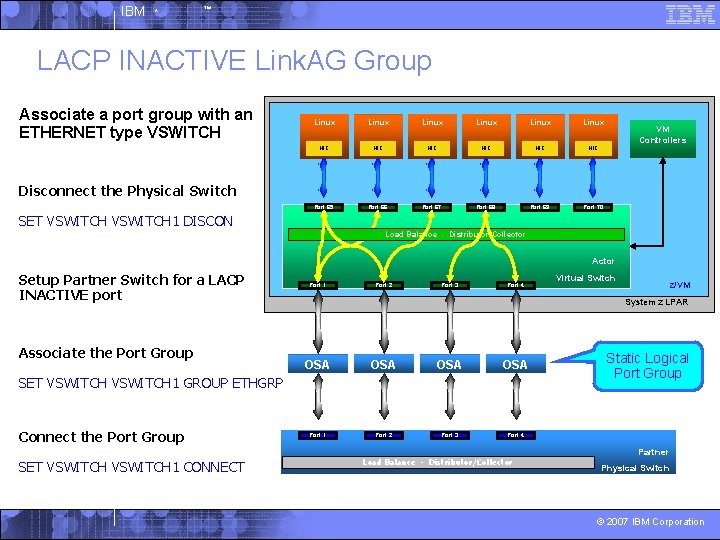
IBM ^ ™ LACP INACTIVE Link. AG Group Associate a port group with an ETHERNET type VSWITCH Linux Linux NIC NIC NIC Port 65 Port 66 Port 67 Port 68 Port 69 Port 70 VM Controllers Disconnect the Physical Switch SET VSWITCH 1 DISCON Load Balance - Distributor/Collector Actor Setup Partner Switch for a LACP INACTIVE port Associate the Port Group Port 1 Port 2 Port 3 Port 4 SET VSWITCH 1 CONNECT z/VM System z LPAR OSA OSA Port 1 Port 2 Port 3 Port 4 SET VSWITCH 1 GROUP ETHGRP Connect the Port Group Virtual Switch Load Balance - Distributor/Collector Static Logical Port Group Partner Physical Switch © 2007 IBM Corporation
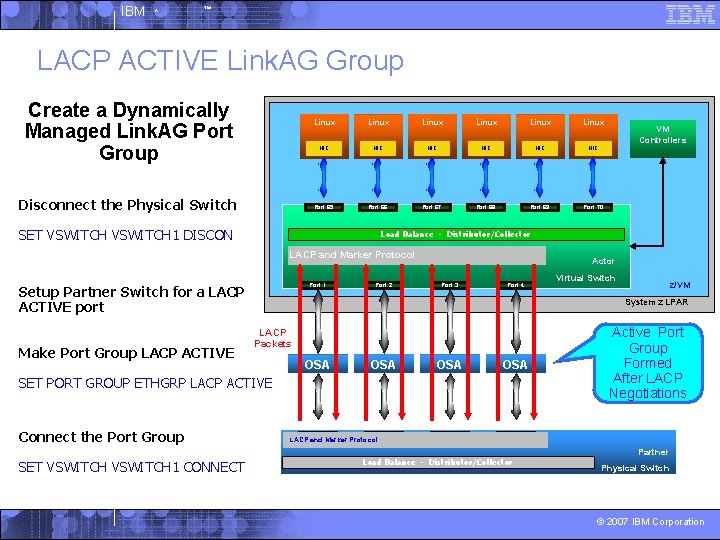
IBM ^ ™ LACP ACTIVE Link. AG Group Create a Dynamically Managed Link. AG Port Group Disconnect the Physical Switch Linux Linux NIC NIC NIC Port 65 Port 66 Port 67 Port 68 Port 69 Port 70 SET VSWITCH 1 DISCON Load Balance - Distributor/Collector LACP and Marker Protocol Port 1 Setup Partner Switch for a LACP ACTIVE port Make Port Group LACP ACTIVE Port 2 Actor Port 3 Port 4 SET VSWITCH 1 CONNECT Virtual Switch z/VM System z LPAR LACP Packets OSA OSA Port 1 Port 2 Port 3 SET PORT GROUP ETHGRP LACP ACTIVE Connect the Port Group VM Controllers LACP and Marker Protocol Load Balance - Distributor/Collector Active Port Group Formed After LACP Negotiations Partner Physical Switch © 2007 IBM Corporation
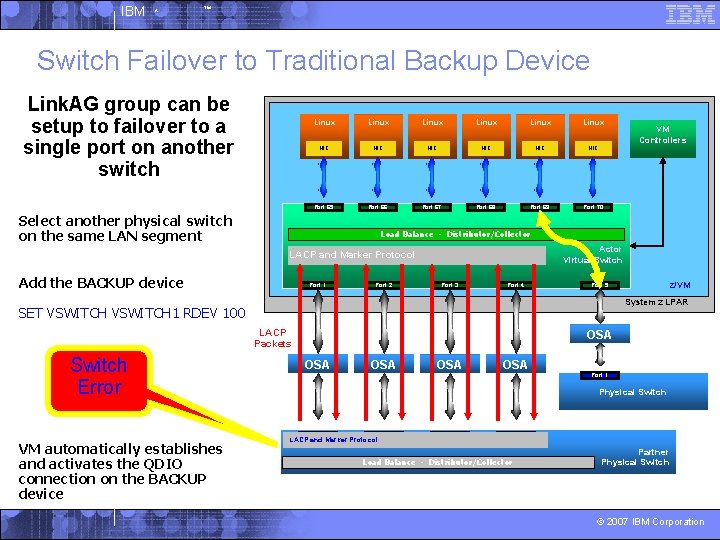
IBM ^ ™ Switch Failover to Traditional Backup Device Link. AG group can be setup to failover to a single port on another switch Linux Linux NIC NIC NIC Port 65 Port 66 Port 67 Port 68 Port 69 Port 70 Select another physical switch on the same LAN segment Load Balance - Distributor/Collector Actor Virtual Switch LACP and Marker Protocol Add the BACKUP device Port 1 Port 2 Port 3 Port 4 System z LPAR LACP Packets OSA OSA OSA Port 1 Physical Switch Port 1 VM automatically establishes and activates the QDIO connection on the BACKUP device z/VM Port 5 SET VSWITCH 1 RDEV 100 Switch Error VM Controllers Port 2 LACP and Marker Protocol Port 3 Load Balance - Distributor/Collector Partner Physical Switch © 2007 IBM Corporation
IBM ^ ™ Advantages of a LACP ACTIVE Port Group (Recommended) • Ports can be added or removed dynamically within the Link. AG group Changes made on one switch are automatically made on the other switch 4 Immediate packet rerouting 4 • Fast near seamless failover to another port within the group • Adding or removing capacity is not disruptive • LACP Protocol provides a heartbeat mechanism • Marker Protocol allows greater flexibility to dynamically move work from one port to another within the group • Automatic fail-back from the backup device to a port group © 2007 IBM Corporation
IBM ^ ™ Contact Information § By e-mail: bolinda@us. ibm. com § In person: USA 607. 429. 5469 § Mailing lists: IBMVM@listserv. uark. edu LINUX-390@vm. marist. edu http: //ibm. com/vm/techinfo/listserv. html § Other: http: //www. vm. ibm. com/virtualnetwork/ © 2007 IBM Corporation
IBM ^ ™ Thanks for Listening! © 2007 IBM Corporation
- Slides: 43