
IBM Io T Connected Vehicle Insights Driving Behavior
IBM Io. T Connected Vehicle Insights Driving Behavior Plug-in Development Guide June 10, 2019 Tokyo Software Development Laboratory © 2019 IBM Corporation
IBM Io. T Connected Vehicle Insights About This Document This document describes how to customize existing driving behavior analysis configuration and how to add new driving behavior patterns. [Related links] • IBM Io. T Connected Vehicle Insights – Entitled Content (KC) • Driver Behavior • Customizing driver behavior insights https: //www. ibm. com/support/knowledgecenter/SSNQ 4 V_gbs/iot-automotive/managing/driver_behavior/db_plugin_framework. html • References • Configuration files • Drb. Customizable. Config. xml https: //www. ibm. com/support/knowledgecenter/SSNQ 4 V_gbs/iot-automotive/managing/driver_behavior/db_types. html? pos=2 2 © 2019 IBM Corporation
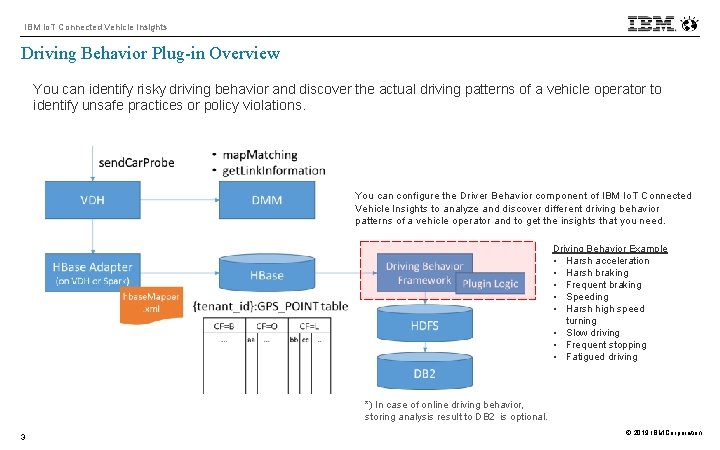
IBM Io. T Connected Vehicle Insights Driving Behavior Plug-in Overview You can identify risky driving behavior and discover the actual driving patterns of a vehicle operator to identify unsafe practices or policy violations. You can configure the Driver Behavior component of IBM Io. T Connected Vehicle Insights to analyze and discover different driving behavior patterns of a vehicle operator and to get the insights that you need. Driving Behavior Example • Harsh acceleration • Harsh braking • Frequent braking • Speeding • Harsh high speed turning • Slow driving • Frequent stopping • Fatigued driving *) In case of online driving behavior, storing analysis result to DB 2 is optional. 3 © 2019 IBM Corporation
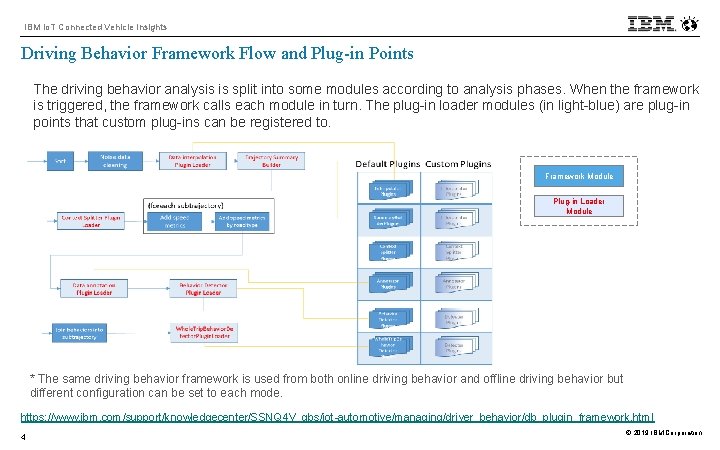
IBM Io. T Connected Vehicle Insights Driving Behavior Framework Flow and Plug-in Points The driving behavior analysis is split into some modules according to analysis phases. When the framework is triggered, the framework calls each module in turn. The plug-in loader modules (in light-blue) are plug-in points that custom plug-ins can be registered to. Framework Module Plug-in Loader Module * The same driving behavior framework is used from both online driving behavior and offline driving behavior but different configuration can be set to each mode. https: //www. ibm. com/support/knowledgecenter/SSNQ 4 V_gbs/iot-automotive/managing/driver_behavior/db_plugin_framework. html 4 © 2019 IBM Corporation
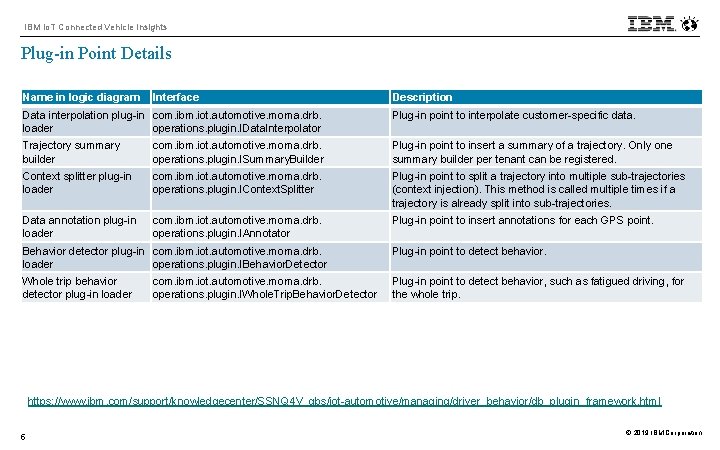
IBM Io. T Connected Vehicle Insights Plug-in Point Details Name in logic diagram Interface Description Data interpolation plug-in com. ibm. iot. automotive. moma. drb. loader operations. plugin. IData. Interpolator Plug-in point to interpolate customer-specific data. Trajectory summary builder com. ibm. iot. automotive. moma. drb. operations. plugin. ISummary. Builder Plug-in point to insert a summary of a trajectory. Only one summary builder per tenant can be registered. Context splitter plug-in loader com. ibm. iot. automotive. moma. drb. operations. plugin. IContext. Splitter Plug-in point to split a trajectory into multiple sub-trajectories (context injection). This method is called multiple times if a trajectory is already split into sub-trajectories. Data annotation plug-in loader com. ibm. iot. automotive. moma. drb. operations. plugin. IAnnotator Plug-in point to insert annotations for each GPS point. Behavior detector plug-in com. ibm. iot. automotive. moma. drb. loader operations. plugin. IBehavior. Detector Plug-in point to detect behavior. Whole trip behavior detector plug-in loader Plug-in point to detect behavior, such as fatigued driving, for the whole trip. com. ibm. iot. automotive. moma. drb. operations. plugin. IWhole. Trip. Behavior. Detector https: //www. ibm. com/support/knowledgecenter/SSNQ 4 V_gbs/iot-automotive/managing/driver_behavior/db_plugin_framework. html 5 © 2019 IBM Corporation
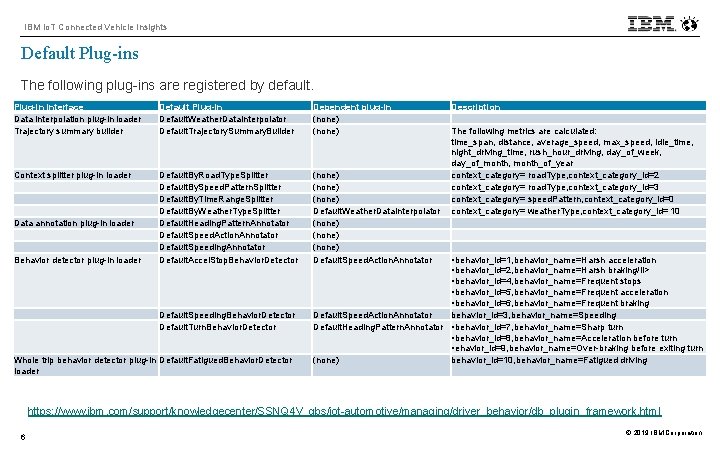
IBM Io. T Connected Vehicle Insights Default Plug-ins The following plug-ins are registered by default. Plug-in interface Data interpolation plug-in loader Trajectory summary builder Default Plug-in Default. Weather. Data. Interpolator Default. Trajectory. Summary. Builder Dependent plug-in (none) Context splitter plug-in loader Default. By. Road. Type. Splitter Default. By. Speed. Pattern. Splitter Default. By. Time. Range. Splitter Default. By. Weather. Type. Splitter Default. Heading. Pattern. Annotator Default. Speed. Action. Annotator Default. Speeding. Annotator Default. Accel. Stop. Behavior. Detector (none) Default. Weather. Data. Interpolator (none) Default. Speed. Action. Annotator Default. Speeding. Behavior. Detector Default. Turn. Behavior. Detector Default. Speed. Action. Annotator behavior_id=3, behavior_name=Speeding Default. Heading. Pattern. Annotator • behavior_id=7, behavior_name=Sharp turn • behavior_id=8, behavior_name=Acceleration before turn • ehavior_id=9, behavior_name=Over-braking before exiting turn (none) behavior_id=10, behavior_name=Fatigued driving Data annotation plug-in loader Behavior detector plug-in loader Whole trip behavior detector plug-in Default. Fatigued. Behavior. Detector loader Description The following metrics are calculated: time_span, distance, average_speed, max_speed, idle_time, night_driving_time, rush_hour_driving, day_of_week, day_of_month, month_of_year context_category= road. Type, context_category_id=2 context_category= road. Type, context_category_id=3 context_category= speed. Pattern, context_category_id=0 context_category= weather. Type, context_category_id= 10 • behavior_id=1, behavior_name=Harsh acceleration • behavior_id=2, behavior_name=Harsh braking/li> • behavior_id=4, behavior_name=Frequent stops • behavior_id=5, behavior_name=Frequent acceleration • behavior_id=6, behavior_name=Frequent braking https: //www. ibm. com/support/knowledgecenter/SSNQ 4 V_gbs/iot-automotive/managing/driver_behavior/db_plugin_framework. html 6 © 2019 IBM Corporation
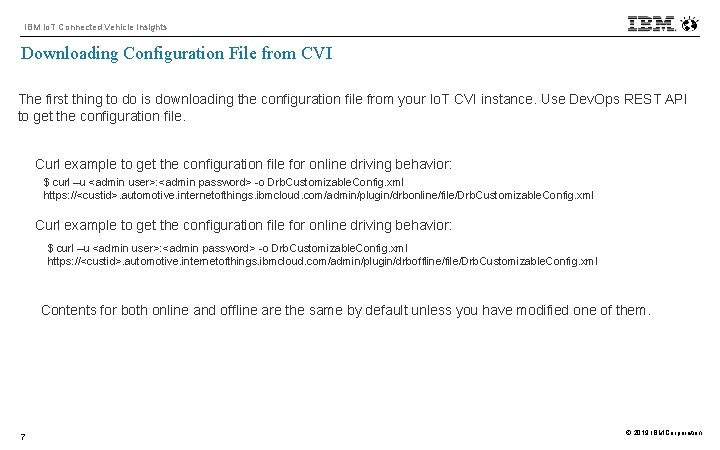
IBM Io. T Connected Vehicle Insights Downloading Configuration File from CVI The first thing to do is downloading the configuration file from your Io. T CVI instance. Use Dev. Ops REST API to get the configuration file. Curl example to get the configuration file for online driving behavior: $ curl –u <admin user>: <admin password> -o Drb. Customizable. Config. xml https: //<custid>. automotive. internetofthings. ibmcloud. com/admin/plugin/drbonline/file/Drb. Customizable. Config. xml Curl example to get the configuration file for online driving behavior: $ curl –u <admin user>: <admin password> -o Drb. Customizable. Config. xml https: //<custid>. automotive. internetofthings. ibmcloud. com/admin/plugin/drboffline/file/Drb. Customizable. Config. xml Contents for both online and offline are the same by default unless you have modified one of them. 7 © 2019 IBM Corporation

IBM Io. T Connected Vehicle Insights Driving Behavior Analysis Configuration File – Drb. Customizable. Config. xml The driving behavior data types and the associated threshold values that are used to detect and classify the results, are configured in the Drb. Customizable. Config. xml file. 8 Plug-in Registration <? xml version="1. 0" encoding="UTF-8"? > <tns: Drb. Customizable. Config xmlns: tns=http: //www. ibm. com/iot/automotive/moma/drb/mapping. . . > <tns: analysis_threahold_values> : Threshold Values Definition </tns: analysis_threahold_values> <tns: speed_scope_to_accel_list> : Speed Related Definition </tns: speed_scope_to_accel_list> <tns: process> <tns: summary_builder> : Trajectory Summary Builder Configuration </tns: summary_builder> <tns: data_interpolator_list> Data Interpolator Configuration : </tns: data_interpolator_list> <tns: context_splitter_list> : Context Splitter Configuration </tns: context_splitter_list> <tns: behavior_annotator_list> : Behavior Annotator Configuration </tns: behavior_annotator_list> <tns: behavior_detector_list> : Behavior Detector Configuration </tns: behavior_detector_list> <tns: whole_trip_behavior_detector_list> : Whole Trip Behavior Detector Configuration </tns: whole_trip_behavior_detector_list> </tns: process> </tns: Drb. Customizable. Config> © 2019 IBM Corporation
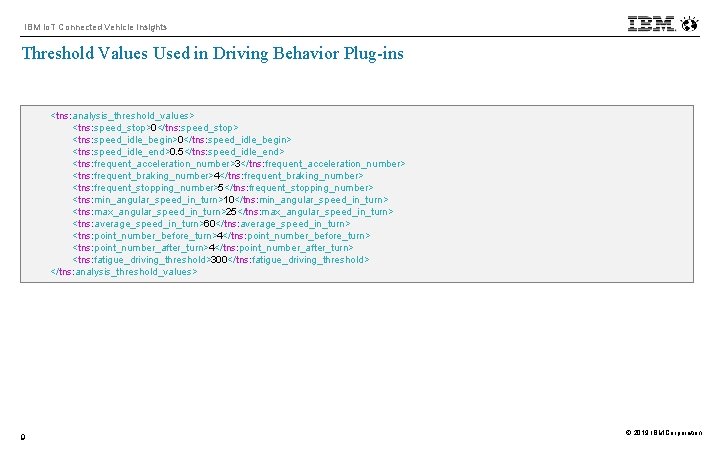
IBM Io. T Connected Vehicle Insights Threshold Values Used in Driving Behavior Plug-ins <tns: analysis_threshold_values> <tns: speed_stop>0</tns: speed_stop> <tns: speed_idle_begin>0</tns: speed_idle_begin> <tns: speed_idle_end>0. 5</tns: speed_idle_end> <tns: frequent_acceleration_number>3</tns: frequent_acceleration_number> <tns: frequent_braking_number>4</tns: frequent_braking_number> <tns: frequent_stopping_number>5</tns: frequent_stopping_number> <tns: min_angular_speed_in_turn>10</tns: min_angular_speed_in_turn> <tns: max_angular_speed_in_turn>25</tns: max_angular_speed_in_turn> <tns: average_speed_in_turn>60</tns: average_speed_in_turn> <tns: point_number_before_turn>4</tns: point_number_before_turn> <tns: point_number_after_turn>4</tns: point_number_after_turn> <tns: fatigue_driving_threshold>300</tns: fatigue_driving_threshold> </tns: analysis_threshold_values> 9 © 2019 IBM Corporation
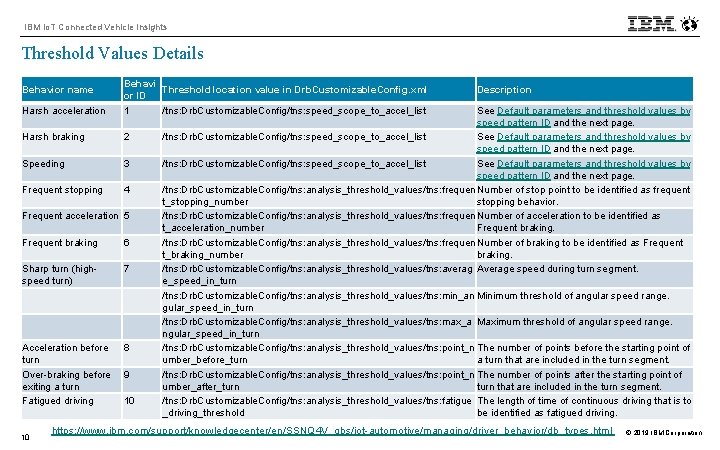
IBM Io. T Connected Vehicle Insights Threshold Values Details Harsh acceleration Behavi Threshold location value in Drb. Customizable. Config. xml or ID 1 /tns: Drb. Customizable. Config/tns: speed_scope_to_accel_list Harsh braking 2 Speeding 3 Frequent stopping 4 Behavior name Frequent acceleration 5 Frequent braking 6 Sharp turn (highspeed turn) 7 Acceleration before turn Over-braking before exiting a turn Fatigued driving 8 10 9 10 Description See Default parameters and threshold values by speed pattern ID and the next page. /tns: Drb. Customizable. Config/tns: speed_scope_to_accel_list See Default parameters and threshold values by speed pattern ID and the next page. /tns: Drb. Customizable. Config/tns: analysis_threshold_values/tns: frequen Number of stop point to be identified as frequent t_stopping_number stopping behavior. /tns: Drb. Customizable. Config/tns: analysis_threshold_values/tns: frequen Number of acceleration to be identified as t_acceleration_number Frequent braking. /tns: Drb. Customizable. Config/tns: analysis_threshold_values/tns: frequen Number of braking to be identified as Frequent t_braking_number braking. /tns: Drb. Customizable. Config/tns: analysis_threshold_values/tns: averag Average speed during turn segment. e_speed_in_turn /tns: Drb. Customizable. Config/tns: analysis_threshold_values/tns: min_an Minimum threshold of angular speed range. gular_speed_in_turn /tns: Drb. Customizable. Config/tns: analysis_threshold_values/tns: max_a Maximum threshold of angular speed range. ngular_speed_in_turn /tns: Drb. Customizable. Config/tns: analysis_threshold_values/tns: point_n The number of points before the starting point of umber_before_turn a turn that are included in the turn segment. /tns: Drb. Customizable. Config/tns: analysis_threshold_values/tns: point_n The number of points after the starting point of umber_after_turn that are included in the turn segment. /tns: Drb. Customizable. Config/tns: analysis_threshold_values/tns: fatigue The length of time of continuous driving that is to _driving_threshold be identified as fatigued driving. https: //www. ibm. com/support/knowledgecenter/en/SSNQ 4 V_gbs/iot-automotive/managing/driver_behavior/db_types. html © 2019 IBM Corporation
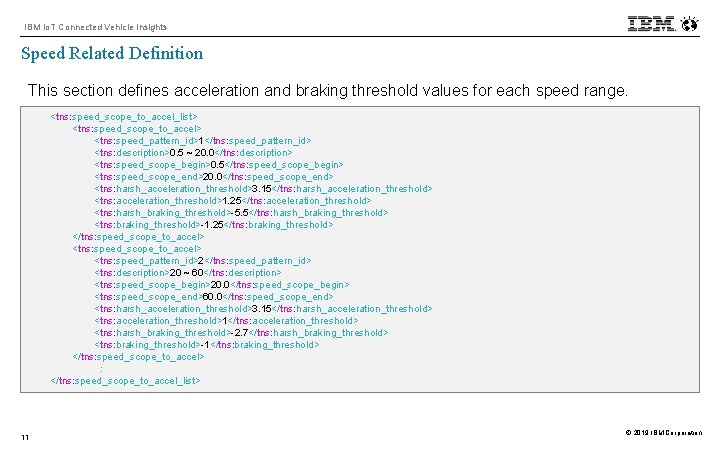
IBM Io. T Connected Vehicle Insights Speed Related Definition This section defines acceleration and braking threshold values for each speed range. <tns: speed_scope_to_accel_list> <tns: speed_scope_to_accel> <tns: speed_pattern_id>1</tns: speed_pattern_id> <tns: description>0. 5 ~ 20. 0</tns: description> <tns: speed_scope_begin>0. 5</tns: speed_scope_begin> <tns: speed_scope_end>20. 0</tns: speed_scope_end> <tns: harsh_acceleration_threshold>3. 15</tns: harsh_acceleration_threshold> <tns: acceleration_threshold>1. 25</tns: acceleration_threshold> <tns: harsh_braking_threshold>-5. 5</tns: harsh_braking_threshold> <tns: braking_threshold>-1. 25</tns: braking_threshold> </tns: speed_scope_to_accel> <tns: speed_pattern_id>2</tns: speed_pattern_id> <tns: description>20 ~ 60</tns: description> <tns: speed_scope_begin>20. 0</tns: speed_scope_begin> <tns: speed_scope_end>60. 0</tns: speed_scope_end> <tns: harsh_acceleration_threshold>3. 15</tns: harsh_acceleration_threshold> <tns: acceleration_threshold>1</tns: acceleration_threshold> <tns: harsh_braking_threshold>-2. 7</tns: harsh_braking_threshold> <tns: braking_threshold>-1</tns: braking_threshold> </tns: speed_scope_to_accel> : </tns: speed_scope_to_accel_list> 11 © 2019 IBM Corporation
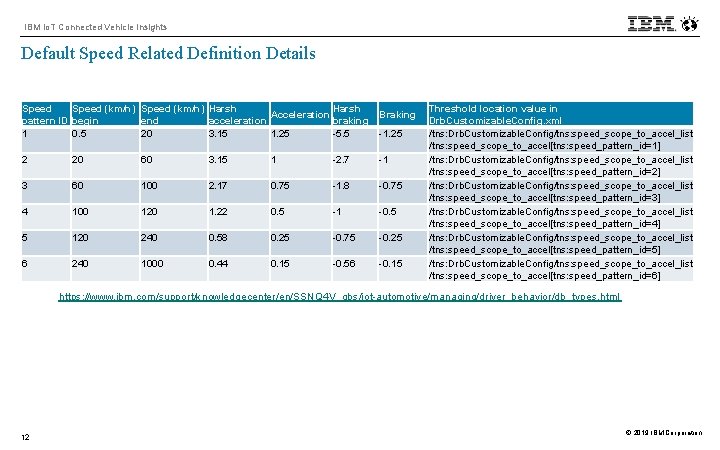
IBM Io. T Connected Vehicle Insights Default Speed Related Definition Details Speed (km/h) Harsh Acceleration pattern ID begin end acceleration braking 1 0. 5 20 3. 15 1. 25 -5. 5 Braking -1. 25 2 20 60 3. 15 1 -2. 7 -1 3 60 100 2. 17 0. 75 -1. 8 -0. 75 4 100 120 1. 22 0. 5 -1 -0. 5 5 120 240 0. 58 0. 25 -0. 75 -0. 25 6 240 1000 0. 44 0. 15 -0. 56 -0. 15 Threshold location value in Drb. Customizable. Config. xml /tns: Drb. Customizable. Config/tns: speed_scope_to_accel_list /tns: speed_scope_to_accel[tns: speed_pattern_id=1] /tns: Drb. Customizable. Config/tns: speed_scope_to_accel_list /tns: speed_scope_to_accel[tns: speed_pattern_id=2] /tns: Drb. Customizable. Config/tns: speed_scope_to_accel_list /tns: speed_scope_to_accel[tns: speed_pattern_id=3] /tns: Drb. Customizable. Config/tns: speed_scope_to_accel_list /tns: speed_scope_to_accel[tns: speed_pattern_id=4] /tns: Drb. Customizable. Config/tns: speed_scope_to_accel_list /tns: speed_scope_to_accel[tns: speed_pattern_id=5] /tns: Drb. Customizable. Config/tns: speed_scope_to_accel_list /tns: speed_scope_to_accel[tns: speed_pattern_id=6] https: //www. ibm. com/support/knowledgecenter/en/SSNQ 4 V_gbs/iot-automotive/managing/driver_behavior/db_types. html 12 © 2019 IBM Corporation
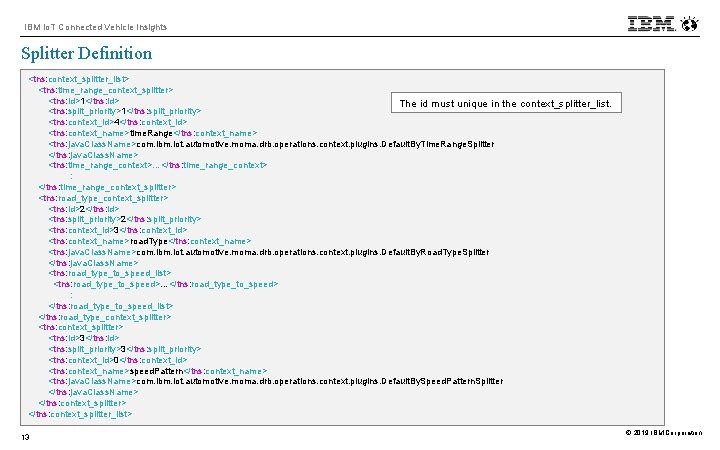
IBM Io. T Connected Vehicle Insights Splitter Definition <tns: context_splitter_list> <tns: time_range_context_splitter> <tns: id>1</tns: id> The id must unique in the context_splitter_list. <tns: split_priority>1</tns: split_priority> <tns: context_id>4</tns: context_id> <tns: context_name>time. Range</tns: context_name> <tns: java. Class. Name>com. ibm. iot. automotive. moma. drb. operations. context. plugins. Default. By. Time. Range. Splitter </tns: java. Class. Name> <tns: time_range_context>…</tns: time_range_context> : </tns: time_range_context_splitter> <tns: road_type_context_splitter> <tns: id>2</tns: id> <tns: split_priority>2</tns: split_priority> <tns: context_id>3</tns: context_id> <tns: context_name>road. Type</tns: context_name> <tns: java. Class. Name>com. ibm. iot. automotive. moma. drb. operations. context. plugins. Default. By. Road. Type. Splitter </tns: java. Class. Name> <tns: road_type_to_speed_list> <tns: road_type_to_speed>…</tns: road_type_to_speed> : </tns: road_type_to_speed_list> </tns: road_type_context_splitter> <tns: id>3</tns: id> <tns: split_priority>3</tns: split_priority> <tns: context_id>0</tns: context_id> <tns: context_name>speed. Pattern</tns: context_name> <tns: java. Class. Name>com. ibm. iot. automotive. moma. drb. operations. context. plugins. Default. By. Speed. Pattern. Splitter </tns: java. Class. Name> </tns: context_splitter_list> 13 © 2019 IBM Corporation
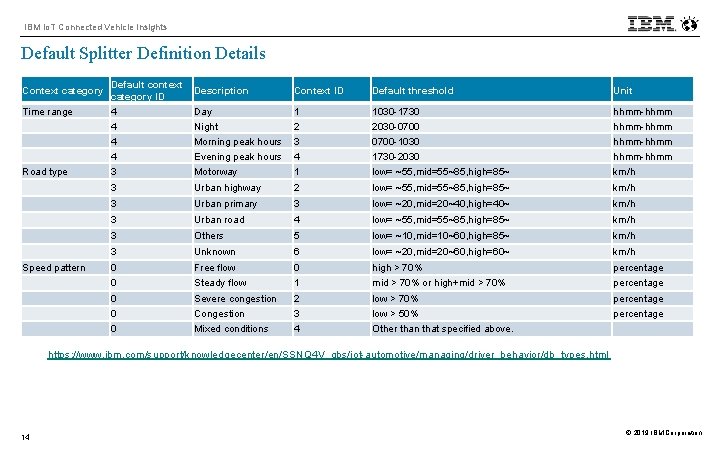
IBM Io. T Connected Vehicle Insights Default Splitter Definition Details Context category Time range Road type Speed pattern Default context category ID 4 4 3 Description Context ID Default threshold Unit Day Night Morning peak hours Evening peak hours Motorway 1 2 3 4 1 1030 -1730 2030 -0700 -1030 1730 -2030 low= ~55, mid=55~85, high=85~ hhmm-hhmm km/h 3 Urban highway 2 low= ~55, mid=55~85, high=85~ km/h 3 Urban primary 3 low= ~20, mid=20~40, high=40~ km/h 3 Urban road 4 low= ~55, mid=55~85, high=85~ km/h 3 Others 5 low= ~10, mid=10~60, high=85~ km/h 3 Unknown 6 low= ~20, mid=20~60, high=60~ km/h 0 0 Free flow Steady flow 0 1 high > 70% mid > 70% or high+mid > 70% percentage 0 0 0 Severe congestion Congestion Mixed conditions 2 3 4 low > 70% low > 50% Other than that specified above. percentage https: //www. ibm. com/support/knowledgecenter/en/SSNQ 4 V_gbs/iot-automotive/managing/driver_behavior/db_types. html 14 © 2019 IBM Corporation
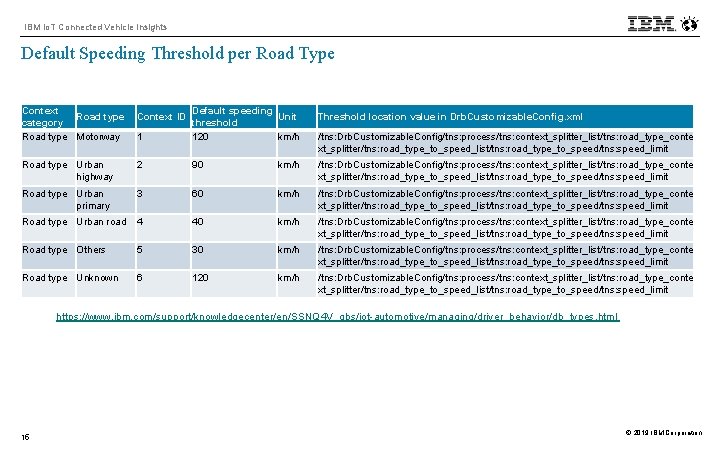
IBM Io. T Connected Vehicle Insights Default Speeding Threshold per Road Type Context Road type category Road type Motorway 1 Default speeding Unit threshold 120 km/h Road type Urban highway 2 90 km/h /tns: Drb. Customizable. Config/tns: process/tns: context_splitter_list/tns: road_type_conte xt_splitter/tns: road_type_to_speed_list/tns: road_type_to_speed/tns: speed_limit Road type Urban primary 3 60 km/h /tns: Drb. Customizable. Config/tns: process/tns: context_splitter_list/tns: road_type_conte xt_splitter/tns: road_type_to_speed_list/tns: road_type_to_speed/tns: speed_limit Road type Urban road 4 40 km/h /tns: Drb. Customizable. Config/tns: process/tns: context_splitter_list/tns: road_type_conte xt_splitter/tns: road_type_to_speed_list/tns: road_type_to_speed/tns: speed_limit Road type Others 5 30 km/h /tns: Drb. Customizable. Config/tns: process/tns: context_splitter_list/tns: road_type_conte xt_splitter/tns: road_type_to_speed_list/tns: road_type_to_speed/tns: speed_limit Road type Unknown 6 120 km/h /tns: Drb. Customizable. Config/tns: process/tns: context_splitter_list/tns: road_type_conte xt_splitter/tns: road_type_to_speed_list/tns: road_type_to_speed/tns: speed_limit Context ID Threshold location value in Drb. Customizable. Config. xml /tns: Drb. Customizable. Config/tns: process/tns: context_splitter_list/tns: road_type_conte xt_splitter/tns: road_type_to_speed_list/tns: road_type_to_speed/tns: speed_limit https: //www. ibm. com/support/knowledgecenter/en/SSNQ 4 V_gbs/iot-automotive/managing/driver_behavior/db_types. html 15 © 2019 IBM Corporation
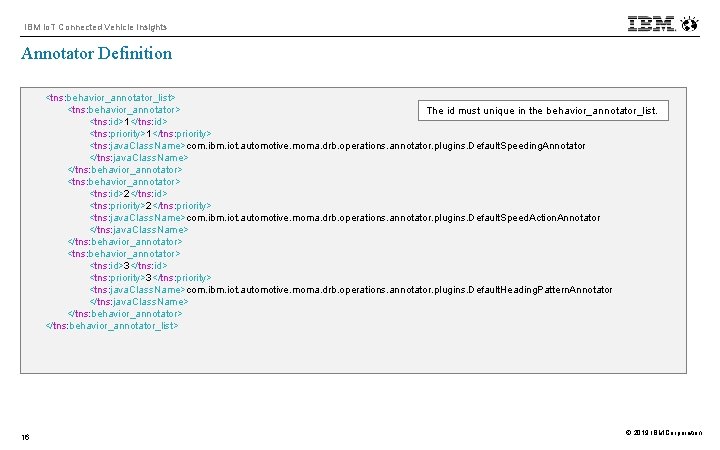
IBM Io. T Connected Vehicle Insights Annotator Definition <tns: behavior_annotator_list> <tns: behavior_annotator> The id must unique in the behavior_annotator_list. <tns: id>1</tns: id> <tns: priority>1</tns: priority> <tns: java. Class. Name>com. ibm. iot. automotive. moma. drb. operations. annotator. plugins. Default. Speeding. Annotator </tns: java. Class. Name> </tns: behavior_annotator> <tns: id>2</tns: id> <tns: priority>2</tns: priority> <tns: java. Class. Name>com. ibm. iot. automotive. moma. drb. operations. annotator. plugins. Default. Speed. Action. Annotator </tns: java. Class. Name> </tns: behavior_annotator> <tns: id>3</tns: id> <tns: priority>3</tns: priority> <tns: java. Class. Name>com. ibm. iot. automotive. moma. drb. operations. annotator. plugins. Default. Heading. Pattern. Annotator </tns: java. Class. Name> </tns: behavior_annotator_list> 16 © 2019 IBM Corporation
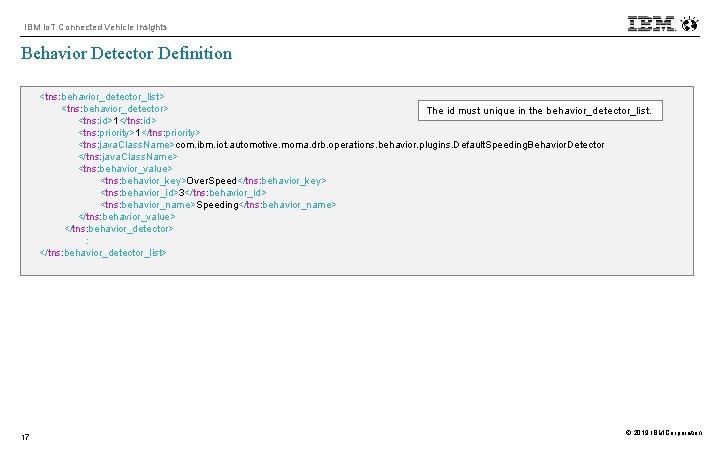
IBM Io. T Connected Vehicle Insights Behavior Detector Definition <tns: behavior_detector_list> <tns: behavior_detector> The id must unique in the behavior_detector_list. <tns: id>1</tns: id> <tns: priority>1</tns: priority> <tns: java. Class. Name>com. ibm. iot. automotive. moma. drb. operations. behavior. plugins. Default. Speeding. Behavior. Detector </tns: java. Class. Name> <tns: behavior_value> <tns: behavior_key>Over. Speed</tns: behavior_key> <tns: behavior_id>3</tns: behavior_id> <tns: behavior_name>Speeding</tns: behavior_name> </tns: behavior_value> </tns: behavior_detector> : </tns: behavior_detector_list> 17 © 2019 IBM Corporation
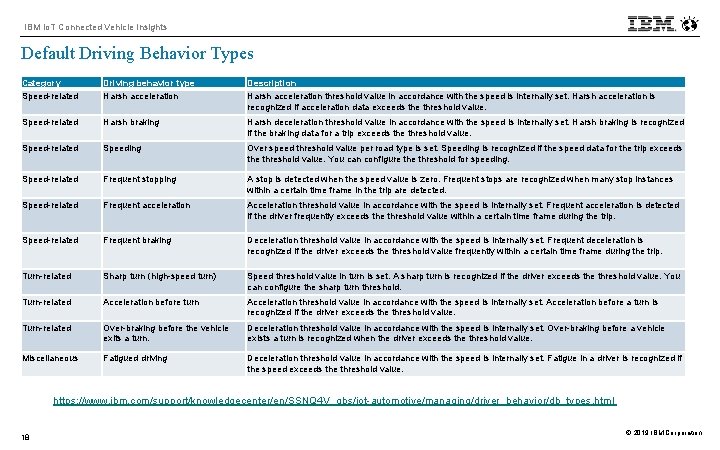
IBM Io. T Connected Vehicle Insights Default Driving Behavior Types Category Speed-related Driving behavior type Harsh acceleration Description Harsh acceleration threshold value in accordance with the speed is internally set. Harsh acceleration is recognized if acceleration data exceeds the threshold value. Speed-related Harsh braking Harsh deceleration threshold value in accordance with the speed is internally set. Harsh braking is recognized if the braking data for a trip exceeds the threshold value. Speed-related Speeding Over speed threshold value per road type is set. Speeding is recognized if the speed data for the trip exceeds the threshold value. You can configure threshold for speeding. Speed-related Frequent stopping A stop is detected when the speed value is zero. Frequent stops are recognized when many stop instances within a certain time frame in the trip are detected. Speed-related Frequent acceleration Acceleration threshold value in accordance with the speed is internally set. Frequent acceleration is detected if the driver frequently exceeds the threshold value within a certain time frame during the trip. Speed-related Frequent braking Deceleration threshold value in accordance with the speed is internally set. Frequent deceleration is recognized if the driver exceeds the threshold value frequently within a certain time frame during the trip. Turn-related Sharp turn (high-speed turn) Speed threshold value in turn is set. A sharp turn is recognized if the driver exceeds the threshold value. You can configure the sharp turn threshold. Turn-related Acceleration before turn Acceleration threshold value in accordance with the speed is internally set. Acceleration before a turn is recognized if the driver exceeds the threshold value. Turn-related Over-braking before the vehicle exits a turn. Deceleration threshold value in accordance with the speed is internally set. Over-braking before a vehicle exists a turn is recognized when the driver exceeds the threshold value. Miscellaneous Fatigued driving Deceleration threshold value in accordance with the speed is internally set. Fatigue in a driver is recognized if the speed exceeds the threshold value. https: //www. ibm. com/support/knowledgecenter/en/SSNQ 4 V_gbs/iot-automotive/managing/driver_behavior/db_types. html 18 © 2019 IBM Corporation
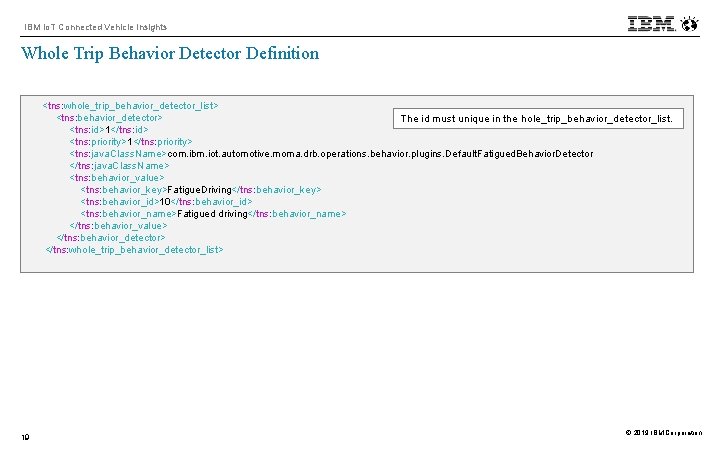
IBM Io. T Connected Vehicle Insights Whole Trip Behavior Detector Definition <tns: whole_trip_behavior_detector_list> <tns: behavior_detector> The id must unique in the hole_trip_behavior_detector_list. <tns: id>1</tns: id> <tns: priority>1</tns: priority> <tns: java. Class. Name>com. ibm. iot. automotive. moma. drb. operations. behavior. plugins. Default. Fatigued. Behavior. Detector </tns: java. Class. Name> <tns: behavior_value> <tns: behavior_key>Fatigue. Driving</tns: behavior_key> <tns: behavior_id>10</tns: behavior_id> <tns: behavior_name>Fatigued driving</tns: behavior_name> </tns: behavior_value> </tns: behavior_detector> </tns: whole_trip_behavior_detector_list> 19 © 2019 IBM Corporation
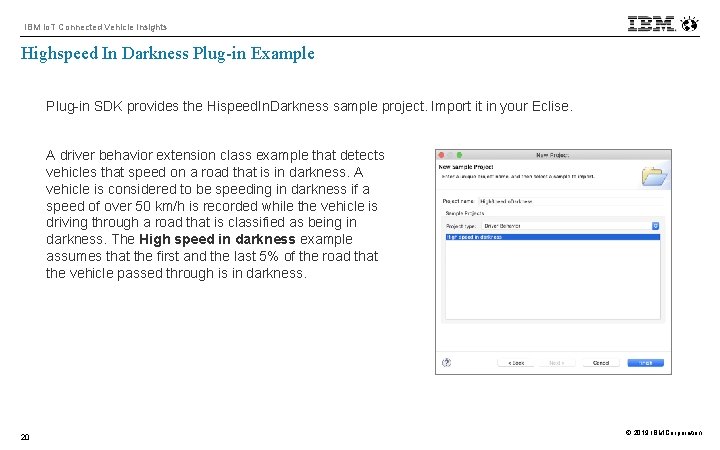
IBM Io. T Connected Vehicle Insights Highspeed In Darkness Plug-in Example Plug-in SDK provides the Hispeed. In. Darkness sample project. Import it in your Eclise. A driver behavior extension class example that detects vehicles that speed on a road that is in darkness. A vehicle is considered to be speeding in darkness if a speed of over 50 km/h is recorded while the vehicle is driving through a road that is classified as being in darkness. The High speed in darkness example assumes that the first and the last 5% of the road that the vehicle passed through is in darkness. 20 © 2019 IBM Corporation
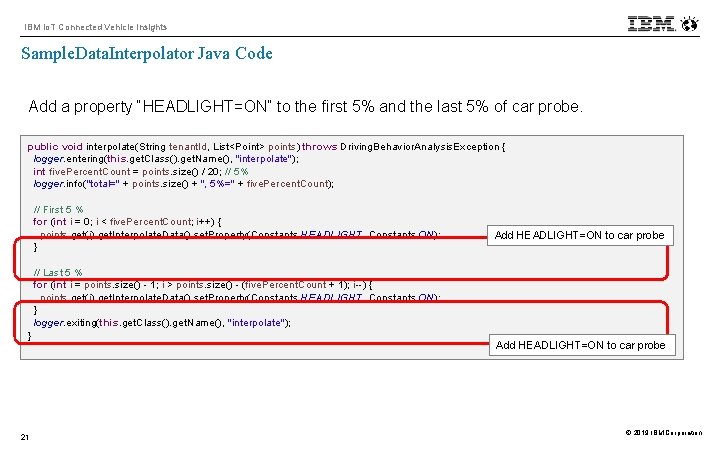
IBM Io. T Connected Vehicle Insights Sample. Data. Interpolator Java Code Add a property “HEADLIGHT=ON” to the first 5% and the last 5% of car probe. public void interpolate(String tenant. Id, List<Point> points) throws Driving. Behavior. Analysis. Exception { logger. entering(this. get. Class(). get. Name(), "interpolate"); int five. Percent. Count = points. size() / 20; // 5% logger. info("total=" + points. size() + ", 5%=" + five. Percent. Count); // First 5 % for (int i = 0; i < five. Percent. Count; i++) { points. get(i). get. Interpolate. Data(). set. Property(Constants. HEADLIGHT, Constants. ON); } Add HEADLIGHT=ON to car probe // Last 5 % for (int i = points. size() - 1; i > points. size() - (five. Percent. Count + 1); i--) { points. get(i). get. Interpolate. Data(). set. Property(Constants. HEADLIGHT, Constants. ON); } logger. exiting(this. get. Class(). get. Name(), "interpolate"); } 21 Add HEADLIGHT=ON to car probe © 2019 IBM Corporation
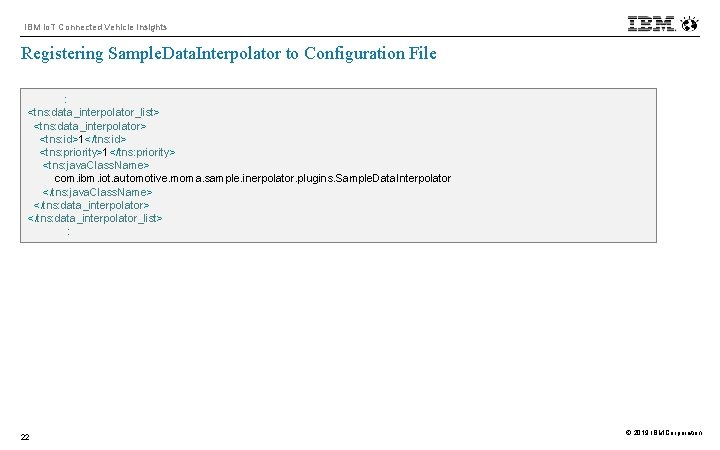
IBM Io. T Connected Vehicle Insights Registering Sample. Data. Interpolator to Configuration File : <tns: data_interpolator_list> <tns: data_interpolator> <tns: id>1</tns: id> <tns: priority>1</tns: priority> <tns: java. Class. Name> com. ibm. iot. automotive. moma. sample. inerpolator. plugins. Sample. Data. Interpolator </tns: java. Class. Name> </tns: data_interpolator_list> : 22 © 2019 IBM Corporation
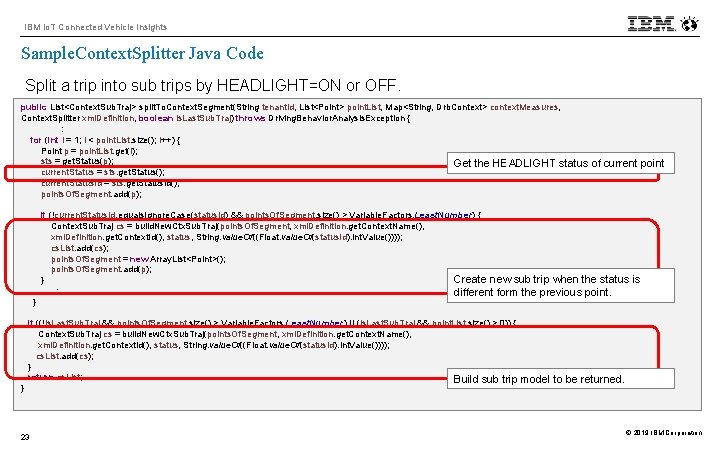
IBM Io. T Connected Vehicle Insights Sample. Context. Splitter Java Code Split a trip into sub trips by HEADLIGHT=ON or OFF. public List<Context. Sub. Traj> split. To. Context. Segment(String tenant. Id, List<Point> point. List, Map<String, Drb. Context> context. Measures, Context. Splitter xml. Definition, boolean is. Last. Sub. Traj) throws Driving. Behavior. Analysis. Exception { : for (int i = 1; i < point. List. size(); i++) { Point p = point. List. get(i); sts = get. Status(p); Get the HEADLIGHT status current. Status = sts. get. Status(); current. Status. Id = sts. get. Status. Id(); points. Of. Segment. add(p); } } if (!current. Status. Id. equals. Ignore. Case(status. Id) && points. Of. Segment. size() > Variable. Factors. Least. Number) { Context. Sub. Traj cs = build. New. Ctx. Sub. Traj(points. Of. Segment, xml. Definition. get. Context. Name(), xml. Definition. get. Context. Id(), status, String. value. Of((Float. value. Of(status. Id). int. Value()))); cs. List. add(cs); points. Of. Segment = new Array. List<Point>(); points. Of. Segment. add(p); Create new sub trip when the status } : different form the previous point. if ((!is. Last. Sub. Traj && points. Of. Segment. size() > Variable. Factors. Least. Number) || (is. Last. Sub. Traj && point. List. size() > 0)) { Context. Sub. Traj cs = build. New. Ctx. Sub. Traj(points. Of. Segment, xml. Definition. get. Context. Name(), xml. Definition. get. Context. Id(), status, String. value. Of((Float. value. Of(status. Id). int. Value()))); cs. List. add(cs); } return cs. List; Build sub trip 23 of current point is model to be returned. © 2019 IBM Corporation
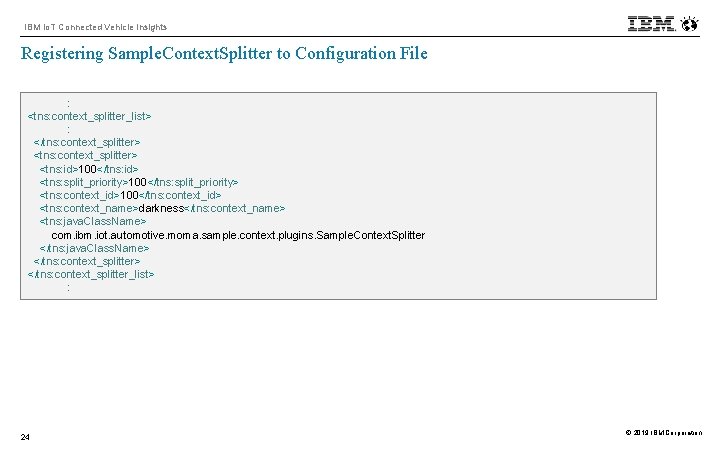
IBM Io. T Connected Vehicle Insights Registering Sample. Context. Splitter to Configuration File : <tns: context_splitter_list> : </tns: context_splitter> <tns: id>100</tns: id> <tns: split_priority>100</tns: split_priority> <tns: context_id>100</tns: context_id> <tns: context_name>darkness</tns: context_name> <tns: java. Class. Name> com. ibm. iot. automotive. moma. sample. context. plugins. Sample. Context. Splitter </tns: java. Class. Name> </tns: context_splitter_list> : 24 © 2019 IBM Corporation
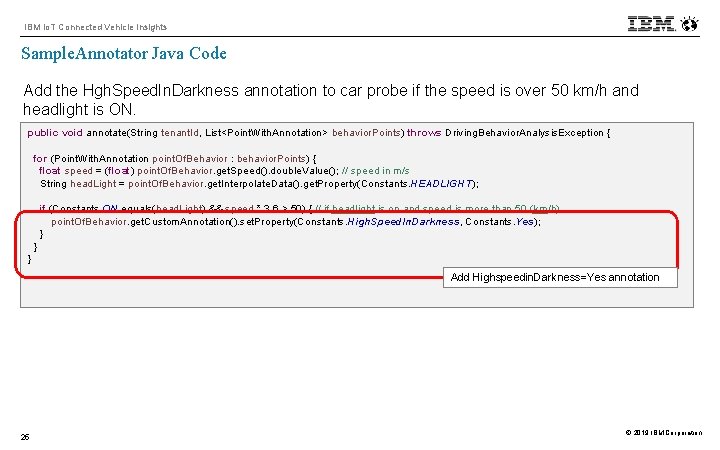
IBM Io. T Connected Vehicle Insights Sample. Annotator Java Code Add the Hgh. Speed. In. Darkness annotation to car probe if the speed is over 50 km/h and headlight is ON. public void annotate(String tenant. Id, List<Point. With. Annotation> behavior. Points) throws Driving. Behavior. Analysis. Exception { for (Point. With. Annotation point. Of. Behavior : behavior. Points) { float speed = (float) point. Of. Behavior. get. Speed(). double. Value(); // speed in m/s String head. Light = point. Of. Behavior. get. Interpolate. Data(). get. Property(Constants. HEADLIGHT); if (Constants. ON. equals(head. Light) && speed * 3. 6 > 50) { // if headlight is on and speed is more than 50 (km/h) point. Of. Behavior. get. Custom. Annotation(). set. Property(Constants. High. Speed. In. Darkness, Constants. Yes); } } } Add Highspeedin. Darkness=Yes annotation 25 © 2019 IBM Corporation
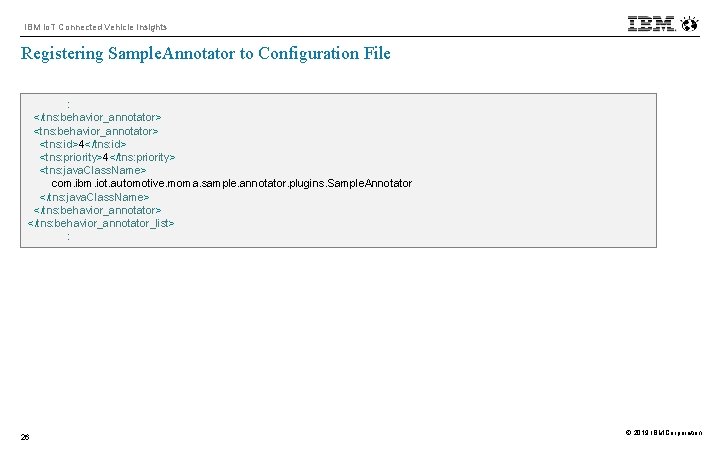
IBM Io. T Connected Vehicle Insights Registering Sample. Annotator to Configuration File : </tns: behavior_annotator> <tns: id>4</tns: id> <tns: priority>4</tns: priority> <tns: java. Class. Name> com. ibm. iot. automotive. moma. sample. annotator. plugins. Sample. Annotator </tns: java. Class. Name> </tns: behavior_annotator_list> : 26 © 2019 IBM Corporation
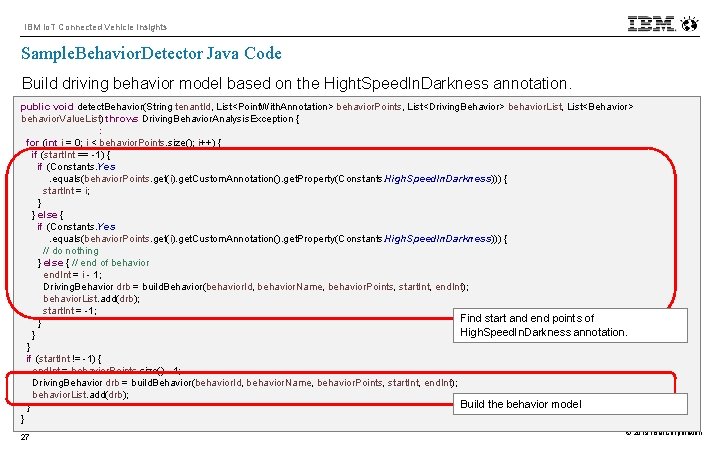
IBM Io. T Connected Vehicle Insights Sample. Behavior. Detector Java Code Build driving behavior model based on the Hight. Speed. In. Darkness annotation. public void detect. Behavior(String tenant. Id, List<Point. With. Annotation> behavior. Points, List<Driving. Behavior> behavior. List, List<Behavior> behavior. Value. List) throws Driving. Behavior. Analysis. Exception { : for (int i = 0; i < behavior. Points. size(); i++) { if (start. Int == -1) { if (Constants. Yes. equals(behavior. Points. get(i). get. Custom. Annotation(). get. Property(Constants. High. Speed. In. Darkness))) { start. Int = i; } } else { if (Constants. Yes. equals(behavior. Points. get(i). get. Custom. Annotation(). get. Property(Constants. High. Speed. In. Darkness))) { // do nothing } else { // end of behavior end. Int = i - 1; Driving. Behavior drb = build. Behavior(behavior. Id, behavior. Name, behavior. Points, start. Int, end. Int); behavior. List. add(drb); start. Int = -1; Find start and end points of } High. Speed. In. Darkness annotation. } } if (start. Int != -1) { end. Int = behavior. Points. size() - 1; Driving. Behavior drb = build. Behavior(behavior. Id, behavior. Name, behavior. Points, start. Int, end. Int); behavior. List. add(drb); Build the behavior model } } 27 © 2019 IBM Corporation
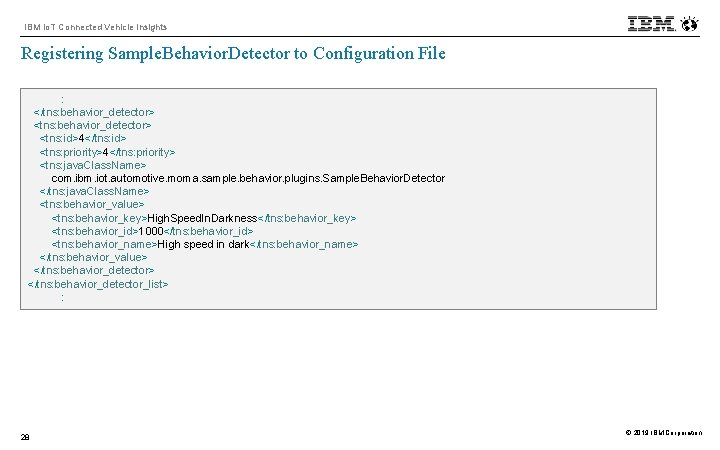
IBM Io. T Connected Vehicle Insights Registering Sample. Behavior. Detector to Configuration File : </tns: behavior_detector> <tns: id>4</tns: id> <tns: priority>4</tns: priority> <tns: java. Class. Name> com. ibm. iot. automotive. moma. sample. behavior. plugins. Sample. Behavior. Detector </tns: java. Class. Name> <tns: behavior_value> <tns: behavior_key>High. Speed. In. Darkness</tns: behavior_key> <tns: behavior_id>1000</tns: behavior_id> <tns: behavior_name>High speed in dark</tns: behavior_name> </tns: behavior_value> </tns: behavior_detector_list> : 28 © 2019 IBM Corporation
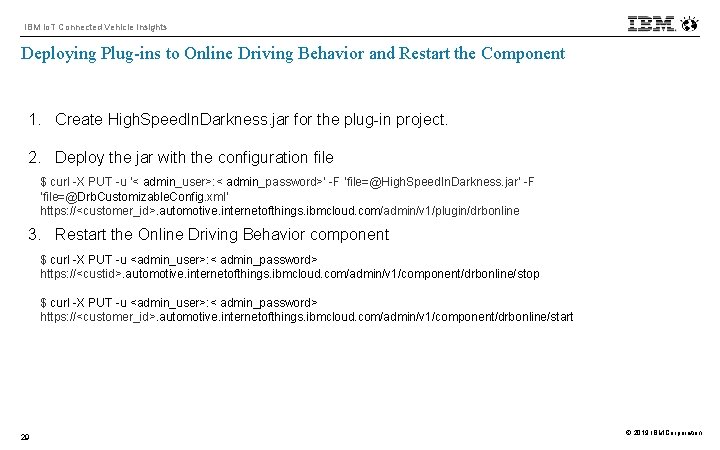
IBM Io. T Connected Vehicle Insights Deploying Plug-ins to Online Driving Behavior and Restart the Component 1. Create High. Speed. In. Darkness. jar for the plug-in project. 2. Deploy the jar with the configuration file $ curl -X PUT -u ‘< admin_user>: < admin_password>’ -F ‘file=@High. Speed. In. Darkness. jar’ -F ‘file=@Drb. Customizable. Config. xml’ https: //<customer_id>. automotive. internetofthings. ibmcloud. com/admin/v 1/plugin/drbonline 3. Restart the Online Driving Behavior component $ curl -X PUT -u <admin_user>: < admin_password> https: //<custid>. automotive. internetofthings. ibmcloud. com/admin/v 1/component/drbonline/stop $ curl -X PUT -u <admin_user>: < admin_password> https: //<customer_id>. automotive. internetofthings. ibmcloud. com/admin/v 1/component/drbonline/start 29 © 2019 IBM Corporation
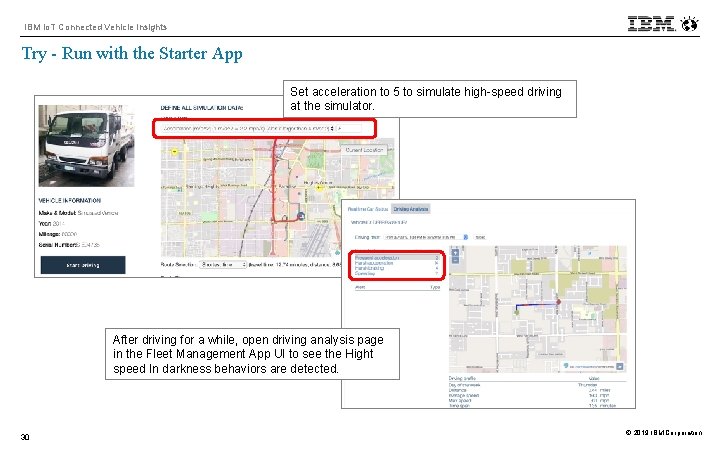
IBM Io. T Connected Vehicle Insights Try - Run with the Starter App Set acceleration to 5 to simulate high-speed driving at the simulator. After driving for a while, open driving analysis page in the Fleet Management App UI to see the Hight speed In darkness behaviors are detected. 30 © 2019 IBM Corporation
- Slides: 30