
IBM Io T Connected Vehicle Insights Agent Rule
IBM Io. T Connected Vehicle Insights Agent Rule Development Guide June 10, 2019 Tokyo Software Development Laboratory © 2019 IBM Corporation
IBM Io. T Connected Vehicle Insights About This Document This document describes how platform developers add real-time analysis for ingested car probe data. [Related links] • IBM Io. T Connected Vehicle Insights – Entitled Content (KC) • Detecting and capturing events of interest • Creating customized rules https: //www. ibm. com/support/knowledgecenter/SSNQ 4 V_gbs/iot-automotive/managing/agent/rule_customization. html 2 © 2019 IBM Corporation
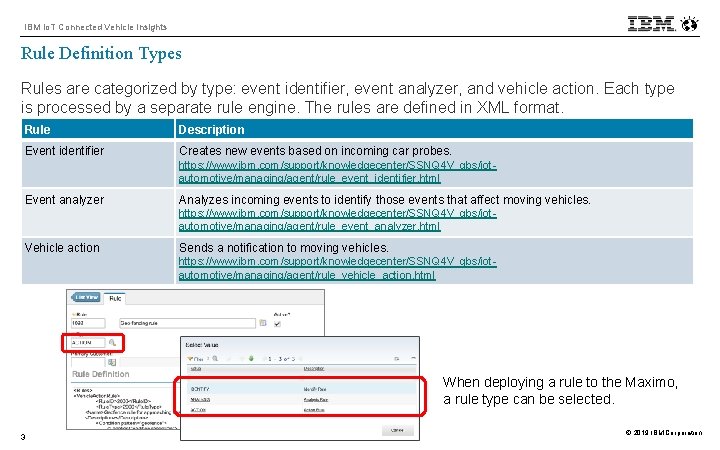
IBM Io. T Connected Vehicle Insights Rule Definition Types Rules are categorized by type: event identifier, event analyzer, and vehicle action. Each type is processed by a separate rule engine. The rules are defined in XML format. Rule Description Event identifier Creates new events based on incoming car probes. https: //www. ibm. com/support/knowledgecenter/SSNQ 4 V_gbs/iotautomotive/managing/agent/rule_event_identifier. html Event analyzer Analyzes incoming events to identify those events that affect moving vehicles. https: //www. ibm. com/support/knowledgecenter/SSNQ 4 V_gbs/iotautomotive/managing/agent/rule_event_analyzer. html Vehicle action Sends a notification to moving vehicles. https: //www. ibm. com/support/knowledgecenter/SSNQ 4 V_gbs/iotautomotive/managing/agent/rule_vehicle_action. html When deploying a rule to the Maximo, a rule type can be selected. 3 © 2019 IBM Corporation
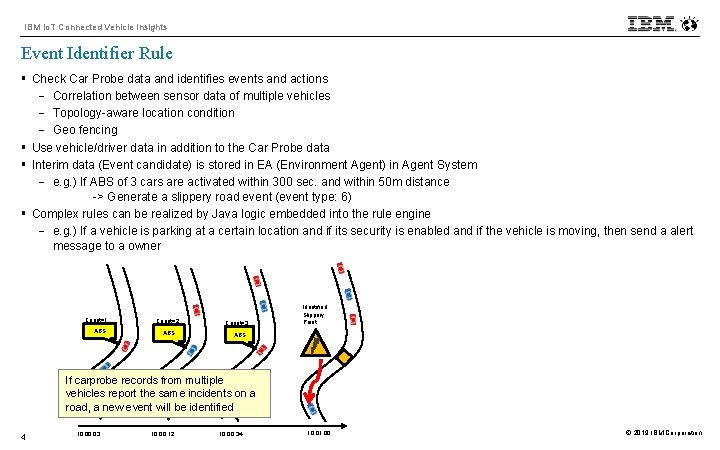
IBM Io. T Connected Vehicle Insights Event Identifier Rule § Check Car Probe data and identifies events and actions - Correlation between sensor data of multiple vehicles - Topology-aware location condition - Geo fencing § Use vehicle/driver data in addition to the Car Probe data § Interim data (Event candidate) is stored in EA (Environment Agent) in Agent System - e. g. ) If ABS of 3 cars are activated within 300 sec. and within 50 m distance -> Generate a slippery road event (event type: 6) § Complex rules can be realized by Java logic embedded into the rule engine - e. g. ) If a vehicle is parking at a certain location and if its security is enabled and if the vehicle is moving, then send a alert message to a owner Count=1 ABS Count=2 ABS Count=3 Identified Slippery Point ABS If carprobe records from multiple vehicles report the same incidents on a road, a new event will be identified 4 10: 03 10: 00: 12 10: 00: 34 10: 01: 00 © 2019 IBM Corporation
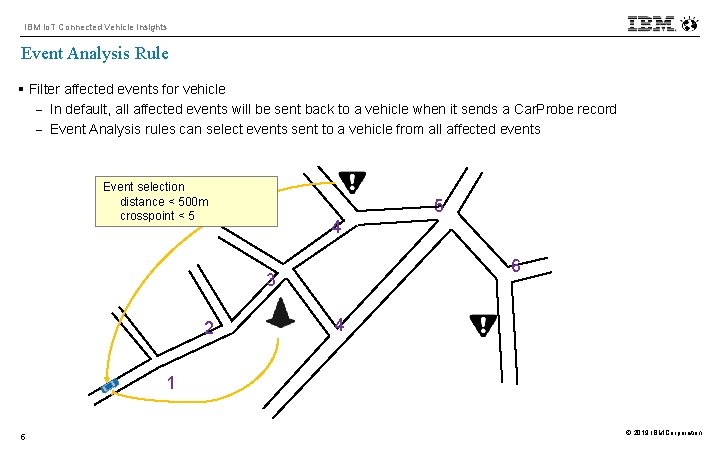
IBM Io. T Connected Vehicle Insights Event Analysis Rule § Filter affected events for vehicle - In default, all affected events will be sent back to a vehicle when it sends a Car. Probe record - Event Analysis rules can select events sent to a vehicle from all affected events Event selection distance < 500 m crosspoint < 5 5 4 6 3 2 4 1 5 © 2019 IBM Corporation
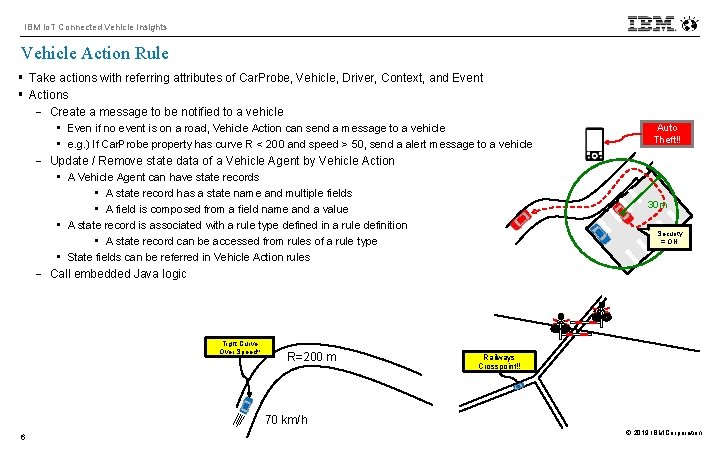
IBM Io. T Connected Vehicle Insights Vehicle Action Rule § Take actions with referring attributes of Car. Probe, Vehicle, Driver, Context, and Event § Actions - Create a message to be notified to a vehicle • Even if no event is on a road, Vehicle Action can send a message to a vehicle • e. g. ) If Car. Probe property has curve R < 200 and speed > 50, send a alert message to a vehicle - Update / Remove state data of a Vehicle Agent by Vehicle Action • A Vehicle Agent can have state records • A state record has a state name and multiple fields • A field is composed from a field name and a value • A state record is associated with a rule type defined in a rule definition • A state record can be accessed from rules of a rule type • State fields can be referred in Vehicle Action rules - Call embedded Java logic Tight Curve Over Speed!! R=200 m Auto Theft!! 30 m Security = ON Railways Crosspoint!! 70 km/h 6 © 2019 IBM Corporation
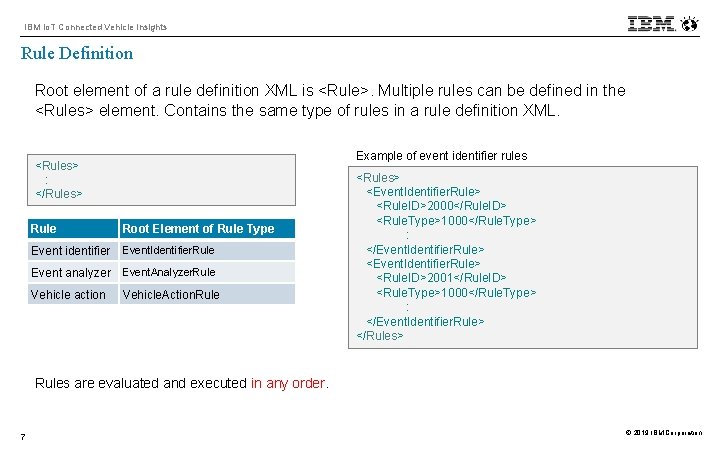
IBM Io. T Connected Vehicle Insights Rule Definition Root element of a rule definition XML is <Rule>. Multiple rules can be defined in the <Rules> element. Contains the same type of rules in a rule definition XML. Example of event identifier rules <Rules> : </Rules> Rule Root Element of Rule Type Event identifier Event. Identifier. Rule Event analyzer Event. Analyzer. Rule Vehicle action Vehicle. Action. Rule <Rules> <Event. Identifier. Rule> <Rule. ID>2000</Rule. ID> <Rule. Type>1000</Rule. Type> : </Event. Identifier. Rule> <Rule. ID>2001</Rule. ID> <Rule. Type>1000</Rule. Type> : </Event. Identifier. Rule> </Rules> Rules are evaluated and executed in any order. 7 © 2019 IBM Corporation
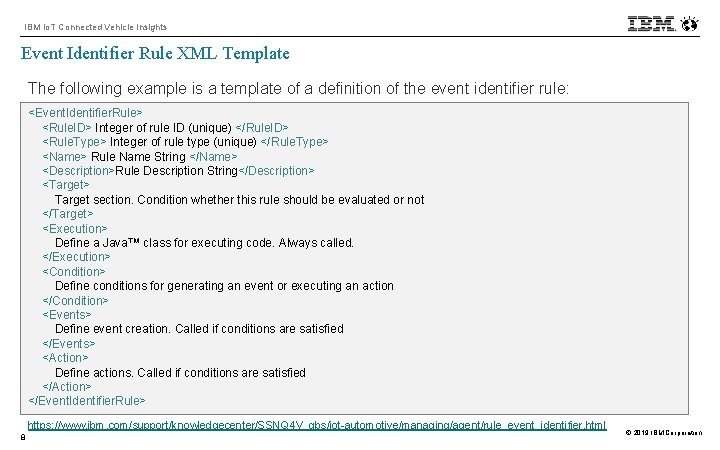
IBM Io. T Connected Vehicle Insights Event Identifier Rule XML Template The following example is a template of a definition of the event identifier rule: <Event. Identifier. Rule> <Rule. ID> Integer of rule ID (unique) </Rule. ID> <Rule. Type> Integer of rule type (unique) </Rule. Type> <Name> Rule Name String </Name> <Description>Rule Description String</Description> <Target> Target section. Condition whether this rule should be evaluated or not </Target> <Execution> Define a Java™ class for executing code. Always called. </Execution> <Condition> Define conditions for generating an event or executing an action </Condition> <Events> Define event creation. Called if conditions are satisfied </Events> <Action> Define actions. Called if conditions are satisfied </Action> </Event. Identifier. Rule> https: //www. ibm. com/support/knowledgecenter/SSNQ 4 V_gbs/iot-automotive/managing/agent/rule_event_identifier. html 8 © 2019 IBM Corporation
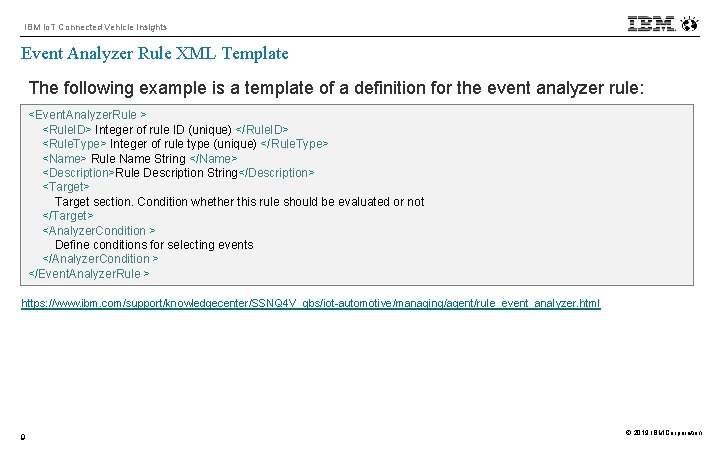
IBM Io. T Connected Vehicle Insights Event Analyzer Rule XML Template The following example is a template of a definition for the event analyzer rule: <Event. Analyzer. Rule > <Rule. ID> Integer of rule ID (unique) </Rule. ID> <Rule. Type> Integer of rule type (unique) </Rule. Type> <Name> Rule Name String </Name> <Description>Rule Description String</Description> <Target> Target section. Condition whether this rule should be evaluated or not </Target> <Analyzer. Condition > Define conditions for selecting events </Analyzer. Condition > </Event. Analyzer. Rule > https: //www. ibm. com/support/knowledgecenter/SSNQ 4 V_gbs/iot-automotive/managing/agent/rule_event_analyzer. html 9 © 2019 IBM Corporation
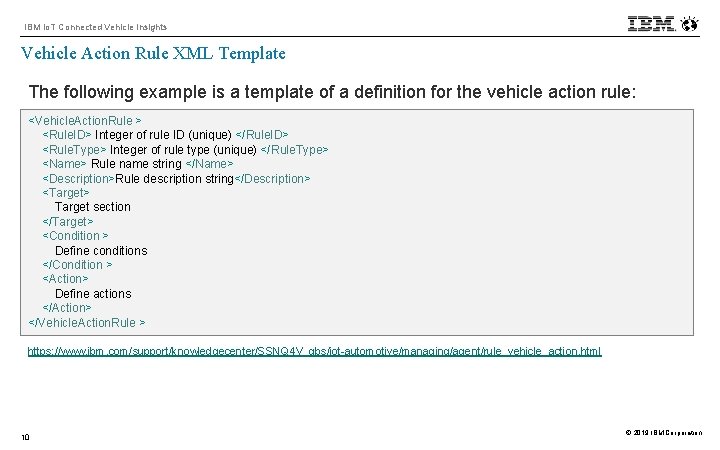
IBM Io. T Connected Vehicle Insights Vehicle Action Rule XML Template The following example is a template of a definition for the vehicle action rule: <Vehicle. Action. Rule > <Rule. ID> Integer of rule ID (unique) </Rule. ID> <Rule. Type> Integer of rule type (unique) </Rule. Type> <Name> Rule name string </Name> <Description>Rule description string</Description> <Target> Target section </Target> <Condition > Define conditions </Condition > <Action> Define actions </Action> </Vehicle. Action. Rule > https: //www. ibm. com/support/knowledgecenter/SSNQ 4 V_gbs/iot-automotive/managing/agent/rule_vehicle_action. html 10 © 2019 IBM Corporation
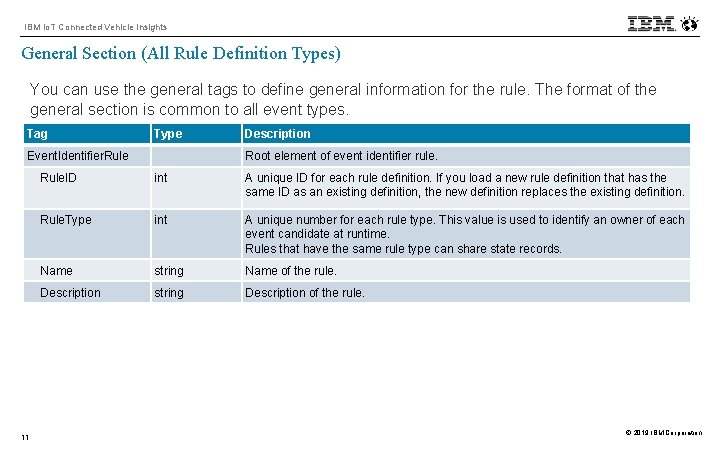
IBM Io. T Connected Vehicle Insights General Section (All Rule Definition Types) You can use the general tags to define general information for the rule. The format of the general section is common to all event types. Tag Type Description Event. Identifier. Rule Root element of event identifier rule. Rule. ID int A unique ID for each rule definition. If you load a new rule definition that has the same ID as an existing definition, the new definition replaces the existing definition. Rule. Type int A unique number for each rule type. This value is used to identify an owner of each event candidate at runtime. Rules that have the same rule type can share state records. Name string Name of the rule. Description string Description of the rule. 11 © 2019 IBM Corporation
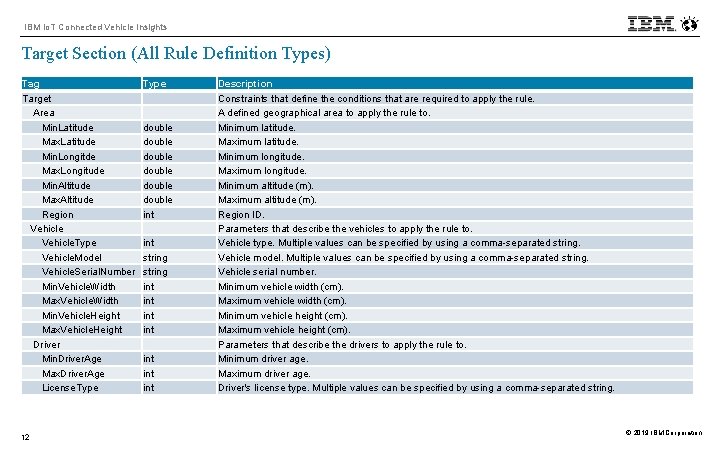
IBM Io. T Connected Vehicle Insights Target Section (All Rule Definition Types) Tag Target Area Min. Latitude Max. Latitude Min. Longitde Max. Longitude Min. Altitude Max. Altitude Region Vehicle. Type Vehicle. Model Vehicle. Serial. Number Min. Vehicle. Width Max. Vehicle. Width Min. Vehicle. Height Max. Vehicle. Height Driver Min. Driver. Age Max. Driver. Age License. Type 12 Type double double int string int int Description Constraints that define the conditions that are required to apply the rule. A defined geographical area to apply the rule to. Minimum latitude. Maximum latitude. Minimum longitude. Maximum longitude. Minimum altitude (m). Maximum altitude (m). Region ID. Parameters that describe the vehicles to apply the rule to. Vehicle type. Multiple values can be specified by using a comma-separated string. Vehicle model. Multiple values can be specified by using a comma-separated string. Vehicle serial number. Minimum vehicle width (cm). Maximum vehicle width (cm). Minimum vehicle height (cm). Maximum vehicle height (cm). Parameters that describe the drivers to apply the rule to. Minimum driver age. Maximum driver age. Driver's license type. Multiple values can be specified by using a comma-separated string. © 2019 IBM Corporation
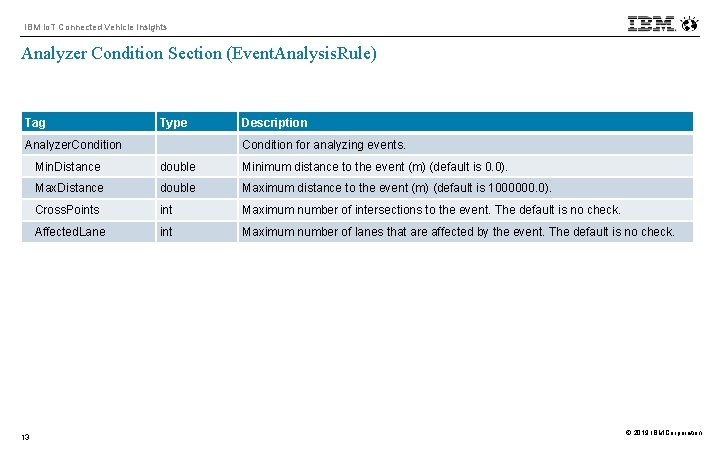
IBM Io. T Connected Vehicle Insights Analyzer Condition Section (Event. Analysis. Rule) Tag Type Description Analyzer. Condition for analyzing events. Min. Distance double Minimum distance to the event (m) (default is 0. 0). Max. Distance double Maximum distance to the event (m) (default is 1000000. 0). Cross. Points int Maximum number of intersections to the event. The default is no check. Affected. Lane int Maximum number of lanes that are affected by the event. The default is no check. 13 © 2019 IBM Corporation
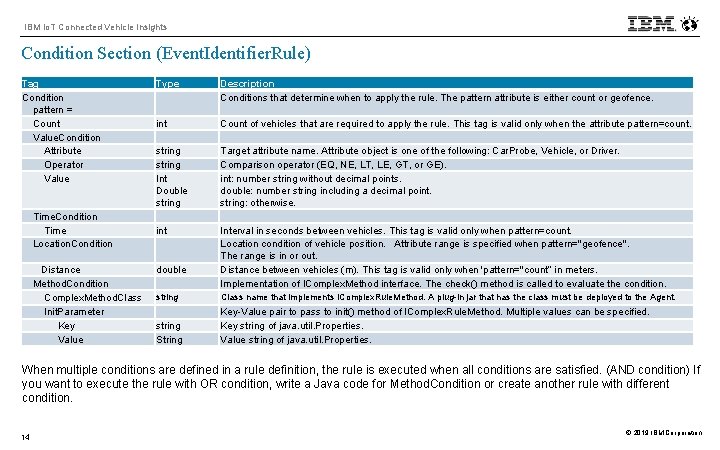
IBM Io. T Connected Vehicle Insights Condition Section (Event. Identifier. Rule) Tag Condition pattern = Count Value. Condition Attribute Operator Value Time. Condition Time Location. Condition Distance Method. Condition Complex. Method. Class Init. Parameter Key Value Type Description Conditions that determine when to apply the rule. The pattern attribute is either count or geofence. int string Int Double string int Count of vehicles that are required to apply the rule. This tag is valid only when the attribute pattern=count. double Target attribute name. Attribute object is one of the following: Car. Probe, Vehicle, or Driver. Comparison operator (EQ, NE, LT, LE, GT, or GE). int: number string without decimal points. double: number string including a decimal point. string: otherwise. Interval in seconds between vehicles. This tag is valid only when pattern=count. Location condition of vehicle position. Attribute range is specified when pattern="geofence". The range is in or out. Distance between vehicles (m). This tag is valid only when 'pattern="count” in meters. Implementation of IComplex. Method interface. The check() method is called to evaluate the condition. string Class name that implements IComplex. Rule. Method. A plug-in jar that has the class must be deployed to the Agent. string String Key-Value pair to pass to init() method of IComplex. Rule. Method. Multiple values can be specified. Key string of java. util. Properties. Value string of java. util. Properties. When multiple conditions are defined in a rule definition, the rule is executed when all conditions are satisfied. (AND condition) If you want to execute the rule with OR condition, write a Java code for Method. Condition or create another rule with different condition. 14 © 2019 IBM Corporation
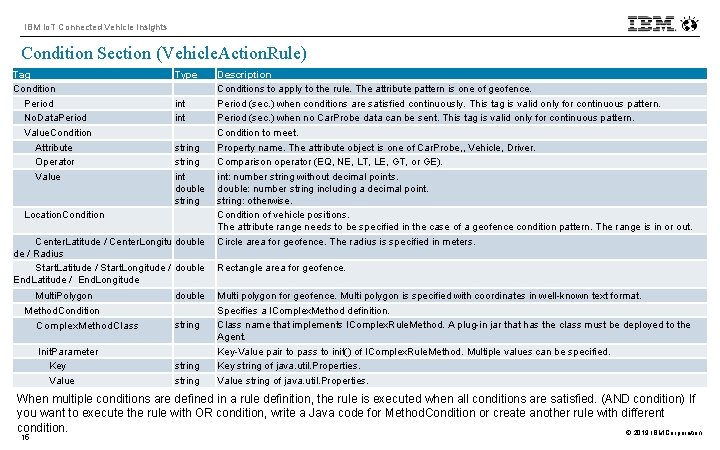
IBM Io. T Connected Vehicle Insights Condition Section (Vehicle. Action. Rule) Tag Condition Period No. Data. Period Value. Condition Attribute Operator Value Location. Condition Type int string int double string Center. Latitude / Center. Longitu double de / Radius Start. Latitude / Start. Longitude / double End. Latitude / End. Longitude Multi. Polygon Method. Condition Complex. Method. Class double string Init. Parameter Key Value string Description Conditions to apply to the rule. The attribute pattern is one of geofence. Period (sec. ) when conditions are satisfied continuously. This tag is valid only for continuous pattern. Period (sec. ) when no Car. Probe data can be sent. This tag is valid only for continuous pattern. Condition to meet. Property name. The attribute object is one of Car. Probe, , Vehicle, Driver. Comparison operator (EQ, NE, LT, LE, GT, or GE). int: number string without decimal points. double: number string including a decimal point. string: otherwise. Condition of vehicle positions. The attribute range needs to be specified in the case of a geofence condition pattern. The range is in or out. Circle area for geofence. The radius is specified in meters. Rectangle area for geofence. Multi polygon is specified with coordinates in well-known text format. Specifies a IComplex. Method definition. Class name that implements IComplex. Rule. Method. A plug-in jar that has the class must be deployed to the Agent. Key-Value pair to pass to init() of IComplex. Rule. Method. Multiple values can be specified. Key string of java. util. Properties. Value string of java. util. Properties. When multiple conditions are defined in a rule definition, the rule is executed when all conditions are satisfied. (AND condition) If you want to execute the rule with OR condition, write a Java code for Method. Condition or create another rule with different condition. © 2019 IBM Corporation 15
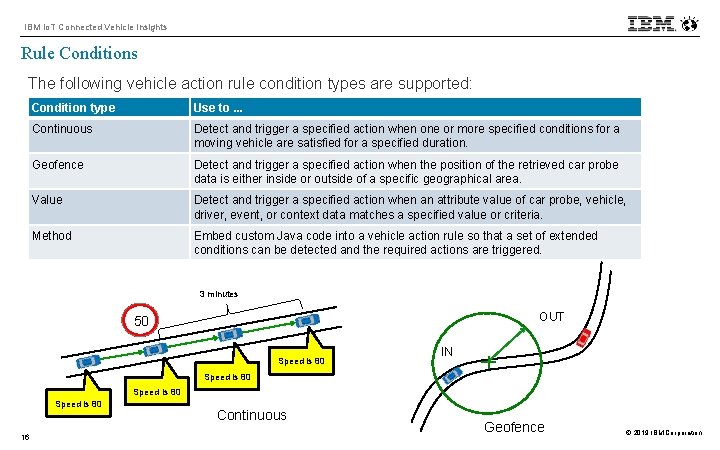
IBM Io. T Connected Vehicle Insights Rule Conditions The following vehicle action rule condition types are supported: Condition type Use to. . . Continuous Detect and trigger a specified action when one or more specified conditions for a moving vehicle are satisfied for a specified duration. Geofence Detect and trigger a specified action when the position of the retrieved car probe data is either inside or outside of a specific geographical area. Value Detect and trigger a specified action when an attribute value of car probe, vehicle, driver, event, or context data matches a specified value or criteria. Method Embed custom Java code into a vehicle action rule so that a set of extended conditions can be detected and the required actions are triggered. 3 minutes OUT 50 Speed is 80 IN Speed is 80 16 Continuous Geofence © 2019 IBM Corporation
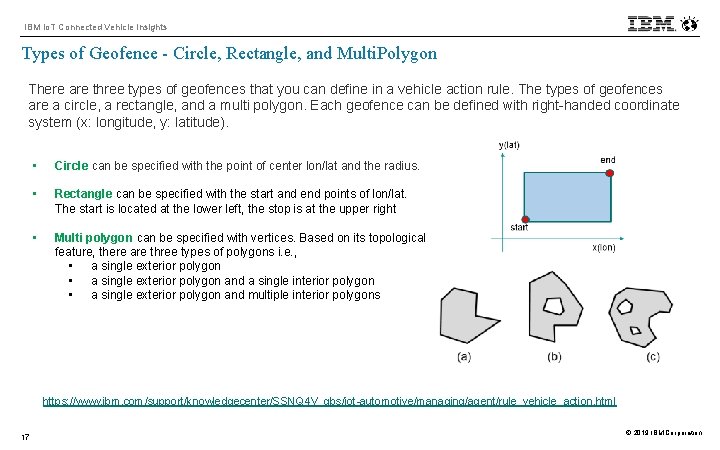
IBM Io. T Connected Vehicle Insights Types of Geofence - Circle, Rectangle, and Multi. Polygon There are three types of geofences that you can define in a vehicle action rule. The types of geofences are a circle, a rectangle, and a multi polygon. Each geofence can be defined with right-handed coordinate system (x: longitude, y: latitude). • Circle can be specified with the point of center lon/lat and the radius. • Rectangle can be specified with the start and end points of lon/lat. The start is located at the lower left, the stop is at the upper right • Multi polygon can be specified with vertices. Based on its topological feature, there are three types of polygons i. e. , • a single exterior polygon and a single interior polygon • a single exterior polygon and multiple interior polygons https: //www. ibm. com/support/knowledgecenter/SSNQ 4 V_gbs/iot-automotive/managing/agent/rule_vehicle_action. html 17 © 2019 IBM Corporation
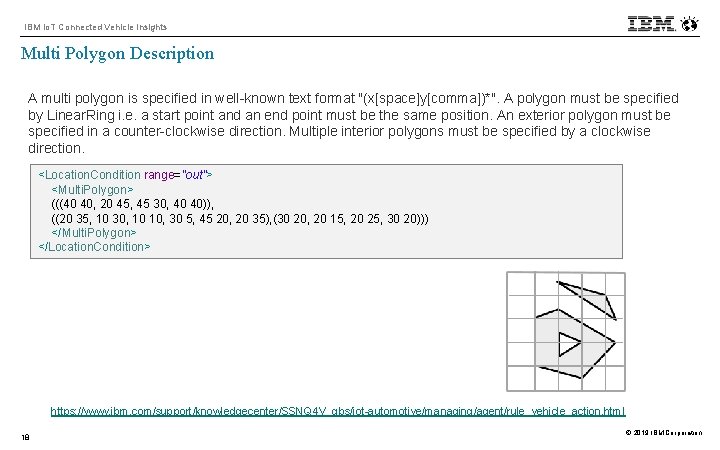
IBM Io. T Connected Vehicle Insights Multi Polygon Description A multi polygon is specified in well-known text format "(x[space]y[comma])*". A polygon must be specified by Linear. Ring i. e. a start point and an end point must be the same position. An exterior polygon must be specified in a counter-clockwise direction. Multiple interior polygons must be specified by a clockwise direction. <Location. Condition range="out"> <Multi. Polygon> (((40 40, 20 45, 45 30, 40 40)), ((20 35, 10 30, 10 10, 30 5, 45 20, 20 35), (30 20, 20 15, 20 25, 30 20))) </Multi. Polygon> </Location. Condition> https: //www. ibm. com/support/knowledgecenter/SSNQ 4 V_gbs/iot-automotive/managing/agent/rule_vehicle_action. html 18 © 2019 IBM Corporation
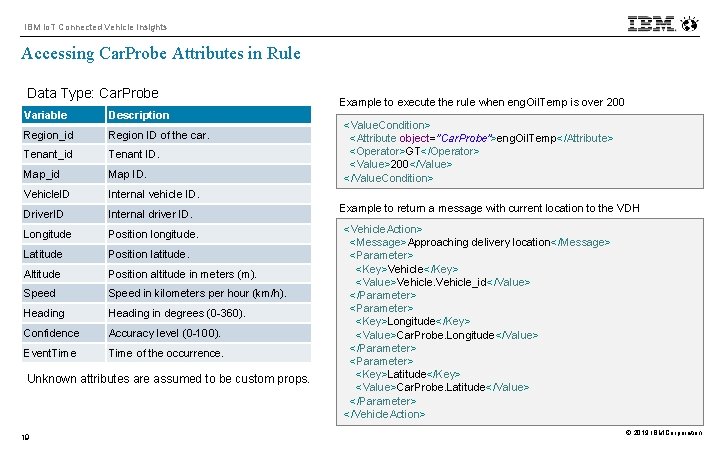
IBM Io. T Connected Vehicle Insights Accessing Car. Probe Attributes in Rule Data Type: Car. Probe Variable Description Region_id Region ID of the car. Tenant_id Tenant ID. Map_id Map ID. Vehicle. ID Internal vehicle ID. Driver. ID Internal driver ID. Longitude Position longitude. Latitude Position latitude. Altitude Position altitude in meters (m). Speed in kilometers per hour (km/h). Heading in degrees (0 -360). Confidence Accuracy level (0 -100). Event. Time of the occurrence. Unknown attributes are assumed to be custom props. 19 Example to execute the rule when eng. Oil. Temp is over 200 <Value. Condition> <Attribute object="Car. Probe">eng. Oil. Temp</Attribute> <Operator>GT</Operator> <Value>200</Value> </Value. Condition> Example to return a message with current location to the VDH <Vehicle. Action> <Message>Approaching delivery location</Message> <Parameter> <Key>Vehicle</Key> <Value>Vehicle_id</Value> </Parameter> <Parameter> <Key>Longitude</Key> <Value>Car. Probe. Longitude</Value> </Parameter> <Parameter> <Key>Latitude</Key> <Value>Car. Probe. Latitude</Value> </Parameter> </Vehicle. Action> © 2019 IBM Corporation
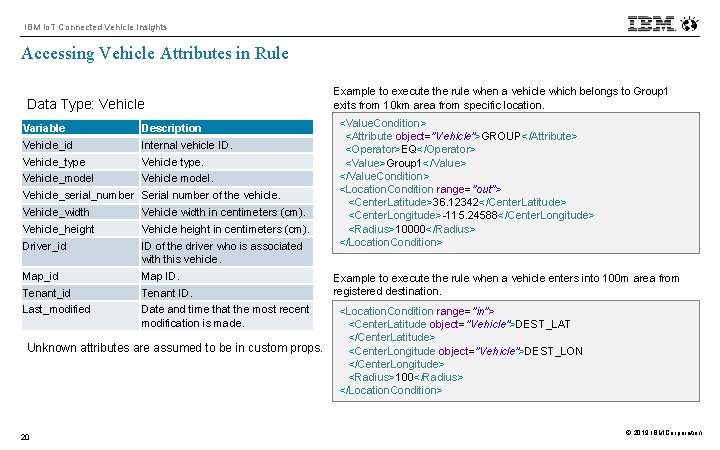
IBM Io. T Connected Vehicle Insights Accessing Vehicle Attributes in Rule Data Type: Vehicle Variable Description Vehicle_id Internal vehicle ID. Vehicle_type Vehicle type. Vehicle_model Vehicle model. Vehicle_serial_number Serial number of the vehicle. Vehicle_width Vehicle width in centimeters (cm). Vehicle_height Vehicle height in centimeters (cm). Driver_id ID of the driver who is associated with this vehicle. Map_id Map ID. Tenant_id Tenant ID. Last_modified Date and time that the most recent modification is made. Unknown attributes are assumed to be in custom props. 20 Example to execute the rule when a vehicle which belongs to Group 1 exits from 10 km area from specific location. <Value. Condition> <Attribute object=”Vehicle">GROUP</Attribute> <Operator>EQ</Operator> <Value>Group 1</Value> </Value. Condition> <Location. Condition range="out"> <Center. Latitude>36. 12342</Center. Latitude> <Center. Longitude>-115. 24588</Center. Longitude> <Radius>10000</Radius> </Location. Condition> Example to execute the rule when a vehicle enters into 100 m area from registered destination. <Location. Condition range="in"> <Center. Latitude object="Vehicle">DEST_LAT </Center. Latitude> <Center. Longitude object="Vehicle">DEST_LON </Center. Longitude> <Radius>100</Radius> </Location. Condition> © 2019 IBM Corporation
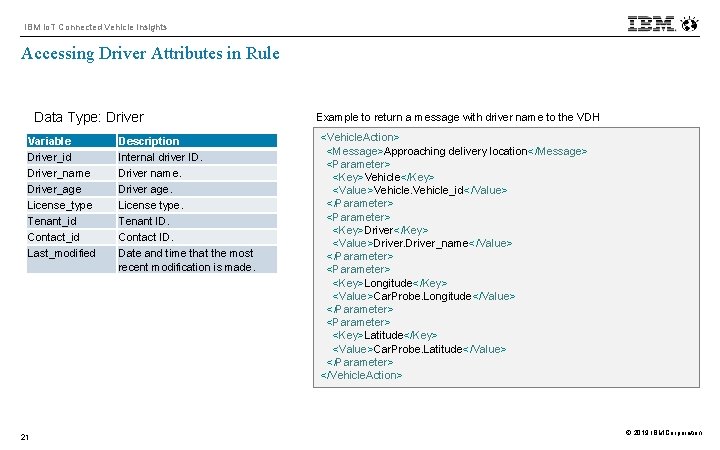
IBM Io. T Connected Vehicle Insights Accessing Driver Attributes in Rule Data Type: Driver Variable Driver_id Driver_name Driver_age License_type Tenant_id Contact_id Last_modified 21 Description Internal driver ID. Driver name. Driver age. License type. Tenant ID. Contact ID. Date and time that the most recent modification is made. Example to return a message with driver name to the VDH <Vehicle. Action> <Message>Approaching delivery location</Message> <Parameter> <Key>Vehicle</Key> <Value>Vehicle_id</Value> </Parameter> <Parameter> <Key>Driver</Key> <Value>Driver_name</Value> </Parameter> <Parameter> <Key>Longitude</Key> <Value>Car. Probe. Longitude</Value> </Parameter> <Parameter> <Key>Latitude</Key> <Value>Car. Probe. Latitude</Value> </Parameter> </Vehicle. Action> © 2019 IBM Corporation
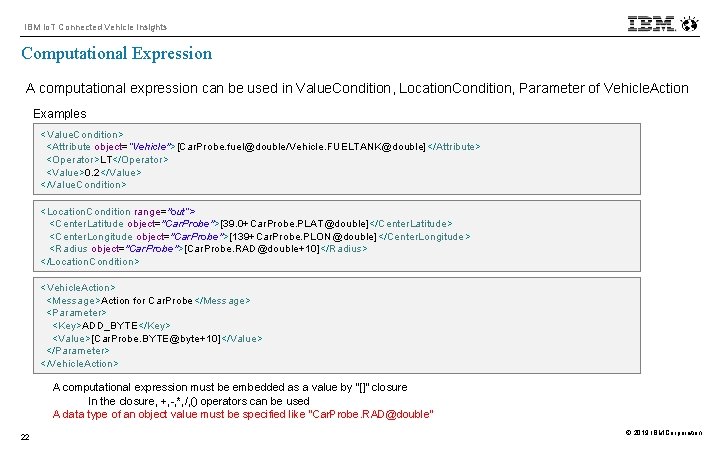
IBM Io. T Connected Vehicle Insights Computational Expression A computational expression can be used in Value. Condition, Location. Condition, Parameter of Vehicle. Action Examples <Value. Condition> <Attribute object=”Vehicle">[Car. Probe. fuel@double/Vehicle. FUELTANK@double]</Attribute> <Operator>LT</Operator> <Value>0. 2</Value> </Value. Condition> <Location. Condition range="out“> <Center. Latitude object="Car. Probe">[39. 0+Car. Probe. PLAT@double]</Center. Latitude> <Center. Longitude object="Car. Probe">[139+Car. Probe. PLON@double]</Center. Longitude> <Radius object="Car. Probe">[Car. Probe. RAD@double+10]</Radius> </Location. Condition> <Vehicle. Action> <Message>Action for Car. Probe</Message> <Parameter> <Key>ADD_BYTE</Key> <Value>[Car. Probe. BYTE@byte+10]</Value> </Parameter> </Vehicle. Action> A computational expression must be embedded as a value by “[]” closure In the closure, +, -, *, /, () operators can be used A data type of an object value must be specified like “Car. Probe. RAD@double” 22 © 2019 IBM Corporation
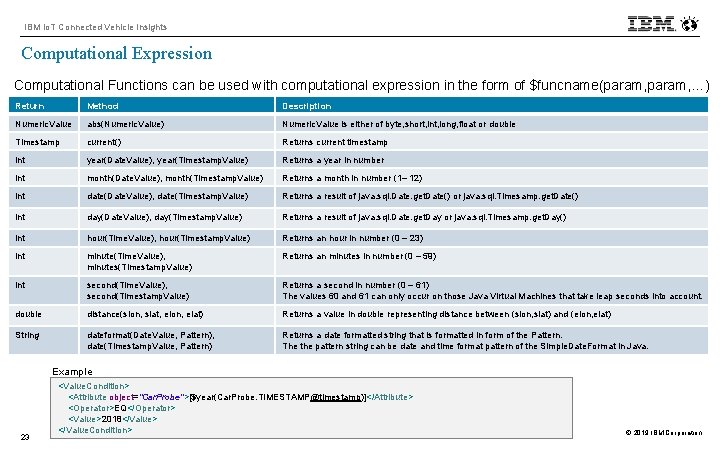
IBM Io. T Connected Vehicle Insights Computational Expression Computational Functions can be used with computational expression in the form of $funcname(param, …) Return Method Description Numeric. Value abs(Numeric. Value) Numeric. Value is either of byte, short, int, long, float or double Timestamp current() Returns current timestamp int year(Date. Value), year(Timestamp. Value) Returns a year in number int month(Date. Value), month(Timestamp. Value) Returns a month in number (1– 12) int date(Date. Value), date(Timestamp. Value) Returns a result of java. sql. Date. get. Date() or java. sql. Timesamp. get. Date() int day(Date. Value), day(Timestamp. Value) Returns a result of java. sql. Date. get. Day or java. sql. Timesamp. get. Day() int hour(Time. Value), hour(Timestamp. Value) Returns an hour in number (0 – 23) int minute(Time. Value), minutes(Timestamp. Value) Returns an minutes in number (0 – 59) int second(Time. Value), second(Timestamp. Value) Returns a second in number (0 – 61) The values 60 and 61 can only occur on those Java Virtual Machines that take leap seconds into account. double distance(slon, slat, elon, elat) Returns a value in double representing distance between (slon, slat) and (elon, elat) String dateformat(Date. Value, Pattern), date(Timestamp. Value, Pattern) Returns a date formatted string that is formatted in form of the Pattern. The the pattern string can be date and time format pattern of the Simple. Date. Format in Java. Example 23 <Value. Condition> <Attribute object="Car. Probe">[$year(Car. Probe. TIMESTAMP@timestamp)]</Attribute> <Operator>EQ</Operator> <Value>2018</Value> </Value. Condition> © 2019 IBM Corporation
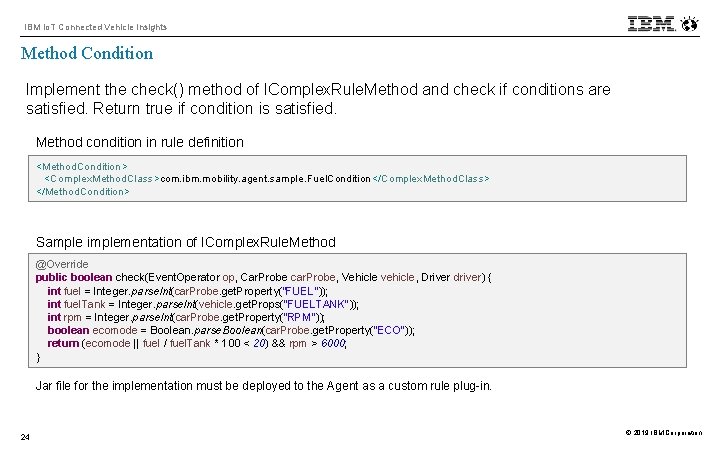
IBM Io. T Connected Vehicle Insights Method Condition Implement the check() method of IComplex. Rule. Method and check if conditions are satisfied. Return true if condition is satisfied. Method condition in rule definition <Method. Condition> <Complex. Method. Class>com. ibm. mobility. agent. sample. Fuel. Condition</Complex. Method. Class> </Method. Condition> Sample implementation of IComplex. Rule. Method @Override public boolean check(Event. Operator op, Car. Probe car. Probe, Vehicle vehicle, Driver driver) { int fuel = Integer. parse. Int(car. Probe. get. Property("FUEL")); int fuel. Tank = Integer. parse. Int(vehicle. get. Props("FUELTANK")); int rpm = Integer. parse. Int(car. Probe. get. Property("RPM")); boolean ecomode = Boolean. parse. Boolean(car. Probe. get. Property("ECO")); return (ecomode || fuel / fuel. Tank * 100 < 20) && rpm > 6000; } Jar file for the implementation must be deployed to the Agent as a custom rule plug-in. 24 © 2019 IBM Corporation
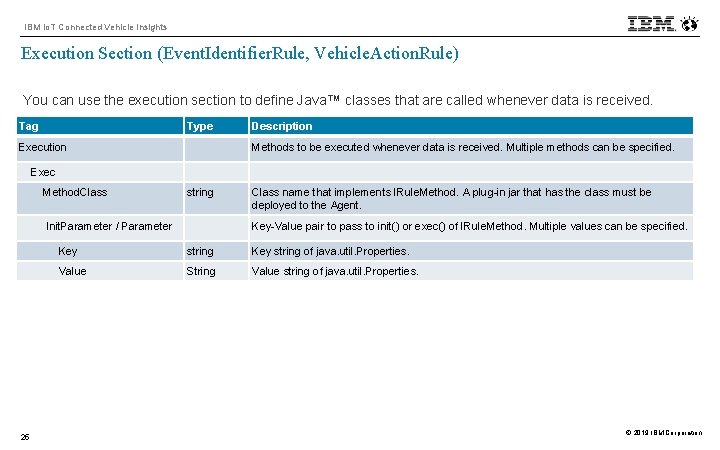
IBM Io. T Connected Vehicle Insights Execution Section (Event. Identifier. Rule, Vehicle. Action. Rule) You can use the execution section to define Java™ classes that are called whenever data is received. Tag Type Description Execution Methods to be executed whenever data is received. Multiple methods can be specified. Exec Method. Class string Class name that implements IRule. Method. A plug-in jar that has the class must be deployed to the Agent. Init. Parameter / Parameter Key-Value pair to pass to init() or exec() of IRule. Method. Multiple values can be specified. Key string of java. util. Properties. Value String Value string of java. util. Properties. 25 © 2019 IBM Corporation
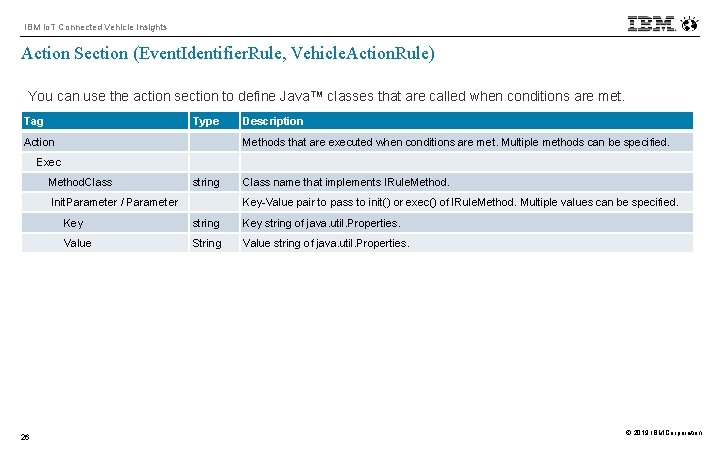
IBM Io. T Connected Vehicle Insights Action Section (Event. Identifier. Rule, Vehicle. Action. Rule) You can use the action section to define Java™ classes that are called when conditions are met. Tag Type Description Action Methods that are executed when conditions are met. Multiple methods can be specified. Exec Method. Class string Class name that implements IRule. Method. Init. Parameter / Parameter Key-Value pair to pass to init() or exec() of IRule. Method. Multiple values can be specified. Key string of java. util. Properties. Value String Value string of java. util. Properties. 26 © 2019 IBM Corporation
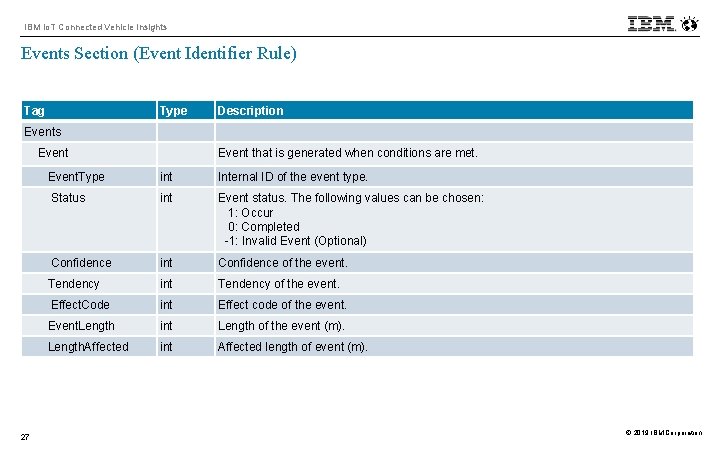
IBM Io. T Connected Vehicle Insights Events Section (Event Identifier Rule) Tag Type Description Events Event that is generated when conditions are met. Event. Type int Internal ID of the event type. Status int Event status. The following values can be chosen: 1: Occur 0: Completed -1: Invalid Event (Optional) Confidence int Confidence of the event. Tendency int Tendency of the event. Effect. Code int Effect code of the event. Event. Length int Length of the event (m). Length. Affected int Affected length of event (m). 27 © 2019 IBM Corporation
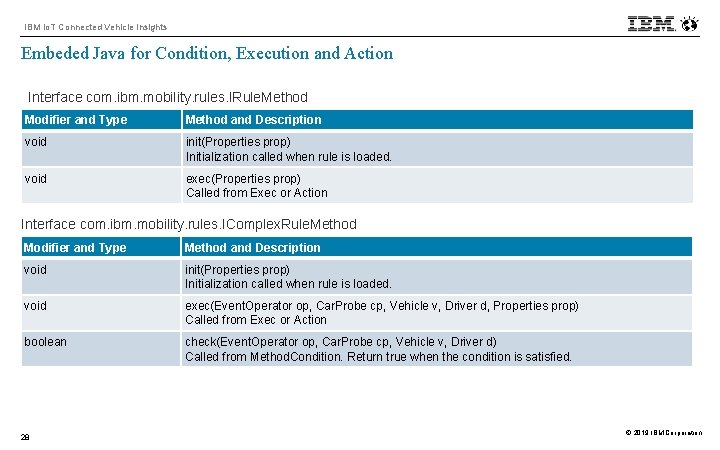
IBM Io. T Connected Vehicle Insights Embeded Java for Condition, Execution and Action Interface com. ibm. mobility. rules. IRule. Method Modifier and Type Method and Description void init(Properties prop) Initialization called when rule is loaded. void exec(Properties prop) Called from Exec or Action Interface com. ibm. mobility. rules. IComplex. Rule. Method Modifier and Type Method and Description void init(Properties prop) Initialization called when rule is loaded. void exec(Event. Operator op, Car. Probe cp, Vehicle v, Driver d, Properties prop) Called from Exec or Action boolean check(Event. Operator op, Car. Probe cp, Vehicle v, Driver d) Called from Method. Condition. Return true when the condition is satisfied. 28 © 2019 IBM Corporation
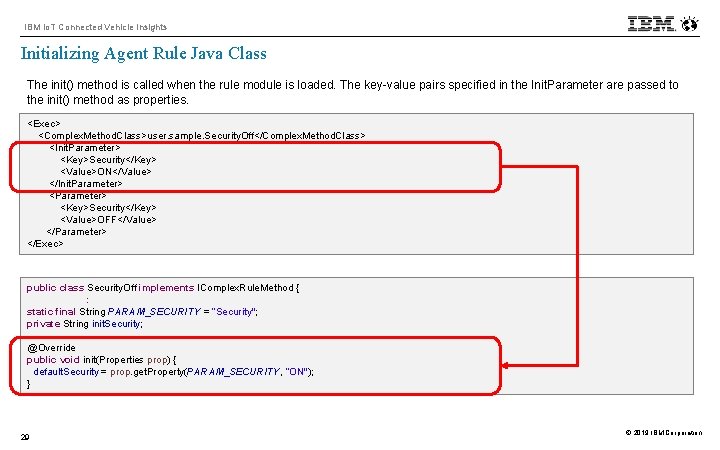
IBM Io. T Connected Vehicle Insights Initializing Agent Rule Java Class The init() method is called when the rule module is loaded. The key-value pairs specified in the Init. Parameter are passed to the init() method as properties. <Exec> <Complex. Method. Class>user. sample. Security. Off</Complex. Method. Class> <Init. Parameter> <Key>Security</Key> <Value>ON</Value> </Init. Parameter> <Key>Security</Key> <Value>OFF</Value> </Parameter> </Exec> public class Security. Off implements IComplex. Rule. Method { : static final String PARAM_SECURITY = ”Security"; private String init. Security; @Override public void init(Properties prop) { default. Security = prop. get. Property(PARAM_SECURITY, ”ON"); } 29 © 2019 IBM Corporation
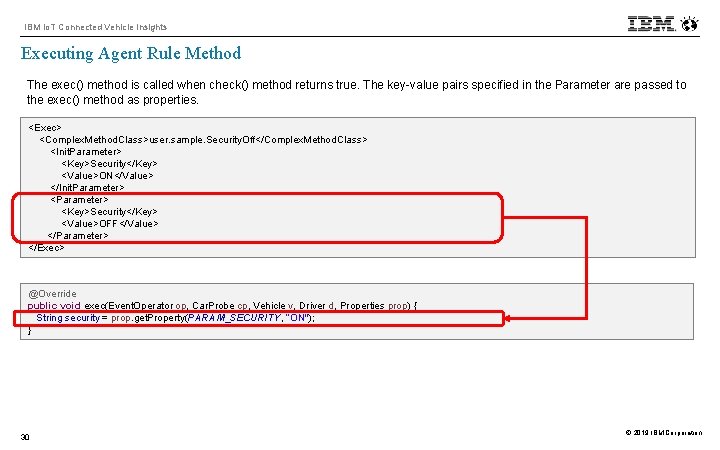
IBM Io. T Connected Vehicle Insights Executing Agent Rule Method The exec() method is called when check() method returns true. The key-value pairs specified in the Parameter are passed to the exec() method as properties. <Exec> <Complex. Method. Class>user. sample. Security. Off</Complex. Method. Class> <Init. Parameter> <Key>Security</Key> <Value>ON</Value> </Init. Parameter> <Key>Security</Key> <Value>OFF</Value> </Parameter> </Exec> @Override public void exec(Event. Operator op, Car. Probe cp, Vehicle v, Driver d, Properties prop) { String security = prop. get. Property(PARAM_SECURITY, ”ON"); } 30 © 2019 IBM Corporation
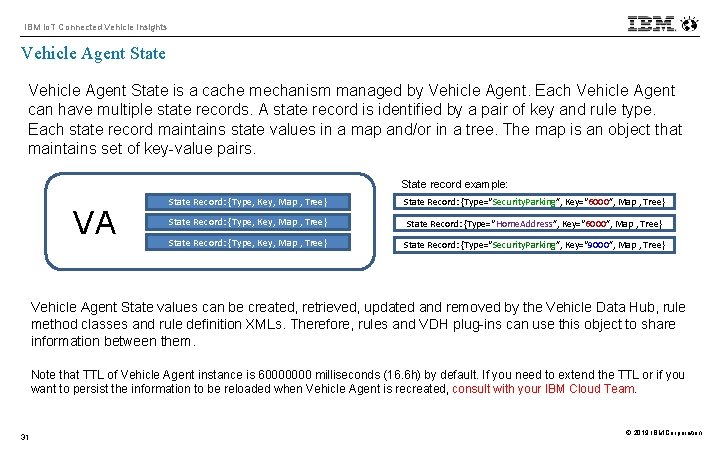
IBM Io. T Connected Vehicle Insights Vehicle Agent State is a cache mechanism managed by Vehicle Agent. Each Vehicle Agent can have multiple state records. A state record is identified by a pair of key and rule type. Each state record maintains state values in a map and/or in a tree. The map is an object that maintains set of key-value pairs. State record example: VA State Record: {Type, Key, Map , Tree} State Record: {Type=“Security. Parking”, Key=“ 6000”, Map , Tree} State Record: {Type, Key, Map , Tree} State Record: {Type=“Home. Address”, Key=“ 6000”, Map , Tree} State Record: {Type, Key, Map , Tree} State Record: {Type=“Security. Parking”, Key=“ 9000”, Map , Tree} Vehicle Agent State values can be created, retrieved, updated and removed by the Vehicle Data Hub, rule method classes and rule definition XMLs. Therefore, rules and VDH plug-ins can use this object to share information between them. Note that TTL of Vehicle Agent instance is 60000000 milliseconds (16. 6 h) by default. If you need to extend the TTL or if you want to persist the information to be reloaded when Vehicle Agent is recreated, consult with your IBM Cloud Team. 31 © 2019 IBM Corporation
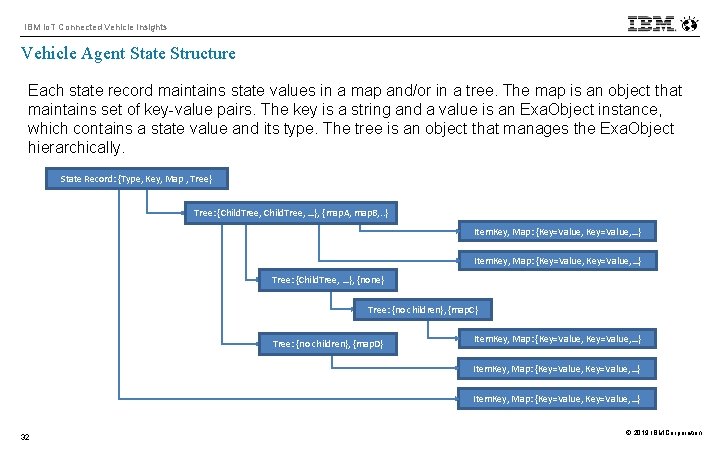
IBM Io. T Connected Vehicle Insights Vehicle Agent State Structure Each state record maintains state values in a map and/or in a tree. The map is an object that maintains set of key-value pairs. The key is a string and a value is an Exa. Object instance, which contains a state value and its type. The tree is an object that manages the Exa. Object hierarchically. State Record: {Type, Key, Map , Tree} Tree: {Child. Tree, …}, {map. A, map. B, . . } Item. Key, Map: {Key=Value, …} Tree: {Child. Tree, …}, {none} Tree: {no children}, {map. C} Tree: {no children}, {map. D} Item. Key, Map: {Key=Value, …} Item. Key, Map: {Key=Value, …} 32 © 2019 IBM Corporation
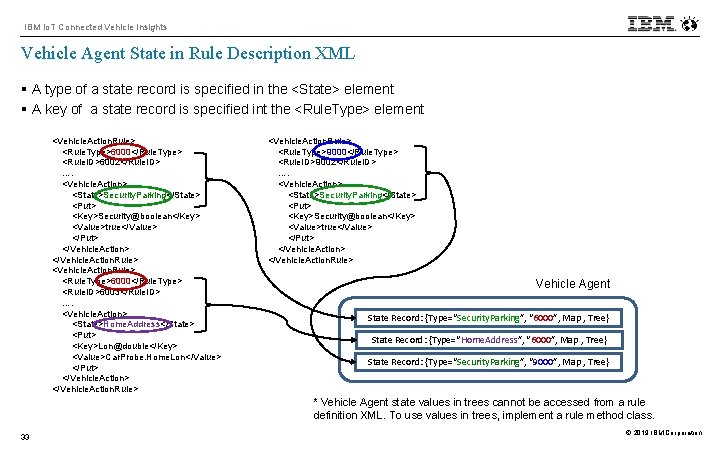
IBM Io. T Connected Vehicle Insights Vehicle Agent State in Rule Description XML § A type of a state record is specified in the <State> element § A key of a state record is specified int the <Rule. Type> element <Vehicle. Action. Rule> <Rule. Type>6000</Rule. Type> <Rule. ID>6002</Rule. ID> …. <Vehicle. Action> <State>Security. Parking</State> <Put> <Key>Security@boolean</Key> <Value>true</Value> </Put> </Vehicle. Action. Rule> <Vehicle. Action. Rule> <Rule. Type>6000</Rule. Type> <Rule. ID>6003</Rule. ID> …. <Vehicle. Action> <State>Home. Address</State> <Put> <Key>Lon@double</Key> <Value>Car. Probe. Home. Lon</Value> </Put> </Vehicle. Action. Rule> <Vehicle. Action. Rule> <Rule. Type>9000</Rule. Type> <Rule. ID>9002</Rule. ID> …. <Vehicle. Action> <State>Security. Parking</State> <Put> <Key>Security@boolean</Key> <Value>true</Value> </Put> </Vehicle. Action. Rule> Vehicle Agent State Record: {Type=“Security. Parking”, “ 6000”, Map , Tree} State Record: {Type=“Home. Address”, “ 6000”, Map , Tree} State Record: {Type=“Security. Parking”, “ 9000”, Map , Tree} * Vehicle Agent state values in trees cannot be accessed from a rule definition XML. To use values in trees, implement a rule method class. 33 © 2019 IBM Corporation
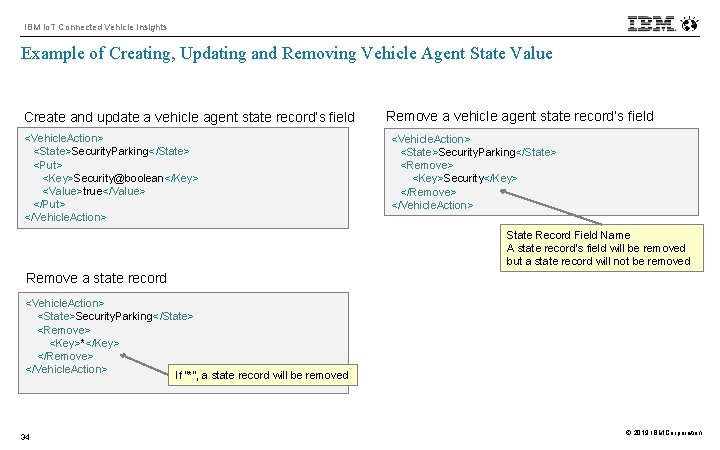
IBM Io. T Connected Vehicle Insights Example of Creating, Updating and Removing Vehicle Agent State Value Create and update a vehicle agent state record’s field <Vehicle. Action> <State>Security. Parking</State> <Put> <Key>Security@boolean</Key> <Value>true</Value> </Put> </Vehicle. Action> Remove a vehicle agent state record’s field <Vehicle. Action> <State>Security. Parking</State> <Remove> <Key>Security</Key> </Remove> </Vehicle. Action> State Record Field Name A state record’s field will be removed but a state record will not be removed Remove a state record <Vehicle. Action> <State>Security. Parking</State> <Remove> <Key>*</Key> </Remove> </Vehicle. Action> If “*”, a state record will be removed 34 © 2019 IBM Corporation
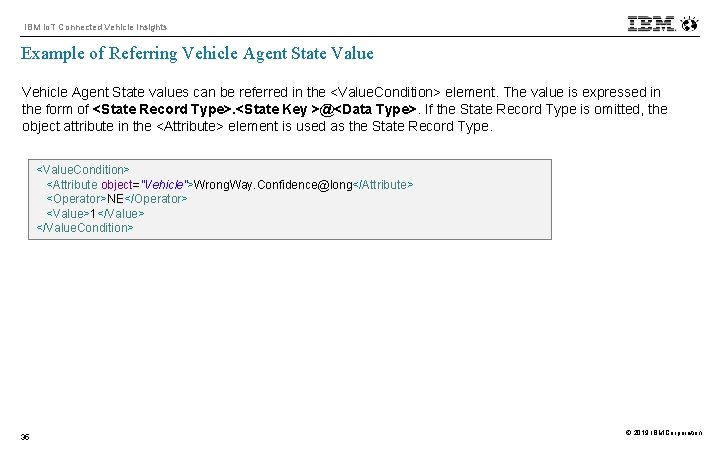
IBM Io. T Connected Vehicle Insights Example of Referring Vehicle Agent State Value Vehicle Agent State values can be referred in the <Value. Condition> element. The value is expressed in the form of <State Record Type>. <State Key >@<Data Type>. If the State Record Type is omitted, the object attribute in the <Attribute> element is used as the State Record Type. <Value. Condition> <Attribute object="Vehicle">Wrong. Way. Confidence@long</Attribute> <Operator>NE</Operator> <Value>1</Value> </Value. Condition> 35 © 2019 IBM Corporation
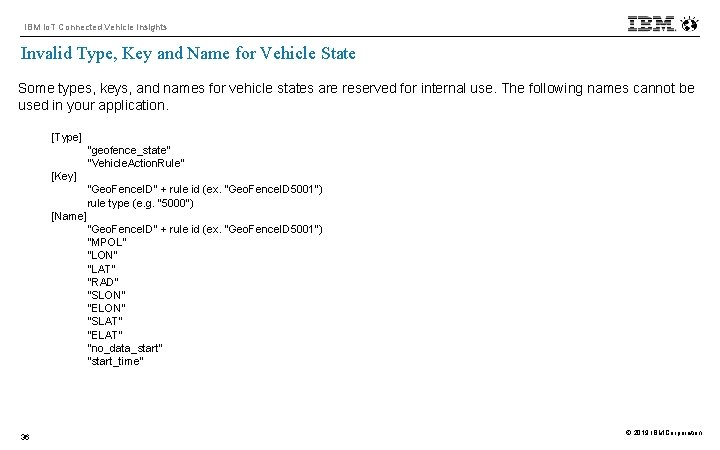
IBM Io. T Connected Vehicle Insights Invalid Type, Key and Name for Vehicle State Some types, keys, and names for vehicle states are reserved for internal use. The following names cannot be used in your application. [Type] "geofence_state“ "Vehicle. Action. Rule" [Key] "Geo. Fence. ID" + rule id (ex. "Geo. Fence. ID 5001") rule type (e. g. "5000") [Name] "Geo. Fence. ID" + rule id (ex. "Geo. Fence. ID 5001") "MPOL" "LON" "LAT" "RAD" "SLON" "ELON" "SLAT" "ELAT“ "no_data_start" "start_time" 36 © 2019 IBM Corporation
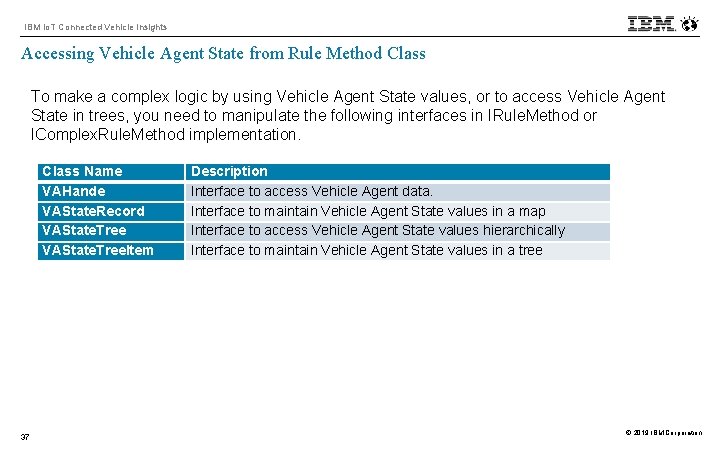
IBM Io. T Connected Vehicle Insights Accessing Vehicle Agent State from Rule Method Class To make a complex logic by using Vehicle Agent State values, or to access Vehicle Agent State in trees, you need to manipulate the following interfaces in IRule. Method or IComplex. Rule. Method implementation. Class Name VAHande VAState. Record VAState. Tree. Item 37 Description Interface to access Vehicle Agent data. Interface to maintain Vehicle Agent State values in a map Interface to access Vehicle Agent State values hierarchically Interface to maintain Vehicle Agent State values in a tree © 2019 IBM Corporation
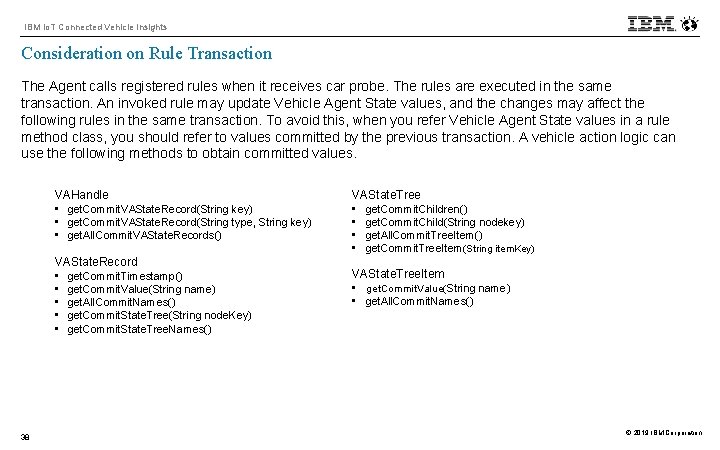
IBM Io. T Connected Vehicle Insights Consideration on Rule Transaction The Agent calls registered rules when it receives car probe. The rules are executed in the same transaction. An invoked rule may update Vehicle Agent State values, and the changes may affect the following rules in the same transaction. To avoid this, when you refer Vehicle Agent State values in a rule method class, you should refer to values committed by the previous transaction. A vehicle action logic can use the following methods to obtain committed values. VAHandle • get. Commit. VAState. Record(String key) • get. Commit. VAState. Record(String type, String key) • get. All. Commit. VAState. Records() VAState. Record • get. Commit. Timestamp() • get. Commit. Value(String name) • get. All. Commit. Names() • get. Commit. State. Tree(String node. Key) • get. Commit. State. Tree. Names() 38 VAState. Tree • get. Commit. Children() • get. Commit. Child(String nodekey) • get. All. Commit. Tree. Item() • get. Commit. Tree. Item(String item. Key) VAState. Tree. Item • get. Commit. Value(String name) • get. All. Commit. Names() © 2019 IBM Corporation
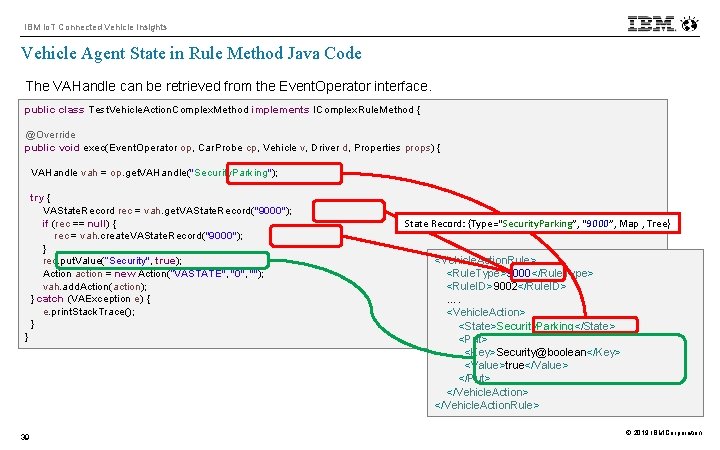
IBM Io. T Connected Vehicle Insights Vehicle Agent State in Rule Method Java Code The VAHandle can be retrieved from the Event. Operator interface. public class Test. Vehicle. Action. Complex. Method implements IComplex. Rule. Method { @Override public void exec(Event. Operator op, Car. Probe cp, Vehicle v, Driver d, Properties props) { VAHandle vah = op. get. VAHandle("Security. Parking"); try { VAState. Record rec = vah. get. VAState. Record("9000"); if (rec == null) { rec = vah. create. VAState. Record("9000"); } rec. put. Value(”Security", true); Action action = new Action(”VASTATE", "0", ""); vah. add. Action(action); } catch (VAException e) { e. print. Stack. Trace(); } } 39 State Record: {Type=“Security. Parking”, “ 9000”, Map , Tree} <Vehicle. Action. Rule> <Rule. Type>9000</Rule. Type> <Rule. ID>9002</Rule. ID> …. <Vehicle. Action> <State>Security. Parking</State> <Put> <Key>Security@boolean</Key> <Value>true</Value> </Put> </Vehicle. Action. Rule> © 2019 IBM Corporation
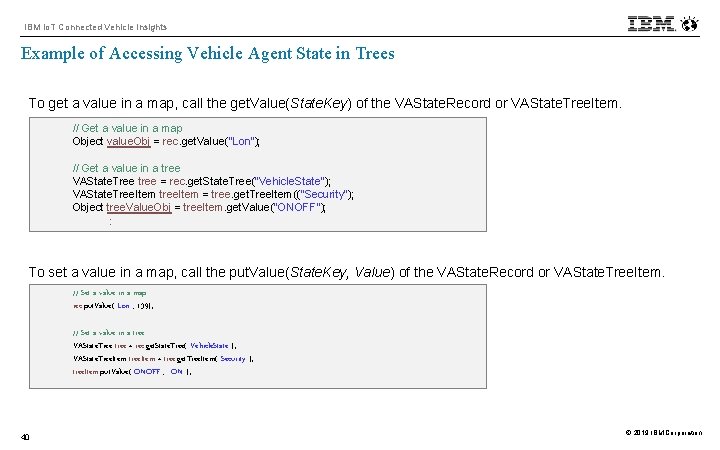
IBM Io. T Connected Vehicle Insights Example of Accessing Vehicle Agent State in Trees To get a value in a map, call the get. Value(State. Key) of the VAState. Record or VAState. Tree. Item. // Get a value in a map Object value. Obj = rec. get. Value("Lon"); // Get a value in a tree VAState. Tree tree = rec. get. State. Tree("Vehicle. State"); VAState. Tree. Item tree. Item = tree. get. Tree. Item(("Security"); Object tree. Value. Obj = tree. Item. get. Value("ONOFF"); : To set a value in a map, call the put. Value(State. Key, Value) of the VAState. Record or VAState. Tree. Item. // Set a value in a map rec. put. Value("Lon", 139); // Set a value in a tree VAState. Tree tree = rec. get. State. Tree("Vehicle. State"); VAState. Tree. Item tree. Item = tree. get. Tree. Item("Security"); tree. Item. put. Value("ONOFF", "ON"); 40 © 2019 IBM Corporation
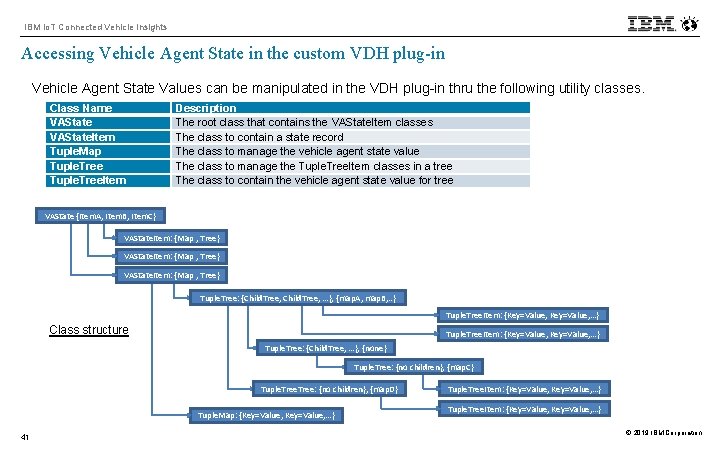
IBM Io. T Connected Vehicle Insights Accessing Vehicle Agent State in the custom VDH plug-in Vehicle Agent State Values can be manipulated in the VDH plug-in thru the following utility classes. Class Name VAState. Item Tuple. Map Tuple. Tree. Item Description The root class that contains the VAState. Item classes The class to contain a state record The class to manage the vehicle agent state value The class to manage the Tuple. Tree. Item classes in a tree The class to contain the vehicle agent state value for tree VAState {Item. A, Item. B, Item. C} VAState. Item: {Map , Tree} Tuple. Tree: {Child. Tree, …}, {map. A, map. B, . . } Tuple. Tree. Item: {Key=Value, …} Class structure Tuple. Tree. Item: {Key=Value, …} Tuple. Tree: {Child. Tree, …}, {none} Tuple. Tree: {no children}, {map. C} Tuple. Tree: {no children}, {map. D} Tuple. Map: {Key=Value, …} 41 Tuple. Tree. Item: {Key=Value, …} © 2019 IBM Corporation
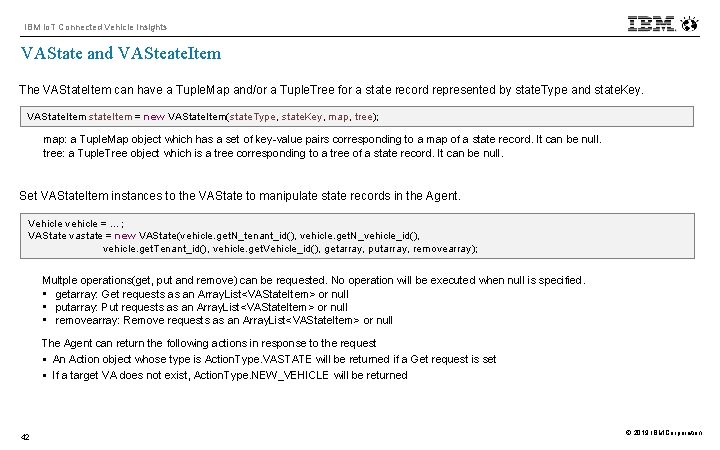
IBM Io. T Connected Vehicle Insights VAState and VASteate. Item The VAState. Item can have a Tuple. Map and/or a Tuple. Tree for a state record represented by state. Type and state. Key. VAState. Item state. Item = new VAState. Item(state. Type, state. Key, map, tree); map: a Tuple. Map object which has a set of key-value pairs corresponding to a map of a state record. It can be null. tree: a Tuple. Tree object which is a tree corresponding to a tree of a state record. It can be null. Set VAState. Item instances to the VAState to manipulate state records in the Agent. Vehicle vehicle = …; VAState vastate = new VAState(vehicle. get. N_tenant_id(), vehicle. get. N_vehicle_id(), vehicle. get. Tenant_id(), vehicle. get. Vehicle_id(), getarray, putarray, removearray); Multple operations(get, put and remove) can be requested. No operation will be executed when null is specified. • getarray: Get requests as an Array. List<VAState. Item> or null • putarray: Put requests as an Array. List<VAState. Item> or null • removearray: Remove requests as an Array. List<VAState. Item> or null The Agent can return the following actions in response to the request § An Action object whose type is Action. Type. VASTATE will be returned if a Get request is set § If a target VA does not exist, Action. Type. NEW_VEHICLE will be returned 42 © 2019 IBM Corporation
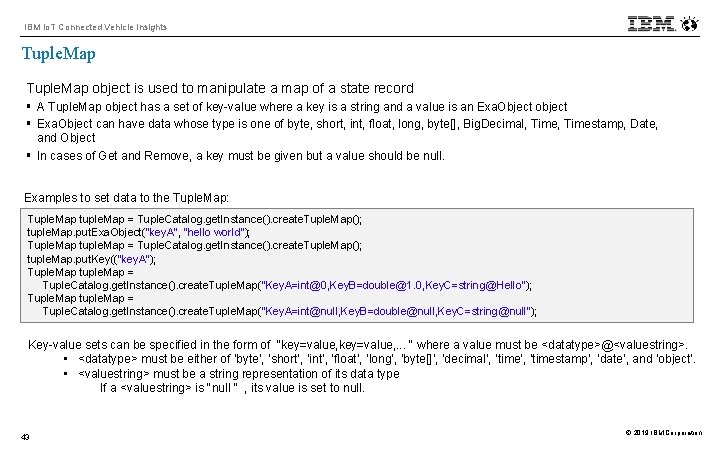
IBM Io. T Connected Vehicle Insights Tuple. Map object is used to manipulate a map of a state record § A Tuple. Map object has a set of key-value where a key is a string and a value is an Exa. Object object § Exa. Object can have data whose type is one of byte, short, int, float, long, byte[], Big. Decimal, Timestamp, Date, and Object § In cases of Get and Remove, a key must be given but a value should be null. Examples to set data to the Tuple. Map: Tuple. Map tuple. Map = Tuple. Catalog. get. Instance(). create. Tuple. Map(); tuple. Map. put. Exa. Object("key. A", "hello world"); Tuple. Map tuple. Map = Tuple. Catalog. get. Instance(). create. Tuple. Map(); tuple. Map. put. Key(("key. A"); Tuple. Map tuple. Map = Tuple. Catalog. get. Instance(). create. Tuple. Map("Key. A=int@0, Key. B=double@1. 0, Key. C=string@Hello"); Tuple. Map tuple. Map = Tuple. Catalog. get. Instance(). create. Tuple. Map("Key. A=int@null, Key. B=double@null, Key. C=string@null"); Key-value sets can be specified in the form of "key=value, . . . " where a value must be <datatype>@<valuestring>. • <datatype> must be either of ‘byte’, ‘short’, ‘int’, ‘float’, ‘long’, ‘byte[]’, ‘decimal’, ‘timestamp’, ‘date’, and ‘object’. • <valuestring> must be a string representation of its data type If a <valuestring> is "null " , its value is set to null. 43 © 2019 IBM Corporation
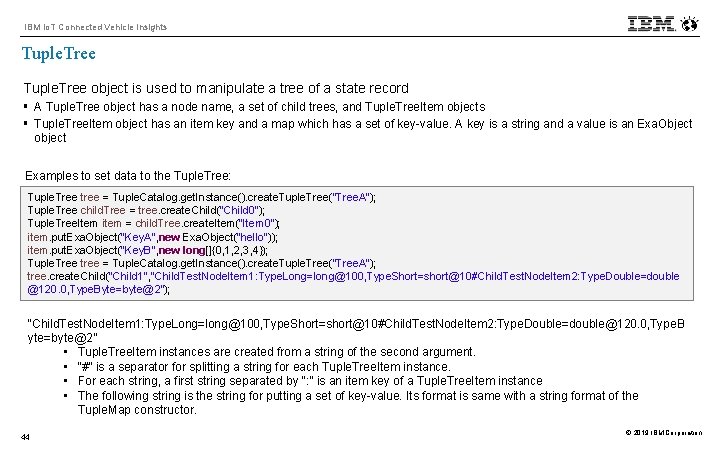
IBM Io. T Connected Vehicle Insights Tuple. Tree object is used to manipulate a tree of a state record § A Tuple. Tree object has a node name, a set of child trees, and Tuple. Tree. Item objects § Tuple. Tree. Item object has an item key and a map which has a set of key-value. A key is a string and a value is an Exa. Object object Examples to set data to the Tuple. Tree: Tuple. Tree tree = Tuple. Catalog. get. Instance(). create. Tuple. Tree("Tree. A"); Tuple. Tree child. Tree = tree. create. Child("Child 0"); Tuple. Tree. Item item = child. Tree. create. Item("Item 0"); item. put. Exa. Object("Key. A", new Exa. Object("hello")); item. put. Exa. Object("Key. B", new long[]{0, 1, 2, 3, 4}); Tuple. Tree tree = Tuple. Catalog. get. Instance(). create. Tuple. Tree("Tree. A"); tree. create. Child("Child 1", "Child. Test. Node. Item 1: Type. Long=long@100, Type. Short=short@10#Child. Test. Node. Item 2: Type. Double=double @120. 0, Type. Byte=byte@2"); “Child. Test. Node. Item 1: Type. Long=long@100, Type. Short=short@10#Child. Test. Node. Item 2: Type. Double=double@120. 0, Type. B yte=byte@2” • Tuple. Tree. Item instances are created from a string of the second argument. • “#” is a separator for splitting a string for each Tuple. Tree. Item instance. • For each string, a first string separated by “: ” is an item key of a Tuple. Tree. Item instance • The following string is the string for putting a set of key-value. Its format is same with a string format of the Tuple. Map constructor. 44 © 2019 IBM Corporation
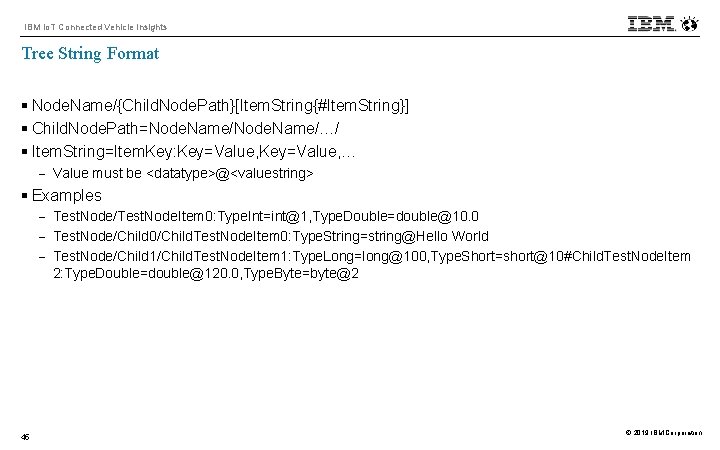
IBM Io. T Connected Vehicle Insights Tree String Format § Node. Name/{Child. Node. Path}[Item. String{#Item. String}] § Child. Node. Path=Node. Name/…/ § Item. String=Item. Key: Key=Value, … - Value must be <datatype>@<valuestring> § Examples - Test. Node/Test. Node. Item 0: Type. Int=int@1, Type. Double=double@10. 0 - Test. Node/Child 0/Child. Test. Node. Item 0: Type. String=string@Hello World - Test. Node/Child 1/Child. Test. Node. Item 1: Type. Long=long@100, Type. Short=short@10#Child. Test. Node. Item 2: Type. Double=double@120. 0, Type. Byte=byte@2 45 © 2019 IBM Corporation
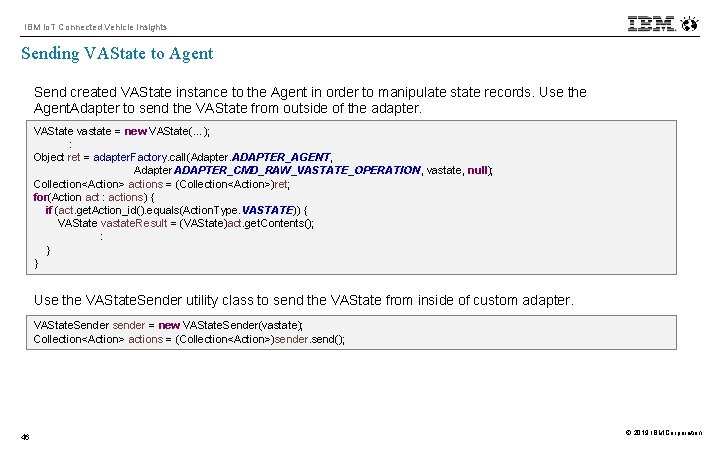
IBM Io. T Connected Vehicle Insights Sending VAState to Agent Send created VAState instance to the Agent in order to manipulate state records. Use the Agent. Adapter to send the VAState from outside of the adapter. VAState vastate = new VAState(…); : Object ret = adapter. Factory. call(Adapter. ADAPTER_AGENT, Adapter. ADAPTER_CMD_RAW_VASTATE_OPERATION , vastate, null); Collection<Action> actions = (Collection<Action>)ret; for(Action act : actions) { if (act. get. Action_id(). equals(Action. Type. VASTATE)) { VAState vastate. Result = (VAState)act. get. Contents(); : } } Use the VAState. Sender utility class to send the VAState from inside of custom adapter. VAState. Sender sender = new VAState. Sender(vastate); Collection<Action> actions = (Collection<Action>)sender. send(); 46 © 2019 IBM Corporation
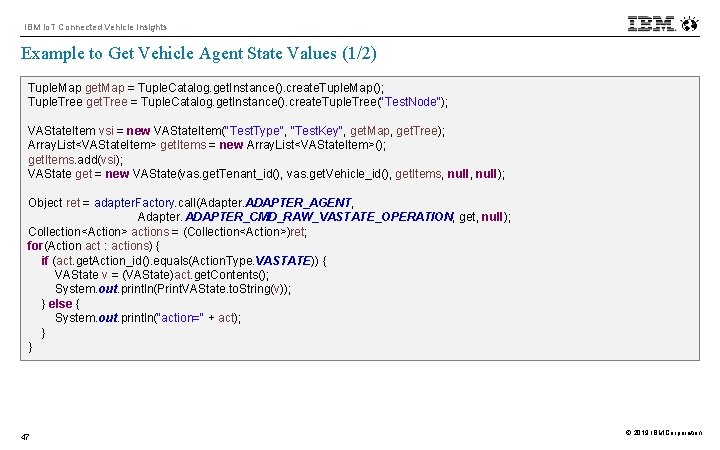
IBM Io. T Connected Vehicle Insights Example to Get Vehicle Agent State Values (1/2) Tuple. Map get. Map = Tuple. Catalog. get. Instance(). create. Tuple. Map(); Tuple. Tree get. Tree = Tuple. Catalog. get. Instance(). create. Tuple. Tree("Test. Node"); VAState. Item vsi = new VAState. Item("Test. Type", "Test. Key", get. Map, get. Tree); Array. List<VAState. Item> get. Items = new Array. List<VAState. Item>(); get. Items. add(vsi); VAState get = new VAState(vas. get. Tenant_id(), vas. get. Vehicle_id(), get. Items, null); Object ret = adapter. Factory. call(Adapter. ADAPTER_AGENT, Adapter. ADAPTER_CMD_RAW_VASTATE_OPERATION, get, null); Collection<Action> actions = (Collection<Action>)ret; for(Action act : actions) { if (act. get. Action_id(). equals(Action. Type. VASTATE)) { VAState v = (VAState)act. get. Contents(); System. out. println(Print. VAState. to. String(v)); } else { System. out. println("action=" + act); } } 47 © 2019 IBM Corporation
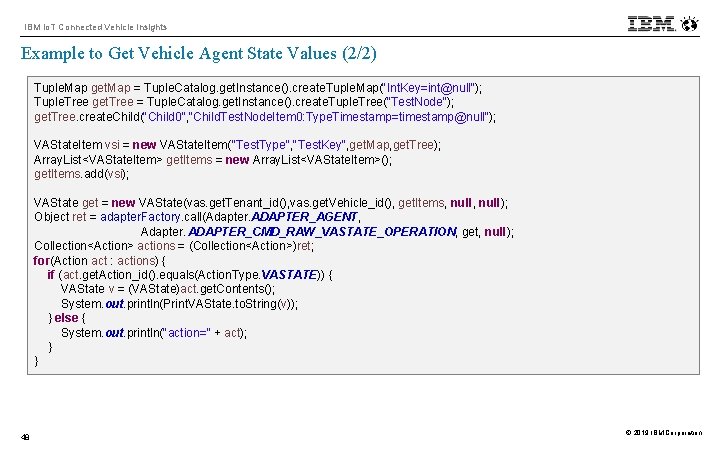
IBM Io. T Connected Vehicle Insights Example to Get Vehicle Agent State Values (2/2) Tuple. Map get. Map = Tuple. Catalog. get. Instance(). create. Tuple. Map("Int. Key=int@null"); Tuple. Tree get. Tree = Tuple. Catalog. get. Instance(). create. Tuple. Tree("Test. Node"); get. Tree. create. Child("Child 0", "Child. Test. Node. Item 0: Type. Timestamp=timestamp@null"); VAState. Item vsi = new VAState. Item("Test. Type", "Test. Key", get. Map, get. Tree); Array. List<VAState. Item> get. Items = new Array. List<VAState. Item>(); get. Items. add(vsi); VAState get = new VAState(vas. get. Tenant_id(), vas. get. Vehicle_id(), get. Items, null); Object ret = adapter. Factory. call(Adapter. ADAPTER_AGENT, Adapter. ADAPTER_CMD_RAW_VASTATE_OPERATION, get, null); Collection<Action> actions = (Collection<Action>)ret; for(Action act : actions) { if (act. get. Action_id(). equals(Action. Type. VASTATE)) { VAState v = (VAState)act. get. Contents(); System. out. println(Print. VAState. to. String(v)); } else { System. out. println("action=" + act); } } 48 © 2019 IBM Corporation
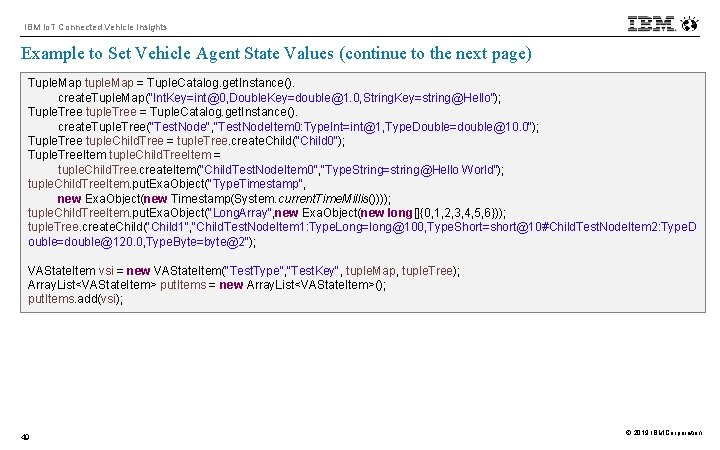
IBM Io. T Connected Vehicle Insights Example to Set Vehicle Agent State Values (continue to the next page) Tuple. Map tuple. Map = Tuple. Catalog. get. Instance(). create. Tuple. Map("Int. Key=int@0, Double. Key=double@1. 0, String. Key=string@Hello"); Tuple. Tree tuple. Tree = Tuple. Catalog. get. Instance(). create. Tuple. Tree("Test. Node", "Test. Node. Item 0: Type. Int=int@1, Type. Double=double@10. 0"); Tuple. Tree tuple. Child. Tree = tuple. Tree. create. Child("Child 0"); Tuple. Tree. Item tuple. Child. Tree. Item = tuple. Child. Tree. create. Item("Child. Test. Node. Item 0", "Type. String=string@Hello World"); tuple. Child. Tree. Item. put. Exa. Object("Type. Timestamp", new Exa. Object(new Timestamp(System. current. Time. Millis()))); tuple. Child. Tree. Item. put. Exa. Object("Long. Array", new Exa. Object(new long[]{0, 1, 2, 3, 4, 5, 6})); tuple. Tree. create. Child("Child 1", "Child. Test. Node. Item 1: Type. Long=long@100, Type. Short=short@10#Child. Test. Node. Item 2: Type. D ouble=double@120. 0, Type. Byte=byte@2"); VAState. Item vsi = new VAState. Item("Test. Type", "Test. Key", tuple. Map, tuple. Tree); Array. List<VAState. Item> put. Items = new Array. List<VAState. Item>(); put. Items. add(vsi); 49 © 2019 IBM Corporation
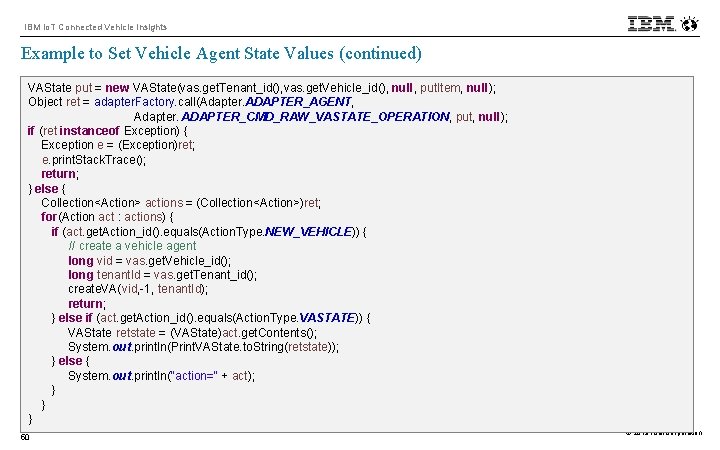
IBM Io. T Connected Vehicle Insights Example to Set Vehicle Agent State Values (continued) VAState put = new VAState(vas. get. Tenant_id(), vas. get. Vehicle_id(), null, put. Item, null); Object ret = adapter. Factory. call(Adapter. ADAPTER_AGENT, Adapter. ADAPTER_CMD_RAW_VASTATE_OPERATION, put, null); if (ret instanceof Exception) { Exception e = (Exception)ret; e. print. Stack. Trace(); return; } else { Collection<Action> actions = (Collection<Action>)ret; for(Action act : actions) { if (act. get. Action_id(). equals(Action. Type. NEW_VEHICLE)) { // create a vehicle agent long vid = vas. get. Vehicle_id(); long tenant. Id = vas. get. Tenant_id(); create. VA(vid, -1, tenant. Id); return; } else if (act. get. Action_id(). equals(Action. Type. VASTATE)) { VAState retstate = (VAState)act. get. Contents(); System. out. println(Print. VAState. to. String(retstate)); } else { System. out. println("action=" + act); } } } 50 © 2019 IBM Corporation
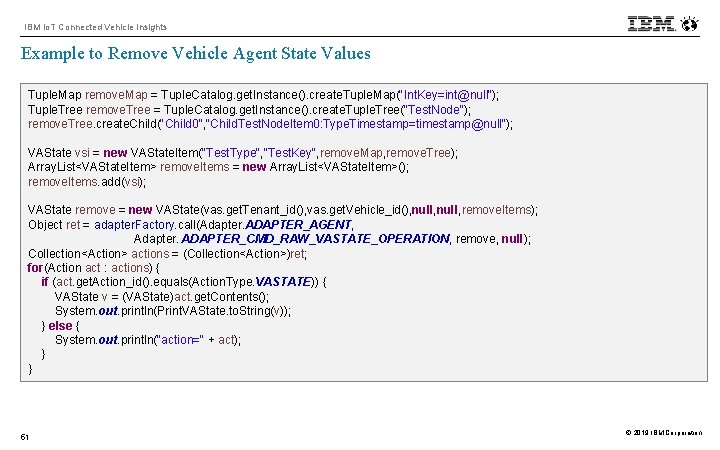
IBM Io. T Connected Vehicle Insights Example to Remove Vehicle Agent State Values Tuple. Map remove. Map = Tuple. Catalog. get. Instance(). create. Tuple. Map("Int. Key=int@null"); Tuple. Tree remove. Tree = Tuple. Catalog. get. Instance(). create. Tuple. Tree("Test. Node"); remove. Tree. create. Child("Child 0", "Child. Test. Node. Item 0: Type. Timestamp=timestamp@null"); VAState vsi = new VAState. Item("Test. Type", "Test. Key", remove. Map, remove. Tree); Array. List<VAState. Item> remove. Items = new Array. List<VAState. Item>(); remove. Items. add(vsi); VAState remove = new VAState(vas. get. Tenant_id(), vas. get. Vehicle_id(), null, remove. Items); Object ret = adapter. Factory. call(Adapter. ADAPTER_AGENT, Adapter. ADAPTER_CMD_RAW_VASTATE_OPERATION, remove, null); Collection<Action> actions = (Collection<Action>)ret; for(Action act : actions) { if (act. get. Action_id(). equals(Action. Type. VASTATE)) { VAState v = (VAState)act. get. Contents(); System. out. println(Print. VAState. to. String(v)); } else { System. out. println("action=" + act); } } 51 © 2019 IBM Corporation
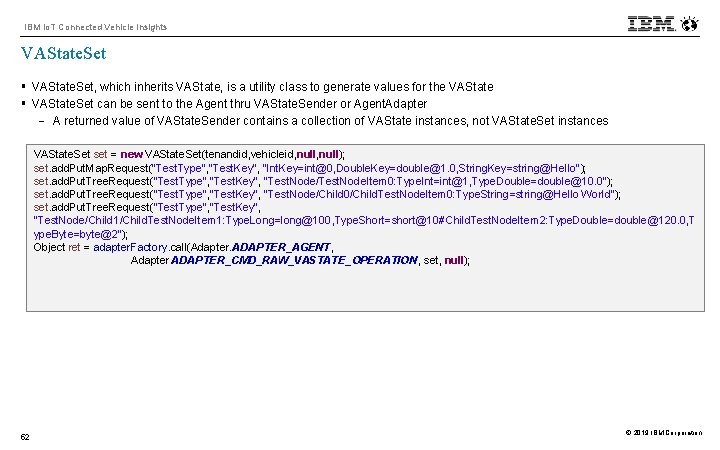
IBM Io. T Connected Vehicle Insights VAState. Set § VAState. Set, which inherits VAState, is a utility class to generate values for the VAState § VAState. Set can be sent to the Agent thru VAState. Sender or Agent. Adapter - A returned value of VAState. Sender contains a collection of VAState instances, not VAState. Set instances VAState. Set set = new VAState. Set(tenandid, vehicleid, null); set. add. Put. Map. Request("Test. Type", "Test. Key", "Int. Key=int@0, Double. Key=double@1. 0, String. Key=string@Hello"); set. add. Put. Tree. Request("Test. Type", "Test. Key", "Test. Node/Test. Node. Item 0: Type. Int=int@1, Type. Double=double@10. 0"); set. add. Put. Tree. Request("Test. Type", "Test. Key", "Test. Node/Child 0/Child. Test. Node. Item 0: Type. String=string@Hello World"); set. add. Put. Tree. Request("Test. Type", "Test. Key", "Test. Node/Child 1/Child. Test. Node. Item 1: Type. Long=long@100, Type. Short=short@10#Child. Test. Node. Item 2: Type. Double=double@120. 0, T ype. Byte=byte@2"); Object ret = adapter. Factory. call(Adapter. ADAPTER_AGENT, Adapter. ADAPTER_CMD_RAW_VASTATE_OPERATION , set, null); 52 © 2019 IBM Corporation
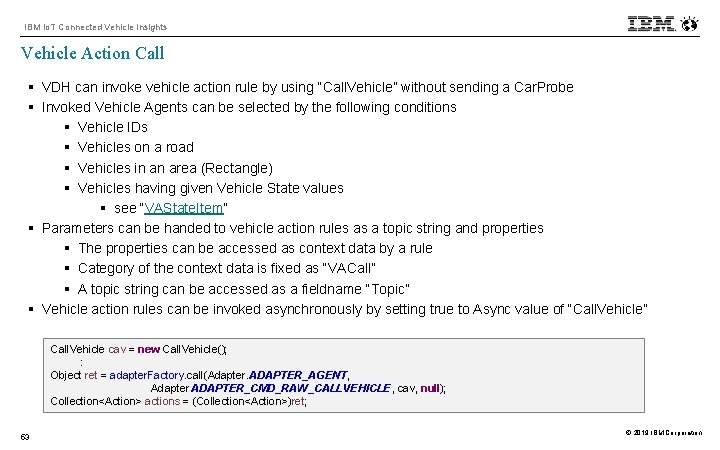
IBM Io. T Connected Vehicle Insights Vehicle Action Call § VDH can invoke vehicle action rule by using “Call. Vehicle” without sending a Car. Probe § Invoked Vehicle Agents can be selected by the following conditions § Vehicle IDs § Vehicles on a road § Vehicles in an area (Rectangle) § Vehicles having given Vehicle State values § see “VAState. Item” § Parameters can be handed to vehicle action rules as a topic string and properties § The properties can be accessed as context data by a rule § Category of the context data is fixed as “VACall” § A topic string can be accessed as a fieldname “Topic” § Vehicle action rules can be invoked asynchronously by setting true to Async value of “Call. Vehicle” Call. Vehicle cav = new Call. Vehicle(); : Object ret = adapter. Factory. call(Adapter. ADAPTER_AGENT, Adapter. ADAPTER_CMD_RAW_CALLVEHICLE, cav, null); Collection<Action> actions = (Collection<Action>)ret; 53 © 2019 IBM Corporation
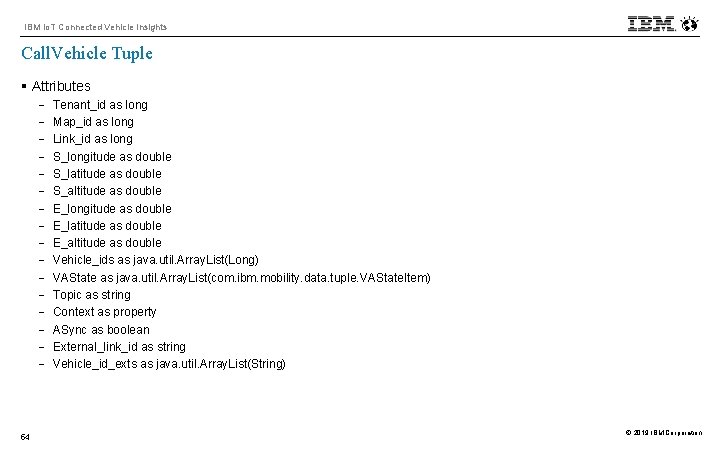
IBM Io. T Connected Vehicle Insights Call. Vehicle Tuple § Attributes - 54 Tenant_id as long Map_id as long Link_id as long S_longitude as double S_latitude as double S_altitude as double E_longitude as double E_latitude as double E_altitude as double Vehicle_ids as java. util. Array. List(Long) VAState as java. util. Array. List(com. ibm. mobility. data. tuple. VAState. Item) Topic as string Context as property ASync as boolean External_link_id as string Vehicle_id_exts as java. util. Array. List(String) © 2019 IBM Corporation
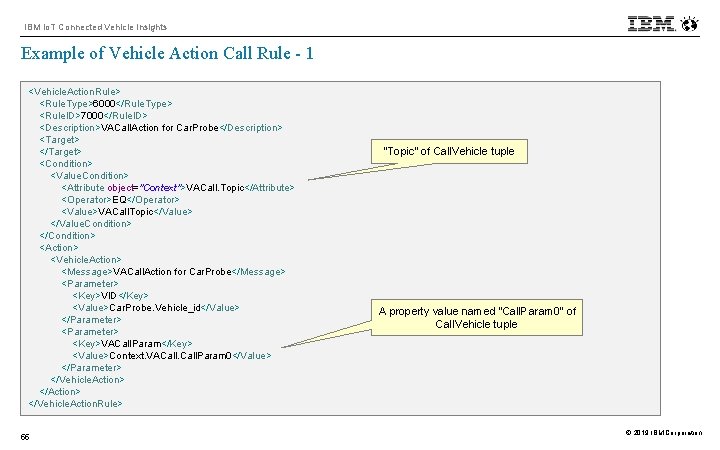
IBM Io. T Connected Vehicle Insights Example of Vehicle Action Call Rule - 1 <Vehicle. Action. Rule> <Rule. Type>6000</Rule. Type> <Rule. ID>7000</Rule. ID> <Description>VACall. Action for Car. Probe</Description> <Target> </Target> <Condition> <Value. Condition> <Attribute object="Context">VACall. Topic</Attribute> <Operator>EQ</Operator> <Value>VACall. Topic</Value> </Value. Condition> </Condition> <Action> <Vehicle. Action> <Message>VACall. Action for Car. Probe</Message> <Parameter> <Key>VID</Key> <Value>Car. Probe. Vehicle_id</Value> </Parameter> <Key>VACall. Param</Key> <Value>Context. VACall. Param 0</Value> </Parameter> </Vehicle. Action> </Vehicle. Action. Rule> 55 “Topic” of Call. Vehicle tuple A property value named “Call. Param 0” of Call. Vehicle tuple © 2019 IBM Corporation
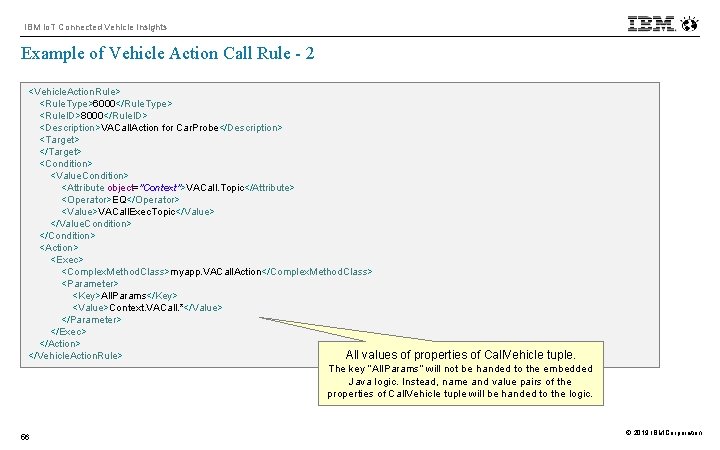
IBM Io. T Connected Vehicle Insights Example of Vehicle Action Call Rule - 2 <Vehicle. Action. Rule> <Rule. Type>6000</Rule. Type> <Rule. ID>8000</Rule. ID> <Description>VACall. Action for Car. Probe</Description> <Target> </Target> <Condition> <Value. Condition> <Attribute object="Context">VACall. Topic</Attribute> <Operator>EQ</Operator> <Value>VACall. Exec. Topic</Value> </Value. Condition> </Condition> <Action> <Exec> <Complex. Method. Class>myapp. VACall. Action</Complex. Method. Class> <Parameter> <Key>All. Params</Key> <Value>Context. VACall. *</Value> </Parameter> </Exec> </Action> All values of properties of Call. Vehicle tuple. </Vehicle. Action. Rule> The key “All. Params” will not be handed to the embedded Java logic. Instead, name and value pairs of the properties of Call. Vehicle tuple will be handed to the logic. 56 © 2019 IBM Corporation
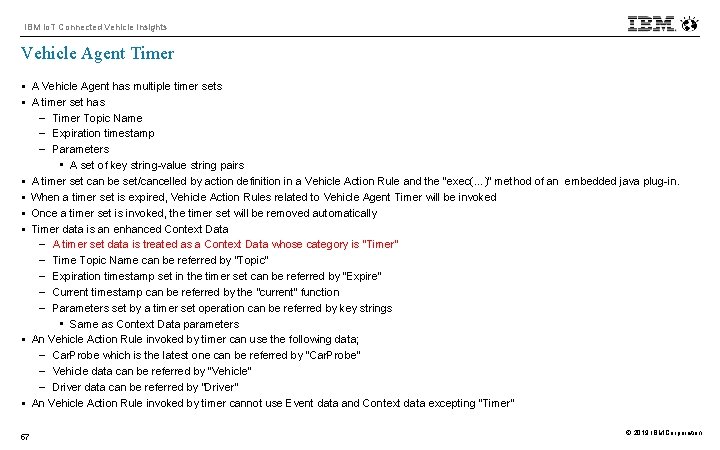
IBM Io. T Connected Vehicle Insights Vehicle Agent Timer § A Vehicle Agent has multiple timer sets § A timer set has - Timer Topic Name - Expiration timestamp - Parameters • A set of key string-value string pairs § A timer set can be set/cancelled by action definition in a Vehicle Action Rule and the “exec(…)” method of an embedded java plug-in. § When a timer set is expired, Vehicle Action Rules related to Vehicle Agent Timer will be invoked § Once a timer set is invoked, the timer set will be removed automatically § Timer data is an enhanced Context Data - A timer set data is treated as a Context Data whose category is “Timer” - Time Topic Name can be referred by “Topic” - Expiration timestamp set in the timer set can be referred by “Expire” - Current timestamp can be referred by the “current” function - Parameters set by a timer set operation can be referred by key strings • Same as Context Data parameters § An Vehicle Action Rule invoked by timer can use the following data; - Car. Probe which is the latest one can be referred by “Car. Probe” - Vehicle data can be referred by “Vehicle” - Driver data can be referred by “Driver” § An Vehicle Action Rule invoked by timer cannot use Event data and Context data excepting “Timer” 57 © 2019 IBM Corporation
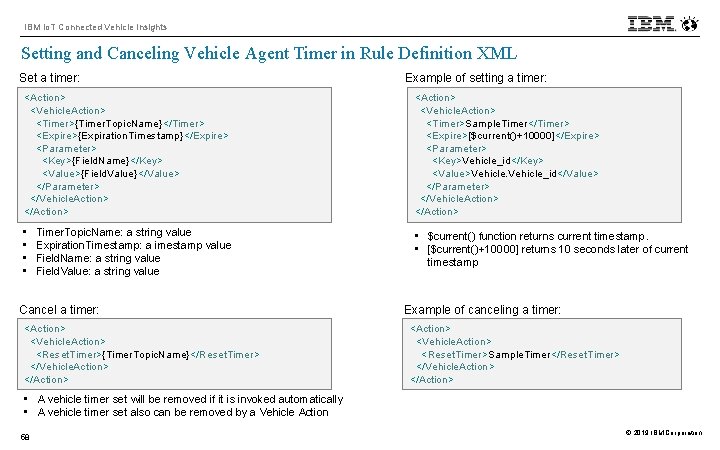
IBM Io. T Connected Vehicle Insights Setting and Canceling Vehicle Agent Timer in Rule Definition XML Set a timer: Example of setting a timer: <Action> <Vehicle. Action> <Timer>{Timer. Topic. Name}</Timer> <Expire>{Expiration. Timestamp}</Expire> <Parameter> <Key>{Field. Name}</Key> <Value>{Field. Value}</Value> </Parameter> </Vehicle. Action> </Action> <Action> <Vehicle. Action> <Timer>Sample. Timer</Timer> <Expire>[$current()+10000]</Expire> <Parameter> <Key>Vehicle_id</Key> <Value>Vehicle_id</Value> </Parameter> </Vehicle. Action> </Action> • • • $current() function returns current timestamp. • [$current()+10000] returns 10 seconds later of current timestamp Timer. Topic. Name: a string value Expiration. Timestamp: a imestamp value Field. Name: a string value Field. Value: a string value Cancel a timer: <Action> <Vehicle. Action> <Reset. Timer>{Timer. Topic. Name}</Reset. Timer> </Vehicle. Action> </Action> Example of canceling a timer: <Action> <Vehicle. Action> <Reset. Timer>Sample. Timer</Reset. Timer> </Vehicle. Action> </Action> • A vehicle timer set will be removed if it is invoked automatically • A vehicle timer set also can be removed by a Vehicle Action 58 © 2019 IBM Corporation
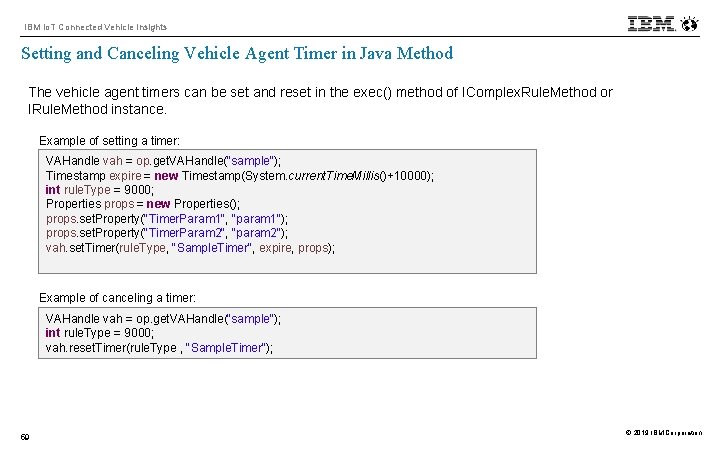
IBM Io. T Connected Vehicle Insights Setting and Canceling Vehicle Agent Timer in Java Method The vehicle agent timers can be set and reset in the exec() method of IComplex. Rule. Method or IRule. Method instance. Example of setting a timer: VAHandle vah = op. get. VAHandle("sample"); Timestamp expire = new Timestamp(System. current. Time. Millis()+10000); int rule. Type = 9000; Properties props = new Properties(); props. set. Property("Timer. Param 1", "param 1"); props. set. Property("Timer. Param 2", "param 2"); vah. set. Timer(rule. Type, "Sample. Timer", expire, props); Example of canceling a timer: VAHandle vah = op. get. VAHandle("sample"); int rule. Type = 9000; vah. reset. Timer(rule. Type , "Sample. Timer"); 59 © 2019 IBM Corporation
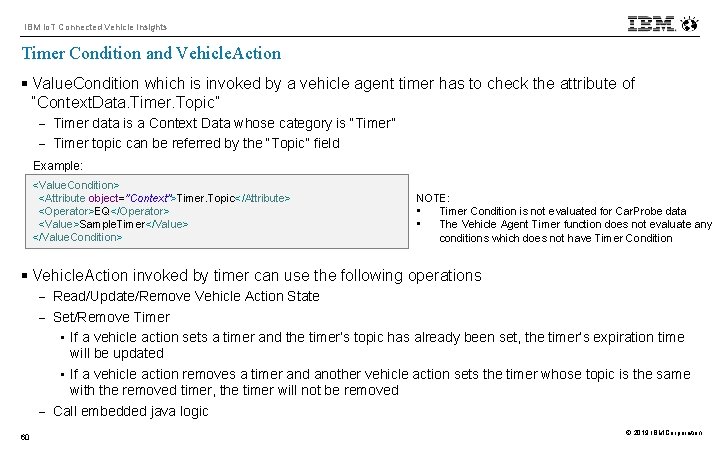
IBM Io. T Connected Vehicle Insights Timer Condition and Vehicle. Action § Value. Condition which is invoked by a vehicle agent timer has to check the attribute of “Context. Data. Timer. Topic” - Timer data is a Context Data whose category is “Timer” - Timer topic can be referred by the “Topic” field Example: <Value. Condition> <Attribute object="Context">Timer. Topic</Attribute> <Operator>EQ</Operator> <Value>Sample. Timer</Value> </Value. Condition> NOTE: • Timer Condition is not evaluated for Car. Probe data • The Vehicle Agent Timer function does not evaluate any conditions which does not have Timer Condition § Vehicle. Action invoked by timer can use the following operations - Read/Update/Remove Vehicle Action State - Set/Remove Timer • If a vehicle action sets a timer and the timer’s topic has already been set, the timer’s expiration time will be updated • If a vehicle action removes a timer and another vehicle action sets the timer whose topic is the same with the removed timer, the timer will not be removed - Call embedded java logic 60 © 2019 IBM Corporation
IBM Io. T Connected Vehicle Insights Timer Persistency § Timer will be persistent if Vehicle Agents are persistent § If a agent container starts, all persistent timer sets will be recovered. However, timer operations will not be started until the first Vehicle Action Rule is loaded 61 © 2019 IBM Corporation
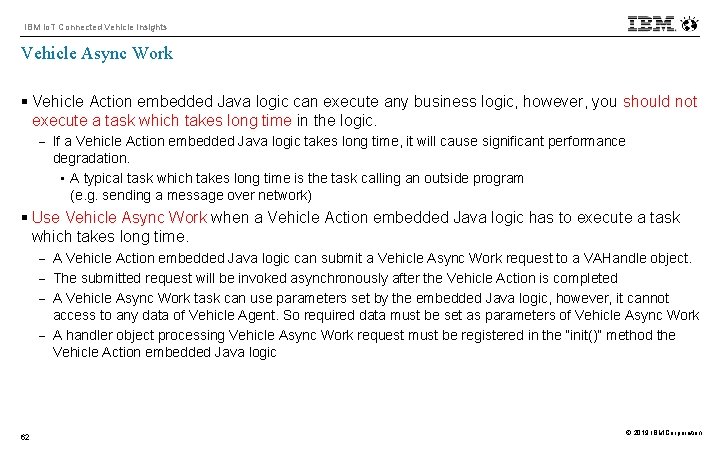
IBM Io. T Connected Vehicle Insights Vehicle Async Work § Vehicle Action embedded Java logic can execute any business logic, however, you should not execute a task which takes long time in the logic. - If a Vehicle Action embedded Java logic takes long time, it will cause significant performance degradation. • A typical task which takes long time is the task calling an outside program (e. g. sending a message over network) § Use Vehicle Async Work when a Vehicle Action embedded Java logic has to execute a task which takes long time. - A Vehicle Action embedded Java logic can submit a Vehicle Async Work request to a VAHandle object. - The submitted request will be invoked asynchronously after the Vehicle Action is completed - A Vehicle Async Work task can use parameters set by the embedded Java logic, however, it cannot access to any data of Vehicle Agent. So required data must be set as parameters of Vehicle Async Work - A handler object processing Vehicle Async Work request must be registered in the “init()” method the Vehicle Action embedded Java logic 62 © 2019 IBM Corporation
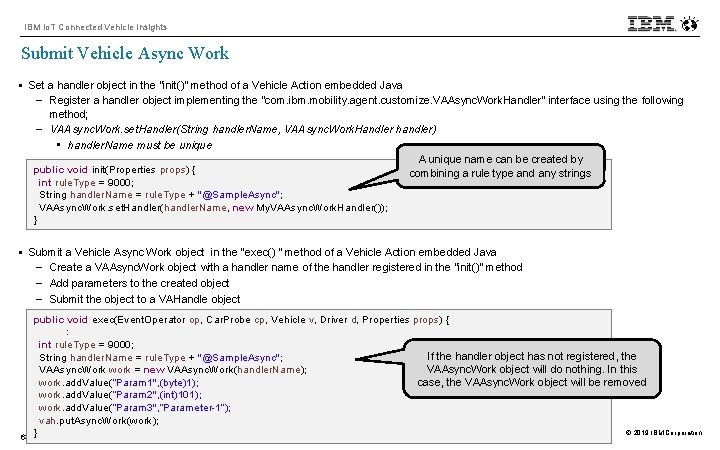
IBM Io. T Connected Vehicle Insights Submit Vehicle Async Work § Set a handler object in the “init()” method of a Vehicle Action embedded Java - Register a handler object implementing the “com. ibm. mobility. agent. customize. VAAsync. Work. Handler” interface using the following method; - VAAsync. Work. set. Handler(String handler. Name, VAAsync. Work. Handler handler) • handler. Name must be unique A unique name can be created by public void init(Properties props) { combining a rule type and any strings int rule. Type = 9000; String handler. Name = rule. Type + "@Sample. Async"; VAAsync. Work. set. Handler(handler. Name, new My. VAAsync. Work. Handler()); } § Submit a Vehicle Async Work object in the “exec() “ method of a Vehicle Action embedded Java - Create a VAAsync. Work object with a handler name of the handler registered in the “init()” method - Add parameters to the created object - Submit the object to a VAHandle object 63 public void exec(Event. Operator op, Car. Probe cp, Vehicle v, Driver d, Properties props) { : int rule. Type = 9000; If the handler object has not registered, the String handler. Name = rule. Type + "@Sample. Async"; VAAsync. Work object will do nothing. In this VAAsync. Work work = new VAAsync. Work(handler. Name); work. add. Value(”Param 1", (byte)1); case, the VAAsync. Work object will be removed work. add. Value(”Param 2", (int)101); work. add. Value(”Param 3", ”Parameter-1”); vah. put. Async. Work(work); © 2019 IBM Corporation }
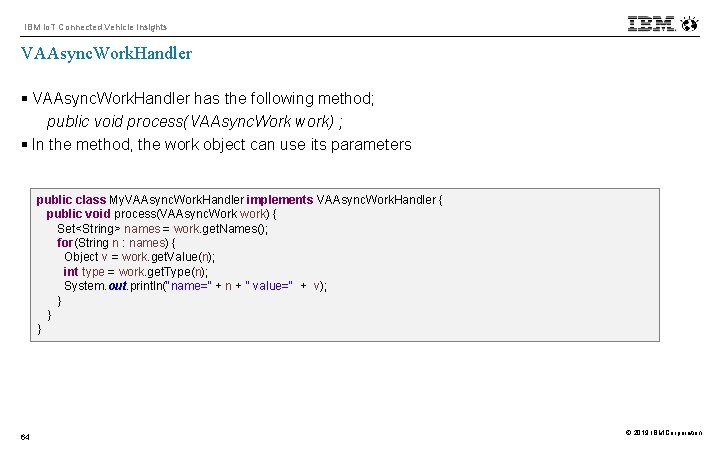
IBM Io. T Connected Vehicle Insights VAAsync. Work. Handler § VAAsync. Work. Handler has the following method; public void process(VAAsync. Work work) ; § In the method, the work object can use its parameters public class My. VAAsync. Work. Handler implements VAAsync. Work. Handler { public void process(VAAsync. Work work) { Set<String> names = work. get. Names(); for(String n : names) { Object v = work. get. Value(n); int type = work. get. Type(n); System. out. println("name=" + n + " value=" + v); } } } 64 © 2019 IBM Corporation
IBM Io. T Connected Vehicle Insights VAAsync. Work Persistency § VAAsync. Work will be persistent if Vehicle Agents are persistent § If a agent container starts, all persistent VAAsync. Work will be recovered. However, those objects will not be invoked until the first Vehicle Action Rule is loaded 65 © 2019 IBM Corporation
- Slides: 65