
IBM Cloud Integration Client Operations Data Power and
IBM Cloud Integration Client Operations Data. Power and MQ Appliances – Tips and Tricks To Maximize Your Interaction with Support
Notices and disclaimers • © 2020 International Business Machines Corporation. No part of this document may be reproduced or transmitted in any form without written permission from IBM. • Performance data contained herein was generally obtained in a controlled, isolated environments. Customer examples are presented as illustrations of how those • U. S. Government Users Restricted Rights — use, duplication or disclosure restricted by GSA ADP Schedule Contract with IBM. • customers have used IBM products and the results they may have achieved. Actual performance, cost, savings or other results in other operating environments may vary. • Information in these presentations (including information relating to products that have not yet been announced by IBM) has been reviewed for accuracy as of the date of initial publication and could include unintentional technical or typographical errors. IBM shall have no responsibility to update this information. This document is distributed “as is” without any warranty, either express or implied. In no event, shall IBM be liable for any damage arising from the use of this information, including but not limited to, loss of data, business interruption, loss of profit or loss of opportunity. IBM products and services are warranted per the terms and conditions of the agreements under which they are provided. • IBM products are manufactured from new parts or new and used parts. In some cases, a product may not be new and may have been previously installed. Regardless, our warranty terms apply. ” • Any statements regarding IBM's future direction, intent or product plans are subject to change or withdrawal without notice. • References in this document to IBM products, programs, or services does not imply that IBM intends to make such products, programs or services available in all countries in which IBM operates or does business. • Workshops, sessions and associated materials may have been prepared by independent session speakers, and do not necessarily reflect the views of IBM. All materials and discussions are provided for informational purposes only, and are neither intended to, nor shall constitute legal or other guidance or advice to any individual participant or their specific situation. • It is the customer’s responsibility to insure its own compliance with legal requirements and to obtain advice of competent legal counsel as to the identification and interpretation of any relevant laws and regulatory requirements that may affect the customer’s business and any actions the customer may need to take to comply with such laws. IBM does not provide legal advice or represent or warrant that its services or products will ensure that the customer follows any law.
Notices and disclaimers continued • Information concerning non-IBM products was obtained from the suppliers of those products, their published announcements or other publicly available sources. IBM has not tested those products about this publication and cannot confirm the accuracy of performance, compatibility or any other claims related to non-IBM products. Questions on the capabilities of non-IBM products should be addressed to the suppliers of those products. IBM does not warrant the quality of any third-party products, or the ability of any such third-party products to interoperate with IBM’s products. IBM expressly disclaims all warranties, expressed or implied, including but not limited to, the implied warranties of merchantability and fitness for a purpose. • The provision of the information contained herein is not intended to, and does not, grant any right or license under any IBM patents, copyrights, trademarks or other intellectual property right. • IBM, the IBM logo, ibm. com and [names of other referenced IBM products and services used in the presentation] are trademarks of International Business Machines Corporation, registered in many jurisdictions worldwide. Other product and service names might be trademarks of IBM or other companies. A current list of IBM trademarks is available on the Web at "Copyright and trademark information" at: www. ibm. com/legal/copytrade. shtml. • .
Agenda • • • Announcements Today’s Speakers Appliance Handbook Must Gather Best Practices ER Tool Working with Networking L 2 Support Team • Debugging • Must Gather Best Practices • Other tips and tricks • Working with Hardware L 2 Support Team • Must Gather • Other Tips and Tricks • Open Floor 4
Announcements • Next Web. Ex will be on 26 -March. The topic will be Overview of XSLTs and Gateway Script within Data. Power. • Fix pack 2018. 4. 1. 10 • Released on 02 -March • Fix list, https: //www. ibm. com/support/pages/node/316533#2018. 4. 1. 10 • Future Web. Ex topics • Send me an email at innessrg@us. ibm. com • Post in the community 5
Today’s Speakers • Colt Gustafson – L 2 Hardware Lead • Dominic Micale – L 2 Stability Lead • Trey Williamson – L 2 Networking Lead 6
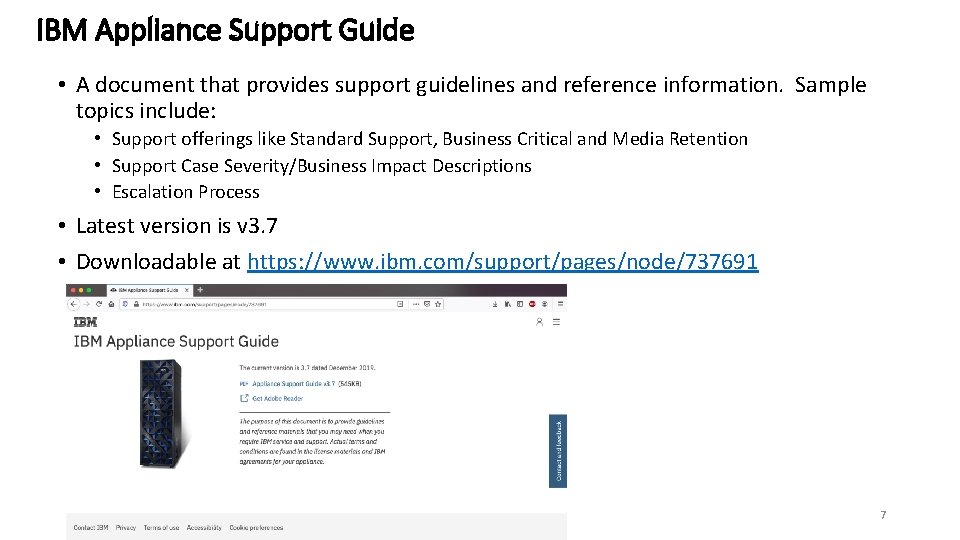
IBM Appliance Support Guide • A document that provides support guidelines and reference information. Sample topics include: • Support offerings like Standard Support, Business Critical and Media Retention • Support Case Severity/Business Impact Descriptions • Escalation Process • Latest version is v 3. 7 • Downloadable at https: //www. ibm. com/support/pages/node/737691 7
Must Gather Best Practices • The starting point of data collection in Data. Power is the Error Report. • Error Reports have a large number of status providers (hardware, cpu, memory, domain/service level, etc. ), recent logs and the DP object configuration, not including file-based content (eg. files on the local filesystem). • Automated Error Reports • Failure Notification Settings can be setup to generate error reports on-startup (capture reload/reboot events) and on-shutdown (capture user events like ‘shutdown reboot’) • See https: //developer. ibm. com/answers/questions/204407/datapower-best-practices-most-detailederror-repor/ for steps to setup Failure Notification Settings to the Best Practices. • Note: Background Packet Capture being on will depend on security requirements. It will capture all network traffic on all interfaces, usually keeps about the last 10 -20 MB of network traffic. • When to generate an error report • If the device has automatically reloaded/rebooted and you do not have Failure Notification Settings configured to generate ‘on-startup’ error report you will need to manually generate one in the Web. GUI via Troubleshooting->Error Report • In other scenarios where you have an issue, but it does not impact the stability of the Data. Power Gateway, then generate an error report immediately after the problem occurs. User Generated Error Reports can be created in the Web. GUI under Troubleshooting->Error Report • In cases where Failure Notification was setup for on-startup, then you can review the temporary: or other destination defined in Failure Notification for error reports. Always download all error reports, not just the latest. 8
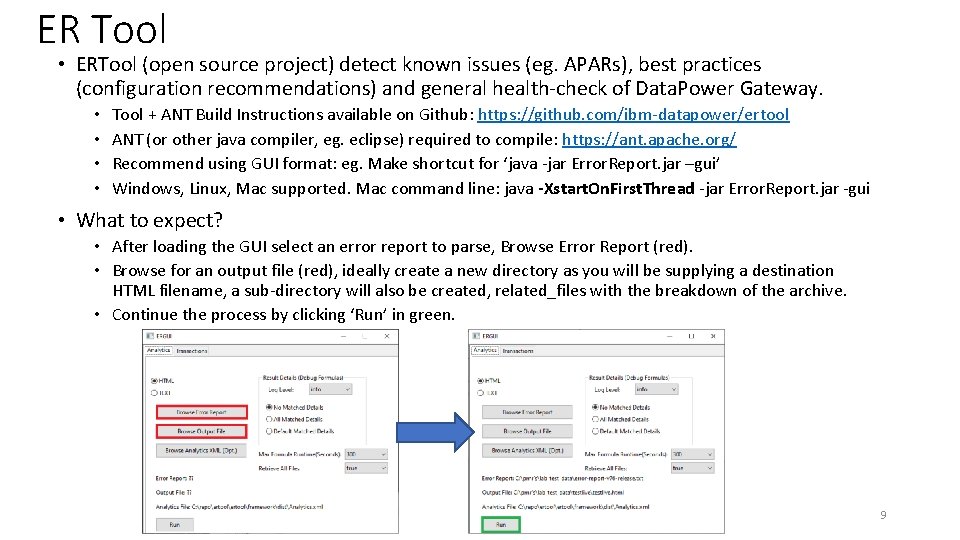
ER Tool • ERTool (open source project) detect known issues (eg. APARs), best practices (configuration recommendations) and general health-check of Data. Power Gateway. • • Tool + ANT Build Instructions available on Github: https: //github. com/ibm-datapower/ertool ANT (or other java compiler, eg. eclipse) required to compile: https: //ant. apache. org/ Recommend using GUI format: eg. Make shortcut for ‘java -jar Error. Report. jar –gui’ Windows, Linux, Mac supported. Mac command line: java -Xstart. On. First. Thread -jar Error. Report. jar -gui • What to expect? • After loading the GUI select an error report to parse, Browse Error Report (red). • Browse for an output file (red), ideally create a new directory as you will be supplying a destination HTML filename, a sub-directory will also be created, related_files with the breakdown of the archive. • Continue the process by clicking ‘Run’ in green. 9
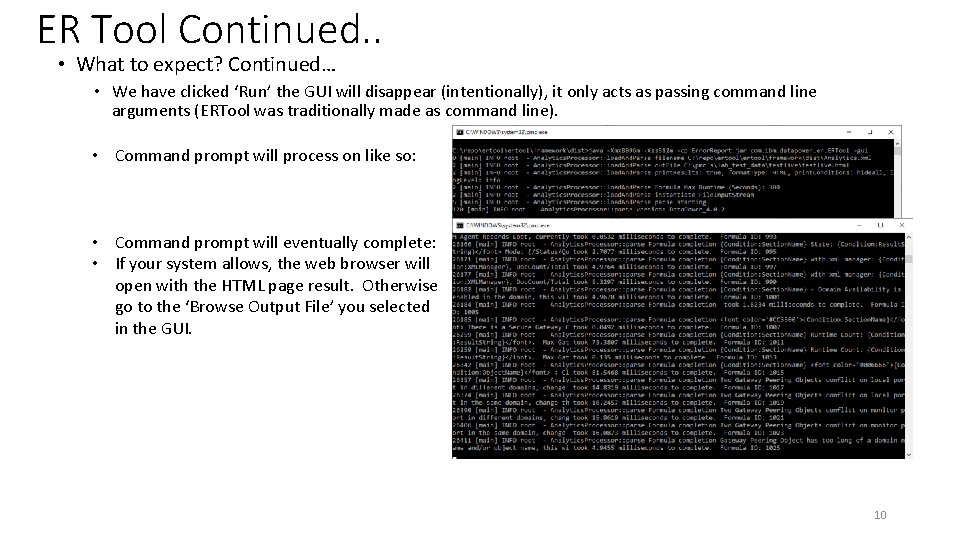
ER Tool Continued. . • What to expect? Continued… • We have clicked ‘Run’ the GUI will disappear (intentionally), it only acts as passing command line arguments (ERTool was traditionally made as command line). • Command prompt will process on like so: • Command prompt will eventually complete: • If your system allows, the web browser will open with the HTML page result. Otherwise go to the ‘Browse Output File’ you selected in the GUI. 10
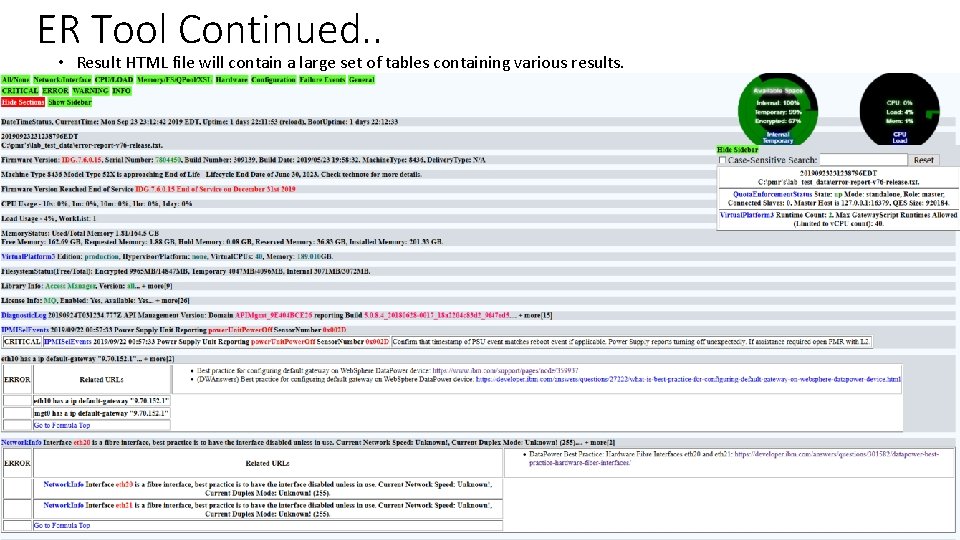
ER Tool Continued. . • Result HTML file will contain a large set of tables containing various results. 11
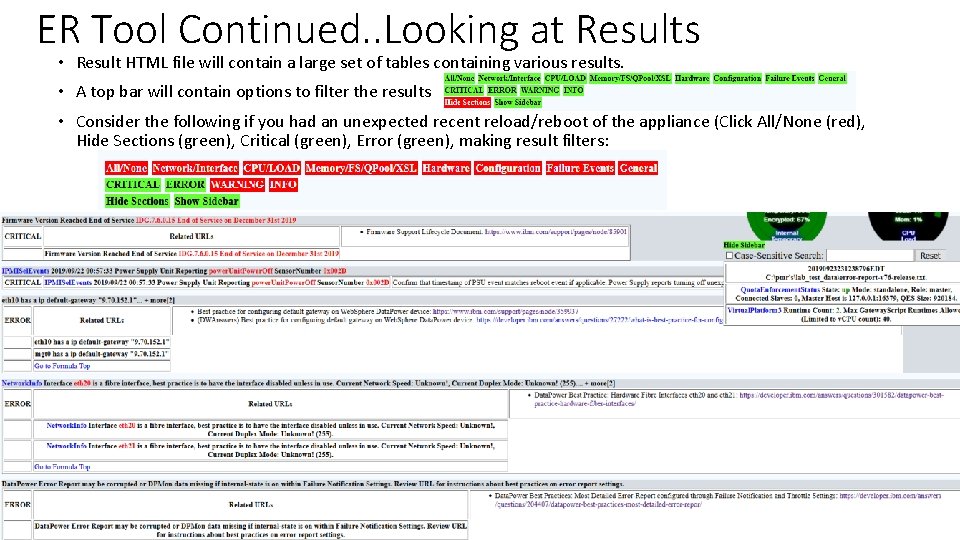
ER Tool Continued. . Looking at Results • Result HTML file will contain a large set of tables containing various results. • A top bar will contain options to filter the results • Consider the following if you had an unexpected recent reload/reboot of the appliance (Click All/None (red), Hide Sections (green), Critical (green), Error (green), making result filters: 12
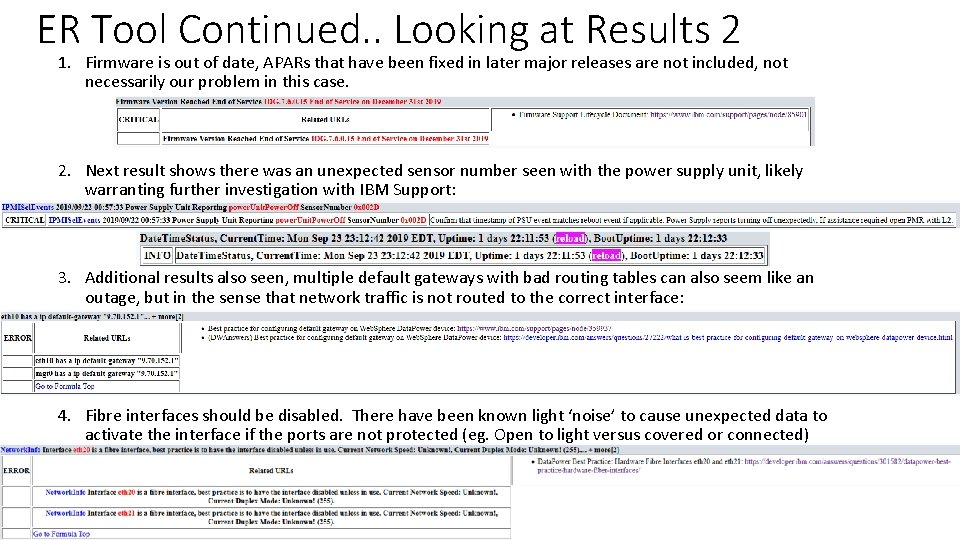
ER Tool Continued. . Looking at Results 2 1. Firmware is out of date, APARs that have been fixed in later major releases are not included, not necessarily our problem in this case. 2. Next result shows there was an unexpected sensor number seen with the power supply unit, likely warranting further investigation with IBM Support: 3. Additional results also seen, multiple default gateways with bad routing tables can also seem like an outage, but in the sense that network traffic is not routed to the correct interface: 4. Fibre interfaces should be disabled. There have been known light ‘noise’ to cause unexpected data to activate the interface if the ports are not protected (eg. Open to light versus covered or connected) 13
Working with Networking L 2 Support Team - Always ask yourself (and your architects, both network and otherwise) Do you need to use more than one network interface? - Are you aware that by having multiple interfaces on unique networks/vlans you could be bridging two networks and bypassing firewalls - Be prepared for support to ask for packet captures. In many failure cases this is a great tool to provide a second point of view that can confirm or contradict the logs and often required data to give clear next steps. (ie think about packet-capture-advanced on your next problem and if you think support might benefit from one go ahead take it and send it in with the error report, it may save some time) 14
Working with Networking L 2 Support Team (Continued) - In many cases there is no "Best solution" as an L 2 I can say "add a static route to test/prove the point" Is that static route the best answer for you long term? It depends. - Data. Power is so absolutely reliant on the network it is NOT just an endpoint node like an Application server or MQ server which waits on inbound connections so the problems will inherently present differently. Time allowing, have you looked at your routing table lately? Are you clear on how the routing table is used on a multi homed appliance? 15
Working with Hardware L 2 Support Team Hardware Coverages • The support for an appliance is by Machine Type (MT) and serial number: • Example: IDG MT 8436 or IDG X 2 MT 8441 • Two types of hardware replacement parts • FRU (Field Replaceable Unit) – Must be replaced by an IBM SSR • CRU (Customer Replaceable Unit) – Replaced by the customer unless have the Business Critical uplift • Target replacement time starts once HW L 2 has determined a part is needed and the address/contact from has been updated in the Support Case • Standard Support: • Target next business day by 11: 59 pm delivery via UPS, Courier, etc. for CRU part replacement • IBM SSR will come onsite with the FRU part during business hours only (no after hours support) • Business Critical Support: • Target delivery of the replacement part by IBM SSR with 4 hours 24 hours by 7 days • Can delivery both FRU and CRU parts • Media Retention: Allows retention of any part that has persistent memory including hard drives, internal memory and HSM module. 16
Working with Hardware L 2 Support Team (Continued) Hardware Must Gathers 1) Problem description such as if the appliance accessible 2) CLI commands: show system show clock show sensors-other config test hardware 3) Generate an Error Report 4) LED status of the rear as well as the “!” LED on the front (add diagrams of the appliances) 5) If the appliance is not running also check: a) What is displayed on the LCD screen on the front b) Is there any output on the serial connection? See this link for details on connecting to the serial console http: //www. ibm. com/support/docview. wss? uid=swg 21663613 17
Working with Hardware L 2 Support Team (Continued) Client Responsibilities 1) Gather all diagnostic requests including physical status of the LED’s on the front and rear of the appliance 2) Connect to the serial console for diagnostics in cases the network in not working 3) If the appliance has Business Critical Support, having the IBM SSR perform the unracking of the failed appliance and racking of new the appliance is an option. Note: Due to the secure nature of the appliance the SSR cannot perform any configuration of the appliance. 4) If a replacement appliance is needed client is responsible for all configuration of the replacement appliance including connecting to the serial console port. Note: If your data center is remote we suggest a “serial console server” that can provide you with remote access to the serial console. There are many brands on the market including these commonly used ones: Advocet, Cyclades, Digi etc. 18
Working with Hardware L 2 Support Team (Continued) Replaceable CRU Parts • Hard drive • Power supply • Fans • Network port modules • On the 8441, crypto/HSM card • Full unit replacement Replaceable FRU Parts • RAID Controller • Memory • Internal SSD See this page in the Knowledge Center for detailed information on the parts types and replacement processes 19
Business Critical Support And Parts Swapping FRU Part Replacement • Data Center Contact needed • IBM SSR: • Will call to arrange time to delivery and install part • Will call the client to ensure they are aware of the part needing to be replaced Part Swapping • Hot swappable parts include: PSU and fans • Non-hot swappable parts that do not require intrusion control to be disabled before powering off: • HDD • Network port modules • (8441) HSM/crypto module • Not-hot swappable parts that disabling intrusion control is required to avoid the need for the admin user to log into the serial console to clear the intrusion after the service • Memory • Raid controller 20
- Slides: 20