
I 3 Maximizing Packet Capture Performance Andrew Brown
I 3: Maximizing Packet Capture Performance Andrew Brown
Agenda • Why do captures drop packets, how can you tell? • Software considerations • Hardware considerations • Potential hardware improvements • Test configurations/parameters • Performance results Sharkfest 2014
What is a drop? • Failure to capture a packet that is part of the traffic in which you’re interested • Dropped packets tend to be the most important • Capture filter will not necessarily help Sharkfest 2014
Why do drops occur? • Applications don’t know that their data is being captured • Result: Only one chance to capture a packet • What can go wrong? Let’s look at the life of a packet Sharkfest 2014
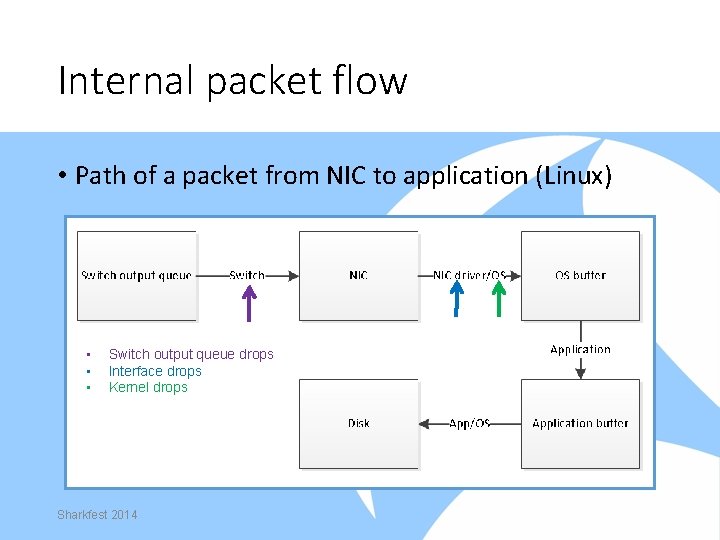
Internal packet flow • Path of a packet from NIC to application (Linux) • • • Switch output queue drops Interface drops Kernel drops Sharkfest 2014
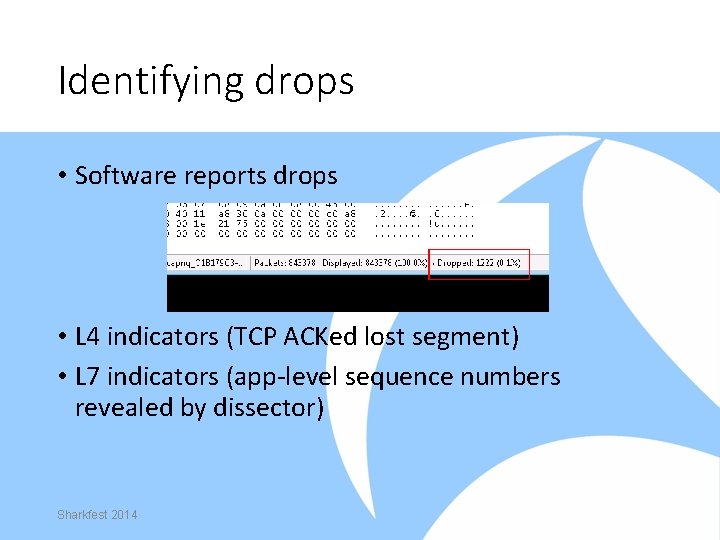
Identifying drops • Software reports drops • L 4 indicators (TCP ACKed lost segment) • L 7 indicators (app-level sequence numbers revealed by dissector) Sharkfest 2014
When is (and isn’t) it necessary to take steps to maximize capture performance? • Not typically necessary when capturing traffic of <= 1 G end device • More commonly necessary when capturing uplink traffic from a TAP or SPAN port • Some sort of action is almost always necessary at 10 G • Methods described aren’t always necessary • Methods focus on free solutions Sharkfest 2014
Software considerations Windows • Quit unnecessary programs • Avoid Wireshark for capturing ˗ Saves to TEMP ˗ Additional processing for packet statistics • Uses CPU • Uses memory over time, can lead to out of memory errors Sharkfest 2014
Software considerations – Windows (continued) • Alternative? Dumpcap ˗ ˗ ˗ Command-line utility Called by Wireshark/Tshark for capture Provides greater control Dumpcapui for CLIphobic “At the limits” example • Dumpcap captured 100% of packets sent • Wireshark captured 68% of packets sent Sharkfest 2014
Software considerations – Windows (continued) • Windows dumpcap buffer tuning ˗ Large buffers are generally good, but… ˗ Increased bandwidth has a tipping point • • Sharkfest 2014 Write to disk slows significantly Larger buffers make it worse Made buffer selection for testing difficult Best option seemed to be 50 MB
Software considerations – Windows (continued) • Dumpcap “slow count” example ˗ ˗ ˗ ˗ Sending 844, 600 packets @. 4 Gb Packets take 1. 48 seconds to send 20 MB buffer takes ~2. 5 seconds to write 512 MB buffer takes ~46 seconds to write Neither setting captured all packets Not cosmetic (break out and file is truncated) Issue disappears at lower bandwidth Sharkfest 2014
Software considerations – Windows (continued) • Video of normal count Sharkfest 2014
Software considerations – Windows (continued) • Video of “slow count” Sharkfest 2014
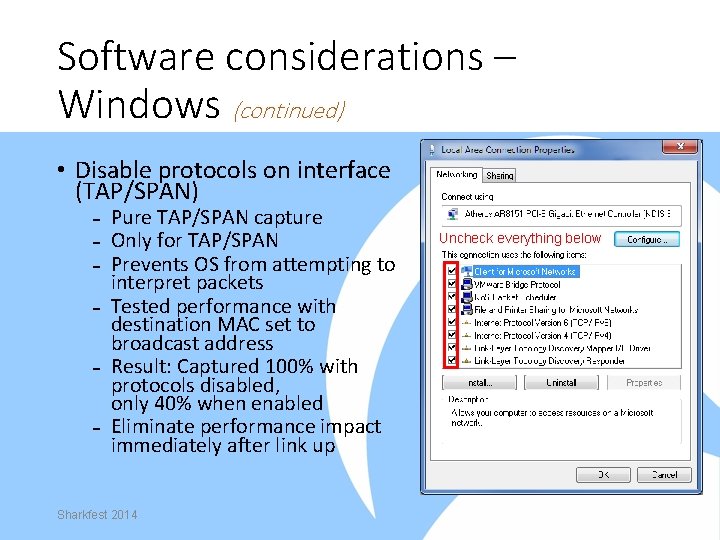
Software considerations – Windows (continued) • Disable protocols on interface (TAP/SPAN) ˗ Pure TAP/SPAN capture ˗ Only for TAP/SPAN ˗ Prevents OS from attempting to interpret packets ˗ Tested performance with destination MAC set to broadcast address ˗ Result: Captured 100% with protocols disabled, only 40% when enabled ˗ Eliminate performance impact immediately after link up Sharkfest 2014 Uncheck everything below
Software considerations – Linux • Quit unnecessary programs • Use tcpdump with 512 MB buffer • Ensure libpcap >= 1. 0. 0 (tcpdump -h) • Watch value of -s flag • No option to disable protocols like Windows • Static (or no) IP for dedicated capture interface • Use XFS with RAID and coordinate stripe sizes Sharkfest 2014
Software considerations – Linux (continued) • Access to development resources? Look at PF_RING ˗ ˗ ˗ Module/NIC driver combination Improves capture performance Included tcpdump wasn’t better than stock We use the API and it works Different performance tiers some are free Sharkfest 2014
Software considerations – Linux (continued) • PF_RING ˗ ˗ ˗ Kernel module/NIC driver combination Improves capture performance via various methods Included tcpdump wasn’t better than stock We use the API and it works Different performance tiers some are free Sharkfest 2014
Hardware considerations Storage • 1 Gb line rate traffic generates 123 -133 MB in one second • WD Black 7. 2 K RPM: 171 MB/s • WD Raptor 10 K RPM: 200 MB/s • If 10 Gb is 10 X 1 Gb… (do the math) • SSD: ~500 MB/s • RAM disk is another option Sharkfest 2014
Hardware considerations - CPU • Three considerations ˗ Number of cores ˗ Clock speed ˗ Performance per clock • Clock speed * PPC = Per-core performance • Multicore is good. . . • … but per-core performance is better than many cores Sharkfest 2014
Hardware considerations - NIC • Intel (regular NIC) • Drivers more actively maintained • Best PF_RING support • 10 G NIC doesn’t help with 1 G capture (1 G and 10 G NICs had the same max bandwidth at or below 1 G) Sharkfest 2014 • Avoid USB NICs • USB 2. 0 is too slow (480 Mb/s) • USB 3. 0 didn’t perform well
Benchmark methodology • Tested limits of capture configurations at 1 G and 10 G ˗ For each configuration, increase bandwidth until it fails ˗ Failure is defined as not capturing all packets ˗ Highest performing solutions formed basis for recommendations Sharkfest 2014
Obvious question: Traffic profile? • If not testing for a specific use case, what is the appropriate traffic with which to test? ˗ What mix of TCP/UDP? ˗ What duration, frequency, severity of bursts? ˗ What mix of small/large packets? Sharkfest 2014
(My) Answer: Many copies of a single packet with tests at various packet sizes • Takes Receive Side Scaling out of the picture • Removes buffering from the equation • Tends to be pessimistic Sharkfest 2014
Test configuration • Unicast UDP packet used for (almost) all tests • Packet sizes of 64, 128, 256, 512, 1024, 1500 bytes ˗ Additional CPU overhead for every packet ˗ One second at 1 Gb is ~82 K 1500 byte packets ˗ One second at 1 Gb is ~1. 49 M 64 byte packets • Number of packets tailored to generate a ~1. 5 GB capture file • Careful to eliminate disk as a bottleneck Sharkfest 2014
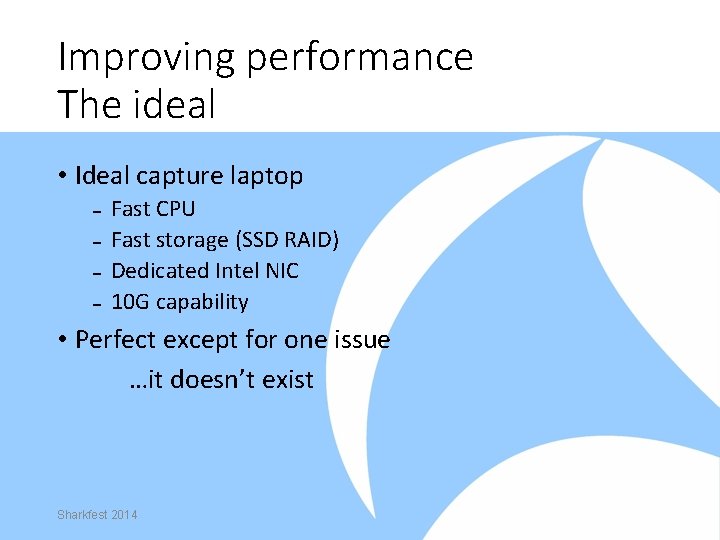
Improving performance The ideal • Ideal capture laptop ˗ ˗ Fast CPU Fast storage (SSD RAID) Dedicated Intel NIC 10 G capability • Perfect except for one issue …it doesn’t exist Sharkfest 2014
Improving performance Thunderbolt • PCIe via a cable (developed by Intel) • Allows use of desktop cards on a laptop • Expensive • Not very widespread (mostly Apple computers) • Other laptop limitations are still a problem Sharkfest 2014
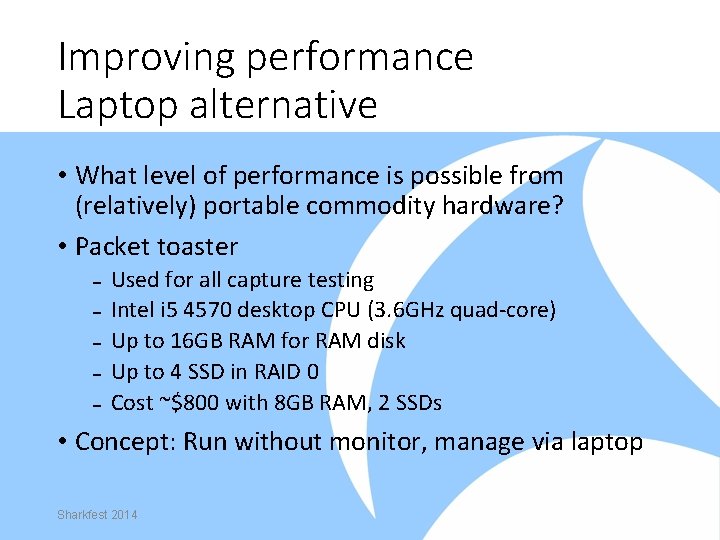
Improving performance Laptop alternative • What level of performance is possible from (relatively) portable commodity hardware? • Packet toaster ˗ ˗ ˗ Used for all capture testing Intel i 5 4570 desktop CPU (3. 6 GHz quad-core) Up to 16 GB RAM for RAM disk Up to 4 SSD in RAID 0 Cost ~$800 with 8 GB RAM, 2 SSDs • Concept: Run without monitor, manage via laptop Sharkfest 2014
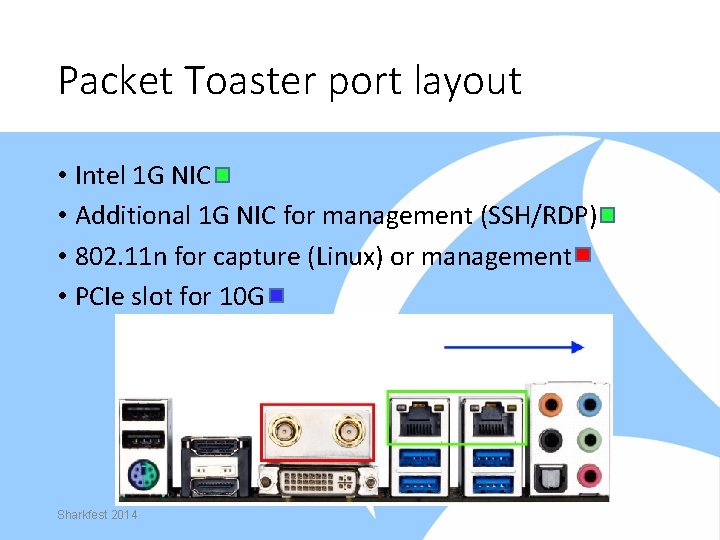
Packet Toaster port layout • Intel 1 G NIC • Additional 1 G NIC for management (SSH/RDP) • 802. 11 n for capture (Linux) or management • PCIe slot for 10 G Sharkfest 2014
Solarflare • Low-latency NIC with stack bypass • Why include it? ˗ ˗ Price competitive with other commodity 10 G NICs Works as a regular NIC under Linux, Windows, Mac etc. Works at 1 G also Solar. Capture app for high-performance Linux capture • Hardware/software capture solution • Tested with Packet Toaster and Mac. Book Pro (via Thunderbolt) Sharkfest 2014
The difference a week makes • At the time of testing, Solar. Capture was a free download • Less than a week ago, Solarflare changed licensing tiers; free Solar. Capture is no longer available • Pricing is reasonable (in my opinion) but… ˗ …reasonable is relative ˗ …this breaks my original concept of free software • Debated removing results but couldn’t (impacted other results and no time to re-test) Sharkfest 2014
Performance Results Configurations • Wireshark under Windows 7 (SSD) • Dumpcap under Linux (SSD) • TCPDump under Linux (SSD) • Solar. Capture under Linux on Mac. Book Pro via Thunderbolt (RAM) • Solar. Capture under Linux (SSD) • Solar. Capture under Linux (RAM) Sharkfest 2014
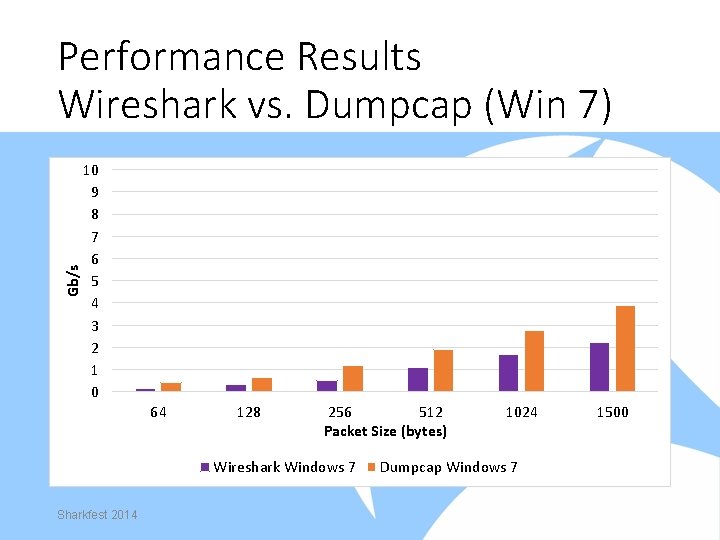
Gb/s Performance Results Wireshark vs. Dumpcap (Win 7) 10 9 8 7 6 5 4 3 2 1 0 64 128 256 512 Packet Size (bytes) Wireshark Windows 7 Sharkfest 2014 1024 Dumpcap Windows 7 1500
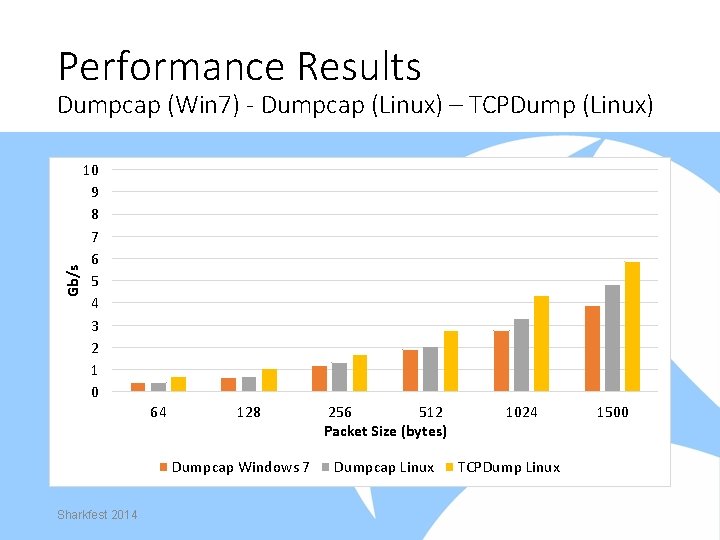
Performance Results Gb/s Dumpcap (Win 7) - Dumpcap (Linux) – TCPDump (Linux) 10 9 8 7 6 5 4 3 2 1 0 64 128 Dumpcap Windows 7 Sharkfest 2014 256 512 Packet Size (bytes) Dumpcap Linux 1024 TCPDump Linux 1500
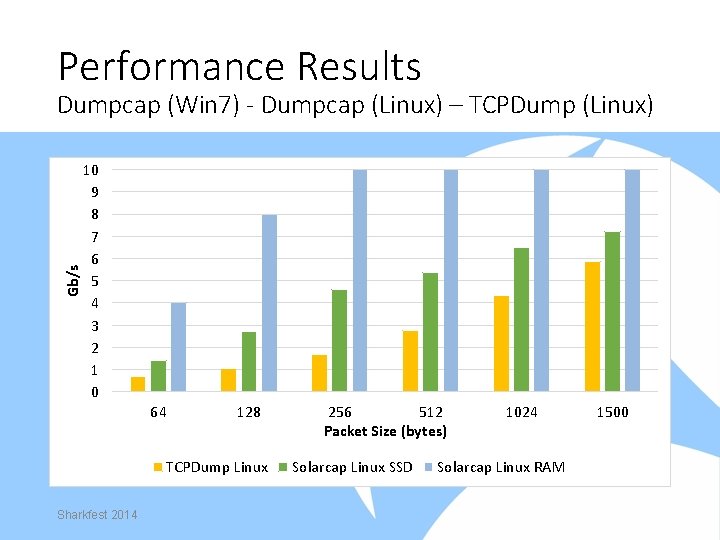
Performance Results Gb/s Dumpcap (Win 7) - Dumpcap (Linux) – TCPDump (Linux) 10 9 8 7 6 5 4 3 2 1 0 64 128 TCPDump Linux Sharkfest 2014 256 512 Packet Size (bytes) Solarcap Linux SSD 1024 Solarcap Linux RAM 1500
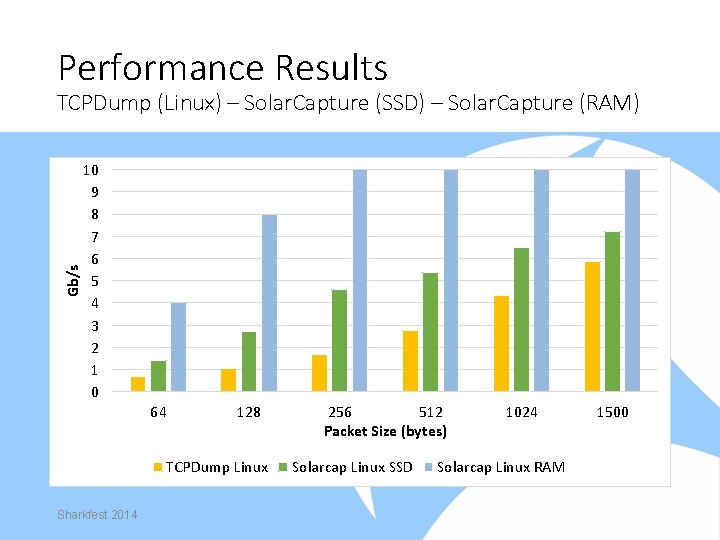
Performance Results Gb/s TCPDump (Linux) – Solar. Capture (SSD) – Solar. Capture (RAM) 10 9 8 7 6 5 4 3 2 1 0 64 128 TCPDump Linux Sharkfest 2014 256 512 Packet Size (bytes) Solarcap Linux SSD 1024 Solarcap Linux RAM 1500
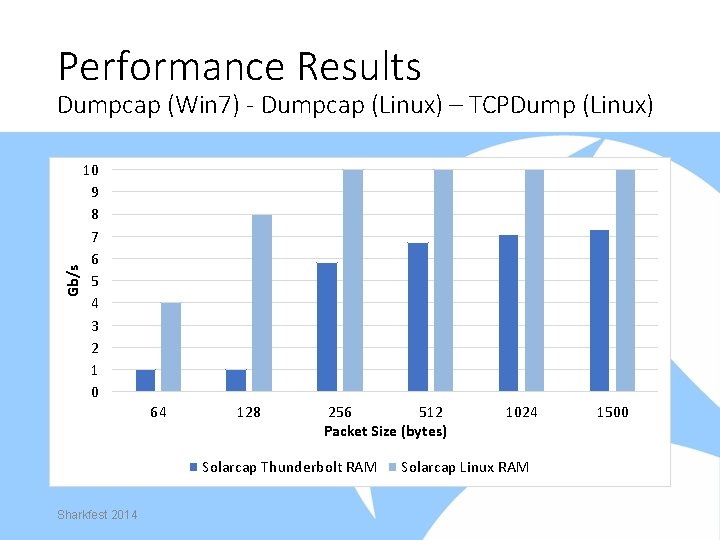
Performance Results Gb/s Dumpcap (Win 7) - Dumpcap (Linux) – TCPDump (Linux) 10 9 8 7 6 5 4 3 2 1 0 64 128 256 512 Packet Size (bytes) Solarcap Thunderbolt RAM Sharkfest 2014 1024 Solarcap Linux RAM 1500
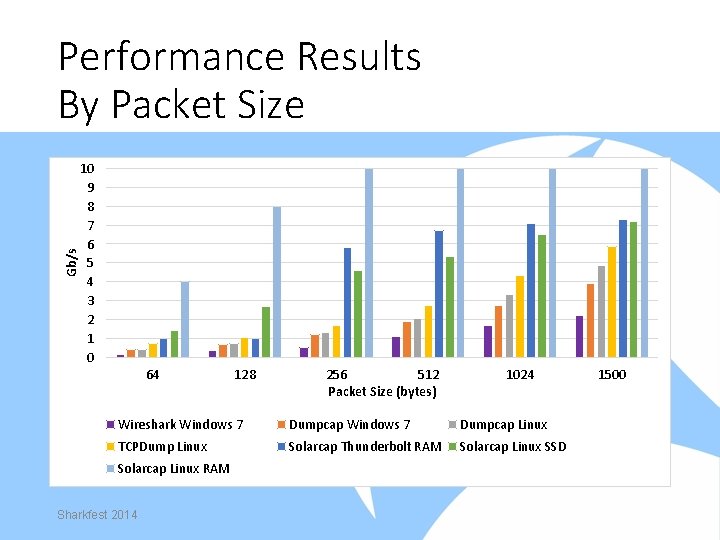
Gb/s Performance Results By Packet Size 10 9 8 7 6 5 4 3 2 1 0 64 128 256 512 Packet Size (bytes) 1024 Wireshark Windows 7 Dumpcap Linux TCPDump Linux Solarcap Thunderbolt RAM Solarcap Linux SSD Solarcap Linux RAM Sharkfest 2014 1500
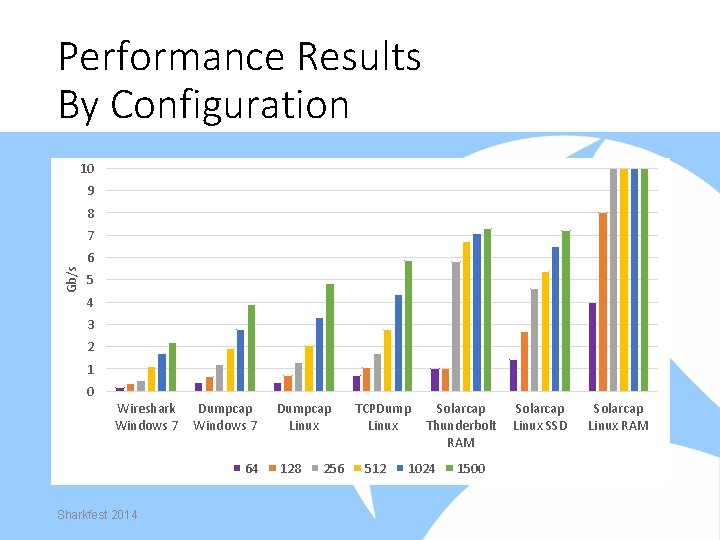
Performance Results By Configuration 10 9 8 7 Gb/s 6 5 4 3 2 1 0 Wireshark Windows 7 Dumpcap Windows 7 64 Sharkfest 2014 Dumpcap Linux 128 256 TCPDump Linux 512 Solarcap Thunderbolt RAM 1024 1500 Solarcap Linux SSD Solarcap Linux RAM
Acknowledgements • BATS Global Markets • Guy Harris ˗ Core developer: libpcap, tcpdump and Wireshark Sharkfest 2014
Appendix - Links • Links ˗ ˗ ˗ http: //www. intel. com (Intel NICs) http: //www. ntop. org (PF_RING) http: //www. solarflare. com (Solar. Capture) http: //www. tcpdump. org (TCPdump/Libpcap) http: //www. wireshark. org (Wireshark/Dumpcap) http: //www. macsales. com (Thunderbolt enclosure) Sharkfest 2014
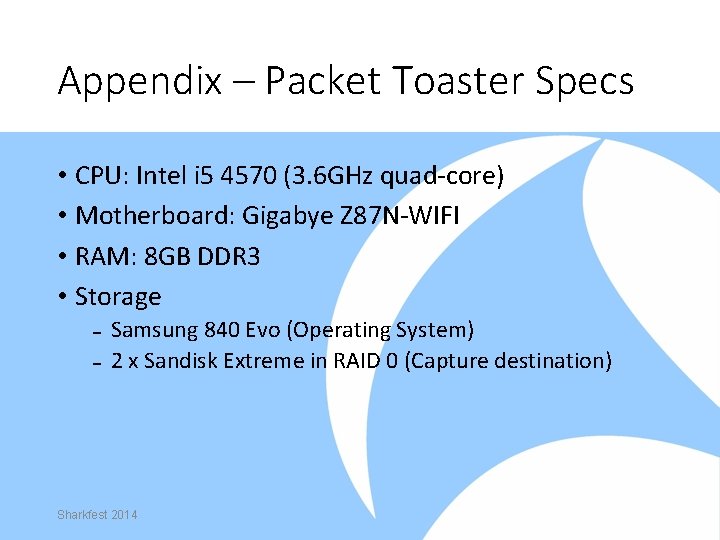
Appendix – Packet Toaster Specs • CPU: Intel i 5 4570 (3. 6 GHz quad-core) • Motherboard: Gigabye Z 87 N-WIFI • RAM: 8 GB DDR 3 • Storage ˗ Samsung 840 Evo (Operating System) ˗ 2 x Sandisk Extreme in RAID 0 (Capture destination) Sharkfest 2014

Questions Sharkfest 2014
- Slides: 42