
i 206 Lecture 20 Memory Management Operating Systems




- Slides: 36
i 206: Lecture 20: Memory Management; Operating Systems Marti Hearst Spring 2012 1
Summary of Key Concepts • Data Storage: – Bit storage using transistors – Memory hierarchy – Locality of reference and caching • Operating System: – – Process management Context switch Threads vs. processes Synchronization and locks 2
Distributed Systems Memory Hierarchy Security Cryptography Network Standards & Protocols Inter-process Communication I/O Operating System Methodologies/ Tools Process Context switch Process vs. Thread Locks and deadlocks Memory hierarchy Memory Register, Cache Main Memory, Secondary Storage ALUs, Registers, Program Counter, Instruction Register Program Assembly Instructions Algorithms Data Representation Gates Adders, decoders, Memory latches, ALUs, etc. Boolean Logic AND, OR, NOT, XOR, NAND, NOR, etc. Number Systems Binary Numbers Bits & Bytes Analysis Big-O Data Structures Searching, sorting, Encryption, etc. Op-code, operands Instruction set arch Decimal, Hexadecimal, Binary Formal models Finite automata regex Stacks, queues, maps, trees, graphs, … Circuits Lossless v. lossy Info entropy & Huffman code Numbers, text, audio, video, image, … Design Machine Instructions CPU Data storage Data compression Compiler/ Interpreter Application Principles Truth table Venn Diagram De. Morgan’s Law 3 3
Images from http: //courses. cs. vt. edu/~csonline/Machine. Architecture/Lessons/ 4
Input A Storing 1 Bit of Data Input B output Adapted from Brookshear Fig 1. 5 • Flip-flop (also called a latch) is a circuit built from gates that can store one bit of data – Setting input A to 1 sets output to 1 – Setting input B to 1 sets output to 0 – While both input lines are 0, the most recently stored value is preserved 5
Data Storage • Where and how do we store data? Brookshear Fig 2. 13 John Chuang 6 6
Data Storage • In general, we want data to be located in close proximity of their use (the CPU in this case) • Why do we want to store data at so many different locations within a computer? • Considerations of – – – Storage capacity Access latency Cost … Patterns of data access 7
The Memory Hierarchy Image from http: //www. howstuffworks. com/computer-memory 1. htm 8
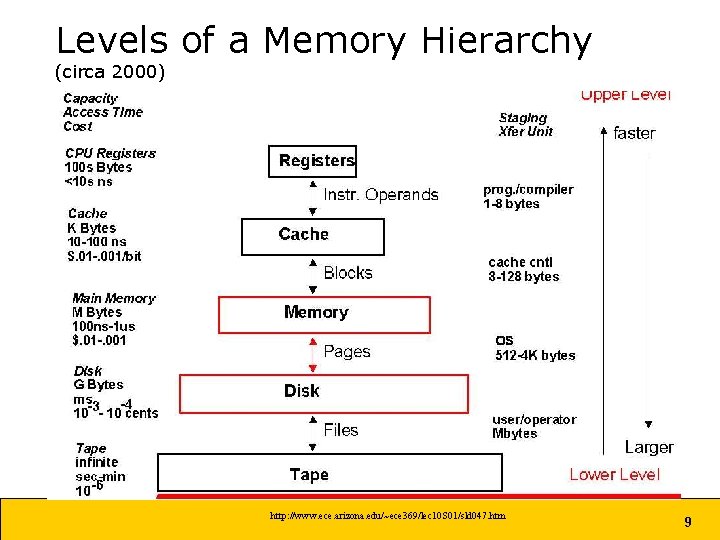
Levels of a Memory Hierarchy (circa 2000) http: //www. ece. arizona. edu/~ece 369/lec 10 S 01/sld 047. htm 9
Caching • Caches store items that have been used recently for faster access • Based on the notion of locality – Something used recently is more likely to be used again soon than other items. • Can be done using – Registers – RAM – Hard Disk, etc Image from http: //cne. gmu. edu/modules/vm/orange/realprog. html 10
Distributed Systems Operating Systems Security Cryptography Network Standards & Protocols Inter-process Communication I/O Operating System Methodologies/ Tools Process Context switch Process vs. Thread Locks and deadlocks Memory hierarchy Memory Register, Cache Main Memory, Secondary Storage ALUs, Registers, Program Counter, Instruction Register Design Program Assembly Instructions Algorithms Data Structures Searching, sorting, Encryption, etc. Op-code, operands Instruction set arch Decimal, Hexadecimal, Binary Data compression Data Representation John Chuang Gates Adders, decoders, Memory latches, ALUs, etc. Boolean Logic AND, OR, NOT, XOR, NAND, NOR, etc. Number Systems Binary Numbers Bits & Bytes Analysis Big-O Stacks, queues, maps, trees, graphs, … Circuits Lossless v. lossy Info entropy & Huffman code Formal models Finite automata regex Machine Instructions CPU Data storage Numbers, text, audio, video, image, … Compiler/ Interpreter Application Principles Truth table Venn Diagram De. Morgan’s Law 11 11
Abstract View of System Components Source: Silberschatz, Galvin, Gagne 12
What is an Operating System? • A software program that acts as an intermediary between a user of a computer and the computer hardware • Operating system functions: – Oversee operation of computer – Store and retrieve files – Schedule programs for execution – Execute programs 13
Operating Systems • Main Roles: – Allow user applications to run on a given machine’s hardware – Act as a “traffic cop” for allocating resources. • Resources – CPU, I/O devices, Memory, Files, Allocation • Processes – versus Programs – Scheduling – Synchronization • Memory Management • File Management Image from http: //courses. cs. vt. edu/~csonline/OS/Lessons/Introduction/index. html 14
Programs vs. Processes • Program – The code, both in human and machine-readable form • Process – A running program is a process. – It is allocated a number of resources: • Registers in the CPU • Some part of the CPU’s RAM • I/O devices (the monitor, files in the file system) • Several copies of the same program can be running as different processes. – But data values, current Program Counter location, etc. , will differ among the different processes. 15
Process Management • A process is a program in execution – A process needs certain resources, including CPU time, memory, files, and I/O devices, to accomplish its task • The operating system is responsible for the following activities in connection with process management – Process creation and deletion – Process suspension and resumption – Provision of mechanisms for: • process synchronization • process communication 16
Resource Sharing • Many processes share hardware resources – CPU, I/O (mouse, keyboard, monitor, disk, …) • Processes must take turns – Context switch (aka process switch) • Operating system serves as coordinator/ scheduler 17 17
Context Switch • When CPU switches to another process, the system must save the state of the old process and load the saved state for the new process • Process control block (PCB, on right) contains information associated with each process • Context-switch time is overhead; the system does no useful work while switching – A system is said to be “thrashing” when it spends more time performing context switches than useful work Source: Silberschatz, Galvin, Gagne 18
Source: Silberschatz, Galvin, Gagne Process State • As a process executes, it changes state – – – new: The process is being created. running: Instructions are being executed. waiting: The process is waiting for some event to occur. ready: The process is waiting to be assigned to a process. terminated: The process has finished execution. 19
Threads • A thread (or lightweight process) is a basic unit of CPU utilization • Each thread has its own – program counter – stack – register set • The threads share: – text section (program) – data section (global variables) Source: Silberschatz, Galvin, Gagne 20
Threads versus Multiple Processes • Threads are cheaper to create than processes (~10 -20 x) • Switching to a different thread in same process is much cheaper than switching to a different process (~5 -50 x) since no context switching required • Threads within same process can share data and other resources more conveniently and efficiently (than Inter. Process Communication) • Threads within a process are not protected from one another 21
Scheduling • An animation http: //courses. cs. vt. edu/~csonline/OS/Lessons/Processes/index. html 22
Resource Allocation • Allocation of files, printers, main memory, and other shared resources. http: //courses. cs. vt. edu/~csonline/OS/Lessons/Resources/index. html 23
Deadlock • Like Gridlock: everyone is stuck waiting for other people to get out of the way – The 3 conditions for deadlock (necessary but not sufficient) from Brookshear • There is competition for nonshareable resources • The resources are requested on a partial basis – (having received some resource, a process will ask for another later) • Once a resource is allocated, it cannot be “forcibly” retrieved – Another way to say these: • Mutex (mutual exclusion) • Hold-and-wait • No preemption Image from http: //courses. cs. vt. edu/~csonline/OS/Lessons/Deadlock/index. html 24
Deadlock • Example: • Two processes running; both require the printer and the CD drive • Process A has the CD drive, but is waiting for the printer; process B has the printer but is waiting for the CD drive. – Have to “break the deadlock” via preemption – Instead: don’t allow it to happen in the first place • Don’t ever allow all three conditions to hold • e. g. , make processes “spool” their print jobs Image from http: //courses. cs. vt. edu/~csonline/OS/Lessons/Deadlock/index. html 25
Synchronization • Use locks to coordinate actions of competing processes • Also known as mutual exclusion (mutex) • Simplest form of lock is a semaphore – Process must acquire semaphore before entering critical section; release semaphore upon exit initialize_lock(). . . acquire_lock() try: change_shared_data() finally: release_lock() 26
Memory Management: User vs. System Address Spaces • The OS manages memory for all the user processes running on the machine. – Each user process runs in its own address space. • User processes have to handle their own memory management. – The C language makes the user do this explicitly – Python does it for you • Every time you do declare a new object, you get a new object • If you stop using the object, you don’t say “remove” • Cleanup is done for you by the python interpreter 27
Address Space • The range of bytes in memory that are assigned to a process. • Often will locate the OS address space in low memory addresses, and user programs in high 0 memory addresses. OS • Example: – OS needs 24 Kbytes – User needs 12 Kbytes 24 K 1012 K User 1024 K 28
Address Space • The address space can begin anywhere in memory. • Example: – Say your program requires 2 K for instructions and 30 K for data. – If stored starting at position 0, then the address space ranges from 0 to 32 K-1 – If stored starting at position 12 K, then the address space ranges from 12 K to 44 K-1. – That means the first instruction starts at location 12 K. (This is where the Program Counter starts. ) • How does the Program Counter know what to do? – The OS automatically adds 12 K to every address in the program. 29
Memory Allocation Policies • The OS tries to accommodate as many user processes as possible. • Problem: where to put which process in memory? • Strategies: – Best fit: smallest possible free block – Worst fit: largest possible free block – First fit: first free block that fits • Occasionally “house cleans” (reorganizes everything). 30
Memory Allocation Policies http: //courses. cs. vt. edu/~csonline/OS/Lessons/Memory. Allocation/index. html 31
Virtual Memory • Allows a process to run even if the full amount of needed memory is not currently available. – Pages: • The memory needed by a program is divided up into 4 K blocks • This allows the process to run in non-continguous blocks of memory – Page table • Shows which pages are in RAM and which on disk. – Page Fault • Happens when the process tries to access a page that is not currently in RAM. http: //courses. cs. vt. edu/~csonline/OS/Lessons/Virtual. Memory/index. html 32
Page Table Maps Pages in Virtual Memory to Main Memory or Disk Image from http: //www. ece. arizona. edu/~ece 369/lec 10 S 01/sld 058. htm 33
Virtual Memory • Allows a process to run even if the full amount of needed memory is not currently available. – Swapping • Moving a page from memory to disk, and vice versa • Can also refer to moving an entire process into or out of RAM memory • A page fault has to be handled by the Scheduler – so slow (accessing the disk resource; can cause a context switch) – Thrashing • When there isn’t enough room in main memory for all the pages that the process needs at the same time • The process spends all its time page faulting, swapping processes into and out of memory, and gets little work done. VM simulation: http: //courses. cs. vt. edu/~csonline/OS/Lessons/Virtual. Memory/index. html 34
Page Replacement Policies • To decide which page to throw out of RAM – – – Least Recently Used (LRU) Least Frequently Used (LFU) LRU with counts First In First Out (FIFO) Remove oldest Random Many others 35
Summary of Key Concepts • Data Storage: – Memory hierarchy – Locality of reference and caching • Operating System: – Process management – Context switch – Synchronization and locks – Memory Management Policies 36