
hugo Benefits Dashboard DAILY REPORT Page 1 of
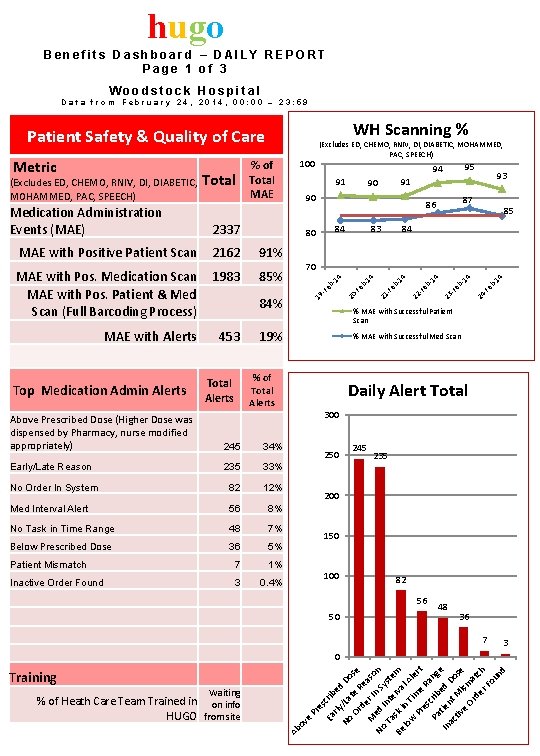
hugo Benefits Dashboard – DAILY REPORT Page 1 of 3 Woodstock Hospital Data from February 24, 2014, 00: 00 – 23: 59 WH Scanning % Patient Safety & Quality of Care 19% Above Prescribed Dose (Higher Dose was dispensed by Pharmacy, nurse modified appropriately) 245 34% Early/Late Reason 235 33% No Order In System 82 12% Med Interval Alert 56 8% No Task in Time Range 48 7% Below Prescribed Dose 36 5% Patient Mismatch 7 1% Inactive Order Found 3 0. 4% 4 4 b 1 24 -F e 23 b 1 -F e b 1 4 4 b 1 % MAE with Successful Patient Scan % MAE with Successful Med Scan % of Total Alerts 22 84% -F e 453 70 4 MAE with Alerts 85 84 21 85% b 1 1983 -F e MAE with Pos. Medication Scan MAE with Pos. Patient & Med Scan (Full Barcoding Process) 4 91% 83 20 2162 87 86 84 93 91 90 90 80 MAE with Positive Patient Scan Top Medication Admin Alerts 91 2337 95 94 b 1 Medication Administration Events (MAE) Total 100 -F e (Excludes ED, CHEMO, RNIV, DIABETIC, MOHAMMED, PAC, SPEECH) % of Total MAE 19 Metric (Excludes ED, CHEMO, RNIV, DIABETIC, MOHAMMED, PAC, SPEECH) Daily Alert Total 300 250 245 235 200 150 100 82 56 50 48 36 7 3 Training Ab ov e Waiting % of Heath Care Team Trained in on info HUGO from site Pr es Ea crib rly ed No /La Do Or te R se d e M er I aso No ed n S n Ta Inte yste Be sk i rva m lo n T l A w l Pr ime ert es R a Pa crib ng e e t In ien d D ac t o tiv M is se e Or ma de tch r. F ou nd 0
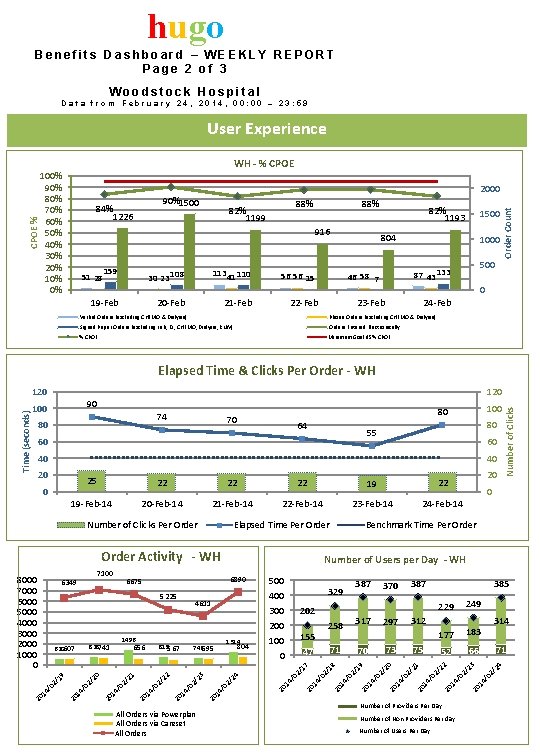
hugo Benefits Dashboard – WEEKLY REPORT Page 2 of 3 Woodstock Hospital Data from February 24, 2014, 00: 00 – 23: 59 WH - % CPOE 100% 90% 80% 70% 60% 50% 40% 30% 20% 10% 0% 2000 90%1500 84% 1226 88% 82% 1199 916 159 30 23 108 113 41 110 19 -Feb 20 -Feb 21 -Feb 51 28 82% 1193 804 1000 22 -Feb 500 87 43 133 46 58 7 56 56 15 Verbal Orders (excluding CHEMO & Dialysis) 1500 Order Count CPOE % User Experience 0 23 -Feb 24 -Feb Phone Orders (excluding CHEMO & Dialysis) Signed Paper Orders (excluding Lab, DI, CHEMO, Dialysis, RNIV) Orders Entered Electronically % CPOE Minimum Goal 95% CPOE Elapsed Time & Clicks Per Order - WH 100 74 80 100 80 70 64 80 55 60 60 40 40 22 22 22 19 -Feb-14 20 -Feb-14 21 -Feb-14 22 -Feb-14 23 -Feb-14 24 -Feb-14 Number of Clicks Per Order Elapsed Time Per Order Activity - WH Number of Users per Day - WH 183 52 66 Number of Non Providers Per day Number of Users Per Day 02 / 24 23 Number of Providers Per Day 314 71 14 / 22 75 177 02 / 14 / 20 73 249 14 / 70 18 17 02 / 14 / 20 24 14 / 02 / 23 20 14 / 20 02 / 22 1 02 /2 20 20 20 14 / 02 / 19 02 / 14 / All Orders via Powerplan All Orders via Careset All Orders 71 229 02 / 47 0 385 20 155 100 21 804 312 14 / 1314 746595 297 02 / 815567 656 317 387 20 1496 828741 620607 258 20 200 14 / 202 370 02 / 300 19 4611 387 20 329 400 14 / 5225 500 20 6890 6675 02 / 6349 14 / 20 7100 0 Benchmark Time Per Order 14 / 0 8000 7000 6000 5000 4000 3000 2000 1000 0 20 25 20 20 Number of Clicks 120 90 20 Time (seconds) 120
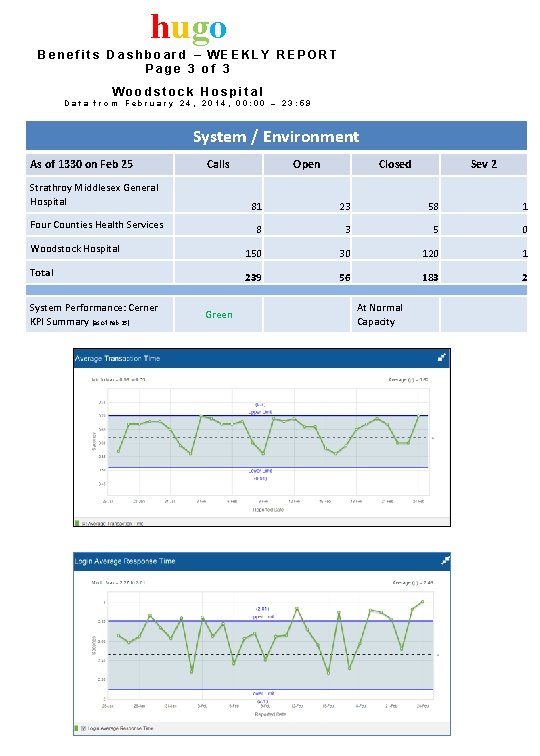
hugo Benefits Dashboard – WEEKLY REPORT Page 3 of 3 Woodstock Hospital Data from February 24, 2014, 00: 00 – 23: 59 System / Environment As of 1330 on Feb 25 Calls Open Closed Sev 2 Strathroy Middlesex General Hospital 81 23 58 1 Four Counties Health Services 8 3 5 0 150 30 120 1 239 56 183 2 Woodstock Hospital Total System Performance: Cerner KPI Summary (as of Feb 25) Green At Normal Capacity
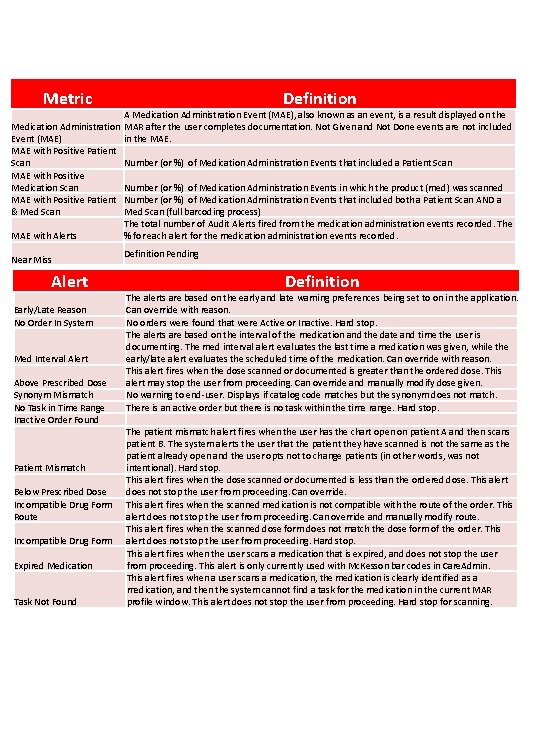
Metric Medication Administration Event (MAE) MAE with Positive Patient Scan MAE with Positive Medication Scan MAE with Positive Patient & Med Scan MAE with Alerts Near Miss Alert Early/Late Reason No Order In System Med Interval Alert Above Prescribed Dose Synonym Mismatch No Task in Time Range Inactive Order Found Patient Mismatch Below Prescribed Dose Incompatible Drug Form Route Incompatible Drug Form Expired Medication Task Not Found Definition A Medication Administration Event (MAE), also known as an event, is a result displayed on the MAR after the user completes documentation. Not Given and Not Done events are not included in the MAE. Number (or %) of Medication Administration Events that included a Patient Scan Number (or %) of Medication Administration Events in which the product (med) was scanned Number (or %) of Medication Administration Events that included both a Patient Scan AND a Med Scan (full barcoding process) The total number of Audit Alerts fired from the medication administration events recorded. The % for each alert for the medication administration events recorded. Definition Pending Definition The alerts are based on the early and late warning preferences being set to on in the application. Can override with reason. No orders were found that were Active or Inactive. Hard stop. The alerts are based on the interval of the medication and the date and time the user is documenting. The med interval alert evaluates the last time a medication was given, while the early/late alert evaluates the scheduled time of the medication. Can override with reason. This alert fires when the dose scanned or documented is greater than the ordered dose. This alert may stop the user from proceeding. Can override and manually modify dose given. No warning to end-user. Displays if catalog code matches but the synonym does not match. There is an active order but there is no task within the time range. Hard stop. The patient mismatch alert fires when the user has the chart open on patient A and then scans patient B. The system alerts the user that the patient they have scanned is not the same as the patient already open and the user opts not to change patients (in other words, was not intentional). Hard stop. This alert fires when the dose scanned or documented is less than the ordered dose. This alert does not stop the user from proceeding. Can override. This alert fires when the scanned medication is not compatible with the route of the order. This alert does not stop the user from proceeding. Can override and manually modify route. This alert fires when the scanned dose form does not match the dose form of the order. This alert does not stop the user from proceeding. Hard stop. This alert fires when the user scans a medication that is expired, and does not stop the user from proceeding. This alert is only currently used with Mc. Kesson bar codes in Care. Admin. This alert fires when a user scans a medication, the medication is clearly identified as a medication, and then the system cannot find a task for the medication in the current MAR profile window. This alert does not stop the user from proceeding. Hard stop for scanning.
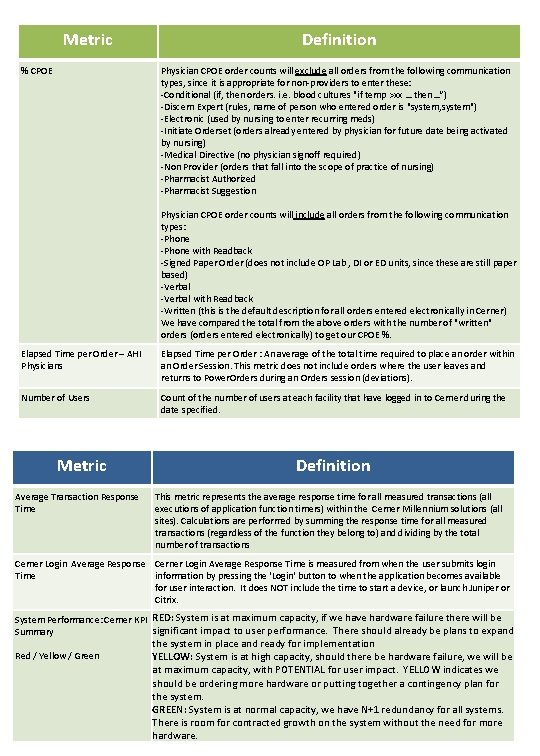
Metric % CPOE Definition Physician CPOE order counts will exclude all orders from the following communication types, since it is appropriate for non-providers to enter these: -Conditional (if, then orders. i. e. blood cultures "if temp >xx … then…“) -Discern Expert (rules, name of person who entered order is "system, system") -Electronic (used by nursing to enter recurring meds) -Initiate Orderset (orders already entered by physician for future date being activated by nursing) -Medical Directive (no physician signoff required) -Non Provider (orders that fall into the scope of practice of nursing) -Pharmacist Authorized -Pharmacist Suggestion Physician CPOE order counts will include all orders from the following communication types: -Phone with Readback -Signed Paper Order (does not include OP Lab , DI or ED units, since these are still paper based) -Verbal with Readback -Written (this is the default description for all orders entered electronically in Cerner) We have compared the total from the above orders with the number of "written" orders (orders entered electronically) to get our CPOE %. Elapsed Time per Order – AHI Physicians Elapsed Time per Order : An average of the total time required to place an order within an Order Session. This metric does not include orders where the user leaves and returns to Power. Orders during an Orders session (deviations). Number of Users Count of the number of users at each facility that have logged in to Cerner during the date specified. Metric Average Transaction Response Time Definition This metric represents the average response time for all measured transactions (all executions of application function timers) within the Cerner Millennium solutions (all sites). Calculations are performed by summing the response time for all measured transactions (regardless of the function they belong to) and dividing by the total number of transactions Cerner Login Average Response Time is measured from when the user submits login Time information by pressing the 'Login' button to when the application becomes available for user interaction. It does NOT include the time to start a device, or launch Juniper or Citrix. System Performance: Cerner KPI RED: System is at maximum capacity, if we have hardware failure there will be significant impact to user performance. There should already be plans to expand Summary Red / Yellow / Green the system in place and ready for implementation YELLOW: System is at high capacity, should there be hardware failure, we will be at maximum capacity, with POTENTIAL for user impact. YELLOW indicates we should be ordering more hardware or putting together a contingency plan for the system. GREEN: System is at normal capacity, we have N+1 redundancy for all systems. There is room for contracted growth on the system without the need for more hardware.
- Slides: 5