
http www julienlecomte netblogfilesperformanceajaxperf ppt http www slideshare

http: //www. julienlecomte. net/blogfiles/performance/ajax-perf. ppt http: //www. slideshare. net/julien. lecomte/high-performance-ajax-applications High Performance Ajax Applications Julien Lecomte

Part 1 Developing For High Performance
Planning and designing for high performance • Plan for performance from day 1 • Work closely with designers and product managers • Understand design rationale • Explain the tradeoffs between design and performance • Offer alternatives and show what is possible (prototype) • Challenge yourself to implement challenging designs (don't just say no) • Help simplify the design and interaction if needed (compromise)
Engineering high performance: A few basic rules • Less is more – Don’t do anything unnecessary. – Don’t do anything until it becomes absolutely necessary. • Break the rules – Make compromises and break best practices, but only as a last resort! • Work on improving perceived performance – Users can deal with some reasonable amount of slowness if: • They are informed appropriately that an operation is pending. • The user interface remains reactive at all time. – Cheat whenever you can by first updating the UI and then do the work. • Need to “lock” all or part of the user interface.
Measuring performance • Test performance using a setup similar to your users’ environment • Profile your code during development • Automate profiling/performance testing • Keep historical records of how features perform • Consider keeping some (small amount of) profiling code in production

Part 2 High Performance Page Load
Yahoo!'s Exceptional Performance rules • 1. Make Fewer HTTP Requests 2. Use a Content Delivery Network 1) load 3. Add an Expires Header 2) render 4. Gzip Components (including JS!) 3) run 5. Put CSS at the Top 6. Move Scripts to the Bottom 7. Avoid CSS Expressions 8. Make Java. Script and CSS External 9. Reduce DNS Lookups • A web page works in 3 (sometimes imbricated) stages: These rules cover mostly the first stage. 10. Minify Java. Script 11. Avoid Redirects 12. Remove Duplicate Scripts 13. Configure ETags 14. Make Ajax Cacheable See http: //developer. yahoo. com/performance/ for more information.
Asset optimization • Minify CSS and Java. Script files: – Use the YUI Compressor [ http: //developer. yahoo. com/yui/compressor/ ] – Stay away from so-called advanced compression schemes - like Packer • Combine CSS and Java. Script files: – At build time [ http: //www. julienlecomte. net/blog/2007/09/16/ ] – At run time • Optimize image assets: – Png. Crush [ http: //pmt. sourceforge. net/pngcrush/ ] – Png. Optimizer [ http: //psydk. org/Png. Optimizer. php ] – etc.
Reduce unminified code size • Loading and parsing HTML, CSS and Java. Script code is costly. • Be concise and write less code. • Make good use of Java. Script libraries. • Consider splitting your large Java. Script files into smaller files (bundles) when the parsing and compilation of the script takes an excessive amount of time (Firefox bug #313967) • Load code (HTML, CSS and Java. Script) on demand (a. k. a “lazy loading”) – See http: //ajaxpatterns. org/On-Demand_Javascript – Use the YUI Loader – Dojo's package system – JSAN Import System
Optimize initial rendering (1/4) Miscellaneous tips. . . • Consider rendering the first view on the server: – Be aware of the added page weight – You will still need to attach event handlers once the DOM is ready • Close Your HTML Tags to Speed Up Parsing: – Implicitly closed tags add cost to HTML parsing – http: //msdn 2. microsoft. com/en-us/library/ms 533020. aspx#Close_Your_Tags • Consider flushing the apache buffer very early on: – The download of external CSS files (should be at the top of the page!) may get a head start. – May not influence the rendering speed however. Browsers buffer their input before displaying it. • Load only essential assets / load assets on a delay or on demand – Use the YUI Image Loader
Optimize initial rendering (2/4) Don’t always wait for onload. . . • Most DOM operations can be accomplished before the onload event has fired. • If you have control over where your code is going to be inserted in the page, write your init code in a <script> block located right before the closing </body> tag. • Otherwise, use the YUI Event utility’s on. DOMReady method: YAHOO. util. Event. on. DOMReady(function () { // Do something here. . . // e. g. , attach event handlers. });
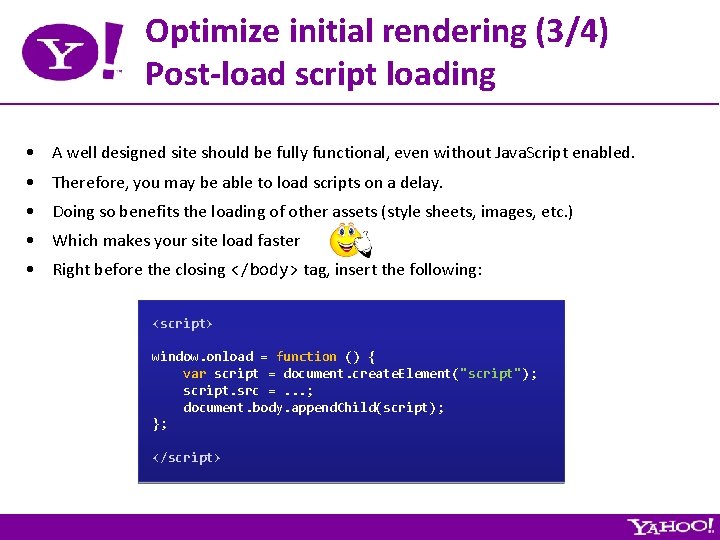
Optimize initial rendering (3/4) Post-load script loading • A well designed site should be fully functional, even without Java. Script enabled. • Therefore, you may be able to load scripts on a delay. • Doing so benefits the loading of other assets (style sheets, images, etc. ) • Which makes your site load faster • Right before the closing </body> tag, insert the following: <script> window. onload = function () { var script = document. create. Element("script"); script. src =. . . ; document. body. append. Child(script); }; </script>
Optimize initial rendering (4/4) Conditional preloading • Preloading assets (Java. Script, CSS, Images, etc. ) has the potential to really enhance the user experience. • However, one must be smart about when the preloading takes place. Otherwise, the preloading may actually worsen the user experience. . . • http: //www. sitepoint. com/article/web-site-optimization-steps/3 • Try it at http: //search. yahoo. com/

Part 3 High Performance Java. Script
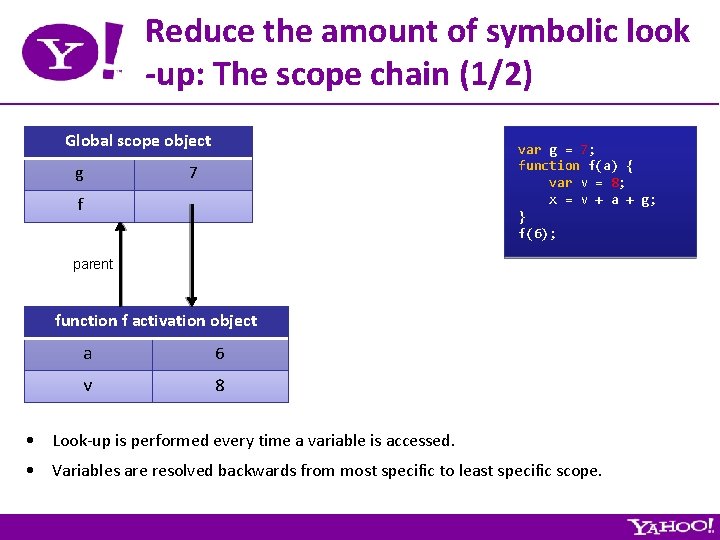
Reduce the amount of symbolic look -up: The scope chain (1/2) Global scope object g var g = 7; function f(a) { var v = 8; x = v + a + g; } f(6); 7 f parent function f activation object a 6 v 8 • Look-up is performed every time a variable is accessed. • Variables are resolved backwards from most specific to least specific scope.
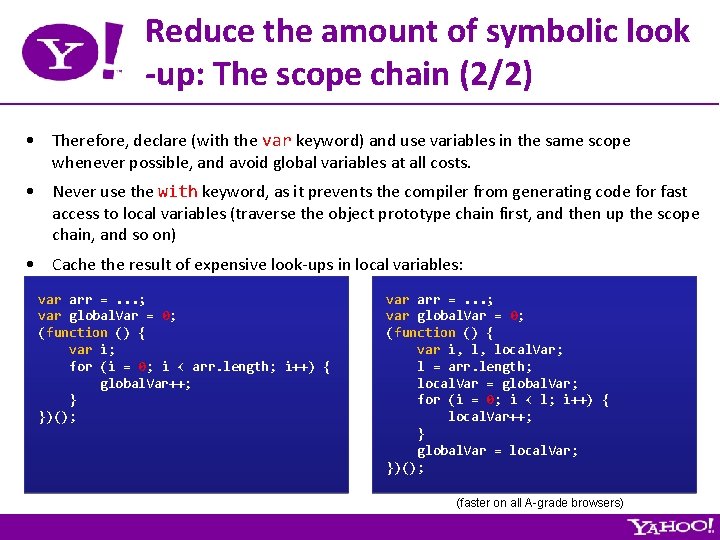
Reduce the amount of symbolic look -up: The scope chain (2/2) • Therefore, declare (with the var keyword) and use variables in the same scope whenever possible, and avoid global variables at all costs. • Never use the with keyword, as it prevents the compiler from generating code for fast access to local variables (traverse the object prototype chain first, and then up the scope chain, and so on) • Cache the result of expensive look-ups in local variables: var arr =. . . ; var global. Var = 0; (function () { var i; for (i = 0; i < arr. length; i++) { global. Var++; } })(); var arr =. . . ; var global. Var = 0; (function () { var i, l, local. Var; l = arr. length; local. Var = global. Var; for (i = 0; i < l; i++) { local. Var++; } global. Var = local. Var; })(); (faster on all A-grade browsers)
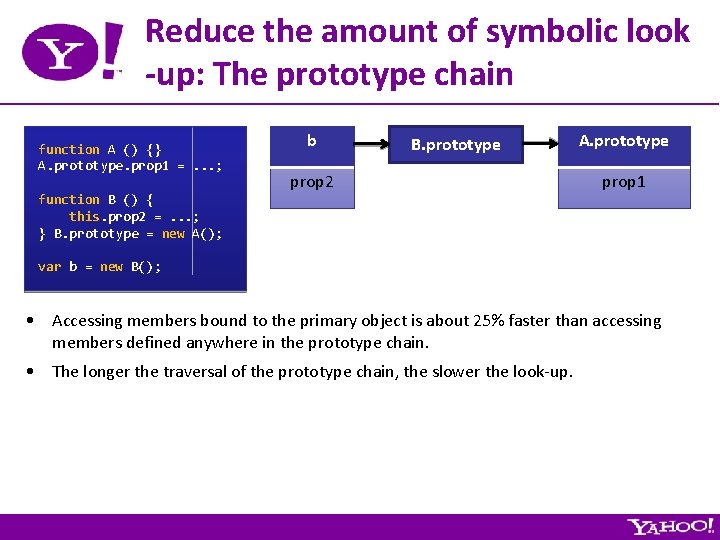
Reduce the amount of symbolic look -up: The prototype chain function A () {} A. prototype. prop 1 =. . . ; function B () { this. prop 2 =. . . ; } B. prototype = new A(); b B. prototype prop 2 A. prototype prop 1 var b = new B(); • Accessing members bound to the primary object is about 25% faster than accessing members defined anywhere in the prototype chain. • The longer the traversal of the prototype chain, the slower the look-up.
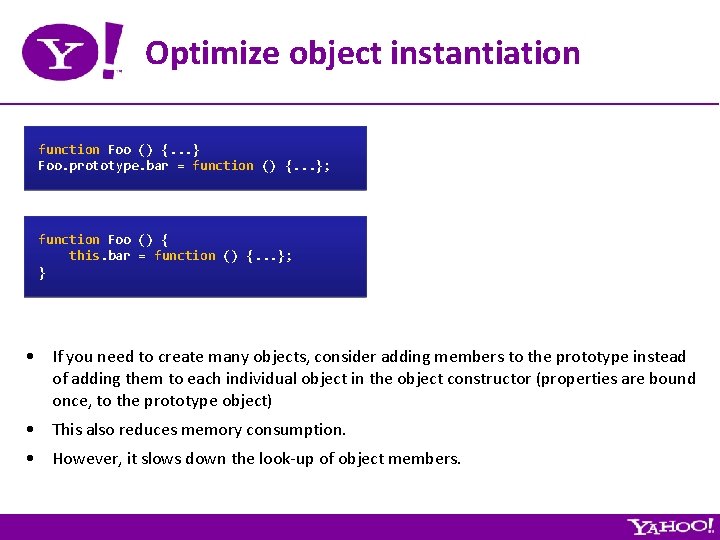
Optimize object instantiation function Foo () {. . . } Foo. prototype. bar = function () {. . . }; function Foo () { this. bar = function () {. . . }; } • If you need to create many objects, consider adding members to the prototype instead of adding them to each individual object in the object constructor (properties are bound once, to the prototype object) • This also reduces memory consumption. • However, it slows down the look-up of object members.
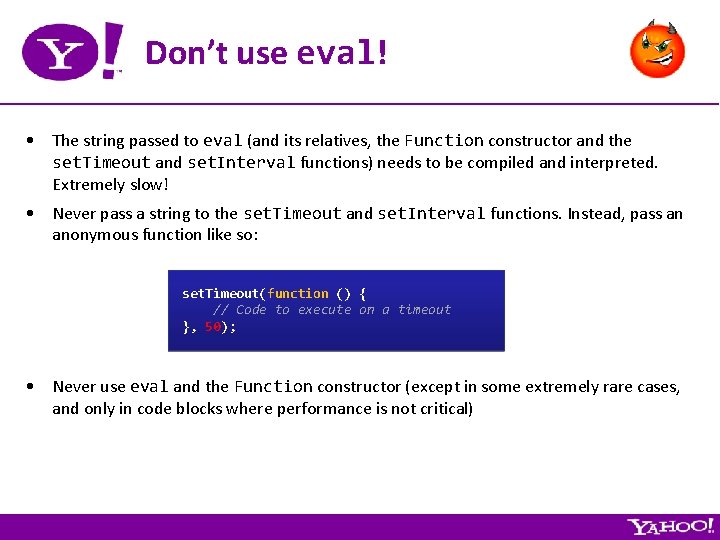
Don’t use eval! • The string passed to eval (and its relatives, the Function constructor and the set. Timeout and set. Interval functions) needs to be compiled and interpreted. Extremely slow! • Never pass a string to the set. Timeout and set. Interval functions. Instead, pass an anonymous function like so: set. Timeout(function () { // Code to execute on a timeout }, 50); • Never use eval and the Function constructor (except in some extremely rare cases, and only in code blocks where performance is not critical)
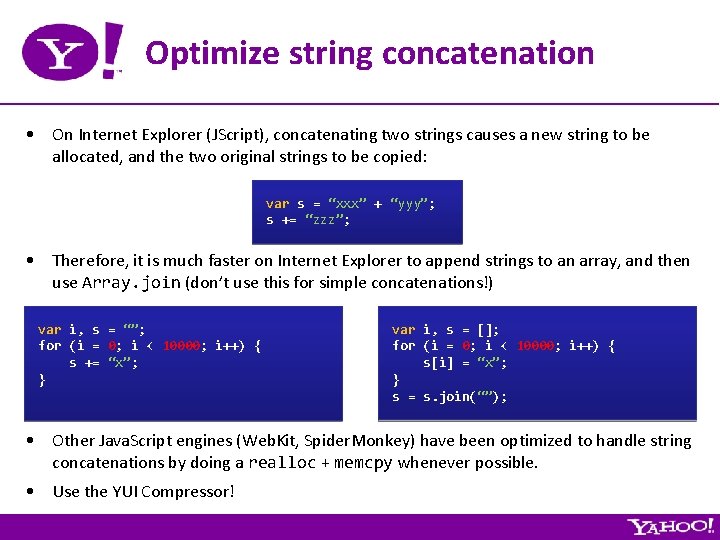
Optimize string concatenation • On Internet Explorer (JScript), concatenating two strings causes a new string to be allocated, and the two original strings to be copied: var s = “xxx” + “yyy”; s += “zzz”; • Therefore, it is much faster on Internet Explorer to append strings to an array, and then use Array. join (don’t use this for simple concatenations!) var i, s = “”; for (i = 0; i < 10000; i++) { s += “x”; } var i, s = []; for (i = 0; i < 10000; i++) { s[i] = “x”; } s = s. join(“”); • Other Java. Script engines (Web. Kit, Spider. Monkey) have been optimized to handle string concatenations by doing a realloc + memcpy whenever possible. • Use the YUI Compressor!
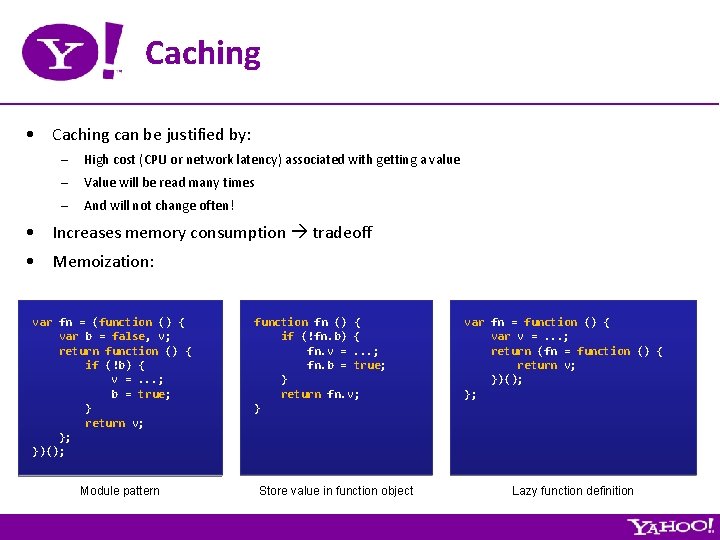
Caching • Caching can be justified by: – High cost (CPU or network latency) associated with getting a value – Value will be read many times – And will not change often! • Increases memory consumption tradeoff • Memoization: var fn = (function () { var b = false, v; return function () { if (!b) { v =. . . ; b = true; } return v; }; })(); Module pattern function fn () { if (!fn. b) { fn. v =. . . ; fn. b = true; } return fn. v; } Store value in function object var fn = function () { var v =. . . ; return (fn = function () { return v; })(); }; Lazy function definition
How to handle long running Java. Script processes (1/2) • During long running Java. Script processes, the entire browser UI is frozen • Therefore, to maintain a decent user experience, make sure that Java. Script threads never take more than ~ 300 msec (at most) to complete. • You can break long running processes into smaller units of work, and chain them using set. Timeout. • You can also process the data on the server. • More info at http: //www. julienlecomte. net/blog/2007/10/28 • Demo

How to handle long running Java. Script processes (2/2) function do. Something (callback. Fn) { // Initialize a few things here. . . (function () { // Do a little bit of work here. . . if (termination condition) { // We are done callback. Fn(); } else { // Process next chunk set. Timeout(arguments. callee, 0); } })(); }
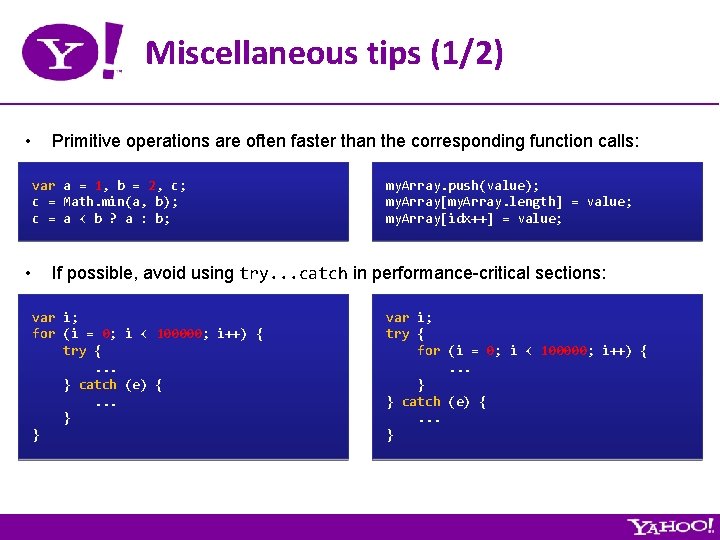
Miscellaneous tips (1/2) • Primitive operations are often faster than the corresponding function calls: var a = 1, b = 2, c; c = Math. min(a, b); c = a < b ? a : b; • my. Array. push(value); my. Array[my. Array. length] = value; my. Array[idx++] = value; If possible, avoid using try. . . catch in performance-critical sections: var i; for (i = 0; i < 100000; i++) { try {. . . } catch (e) {. . . } } var i; try { for (i = 0; i < 100000; i++) {. . . } } catch (e) {. . . }
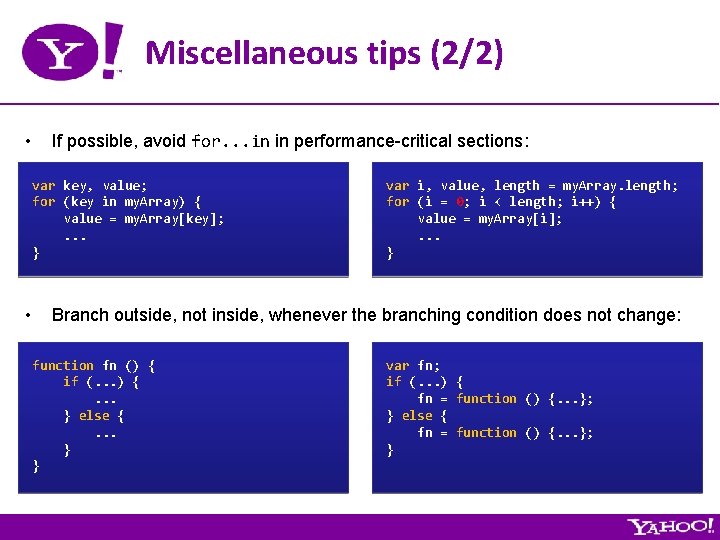
Miscellaneous tips (2/2) • If possible, avoid for. . . in in performance-critical sections: var key, value; for (key in my. Array) { value = my. Array[key]; . . . } • var i, value, length = my. Array. length; for (i = 0; i < length; i++) { value = my. Array[i]; . . . } Branch outside, not inside, whenever the branching condition does not change: function fn () { if (. . . ) {. . . } else {. . . } } var fn; if (. . . ) { fn = function () {. . . }; } else { fn = function () {. . . }; }

Part 4 High Performance Dynamic HTML
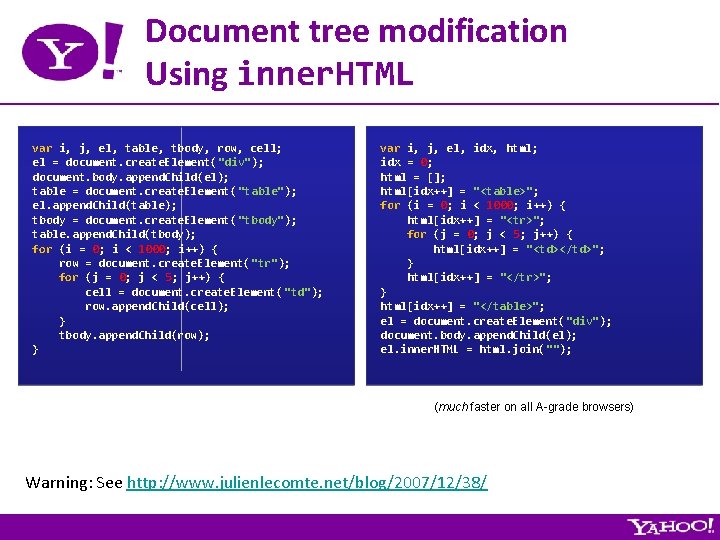
Document tree modification Using inner. HTML var i, j, el, table, tbody, row, cell; el = document. create. Element("div"); document. body. append. Child(el); table = document. create. Element("table"); el. append. Child(table); tbody = document. create. Element("tbody"); table. append. Child(tbody); for (i = 0; i < 1000; i++) { row = document. create. Element( "tr"); for (j = 0; j < 5; j++) { cell = document. create. Element( "td"); row. append. Child(cell); } tbody. append. Child(row); } var i, j, el, idx, html; idx = 0; html = []; html[idx++] = "<table>"; for (i = 0; i < 1000; i++) { html[idx++] = "<tr>"; for (j = 0; j < 5; j++) { html[idx++] = "<td></td>"; } html[idx++] = "</tr>"; } html[idx++] = "</table>"; el = document. create. Element("div"); document. body. append. Child(el); el. inner. HTML = html. join(""); (much faster on all A-grade browsers) Warning: See http: //www. julienlecomte. net/blog/2007/12/38/
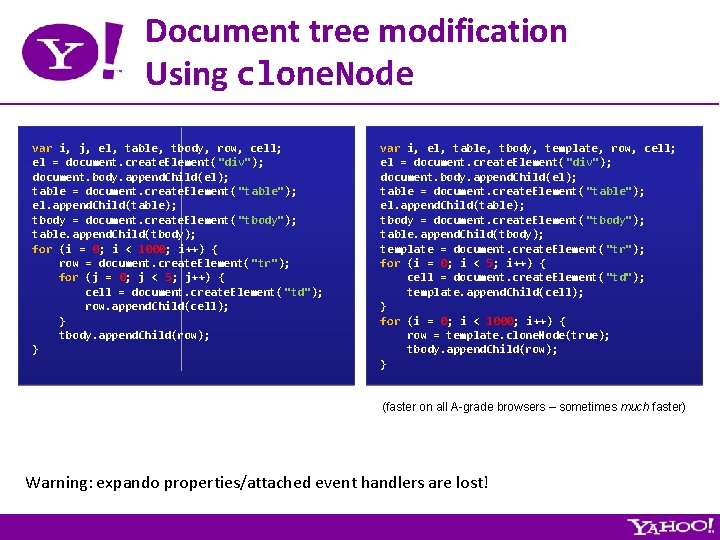
Document tree modification Using clone. Node var i, j, el, table, tbody, row, cell; el = document. create. Element("div"); document. body. append. Child(el); table = document. create. Element("table"); el. append. Child(table); tbody = document. create. Element("tbody"); table. append. Child(tbody); for (i = 0; i < 1000; i++) { row = document. create. Element( "tr"); for (j = 0; j < 5; j++) { cell = document. create. Element( "td"); row. append. Child(cell); } tbody. append. Child(row); } var i, el, table, tbody, template, row, cell; el = document. create. Element("div"); document. body. append. Child(el); table = document. create. Element("table"); el. append. Child(table); tbody = document. create. Element("tbody"); table. append. Child(tbody); template = document. create. Element( "tr"); for (i = 0; i < 5; i++) { cell = document. create. Element( "td"); template. append. Child(cell); } for (i = 0; i < 1000; i++) { row = template. clone. Node(true); tbody. append. Child(row); } (faster on all A-grade browsers – sometimes much faster) Warning: expando properties/attached event handlers are lost!
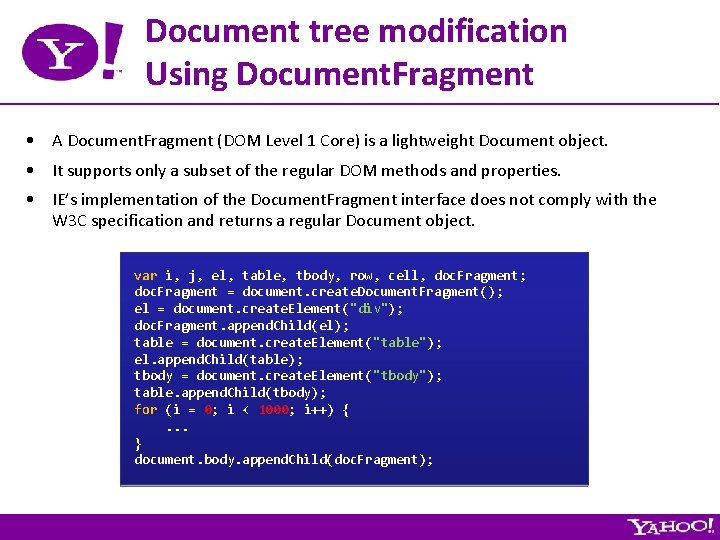
Document tree modification Using Document. Fragment • A Document. Fragment (DOM Level 1 Core) is a lightweight Document object. • It supports only a subset of the regular DOM methods and properties. • IE’s implementation of the Document. Fragment interface does not comply with the W 3 C specification and returns a regular Document object. var i, j, el, table, tbody, row, cell, doc. Fragment; doc. Fragment = document. create. Document. Fragment(); el = document. create. Element("div"); doc. Fragment. append. Child(el); table = document. create. Element("table"); el. append. Child(table); tbody = document. create. Element("tbody"); table. append. Child(tbody); for (i = 0; i < 1000; i++) {. . . } document. body. append. Child(doc. Fragment);
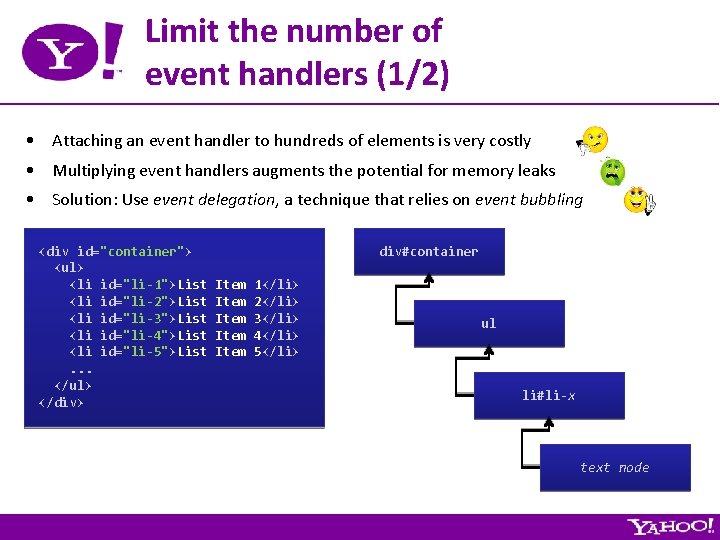
Limit the number of event handlers (1/2) • Attaching an event handler to hundreds of elements is very costly • Multiplying event handlers augments the potential for memory leaks • Solution: Use event delegation, a technique that relies on event bubbling <div id="container"> <ul> <li id="li-1">List <li id="li-2">List <li id="li-3">List <li id="li-4">List <li id="li-5">List. . . </ul> </div> div#container Item Item 1</li> 2</li> 3</li> 4</li> 5</li> ul li#li-x text node
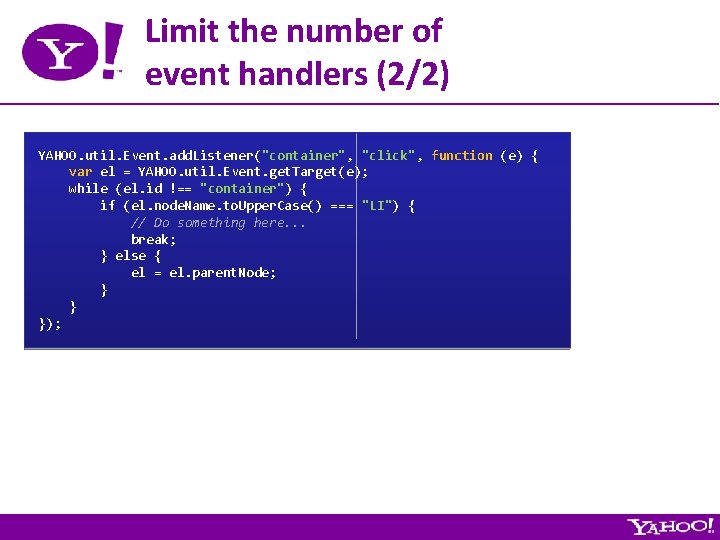
Limit the number of event handlers (2/2) YAHOO. util. Event. add. Listener("container", "click", function (e) { var el = YAHOO. util. Event. get. Target(e); while (el. id !== "container") { if (el. node. Name. to. Upper. Case() === "LI") { // Do something here. . . break; } else { el = el. parent. Node; } } });
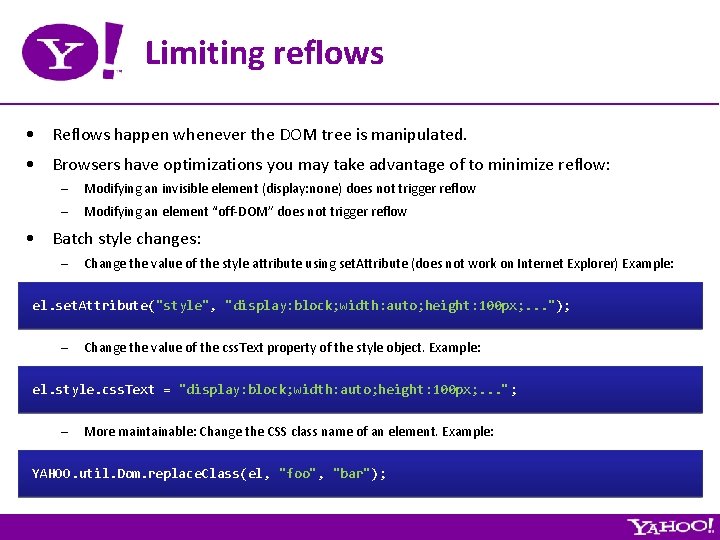
Limiting reflows • Reflows happen whenever the DOM tree is manipulated. • Browsers have optimizations you may take advantage of to minimize reflow: – Modifying an invisible element (display: none) does not trigger reflow – Modifying an element “off-DOM” does not trigger reflow • Batch style changes: – Change the value of the style attribute using set. Attribute (does not work on Internet Explorer) Example: el. set. Attribute("style", "display: block; width: auto; height: 100 px; . . . "); – Change the value of the css. Text property of the style object. Example: el. style. css. Text = "display: block; width: auto; height: 100 px; . . . "; – More maintainable: Change the CSS class name of an element. Example: YAHOO. util. Dom. replace. Class(el, "foo", "bar");
Miscellaneous tips. . . • Consider using the onmousedown event instead of the onclick event – Get a head start by making use of the small delay between the time a user presses the mouse button and the time he/she releases it. • “Downshift your code”: throttle frequent and expensive actions – See http: //yuiblog. com/blog/2007/07/09/downshift-your-code/
Part 5 High Performance Layout and CSS
Miscellaneous tips. . . • Use CSS Sprites for Snappy Image Replacement. • Avoid using Java. Script for layout. – window. onresize is throttled. . . – Use pure CSS instead! – Side benefits: improves maintainability, degrades more gracefully, etc. • Avoid using Internet Explorer expressions – Expressions are constantly evaluated in order to react to environment changes. – There are ways to more safely use expressions, but in general, you shouldn’t need/use them. • Avoid using Internet Explorer filters (or keep their use to a minimum) • Optimize Table Layout – Goal: allow the rendering engine to start rendering a table before it has received all the data – Use table-layout: fixed – Explicitly define a COL element for each column – Set the WIDTH attribute on each col • Optimize your CSS selectors [ http: //developer. mozilla. org/en/docs/Writing_Efficient_CSS ]

Part 6 High Performance Ajax

Ajax Best Practices • Never resort to using synchronous XMLHttp. Request – http: //yuiblog. com/blog/2006/04/04/synchronous-v-asynchronous/ – Asynchronous programming model slightly more complicated. – Need to lock all or part of the UI while the transaction is pending. • Programmatically handle network timeouts. • Solution: Use the YUI Connection Manager: var callback success: failure: timeout: }; = { function () { /* Do something */ }, 5000 YAHOO. util. Connect. async. Request("GET", url, callback);
Improving perceived network latency using the optimistic pattern • If the data is validated locally (on the client, using Java. Script) before being sent to the server, the request will be successful in 99. 9% of the cases. • Therefore, in order to optimize the user experience, we should assume a successful outcome and adopt the following pattern: → Update the UI when the request gets sent. → Lock the UI/data structures with the finest possible granularity. → Let the user know that something is happening. → Let the user know why a UI object is locked. → Unlock the UI/data structures when the outcome is successful. → Handle error cases gracefully.
Miscellaneous tips. . . • Be aware of the maximum number of concurrent HTTP/1. 1 connections. • Multiplex Ajax requests whenever possible, and if your backend supports it. • Piggyback unsollicited notifications in a response to an Ajax request. • Favor JSON over XML as your data exchange format – Accessing a JSON data structure is easier and cheaper than accessing XML data. – JSON has less overhead than XML. • Push, don’t poll. Use COMET to send real-time notifications to the browser. • Consider using local storage to cache data locally, request a diff from the server: – Internet Explorer’s user. Data – Flash local storage – DOM: Storage (What. WG persistent storage API, implemented in Firefox 2) – Google Gears – etc.

Part 7 Performance Tools
![Performance Tools • YSlow? [ http: //developer. yahoo. com/yslow/ ] • Task manager •](http://slidetodoc.com/presentation_image_h/7571e1850db6508e0c6deb3b95fa03cf/image-42.jpg "Performance Tools • YSlow? [ http: //developer. yahoo. com/yslow/ ] • Task manager •")
Performance Tools • YSlow? [ http: //developer. yahoo. com/yslow/ ] • Task manager • IE Leak Detector a. k. a Drip [ http: //www. outofhanwell. com/ieleak/ ] • Stopwatch profiling – Ajax. View [ http: //research. microsoft. com/projects/ajaxview/ ] – Js. Lex [ http: //rockstarapps. com/pmwiki. php? n=Js. Lex ] – YUI profiler [ http: //developer. yahoo. com/yui/profiler/ ] • Venkman or Firebug Profiler [ http: //www. getfirebug. com/ ]
- Slides: 42