
HTCondor Tutorial Yu Chul Yang Kyungpook National University

![Basic Condor Command Basic Usage Description condor_submit $> condor_submit [Job. Desc. File] submit a](https://slidetodoc.com/presentation_image_h/19bb2e4d0577bd413ea28ab1190e598e/image-5.jpg "Basic Condor Command Basic Usage Description condor_submit $> condor_submit [Job. Desc. File] submit a")
![Exercise 0 : condor_submit Hands-on : condor_submit [Job. Description. File] $>mkdir ex 0; cd](https://slidetodoc.com/presentation_image_h/19bb2e4d0577bd413ea28ab1190e598e/image-6.jpg "Exercise 0 : condor_submit Hands-on : condor_submit [Job. Description. File] $>mkdir ex 0; cd")
![Exercise 1 : condor_(q/hold/release/tail/rm) Hands-on : condor_command [Cluser. ID]. [Process. ID] $> mkdir ex](https://slidetodoc.com/presentation_image_h/19bb2e4d0577bd413ea28ab1190e598e/image-7.jpg "Exercise 1 : condor_(q/hold/release/tail/rm) Hands-on : condor_command [Cluser. ID]. [Process. ID] $> mkdir ex")
- Slides: 16
HTCondor Tutorial Yu. Chul Yang (Kyungpook National University) - LHC Grid Computing School Feb. 04, 2015 -
Contents 1. Introduction 2. Basic Condor (Hands-On) 3. cms. Run(CMSSW) using Condor (Hands-On)
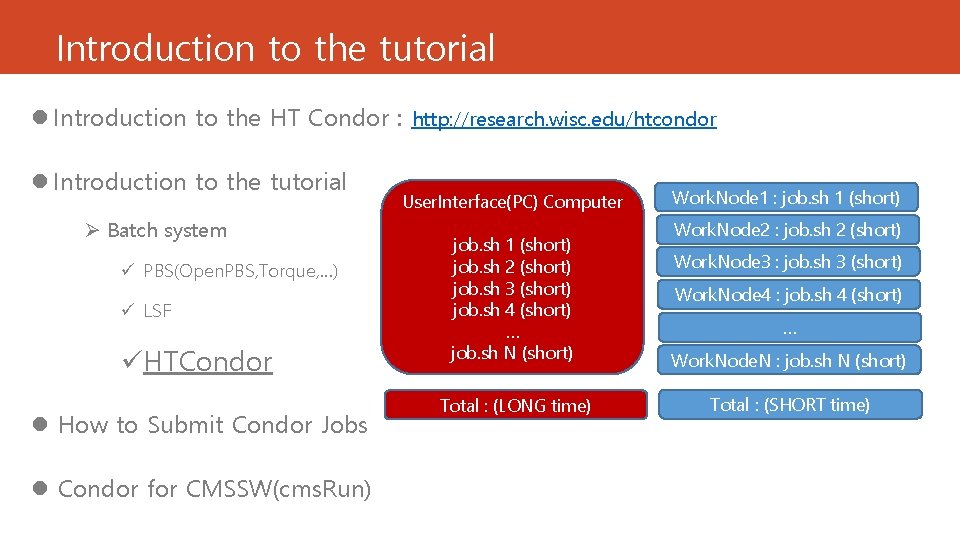
Introduction to the tutorial l Introduction to the HT Condor : http: //research. wisc. edu/htcondor l Introduction to the tutorial Ø Batch system ü PBS(Open. PBS, Torque, …) ü LSF üHTCondor l How to Submit Condor Jobs l Condor for CMSSW(cms. Run) User. Interface(PC) Computer Work. Node 1 : job. sh 1 (short) Work. Node 2 : job. sh 2 (short) job. sh 1 (short) job. sh 2 (short) job. sh 3 (short) job. sh 4 (short) … job. sh N (short) Work. Node. N : job. sh N (short) Total : (LONG time) Total : (SHORT time) Work. Node 3 : job. sh 3 (short) Work. Node 4 : job. sh 4 (short) …
PART 1 : Basic Condor Requirements : account on ui 02. sdfarm. kr
Basic Condor Command Basic Usage Description condor_submit $> condor_submit [Job. Desc. File] submit a job condor_q $> condoq_q [cluster. ID] show status a jobs condor_rm $> condor_rm [cluster. ID] remove jobs from the queue condor_hold $> condor_hold [cluster. ID] hold jobs in the queue condor_release $> condor_release [cluster. ID] release jobs in the queue condor_tail $> condor_tail [cluster. ID]. [process. ID] display the standard output condor_status $> condor_status list summary of pool resources
Exercise 0 : condor_submit Hands-on : condor_submit [Job. Description. File] $>mkdir ex 0; cd ex 0 $>cp ~ycyang/tut/condor/ex 0/job 0. jdl $>condor_submit job 0. jdl Result $>ls -al …. . $>cat condor*. out wn? ? sdfarm. kr
Exercise 1 : condor_(q/hold/release/tail/rm) Hands-on : condor_command [Cluser. ID]. [Process. ID] $> mkdir ex 1; cd ex 1 $> cp ~ycyang/tut/condor/ex 1/run 1. sh $> cp ~ycyang/tut/condor/ex 1/job 1. jdl $> cat run 1. sh $> cat job 1. jdl $> condor_submit job 1. jdl 2 job(s) submitted to cluster 22404. $> condor_q $USER $> condor_hold [Cluster. ID] $> condor_release [Cluster. ID] $> condor_tail [Cluster. ID]. 0 $> condor_rm [Cluster. ID]. 0 Result $>cat condor_[Cluster. ID]_1. log
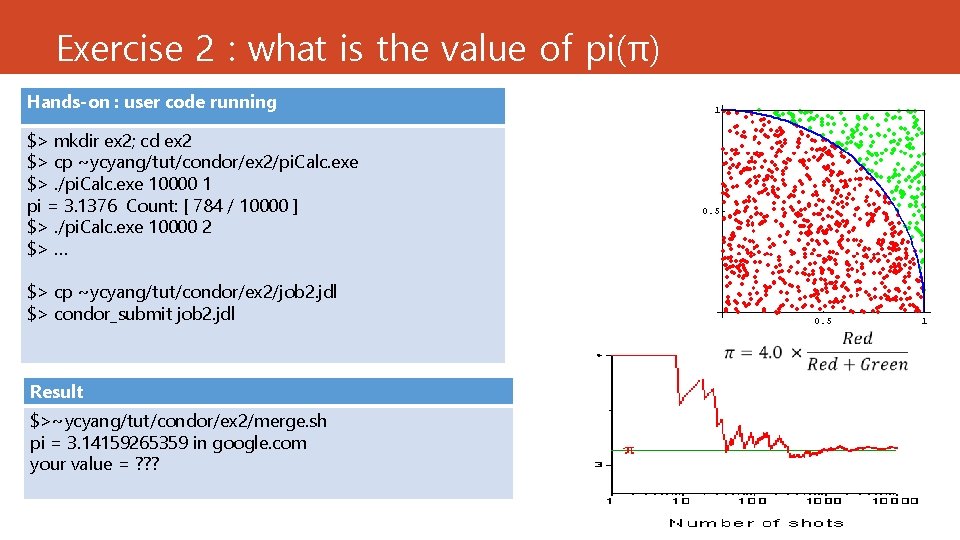
Exercise 2 : what is the value of pi(π) Hands-on : user code running $> mkdir ex 2; cd ex 2 $> cp ~ycyang/tut/condor/ex 2/pi. Calc. exe $>. /pi. Calc. exe 10000 1 pi = 3. 1376 Count: [ 784 / 10000 ] $>. /pi. Calc. exe 10000 2 $> … $> cp ~ycyang/tut/condor/ex 2/job 2. jdl $> condor_submit job 2. jdl Result $>~ycyang/tut/condor/ex 2/merge. sh pi = 3. 14159265359 in google. com your value = ? ? ?
PART 2 : Condor for cms. Run Requirements : 1. Experience with CMSSW, 2. CMS VOMS Account
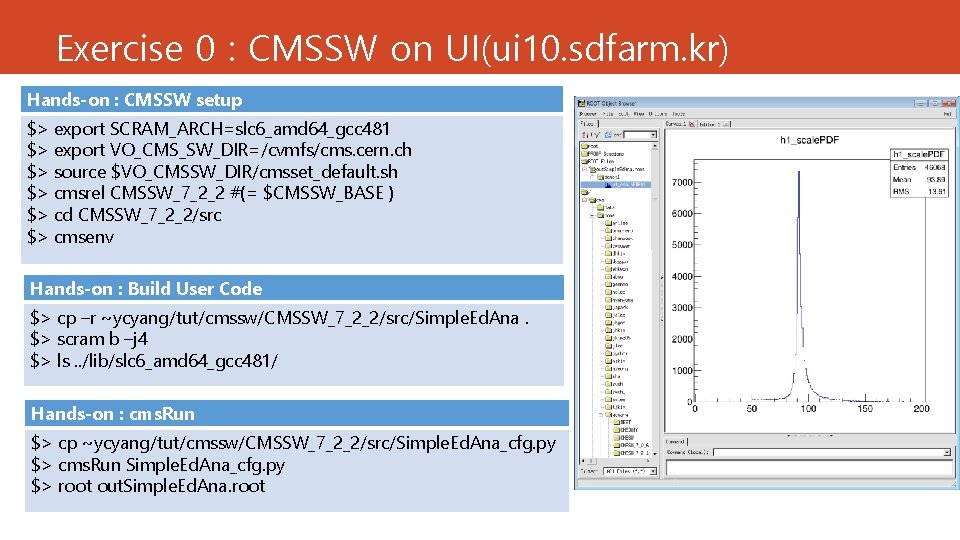
Exercise 0 : CMSSW on UI(ui 10. sdfarm. kr) Hands-on : CMSSW setup $> export SCRAM_ARCH=slc 6_amd 64_gcc 481 $> export VO_CMS_SW_DIR=/cvmfs/cms. cern. ch $> source $VO_CMSSW_DIR/cmsset_default. sh $> cmsrel CMSSW_7_2_2 #(= $CMSSW_BASE ) $> cd CMSSW_7_2_2/src $> cmsenv Hands-on : Build User Code $> cp –r ~ycyang/tut/cmssw/CMSSW_7_2_2/src/Simple. Ed. Ana. $> scram b –j 4 $> ls. . /lib/slc 6_amd 64_gcc 481/ Hands-on : cms. Run $> cp ~ycyang/tut/cmssw/CMSSW_7_2_2/src/Simple. Ed. Ana_cfg. py $> cms. Run Simple. Ed. Ana_cfg. py $> root out. Simple. Ed. Ana. root
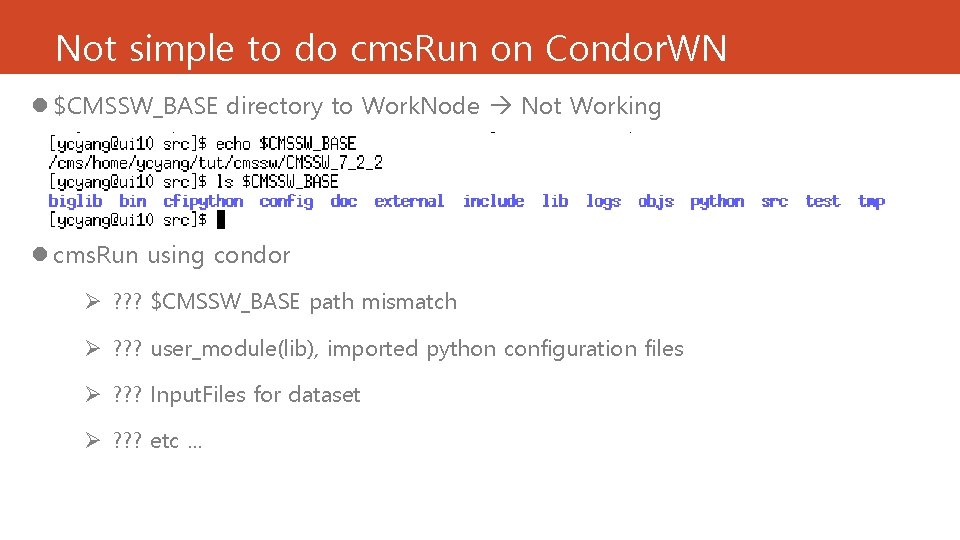
Not simple to do cms. Run on Condor. WN l $CMSSW_BASE directory to Work. Node Not Working l cms. Run using condor Ø ? ? ? $CMSSW_BASE path mismatch Ø ? ? ? user_module(lib), imported python configuration files Ø ? ? ? Input. Files for dataset Ø ? ? ? etc …
How to create the condor job l $CMSSW_BASE path new release CMSSW_7_2_2 on worknode l user libraries tar/copy $CMSSW_BASE/lib directory to worknode l python configuration files pickle. dump(process, ‘file’) like edm. Config. Dump l input files in dataset das_client. py (file_list and site) l JSON(select good lumi. ) for collision data process. source. lumis. To. Process l voms-proxy; access inputfile in global CMS sites
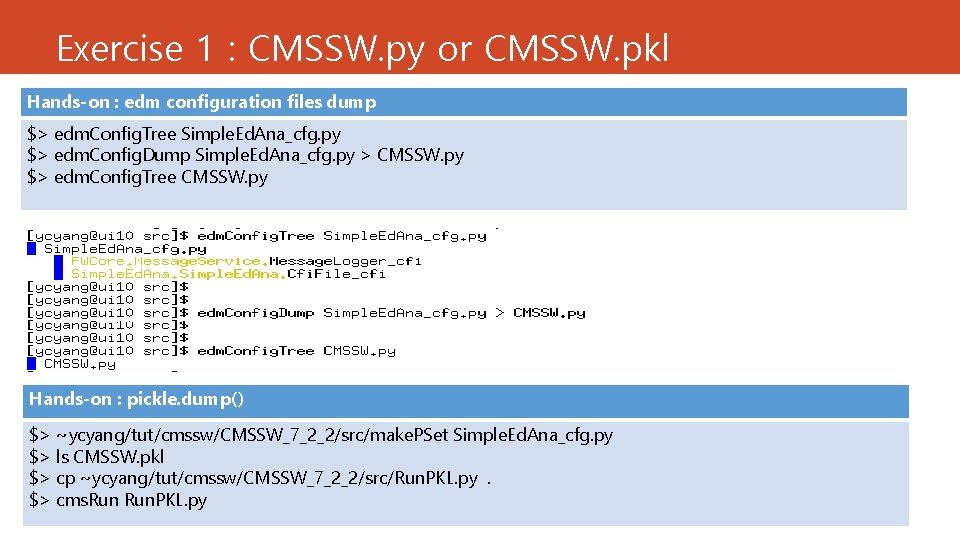
Exercise 1 : CMSSW. py or CMSSW. pkl Hands-on : edm configuration files dump $> edm. Config. Tree Simple. Ed. Ana_cfg. py $> edm. Config. Dump Simple. Ed. Ana_cfg. py > CMSSW. py $> edm. Config. Tree CMSSW. py Hands-on : pickle. dump() $> ~ycyang/tut/cmssw/CMSSW_7_2_2/src/make. PSet Simple. Ed. Ana_cfg. py $> ls CMSSW. pkl $> cp ~ycyang/tut/cmssw/CMSSW_7_2_2/src/Run. PKL. py. $> cms. Run. PKL. py
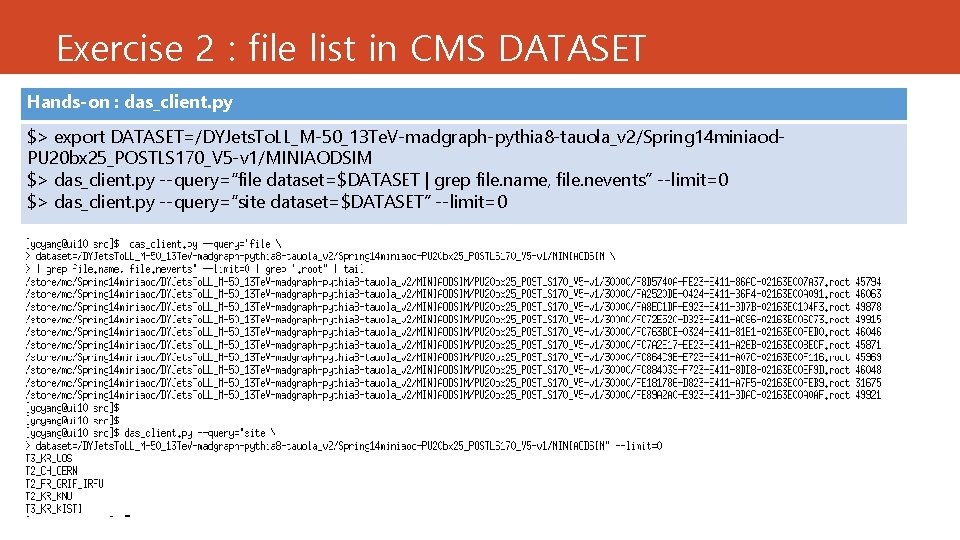
Exercise 2 : file list in CMS DATASET Hands-on : das_client. py $> export DATASET=/DYJets. To. LL_M-50_13 Te. V-madgraph-pythia 8 -tauola_v 2/Spring 14 miniaod. PU 20 bx 25_POSTLS 170_V 5 -v 1/MINIAODSIM $> das_client. py --query=“file dataset=$DATASET | grep file. name, file. nevents” --limit=0 $> das_client. py --query=“site dataset=$DATASET” --limit=0
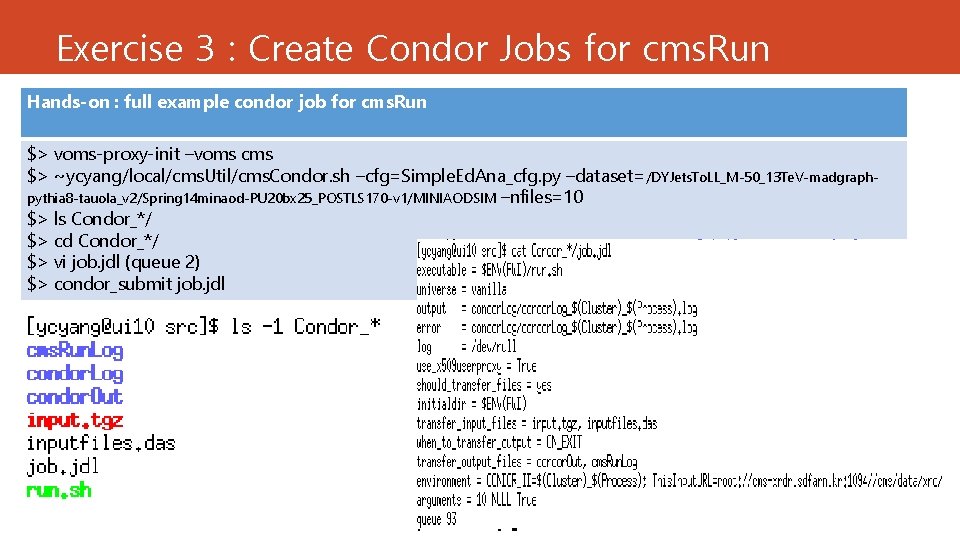
Exercise 3 : Create Condor Jobs for cms. Run Hands-on : full example condor job for cms. Run $> voms-proxy-init –voms cms $> ~ycyang/local/cms. Util/cms. Condor. sh –cfg=Simple. Ed. Ana_cfg. py –dataset=/DYJets. To. LL_M-50_13 Te. V-madgraphpythia 8 -tauola_v 2/Spring 14 minaod-PU 20 bx 25_POSTLS 170 -v 1/MINIAODSIM –nfiles=10 $> ls Condor_*/ $> cd Condor_*/ $> vi job. jdl (queue 2) $> condor_submit job. jdl
Summary l Do by your hands l Question / Discussion l Ref> http: //research. cs. wisc. edu/htcondor/manual/v 7. 6/2_5 Submitting_Job. html