
HPUX LVM Online JFS and Oracle ASM Basics
HP-UX LVM, Online. JFS and Oracle ASM Basics* Dusan Baljevic Sydney, Australia 2009
Disk Partitioning Concepts – HP-UX Partitions can be configured using: • The Whole Disk Approach (no volume manager). • Logical Volume Manager (LVM). • Veritas Volume Manager (Vx. VM). 2
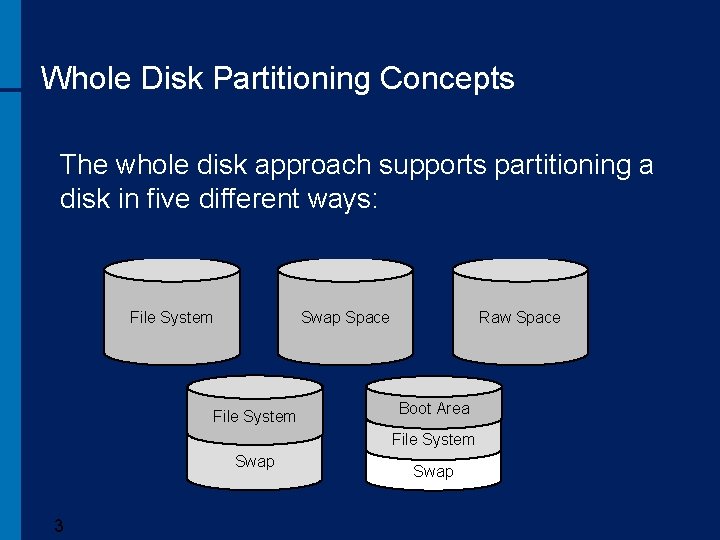
Whole Disk Partitioning Concepts The whole disk approach supports partitioning a disk in five different ways: File System Raw Space Swap Space File System Boot Area File System Swap 3 Swap
Whole Disk Partitioning - Pros • Simple to use, almost no Unix knowledge required. • No licensing. • Supports any type of physical volume. 4
Whole Disk Partitioning - Cons • Partitions cannot span multiple disks. • Each disk can contain at most one file system partition. • Partitions cannot be easily extended. 5
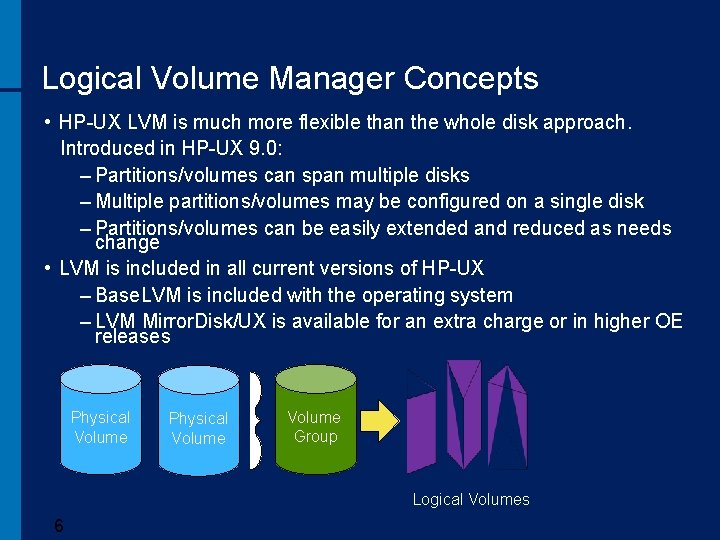
Logical Volume Manager Concepts • HP-UX LVM is much more flexible than the whole disk approach. Introduced in HP-UX 9. 0: – Partitions/volumes can span multiple disks – Multiple partitions/volumes may be configured on a single disk – Partitions/volumes can be easily extended and reduced as needs change • LVM is included in all current versions of HP-UX – Base. LVM is included with the operating system – LVM Mirror. Disk/UX is available for an extra charge or in higher OE releases Physical Volume Group Logical Volumes 6
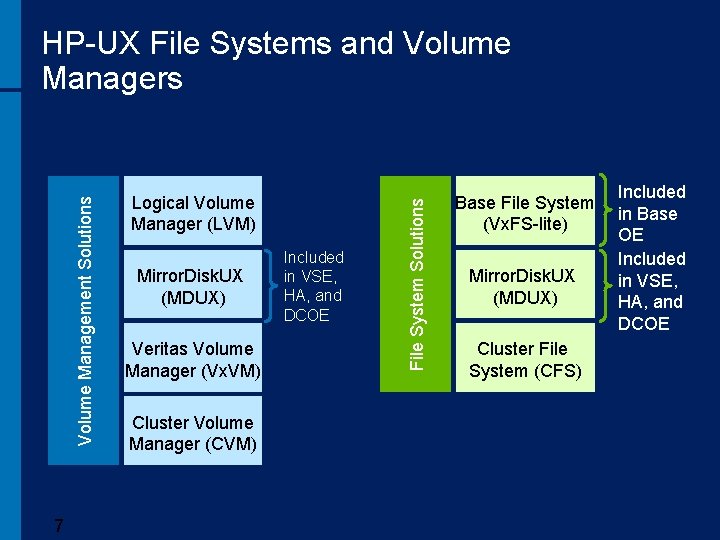
7 Logical Volume Manager (LVM) Mirror. Disk. UX (MDUX) Veritas Volume Manager (Vx. VM) Cluster Volume Manager (CVM) Included in VSE, HA, and DCOE File System Solutions Volume Management Solutions HP-UX File Systems and Volume Managers Base File System (Vx. FS-lite) Mirror. Disk. UX (MDUX) Cluster File System (CFS) Included in Base OE Included in VSE, HA, and DCOE
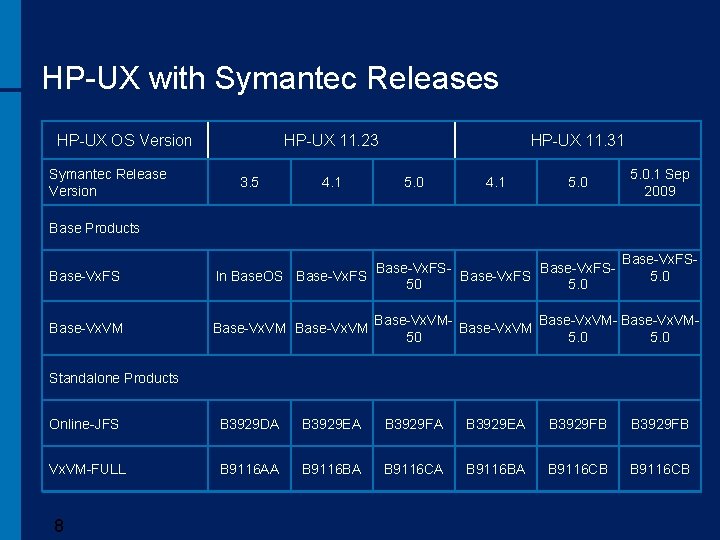
HP-UX with Symantec Releases HP-UX OS Version Symantec Release Version HP-UX 11. 23 3. 5 4. 1 HP-UX 11. 31 5. 0 4. 1 5. 0. 1 Sep 2009 Base Products Base-Vx. FSBase-Vx. FSIn Base. OS Base-Vx. FS 50 5. 0 Base-Vx. VM Base-Vx. FS 5. 0 Base-Vx. VM- Base-Vx. VM 50 5. 0 Standalone Products Online-JFS B 3929 DA B 3929 EA B 3929 FB Vx. VM-FULL B 9116 AA B 9116 BA B 9116 CB 8
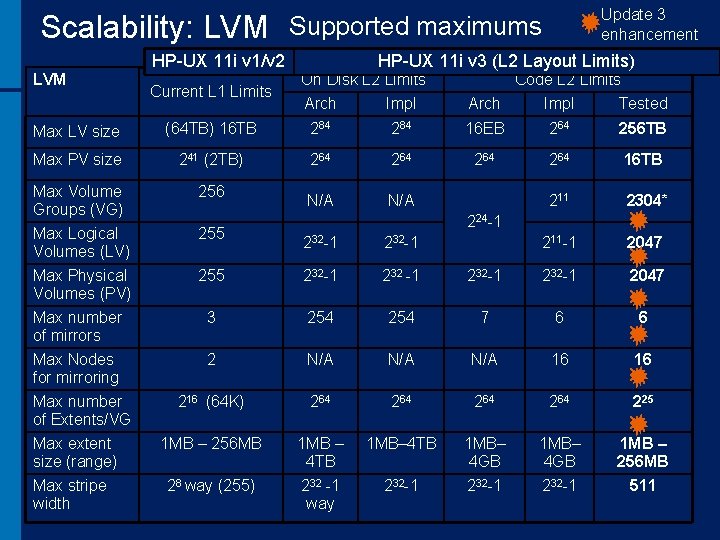
Update 3 enhancement Scalability: LVM Supported maximums LVM HP-UX 11 i v 1/v 2 Current L 1 Limits HP-UX 11 i v 3 (L 2 Layout Limits) On Disk L 2 Limits Code L 2 Limits Arch Impl Tested Max LV size (64 TB) 16 TB 284 16 EB 264 256 TB Max PV size 241 (2 TB) 264 264 16 TB Max Volume Groups (VG) 256 N/A 211 2304* Max Logical Volumes (LV) 255 211 -1 2047 Max Physical Volumes (PV) 224 -1 232 -1 255 232 -1 232 -1 2047 Max number of mirrors 3 254 7 6 6 Max Nodes for mirroring 2 N/A N/A 16 16 216 (64 K) 264 264 225 Max extent size (range) 1 MB – 256 MB 1 MB – 4 TB 1 MB– 4 GB 1 MB – 256 MB Max stripe width 28 way (255) 232 -1 way 232 -1 511 Max number of Extents/VG
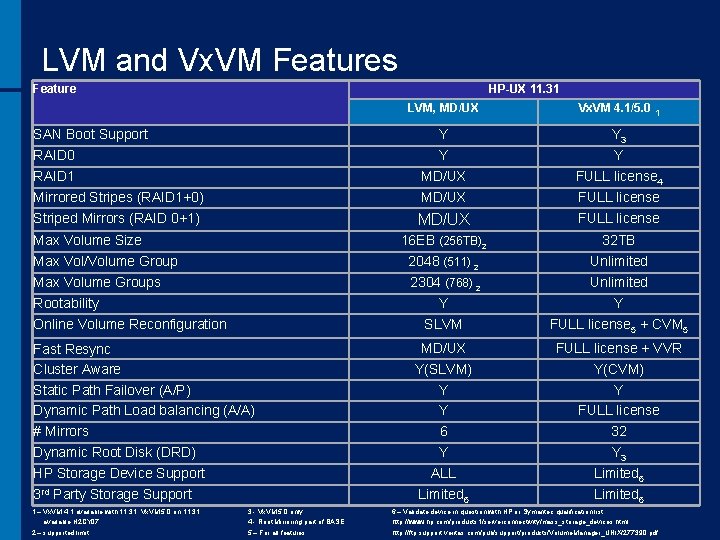
LVM and Vx. VM Features Feature HP-UX 11. 31 SAN Boot Support RAID 0 RAID 1 Mirrored Stripes (RAID 1+0) Striped Mirrors (RAID 0+1) Max Volume Size Max Vol/Volume Group Max Volume Groups Rootability Online Volume Reconfiguration Fast Resync Cluster Aware Static Path Failover (A/P) Dynamic Path Load balancing (A/A) # Mirrors Dynamic Root Disk (DRD) HP Storage Device Support 3 rd Party Storage Support LVM, MD/UX Vx. VM 4. 1/5. 0 1 Y Y MD/UX Y 3 Y FULL license 4 FULL license 16 EB (256 TB)2 2048 (511) 2 2304 (768) 2 Y SLVM 32 TB Unlimited Y FULL license 5 + CVM 5 MD/UX Y(SLVM) Y Y 6 Y ALL Limited 6 FULL license + VVR Y(CVM) Y FULL license 32 Y 3 Limited 6 1 – Vx. VM 4. 1 available with 11. 31, Vx. VM 5. 0 on 11. 31 3 - Vx. VM 5. 0 only 6 – Validate device in question with HP or Symantec qualification list: available H 2 CY 07 4 - Root Mirroring part of BASE http: //www. hp. com/products 1/serverconnectivity/mass_storage_devices. html 5 – For all features http: //ftp. support. veritas. com/pub/support/products/Volume. Manager_UNIX/277390. pdf 2 – supported limit
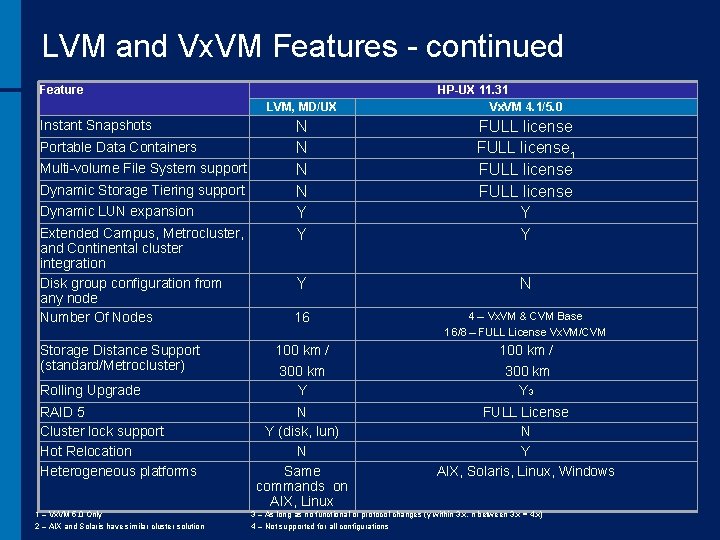
LVM and Vx. VM Features - continued Feature LVM, MD/UX Instant Snapshots Portable Data Containers Multi-volume File System support Dynamic Storage Tiering support Dynamic LUN expansion Extended Campus, Metrocluster, and Continental cluster integration Disk group configuration from any node Number Of Nodes Storage Distance Support (standard/Metrocluster) Rolling Upgrade RAID 5 Cluster lock support Hot Relocation Heterogeneous platforms 1 – Vx. VM 5. 0 Only 2 – AIX and Solaris have similar cluster solution HP-UX 11. 31 Vx. VM 4. 1/5. 0 N N Y Y FULL license 1 FULL license Y Y Y N 16 4 – Vx. VM & CVM Base 16/8 – FULL License Vx. VM/CVM 100 km / 300 km Y 3 N Y (disk, lun) N Same commands on AIX, Linux FULL License N Y AIX, Solaris, Linux, Windows 3 – As long as no functional or protocol changes (y within 3. x, n between 3. x = 4. x) 4 – Not supported for all configurations
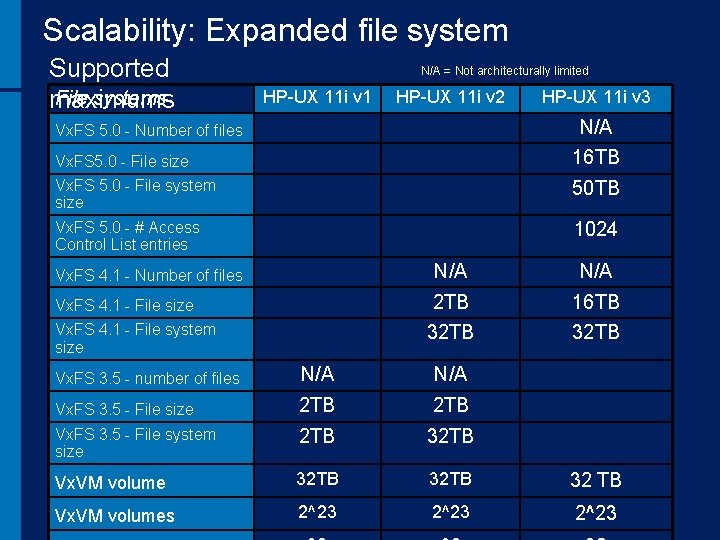
Scalability: Expanded file system Supported File systems maximums N/A = Not architecturally limited HP-UX 11 i v 1 HP-UX 11 i v 2 HP-UX 11 i v 3 Vx. FS 5. 0 - Number of files N/A Vx. FS 5. 0 - File size 16 TB Vx. FS 5. 0 - File system size 50 TB Vx. FS 5. 0 - # Access Control List entries 1024 Vx. FS 4. 1 - Number of files N/A Vx. FS 4. 1 - File size 2 TB 16 TB Vx. FS 4. 1 - File system size 32 TB Vx. FS 3. 5 - number of files N/A Vx. FS 3. 5 - File size 2 TB Vx. FS 3. 5 - File system size 2 TB 32 TB Vx. VM volume 32 TB 32 TB Vx. VM volumes 2^23
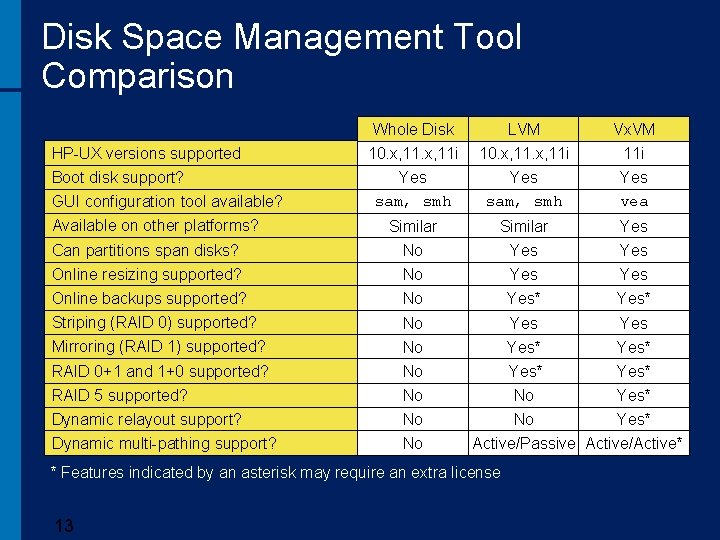
Disk Space Management Tool Comparison Whole Disk LVM Vx. VM 10. x, 11 i Yes sam, smh 11 i Yes vea Similar Yes Can partitions span disks? No Yes Online resizing supported? Online backups supported? No No Yes Yes* Striping (RAID 0) supported? Mirroring (RAID 1) supported? No No Yes Yes* RAID 0+1 and 1+0 supported? No Yes* RAID 5 supported? No No No HP-UX versions supported Boot disk support? GUI configuration tool available? Available on other platforms? Dynamic relayout support? Dynamic multi-pathing support? No Yes* Active/Passive Active/Active* * Features indicated by an asterisk may require an extra license 13
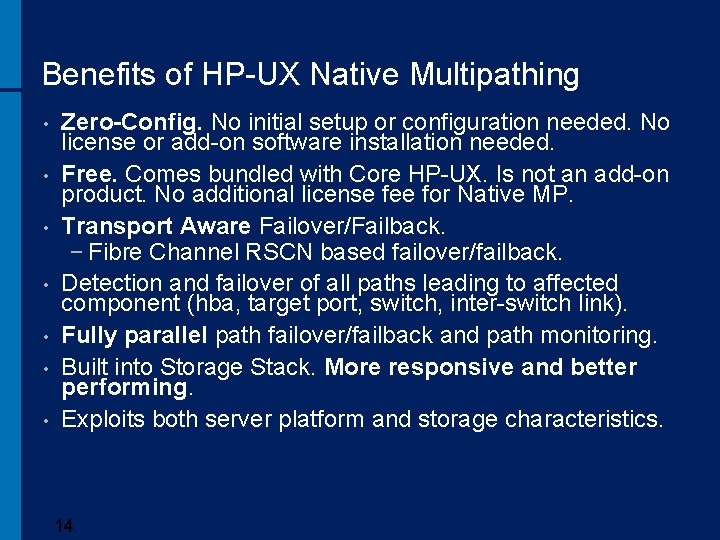
Benefits of HP-UX Native Multipathing • • Zero-Config. No initial setup or configuration needed. No license or add-on software installation needed. Free. Comes bundled with Core HP-UX. Is not an add-on product. No additional license fee for Native MP. Transport Aware Failover/Failback. − Fibre Channel RSCN based failover/failback. Detection and failover of all paths leading to affected component (hba, target port, switch, inter-switch link). Fully parallel path failover/failback and path monitoring. Built into Storage Stack. More responsive and better performing. Exploits both server platform and storage characteristics. 14
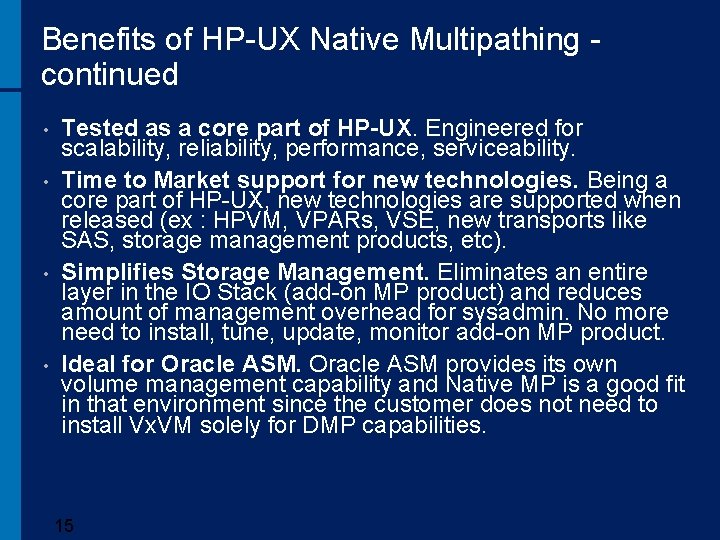
Benefits of HP-UX Native Multipathing - continued • • Tested as a core part of HP-UX. Engineered for scalability, reliability, performance, serviceability. Time to Market support for new technologies. Being a core part of HP-UX, new technologies are supported when released (ex : HPVM, VPARs, VSE, new transports like SAS, storage management products, etc). Simplifies Storage Management. Eliminates an entire layer in the IO Stack (add-on MP product) and reduces amount of management overhead for sysadmin. No more need to install, tune, update, monitor add-on MP product. Ideal for Oracle ASM provides its own volume management capability and Native MP is a good fit in that environment since the customer does not need to install Vx. VM solely for DMP capabilities. 15
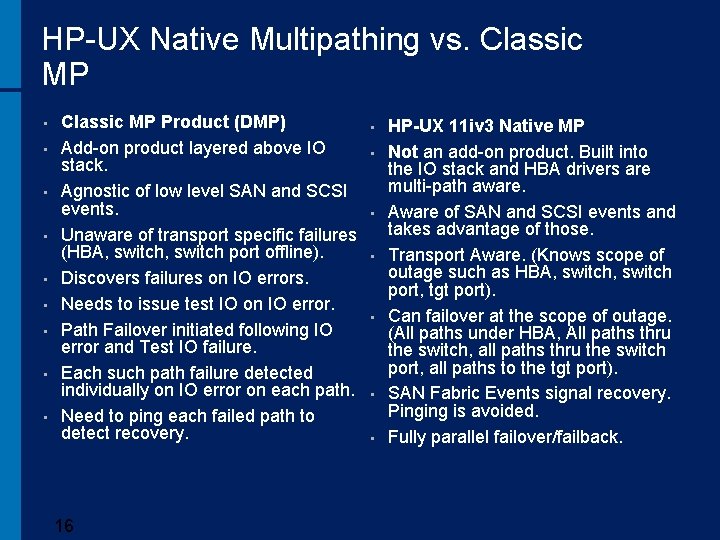
HP-UX Native Multipathing vs. Classic MP • • • Classic MP Product (DMP) Add-on product layered above IO stack. Agnostic of low level SAN and SCSI events. Unaware of transport specific failures (HBA, switch port offline). Discovers failures on IO errors. Needs to issue test IO on IO error. Path Failover initiated following IO error and Test IO failure. Each such path failure detected individually on IO error on each path. Need to ping each failed path to detect recovery. 16 • • HP-UX 11 iv 3 Native MP Not an add-on product. Built into the IO stack and HBA drivers are multi-path aware. Aware of SAN and SCSI events and takes advantage of those. Transport Aware. (Knows scope of outage such as HBA, switch port, tgt port). Can failover at the scope of outage. (All paths under HBA, All paths thru the switch, all paths thru the switch port, all paths to the tgt port). SAN Fabric Events signal recovery. Pinging is avoided. Fully parallel failover/failback.
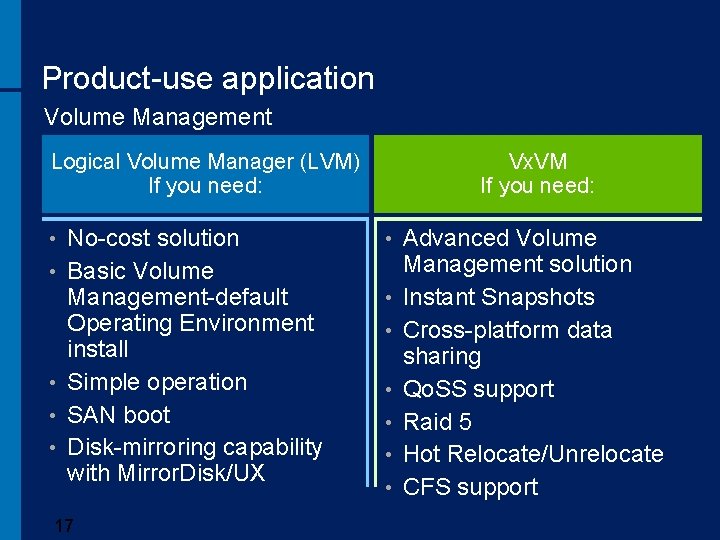
Product-use application Volume Management Logical Volume Manager (LVM) If you need: • • • No-cost solution Basic Volume Management-default Operating Environment install Simple operation SAN boot Disk-mirroring capability with Mirror. Disk/UX 17 Vx. VM If you need: • • Advanced Volume Management solution Instant Snapshots Cross-platform data sharing Qo. SS support Raid 5 Hot Relocate/Unrelocate CFS support
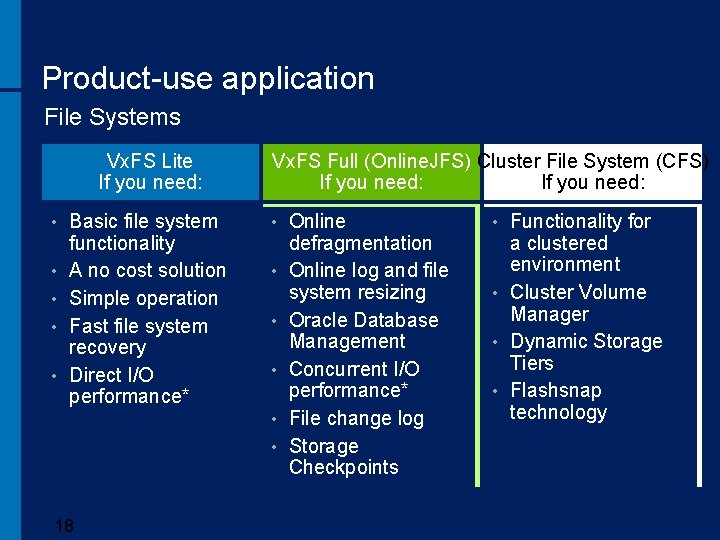
Product-use application File Systems Vx. FS Lite If you need: • • • Basic file system functionality A no cost solution Simple operation Fast file system recovery Direct I/O performance* Vx. FS Full (Online. JFS) Cluster File System (CFS) If you need: • • • 18 Online defragmentation Online log and file system resizing Oracle Database Management Concurrent I/O performance* File change log Storage Checkpoints Functionality for a clustered environment • Cluster Volume Manager • Dynamic Storage Tiers • Flashsnap technology •
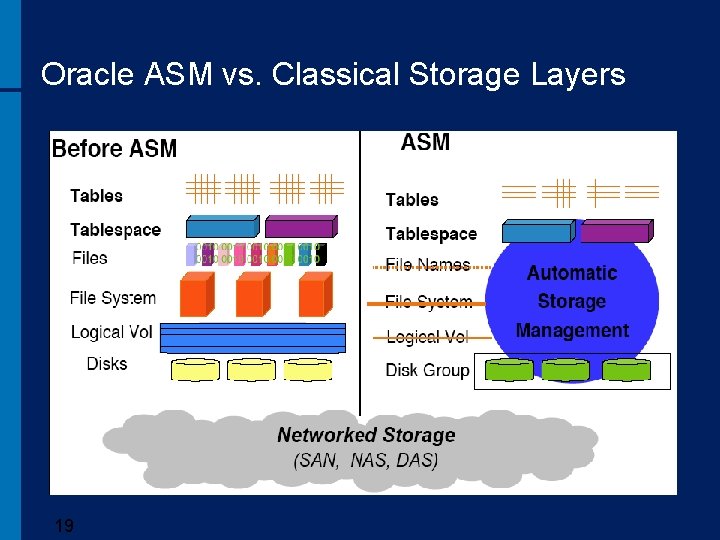
Oracle ASM vs. Classical Storage Layers 19
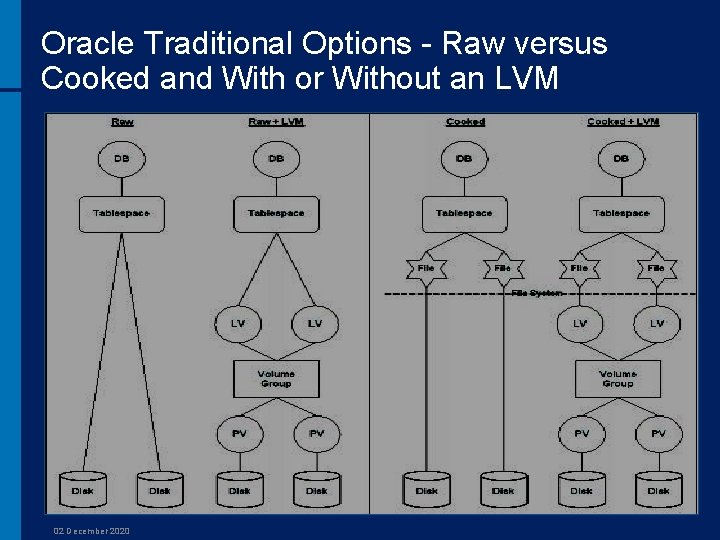
Oracle Traditional Options - Raw versus Cooked and With or Without an LVM 02 December 2020
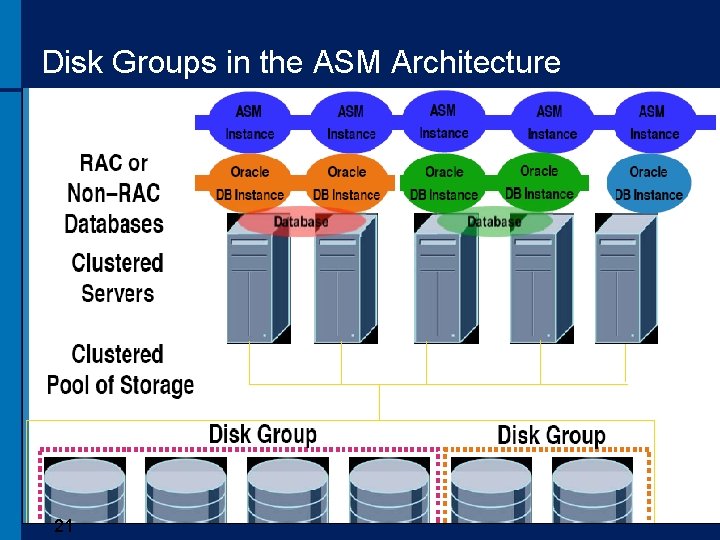
Disk Groups in the ASM Architecture 21
Oracle ASM Basics • An ASM file system layer is implicitly created within a disk group. ASM provides a vertical integration of the file system and volume manager for Oracle database files. • This file system is transparent to users and only accessible through ASM instance, interfacing databases, and ASM’s utilities. For example, database backups of ASM files can be performed only with RMAN. • Does not completely bypass the O/S I/O stack. It uses the asyncdsk driver in order to perform asynchronous I/O. Without it, the logwriter and dbwriters would be doing direct, synchronous I/O and would not be able to perform acceptably in high IO workloads. The I/O requests also have to pass though the SCSI and FC layers. 22
Oracle ASM Basics - continued The functionality of an ASM instance can be summarized as follows: • Manages groups of disks, called disk groups. • Protects the data within a disk group. * • Provides near-optimal I/O balancing without any manual tuning. • Enables the user to manage database objects such as tablespaces without needing to specify and track filenames. • Supports large files. 23
Oracle ASM Basics - continued • One can use Oracle Enterprise Manager (EM) or the Database Configuration Assistant (DBCA) for a GUI interface to Automatic Storage Management that replaces the use of SQL or SQL*Plus for configuring and altering disk groups and their metadata. • DBCA eases the configuring and creation of the database. • EM provides an integrated approach for managing both the ASM instance and database instance. 24
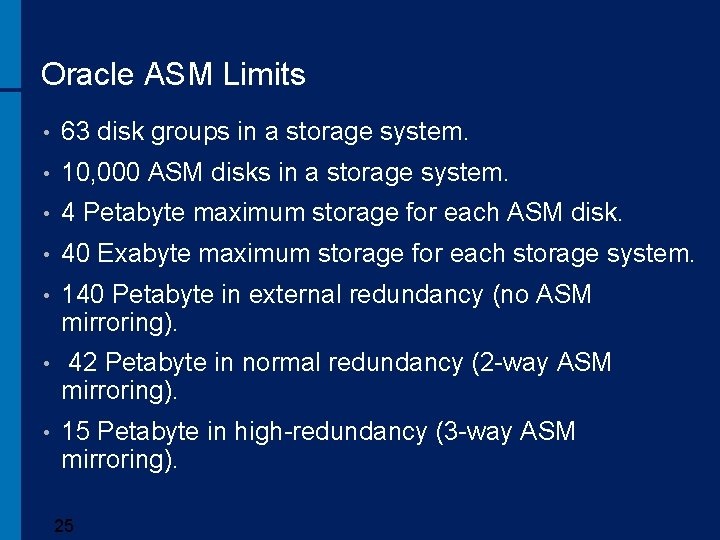
Oracle ASM Limits • 63 disk groups in a storage system. • 10, 000 ASM disks in a storage system. • 4 Petabyte maximum storage for each ASM disk. • 40 Exabyte maximum storage for each storage system. • 140 Petabyte in external redundancy (no ASM mirroring). • 42 Petabyte in normal redundancy (2 -way ASM mirroring). • 15 Petabyte in high-redundancy (3 -way ASM mirroring). 25
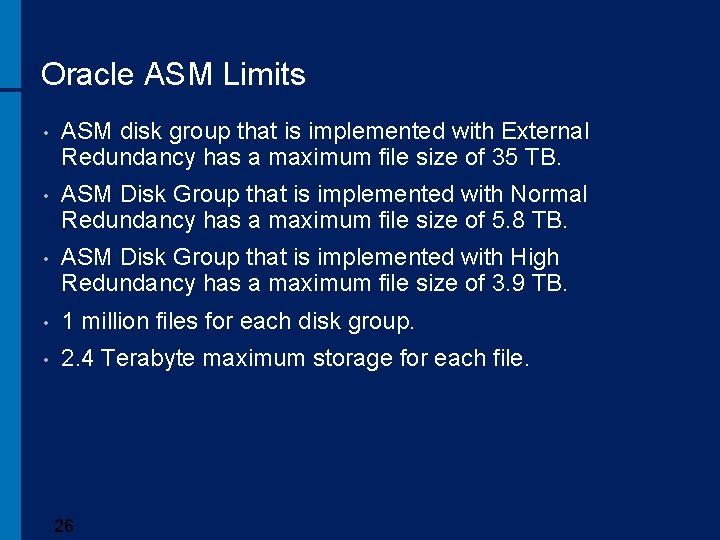
Oracle ASM Limits • ASM disk group that is implemented with External Redundancy has a maximum file size of 35 TB. • ASM Disk Group that is implemented with Normal Redundancy has a maximum file size of 5. 8 TB. • ASM Disk Group that is implemented with High Redundancy has a maximum file size of 3. 9 TB. • 1 million files for each disk group. • 2. 4 Terabyte maximum storage for each file. 26
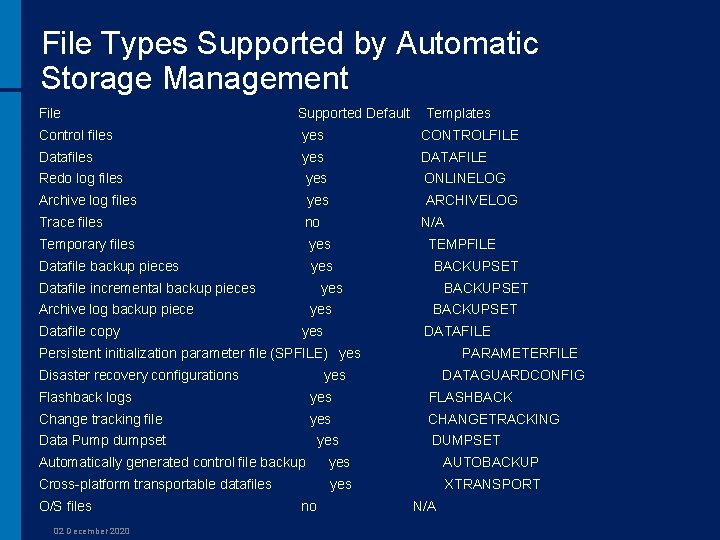
File Types Supported by Automatic Storage Management File Supported Default Templates Control files yes CONTROLFILE Datafiles yes DATAFILE Redo log files yes ONLINELOG Archive log files yes ARCHIVELOG Trace files no N/A Temporary files yes TEMPFILE Datafile backup pieces yes BACKUPSET Datafile incremental backup pieces yes BACKUPSET Archive log backup piece yes BACKUPSET Datafile copy yes DATAFILE Persistent initialization parameter file (SPFILE) yes PARAMETERFILE Disaster recovery configurations yes DATAGUARDCONFIG Flashback logs yes FLASHBACK Change tracking file yes CHANGETRACKING Data Pump dumpset yes DUMPSET Automatically generated control file backup yes AUTOBACKUP Cross-platform transportable datafiles yes XTRANSPORT O/S files no N/A 02 December 2020
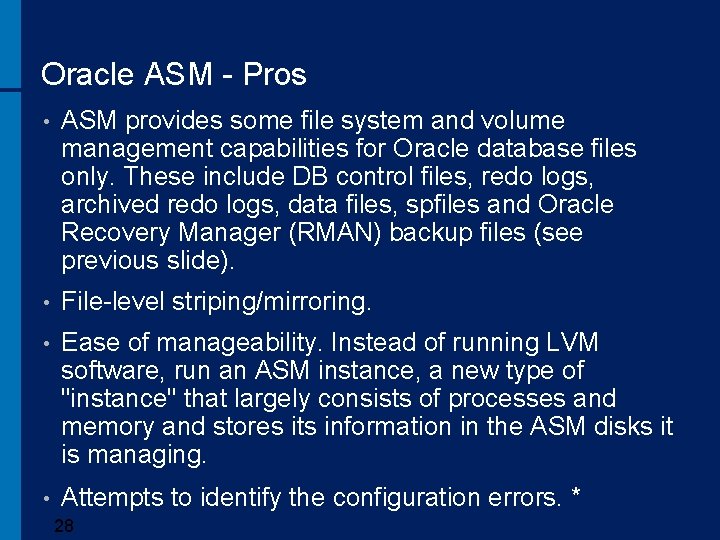
Oracle ASM - Pros • ASM provides some file system and volume management capabilities for Oracle database files only. These include DB control files, redo logs, archived redo logs, data files, spfiles and Oracle Recovery Manager (RMAN) backup files (see previous slide). • File-level striping/mirroring. • Ease of manageability. Instead of running LVM software, run an ASM instance, a new type of "instance" that largely consists of processes and memory and stores its information in the ASM disks it is managing. • Attempts to identify the configuration errors. * 28
Oracle ASM - Pros • Gives Oracle Corporation control over the storage system, which makes them happy, so they promote it heavily. * • No large Unix-level administration needed. • Provides a single point of support (Oracle) so there is no “finger-pointing”. • Provides easy management of block devices (raw partitions). • Automatically moves hot blocks to the outside of the disk. • Vendor and operating system neutral. 29
Oracle ASM - Pros • Included in the Oracle license so no additional cost for the software or its support. • Supports very large disk groups and datafiles. • Database File System with performance of RAW I/O. • Supports clustering (RAC) and single instance. • Automatic data distribution. • Memory requirements for an ASM instance are small. 100 MB of RAM is typically all that is required to run an ASM instance on a production server. 30
Oracle ASM - Pros • On-line add/drop/resize disk with minimum data relocation. • Automatic file management. * • Flexible mirror protection. • Inode locks not applicable to ASM. • Ability to grow diskgroup capacity on the fly. • Supports multiple database instances running on a single host, and does not have its own data dictionary. 31
Oracle ASM – Pros (Oracle 11 gr) • Fast mirror resynchronization. * • Preferred mirror read in a cluster. ** • Support for large ALU. *** • Variable size extents. **** • Rolling upgrade and patching. • Table level migration wizard in EM. • New ASMCMD commands. • New SYSADM privilege – separate from the SYSDNA privilege. • More flexible FORCE options to MOUNT or DROP disk groups. 32
Oracle ASM - Cons • ASM cannot be used for Oracle executables and nondatabase files. • ASM files can only be managed through an Oracle application such as RMAN. This can be a weakness if you prefer third-party backup software or simple backup scripts. Cannot store CRS files or database software. Cannot manage ASM through standard Unix tools. • Potentially disrupts the balance of power between the Unix Systems Administration groups, and the Database/DBA groups. Traditionally the former group manages disks, hardware, and the operating system level, leaving the DBAs to coordinate with them for new resources. This would change that balance, which could cause some resistance. * 33
Oracle ASM - Cons • ASM does not have multi-pathing capability. It assumes the underlying O/S will provide this functionality. In HP-UX, multi-pathing is provided by a Volume Manager feature such as PVLinks in the HP-UX Logical Volume Manager (LVM), native multipathing in HP-UX 11. 31, or DMP in Veritas Volume Manager from Symantec (Vx. VM), or by other third-party software such as Securepath or Powerpath. • ASM is still in the enterprise computing, relatively new. There a number of vendors whose core business has been in the logical volume manager/file system space for years. Often, maturity matters a lot when it comes to software systems, reliability, and proven success rates. • New technology to get familiar with. 34
Oracle ASM - Cons • Automatic Storage Management load balances file activity by uniformly distributing file extents across all disks in a disk group. For this technique to be effective it is important that the disks used in a disk group be of similar performance characteristics. There may be situations where it is acceptable to temporarily have disks of different sizes and performance co-existing in a disk group (for example, when migrating from an old set of disks to a new set of disks). The new disks would be added and the old disks dropped. As the old disks are dropped, their storage is migrated to the new disks while the disk group in online. 35
Oracle ASM - Cons • There is no shared awareness of LUN use between ASM and LVM or Vx. VM. It means that the system administrator must be careful not to accidentally allocate a LUN already allocated for LVM or Vx. VM use to ASM use (or vice-versa). • ASM is not an enterprise-class file system. • ASM is a proprietary solution. • The customer is dependant on the reliability of the new ASM code stack. * • Does not offer network monitoring. • Be careful about ASM hidden parameters. 36
Oracle ASM - Cons • Not for high I/O environments (that is what some tests claim). • Everything is single threaded through one process at a very low level. * • If one uses Oracle ASM and CRS, they will still require a 3 rd party clustering solution to support the non-Oracle data. They will then have to manage multiple clustering solutions. 37
Oracle ASM - Cons • DBAs must still watch and then perform the task of adding and removing disks to an ASM disk group when needed. This leads back to the problem of DBAs under allocating, and worse yet, over allocating disk storage, just to be safe, which recreates the problem of wasted space and leads to higher than needed storage costs. This is where thin provisioning comes into play. Thin provisioning will automatically allocate on a just-enough and just-in-time basis which relieves the DBA from both having to watch and then add or remove disk to a disk group. Oracle's ASM and thin provisioning could be combined to offer a complete, end-to-end, storage solution. Oracle's ASM feature would create, allocate, place, and rebalance data files for performance and thin provisioning would dedicate disk space on the fly and only when needed. 38
Oracle ASM - Cons • Configuration details and performance metrics are exposed via V$ views. Other possibilities are the command line interface, asmcmd and the graphical interface of OEM. • Metadata are however partially hidden to the end user. That is the mapping between physical storage, ASM allocation units, and database files is not completely exposed via V$ views. It was found that is possible to query such information via undocumented X$ tables. For example, it is possible to determine the exact physical location on disk of each extent (or mirror copies of extents) for each file allocated on ASM (and if needed access the data directly via the O/S). This can be used by Oracle DBAs wanting to extend their knowledge of the inner workings of the ASM or wanting to diagnose hotspots and ASM rebalancing issues. 39
What about Non-Database Files? • Since ASM supports only database data files and log files, the following storage management methods are required for non-database files if ASM is used: • A) A local file system or Cluster File System for Oracle Clusterware binaries and configuration files and RAC binaries and configuration files. • B) Shared storage for Oracle Clusterware data: voting disk and OCR files. This storage has to be configured either as shared raw devices, shared raw volumes, or files in the Cluster File System. Oracle Clusterware needs to be up and running before the ASM daemon can start. Therefore, ASM cannot be used for Oracle Clusterware data. 40
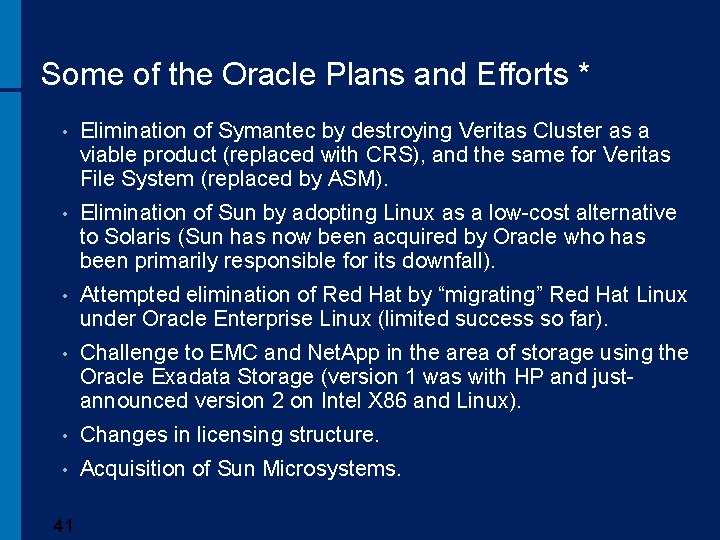
Some of the Oracle Plans and Efforts * • Elimination of Symantec by destroying Veritas Cluster as a viable product (replaced with CRS), and the same for Veritas File System (replaced by ASM). • Elimination of Sun by adopting Linux as a low-cost alternative to Solaris (Sun has now been acquired by Oracle who has been primarily responsible for its downfall). • Attempted elimination of Red Hat by “migrating” Red Hat Linux under Oracle Enterprise Linux (limited success so far). • Challenge to EMC and Net. App in the area of storage using the Oracle Exadata Storage (version 1 was with HP and justannounced version 2 on Intel X 86 and Linux). • Changes in licensing structure. • Acquisition of Sun Microsystems. 41
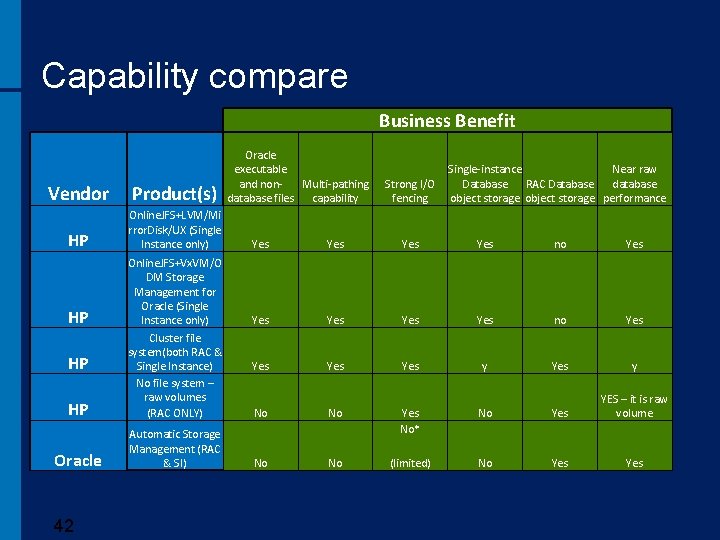
Capability compare Business Benefit Vendor Product(s) HP Online. JFS+LVM/Mi rror. Disk/UX (Single Instance only) HP Online. JFS+Vx. VM/O DM Storage Management for Oracle (Single Instance only) Cluster file system(both RAC & Single Instance) No file system – raw volumes (RAC ONLY) Oracle Automatic Storage Management (RAC & SI) HP HP 42 Oracle executable and non. Multi-pathing database files capability Single-instance Near raw Strong I/O Database RAC Database database fencing object storage performance Yes Yes no Yes Yes Yes y No No Yes No* No Yes YES – it is raw volume No No (limited) No Yes
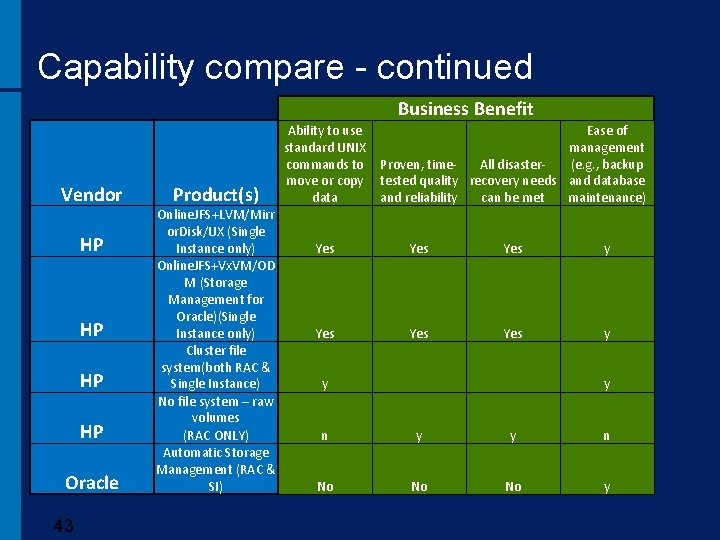
Capability compare - continued Business Benefit Vendor HP HP Oracle 43 Product(s) Online. JFS+LVM/Mirr or. Disk/UX (Single Instance only) Online. JFS+Vx. VM/OD M (Storage Management for Oracle)(Single Instance only) Cluster file system(both RAC & Single Instance) No file system – raw volumes (RAC ONLY) Automatic Storage Management (RAC & SI) Ability to use Ease of standard UNIX management commands to Proven, time(e. g. , backup All disastermove or copy tested quality recovery needs and database data and reliability can be met maintenance) Yes Yes Yes y y n No No No y
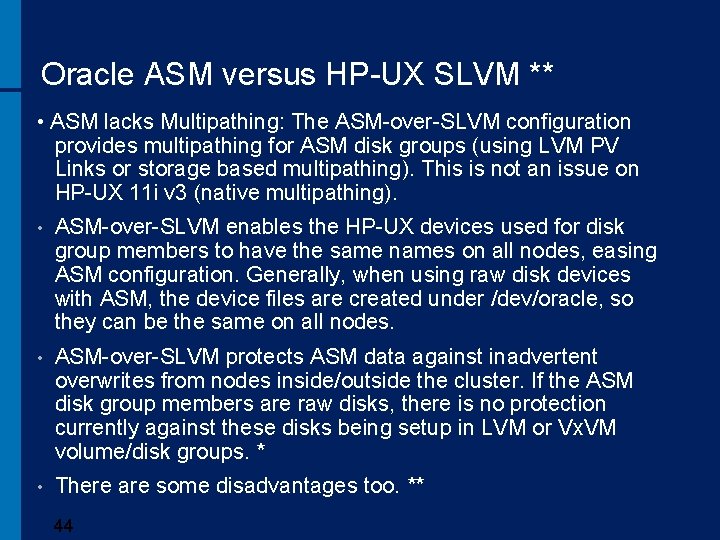
Oracle ASM versus HP-UX SLVM ** • ASM lacks Multipathing: The ASM-over-SLVM configuration provides multipathing for ASM disk groups (using LVM PV Links or storage based multipathing). This is not an issue on HP-UX 11 i v 3 (native multipathing). • ASM-over-SLVM enables the HP-UX devices used for disk group members to have the same names on all nodes, easing ASM configuration. Generally, when using raw disk devices with ASM, the device files are created under /dev/oracle, so they can be the same on all nodes. • ASM-over-SLVM protects ASM data against inadvertent overwrites from nodes inside/outside the cluster. If the ASM disk group members are raw disks, there is no protection currently against these disks being setup in LVM or Vx. VM volume/disk groups. * • There are some disadvantages too. ** 44
Oracle Discontinues Raw/Block Device Support In release 11. 2, the Oracle Installer and DBCA (Database Configuration Assistant) will no longer support raw/block devices for database files. In addition, there will no longer be raw/block device support for storing the OCR and Voting Disks for new installs. Customers who create a new 11. 2 database will need to store their database files in either ASM, a file system, or on an NFS filer. RAC database files must be stored on ASM, a certified clustered file system, or a 45 certifed NFS filer.
Oracle ASM on HP-UX – Some Experiences • It was found Oracle ASM was a good choice to simplify Oracle related storage and volume management − However do not use ASM redundancy features • The HP-UX 11 v 3 MSS (Mass Storage Stack) and Oracle ASM were a “killer combo”. • ASM works very well for Oracle data management, but a severe performance penalty gets incurred if the ASM redundancy features are used on top of the storage array redundancy features. 46
One of HP-UX Solutions • HP-UX file systems can provide read/write performance 95 -98% as fast as a raw-device setup. * OJFS 5. 0. 1: performance impact virtually eliminated. • The manageability and reduced administration from a file system, with near-raw performance. • 4* Currently this is offered through the purchase of a Storage Management Suite bundle 7
HP-UX 11 iv 3 Mass Storage Stack • • Transparent native multipathing to LUNs is useful and necessary – decreases work and rework. Load balancing increased performance − “least command load” policy provided the best performance for this BI workload − “round robin” policy, the default, provided slightly less performance • Persistent LUN bindings and LUN DSF’s reduce design and maintenance efforts significantly for mid-range and high-end BI implementations containing large storage subsystems. 48
Some Best Practices for Oracle ASM with HP Storage. Works As a result of testing, a set of best practices for using Oracle ASM with HP Storage. Works on HP-UX servers is presented: • Configure ASM disk groups to use external redundancy. • When building a disk group or adding to an existing one, use disks of similar capacity and performance characteristics in the same disk group. • To leverage I/O distribution across as many resources as possible, it is best to present more than one LUN to a disk group (allowing ASM to do the striping). • Use HP Secure Path with ASM on HP-UX 11. 23 or MSS (Mass Storage Stack) on HP-UX 11. 31 because it complements the high availability and performance of the entire stack. 49
Some Best Practices for Oracle ASM with HP Storage. Works - continued • Each device (LUN) should be managed either by Oracle ASM or by HP-UX LVM, but not both. • Care should be taken not to attempt inadvertently to manage an ASM disk by a traditional volume manager or vice versa. • Configure async I/O (Please consult the Oracle Administration Guide documentation). • Use "insf" instead of "insf -e" to create the devices associated with new hardware because "insf -e" will reset the ownership to user "bin“. 50
- Slides: 50