
HP Flow CM Professional Delivering enterpriselevel document management
- Slides: 11
HP Flow CM Professional Delivering enterprise-level document management in an SMB package HP Company Confidential © Copyright 2012 Hewlett-Packard Development Company, L. P. The information contained herein is subject to change without notice.
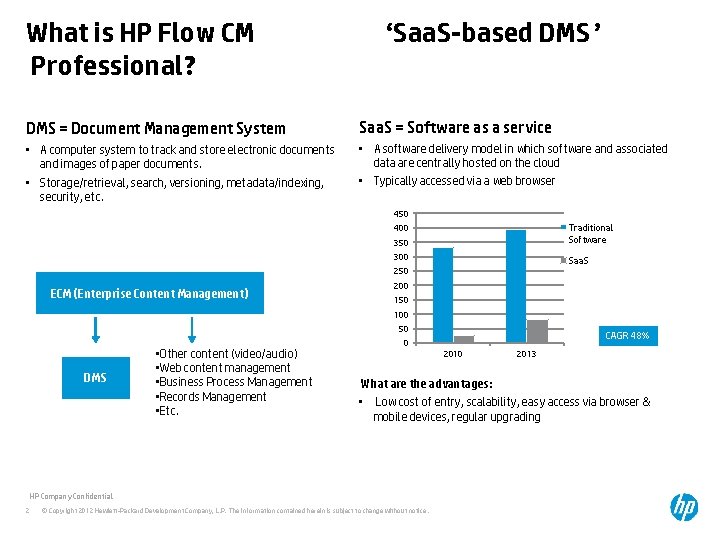
What is HP Flow CM Professional? ‘Saa. S-based DMS’ DMS = Document Management System Saa. S = Software as a service • A computer system to track and store electronic documents and images of paper documents. • Storage/retrieval, search, versioning, metadata/indexing, security, etc. • A software delivery model in which software and associated data are centrally hosted on the cloud • Typically accessed via a web browser 450 350 Traditional Software 300 Saa. S 400 250 ECM (Enterprise Content Management) 200 150 100 50 DMS • Other content (video/audio) • Web content management • Business Process Management • Records Management • Etc. 2010 2013 What are the advantages: • Low cost of entry, scalability, easy access via browser & mobile devices, regular upgrading HP Company Confidential 2 CAGR 48% 0 © Copyright 2012 Hewlett-Packard Development Company, L. P. The information contained herein is subject to change without notice.
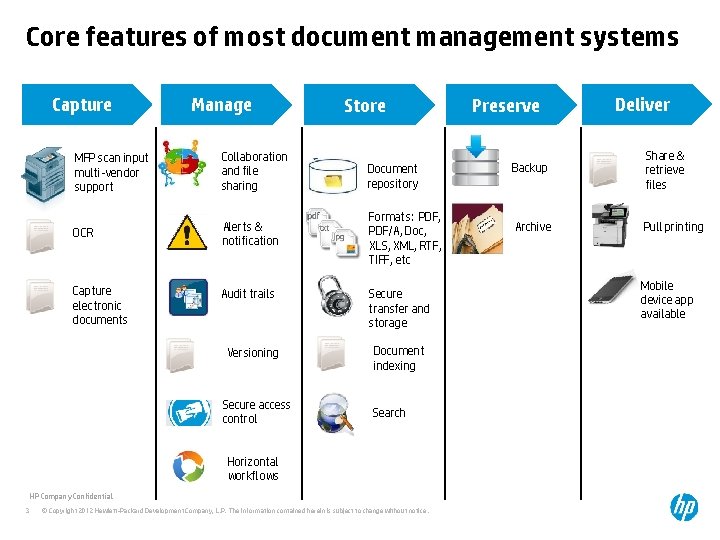
Core features of most document management systems Capture MFP scan input multi-vendor support Manage » Collaboration and file sharing OCR Alerts & notification Capture electronic documents Audit trails Versioning Secure access control Store Document repository Formats: PDF, PDF/A, Doc, XLS, XML, RTF, TIFF, etc Secure transfer and storage Document indexing Search Horizontal workflows HP Company Confidential 3 © Copyright 2012 Hewlett-Packard Development Company, L. P. The information contained herein is subject to change without notice. Preserve Deliver Backup Share & retrieve files Archive Pull printing Mobile device app available
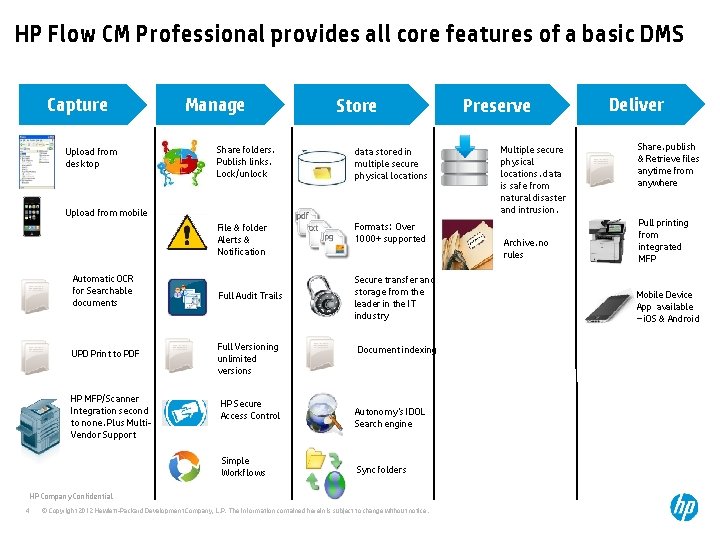
HP Flow CM Professional provides all core features of a basic DMS Capture Upload from desktop Manage Store » Share folders, Publish links, Lock/unlock data stored in multiple secure physical locations File & folder Alerts & Notification Formats: Over 1000+ supported Upload from mobile Automatic OCR for Searchable documents UPD Print to PDF HP MFP/Scanner Integration second to none, Plus Multi. Vendor Support Full Audit Trails Full Versioning unlimited versions HP Secure Access Control Simple Workflows Secure transfer and storage from the leader in the IT industry Document indexing Autonomy’s IDOL Search engine Sync folders HP Company Confidential 4 © Copyright 2012 Hewlett-Packard Development Company, L. P. The information contained herein is subject to change without notice. Preserve Multiple secure physical locations, data is safe from natural disaster and intrusion. Archive, no rules Deliver Share, publish & Retrieve files anytime from anywhere Pull printing from integrated MFP Mobile Device App available – i. OS & Android
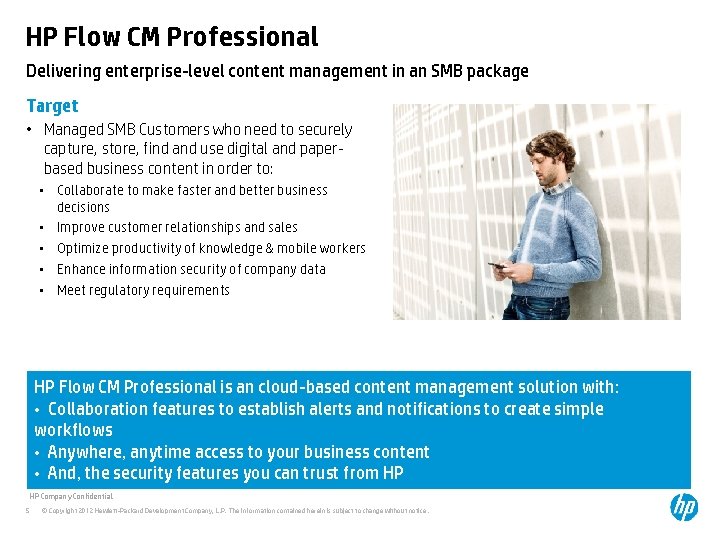
HP Flow CM Professional Delivering enterprise-level content management in an SMB package Target • Managed SMB Customers who need to securely capture, store, find and use digital and paperbased business content in order to: • Collaborate to make faster and better business decisions • Improve customer relationships and sales • Optimize productivity of knowledge & mobile workers • Enhance information security of company data • Meet regulatory requirements HP Flow CM Professional is an cloud-based content management solution with: • Collaboration features to establish alerts and notifications to create simple workflows • Anywhere, anytime access to your business content • And, the security features you can trust from HP HP Company Confidential 5 © Copyright 2012 Hewlett-Packard Development Company, L. P. The information contained herein is subject to change without notice.
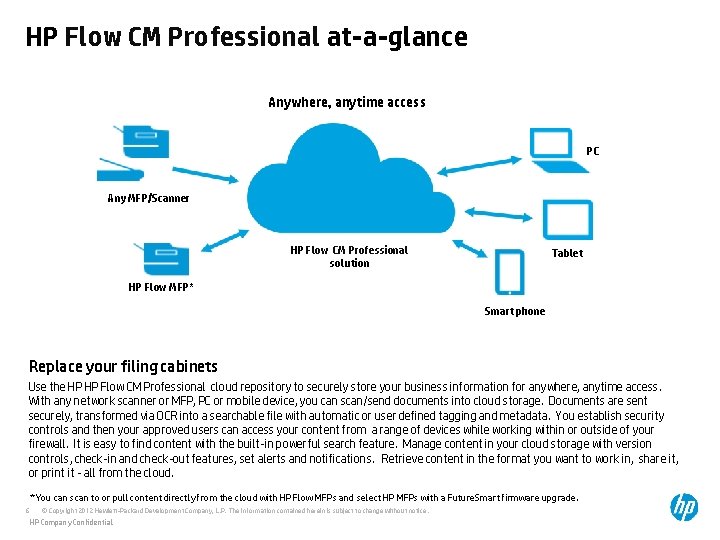
HP Flow CM Professional at-a-glance Anywhere, anytime access PC Any MFP/Scanner HP Flow CM Professional solution Tablet HP Flow MFP* Smart phone Replace your filing cabinets Use the HP HP Flow CM Professional cloud repository to securely store your business information for anywhere, anytime access. With any network scanner or MFP, PC or mobile device, you can scan/send documents into cloud storage. Documents are sent securely, transformed via OCR into a searchable file with automatic or user defined tagging and metadata. You establish security controls and then your approved users can access your content from a range of devices while working within or outside of your firewall. It is easy to find content with the built-in powerful search feature. Manage content in your cloud storage with version controls, check-in and check-out features, set alerts and notifications. Retrieve content in the format you want to work in, share it, or print it - all from the cloud. * You can scan to or pull content directly from the cloud with HP Flow MFPs and select HP MFPs with a Future. Smart firmware upgrade. 6 © Copyright 2012 Hewlett-Packard Development Company, L. P. The information contained herein is subject to change without notice. HP Company Confidential
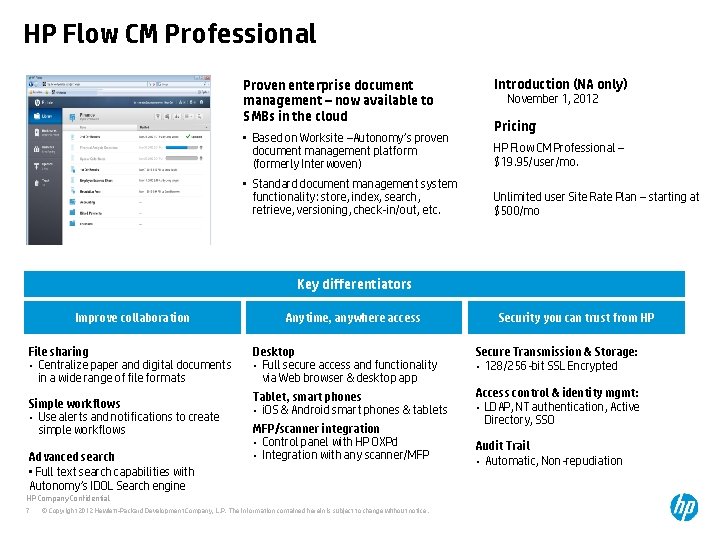
HP Flow CM Professional Proven enterprise document management – now available to SMBs in the cloud • Based on Worksite –Autonomy’s proven document management platform (formerly Interwoven) • Standard document management system functionality: store, index, search, retrieve, versioning, check-in/out, etc. Introduction (NA only) November 1, 2012 Pricing HP Flow CM Professional – $19. 95/user/mo. Unlimited user Site Rate Plan – starting at $500/mo Key differentiators Improve collaboration File sharing • Centralize paper and digital documents in a wide range of file formats Simple workflows • Use alerts and notifications to create simple workflows Advanced search • Full text search capabilities with Autonomy’s IDOL Search engine Anytime, anywhere access Desktop • Full secure access and functionality via Web browser & desktop app Secure Transmission & Storage: • 128/256 -bit SSL Encrypted Tablet, smart phones • i. OS & Android smart phones & tablets Access control & identity mgmt: • LDAP, NT authentication, Active Directory, SSO MFP/scanner integration • Control panel with HP OXPd • Integration with any scanner/MFP HP Company Confidential 7 Security you can trust from HP © Copyright 2012 Hewlett-Packard Development Company, L. P. The information contained herein is subject to change without notice. Audit Trail • Automatic, Non-repudiation
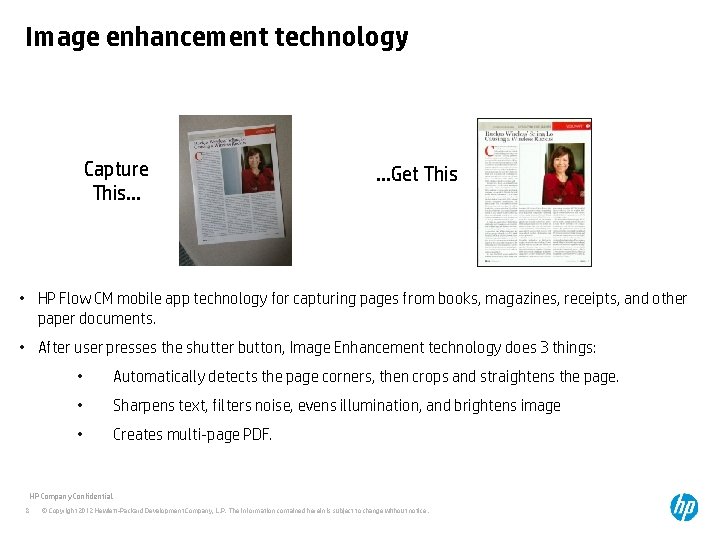
Image enhancement technology Capture This… …Get This • HP Flow CM mobile app technology for capturing pages from books, magazines, receipts, and other paper documents. • After user presses the shutter button, Image Enhancement technology does 3 things: • Automatically detects the page corners, then crops and straightens the page. • Sharpens text, filters noise, evens illumination, and brightens image • Creates multi-page PDF. HP Company Confidential 8 © Copyright 2012 Hewlett-Packard Development Company, L. P. The information contained herein is subject to change without notice.
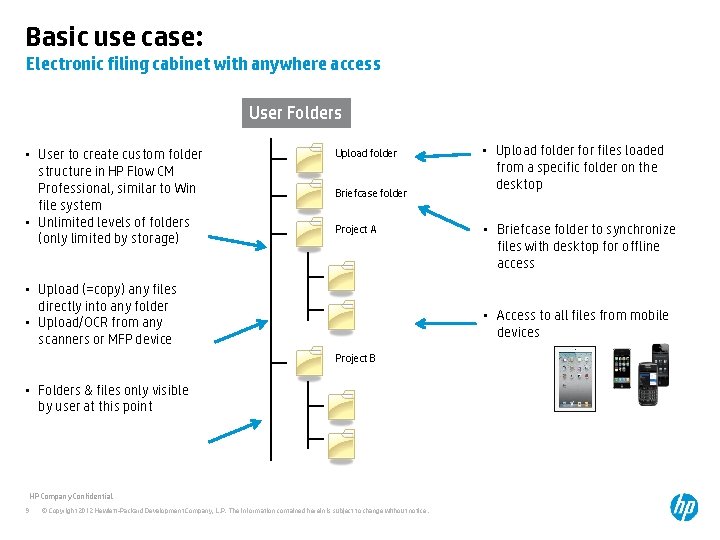
Basic use case: Electronic filing cabinet with anywhere access User Folders • User to create custom folder structure in HP Flow CM Professional, similar to Win file system • Unlimited levels of folders (only limited by storage) Upload folder Briefcase folder Project A • Upload (=copy) any files directly into any folder • Upload/OCR from any scanners or MFP device • Briefcase folder to synchronize files with desktop for offline access • Access to all files from mobile devices Project B • Folders & files only visible by user at this point HP Company Confidential 9 • Upload folder for files loaded from a specific folder on the desktop © Copyright 2012 Hewlett-Packard Development Company, L. P. The information contained herein is subject to change without notice.
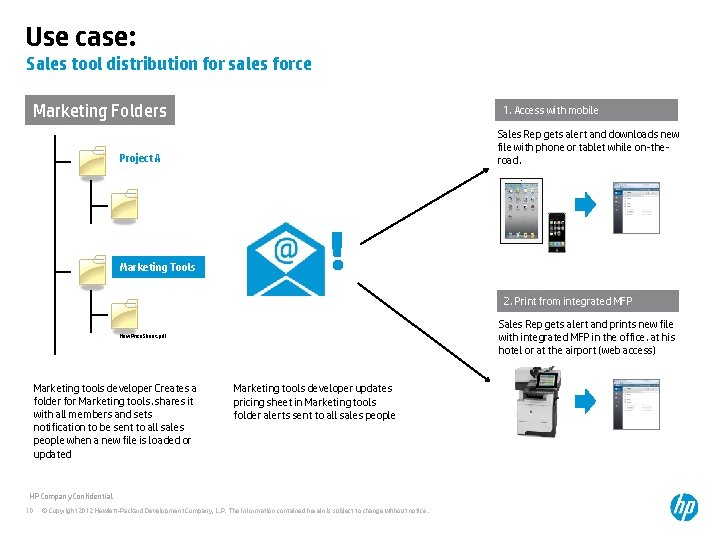
Use case: Sales tool distribution for sales force Marketing Folders 1. Access with mobile Sales Rep gets alert and downloads new file with phone or tablet while on-theroad. Project A Marketing Tools ! 2. Print from integrated MFP Sales Rep gets alert and prints new file with integrated MFP in the office, at his hotel or at the airport (web access) New. Price. Sheet. pdf Marketing tools developer Creates a folder for Marketing tools, shares it with all members and sets notification to be sent to all sales people when a new file is loaded or updated Marketing tools developer updates pricing sheet in Marketing tools folder alerts sent to all sales people HP Company Confidential 10 © Copyright 2012 Hewlett-Packard Development Company, L. P. The information contained herein is subject to change without notice.
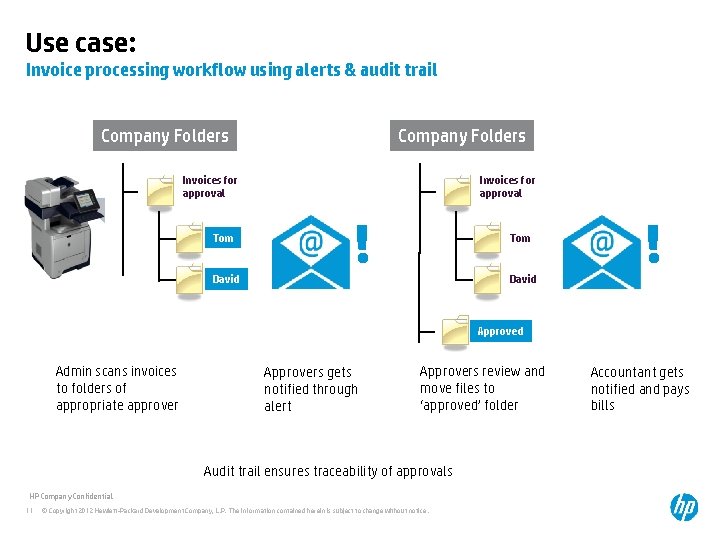
Use case: Invoice processing workflow using alerts & audit trail Company Folders Invoices for approval Tom David ! Approved Admin scans invoices to folders of appropriate approver Approvers gets notified through alert Approvers review and move files to ‘approved’ folder Audit trail ensures traceability of approvals HP Company Confidential 11 © Copyright 2012 Hewlett-Packard Development Company, L. P. The information contained herein is subject to change without notice. Accountant gets notified and pays bills